Where to buy
Check the latest price, availability and delivery on Amazon. Orders are placed on Amazon. We may earn a commission from qualifying purchases.
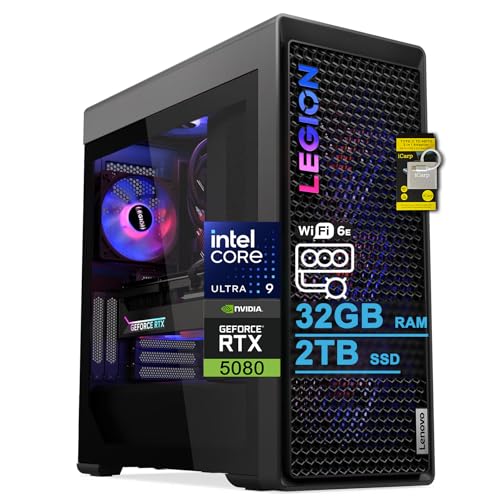
- Best overall for streamers: Lenovo Legion Tower 7i Gen 10, Core Ultra 9 285K, RTX 5080 — Check on Amazon
- CLX Set Gaming PC, Ryzen 7 9800X3D, RTX 5080 — Check on Amazon
- Alienware Aurora ACT1250, Core Ultra 9 285, RTX 5080 — Check on Amazon
- Skytech King 95, Ryzen 7 9800X3D, RTX 5070 Ti — Check on Amazon
- iBUYPOWER Y40 PRO, Ryzen 9 7900X, RTX 5070 Ti — Check on Amazon
See 1 more Amazon option
- ZOTAC MEK Gaming PC, Ryzen 7 9700X, RTX 5070 Ti, Windows 11 Pro — Check on Amazon
Read the full guide ↓
Disclosure: As an Amazon Associate, reviewstook.com earns from qualifying purchases. Links to Amazon on this page are affiliate links; they cost you nothing extra. Listing details such as price and availability change often, so check the current Amazon listing before you buy.
Three thousand dollars is the budget where a single streaming PC stops asking you to compromise in two directions at once. Cheaper machines make you choose: frames for the game or frames for the stream, a CPU that plays well or a CPU that produces well. At $3,000 that trade mostly disappears, because every serious machine in this guide pairs a top-tier graphics card with one specific piece of streaming hardware that matters more than any other: two ninth-generation NVENC encoders. Both the RTX 5080 and the RTX 5070 Ti carry a pair of them in NVIDIA’s published specifications, and a pair is what changes the workflow. One encoder sends your live stream while the second records a clean, high-bitrate local copy in 4K for editing and uploads — two full hardware encode jobs running at once, neither one touching your game’s frame rate the way a CPU encode would.
The honesty note for this tier is about ceilings, and they are not where the marketing points. The first ceiling: there is no RTX 5090 system anywhere near $3,000 — complete 5090 prebuilts sit well above this budget on Amazon, and most sit far higher still. Anything at this budget wearing “5090-class” language in a headline is wearing it over a lesser card. The second ceiling is the platforms themselves. Twitch’s standard ingest guidance still tops out around 6,000 kbps of H.264, which makes 1080p60 the practical Twitch ceiling no matter what GPU you buy; Twitch’s Enhanced Broadcasting raises that to roughly 7,500 kbps at 1080p and 9,000 kbps at 1440p in HEVC for Affiliates and Partners. YouTube is the opposite world: its own encoder guidance recommends about 12 Mbps in AV1 or HEVC (17 Mbps in H.264) just for 1080p60, and 35 Mbps in AV1/HEVC or 50 Mbps in H.264 for 4K60. So a “4K streaming PC” is, in practice, a 4K YouTube PC — and every machine below can be exactly that, because the hardware stopped being the limit several price tiers ago. What $3,000 actually buys a streamer is headroom: 4K or high-refresh 1440p gameplay, a dual-encoder workflow, and a CPU chosen for your kind of work — core count for production-heavy creators, cache for pure gamers.
Below are the quick picks, detailed reviews of all six machines, a comparison table, a section on how the dual-encoder workflow actually runs, a section on the platform ceilings, the mistakes that waste money at this tier, and the questions streamers ask before spending this much.
In this guide
Quick Picks
Short on time, or comparing several options at once? Each row below names a streamer type and the machine that suits it, with a link to the listing.
| Streamer type | Pick | Why it stands out | Link |
|---|---|---|---|
| Best overall for streamers | Lenovo Legion Tower 7i Gen 10 | 24-core Ultra 9 285K, RTX 5080 dual NVENC, 2TB SSD, published 850W PSU | Check on Amazon |
| Best for pure gaming streams | CLX Set Gaming PC | 9800X3D gaming CPU with an RTX 5080 and a 2TB drive | Check on Amazon |
| Best RTX 5080 value | Alienware Aurora ACT1250 | 24-core Ultra 9 285 and a 5080 — check price on Amazon | Check on Amazon |
| Best gaming CPU, sensible money | Skytech King 95 | 9800X3D with a dual-encoder RTX 5070 Ti — check price on Amazon | Check on Amazon |
| Best value for creator-streamers | iBUYPOWER Y40 PRO | 12-core Ryzen 9 7900X, 5070 Ti, 2TB — check price on Amazon | Check on Amazon |
| Best published spec sheet | ZOTAC MEK Gaming PC | Every key figure printed, 750W Gold PSU, Windows 11 Pro | Check on Amazon |
How These Picks Were Chosen
Every machine below is a real Amazon listing positioned at or below the $3,000 budget in the United States — three of them sit in this tier when their current pricing falls inside the budget, so check the current price on Amazon before you buy. The RTX 5080 machines in particular often sit above this budget and move into it during deal events; each such review says plainly to confirm the current price fits the budget before ordering. Anything whose headline implied RTX 5090 performance at this money was excluded, because no such complete system exists near $3,000.
We did not use these machines ourselves. We read the maker listings and specification pages and judged them on the four things that decide a streaming PC once the GPU tier is set. First, the encoder block: NVIDIA’s published specifications give both the RTX 5080 and the RTX 5070 Ti two ninth-generation NVENC encoders with AV1 encode, so every pick here can run a stream encode and a separate high-quality recording encode simultaneously — the dual-encoder workflow this guide is built around. Second, the CPU split: streaming itself, done on NVENC, asks little of a processor, so we separated picks by what the CPU is really for — many-core chips (the 24-core Ultra 9 285K and 285, the 12-core Ryzen 9 7900X) for creators who edit, render, compile or run heavy production scenes, and the Ryzen 7 9800X3D for players whose second job for the machine is simply playing at the highest frame rates. Third, storage and memory sized for a recording workflow: 2TB drives score over 1TB because a local 4K recording habit eats space, and 32GB of RAM is the floor at this tier, not a luxury. Fourth, published honesty: builders who print their power supply wattage and full specifications scored over builders who leave you to guess, and where a figure is not published — one pick’s PSU below — the review says so instead of inventing it.
One filter sat on top of all of that, and it is the platform filter. A streaming PC is only as good as the stream the platform accepts. We checked each pick against what Twitch and YouTube actually ingest today: Twitch’s standard guidance around 6,000 kbps H.264 with Enhanced Broadcasting headroom above it, and YouTube’s published encoder recommendations, which run to roughly 12 Mbps AV1/HEVC at 1080p60 and 35 Mbps at 4K60. Every machine in this guide clears both bars with room to spare — which is precisely why the guide spends its words on workflow, storage and CPU choice rather than pretending any of them will make a Twitch stream sharper than Twitch allows.
The 6 Best Streaming PCs Under $3,000
Lenovo Legion Tower 7i Gen 10 — Core Ultra 9 285K, RTX 5080
Who it suits: Streamers who are also producers — the ones editing the VOD the same night, running layered OBS scenes, a VTuber rig or a browser full of production tabs — and who want the strongest all-round machine in the guide.
The Legion is the only pick that refuses to pick a side in the CPU argument, because the Core Ultra 9 285K brings 24 cores to both jobs. For the game, it is a flagship-class processor. For everything around the game — timeline renders, thumbnail exports, a recording being processed while the next stream loads — those cores are the difference between a machine that streams and a machine that runs a small production company. The RTX 5080 beside it carries the dual ninth-generation NVENC encoders this guide is built on: one for the live output, one for a pristine local recording, with AV1 available for the platforms and archives that accept it. The supporting cast is the most complete in the guide: a 2TB SSD sized for a recording habit, a 360mm liquid cooler, an 850W power supply whose wattage Lenovo actually publishes, Wi-Fi 6E, 2.5Gb Ethernet for the wired connection a stream deserves, Thunderbolt 4, and a keyboard and mouse in the box. Check the current price on Amazon before you buy, and note that Lenovo’s own store positions comparable 285K/5080 configurations higher in the range, so match the exact configuration at checkout rather than assuming every Legion Tower listing is this one.
- 24-core Ultra 9 285K: the production CPU of the guide, and a flagship gaming chip.
- RTX 5080 with two NVENC encoders — stream and 4K local record at once.
- Published 850W PSU, 2TB SSD, 360mm liquid cooling, 2.5Gb Ethernet, Thunderbolt 4.
Honest limitation: The listing states a 32GB maximum for RAM, so the memory it ships with is the memory it keeps — a real ceiling for the heaviest multitaskers, and the reason to check the configuration carefully before ordering.
Choose it if your PC earns its keep between streams as much as during them. Skip it if you only play and stream — the 9800X3D picks below play at least as well for less.

CLX Set Gaming PC — Ryzen 7 9800X3D, RTX 5080
Who it suits: Pure gaming streamers — competitive and high-refresh players whose production is a clean scene, a camera and a game pushed as hard as it will go.
If the Legion is the producer’s machine, the CLX Set is the player’s. The Ryzen 7 9800X3D is the gaming-first CPU of this generation, and pairing it with an RTX 5080 gives you the strongest play-and-broadcast combination in the guide: the card’s two NVENC encoders lift the entire streaming workload off the processor, so the X3D’s cores do nothing but play. The rest of the specification reads like it was written by someone who records: 32GB of DDR5 and a 2TB NVMe drive, because a streamer who keeps local 4K recordings thinks in terabytes, plus a 360mm AIO keeping the eight hard-working cores cool through a long session. Now the condition, and it is a hard one. This configuration’s pricing moves a lot: it has appeared inside this budget in Amazon deal coverage and well above it at other times as component pricing shifted. Which position you find depends on when you look, so check the current price on Amazon before you buy. Treat this pick as a budget check with a machine attached: when its current price sits within the $3,000 budget it is arguably the best pure-gaming streaming PC here, and when it sits above that budget the Legion and the Aurora do the same streaming job with production cores to spare.
- 9800X3D plus RTX 5080: the guide’s strongest pure-gaming pairing.
- Dual NVENC encoders mean the stream costs the game nothing.
- 2TB NVMe storage and 360mm AIO — built for long, recorded sessions.
Honest limitation: Strongly price-conditional — it moves in and out of this budget, so check the current price on Amazon. The eight-core CPU is also the weakest production chip in the guide if your editing load grows.
Choose it if its current price on Amazon sits within this budget and gaming is the whole job. Skip it if the listing currently sits above the $3,000 budget, or you edit and render heavily — that is the Legion’s brief.

Alienware Aurora ACT1250 — Core Ultra 9 285, RTX 5080
Who it suits: Streamers who want the 24-core production headroom and the RTX 5080’s dual encoders at the most accessible position of the three 5080 machines — check the current price on Amazon — and who value a big-brand support network.
The Aurora is the value door into this guide’s top GPU tier. Its Core Ultra 9 285 is a 24-core chip in Intel’s own specification — hold that thought — paired with the RTX 5080, 32GB of DDR5, a 1000W Platinum-rated power supply that Dell publishes outright, and 240mm liquid cooling. As a streaming machine it wants for nothing: dual NVENC encoders for the stream-plus-record workflow, cores to spare for production work, and Dell’s support structure behind the whole system. Check the current price on Amazon before you buy: this machine has appeared inside this budget in deal coverage, while its usual position is higher in the range and a Dell-direct comparable sits higher still. Two honesty notes belong in this review, both about the listing rather than the machine. Amazon’s product information describes the Ultra 9 285 as a 20-core processor; Intel specifies 24 cores (8 performance plus 16 efficiency), and Intel is the one to trust. The same listing describes the liquid cooling as both fitted and optional. Neither contradiction changes what the hardware is, but confirm the cooling configuration with the seller before ordering, and treat any in-budget position as a deal to catch rather than the position to expect. The 1TB SSD is also the smallest boot drive among the 5080 picks — recording-heavy streamers should budget for a second drive.
- Most accessible entry to the RTX 5080 tier in this guide — check price on Amazon.
- 24-core Ultra 9 285 (per Intel) plus a published 1000W Platinum PSU.
- Dual NVENC encoders and Dell’s whole-system support behind them.
Honest limitation: The Amazon listing contradicts itself on core count and cooling — verify before ordering — and the 1TB SSD fills quickly under a 4K recording habit.
Choose it if the deal is live and you want production cores with your 5080. Skip it if its current price on Amazon sits above this budget, where the Legion’s bigger drive and published spec sheet argue louder.

Skytech King 95 — Ryzen 7 9800X3D, RTX 5070 Ti
Who it suits: Gaming streamers who want the X3D processor and the full dual-encoder workflow at the tier’s resident price — no deal-hunting required.
The King 95 is the control group that exposes the 5080 picks’ deal dependence. Its RTX 5070 Ti is one step down the GPU ladder, but for a streamer the step is smaller than it looks: NVIDIA’s specifications give the 5070 Ti the same two ninth-generation NVENC encoders as the 5080, so the stream-and-record workflow is identical, and the platforms cap your output long before this card’s rendering does — a Twitch stream leaves at 1080p60 whether the game rendered at 1440p on a 5070 Ti or a 5080. What you get for the saving is the 9800X3D for the game itself, 32GB of DDR5-5600, an 850W Gold ATX 3 power supply that Skytech publishes, and a 360mm ARGB AIO. Check the current price on Amazon — this pick normally sits inside this budget at its regular position rather than only during deal events, which is the entire point. Two cautions: the listing notes the GPU brand may vary, which is normal for integrators but worth knowing, and near-identical King 95 variants circulate under other listings, so match model ST-KING95-1671-W-AM exactly. The 1TB SSD, again, is the recording workflow’s pressure point.
- Same dual-NVENC streaming workflow as the 5080 picks, at a regular in-budget position.
- 9800X3D gaming CPU with a published 850W Gold PSU.
- Sits inside this budget without waiting for a deal event — check price on Amazon.
Honest limitation: One GPU tier down — high-refresh 4K play is where the 5080 earns its premium — and the 1TB drive is tight for archived recordings. GPU brand may vary per the listing.
Choose it if you stream to Twitch or 1440p YouTube and want X3D gaming without the deal lottery. Skip it if native 4K high-refresh play is the point of the purchase — that is what the 5080 picks are for.

iBUYPOWER Y40 PRO — Ryzen 9 7900X, RTX 5070 Ti
Who it suits: Creator-streamers on a value hunt: twelve cores for the edit, a dual-encoder 5070 Ti for the stream, 2TB for the archive — at the most accessible position in this guide; check price on Amazon.
The Y40 PRO is the pick that makes producers ask why the others cost more. The Ryzen 9 7900X brings 12 cores — not the 24 of the Intel flagships, but well past the point where editing timelines, exports and a busy OBS scene stop competing with each other — and the RTX 5070 Ti brings the same dual ninth-generation NVENC block as every other pick here. Around them: 32GB of DDR5, a 2TB NVMe SSD that recording workflows will thank it for, a keyboard and mouse in the box, and a 1-year manufacturer warranty. Its position in the range is the story: it sits toward the accessible end of this guide’s tier, and deal coverage has at times placed it lower still. When its current price on Amazon sits toward that lower end, this is the most streaming PC for the money in the guide by a wide margin. The honest gap is documentation: the power supply wattage is not headlined in the listing material we verified, so confirm it on the live listing or the unit’s label before purchase rather than assuming a figure. Also note the Y40 PRO name covers a different 7800X3D configuration under another listing — this review is only the 7900X machine, model Y40BA9N57T01.
- 12-core production CPU plus dual-NVENC 5070 Ti plus 2TB — the creator’s checklist, complete.
- Positioned toward the accessible end of the tier: the guide’s value outlier — check price on Amazon.
- Keyboard, mouse and a stated 1-year manufacturer warranty included.
Honest limitation: PSU wattage is not published in the verified listing material — a must-confirm, not a number we will guess at. The 7900X also trails the 9800X3D as a pure gaming chip.
Choose it if you split time between streaming and editing and its current price on Amazon sits in its usual accessible position in this tier. Skip it if you want every specification published before you buy — that is the ZOTAC below.

ZOTAC MEK Gaming PC — Ryzen 7 9700X, RTX 5070 Ti
Who it suits: Streamers who read spec sheets for a living — and anyone setting up a small studio machine who wants Windows 11 Pro and every figure in writing.
The MEK earns its place the unfashionable way: by publishing everything. ZOTAC’s own RTX 5070 Ti — the dual-NVENC card, as in the two picks above it — a Ryzen 7 9700X with eight fast cores, 32GB of DDR5-6000, a 750W 80+ Gold power supply with its wattage and rating printed, WiFi 6E, Bluetooth 5.3, and an output set (HDMI 2.1b plus three DisplayPort 2.1b) that makes a three-monitor streaming desk easy to wire. Windows 11 Pro is a quiet streamer-relevant extra: remote desktop hosting and the Pro policy controls matter to anyone who administers their stream machine from another room or folds it into a small studio network. Check the current price on Amazon: deal coverage has placed it inside this budget, while ZOTAC’s own reference position sits higher in the range — so this is a sometime-deal pick, not an always-in-budget one. The caveats are about paper, not hardware: a secondary source flagged inconsistencies in ZOTAC’s secondary documentation around the Windows edition and outputs, so trust the Amazon listing’s headline specification — the one cited here — and confirm at checkout. The eight-core CPU is the guide’s lightest production chip alongside the CLX’s, and the 1TB SSD repeats the tier’s familiar storage warning.
- The cleanest published spec sheet in the guide — PSU wattage and rating included.
- Windows 11 Pro, DDR5-6000, and four display outputs for a multi-monitor desk.
- Dual-NVENC RTX 5070 Ti — check price on Amazon.
Honest limitation: The 9700X is a fine gaming chip but the guide’s slimmest production CPU, and ZOTAC’s secondary documentation has inconsistencies — buy from the listing’s headline spec.
Choose it if published specifications and Windows 11 Pro matter to your setup. Skip it if heavy editing is half the job — the 12- and 24-core picks exist for that.

Comparison Table
| Product | CPU / GPU | Best use | Link |
|---|---|---|---|
| Lenovo Legion Tower 7i Gen 10 | Ultra 9 285K (24-core) / RTX 5080 | Streaming plus serious production work | Check on Amazon |
| CLX Set Gaming PC | Ryzen 7 9800X3D / RTX 5080 | Pure gaming streams when in budget | Check on Amazon |
| Alienware Aurora ACT1250 | Core Ultra 9 285 (24-core) / RTX 5080 | Most accessible route to a 5080 | Check on Amazon |
| Skytech King 95 | Ryzen 7 9800X3D / RTX 5070 Ti | X3D gaming and dual-encode at a regular in-budget position | Check on Amazon |
| iBUYPOWER Y40 PRO | Ryzen 9 7900X (12-core) / RTX 5070 Ti | Creator-streamer value with 2TB storage | Check on Amazon |
| ZOTAC MEK Gaming PC | Ryzen 7 9700X / RTX 5070 Ti | Published specs and Windows 11 Pro | Check on Amazon |
How to Choose a Streaming PC Under $3,000
- Count encoders before cores. The single most streamer-specific specification in this guide is the pair of ninth-generation NVENC encoders NVIDIA builds into both the RTX 5080 and the RTX 5070 Ti. Two encoders means the stream and the local recording are separate hardware jobs. One encoder — the configuration on lesser cards — means they negotiate. At this budget, never accept the negotiation.
- Buy the CPU for the work around the stream, not the stream. With NVENC encoding, the processor barely touches your broadcast. What it does touch: editing, rendering, compiling, heavy OBS scenes, VTuber tracking, and the game itself. Production-heavy creators should take cores — 24 in the Legion and Aurora, 12 in the Y40 PRO. Pure players should take the 9800X3D’s gaming speed in the CLX Set or King 95 and let the GPU encode.
- Size storage for the recording habit, not the game library. A high-bitrate 4K local recording consumes gigabytes per hour, every hour you stream. The 2TB machines (Legion, CLX Set, Y40 PRO) fit that workflow out of the box; the 1TB machines are fine streamers that will ask for a second drive sooner than you expect.
- Match the GPU to your monitor, not to the platform. Your viewers’ ceiling is set by Twitch or YouTube, not by your card. Your own ceiling is your display: high-refresh 1440p is served by every pick here, while native 4K high-refresh play is the honest reason the RTX 5080 exists in this guide.
- Treat current pricing as a condition, not a description. Three of these six machines are in-budget when their current pricing falls inside the $3,000 budget, not at every moment. Check the current price on Amazon for each; a pick currently above the budget is a different, worse purchase wearing the same name.
- Wire the stream. Every pick here offers Ethernet; the Legion adds 2.5Gb. No GPU fixes a stream sent over congested Wi-Fi, and no platform compensates for an unstable upload. Keep the stream at roughly three-quarters of your measured stable upload speed or less.
- Check the configuration, not the family name. Legion Towers, King 95s and Y40 PROs all exist in near-identical variants under other listings. Match the model number and full specification at checkout — the review’s numbers belong to the exact configuration named.
- Confirm what the listing leaves blank. Published PSU wattage is a feature; where it is absent (the Y40 PRO), verify it on the live listing. Where a listing contradicts a maker’s own specification (the Aurora’s core count), the maker’s specification wins.
Two Encoders, Two Jobs: The Dual-NVENC Workflow
This is the workflow the whole guide is built around, and it is worth describing concretely because it is the real difference between a gaming PC that can stream and a streaming PC. In OBS or your broadcast tool of choice, the first NVENC encoder takes the live output: H.264 at Twitch’s ~6,000 kbps ceiling, HEVC if you are in Enhanced Broadcasting, or AV1 where the platform accepts it. The second NVENC encoder takes a completely separate job — a local recording at a bitrate no platform would accept, in 4K if you play in 4K, written to your drive as the master copy your edits, clips and uploads will come from. Because both jobs run on dedicated encoder hardware, neither is borrowed from the game’s rendering budget, and the CPU is left to run the game and the production around it.
There is a quieter benefit, too: because the recording is a separate encode rather than a copy of the stream, it is not bound by the stream’s compromises. Your viewers receive a 6,000 kbps Twitch-shaped picture; your archive keeps a master with several times that bitrate, at your gameplay resolution, ready for editing software that will thank you for every extra megabit. The second encoder also unlocks the modern multistream shape. Twitch’s Enhanced Broadcasting works by sending several renditions of your stream so every viewer gets a quality option — rendition ladders are encoder work, and dual-encoder cards absorb them without drama. Add the recording on top and you are running the kind of three-job video pipeline that, a few GPU generations ago, genuinely justified a second PC. At $3,000 it is a checkbox in a specification table — which is exactly why the checkbox is worth checking before you buy, and why every pick in this guide was required to have it.
The Platform Ceiling: Why Your Stream Is Capped Before Your PC Is
Streamers shopping at $3,000 often carry a quiet assumption: that a powerful enough PC produces a visibly better stream, full stop. The platforms disagree, and their published numbers say so. Twitch’s standard broadcasting guidance is built around H.264 at up to roughly 6,000 kbps — enough for a good 1080p60, and a hard practical ceiling for everyone on standard ingest regardless of hardware. Twitch’s Enhanced Broadcasting loosens it for Affiliates and Partners: HEVC renditions up to about 7,500 kbps at 1080p and 9,000 kbps at 1440p. That is the entire Twitch quality ladder, and a mid-range PC from two tiers down this guide’s family tree already climbs it.
YouTube is where the headroom in these machines actually shows. YouTube’s own live encoder guidance recommends roughly 12 Mbps in AV1 or HEVC for 1080p60 — double Twitch’s standard ceiling — about 24 Mbps for 1440p60, and 35 Mbps in AV1/HEVC (50 Mbps in H.264) for 4K60, and it transcodes everything, so a richer source improves what viewers see at every rendition. So the honest summary for a $3,000 streaming PC is this: on Twitch, you are buying gameplay quality, recording quality and production speed, because the broadcast itself capped out long ago. On YouTube, the same machine’s AV1 encoder and 4K rendering genuinely reach the viewer. Choose the machine for your platform, and let the platform’s ceiling — not a headline — tell you when to stop spending. Readers working to a tighter budget should see Best Streaming PC Under $2500, and those building a first setup can start with Best Streaming PC For Beginners Under $3000.
One PC or Two? The Dual-PC Question at $3,000
Every streamer at this budget eventually faces the fork: one powerful machine that does everything, or the classic two-PC setup — a gaming rig plus a dedicated streaming box with a capture card between them. The two-PC arrangement earned its reputation honestly in the CPU-encoding era, when x264 at good quality presets could eat half a processor and the only way to protect the game was to move the broadcast to another chassis. That arithmetic is what the dual-encoder generation changed. With two NVENC encoders on the card, the stream encode and the recording encode are dedicated hardware jobs that cost the game essentially nothing, and the main historical reason to split the setup — encoding load — is gone.
What remains on the two-PC side of the ledger is real but narrower: total isolation, so a game crash or a driver update never takes the broadcast down with it; a streaming box that keeps running while the gaming rig reboots; and a capture path for console play, which a single PC cannot ingest without a capture device anyway. Against that, one $3,000 machine buys a far stronger GPU and CPU than the same money split two ways, one desk footprint, one Windows license to maintain, and no capture-card latency or cabling in the path. Our honest read: at this budget, single-PC is the right default for PC-game streamers — every pick in this guide was chosen to make it so. Split the setup only if you stream consoles seriously, or if broadcast uptime is a professional obligation rather than a preference. And if you do split it later, a machine from this guide becomes the strongest half of either arrangement.
Common Buying Mistakes
- Paying for an “RTX 5090-class” headline at $3,000. No complete 5090 system exists near this budget — complete 5090 systems sit well above it. The headline is decoration on a lesser card.
- Buying CPU cores “for the stream” while encoding on NVENC. The encoder does the stream; cores are for editing, rendering and production. Buy them for the right job or do not buy them.
- Assuming a bigger GPU sharpens a Twitch stream. Twitch’s standard ingest caps around 6,000 kbps H.264; past that ceiling, extra GPU buys your gameplay and your recordings, not your viewers’ picture.
- Skipping the second encoder. A single-NVENC card forces the stream and the local record to share hardware. At this budget the dual-encoder cards are the whole point.
- Undersizing storage. A 1TB drive plus a 4K recording habit equals a full disk mid-season. Either buy 2TB now or budget the second drive with the machine.
- Chasing a deal pick when its current price sits above this budget. The CLX Set and the Aurora above the $3,000 budget are different purchases from the ones reviewed. The budget checks in the reviews are there for a reason.
- Ordering the family instead of the configuration. Legion, King 95 and Y40 PRO names all cover multiple builds. Match the model number, or you may receive the variant with the smaller drive and the other processor.
- Streaming over Wi-Fi on a $3,000 wired-capable machine. Upload stability is stream quality; run the cable.
- Trusting a listing over the maker. When Amazon’s copy says 20 cores and Intel says 24, Intel is right. Verify contradictions before they become returns.
Final Recommendation
- Best overall for streamers: Lenovo Legion Tower 7i Gen 10.
- Pure gaming streams: CLX Set Gaming PC — when its current price sits within this budget.
- RTX 5080 on a budget: Alienware Aurora ACT1250.
- Gaming-first, no deal lottery: Skytech King 95.
- Creator-streamers counting dollars: iBUYPOWER Y40 PRO.
- Spec-sheet buyers and small studios: ZOTAC MEK Gaming PC.
Our top two for streamers at this budget are the Legion Tower 7i, for the creator who produces as much as they play — 24 cores, a dual-encoder 5080, 2TB and a published power supply — and the Skytech King 95, for the player who streams: the same dual-encoder workflow and the best gaming CPU here, at a price that does not require a deal event. Between them they cover the two honest shapes of this search: the production studio that games, and the gaming rig that broadcasts. If the CLX Set’s current price on Amazon sits within this budget when you look, it displaces both for pure players; if the Y40 PRO sits toward the lower end of its usual position, it is the value answer for anyone who edits. Streamers whose room is the constraint should also see Best Streaming PC For Small Spaces Under $3000, and anyone cross-shopping the broader category can compare Best Gaming PC For Streaming Under $3000. Check the current price on Amazon against the $3,000 budget, match the model number at checkout, wire the Ethernet — and spend the savings on the microphone your viewers actually hear.
Frequently Asked Questions
Can I really not buy an RTX 5090 streaming PC for $3,000?
Not a complete one. Complete RTX 5090 prebuilts on Amazon sit well above this budget, and most sit far higher still. At $3,000 the honest top tier is the RTX 5080 — and for streaming specifically, the gap matters less than it appears, because the platforms cap your broadcast far below what either card can encode.
What does the second NVENC encoder actually do for a streamer?
It separates your two video jobs. One encoder sends the live stream; the second records a high-bitrate local master — 4K if you play in 4K — for editing, clips and uploads. Both run on dedicated hardware, so neither costs the game performance, and the arrangement also absorbs extras like Enhanced Broadcasting’s multi-rendition ladder. Both the RTX 5080 and RTX 5070 Ti carry two ninth-generation NVENC encoders in NVIDIA’s specifications, which is why every pick in this guide has one of those two cards.
Should a streamer buy more CPU cores or the 9800X3D?
Decide by what the CPU does when you are not live. Encoding is the GPU’s job in every pick here, so cores buy production: editing, rendering, heavy OBS scenes, VTuber tracking, compiling. If that is your week, take the 24-core Legion or Aurora, or the 12-core Y40 PRO. If the machine plays and broadcasts and little else, the 9800X3D’s gaming speed is worth more than cores that will idle.
Will one of these PCs let me stream in 4K?
On YouTube, yes — that is the platform with 4K headroom: its encoder guidance runs to about 35 Mbps in AV1 or HEVC for 4K60, and these machines’ AV1 encoders and 4K rendering cover it, provided your upload connection does. On Twitch, standard ingest is built around ~6,000 kbps H.264, which makes 1080p60 the practical ceiling for most streamers; Enhanced Broadcasting adds HEVC up to 1440p for Affiliates and Partners. A “4K streaming PC” is really a 4K YouTube PC, and all six picks qualify.
Is the RTX 5070 Ti enough, or do I need the 5080 to stream?
For the stream itself, the 5070 Ti is enough — it carries the same dual ninth-generation NVENC encoders, and platform ceilings bind long before its rendering does. The 5080 earns its premium on your side of the broadcast: native 4K and high-refresh 1440p gameplay headroom. Buy it for your monitor, not for your viewers.
How much storage does a streaming PC need?
More than a gaming PC, because of the local recordings. A high-bitrate 4K master recording consumes gigabytes per streamed hour, and an archive grows quietly. The 2TB picks in this guide fit the workflow; the 1TB picks are good machines that will want a second drive — budget for it rather than discovering it mid-season.
Why do three of the six picks depend on current pricing?
Because RTX 5080 systems ordinarily sit above $3,000 and enter this budget during deal events. The CLX Set and the Aurora both move in and out of this tier as their current pricing shifts, and the Legion’s position varies by channel as well. The reviews state the budget check plainly so the recommendation survives the price you actually find: check the current price on Amazon — when it sits within the $3,000 budget, buy with confidence; when it sits above the budget, the regularly in-budget picks are the better purchase.
How much upload bandwidth do these PCs need?
Less than the hardware can produce — the connection, not the computer, is the constraint. A Twitch stream at the standard ~6,000 kbps ceiling wants roughly 8–10 Mbps of stable upload once audio and overhead are counted, keeping the stream near three-quarters of your measured speed. YouTube’s higher targets scale the requirement: its recommended 12 Mbps AV1/HEVC at 1080p60 implies around 16–20 Mbps of dependable upload, 1440p60 roughly doubles that, and 4K60 at YouTube’s recommended 35 Mbps in AV1/HEVC is fiber territory — plan on 50 Mbps or more of real, sustained upload, measured at streaming hours rather than quoted from a plan brochure. Every pick in this guide can encode far past what most home connections can send, which is why the reviews keep returning to the same unglamorous advice: wire the Ethernet, measure the upload at the time you actually stream, and set the bitrate the connection can hold — a stable 1080p60 beats an ambitious 1440p that drops frames.


