Where to buy
Check the latest price, availability and delivery on Amazon. Orders are placed on Amazon. We may earn a commission from qualifying purchases.
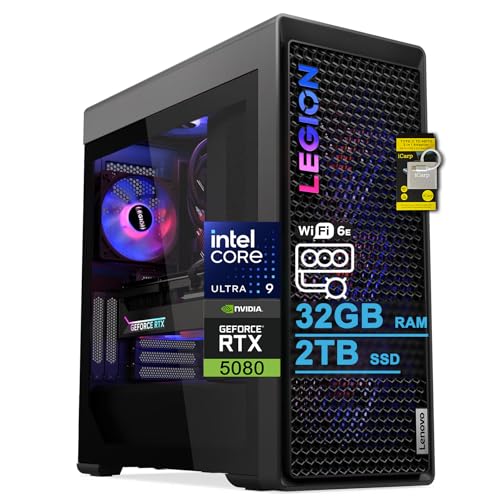
- Best for streaming: Lenovo Legion Tower 7i Gen 10, Core Ultra 9 285K, RTX 5080, 32GB DDR5, 2TB SSD — Check on Amazon
- CLX Set Gaming PC, Ryzen 7 9800X3D, RTX 5080, 32GB DDR5, 2TB NVMe — Check on Amazon
- Alienware Aurora ACT1250, Core Ultra 9 285, RTX 5080, 32GB DDR5, 1TB SSD — Check on Amazon
- iBUYPOWER Y40 PRO, Ryzen 9 7900X, RTX 5070 Ti, 32GB DDR5, 2TB NVMe — Check on Amazon
See 2 more Amazon options
- Skytech King 95, Ryzen 7 9800X3D, RTX 5070 Ti, 32GB DDR5, 1TB NVMe — Check on Amazon
- ZOTAC MEK Gaming PC, Ryzen 7 9700X, RTX 5070 Ti, 32GB DDR5-6000, 1TB NVMe — Check on Amazon
Read the full guide ↓
Disclosure: As an Amazon Associate, reviewstook.com earns from qualifying purchases. Links to Amazon on this page are affiliate links; they cost you nothing extra. Listing details such as price and availability change often, so check the current Amazon listing before you buy.
Streaming from one machine is a different purchase from gaming on one, and at $3,000 the difference is worth stating before any product names appear. A gaming PC has one job at a time. A streaming PC has four at once: render the game, encode the broadcast, record a local copy, and run the streamer’s working clutter — browser sources, chat, alerts, a second monitor of dashboards — without any of those jobs stealing frames from the others. The good news at this budget is that the encode itself is a solved problem. Every graphics card in this guide, RTX 5080 and RTX 5070 Ti alike, carries two ninth-generation NVENC encoder blocks with AV1 encoding, so the hardware that turns your gameplay into a broadcast is, for once, an honest tie. What separates the six machines below is everything around that tie: how much CPU is left over while the game runs, how much recording the storage swallows before it fills, whether the network connection is a cable or a hope, and how much of your $3,000 survives the purchase to pay for the microphone that actually decides how your stream sounds.
Two honesty notes frame the whole guide. First, the RTX 5080 machines here sit toward the top of this budget, and their value depends heavily on the current listing — check price on Amazon before judging any of them, and give each one a walk-away point in its review below. The RTX 5070 Ti is the card that lives comfortably at this budget every day, and for streaming specifically it gives up nothing on the encode side — the same dual NVENC and AV1 hardware does your broadcast either way. Second, there is no RTX 5090 system anywhere near $3,000; complete 5090 prebuilts sit in a clearly higher tier, so any listing implying flagship performance at this price is selling a headline. And a third, quieter truth for streamers: 4K streaming is limited by the platforms, not by these PCs. Twitch’s standard broadcast runs at 1080p60 around 6,000 kbps; YouTube accepts more — higher bitrates, 1440p, AV1 — and that platform difference, covered in the setup section below, matters more to your viewers than which of these six towers sits under your desk.
In this guide
Quick Picks
Short on time, or comparing several options at once? Each row below names a streamer type and the machine that suits it, with a link to the listing.
| Streamer type | Pick | Why it stands out | Link |
|---|---|---|---|
| Best for streaming | Lenovo Legion Tower 7i Gen 10 | 2TB recording room, 24-core CPU headroom, 2.5Gb Ethernet documented | Check on Amazon |
| Best game performance per stream | CLX Set Gaming PC | 9800X3D plus RTX 5080 and 2TB — check price on Amazon | Check on Amazon |
| An RTX 5080 stream with big-brand support | Alienware Aurora ACT1250 | RTX 5080 with a Quick Sync reserve encoder — check price on Amazon | Check on Amazon |
| Best value streaming tower | iBUYPOWER Y40 PRO | Twelve-core CPU and 2TB, positioned lower in this tier | Check on Amazon |
| Best gaming CPU in this tier | Skytech King 95 | 9800X3D, published 850W Gold PSU — check price on Amazon | Check on Amazon |
| Cleanest published spec sheet | ZOTAC MEK Gaming PC | Every key spec published, DDR5-6000, Windows 11 Pro | Check on Amazon |
How These Picks Were Chosen
Every guide in this series starts from the same six verified machines at this tier; this one re-grades them for the streaming workload, and the grading order changes. The encoder comes first — except that here, unusually, the encoder cannot separate the field. RTX 5080 and RTX 5070 Ti cards both ship with two ninth-generation NVENC blocks and AV1 encode, so all six picks broadcast with identical encoder hardware: NVENC H.264 for a standard Twitch stream, NVENC AV1 where the platform takes it. We state that tie plainly because plenty of listings hope you will pay a 5080 premium for a streaming benefit that does not exist. Frame generation, likewise, is not credited anywhere in this guide as a streaming feature: it synthesises frames for your monitor, and your encoder sends your viewers the rendered stream, not the generated one.
With the encoder tied, the ranking turns on simultaneous load — what the machine has left while the game is running. That means CPU headroom beyond the game’s own appetite, memory that is not the constraint (all six picks carry 32GB of DDR5, the correct standard for a game plus OBS plus a browser), and storage, which streamers consume in a way gamers do not: a local recording habit eats a 1TB drive in a season, so the three 2TB picks grade up and the three 1TB picks carry a planned second drive in their reviews. Networking is graded on documentation, not assumption: the Legion’s listing publishes 2.5Gb Ethernet, and every pick, Wi-Fi equipped or not, is held to the wired-Ethernet rule in the setup section. The two Intel machines earn one genuine streaming extra — their documented non-F processors carry Intel Quick Sync, credited in this guide strictly as a reserve encoder for a second output or a recording pass, never as an AV1 source. No encoder claim is made for the AMD picks’ integrated graphics. Prices change often, so check the current price on Amazon for every pick: a machine that fits this budget well at one point may move above this tier at another, and the top-of-tier picks keep their walk-away points for exactly that reason.
The 6 Best Gaming PCs for Streaming Under $3,000
Lenovo Legion Tower 7i Gen 10 — Core Ultra 9 285K, RTX 5080, 32GB DDR5, 2TB SSD
Who it suits: Streamers who record everything, run busy scenes, and want the one machine in this guide whose listing documents the full streaming checklist — storage, cores and a proper wired network connection — without a single item left to faith.
The Legion takes first place on the strength of everything around its graphics card. The card itself, an RTX 5080, brings the dual ninth-generation NVENC and AV1 encode that all six picks share. What the others do not all share is the supporting cast: a Core Ultra 9 285K with 24 cores, so the game, OBS, a browser full of dashboards and a local recording divide real headroom instead of fighting over it; a 2TB SSD, double the recording room of half this guide; and a listing that publishes 2.5Gb Ethernet alongside Wi-Fi 6E and Thunderbolt 4, with keyboard and mouse in the box. The 285K also carries Intel Quick Sync, which this guide credits as a reserve encoder — the block you point a recording pass or a secondary output at while NVENC carries the broadcast. Check price on Amazon for the exact configuration, and compare it with Lenovo’s own-store positioning for comparable 285K/5080 builds, and match the exact configuration at checkout, because the Legion Tower family sprawls across many near-identical listings.
For a streamer, this is the machine with the fewest asterisks. The 360mm liquid cooler keeps the 24-core chip quiet-adjacent under the combined load, the 850W power supply is published rather than guessed, and the 2TB drive means the record-everything habit that clips are made from survives a full season before housekeeping begins. If your stream involves a capture card for console nights, the platform has the ports and the cores to run that workflow on the same box, at the same time as everything else.
- Dual NVENC plus AV1 from the RTX 5080, with Quick Sync held in reserve.
- 2TB of storage and a documented 2.5Gb Ethernet port — the streamer’s two unglamorous essentials, both published.
- 24-core 285K leaves genuine CPU headroom beside the game.
Honest limitation: The listing states a maximum memory of 32GB, so the RAM it ships with is the RAM it keeps; and its position near the top of this tier means its value depends on the current listing rather than on an everyday position in the tier.
Choose it if you record locally, multitask heavily on stream, and want the most complete streaming platform here. Skip it if the current price has climbed well above this tier, or a future 64GB memory upgrade is already in your plans.

CLX Set Gaming PC — Ryzen 7 9800X3D, RTX 5080, 32GB DDR5, 2TB NVMe
Who it suits: Streamers whose game comes first — competitive and high-refresh players who want the strongest gaming CPU in the guide feeding the broadcast, and who can buy when the price is right rather than when the calendar says so.
CLX pairs the Ryzen 7 9800X3D, the processor gaming builders pick when the budget allows, with the RTX 5080, 32GB of DDR5, a 2TB NVMe drive and a 360mm all-in-one liquid cooler. For streaming, the division of labour is exactly what a one-box setup wants: the 9800X3D’s cores point entirely at the game, while the 5080’s dual NVENC blocks handle the encode without borrowing anything back. The 2TB drive matches the Legion’s recording room. At a favourable position in this tier, this is the strongest game-first streaming proposition in the guide — check price on Amazon for the configuration in front of you.
The condition attached to this pick is the largest in the guide, and it is not about hardware. Coverage of the identical configuration has also placed it well above this budget once component prices climbed. Same machine, same listing family, a very different tier — so the rule is firm: this recommendation applies when its current price fits comfortably within this budget, and not when it sits above this tier. Boutique assembly is the softer caveat: CLX builds tidy machines to order, but support runs through a smaller company than Lenovo or Dell, which matters if your stream schedule cannot absorb a slow repair. No encoder claim is made for the 9800X3D’s integrated graphics; the broadcast belongs to NVENC, and the CPU’s job is to make sure the game never notices the stream exists.
- 9800X3D plus RTX 5080: the game gets the best CPU here, the stream gets dual NVENC and AV1.
- 2TB NVMe storage — recording room equal to the guide’s best.
- Positioned toward the top of this tier when priced favourably — check price on Amazon.
Honest limitation: The most price-volatile machine in this guide — it has also been recorded well above this tier — so it is a recommendation only when the current price fits this budget, and support runs through a boutique builder rather than a national network.
Choose it if the current price fits comfortably within this budget and your stream is built around a demanding, CPU-sensitive game. Skip it if the price has swung up, or you need the safety net of a big-brand service network.

Alienware Aurora ACT1250 — Core Ultra 9 285, RTX 5080, 32GB DDR5, 1TB SSD
Who it suits: Streamers who want an RTX 5080 broadcast backed by a national support network, and who are ready to check the current price on Amazon and act while it fits this budget.
The Aurora’s streaming case starts with its position in this tier: check price on Amazon, and compare it with Dell-direct positioning for a comparable build. The specification around the card is flagship-grade — a Core Ultra 9 285 with 24 cores, 32GB of DDR5-5200, a 1000W Platinum-rated power supply and 240mm liquid cooling — and the 285, like the Legion’s 285K, carries Intel Quick Sync, credited here strictly as a reserve encoder behind the 5080’s dual NVENC and AV1. That reserve is a real, if modest, streaming asset: a recording pass or a second platform output can live on Quick Sync while the broadcast stays on NVENC. The 1000W Platinum supply is also the most upgrade headroom in the guide, which matters to streamers whose next purchase is a future graphics card rather than a future PC.
Two catches drop it to third for this angle. The first is storage: 1TB fills fast under a record-everything habit, so treat a second drive as a planned addition on top of the machine, not an optional extra. The second is the listing itself, which contradicts itself twice — describing the Ultra 9 285 as 20-core where Intel specifies 24, and describing liquid cooling as both fitted and optional. Trust Intel on the cores, and confirm the cooling configuration with the seller before ordering. Add Dell’s proprietary platform, which makes some future upgrades Dell-shaped, and the Aurora is the 5080 deal to grab with your eyes open rather than the guide’s default.
- RTX 5080 — check price on Amazon — with dual NVENC and AV1.
- Quick Sync reserve encoder and a 1000W Platinum PSU — the most electrical headroom here.
- Big-brand support network behind a deal-priced machine.
Honest limitation: 1TB of storage is a recording constraint from the first month, the platform is proprietary, and Amazon’s own listing contradicts itself on core count and cooling — verify both before ordering.
Choose it if the current price fits this budget and you want the 5080 with Dell’s service network behind it. Skip it if the price has drifted back above this budget, or you record heavily and would rather start with 2TB fitted.

iBUYPOWER Y40 PRO — Ryzen 9 7900X, RTX 5070 Ti, 32GB DDR5, 2TB NVMe
Who it suits: Streamers who would rather keep a meaningful share of the budget for the parts of a stream viewers actually notice — the microphone, the lighting, the camera — without giving up anything on the encode.
The Y40 PRO is the value argument of this guide, and for streaming it is a stronger argument than the gaming guides make it sound. The RTX 5070 Ti carries the same dual ninth-generation NVENC and AV1 encode as the 5080 picks, so the broadcast hardware is identical. Around it, iBUYPOWER fits a twelve-core Ryzen 9 7900X — the most cores of any AMD pick here, and therefore the most simultaneous-load headroom on that side of the guide — 32GB of DDR5-5200, a 2TB NVMe drive that matches the leaders’ recording room, WiFi, and keyboard and mouse in the box, under a one-year manufacturer warranty. Check price on Amazon — it is positioned in the lower part of this tier. At that position this is a complete one-box streaming PC in the guide’s midfield, with a substantial remainder for the kit section below.
The limitations are the ones the base research documented. The 7900X is a productivity-leaning chip from the previous Ryzen generation; in purely CPU-bound games the 9800X3D machines hold an edge, though NVENC carrying the encode narrows what that edge means to a streamer. And iBUYPOWER does not headline this listing’s power supply wattage in the verified material, so confirm it on the live listing before buying — a five-minute check, not a dealbreaker, but not one to skip. One naming trap deserves its own sentence: the Y40 PRO badge also sits on a different 7800X3D build under a separate listing, so the model number to match is Y40BA9N57T01. No encoder claim is made for the 7900X’s integrated graphics; the broadcast is NVENC’s job.
- Identical encoder hardware to the 5080 picks — dual NVENC plus AV1 — positioned in the lower part of this tier.
- Twelve-core CPU and 2TB storage: simultaneous-load headroom and recording room together.
- The money it saves is the microphone-and-lighting budget, already inside your $3,000.
Honest limitation: The verified listing material never headlines a PSU wattage, so confirm it before purchase; the 7900X also trails the 9800X3D in CPU-bound gaming.
Choose it if its current price remains in the lower part of this tier and your stream kit still needs buying. Skip it if you are chasing the strongest gaming CPU, or the unpublished PSU is a question you do not want to have to ask.

Skytech King 95 — Ryzen 7 9800X3D, RTX 5070 Ti, 32GB DDR5, 1TB NVMe
Who it suits: Streamers who want the 9800X3D’s game performance at a price that does not depend on catching a 5080 sale — and who stream more than they archive.
The King 95 pairs the same 9800X3D found in the CLX with the RTX 5070 Ti, 32GB of DDR5-5600, a 360mm ARGB liquid cooler and an 850W Gold ATX 3 power supply that Skytech publishes in the listing, where several rivals leave the wattage blank. For a one-box stream the division of labour matches the CLX exactly: the gaming CPU feeds the game, dual NVENC and AV1 handle the broadcast, and nothing borrows from anything. It is positioned in the middle of this tier — check price on Amazon — which makes it the streaming tower that answers this search at its regular tier position rather than only during a sale event — no encoder claim is made for the 9800X3D’s integrated graphics, and none is needed.
What holds it at fifth for this angle is storage. The 1TB Gen4 drive is the guide’s joint-smallest, and a streamer who records every session for clips will feel that within a season; plan a second drive as part of this purchase, as machine plus drive. Two listing cautions from the base research stay in force: Skytech states the graphics card brand may vary — the performance class is guaranteed, the specific board partner is not — and the King 95 name covers near-identical variants under other listings, so match model ST-KING95-1671-W-AM and the specification, not the name, before paying. Judged on what it controls — gaming CPU, published power supply, tier position — it remains the no-sale-required pick of the guide.
- 9800X3D game performance with the same dual NVENC and AV1 encode as every pick here.
- The 850W Gold ATX 3 power supply is printed in the listing, not left to guesswork.
- Positioned in the middle of this tier: in budget without waiting for a sale — check price on Amazon.
Honest limitation: 1TB of storage is a recording-space catch for anyone who archives sessions, and the listing’s brand-may-vary GPU note plus lookalike variants make model matching essential.
Choose it if you stream live more than you record, and want the gaming CPU without the deal hunt. Skip it if local recording is central to your workflow and you do not want a second drive on the shopping list — the 2TB picks above start where this one needs an addition.

ZOTAC MEK Gaming PC — Ryzen 7 9700X, RTX 5070 Ti, 32GB DDR5-6000, 1TB NVMe
Who it suits: Streamers who read spec sheets before they read prices, want every number published up front, and run a tidy one-box setup rather than a multitasking command centre.
ZOTAC builds graphics cards, and its prebuilt reads like documentation written by people who expect to be checked: its own RTX 5070 Ti with the dual NVENC and AV1 encode shared across this guide, a Ryzen 7 9700X, 32GB of DDR5-6000 — the fastest memory here — a 750W 80+ Gold power supply, WiFi 6E, Bluetooth 5.3, HDMI 2.1b and three DisplayPort 2.1b outputs, and Windows 11 Pro where the rest of the guide ships Home. It is positioned toward the lower end of this tier among this guide’s full-size 5070 Ti towers — check price on Amazon. For a straightforward game-plus-OBS workload, nothing in that specification is a compromise, and the published-everything approach means the streaming setup section below can be planned against real numbers.
Its sixth place is about ceiling, not competence. The 9700X’s eight cores are the least simultaneous-load headroom in the guide — entirely sufficient while NVENC carries the encode, but the first specification to feel crowded if your stream grows into heavy scenes, multiple capture sources and a browser farm at once. The 1TB drive repeats the recording-space catch: plan a second drive as part of the purchase. And the base research flagged inconsistencies in ZOTAC’s secondary documentation for this model, so treat the Amazon listing’s headline specification — the one quoted here — as the document of record and confirm it at checkout. The 750W supply is correctly sized for the configuration as shipped, with working margin rather than upgrade theatre.
- Nothing important is left unpublished: wattage, memory speed, outputs and Windows edition are all stated.
- DDR5-6000 and Windows 11 Pro — small upgrades the rest of the guide skips.
- Positioned toward the lower end of this tier among the full-tower 5070 Ti picks — check price on Amazon.
Honest limitation: The eight-core CPU is the guide’s least simultaneous-load headroom, 1TB is a recording constraint, and secondary documentation for the model has inconsistencies — trust the Amazon listing’s headline spec and verify at checkout.
Choose it if your stream is a game, OBS and a microphone, and you want it documented and well positioned in this tier. Skip it if your scenes and multitasking are already heavy — the twelve- and 24-core picks above are built for that growth.

Comparison Table
| Product | Graphics card | Encoder | Best streaming use | Link |
|---|---|---|---|---|
| Lenovo Legion Tower 7i Gen 10 | RTX 5080 16GB | 2× NVENC + AV1, Quick Sync reserve | Record-everything streaming, 2TB and 2.5Gb Ethernet | Check on Amazon |
| CLX Set Gaming PC | RTX 5080 16GB | 2× NVENC + AV1 | Game-first streaming — 9800X3D, when its current price fits this budget | Check on Amazon |
| Alienware Aurora ACT1250 | RTX 5080 16GB | 2× NVENC + AV1, Quick Sync reserve | RTX 5080 stream with big-brand support, 1TB recording catch | Check on Amazon |
| iBUYPOWER Y40 PRO | RTX 5070 Ti 16GB | 2× NVENC + AV1 | Best value — twelve cores and 2TB, positioned lower in this tier | Check on Amazon |
| Skytech King 95 | RTX 5070 Ti 16GB | 2× NVENC + AV1 | 9800X3D in the middle of this tier, 1TB recording catch | Check on Amazon |
| ZOTAC MEK Gaming PC | RTX 5070 Ti 16GB | 2× NVENC + AV1 | Cleanest published spec sheet, Windows 11 Pro | Check on Amazon |
Setting Up OBS on Any of These PCs
The encoder settings below are the same on all six machines, because the encoder hardware is the same — which is rather the point of this guide. In OBS, choose the NVIDIA NVENC encoder for your broadcast output on every pick. For a standard Twitch stream, that means NVENC H.264 at 1080p60 with constant bitrate (CBR) at around 6,000 kbps and a keyframe interval of two seconds — the combination Twitch’s ingest expects, and the one that keeps your stream compatible with every viewer device. For YouTube, the same hardware gives you more room: higher bitrates, a 1440p stream, and NVENC AV1 where your setup supports it, which is where the AV1 hardware in all six cards actually earns its keep today. Twitch’s AV1 path runs through its Enhanced Broadcasting programme rather than the standard ingest, so treat AV1-on-Twitch as a programme to join, not a default to assume. On the two Intel machines — the Legion and the Aurora — Quick Sync is available as a reserve encoder: a sensible home for a simultaneous local recording at a different quality, or a secondary output, while NVENC carries the broadcast itself. Do not build your stream on CPU (x264) encoding on any pick here, not even the 24-core Intel machines or the twelve-core Y40 PRO: x264 is an emergency fallback for the day something else breaks, because every core it eats is a core the game and your scene were using.
When a stream stutters, OBS tells you which of three counters is responsible, and each has a different fix. Rendering lag means the GPU is saturated compositing your scene — the game is taking the whole card; cap the game’s frame rate or lower its settings so the compositor keeps its share. Encoding lag means the encoder is overloaded — on these NVENC picks that almost always means the output resolution or a second simultaneous encode is asking too much; drop the stream to 1080p before you touch anything else. Network lag — dropped frames with both other counters clean — is the connection, and its fix is not a setting: it is a cable. Run Ethernet to whichever of these towers you buy, including the Wi-Fi 6E picks. Wi-Fi is a fine backup and a poor broadcast plan; a wired connection is the cheapest reliability upgrade in this entire guide, and it costs a cable you probably already own.
Two recording habits separate a settled setup from a fragile one. First, record locally at higher quality than you stream: the broadcast is capped by the platform’s bitrate, but your local recording is capped only by your drive, so editors and clip channels should work from a recording encode — NVENC at a generous quality setting, or Quick Sync on the two Intel picks — rather than from the stream’s own compressed output. Keep the recording on its own drive where the machine allows it, which is the practical half of why this guide grades 2TB picks up and treats a second drive as part of the 1TB picks’ setup. Second, rehearse the whole load before it counts: run the game, the broadcast, the recording and every browser source together for an hour in a private test stream, and watch the three counters while you do. Every pick in this guide has the hardware for that rehearsal to pass; the ones that fail do so on settings, not silicon, and settings are free to change before an audience is watching.
One Streaming PC or Two?
Every streamer at this budget eventually asks whether the money should buy a second, dedicated streaming PC instead. At this tier the answer is no, and the encoder tie is why. A second machine earns its desk space when the gaming PC’s encoder or CPU cannot carry both jobs; here, dual NVENC blocks encode the broadcast without touching the game’s resources, and the CPUs in this guide — twelve and 24 cores on the headroom picks — absorb OBS and the streaming clutter with room to spare. What a second PC would add is a second set of failure points: a capture chain between the machines, audio synchronisation to maintain, and another Windows install to update on stream day. The honest exceptions are narrow. If you stream console games as your main content, one of these towers plus a capture card is still the single-box answer, with the console as a source rather than a second computer. And if your production grows into multiple cameras, hardware switching and a producer’s desk, you have outgrown a buying guide’s question entirely. For everyone between — which is nearly everyone reading this page — one machine from this guide, wired, with a real microphone, is the professional setup.
What Else You Will Spend: The Stream Kit
None of the prices below are quoted, deliberately: this section is an order of priorities, not a second shopping list with numbers this guide has not verified. Buy in this order, and stop wherever your remaining budget stops. First, the microphone and its interface or USB connection — audio is the part of a stream viewers forgive least, and the gap between a headset microphone and a proper broadcast microphone is the largest quality jump available to any streamer at any PC budget. Second, lighting: a single key light aimed correctly does more for a camera image than a camera upgrade does. Third, the webcam itself, which matters less than the light hitting it. Fourth, and only if you stream console games, a capture card — it has no role in a PC-only setup, because the PC is already the source. Notice what this ordering implies about the guide above: the difference in tier position between the Y40 PRO and the 5080 picks can cover a complete and good-sounding stream kit. The encoder in your viewers’ experience is identical either way; the microphone is not.
How to Choose a Gaming PC for Streaming Under $3,000
- Start from the tie. Every card in this guide — RTX 5080 and RTX 5070 Ti alike — carries two ninth-generation NVENC blocks with AV1 encode. Do not pay a premium for streaming performance that is identical across the whole guide; pay for what differs: cores, storage, networking and price.
- Match storage to your recording habit. If you record every session for clips and edits, the 2TB picks (Legion, CLX, Y40 PRO) start where you need to be. On a 1TB pick, plan for the machine plus a second drive from day one rather than discovering the wall mid-season.
- Count cores for the clutter, not the encode. NVENC carries the broadcast, so the CPU’s streaming job is the game plus OBS, chat, alerts and dashboards. The 24-core Intel picks and the twelve-core Y40 PRO have the most left over; the eight-core ZOTAC is the guide’s ceiling for growth.
- Wire it, whatever it ships with. The Legion documents 2.5Gb Ethernet; the others document Wi-Fi of various grades. The rule does not change: Ethernet for the broadcast, Wi-Fi as the backup. A stream dropped by a wireless hiccup is a settings problem you chose.
- Give every top-of-tier pick a walk-away point. The 5080 machines are recommendations when their current price fits this budget, and are not recommendations when they sit well above this tier. Decide that point before you open the listing — check price on Amazon.
- Accept the 5090 verdict. No verified RTX 5090 system exists near $3,000 — complete systems sit in a clearly higher tier. Streamers gain nothing from the flagship’s headline anyway; the encoder story is already complete at this tier.
- Match the model number, not the model name. King 95, Y40 PRO and Legion Tower all name families with near-identical variants under other listings. The exact model and specification in front of you is the only machine you are buying.
- Spend the remainder on sound. Whatever is left after the tower is the kit budget — microphone first, lighting second, camera third, capture card only for console sources. Our Best Gaming PC Under $3000 guide covers the same six machines graded purely as gaming PCs, if you want the other half of the comparison.
Common Buying Mistakes
- Paying a 5080 premium “for streaming.” The 5070 Ti picks carry the same dual NVENC and AV1 hardware; the premium buys game frames, not broadcast quality.
- Encoding on the CPU because the core count looks impressive. x264 on a 24-core chip still competes with your game; NVENC exists precisely so it does not have to.
- Streaming over Wi-Fi because the listing advertised Wi-Fi 6E. The specification is real and the dropped frames will be too. Run the cable.
- Recording everything to a 1TB drive with no plan. The drive fills, the recording stops, and the session you wanted is the one that is missing.
- Paying well above this tier for a top-of-tier pick. An Aurora or a CLX priced well above this budget is not the machine this guide recommended; the recommendation depends on the machine fitting this tier as much as on the PC itself.
- Believing a 5090 headline at $3,000. Verified 5090 systems sit in a clearly higher tier, and the encoder you actually need is already in every pick here.
- Buying the model name rather than the model number, then unboxing a lookalike variant built around a different processor, half the storage or a lesser graphics card.
- Buying the tower and streaming on a headset microphone. The audience hears the microphone, not the graphics card; budget the kit as part of the purchase.
Final Recommendation
- Most streamers: Lenovo Legion Tower 7i Gen 10 — the complete platform: 2TB, 24 cores, documented 2.5Gb Ethernet.
- Game-first streamers: CLX Set, only when its current price fits this budget.
- RTX 5080 broadcast with big-brand support: Alienware Aurora ACT1250, when its current price fits this budget, with a second drive planned.
- Best value, kit included: iBUYPOWER Y40 PRO — the savings are the microphone budget.
- Gaming CPU without the deal hunt: Skytech King 95, with a second drive planned in.
- Documented and tidy: ZOTAC MEK Gaming PC.
Our top two for streaming are the Lenovo Legion Tower 7i Gen 10, because it is the only machine here whose listing documents the whole streaming checklist — recording storage, CPU headroom, a reserve encoder and a proper wired network port — and the CLX Set, because when priced within this budget it pairs the strongest gaming CPU in the guide with the same 2TB recording room. Between them sits the Aurora for buyers who find it well positioned in this tier, and beneath all three sits the Y40 PRO, quietly making the most streamerly argument in the guide: identical encoder hardware, twelve cores, 2TB, and enough of the budget left over to sound professional. Streamers working to a smaller budget should compare the tier below in Best Gaming PC For Streaming Under $2500, and buyers whose workload is a dedicated streaming machine rather than a gaming PC that streams should see Best Streaming PC Under $3000. Check price on Amazon, match the model number, run the Ethernet cable, and let the walk-away point you set do its job.
Frequently Asked Questions
Is an RTX 5070 Ti enough for streaming, or do I need the 5080?
For the broadcast itself, the 5070 Ti is enough in the most literal sense: it carries the same two ninth-generation NVENC blocks and AV1 encode as the 5080, so the stream your viewers receive is encoded by identical hardware. The 5080 buys game performance — higher settings and frame rates in the game being streamed — not a better encode. Choose by the game you play and the live price, not by a streaming benefit that does not exist.
Can these PCs stream in 4K?
The hardware can encode well beyond 4K; the platforms are the limit. Twitch’s standard broadcast is 1080p60 at around 6,000 kbps, with AV1 arriving through its Enhanced Broadcasting programme. YouTube accepts higher bitrates, 1440p streams and AV1 today. So a 4K stream is a platform question, not a PC question — and for most streamers, a clean 1080p60 or 1440p broadcast reaches more viewers in better shape than a 4K one.
Should I encode with the CPU instead, given these core counts?
No. Even the 24-core Intel picks and the twelve-core Y40 PRO should broadcast on NVENC, which is dedicated hardware that leaves every CPU core to the game, OBS and your other applications. CPU (x264) encoding is a fallback for troubleshooting, not a strategy. The one refinement this guide endorses is on the Intel machines: Quick Sync can carry a secondary job, such as a local recording, while NVENC carries the broadcast. No AV1 claim is made for Quick Sync, and no encoder claim is made for the AMD picks’ integrated graphics.
How much storage does a streamer actually need?
More than a gamer. A local recording of every session, kept for clips and edits, consumes a 1TB drive within a season of regular streaming. The three 2TB picks in this guide — the Legion, the CLX and the Y40 PRO — are graded up for exactly that reason. On a 1TB pick, treat a second drive as part of the purchase rather than a future upgrade, and keep recordings on their own drive where you can.
Is Wi-Fi good enough for streaming?
Not as a plan. Several picks here document capable Wi-Fi, and the Legion publishes 2.5Gb Ethernet as well, but the rule in this guide is unconditional: the broadcast runs on a wired Ethernet connection. Wi-Fi is the backup for the day the cable is in another room. Dropped frames from a wireless hiccup are the most common and most preventable fault in one-box streaming.
Why do prices for the same PC swing so much?
Component costs move fast, and integrators reprice with them. Take the CLX Set in this guide: it has been positioned both within this tier and well above it in different coverage. That is why each top-of-tier pick carries a walk-away point in this guide, and why you should check the current price on Amazon — the live listing is the only price that counts.
What should I buy after the PC to complete a stream setup?
In this order: a proper microphone, then lighting, then a webcam, and a capture card only if you stream console games. The PC budget and the kit budget are one budget — which is why the Y40 PRO’s position in the lower part of this tier makes it a streaming pick and not just a value pick. Streamers furnishing a whole first setup should also read Best Gaming PC For Beginners Under $3000, where the desk around the PC gets its own accounting.


