Where to buy
Check the latest price, availability and delivery on Amazon. Orders are placed on Amazon. We may earn a commission from qualifying purchases. Every product below is a barebones kit: the kit provides the case, board, processor and cooler only — no RAM, no SSD and no operating system unless a review says otherwise, so budget for those parts before comparing any kit here with a complete mini PC — check price on Amazon for the current listing before you compare.
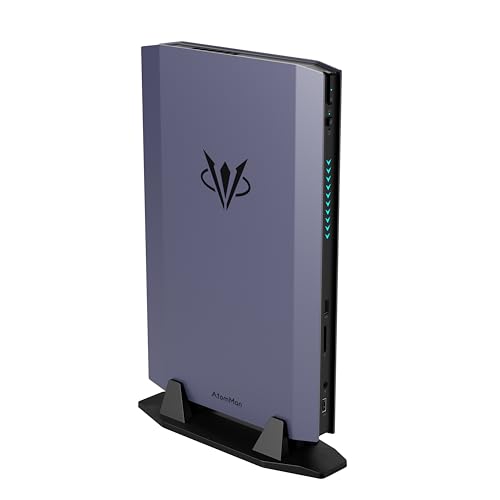
- Best overall barebones kit: AtomMan G7 Ti Mini PC, Core i9-14900HX, RTX 4070 — Check on Amazon
- AtomMan G7 Pt Mini PC, Ryzen 9 7945HX, RX 7600M XT — Check on Amazon
- MINISFORUM MS-A2 Mini Workstation, Ryzen 9 9955HX, Barebone — Check on Amazon
- MINISFORUM MS-01 Mini Workstation Barebone, Core i9-13900H — Check on Amazon
- MINISFORUM UM890 Pro Mini PC, Ryzen 9 8945HS, Barebone Version — Check on Amazon
See 1 more Amazon option
- GMKtec Nucbox K8 Plus Mini PC, Ryzen 7 8845HS (Without RAM/SSD/OS) — Check on Amazon
Read the full guide ↓
Disclosure: As an Amazon Associate, reviewstook.com earns from qualifying purchases. Links to Amazon on this page are affiliate links; they cost you nothing extra. Listing details such as price and availability change often, so check the current Amazon listing before you buy.
Every mini PC is small. That is the category’s entry ticket, not a discovery, and a guide that stopped there would tell you nothing. What actually decides whether one of these machines fits a cramped room is everything around the box: the power brick that trails it, the clearance its fans demand, the cables dropping off the desk’s back edge, and — for two kits here — the external GPU dock pencilled into the future. A chassis can win on volume and still lose the room. So this guide grades the whole footprint, not the photograph.
It also keeps the two disciplines a barebones guide owes you. The first is money: a kit price never buys a working computer. Nothing below includes memory, storage or an operating system, so each review weighs the finished machine — parts included — against the maker’s own configured version of the identical box, the one comparison that reveals whether building it yourself pays. The second is measurement: figures appear here only where the underlying research actually documents them. One pick is documented at roughly a litre and a half, another at 1.78 litres, another at 2.6 litres, another as a five-inch square. Where research records no volume, dimension, weight or mount pattern, none is invented — the pick is graded by shape class instead, and the checklist further down shows you how to pull the exact numbers from the live listing before you commit.
And the budget itself deserves a sentence of context. Fifteen hundred dollars is where barebones stops meaning “integrated graphics and patience.” Two kits below carry soldered discrete GPUs — a laptop RTX 4070 fed up to 140W, a Radeon RX 7600M XT at up to 120W. Two are workstation platforms built around many-core processors, twin 10-gigabit networking and a physical PCIe slot. Two are premium APU kits whose OCuLink port keeps an external-GPU upgrade alive. The one newer discrete kit, the AtomMan G7 Pro with a laptop RTX 5070, sits in a higher tier for the empty box alone — outside this budget before a single part is added — so it appears only as the ceiling marker. All six picks are positioned to complete at or under $1,500 once finished.
In this guide
Quick Picks
In a hurry? Match your room to a row. For every pick, check price on Amazon for the current kit listing; the reviews explain how to judge the finished build against the configured version.
| Space situation | Pick | Why it stands out | Link |
|---|---|---|---|
| Best overall for a tight desk | AtomMan G7 Ti (Core i9-14900HX, RTX 4070) | The strongest GPU in the guide, packaged as an upright slab | Check on Amazon |
| Best value discrete-GPU kit | AtomMan G7 Pt (Ryzen 9 7945HX, RX 7600M XT) | Sixteen cores and a 120W Radeon inside a documented 2.6 litres | Check on Amazon |
| Most compute per litre | MINISFORUM MS-A2 (Ryzen 9 9955HX) | 16 Zen 5 cores, twin 10G SFP+ and a PCIe slot in a documented 1.78 litres | Check on Amazon |
| Smallest documented footprint | MINISFORUM MS-01 (Core i9-13900H) | Roughly a litre and a half, still carrying dual 10GbE and dual USB4 | Check on Amazon |
| Quietest shelf neighbour | MINISFORUM UM890 Pro (Ryzen 9 8945HS) | A five-inch square whose cooling earned praise for hushed running | Check on Amazon |
| Best for tinkerers on a leash | GMKtec Nucbox K8 Plus (Ryzen 7 8845HS) | An honestly labelled no-RAM/no-SSD/no-OS listing with OCuLink and dual 2.5G LAN | Check on Amazon |
How These Picks Were Chosen
Two filters from the base research come first, because changing the angle does not change the arithmetic. Under the completion filter, a kit qualified only when a sensible finish — sensible RAM, a 1TB-class NVMe drive, an operating system — could bring the whole machine in at or under $1,500, with the maker’s configured twin — checked on the same day — as the benchmark the parts bill must beat. Under the permanence filter, remember that the processor, and any discrete GPU, is soldered for life in all six machines; memory and storage are the sole parts you will ever choose twice, so a kit justifies its place in this budget only when the fixed silicon merits a five-year stay.
This variant then applies a space filter with three rules. Rule one: documented or it did not happen. The shapes and volumes graded below — a litre and a half, 1.78 litres, 2.6 litres, a five-inch square, an upright slab — are the ones the research records. No pick receives a millimetre measurement, a weight, a VESA pattern or a decibel figure the research does not contain; gaps are labelled as gaps. Rule two: the entourage counts. A power brick occupies floor or shelf. An OCuLink dock is a second enclosure with a second supply, not a footnote. SFP+ ports arrive empty and ask for modules and stiff cables. Rule three: heat is a placement rule. Machines of 100W-class silicon in one-and-a-half to two-and-a-half litres cannot live just anywhere; where each may sit — open shelf, ventilated cubby, never a sealed cabinet — is graded per pick.
Nothing here was tested on our own bench. The selections and specifications are inherited from the verified research behind this budget’s base guide — maker listings and spec pages, independent reviews — and re-graded strictly on the space evidence inside it. Where that evidence runs out, the review says “not documented” and moves on, and the checklist below hands you the measuring routine that closes the gap from the live listing.
The Space You Cannot See on the Spec Sheet
Four things determine the real footprint of a mini PC, and the mini PC is none of them. First, the power brick. Modest integrated-graphics boxes sip electricity and their adapters vanish; the discrete kits in this guide play a different sport. The G7 Pt’s external supply is described in the research as a substantial brick, and any 120–140W machine’s adapter is effectively a piece of furniture — under the desk, in a cable tray, or beside the box on the shelf, each with its own heat and clutter consequences. Budget a home for it while you budget the shelf for the machine.
Second, the dock that has not arrived yet. The UM890 Pro and the K8 Plus both offer a dedicated OCuLink port, the low-latency route to an external graphics dock. As a staged plan it is sound — small box today, desktop graphics when funds recover. As a space claim it needs its asterisk read aloud: the dock is another enclosure with another power supply, and the finished pairing takes up something like the room a compact tower would have taken all along. Choose these kits because the staging suits your wallet, not because the end state is miniature.
Third, the cabling. Twin 10-gigabit SFP+ ports are a headline feature that arrives with nothing to insert into them; modules or direct-attach cables follow, each wanting bend radius behind a shallow shelf. The copper 2.5G ports every pick also carries ask for nothing beyond a cable you probably own. Direction matters too in tight quarters: a rear-exiting cable bundle drops cleanly off a desk’s back edge, while front-facing connections trade tidiness for reach. The reviews grade cabling only where research documents it, and stay quiet where it does not.
Fourth, the air. A litre-and-a-half enclosure shedding a 100W-class processor has one exit strategy: fans, immediately. Hence the MS-A2’s audible load noise and relatively high idle draw in reviewer findings, the balanced modes on both AtomMan kits that exchange a slice of performance for a large slice of quiet, and the weight this guide puts on the UM890 Pro’s praised cooling — in a small room, the machine sits close to you, its exhaust close to a wall, its intake close to whatever got stacked beside it. Clearance is therefore treated in the checklist as a measurement, equal in rank to shelf depth.
The 6 Best Barebones Mini PCs for Small Spaces Under $1,500
AtomMan G7 Ti Mini PC — Core i9-14900HX, RTX 4070
Who it suits: Gamers short on desk depth — a narrow worktop, a shallow shelf, a single rented room — who will not trade graphics muscle for the space saving, and who already hold DDR5 SO-DIMMs or an NVMe drive, or can source them cheaply.
Shape is this machine’s space argument. Rather than sprawling flat like a console, the G7 Ti stands as a slim vertical slab, so the desk area it surrenders is roughly the footprint of its base — think of a hardback novel shelved upright. Depth is the dimension cramped desks exhaust first, and a slab barely touches it. Research documents no litre volume and no exact dimensions for the chassis, so none are printed here; file the shape under “upright slab,” and pull true measurements from the live listing before promising it a particular shelf. The slab’s contents are the guide’s strongest: a Core i9-14900HX carrying 24 cores (8 performance, 16 efficiency) and boosting to 5.8GHz, beside an NVIDIA RTX 4070 laptop GPU with 8GB of GDDR6 allowed up to 140W — the full-power flavour of that chip, not the strangled low-wattage cut that makes laptop cross-shopping so miserable. Memory goes in two DDR5-5600 SO-DIMM slots rated to 96GB, storage in two M.2 PCIe 4.0 slots, and display output runs through HDMI 2.1 and USB4 with Wi-Fi 7 aboard. It ships as a barebone — memory, storage and OS are yours to add — while everything else, 140W GPU included, arrives soldered and functional.
Its arithmetic is the standing warning of this review. The empty kit and the factory-built 32GB/1TB edition sit close together within this tier, with only a narrow gap between them — check the current price on Amazon for both before you decide. Your memory, drive and Windows licence must collectively fit inside that gap or the prebuilt is the better value. In practice that happens when parts come off your own shelf. Finished with care, the machine can still land inside this budget, and self-assembly repays you in specification rather than savings: 64GB instead of 32GB, a quicker or larger drive, a Linux install carrying no licence cost at all. The spatial caveat: performance mode works the twin fans hard enough to hear, so in a small room the slab earns its keep on an open shelf or desk corner with air circulating, not entombed in a cabinet. And the GPU can never be swapped — its retirement is the machine’s.
- Full-power RTX 4070 laptop graphics at up to 140W, with DLSS — the most gaming muscle in this guide.
- Upright slab geometry: the footprint that asks least of a shallow desk.
- Twin SO-DIMM slots to 96GB and twin M.2 slots leave the build genuinely open.
Honest limitation: With only a narrow gap between the kit and the configured edition, the maths favours parts owners — and performance mode is plainly audible, the rent this much power pays in a slim case sitting near its user.
Choose it if desk depth is your binding constraint, top-tier mini-PC gaming is the goal, and parts already sit on your shelf. Skip it if every component would be bought new — the configured edition, or the G7 Pt next, treats you better — or if its only home is a closed cabinet.

AtomMan G7 Pt Mini PC — Ryzen 9 7945HX, RX 7600M XT
Who it suits: Gamers and creators after discrete graphics with real change left over once the build is finished — provided a shelf or floor spot exists for one chunky power brick.
Of the six, this is the pick whose spatial facts are documented most completely: the enclosure measures out at 2.6 litres, a verified volume you can hold a tape against before ordering. Inside work sixteen full Zen 4 cores in a Ryzen 9 7945HX boosting to 5.4GHz, partnered with a discrete Radeon RX 7600M XT drawing up to 120W and carrying 8GB of GDDR6. The model launched under an AMD Advantage banner — a first among mini PCs — and reviewers rated it a potent 1080p machine that stretches into 1440p under sensible settings. A hardware switch flips the CPU between a 65W balanced profile and an 85W performance profile; treat it as a volume knob as much as a speed one, balanced for the desk you sit at, performance for the session. Nothing is pre-fitted: memory, storage and OS are all on you. Two SO-DIMM slots accept DDR5 up to 96GB, the board takes PCIe 5.0 NVMe, and the guide’s one explicit space debit is recorded in the research without varnish — the external power supply is a substantial brick. On a small desk that brick is a second placement problem in its own right, and it is the chief reason the kit’s true footprint outgrows its tidy litre figure.
Completion here is the friendliest among the discrete kits. The empty box sits noticeably below the assembled 32GB/1TB version of the same machine in this tier — check price on Amazon for both listings on the day you shop. Finishing a barebone means adding 32GB of DDR5, a 1TB M.2 drive and a Windows key, and on this kit that completion still leaves a completed G7 Pt comfortably inside budget, with headroom to choose 64GB of memory or a 2TB drive and still finish under $1,500. Headroom like that is the entire point of buying the empty box. The familiar cautions apply, plus the spatial one: processor and graphics are soldered beyond reach, and 120W of GPU in 2.6 litres guarantees fan presence under sustained play, so plan the placement — open air at the exhaust side — instead of discovering it.
- Sixteen Zen 4 cores and a 120W RX 7600M XT: discrete graphics without apology.
- A verified 2.6-litre enclosure — a volume you can measure your shelf against in advance.
- Positioned as the value discrete-GPU kit in this tier — check price on Amazon; a realistic finish keeps upgrade room inside the budget.
Honest limitation: The 7600M XT’s 8GB of VRAM is the first wall newer titles hit at 1440p, and no upgrade path leads around a soldered GPU; Radeon upscaling means FSR rather than DLSS. The hefty external brick also needs a home of its own.
Choose it if you want this guide’s best exchange of gaming power for finished cost, and your shelf can spare about three litres plus brick room. Skip it if ray tracing or DLSS tops your list — that brief belongs to the G7 Ti — or if no surface anywhere can adopt the power supply.

MINISFORUM MS-A2 Mini Workstation — Ryzen 9 9955HX, Barebone
Who it suits: Homelab builders, virtualisation hosts and CPU-bound professionals chasing the most computation that fits inside two litres, content to add graphics later or never.
Judged on compute per litre, the rest of this guide is not close. A Ryzen 9 9955HX — 16 Zen 5 cores, 32 threads, boosting to 5.4GHz — lives inside a documented 1.78-litre aluminium enclosure, flanked by twin 10-gigabit SFP+ ports, twin 2.5-gigabit Ethernet, three M.2 storage positions with U.2 support, and a physical PCIe x16 slot wired at PCIe 4.0 x8 with lane-splitting. That slot accepts a low-profile GPU, a faster NIC or an HBA, converting the box from appliance to platform. The kit arrives empty of memory, storage and OS; a pair of DDR5-5600 SO-DIMM slots takes up to 96GB. Its spatial debits are documented rather than rumoured: reviewers logged audible noise under load and an idle draw on the high side for the class, the natural tariff of a 100W-class HX chip in a tiny case, which points this machine toward a ventilated shelf or utility corner rather than a bedside. Its SFP+ sockets likewise demand modules or direct-attach cables — extra small hardware and stiff runs behind shallow furniture — and reviewers noted the slot’s airflow is modest, suiting low-power cards rather than gaming flagships.
The gaming position needs no dressing up: it is not a gaming PC. The integrated Radeon 610M exists to drive displays, full stop. Positioning tells the completion story cleanly — the 9955HX barebone sits well below Minisforum’s configured 32GB/1TB edition of the same chassis in this tier; check the current price on Amazon for both. Hold those side by side: complete the kit for less than the gap between the two and you come out ahead, and anyone holding a spare RAM kit finishes far ahead. A low-profile GPU for the slot remains a legitimate second phase, at additional cost beyond the completion itself. One caution from the research is worth passing on verbatim in spirit: the pinned ASIN belongs to the Amazon MS-A2 listing family, so on the live page, confirm the style selected is the 9955HX barebone — configurations share families in this category, and the style selector is where mistakes get caught. Bought for cores, ports and the slot, and placed where air reaches it, it stands alone in this guide.
- 16 Zen 5 cores in a documented 1.78 litres — unmatched compute density here.
- Twin 10G SFP+, twin 2.5G and a PCIe x16 (x8) slot: platform hardware, not appliance hardware.
- Positioned well below its configured twin in this tier — check price on Amazon; the completion room is generous.
Honest limitation: The 610M integrated graphics cap gaming at light and older titles until a low-profile card joins the slot at extra cost, and even then the slot’s airflow sets the ceiling. Under load it is audible; a silent corner is the wrong address for it.
Choose it if your workload is processors, virtual machines, storage or networking, and your small space offers one ventilated shelf. Skip it if gaming drives the purchase — either AtomMan kit out-guns it without contest.

MINISFORUM MS-01 Mini Workstation Barebone — Core i9-13900H
Who it suits: Homelab and edge-server builders with the least room of any reader here — one shallow shelf, a network corner, the top of a NAS stack — who want 10-gigabit networking, a PCIe slot and triple storage in Intel form, with Quick Sync for media duties.
This is the guide’s smallest documented volume: a box of roughly a litre and a half. Into it Minisforum pours the recipe that created the workstation-mini category — a Core i9-13900H with 14 cores and 20 threads boosting to 5.4GHz, vPro support, and Iris Xe integrated graphics whose Quick Sync transcoding is precisely why media-server builders pick Intel silicon — plus twin 10GbE SFP+ ports and twin 2.5G Ethernet, three M.2 2280/22110 positions with U.2 support, a PCIe 4.0 x16 slot (electrically x8) awaiting a low-profile card, two DDR5 SO-DIMM slots good for 96GB, and dual USB4. That final item is the tight-desk feature: USB4 is how a litre-and-a-half box runs a docked desktop over minimal cabling, which counts double when the desktop itself is the scarce resource. The barebone listing includes neither memory nor storage; the processor is the single decision frozen at checkout, with Core i5-12600H and Core i9-12900H editions sitting below this one. Like its MS-A2 sibling, the SFP+ sockets need modules or direct-attach cables before they carry anything — small extras that belong in the space plan — while the copper 2.5G ports work with whatever cable you already own.
The i9-13900H barebone sits in the lower part of this tier, while the configured i9 edition with 32GB and 1TB sits considerably higher — check the current price on Amazon for both. Treat the configured listing as the bar: the gap between the kit and the configured edition leaves substantial headroom between you and parity. One reviewer finding deserves daylight, and it matters most precisely because this machine will likely run unattended in a corner: Notebookcheck’s early test unit crashed unpredictably under sustained load testing, and the maker planned a replacement. That was a launch review sample rather than a verdict on current production — but stress-test your own unit inside its return window before trusting it with always-on work. Thermals follow the family pattern: a hard-working chip in a small enclosure makes fan noise, and the PCIe bay is nobody’s wind tunnel, so the litre and a half wants shelf air around it, not the sealed cabinet it would physically squeeze into. For gaming it remains, like the MS-A2, an integrated-graphics machine until a low-profile card arrives; buy it for the ports and the slot.
- The smallest documented footprint in the guide — roughly a litre and a half — with server features uncut.
- Twin 10GbE SFP+, twin 2.5G, three M.2/U.2 positions and a PCIe slot: nothing else this size carries this much.
- Quick Sync transcoding and dual USB4 make it the media-homelab pick and a one-cable desk citizen.
Honest limitation: Graphics stop at Iris Xe, and early review hardware stumbled under sustained load — put your own unit through stress testing before it earns always-on trust.
Choose it if your homelab leans Intel — Quick Sync, vPro, 10G — and your space budget is denominated in single litres. Skip it if cores per dollar rule the decision; the MS-A2’s 9955HX is the stronger compute purchase.
MINISFORUM UM890 Pro Mini PC, Barebone Version — Ryzen 9 8945HS
Who it suits: Buyers whose small space doubles as a quiet space — bedroom desk, studio flat, shared living room — who want a premium APU platform immediately and an OCuLink route to discrete graphics later, positioned as the most accessible kit in this guide.
Its documented shape is the easiest here to plan around: a five-inch square. A square footprint is simple to allocate — a shelf corner, the ground beside a monitor stand, the end of a desk — and reviewers singled out this chassis for quiet cooling, which in a small room functions as a space feature in its own right: a machine welcome near your chair outperforms a faster one exiled to a cupboard. The silicon is a Ryzen 9 8945HS — eight Zen 4 cores boosting to 5.2GHz — driving Radeon 780M integrated graphics, the strongest iGPU generation in common mini-PC service and a believable 1080p low-to-medium gaming engine with FSR’s help. Minisforum permits the chip up to 70W, the top of its class, purchasing sustained pace at the price of fan presence when pushed. The barebone edition includes no memory, storage or OS; two DDR5-5600 SO-DIMM slots take up to 96GB and two M.2 PCIe 4.0 slots take your drives. Its graphics future is the best arranged in this guide: beside dual USB4 and dual 2.5G Ethernet sits a dedicated OCuLink port, and the word “dedicated” does the work — an external GPU dock attaches later without consuming an M.2 slot.
The dock deserves its own honest paragraph, because the staged plan is this pick’s entire pitch. Stage one really is tiny: the square, completed, hushed, finished. Stage two — the OCuLink dock — is a separate enclosure with a separate supply, and the day it lands, your setup’s footprint roughly doubles. That argues against nothing; it is the plan, priced in floor space as well as money, and small-space buyers should nominate the dock’s shelf before stage one ships. The positioning is the guide’s most instructive. The barebone sits at the accessible end of this tier, while its configured 32GB/1TB sibling sits much higher — a gap that has widened as memory and NAND supply tightened; check the current price on Amazon for both listings. Arrive owning DDR5 and an NVMe drive and the kit plus your parts completes a machine that costs far more factory-built; arrive buying memory while supply is tight and the advantage thins fast, so compare both routes on the day. A research caveat carries over: the barebone is a standalone Amazon page, distinct from the configured family — confirm you are standing on the barebone listing itself when you order. Either way, a finished UM890 Pro lands far beneath this guide’s $1,500 ceiling.
- A documented five-inch square — the simplest footprint in the guide to find a home for.
- Cooling that reviewers praised for quiet running: the pick for shelves within earshot.
- Positioned at the lower end of this tier as a barebone — check price on Amazon — with a dedicated OCuLink port and dual USB4: the best-arranged eGPU runway here.
Honest limitation: Integrated graphics remain integrated graphics — the 780M is no 1440p engine — and the dock that remedies it is a further purchase and a further box, with a footprint of its own.
Choose it if a staged build in a quiet room appeals: an excellent compact PC today, discrete graphics over OCuLink tomorrow, dock shelf already chosen. Skip it if discrete-GPU gaming must start on day one — the G7 Pt delivers it for less money overall.

GMKtec Nucbox K8 Plus Mini PC (Without RAM/SSD/OS) — Ryzen 7 8845HS
Who it suits: Tinkerers who want the barebone deal stated without ambiguity, with OCuLink, dual Intel 2.5G networking and a dual-fan chassis — in a spot where the machine can breathe.
GMKtec markets this kit the way the category should be marketed: a dedicated Amazon listing whose title spells out “Without RAM/SSD/OS.” What the box does contain is a Ryzen 7 8845HS — eight Zen 4 cores reaching 5.1GHz — with Radeon 780M graphics, housed in a dual-fan chassis offering an OCuLink port for an external GPU, dual USB4, HDMI 2.1 and DisplayPort outputs, and dual 2.5GbE LAN on Intel i226V controllers, a detail network-minded shoppers actively hunt for. A pair of DDR5 SO-DIMM slots and a pair of M.2 PCIe 4.0 slots await your parts — retailer spec pages cite ceilings up to 128GB of memory and 8TB of storage across them — and the chip offers a 65W performance mode. Spatial grading here is intentionally the guide’s thinnest, because the research documents the least: no volume, dimensions or weight are recorded for this pick, so none are asserted. It is graded by class alone — a dual-fan APU box of the UM890 Pro’s family — to be measured off the live listing before any particular shelf is promised to it. In layout and intent it is that machine’s nearest rival: same APU tier, same graphics, same escape hatch, and the same dock caveat, since the stage-two OCuLink box will need a home as well.
With this pick, completion discipline outweighs the kit listing alone, because the configured sibling’s positioning in this tier swings widely — at times deeply discounted, at other times near the top of the band; check the current price on Amazon for both. When the finished machine is heavily discounted, scarcely any kit-plus-new-parts combination prevails; when the configured edition sits high in the tier, the kit finished from your parts shelf prevails comfortably. Hence the rule that forms this review’s core counsel: check the configured listing’s current price on Amazon before anything else, and take the barebone only when that day’s comparison favours it — or when the motive is not thrift at all but picking your own memory capacity, drive and operating system, a motive this guide honours. Fan noise in the 65W mode and the lack of any discrete GPU are the standing caveats it shares with its UM890 Pro rival; in a small room, let the balanced side of that mode switch handle desk hours and keep performance mode for gaming time.
- A standalone barebone listing with the terms in its title — no variant roulette at checkout.
- OCuLink, twin USB4 and twin Intel i226V 2.5G LAN: connectivity beyond its class.
- Dual-fan cooling with a 65W performance mode behind the 8845HS.
Honest limitation: A deeply discounted configured edition collapses the barebone case for anyone buying parts new — check the finished machine’s current price on Amazon before committing. Its chassis measurements are also the least documented in this guide.
Choose it if GMKtec’s flavour of the OCuLink APU platform appeals and speccing your own memory and storage is half the pleasure. Skip it if the configured K8 Plus happens to be sitting on a deep discount the day you shop.

Comparison Table
| Product | CPU / GPU | Documented space facts | Price | Best use | Link |
|---|---|---|---|---|---|
| AtomMan G7 Ti | i9-14900HX / RTX 4070 Laptop 140W | Upright slim slab; volume not documented | Check price on Amazon | Peak gaming on a shallow desk | Check on Amazon |
| AtomMan G7 Pt | Ryzen 9 7945HX / RX 7600M XT 120W | 2.6-litre box; substantial external brick | Check price on Amazon | Value discrete-GPU gaming | Check on Amazon |
| MINISFORUM MS-A2 | Ryzen 9 9955HX / Radeon 610M + PCIe slot | 1.78-litre aluminium enclosure | Check price on Amazon | Most compute per litre; homelab | Check on Amazon |
| MINISFORUM MS-01 | i9-13900H / Iris Xe + PCIe slot | Roughly a litre and a half — smallest here | Check price on Amazon | Intel homelab, Quick Sync, 10G | Check on Amazon |
| MINISFORUM UM890 Pro | Ryzen 9 8945HS / Radeon 780M, OCuLink | Five-inch square; quiet cooling praised | Check price on Amazon | Quiet all-rounder, staged eGPU build | Check on Amazon |
| GMKtec Nucbox K8 Plus | Ryzen 7 8845HS / Radeon 780M, OCuLink | Dual-fan chassis; dimensions not documented | Check price on Amazon | Tinkerer’s APU platform, dual Intel LAN | Check on Amazon |
Measure Before You Buy: The Small-Space Checklist
Five steps, one tape measure, ten minutes — done in this order, before any kit is ordered.
- Step 1 — Measure the surface’s usable depth. Depth runs out first in small rooms, so measure the exact ground the machine will occupy: shelf board, desk rear strip, cabinet shelf. Then open your candidate’s live listing and read its depth in the product-information block. Where this guide documents a volume — 2.6 litres, 1.78 litres, roughly a litre and a half, a five-inch square — treat it as the class check; where it documents none, as with the G7 Ti’s slab and the K8 Plus, the listing’s figures are the sole authority. Listing depth plus the cable allowance from step 4 must fit inside your measurement, or the kit does not fit, whatever its volume implies.
- Step 2 — Reserve the ventilation clearance. Everything here is a 65W-to-140W machine in a miniature enclosure. Keep open air at the exhaust side and an unobstructed intake path; rule out sealed cabinets, monitor-stand pockets and closable cubbies at the planning stage, not the unboxing stage. If the only available home fails this step, downgrade the pick, not the airflow — the UM890 Pro’s quiet cooling or an AtomMan in balanced mode — rather than scheduling a performance-mode machine for suffocation.
- Step 3 — Give the power brick an address. The discrete kits feed from external supplies, and the G7 Pt’s is documented as substantial. Decide in advance where it resides: floor beneath the desk, a cable tray, or the shelf alongside the box — and if it shares the shelf, add its bulk to the step-1 footprint. A brick with no planned home ends up wherever gravity puts it, which is invariably in the way.
- Step 4 — Walk the cable drop. Inventory what will genuinely be connected: power, one or two displays, Ethernet, peripherals — plus, on the workstation kits, SFP+ modules or direct-attach cables with their bend radius, or a USB4 dock lead on the MS-01. Trace each run from box to destination and confirm the drop behind the desk is clear. A litre and a half of computer can still claim thirty centimetres of cable room behind it.
- Step 5 — Count tomorrow’s objects, then order. If the roadmap holds an OCuLink GPU dock (UM890 Pro, K8 Plus), a low-profile card for a PCIe slot (MS-A2, MS-01), a second M.2 drive or a 10G switch for the SFP+ ports, pace out a home for each one now. The purchase you are making is the final arrangement, not the day-one photograph. When all five steps pass, order — kit and completion parts together, with both listings checked on the same day.
The Completion Maths Has Not Gone Away
A change of angle does not repeal the barebones rule: the sticker is a deposit, and the sole comparison worth making is your finished total against the configured edition of the same machine. This tier’s kits demonstrate the spread. The G7 Ti leaves only a narrow corridor between its kit and its configured self — the gap your memory, drive and OS must squeeze through. The G7 Pt is kinder: its kit sits well below the assembled version, so the kit route can finish ahead with room to spare. The MS-A2 flips the pattern again: the gap between its barebone and its configured edition is wide, rewarding parts owners handsomely and careful new-parts buyers respectably. The MS-01 likewise leaves generous headroom between its kit and its configured counterpart. The UM890 Pro captures the market’s mood — its configured edition has moved much higher in the tier while its barebone remains at the accessible end — and the K8 Plus declines any fixed verdict, which is exactly why this guide sends you to check the configured listing’s current price on Amazon first.
So run your own table before ordering. Check the current price on Amazon for the kit; note the precise memory kit and drive you intend to fit; note the operating system — nothing for Linux or a transferable licence, real money for a fresh Windows key. Total them. Set that beside the configured listing’s current price for the identical machine, checked on Amazon the same day. If your figure is not plainly lower, or the margin fails to purchase a visibly better specification — extra memory, a larger or faster drive — then the barebone is a pastime rather than a saving, and buying the finished PC carries no shame. The parts drawer is where this tier’s kits genuinely triumph: DDR5 SO-DIMMs and NVMe drives left over from a laptop upgrade count at their full replacement value in this comparison. One thermal choice is also yours alone: a mid-range NVMe drive runs cooler than a flagship PCIe 5.0 unit, and inside the small, airflow-limited enclosures this entire guide concerns, that difference is worth real degrees.
When a Barebones Kit Is the Wrong Kind of Small
The routing honesty runs both ways, and some readers should exit here. If the wish is a finished small PC that games the day it arrives — no assembly, no parts hunt, no completion sums — a configured mini gaming PC is simply the better buy: begin with Best Mini Gaming PC Under $1500 and set it against the wider field in Best Mini PC Under $1500. If the true constraint is desk depth but a tower may stand on the floor, small form factor machines trade a little volume for far easier cooling — see Best Small Form Factor Gaming PC Under $1500 and Best Compact Gaming PC Under $1500. And if the small space is a living-room shelf where the PC is a guest rather than a workstation, the complete machines in Best Mini PC For Small Spaces Under $1500 arrive ready, which nothing in this guide does. Barebones earns its complexity only for the parts choice, the staged upgrade path or the completion saving — respectable reasons in a small space, provided they are actually yours.
Common Buying Mistakes
- Measuring the chassis and forgetting the brick — the discrete kits’ external supplies are furniture, and a shelf that swallows 2.6 litres may balk at 2.6 litres plus a power supply.
- Setting a kit’s sticker beside finished PCs, declaring the gap a saving, and never adding memory, storage and an OS licence to the empty box.
- Locking a 120–140W machine inside a cabinet, then blaming its fans — miniature enclosures need open air the way desktops need a power supply.
- Choosing an OCuLink kit for its tiny first-day footprint while making no plan for the stage-two dock, a second enclosure with a second supply.
- Reading “PCIe slot” in a mini workstation as an invitation to full-size gaming cards; the slot is x8 electrical, low-profile only, and modestly ventilated.
- Asking the MS-A2 or MS-01 to game on integrated graphics — the 610M and Iris Xe are display engines, not gaming GPUs.
- Installing one memory stick and halving bandwidth, a penalty integrated graphics feel instantly; SO-DIMMs are bought as matched pairs.
- Taking dimensions from a render or a roundup. Where this guide documents no figure, the live listing’s product-information block is the only measurement source worth trusting — work the checklist, not the photograph.
- Skipping the stress test. Your assembly is the quality control now: run memory and storage tests in the opening days, inside every return window — doubly wise for always-on duty, given the MS-01’s early review history.
Final Recommendation
- Most small-desk gamers: AtomMan G7 Pt — discrete graphics, sixteen cores, a documented 2.6 litres, and a finish that sits comfortably inside the budget.
- Shallowest desks, peak performance, parts on hand: AtomMan G7 Ti — the upright slab.
- Least room of all: MINISFORUM MS-01 (roughly a litre and a half) or MS-A2 (1.78 litres, the most compute per litre).
- Quiet rooms and staged builds: MINISFORUM UM890 Pro barebone, OCuLink eGPU as stage two, dock shelf reserved in advance.
- Tinkerers wanting an unambiguous barebone listing: GMKtec Nucbox K8 Plus — after checking the configured listing’s current price on Amazon first.
Our two headline picks for small spaces are the AtomMan G7 Pt — the one discrete-GPU kit whose completion arithmetic works even when every part is bought new, in a 2.6-litre volume you can verify against your own shelf before ordering — and the MINISFORUM UM890 Pro, whose five-inch square and praised quiet cooling make it the machine here that is easiest to live beside, provided the dock’s future shelf is part of the plan from day one. The MS-01 answers when the space budget is counted in single litres and the workload is a homelab; the G7 Ti answers when the desk is shallow and the parts drawer is full. Whichever kit you settle on, work the five measurement steps, run the configured-versus-barebone comparison on ordering day, fit memory as a matched pair, and check the current price on Amazon before paying. Readers speccing a step down should also see Best Barebones Mini PC Under $1200 and Best Barebones Mini PC For Small Spaces Under $1200, and those with room to spend can compare Best Barebones Mini PC Under $2500.
Frequently Asked Questions
How much room do I actually need for a barebones mini PC?
More than the box, far less than a tower. Documented volumes in this guide span roughly a litre and a half (MS-01), 1.78 litres (MS-A2) and 2.6 litres (G7 Pt), with the UM890 Pro documented as a five-inch square and the G7 Ti as a slim upright slab. To whichever applies, add a home for the power brick, exhaust-side ventilation clearance, and the cable drop behind the desk — the checklist above converts each into a measurement. Where a pick’s exact dimensions go undocumented in our research, the live listing’s product-information block is the place to measure from.
Can I wall-mount or VESA-mount these kits?
Not documented — treat it as unconfirmed. Our research records no VESA pattern and no wall-mount provision for any of the six picks, so this guide claims none. If mounting behind a monitor is the plan, verify it on the live listing or the maker’s specification page before ordering; if it is not offered, a shallow shelf chosen with the checklist delivers most of the same desk-clearing benefit.
What exactly does a barebones mini PC include — and what is missing?
Included and working: the enclosure, motherboard, processor — plus a discrete GPU where one is fitted — cooling, power supply and wireless card. Missing on every pick here: memory, storage and an operating system. You install DDR5 SO-DIMM memory and an M.2 NVMe drive, a screwdriver job of roughly ten minutes, then install your OS, and the machine is whole. No soldering, and no further components are required.
How much does it really cost to complete a barebones mini PC under $1,500?
It turns on the kit, which is why every review anchors itself to the configured edition of the same machine. The G7 Pt is the friendliest discrete kit to complete, with its kit sitting well below its configured twin. The G7 Ti’s configured twin sits only narrowly above its kit, capping what a sensible completion may cost. The two workstation kits hold the widest daylight between their kit and configured positions in this tier. Your true figure is whatever the specific memory kit, drive and OS licence in your basket cost on ordering day — check the current price on Amazon for the kit and the configured edition on the same day, because memory pricing moves too fast for any guide to quote it honestly in advance.
Will a high-power mini PC be loud in a small room?
At gaming or rendering load, yes, audibly — that is the physics of 100W-plus silicon inside three litres, and reviewers remarked on fan noise at full tilt for both AtomMan kits and the MS-A2. Balanced power modes run far quieter for a negligible everyday performance cost, the APU kits are the hushed end of the six — the UM890 Pro’s cooling drew explicit praise — and placement swings the experience: open shelf air sounds nothing like a sealed cabinet, in either direction. No decibel figure is quoted for any pick, because the research documents none we could stand behind.
Can I upgrade the CPU or GPU in these machines later?
No. The processor is soldered to the board in all six machines, and any fitted discrete GPU is soldered alongside it. The upgrade paths that do exist are memory up to the stated ceiling, storage via spare M.2 slots where fitted, an external GPU over OCuLink on the UM890 Pro and K8 Plus — dock footprint and all — or a low-profile card in the PCIe slot of the MS-A2 and MS-01. Choose silicon you will still want in four years; it is the silicon you will still have.
Why is there no RTX 5070 barebones kit in this guide?
Positioning, not performance. The AtomMan G7 Pro — the G7 Ti’s RTX 5070 sibling — is positioned by Minisforum in a tier above this guide’s budget for the barebone alone, before memory, storage or an operating system enter the basket. The day a 5070-class kit is positioned under $1,500 it belongs here; for now the verified ceiling at this budget is the RTX 4070 and the RX 7600M XT.
- Best Barebones Mini PC Under $1500
- Best Barebones Mini PC Under $1200
- Best Barebones Mini PC Under $2500
- Best Barebones Mini PC For 1440p Gaming Under $1500
- Best Barebones Mini PC For Beginners Under $1500
- Best Barebones Mini PC For Streaming Under $1500
- Best Mini PC Under $1500
- Best Mini Gaming PC Under $1500


