Where to buy
Check the latest price, availability and delivery on Amazon. Orders are placed on Amazon. We may earn a commission from qualifying purchases.
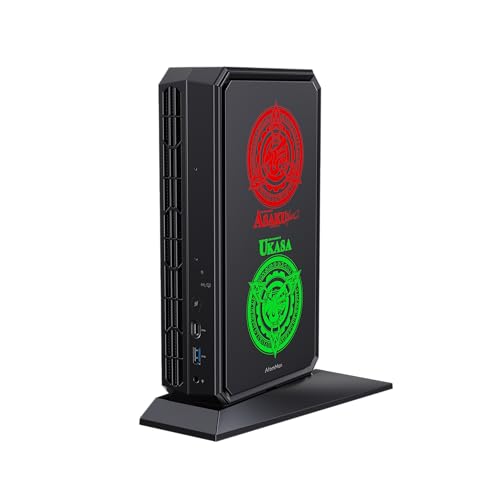
- Best first barebones kit for most beginners: AtomMan G7 Pt Mini PC, Ryzen 9 7945HX, RX 7600M XT — Check on Amazon
- AtomMan G7 Ti Mini PC, Core i9-14900HX, RTX 4070 — Check on Amazon
- MINISFORUM MS-A2 Mini Workstation, Ryzen 9 9955HX, Barebone — Check on Amazon
- MINISFORUM MS-01 Mini Workstation Barebone, Core i9-13900H — Check on Amazon
- MINISFORUM UM890 Pro Mini PC, Ryzen 9 8945HS, Barebone Version — Check on Amazon
See 1 more Amazon option
- GMKtec Nucbox K8 Plus Mini PC, Ryzen 7 8845HS (Without RAM/SSD/OS) — Check on Amazon
Read the full guide ↓
Disclosure: As an Amazon Associate, reviewstook.com earns from qualifying purchases. Links to Amazon on this page are affiliate links; they cost you nothing extra. Listing details such as price and availability change often, so check the current Amazon listing before you buy.
If you have never built a PC before, a “barebones” mini PC can look like a trap: a computer sold deliberately unfinished. It is actually the gentlest first build that exists: no motherboard to mount, no cables to route. The box arrives with the processor, cooling, power supply and wireless already installed and working; what is missing is exactly three things — memory, storage and an operating system — and adding them takes a screwdriver and about ten minutes. At $1,500 the kits are serious machines: two of them carry real gaming graphics chips, two are small workstation platforms with sixteen processor cores and networking faster than most offices, and two are premium compact PCs built for a later graphics upgrade through an external dock.
Here is the one idea this whole guide hangs on: the kit price is never the price you pay. A barebones kit on its own still needs memory, storage and Windows before it can do anything at all, and those parts can cost anything from almost nothing (if you already own them) to a substantial extra sum (if you buy them new during a price spike). Check price on Amazon for the kit itself, then price the parts you still need alongside it. So every pick below is judged on its total cost to complete — kit plus parts plus operating system — and compared against the factory-finished version of the same machine, because that comparison is the only honest test of whether the barebones route saves you money. Sometimes it does, handsomely; sometimes the finished machine is smarter, and this guide says so kit by kit rather than let a headline price flatter a bad deal.
Two more honest notes before the picks. First, the most powerful barebones kit of all — the AtomMan G7 Pro with a laptop RTX 5070 graphics chip — has been listed by its maker above this entire budget for the kit alone, before a single part is added, so it is excluded, and it marks where the category’s ceiling sits today. Second, memory and storage prices have been rising sharply, and some finished mini PCs that were positioned as mid-range options a year or so ago have recently climbed into a much higher tier. That volatility is why the finish-it-yourself route is worth understanding: reuse parts you own, wait out a spike, or pick the exact capacity you need instead of the one a product manager chose.
The Words on the Listing, Translated
Barebones listings are written for people who already know the vocabulary. If that is not you yet, this short glossary covers every term used in the reviews below — keep it open while you shop.
- Barebones / barebone. A partly assembled computer: case, motherboard, processor, cooling, power supply and Wi-Fi are included and working. Memory, storage and the operating system are not. “Without RAM/SSD/OS” in a listing title means exactly the same thing.
- RAM (memory). The machine’s short-term workspace: more RAM means more programs and browser tabs open at once without slowdowns. Treat 16GB as the minimum and 32GB as the comfortable choice for gaming.
- SO-DIMM. The small, laptop-sized shape of memory stick that every mini PC uses. Desktop PCs use longer sticks called DIMMs, and the two do not fit each other’s slots. Every kit in this guide takes DDR5 SO-DIMMs — buy that exact format and generation as a matched pair of two sticks: a single stick roughly halves memory speed, and built-in graphics feel it immediately.
- SSD (storage). Where your files, games and Windows itself live permanently. In these machines it is a stick-shaped drive called an M.2 NVMe SSD — fast, silent, about the size of a stick of gum. Older, slower 2.5-inch drives (shaped like a small notebook) are a different format that none of the picks below uses. 1TB is the sensible starting size.
- Operating system (OS). Windows, or a free alternative such as Linux. No kit here includes one: a Windows licence is a real cost in the maths, while Linux costs nothing but asks more of a beginner.
- Integrated vs discrete graphics. Integrated graphics are built into the processor and share the machine’s RAM — fine for everyday use and light gaming. A discrete graphics chip (GPU) is a separate, much more powerful part with its own dedicated memory (VRAM).
- Soldered. Permanently attached to the board. A soldered processor or graphics chip can never be removed or upgraded — in these kits, only memory and storage can ever change.
- OCuLink and eGPU. OCuLink is a small port for connecting an external graphics dock (an eGPU) later — a full desktop graphics card in its own box, giving a compact PC a second life as a much stronger gaming machine.
- PCIe slot. A slot inside two of the workstation picks that accepts add-in cards — a small low-profile graphics card, an extra network card, a storage controller. An expansion doorway most mini PCs do not have.
- 10GbE / SFP+. Wired networking ten times faster than the standard home connection. It matters for home servers and fast shared storage; otherwise it is harmless extra.
- Quick Sync. An Intel processor feature that speeds up video encoding — why home-media-server builders often choose Intel.
- Total cost to complete. This guide’s yardstick: kit price + the memory you will fit + the SSD you will fit + the operating system, compared against the factory-finished version of the same box.
In this guide
Quick Picks
Short on time, or comparing several options at once? Each row below names a buyer type and the kit that suits it, with a link to the listing.
| Buyer type | Pick | Why it stands out | Link |
|---|---|---|---|
| Best first kit for most beginners | AtomMan G7 Pt (Ryzen 9 7945HX, RX 7600M XT) | Real gaming graphics, and finishing it still leaves money in the budget | Check on Amazon |
| Most powerful, if you own parts | AtomMan G7 Ti (Core i9-14900HX, RTX 4070) | The strongest graphics chip in any barebones mini PC near this budget | Check on Amazon |
| Most processor cores | MINISFORUM MS-A2 (Ryzen 9 9955HX) | 16 cores, very fast networking and an expansion slot — check price on Amazon | Check on Amazon |
| Best for a home server project | MINISFORUM MS-01 (Core i9-13900H) | Fast networking, three storage slots and Quick Sync in about 1.5 litres | Check on Amazon |
| Best small all-rounder | MINISFORUM UM890 Pro (Ryzen 9 8945HS) | Check price on Amazon, with an OCuLink port for a later graphics dock | Check on Amazon |
| Clearest barebones listing | GMKtec Nucbox K8 Plus (Ryzen 7 8845HS) | The title itself says “Without RAM/SSD/OS” — no guessing what is missing | Check on Amazon |
How These Picks Were Chosen
The $1,500 budget was applied to the finished machine, never to the box alone. A kit earned its place only if a realistic completion — the kit, a sensible amount of memory, a 1TB-class SSD and an operating system — could land at or under $1,500 once the kit and the parts you choose are added together. Where a kit only makes sense if you already own parts, its review says that in plain language instead of hiding behind the kit price. Anything whose unfinished price alone ate the whole budget was left out, however impressive: the RTX 5070 G7 Pro, priced above the budget for the kit alone, is the clearest example.
We did not use these machines ourselves. We read the makers’ listings, specification pages and independent reviews, and compared processor and graphics chips, memory and storage ceilings, slot counts, networking and cooling. Two questions mattered more than any benchmark. First, the completion question: what is missing, what does it cost to add, and does the maker’s own finished version — which shows exactly what the factory charges for those parts — make the kit look clever or pointless? Second, the permanence question: because the processor and graphics can never be changed, a kit deserves a premium only if its soldered-in silicon is strong enough to still feel good in five years.
A beginner-specific filter sat on top of both: could a first-timer finish this kit without surprises? That favoured kits whose listings state clearly what is missing, whose memory and storage types are unambiguous, and whose completion maths needs no rare parts. It is also why this guide keeps repeating one instruction: before ordering, write the finished version’s price next to your kit-plus-parts total. That habit protects you better than any single recommendation below.
The 6 Best Barebones Mini PCs for Beginners Under $1,500
AtomMan G7 Ti Mini PC — Core i9-14900HX, RTX 4070
Who it suits: A beginner who wants the most gaming power this category offers — and who already owns DDR5 laptop memory or an M.2 SSD, or can get them cheaply.
The easiest way to picture the G7 Ti is as a gaming laptop with the screen, keyboard and battery taken away and the savings passed on. Inside is a full-strength mobile processor, the Core i9-14900HX with 24 cores (8 fast “performance” cores and 16 smaller “efficiency” cores) running at up to 5.8GHz, alongside an NVIDIA RTX 4070 laptop graphics chip with 8GB of its own memory, running at up to 140W. That wattage matters: some slim laptops run this same chip at a fraction of the power and are dramatically slower, so a “4070” badge alone guarantees nothing. Reviewers who tested the finished version described a machine at home playing games at 1440p — a claim you almost never get to make about a PC this small. The box is a slim upright slab with two fans, two slots for DDR5-5600 SO-DIMM memory (up to 96GB in total), two M.2 slots for SSDs, Wi-Fi 7, and HDMI 2.1 and USB4 connectors for your monitor and accessories. As a barebones kit it arrives with no memory, no SSD and no operating system; everything else is fitted and working.
Now the maths, because with this kit the maths is the whole decision. When PC Gamer reviewed it, the barebones kit sat very close in price to the factory-finished version with 32GB of memory and a 1TB SSD — check price on Amazon for both versions before you decide. The gap between them is narrow, and your memory, SSD and Windows licence all have to fit inside that gap for the kit to be the cheaper route, realistically only if at least one part comes out of a drawer you already own. Finished carefully, a G7 Ti lands right at the top of this budget, under the $1,500 line. What finishing it yourself buys is choice: 64GB of memory instead of 32GB, a bigger or faster SSD, or a free Linux install instead of a Windows licence. What it never buys you is a graphics upgrade — the 4070 is soldered, and when it eventually feels old, the whole machine is old.
- The RTX 4070 laptop chip at up to 140W is the genuine high-power version, with DLSS (NVIDIA’s smart upscaling) for smooth 1440p play.
- A 24-core processor is desktop-replacement power; it will not hold the graphics chip back.
- Two memory slots and two SSD slots give your first build real freedom to spec it your way.
Honest limitation: The saving over the finished version is narrow — check price on Amazon for both versions — so this kit makes financial sense mainly if you are reusing parts — and when you push it hard in its performance mode, the two fans work audibly. That is the standing cost of this much power in a slim box.
Choose it if you want the strongest mini-PC gaming performance available and have memory or storage already on the shelf. Skip it if you would be buying every part new — buy the finished version instead, or look at the G7 Pt below.

AtomMan G7 Pt Mini PC — Ryzen 9 7945HX, RX 7600M XT
Who it suits: A beginner who wants real gaming graphics and still wants money left over after the build is finished — the best balance in this guide.
If the G7 Ti is the ceiling of this category, the G7 Pt is its sweet spot, and for a first build it is the easiest kit here to recommend. Inside is AMD’s Ryzen 9 7945HX — sixteen full-size cores running at up to 5.4GHz, the same class of chip found in large desktop-replacement gaming laptops — paired with a separate Radeon RX 7600M XT graphics chip running at up to 120W with 8GB of its own memory. It was promoted as the first mini PC with AMD Advantage certification, and independent reviewers found it strong at 1080p gaming and able to reach into 1440p with sensible settings. The barebones version arrives with no memory, no storage and no operating system: you add two DDR5 SO-DIMM sticks (up to 96GB), one M.2 SSD — the board even accepts the newest PCIe 5.0 drives — and an operating system. A physical switch flips the processor between a 65W balanced mode and an 85W performance mode; think of it as a noise switch as much as a speed switch, with fan volume following the mode.
The completion maths here is the friendliest of the two gaming kits. Check price on Amazon for both the barebones kit and the finished 32GB/1TB version, because the gap between them decides whether this route saves you anything. Reviewers estimated a modest extra outlay to finish the kit with 32GB of DDR5 memory, a 1TB M.2 drive and a Windows key, which puts a completed G7 Pt comfortably inside the budget, with room to step up to 64GB of memory or a 2TB SSD and still land under $1,500 if your parts prices behave. That breathing room is what a barebones purchase is supposed to buy a beginner. The standing cautions apply: the silicon is soldered forever, the external power supply is a substantial brick, and a 120W graphics chip in a 2.6-litre box means fan noise in long gaming sessions is a fact to plan around, not a fault.
- Sixteen full cores plus a 120W Radeon graphics chip — genuine gaming hardware, not a built-in-graphics compromise.
- Check price on Amazon, with a finished build that should leave upgrade headroom in the budget.
- Support for PCIe 5.0 SSDs and up to 96GB of memory gives the machine a long life.
Honest limitation: The graphics chip’s 8GB of dedicated memory is the first ceiling you will meet in newer games at 1440p, and there is no way past it — the GPU is soldered. AMD also has no DLSS, so its upscaling option is the (perfectly decent) FSR instead.
Choose it if you want the best ratio of gaming power to total finished cost in this guide. Skip it if top-tier ray tracing or DLSS matters to you — that is the G7 Ti’s department.

MINISFORUM MS-A2 Mini Workstation — Ryzen 9 9955HX, Barebone
Who it suits: A beginner whose project is a home server, a virtual-machine playground or CPU-heavy work — and who understands from the start that this is not a gaming machine.
Let us be plain first: the MS-A2 is not a gaming PC, and nothing below will dress it up as one — its built-in Radeon 610M graphics exist to put a picture on a screen. What it offers instead is the most processor you can buy in a barebones mini PC: a Ryzen 9 9955HX with 16 cores and 32 threads (threads are parallel work lanes; more lanes, more simultaneous jobs) running at up to 5.4GHz, inside a 1.78-litre aluminium box. Around that processor sit two 10-gigabit SFP+ network ports and two 2.5-gigabit Ethernet ports, three M.2 storage positions (including support for U.2 server drives), and — the feature that separates it from every appliance-style mini PC — a physical PCIe x16 slot, wired for PCIe 4.0 x8 speed, that accepts a small low-profile graphics card, a faster network card or a storage controller later. That slot turns the MS-A2 from a small PC into a small platform you can grow. The barebones kit ships with no memory, no SSD and no operating system; its two DDR5-5600 SO-DIMM slots accept up to 96GB.
On price, the pattern here is the reverse of the G7 Ti’s. Check price on Amazon for the barebones kit and for Minisforum’s own finished 32GB/1TB version of the same box. The gap between them is generous: finish the kit for less than that gap in parts and you are ahead — far ahead if a memory kit is already on your shelf. The gaming honesty, once more: completed within this budget, this is a processor monster with display-only graphics. Adding a low-profile graphics card to the PCIe slot later is a legitimate step, but it is an extra purchase beyond the completion comparison above, and reviewers noted the slot area has modest airflow, which suits low-power cards rather than gaming flagships. Reviewers also found fan noise audible under load and idle power draw relatively high for the class — the expected cost of a 100W-class processor in a small box. Buy it for cores, ports and the slot, and nothing here rivals it; buy it hoping it is secretly a games machine and you will be disappointed on day one.
- 16 cores and 32 threads — simply the strongest processor in this guide.
- Two 10-gigabit ports, two 2.5-gigabit ports and a PCIe expansion slot: a platform, not an appliance.
- Check price on Amazon for the kit and the finished version — the most completion headroom here.
Honest limitation: Built-in graphics only — gaming beyond light and older titles means buying a low-profile graphics card for the PCIe slot at extra cost, and the slot’s airflow limits how powerful that card can be.
Choose it if your workload is processing power, virtual machines, storage or networking. Skip it if gaming is the point — the two AtomMan kits above are in a different league entirely.

MINISFORUM MS-01 Mini Workstation Barebone — Core i9-13900H
Who it suits: A beginner building a first home server or media library who wants the MS-A2’s formula — fast networking, an expansion slot, triple storage — in Intel form.
The MS-01 is the machine that defined this little workstation category, and the barebones version is still the insider’s way to buy it. The top processor option is Intel’s Core i9-13900H: 14 cores, 20 threads, up to 5.4GHz, with business-grade vPro features and an Iris Xe integrated graphics chip whose Quick Sync video encoding is the specific reason home-media-server builders pick Intel: it converts video for streaming to your TV or phone very efficiently. Around the processor: two 10-gigabit SFP+ ports and two 2.5-gigabit Ethernet ports, three M.2 storage slots (with support for U.2 server drives), a PCIe 4.0 x16 slot (running at x8 speed) for a low-profile add-in card, two DDR5 SO-DIMM slots for up to 96GB of memory, and two USB4 ports — all in a box of about a litre and a half. The barebones listing ships with no memory and no SSD. One decision is locked in at purchase: the processor, with Core i5-12600H and Core i9-12900H versions sitting below the 13900H.
Check price on Amazon for the i9-13900H barebones kit and for the finished i9 machine with 32GB of memory and a 1TB SSD. Treat the finished version, a premium-tier configuration, as the anchor your parts spending has to beat; the gap between the two leaves generous room to do it. One review caveat deserves daylight rather than a footnote: in Notebookcheck’s early testing, its MS-01 review unit suffered unpredictable crashes under sustained heavy load, and the maker planned a replacement unit. That was a launch review sample, not a verdict on current production — but if you plan to run this box as an always-on server, stress-test your own unit thoroughly inside the return window (the walkthrough below explains how). Heat and noise follow the category pattern, and as a games machine it is, like the MS-A2, a built-in-graphics box until you add a low-profile card. Buy it for the network ports and the slot.
- Two 10-gigabit ports, two 2.5-gigabit ports, three storage positions and an expansion slot — server features in a mini footprint.
- The Core i9-13900H’s Quick Sync makes it the transcoding and home-server pick.
- Check price on Amazon for the i9 kit — a generous gap before you match the finished version’s price.
Honest limitation: Built-in Iris Xe graphics only — and early review testing reported instability under sustained load, so verify your own unit under stress before trusting it with always-on duties.
Choose it if your home server is Intel-shaped — media transcoding, Quick Sync, 10-gigabit networking. Skip it if you want the most processor cores per dollar; the MS-A2’s chip is the stronger compute buy.
MINISFORUM UM890 Pro Mini PC, Barebone Version — Ryzen 9 8945HS
Who it suits: A beginner who wants a premium compact PC now and a graphics upgrade later — strong built-in graphics today, an OCuLink port for an external graphics dock tomorrow — as the most accessible kit in this guide; check price on Amazon.
Not every premium barebones kit needs a graphics chip soldered in. The UM890 Pro pairs AMD’s Ryzen 9 8945HS — eight cores running at up to 5.2GHz — with Radeon 780M integrated graphics, the strongest built-in graphics generation in widespread mini-PC use and a credible way to play modern games at 1080p on low-to-medium settings with FSR upscaling helping. The box is a five-inch square whose cooling reviewers praised for staying quiet, and its connections are the best in this guide for future graphics plans: beside two USB4 ports and two 2.5-gigabit Ethernet ports sits a dedicated OCuLink port, the low-delay way to attach an external graphics dock later without giving up a storage slot. The barebones version ships with no memory, no SSD and no operating system. Two DDR5-5600 SO-DIMM slots take up to 96GB of memory and two M.2 PCIe 4.0 slots take your drives. Minisforum lets the chip run at up to 70W — the top of its class — which buys sustained performance at the cost of hearing the fan under load.
Its price story is the most instructive in this guide. Check price on Amazon for the barebones kit and for the finished 32GB/1TB version. The finished version has climbed sharply from its launch-era positioning, a rise attributed to the ongoing memory and storage shortage. That spread is the whole barebones argument in a single product: if you own DDR5 memory and an M.2 drive, the kit plus your parts completes a machine that costs substantially more in factory form — check price on Amazon for the finished version to see the current gap. If you would be buying memory new at shortage prices, expect that gap to narrow sharply — price both routes on the day you buy. Either way, a completed UM890 Pro lands far under this $1,500 ceiling — precisely its role here: the premium platform for a beginner whose remaining budget can later stretch to the OCuLink graphics dock that turns it into a two-stage gaming build.
- Check price on Amazon — the most accessible route into a flagship compact platform in this guide.
- A dedicated OCuLink port plus two USB4 ports: the best external-graphics runway here.
- Radeon 780M graphics play modern games at 1080p low-to-medium with FSR while you save for the dock.
Honest limitation: Built-in graphics are built-in graphics — the 780M is not a 1440p engine, and the external dock that fixes that is a second purchase with its own enclosure cost on top.
Choose it if you like a staged plan: a superb compact PC now, discrete graphics via OCuLink later. Skip it if you want discrete-graphics gaming on day one — the G7 Pt does that for less total money.

GMKtec Nucbox K8 Plus Mini PC (Without RAM/SSD/OS) — Ryzen 7 8845HS
Who it suits: A beginner who wants zero ambiguity about what is in the box — a listing that says “Without RAM/SSD/OS” in its title — plus OCuLink and strong networking.
GMKtec sells the K8 Plus the way barebones ought to be sold: as a dedicated listing whose title spells out exactly what is missing. What you do get is a Ryzen 7 8845HS — eight cores running at up to 5.1GHz — with Radeon 780M built-in graphics, in a dual-fan chassis with an OCuLink port for an external graphics dock, two USB4 ports, HDMI 2.1 and DisplayPort outputs, and two 2.5-gigabit Ethernet ports running on Intel i226V controllers, a detail network-minded buyers specifically look for. Two DDR5 SO-DIMM slots and two M.2 PCIe 4.0 slots wait for your parts — retailer specification pages put the ceilings at up to 128GB of memory and 8TB of storage across the slots — and the chip can run in a 65W performance mode. In layout and intent it is the UM890 Pro’s closest rival: same class of processor and graphics, same external-GPU escape hatch, from the other big mini-PC maker.
With this pick, completion discipline matters more than the kit price, because its finished sibling has swung wildly: the 32GB/1TB version has swung from deep-discount positioning to a much higher premium tier on Amazon. Against a deep discount on the finished machine, almost no combination of barebones kit plus brand-new parts wins; when the finished machine sits at the top of its range, the kit finished with parts from your shelf wins easily. So the rule for this pick is simple: check price on Amazon for the finished listing first, and take the barebones route only when that day’s maths favours it — or when the point was never saving money but choosing your own memory, SSD and operating system, which is a perfectly good reason. Fan noise in the 65W mode and the absence of any built-in discrete graphics chip are the standing caveats, shared with its UM890 Pro rival.
- A dedicated barebones listing that says “Without RAM/SSD/OS” in the title — no variant roulette, no surprises.
- OCuLink, two USB4 ports and dual Intel 2.5-gigabit networking: connectivity that punches above its class.
- Dual-fan cooling and a 65W performance mode for the processor.
Honest limitation: When the finished version is on one of its deep discounts, the barebones route only makes sense with parts already owned — check the finished machine’s price before you commit.
Choose it if you want GMKtec’s take on the OCuLink compact platform and enjoy speccing your own memory and storage. Skip it if a finished K8 Plus happens to be on one of its deep discounts the day you shop.

Comparison Table
| Product | CPU / GPU | Price | Best use | Link |
|---|---|---|---|---|
| AtomMan G7 Ti | i9-14900HX / RTX 4070 Laptop 140W | Check price on Amazon | Maximum mini-PC gaming, 1440p | Check on Amazon |
| AtomMan G7 Pt | Ryzen 9 7945HX / RX 7600M XT 120W | Check price on Amazon | Value discrete-GPU gaming | Check on Amazon |
| MINISFORUM MS-A2 | Ryzen 9 9955HX / Radeon 610M + PCIe slot | Check price on Amazon | CPU compute, homelab, 10G networking | Check on Amazon |
| MINISFORUM MS-01 | i9-13900H / Iris Xe + PCIe slot | Check price on Amazon | Intel homelab, Quick Sync, 10G | Check on Amazon |
| MINISFORUM UM890 Pro | Ryzen 9 8945HS / Radeon 780M, OCuLink | Check price on Amazon | Compact all-rounder, staged eGPU build | Check on Amazon |
| GMKtec Nucbox K8 Plus | Ryzen 7 8845HS / Radeon 780M, OCuLink | Check price on Amazon | Tinkerer’s APU platform, dual Intel LAN | Check on Amazon |
Your First Build, Step by Step
If this is your first encounter with the inside of a computer, here is the whole job in order. Nothing below needs experience — it is closer to changing a lightbulb than to building a desktop PC.
Before the kit arrives, buy its missing three parts. First, memory: a matched pair of DDR5 SO-DIMM sticks — two sticks of the same size and speed, bought as a kit — totalling 32GB for gaming or 16GB as a budget floor. Second, storage: one M.2 NVMe SSD, 1TB unless you know you need more. Third, the operating system: a Windows licence, or a free Linux download if you are feeling adventurous. Add a small Phillips screwdriver, a USB stick of 8GB or more, and access to any working computer, which you will use to prepare the Windows or Linux installer on that stick beforehand.
Assembly takes about ten minutes. Unplug everything and work on a clear table. Remove the screws holding the bottom panel (each maker differs slightly, and each includes a quick guide) and put them somewhere safe. Fit the SSD first: it slides into its M.2 slot at a shallow angle, presses flat, and is held by one small screw. Then the memory: each SO-DIMM stick also goes in at an angle and presses down until the two side clips click. A firm click is normal; nothing should need forcing, and a stick that will not seat is probably backwards — flip it. Replace the panel and screws.
First switch-on is a checklist, not a leap of faith. Connect a monitor, keyboard and the power supply, insert your installer USB stick, and switch on. The machine should show its maker’s logo and then the setup program (the BIOS) or the installer. In the BIOS, confirm two numbers: the memory total should match what you fitted, and your SSD should appear by name. If either is wrong, switch off and re-seat that part — nine times out of ten a memory stick is simply not fully clicked in. Then let the installer run — it copies the OS onto your SSD, restarts, and walks you through creating an account. Once you reach the desktop, connect to Wi-Fi, run the system updates until none remain, and restart once more.
Finish with a stress test while returns are still easy. Because you assembled this machine, spend the first evening proving it: run a free memory-testing tool for a couple of hours, copy a large folder back and forth to exercise the SSD, and play a game while listening to the fans. Everything should be boring — no crashes, no errors, no strange noises. This matters most for the MS-01, given the early review-unit instability in its review, but it is good practice for every kit here: if anything misbehaves, swap the faulty part while you still can.
What the Whole Thing Really Costs
Every barebones listing hopes you will compare its price against finished PCs. Refuse the invitation. The only comparison that matters is kit-plus-parts against the finished version of the same box — and the comparisons in this guide show why. The G7 Ti’s kit sits only narrowly below its finished self: your parts and operating system must fit inside that gap — check price on Amazon for both versions. The G7 Pt leaves more room, with reviewers putting completion at a modest extra outlay. The MS-A2 flips the pattern, with a much wider gap between the kit and the finished version. And the UM890 Pro shows the market’s mood swings: its finished version has climbed sharply while its kit has stayed in a lower tier, so the same kit can be the smart buy one month and the silly buy another.
So build your own little table before you order: kit price, the exact memory and SSD you intend to fit, and the operating-system cost — zero if you run Linux or hold a transferable licence, real money for a fresh Windows key. Add them up, then write the finished listing’s price beside yours. If your total is not clearly lower, or the gap does not buy a meaningfully better specification, the barebones route is a hobby, not a saving — and there is no shame in buying the finished machine. Where barebones genuinely wins is the parts drawer: memory and drives left over from a laptop upgrade are worth their full shop price in this maths.
Finally, the costs that sit outside every pick’s price and outside the completion maths above — budget for them separately. A basic screwdriver set is a small extra to allow for separately. A monitor, keyboard and mouse are assumed yours already; if not, they are a real extra for any PC. An external graphics dock for the UM890 Pro or K8 Plus is a later, optional purchase — enclosure plus graphics card — never counted in this guide’s completion comparison. And a workstation kit run as a server will want a wired network cable to make its fast ports worthwhile — cheap, but still a line on the list.
Upgrades in Plain Terms: What You Can and Cannot Change Later
Can a cheaper kit be “upgraded into” a better one later? In this category the answer splits cleanly in two. You can change: the memory (more of it, up to each kit’s stated ceiling, as long as it stays DDR5 SO-DIMM), the storage (a bigger SSD, or a second one in kits with two slots), and — on the UM890 Pro and K8 Plus — the graphics, by adding an external dock over OCuLink; on the MS-A2 and MS-01, a low-profile card in the PCIe slot. You can never change: the processor, or a fitted discrete graphics chip. Both are soldered to the board. That is why the reviews keep returning to one piece of advice: the processor and graphics are the machine you are actually buying. Memory and storage are the seasoning; the silicon is the meal.
How to Choose a Barebones Mini PC Under $1,500
- Do the completion maths first. Kit + your actual memory + your actual SSD + operating system, against the finished version of the same machine, priced the same day. If the kit wins on neither price nor specification, the finished PC is the buy.
- Buy the soldered silicon, not the slots. Processor and graphics can never be changed in these machines; memory and storage are the only upgrades that exist, so today’s chip is the machine’s permanent ceiling.
- Match the kit to your graphics plan. A discrete GPU built in (G7 Ti, G7 Pt) for gaming now; OCuLink (UM890 Pro, K8 Plus) for a staged external-graphics build; a PCIe slot (MS-A2, MS-01) for a low-profile card or network/storage add-in in a workstation.
- Respect the VRAM ceiling. Both gaming kits carry 8GB of graphics memory. That is a good 1080p and workable 1440p budget with upscaling; it is not a 4K gaming specification, and no memory upgrade changes it.
- Check the memory type before reusing parts. Every kit here takes DDR5 SO-DIMMs — laptop-style sticks, not desktop DIMMs and not DDR4. Parts-drawer memory only counts if it is the right shape and generation.
- Count the SSD slots, not just the headline. Two slots (both AtomMan kits, UM890 Pro, K8 Plus) let you add a second drive later; the workstation kits’ three positions plus U.2 support are a different storage league entirely.
- Decide the operating system before checkout. No kit here includes one. Linux costs nothing; a Windows licence is a real line item, and forgetting it is the classic way a “saving” evaporates.
- Price everything on the same day. Memory and SSD prices move fast enough that last month’s comparison is fiction — the barebones-versus-finished verdict expires within days, so price everything together.
Common Buying Mistakes
- Comparing a barebones kit’s price against finished PCs and calling the difference a saving, without adding memory, storage and an operating-system licence.
- Buying the G7 Ti kit with all-new parts when its finished version costs only a little more — check price on Amazon for both versions, because that kit is for people reusing parts.
- Assuming a PCIe slot in a mini workstation means full-size gaming-graphics upgrades; the slot is x8-speed, low-profile and modestly cooled.
- Expecting the MS-A2 or MS-01 to play games on their built-in graphics — the 610M and Iris Xe are display engines, not gaming GPUs.
- Reaching for the RTX 5070 AtomMan G7 Pro and discovering its barebones kit alone is priced above this budget at the maker’s store, before a single part is added.
- Fitting a single memory stick and halving memory speed — built-in graphics feel this immediately. Always buy SO-DIMMs as a matched pair.
- Assuming the DDR4 memory in your drawer will fit. Every kit here accepts DDR5 SO-DIMM only.
- Sealing a 120–140W machine inside a cabinet and blaming the fans; small chassis need open air the way desktops need a power supply.
- Skipping the stress test. You did the assembly, so prove it works — memory and storage tests in the first days, while every return window is still open.
Final Recommendation
- Most beginners: AtomMan G7 Pt — real gaming graphics, sixteen cores, and a completion that should land comfortably inside the budget without needing parts you already own.
- Maximum performance, parts on hand: AtomMan G7 Ti.
- Home server and CPU-heavy projects: MINISFORUM MS-A2 (AMD cores) or MS-01 (Intel, Quick Sync, vPro).
- Staged build, compact and quiet: MINISFORUM UM890 Pro barebone, with an OCuLink graphics dock as stage two.
- Beginners who want the clearest listing: GMKtec Nucbox K8 Plus.
For a first build, our top two are the AtomMan G7 Pt, because it is the one gaming kit whose completion maths works even when every part is bought new, and the MINISFORUM MS-A2, because a sixteen-core platform with dual 10-gigabit networking and an expansion slot — check price on Amazon — is the strongest barebones value in the category — provided you understand it is a workstation, not a games console. The G7 Ti is the performance king, and the right buy precisely when its thin completion gap does not apply because your parts are already paid for. Whichever kit you choose, run the finished-versus-barebones comparison on the day you order, fit memory as a matched pair, and stress-test inside the return window. If the whole idea still feels like a step too far, there is no failure in starting with a finished machine instead — see Best Prebuilt Gaming PC Under $1500 — and readers speccing a step down should also see Best Barebones Mini PC Under $1200.
Frequently Asked Questions
What exactly does a barebones mini PC include — and what is missing?
The case, motherboard, processor (and graphics chip where fitted), cooling, power supply and wireless card are included and working. Missing on every pick here: memory, storage and an operating system. Fit DDR5 SO-DIMM memory and an M.2 NVMe SSD — a ten-minute job with a screwdriver — install your OS, and the machine is complete. No soldering, no cables to connect, nothing else to buy.
I have never opened a computer. Is this really a beginner job?
Yes — it is the gentlest first build that exists: two stick-shaped parts into obvious slots, then install the software, following the walkthrough above. The two habits that protect beginners are buying the right memory format (DDR5 SO-DIMM, as a matched pair) and confirming the BIOS can see your memory and SSD before installing anything.
How much does it really cost to complete a barebones mini PC under $1,500?
It depends on the kit, which is why every review here anchors to the finished version of the same machine. Reviewers put the G7 Pt’s finishing parts at a modest extra outlay over its kit — check price on Amazon for the current kit price; the G7 Ti’s finished twin sits only narrowly above its kit, which caps what finishing it should sensibly cost; the workstation kits leave much more room. Your real number is whatever the memory, SSD and OS licence in your cart cost on the day you order — prices move too fast for any guide to quote it honestly.
Can a barebones mini PC really play games at 1440p?
Two can, with managed expectations. The G7 Ti’s 140W RTX 4070 laptop chip is a true 1440p part with DLSS, and reviewers assessed the machine at that resolution. The G7 Pt’s RX 7600M XT is a high-settings 1080p card that reaches into 1440p with FSR and adjusted settings. Both are capped by their 8GB of graphics memory in newer titles. The compact APU kits are 1080p machines on built-in graphics, and the workstation pair do not game meaningfully until a card is added.
Why is there no RTX 5070 barebones kit in this guide?
Price, not performance. The AtomMan G7 Pro — the RTX 5070 sibling of the G7 Ti — has been listed by Minisforum above this budget for the kit alone: the entire budget gone before memory, storage or an operating system. When a 5070-class kit falls under $1,500 it will belong here; today the verified ceiling at this budget is the RTX 4070 and RX 7600M XT.
Is a barebones kit still worth it during the memory price spike?
Sometimes — which is precisely why the maths has to be done per product. Rising memory and storage prices push finished machines up too (one pick’s finished version has climbed sharply), so a kit finished with parts you already own can save meaningfully. Buy those parts new at spike prices, though, and the factory version — built from bulk-bought components — can undercut your self-build. Compare both routes, same day, every time.
Can I upgrade the processor or graphics in these machines later?
No. In every mini PC in this guide the processor is soldered to the board, and where a discrete graphics chip is fitted, it is soldered too. Your upgrade paths are memory (up to the stated ceiling), storage (extra M.2 slots where fitted), an external graphics dock over OCuLink on the UM890 Pro and K8 Plus, or a low-profile card in the PCIe slot of the MS-A2 and MS-01. Choose silicon you will still want in four years, because it cannot be swapped later.
How loud will a high-power barebones mini PC be?
Audible under gaming or rendering load — that is physics, not a defect: 100W-plus of silicon in under three litres needs moving air, and reviewers noted fan noise from both AtomMan kits and the MS-A2 at full tilt. Balanced modes are far quieter and cost little for everyday work, the compact APU kits are the quietest of the six, and placement matters — open desk air sounds very different from a sealed cabinet.
- Best Barebones Mini PC Under $1500
- Best Barebones Mini PC Under $1200
- Best Barebones Mini PC Under $2500
- Best Barebones Mini PC For 1440p Gaming Under $1500
- Best Barebones Mini PC For Small Spaces Under $1500
- Best Barebones Mini PC For Streaming Under $1500
- Best Mini PC Under $1500
- Best Mini Gaming PC Under $1500
- Best Small Form Factor Gaming PC Under $1500
- Best Mini PC For Beginners Under $1500


