Where to buy
Check the latest price, availability and delivery on Amazon. Orders are placed on Amazon. We may earn a commission from qualifying purchases.
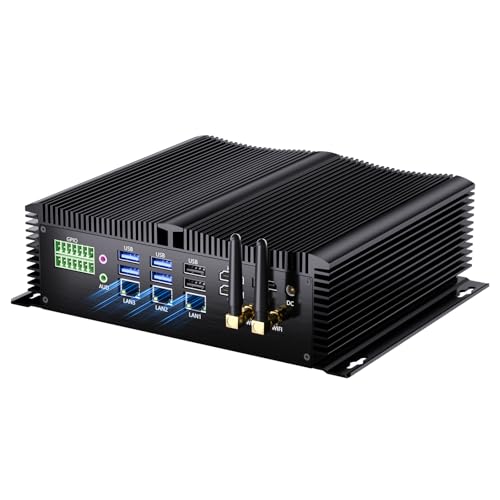
- Strongest graphics in a fanless case: Kinupute Fanless Mini PC, Core i7-1260P, 16GB DDR5, 256GB NVMe, 3x 2.5G LAN — Check on Amazon
- Best complete silent desktop for a 1440p screen: MeLE Quieter4C N150 Fanless Mini PC, 16GB RAM, 512GB SSD, Windows 11 Pro — Check on Amazon
See 4 more Amazon options
- ZOTAC ZBOX CI337 Nano Fanless Mini PC, Intel N100 (Barebones) — Check on Amazon
- MeLE Quieter4C N100 Fanless Mini PC, 8GB RAM, 128GB, Windows 11 Pro — Check on Amazon
- KINGDEL NC3000 Fanless Industrial PC, Core i7 8th Gen, 16GB RAM, 512GB NVMe SSD — Check on Amazon
- Protectli Vault Pro VP2430, Fanless 4-Port 2.5GbE Mini PC (Barebones) — Check on Amazon
Read the full guide ↓
Disclosure: As an Amazon Associate, reviewstook.com earns from qualifying purchases. Links to Amazon on this page are affiliate links; they cost you nothing extra. Listing details such as price and availability change often, so check the current Amazon listing before you buy.
This keyword contains two separate promises, and only one of them can be kept. The first promise is a 1440p display: a sharp 2560×1440 desktop, crisp text, video that fills the panel properly. Every machine in this guide can do that — they carry Intel integrated graphics with display outputs rated well beyond 1440p, and showing a 1440p desktop asks almost nothing of a modern chip. The second promise is 1440p gaming: a game world actually drawn, pixel by pixel, at 2560×1440 by the machine on your desk. No fanless mini PC can do that for modern games, at $1,500 or any other price, because rendering a game at native 1440p takes a discrete graphics card, and a graphics card makes more heat than a fanless case can shed. Any guide that blurs those two promises into one is selling you the blur.
So this guide grades the honest version of the setup, which is a genuinely good one: the game renders at 1080p — or 720p for heavier titles — and is scaled up to the 1440p panel, while everything that is not a rendered game world (the desktop, text, streamed video, and games rendered by a cloud service and merely decoded locally) runs at the panel’s full native sharpness. Picks are ranked by how well they support exactly that split: the strength of the integrated graphics doing the rendering, the memory feeding it, the display outputs connecting it, and the honesty of the listing describing it. Readers who want native 1440p rendering itself should start with Best 1440p Gaming PC Under $1500 and accept the fan that comes with it; readers whose priority is a silent room with a sharp screen should read on.
The budget needs the same honesty. There is no $1,500 tier of fanless mini PC: even the most expensive verified configuration in this category sits well below that budget as a premium-tier machine, and most of the market sits in the budget to mid-range tiers below it. That ceiling is set by cooling physics — a small finned case sheds the heat of a 6 to 15 watt processor indefinitely, which is why this category runs Intel N-series chips and throttled U-series silicon rather than anything faster. Most of the $1,500 therefore stays unspent, and the ranking below spends none of it pretending otherwise: extra money in this category buys memory, ports, metal and support, and the reviews say which of those, if any, helps a 1440p screen.
In this guide
Quick Picks
Short on time, or comparing several options at once? Each row below names a buyer type and the product that suits it, with a link to the listing.
| Buyer type | Pick | Why it stands out | Link |
|---|---|---|---|
| Most rendering headroom | Kinupute Fanless Mini PC, Core i7-1260P | Iris Xe graphics and 16GB of DDR5 — the strongest integrated renderer a passive case holds, with triple 4K outputs | Check on Amazon |
| Best complete 1440p desk | MeLE Quieter4C N150, 16GB/512GB | 16GB feeding the integrated graphics, triple 4K outputs and a finished Windows desktop in a sealed slab | Check on Amazon |
| Best display plumbing, DIY | ZOTAC ZBOX CI337 Nano | DisplayPort 1.4 alongside two HDMI ports, and you choose the 16GB of DDR5 the graphics will share | Check on Amazon |
| Sharp screen, small spend | MeLE Quieter4C N100, 8GB/128GB | A complete silent PC whose video decode fills a 1440p panel properly, at the category’s natural price | Check on Amazon |
| Industrial corner, legacy ports | KINGDEL NC3000 Fanless Industrial PC, Core i7 | Metal case, serial ports and an HDMI output for the panel — its UHD 620 is the set’s weakest renderer | Check on Amazon |
| The network beside the screen | Protectli Vault Pro VP2430 | Not a gaming machine at all: a supported firewall appliance that can serve media to the 1440p setup | Check on Amazon |
How These Picks Were Chosen
The set itself comes from the base guide to this category, Best Fanless Mini PC Under $1500, and its first filter was the word “fanless” applied strictly: a machine qualified only if the manufacturer documents it as passively cooled — MeLE describes the Quieter line as fanless by design, ZOTAC sells the CI337 explicitly as a fanless, passively cooled system, Protectli’s datasheet calls the VP2430 “Fanless and Silent”, and the Kinupute and KINGDEL listings describe finned all-metal fanless enclosures. Mini PCs that are merely quiet, with a small fan running slowly, were excluded however good they are, because a fan is a moving part that ingests dust and eventually wears — a different product from the one this keyword asks for. Industrial listings change configuration under a single ASIN, so each review names the configuration it describes, and checking the live listing with the exact configuration selected — and checking the price on Amazon there — matters more here than in most categories.
On top of that verified set, this variant applies a second filter specific to the 1440p question. Each pick was graded on the four things that decide the honest 1440p setup. First, the display outputs the maker documents — HDMI, DisplayPort and USB-C connections rated for resolutions beyond 1440p, so the panel runs at native sharpness for desktop and video. Second, the integrated graphics doing the actual rendering, judged by class: Intel’s Iris Xe is a step above the UHD graphics in the N-series chips, which are a step above the older UHD 620. Third, memory, because integrated graphics have no memory of their own and borrow from the system pool — 16GB shared is a workable gaming configuration, 8GB is a constraint the reviews grade openly. Fourth, thermal honesty: a gaming session is a sustained load, and a passive case settles sustained loads to what its fins can shed, so burst specifications were discounted accordingly. No pick was credited with an upscaling brand its hardware does not have, and no internal-resolution figure is claimed for any upscaler in this guide — the practical route on Intel integrated graphics is the render-scaling setting the game itself offers.
Rendering Is Not Displaying: The Distinction This Guide Runs On
A monitor does not care who drew the picture. When a 1440p panel receives a 1440p signal, it lights every pixel it has, and the machine sending that signal may have produced it in very different ways. A desktop, a document and a video stream are cheap to produce at full 2560×1440: the desktop is mostly still, text is drawn as shapes, and video arrives pre-rendered, needing only to be decoded — a job these Intel chips do in dedicated hardware, which is why an inexpensive fanless box plays 4K video without effort. A modern game is the opposite: every frame is a new 3D scene computed in real time, and computing it at 2560×1440 instead of 1920×1080 means roughly 78 percent more pixels of work per frame. That multiplication is where integrated graphics in a 6 to 15 watt envelope run out — not at displaying 1440p, but at rendering it.
The working solution is render scaling. The game draws its world at 1080p, or at 720p for the heaviest titles, and that finished picture is then scaled up to fill the 1440p panel. The result is visibly softer than native rendering — fine detail is reconstructed rather than real — and visibly better than running the same game on a 1080p screen, because the panel’s extra pixels still serve the desktop, the interface text and everything outside the game window. This is the setup this entire guide is graded for, and it is also why the monitor pairing advice is two-sided. A 1440p monitor is a genuine upgrade for these machines: more workspace, sharper text, proper video. What it cannot do is make the games themselves render at 1440p, and buyers whose games come first should put the monitor money toward a fanned machine instead — the smaller-budget version of this same question is worked through at Best Fanless Mini PC For 1440p Gaming Under $700.
One route does put a genuinely 1440p-presented game on the screen: cloud gaming. When a service renders the game on its own servers and streams the picture back, the fanless box only decodes video — the workload it is best at — and the stream arrives at the panel’s resolution rather than at a locally rendered one. The quality then depends on the service tier and the connection rather than on anything in this guide, and input lag joins the bill, but for a silent room it is the only way the second promise in this keyword gets kept. The picks below are therefore also graded, quietly, on the decode-and-display side: modern display outputs, hardware video decode, and a wired network connection where the listing provides one.
The 6 Best Fanless Mini PCs for a 1440p Setup Under $1,500
Kinupute Fanless Mini PC — Core i7-1260P, 16GB DDR5, 256GB NVMe, 3x 2.5G LAN
Who it suits: The buyer who wants the most game-rendering ability silence can hold — lighter titles rendered at 1080p and scaled to a 1440p panel, with the strongest desktop and decode performance in the category wrapped around them.
Ranked first because this angle, more than any other, rewards graphics — and the Kinupute’s Intel Iris Xe is the only genuinely stronger graphics hardware in this set. The machine pairs a 12-core, 16-thread Core i7-1260P with 16GB of DDR5-5600 across two slots (expandable to 64GB), a 256GB NVMe SSD, three 2.5-gigabit Ethernet ports, triple 4K display support and Windows 11 Pro, inside a fanless industrial enclosure built for continuous running. Check the price on Amazon for this one — it is the premium pick here and, for this keyword, the most relevant one: integrated graphics borrow their memory from the system pool, so the DDR5 specification and the 16GB capacity are not spec-sheet decoration — they are part of the rendering hardware. Of the six machines, this is the one whose 1080p rendering holds up best once the picture is stretched across a 1440p panel, and the one whose desktop at native 1440p feels entirely unhurried.
The limitation is the category’s, concentrated: the 1260P is a 28-watt-class processor in a case that can shed far less than that indefinitely. A gaming session is precisely the load shape that exposes this — not a burst, but an hour of continuous work — so rendering speeds settle toward what the fins allow and stay there, and the gap between this machine and the N-series picks narrows over a long session even though it never closes. The 256GB SSD is small for a game library at any price, and support runs through an industrial seller rather than a domestic service network. None of that dethrones it for this use; it simply defines the purchase. You are buying the ceiling of fanless rendering, with the ceiling’s physics included.
- Iris Xe graphics — a clear class above the UHD graphics in every other pick here.
- 16GB of DDR5 in two slots, up to 64GB: the widest memory feeding an integrated GPU in this set.
- Triple 4K display outputs and three 2.5GbE ports — a 1440p desk plus serious networking.
Honest limitation: Sustained gaming loads throttle toward what the passive case can shed, and 256GB of storage is tight.
Choose it if you want the best 1080p-rendered, 1440p-displayed gaming a silent machine can do, plus real multi-core capability for everything else. Skip it if your sessions are long all-core grinds or your game library is large — a fanned machine in this tier does both better, loudly.

MeLE Quieter4C N150 — 16GB RAM, 512GB SSD, Windows 11 Pro
Who it suits: The mainstream buyer of this keyword: a bedroom, study or living-room desk where the machine must be inaudible, the screen is 1440p, and the gaming is indie, retro, esports and cloud rather than AAA.
If the Kinupute is the ceiling, this is the finished product. The Quieter4C is a slim metal slab — about 5.2 by 3.2 by 0.7 inches, sealed, with no vents to clog — that mounts behind the monitor it serves and disappears. Inside are Intel’s N150 (four cores, up to 3.6GHz), 16GB of memory and a 512GB SSD, with two HDMI ports and a full-function USB-C driving up to three 4K displays between them, and Windows 11 Pro installed and licensed through MeLE’s Microsoft OEM partnership. Check the price on Amazon for the current listing. For the 1440p setup specifically, the configuration is the point: 16GB is the memory capacity that makes shared-memory graphics workable rather than cramped, the outputs run the panel at native resolution for everything outside the game window, and the hardware video decode handles streamed and cloud-delivered pictures without waking a fan that does not exist.
The honesty is about the chip. An N150 renders games the way an N150 does — older titles, indie games and esports at modest settings, rendered at 1080p or below and scaled to the panel — and the premium over cheaper N-series boxes buys the build, the configuration, the display plumbing and the maker’s support, not a faster renderer. On this build the memory is soldered LPDDR5, so the 16GB is permanent; storage can grow through the M.2 slot. Buy it as the complete silent desk it is, with the rendering ceiling understood, and it is the easiest recommendation in this guide.
- 16GB and 512GB in a sealed, mountable slab — the complete 1440p desk in one purchase.
- Two HDMI ports plus full-function USB-C: triple 4K display support for the panel and spares.
- Properly licensed Windows 11 Pro and a maker that publishes manuals and answers email.
Honest limitation: The N150’s integrated graphics set a low rendering ceiling, and the soldered memory means the configuration you buy is the configuration you keep.
Choose it if silence in a living space and a sharp 1440p desktop matter more than rendered resolution. Skip it if your games are modern and demanding — no configuration of this machine changes that answer.

ZOTAC ZBOX CI337 Nano — Intel N100 Barebones
Who it suits: Builders who like choosing their own memory and storage — and who notice that, for integrated graphics, choosing the memory is choosing part of the graphics hardware.
The CI337 earns third place on its outputs and its options. ZOTAC’s long-running fanless nano line gives this kit two HDMI 2.0 ports, a DisplayPort 1.4 and DisplayPort over USB-C — the DisplayPort connection is the one to pair with a 1440p monitor — plus VESA mounting for a behind-panel install. The board takes a DDR5-4800 SO-DIMM up to 16GB and an M.2 SSD, both yours to specify, and you can check the price on Amazon for the kit itself. Fitted with the full 16GB, a completed CI337 gives its N100 the memory headroom the integrated graphics need to share without strangling the game — the one route in this guide to a 16GB N-series machine at a builder’s kit tier rather than as a finished product.
Barebones arithmetic is the review, so do it before ordering. The box contains no memory, no storage and no operating system: a 16GB DDR5 SO-DIMM, a modest NVMe drive and a retail Windows licence all still have to be added before it can be compared with the complete MeLE N100 system below, which arrives assembled and licensed as one product. The kit wins with parts already on the shelf, with Linux costing the licence nothing, or when ZOTAC’s board and its DisplayPort output are specifically what you want. And the standard fanless warning applies with gaming force: the case is the cooler, so mount it with air around it, not sealed against the back of a hot panel in a closed cabinet.
- DisplayPort 1.4 alongside HDMI and USB-C display output — the best 1440p plumbing in the set.
- Your choice of DDR5 up to 16GB: the memory decision integrated graphics actually feel.
- Established brand, VESA-ready, and the lowest entry point here, in the budget tier.
Honest limitation: Nothing is included — no RAM, no SSD, no OS — so the parts still to buy are part of the purchase, not an afterthought.
Choose it if you have parts on hand, run Linux, or want the DisplayPort connection and the 16GB configuration at kit prices. Skip it if every component would be bought new — the complete MeLE systems are the simpler purchase.

MeLE Quieter4C N100 — 8GB RAM, 128GB, Windows 11 Pro
Who it suits: Buyers whose 1440p screen mostly shows desktop, documents and video — with light games rendered modestly — and who want that in complete, silent form at the category’s natural price.
This is the original Quieter4C configuration: the same slim, sealed, fanless MeLE case as the N150 model above, an Intel N100, 8GB of RAM and 128GB of storage with an M.2 slot and microSD for expansion, triple-display output and Windows 11 Pro installed. Check the price on Amazon — it sits in the category’s budget tier: a complete, supported, silent PC without the parts bill a barebones kit still carries. On a 1440p panel its strengths are real — the desktop is native-sharp, and the N100’s hardware video decode handles 4K playback, let alone 1440p, without effort. As a media and streaming front-end behind a good screen, it is the value pick of this guide.
For gaming, the configuration is the constraint, and it should be stated as one: 8GB of memory is shared between Windows, the game and the integrated graphics borrowing from the same pool, which caps rendered gaming at the lightest end — retro, indie and the least demanding esports, rendered at 720p to 1080p and scaled up. The base storage is eMMC-class, slower than the NVMe drives in the dearer picks, though the M.2 slot repairs that later; the memory cannot be repaired at all, because it is not user-upgradeable on these builds. Networking is a single gigabit port. None of this is hidden cost — it is the honest shape of the category’s sweet spot, bought knowingly.
- A complete, licensed, silent Windows PC at the category’s natural price point.
- Hardware video decode that fills a 1440p or 4K panel with video effortlessly.
- M.2 slot and microSD soften the small base storage; the sealed case ingests no dust.
Honest limitation: The fixed 8GB shared between system and graphics is the tightest rendering budget in this guide, and base storage is eMMC-class.
Choose it if the screen’s work is desktop and video with light gaming at the edges. Skip it if gaming is a daily habit — the 16GB N150 build above is the same machine with the constraint removed, and it cannot be upgraded into later.

KINGDEL NC3000 Fanless Industrial PC — Core i7-8565U, 16GB RAM, 512GB NVMe
Who it suits: Buyers whose silent machine works in the physical world — a workshop bench, kiosk or point-of-sale corner — where a 1440p panel is the display and the games, if any, are incidental.
The NC3000 is the industrial establishment: a full metal fanless case, two COM RS232 serial ports, four USB 3.0 ports, Wi-Fi and Bluetooth, and display outputs split between HDMI and VGA. The configuration documented here — 16GB of DDR4 with a 512GB NVMe SSD — is listed on Amazon — check the price on Amazon — and the same listing family carries higher configurations including 32GB and 1TB builds, so confirm exactly which configuration is selected before comparing anything. For this keyword, connect the 1440p panel to the HDMI output: the listing documents 4K through that port, which covers a 1440p desktop comfortably, while the VGA socket is analogue legacy for old equipment, not for a modern panel. The metal case is the heatsink and the armour at once, built to run unattended for years in unkind rooms.
The grading for gaming is the plainest in this guide. The processor is a Core i7-8565U — a four-core chip from 2018 whose badge flatters it — and its Intel UHD 620 graphics are, alongside the oldest hardware here, the weakest renderer in the set: desktop and video at 1440p are fine, rendered gaming belongs to the oldest and lightest titles, at the lowest render resolutions in this guide. What the money buys is not rendering at all; it is the case, the serial ports, the configuration range and an industrial seller’s 24/7 intent. For the buyer who needs those, this is a legitimate machine with a sharp screen attached. For the buyer who only wants the screen sharp and the games smooth, the picks above it spend the same money better.
- Full metal fanless case built for continuous, unattended operation in harsh spots.
- HDMI output documented for 4K — a 1440p desktop is well within it.
- Two COM RS232 ports and a configuration range up to 32GB/1TB on the listing family.
Honest limitation: UHD 620 graphics are the weakest renderer here, and the 2018-era i7 badge promises more than the chip delivers.
Choose it if serial ports, metal and 24/7 duty are the requirement and the 1440p panel is for work. Skip it if gaming matters — every pick above it renders better.

Protectli Vault Pro VP2430 — Intel N150, 4x 2.5GbE, Barebones
Who it suits: Network-minded buyers building a silent room properly: this is the firewall and media-serving appliance that sits beside a 1440p setup — included in this set, and graded honestly as the one pick that is not a gaming machine in any sense.
Protectli sells the wrapper, not the silicon. The VP2430 is a fanless, finned-aluminium appliance around the same Intel N150 found in far cheaper machines, with four Intel i226-V 2.5-gigabit Ethernet ports, a DDR5 SO-DIMM slot supporting up to 64GB, 32GB of onboard eMMC plus an M.2 slot, a serial console connection, and the option of coreboot open-source firmware — wrapped in US-based assembly and support, published datasheets and a maintained knowledge base. Check the price on Amazon for the barebones unit and for configured units of the line, and it is also worth checking Protectli’s own store before ordering either way. Its honest role in a 1440p household is upstream of the screen: routing the connection a cloud-gaming stream arrives on, and serving a local media library to the machine that does face the panel.
As a pick for this keyword it must be graded last, and the review should not soften why. The Amazon unit is a barebones appliance with no operating system installed; it is not sold as a desktop, renders nothing worth discussing, and paying its support premium to play games would be the single worst use of money in this guide. Bought for its actual job — the silent, always-on heart of a home network, backed by a company that answers tickets — it is arguably the most defensible purchase here. The distinction is the whole review: the top of the fanless market charges for support, firmware and warranty, and that money is well spent only by buyers who need the wrapper.
- Four Intel 2.5GbE ports and a coreboot option — the network professional’s specification.
- US-based support, real datasheets and a knowledge base that is actually maintained.
- DDR5 slot to 64GB: headroom for firewall and virtualisation duties for years.
Honest limitation: A barebones network appliance with no OS — as a gaming or desktop purchase for a 1440p screen, it is simply the wrong tool.
Choose it if it will run the network and serve the media in a silent setup, with a company standing behind it. Skip it if the machine itself must face the monitor and the games — that is every other pick in this guide.

The Monitor Half of the Purchase
Because the machine half of this setup costs so much less than the keyword’s budget, the monitor is where the real decision sits — and it deserves the same honesty as the computers. A 1440p panel gives these machines more than any upgrade inside them could: a desktop with room for two documents side by side, text rendered at a sharpness that makes long reading days easier, and video shown at the resolution it increasingly arrives in. For the work a fanless PC is actually for — documents, browsing, media, light creative tasks — that is a transformation no processor swap in this category can match, because the processors are all within reach of each other while the screen is the thing you look at for every one of those hours. Buyers pairing a panel with the smaller end of this category will find the same logic worked through at Best Fanless Mini PC For 1440p Gaming Under $1200.
What the panel cannot do bears repeating in purchasing language: it cannot raise the resolution a game is rendered at, it cannot add a graphics card’s worth of performance, and a higher-refresh panel cannot manufacture frames the integrated graphics did not draw. A buyer who spends the leftover budget on an expensive gaming monitor — high refresh, adaptive sync, the full specification — is buying capabilities whose other half lives in a machine this category does not contain. The sensible pairing is a good general-purpose 1440p display: accurate enough for photo work, comfortable for text, connected digitally. Spend on panel quality you will see in documents and video, not on gaming specifications whose partner hardware is absent.
Connection discipline completes the pairing. Run the panel on the digital output the maker documents — DisplayPort where the machine offers it, HDMI otherwise — at the panel’s native resolution, set explicitly in the operating system rather than assumed. Keep the analogue socket for the legacy equipment it belongs to. And site the machine for air rather than for invisibility: the neatest installation in this category, a fanless slab sealed behind a warm panel in a closed cabinet, is also the one most likely to throttle, because the case is the heatsink and the space behind a working display is already heated. Behind the monitor on its VESA mount with open air around it is the install these machines were designed for; entombed is not.
Comparison Table
| Product | Graphics | Best use on a 1440p screen | Link |
|---|---|---|---|
| Kinupute Fanless Mini PC, i7-1260P | Intel Iris Xe | The strongest 1080p rendering scaled to the panel, plus triple 4K outputs | Check on Amazon |
| MeLE Quieter4C N150, 16GB/512GB | Intel integrated (N150) | The complete silent desk: native 1440p desktop, light games rendered below it | Check on Amazon |
| ZOTAC ZBOX CI337 Nano | Intel integrated (N100) | DisplayPort 1.4 to the panel and 16GB of DDR5 you specify yourself | Check on Amazon |
| MeLE Quieter4C N100, 8GB/128GB | Intel integrated (N100) | Video and desktop at full panel sharpness; the lightest rendered gaming | Check on Amazon |
| KINGDEL NC3000 Fanless Industrial PC | Intel UHD 620 | Industrial duty with a 1440p work display on the HDMI output | Check on Amazon |
| Protectli Vault Pro VP2430 | Intel integrated (N150) | Not a display machine: firewall and media server beside the setup | Check on Amazon |
How to Choose for a 1440p Screen
- Decide the render target before the machine. On any fanless pick, the game renders at 1080p at best and 720p for heavier titles, then scales to the panel. If that sentence disappoints you, the fanless category is the wrong purchase — the disappointment is cheaper now than after delivery.
- Grade the graphics by class, not by clock speed. In this set the order is Iris Xe, then the current N-series integrated graphics, then the older UHD 620. That order, not the processor badge, predicts how the rendered picture holds up stretched across 1440p.
- Treat memory as graphics memory. Integrated graphics borrow from the system pool, so 16GB is the workable configuration and 8GB is a real constraint shared with Windows and the game. Where memory is soldered, the configuration decision is permanent — make it at checkout, not later.
- Check the outputs against the panel. The monitor should connect digitally, at its native resolution: HDMI or DisplayPort as the maker documents, with DisplayPort the preferred pairing where offered. An analogue VGA socket is for legacy equipment, never for the 1440p screen.
- Plan for session length, not peak speed. A passive case settles a sustained load to what its fins can shed, and a gaming session is a sustained load. Burst specifications flatter every machine here; judge by processor and graphics class instead.
- Count everything a barebone still needs. Memory, storage and an operating system are all still to add before it can be compared against the complete systems. A barebone wins with parts on hand or a free OS; bought entirely new, a complete system is usually the simpler purchase.
- Wire the connection. For cloud gaming and streamed video — the routes where this setup genuinely shines — a wired Ethernet connection beats Wi-Fi, and every pick here offers at least one wired port. Use it.
- Give the case air. The enclosure is the heatsink. Open air on the finned surfaces, out of sealed cabinets and away from the hot back of the panel it hides behind; a throttled fanless PC is usually a sited fanless PC.
- Keep the change. The verified top of this category sits well below the budget, in the premium tier, and the sweet spots sit in the budget to mid-range tiers. The rest of the $1,500 buys a better 1440p monitor, a mount, or nothing — all better purchases than a markup on the word “premium”.
Common Buying Mistakes
- Reading “supports 4K displays” as “plays games at 4K” — display output resolution and rendered game resolution are different specifications, and listings benefit when buyers confuse them.
- Buying a 1440p monitor expecting it to raise the games’ rendering resolution with it. The panel upgrades the desktop, text and video; the game still renders where the graphics can manage.
- Paying toward $1,500 for a “premium” fanless tier that does not exist — the category’s verified ceiling sits well below that budget.
- Trusting a Core i7 badge without asking which generation: the 2018 chip in this set renders below the modern N-series machines it out-badges.
- Choosing the 8GB soldered configuration for gaming and discovering the shared-memory ceiling cannot be upgraded away.
- Connecting the 1440p panel through a VGA socket or an ancient cable and blaming the machine for the soft picture.
- Ordering a barebones kit without counting the memory, storage and OS it still needs before it is a working machine.
- Sealing the machine behind the monitor in a closed cabinet — the neatest install and the fastest route to throttling.
- Expecting any fanless machine to render modern AAA games natively, at 1440p or any other resolution. That purchase has a fan in it.
Final Recommendation
- Most rendering a silent machine can do: Kinupute Fanless Mini PC, Core i7-1260P.
- Most buyers with a 1440p desk: MeLE Quieter4C N150.
- Builders who want DisplayPort and their own 16GB: ZOTAC ZBOX CI337 Nano.
- Sharp screen, light games, small spend: MeLE Quieter4C N100.
- Industrial duty with a work panel: KINGDEL NC3000 Fanless Industrial PC.
- The network beside the setup: Protectli Vault Pro VP2430.
Our top two split the honest version of this keyword between them. The Kinupute is for the buyer who wants the rendered side of the setup as strong as silence allows — Iris Xe graphics fed by 16GB of DDR5, rendering at 1080p and scaling to the panel better than anything else here. The MeLE Quieter4C N150 is for the larger group whose screen time is mostly desktop, video and lighter games: a complete, supported, sealed machine that runs the 1440p panel natively for everything except the game window, and renders that window modestly and quietly. Between them sits the whole truth of the category — a machine from the budget to premium tiers, well below the budget ceiling, with the rest of the budget better spent on the monitor itself. If native 1440p rendering is the actual requirement, surrender the fanless requirement instead: Best Mini Gaming PC Under $1500 shows what this money does when a fan is allowed, and the wider ladder of this same category is covered at Best Fanless Mini PC Under $2500.
Frequently Asked Questions
Can a fanless mini PC actually game at 1440p?
Not natively, for modern games — and this guide treats any claim otherwise as a red flag. Rendering a game at 2560×1440 needs a discrete graphics card, whose heat no passive case can shed. What these machines do well is the split setup: games rendered at 1080p or 720p and scaled to the panel, with the desktop, text and video at full native 1440p, plus cloud gaming, where a remote server renders and the local chip only decodes the returning stream.
Is a 1440p monitor wasted on a fanless mini PC?
No — it is arguably the best companion purchase in this category. The extra pixels serve everything the machine is genuinely good at: workspace, text sharpness, documents side by side, and video at native resolution. The monitor is only wasted if it was bought to raise the games’ rendering resolution, which no monitor can do.
Why does memory size matter so much for these machines’ gaming?
Because integrated graphics have no memory of their own. The graphics borrow from the same pool Windows and the game are using, so an 8GB machine divides a small pool three ways while a 16GB machine gives the graphics room to work. On soldered-memory builds that decision is permanent, which is why the reviews grade it as part of the graphics specification.
Which connection should I use for the 1440p panel?
A digital one the maker documents — HDMI or DisplayPort — with DisplayPort preferred where the machine offers it, as the ZOTAC kit does. Keep analogue VGA for the legacy equipment it exists for. The wrong cable or socket can cap the resolution or the picture quality before the machine gets a say.
Will a fanless PC slow down during a long gaming session?
It will settle, by design. A passive case sheds a fixed amount of heat, so a sustained load — and a gaming session is one — runs at the speed the fins can sustain rather than the burst speed on the box. Proper siting, with open air around the case, is what keeps that settled speed as high as the design allows.
What should the rest of the $1,500 buy?
The screen, mostly. The verified ceiling of this category sits well below the budget and its sweet spots are in lower tiers still, so the honest allocation is a good 1440p monitor, a mount, perhaps a larger SSD — or simply unspent money. If the leftover budget keeps pulling toward performance, that is the signal to look at fanned machines instead, starting with Best Mini PC Under $1500.
- Best Fanless Mini PC Under $1500
- Best Fanless Mini PC Under $400
- Best Fanless Mini PC Under $700
- Best Fanless Mini PC Under $1200
- Best Fanless Mini PC For 1440p Gaming Under $400
- Best Fanless Mini PC For 1440p Gaming Under $2500
- Best Fanless Mini PC For Streaming Under $1500
- Best Fanless Mini PC For Small Spaces Under $1500
- Best Fanless Mini PC For Beginners Under $1500


