Where to buy
Check the latest price, availability and delivery on Amazon. Orders are placed on Amazon. We may earn a commission from qualifying purchases.
- Best overall fanless mini PC for a 1440p setup under $700: UDPTCP Fanless Core Ultra 7 155H Mini PC, 6x 2.5GbE (Barebone) — Check on Amazon
- MeLE Quieter DL Business-Grade, N150, 16GB RAM, 512GB SSD, Dual 2.5GbE — Check on Amazon
- Protectli Vault Pro VP2430, N150, 4x 2.5GbE, Barebone — Check on Amazon
- Kinupute Fanless Industrial Mini PC, Core i7-1165G7, 8GB RAM, 256GB SSD — Check on Amazon
- MeLE Quieter4C N150, 16GB RAM, 512GB SSD, Triple 4K Display — Check on Amazon
See 1 more Amazon option
- Protectli Vault Pro VP2440, N150, 2x 10G SFP+, 16GB RAM, 250GB SSD — Check on Amazon
Read the full guide ↓
Disclosure: As an Amazon Associate, reviewstook.com earns from qualifying purchases. Links to Amazon on this page are affiliate links; they cost you nothing extra. Listing details such as price and availability change often, so check the current Amazon listing before you buy.
Start with the distinction this whole guide hangs on, because almost every disappointing purchase in this category comes from confusing the two halves of it. Rendering a game at 1440p means the graphics hardware draws 2,560 by 1,440 pixels for every frame. Displaying at 1440p means the machine sends a 1440p picture to your monitor. The six fanless mini PCs below are genuinely good at the second half and honestly incapable of the first where modern games are concerned: every one of them renders with Intel integrated graphics inside a sealed, fanless case, and no integrated GPU in a passive box renders modern titles natively at 1440p. Not at this budget, not at any price we could verify. What these machines do well — and what this guide grades them on — is the realistic version of a 1440p setup: games rendered at 1080p, or 720p for the lightest chips, then upscaled to fill a 1440p screen, alongside a desktop, text and video that really are 1440p-sharp, because display output is a different and much cheaper job than game rendering. If that split sounds like a compromise you can live with — silence on the desk, a crisp 1440p desktop, light games upscaled — read on. If native 1440p gaming is the actual requirement, no fanless box satisfies it, and the honest move is a fanned machine; this guide points to one at the end.
Every pick was verified as genuinely fanless from the manufacturer’s own specifications, datasheets or hands-on coverage — never from a listing headline. The set spans an unusual range: a barebone built around Intel’s Core Ultra 7 155H with the strongest integrated graphics silence can buy, a previous-generation Core i7 industrial desktop, and four machines on Intel’s little N150, graded here less for their processor — which is identical — than for their display outputs, their memory arrangements and the jobs around the gaming. Below are the quick picks, a plain explanation of how the render-versus-display grading works, detailed reviews of all six, a comparison table, monitor-pairing advice, the mistakes that waste money on this keyword, and the questions buyers ask before pairing a silent box with a 1440p screen.
In this guide
Quick Picks
Short on time, or comparing several options at once? Each row below names a buyer type and the product that suits it, with a link to the listing.
| Buyer type | Pick | Why it stands out | Link |
|---|---|---|---|
| Best overall for a 1440p setup | UDPTCP Fanless Core Ultra 7 155H (Barebone) | The strongest integrated graphics in a fanless case — the only pick that renders its 1080p honestly well | Check on Amazon |
| Best display outputs, ready to run | MeLE Quieter DL Business-Grade, 16GB/512GB | Documented triple 4K output over HDMI, DisplayPort and USB-C, with RAM and SSD fitted | Check on Amazon |
| Most screens at once | Protectli Vault Pro VP2430 (Barebone) | Four documented video outputs and a DDR5 slot, on a documented fanless platform | Check on Amazon |
| Best ready-to-run desktop | Kinupute Fanless Mini PC, Core i7-1165G7 | Iris Xe graphics and Windows 11 Pro installed — the second-strongest renderer here, no assembly | Check on Amazon |
| Best silent 1440p desk and media PC | MeLE Quieter4C N150, 16GB/512GB | Triple 4K at 60Hz, USB-C power, VESA mount — a desktop and video machine first | Check on Amazon |
| Best for 10-gigabit networking | Protectli Vault Pro VP2440, 16GB/250GB | Two 10G SFP+ ports; buy it for the network, not for the screen | Check on Amazon |
How These Picks Were Chosen
The first filter was fanless, proven. A machine had to be documented as passively cooled in the maker’s own material — a Protectli datasheet describing a fanless appliance, a MeLE design built around a silent case, specialist coverage describing a passive heatsink chassis — or in hands-on reporting that examined the hardware. Words like “quiet” or “silent mode” in a marketplace title were not evidence, because in this market they routinely describe a small fan turning slowly. Anything whose fanless status could not be verified was excluded, however famous, and the research notes behind this guide name those machines.
The second filter was this angle’s grading, applied in the open. Each pick is scored on two separate ledgers. The display ledger asks what the machine can put on a 1440p screen: the video outputs its maker documents, the resolutions those outputs are specified for, and the video decode hardware that makes 1440p and 4K playback effortless. The render ledger asks what the integrated graphics can actually draw: which class of Intel iGPU it is, and whether its honest gaming territory is older games at 1080p, light esports at low settings, or streaming and emulation only. No pick was allowed to borrow from one ledger to pay the other — a machine with four video outputs and an entry-level chip is a multi-screen desktop, not a gaming PC, and the reviews say which is which. Live prices change often, so check price on Amazon for each pick; two picks are barebones whose completion costs are called out rather than hidden, and one pick carries an explicit buy-only-if-it-fits-this-budget rule instead of an invented figure. We did not use these machines ourselves; we read maker listings, datasheets, specification pages and independent coverage, and where a maker’s own test figures appear — Protectli publishes VPN throughput for its Vaults — they are labelled maker-published.
Rendering Is Not Displaying: The 1440p Distinction
A 1440p monitor asks two completely different things of a PC, and fanless mini PCs split cleanly down the middle of them. Displaying a 1440p desktop is cheap work: the display engine draws windows, text and video frames that mostly already exist, and every chip in this guide — down to the smallest N150 — is specified for outputs at or above 1440p. The MeLE boxes document triple 4K output; the Protectli VP2430 documents four video outputs; the UDPTCP offers DisplayPort and HDMI alongside Thunderbolt 4. Video playback is cheaper still, because these Intel chips carry Quick Sync decode hardware that handles high-resolution video as a dedicated task rather than a general computation. A fanless box driving a 1440p monitor for office work, browsing and films is not straining; it is doing the job it was designed for, in silence.
Rendering a game is the opposite kind of work. Every frame is computed from scratch — geometry, lighting, textures — and the pixel count is the multiplier on all of it: 1440p carries roughly 78 percent more pixels than 1080p. Integrated graphics in a passively cooled case operate under a strict heat budget, because the case can only shed so much warmth into still air, so their sustainable rendering power is a fraction of what even a modest gaming graphics card delivers. That arithmetic is why native 1440p rendering of modern games is not a matter of choosing the right pick from this list; it is outside the category. The two stronger chips here — the Core Ultra 7 155H’s Arc graphics and the i7-1165G7’s Iris Xe — render older games and esports titles at 1080p at low-to-medium settings. The N150 machines render lighter fare still: retro titles, emulation, indie games and esports at low settings and reduced resolutions. Planning a purchase around anything more is planning to be disappointed.
The bridge between the two ledgers is upscaling, and it deserves precise language. The practical method on these machines is render scaling: the game renders internally at 1080p or 720p — set with the resolution or render-scale slider the game itself provides — and the result is scaled up to fill the 1440p panel. Many games also include AMD’s FSR upscaling, which these Intel chips can use because it runs on the game side; it is graded here as a generic tool, not a promise, and its quality varies by title. What these machines do not have is NVIDIA’s DLSS, which requires NVIDIA hardware that no pick contains — any listing or review implying otherwise for an Intel integrated GPU is wrong. Upscaling done this way is a legitimate, widely used route to a good-looking 1440p picture from modest hardware. It is not native 1440p, the image is softer than a natively rendered one, and this guide never calls it anything else. Judge each pick below by how much honest rendering it brings to that upscale — that, plus its display outputs, is the whole contest.
The 6 Best Fanless Mini PCs for a 1440p Setup Under $700
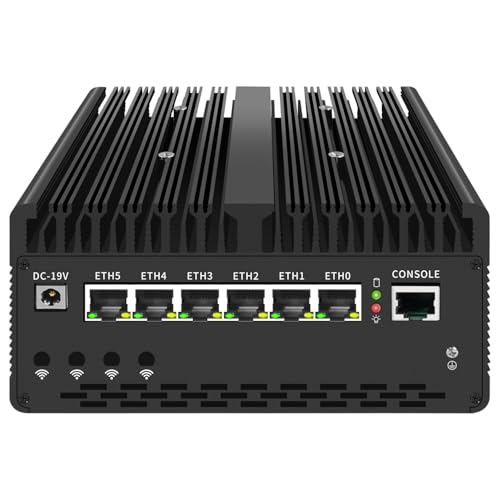
UDPTCP Fanless Core Ultra 7 155H Mini PC, 6x 2.5GbE (Barebone)
Who it suits: The buyer who wants the most genuine game rendering a silent box can do — and who is willing to fit memory and storage to get it.
On the render ledger, this machine stands alone in the guide. Intel’s Core Ultra 7 155H brings 16 cores and an Arc integrated GPU of 8 Xe cores, sealed into a passive case that specialist coverage describes as a slightly larger chassis built around a sizable heatsink, rated by its maker for ambient temperatures from 0 to 60°C and up to 95% humidity. That Arc GPU is the strongest integrated graphics in this guide by a wide margin: the base research behind these picks credits it with esports titles and older games at 1080p at low-to-medium settings — which, upscaled, is the most convincing 1440p-screen gaming any fanless machine in this budget tier offers. On the display ledger it is equally serious: DisplayPort and HDMI outputs, a Thunderbolt 4 port, and Quick Sync hardware for the video side. Around the processors sit six Intel I226-V 2.5-gigabit Ethernet ports plus a console port, a PCIe 4.0 x8 slot and SIM slots — a firewall and small-server platform that happens to carry the category’s best iGPU.
The costs are homework and honesty about clocks. The kit is a barebone — check price on Amazon — and that buys a motherboard, case and processor: DDR5 memory and an M.2 SSD are still on you, for 16–32GB of memory and a 512GB–1TB drive, and those parts can land a finished machine near or a little past this guide’s ceiling. The fully configured 32GB/1TB build sits in a higher tier — check price on Amazon before assuming it fits this budget. Two specification details belong in the open: the board supports DDR5-5600 while configured builds ship DDR5-4800, and no Wi-Fi card is included by default in any Amazon configuration, so wireless is a card you add. And the fanless rule still governs the gaming: a passive case sheds a fixed amount of heat, so through a long session the chip settles below its boost clocks to the pace the fins allow. Short-to-medium sessions — which is most play — get the strong version of this machine. Buy it as the best renderer silence offers, not as a graphics card substitute.
- Arc integrated graphics with 8 Xe cores — the strongest render ledger in this guide.
- DisplayPort, HDMI and Thunderbolt 4 for the display side; Quick Sync for video.
- Six Intel I226-V 2.5GbE ports, a PCIe 4.0 x8 slot and industrial ambient ratings.
Honest limitation: Barebone — memory, storage and OS are extra and can carry the total past this guide’s ceiling — and sustained loads settle to what a passive case can shed, so marathon sessions run slower than first impressions.
Choose it if you want one silent box whose 1080p rendering genuinely earns its upscale to a 1440p screen. Skip it if you want a finished computer out of the box, or your budget is a hard all-in ceiling.

MeLE Quieter DL Business-Grade, Intel N150, 16GB RAM, 512GB SSD
Who it suits: Anyone whose 1440p priority is the desktop itself — multiple sharp screens, network services, silence — with light games streamed or upscaled rather than rendered hard.
Grade this one display-ledger first, because that is where it shines. MeLE documents triple 4K output for the Quieter DL — HDMI 2.0, DisplayPort 1.4 and USB-C with DisplayPort — which means a 1440p monitor is well inside its comfort zone, with screens to spare. The machine is a metal slab about 6.61 by 3.74 by 0.84 inches and 0.95 lb whose whole top surface is the heatsink, rated by MeLE at roughly 6 watts at idle, and the Business-Grade build is the specific one to buy: it carries two Intel I226-V 2.5-gigabit controllers, memory in a real DDR4 slot you can later raise to 32GB, and a 512GB NVMe SSD fitted. Check price on Amazon for that build’s live figure; the Business-Grade 8GB/256GB build of the same machine sits in a lower tier and is the sensible fallback. Windows 11 Pro is installed and the BIOS is unlocked on this listing.
The render ledger is the N150 ledger, and it is short: four small cores with entry-level integrated graphics. Reviewer testing of the N100 build of this same box — a chip a marginal step below the N150 — found popular esports titles choppy even at their lowest settings, so the honest gaming description is retro titles, emulation, indie games and games streamed from a bigger machine or the cloud, rendered low and upscaled to the panel. The purchase trap in this model family matters more than any specification: MeLE also sells soldered-memory builds of the Quieter DL that use Realtek network controllers which owners report pfSense failing to recognise. The Business-Grade name, the Intel controllers and the slotted memory are one package — verify all three on the live listing, because the model name alone does not guarantee them. Stock of the 16GB build has also been intermittent, recorded unavailable by one tracker in mid-November 2026 even as others listed it weeks earlier. As a silent multi-screen desktop that serves a home’s network, it is the most complete ready-to-run package here; as a games renderer, it never pretends to be one.
- Documented triple 4K output — HDMI 2.0, DisplayPort 1.4 and USB-C — for a multi-screen 1440p desk.
- Business-Grade build: two Intel I226-V ports, slotted DDR4 to 32GB, 512GB NVMe fitted.
- Roughly 6W at idle by MeLE’s rating, in a sub-inch slab under a pound.
Honest limitation: The N150 is an entry-level renderer — streamed, retro and light games only — and the 16GB Business-Grade build’s stock is intermittent; the soldered Realtek builds sharing this model name are a different, weaker purchase.
Choose it if your 1440p money is buying screens, services and silence in a finished box. Skip it if local game rendering is the priority — that is the UDPTCP — or you need more than two network ports.

Protectli Vault Pro VP2430, Intel N150, 4x 2.5GbE (Barebone)
Who it suits: Homelab and firewall builders who want the most documented display outputs in the guide wrapped around the best-documented fanless platform — and who install their own systems as a matter of course.
Protectli’s datasheet describes the VP2430 in its first line as a fanless appliance, and its display ledger is quietly the fullest here: four video outputs — HDMI, DisplayPort and two USB-C ports carrying DisplayPort — so a 1440p working screen, a second screen and a console display can all hang off one silent box. The platform underneath is an Intel N150 with four Intel I226-V 2.5-gigabit ports, each on its own PCIe lane, a single DDR5 SO-DIMM slot that Protectli has qualified with modules up to 64GB (Intel’s own sheet for the chip says 16GB; Protectli publishes its tested list), 32GB of onboard eMMC and an M.2 slot for real storage — the maker’s manual and datasheet describe that slot differently, so this guide deliberately calls it only an M.2 slot. Coreboot firmware is available as an alternative to the standard BIOS, and Protectli publishes its own VPN testing: its WireGuard figure for this machine, around 2.25 Gbps in the maker’s own OPNsense test, is a maker number and is labelled as one. Check price on Amazon for this model’s live figure, and note the successor VP2430e barebone — the same machine without the eMMC — sits in a similar mid-range tier, so check its live listing price too before comparing the two.
What arrives is a shell with a pedigree: this listing is a barebone, so DDR5 memory and an M.2 drive are yours to fit, and no operating system is included in any configuration. The render ledger is the same N150 ledger as the MeLE boxes — 4K playback and a sharp 1440p desktop are effortless, games are retro, emulation, streamed and light esports at low settings on a good day. Nothing about the four outputs changes that, and this guide will not let a display specification impersonate a gaming specification. Pay the Protectli premium when the machine is your network’s front door and you want datasheets, a hardware knowledge base and a support desk behind it; the gaming you do on it will be the light kind, enjoyed on as many screens as you care to attach.
- Four documented video outputs — the most screens any pick here can drive.
- Four Intel I226-V 2.5GbE ports on their own lanes, coreboot option, published datasheets.
- DDR5 slot qualified by Protectli to 64GB, with onboard eMMC for a lightweight boot system.
Honest limitation: Barebone and OS-free — memory, storage and installation are on you — and its N150 rendering ceiling is identical to the cheaper N150 boxes; the outputs buy screens, not frame rates.
Choose it if this is your firewall and your desk wants several sharp screens in silence. Skip it if you want a finished PC, or rendering power is what the money is for.

Kinupute Fanless Industrial Mini PC, Core i7-1165G7, 8GB RAM, 256GB SSD
Who it suits: Buyers who want the second-strongest renderer in the guide as a finished, ready-to-run desktop — no barebone arithmetic, no OS to source.
The Kinupute’s claim on this angle is its Iris Xe graphics. The Core i7-1165G7 — four cores, eight threads, boosting to 4.7GHz — was a real laptop processor of its generation, and its integrated graphics sit a clear class above the N150 machines and a clear class below the UDPTCP’s Arc: the same light-esports and older-games territory as the top pick, at somewhat lower settings, rendered at 1080p or below and upscaled to the panel. Check price on Amazon for its live figure, in a configuration with 8GB of DDR4 memory, a 256GB SSD and Windows 11 Pro installed, inside a finned, ruggedised metal case rated by its maker for continuous duty. Two 2.5-gigabit LAN ports, built-in Wi-Fi 6 and dual display outputs round out the most conventionally desktop-shaped specification in the guide — the silent everyday computer that also plays, rather than the appliance that also displays.
Its display ledger needs one honest footnote: the dual outputs are HDMI and VGA. The HDMI port is the route to your 1440p monitor; the VGA connector is a legacy courtesy for old screens and projectors, not a second high-resolution output, and it should not be counted as one. The configuration’s weak point in 2026 is memory: 8GB is adequate for office work, browsing and appliance duty, and tight for heavy multitasking or a growing game library, while the 256GB drive fills quickly. The chip itself is from 2020, and inside a passive case it settles well below its 4.7GHz headline under long loads — burst speed for interactive work, governed speed for marathons, the standard fanless bargain. Kinupute also sells a sibling industrial listing with six serial COM ports for factory and legacy-equipment work, mentioned here as family context for workshop buyers. In a quiet room, this is the pick that feels most like a normal PC — which is exactly what it is, with the fan designed out.
- Iris Xe graphics — the second-strongest render ledger here, in a complete machine.
- Windows 11 Pro installed, Wi-Fi 6 fitted, dual 2.5GbE ports; nothing to assemble.
- A ruggedised metal industrial build made for continuous, round-the-clock duty.
Honest limitation: Only 8GB of RAM and 256GB of storage in this configuration, one of its two display outputs is legacy VGA, and a 2020-era chip in a passive case cannot hold its boost clocks through long sessions.
Choose it if you want a silent everyday desktop whose light gaming arrives ready to run. Skip it if you need 16GB of memory on day one — the completed UDPTCP is the stronger machine — or a second modern display output matters.

MeLE Quieter4C, Intel N150, 16GB RAM, 512GB SSD
Who it suits: The classic silent-desk buyer: a 1440p desktop and media machine that mounts behind the monitor, plays video flawlessly, and treats games as the light, streamed or retro kind.
If the Quieter DL is the network person’s MeLE, the Quieter4C is the desk person’s, and its display ledger is documented in the listing itself: two HDMI 2.0 ports plus a full-function USB-C give triple 4K output at 60Hz, the USB-C also accepts power delivery input, and a VESA mount in the box lets the slab disappear behind the very monitor it drives. This configuration — 16GB of memory, a 512GB SSD, Windows 11 Pro — sits in the mid-range tier of this guide; check price on Amazon for its live figure. For the display side of a 1440p setup it is close to ideal: Quick Sync hardware in the N150 handles 4K playback and transcodes for a home media server without effort or noise, desktop text at 1440p is crisp, and features like auto power-on, Wake-on-LAN and PXE boot suit a machine that must wake unattended. The streaming version of this setup is covered in depth at Best Fanless Mini PC For Streaming Under $700; this guide’s concern is the screen in front of you.
The render ledger is, once again, the N150’s: light games at low settings and reduced render resolutions, upscaled; retro and emulation happily; modern titles via cloud streaming rather than local rendering. Two configuration facts deserve plain statement. Memory on this N150 configuration is fixed — the listing describes LPDDR5 fitted at the factory — so the 16GB you buy is the 16GB the machine keeps for life; choose the configuration as a final decision, not a starting point. And the networking is a single gigabit Ethernet port with Wi-Fi 5, which dates it beside its dual-2.5GbE sibling: fine at a desk with a cable or modest wireless needs, wrong for firewall ambitions. None of that dents its actual job. As a silent 1440p desktop and media endpoint with enough memory and storage to never feel entry-level, it is the category’s most proven design doing exactly what it is for.
- Triple 4K at 60Hz over dual HDMI and USB-C, documented in the listing; VESA mount included.
- 16GB of memory and a 512GB SSD fitted at the factory — the configuration that never feels like the base model.
- USB-C power input, auto power-on, Wake-on-LAN and PXE for unattended 24/7 roles.
Honest limitation: Memory is fixed on this configuration with no later upgrade, networking is a single gigabit port and Wi-Fi 5, and rendering is the entry-level N150 class — the screen will be sharper than the games.
Choose it if silence at the desk or behind the TV is the whole point and games arrive streamed or retro. Skip it if you need dual LAN — that is the Quieter DL — or upgradeable memory.

Protectli Vault Pro VP2440, Intel N150, 2x 10G SFP+, 16GB RAM, 250GB SSD
Who it suits: Network builders whose internet or core switch runs at 10 gigabits — the one buyer for whom this machine’s unique hardware matters. For a 1440p desk specifically, it is the specialist’s detour, and this review grades it as one.
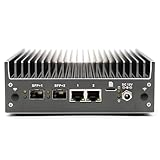
The VP2440 exists to remove a bottleneck: every 2.5GbE fanless box stops at two and a half gigabits, so Protectli kept the fanless Vault Pro formula and the same Intel N150, then added two Intel X710 10-gigabit SFP+ ports beside two I226-V 2.5GbE ports. In Protectli’s own published testing — maker figures, labelled as such — its WireGuard result over the SFP+ ports runs to 4.15 Gbps, with IPsec at 3.64 Gbps, close to twice the VP2430’s WireGuard figure for the simple reason that the ports were the limit. The Amazon configuration covered here ships with 16GB of DDR5 memory and a 250GB SSD plus 32GB of onboard eMMC, memory expandable to 64GB, no operating system included, coreboot available, and the same published datasheets and hardware knowledge base as its sibling. On the render ledger it is an N150, identical in gaming terms to the MeLE boxes: light, streamed, retro. On the display ledger, this guide claims nothing beyond what the platform documents, because display outputs were not the documented story of this model in the research — if a multi-screen 1440p desk is your goal, the VP2430 above is the Protectli graded for it.
This pick carries the guide’s most explicit price warning, and it sits here in the review rather than in small print: no verified US price is quoted for this listing here, and none will be invented. Discussion in European networking forums suggests a premium-tier positioning, but the rule is simple — check price on Amazon, and this machine belongs in this guide only if the live price is at or under $700 when you check it; above that, it belongs in a bigger-budget guide. One more caveat, and an unusually well-documented one: Protectli’s technical service bulletin TSB-2025-001 states that VP2440 units on coreboot firmware v0.9.0 may suffer intermittent slowdowns on their 2.5GbE ports, traced to an ASPM issue; a software workaround is published, a permanent fix is in development, and the default AMI BIOS is unaffected. That a maker publishes such a bulletin is the strongest argument for buying Protectli — and the detail is here so you can plan around it, firmware choice first. Buy it for the SFP+ cages, or do not buy it.
- Two Intel X710 10G SFP+ ports — no other fanless pick in this guide offers 10-gigabit networking.
- Arrives fitted with 16GB of DDR5 and a 250GB SSD, with memory headroom to 64GB.
- Protectli’s datasheets, knowledge base and support — down to the maker’s own firmware service bulletins.
Honest limitation: No verified US price is quoted here — check price on Amazon and buy only at a live price of $700 or less — its display outputs are not its documented strength, and coreboot v0.9.0 on this model carries a documented 2.5GbE slowdown issue with a workaround; the stock AMI BIOS is unaffected.
Choose it if your internet connection or core switch runs at 10 gigabits and a fan in the rack is a non-starter. Skip it if your network is 2.5GbE or slower — the VP2430 does that job for less — or the 1440p desk is the actual project.
Comparison Table
| Product | Processor | Best use | Link |
|---|---|---|---|
| UDPTCP Fanless Core Ultra 7 155H (Barebone) | Core Ultra 7 155H, Arc iGPU | Strongest honest rendering for an upscaled 1440p setup | Check on Amazon |
| MeLE Quieter DL Business-Grade, 16GB/512GB | Intel N150 | Triple-4K silent desktop, firewall and home server | Check on Amazon |
| Protectli Vault Pro VP2430 (Barebone) | Intel N150 | Four video outputs on the best-documented firewall platform | Check on Amazon |
| Kinupute Fanless Mini PC, i7-1165G7 | Core i7-1165G7, Iris Xe | Ready-to-run silent desktop with second-best graphics | Check on Amazon |
| MeLE Quieter4C N150, 16GB/512GB | Intel N150 | Silent 1440p desktop, HTPC and streaming endpoint | Check on Amazon |
| Protectli Vault Pro VP2440, 16GB/250GB | Intel N150 | Fanless routing for 10-gigabit networks | Check on Amazon |
How to Choose a Fanless Mini PC for a 1440p Setup
- Decide which 1440p you actually mean. If it is a sharp desktop, more workspace and clean video, every pick here delivers it and the choice turns on ports and silence. If it is games rendered natively at 1440p, no pick here delivers it at any configuration — that requirement belongs to a fanned gaming PC, and Best 1440p Gaming PC Under $700 is the same budget aimed at it honestly.
- Match the render expectation to the iGPU class. Arc graphics (UDPTCP) render older games and esports at 1080p low-to-medium. Iris Xe (Kinupute) covers the same ground a step lower. The N150 machines (both MeLEs, both Protectlis) are for retro, emulation, indie and streamed play. Buy the class your library actually lives in.
- Plan the upscale, not the fantasy. Expect to set games to render at 1080p — or 720p on the N150 boxes — with the game’s own render-scale or resolution settings, and let the panel display 1440p. Where a game includes FSR, it is available on these chips as a game-side option; DLSS is not, because there is no NVIDIA hardware in any pick.
- Check the display outputs, not the headline resolution. Count the screens you will really attach and the connectors they need: triple 4K on the MeLEs, four outputs on the VP2430, DisplayPort and HDMI plus Thunderbolt 4 on the UDPTCP, and on the Kinupute remember that one of its two outputs is legacy VGA. A “supports 4K” claim with the wrong ports is not support for your desk.
- Budget at sustained clocks, not boost clocks. A game session is a sustained load, and a passive case settles every chip below its headline speed for exactly that kind of work. The stronger chips still win — their settled pace is higher — but buy them for headroom, not for the number on the box.
- Separate barebone prices from computer prices. The UDPTCP and the VP2430 are both barebones and still need memory, storage and an operating system. Check price on Amazon for each, then add realistic parts costs before comparing either against the ready-to-run MeLE and Kinupute boxes.
- Memory: buy the ceiling when it is fixed. Slotted machines (Quieter DL Business-Grade, both Protectlis, the UDPTCP once you fit it) can grow. The Quieter4C’s memory is fitted for life, so its 16GB configuration is the decision, not a starting point.
- Give the case air. A fanless PC cools by radiating from its fins. Open air on the finned surfaces, fins unobstructed, never a sealed cabinet or a drawer — a passive case in a closed box is an oven with a computer in it, and its clocks will tell you so within the hour.
Pairing a 1440p Monitor with a Fanless Mini PC
What the monitor genuinely buys you on these machines is considerable — it is simply not frame rates. A 1440p panel gives the desktop roughly three-quarters more workspace than 1080p at the same size, text rendered with visibly finer edges, and two documents side by side without compromise. Video benefits twice over: native 1440p content plays at full sharpness, and 4K sources downscale to 1440p cleanly, with the Quick Sync decode hardware in every chip here handling playback as a light, dedicated task. For the desk-bound majority of computing — writing, spreadsheets, browsing, code, films — a fanless box on a 1440p screen feels like a considerably more expensive computer than it is, and it feels that way in complete silence.
What the monitor cannot do is add rendering power it does not contain. The game does not know your panel’s resolution until you tell it, and on these machines the right instruction is to render below the panel — 1080p on the two stronger picks, lower on the N150 boxes — and upscale. Be honest with yourself about the alternative pairing, too: if gaming is the desk’s main event and the budget is fixed, a good 1080p monitor is arguably the more truthful partner for a fanless PC, because games then render at the panel’s native resolution with no scaling softness at all, and the savings can fund the completed UDPTCP instead of a barebone. Two practical checks close the pairing. First, after connecting, open your operating system’s display settings and set the monitor’s actual refresh rate — panels frequently default to a lower rate than they support, and the fix is free. Second, confirm the refresh rate you care about is available over the specific port you will use, from the live listing’s specification table, because output capabilities vary by port on compact machines and this guide claims none it cannot document.
Common Buying Mistakes
- Reading “supports 4K output” as “plays games at 4K.” Display output and game rendering are different jobs with different hardware demands; every pick here does the first and none does the second.
- Expecting native 1440p gaming from integrated graphics in a sealed box. The pixel count alone forbids it for modern titles; plan on rendering at 1080p or below and upscaling, or buy a fanned gaming PC.
- Assuming DLSS is available because a game offers it. DLSS requires NVIDIA hardware; these are Intel integrated GPUs, and the upscaling available to them is render scaling and game-side options such as FSR.
- Counting the Kinupute’s VGA port as a second high-resolution output. It is a legacy connector; the HDMI port is the 1440p route, and desks needing two modern screens should look at the MeLEs or the VP2430.
- Buying the wrong Quieter DL. Soldered-memory builds share the model name but carry Realtek network controllers that firewall systems may not recognise; the Business-Grade build with Intel I226-V controllers and slotted memory is the one this guide recommends — verify it on the listing.
- Buying a barebone and forgetting the parts. Memory, an SSD and possibly an OS belong in the budget from the start; the UDPTCP’s finished cost can pass this guide’s ceiling even though its barebone listing looks comfortably inside it.
- Sealing the fanless PC inside a cabinet or media unit to keep the desk tidy. Starved of air, a passive case throttles and cooks; the silence you bought becomes the slowness you blame.
- Paying for the VP2440’s 10-gigabit ports on a gigabit network — or buying it above $700 live. Its rule in this guide is explicit: the ports justify it only on a 10G network, and the price justifies it only at or under the budget.
Final Recommendation
- Most rendering a silent box can do: UDPTCP Fanless Core Ultra 7 155H (Barebone).
- Sharp multi-screen desk, ready to run: MeLE Quieter DL Business-Grade, 16GB/512GB.
- Most screens and best documentation: Protectli Vault Pro VP2430 (Barebone).
- Finished desktop with second-best graphics: Kinupute Fanless Mini PC, Core i7-1165G7.
- Silent 1440p desktop and media endpoint: MeLE Quieter4C N150, 16GB/512GB.
- 10-gigabit networks: Protectli Vault Pro VP2440 — only at a live price of $700 or less.
Our top two for this angle are the UDPTCP, the only pick whose rendering honestly flatters a 1440p screen — Arc graphics doing real 1080p work, upscaled, behind six fast network ports, accepting the barebone homework as the price — and the MeLE Quieter DL Business-Grade, for the larger group whose 1440p is a desktop rather than a battleground: three documented 4K outputs, the right network chips, fitted memory and storage, and a machine that disappears behind the monitor it drives. The Kinupute splits the difference as a finished desktop with the second-best graphics; the Quieter4C is the media-and-desk specialist; the Protectli pair are bought for firmware, documentation and ports, with the VP2440 reserved for genuinely 10-gigabit networks. Readers whose budget is smaller lose less than usual stepping down in this category — Best Fanless Mini PC For 1440p Gaming Under $500 applies the same honesty at a lower tier, and Best Fanless Mini PC For 1440p Gaming Under $800 shows what a little more buys — while anyone who realises, reading this, that native rendering was the point all along should take the same money to Best Mini Gaming PC Under $700 with our blessing. Check the live price and the exact build name before you order, give the fins open air when it arrives, and set your games to render honestly: the picture on your 1440p screen will be better for the truth.
Frequently Asked Questions
Can any fanless mini PC actually game at native 1440p?
No — not with modern games, and not at any price we could verify. Native 1440p rendering demands graphics power that integrated GPUs in passively cooled cases cannot sustain, because the case’s heat budget caps them long before the pixel count is met. The strongest pick here, the UDPTCP’s Arc graphics, renders older games and esports titles at 1080p; the rest render lighter still. Native 1440p gaming is a fanned-machine job with a discrete graphics card, full stop.
Then why put a 1440p monitor on one at all?
Because displaying is not rendering. The desktop, text, browsing and video on a 1440p panel are genuinely sharper and roomier than at 1080p, and every chip here is specified for outputs at or above that resolution — the MeLEs document triple 4K. Games render lower and upscale to the panel. For a desk that works all day and plays lightly in the evening, the monitor is money well spent; for a desk that only games, see the next answer.
Would a 1080p monitor be the smarter buy for gaming?
For a gaming-first desk, arguably yes. Games on these machines render at 1080p or below, so a 1080p panel shows that rendering natively, with no scaling softness, and usually costs less — savings that can complete the UDPTCP barebone instead of leaving it a kit. The 1440p panel wins when desktop work, text and video share the desk with the games, which is most real desks.
Is upscaled 1080p on a 1440p screen as good as native 1440p?
No, and this guide will not pretend otherwise. Upscaling fills the panel from a smaller rendered image, so fine detail is softer than a natively rendered 1440p frame. It is, however, a legitimate and widely used compromise: motion stays smooth because the rendering load stays at 1080p levels, and the desktop around the game remains truly 1440p. Judge it as what it is — a good picture honestly labelled — rather than as a substitute for hardware these machines do not have.
Which pick renders games best?
The UDPTCP, by a wide margin: its Arc integrated graphics are the strongest in the guide, credited in the underlying research with esports and older games at 1080p at low-to-medium settings. The Kinupute’s Iris Xe is second, covering the same territory a step lower in a finished machine. The four N150 picks share the entry-level class — retro, emulation, indie and streamed games — and differ from each other in outputs, ports and memory, not in rendering.
Can these machines drive a 1440p monitor at all?
Yes, comfortably — that half of the keyword is real. The Quieter DL and Quieter4C document triple 4K output, the VP2430 documents four video outputs, and the UDPTCP offers DisplayPort and HDMI with Thunderbolt 4. One caution: on the Kinupute, use the HDMI port for the 1440p screen; its second output is legacy VGA. And after connecting any panel, set its actual refresh rate in your display settings — monitors often default below their capability.
What if I want the silence but more game?
Then let something else do the rendering. Cloud gaming services and in-home streaming from a bigger PC ask the fanless box only to decode video and drive the screen — work its Quick Sync hardware does superbly and silently. That workflow is the subject of Best Fanless Mini PC For Streaming Under $700. If the rendering must happen on the desk and must be native, the honest purchase is a fanned machine such as those in Best Compact Gaming PC Under $700, and no amount of fanless budget changes that.


