Where to buy
Check the latest price, availability and delivery on Amazon. Orders are placed on Amazon. We may earn a commission from qualifying purchases.
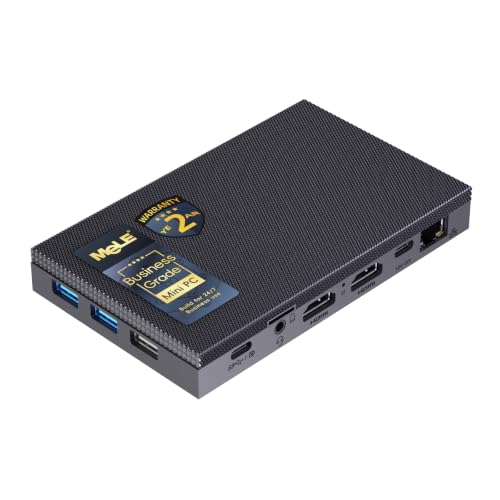
- Best fanless pick for a 1440p desk: MeLE Quieter4C Fanless Mini PC, Intel N100, Windows 11 Pro — Check on Amazon
- MINIX NEO Z300-0dB Fanless Mini PC, Intel Core i3-N300, 16GB RAM, 512GB SSD — Check on Amazon
- ZOTAC ZBOX CI337 Nano Fanless Mini PC, Intel N100, Barebone — Check on Amazon
- KINGDEL NC3000 Fanless Industrial Mini PC, Core i7-8565U, 16GB RAM, 512GB NVMe — Check on Amazon
- Protectli Vault Pro VP2430, Intel N150, 4x 2.5GbE, Coreboot-Ready Barebone — Check on Amazon
See 1 more Amazon option
- Protectli Vault Pro VP4630, Intel Core i3, 6-Port Firewall Appliance — Check on Amazon
Read the full guide ↓
Disclosure: As an Amazon Associate, reviewstook.com earns from qualifying purchases. Links to Amazon on this page are affiliate links; they cost you nothing extra. Listing details such as price and availability change often, so check the current Amazon listing before you buy.
The phrase “1440p gaming” hides two completely different promises, and this guide only makes one of them. The first promise is render resolution: the game itself draws every frame at 2560 × 1440 pixels. The second is display resolution: a 1440p monitor sits on your desk, showing a crisp desktop, sharp text and high-resolution video. Every machine below keeps the second promise easily — these Intel chips drive 1440p and even 4K displays without breaking a sweat, and they decode high-resolution video in hardware. Not one of them keeps the first promise for modern games. Native 1440p rendering needs a discrete graphics card with real power behind it, and a fanless mini PC cannot have one, because the heat a gaming GPU produces has nowhere to go in a case with no fan. That is true at $800 exactly as it is at $300, and any guide that blurs the distinction is setting you up for a return.
So what does honest 1440p look like on a fanless machine? The game renders at 1080p — or 720p for heavier titles — and a render-scaling setting stretches that image to fill your 1440p panel. The desktop around the game stays natively sharp, video plays at full resolution, and lighter games — indie titles, older releases, esports games at modest settings, emulation — run the scaled route comfortably. Cloud gaming also fits naturally here, because the local machine only has to decode a video stream, which is the one graphics job these chips are genuinely excellent at. What the extra money in an $800 budget buys is not faster silicon — the fanless ceiling is the same low-power Intel shelf (N100, N150, i3-N300, older 15-watt U-series parts) at every price — but better display outputs, more memory for the integrated graphics to share, vendor support, network ports and build quality. Below, each pick is graded on how honestly it supports that real version of 1440p: documented display outputs first, video decode second, and no invented gaming claims anywhere.
In this guide
Quick Picks
Short on time, or comparing several options at once? Each row below names a buyer type and the product that suits it, with a link to the listing.
| Buyer type | Pick | Why it stands out | Link |
|---|---|---|---|
| Best for a 1440p desk | MeLE Quieter4C (Intel N100) | Triple 4K@60Hz outputs, complete with Windows 11 Pro, well under budget | Check on Amazon |
| Most render headroom | MINIX NEO Z300-0dB (Intel Core i3-N300) | Eight cores and 16GB of memory — the strongest integrated graphics support in this set | Check on Amazon |
| Best display flexibility, barebone | ZOTAC ZBOX CI337 Nano (Intel N100) | HDMI, DisplayPort and USB-C display outputs on a name-brand budget-tier kit — check price on Amazon | Check on Amazon |
| Best for industrial and legacy gear | KINGDEL NC3000 (Core i7-8565U) | HDMI plus VGA and dual serial ports — a 1440p desktop for control rooms, not game rooms | Check on Amazon |
| Best for firewall and homelab | Protectli Vault Pro VP2430 (Intel N150) | Four Intel 2.5GbE ports and coreboot — a network appliance first, a display machine second | Check on Amazon |
| Best for multi-port networking | Protectli Vault Pro VP4630 (Intel Core i3) | Six 2.5GbE ports with Protectli’s support — buy only near the low end of its price range | Check on Amazon |
How These Picks Were Chosen
The first filter was the word “fanless” itself, applied strictly. A pick qualifies only if the manufacturer states passive cooling in its own specifications or datasheet, or a reviewer teardown confirms there is no fan inside. This category is full of traps — finned aluminum boxes that look passively cooled yet hide a small internal fan, and “quiet” mini PCs whose listings never claim fanless at all. If the maker’s own documentation would not confirm the absence of a fan, the model stayed out — no guesses, no benefit of the doubt.
The second filter was specific to this angle: documented display outputs. For a guide about 1440p, what matters is what the maker’s specification actually promises — how many displays, over which connectors, at what stated resolution. Every display claim in the reviews below comes from the base research behind this guide’s sibling article, Best Fanless Mini PC Under $800, and where the base research documents no display specification at all — true of the two Protectli network appliances — the review says so plainly and grades the pick as the network machine it is, rather than inventing an output it may or may not have. Check the live listing if a Protectli’s display output matters to your setup.
The third filter was video honesty. These are all Intel integrated graphics, and Intel’s Quick Sync hardware decode is why 1440p and 4K video playback is smooth on chips that cannot render a modern game at that resolution. We graded that decode path as a real strength, and the game-rendering path as what it is: a 1080p-or-below engine that reaches a 1440p screen through render scaling. There is no DLSS here — that is NVIDIA technology and no pick has NVIDIA hardware — and we make no upscaling-quality promises beyond what render scaling plainly does. Check price on Amazon for every pick before you buy, because fanless pricing moves constantly. Two of the six picks are barebones that need memory and storage added before they are computers; their reviews count that parts bill as part of the real price, never presenting a barebone sticker as a complete PC.
Render Resolution vs Display Resolution: The Distinction This Guide Runs On
Everything in this guide follows from one distinction, so it deserves its own section. Display resolution is what your monitor shows. Render resolution is what the graphics hardware actually draws. On a gaming desktop with a discrete GPU, the two usually match. On an integrated-graphics mini PC, they routinely do not — and that gap is not a failure, as long as nobody lies to you about which one you are getting.
Display resolution is where these machines shine. A 1440p monitor connected to any of the desktop picks below gives you a genuinely sharper working day: crisper text, more spreadsheet and timeline on screen at once, and photo and document work that uses every pixel the panel has. Video is even better. Streaming services and local files at 1440p and 4K are decoded in hardware by the Intel Quick Sync block inside these chips, so playback is smooth and the processor stays nearly idle — this is the workload fanless mini PCs were born for, and it is why so many of them end up as media boxes. If your “1440p” need is a beautiful desk and flawless video, this category delivers it completely, in total silence, well under this guide’s budget ceiling.
Render resolution is where the honesty has to bite. A modern game drawn natively at 2560 × 1440 asks the graphics hardware to shade roughly 3.7 million pixels per frame, and the integrated graphics in a 6-to-15-watt chip simply do not have the shading power — not at settings you would accept, not in titles from the last several years. The practical route, and the one this guide grades, is render scaling: set the game to render at 1920 × 1080 or 1280 × 720 internally, and let the game or the driver scale that image up to your 1440p panel. The result is a softer picture than native rendering — that is the trade, stated plainly — but it is a playable, honest one for the game classes these machines handle: indie games, older titles, esports games at modest settings, and emulation. The lightest of those can sometimes render at higher internal resolutions; demanding modern releases belong on different hardware entirely, and this guide will keep pointing at the exit for readers whose real goal is native 1440p play.
Monitor pairing follows from all of this. A 1440p monitor is a good purchase alongside a fanless mini PC — for the desktop and video reasons above — but buy it for its panel quality, not its gaming specifications. A high-refresh 1440p gaming monitor’s headline refresh rate is wasted on integrated graphics in games, because the machine cannot feed it new rendered frames at anything like that pace; the same money buys a better-calibrated 60Hz panel that flatters the work these PCs actually do. One more quirk worth knowing: 1080p content scaled onto a 1440p panel does not map pixel-for-pixel, so scaled games look a little softer than they would on a native 1080p screen. That is the known cost of the render-scaling route, and it is still the right route — just walk in knowing it. And if, reading this, you realize the game rendering is the part you actually care about, the honest recommendation is a category change, not a bigger fanless budget: a fanned machine from our Best Mini Gaming PC Under $800 guide, or a desktop built for the job in Best 1440p Gaming PC Under $800, will render at 1440p in a way nothing below can.
The 6 Best Fanless Mini PCs for a 1440p Desk Under $800
MeLE Quieter4C Fanless Mini PC (Intel N100)
Who it suits: Anyone whose 1440p plan is a sharp, silent desk — work, browsing and high-resolution video all day, with light games rendered below native and scaled to the panel — in a complete machine that needs no parts and no assembly.
For this angle, the Quieter4C has the best-documented display story in the set. MeLE’s specification promises three 4K displays at 60Hz across two HDMI ports and a full-function USB-C, which means a single 1440p monitor is trivially within its reach, and a 1440p-plus-secondary-monitor desk is too. That USB-C also accepts USB PD power, so the whole slab — 5.16 × 3.19 × 0.72 inches, thin enough to VESA-mount behind the very monitor it drives — can run from a suitable PD supply and effectively disappear. The Intel N100 inside decodes high-resolution video in hardware through Quick Sync, so 1440p and 4K playback is smooth and cool-running, and Windows 11 Pro is preinstalled, with auto power-on and Wake on LAN for the always-on duties these machines collect. Both builds sit in the budget-to-mid-range tier of this guide — check price on Amazon for the 8GB/128GB build and the 16GB/512GB build before you buy.
Buy the configuration with this angle in mind. Integrated graphics borrow their memory from the system RAM, and the 16GB build leaves the N100’s graphics properly fed while the desktop and a game share the pool — it is the version to buy for a 1440p desk. The 8GB/128GB build’s storage is eMMC, serviceable but the budget tell, with an empty M.2 slot beside it where an NVMe drive belongs if the machine stays for years. Gaming itself is the render-scaling story from the section above: light titles rendered at 1080p or 720p and scaled to the panel, retro and cloud gaming beyond that. Both builds run memory in a single channel, normal for the N100, which is part of why the graphics stay in the light-duty class. Networking is the other dated note — a single Gigabit Ethernet port and Wi-Fi 5 — fine for a desk, not a network hub.
- Triple 4K@60Hz output (2× HDMI + USB-C) — the strongest documented display support among the complete picks.
- Hardware video decode makes 1440p/4K playback smooth and silent; the case top is the heatsink, with no fan at all.
- Complete with Windows 11 Pro in 16GB/512GB and 8GB/128GB builds — check price on Amazon.
Honest limitation: Games reach a 1440p screen only by rendering lower and scaling up — the N100’s single-channel integrated graphics are a light-duty engine, and no configuration of this machine changes that.
Choose it if your 1440p goal is the display — a crisp desk, flawless video, light scaled gaming — in total silence. Skip it if native 1440p game rendering is the actual requirement, or you need multiple fast network ports.

MINIX NEO Z300-0dB Fanless Mini PC (Intel Core i3-N300)
Who it suits: Buyers who want the most render headroom a verified fanless desktop offers — the strongest chip and the most memory in this set — for a 1440p desk where lighter games get the best scaled treatment available without a fan.
The Z300-0dB’s claim starts with its processor. The Intel Core i3-N300 carries eight cores up to 3.8GHz — double the core count of the N100 and N150 boxes — and while core count is not the same as graphics power, the package around it is what a render-scaling workload wants: 16GB of DDR4 in a real SO-DIMM slot, upgradeable to 32GB, so the integrated graphics share a deep memory pool instead of a shallow one, plus a 512GB PCIe NVMe SSD fitted as standard. Display support is documented and clean: dual HDMI 2.0 outputs driving two 4K displays at 60Hz, so a 1440p primary panel is squarely in spec, with a 2.5G Ethernet port for fast local transfers and Windows 11 Pro preinstalled. Check price on Amazon before you buy — it is the premium complete-machine option in this guide — and even here, the honest sentence stands: it renders games at 1080p or below and scales them to your 1440p screen. It just does that job with more headroom than anything else in this set.
The thermal fine print matters more for gaming than for any other use, because a game is a sustained load, and sustained load is the fanless bargain’s weak side. In independent testing this machine’s CPU temperature was measured at 98°C under sustained load — within the chip’s design envelope, and the machine keeps working, but it means long gaming sessions settle to the clock speeds the case can shed rather than the boost clocks on the box. Bursty desktop work never gets there; a marathon game lives there. Two smaller notes: the USB-C port is data-only, so display output runs through the HDMI pair, and memory runs single-channel despite the generous capacity. Buy the Z300 for the best version of the scaled-1440p experience and a silent desk with real multitasking muscle — not for silent speed that physics will not sustain.
- Eight-core i3-N300 with 16GB of slotted, upgradeable memory — the most headroom in this set for scaled gaming and multitasking.
- Dual HDMI 2.0 outputs documented at 4K@60Hz — a 1440p panel is comfortably in spec.
- 512GB NVMe SSD and Windows 11 Pro fitted — check price on Amazon.
Honest limitation: Sustained-load temperatures measured at 98°C mean long gaming sessions run at settled, not boost, clocks — and even at full tilt, native 1440p rendering of modern games is beyond its integrated graphics.
Choose it if you want the strongest silent desktop in this set driving a 1440p display, with light games scaled up as a bonus. Skip it if your play is long sessions of demanding modern titles — that workload needs a fan and a discrete GPU.

ZOTAC ZBOX CI337 Nano Fanless Mini PC (Intel N100, Barebone)
Who it suits: Builders and Linux users who want documented display flexibility — HDMI, DisplayPort and USB-C display outputs on one small kit — and are happy choosing their own memory, storage and operating system to get there.
On outputs alone, the CI337 Nano argues above its price. ZOTAC’s specification documents triple-display support across two HDMI 2.0 ports, DisplayPort 1.4 and DisplayPort over USB-C — the widest connector mix in this guide — so pairing it with a 1440p monitor, by whichever cable your desk prefers, is a specification rather than a hope. The N100 inside is the same light-duty chip as in the complete MeLE pick: hardware video decode for smooth 1440p and 4K playback, and game rendering that tops out at the render-scaling route for light titles. Check the price on Amazon before ordering, and note that it arrives as a true barebone — no memory, no storage, no operating system. Inside are a DDR5 SO-DIMM slot (up to 16GB; ZOTAC’s official specification is DDR5, whatever an occasional retailer Q&A answer claims), an M.2 NVMe slot plus a 2.5-inch drive bay, dual Gigabit LAN, Wi-Fi 6 and a VESA mount.
The barebone arithmetic is the review, so do it before ordering: the kit plus a 16GB DDR5 stick and a 512GB NVMe drive lands near the price of a complete N100 machine, and on days when DDR5 prices spike it lands above it. The kit wins when parts are already on your shelf, when you want a specific drive, or when you run Linux and refuse to pay for a Windows license you would delete. One technical footnote from the base research: the M.2 slot runs at PCIe 3.0 x1, capping NVMe speeds well below what the drive itself can do — irrelevant for desktop, media and scaled-gaming duties, but a reason not to buy a flagship SSD for it. Judged for this angle, it is the most budget-friendly documented route to a flexible multi-display 1440p desk — provided the word “barebone” is priced in from the start.
- Triple-display output across HDMI 2.0, DisplayPort 1.4 and USB-C — the widest documented connector mix here.
- The budget-tier entry point in this guide: a genuinely fanless kit from an established brand — check price on Amazon.
- Your choice of DDR5 memory, M.2 or 2.5-inch storage, and OS — ideal for Linux installs and parts on hand.
Honest limitation: The sticker is not the price — memory, storage and an OS are on you — and the N100’s integrated graphics render games at 1080p or below for scaling, exactly like the complete machines.
Choose it if you have parts, prefer Linux, or want DisplayPort in a silent 1440p desk build. Skip it if you want a working computer out of the box — the Quieter4C runs the same chip, complete, and on most days costs little more.

KINGDEL NC3000 Fanless Industrial Mini PC (Core i7-8565U)
Who it suits: Buyers whose 1440p screen belongs to a control room, lab bench or point-of-sale install — serial-connected equipment, older VGA displays, a silent box that must run for years — rather than to a gaming desk.
The NC3000 is the rugged end of this budget, and its review for this angle starts with a demotion: its graphics are the oldest in the set. The Core i7-8565U is a 15-watt, four-core/eight-thread chip turboing to 4.6GHz, but its UHD Graphics 620 dates from 2018, and it shows. What it does well is drive displays for work: HDMI and VGA outputs for dual displays — the VGA output is 4K-capable per the listing — so a 1440p desktop for monitoring, control and office duties is a legitimate use, and everyday video playback is within its hardware decode’s ability. What it does not do is games beyond the lightest legacy titles, even scaled; this is the weakest gaming pick in the guide by a wide margin, and it is included because the search that led you here sometimes belongs to people whose real requirements are its two RS232 COM serial ports, four USB 3.0 ports and fanless all-metal case. The configuration most often listed on Amazon pairs 16GB of DDR4 with a 512GB NVMe SSD — check price on Amazon — with a 32GB/1TB build offered in the same listing family — confirm which configuration you are actually buying before comparing prices. At 9.2 by 5.9 by 2 inches and about three pounds of metal, it is the largest machine here; that mass is the heatsink.
Judge it as what it is. The platform is from 2018, DDR4 dates the internals, and KINGDEL is a small industrial brand whose support is a storefront rather than a knowledge base. None of that matters if your problem is a serial device and a quiet room with a big sharp screen for its control software. Everything about this machine is aimed at being installed, connected to equipment and ignored for years. Bought for that job, it is fairly priced. Bought as a 1440p gaming machine at any price, it will disappoint you — the MeLE and MINIX picks above are newer, cheaper and better supported for anything resembling play.
- HDMI plus VGA dual-display support — a 1440p work screen alongside legacy equipment nothing else here can connect.
- Two RS232 serial ports and a fanless all-metal industrial build, in a 16GB/512GB configuration — check price on Amazon.
- A heavy finned case giving a 15W processor genuine passive thermal headroom for 24/7-style duty.
Honest limitation: UHD Graphics 620 from 2018 is the weakest graphics in this set — 1440p desktop and video duty only, with gaming beyond legacy titles out of the question.
Choose it if serial ports, VGA or an industrial install are the actual requirement behind your 1440p screen. Skip it if games are any part of the plan — every other desktop pick here serves that better for less.

Protectli Vault Pro VP2430 (Intel N150, 4x 2.5GbE)
Who it suits: Firewall, router and homelab builders who want the box at the center of their network to come from a vendor that publishes datasheets, maintains firmware and answers support tickets — and who understand its display is for administration, not gaming.
For this angle the VP2430 needs a plain disclaimer up front: it is a network appliance that happens to be a fanless mini PC, not a 1440p gaming machine in any sense. Our base research documents its network and platform specifications in depth — an Intel N150, four Intel I226-V 2.5GbE ports (the controller pfSense and OPNsense handle without driver drama), a DDR5 SO-DIMM slot Protectli qualifies with modules up to 64GB, an M.2 NVMe slot, extra M.2 E-key and B-key slots for Wi-Fi or a cellular modem, and 32GB of onboard eMMC to boot a lightweight OS — but it documents no display-output specification for this pick, so this guide claims none. If a display matters for your install, check the live listing’s specification before ordering. What the VP2430 does with a screen, in its real life, is show a firewall console during setup; the rest of its existence is headless, and that is exactly what it is for.
The buying facts mirror the base guide. The Amazon listing is a barebone unit — you add the DDR5 SO-DIMM and M.2 SSD yourself, and that parts bill belongs in any price comparison. Check price on Amazon for the barebone, and note that configured coreboot builds, sold as the VP2430e (the same hardware without eMMC), sit in a higher tier once parts and assembly are included. Firmware is a genuine differentiator: both AMI and open-source coreboot are supported, with TPM support and measured boot in the Vault Pro line, and the unit is assembled in the USA, Canada or Germany behind US-based support and a 30-day money-back guarantee. Even fully built it lands far under this guide’s ceiling. Its place in a 1440p guide is as the honest counterweight: if your network needs this box, buy it for the network — and let a different machine drive your gaming display.
- Four Intel I226-V 2.5GbE ports — the controller pfSense and OPNsense handle without driver drama, fitted four times.
- Your choice of AMI or open-source coreboot firmware, a published datasheet, and US-based support backed by a real knowledge base.
- A fanless all-aluminum chassis built for round-the-clock appliance duty, with internal room for NVMe storage, Wi-Fi or a cellular modem.
Honest limitation: It is a barebone network appliance with no display specification documented in our research — grading it as a 1440p gaming pick would be fiction, and its N150 is a routing chip, not a gaming processor.
Choose it if this box will run your network or homelab and maintained firmware, published documentation and reachable support matter more to you than the lowest sticker. Skip it if the 1440p display is the point — the MeLE and MINIX picks are built for that desk.

Protectli Vault Pro VP4630 (Intel Core i3, 6-Port)
Who it suits: Network builders who want the most ports and the most support this budget can buy in one fanless box — a six-port firewall or virtualization host — and who, like the VP2430 buyer, are shopping for infrastructure rather than a gaming display.
The VP4630 is the step up inside Protectli’s own line: six 2.5GbE ports instead of four, an Intel Core i3 of Tiger Lake class instead of an N-series chip, DDR4 memory and your choice of M.2 NVMe or SATA storage, in the same fanless aluminum Vault chassis with coreboot available and Protectli’s US support behind it. Six physical ports let a segmented home or small-office network — WAN, LAN, IoT, guests, a DMZ, a lab — skip the VLAN workarounds, and the i3’s AES-NI hardware keeps encrypted VPN traffic moving at rates the N-series boxes cannot match. Its position in this guide carries the same plain disclaimer as its sibling: our base research documents no display-output specification for this appliance, so none is claimed here, and its Tiger Lake integrated graphics were never the reason anyone buys it. Check the live listing if its display output matters to your rack. As a gaming-adjacent purchase it makes sense only as the silent, reliable network that a gaming household’s traffic flows through.
Two cautions, both about buying rather than hardware. First, configuration: the tracked Amazon listing pairs 8GB of RAM with a 120GB SATA SSD, which is a firewall’s specification, not a desktop’s — confirm the configuration on the listing if you want a virtualization host, or order parts to grow it. Second, price discipline: this listing is largely third-party-sold and its pricing swings widely, so check price on Amazon — the live price is the only one that counts. At the low end of the range it is a fair price for six ports and this vendor. Near the top, walk away — the VP2430 above covers most of the same ground for less, and no fanless box in this guide justifies a scarcity premium. Let the live price decide between the two Protectli picks.
- Six 2.5GbE ports behind a Core i3 with AES-NI — more fanless networking than any other pick here offers.
- The fanless aluminum Vault chassis, with Protectli’s coreboot option, published documentation and US-based support behind it.
- Flexible internals: DDR4 memory, and your choice of M.2 NVMe or SATA storage for firewall or light virtualization work.
Honest limitation: The commonly tracked configuration is a lean 8GB/120GB, the platform is DDR4-era, no display specification is documented in our research, and third-party pricing swings widely — this pick is only a buy near the low end of its tracked range.
Choose it if six physical ports and a vendor standing behind them are the requirement, and the live price sits at the low end of its range. Skip it if the listing is priced toward the top of its range, or if a gaming display is what you are actually shopping for.

Comparison Table
| Product | Processor | Documented display outputs | Honest 1440p role | Link |
|---|---|---|---|---|
| MeLE Quieter4C | Intel N100 (4-core) | 2× HDMI + USB-C, triple 4K@60Hz | Sharp 1440p desktop and video; light games rendered at 1080p/720p and scaled | Check on Amazon |
| MINIX NEO Z300-0dB | Intel Core i3-N300 (8-core) | 2× HDMI 2.0, dual 4K@60Hz | The most headroom for the render-scaling route, with 16GB for the graphics to share | Check on Amazon |
| ZOTAC ZBOX CI337 Nano | Intel N100 (4-core) | 2× HDMI 2.0 + DP 1.4 + DP over USB-C, triple display | Flexible 1440p desk build — you supply memory, storage and OS | Check on Amazon |
| KINGDEL NC3000 | Core i7-8565U (4-core, 15W) | HDMI + VGA, dual display | 1440p work screen for industrial and legacy setups; gaming is not its job | Check on Amazon |
| Protectli Vault Pro VP2430 | Intel N150 (4-core) | Not documented in our research — check the live listing | Network appliance; the display is for setup consoles, not games | Check on Amazon |
| Protectli Vault Pro VP4630 | Intel Core i3 (6-port) | Not documented in our research — check the live listing | Six-port network appliance; infrastructure, not a display machine | Check on Amazon |
How to Choose a Fanless Mini PC for a 1440p Display
- Decide which 1440p you mean before anything else. If you mean a 1440p monitor showing a sharp desktop, documents and video, this category delivers it completely and silently. If you mean games rendered natively at 2560 × 1440, no fanless mini PC at any price delivers it — stop here and shop the fanned categories instead. Every other step assumes the first meaning, with games handled by render scaling.
- Grade the display outputs from the specification, not the headline. What reaches your monitor is decided by documented outputs: how many displays, which connectors, at what stated resolution. The desktop picks in this guide document 4K@60Hz-class outputs, which puts a 1440p panel comfortably in spec. Where a listing documents no display specification — as with the network appliances here — treat the display as unverified and check before you buy.
- Set render scaling up deliberately. In each game, choose the internal render resolution first (1080p for lighter titles, 720p for heavier ones) and let the game’s scaling setting fill your 1440p panel. Expect a softer image than native rendering — that softness is the honest price of silence — and prefer titles whose art style forgives it: indie, stylized and older games wear scaling far better than photorealistic ones.
- Feed the integrated graphics memory. Integrated graphics borrow system RAM, and they share it with the game and the desktop at the same time. Sixteen gigabytes is the comfortable floor for a 1440p desk that also plays light games; 8GB configurations work but leave the graphics competing with everything else you have open. Slotted memory you can upgrade later beats a fixed configuration you cannot.
- Buy the monitor for the work, not the refresh rate. A 1440p panel earns its place through text sharpness, workspace and video. Its gaming specifications mostly do not transfer: a high-refresh panel cannot display frames the integrated graphics never render. Spend on panel quality and calibration instead, and remember that 1080p-rendered games scaled onto a 1440p screen look slightly softer than on a native 1080p panel.
- Count the whole price of a barebone. A barebone kit becomes a substantially more expensive computer once memory, an SSD and possibly a Windows license join it. Own the parts already, or run Linux, and the barebone wins; own neither, and the complete machine usually does. Add up the full build for every candidate before you compare stickers.
- Plan placement like it matters — it does. A fanless case sheds its heat through its own metal surfaces, and those surfaces need open room air. Gaming is a sustained load, the exact load that makes these machines run hottest, so leave space around the fins, keep the box out of sealed cabinets and direct sun, and never stack gear on top of it. The same machine holds its clocks on an open shelf and throttles inside a closed TV cabinet.
- Verify “fanless” like a skeptic. Check the manufacturer’s own spec sheet for the words fanless or passive cooling. Finned cases can hide fans — some multi-port boxes that look passive carry a small internal fan — and “quiet” in a title is not a claim of fanless at all. If the maker’s specifications will not say the word, work on the assumption that a fan is inside.
- Use the leftover budget where it shows. Most readers of this guide should choose a budget-to-mid-range machine well under the ceiling, not spend up to it. The remainder buys what actually changes daily life at a silent 1440p desk: the better panel itself, a larger SSD, or a monitor arm that lets the little box hide behind the screen it drives.
Common Buying Mistakes
- Reading “supports 4K displays” as “plays games at 4K” — or at 1440p. Display output support and game render resolution are different specifications; every pick in this guide has the first and, for modern games, not the second.
- Expecting the $800 budget to buy gaming performance. There is no fanless gaming tier: the silicon is capped by passive cooling at $800 exactly as at $300, and the extra money buys outputs, memory, ports and support.
- Pairing integrated graphics with a high-refresh 1440p gaming monitor and expecting the refresh rate to matter. The panel will show the desktop beautifully; in games it can only display the frames the machine renders, at the rate it renders them.
- Turning render scaling off in pursuit of “real 1440p” and blaming the machine. Native rendering in a demanding title on integrated graphics is a slideshow; scaling is not a compromise setting here, it is the intended way to play.
- Comparing a barebone’s sticker against complete machines. That kit priced lower still needs memory, storage and maybe an OS license before it can compute anything at all.
- Buying eMMC storage at NVMe prices. At this budget, check what the storage actually is — and prefer a fitted NVMe drive or an open M.2 slot you can fill yourself.
- Assuming a network appliance is a gaming PC because it appears in a gaming guide. The Protectli picks are excellent at their real job; their presence here is a map of the category, not a gaming recommendation.
- Sealing a heatsink in a cabinet. A fanless PC in a closed entertainment center is an oven with a computer in it; throttling and shortened life follow, and gaming loads make it worse.
Final Recommendation
- Most buyers: MeLE Quieter4C, in the 16GB/512GB configuration — the complete, silent 1440p desk.
- Most render headroom: MINIX NEO Z300-0dB, for the strongest version of the scaled-gaming experience.
- Builders who want DisplayPort: ZOTAC ZBOX CI337 Nano, with the parts bill counted honestly.
- Industrial and legacy screens: KINGDEL NC3000.
- Firewall and homelab: Protectli Vault Pro VP2430.
- Six ports and maximum support: Protectli Vault Pro VP4630, only near the low end of its price range.
Our top two for this search are the MeLE Quieter4C — the finished silent desktop whose triple 4K-class outputs make a 1440p desk effortless well under the ceiling — and the MINIX NEO Z300-0dB, which trades a little polish for eight cores and a deep memory pool, the most support integrated graphics can get in a fanless box. Between them they cover the honest shape of this keyword: a beautiful, silent 1440p display for work and video, with light games rendered below native and scaled up to fill it. The ZOTAC kit is the builder’s route to the same desk with DisplayPort in the mix; the KINGDEL serves the industrial corner; and the two Protectli appliances belong to readers whose fanless purchase is really network infrastructure. Readers working with less can find the same display story in Best Fanless Mini PC For 1440p Gaming Under $500, and those ready to spend past this ceiling for the category’s extras should see Best Fanless Mini PC For 1440p Gaming Under $1200. First-time buyers may want Best Fanless Mini PC For Beginners Under $800 before ordering, and anyone whose PC lives behind the TV should read Best Fanless Mini PC For Streaming Under $800. Decide which 1440p you mean, verify the display outputs in the maker’s own specs, count the full cost if it is a barebone, and check the live price before you order.
Frequently Asked Questions
Can a fanless mini PC actually game at 1440p?
Not natively, and this guide will not pretend otherwise. No pick here — and no fanless mini PC at any price — has the discrete graphics hardware to render modern games at 2560 × 1440. What these machines do is drive a 1440p display perfectly for desktop and video, and play light games rendered at 1080p or 720p and scaled up to the panel. If native 1440p rendering is the requirement, the machine you want has a fan and a graphics card; start with Best Gaming PC Under $800 or the wider field in Best Mini PC Under $800 instead.
If the games are scaled anyway, why buy a 1440p monitor at all?
Because the monitor serves everything else you do. Text, documents, timelines and photo work all render natively at 1440p and are visibly sharper for it, and 1440p and 4K video play back at full resolution through hardware decode. The scaled softness applies only inside games. Buyers whose screen time is almost entirely gaming should weigh a good 1080p panel instead; buyers with a mixed desk get real value from 1440p.
Why does spending $800 not buy a faster fanless PC than spending $400?
Because passive cooling caps the processor. A finned case sheds a small, fixed amount of heat, so the entire category — at every price — is built from low-power chips in the 6-to-15-watt class. The step from $400 to $800 buys display outputs, memory, network ports, firmware, documentation and vendor support. Those are real things, worth buying on purpose; they are just not rendering speed.
Is render scaling a bad picture?
It is a softer picture than native rendering, and the difference is visible if you look for it — edges lose some bite, fine detail smooths out. For the game classes these machines handle, most players stop noticing within minutes, especially in stylized and older titles. What scaling is not is a trick or a defect: it is the standard, honest way integrated graphics meet a high-resolution display, and every pick in this guide is graded on how well it supports exactly that.
Will a fanless PC slow down during long gaming sessions?
It manages heat by design, which under sustained load means settling to the clock speeds its case can cool — one pick in this guide was measured at 98°C at the CPU under sustained load. Short and bursty play never gets there; long sessions in heavier titles live there. Placement decides whether the machine reaches its modest potential or falls short of it: open air around the fins, never a sealed cabinet. For marathon gaming, a fanned machine is simply the right tool.
Barebone or complete — which should I buy for a 1440p desk?
Complete, unless you already own suitable memory and storage. A barebone like the ZOTAC CI337 is excellent value with parts on the shelf, and its DisplayPort output is genuinely useful; bought with retail parts at current memory prices, its completed cost approaches a ready-built machine that arrives working, with the operating system installed. Price the whole build, not the box.


