Where to buy
Check the latest price, availability and delivery on Amazon. Orders are placed on Amazon. We may earn a commission from qualifying purchases.
- Best overall fanless mini PC for streaming: MINIX NEO Z300-0dB Fanless Mini PC, Intel Core i3-N300, 16GB RAM, 512GB SSD — Check on Amazon
- MeLE Quieter4C Fanless Mini PC, Intel N100, Windows 11 Pro — Check on Amazon
- Protectli Vault Pro VP2430, Intel N150, 4x 2.5GbE, Coreboot-Ready Barebone — Check on Amazon
- KINGDEL NC3000 Fanless Industrial Mini PC, Core i7-8565U, 16GB RAM, 512GB NVMe — Check on Amazon
- ZOTAC ZBOX CI337 Nano Fanless Mini PC, Intel N100, Barebone — Check on Amazon
See 1 more Amazon option
- Protectli Vault Pro VP4630, Intel Core i3, 6-Port Firewall Appliance — Check on Amazon
Read the full guide ↓
Disclosure: As an Amazon Associate, reviewstook.com earns from qualifying purchases. Links to Amazon on this page are affiliate links; they cost you nothing extra. Listing details such as price and availability change often, so check the current Amazon listing before you buy.
Start with the sentence most streaming guides bury: a fanless mini PC is not a game-streaming machine, and no pick in this guide becomes one at any point under $800. The silicon that can live inside a passively cooled case — Intel’s N100, N150 and i3-N300, plus older 15-watt U-series parts — renders modern games weakly, and streaming asks a computer to render the game and encode the broadcast at the same time. What these silent boxes genuinely stream, and stream well, is everything that does not have to be rendered first: a talk or podcast show from a desk, a desktop and slides, a console fed in through a capture card, a camera pointed at a workbench, a retro or indie session, and a media library transcoded for the household. That is a real and popular set of broadcasts — it is simply a different set from “watch me play a new release,” and this guide grades for the honest one.
Every pick below earns its place the same way: an Intel hardware encoder called Quick Sync, sitting inside the integrated graphics, that turns your camera, capture card or desktop into a broadcast without asking the CPU cores to do the work. On the chips in this guide, Quick Sync handles H.264 — the codec Twitch runs on — as a fixed-function job, which is why a four-core silent box can hold a clean 1080p talk stream for hours while a much more expensive CPU-only setup sweats. One limit applies to the whole table and is worth knowing before you spend anything: none of these chip generations encodes AV1. If a listing or a rival guide credits an N100 or N150 box with AV1 streaming, it is wrong — AV1 on these machines is, at most, a playback story, never an encoding one. YouTube and Twitch broadcasts from these picks are H.264 broadcasts, and at Twitch’s roughly 6,000 kbps ceiling for standard streams, H.264 from Quick Sync is a perfectly respectable picture.
The rest of the grading is the simultaneous load, because a stream is never one program. It is OBS, a browser full of chat and alerts, a dashboard tab, maybe a voice app — all drawing on the same small memory pool that the integrated graphics also borrows from, all writing recordings to the same small drive. That is why the eight-core pick tops this guide despite sharing its encoder with cheaper boxes, why one pick is graded down for shipping 128GB of eMMC as its recording drive, and why two excellent network appliances sit where they do: they arrive as barebones, and a stream box you still have to build is a project, not a purchase. Below are the quick picks, an explanation of the encoder, detailed reviews of all six machines, a comparison table, the OBS setup that makes these boxes behave, what the $800 does not include, the mistakes that waste money, and the questions silent streamers ask most.
In this guide
Quick Picks
Short on time, or comparing several options at once? Each row below names a streaming job and the product that suits it, with a link to the listing.
| Streaming job | Pick | Why it stands out | Link |
|---|---|---|---|
| Best overall stream box | MINIX NEO Z300-0dB (Intel Core i3-N300) | Eight cores carry OBS, chat and browser at once; 512GB NVMe gives recordings somewhere to live | Check on Amazon |
| Best complete and simple | MeLE Quieter4C (Intel N100) | Ready out of the box with Windows 11 Pro; the 16GB/512GB build is the one to stream from | Check on Amazon |
| Best dedicated appliance | Protectli Vault Pro VP2430 (Intel N150) | Quick Sync plus four 2.5GbE ports and coreboot — a stream/transcode box that can also run the network | Check on Amazon |
| Best fitted storage | KINGDEL NC3000 (Core i7-8565U) | 16GB of RAM and a 512GB NVMe already installed; an older Quick Sync generation does the encoding | Check on Amazon |
| Best kit for builders | ZOTAC ZBOX CI337 Nano (Intel N100) | A name-brand fanless barebone — you choose the memory and the recording drive; check price on Amazon | Check on Amazon |
| Best for network-first setups | Protectli Vault Pro VP4630 (Intel Core i3) | Six 2.5GbE ports and a Tiger Lake-class Quick Sync — a buy only near the low end of its price range | Check on Amazon |
How These Picks Were Chosen
The first filter was the same one this category always demands: “fanless” verified strictly. A pick qualifies only if the manufacturer states passive cooling in its own specifications or datasheet, or a teardown confirms there is no fan inside. Finned cases can hide small internal fans over the memory and storage, and several well-known boxes failed exactly that check during research and were excluded — they are named in our research notes. A streaming PC sits near a microphone, which makes the stakes of this filter higher than usual: a “nearly silent” fan is a noise floor your audience hears on every broadcast, forever. Silence you can verify is the entire product here.
The second filter was the encoder. Every pick carries Intel integrated graphics with Quick Sync hardware encoding, because that block — not the core count, not the clock speed — is what makes a low-power box a credible streamer at all. Picks were then graded on the load a real broadcast puts around the encoder: cores left over for OBS’s scene compositing and your browser, memory headroom once the integrated graphics have taken their share, wired networking you can trust at a constant bitrate, and storage that can absorb hours of local recording without filling up mid-show. Two of the six are barebones that need memory and storage added before they compute anything; where that is the case, the review says so in its first lines and counts the parts bill as part of the real price.
We did not use these products ourselves. We read the manufacturer listings, datasheets and specification pages, and independent coverage that documents prices and configurations, and we favored makers who publish their numbers in full. Check price on Amazon for the current listing on every pick, because these listings move constantly, and one pick’s third-party pricing varies widely enough that its review carries an explicit warning. Where a maker’s claims stretch, the review says so.
The Encoder Is the Streaming Spec
On a gaming PC, streaming performance is a graphics-card conversation. On a fanless mini PC, it is a conversation about one small fixed-function block inside the integrated graphics: Intel Quick Sync. Quick Sync exists for exactly the job OBS asks for — taking a finished frame and compressing it into an H.264 stream — and because it is dedicated hardware, it does that job without consuming the CPU cores your browser, chat and scene switching are using. That separation is the whole reason this guide exists. A fanless box asked to encode in software, on its four modest cores, falls over; the same box encoding through Quick Sync holds a talk stream indefinitely, in silence, at a power draw you could run off a battery bank.
Know the generations, because they are not equal. The N100, N150 and i3-N300 picks share the same modern Quick Sync family: clean H.264 output at Twitch bitrates, hardware HEVC encoding for high-quality local recordings, and — to repeat the limit that matters — no AV1 encoding of any kind. The KINGDEL’s i7-8565U carries an older Quick Sync generation behind its UHD 620 graphics: entirely serviceable for H.264 talk and capture work, a step behind in encoding polish, and paired with graphics that were modest in 2018. The VP4630’s Tiger Lake-class i3 sits between the two camps. None of these differences changes what you should broadcast — H.264, around 6,000 kbps CBR, two-second keyframes, the recipe the OBS section below spells out — but they do change how much else the box can do while it broadcasts, and that is the grading that follows.
The same Quick Sync block moonlights as the best reason to own one of these boxes beyond streaming: hardware transcoding for a home media server. The machine that encodes your talk show on Tuesday can spend the rest of the week silently re-encoding your film library for phones and hotel TVs. Several picks below are sold primarily as network appliances, and their streaming value is exactly this double life — infrastructure that broadcasts. Judge them that way and the ranking makes sense.
The 6 Best Fanless Mini PCs for Streaming Under $800
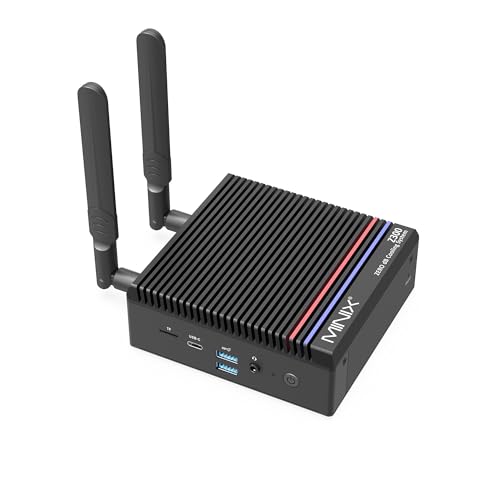
MINIX NEO Z300-0dB Fanless Mini PC (Intel Core i3-N300)
Who it suits: Streamers whose show is a desk, a camera and a browser full of chat — talk, podcast, teaching, console capture — and who want one silent box with enough headroom to run the whole production without breaking a sweat.
Every pick in this guide has roughly the same encoder. The MINIX wins because of everything around it. Its i3-N300 carries eight cores — double the N100 and N150 boxes — and a live broadcast is precisely the workload that notices: OBS compositing scenes on some cores, the Quick Sync block encoding from the integrated graphics, a browser holding chat, alerts and a dashboard on the others, and nobody queueing behind anybody. The 16GB of memory sits in a real SO-DIMM slot and can grow to 32GB, which matters more than it sounds, because the integrated graphics borrow their memory from the same pool your browser is drinking from. The 512GB PCIe NVMe SSD is the other quiet advantage: recordings at streaming bitrates accumulate for months before housekeeping becomes a chore. Add a 2.5G Ethernet port, dual HDMI 2.0 outputs for a confidence monitor and a main display, and Windows 11 Pro already installed, and this is the only pick that arrives as a complete streaming station rather than a starting point. Check price on Amazon for the current listing. The “0dB” in the name is a specification MINIX’s own manual backs — the cooling system is listed as “Fanless (0dB),” with the metal chassis doing the thermal work — and beside a microphone, that is the difference between a noise floor of nothing and one you gate and filter forever.
The thermal fine print is real, and it shapes how you should run the show. In independent testing the N300’s CPU was measured at 98°C under sustained load — within the chip’s design envelope, and the machine keeps working, but it is the fanless bargain stated as a number: this box manages marathon loads by running hot and trimming clocks. A talk stream through Quick Sync is not a marathon load; the encoder is fixed-function and the cores stay mostly idle. Ask it to also render a modern game at the same time and you are back to the category’s hard truth — the integrated graphics are the light-duty class, and self-rendered game streams from this pick mean retro, indie and esports titles at modest settings, sent out at 720p. Two smaller notes: memory runs single-channel, which caps the integrated graphics’ share of bandwidth, and the USB-C port is data-only, so display and power plans should run through the HDMI ports and the barrel supply.
- Eight cores — the most simultaneous-load headroom of any pick here: OBS, chat, browser and dashboard without contention.
- Quick Sync hardware encoding for H.264 broadcasts and HEVC recordings, with 16GB of slotted RAM (to 32GB) around it.
- 512GB NVMe fitted as standard, 2.5G wired Ethernet, and genuinely fanless 0dB operation beside a microphone.
Honest limitation: Sustained-load temperatures measured at 98°C mean heavy marathon work throttles to what the case can shed — stream through the encoder, not through rendering, and this pick is in its element; ask it to render modern games and it is the wrong tool.
Choose it if you want the most complete silent stream box under this budget and your content is talk, desktop, capture or light games. Skip it if your show is a modern game rendered on the same machine — no fanless pick fixes that, and a fanned mini PC at this price is dramatically faster.

MeLE Quieter4C Fanless Mini PC (Intel N100)
Who it suits: Streamers who want to unbox a finished, silent broadcast box today — podcast and talk shows, console capture, media streaming — and would rather spend the leftover budget on a microphone than on parts.
The Quieter4C is the simplest recommendation in this guide: a complete Windows 11 Pro machine, fanless by MeLE’s design with the case top as the heatsink, whose N100 carries the same modern Quick Sync encoder as the pick above it. For a talk or capture stream, the broadcast itself will look and behave identically to the MINIX’s — the encoder sees to that. Where the four-core N100 asks for discipline is everything around the encode: keep the browser honest, close the dozen idle tabs, and let OBS, chat and one dashboard share four cores like adults. The machine helps in unexpected places: three 4K displays across two HDMI ports and a full-function USB-C (a teleprompter or confidence monitor costs nothing extra), USB PD power input for mobile or off-grid setups, auto power-on and Wake on LAN, and a VESA mount that puts it behind the monitor, out of the shot and out of the way. Check price on Amazon for the build discussed next, and note the networking is a single Gigabit Ethernet port — entirely sufficient for a 6,000 kbps wired stream — with Wi-Fi 5 behind it that should be treated as a fallback, never the plan.
Now the configuration warning, which is this pick’s whole review. The 8GB/128GB build carries 8GB of memory and 128GB of storage, and that storage is eMMC. For streaming, both numbers bite: 8GB is the pool the integrated graphics, OBS and your browser all share, and 128GB of eMMC is a recording drive that fills in weeks of regular shows while writing at eMMC speeds. The empty M.2 slot beside it is the designed-in fix — one NVMe drive turns this into a comfortable station — but the cleaner answer is the 16GB/512GB build, which doubles the memory and fits proper NVMe storage from the factory. Buy that build for streaming. The 8GB/128GB version is a fine silent desktop and a cramped broadcast box. Either way, memory runs single-channel on the N100, and the graphics are the light-duty class: retro, indie and cloud-rendered games stream happily, modern titles rendered locally do not.
- The same modern Quick Sync encoder as the guide’s top pick, in a complete machine with Windows 11 Pro preinstalled.
- Triple 4K output, USB-C PD power input and a VESA mount — a stream station that disappears behind the monitor.
- The 16GB/512GB build removes this pick’s only real streaming compromises.
Honest limitation: The headline 8GB/128GB build pairs a shared 8GB memory pool with eMMC recording storage — workable for occasional streams, tight for a regular show; four cores also leave less room for a busy browser than the pick above.
Choose it if you want silence and simplicity, in the 16GB/512GB configuration. Skip it if you plan to run a heavy browser-and-alerts production on the base build, or you need more than one fast network port.

Protectli Vault Pro VP2430 (Intel N150, 4x 2.5GbE)
Who it suits: Homelab streamers who want the broadcast box to be infrastructure — a silent appliance that encodes the show, transcodes the media library and possibly runs the network it streams over, from a vendor that publishes datasheets and answers tickets.
Read this pick as a streaming appliance rather than a desktop and it makes complete sense. The N150 inside carries the same modern Quick Sync family as the picks above — H.264 for the broadcast, HEVC for recordings and library transcodes — and around it Protectli builds the most trustworthy platform in this guide: a fanless all-aluminum chassis that Protectli’s own datasheet describes as “Fanless and Silent,” four Intel I226-V 2.5GbE ports (the controller pfSense and OPNsense handle without driver drama), a choice of AMI or open-source coreboot firmware, and assembly in the USA, Canada or Germany with US-based support and a 30-day money-back guarantee behind it. Four wired ports change what a stream box can be: the console and capture gear on one segment, the household quarantined on another — a small, silent network with a broadcast studio attached. There are three M.2 slots inside, for NVMe storage plus Wi-Fi or a cellular modem, and 32GB of onboard eMMC that boots a lightweight OS before you add anything.
The barebone honesty comes first, though: the Amazon listing is a barebone unit — check price on Amazon. You add a DDR5 SO-DIMM — Protectli qualifies modules well beyond Intel’s official figure, up to 64GB — and an M.2 SSD yourself, plus the operating system of your choice, and that parts bill is part of this product’s price. Configured coreboot builds are sold as the VP2430e (the same hardware without the eMMC). Treat the 32GB of eMMC as a boot device, never as recording storage: a stream archive belongs on the SSD you fit. Completed and configured, the premium over a white-box import buys firmware maintenance, documentation and support — not a faster encoder, because the N150’s Quick Sync is the same class of silicon found in other boxes in this class. As a desktop it is unremarkable; as the silent, supported, always-on heart of a streaming and media setup, it has no rival here.
- Modern Quick Sync encoding and transcoding in a fanless appliance chassis rated for 24/7 duty.
- Four Intel I226-V 2.5GbE ports — wired streaming with network segmentation, no Wi-Fi roulette.
- A choice of coreboot or AMI firmware, documentation you can actually read, and support staffed in the US.
Honest limitation: It is a barebone — memory, SSD and OS are extra, and the parts bill belongs in any price comparison — and the onboard eMMC is a boot device, not a place to keep recordings.
Choose it if your stream box doubles as network or media infrastructure and you value firmware and support over a low sticker. Skip it if you want to unbox a finished Windows streaming desktop — the MeLE and MINIX picks are built for you.

KINGDEL NC3000 Fanless Industrial Mini PC (Core i7-8565U)
Who it suits: Streamers whose show involves physical gear — a workshop, a lab bench, instruments on camera — or anyone who wants a fitted, finished machine whose storage and memory need no shopping list, and who can accept an older encoder generation.
The NC3000’s streaming case rests on two fitted numbers: 16GB of DDR4 and a 512GB NVMe SSD, already installed, in the configuration most often listed on Amazon — check price on Amazon. That pairing quietly solves the two problems that dog the cheaper picks — the memory pool is big enough for OBS, a browser and chat without negotiation, and recordings have a proper NVMe home from day one. The encoding is done by the Quick Sync block in the i7-8565U’s UHD 620 graphics, and honesty requires placing it: this is an older Quick Sync generation, from a 15-watt four-core chip launched in the late 2010s, and its H.264 output is a step behind the modern block in the N-series picks at the same bitrate. For talk, desktop and console-capture work at Twitch’s bitrates, the difference is small and the stream is perfectly presentable; it is a polish gap, not a capability gap. Around that, KINGDEL builds the industrial article: a fanless all-metal case — at 9.2 by 5.9 by 2 inches and roughly three pounds, the mass is the heatsink — with two RS232 serial ports, HDMI and VGA for dual displays, four USB 3.0 ports, and Wi-Fi with Bluetooth. If your stream demonstrates equipment, the serial ports and the silence are a combination nothing else in this guide offers.
Judge the compromises clearly. The platform dates from 2018: UHD 620 graphics handle displays, playback and the encoder, and nothing beyond the lightest gaming; there is no modern codec hardware of any kind. The listing’s documented network story is Wi-Fi, which for streaming is the wrong medium — a constant-bitrate broadcast wants a wire, so check the live listing’s full port list and plan the connection before this becomes your station; every other pick in this guide leads with documented wired Ethernet. The same listing family offers a 32GB/1TB configuration, so confirm which build the buy box is actually selling before you order. And KINGDEL is a small industrial brand whose support is a storefront rather than a knowledge base — built to be installed and ignored, which suits an industrial corner better than a creator’s desk.
- 16GB of RAM and a 512GB NVMe SSD fitted as standard — the simultaneous load and the recordings are both provided for.
- Quick Sync H.264 encoding from an older generation: fully serviceable for talk, desktop and capture streams.
- Fanless all-metal industrial build with dual RS232 serial and VGA — unique in this guide, ideal around equipment.
Honest limitation: A 2018 platform with an older-generation encoder and dated graphics, a Wi-Fi-led network story in a guide that insists on wired streaming, and thin brand support compared with Protectli or MeLE.
Choose it if fitted storage and memory matter more than encoder vintage, or your stream lives among serial-connected gear. Skip it if you want the cleanest modern Quick Sync output and a documented wired-first network setup — the picks above do both.

ZOTAC ZBOX CI337 Nano Fanless Mini PC (Intel N100, Barebone)
Who it suits: Builders and Linux streamers who already own — or enjoy choosing — memory, storage and an operating system, and want the modern N100 encoder in a name-brand fanless kit at the lowest entry price in this guide.
For a streaming build, a barebone has one genuine virtue: the two components streaming cares most about after the encoder — memory size and recording storage — are chosen by you, at the sizes the job actually needs. The CI337 Nano gives you the modern part for free: its N100 carries the same current Quick Sync family as the MeLE and MINIX picks, so the broadcast itself is the modern broadcast. Around it, ZOTAC’s kit — passively cooled, stated as fanless in ZOTAC’s own listing copy, and listed on Amazon — check price on Amazon — provides a DDR5 SO-DIMM slot for up to 16GB, an M.2 NVMe slot plus a 2.5-inch drive bay, dual Gigabit LAN for a properly wired stream, Wi-Fi 6 when you need it, and triple-display output across two HDMI 2.0 ports, DisplayPort 1.4 and DisplayPort over USB-C. Fit 16GB and a generous SSD and you have assembled the exact station the complete machines approximate: encoder, memory pool and recording drive all sized on purpose. Run it on Linux and the refused Windows license stays in the microphone fund.
The arithmetic is the review, so do it before ordering: the kit plus a 16GB DDR5 stick and a 512GB NVMe drive lands in the same territory as a complete N100 machine, and on days when DDR5 prices spike, above it. Two technical footnotes from the manufacturer’s own specifications deserve care. The memory is DDR5 — one retailer Q&A answer says DDR4, erroneously; ZOTAC’s specification governs, and ordering the wrong generation is this kit’s classic own goal. And the M.2 slot runs at PCIe 3.0 x1, capping NVMe throughput well below the drive’s capability: irrelevant for desktop work, and worth knowing before you pay for a flagship SSD whose speed the slot cannot use — buy capacity for a recording drive, not velocity. The N100 ceiling is the category ceiling, of course: four cores to share among OBS, browser and chat, and integrated graphics in the light-duty class for anything self-rendered.
- The modern N100 Quick Sync encoder in a genuinely fanless barebone from an established brand — a budget-tier entry point in this guide.
- You choose the memory and the recording drive — the two streaming-critical components — with M.2 and 2.5-inch options.
- Dual Gigabit LAN for a wired broadcast, Wi-Fi 6, and triple-display output for a full streaming desk.
Honest limitation: Barebone means the sticker is not the price — RAM, SSD and possibly an OS are on you — and the x1-lane M.2 slot caps SSD speed; the DDR5-versus-DDR4 trap has caught buyers who trusted a retailer answer over the spec sheet.
Choose it if you have parts on the shelf, prefer Linux, or want the recording drive sized exactly to your show. Skip it if you want to unbox a working stream station — the Quieter4C is the same silicon, complete, for not much more on most days.

Protectli Vault Pro VP4630 (Intel Core i3, 6-Port)
Who it suits: Network-first streamers who want the most wired infrastructure this budget can buy in one silent box — six ports for a segmented studio network — from the vendor with the best documentation in the category, at the right price.
Nothing here fails as hardware. The VP4630 steps up inside Protectli’s own line: six 2.5GbE ports instead of four, a Tiger Lake-class Intel Core i3 instead of an N-series chip, DDR4 memory and your choice of M.2 NVMe or SATA storage, in the same fanless aluminum Vault chassis, with coreboot available and Protectli’s US support behind it. Its Quick Sync encoder is a generation newer than the KINGDEL’s and entirely credible for H.264 talk, desktop and capture work, and the i3’s AES-NI acceleration keeps encrypted traffic moving at rates the N-series boxes cannot match. For a streaming setup that is really a small network — console and capture machine on one segment, the stream box on another, the household fenced off on a third — six physical ports end the VLAN gymnastics, and the box that runs that network can also be the box that encodes the show or transcodes the library. That double life is this pick’s honest pitch.
What demotes it is buying, not building. First, configuration: the commonly tracked Amazon listing pairs 8GB of RAM with a 120GB SATA SSD — a firewall’s specification, and for streaming the leanest fitted setup in this guide: a shared 8GB pool for OBS and browser, and a recording drive measured in a few dozen shows. Confirm the configuration on the live listing, or budget the parts to grow it. Second, price discipline, and this one is absolute: the listing is largely third-party-sold and its pricing swings widely, so check price on Amazon before you judge it. At the low end of its range, this is a fair buy for six ports and this vendor. At the high end, walk away — the VP2430 above covers most of the same ground for less, and no fanless box justifies a scarcity premium. Check the live price first, and let it choose between this pick and its smaller sibling.
- Six 2.5GbE ports and a Tiger Lake-class Quick Sync encoder — the most network, and a modern broadcast, in one silent chassis.
- Protectli’s coreboot option, documentation and US-based support; DDR4 and NVMe-or-SATA flexibility.
- AES-NI acceleration for encrypted traffic the N-series picks cannot match.
Honest limitation: The commonly tracked configuration is a lean 8GB/120GB — the tightest fitted memory and recording storage here — and third-party pricing swings so widely that the pick is only a buy near the low end of its tracked range.
Choose it if six physical ports and a vendor who answers are the requirement, and the listing is sitting at the low end of its range when you look. Skip it if the listing is priced at the high end of its range, or you would have to grow the memory and storage on day one anyway — the VP2430 plus a managed switch is the smarter network at that money.

Comparison Table
| Product | Processor | Encoder | Best streaming use | Link |
|---|---|---|---|---|
| MINIX NEO Z300-0dB | Intel Core i3-N300 (8-core) | Quick Sync (modern) | The complete talk/desktop/capture station with the most load headroom | Check on Amazon |
| MeLE Quieter4C | Intel N100 (4-core) | Quick Sync (modern) | Silent broadcast box, complete out of the box — in the 16GB/512GB build | Check on Amazon |
| Protectli Vault Pro VP2430 | Intel N150 (4-core) | Quick Sync (modern) | Dedicated stream/transcode appliance that can also run the network | Check on Amazon |
| KINGDEL NC3000 | Core i7-8565U (4-core, 15W) | Quick Sync (older generation) | Fitted 16GB/512GB station for streams around physical equipment | Check on Amazon |
| ZOTAC ZBOX CI337 Nano | Intel N100 (4-core) | Quick Sync (modern) | Barebone kit — you size the memory and the recording drive | Check on Amazon |
| Protectli Vault Pro VP4630 | Intel Core i3 (6-port) | Quick Sync (Tiger Lake class) | Segmented studio networks — only near the low end of its price range | Check on Amazon |
Set Up OBS Once, Correctly
These boxes reward one careful setup and then disappear. Work through this list once, on a test stream, before your first real show.
- Pick the Quick Sync encoder, always. In OBS’s output settings, choose the Quick Sync H.264 encoder (shown as QSV) rather than x264. On every pick in this guide the hardware encoder is the broadcast; software encoding on four efficiency cores is how a silent box learns to stutter. The MINIX’s eight cores could carry a light x264 talk stream, and should not be asked to — Quick Sync leaves those cores for your browser.
- Set the broadcast recipe and stop touching it. Constant bitrate (CBR) at around 6,000 kbps for Twitch, a two-second keyframe interval, and 1080p output for talk, desktop and capture content. For a self-rendered light game, drop the output to 720p — the encoder’s load falls, the picture stays honest, and nobody’s chat ever asked for a struggling 1080p. Record locally in HEVC through the same Quick Sync block for a smaller, better archive than H.264 at the same quality.
- Learn the three counters before you need them. OBS’s Stats window separates every bad stream into three numbers. Dropped frames are network: the connection could not carry the bitrate — the fix is a cable, a lower bitrate, or a different ingest server, never a setting in the encoder. Skipped frames are encoding lag: the encoder could not keep up — lower the output resolution, simplify the scene, and confirm you actually selected Quick Sync. Missed frames are rendering lag: the graphics ran out of room compositing your scenes — fewer browser sources, lighter overlays, and closing the tabs you are not reading.
- Wire the stream, without exception. A constant 6,000 kbps upload is a trivial load for any wired port in this guide and a coin flip on Wi-Fi in a busy house. The MeLE’s Wi-Fi 5 and the ZOTAC’s Wi-Fi 6 are for convenience, not for broadcasts. Run a cable to the streaming box — on the Protectli picks, give the stream its own port and segment while you are there — and let wireless serve everything that is not the show.
- Give recordings their own room. Point OBS’s recording path at the largest, fastest storage you fitted — the NVMe drive, never the MeLE’s eMMC or the VP2430’s boot eMMC — and check the folder weekly. A recording drive that fills mid-stream fails silently and takes the archive with it; on the 128GB and 120GB configurations in this guide, that is a when, not an if, without housekeeping.
- Place the heatsink like a heatsink. A fanless case sheds heat through its fins, so the stream box needs open air on every side: not sealed in a cabinet, not stacked under the console it is capturing, not buried behind the monitor it hides behind without a gap. The same machine holds its clocks on an open shelf and trims them inside a closed TV cabinet — and a long show is exactly the sustained load that finds out which one you chose.
What $800 Does Not Include
The machine is the silent half of a streaming setup. The other half is a kit list, and it is never inside any pick’s price — budget for it separately, in this order, because the order is the difference between a show that sounds professional on a cheap box and a show that sounds cheap on an expensive one.
- A microphone, first. Your audience forgives a modest picture for hours and a bad microphone for about ninety seconds. The fanless box has already done its half of the audio bargain — there is no fan noise to gate out, ever — so the microphone is where the next dollar belongs, ahead of every other item on this list.
- Lighting, second. A lit face at 1080p from a basic camera beats a dark face at any resolution from a good one. Lighting is also the cheapest picture upgrade that exists, and it flatters the H.264 encoder too: a well-lit, low-noise image compresses cleanly at 6,000 kbps, while a grainy, underlit one spends its bitrate describing noise.
- A webcam, third. Only after the microphone and the light. Every pick here drives multiple displays and handles a USB camera without complaint; the camera itself is the interchangeable part of the chain.
- A capture card, only for console. If your content is a console, a capture card is how its picture reaches the stream box — for that job it is essential and the fanless picks are ideal partners, since the console does the rendering and the silent box does the encoding and broadcasting. If your content is talk, desktop or PC games, a capture card does nothing at all in a one-machine setup; do not buy one out of a generic checklist.
How to Choose a Fanless Mini PC for Streaming
- Name the show before the machine. Talk, podcast, teaching, desktop and console-capture streaming are this category’s home ground. Retro, indie and cloud-rendered games stream fine. A modern game rendered and broadcast from the same fanless box is not a configuration problem to solve — it is a different product category, and no pick or price in this guide changes it.
- Grade the load around the encoder. All six picks encode credibly; they differ in what else fits. Eight cores and 16GB (the MINIX) carry a busy browser production. Four cores and 8GB (the base MeLE build, the tracked VP4630 configuration) carry a disciplined one. Count your tabs, alerts and browser sources honestly, then buy the headroom they need.
- Treat recording storage as a specification. A regular show writes hours of video a week. Prefer a fitted NVMe drive of 512GB or the open slot to add one; treat eMMC — the MeLE base build’s 128GB, the VP2430’s 32GB boot device — as something recordings visit briefly or never, and price the fix into barebone and base-build comparisons.
- Verify “fanless” like a skeptic. Check the manufacturer’s own datasheet for the words fanless or passive cooling. Finned cases can hide internal fans, and “quiet” in a listing title is not a fanless claim. Beside a microphone, this check is not pedantry — it is your noise floor.
- Count the whole price of a barebone. The VP2430 and the CI337 are starting points: memory, an SSD and possibly an OS belong in the sum before either is compared with the complete MeLE or MINIX. If the parts shelf is already stocked, or Linux is the plan, the barebone wins; otherwise the complete machine does.
- Wire it, and pick the controller. Streaming wants Ethernet, full stop. For the network-building picks, Intel I226-V controllers are the safe choice for pfSense and OPNsense; the listing or datasheet names the controller — read it before the box becomes your router and your studio at once.
- Use the leftover budget where audiences notice. Most readers should not spend the whole budget on the machine alone. Leaving room in the budget for the microphone, the light and the larger SSD — the parts of a stream viewers actually perceive — makes a better show than a costlier silent box behind a bad microphone.
Common Buying Mistakes
- Buying a fanless box to stream modern games it must render itself. The encoder was never the problem; the integrated graphics are, and they are the light-duty class at every price in this category.
- Encoding in software out of habit. Leaving OBS on x264 wastes the one component — Quick Sync — that makes these machines streamers, and turns an easy broadcast into a core-count fight.
- Streaming over Wi-Fi because the box is small and the router is far. Small boxes invite wireless thinking; a constant-bitrate broadcast punishes it with dropped frames that no encoder setting can fix.
- Recording to eMMC or to a nearly full drive. The base MeLE’s 128GB and the VP4630’s tracked 120GB fill quietly and fail silently; archives belong on the big NVMe drive you fitted or chose.
- Comparing a barebone’s sticker against complete machines. The kit that looks cheaper at first glance needs RAM, storage and maybe an OS before it broadcasts anything.
- Paying the scarcity premium on third-party listings. The VP4630 is a buy at the low end of its range and a mistake at the high end; fanless models drift in and out of stock, and waiting is a strategy.
- Sealing the heatsink in a cabinet for a cleaner look. A fanless stream box in a closed entertainment center throttles through your longest shows; the fins need air more than the room needs tidiness.
- Spending all $800 on the machine and nothing on the microphone. Silence is this category’s gift to your audio; a drawer microphone wastes it completely.
Final Recommendation
- Most streamers: MINIX NEO Z300-0dB — the encoder everyone shares, plus the cores, memory and storage a real production needs around it.
- Complete and simple: MeLE Quieter4C, in the 16GB/512GB configuration.
- Dedicated appliance and media server: Protectli Vault Pro VP2430, completed with your choice of memory and SSD.
- Fitted storage around physical gear: KINGDEL NC3000.
- Builders with parts on hand: ZOTAC ZBOX CI337 Nano.
- Six ports and maximum support: Protectli Vault Pro VP4630, only near the low end of its price range.
Our top two for this job are the MINIX NEO Z300-0dB — the only pick that arrives with headroom for the whole production, browser and all — and the MeLE Quieter4C in its 16GB/512GB build, the finished silent box that makes the category’s case at a friendlier price. Between them they cover the two honest shapes of this search: a streaming station with room to grow, and a streaming appliance you can forget exists. If your box is really network infrastructure that broadcasts, the VP2430 is the connoisseur’s answer; if it must live among serial-connected equipment, the KINGDEL speaks that language; and if you would rather assemble the station yourself, the ZOTAC kit is the cheapest honest way in. Readers working with a smaller ceiling should also see Best Fanless Mini PC For Streaming Under $500 and Best Fanless Mini PC For Streaming Under $400 — the same Quick Sync story lives there for less — and anyone still deciding whether silence or speed matters more to their show should compare the wider field in Best Mini PC For Streaming Under $800. Name the show, verify the fanless claim in the maker’s own specs, count the full cost if it is a barebone, wire the connection, and check the live price before you order.
Frequently Asked Questions
Can a fanless mini PC stream games?
The lightest ones, honestly framed. These boxes stream other people’s rendering beautifully — a console through a capture card, a gaming PC from another room, a cloud gaming service — because the Quick Sync encoder does the broadcast while something else draws the picture. Games the fanless box renders itself are the retro, indie and esports-at-low-settings class, best sent out at 720p. Modern AAA titles rendered and streamed from the same fanless machine are beyond every pick in this guide under $800; our Best Fanless Mini PC For 1440p Gaming Under $800 guide explains that reality in full.
What encoder should I use in OBS on a fanless mini PC?
Quick Sync H.264 — the hardware encoder inside the Intel integrated graphics — on every pick here. It exists precisely so the CPU cores do not have to encode, and on four-core fanless chips that separation is the difference between a stable show and a slideshow. Set constant bitrate around 6,000 kbps for Twitch with a two-second keyframe interval, and record locally in Quick Sync HEVC for a compact archive.
Do any of these mini PCs stream in AV1?
No. None of the chip generations in this guide — N100, N150, i3-N300, the 8565U or the Tiger Lake-class i3 — encodes AV1 in hardware, and software AV1 encoding on these cores is not a practical broadcast. Every stream from these machines is H.264, which Twitch is built on and YouTube accepts happily. If AV1 broadcasting is a genuine requirement rather than a spec-sheet preference, it begins with a discrete modern graphics card in a fanned machine — a different category, surveyed in Best Streaming PC Under $800.
Is a fanless PC actually better for streaming audio?
It removes the one noise source you cannot move: the computer itself. A fanned streaming PC near a desk microphone contributes a constant noise floor that gates and filters manage but never erase; a verified fanless box contributes nothing, at any load, forever. It matters most to talk and podcast formats recorded close to the machine, and least to streamers whose PC already lives in another room — placement solves the problem fanlessness also solves.
Will a fanless stream box overheat during a long show?
A talk or capture stream through Quick Sync is light, fixed-function work — the duty these machines are built for — and runs for hours without drama. The heat ceiling appears under sustained all-core loads: one pick here was measured at 98°C at the CPU under marathon testing, and it manages that by trimming clocks. Keep the fins in open air rather than a sealed cabinet, encode on the hardware block rather than the cores, and a long show is well inside the design.
Is a barebone fanless PC a good streaming deal?
In exactly two situations: you already own suitable memory and storage, or you run Linux and refuse a bundled Windows license. Otherwise add the parts at current prices before comparing — DDR5 swings enough that a kit can move from bargain to bad idea between shopping seasons. The streaming-specific virtue of a barebone is real, though: you choose the recording drive’s size yourself, and on the ZOTAC and Protectli picks that choice removes the category’s most common storage regret on day one.


