Where to buy
Check the latest price, availability and delivery on Amazon. Orders are placed on Amazon. We may earn a commission from qualifying purchases.
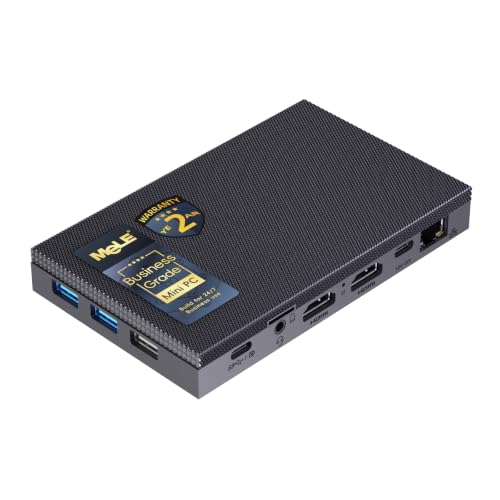
- Best overall fanless mini PC for beginners: MeLE Quieter4C Fanless Mini PC, Intel N100, Windows 11 Pro — Check on Amazon
- Protectli Vault Pro VP2430, Intel N150, 4x 2.5GbE, Coreboot-Ready Barebone — Check on Amazon
- MINIX NEO Z300-0dB Fanless Mini PC, Intel Core i3-N300, 16GB RAM, 512GB SSD — Check on Amazon
- KINGDEL NC3000 Fanless Industrial Mini PC, Core i7-8565U, 16GB RAM, 512GB NVMe — Check on Amazon
- ZOTAC ZBOX CI337 Nano Fanless Mini PC, Intel N100, Barebone — Check on Amazon
See 1 more Amazon option
- Protectli Vault Pro VP4630, Intel Core i3, 6-Port Firewall Appliance — Check on Amazon
Read the full guide ↓
Disclosure: As an Amazon Associate, reviewstook.com earns from qualifying purchases. Links to Amazon on this page are affiliate links; they cost you nothing extra. Listing details such as price and availability change often, so check the current Amazon listing before you buy.
If this is your first PC purchase — or your first in a long time — a fanless mini PC is one of the friendliest places to start, as long as you know exactly what one is. It is a complete little computer, roughly the size of a paperback book, with one unusual feature: there is no fan inside it at all. Instead of blowing air over hot parts the way every ordinary PC does, it spreads its heat across a heavy metal case covered in fins, and the case radiates that heat into the room. No fan means no fan noise, ever, and no fan to wear out, clog with dust, or start rattling in three years. For a bedroom desk, a study or a home office where you take calls, that silence is the entire point.
Now the honest part, before any product names: silence is bought with speed. A case can only shed a small amount of heat, so fanless PCs are built around gentle, low-power processors — in this guide, Intel’s N100, N150 and i3-N300 chips, plus one older 15-watt laptop-class Core i7. Every one of the six picks below uses integrated graphics, the small graphics circuit built into the processor itself, rather than the separate graphics card that powers a gaming tower. These machines are genuinely good at everyday computing, video, older games, indie games, light esports titles turned down, and streaming games from a bigger PC or the cloud — and they are not built for modern big-budget games at high settings. No fanless mini PC at any price changes that: even the most expensive verified fanless machines our research found on Amazon run the same class of low-power chips as the entry-level picks below — check price on Amazon for each pick. What $800 buys in this category is better network ports, better support, better build, and more already fitted.
One more beginner-friendly truth: most of these picks cost far less than $800, so treat the budget as a ceiling, not a target. For most first-time buyers the right answer is a complete machine in the $330–$500 range, with the leftover kept for a monitor and other extras.
In this guide
Quick Picks
Short on time? Each row below names a buyer type and the product that suits it, with a link to the listing.
| Buyer type | Pick | Why it stands out | Link |
|---|---|---|---|
| Best overall for beginners | MeLE Quieter4C (Intel N100) | Complete and silent out of the box, runs three screens, well under budget — check price on Amazon | Check on Amazon |
| Best for a home network or firewall project | Protectli Vault Pro VP2430 (Intel N150) | Four fast network ports, open-source firmware option, US-based support | Check on Amazon |
| Most everyday speed, still silent | MINIX NEO Z300-0dB (Intel Core i3-N300) | Eight processor cores — the most in a verified fanless desktop here — with memory and storage fitted | Check on Amazon |
| Best for older and industrial equipment | KINGDEL NC3000 (Core i7-8565U) | Serial ports and a VGA connector that modern mini PCs no longer include | Check on Amazon |
| Cheapest way in, if you like building | ZOTAC ZBOX CI337 Nano (Intel N100) | A fanless kit from a known brand and the lowest-cost way in here — check price on Amazon; you add memory, storage and Windows yourself | Check on Amazon |
| Most network ports with vendor support | Protectli Vault Pro VP4630 (Intel Core i3) | Six fast network ports and Protectli’s support — but only at the low end of its price range | Check on Amazon |
How These Picks Were Chosen
The first test every pick had to pass is the one in the category’s name: is it actually fanless? That word gets abused in listings, so we only accepted a machine when its own manufacturer states passive, fanless cooling in the specifications or datasheet, or a reviewer who opened the box confirmed no fan inside. Finned metal cases can mislead — some boxes that look passively cooled conceal a small internal fan — and plenty of mini PCs are merely “quiet,” a different promise entirely. Several familiar models failed this test during research and were left out; if the maker would not put “fanless” in its own specification table, the machine did not get in on hope.
The second test was honesty about what you receive: four of the six picks are complete computers that work when plugged in. Two are barebones — a case, a motherboard and a processor, with the memory, storage and operating system left for you to buy and install. Barebones are not a scam, but their sticker is not their real price, so each barebone review below counts the extra parts as part of the cost before recommending anything. Where a listing sells several configurations under one page, the review tells you which configuration is being offered and what to double-check in your cart.
The third test was documentation. We did not use these products ourselves; we read manufacturer listings, datasheets, manuals and independent coverage that documents configurations, and favored makers who publish their full numbers over listings written in adjectives. Prices move constantly, so check the current price on Amazon for each pick before you buy. Finally, a note on the category label: Amazon files these machines under gaming PCs. They are not gaming PCs in the way a tower with a graphics card is, and this guide will keep telling you so, because a beginner deserves the truth before checkout rather than after.
Words Worth Knowing Before You Spend
Every technical term used below is defined here, in plain English. Read this section once and the rest of the guide — and most Amazon listings — will make sense.
- Fanless (passive cooling). A fanless PC has no fan and no moving cooling parts. Heat travels from the processor into the metal case, whose fins give it a large surface to escape from, and room air carries it away. Two consequences follow: the machine is silent, and the case is the cooling system, so it needs open air around it and gets warm to the touch in normal use. Warm is fine. Buried in a cabinet is not.
- Watts and TDP. A processor’s TDP (thermal design power) is roughly how much heat it produces at full work, in watts. Ordinary desktop processors produce 65 watts or more; the chips in this guide produce about 6 to 15. That gap is the whole story of fanless computing: the case can only shed a few watts, so the chips must be frugal ones.
- CPU (the processor), cores and threads. The CPU is the computer’s brain. A core is one working unit inside it; more cores means more jobs done at the same time. A thread is a stream of work a core can follow — some cores handle two at once. Four cores (the N100 and N150 picks) feel fine for everyday use; the eight cores in the MINIX pick below feel noticeably roomier with many programs open.
- Integrated graphics, and shared memory. A gaming tower has a separate graphics card with its own fast memory. These mini PCs instead use integrated graphics: a small graphics circuit inside the processor that borrows part of the main memory — called shared memory. Integrated graphics are perfectly good for screens, video, and light games, and they are the main reason a fanless PC cannot match a gaming tower. There is no graphics card to upgrade later.
- RAM (memory), and soldered versus socketed. RAM is the computer’s short-term workspace: more of it means more programs and tabs stay open without slowdowns. 8GB is the workable minimum, 16GB is comfortable, 32GB is generous. Memory is fitted one of two ways. Socketed memory is a small stick clicked into a slot (here, a SO-DIMM slot), swappable for a bigger stick later. Soldered memory is fixed to the board permanently — the size you buy is the size you keep. Where a pick below has a documented slot, the review says so; where the maker sells fixed configurations, treat memory size as a checkout decision, not an upgrade plan.
- Storage: SSD, NVMe and eMMC. Storage is where your files and programs live permanently. An SSD (solid-state drive) is the modern standard — no spinning parts, fast, silent; NVMe is the fastest common kind of SSD connection. eMMC is cheaper, slower storage soldered into budget machines — it works, but it is the first thing you will outgrow. When a listing gives only a size like “512GB,” check which kind it is; the reviews flag it wherever it matters.
- Barebone. A barebone (or “kit”) is a partial computer: case, motherboard and processor only. Memory, storage and the Windows license are not included, and the machine can do nothing until you buy and fit them. Two picks here are barebones, and both reviews do that extra arithmetic for you. If fitting parts sounds like a chore rather than a hobby, buy a complete machine.
- New versus renewed. Renewed or refurbished means a used machine cleaned, tested and resold, usually with a shorter warranty. Every pick in this guide is sold new — worth stating plainly, because mini PC listings mix the two freely, and these six are factory-new products with standard warranties.
- Resolution: 1080p, 1440p and 4K. Resolution is how many dots (pixels) make up the picture: 1080p is about two million, 1440p about 3.7 million, 4K about 8.3 million. More pixels means a sharper picture and more work for the graphics. These machines display a crisp 4K desktop and play 4K video happily, but playing games is the hard job, and their honest home for games is 1080p and below.
- Refresh rate (Hz). Refresh rate is how many times per second the screen redraws, measured in hertz. A standard office screen is 60Hz; gaming screens run 144Hz and up for smoother motion. A fast monitor often arrives set to 60Hz; switch it to its real rate in Windows settings (walkthrough, step 6). With integrated graphics, 60Hz is honestly all these machines can feed for games anyway.
- Upscaling. Upscaling is a shortcut: the game draws a smaller, cheaper picture, and software stretches and sharpens it to fill your screen. AMD’s version, FSR, works on almost any graphics hardware — including the Intel chips here — in games that include it. NVIDIA’s DLSS works only on NVIDIA graphics cards — there are none in this guide, so no pick here can use it. Upscaling helps light games on these machines; it does not turn them into gaming towers.
- Power brick. Mini PCs have no internal power supply like a tower does; they use an external brick, like a laptop charger, which sits on the desk or floor, gets mildly warm, needs a little air, and counts in the machine’s footprint.
- Platform. A machine’s platform is the family its processor belongs to; it tells you how old the design is. The N100, N150 and i3-N300 picks below are current low-power platforms; the KINGDEL pick uses a 2018 laptop platform — serviceable, but not current, and its review says so. On every pick here the processor is soldered down and can never be upgraded.
Your First Evening: Setting Up, Step by Step
None of the complete machines below needs tools or expertise to set up; work through these steps and you will have a working, updated desktop in one evening. Barebone owners have one extra job first — fitting memory and storage and installing Windows — which the ZOTAC and Protectli reviews describe; if that sounds like too much, buy a complete pick and skip to step 1.
- Place the machine where it can breathe. This is the fanless rule, and the only step that can shorten your PC’s life if you skip it: the case is the heatsink, so it needs open air around its fins. Put it on the desk, on an open shelf, or behind the monitor where a pick includes a mounting bracket. Never seal it in a closed cabinet, bury it under papers, or stack equipment on top of it. Warm to the touch in use is normal; trapped heat is not.
- Place the power brick sensibly. The brick wants the same courtesy: open air, not wedged behind a cushion or under a rug. (The MeLE is the one exception: it can run from a USB PD supply over USB-C.)
- Connect the monitor to the machine’s own display outputs. On a gaming tower, the screen must plug into the graphics card, not the motherboard. Here there is no graphics card, so life is simpler: use a display output on the mini PC itself, as listed in each review — HDMI is the safe first choice.
- Connect keyboard, mouse and a network cable. Any USB keyboard and mouse will do. Wi-Fi works, but plug in an Ethernet cable for setup if you can: the first update round is large, and wired is faster and cannot drop halfway.
- Let Windows update itself, then update drivers. A new machine’s first job is an hour of patience. Run Windows Update, restart when asked, and repeat until it reports nothing left — then check the maker’s support page for newer graphics or network drivers. Do this before judging the machine’s speed; half of all “slow new PC” complaints are an unfinished update queue.
- Set your monitor’s real refresh rate. Open Settings, then System, then Display, then Advanced display, and choose the highest refresh rate your monitor offers. Screens often arrive limited to 60Hz even when they can do more, and this thirty-second fix is the most commonly missed step in all of PC setup.
- Verify you received the configuration you paid for. Mini PC listings often sell several configurations under one page, and the wrong one occasionally ships. In Windows, open Settings, then System, then About, and check the installed RAM and processor name against your order; check storage size in File Explorer. On a barebone, confirm the parts you fitted are recognized at full size. Do it on day one, while returns are painless.
- Install a game store and set your expectations. Install Steam (or your store of choice), sign in, and start with the games these machines enjoy: older titles, indie games, light esports games on modest settings, and games streamed from the cloud or another PC. Set game resolution to 1080p or lower and let the machine impress you within its honest limits, instead of opening with the heaviest game of the year and concluding it is broken — it is not broken, it is fanless.
The 6 Best Fanless Mini PCs Under $800 for Beginners
MeLE Quieter4C Fanless Mini PC (Intel N100)
Who it suits: A first-time buyer who wants the silent-computer experience with nothing to build and plenty of budget left over.
Start here, because this is the machine most readers of this guide should buy. The Quieter4C cools Intel’s N100 — four cores, up to 3.4GHz — with the top of its own slim case, built as a heatsink. There is no fan and no vents to clog, and the machine is under an inch thick (about 5.16 by 3.19 by 0.72 inches), small enough to VESA-mount behind a monitor and forget. It runs three 4K screens at once across two HDMI ports and a USB-C port, and that USB-C can also power the machine from a USB PD supply. Windows 11 Pro is installed, it can wake over the network and restart itself after an outage, and MeLE rates it for 24/7 duty.
The one decision to make carefully is which configuration to order, because the listing sells more than one. The 8GB memory / 128GB storage build is the lower-cost configuration — check price on Amazon; it works, but its storage is the slower eMMC kind, and the empty M.2 slot beside it is where a proper SSD belongs if you keep the machine for years. The 16GB / 512GB build — check the current price on Amazon — arrives with that NVMe storage and twice the memory, and is the version to buy if you can stretch to it. Two cautions: memory runs in a single channel on this chip, keeping graphics light-duty whatever you choose, and MeLE also sells newer N150-based refresh builds positioned higher in the range — make sure the cart holds the N100 machine you intend to buy, which is what step 7 of the walkthrough is for.
- Completely silent, complete with Windows 11 Pro, and thin enough to hide behind a monitor.
- Runs three 4K displays and can be powered over USB-C.
- Two configurations to choose between — the 16GB/512GB build and the 8GB/128GB build; check price on Amazon for each.
Honest limitation: Networking is a generation behind — a single Gigabit Ethernet port and Wi-Fi 5 — and integrated graphics on a single memory channel mean light games only, forever.
Choose it if you want a silent everyday computer that simply works, and would rather keep the leftover budget for a good monitor. Skip it if you need several fast network ports (read the Protectli reviews) or any serious gaming power (no fanless machine offers it).

Protectli Vault Pro VP2430 (Intel N150, 4x 2.5GbE)
Who it suits: A beginner whose real project is a home network — a proper firewall or a first homelab — and who wants a company that publishes manuals and answers support tickets.
Protectli is the name beginners in networking get told to trust, and the VP2430 shows why. It is a fanless, all-aluminum box — the chassis is the heatsink, per Protectli’s own datasheet — built around Intel’s N150 (four cores, up to 3.6GHz) and, most importantly, four Intel 2.5GbE network ports using the I226-V controller, the one the popular firewall systems pfSense and OPNsense handle without driver trouble. It offers a choice of ordinary AMI firmware or open-source coreboot, is assembled in the USA, Canada or Germany, and comes with a published datasheet, a real knowledge base, US-based support and a 30-day money-back guarantee. Inside are three M.2 slots — one for an NVMe SSD, plus smaller slots for Wi-Fi or a cellular modem — and 32GB of built-in eMMC that can boot a lightweight system before you add anything.
Now the part a beginner must not miss: the Amazon listing is a barebone. Check price on Amazon, and remember that the listing price is only part of what you will spend: you still need to buy and fit a DDR5 memory stick (Protectli qualifies sticks up to 64GB, well beyond Intel’s official figure for this chip) and an M.2 SSD before it is a computer at all — the parts bill is part of this product’s price, so add it before comparing with the complete machines above. (Configured coreboot versions, sold as the VP2430e — the same hardware without the built-in eMMC — sit higher in the range.) Even built up, the total lands far below this guide’s ceiling, and the premium over an anonymous import buys support, maintained firmware and a warranty someone answers for — not a faster processor, because the N150 is the same class of chip found in more basic boxes.
- Four Intel 2.5GbE ports — the right controller, four times over, for firewall and homelab work.
- Coreboot or AMI firmware, a published datasheet, and US-based support.
- Fanless aluminum chassis built for always-on duty, with room for SSD, Wi-Fi and a cellular modem.
Honest limitation: It arrives as a barebone, so memory and storage cost extra, and the four-core N150 is a networking chip — fine for routing, VPNs and light server jobs, ordinary as a desktop, and not a gaming processor.
Choose it if this box will sit at the center of your network and you want documentation and support more than a low sticker. Skip it if you want a finished Windows desktop out of the box — the MeLE and MINIX picks exist for you.

MINIX NEO Z300-0dB Fanless Mini PC (Intel Core i3-N300)
Who it suits: A beginner who wants the most everyday speed a silent computer can offer — many tabs, documents, calls and media at once — in a complete machine with zero assembly.
The “0dB” in this machine’s name is a claim MINIX puts in its own manual: the cooling system is specified as “Fanless (0dB),” and the metal chassis does all the work. Inside is the strongest processor in this guide — Intel’s Core i3-N300, eight cores at up to 3.8GHz, double the core count of the N100 and N150 machines. It arrives complete: 16GB of memory in a genuine slot you can later raise to 32GB (a rarity among fanless desktops), a 512GB NVMe SSD, two HDMI outputs that each drive a 4K screen at 60Hz, a fast 2.5G Ethernet port, and Windows 11 Pro installed. Check price on Amazon; positioned at the top of the complete machines here, it is the natural ceiling of that group: the step up over the MeLE buys more cores and a better specification — not a new class of performance, and certainly not gaming graphics, which remain integrated and light-duty.
One measured fact teaches how fanless machines behave. In independent testing, this processor reached 98°C under a sustained heavy load. That is inside the chip’s design limits and the machine keeps working, but it is the fanless bargain in one number: under marathon workloads — long video exports, big software builds, heavy conversions — a fanless box runs hot and trims its speed to what the case can shed. Ordinary bursty work (documents, browsing, calls, media) never gets near that point. Note too that the USB-C port is data-only — it cannot power the machine or carry a display — so plan on the power brick and the HDMI ports.
- Eight-core i3-N300 — the most processor cores in any verified fanless pick in this guide.
- 16GB of memory in an upgradeable slot and a 512GB NVMe SSD, with Windows 11 Pro.
- Two 4K HDMI outputs and 2.5G Ethernet in a solid metal case — check price on Amazon.
Honest limitation: Sustained heavy loads run hot (98°C measured) and slow down accordingly; the USB-C port is data-only, and memory runs in a single channel.
Choose it if you want a silent desktop with real multitasking headroom and no setup beyond the walkthrough. Skip it if your main work is long, heavy processing — a quietly fanned machine will finish those jobs faster for less money.

KINGDEL NC3000 Fanless Industrial Mini PC (Core i7-8565U)
Who it suits: A beginner whose computer must talk to physical equipment — a serial-controlled instrument, workshop or lab gear, an older VGA monitor — and needs ports consumer mini PCs deleted years ago.
The NC3000 is heavier and older-fashioned than the picks above, on purpose. It is a fanless, all-metal industrial computer, about 9.2 by 5.9 by 2 inches and roughly three pounds — that mass is not clumsiness, it is the heatsink that lets a 15-watt processor live without a fan. The processor is a Core i7-8565U (four cores, eight threads, up to 4.6GHz), and the ports are the reason the machine exists: two RS232 serial ports, HDMI and VGA outputs for two displays, four USB 3.0 ports, Wi-Fi and Bluetooth. The commonly listed configuration pairs 16GB of memory with a 512GB NVMe SSD — check price on Amazon — and the same listing family offers a 32GB / 1TB build — which is why step 7 of the walkthrough (verify the delivered configuration) matters for this pick more than any other.
Judge it by 2018, because that is when its platform is from. The integrated UHD Graphics 620 handles screens and video playback and is not a gaming part; the memory is the older DDR4 generation; and KINGDEL is a small industrial brand whose support is a storefront page, not a knowledge base. None of that is a flaw if your problem is “a silent computer that must connect to a serial device and then be ignored for years” — for that job this is the only pick speaking the right language, fairly priced. Bought as a general modern desktop, though, the MeLE and MINIX above are newer, cheaper and better supported.
- Two serial ports and a VGA output — connections nothing else in this guide offers.
- Core i7-8565U with 16GB of memory and a 512GB NVMe SSD — check price on Amazon; a 32GB/1TB build exists in the same listing family.
- A heavy finned metal case with genuine thermal headroom for always-on industrial duty.
Honest limitation: A 2018 platform with basic integrated graphics: right for control, office and media work, irrelevant for games, and thin brand support compared with Protectli or MeLE.
Choose it if serial ports, VGA or an industrial installation are the real requirement. Skip it if you simply want a quiet home desktop — picks one and three do that job better for less.

ZOTAC ZBOX CI337 Nano Fanless Mini PC (Intel N100, Barebone)
Who it suits: A beginner who is curious about building — who already owns spare parts, or wants to run Linux, or simply enjoys putting the machine together — and wants the cheapest honest way into fanless computing.
ZOTAC’s C-series is one of the longest-running fanless lines in the business, and the CI337 Nano is its current N100 model: a passively cooled barebone, described as fanless in ZOTAC’s own listing — check price on Amazon; it is positioned as the lowest-cost entry in this guide. For that you get the case, board and processor, plus a surprisingly complete set of connections: a DDR5 memory slot (up to 16GB), an M.2 NVMe slot and a 2.5-inch drive bay, two Gigabit Ethernet ports, Wi-Fi 6, a VESA mount, and three display outputs across two HDMI ports, a DisplayPort, and DisplayPort over USB-C. You supply one memory stick, one SSD and an operating system, and in exchange you know exactly what is inside your computer.
The total cost gets its own paragraph. The kit plus a 16GB DDR5 stick and a 512GB NVMe drive lands close to the cost of a complete N100 machine — and on days when DDR5 prices spike, above it. The kit wins in three situations: you already own the parts, you want a specific drive, or you run Linux and refuse to pay for a Windows license you would delete on day one. Two technical notes: the M.2 slot runs at a reduced lane speed (PCIe 3.0 x1), so do not buy a flagship SSD for it — a mid-range drive is the right match — and ZOTAC’s official specification is DDR5 memory, whatever a stray Q&A answer on the listing may claim. The N100 ceiling applies here exactly as elsewhere: office, media, network and retro-gaming duty, in silence.
- A genuinely fanless kit from an established brand — check price on Amazon; the lowest-cost way in.
- Two Ethernet ports, Wi-Fi 6, three display outputs, and room for both an M.2 SSD and a 2.5-inch drive.
- You choose the memory, storage and operating system — ideal for Linux and for parts already on your shelf.
Honest limitation: Barebone means the sticker is not the price — parts and an operating system are on you — and the slowed M.2 slot caps SSD speed; the chip itself is the same light-duty N100 as in the complete machines.
Choose it if you have parts, prefer Linux, or want the small pleasure of building it. Skip it if you want to unbox a working computer — the MeLE is the same silicon, complete, for not much more on most days.

Protectli Vault Pro VP4630 (Intel Core i3, 6-Port)
Who it suits: A beginner planning a bigger home or small-office network — separate networks for work, guests, gadgets and a lab — who wants the most ports and strongest vendor support this budget buys in one silent box.
The VP4630 is the step up within Protectli’s own line: six 2.5GbE network ports instead of the VP2430’s four, an Intel Core i3 of the Tiger Lake generation instead of an N-series chip, DDR4 memory, and your choice of M.2 NVMe or SATA storage, all in the same fanless aluminum Vault chassis with the coreboot firmware option and Protectli’s US support behind it. Six physical ports end the beginner’s VLAN juggling act — one each for internet, home, work, gadgets, guests and experiments — and the i3 includes AES-NI, hardware that keeps encrypted VPN traffic moving at speeds the N-series chips cannot match. Nothing about it is quick in the gaming sense, and everything about it is what the top of a fanless budget is honestly for.
Two cautions, both about buying. First, configuration: the commonly listed Amazon configuration pairs 8GB of memory with a small 120GB SATA SSD — a firewall’s specification, not a desktop’s — so if you want a virtualization host, confirm the configuration on the listing or plan to grow it with parts. Second, price discipline: this listing is largely third-party-sold, and its pricing varies widely. Check the current price on Amazon first. At the low end of its range it is a fair price for six ports and this vendor. Near the top of that range, walk away — the VP2430 covers most of the same ground for less, and no fanless box justifies a scarcity premium. Let the live price choose between the two Protectli picks for you.
- Six 2.5GbE ports and a Core i3 with AES-NI — the most networking this budget buys without a fan.
- Protectli’s coreboot option, published documentation and US-based support in the fanless Vault chassis.
- Flexible DDR4 memory and NVMe-or-SATA storage for firewall or light virtualization duty.
Honest limitation: The commonly listed configuration is a lean 8GB/120GB, the platform is DDR4-era, and third-party pricing swings widely — this pick only makes sense near the low end of its price range.
Choose it if six physical ports and Protectli’s support are the point, and the live listing sits at the low end of its range — check the current price on Amazon. Skip it if the listing sits near the top of its range — at that point, the VP2430 plus a managed switch is the smarter network.

Comparison Table
| Product | Processor | Best use | Link |
|---|---|---|---|
| MeLE Quieter4C | Intel N100 (4-core) | Silent everyday desktop and media PC, complete | Check on Amazon |
| Protectli Vault Pro VP2430 | Intel N150 (4-core) | Firewall, router and homelab with vendor support | Check on Amazon |
| MINIX NEO Z300-0dB | Intel Core i3-N300 (8-core) | Silent desktop with the most multitasking headroom | Check on Amazon |
| KINGDEL NC3000 | Core i7-8565U (4-core, 15W) | Industrial control, serial devices, legacy displays | Check on Amazon |
| ZOTAC ZBOX CI337 Nano | Intel N100 (4-core) | Barebone kit for builders and Linux installs | Check on Amazon |
| Protectli Vault Pro VP4630 | Intel Core i3 (6-port) | Segmented networks and VPN-heavy firewalls | Check on Amazon |
How to Choose a Fanless Mini PC Under $800
- Decide the job first, the budget second. Fanless PCs do four jobs well — silent desktop, media player, network appliance, always-on light server — and one job badly: modern gaming. If your job is on the good list, keep reading with confidence. If it is gaming, look at fanned machines instead; no price in this category changes the answer.
- Check the word “fanless” like a skeptic. Look for it in the manufacturer’s own specification table or datasheet. A finned case is not proof — some lookalike boxes hide a small fan inside — and “quiet” in a title is not a claim of fanless at all. If the maker’s own specs stay silent on the subject, shop as if a fan is in there.
- Buy complete unless building is the hobby. A barebone’s sticker excludes memory, storage and usually Windows. Add those costs before comparing anything, and be honest about whether fitting parts sounds fun or sounds like a chore. Both answers are respectable; they lead to different picks.
- Choose the configuration, not just the model. Listings sell several memory and storage sizes under one page. At this budget, 16GB of memory and a real NVMe SSD are the comfortable targets; an 8GB machine with eMMC storage is the budget tell. Decide the configuration first, then verify it in the cart and again on delivery day.
- Spend the step-up money knowingly. Between $300 and $800 the processors barely change. What changes is ports and controllers, firmware options, documentation, warranty handling, and who answers when something breaks. Those are genuinely valuable — buy them on purpose, not under the illusion that they are speed.
- For network builds, check the controller, not just the count. Four ports with Intel I226-V controllers (the VP2430) will save a beginner real pain in pfSense and OPNsense; some cheaper boxes use Realtek controllers with a documented history of driver trouble there. The datasheet names the controller — read it.
- Plan the placement before the purchase. The case is a heatsink, and heatsinks need air: an open shelf, a desk, or a monitor mount. If your only spot is a closed TV cabinet, change the spot or change the plan — a sealed fanless PC throttles and ages early.
- Keep the change. Most beginners should land between $330 and $500 here. The leftover buys things that improve daily life more than a spec upgrade: a monitor, a larger SSD later, or a small UPS.
What Else You Will Spend
No pick in this guide is the whole purchase, and a beginner’s budget should be planned as a total, not a sticker.
- A monitor comes first. No pick includes a screen, and it is the extra you will look at every day. Every pick can display a crisp 4K desktop, but a comfortable 1080p or 1440p monitor is the honest partner, and a high-refresh gaming monitor is wasted money, because integrated graphics cannot feed it in games.
- Keyboard and mouse. Also not included with any pick. Anything with a USB plug or wireless receiver works; there is no performance secret to unlock, so buy for comfort.
- Cables. An HDMI cable for the monitor and an Ethernet cable for setup are the two that matter; display cables are the classic forgotten extra, so check the box contents on the listing before you order.
- Barebone parts, priced as machine plus fix. For the two barebones, the honest price is the kit plus a memory stick, an SSD, and a Windows license if you are not running Linux. Once its parts are added, the ZOTAC kit becomes a computer at roughly the complete MeLE’s total cost — the real comparison, and why the kit only wins if you own parts or enjoy the build. The VP2430’s parts bill buys the exact memory size your project needs — a feature, but still a bill.
- Configuration catches, priced the same way. The MeLE’s cheaper build pairs 8GB of memory with slow eMMC storage; the fix — the 16GB/512GB build, or an SSD in its empty M.2 slot later — is part of that pick’s true cost. The VP4630’s commonly listed 8GB/120GB configuration is a firewall’s spec; wanting a desktop or virtualization host from it means budgeting for more memory and storage from the start.
- Nothing else is required. No pick needs a subscription, a special desk, or cooling accessories — adding cooling accessories to a fanless PC means you bought the wrong PC.
Upgrades, in Plain Terms
Beginners are often sold computers on future upgrade promises, so here is exactly what can and cannot change on these machines, stated plainly.
- There is no graphics upgrade. On any of them. Ever. The graphics live inside the processor, the processor is soldered to the board, and there is no slot for a graphics card. If you outgrow these machines for games, the upgrade is a different computer. Any seller who implies otherwise is misleading you.
- Memory can grow only where a slot is documented. The MINIX can go from 16GB to 32GB with a single stick swap. The two barebones take the memory you choose at build time — the VP2430 accepts large DDR5 sticks (Protectli qualifies up to 64GB), the ZOTAC up to 16GB of DDR5. On the complete MeLE and KINGDEL, treat the fitted memory as final: choose the size at checkout.
- Storage is the easy, documented upgrade. The MeLE has an empty M.2 slot waiting for an NVMe SSD — the most worthwhile later purchase in this guide. The ZOTAC takes both an M.2 drive and a 2.5-inch drive. The VP2430’s M.2 slot is where its main SSD goes from day one. Adding storage never changes how fast the machine thinks, only how much it holds, and a beginner can do it with one screwdriver and ten minutes.
- Everything else is fixed. Processors, graphics, and the case-as-heatsink are permanent. That permanence is the fanless trade: fewer moving parts, fewer failures, fewer choices — and a ceiling you accept on day one in exchange for silence.
Common Buying Mistakes
- Buying a fanless PC for modern games. The category label says “gaming PC”; the physics says otherwise. Retro, indie, light esports and cloud gaming are the honest list, at $800 exactly as at $300.
- Believing a finned case proves a fanless design. Lookalike boxes can conceal a small fan inside, over the memory and storage. Check the manufacturer’s own specifications for the word fanless — nothing else counts as proof.
- Comparing a barebone’s sticker with complete machines’ prices. The kit that looks cheaper at first glance needs memory, storage and maybe a Windows license before it computes anything.
- Ordering the wrong configuration from a multi-configuration listing — and never checking. Verify the memory and storage in Windows on delivery day (walkthrough, step 7), while returns are still painless.
- Paying the scarcity premium on third-party listings. Fanless models drift in and out of stock and third-party prices swing widely; the VP4630 is a buy at the low end of its range and a mistake near the top of it. Waiting is a strategy.
- Buying eMMC storage at NVMe prices. At the top of this budget, check what the storage actually is, and prefer a fitted NVMe drive or an open M.2 slot you can fill.
- Sealing the heatsink in a cabinet. A fanless PC in a closed entertainment center is an oven with a computer in it; throttling and a shortened life follow. Placement is part of the product.
- Spending all $800 because the budget allows it. The best outcome in this category is usually a $330–$500 machine and money left over. The ceiling is permission, not instructions.
Final Recommendation
- Most beginners: MeLE Quieter4C, in the 16GB/512GB configuration.
- Home network and firewall projects: Protectli Vault Pro VP2430.
- The most everyday speed in silence: MINIX NEO Z300-0dB.
- Serial ports and legacy equipment: KINGDEL NC3000.
- If you have parts on the shelf: ZOTAC ZBOX CI337 Nano.
- Six ports with full vendor support: Protectli Vault Pro VP4630, only near the low end of its price range.
Our top two for a beginner are the MeLE Quieter4C — the complete, silent desktop that makes the category’s case well under the ceiling — and the Protectli Vault Pro VP2430, for network builders. The MINIX Z300-0dB is the step up for multitasking; the KINGDEL is the only pick that speaks serial; the ZOTAC kit is the cheapest honest way in if building appeals. If $800 is more than your job needs, the same silence costs less in our guides to Best Fanless Mini PC For Beginners Under $500 and Best Fanless Mini PC For Beginners Under $400; readers whose silent machine is really for the TV stand should see Best Fanless Mini PC For Streaming Under $800. Name the job first, confirm the fanless claim in the maker’s own specification table, count the whole cost of any barebone, and look at the live price on the day you order.
Frequently Asked Questions
I am a complete beginner. Which one should I just buy?
The MeLE Quieter4C, in its 16GB/512GB configuration — complete, silent, and small enough to disappear behind a monitor. Buy the MINIX Z300-0dB instead only if you keep many programs open at once and want the extra cores; buy a Protectli only if your project is a network, not a desktop.
Can a fanless mini PC play games at all?
Yes — the right games. Older titles, indie games, light esports games on modest settings, emulation, and games streamed from the cloud or from a bigger PC all work well, because the integrated graphics in these chips are built for exactly that class of play. Modern big-budget games at high settings, and 1440p gaming in particular, are beyond every pick here at any price; our Best Fanless Mini PC For 1440p Gaming Under $800 guide explains that reality, and if gaming is the priority, a fanned machine at this budget is dramatically faster.
Why do these cost so much for such modest processors?
Because the price was never for the processor. It pays for the machined metal case that replaces the fan, for low-volume and industrial design, for multi-port network boards, and — at the top of the range — for firmware maintenance, documentation, warranty and support. A fanless box and a fanned box with the same chip are different products at different positions in the range: an appliance built to be forgotten, versus a computer.
Will it overheat, or get slower the longer it runs?
It manages heat by design: under a long, heavy load it runs hot and trims its speed to what the case can shed — one pick here was measured at 98°C under sustained load. For everyday bursty work you will never notice. Placement decides whether it reaches its modest potential or falls short, which is why step 1 of the walkthrough — open air around the fins, never a sealed cabinet — matters more than any setting.
Is a barebone a good first PC?
Only if the building itself appeals to you, or you already own a suitable memory stick and SSD, or you plan to run Linux. Otherwise the honest total — kit plus parts plus possibly Windows — meets or beats a complete machine’s price, and the complete machine works the evening it arrives.
Fanless, or just a quiet fanned mini PC?
Choose fanless when silence must be absolute (bedroom, studio, recording space), when the box runs around the clock unattended, or when it is network infrastructure you intend to forget for five years. Choose a quiet fanned mini PC when you want the most performance per dollar and a faint fan under load is acceptable — it will be faster, cheaper, or both. The wider field is compared in Best Mini PC Under $800, and those set on silence in tight quarters should see Best Fanless Mini PC For Small Spaces Under $800.
How long will a fanless mini PC last?
The design removes the most common mechanical failure — there is no fan to wear out, clog or start rattling — and the appliance picks here are built for continuous duty. The realistic limits are elsewhere: eMMC storage wears faster than NVMe, power bricks age like any electronics, and a low-power chip will feel slow long before it stops working. Buy NVMe storage from a maker with a real warranty, and how long the machine serves you will be decided by your patience with its speed, not by broken parts.


