Where to buy
Check the latest price, availability and delivery on Amazon. Orders are placed on Amazon. We may earn a commission from qualifying purchases.
- Best overall fanless streaming mini PC: MeLE Quieter4C Fanless Mini PC, Intel N150, 16GB RAM, 512GB Storage, Windows 11 Pro — Check on Amazon
- MINIX NEO Z300-0dB Fanless Mini PC, Intel i3-N300, 16GB RAM, 512GB SSD — Check on Amazon
- HISTTON Fanless Industrial Mini PC, Core i7-10810U, 32GB RAM, 512GB SSD — Check on Amazon
- Protectli Vault Pro VP2430 Fanless Mini PC, Intel N150, 4x 2.5GbE Ports — Check on Amazon
See 2 more Amazon options
- ZOTAC ZBOX CI337 Nano Fanless Silent Mini PC, Intel N100, Barebone — Check on Amazon
- MeLE PCG02 Fanless PC Stick, Intel N100, 8GB RAM, 128GB, Windows 11 Pro — Check on Amazon
Read the full guide ↓
Disclosure: As an Amazon Associate, reviewstook.com earns from qualifying purchases. Links to Amazon on this page are affiliate links; they cost you nothing extra. Listing details such as price and availability change often, so check the current Amazon listing before you buy.
Streaming is the one job where a fanless mini PC’s defining trait stops being a compromise and becomes the feature. A fan is a noise source sitting somewhere near your microphone, and every fanned streaming PC forces the same negotiation: move the machine further away, buy a longer cable run, add noise suppression, or accept a faint whine under every quiet moment of the broadcast. A fanless machine ends the negotiation. It can sit on the desk, in shot, next to the microphone, and contribute exactly nothing to the audio. That is the honest reason this guide exists — not because these little boxes are secretly powerful, but because silence is a production value and these are the only PCs that deliver it for free.
What they cannot do needs saying just as plainly, because “streaming PC” usually means something specific. The classic one-machine gaming stream — a demanding game rendered on the same computer that captures, composites and encodes it — is beyond every pick below. These machines have no discrete graphics card and no NVENC encoder; their integrated graphics render light games only, and their encoder is Intel Quick Sync, the fixed-function video block inside the processor. So this guide grades them on the streaming workflows they genuinely serve: the silent talk-and-desktop station (just chatting, podcasts, webinars, screen-share and reaction formats), the console streaming station (a capture card brings the game in from a PlayStation, Xbox or Switch, and the mini PC handles OBS and the encode), the media and transcode box (a Plex or Jellyfin server whose Quick Sync hardware re-encodes your library for remote viewers), and light self-rendered game streams of undemanding titles at 720p. If your plan is a AAA game and its stream on one silent box, no such product exists — the honest route is a fanned machine in another room, or the gaming-first guides such as Best Streaming PC Under $1200 with a fan accepted as part of the deal.
The second honesty is about money, and it mirrors the category itself. Genuinely fanless machines top out far below this $1,200 budget, because passive cooling caps the processor at low-power silicon. The most expensive sensible pick below sits at the top of this category, and it is included as a documented ceiling rather than a recommendation — what its higher position in the range buys over a more modest machine is memory and industrial ports, not a better stream. Every encoder in this guide is the same class of Intel Quick Sync hardware, and a stream encoded by a lower-tier box looks the same as one encoded by the ceiling pick at the same settings. Silence does not scale with price, and neither does stream quality. Buy the machine that fits your workflow and keep the rest of the budget for the microphone and lights that viewers actually notice.
In this guide
Quick Picks
Short on time, or comparing several options at once? Each row below names a streaming job and the product that suits it, with a link to the listing.
| Streaming job | Pick | Why it stands out | Link |
|---|---|---|---|
| Best overall silent stream station | MeLE Quieter4C, N150, 16GB/512GB | Complete and silent: Quick Sync encoding, triple 4K output for a multi-monitor desk — check price on Amazon | Check on Amazon |
| Best for a busy stream desk | MINIX NEO Z300-0dB, i3-N300, 16GB/512GB | Eight cores carry OBS, browser, chat and alerts at once; 2.5G Ethernet — check price on Amazon | Check on Amazon |
| Most memory for heavy scenes | HISTTON Fanless Industrial PC, i7-10810U, 32GB/512GB | 32GB of RAM and six cores for browser-heavy productions — the category’s real ceiling; check price on Amazon | Check on Amazon |
| Best always-on media/transcode box | Protectli Vault Pro VP2430, N150 | Four 2.5GbE ports and Quick Sync transcoding in a silent appliance built to run for years — check price on Amazon | Check on Amazon |
| Best barebone stream build | ZOTAC ZBOX CI337 Nano, N100 | A brand-name fanless barebone you complete with your own memory and SSD — check price on Amazon | Check on Amazon |
| Smallest stream and media station | MeLE PCG02 PC Stick, N100, 8GB/128GB | A whole silent Windows PC in a 130g stick behind the TV — check price on Amazon | Check on Amazon |
How These Picks Were Chosen
The first filter was the word “fanless” itself, applied strictly. A pick had to be a genuinely passively cooled machine — no fan — verified from the manufacturer’s own specifications or documentation, never from a marketplace headline. That filter removed some famous names: several multi-port firewall boxes sold as “fanless” turn out, in the manufacturer’s own material or in independent teardowns, to carry a small internal fan, and one widely sold line’s internal fan has been measured by reviewers at levels no microphone would forgive. Those machines may be fine routers, but a streaming guide that promises silence cannot recommend a fan it has not disclosed. The same filter removed every “quiet fan” mini PC and every gaming mini PC, because an actively cooled machine is a different product answering a different search.
The second filter was the encoder, graded from the silicon actually inside each pick — not from streaming keywords in a listing title. Every machine here encodes with Intel Quick Sync, and the generations differ in ways that matter. The N100, N150 and i3-N300 picks carry the current low-power Quick Sync block: hardware H.264 and HEVC encoding, which covers Twitch and YouTube streaming today, plus AV1 decoding for playback and transcoding sources. What that generation does not have is AV1 encoding — no pick in this guide can send an AV1 stream, and any listing or review implying a sub-$1,200 fanless box can is wrong; AV1 encode lives on discrete RTX 40-series cards and a few much larger machines. The one Core i7 pick is older still: its Quick Sync generation predates AV1 entirely, with neither AV1 encode nor decode. We graded each pick on its real encoder, its core count for simultaneous work, its memory for browser-heavy scenes, and its storage for local recordings — the four things that actually decide a small stream station’s behaviour.
The third filter was verifiability. Every machine below is a genuine Amazon listing; during research we cross-checked each ASIN and specification against manufacturer pages and specification databases. Prices change often and barebone totals swing with the memory market, so check the current price on Amazon for each pick before you decide. Two picks are barebones that ship without some or all of memory, storage and operating system; their reviews say so plainly and describe the completion honestly in qualitative terms. We did not stream from these machines ourselves; we read the maker listings, datasheets and specification pages, and where a maker’s claims stretch, the review says so. If your budget is smaller — and for most stream stations it should be — the same logic applies at Best Fanless Mini PC For Streaming Under $500 and Best Fanless Mini PC For Streaming Under $800.
The Streaming Workflows These Machines Actually Serve
Before the reviews, the workflows deserve one honest section each, because “for streaming” covers four different jobs and the picks are not equally good at all of them.
Talk, desktop and podcast streaming. Just-chatting formats, video podcasts, webinars, tutorials and reaction streams ask the PC to composite camera, screen and browser sources in OBS and encode the result — no game rendering at all. This is the fanless machine’s home turf. Quick Sync handles a 1080p60 H.264 encode at Twitch’s roughly 6,000 kbps ceiling without troubling the CPU cores, the silence keeps the microphone honest, and the real limits are memory for browser sources and cores for everything running at once. Every complete pick in this guide does this job; they differ in headroom, not capability.
Console streaming through a capture card. The console renders the game; the mini PC receives it over a USB or PCIe capture card, composites your camera and overlays, and encodes. The rendering problem disappears, which makes a fanless box a legitimate single-purpose stream station for PlayStation, Xbox and Switch content. The demands that remain are a clean USB port for the card, enough cores to keep OBS and chat responsive, and Quick Sync for the encode — again, every pick qualifies, and the silent desk is a genuine production advantage.
Media serving and transcoding. A Plex or Jellyfin server is a streaming machine in the other direction: it sends video to your household and, when a remote viewer’s connection or device cannot handle the original file, transcodes it in real time. Quick Sync is exactly the hardware this job wants, and the N-series chips’ AV1 decoding means even newer-format sources can be pulled in and re-encoded to H.264 or HEVC for the viewer. A fanless box does this silently, sips power, and runs for years — which is why the network-focused pick in this guide earns its place in a streaming roundup.
Self-rendered game streaming — the limited one. Rendering a game and encoding its stream on the same integrated graphics is where the ceiling shows. The integrated GPU is busy drawing the game; OBS’s compositor shares the same silicon; and the titles that stay smooth are the light ones — retro, indie and older esports games at 720p with modest settings. Treat that as a bonus mode of the talk station, not a reason to buy. If self-rendered game streaming is the main event, the money belongs in a machine with a discrete GPU and NVENC, and the silence problem is solved with distance and cable instead.
The 6 Best Fanless Mini PCs for Streaming Under $1,200
MeLE Quieter4C Fanless Mini PC — Intel N150, 16GB RAM, 512GB Storage
Who it suits: Streamers who want the finished silent station — talk, desktop, podcast and console-capture streaming from a complete machine that makes no noise beside the microphone, ever.
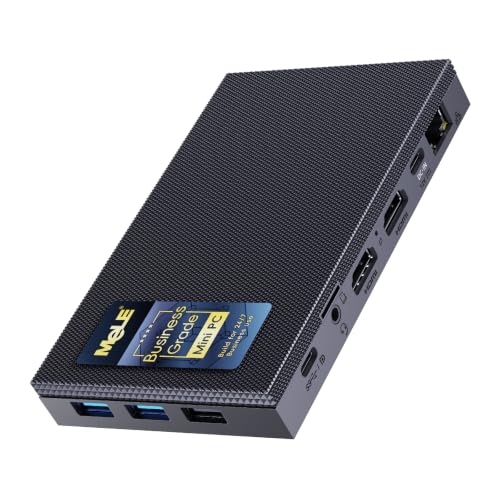
The Quieter4C is the reference fanless desktop, and for streaming its specification reads like a checklist of the job’s real requirements. The Intel N150’s Quick Sync block encodes H.264 and HEVC in hardware, so a 1080p60 stream at Twitch’s ~6,000 kbps leaves the four CPU cores free for OBS’s scene work, the browser, chat and alerts; the same hardware decodes AV1, which keeps it current as a media and transcode box even though — to be exact about the encoder map — this generation has no AV1 encode, and your outgoing stream is H.264 today. Around the encoder, MeLE builds the desk a streamer actually wants: 16GB of DDR4 memory in a real slot on this Business Grade build, so browser sources and a dozen tabs do not squeeze the stream; 512GB of storage, so local recordings have somewhere to live; two HDMI ports plus a full-function USB-C for up to three 4K displays, because stream desks grow monitors; gigabit Ethernet for the wired connection a stream should always use; and a VESA mount that puts the whole 5.2 by 3.2 by 0.7 inch slab behind a screen, out of the shot entirely. It can be powered over USB-C PD, auto-powers on after an outage, and supports Wake-on-LAN — the always-on manners of a machine meant to be ready when you are. Windows 11 Pro is pre-installed. Check the current price on Amazon — it is the complete answer; the same chassis is also offered in a lower-tier N100, 8GB/128GB configuration for lighter duties, though the 8GB of shared memory makes that build a tighter simultaneous-load proposition.
The limitations are the category’s, stated plainly. Four efficiency cores are enough for the workflows above and no more: ask it to render a modern game and encode its stream simultaneously and it will do neither well. Under a long flat-out load a passive case sheds heat only as fast as physics allows, so sustained speeds settle below the boost clock; MeLE itself states case surface temperatures of 55 to 70 degrees Celsius under load, which is normal and within the cited safety standard, but it means open air, not a sealed cabinet — a stream station buried behind equipment will throttle mid-broadcast. None of that is a flaw in a machine whose entire point is silence at the desk; it is simply the honest shape of the best all-round fanless stream station we could verify.
- Quick Sync hardware encoding leaves the CPU free for OBS, browser and chat.
- 16GB of slotted memory and 512GB of storage — real headroom for scenes and recordings.
- Triple 4K display support and a VESA mount for a clean, silent stream desk.
Honest limitation: No AV1 encode and no discrete GPU — H.264/HEVC streaming of talk, desktop and captured console play is its ceiling, and sustained loads throttle to what a passive case can shed.
Choose it if you want the ready-to-run silent station for talk, podcast, desktop or console-capture streaming. Skip it if your plan is rendering modern games and streaming them from the same box — that job needs a discrete GPU and a fan.

MINIX NEO Z300-0dB Fanless Mini PC — Intel i3-N300, 16GB RAM, 512GB SSD
Who it suits: Streamers whose desk is busy — multiple browser sources, chat, alerts, a capture card and a recording running at once — and who want the most simultaneous-load headroom a consumer fanless box can hold.
The NEO Z300-0dB’s headline is its processor. The Intel i3-N300 is the eight-core member of the Alder Lake-N family, and in a streaming station those extra cores are not about the encode — Quick Sync, the same current-generation block as the Quieter4C’s, handles H.264 and HEVC encoding in fixed-function hardware with AV1 decode for media work — they are about everything else that happens during a live broadcast. OBS compositing, a browser full of dashboards and browser sources, chat clients, alert services and a local recording all compete for CPU and memory bandwidth; eight threads absorb that pile-up noticeably better than four. MINIX pairs the chip with 16GB of DDR4 memory and a fast 512GB PCIe SSD, pre-installs Windows 11 Pro, and adds the two connections a stream desk appreciates most: a 2.5-gigabit Ethernet port, so the wired upload rule costs nothing in local transfer speed, and dual 4K display output over HDMI and USB-C. A VESA mount is included, and MINIX rates the machine for continuous 24/7 operation — the “0dB” name is a literal claim about its passive cooling. Check the current price on Amazon; it sits in a similar part of the range to the Quieter4C’s flagship configuration while doubling the cores.
The standard fanless caveats apply here, and this machine adds one of its own. Eight efficiency cores are still efficiency cores: per-core speed is modest, the integrated graphics are the same class as the rest of this guide, and self-rendered game streaming stays in the light category regardless of core count — the encoder generation is identical to the cheaper picks, so the stream itself looks no better, it just shares the machine more gracefully. The passive top cover becomes warm under load — MINIX warns about it in its own listing copy — and sustained all-core work settles to what the case can dissipate. Memory is DDR4 rather than DDR5, a fair trade at this tier. Judged on the thing streaming actually stresses — everything at once, in silence — this is the strongest consumer pick in the guide.
- Eight-core i3-N300 — the most simultaneous-load headroom in a verified consumer fanless box.
- Quick Sync H.264/HEVC encoding plus AV1 decode for media and transcode work.
- 2.5-gigabit Ethernet and a fast 512GB PCIe SSD, ready to work the day it arrives.
Honest limitation: The encoder is the same generation as the cheaper picks — the extra cores buy multitasking grace, not a better-looking stream — and the case runs warm under sustained load.
Choose it if your streams run heavy scenes, many browser sources or a capture card alongside recording. Skip it if your format is a simple single-camera talk stream — the Quieter4C does that job with a third display output.

HISTTON Fanless Industrial Mini PC — Core i7-10810U, 32GB RAM, 512GB SSD
Who it suits: Producers whose streams are browser-and-memory productions — many live web sources, dashboards and guests — and who came to this search wondering what the top of a $1,200 fanless budget actually buys a streamer.
This pick earns its place as documentation: the top of the category, put on the record rather than left as rumour. The machine is a fanless industrial computer: an Intel Core i7-10810U — six cores, twelve threads — passively cooled in a finned aluminium chassis measuring 8.07 by 4.92 by 2.09 inches, fitted with 32GB of DDR4 memory (upgradeable to 64GB), a 512GB NVMe SSD, dual gigabit Ethernet, triple display outputs and Windows 11 Pro. Check the current price on Amazon. For streaming, its genuine asset is memory: 32GB is double every other pick here, and a production built from browser sources, guest feeds and dashboards feels that headroom directly, because browser sources are memory with a frame rate. The six cores give software x264 encoding real room at modest presets, and the industrial build suits a machine that lives in a rack room or studio corner and runs unattended.
Now the honesty this pick exists to carry, which for streamers is sharper than usual. The i7-10810U is a 15-watt laptop processor from 2019, and its Quick Sync encoder is the oldest in this guide: H.264 and HEVC encoding of an earlier generation, and no AV1 support in either direction — it cannot decode AV1 sources in hardware, let alone encode them. The picks above it, sitting lower in the range, carry the newer encoder block. Its integrated graphics are likewise older and weaker, its Bluetooth is version 4.2, and in a passive case its six cores cannot hold boost clocks through long loads. The same seller offers a lower-memory version of this family, sitting lower in the range, and a higher-memory, larger-storage configuration that sits well above this guide’s budget, for the same class of silicon. Buy this machine for memory and industrial I/O with open eyes and it will serve well; buy it assuming the top of the budget buys the best fanless stream, and you have paid a premium for the oldest encoder in the guide.
- 32GB of memory — double every other pick — for browser-source-heavy productions.
- Six cores give software encoding and multitasking real room.
- A finned industrial case made for dust, neglect and running unattended for years.
Honest limitation: The oldest encoder in the guide: a 2019 Quick Sync generation with no AV1 decode or encode, and dated integrated graphics — the price buys memory and ports, not streaming quality.
Choose it if your production is memory-bound and you need industrial I/O in total silence. Skip it if you simply want the best fanless stream — the picks above encode with newer hardware and sit lower in the range.

Protectli Vault Pro VP2430 Fanless Mini PC — Intel N150, 4x 2.5GbE
Who it suits: Streamers whose “streaming” points the other way — a silent, always-on media server or network box that transcodes and serves video to the household and beyond, and never sleeps.
Protectli’s trade is appliances rather than desktops, and the Vault Pro VP2430 is built exactly that way. Inside the finned, fanless case — Protectli’s own documentation describes the machine as “Fanless and Silent,” full stop — sits an Intel N150 whose Quick Sync block is the same current generation as the Quieter4C’s: hardware H.264 and HEVC encoding for transcodes, AV1 decoding for modern sources. Around it are four Intel I226-V 2.5-gigabit Ethernet ports, a DDR5 memory slot the maker has tested with modules up to 64GB, an M.2 NVMe slot for a real media library drive, and 32GB of onboard eMMC to boot a lightweight system from. Then come the details consumer brands skip: an optional open-source coreboot firmware, a TPM module, a serial console port, a VESA mount in the box, and assembly in the USA, Canada or Germany behind a real support organisation. Check the current price on Amazon. As the silent heart of a Plex or Jellyfin setup — serving direct plays all day and hardware-transcoding for whichever remote viewer needs it — it is the most purpose-fit machine in this guide, and its network ports make it equally at home routing the streamer’s whole LAN.
The caveats are about configuration and role, not quality. Amazon sells the VP2430 in several configurations, and the lower-priced ones are barebone — memory and SSD are yours to add — so read the exact listing configuration before comparing it against the complete desktops here; the onboard eMMC will boot a media or firewall system happily but is no place to record or store a library, which is what the M.2 slot is for. The newest VP2430e variant drops the eMMC, so check which revision a listing describes. And as a desk stream station it is deliberately specialised: four network ports and a console connector are wasted on OBS duty, and its display outputs are a workmanlike HDMI and DisplayPort pair. Judged as the always-on streaming appliance it is, it has no serious rival here; judged as a broadcast desk PC, the Quieter4C above is the better buy.
- Quick Sync transcoding with AV1 decode — the media-server encoder story done right.
- Four Intel 2.5GbE ports and coreboot firmware — purpose-built for network and server duty.
- Specialist-built, properly documented hardware with a real support organisation behind it.
Honest limitation: Lower Amazon configurations are barebone — memory and storage cost extra — and the 32GB eMMC is a boot device, not recording or library storage.
Choose it if the fanless PC’s job is media serving, transcoding or running the network behind your streams. Skip it if you want a ready-to-run broadcast desk — the Quieter4C is the better fit for that job.

ZOTAC ZBOX CI337 Nano Fanless Mini PC — Intel N100, Barebone
Who it suits: Streamers who want a genuine brand-name silent station for the least money — and who are happy to choose and fit their own memory and SSD, or already have both on the shelf.
ZOTAC has made passively cooled nano PCs longer than almost anyone, and the CI337 Nano is the current entry point: an Intel N100 in a finned, fanless chassis measuring about 5.03 by 4.99 by 2.24 inches, with the N100’s Quick Sync block providing hardware H.264 and HEVC encoding and AV1 decode — the same encoder generation as the guide’s top picks, which is precisely the point. A stream encoded here is encoded by the same class of silicon as a stream from the Quieter4C; what its lower position in the range removes is everything else. The box is barebone, as its own title states: no memory, no storage, no operating system. You add a DDR5-4800 SO-DIMM (the board takes up to 16GB — choose 16GB if streaming is the job, because OBS, a browser and chat on shared memory will feel 8GB immediately), an M.2 SSD or a 2.5-inch drive in the spare bay, and the OS of your choice. Around the build you still get triple display support across two HDMI ports, a DisplayPort and USB-C, dual gigabit Ethernet for the wired-stream rule, Wi-Fi 6 and Bluetooth 5.2, and a VESA mount. Check the current price on Amazon. Costed honestly, a completed CI337 also needs the memory and storage you add yourself, and those parts costs vary with the memory market, so the finished total sits higher than the barebone’s own position in the range.
That DIY nature cuts both ways. If you do not already own a spare DDR5 stick and SSD, the headline price is a down payment, not a stream station; if your parts shelf holds DDR4 instead, note this board is DDR5 and the older memory will not fit. The N100’s four cores are the tightest simultaneous-load budget among the complete-equivalent picks — keep scenes lean, cap browser sources, and it streams talk and captured console play cleanly; overload it and the encoding lag counter in the OBS section below will introduce itself. The M.2 slot is a PCIe 3.0 x1 design, so storage speed is capped below what the drive itself could do in a bigger machine — recordings are unaffected, since even that link outruns any stream bitrate, but large library transfers feel it. ZOTAC also stands behind the box with its own support and warranty — the thing that separates it from the anonymous fanless barebones crowding the same price band.
- The same Quick Sync encoder generation as the top picks, at the lowest entry point in this range — check price on Amazon.
- Two gigabit Ethernet ports, Wi-Fi 6 and three 4K display outputs in a five-inch box.
- Takes your choice of DDR5 memory and M.2 or 2.5-inch storage — fit 16GB for streaming.
Honest limitation: Barebone means barebone: no RAM, no SSD, no operating system, and four cores leave the least headroom for heavy simultaneous scenes.
Choose it if DDR5 and an SSD already sit on your shelf, or you simply want to pick them yourself. Skip it if you want to unbox a working stream station — once retail parts are added, the complete picks above can be the simpler value.

MeLE PCG02 Fanless PC Stick — Intel N100, 8GB RAM, 128GB Storage
Who it suits: Streamers and media users whose silent PC needs to be invisible — a stick behind the TV for media playback, a travelling talk-stream kit, or a signage and guest-screen station that runs itself.
Nothing we could verify packs a complete fanless PC smaller than the PCG02: 137.5 by 53 by 16.3 millimetres and 130 grams, plugging straight into a display’s HDMI socket by its own male connector. Inside are an Intel N100, 8GB of LPDDR5 memory and 128GB of high-endurance eMMC storage running Windows 11 Pro. The N100’s Quick Sync block gives it the same H.264/HEVC hardware encode and AV1 decode as the bigger picks, which makes this stick a legitimate little streaming appliance in both directions: it can run a simple OBS talk setup or a media front-end at the TV, transcode and serve light media duties, and receive streams and cloud games all day without a sound. A full-function USB-C port drives a second 4K display and accepts power, there is gigabit Ethernet — a wired connection a stick this size has no business offering, and the one a stream should always use — plus Wi-Fi 5, Bluetooth 5.1 and a microSD slot. The Business Grade touches are the same ones MeLE builds into the Quieter line — Wake-on-LAN, PXE boot, timed wake and auto power-on after an outage — because this stick is designed to run unattended for years. Check the current price on Amazon.
The limits are written into the form factor, and for streaming they bite in two specific places. Memory is 8GB, soldered, and shared with the integrated graphics: OBS plus a browser plus chat fits, but with no headroom to spare, so heavy browser-source scenes are off the menu. Storage is 128GB of eMMC — slower than an SSD and small — which makes local recording the tightest squeeze in this guide; record at stream bitrates and the drive fills in days of broadcasting, so plan on recording to network storage or treating recordings as disposable. MeLE puts the stick’s surface at the same 55 to 70 degrees Celsius under load — normal for passive cooling and inside the cited safety standard — but a stick plugged into the back of a hot television inside a closed cabinet is living its hardest life, so give it air. Buy it as the invisible appliance it is, and it is excellent; buy it as a shrunken stream desk, and the Quieter4C exists precisely for you. Buyers weighing the smaller-budget versions of this category should also see Best Fanless Mini PC Under $1200 for the full fanless picture.
- A complete silent Windows 11 Pro PC in a 130g stick — the most discreet streaming appliance here.
- Quick Sync encode and AV1 decode, gigabit Ethernet, dual-display output.
- High-endurance storage and unattended-operation features (WoL, auto power-on) for 24/7 duty.
Honest limitation: Fixed 8GB of shared memory and 128GB of eMMC — the tightest simultaneous-load and recording-storage budget in the guide, with no upgrade path.
Choose it if the station must vanish behind a screen and the workload is media, signage or a simple talk setup. Skip it if you record locally, run heavy scenes or need memory beyond the basics — every other pick offers more.

Comparison Table
| Product | Processor / encoder | Best streaming use | Link |
|---|---|---|---|
| MeLE Quieter4C, 16GB/512GB | Intel N150 — Quick Sync H.264/HEVC, AV1 decode | The complete silent talk, podcast and console-capture station | Check on Amazon |
| MINIX NEO Z300-0dB, 16GB/512GB | Intel i3-N300, 8-core — Quick Sync H.264/HEVC, AV1 decode | Busy stream desks: heavy scenes, capture and recording at once | Check on Amazon |
| HISTTON Fanless Industrial PC, 32GB/512GB | Core i7-10810U, 6-core — older Quick Sync, no AV1 | Memory-heavy browser-source productions, industrial duty | Check on Amazon |
| Protectli Vault Pro VP2430 | Intel N150 — Quick Sync H.264/HEVC, AV1 decode | Always-on media server and transcoding appliance | Check on Amazon |
| ZOTAC ZBOX CI337 Nano | Intel N100 — Quick Sync H.264/HEVC, AV1 decode | Cheapest brand-name fanless stream build, completed your way | Check on Amazon |
| MeLE PCG02 PC Stick, 8GB/128GB | Intel N100 — Quick Sync H.264/HEVC, AV1 decode | Invisible media and simple talk station behind a screen | Check on Amazon |
Setting Up OBS on a Fanless Stream Station
The hardware only becomes a stream with the right settings, and on Quick Sync machines the defaults are not always your friend. Work through this once and the little box will hold a broadcast for hours.
- Pick the hardware encoder, per pick. In OBS, set the streaming encoder to the Intel Quick Sync H.264 option (shown as QuickSync H.264) on every pick in this guide — never x264 on the four-core machines, whose cores are needed for compositing and the browser. On the six-core HISTTON, x264 at veryfast or faster presets is a survivable fallback, but its Quick Sync is still the efficient choice; its older generation simply lacks the newer block’s refinements. There is no AV1 streaming encoder on any pick here, so do not go looking for one in the list — H.264 is what Twitch takes best anyway, and YouTube accepts it happily.
- Rate control: CBR, with a two-second keyframe interval. Use constant bitrate — around 6,000 kbps for 1080p60 on Twitch, less for 720p — and set the keyframe interval to 2 seconds, which the platforms expect. Variable bitrate saves nothing on a live upload and can complicate the platform’s transcoding.
- Watch the three lag counters. OBS’s Stats window separates your problems into three counters, and each has its own fix. Rendering lag (frames missed due to rendering lag) means the integrated graphics cannot composite your scene at the chosen canvas: lower the output resolution to 720p, trim GPU-heavy sources and browser animations, and cap the preview. Encoding lag (frames skipped due to encoding lag) means the encoder is saturated: confirm you are actually on Quick Sync rather than x264, drop to 720p60 or 1080p30, and avoid stacking a high-quality local recording encode on top of the stream encode on the four-core picks. Network dropped frames are not the PC’s fault at all: they mean the upload path failed, and the fixes are below.
- Wire it. Always. Stream on Ethernet, never Wi-Fi — a wireless dropout reads to viewers as the PC failing, and every pick here has a proper Ethernet port (the MINIX and Protectli run theirs at 2.5 gigabits). If the router is far away, a long cable is the cheapest streaming upgrade in existence.
- Record smart on small storage. Recording the stream locally doubles the encode load unless you record using the stream encoder’s output — OBS can do exactly that, and on these machines you should. On the eMMC picks, watch capacity: the PCG02’s 128GB fills quickly at stream bitrates, and the VP2430’s 32GB eMMC is a boot device only — recordings belong on its M.2 SSD or your network storage.
- Give it air before you go live. A fanless case under a two-hour encode settles at the temperature physics allows; makers state surfaces of 55 to 70 degrees Celsius under load. Place the machine in open air with the fins unobstructed — not in the sealed cabinet with the console — and a long stream will not slowly throttle into the red counters above.
How to Choose a Fanless Mini PC for Streaming
- Name your workflow first. Talk and desktop streaming, console capture, media transcoding and light self-rendered games are four different jobs. Every pick here does the first three; none does heavy game streaming. The choice between them is headroom and role, not basic capability.
- Grade the encoder from the chip, not the listing. The N100, N150 and i3-N300 carry the current low-power Quick Sync block — H.264/HEVC encode, AV1 decode, no AV1 encode. The 2019 Core i7 in the ceiling pick carries an older block with no AV1 at all. A listing that promises AV1 streaming from any of these is inventing a feature.
- Count cores for the pile-up, not the encode. Hardware encoding barely touches the CPU. What eats cores live is OBS compositing, browser sources, chat, alerts and recording at once — which is why the eight-core MINIX exists in this guide and why four-core picks want lean scenes.
- Treat memory as shared, because it is. Integrated graphics borrow system RAM, so a 16GB pick is the comfortable floor for a stream desk and the soldered 8GB stick is a simple-format appliance. Browser sources are the hungriest residents; the 32GB HISTTON is the memory specialist, bought for capacity rather than encoder quality.
- Plan recording storage like a budget. SSD picks shrug off local recordings. eMMC picks do not: 128GB is a few long broadcasts, and 32GB is a boot drive pretending to be storage. Decide where recordings live before the first stream, not during it.
- Verify “fanless” from the manufacturer, not the headline. Some boxes sold as fanless contain a small auxiliary fan — audible to a microphone even when a spec sheet calls the design fanless. Check the maker’s own documentation for a passive-cooling statement, as this guide did for every pick.
- Judge a barebone by its completed total, not its entry point. A barebone needs memory, storage and usually an operating system; once those parts are added, completing the ZOTAC can approach a complete machine’s position in the range. Compare completed totals before you decide.
- Keep the change. The correct spend for a silent stream station in this category sits in the lower part of this budget for a complete machine. A $1,200 budget is permission, not an instruction — the encoder does not improve past the current Quick Sync generation, so the leftover money belongs in the kit section below.
What Else You Will Spend: The Kit Around the Station
The PC is the silent part of a stream, not the whole of it, and the remaining budget does its best work here. Treat this section as an order of priorities, and shop each item on its own merits.
- A microphone, first. Viewers forgive soft video and leave over bad audio. A decent USB or XLR microphone, placed close, is the single largest quality jump available to any streamer — and the fanless PC’s silence is what lets a sensitive microphone sit near the desk without drinking fan noise.
- Lighting, second. A simple key light makes an inexpensive camera look deliberate. Cameras are sensors starved of light; feed them and the picture improves more than any camera upgrade at this level.
- A webcam, third. Only after light. Any current 1080p camera is adequate for the corner-of-screen role most facecams play.
- A capture card, only for console streaming. If your games live on a PC, you do not need one at all in this setup — and if your games live on the same fanless PC, a capture card does not fix the rendering problem. Buy the card when a console is the game source and the mini PC is the broadcast station, which is the division of labour these machines are built for.
- Cables and small things. A long Ethernet cable for the wired rule, a USB hub if the stick or nano runs short of ports, and somewhere sensible for recordings to land. None of it is included in a pick’s listing.
Common Buying Mistakes
- Buying a fanless PC to render and stream modern games on one box. Integrated graphics plus Quick Sync is a talk, desktop and capture station; the game-rendering stream station needs a discrete GPU, and a discrete GPU needs a fan.
- Believing an AV1 streaming claim for this class of hardware. The N-series Quick Sync block decodes AV1 and encodes H.264/HEVC; the 2019 i7 here does neither AV1 job. AV1 encode requires hardware none of these picks contain.
- Spending the whole $1,200 because the budget says so. The verified ceiling of this category is an industrial configuration whose premium buys memory and ports — and the oldest encoder in this guide.
- Streaming over Wi-Fi because the desk looks tidier. Dropped frames from a wireless dropout are indistinguishable from a failing PC to your viewers; every pick here has Ethernet for a reason.
- Leaving OBS on the x264 software encoder on a four-core pick. The cores are needed for the scene and the browser; Quick Sync exists precisely to take the encode off them.
- Sealing the machine in a cabinet with the console. A passive case sheds heat from its surfaces; starve it of air and a long stream throttles into encoding lag, then gets blamed on the encoder.
- Recording everything to a small eMMC drive. The stick’s 128GB and the Protectli’s 32GB boot device fill fast at stream bitrates; plan recording storage before the first broadcast.
- Comparing a barebone’s entry point against complete machines. The memory and storage a barebone needs add substantially to what the finished station really costs.
Final Recommendation
- Most streamers: MeLE Quieter4C, N150, 16GB/512GB.
- Busy desks and heavy scenes: MINIX NEO Z300-0dB.
- Memory-heavy productions: HISTTON Fanless Industrial PC, 32GB.
- Media serving and transcoding: Protectli Vault Pro VP2430.
- Tightest budget with parts on hand: ZOTAC ZBOX CI337 Nano.
- Invisible media and simple talk setups: MeLE PCG02 PC Stick.
Our top two are the MeLE Quieter4C, the finished silent station that asks nothing of you but a power outlet and an Ethernet cable, and the MINIX NEO Z300-0dB, which trades a display output for twice the cores and the calmest simultaneous-load behaviour in the guide. Between them they cover what a fanless stream station is honestly for: talk, podcast, desktop and console-capture broadcasts with a microphone that hears only you, plus media boxes that transcode in silence all day. The Protectli is the specialist’s pick for the server side of streaming, the HISTTON documents the top of the market for buyers who need its memory, the ZOTAC is the value route for the parts-rich, and the PCG02 disappears behind a screen like nothing else here. What none of them requires is your whole $1,200 — the best outcome for this search is a station in the lower part of the budget range, a wired connection, and the rest of the budget in the microphone and lights your viewers will actually perceive. Readers earlier in the journey may want Best Fanless Mini PC For Beginners Under $1200, and anyone whose games outgrow this category should compare Best Fanless Mini PC For Streaming Under $2500 against the fanned streaming guides before spending more on silence than the job needs.
Frequently Asked Questions
Can a fanless mini PC really run a live stream?
Yes — the right kinds. Talk, desktop, podcast and console-capture streaming are compositing-and-encoding jobs, and the Quick Sync hardware in every pick here encodes 1080p60 H.264 without loading the CPU. What it cannot do is render a demanding game and stream it from the same box; that workflow needs a discrete GPU. Match the machine to the format and it will broadcast for hours in complete silence.
Why is there no AV1 streaming in this guide?
Because the hardware does not have it. The current low-power Intel Quick Sync block in the N100, N150 and i3-N300 encodes H.264 and HEVC and decodes AV1; AV1 encoding requires newer discrete or high-end integrated hardware that cannot be cooled passively at this size and price. Any listing claiming AV1 streaming from a fanless mini PC is misdescribing the silicon. For today’s platforms this costs you nothing: Twitch runs on H.264, and YouTube accepts it fully.
Which encoder setting should I use in OBS?
The Intel Quick Sync H.264 hardware encoder, at constant bitrate — around 6,000 kbps for 1080p60 on Twitch — with a two-second keyframe interval. Avoid the x264 software encoder on the four-core picks; their cores are needed for your scene, browser and chat. The full walkthrough, including the three lag counters and their fixes, is in the setup section above.
Is a fanless mini PC good as a Plex or Jellyfin server?
It is one of the best forms the job takes. Quick Sync transcodes in hardware at a fraction of the power of a desktop, AV1 sources decode in hardware on the N-series picks, and the machine runs silently around the clock. Fit a real SSD for the library — the Protectli’s M.2 slot or any complete pick’s storage — rather than relying on eMMC, and it will serve for years.
Why is no pick in this guide anywhere near $1,200?
Because passive cooling caps the processor. A finned case sheds the heat of a low-power chip; anything stronger needs moving air, so complete fanless machines cluster in the lower part of this budget, and the only way to spend more is industrial configurations — like the ceiling pick here, or its higher-specification sibling configuration above this budget — where the money buys memory, storage and ports around the same class of silicon. Streaming quality follows the encoder, and the encoder stops improving long before the price does.
Barebone or complete — which should a streamer buy?
Complete — unless suitable memory and storage are already sitting on your shelf. A barebone like the ZOTAC CI337 is excellent value with parts on the shelf, and it carries the same encoder generation as the top picks; bought with retail parts at current memory prices, its completed cost approaches a ready-built machine that arrives working. If you do complete one for streaming, fit 16GB — shared memory is the first thing a live desk runs out of.
Should I just buy a fanned streaming PC instead?
If your format is self-rendered gaming, yes — a fanned machine with a discrete GPU is the only honest tool for it, and the silence problem moves to placement and cable length instead. If your format is talk, desktop, console capture or media serving, the fanless station is not the compromise option; beside a microphone, it is the better one. First-time buyers in this category may also find Best Mini PC Under $1200 useful for the wider picture.


