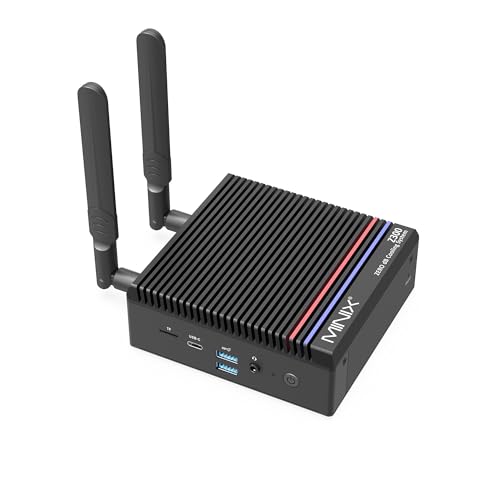
Where to buy
Check the latest price, availability and delivery on Amazon. Orders are placed on Amazon. We may earn a commission from qualifying purchases.
- Best fanless mini PC for streaming: MINIX NEO Z300-0dB Fanless Mini PC, Intel Core i3-N300, 16GB RAM, 512GB SSD — Check on Amazon
- MeLE Quieter4C Fanless Mini PC, Intel N100, 8GB RAM, 128GB, Windows 11 Pro — Check on Amazon
- HUNSN RJ42 Micro Firewall Appliance, Intel N150, 4x 2.5GbE LAN — Check on Amazon
- KINGDEL NC3000 Fanless Industrial Mini PC, Core i7 8th Gen, 32GB RAM, 1TB SSD — Check on Amazon
- Protectli Vault FW4C, 4-Port Firewall Mini PC, Intel J3710, 4x 2.5GbE — Check on Amazon
See 1 more Amazon option
- ZOTAC ZBOX CI337 Nano Fanless Barebone Mini PC, Intel N100, No RAM/Storage/OS — Check on Amazon
Read the full guide ↓
Disclosure: As an Amazon Associate, reviewstook.com earns from qualifying purchases. Links to Amazon on this page are affiliate links; they cost you nothing extra. Listing details such as price and availability change often, so check the current Amazon listing before you buy.
A fanless mini PC on a streaming desk sounds like a contradiction until you think about microphones. A condenser mic hears everything in the room, and a small fan two feet from it becomes part of every broadcast. A passively cooled machine makes no sound at all, because there is nothing in it that moves. That is the real reason to put one of these boxes in a streaming setup, and this guide grades all six picks on exactly that basis: what each machine can honestly do in a broadcast workflow, judged encoder first, because the encoder decides whether a stream holds together.
The workflow has to be defined before any pick makes sense, because these machines are not one-machine game streamers. Every pick here renders and encodes with Intel integrated graphics; there is no discrete GPU in any fanless mini PC at any price: a gaming graphics card produces more heat than a passive case can shed. What these six machines genuinely do well is three jobs. First, they are silent talk and desktop stream stations: a camera, a microphone, OBS, a browser and chat on screen, the machine encoding the outgoing feed in hardware. Second, they are console stream stations: the console renders the game, a capture card hands the picture to the silent PC, and the PC’s only heavy job is encoding. Third, they are media and transcode boxes: the same hardware video engine that encodes a stream also transcodes a Plex or Jellyfin library, around the clock. What they cannot do is render a modern game and encode it on the same chip at watchable quality; self-rendered game streams from these picks are for the lightest titles, sent at 720p, and anything beyond that belongs on a fanned machine — see Best Streaming PC Under $2500 for the category that does it properly.
The budget needs the same honesty. There is no genuinely fanless mini PC to buy in the upper reaches of this budget on Amazon US, because passive cooling caps the processor at low-power chips, and low-power chips sit in the lower tiers. Every verified fanless machine in this guide sits well within the budget. A $2,500 budget here is not spent; it is mostly handed back, and the useful destinations for the remainder are the streaming kit around the machine — microphone first, then lighting, then a capture card if you stream a console — plus the storage and backup hardware a recording workflow eats. What the money cannot buy, at any figure, is a faster class of silent silicon: above the ceiling documented here, “fanless” listings are fanned machines in disguise, industrial quotes wearing retail tags, or the same low-power box with a markup.
In this guide
Quick Picks
Short on time, or comparing several options at once? Each row below names a streaming role and the product that suits it, with a link to the listing.
| Streaming role | Pick | Why it stands out | Link |
|---|---|---|---|
| Best fanless streaming station | MINIX NEO Z300-0dB (i3-N300, 16GB/512GB) | Eight cores and 16GB — the only pick with real headroom for OBS, browser and chat at once | Check on Amazon |
| Best value silent stream box | MeLE Quieter4C (N100, 8GB/128GB) | The benchmark silent desktop: triple 4K output for a multi-monitor stream desk, USB-C powered | Check on Amazon |
| Best dual-duty network and stream box | HUNSN RJ42 (N150, 4x 2.5GbE) | The newest encoder silicon here plus storage headroom to grow into a media host | Check on Amazon |
| Best for memory-hungry stream desks | KINGDEL NC3000 (i7 8th Gen, 32GB/1TB) | 32GB of RAM and a terabyte of storage fitted — simultaneous load is its strength | Check on Amazon |
| Best stream-network infrastructure | Protectli Vault FW4C (J3710, 4x 2.5GbE) | It routes and protects the stream rather than producing it — with US support behind it | Check on Amazon |
| Cheapest route to a silent encoder | ZOTAC ZBOX CI337 Nano (N100 barebone) | A brand-name fanless kit you finish with your own DDR5 and SSD | Check on Amazon |
How These Picks Were Chosen
Two filters decided this list, and both were applied strictly. The first was fanless verification: the manufacturer’s own specification page, manual or an independent review had to confirm there is no fan in the machine — a passive heatsink, a finned chassis, a case that is itself the cooler. Listing headlines were not accepted as evidence, because “silent” is the most abused word in this category; machines described as whisper-quiet that contain a small fan were excluded. If the absence of a fan could not be verified, the machine went on the excluded list, not in the guide.
The second filter was the streaming grading itself, and it runs encoder first. Every pick uses Intel integrated graphics, so the encoder story for the whole guide is Intel Quick Sync, and the differences between picks are differences of Quick Sync generation and of the CPU and memory headroom around it. One fact governs every grade below: no pick in this guide can encode AV1. AV1 encoding exists only on current discrete graphics cards; the Quick Sync generations in these low-power chips predate it, and the newest chips here can at best decode AV1 for playback, not encode it for a stream. Every streaming grade in this guide is therefore an H.264 grade, with HEVC relevant only where a platform accepts it for recording or uploads. Anyone who tells you a fanless mini PC streams in AV1 is describing a different machine.
Within that frame, each pick was graded on three things: the Quick Sync generation in its chip; how much simultaneous load the machine around it can carry — OBS, a browser full of dashboards, chat, alerts and a recording writing to disk, all sharing the same memory; and how its storage handles recordings, because a stream station that also records fills drives faster than buyers expect. Picks whose fitted storage is eMMC are graded harder on recording duty than picks with a real NVMe SSD, and the reviews say which is which. We did not use these machines ourselves; we read maker specifications, manuals and independent reviews, and where a maker’s claims stretch, the review says so. Check price on Amazon for the current listing on each pick, and note that two picks are configurable platforms whose reviews state exactly what the linked configuration includes.
The Workflow These Machines Can Actually Run
Because the encoder ceiling is H.264, the platform math is simple. Twitch’s standard ceiling is roughly 6,000 kbps at constant bitrate for a 1080p60 stream, with a keyframe interval of two seconds — settings the stronger picks can hold while also running the rest of a stream desk. YouTube accepts higher bitrates and 1440p uploads, but a higher output resolution does not create detail the encoder silicon cannot produce; the honest configuration is a 1080p canvas at most, with several happiest producing a clean 720p talk feed. The stream these boxes produce is a talking-head, desktop, podcast or console-capture stream — content where the conversation carries the broadcast and the encoder’s job is steady, not heroic.
The console route deserves its own sentence because it is the one way these machines touch real gaming content: the console does all the rendering, the capture card delivers the picture over USB or PCIe, and the fanless PC only encodes and overlays — a division of labor that plays to everything these boxes are: silent, low-power, always ready. The self-rendered route is the opposite: the same small chip must render the game and encode the result simultaneously, sharing memory bandwidth between the two, and the honest ceiling is the lightest indie and retro titles at 720p with modest settings. Modern AAA games are out, at every price in this guide — it is the physics that made the machines silent in the first place. Readers whose main content is self-rendered PC gameplay should stop here and shop the fanned category instead, starting with Best Gaming PC For Streaming Under $2500; readers whose content is talk, desktop or console will find these six machines cover the job well within the budget.
The 6 Best Fanless Mini PCs for Streaming Under $2,500
MINIX NEO Z300-0dB Fanless Mini PC (Intel Core i3-N300, 16GB RAM, 512GB SSD)
Who it suits: Streamers who want one silent machine to run the whole desk — OBS, browser dashboards, chat, alerts and a local recording — with the encoder in hardware and the microphone hearing none of it.
The Z300-0dB takes first place here because streaming is a simultaneous-load job, and this is the only pick with headroom to spare. Its Intel Core i3-N300 brings eight efficiency cores — the most CPU in a verified fanless desktop — and its Quick Sync block is the encoder: set OBS to the Quick Sync H.264 encoder and the outgoing feed is produced by fixed-function hardware while the eight cores handle the browser, the chat client, the alert overlays and the scene switching. Around that, MINIX fits the configuration a stream desk actually wants: 16GB of DDR4 in a socketed SO-DIMM slot (upgradeable to 32GB, so the memory ceiling is a purchase away rather than permanent), a 512GB PCIe NVMe SSD that records a local copy of every stream without thinking about space for months, Windows 11 Pro installed, a 2.5GbE Ethernet port, Wi-Fi 6, and dual HDMI 2.0 outputs at 4K/60 — enough for a main monitor and a chat-and-dashboards screen. The “0dB” in the name is a literal claim, verified by independent reviewers: the finned aluminum chassis is the heatsink, there is no fan anywhere in the machine, and on a desk next to a microphone that is the entire point. Check price on Amazon — it sits at the premium end of verified fanless desktops, and still sits well within this guide’s budget.
The limitations are thermal and graphical, and both are documented rather than hidden. Stress testing has measured the CPU at 98°C under sustained load, and owners report the chassis exterior reaching roughly 160°F during long CPU-intensive work — hot enough that MINIX’s own listing copy warns the top cover may grow warm and should be kept out of children’s reach. Encoding itself is light work for the Quick Sync block, so a talk stream will not push it there, but a long session that also leans on the CPU — software encoding by mistake, a heavy browser, a game rendering locally — heats the case exactly as the physics says. Place it in open air, not a closed cabinet. The graphical ceiling is the category’s: reviewers who tested gaming on it concluded the class does not change — this is a stream station, not a game renderer, and the console-plus-capture-card route is how it broadcasts gameplay. Expansion is one slot deep, and the USB-C port is data-only: no power delivery, no display out of it.
- Eight-core i3-N300 with Quick Sync encoding — the most simultaneous-load headroom in a verified fanless desktop.
- 16GB socketed RAM (to 32GB) and a 512GB NVMe SSD: records locally without storage anxiety.
- 2.5GbE wired Ethernet, Wi-Fi 6, dual 4K HDMI — the stream-desk port set, complete.
- Finned metal chassis independently reviewed and confirmed fanless — true silence next to a microphone.
Honest limitation: The case gets hot enough under sustained load to carry a keep-away-from-children warning; the encoder is H.264 Quick Sync with no AV1, and self-rendered gaming tops out at emulation and older titles.
Choose it if you want one silent box to run the entire talk/desktop or console-capture stream desk. Skip it if your content is self-rendered modern PC gameplay — no fanless machine does that job, and this one’s premium buys headroom, not graphics.

MeLE Quieter4C Fanless Mini PC (Intel N100, 8GB RAM, 128GB)
Who it suits: Streamers who want the proven silent stream box in the category’s value tier — a dedicated talk, podcast or console-capture station that disappears behind a monitor and never makes a sound.
The Quieter4C is the machine this category is measured against, and for streaming its virtues are specific. The Intel N100’s Quick Sync block does the same fixed-function H.264 encoding as every pick here, and for a disciplined station — OBS, one browser, chat — that is sufficient: the encoder does not care that the CPU around it is a four-core 6-watt-class chip, because encoding was never the CPU’s job. What the MeLE adds is the best display setup in the guide for a stream desk: two HDMI 2.0 ports plus a full-function USB-C port drive three 4K displays, so the streaming monitor, the chat monitor and a third screen for dashboards all run off the silent box itself. It is powered over USB-C and ships with a VESA mount in the box, so the whole 5.2 × 3.2 × 0.7 inch slab mounts behind a monitor — the tidiest possible answer to where a stream PC lives. The configuration linked here is the Business-Grade build with 8GB of RAM, 128GB of storage and Windows 11 Pro; the line also sells 16GB builds and storage up to 512GB, and there is an M.2 slot and a microSD slot for growth. Check price on Amazon for this listing; the 16GB/512GB configuration sits in a higher tier in the same line, and for a main stream desk that step-up is the version to hunt.
The limitations land exactly where streaming loads a machine. The linked configuration’s 8GB of memory is shared between Windows, OBS, the browser and chat, and it is the tightest simultaneous-load budget in this guide — run the desk lean, close what you are not using, and treat the 16GB configuration as the serious version. Storage is the second catch: the fitted 128GB is eMMC-class storage, which is the wrong place to write hours of local recordings; the fix is to fit an SSD in the M.2 slot and point OBS’s recording path at it — a fix you should plan for as part of the setup. Sustained CPU performance is the third: independent stress testing at factory power limits measured average clocks around 1.2 GHz over a long run with the case top around 64°C — normal fanless behavior, and irrelevant to hardware encoding, but anything that falls back to CPU encoding will struggle, so keep OBS on Quick Sync. Networking is gigabit Ethernet and Wi-Fi 5: the wired port is adequate for a 6,000 kbps upload, but stream over the wire, not the Wi-Fi.
- Fanless verified from the maker’s own design — no fan, no moving parts, silent by construction.
- Triple 4K display support (2x HDMI 2.0 plus USB-C with DisplayPort) — the best stream-desk screen setup here.
- USB-C powered and VESA-mountable: disappears behind a monitor, off the desk entirely.
- Quick Sync H.264 encoding with an M.2 slot ready to take recording storage.
Honest limitation: The linked 8GB/128GB configuration is the line’s floor — tight for simultaneous load, and its eMMC-class storage should not be your recording drive; sustained CPU clocks fall to roughly a third of rated turbo under long loads.
Choose it if you want the reference silent stream box and will run a lean desk or step up to the 16GB configuration. Skip it if your desk runs many heavy apps at once and you will not manage them — the MINIX above carries that load instead.

HUNSN RJ42 Micro Firewall Appliance (Intel N150, 8GB RAM, 128GB SSD, 4x 2.5GbE)
Who it suits: Technical streamers and home-lab owners who want the newest silent silicon doing double duty — a stream station or media/transcode host today, with the ports and storage bays to become the network’s core tomorrow.
The RJ42 is the same fanless idea as the supported-brand firewall boxes, executed by the Shenzhen white-box industry a generation newer — and for streaming, the generation matters, because its Intel N150 carries the newest Quick Sync block in this guide, in a chassis whose own manual specifies fanless, silent 0.00 dB operation. The configuration linked here pairs the N150 with 8GB of DDR5 in a single SO-DIMM slot and a 128GB SSD, and the expansion story is the best in the guide: two M.2 2280 NVMe slots plus a 2.5-inch SATA position alongside the fitted drive, so recording storage and a media library have somewhere real to live. Four 2.5GbE ports on Intel I226-V controllers — the NIC generation the pfSense and OPNsense communities specifically look for — mean the wired connection is never the bottleneck, and display outputs (dual HDMI 2.1, DisplayPort, USB-C with display) mean it can sit on a stream desk as the station itself, not only in a network cupboard. HUNSN sells the RJ42 in barebone and multiple fitted configurations under closely related listings; the one linked here is the N150 build with 8GB and 128GB documented by a spec-checked survey of the category, and check price on Amazon for the RJ42 line — check the live listing for the configuration you are actually buying.
The trade against the supported brands is support, and it is not subtle. There is no US support line and no money-back promise beyond Amazon’s own returns; documentation is a translated manual, not a knowledge base. The white-box market also churns: identical-looking four-port boxes appear under rotating brand names, listings drift between configurations, and this same chassis exists in N100 and i3-N305 variants — so verify on the live listing, and again on delivery, that the chip is the N150 and the NICs are Intel I226-V. The fitted 8GB of memory carries the same simultaneous-load caution as the MeLE: fine for a disciplined station or a dedicated transcode role, tight for an everything-at-once desk, though the single DDR5 slot makes the step up a part swap rather than a new machine. Judged on hardware alone it is the strongest box in this guide; judged as a supported product it is a deliberate step down, and buyers should choose knowingly rather than by default.
- Intel N150 with the guide’s newest Quick Sync generation — encode and transcode in hardware, silently.
- Four Intel I226-V 2.5GbE ports: the wired upload is never the constraint.
- Two M.2 NVMe slots plus a 2.5-inch bay — recording and media storage with real headroom.
- Fanless aluminum chassis, manufacturer-rated at 0.00 dB, with display outputs for desk duty.
Honest limitation: White-box support reality — a manual, a storefront inbox and Amazon returns stand in for a vendor; listings and configurations churn, so verify chip and NICs on the live listing and on delivery.
Choose it if you are fluent enough to self-support and want one silent box that can stream, transcode and route. Skip it if the setup supports other people’s streams and needs a vendor behind it — that is the Protectli’s entire reason to exist.

KINGDEL NC3000 Fanless Industrial Mini PC (Core i7 8th Gen, 32GB RAM, 1TB SSD)
Who it suits: Streamers whose desk is heavy — many browser windows, dashboards, a DAW or production tools alongside OBS — and who would rather have memory and storage in abundance than the newest encoder silicon.
The NC3000 represents the industrial branch of fanless computing, where passive cooling is solved with mass: a full metal case with the surface area to shed a 15-watt-class processor’s heat without a fan. The configuration linked here pairs an 8th-generation Core i7 (the i7-8565U, four cores, up to 4.6 GHz turbo) with 32GB of DDR4 RAM and a 1TB NVMe SSD — by a wide margin the largest memory and storage fitted to any machine in this guide, and for streaming that is a genuine, specific strength: simultaneous load is where the smaller picks strain, and 32GB of memory simply does not strain. OBS, a browser farm of dashboards and chat, a recording writing to a terabyte drive with room to spare — this is the pick that never asks you to close anything. Its encoder is the older Quick Sync generation inside that 2018 platform’s UHD Graphics 620: it encodes H.264 in hardware and will run the talk-and-capture workflow, but it is a dated block with no modern Quick Sync advantage to lean on, and it should be graded as the set’s second-oldest encoder rather than its badge. The port selection is the reason the model exists — two RS232 serial COM ports, HDMI and VGA outputs, four USB 3.0 ports, Wi-Fi and Bluetooth — built for control rooms and installations, and mostly surplus on a stream desk. This industrial machine sits at the premium end of verified fanless PCs on Amazon, and still sits well within this budget. Check price on Amazon on the live listing for the linked configuration.
The limitations deserve the same directness. An 8th-generation Core i7 is a 2018 platform: its integrated graphics are older than the N100’s, the wireless is a generation behind, and under a sustained all-core load a passively cooled U-series chip settles well below its turbo headline — the same physics as every pick here. KINGDEL’s wider catalog teaches a listing-literacy lesson worth putting on the record: the brand sells many near-identical fanless boxes, and at least one newer listing states that its exact 12th-generation i7 variant is “shipped randomly” from a list of four chips. That listing is excluded from this guide — a CPU lottery is not a specification. The NC3000 linked here names its processor plainly — precisely why it is the one KINGDEL this guide can recommend. Buy it for the memory, the storage and the metal; verify the configuration on delivery; and do not mistake the i7 badge for modern performance or a modern encoder.
- 32GB RAM and 1TB NVMe in the linked configuration — the roomiest simultaneous-load budget here.
- Hardware H.264 Quick Sync encoding from a passively cooled 15W-class Core i7.
- Two RS232 serial ports plus VGA — legacy and industrial equipment connects without adapters.
- The listing names its exact processor (i7-8565U) — not true of every sibling listing.
Honest limitation: A 2018 platform with the set’s second-oldest encoder generation and dated integrated graphics; passive cooling caps sustained performance well below the turbo headline, and the brand’s wider catalog demands careful listing-reading.
Choose it if your stream desk is memory-hungry and you value never closing an app over encoder vintage. Skip it if you want the newest silicon and support — the MINIX and HUNSN above are newer machines in a similar tier.

Protectli Vault FW4C (Intel J3710, 4x 2.5GbE Firewall Mini PC)
Who it suits: Streamers who treat the network as part of the production — a dedicated, silent firewall and router between the stream desk and the internet, from a vendor that answers support tickets.
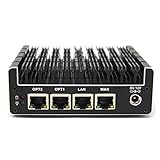
The FW4C’s place in a streaming guide is different from the other five, and this review grades it on that basis honestly: it is not the machine that produces your stream, it is the machine that protects and routes it. Protectli’s Vault line exists to run open-source firewall software (pfSense, OPNsense, OpenWrt, Untangle) on silent, finned-aluminum hardware with no moving parts. The FW4C pairs an Intel J3710 quad-core processor with four Intel 2.5GbE ports — labeled WAN, LAN, OPT1 and OPT2 on the chassis — a hardware serial console port, AES-NI encryption support, and the option of coreboot open firmware. For a streamer, the concrete benefits are a network that stays up and stays separate: the stream desk on its own segment, upload traffic prioritized by your own rules, and no consumer-router firmware deciding your bitrate mid-broadcast. It does carry a Quick Sync encoder — the oldest generation in this guide — but grading it as a stream station would be a category error: it ships without a desktop operating system by design, its platform ceiling is 8GB of DDR3L memory and an mSATA drive, and its four cores belong to your firewall rules. The Amazon listing linked here is the 4GB DDR3 RAM / 32GB SSD configuration; Protectli sells the same chassis in higher configurations (8GB/120GB listings exist). What the premium buys is everything around the hardware: US-based support, a 30-day money-back guarantee, published knowledge-base documentation down to BIOS settings, and a vendor that has sold the same models for years.
The honest limitation is the silicon’s age. The J3710 is a 2016-era low-power chip: it routes a gigabit WAN and runs standard firewall rules silently and indefinitely, which is the job, but multi-gigabit VPN throughput and heavy intrusion-prevention workloads are beyond its comfortable reach, and even sympathetic reviewers steer power users toward Protectli’s newer N-series Vaults or the HUNSN above. Check price on Amazon, and compare Protectli’s direct store as an alternative channel, since channel pricing can differ. In this pick’s case the support, not the streaming, is the product.
- Four Intel 2.5GbE ports, labeled WAN/LAN/OPT on the chassis, plus a hardware console port.
- AES-NI and an optional coreboot open firmware — the firewall-enthusiast checklist, complete.
- US-based support, 30-day money-back guarantee, deep published documentation.
- A finned aluminum fanless chassis built for years of continuous duty.
Honest limitation: The J3710 is a 2016 chip with the guide’s oldest encoder and a low ceiling for VPN and inspection workloads; it is network infrastructure, not a stream station — check price on Amazon and compare Protectli’s own store.
Choose it if the network under your stream is infrastructure you do not want to think about, and vendor support is worth more than spec-sheet speed. Skip it if you need a machine to produce the stream itself — every other pick here out-encodes it — or multi-gigabit VPN throughput.
ZOTAC ZBOX CI337 Nano Fanless Barebone (Intel N100, No RAM/Storage/OS)
Who it suits: Builders who want the cheapest credible route to a silent encode box — a brand-name fanless kit they finish with their own memory, SSD and operating system, sized exactly to a dedicated streaming or transcoding role.
ZOTAC’s C-series is the longest-running fanless line in consumer mini PCs, and the CI337 Nano is its current N100 generation: a passively cooled barebone — ZOTAC’s own description is “a robust passive cooled design with no moving components” — built around the same four-core N100 (up to 3.4 GHz) as the MeLE, which means the same Quick Sync H.264 encoder that anchors this guide’s workflow, in a slightly larger nano chassis with a VESA mount. Display output is triple — two HDMI 2.0 ports, DisplayPort 1.4 and DP over USB-C — matching the MeLE’s stream-desk party trick. What arrives is the computer minus its variable parts: a single DDR5-4800 SO-DIMM slot (up to 16GB), an M.2 2242 slot (PCIe 3.0 x1 or SATA) and a 2.5-inch SATA bay, all empty, and no operating system. Considered honestly, the completion is a parts list, not a finished machine: the kit itself, plus a DDR5 SO-DIMM, plus storage in the M.2 slot or the SATA bay, plus an operating system — Linux is free and runs OBS and media servers happily; a Windows license is the extra line if you want Windows. Check price on Amazon for the barebone — it is the lowest-tier entry in this guide, and a completed CI337 lands in a similar tier to the other entry-level picks here once the parts you choose are added, so account for those parts before ordering. For a dedicated encode or transcode role, that build-it-yourself route is the best value on this page.
The kit bargain comes with kit homework, and one real compromise. The M.2 slot is 2242-length and runs at PCIe 3.0 x1 — a narrow, slow lane by modern standards — so the 2.5-inch SATA bay will carry bulk recording storage for most builds, and neither is a performance path. The single memory slot caps the machine at 16GB in single channel, permanently — enough for a dedicated station, not an everything desk. And a kit shifts the compatibility burden to you: the right SO-DIMM (this board is DDR5; DDR4 will not fit), the right drive lengths, an OS install — none of it hard, all of it yours. What you get in return is a fanless machine from a brand with a support site, a model number and a documentation trail, at the lowest tier in the guide. Complete it with parts you already own and it is the cheapest silent encoder here by a wide margin; complete it with retail parts and it can converge on the finished machines, which is worth checking before ordering.
- A fanless kit from an established brand — ZOTAC’s C-series passive design, with documentation and support behind it.
- The same N100 Quick Sync encoder as the finished picks, at the lowest entry tier in the guide (check price on Amazon).
- Triple display output and a VESA mount, matching the finished machines.
- You choose the RAM, storage and OS — including free Linux builds for a dedicated encode/transcode role.
Honest limitation: Barebone means barebone: memory, storage and an OS are all extra purchases and extra work; the M.2 slot is short (2242) and slow (PCIe 3.0 x1), and memory is a single slot capped at 16GB, single channel.
Choose it if you enjoy the build, have parts on hand, or want a dedicated silent encode box at the lowest tier. Skip it if you want to plug in and stream today — the finished picks above arrive ready, Windows installed.

Comparison Table
| Product | Encoder | Best streaming use | Link |
|---|---|---|---|
| MINIX NEO Z300-0dB (i3-N300) | Quick Sync H.264, most headroom | The whole stream desk on one silent machine | Check on Amazon |
| MeLE Quieter4C (N100) | Quick Sync H.264 | Value silent station; triple-monitor stream desk | Check on Amazon |
| HUNSN RJ42 (N150) | Quick Sync H.264, newest generation here | Stream, transcode and network duty in one box | Check on Amazon |
| KINGDEL NC3000 (i7 8th Gen) | Quick Sync H.264, older generation | Memory-heavy desks; 32GB and 1TB fitted | Check on Amazon |
| Protectli Vault FW4C (J3710) | Quick Sync H.264, oldest here — not its job | Firewall/router infrastructure under the stream | Check on Amazon |
| ZOTAC ZBOX CI337 Nano (N100) | Quick Sync H.264 | Cheapest dedicated silent encode/transcode build | Check on Amazon |
Setting Up OBS on a Fanless Stream Station
Every pick here sets up the same way, because every pick encodes the same way. In OBS, set the encoder to the Intel Quick Sync H.264 option explicitly; the single most common fanless-streaming failure is leaving OBS on its software (x264) default, which hands the encode to the low-power CPU cores, saturates them, heats the passive case, and produces exactly the stuttering stream the buyer bought silence to avoid. With Quick Sync selected, use constant bitrate (CBR) at or below roughly 6,000 kbps for Twitch, a keyframe interval of two seconds, and a 1080p canvas at most — 720p output is the honest setting for the four-core picks when the desk is busy. Record locally at the same time if your storage allows it: the encoder can produce the recording alongside the stream, and the local copy is your upload-quality archive — but point the recording path at a real SSD, never at eMMC-class fitted storage.
When a stream degrades, OBS’s own statistics window names the cause in one of three counters, and each has a different fix. Rendering lag means the graphics side missed frames — the scene is too heavy for integrated graphics; simplify scenes, drop the canvas to 720p, and close whatever else is using the GPU, including browser tabs with video. Encoding lag means the encoder itself fell behind — on Quick Sync that almost always means the encode was actually running on the CPU by mistake, or the bitrate and resolution ask more than the generation gives; confirm the Quick Sync encoder is selected, step down to 720p, and do not raise the bitrate to compensate, because bitrate is not the constraint. Network dropped frames are not the computer at all — they are the connection, and the fix is the oldest rule in streaming: wire the machine. Every pick here has at least gigabit Ethernet and the stronger picks have 2.5GbE; a 6,000 kbps stream is a trivial load for a cable and a gamble on Wi-Fi, especially the MeLE’s Wi-Fi 5. Run the cable. A fanless station’s last setup rule is placement: the case is a radiator, so give it open air on the desk or behind the monitor on its mount — a sealed cabinet throttles the machine and the stream with it.
How to Choose a Fanless Mini PC for Streaming
- Name your workflow before your machine. Talk/desktop streaming, console capture and media transcoding are the three jobs these machines do; self-rendered modern gameplay is not a fourth. If that is your content, stop and shop fanned machines — no pick here fixes that, at any price.
- Grade the encoder generation, not the badge. Every pick encodes H.264 through Intel Quick Sync and none encodes AV1; encoder vintage follows chip vintage, not tier, so a Core i7 badge from 2018 does not out-encode an N150.
- Count simultaneous load honestly. OBS plus a browser plus chat plus alerts share one memory pool. Sixteen gigabytes is comfortable, thirty-two is luxurious, eight is a discipline.
- Give recordings a real drive. Recordings fill storage steadily, and eMMC-class fitted storage is the wrong medium for them. Prefer a fitted NVMe (MINIX, KINGDEL), spare slots you can populate (HUNSN, ZOTAC), or the M.2 slot in the MeLE — and include that drive in the station plan.
- Wire it. Dropped frames are a network problem wearing a computer costume. Every pick has wired Ethernet; use it.
- Decide your support tolerance honestly. The same class of hardware costs more from the vendor with US support and a money-back guarantee than from a white-box storefront; buying the cheap one and expecting the supported one’s service is the only wrong answer.
- Check what the box does not include. Barebone kits need RAM, storage and an OS before they encode anything; firewall appliances ship without a desktop OS by design. Account for the finished, working station before comparing it with finished machines.
- Verify the silence, not the adjective. The whole point of the purchase is a microphone that hears nothing — look for the maker’s own fanless or passive-cooling statement, or an independent review confirming no fan.
What the Rest of the Budget Should Buy
Every pick in this guide sits well within a $2,500 budget, which leaves a substantial remainder looking for honest work — and in a streaming setup, unlike in the PC itself, there is real work for it, in a strict order. The microphone comes first. Viewers forgive a soft picture for an entire stream and forgive bad audio for about a minute; if any single purchase upgrades a broadcast, it is the mic and its interface, bought before any lighting, camera or capture hardware. None of that kit is included with any pick in this guide, deliberately — the machines are considered as machines. Lighting comes second: a modest key light does more for a camera image than any camera upgrade at this level, because small sensors are starved for light long before they are starved for resolution. The webcam is third — for many talk streamers, the camera they already own, tethered, beats a new one. A capture card is fourth and conditional: it is the one piece of kit the console workflow cannot exist without, and pointless spending for a talk or desktop streamer.
After the kit, the remainder funds the station’s ecosystem rather than its badge: the SSD that takes the MeLE’s or ZOTAC’s recording duty, a small UPS so the silent always-on box also rides out power blips silently, and — for any machine doing always-on duty — a second identical unit as a cold spare, the one genuine luxury this category sells, converting a hardware failure from a cancelled week into a ten-minute swap. What the remainder should not do is chase a more expensive “fanless” machine: there is no faster silent tier waiting at a higher price, only markup wearing one. Keep what is left — a silent PC bought in the lower tiers, a microphone bought before everything else, and money still in hand is a better stream than a premium box with a headset mic, every time.
Common Buying Mistakes
- Leaving OBS on software (x264) encoding. On a low-power fanless chip that saturates the CPU, heats the case and stutters the stream; the hardware Quick Sync encoder exists precisely for this job — select it.
- Expecting AV1 from integrated graphics. No pick here encodes AV1, and neither does any fanless mini PC; AV1 encoding lives on current discrete graphics cards in fanned machines.
- Buying a fanless PC to render and stream modern games on one chip. The realistic ceiling is talk, desktop and console-capture content, plus the lightest self-rendered titles at 720p.
- Recording to eMMC. Hours of local recordings wear and crowd eMMC-class fitted storage; give recordings a real SSD and include that drive in the station plan.
- Streaming over Wi-Fi because the desk looks tidier. Dropped frames are the tax; every pick here has wired Ethernet for a reason.
- Paying a premium for “fanless” without verifying it. If the maker’s own spec page does not say fanless or passive, assume there is a fan — the most expensive mistake in this category is a fanned machine bought for its headline, humming into the microphone.
- Expecting a bigger budget to buy a faster silent machine. This category sits in the lower tiers; past that, money buys support, ports, ruggedness or markup — never a quicker class of fanless silicon, and never a better encoder.
- Trusting a configuration you did not read. Listings in this category bundle several configurations under one page, and at least one prominent industrial listing ships one of four CPUs at random. Check the exact configuration — chip, memory, storage — in the cart, and check it again when the box arrives.
- Sealing the radiator in a cabinet. A fanless PC in a closed media cabinet will throttle under load; open air is a system requirement, not a suggestion.
Final Recommendation
- Most streamers: MINIX NEO Z300-0dB — the only pick that runs the whole desk with headroom.
- Value silent station: MeLE Quieter4C, ideally in its 16GB configuration.
- Stream, transcode and network in one: HUNSN RJ42.
- Memory-heavy desks: KINGDEL NC3000.
- Network infrastructure with support: Protectli Vault FW4C.
- Builders and dedicated encode boxes: ZOTAC ZBOX CI337 Nano barebone.
Our top two are the MINIX NEO Z300-0dB, the most complete silent stream station — eight cores, 16GB of socketed memory, a 512GB NVMe drive and 2.5GbE (check price on Amazon) — and the MeLE Quieter4C, the proven reference for silent streaming in the value tier, whose triple-display output builds the tidiest stream desk in the guide. The HUNSN adds the newest silicon and media storage; the KINGDEL serves desks too heavy for 8GB machines; the Protectli guards the network; the ZOTAC kit is the builder’s route to the same encoder at the lowest tier. Buyers narrowing by budget rather than role should also see Best Fanless Mini PC For Streaming Under $1200 and Best Fanless Mini PC For Streaming Under $1500, first-time buyers Best Fanless Mini PC For Beginners Under $2500, and anyone whose content is really self-rendered gameplay should start again at Best Streaming PC Under $2500. Verify the fanless claim, select the hardware encoder, wire the connection — and keep the change for the microphone.
Frequently Asked Questions
Can a fanless mini PC really run a stream?
Yes — the streams it is built for. A talk, podcast, desktop or console-capture stream is encoded by the chip’s Quick Sync hardware block, not by its CPU cores, and every pick here has one. The machine runs OBS, chat and a browser while the encoder works in fixed-function silicon, and it does so in complete silence. What it cannot do is render a modern game and encode it on the same integrated graphics; self-rendered streams are for the lightest titles at 720p.
Why can’t these machines encode AV1?
Because AV1 encoding arrived with the current generation of discrete graphics cards, and no fanless mini PC has a discrete graphics card — the heat cannot be shed passively. The Quick Sync generations in these low-power chips encode H.264 (and HEVC for the workflows that accept it); the newest can decode AV1 for playback, which is a different capability from encoding it for a stream. If AV1 output is a requirement, the machine you need has a fan.
Which encoder setting should I use in OBS?
The Intel Quick Sync H.264 encoder, at constant bitrate around 6,000 kbps for Twitch with a two-second keyframe interval, on a 1080p canvas at most — 720p when the desk is busy or the pick is a four-core model. The one setting to avoid is the software x264 default, which loads the CPU cores these machines do not have to spare.
Is 8GB of RAM enough for a stream station?
For a disciplined single-purpose station — OBS, one browser, chat — yes, and two picks here ship exactly that. It leaves no slack: heavy dashboards, many tabs or production tools alongside OBS will crowd it. Sixteen gigabytes is the comfortable figure, thirty-two removes the question, and on socketed-memory picks the step up is a part swap, not a new machine.
Can I stream gameplay through one of these?
Console gameplay, yes — that is one of their best jobs: the console renders, a capture card feeds the picture in, and the silent PC encodes and overlays. PC gameplay rendered on the same box is limited to retro, indie and older titles at modest settings, and modern AAA games are out at any price in this category.
Where should my recordings go?
Onto a real SSD, never the eMMC-class storage fitted to the value configurations. The MINIX and KINGDEL arrive with NVMe drives fitted; the HUNSN has spare slots waiting; the MeLE takes an SSD in its M.2 slot and the ZOTAC in its M.2 or 2.5-inch bay. Include that drive as part of the station plan.
What should I do with the rest of a $2,500 budget?
In order: the microphone, then lighting, then a camera if you need one, then a capture card if — and only if — you stream a console. Then the ecosystem: recording storage, a small UPS, and a second identical unit as a cold spare if the machine does always-on duty. Whatever remains, keep. There is no faster fanless machine waiting at a higher price, and the microphone will improve your stream more than any computer in this guide.


