Where to buy
Check the latest price, availability and delivery on Amazon. Orders are placed on Amazon. We may earn a commission from qualifying purchases.
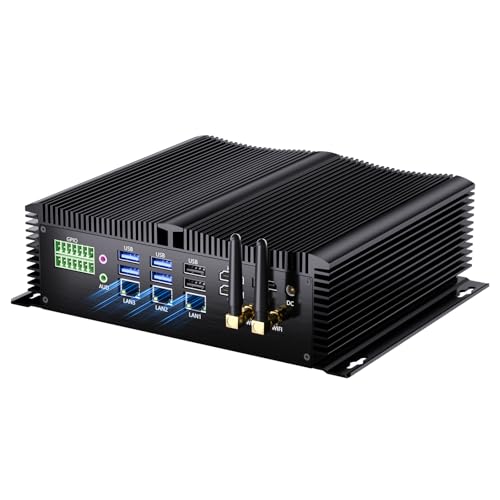
- Most powerful fanless pick: Kinupute Fanless Mini PC, Core i7-1260P, 16GB DDR5, 256GB NVMe, 3x 2.5G LAN — Check on Amazon
- KINGDEL NC3000 Fanless Industrial PC, Core i7 8th Gen, 16GB RAM, 512GB NVMe SSD — Check on Amazon
- MeLE Quieter4C N150 Fanless Mini PC, 16GB RAM, 512GB SSD, Windows 11 Pro — Check on Amazon
- Protectli Vault Pro VP2430, Fanless 4-Port 2.5GbE Mini PC (Barebones) — Check on Amazon
See 2 more Amazon options
- MeLE Quieter4C N100 Fanless Mini PC, 8GB RAM, 128GB, Windows 11 Pro — Check on Amazon
- ZOTAC ZBOX CI337 Nano Fanless Mini PC, Intel N100 (Barebones) — Check on Amazon
Read the full guide ↓
Disclosure: As an Amazon Associate, reviewstook.com earns from qualifying purchases. Links to Amazon on this page are affiliate links; they cost you nothing extra. Listing details such as price and availability change often, so check the current Amazon listing before you buy.
Start with the fact that shapes everything else in this guide: there is no $1,500 fanless mini PC, and there is nothing close. We checked the genuinely passively cooled machines sold on Amazon — every model whose fanless design could be verified from the manufacturer’s own specifications, not from a marketing adjective — and even the most expensive configuration we could verify sits far below that ceiling — check price on Amazon for the current figure. Most of the category sits in the budget to mid-range tiers. The $1,500 in this search is not a tier; it is a ceiling you will never touch, and any listing that tries to sell you a “premium fanless” machine anywhere near it is charging for words, not hardware.
The reason is physics, not a gap in the market waiting to be filled. A fanless mini PC cools its processor by turning the whole case into a heatsink, and a small finned aluminium box can shed roughly the heat of a 6 to 15 watt processor indefinitely. That is why nearly every true fanless machine runs Intel’s N100 or N150 — competent, efficient chips built for exactly that thermal envelope — and why the few fanless boxes with faster Core i7 processors are understood, by the industrial buyers they are made for, to run those chips well below their fanned potential under sustained load. Silence does not scale with money. Past the basic tier, extra spending buys rugged metal cases, serial ports, extra network interfaces, longer warranties and a support line that answers — all real things, and none of them speed.
One more honesty note, because this keyword sits in a gaming category: none of these machines is a gaming PC in the modern sense. Integrated graphics in a passively cooled box will handle retro emulation, indie titles, cloud gaming and video streaming comfortably, and that is the honest ceiling. If you arrived here hoping $1,500 of fanless buys quiet and fast, the truthful answer is that the two do not coexist at any price — a silent room and a demanding game require different machines, and the guides at the end of this page cover the small gaming PCs that accept a fan to get there. What follows is the best of what fanless actually is: six verified machines, every one far under budget, ranked by what each is genuinely good at.
In this guide
Quick Picks
Short on time, or comparing several options at once? Each row below names a buyer type and the product that suits it, with a link to the listing.
| Buyer type | Pick | Why it stands out | Link |
|---|---|---|---|
| Most powerful fanless | Kinupute Fanless Mini PC, Core i7-1260P | 12-core CPU, DDR5 and triple 2.5G LAN in a passive case — the verified ceiling of the category | Check on Amazon |
| Best industrial build | KINGDEL NC3000 Fanless Industrial PC, Core i7 | Full metal case, dual COM ports and 24/7 design at a mid-category price | Check on Amazon |
| Best silent desktop | MeLE Quieter4C N150, 16GB/512GB | The polished consumer fanless PC: slim metal body, triple 4K displays, Windows 11 Pro | Check on Amazon |
| Best support and warranty | Protectli Vault Pro VP2430 | US-based support, coreboot firmware and four 2.5GbE ports — you pay for the company, not the chip | Check on Amazon |
| Best value complete system | MeLE Quieter4C N100, 8GB/128GB | A complete, silent Windows PC — no barebones build-up required | Check on Amazon |
| Best barebones kit | ZOTAC ZBOX CI337 Nano | Established brand, DDR5 support and triple displays — bring your own RAM, SSD and OS | Check on Amazon |
How These Picks Were Chosen
The word “fanless” is the whole search, so it was the whole filter. A pick earned its place only if its passive cooling could be verified from the manufacturer’s own product pages, specification sheets or manuals — MeLE documents the Quieter line as fanless by design, ZOTAC sells the CI337 explicitly as a “Fanless, Passively Cooled” system, Protectli’s datasheet lists the VP2430 as “Fanless and Silent”, and the Kinupute and KINGDEL listings describe finned all-metal fanless enclosures built for industrial use. Machines that are merely quiet — the large majority of mini PCs, including well-known models with small, slow fans — were excluded no matter how good they are, because a fan you can barely hear is still a fan: it moves air, ingests dust and eventually wears. If a model’s cooling could not be verified either way, it was left out rather than guessed in; the exclusions are named at the end of this guide’s notes so you can see the standard working.
Prices change often, so check price on Amazon for the current figure on every pick. Industrial mini PC listings are notoriously fluid — configurations change under a single listing, and prices move with them. Where a listing carries several configurations, the review says which configuration is being discussed. Check the live listing, with the exact configuration selected, before you buy: on this class of product that advice matters more than usual.
We did not use these products ourselves. We read manufacturer specification pages, manuals and the Amazon listings, and compared processors, thermal design, memory and storage configurations, port counts and warranty terms. Two category truths were applied throughout. First, sustained performance in a passive case is set by the case, not the chip badge: a Core i7 in a fanless box will outrun an N100 in bursts and in lightly threaded work, and will settle much closer to it under an all-core load that lasts — the reviews judge each machine on that basis rather than on its processor’s fanned benchmark scores. Second, in this category the differences that survive contact with real use are rarely computational: they are the case, the ports, the warranty and who answers the phone. The ranking reflects that.
The 6 Best Fanless Mini PCs Under $1,500
Kinupute Fanless Mini PC — Core i7-1260P, 16GB DDR5, 256GB NVMe, 3x 2.5G LAN
Who it suits: Buyers who want the most computing a passive case can honestly hold — a silent home-lab host, a multi-VM box, or an industrial controller that also has to think — and who understand what they are paying for.
This is the verified ceiling of the category, and it earns the position on specification rather than price theatre. The Core i7-1260P is a 12-core, 16-thread processor — a genuinely modern chip, several classes above the N-series silicon in most fanless boxes — paired with 16GB of DDR5-5600 in two slots (expandable to 64GB), a 256GB NVMe SSD, Intel Iris Xe graphics, three 2.5-gigabit Ethernet ports, triple 4K display support and Windows 11 Pro, all inside a fanless industrial enclosure designed for continuous operation. Check price on Amazon for the current figure — it is the premium pick in this guide and the clearest proof of the guide’s thesis: the top of the fanless market sits well below this search’s budget ceiling.
The honest limitation is thermal, and it is structural rather than a flaw in this particular box. The 1260P is a 28-watt-class processor; a passive case cannot shed 28 watts indefinitely, so under a sustained all-core load — a long render, a full-speed transcode, a compile that runs for an hour — the chip will clock down toward what the case can dissipate and stay there. In bursts, in mixed workloads, in virtualisation with headroom, it is far and away the fastest machine here. Run at a constant maximum, it converges toward the pack. The 256GB SSD is also small for the money, and the brand is an industrial importer rather than a household name: support runs through the seller and the listing, not a domestic service network. Buy it for capability per litre of silence, with your eyes open about sustained loads.
- The strongest verified fanless specification on Amazon: 12-core i7-1260P, DDR5, triple 2.5G LAN.
- Two memory slots up to 64GB — rare upgrade headroom in a passive case.
- Triple 4K display support and Windows 11 Pro included.
Honest limitation: Passive cooling caps sustained performance well below the chip’s fanned potential, and 256GB of storage is tight for a premium pick.
Choose it if you need real multi-core capability in total silence and your workloads are bursty or mixed. Skip it if your load is a constant all-core grind — a fanned mini PC will finish it faster — or if you need a big-name warranty.

KINGDEL NC3000 Fanless Industrial PC — Core i7-8565U, 16GB RAM, 512GB NVMe
Who it suits: Buyers whose silent PC has a job in the physical world — machinery, kiosks, point-of-sale, a workshop or a dusty corner — and who need legacy ports a consumer mini PC no longer offers.
KINGDEL’s NC3000 line is the industrial establishment of this category: a full metal fanless case, a Core i7-8565U processor, and the port selection that defines the genre — two COM RS232 serial ports alongside HDMI and VGA display outputs, four USB 3.0 ports, Wi-Fi and Bluetooth. The configuration documented here pairs 16GB of DDR4 with a 512GB NVMe SSD, and you can check price on Amazon for this configuration; the same listing family also carries higher configurations, including 32GB and 1TB builds, so confirm the exact configuration selected on the listing. For a machine expected to run unattended for years in an unkind environment, the metal case is not decoration — it is the heatsink, the armour and the product.
Read the processor badge with care. “Core i7” sounds like the top of a range, and in 2018 it was; the 8565U is a four-core chip of that era, and in raw throughput it sits far closer to the modern N100 machines in this guide than to the Kinupute above it — its graphics, Intel UHD 620, are the weakest here alongside them. What this premium-tier industrial box buys over a budget consumer fanless box is not speed: it is the case, the serial ports, the configuration options and an industrial seller’s 24/7 design intent. That is a legitimate purchase for the buyer who needs those things and a poor one for the buyer who only reads the i7 sticker. Windows licensing and support on this class of listing run through the seller; check the listing’s stated OS and warranty terms before ordering.
- Full metal fanless case built for continuous, unattended operation.
- Two COM RS232 ports plus HDMI and VGA — the legacy I/O consumer boxes dropped.
- Multiple configurations on the listing, up to 32GB RAM and 1TB storage.
Honest limitation: The i7-8565U is a 2018-era four-core chip; its badge promises more performance than a modern N-series comparison would suggest.
Choose it if you need serial ports, a metal case and 24/7 intent in a harsh spot. Skip it if you want the most speed per dollar in silence — that is the Kinupute or the MeLE below.

MeLE Quieter4C N150 — 16GB RAM, 512GB SSD, Windows 11 Pro
Who it suits: The mainstream silent-desktop buyer: a bedroom, study, studio or living-room PC that must make no sound at all, ever, while doing ordinary computing properly.
MeLE is the closest thing the fanless category has to a consumer brand, and the Quieter4C is its flagship shape: a slim metal slab, about 5.2 by 3.2 by 0.7 inches, with no fan and no vents to clog, that mounts behind a monitor or disappears into a media cabinet. This configuration pairs Intel’s N150 — the current refresh of the N100, four cores up to 3.6GHz — with 16GB of memory and a 512GB SSD, drives up to three 4K displays across two HDMI ports and a full-function USB-C, and arrives with Windows 11 Pro installed and licensed through MeLE’s Microsoft OEM partnership. Check price on Amazon for the current figure. Of the six machines here, this is the one that feels like a finished product rather than a component: the astrophotography and always-on communities adopted the Quieter line precisely because it runs 24/7, silently, at a few watts.
Its premium positioning asks a fair question, and the answer must be honest: an N150 is an N150. The chip in this premium machine is a close relative of the one in budget fanless boxes, and in sustained computing throughput they are peers — the premium buys the slim metal build, the 16GB/512GB configuration, the triple-display output, the maker’s quality control and a warranty from a company that publishes manuals and answers email. On this build the memory is soldered LPDDR5, so the 16GB you buy is the 16GB you keep; storage, by contrast, expands through the M.2 slot. If your work is documents, browsing, media and light photo handling in a room where silence is the point, this is the category working exactly as intended. If your work is heavy, no fanless box is — read the Kinupute review again, or accept a fan.
- The polished consumer fanless PC: slim metal case, no vents, VESA-friendly.
- 16GB RAM and 512GB SSD with an M.2 slot for storage expansion.
- Triple 4K display support and a properly licensed Windows 11 Pro.
Honest limitation: You are paying a premium over near-identical N-series performance elsewhere in this guide, and the RAM is soldered on this build.
Choose it if silence in a living space is the priority and you want a complete, supported, finished product. Skip it if you are comfortable with industrial listings and would rather spend the difference on capability.

Protectli Vault Pro VP2430 — Intel N150, 4x 2.5GbE, Barebones
Who it suits: Network-minded buyers — a firewall, router or home-lab host — who value a real company behind the box more than any specification on it.
Protectli is what the top of this budget honestly buys, because what it sells is not silicon. The VP2430 itself is a fanless, finned-aluminium appliance built around the same Intel N150 found in more budget-oriented machines, with four Intel i226-V 2.5-gigabit Ethernet ports, a DDR5 SO-DIMM slot supporting up to 64GB, 32GB of onboard eMMC plus an M.2 slot, and a serial console connection. Around that ordinary hardware sits the actual product: assembly and support in the United States, a maintained knowledge base, validated network-interface firmware, and the option of coreboot open-source firmware — the reason network professionals specify these by name. Check price on Amazon for the barebones form and for configured units of the line; Protectli’s own store is also worth checking, and comparing both is part of buying one sensibly.
The caveats define the buyer. The Amazon unit is a barebones appliance: no operating system, memory and storage to be added or selected depending on the exact listing, and no pretence of being a desktop — it has no interest in your monitor-and-keyboard life beyond a console cable. As a desktop it would be a strange, expensive way to run an N150. As the silent, always-on heart of a home network, backed by a support team that publishes datasheets and answers tickets, it is the most defensible purchase in this guide. That is the pattern at the top of the fanless market: the money buys the wrapper — support, firmware, warranty, documentation — and buyers who need the wrapper are right to pay for it.
- Four Intel 2.5GbE ports and coreboot firmware option — the network professional’s specification.
- US-based support, real datasheets and a maintained knowledge base.
- DDR5 slot up to 64GB: genuine headroom for virtualisation and firewall duties.
Honest limitation: It is a barebones network appliance with no OS installed, priced at a premium over identical silicon — poor value as a general desktop.
Choose it if it will run your network and you want a company standing behind it for years. Skip it if you want a ready-to-use silent desktop — that is the MeLE above, complete.

MeLE Quieter4C N100 — 8GB RAM, 128GB, Windows 11 Pro
Who it suits: Buyers who want the complete fanless experience at the category’s natural price — a silent second PC, a media and streaming box, a signage or telescope-side computer — without paying the premium tiers’ wrapper costs.
This is the original Quieter4C configuration and, for many buyers, the sweet spot of the entire category: the same slim, sealed, fanless MeLE case as its N150 sibling, the Intel N100 processor, 8GB of RAM and 128GB of storage with an M.2 slot and microSD for expansion, triple-display output and Windows 11 Pro installed. Check price on Amazon for the current figure — this is a budget-tier complete system, which frames the category’s economics in one line: the complete, supported, silent PC arrives ready to use, while the barebones kits in this guide still need memory, storage and an operating system added. For streaming duty — the use this keyword family asks about most — the N100’s hardware video decode handles 4K playback without waking a fan that does not exist, and the whole machine idles at a few watts on a bedroom shelf.
The limits are the configuration’s, plainly stated. Eight gigabytes of RAM is enough for media, browsing, office work and light duties, and not enough for a desk full of virtual machines; the base storage is eMMC-class on the entry build, slower than the NVMe drives in the premium picks, though the M.2 slot lets you fix that later; and networking is a single gigabit port where the Protectli offers four 2.5-gigabit ones. None of that matters for the jobs this machine is for. What matters is that nothing here is pretending: it is the same fanless proposition as the premium N150 model above, with a smaller configuration and a budget-tier positioning, from the same maker.
- A complete, licensed, silent Windows PC at the category’s natural price point.
- Same sealed fanless MeLE case as the premium model — no vents, no dust path.
- M.2 slot and microSD expansion soften the small base storage.
Honest limitation: 8GB of RAM and eMMC-class base storage cap it at light duties, and a single gigabit Ethernet port rules out network-appliance work.
Choose it if your silent PC streams, browses and handles light work. Skip it if you need 16GB from day one — buy the N150 build above instead of upgrading later, because the memory is not user-upgradeable on these builds.

ZOTAC ZBOX CI337 Nano — Intel N100 Barebones
Who it suits: Builders who already own a spare DDR5 SO-DIMM and SSD, or who enjoy specifying their own machine, and who want a long-established brand’s fanless kit as a budget-tier entry in this guide.
ZOTAC has made passively cooled nano PCs longer than almost anyone, and the CI337 is the current form of that experience: a compact fanless barebones built on the Intel N100, with a DDR5-4800 SO-DIMM slot supporting up to 16GB, an M.2 storage slot, triple-display output across two HDMI 2.0 ports, DisplayPort 1.4 and DisplayPort over USB-C, and VESA mounting for behind-monitor installs. Check price on Amazon for the current figure. As a piece of hardware it is exactly what a barebones should be: a well-understood case, a documented board, and nothing you did not ask for.
Barebones arithmetic is the whole review, so do it before ordering rather than after. The kit contains no memory, no storage and no operating system; you will still need to add a 16GB DDR5 SO-DIMM, a modest NVMe SSD and a Windows licence if you need one, while the complete MeLE N100 system above arrives assembled, licensed and warranted as one product. The kit wins when the parts are already in your drawer, when you run Linux and the licence costs nothing, or when you specifically want ZOTAC’s board and case. It also carries the standard warning of this category: fanless means the case is the cooler, so site it with air around it, not sealed in a cabinet, whatever the temptation of a tidy install.
- The established-brand fanless kit: documented, VESA-ready, triple-display.
- DDR5 memory support — your spare modern SO-DIMM has a home.
- A budget-tier entry in this guide — check price on Amazon.
Honest limitation: No RAM, storage or OS is included; if you would be buying every component new, a complete rival system is usually the simpler purchase.
Choose it if you have the parts on hand or run Linux. Skip it if you would be buying every component new — the complete MeLE systems are the better arithmetic.

Comparison Table
| Product | Processor | Best use | Link |
|---|---|---|---|
| Kinupute Fanless Mini PC, i7-1260P | Core i7-1260P (12-core) | Most fanless capability: home lab, VMs, industrial control | Check on Amazon |
| KINGDEL NC3000 Fanless Industrial PC | Core i7-8565U | Rugged 24/7 duty with serial ports | Check on Amazon |
| MeLE Quieter4C N150 | Intel N150 | Silent living-space desktop, complete and supported | Check on Amazon |
| Protectli Vault Pro VP2430 | Intel N150 | Firewall and network duty with real support | Check on Amazon |
| MeLE Quieter4C N100 | Intel N100 | Complete silent PC at the natural category price | Check on Amazon |
| ZOTAC ZBOX CI337 Nano | Intel N100 (barebones) | DIY kit for builders with parts on hand | Check on Amazon |
How to Choose a Fanless Mini PC
- Start from the workload’s duration, not its peak. Passive cases handle bursts gracefully and sustained loads at whatever wattage the fins can shed. Bursty office work, browsing and media suit any pick here; an all-day transcode or render queue belongs in a fanned machine at any budget.
- Verify “fanless” from the manufacturer, not the listing headline. Check the maker’s specification page for a fanless or passive design. “Quiet”, “silent mode” and “low noise” on a listing usually describe a small fan running slowly — a different product with a different lifespan.
- Match the chip to the job, not the badge. N100 and N150 machines are peers in sustained work; a fanless Core i7 buys burst speed, more cores for virtualisation and better lightly threaded response — not a multiple of the performance. An older i7 badge (the KINGDEL’s 8565U) can be slower than a modern N-series chip in some work despite the grander name.
- Decide what the premium is buying before paying it. At the premium end of this category, extra money buys case quality, ports, configuration, warranty and support. Those are worth paying for when you need them — serial ports, four network interfaces, a support line — and wasted when you do not.
- Do the barebones checklist in full. Count the memory, storage and operating system you still need alongside the kit, and compare that complete picture against the complete systems. Barebones wins with parts on hand or a free OS; it is less compelling when everything must be bought new.
- Check what is soldered. Several fanless designs fix their memory at the factory. If a configuration’s RAM might constrain you later, buy the larger configuration now — there is no upgrade path to discover afterwards.
- Plan the install for airflow. A passive case sheds heat to the room. Give it open air on its finned surfaces, keep it out of sealed cabinets and direct sun, and treat a hot-running install as a siting problem before treating it as a defective product.
- Count the ports your job actually uses. This category’s real specialisation is I/O: serial COM ports for machinery, multiple 2.5GbE ports for networks, triple display outputs for desks and signage. The right ports are worth more than a faster chip you cannot connect to anything.
- Check the seller and the warranty as part of the specification. Industrial listings vary in support quality. A published manual, a stated warranty term and a maker with its own support channel are features; price them as such.
- Spend the leftover budget on the room, not the box. With the ceiling this far below $1,500, the honest use of the remainder is a better monitor, a VESA mount, a UPS for the always-on machine, or nothing at all. Silence was the purchase; it does not need gold-plating.
Why Fanless Tops Out: The Physics That Sets the Ceiling
Every fanless mini PC is a negotiation with one equation: heat out through the case surface must equal heat generated inside, at a case temperature you can safely touch. A small finned enclosure in still air sheds on the order of ten watts comfortably and perhaps fifteen with generous fins and a warm case. That is why the category’s processors cluster where they do — Intel’s N100 and N150 are 6-watt-class chips that can run at full speed forever inside a sealed slab — and why faster processors in passive cases are always a compromise: the Kinupute’s 12-core i7 is real, and so is the throttle that arrives when a long load meets a finite heatsink. No manufacturer has repealed this, and none will at $1,500 or any other price; a bigger passive case sheds more heat, but by the time it does, it is no longer a mini PC.
This is also why the category’s prices bunch so tightly. The expensive parts of a normal PC — a fast processor run at full power, a graphics card, elaborate cooling — are precisely the parts fanless design forbids. What remains to differentiate a premium fanless machine from a budget one is everything around the computation: the milled case, the port count, the memory ceiling, the firmware, the warranty, the support desk. Buyers who understand that buy well in this category. Buyers who shop it like a normal PC market — assuming the dearest must be the fastest in proportion — reliably overpay for a badge.
What Spending More Actually Buys (and What It Doesn’t)
It buys ruggedness: full metal enclosures that double as heatsinks and survive workshops, kiosks and factory floors where a plastic consumer box would not be installed at all. It buys I/O: the serial ports, multiple Ethernet interfaces and display combinations that industrial and network work runs on and consumer machines omit. It buys configuration: memory ceilings of 32GB or 64GB, storage options, and boards documented well enough to deploy in numbers. And it buys the company: Protectli’s US support and coreboot firmware, MeLE’s manuals and OEM licensing, ZOTAC’s long model history — the unglamorous infrastructure that matters in year three of an always-on installation.
It does not buy speed in proportion to price, and it never buys gaming performance. The fastest verified fanless machine in this guide sits in the premium tier, well above the budget complete systems, and is not proportionally faster at anything sustained; its graphics remain integrated, its gaming ceiling remains retro, indie and cloud. It does not buy future-proofing either — a fanless box is a finished appliance, and its successor in five years will be another budget-to-mid-range box, not an upgrade of this one. Spend more in this category when the wrapper is the requirement. When it is not, the category’s middle — a complete N-series system from a real maker — is one of the best-value purchases in all of small computing, and the rest of the $1,500 was never needed.
Common Buying Mistakes
- Assuming a $1,500 fanless tier exists and paying a markup for the word “premium” on an ordinary N100 box.
- Buying a “quiet” or “silent mode” mini PC with a fan, when true fanless was the requirement — check the manufacturer’s specification, not the listing adjectives.
- Reading a Core i7 badge as a performance guarantee in a passive case, without asking which i7, of which year, throttled to what.
- Running a sustained all-core workload — transcoding, rendering, folding — on a passive machine and blaming the product for the physics.
- Ordering a barebones kit without accounting for the memory, storage and OS you still need to add.
- Buying the 8GB soldered configuration to save money, then needing 16GB with no upgrade path.
- Sealing a fanless PC inside a cabinet or entertainment unit with no airflow, then wondering why it slows down and runs hot.
- Expecting modern gaming from integrated graphics in a 6-watt envelope; fanless and gaming are different purchases.
- Ignoring the seller’s warranty and support terms on industrial listings, where they vary far more than the hardware does.
Final Recommendation
- Most buyers who want silence in a living space: MeLE Quieter4C N150.
- The most fanless capability money can buy: Kinupute Fanless Mini PC, Core i7-1260P.
- Rugged duty and serial ports: KINGDEL NC3000 Fanless Industrial PC.
- Network duty with real support: Protectli Vault Pro VP2430.
- The category’s natural value point: MeLE Quieter4C N100.
- Builders with parts on hand: ZOTAC ZBOX CI337 Nano.
Our top two are the MeLE Quieter4C N150, for the complete and supported silent desktop most people searching this term actually want, and the Kinupute i7-1260P, for the smaller group who need genuine multi-core capability without a fan and accept the sustained-load compromise that comes with it. Between them they mark the category’s honest range, from budget to premium, with the differences paid for in build, ports, configuration and support rather than in speed. If your budget genuinely stretches to $1,500 and the machine must also play modern games, the fanless requirement is the thing to surrender — see Best Mini Gaming PC Under $1500 and Best Compact Gaming PC Under $1500 for what that money buys with a fan allowed. If silence is truly the requirement, spend well under the budget here and keep the rest: the ceiling of this category is a fact about heat, not a challenge to spend against.
Frequently Asked Questions
Why is there no fanless mini PC anywhere near $1,500?
Because passive cooling caps performance, and performance is what expensive PCs sell. A small finned case can shed roughly 6 to 15 watts indefinitely, which limits fanless machines to efficient processors whose entire systems sit in the budget to mid-range tiers. Even the most expensive verified fanless configuration we found on Amazon sits well below that ceiling — check price on Amazon for the current figure; above the premium tier, the market simply ends. Listings positioned higher are markups on ordinary hardware, not a higher tier.
Can a fanless mini PC play games?
Light ones, honestly framed. Integrated graphics in these machines handle retro emulation, older and indie titles, and esports games at modest settings, and hardware video decode makes them excellent for streamed and cloud gaming, where another machine does the rendering. Modern AAA games at native resolution are beyond every pick here — that workload generates more heat than any passive mini case can shed, at any price.
Is a fanless Core i7 much faster than a fanless N100?
In bursts and mixed work, yes — more cores, higher clocks, better lightly threaded response. Under a sustained all-core load, the passive case becomes the limit and the gap narrows sharply, because both machines must live within what their enclosures can dissipate. Judge a fanless i7 by your workload’s shape, not by the chip’s benchmark scores in a fanned laptop.
Fanless or just quiet — does the difference matter?
For most desks, a good quiet mini PC is fine and faster for the money. True fanless matters where a fan is a liability: bedrooms and studios where any noise is heard, dusty environments where moving air carries grit into the machine, and unattended installations where a worn fan is the most likely first failure. If none of those is your situation, the wider mini PC market — see Best Mini PC Under $1500 — offers more speed per dollar.
Do fanless mini PCs overheat?
They manage heat by slowing down rather than failing: a properly sited fanless PC under excessive load reduces its clocks and keeps working. Problems arise when the case cannot breathe — sealed cabinets, direct sun, fins smothered against a wall. Give the enclosure open air and the design does the rest; these machines are built to run for years without intervention.
What should I spend the rest of the $1,500 on?
Nothing, for the PC itself — the category’s best machines sit well under the budget. Sensible companions are a monitor worth looking at, a VESA mount, a small UPS for an always-on machine, or extra storage. If the leftover money is burning a hole and gaming is the real goal, that is a different purchase entirely, and it has a fan in it.
- Best Fanless Mini PC Under $1500
- Best Fanless Mini PC Under $400
- Best Fanless Mini PC Under $700
- Best Fanless Mini PC Under $1200
- Best Fanless Mini PC For Streaming Under $1500
- Best Fanless Mini PC For Small Spaces Under $1500
- Best Fanless Mini PC For Beginners Under $1500
- Best Fanless Mini PC Under $2500
- Best Barebones Mini PC Under $1500


