Where to buy
Check the latest price, availability and delivery on Amazon. Orders are placed on Amazon. We may earn a commission from qualifying purchases.
- Strongest silent stream station: Kinupute Fanless Mini PC, Core i7-1260P, 16GB DDR5, 256GB NVMe, 3x 2.5G LAN — Check on Amazon
- MeLE Quieter4C N150 Fanless Mini PC, 16GB RAM, 512GB SSD, Windows 11 Pro — Check on Amazon
- MeLE Quieter4C N100 Fanless Mini PC, 8GB RAM, 128GB, Windows 11 Pro — Check on Amazon
- KINGDEL NC3000 Fanless Industrial PC, Core i7 8th Gen, 16GB RAM, 512GB NVMe SSD — Check on Amazon
See 2 more Amazon options
- Protectli Vault Pro VP2430, Fanless 4-Port 2.5GbE Mini PC (Barebones) — Check on Amazon
- ZOTAC ZBOX CI337 Nano Fanless Mini PC, Intel N100 (Barebones) — Check on Amazon
Read the full guide ↓
Disclosure: As an Amazon Associate, reviewstook.com earns from qualifying purchases. Links to Amazon on this page are affiliate links; they cost you nothing extra. Listing details such as price and availability change often, so check the current Amazon listing before you buy.
A fanless PC next to a streaming microphone sounds like a contradiction until you think about what a microphone actually hears. Every fanned streaming PC makes a bargain with its owner: the fan noise gets gated, filtered or EQ’d out of the broadcast, and the streamer learns to live with the processing artefacts that leaves behind. A fanless machine skips the bargain entirely. There is no fan, so there is nothing for the microphone to pick up — the PC can sit on the desk, in frame, a foot from the mic, and contribute exactly zero noise to the recording. For talk streams, podcasts, voiceover work and quiet-room broadcasting, that silence is not a luxury feature. It is the whole product.
Now the honesty this category demands, stated before anything is recommended. A fanless mini PC is a streaming station, not a gaming-streaming rig. Every machine in this guide renders its picture with Intel integrated graphics inside a passively cooled case that can shed roughly 6 to 15 watts indefinitely. That is enough — genuinely enough — for the three streaming jobs these boxes do well: broadcasting a talking head, a desktop and a webcam; streaming a console that arrives through a capture card while the PC only encodes; and working as a silent media and transcode server that feeds, records and archives other people’s streams. It is not enough to play a modern game and encode its stream on the same box, and no pick below pretends otherwise. Where a game is rendered on the PC itself, the honest ceiling is the lightest titles at 720p. Anything heavier belongs on a fanned machine — the guide at Best Streaming PC Under $1500 covers that purchase.
The second honesty point is about the budget. There is no $1,500 fanless mini PC. The most expensive genuinely fanless configuration we could verify on Amazon — every pick here was checked against the manufacturer’s own documentation, not a listing adjective — is the Kinupute at the top of this guide, and even that premium pick sits well under this budget — check price on Amazon for the current listing. Most of the category sits in the budget to mid-range tiers. So this guide is framed the way the market actually works: the six best fanless machines for streaming duty, every one far under budget, graded first on the thing streaming actually runs on — the video encoder — and on how each box holds up when a browser full of chat, an OBS canvas, alerts, a recording and a call are all running at once. The leftover money is real, and the final sections explain what streaming gear it is better spent on.
In this guide
Quick Picks
Short on time, or comparing several options at once? Each row below names a buyer type and the product that suits it, with a link to the listing.
| Buyer type | Pick | Why it stands out | Link |
|---|---|---|---|
| Most headroom for a busy stream | Kinupute Fanless Mini PC, Core i7-1260P | 12 cores and Iris Xe Quick Sync — the most simultaneous-load capacity silence can hold | Check on Amazon |
| Best complete silent station | MeLE Quieter4C N150, 16GB/512GB | Finished, licensed and silent: 16GB of memory and a real SSD for recordings, ready out of the box | Check on Amazon |
| Best value silent station | MeLE Quieter4C N100, 8GB/128GB | A complete silent stream PC at the category’s natural price — with storage catches graded below | Check on Amazon |
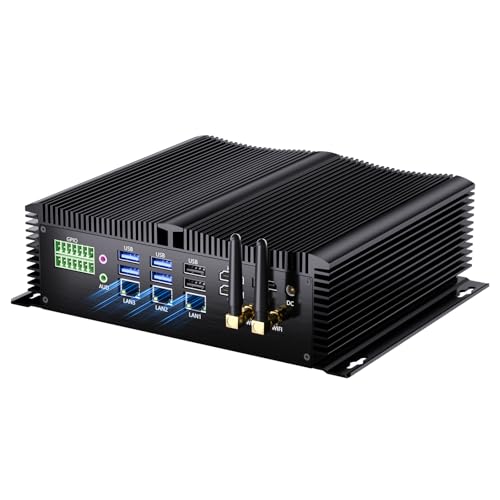
| Best for a fixed streaming corner | KINGDEL NC3000 Fanless Industrial PC, Core i7 | 16GB and 512GB in a metal case built to be installed once and left running for years | Check on Amazon |
| Best dedicated encode/transcode box | Protectli Vault Pro VP2430 | A silent appliance for media serving and network-side duties, backed by a real support organisation | Check on Amazon |
| Best kit for builders | ZOTAC ZBOX CI337 Nano | The same N100 streaming silicon as the value pick, in a barebones you complete with your own parts | Check on Amazon |
How These Picks Were Chosen
The first filter was the word “fanless” itself, applied from the manufacturer’s own material rather than from marketplace headlines. MeLE documents the Quieter line as fanless by design; ZOTAC sells the CI337 explicitly as a fanless, passively cooled system; Protectli’s datasheet describes the VP2430 as “Fanless and Silent”; the Kinupute and KINGDEL listings describe finned all-metal fanless enclosures built for continuous duty. Machines that are merely quiet — a small fan turning slowly — were excluded however good they are, because for a streaming microphone the difference between very quiet and silent is the difference between processing your voice and not having to. Models whose cooling could not be verified either way were left out rather than guessed in.
The second filter was the encoder. Streaming is, at its core, a video-encoding job that happens to have a person attached, so each pick was graded on the encoder its silicon actually carries — and in this set that story is uniform enough to state once: every machine here uses Intel integrated graphics, and every one encodes through Intel Quick Sync. There is no discrete encoder anywhere in this guide, no NVIDIA NVENC, and — this matters, because listings blur it — no AV1 encoding on any pick: the Quick Sync generations in these chips encode H.264 and HEVC, and that is the whole list. The newer silicon (the N100, N150 and the Kinupute’s Iris Xe) can decode AV1, which helps when the box is playing or transcoding modern media; the KINGDEL’s older UHD 620 cannot, and its review says so. Each pick was then graded on the simultaneous load a real stream applies: OBS compositing a canvas, a browser holding chat and alerts, shared memory feeding both the CPU and the integrated graphics, and a recording writing to storage the whole time. That is where the 8GB and eMMC configurations in this guide get marked down, and they are marked down in the open.
Prices change often, so no static price is printed here. Industrial mini PC listings change configuration under a single page and prices move with them, so check price on Amazon with the exact configuration selected before you buy. We did not use these products ourselves; we read manufacturer specification pages, manuals and the Amazon listings, and compared encoder hardware, processor class, memory and storage configurations, port layouts and warranty terms.
The Streaming Jobs These Machines Can Actually Do
Before the picks, the workflow — because “streaming” covers four very different jobs, and a fanless box is excellent at three of them and wrong for the fourth. The first job is the talk stream: a webcam, a microphone, a desktop or slides, chat on screen, alerts firing. The rendering load is nearly nothing; the real work is encoding one 1080p canvas and running the browser-and-OBS household around it. Every pick in this guide does this job, and does it in a silence no fanned PC can match. The second job is the console stream: the game runs on a PlayStation, Xbox or Switch, a capture card hands the picture to the PC, and the PC’s only heavy task is the encode. Again, every pick qualifies — the encoder does not care whether the frames came from a capture card or a local game, and the console’s own fan is in another part of the room, or another room entirely.
The third job is the media and transcode box: the silent server that runs Plex or Jellyfin, transcodes the household’s library with Quick Sync hardware, records and archives streams, and sits awake all night doing it at a few watts. Fanless machines are arguably the best tool in computing for this job, and two picks below — the Protectli and the Kinupute — are graded with it in mind. The fourth job is the one to refuse: playing a demanding game on the PC and streaming it from the same PC. Integrated graphics rendering a modern title has nothing left for a quality encode, and a passive case has no thermal headroom for the attempt. Light, older and indie titles at 720p are the honest exception. If the fourth job is your job, buy a fanned streaming PC and treat this guide as the guide to your second machine.
One platform fact shapes every setting recommended later: Twitch’s practical standard is around 6,000 kbps with constant bitrate for a 1080p60 broadcast, and that is a gentle load for any Quick Sync encoder in this guide — the encoder is rarely the bottleneck on a fanless stream. The bottlenecks are memory, storage speed and heat over hours, which is why the reviews grade those things as streaming features rather than footnotes.
The Encoder Story: Quick Sync, and Only Quick Sync
It is worth one section to make the encoder map explicit, because streaming guides for fanned PCs revolve around encoder choice and this category offers exactly one. Intel Quick Sync is a dedicated block inside the integrated graphics that encodes video without asking the CPU cores to do it — which is why a modest N100 can broadcast a clean 1080p stream while its four cores handle OBS, the browser and the chat. In OBS the encoder appears as QuickSync H.264, and that is the setting every pick in this guide should use: it keeps the CPU free for the simultaneous load, it produces a picture that holds up well at Twitch bitrates, and it sips power a passive case can shed all night.
The differences between picks are generational, not categorical. The Kinupute’s Iris Xe carries the most modern Quick Sync in the set, paired with twelve CPU cores to absorb everything around the encode. The N100 and N150 machines share a newer Quick Sync generation that also decodes AV1 — useful when the box doubles as the household’s media player or transcodes a modern library — but, to repeat the point listings love to blur, decode is not encode: no machine here can send an AV1 stream, and any buying decision that assumes otherwise is built on a misreading. The KINGDEL’s UHD 620 Quick Sync is the oldest here: perfectly serviceable H.264 encoding for talk and capture-card work, visibly a generation behind in fast-moving scenes, and with no AV1 decode for media duties. None of this is a reason to reject the set — at 6,000 kbps CBR, a well-set Quick Sync stream looks good — but it is the honest map, and the OBS section below is written to it.
The 6 Best Fanless Mini PCs for Streaming Under $1,500
Kinupute Fanless Mini PC — Core i7-1260P, 16GB DDR5, 256GB NVMe, 3x 2.5G LAN
Who it suits: The streamer who runs a busy broadcast from one silent box — multiple scenes, a browser full of chat and dashboards, a recording running alongside the stream — and wants the most simultaneous-load headroom a passive case can honestly hold.
Every other pick in this guide asks you to be a little careful about what else is running. The Kinupute is the one that mostly does not. Its Core i7-1260P is a 12-core, 16-thread processor — a genuinely modern chip in a category of four-core efficiency parts — paired with 16GB of DDR5-5600 in two slots (expandable to 64GB), a 256GB NVMe SSD, Intel Iris Xe graphics with the most current Quick Sync encoder in this set, three 2.5-gigabit Ethernet ports, triple 4K display support and Windows 11 Pro. For streaming, the shape of that specification is exactly right: the encoder block handles the broadcast, and twelve cores absorb OBS compositing, the chat browser, alerts, a Discord call and a local recording without the contention that makes smaller boxes stutter. Check price on Amazon — this is the verified ceiling of the entire fanless category, a premium pick that still sits well under this search’s budget.
The limitation is thermal, and for streaming it has a specific shape worth understanding. The 1260P is a 28-watt-class chip in a case that sheds far less than that indefinitely, so a load that pins every core for hours — say, software-encoding while also rendering a game — will clock down toward what the fins can dissipate. The streaming answer is to never ask it to: encode on Quick Sync, which this guide’s OBS section sets up, and the sustained load stays in the range the case handles, with the cores left for bursts. The 256GB SSD is also tight for a machine that records every broadcast — plan on archiving to external or network storage — and the brand is an industrial importer, so support runs through the seller rather than a domestic service network. Judged as a stream station, though, this is the ceiling of what silence can do, at a price that proves the guide’s opening point.
- Twelve cores and Iris Xe Quick Sync: the most streaming headroom in a verified fanless machine.
- Two memory slots up to 64GB — the only pick that can grow into a heavier broadcast.
- Three 2.5GbE ports: a wired stream uplink and a network to spare.
Honest limitation: Sustained all-core loads throttle to what the passive case can shed, so the encode must live on Quick Sync — and 256GB fills quickly if you record everything.
Choose it if your stream is a production — many sources, many tabs, a recording always on — and the PC must stay silent in the room with the microphone. Skip it if your broadcast is a webcam and a chat window; the MeLE picks below do that job for far less.

MeLE Quieter4C N150 — 16GB RAM, 512GB SSD, Windows 11 Pro
Who it suits: The talk streamer, podcaster or voiceover artist who wants a finished, silent broadcast PC — unbox it, install OBS, go live — with no build, no licence errands and nothing to forgive.
This is the most complete streaming station in the guide. The Quieter4C pairs Intel’s N150 with 16GB of memory and a 512GB SSD in a slim sealed metal slab — about 5.2 by 3.2 by 0.7 inches — with no fan, no vents and nothing to hum, and it arrives with Windows 11 Pro installed and properly licensed. For the streaming jobs defined at the top of this guide, the configuration is well judged where it matters: 16GB is the memory figure that lets OBS, a chat browser and a call coexist without swapping; the 512GB SSD is real recording space, not a token drive; and the N150’s Quick Sync encodes a 1080p broadcast at Twitch bitrates without troubling the four cores. Check price on Amazon for the current listing. Mounted behind a monitor or standing on the desk beside the microphone, it contributes nothing to the recording but the picture.
The boundaries are the platform’s, stated plainly. The N150 is an efficiency chip: it encodes beautifully through Quick Sync and handles the talk-stream household with ease, but it will not render and stream a demanding game from the same box, and under a long simultaneous load it settles to what the passive case sheds — which the Quick Sync workflow is designed to stay inside. On this build the memory is soldered LPDDR5, so the 16GB fitted is the 16GB for life; storage, by contrast, can grow through the M.2 slot. Buy it as what it is — the finished silent station for talk, desktop and capture-card streaming — and it is the easiest recommendation in this guide.
- 16GB of memory and a 512GB SSD: the simultaneous-load and recording figures a stream actually needs.
- Completely silent, sealed and slim — sit it next to the microphone without a thought.
- Windows 11 Pro installed and licensed; triple 4K display support for a multi-monitor desk.
Honest limitation: The memory is soldered on this build, and the N150’s ceiling is the talk/desktop/capture workflow — not one-box game streaming.
Choose it if you want the ready-to-broadcast silent PC and your stream is talk, desktop or console-through-capture. Skip it if you need upgradeable memory or heavier local rendering — the Kinupute above is the step up.

MeLE Quieter4C N100 — 8GB RAM, 128GB, Windows 11 Pro
Who it suits: The streamer on the category’s natural budget — a quiet second PC for talk streams, a console-capture station, or a silent media box that also broadcasts — who accepts two configuration catches in exchange for the lowest complete-system price here.
The proposition is the same sealed, silent MeLE case as the pick above, with the Intel N100 inside it, and the N100’s Quick Sync is the same streaming story: a hardware-encoded 1080p talk or capture-card broadcast at Twitch bitrates is well within it, and the machine does it while drawing a few watts and making no sound at all. Check price on Amazon — this is a budget-tier complete system, and the complete, licensed, silent stream station costs about what this guide’s barebones kits cost before a single part is added. For a bedroom streamer whose loudest problem was a PC fan in every recording, that is a genuinely transformative little purchase.
The catches are real, and for streaming they bite harder than for general use, so they are graded accordingly. Eight gigabytes of memory is shared between Windows, OBS, the browser holding your chat, and the integrated graphics themselves; a lean setup — chat popped out or on a second device, overlays kept light — streams comfortably, while a dozen dashboard tabs will make it swap and stutter. The base storage is 128GB of eMMC-class memory: fine for the OS and OBS, slow and small for recording every broadcast, so plan to record to the M.2 slot once you fit a drive there, or to external storage, from day one. Networking is a single gigabit port — enough for the wired uplink streaming demands, with nothing spare. None of this disqualifies it; it defines the discipline of the setup. Run it lean, record smart, and it streams in silence for years.
- A complete, licensed, silent stream PC at roughly the price of a barebones kit.
- The same fanless MeLE case and Quick Sync encode as the premium pick.
- M.2 slot and microSD expansion give the storage a growth path.
Honest limitation: 8GB of shared memory and 128GB of eMMC-class storage are the tightest simultaneous-load and recording figures in this guide — both demand a lean setup.
Choose it if the stream is talk or console capture, the setup can stay lean, and silence matters more than headroom. Skip it if you record everything and run a heavy browser load — the N150 build above is the same machine with the catches removed.

KINGDEL NC3000 Fanless Industrial PC — Core i7-8565U, 16GB RAM, 512GB NVMe
Who it suits: The streamer with a fixed corner — a studio nook, a church or venue install, a workshop broadcast setup — where the PC is mounted once, expected to run for years unattended, and never thought about again.
KINGDEL’s NC3000 is the industrial establishment of the fanless category: a full metal case that is heatsink and armour in one, and the port selection of an earlier, more connected era — two COM RS232 serial ports alongside HDMI and VGA outputs, four USB 3.0 ports, Wi-Fi and Bluetooth. The configuration documented here pairs 16GB of DDR4 with a 512GB NVMe SSD, and you can check price on Amazon for the current listing; the same listing family carries higher configurations, including 32GB and 1TB builds, so confirm the exact configuration selected before comparing prices. For streaming, its virtues are the installer’s virtues: the memory and storage figures a talk or capture-card broadcast wants, a case built for continuous duty in unkind rooms, and nothing — no fan, no vent fan-filter — to maintain.
Its encoder, though, is the oldest in this guide, and the review grades it as such. The “Core i7” badge belongs to the 8565U, a four-core chip from 2018 whose UHD 620 graphics carry an earlier Quick Sync generation: entirely serviceable for H.264 talk and capture-card streams, a step behind the newer silicon in fast-moving scenes, and with no AV1 decode, so the box is a weaker media player than the N-series picks when the stream ends. In raw throughput the chip sits far closer to the modern N100 machines than to the Kinupute at the top of this guide. What the price buys is the case, the ports, the configuration and the 24/7 intent — a legitimate purchase for a fixed install, and the wrong one for a buyer shopping on the badge. Windows licensing and support on this class of listing run through the seller; check the stated OS and warranty terms before ordering.
- 16GB and 512GB fitted: the simultaneous-load and recording figures, in a fit-and-forget metal case.
- Serial ports, VGA and four USB 3.0 ports — the legacy I/O fixed installs still run on.
- Built for continuous, unattended operation in harsh rooms.
Honest limitation: The 2018-era Quick Sync is the weakest encoder here and there is no AV1 decode; the i7 badge flatters a four-core chip of its year.
Choose it if the stream station is a permanent install in a real room and longevity is the specification. Skip it if the box will also be the media player, or you want the modern encoder — the MeLE N150 does both better for similar money.

Protectli Vault Pro VP2430 — Intel N150, 4x 2.5GbE, Barebones
Who it suits: The technically confident streamer whose broadcast has a back office — a media library to transcode, recordings to archive, a network to run — and who wants one silent appliance, backed by a real company, doing those jobs around the clock.
Protectli sells the wrapper as much as the machine, and for always-on streaming infrastructure the wrapper is worth pricing. The VP2430 is a fanless, finned-aluminium appliance on the same Intel N150 found in far cheaper boxes, with four Intel i226-V 2.5-gigabit Ethernet ports, a DDR5 SO-DIMM slot supporting up to 64GB, 32GB of onboard eMMC plus an M.2 slot, and a serial console port. Around that hardware sit assembly and support in the United States, a maintained knowledge base, validated firmware and the option of coreboot open-source firmware. As a streaming purchase its best role is the third job from the top of this guide: the silent transcode and media server — Quick Sync turning your library and your VOD archive into whatever each screen needs — and a network host that never sleeps. Check price on Amazon for the current barebones listing, and check configured units of the line there too; Protectli’s own store is also worth checking, and checking both is part of buying one sensibly.
What it is not is a ready stream station. The Amazon unit is a barebones appliance with no operating system installed: memory and storage are added or selected depending on the exact listing, and turning it into an OBS machine is a project you spec and build yourself rather than a product you unbox. The 32GB of eMMC will boot a lightweight system happily and is no place to record broadcasts — an M.2 drive is part of the real price, as it is for every barebone here. Its four network ports are wasted on a single-PC talk stream and exactly right for a streaming household’s infrastructure. Buy it for the back office, with the completion costs counted, and it is the most defensible appliance in this guide; buy it expecting to go live on Friday, and the MeLE picks exist to save you.
- Quick Sync transcoding plus four 2.5GbE ports: the silent media-server and network host.
- US-based support, real datasheets, a maintained knowledge base and a coreboot option.
- DDR5 slot up to 64GB — headroom no other appliance here offers.
Honest limitation: Barebones with no OS installed: the streaming station is a build project, and the onboard eMMC is not recording storage.
Choose it if your streaming setup needs an always-on transcode, archive and network box from a company that answers tickets. Skip it if you want to unbox a PC and go live — that is the MeLE N150, complete, at a similar real price.

ZOTAC ZBOX CI337 Nano — Intel N100 Barebones
Who it suits: The builder-streamer who already owns a spare DDR5 SO-DIMM and SSD — or runs Linux and pays no licence toll — and wants the N100 streaming station at the lowest entry price in this guide, assembled their own way.
ZOTAC has built passively cooled nano PCs longer than almost anyone, and the completed CI337 is, in streaming terms, a familiar machine: the Intel N100 and its Quick Sync encoder, a DDR5-4800 SO-DIMM slot supporting up to 16GB, an M.2 storage slot, triple-display output across two HDMI 2.0 ports, DisplayPort 1.4 and DisplayPort over USB-C, and VESA mounting for a behind-monitor install that keeps the desk — and the microphone’s neighbourhood — completely clear. Completed with 16GB and a real SSD, it runs the talk and capture-card workflow exactly as the MeLE N100 does, because underneath, it is the same silicon doing the same encode in the same silence. Check price on Amazon for the current kit listing — this is a budget-tier entry point for builders.
The whole review is the arithmetic, so do it before ordering. The box contains no memory, no storage and no operating system; add a 16GB DDR5 SO-DIMM, a modest NVMe SSD and a retail Windows licence, and the completed CI337 costs as much as — or more than — the complete MeLE N100 above, which arrives assembled and licensed as one product. The kit wins when the parts are already in a drawer, when the OS is Linux and costs nothing, or when you specifically want ZOTAC’s board, case and VESA install. And the standard fanless siting rule applies with streaming force: the case is the cooler, so mount it with air around it — behind a monitor is ideal, sealed inside a media cabinet is a slow oven that will throttle a long broadcast.
- The same N100 Quick Sync streaming silicon as the value pick, in an established brand’s kit.
- VESA mounting and triple displays: a genuinely invisible stream station.
- The lowest entry price in this guide — a budget-tier kit for builders with parts on hand.
Honest limitation: No RAM, storage or OS is included; built up with new retail parts it can cost more than the complete rival it matches.
Choose it if the parts shelf or a Linux install makes the arithmetic win. Skip it if every component would be bought new — the complete MeLE systems are the better sum.

Comparison Table
| Product | Processor | Best use | Link |
|---|---|---|---|
| Kinupute Fanless Mini PC, i7-1260P | Core i7-1260P (12-core) | The busy one-box broadcast: most cores, most headroom | Check on Amazon |
| MeLE Quieter4C N150 | Intel N150 | The finished silent station for talk, desktop and capture | Check on Amazon |
| MeLE Quieter4C N100 | Intel N100 | Complete silent streaming at the natural category price | Check on Amazon |
| KINGDEL NC3000 Fanless Industrial PC | Core i7-8565U | Fixed installs and legacy I/O, run for years | Check on Amazon |
| Protectli Vault Pro VP2430 | Intel N150 | Silent transcode, archive and network appliance | Check on Amazon |
| ZOTAC ZBOX CI337 Nano | Intel N100 (barebones) | DIY station for builders with parts on hand | Check on Amazon |
Setting Up OBS on a Fanless Stream Station
The settings below are the same discipline on every pick, because every pick encodes the same way. In OBS, set the output encoder to QuickSync H.264 — never x264 on these machines. Software encoding spends the CPU cores that OBS, the browser and your call are already sharing; Quick Sync spends a dedicated block that was built for exactly this and leaves the cores alone. Set rate control to CBR at around 6,000 kbps for Twitch at 1080p60, with a keyframe interval of 2 seconds, which the platform expects. On the 8GB MeLE N100, or if the canvas is mostly a webcam and slides, 1080p30 or a 720p canvas lightens everything at once and most viewers will never know. Record in the same session using the stream encoder where the software allows it, and point the recording path at real storage — the SSD in the N150 and KINGDEL, a fitted M.2 drive in the N100 MeLE or the completed kits — never at eMMC.
When a fanless stream stutters, OBS reports three different problems and they have three different fixes, so learn to read them separately. Rendering lag means the canvas itself is too heavy for the integrated graphics: too many browser sources, animated overlays stacked deep, a 4K canvas downscaled live. Trim sources, pre-render animations to video, and drop the canvas resolution. Encoding lag with Quick Sync selected is rare and usually means the encoder has been pushed past its generation — an older UHD 620 asked for 1080p60 with every quality toggle on; step back to 1080p30 or 720p60 and it recovers. Dropped frames marked as network are neither of those: they are the uplink, and on a stream station the fix is physical — a wired Ethernet connection, always. Every pick in this guide has at least one wired port; use it for the broadcast even if the desk is tidier on Wi-Fi, and let Wi-Fi serve everything else in the room.
Two fanless-specific habits protect a long broadcast. First, site the box for air before the stream, not after the throttle: fins unobstructed, out of sealed cabinets, away from the heat of the monitor it hides behind. A passive case under a three-hour encode settles at its thermal equilibrium, and that equilibrium is a placement decision. Second, keep the simultaneous load honest: chat on a phone or tablet instead of a second browser window, dashboards closed once the stream is running, and the recording archived off the box between sessions. The streamers these machines serve best treat them as appliances — set up once, loaded lightly, left alone — and the broadcast quality shows it.
How to Choose a Fanless Mini PC for Streaming
- Name your streaming job first. Talk, desktop and console-through-capture work suits every pick here; media serving and transcoding point at the Protectli and Kinupute; playing and streaming a demanding game from one box points out of this category entirely.
- Grade the encoder, not the badge. All six picks encode through Intel Quick Sync in H.264 and HEVC; none encodes AV1, and none has a discrete encoder. The newer silicon adds AV1 decode for media duties; the KINGDEL’s older graphics do not have it.
- Count memory for the whole household, not the game. OBS, a chat browser, alerts and a call share the same RAM, and integrated graphics take their share too. 16GB is the comfortable figure; 8GB works with a lean setup and discipline.
- Give recordings a real drive. A broadcast archive grows fast. Prefer a fitted SSD, treat eMMC as boot storage only, and never let a barebone’s sticker price hide the drive it still needs.
- Do the barebones arithmetic in full. Kit plus memory, plus storage, plus an operating system if you need one, compared against the complete systems — the Protectli and the ZOTAC both change price completely once finished.
- Check what is soldered. The MeLE builds fix their memory at the factory. If 8GB might constrain the stream later, buy the 16GB configuration now; there is no upgrade to discover afterwards.
- Wire the uplink. Streaming over Wi-Fi from a box with a gigabit or 2.5-gigabit port is self-sabotage. Run the cable; it is the cheapest quality upgrade in this entire guide.
- Plan the install for airflow. The case is the heatsink. Open air on the finned surfaces, out of sealed furniture, and a long stream will hold its clocks from the first minute to the last.
- Spend the leftover on the signal chain, not the box. A microphone and a light do more for the broadcast than any PC upgrade that exists here.
What Else You Will Spend: The Rest of the Stream Kit
No pick in this guide is a broadcast by itself, and the honest costing of a fanless stream includes the kit around the PC — none of which is inside any pick’s price, and none of which is priced here, because the listings this guide verified sell computers, not microphones. Buy in this order. First, the microphone and its interface or USB connection: on a silent PC the microphone is suddenly the loudest decision in the chain, because there is no fan noise left to hide a mediocre one — this is where the fanless dividend gets spent. Second, lighting: a single decent key light does more for a webcam picture than any camera upgrade, and it makes the encoder’s job easier too, since a well-lit scene compresses cleaner than a noisy dark one at the same bitrate. Third, the webcam itself, if the one you own is the weak link.
The capture card comes fourth and carries a condition: it is a console-only purchase. If your games run on a PlayStation, Xbox or Switch, a capture card is what turns any pick in this guide into its stream station. If your games run on the PC, a capture card does nothing for a one-box setup — the game is already in the machine — and the money belongs in the fanned PC this guide keeps pointing at instead. Finally, the unglamorous items: the Ethernet cable that the wired rule requires, a VESA mount or shelf that gives the case its air, and external or network storage sized for your recording habit. Costed honestly, the PC is often the cheapest part of a quiet streaming setup — which is precisely the budget shape this category offers, and a good one.
Common Buying Mistakes
- Buying a fanless PC to play and stream a demanding game on the same box — integrated graphics and a passive case cannot do both, at any price in this guide or beyond it.
- Assuming a listing’s “AV1 support” means AV1 streaming. On every pick here it means decode at most; the encode that a stream sends is H.264, and the platform standard is built on it.
- Selecting the x264 software encoder in OBS out of habit, then blaming the mini PC for the stutter that Quick Sync would have avoided entirely.
- Streaming over Wi-Fi because the desk looks cleaner, while a wired port sits empty on the back of the box.
- Recording broadcasts to eMMC or a nearly full drive, and discovering the archive’s cost in dropped frames mid-stream.
- Running a dashboard farm — chat, alerts, analytics, a call, twelve tabs — on an 8GB machine and grading the PC instead of the load.
- Sealing the fanless box inside a media cabinet for tidiness, then reading the resulting thermal throttle as a defective product.
- Comparing a barebone’s sticker against complete systems and forgetting the memory, storage and operating system still to buy.
- Spending the whole $1,500 on the PC side of the setup when the microphone and light were the actual bottlenecks all along.
Final Recommendation
- Most streamers who want silence by the microphone: MeLE Quieter4C N150.
- The busiest one-box broadcast: Kinupute Fanless Mini PC, Core i7-1260P.
- Complete silent streaming at the lowest price: MeLE Quieter4C N100.
- Permanent installs and legacy I/O: KINGDEL NC3000 Fanless Industrial PC.
- The streaming back office — transcode, archive, network: Protectli Vault Pro VP2430.
- Builders with parts on hand: ZOTAC ZBOX CI337 Nano.
Our top two are the MeLE Quieter4C N150, the finished silent station that most people searching this term actually need — complete, licensed, 16GB, a real SSD, broadcasting in true silence the evening it arrives — and the Kinupute i7-1260P, for the producer whose single box must hold a busy broadcast together and who will keep its encode on Quick Sync where it belongs. Between them they mark the category’s honest range for streaming — from budget-tier complete systems to a premium headroom pick — with the differences paid for in memory, storage, cores and support rather than in encoder magic, because there is no encoder magic to buy — it is Quick Sync all the way down, and it is enough for the jobs these machines are honestly for. Smaller budgets run the same logic at Best Fanless Mini PC For Streaming Under $700 and Best Fanless Mini PC For Streaming Under $400; first-time buyers may want Best Fanless Mini PC For Beginners Under $1500 before ordering. And if the real goal is playing modern games while streaming them, surrender the fanless requirement with a clear conscience — Best Mini Gaming PC Under $1500 is where that money works.
Frequently Asked Questions
Can a fanless mini PC really stream?
Yes — the jobs it is built for. A talk stream, a desktop broadcast or a console fed through a capture card asks the PC to encode one canvas and run the chat-and-alerts household, and Intel Quick Sync does that encoding in dedicated hardware at Twitch’s standard bitrate without troubling the CPU. What it cannot do is render a demanding game and encode its stream on the same integrated graphics. Keep the jobs separate and a fanless station streams for years, in silence.
Why does silence matter so much for streaming?
Because the microphone hears the room. A fanned PC under the desk forces noise gates, suppression filters and careful mic placement, and every layer of processing leaves a mark on the voice. A fanless PC removes the noise at the source: the mic can sit closer, the gate can open less, and the voice that reaches the audience is the one that left the streamer. For talk formats, podcasts and voiceover, it is the single largest quality upgrade a PC purchase can make.
Can any of these PCs stream in AV1?
No. Every pick encodes through Intel Quick Sync in H.264 and HEVC. The newer chips — the N100, N150 and the Kinupute’s Iris Xe — can decode AV1, which is useful for playback and transcoding a modern library, but decoding is not encoding, and no fanless mini PC in this guide sends an AV1 stream. Listings that imply otherwise are describing the decode line of the spec sheet.
Is 8GB of memory enough for streaming?
For a lean talk or capture-card setup, yes — with the discipline the MeLE N100’s review describes: chat on a second device or popped out, overlays kept light, dashboards closed while live. The memory is shared with the integrated graphics, so a heavy browser load is the first thing that makes an 8GB stream stutter. If your broadcast runs many browser sources, the 16GB configurations are the honest minimum.
What bitrate and settings should a fanless stream use?
The platform standard this guide is written to: QuickSync H.264 in OBS, constant bitrate around 6,000 kbps, a 2-second keyframe interval, at 1080p60 on the stronger picks and 1080p30 or 720p on the 8GB machine or the older KINGDEL encoder. Record to a real SSD, keep the uplink wired, and give the case open air for the full session — those four habits matter more than any quality toggle.
Should I buy the Protectli or ZOTAC and build my own stream station?
Only with the full arithmetic done. Both are barebones: add memory, storage and an operating system and their real prices approach or pass the complete MeLE systems, which arrive licensed and ready. The kits win when parts are already on your shelf, when the OS is free, or — in the Protectli’s case — when the box’s real job is the always-on back office of transcode, archive and network duty, where its support and firmware are worth paying for.


