Where to buy
Check the latest price, availability and delivery on Amazon. Orders are placed on Amazon. We may earn a commission from qualifying purchases.
- Best for most small spaces: MeLE Quieter4C N100 Fanless Mini PC, 8GB RAM, 128GB, Windows 11 Pro — Check on Amazon
- MeLE Quieter4C N150 Fanless Mini PC, 16GB RAM, 512GB SSD, Windows 11 Pro — Check on Amazon
- ZOTAC ZBOX CI337 Nano Fanless Mini PC, Intel N100 (Barebones) — Check on Amazon
- Protectli Vault Pro VP2430, Fanless 4-Port 2.5GbE Mini PC (Barebones) — Check on Amazon
See 2 more Amazon options
- Kinupute Fanless Mini PC, Core i7-1260P, 16GB DDR5, 256GB NVMe, 3x 2.5G LAN — Check on Amazon
- KINGDEL NC3000 Fanless Industrial PC, Core i7 8th Gen, 16GB RAM, 512GB NVMe SSD — Check on Amazon
Read the full guide ↓
Disclosure: As an Amazon Associate, reviewstook.com earns from qualifying purchases. Links to Amazon on this page are affiliate links; they cost you nothing extra. Listing details such as price and availability change often, so check the current Amazon listing before you buy.
A fanless mini PC looks like the perfect answer to a small room: a silent slab of metal, no tower under the desk, no fan pushing warm air at your ankles. And it can be exactly that — provided you understand the one rule this category runs on. A fanless computer has no fan because the case itself is the cooling system. The finned metal shell is a heatsink, and a heatsink only works while room air can reach it. So the real size of a fanless PC is never just the box. It is the box, plus the shell of open air that must surround it, plus the external power brick that has to live somewhere, plus the bend of cables leaving its back panel. Shrink any one of those four and the machine still fits — but it stops cooling, slows down, and quietly becomes a worse computer than the one you paid for.
That is why this guide grades installations rather than spec sheets. Every pick below is a genuinely fanless machine — passive cooling verified from the manufacturer’s own documentation, not from a listing adjective — and each is judged on how it actually occupies a small space: its form-factor class, the dimensions and mounting options its maker documents, where its brick goes, how its cables leave, and how much breathing room its fins demand. Two of the six publish exact case dimensions and documented monitor mounting, and those two lead the guide for a reason: in a small space, a computer you can bolt behind the display is a computer that takes no desk at all. The rest are graded honestly by class, because their makers do not publish measurements we could verify — and we do not invent measurements.
One budget truth before the picks, because it changes how you should shop: $1,500 is far more than this category can spend. Even the most expensive genuinely fanless configuration we could verify on Amazon sits in the premium tier well below that ceiling, and most of the category sits in the budget-to-mid-range tier — check price on Amazon for each pick, because listings change often. Past the category’s ceiling, money buys memory, ports, rugged cases and support contracts — it does not buy speed, and it never buys silence, because silence is already total in the budget tier. So buy the installation that fits your room, keep the rest of the budget, and if the leftover tempts you toward a bigger box, remember that in a small space the unspent money was the feature. A last honesty note, since this keyword sits in a gaming category: these are light-gaming machines — retro, indie, esports at modest settings and streamed games — because integrated graphics in a passive case cannot be anything else, at any price.
In this guide
Quick Picks
Short on time, or comparing several options at once? Each row below names a buyer type and the product that suits it, with a link to the listing.
| Buyer type | Pick | Why it stands out | Link |
|---|---|---|---|
| Best for most small spaces | MeLE Quieter4C N100, 8GB/128GB | A documented 5.16 × 3.19 × 0.72 in slab that mounts behind a monitor — the zero-desk-footprint complete PC | Check on Amazon |
| Best small-space desktop | MeLE Quieter4C N150, 16GB/512GB | The same slim documented case with the finished specification: 16GB, 512GB, triple 4K output | Check on Amazon |
| Best mount-it-yourself kit | ZOTAC ZBOX CI337 Nano | Documented VESA mounting on an established brand’s barebone — bring your own RAM, SSD and OS | Check on Amazon |
| Best for a network corner | Protectli Vault Pro VP2430 | A finned network appliance that lives on a shelf or in a ventilated cupboard and runs the house’s network | Check on Amazon |
| Most capability in a fanless box | Kinupute Fanless Mini PC, Core i7-1260P | 12-core CPU and triple 2.5G LAN — the category’s ceiling, and the pick that needs the most air around it | Check on Amazon |
| Best for a workshop corner | KINGDEL NC3000 Fanless Industrial PC, Core i7 | A full-metal industrial case with serial ports — the largest footprint here, bought for the job, not the size | Check on Amazon |
How These Picks Were Chosen
Two filters decided this list, and the first was the word “fanless” applied strictly. A pick qualified only if its passive cooling could be verified from the manufacturer’s own product pages, datasheets or manuals — MeLE documents the Quieter line as fanless by design, ZOTAC sells the CI337 explicitly as a fanless, passively cooled system, Protectli’s datasheet describes the VP2430 as “Fanless and Silent”, and the Kinupute and KINGDEL machines are finned all-metal industrial enclosures built to run without a fan. Mini PCs that are merely quiet — the majority of the market, including respected models with small slow fans — were excluded however good they are, because in a small space the distinction is practical, not pedantic: a fan ingests the dust of a small room, wears, and eventually makes the noise you bought your way out of. Models whose cooling could not be verified either way were left out rather than guessed in.
The second filter was the room itself. Each pick is graded as an installation: form-factor class first, then the measurements its maker actually publishes. Only the two MeLE machines have verified case dimensions in the research behind this guide — about 5.2 by 3.2 by 0.7 inches — and only they and the ZOTAC document monitor mounting, so only those three get mounting claims in this guide. The Protectli, Kinupute and KINGDEL publish no dimensions we could verify, so they are graded by class — finned appliance, finned industrial box, full-metal industrial case — and the reviews tell you to take their exact measurements from the live listing before committing a shelf to them. That restraint is deliberate. A small-space guide that invents centimetres is worse than one that admits which numbers it has.
Prices change too often to print. Industrial and niche listings drift, and configurations change under a single listing, so this guide prints no fixed prices at all — check price on Amazon for the current figure on each pick. Where a listing carries several configurations, the review names the configuration it describes, so you can match it on the listing before you buy. We did not use these products ourselves; we read manufacturer specification pages, manuals and the Amazon listings, and compared processors, thermal design, memory and storage configurations, port layouts and warranty terms. Two category truths run through every judgement below: sustained performance in a passive case is set by the case and the air around it, not by the chip badge — and in a small space, the install you plan is the product you actually live with.
The Space Around the Box
Four hidden costs decide whether a fanless mini PC works in a small room, and none of them appears on a spec sheet. The first is the air envelope. A fanned PC can be tucked into a cubby because it carries its weather with it; a fanless PC borrows the room’s air, so it needs open space on its finned surfaces — a hand’s width of moving air is the working rule, more above the top panel where heat leaves. This is stricter than for any fanned machine, and it is absolute: a sealed media cabinet, a drawer, a stack of books on the fins or a box shoved flat against a wall all convert a silent PC into a slow one, because a heatsink wrapped in insulation is just a warm brick. If your only available spot is enclosed, the honest answer is that a fanless PC is the wrong purchase for that spot — ventilate the spot, or choose a different machine.
The second cost is the power brick. Every machine in this guide is fed by an external adapter, and that adapter is part of the installation whether you plan it or not: it needs a home with its own air around it — bricks run warm — and its cable length decides how far the PC can sit from the wall socket. In practice the brick lives on the floor behind the desk, in a cable tray, or on the shelf beside the machine, and each choice consumes space the listing photograph never shows. The third cost is the cable drop. Measure a mini PC’s depth from the wall, not from its front edge: power, display and Ethernet cables leave the back panel and need their bend radius, so the installed depth of any of these machines is the case depth plus roughly the depth of a fist for the cables behind it. Mounting behind a monitor removes the desk footprint entirely but not this arithmetic — the cables still have to fall somewhere, and the monitor’s own stand or arm still owns its patch of desk.
The fourth cost is the room itself. A fanless PC puts all of its heat into the room’s air, slowly and silently, with no fan to announce it. The wattage is small — these are low-power machines — but a tiny, closed room notices a always-on box in summer, and the machine notices the room right back: the warmer the air around the fins, the less heat the case can shed, and the sooner a sustained load slows down. None of this is a reason to avoid the category. It is the reason this guide’s buying routine starts with a tape measure instead of a shopping cart.
The 6 Best Fanless Mini PCs for Small Spaces Under $1,500
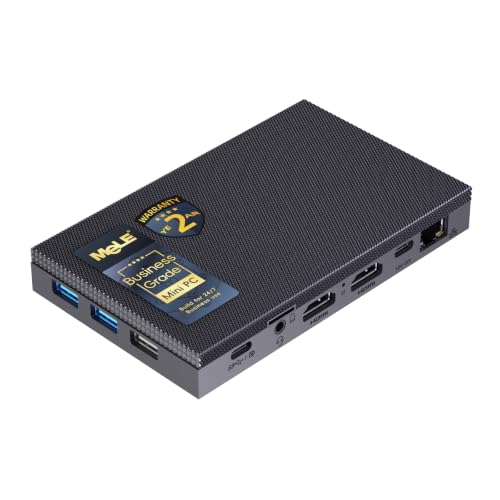
MeLE Quieter4C N100 — 8GB RAM, 128GB, Windows 11 Pro
Who it suits: Anyone whose small space has a monitor in it — which is most small spaces — and who wants the computer to stop occupying the room: a bedroom desk, a studio corner, a living-room media setup, a second PC that should be heard never and seen barely.
This is the installation the whole category promises, documented rather than implied. The Quieter4C N100 is a sealed metal slab measuring 5.16 by 3.19 by 0.72 inches — those are the maker’s own figures — with no fan and no vents, designed to mount behind a monitor, where its desk footprint becomes exactly zero. What remains in the room is the brick, which tucks behind the desk or into a cable tray, and the cables, which drop from the monitor’s back in the same bundle as the display’s own. Inside the slab: Intel’s N100 processor, 8GB of memory, 128GB of storage with an M.2 slot and a microSD slot for expansion, triple-display output, and Windows 11 Pro installed and licensed. Check price on Amazon for the current figure: this is a budget-tier machine, which makes the disappearing trick also the most affordable complete one in this guide.
Grade the compromises as installation facts. The sealed case that makes it mountable also makes it a heatsink with a small surface, so the behind-monitor spot must still be open air — a monitor against a wall with the PC sandwiched tight is a warmer install than the same PC on an open shelf, and a sealed cabinet remains refused outright. The memory is not user-upgradeable on this build, so the 8GB is permanent; buy the N150 configuration below if 16GB matters from day one rather than planning an upgrade that does not exist. Base storage is eMMC-class, with the M.2 slot as the designed-in fix. And networking is a single gigabit Ethernet port. None of that dents the proposition for the jobs it suits — streaming, browsing, office work, light duties, light games — because the proposition was never speed. It is a complete, silent computer that leaves the room exactly as it found it.
- The only fully documented zero-footprint install here: published dimensions and behind-monitor mounting.
- Sealed case with no vents — nothing to clog with the dust of a small room.
- A complete, licensed Windows PC in the budget tier — check price on Amazon.
Honest limitation: 8GB of memory that cannot be upgraded, eMMC-class base storage, and a single gigabit port — light duties only, permanently configured.
Choose it if your monitor has a back and your workload is media, browsing and light work. Skip it if you need 16GB from day one — the N150 build below is the same disappearing act with the bigger configuration inside.

MeLE Quieter4C N150 — 16GB RAM, 512GB SSD, Windows 11 Pro
Who it suits: The small-space buyer who wants the vanishing install and the finished specification at once — the silent main PC for a bedroom, study or studio flat, bought once and not revisited.
Same slab, more inside. This Quieter4C configuration measures about 5.2 by 3.2 by 0.7 inches per its listing’s specification block, mounts behind a monitor the same way, and pairs Intel’s N150 — the current refresh of the N100, four cores up to 3.6GHz — with 16GB of memory and a 512GB SSD, driving up to three 4K displays across two HDMI ports and a full-function USB-C. Windows 11 Pro arrives installed under MeLE’s Microsoft OEM partnership. It sits in the mid-range tier of this category — check price on Amazon for the current figure. As an installation it is identical to its sibling above — zero desk footprint, a brick to house, cables that fall behind the display — so the extra money changes nothing about the room. It changes the machine’s staying power: double the memory and quadruple the storage, in the same seven-tenths of an inch.
The premium deserves the same honest question here as anywhere: an N150 is an N150, and this machine’s sustained computing throughput is a peer of far cheaper fanless boxes. What the premium over its sibling buys is the configuration, the slim metal build, the triple-display output and a maker that publishes manuals and answers email. On this build the memory is soldered LPDDR5 — the 16GB you buy is the 16GB you keep — while storage still expands through the M.2 slot. Siting notes are the family notes: behind a monitor is its natural home, open air is non-negotiable, and the case will run warm to the touch under load, which is the design working, not failing. For a small room that needs one silent computer to simply be the computer, this is the category’s most complete answer.
- Documented slim case with behind-monitor mounting — the same zero-footprint install as the N100.
- 16GB of memory and a 512GB SSD, with an M.2 slot for later storage.
- Triple 4K display support — one slab can run a small desk’s whole display setup.
Honest limitation: Soldered memory makes the configuration permanent, and the price premium buys specification and finish, not a faster class of processor.
Choose it if you want the disappearing PC with nothing left to upgrade. Skip it if your duties are light enough that the N100 build above does the same vanishing act at a lower price point — check price on Amazon for both.

ZOTAC ZBOX CI337 Nano — Intel N100 Barebones
Who it suits: Builders with a spare DDR5 SO-DIMM and SSD on the shelf who want a documented mount-behind-the-monitor install from the brand that has made passively cooled nano PCs longer than almost anyone.
The CI337’s small-space credential is printed in its own documentation: VESA mounting, for behind-monitor installs, on a compact fanless barebone built around Intel’s N100. Around that mount sits a well-understood board — a DDR5-4800 SO-DIMM slot supporting up to 16GB, an M.2 storage slot, and triple-display output across two HDMI 2.0 ports, DisplayPort 1.4 and DisplayPort over USB-C. It sits in the budget tier of this guide — check price on Amazon for the current figure. Installed, it offers the same disappearing trick as the MeLE machines — the desk keeps only the monitor — with one difference that matters in a tight room: you assemble it first. In a small space that assembly needs a table, an hour and somewhere for the parts boxes to go, which is a real, if temporary, footprint of its own.
Then the barebones arithmetic, in full, because it decides this pick. The kit contains no memory, no storage and no operating system. Add a 16GB DDR5 SO-DIMM, a modest NVMe SSD and a Windows licence bought at retail, and the completed CI337 should be compared carefully with the complete MeLE N100 system at the top of this guide, which arrives assembled, licensed and warranted as one product — check price on Amazon for both before assuming the kit works out cheaper. The kit wins when the parts are already in your drawer, when you run Linux and the licence costs nothing, or when you specifically want ZOTAC’s board in your install. Its siting rule is the category rule, stated by its own design: the case is the cooler, so the behind-monitor spot must be open air, not a sealed cabinet — a temptation tidy installs keep offering and fanless machines keep refusing.
- Documented VESA mounting — a verified zero-footprint route from an established brand.
- DDR5 memory support gives a spare modern SO-DIMM a home.
- The budget-tier way into this guide — check price on Amazon.
Honest limitation: Barebone means barebone — no RAM, no SSD, no OS — and completed with new retail parts it can cost more than a complete rival that mounts the same way.
Choose it if the parts are on your shelf or your OS is free. Skip it if you would be buying every component new — the MeLE systems above are the better arithmetic for the same spot on the wall.

Protectli Vault Pro VP2430 — Intel N150, 4x 2.5GbE, Barebones
Who it suits: Small-space networkers — a flat, studio or small house whose router corner, airing cupboard or shelf end needs a silent firewall or home-lab host that runs for years and is never thought about.
Every small home has one awkward square foot where the network lives, and this is the machine built for it. The VP2430 is a finned-aluminium appliance — Protectli’s datasheet describes it as “Fanless and Silent” — built around the same Intel N150 found in cheaper machines, with four Intel i226-V 2.5-gigabit Ethernet ports, a DDR5 SO-DIMM slot supporting up to 64GB, 32GB of onboard eMMC plus an M.2 slot, and a serial console connection. Around that hardware sits the actual product: assembly and support in the United States, a maintained knowledge base, validated network firmware and the option of coreboot open-source firmware. It sits in the mid-range tier as a barebones unit, with configured versions of the line in a higher tier; check price on Amazon, and check Protectli’s own store as well, since its pricing sometimes undercuts Amazon — checking both is part of buying one sensibly. Its maker publishes no case dimensions we could verify, so grade it by class — a finned appliance that sits flat on a shelf or cupboard board — and take its exact measurements from the live listing before committing your network corner to it.
The installation grading cuts both ways. Positively: it is designed to be installed and forgotten, it makes no noise in a bedroom-adjacent cupboard, and its four network ports mean the small space’s switch, router and firewall can collapse into one box — a genuine footprint saving no desktop pick here offers. Negatively: forgotten still requires air. A finned case in a sealed cupboard is the classic small-space mistake with this exact product class, and the refusal stands — the cupboard needs ventilation, or the appliance needs a different home. And the caveats of configuration apply in full: the Amazon unit is a barebones appliance with no operating system, memory and storage to be added or selected depending on the exact listing, and no pretence of being a desktop. As the silent heart of a small home’s network, backed by a company that publishes datasheets, it is the most defensible purchase in this guide. As a desk PC, it would be a strange one.
- Four Intel 2.5GbE ports — can absorb the router, firewall and switch into one silent box.
- US-based support, real datasheets and a coreboot firmware option.
- DDR5 slot up to 64GB: genuine headroom for virtualisation in a cupboard-class install.
Honest limitation: A barebones network appliance with no OS installed, priced at a premium over identical silicon — and its natural cupboard home must be ventilated, not sealed.
Choose it if it will run your network from the corner it lives in. Skip it if you want a ready-to-use silent desktop — the MeLE machines above do that job complete, in a similar tier — check price on Amazon for each.

Kinupute Fanless Mini PC — Core i7-1260P, 16GB DDR5, 256GB NVMe, 3x 2.5G LAN
Who it suits: Buyers whose small space still has to do big work — a home lab, several virtual machines, an industrial controller that also has to think — and who can give the most capable fanless box the breathing room it honestly needs.
Start with why this pick sits fifth in a small-spaces guide despite leading on specification. The Kinupute pairs a 12-core, 16-thread Core i7-1260P with 16GB of DDR5-5600 in two slots (expandable to 64GB), a 256GB NVMe SSD, Intel Iris Xe graphics, three 2.5-gigabit Ethernet ports, triple 4K display support and Windows 11 Pro, inside a fanless industrial enclosure designed for continuous operation. Check price on Amazon for the current figure — it is the premium tier of this guide: the most expensive pick here, and the verified ceiling of the whole fanless category, still well below this search’s budget ceiling. Its maker publishes no case dimensions we could verify, so it is graded by class: a finned industrial box that sits on a desk or shelf as a visible object, not a slab that vanishes behind a display. No mounting is documented for it, so none is claimed.
The installation consequence follows from the silicon. The 1260P is a 28-watt-class processor in a case that sheds heat passively, so under a sustained all-core load the chip clocks down toward what the fins can dissipate — and the fins can dissipate more, for longer, when the air around them is generous. Of the six picks, this is the one to site most carefully: an open shelf or desk with clear space on every finned side, never a hutch, a cubby or a cabinet. Placed that way, it is far and away the fastest machine in this guide in bursts and mixed workloads. Placed badly, it converges toward the N-series pack while sitting in a far higher price tier. The 256GB SSD is also small for a premium-tier machine, and the brand is an industrial importer rather than a household name. Buy it when the capability is the requirement and the room can spare the air; the small space that cannot spare the air should buy the MeLE N150 and keep the change.
- Nothing else verified as fanless on Amazon carries this much: a 12-core i7-1260P, DDR5 memory and three 2.5G LAN ports.
- Two memory slots accepting up to 64GB — upgrade headroom passive cases almost never offer.
- Three 4K displays supported, and Windows 11 Pro in the box.
Honest limitation: The biggest air appetite in this guide and no documented mounting — it is a shelf object that must be sited openly, and passive cooling caps its sustained performance regardless.
Choose it if you need real multi-core capability in silence and have an open shelf to give it. Skip it if your only spots are enclosed — its premium evaporates exactly where the air runs out.

KINGDEL NC3000 Fanless Industrial PC — Core i7-8565U, 16GB RAM, 512GB NVMe
Who it suits: Buyers whose “small space” is a workshop bench, a kiosk enclosure, a point-of-sale counter or a dusty corner where the PC has a physical job — and who need the legacy ports consumer mini PCs no longer offer.
Grade this one honestly first: it is the largest installation in this guide, a full-metal industrial case that sits on a surface as a deliberate object, and its maker publishes no dimensions we could verify — take its exact measurements from the live listing before committing a bench or counter to it. What the footprint buys is the genre’s defining port selection: two COM RS232 serial ports alongside HDMI and VGA display outputs, four USB 3.0 ports, Wi-Fi and Bluetooth, in a fanless metal enclosure where the case is heatsink, armour and product in one. The configuration documented here pairs 16GB of DDR4 with a 512GB NVMe SSD and sits in the mid-range tier of this guide — check price on Amazon for the current figure; the same listing family carries higher configurations, including 32GB and 1TB builds, so confirm the exact configuration selected before you buy.
The processor badge needs the same plain reading here as anywhere. The Core i7-8565U is a four-core chip from 2018; in raw throughput it sits far closer to the modern N100 machines above than to the Kinupute, and its Intel UHD 620 graphics are the weakest in this guide alongside them. What you are paying for is the case, the serial ports, the configuration options and an industrial seller’s 24/7 design intent — legitimate in a harsh spot, poor value at a tidy desk. Its siting rule is the industrial one: metal fins want open air like every pick here, but this is also the one machine in the guide genuinely at home in dust and vibration, provided the air can still move. On listings of this class the operating system and the warranty run through the seller rather than a domestic service network, so read the stated OS and warranty terms on the listing before you order.
- Full-metal fanless case built for continuous, unattended operation in unkind rooms.
- Two COM RS232 ports plus HDMI and VGA — the legacy I/O that defines its niche.
- Multiple configurations on the listing, up to 32GB of RAM and 1TB of storage.
Honest limitation: The largest footprint here, no published dimensions to plan around, and a 2018-era four-core chip whose i7 badge flatters it.
Choose it if the small space is a workbench and the serial ports are the requirement. Skip it if the space is a living room — every pick above it disappears better and computes as fast.

Comparison Table
| Product | Processor | Best use | Link |
|---|---|---|---|
| MeLE Quieter4C N100 | Intel N100 | The documented zero-footprint PC, mounted behind the monitor | Check on Amazon |
| MeLE Quieter4C N150 | Intel N150 | The same vanishing install with the finished 16GB/512GB specification | Check on Amazon |
| ZOTAC ZBOX CI337 Nano | Intel N100 (barebones) | Documented VESA mounting for builders with parts on hand | Check on Amazon |
| Protectli Vault Pro VP2430 | Intel N150 | The network corner: firewall and lab duty with real support | Check on Amazon |
| Kinupute Fanless Mini PC, i7-1260P | Core i7-1260P (12-core) | Most fanless capability, on an open shelf with air to spare | Check on Amazon |
| KINGDEL NC3000 Fanless Industrial PC | Core i7-8565U | Rugged bench and counter duty with serial ports | Check on Amazon |
How to Choose: Measure Before You Buy
Five steps, in order. Do them before the order, not after the delivery — every one is cheaper with a tape measure than with a returns label.
- Step 1 — Measure the spot. Not the shelf’s advertised size: its real width, depth and height, with the skirting board, the shelf lip and the door swing accounted for. Then decide which kind of spot it is. A monitor’s back is a spot — the two MeLE machines and the ZOTAC document mounting for exactly it. An open shelf is a spot. A closed cabinet, a drawer and the gap behind a sofa are not spots, whatever their dimensions, because a fanless case sealed in still air cannot cool itself. If your machine’s maker publishes case dimensions, compare them now; if it does not — the Protectli, Kinupute and KINGDEL in this guide — take the figures from the live listing’s specification table before you commit, never from a roundup or a sibling model.
- Step 2 — Reserve the ventilation clearance. Add the air to the measurement. The fins need open room on every finned side — a hand’s width as a working minimum, and more above the top panel, where the heat actually leaves. Behind a monitor, check that the display is not pressed flat to a wall with the PC sandwiched in the gap; on a shelf, check that books, boxes and the next device along will not migrate against the case over the following month, because in real rooms they do. If the reserved air does not fit, the machine does not fit, however small the box itself is.
- Step 3 — Give the power brick an address. Every pick in this guide is fed by an external adapter, and the adapter is a second object in your small space: it runs warm, it needs its own air, and its cable length fixes how far the PC can live from the socket. Decide its home now — floor behind the desk, a cable tray, the shelf beside the machine — and check the drop from that home to the wall socket. A brick balanced on top of the finned case is the one address that is never acceptable: it insulates the heatsink and cooks in the rising heat at the same time.
- Step 4 — Walk the cable drop. Count what leaves the machine — power in, one to three displays out, Ethernet, the USB devices — and trace each cable’s path from the back panel to where it ends. Cables leave backwards and bend, so the installed depth of any pick here is its case depth plus a fist’s depth of bend behind it; on a shallow desk or shelf, that arithmetic, not the case, is what collides with the wall. Behind a monitor the drop is short and tidy, which is half of why the mounted picks lead this guide. Where a pick documents its outputs — the MeLE machines’ two HDMI ports and USB-C, the ZOTAC’s two HDMI, DisplayPort and USB-C — plan against those; where it does not, read the port layout from the live listing’s photographs rather than assuming.
- Step 5 — Then order, and verify on arrival. With the spot measured and the air reserved, order — and on arrival, before the machine goes into its measured home, verify what actually arrived: the configuration against the listing (industrial listings change configurations under one ASIN, and the KINGDEL family sells several builds under one roof), the memory and storage in the system settings, and the mounting hardware in the box if your install depends on it. Run it on the open desk for an evening first. A fanless PC that is cool and quick in the open but slow in its spot has told you the spot is wrong, and it is far easier to learn that before the cables are dressed than after.
Common Buying Mistakes
- Measuring the box and forgetting the air: the case fits the shelf, the fins touch three walls, and the silent PC becomes a slow one.
- Sealing a fanless PC inside a media cabinet or entertainment unit because the install looks tidier — the single most common way this category gets returned as “defective”.
- Resting the power brick, a book or another device on top of the finned case, insulating the heatsink the whole design depends on.
- Assuming every mini PC mounts behind a monitor. In this guide, mounting is documented for the two MeLE machines and the ZOTAC — and claimed for nothing else.
- Planning a shelf around dimensions copied from a review roundup or a sibling model, for a machine whose maker publishes none.
- Ordering a barebones kit for a tight install without counting the assembly footprint — the parts, the tools and the table the build happens on — or the completed cost once RAM, SSD and an OS are added.
- Buying the 8GB configuration of a soldered-memory machine to save money, then needing 16GB with no upgrade path.
- Paying toward $1,500 for a “premium” fanless box, when the category’s ceiling sits well below that budget and the extra money buys ports and support, never speed or quieter silence.
- Expecting modern gaming from integrated graphics in a passive case; fanless and gaming are different purchases, and no siting trick changes that.
Final Recommendation
- Most small spaces: MeLE Quieter4C N100 — the documented zero-footprint install in the budget tier — check price on Amazon.
- The finished small-space desktop: MeLE Quieter4C N150 — the same disappearing slab with 16GB and 512GB inside.
- Builders with parts on hand: ZOTAC ZBOX CI337 Nano — documented VESA mounting, your choice of memory and storage.
- The network corner: Protectli Vault Pro VP2430 — provided its cupboard breathes.
- Capability first, air available: Kinupute Fanless Mini PC, Core i7-1260P.
- The workshop bench: KINGDEL NC3000 Fanless Industrial PC.
Our top two are the MeLE Quieter4C N100, for the buyer whose room simply needs the computer gone, and the Quieter4C N150, for the buyer who wants it gone with the finished specification inside. Between them they cover most of what “fanless for small spaces” honestly means: a documented slab, a documented mount, a brick in a tray, and a room that gets its desk back. If your small space must also play modern games, the fanless requirement is the thing to surrender — see Best Mini Gaming PC Under $1500 and Best Compact Gaming PC Under $1500 for what a fan buys at this budget — and if your space is not small at all, the wider shortlist at Best Fanless Mini PC Under $1500 ranks these same machines by capability instead of by installation. Either way, you do not need to spend anywhere near the full budget: the ceiling of this category is a fact about heat, and the room you were trying to save was the point of the purchase.
Frequently Asked Questions
Can I put a fanless mini PC inside a closed TV cabinet?
No — and this is the one answer in this guide with no exceptions among the picks. A fanless case cools itself through its own surfaces, so a sealed cabinet starves it of the air it sheds heat into; the machine responds by slowing down, and the install gets blamed on the product. A cabinet with genuine ventilation — open back, mesh door, real airflow — is a different situation, but if the door closes on still air, choose a fanned machine for that spot or choose a different spot for the fanless one.
Which of these can actually mount behind a monitor?
The ones whose makers document it: the two MeLE Quieter4C machines, which are built to mount behind a display, and the ZOTAC CI337, which documents VESA mounting in its own specification. No mounting is documented for the Protectli, Kinupute or KINGDEL in the research behind this guide, so none is claimed for them — if a listing photograph suggests otherwise, confirm the bracket is actually included before planning the install around it. Remember that mounting removes the desk footprint, not the rules: the mounted machine still needs open air behind the display, and its brick and cables still need their addresses.
How much clearance does a fanless mini PC really need?
Plan on a hand’s width of open air around the finned surfaces as a working minimum, with more above the top panel, and treat anything less as a compromise the machine pays for in sustained speed. The makers behind this guide publish no clearance figure we could verify, so this guide prints none as fact — what is documented, by the physics every one of these designs shares, is the direction of the rule: more air, cooler case, faster machine; sealed air, the opposite. When in doubt, give the fins the room and take the space back from somewhere that does not breathe.
Does the power brick really count as part of the footprint?
Yes. Every machine here is fed by an external adapter, and in a small room an unplanned brick ends up in the worst places — balanced on the heatsink, wedged behind the case against the wall, or heating a cable nest. It is small, but it is a second warm object with its own cable, and the installs that work are the ones that assigned it a home — floor, tray or shelf — before the order was placed.
Why does nothing here cost anywhere near $1,500?
Because a passive case caps how much performance it can cool, and expensive PCs are expensive precisely because of performance. A small finned case sheds roughly the heat of a 6 to 15 watt processor indefinitely, which limits fanless machines to efficient chips whose complete systems sit in the budget-to-mid-range tier; the most expensive verified fanless configuration we found on Amazon is the Kinupute in this guide, the premium tier of the category — check price on Amazon. The same physics is covered from the capability side at Best Fanless Mini PC For Beginners Under $1500. Put any budget you do not spend toward the room — a monitor arm, a cable tray, a better display — or keep it.
Can a fanless mini PC play games in a small space?
Light ones, honestly framed. Integrated graphics in these machines handle retro emulation, older and indie titles and esports games at modest settings, and their hardware video decode makes them excellent for streamed and cloud gaming, where another machine does the rendering — see Best Fanless Mini PC For Streaming Under $1500 for that angle in full. Modern AAA games are beyond every pick here at any price, because the heat they generate is exactly what a passive case cannot shed.
- Best Fanless Mini PC Under $1500
- Best Fanless Mini PC Under $400
- Best Fanless Mini PC Under $700
- Best Fanless Mini PC Under $1200
- Best Fanless Mini PC For Small Spaces Under $400
- Best Fanless Mini PC For Small Spaces Under $1200
- Best Fanless Mini PC For Streaming Under $1500
- Best Fanless Mini PC For Beginners Under $1500
- Best Fanless Mini PC Under $2500
- Best Barebones Mini PC Under $1500
- Best Mini PC Under $1500


