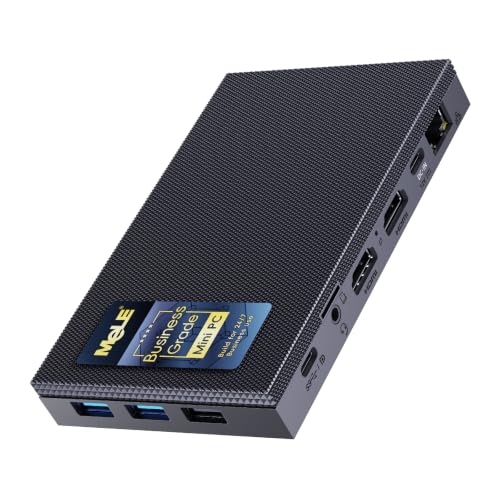
Where to buy
Check the latest price, availability and delivery on Amazon. Orders are placed on Amazon. We may earn a commission from qualifying purchases.
- Best overall fanless mini PC for a small space: MeLE Quieter4C Fanless Mini PC, Intel N150, 16GB RAM, 512GB Storage, Windows 11 Pro — Check on Amazon
- MINIX NEO Z300-0dB Fanless Mini PC, Intel i3-N300, 16GB RAM, 512GB SSD — Check on Amazon
- HISTTON Fanless Industrial Mini PC, Core i7-10810U, 32GB RAM, 512GB SSD — Check on Amazon
- Protectli Vault Pro VP2430 Fanless Mini PC, Intel N150, 4x 2.5GbE Ports — Check on Amazon
See 2 more Amazon options
- ZOTAC ZBOX CI337 Nano Fanless Silent Mini PC, Intel N100, Barebone — Check on Amazon
- MeLE PCG02 Fanless PC Stick, Intel N100, 8GB RAM, 128GB, Windows 11 Pro — Check on Amazon
Read the full guide ↓
Disclosure: As an Amazon Associate, reviewstook.com earns from qualifying purchases. Links to Amazon on this page are affiliate links; they cost you nothing extra. Listing details such as price and availability change often, so check the current Amazon listing before you buy.
A fanless mini PC looks like the easiest small-space purchase there is: no tower, no fan, a slab of metal smaller than a paperback. Then it arrives, and the real installation begins. There is a power brick that has to live somewhere. There are cables that leave the back of the box and need room to bend. And there is the fact that makes fanless machines stricter housemates than any fanned PC: the case is not a container for the cooling system, it is the cooling system. Every fin on that little slab is a radiator, and a radiator buried in a drawer, sealed in a media cabinet or sandwiched under a stack of books is a radiator that has stopped working. A fanned mini PC in a tight spot gets loud. A fanless one in a tight spot gets slow, then hot, then slower. So this guide does not grade spec sheets. It grades installations: the footprint a machine actually occupies once the brick, the cable drop and the air gap around the fins are counted, and whether that installed footprint honestly fits the small spaces people buy these machines for.
Two honesty notes before the picks, because both shape everything below. First, the money: $1,200 is far more than this category can use. The most expensive verified fanless pick in this guide sits at the top of the category’s range — check the current price on Amazon — and what that premium buys is memory, ports and an industrial price list wrapped around a 15-watt processor from 2019 — not speed, not silence, and certainly not a smaller box. The machines that install best in small spaces mostly sit in the lower and middle parts of the range below that ceiling. Second, the category itself: a fanless PC is a light-gaming machine at best. There is no discrete graphics card in any passively cooled mini PC at any price, because a gaming GPU makes more heat than a finned case can shed. What these machines do superbly is disappear — behind a monitor, under a shelf, inside a network cupboard — and run silent desktop, media and always-on jobs for years. If gaming is the main job and silence is negotiable, the money belongs elsewhere, starting with Best Mini Gaming PC Under $1200. If the job is a computer that takes up almost no room and makes no sound doing it, read on — but read it as an installation guide, because that is where small-space purchases are won and lost.
In this guide
Quick Picks
Short on time, or comparing several options at once? Each row below names the small-space situation and the product that installs best in it, with a link to the listing.
| Small-space situation | Pick | Why it installs well | Link |
|---|---|---|---|
| Best overall install | MeLE Quieter4C, N150, 16GB/512GB | A 5.2 × 3.2 × 0.7 in slab with a VESA mount — it bolts behind the monitor and the desk footprint drops to zero — check price on Amazon | Check on Amazon |
| Most computer, still mountable | MINIX NEO Z300-0dB, i3-N300, 16GB/512GB | Eight cores in a VESA-mountable fanless box — check price on Amazon | Check on Amazon |
| The shelf-and-cupboard heavyweight | HISTTON Fanless Industrial PC, i7-10810U, 32GB/512GB | The biggest box here at 8.07 × 4.92 × 2.09 in — a deliberate placement — check price on Amazon | Check on Amazon |
| Network cupboard duty | Protectli Vault Pro VP2430, N150 | VESA kit in the box and four 2.5GbE ports — built to live where the cables already are — check price on Amazon | Check on Amazon |
| Cheapest mounted install | ZOTAC ZBOX CI337 Nano, N100 barebone | About 5 × 5 × 2.2 in with VESA mounting, before the parts it still needs — check price on Amazon | Check on Amazon |
| No footprint at all | MeLE PCG02 PC Stick, N100, 8GB/128GB | A 130g stick that plugs straight into the screen’s HDMI port — check price on Amazon | Check on Amazon |
How These Picks Were Chosen
Three filters were applied, and for this angle the third one matters most. The first filter was the word “fanless” itself, checked against manufacturer documentation rather than marketplace headlines. Several boxes sold as fanless turn out, in the maker’s own material or in independent teardowns, to carry a small auxiliary fan — one widely sold firewall line pairs its “fanless design” claim with a built-in micro-fan in the same listing, and another’s internal fan has been measured by reviewers at 39 to 41 dBA. Those machines are excluded here, however small they are, because a fan you were not told about is also a fan that can fail, clog and whine in exactly the quiet room you bought silence for.
The second filter was verifiability. Every pick is a real Amazon listing whose ASIN and specifications were cross-checked against manufacturer pages and specification databases during research. Check the current price on Amazon for each pick, because fanless pricing moves, and barebone pricing swings with the memory market. Two picks ship as barebones without memory, storage or an operating system in their lower configurations; their reviews account for the completion honestly instead of letting a low entry point flatter a small-space budget.
The third filter is the one this angle adds: installability. Each machine was graded on the space it occupies installed — the case, plus the air gap its fins need on every side, plus the power brick, plus the bend radius of the cables leaving it. Where a manufacturer documents real dimensions, a weight or a VESA pattern, those figures are used and credited. Where the research documents none, the machine is graded by form-factor class only, and this guide says so rather than inventing a number. That discipline matters more in this category than in most: a small-space buyer is quite literally buying measurements, and a made-up measurement is worse than none.
The Space Around the Box
Every small-space mistake in this category comes from measuring the wrong thing. The listing gives you the case. The installation takes four other bites out of your space, and each one is non-negotiable.
The air gap is part of the machine. A fanned PC moves its heat problem somewhere else — out the back, on a current of air. A fanless PC keeps its heat in the case and radiates it from the finned surfaces, which is why makers state surface temperatures of 55 to 70 degrees Celsius under load for the picks below. That heat has to go somewhere, and “somewhere” is the air immediately around the box. Plan on clear air on every finned side: not a centimetre of clearance inside a sealed cabinet, not the underside of a shelf pressed down on the top fins, not a cosy gap between two warm devices. This rule is stricter than anything a fanned machine asks of you, and it is absolute — a fanless PC that cannot breathe is not a small PC, it is a slow one. Sealed cabinets, closed drawers, stacked books and buried-behind-the-sofa placements are refused outright for every pick in this guide, whatever the tape measure says.
The brick needs an address. Machines this small do not carry their power supply inside; it sits in a brick on the cable, and that brick occupies floor, shelf or power-strip space of its own, generates a little heat of its own, and decides how far the box can sit from the wall socket. Two picks below soften this: the Quieter4C and the PCG02 stick can be powered over USB-C Power Delivery, which can mean one tidy cable class from a suitable supply instead of a dedicated brick. For the rest, give the brick a planned home — ventilated, off soft furnishings, reachable — before the machine arrives, not after you discover the cable is thirty centimetres short of the neat spot you had chosen.
The cable drop sets the real depth. A mini PC on a shelf is not as deep as its case; it is as deep as its case plus the stiff bend of the HDMI, Ethernet and power cables leaving the rear panel. On a shallow shelf that bend, not the box, is what pushes against the wall or hangs the machine half off the edge. Measure the spot with the cables in mind: display cable, network cable if you wire it (and for always-on duty you should), power lead, and whatever USB devices live attached. Machines that mount behind a monitor convert this problem into the monitor’s own cable drop, which is one reason the VESA picks grade so well below.
Heat rises into the room, not out of it. A fanless box adds no noise to a small room, which is the point — but it adds all of its heat to that room’s air, slowly and continuously. For desktop and media loads that is a few watts and a non-issue. For a 24/7 server in a small sealed study, it is worth one thought before you commit the cupboard: the machine will be fine in open air, and the room will be a fraction warmer. Plan the placement for the machine’s sake first; the room will cope.
The 6 Best Fanless Mini PCs for Small Spaces Under $1,200
MeLE Quieter4C Fanless Mini PC — Intel N150, 16GB RAM, 512GB Storage
Who it suits: Anyone whose small space is a desk — a bedroom desk, a studio corner, a kitchen counter — who wants the computer to stop being an object on it.
Start with the documented measurements, because they are the argument: 5.2 by 3.2 by 0.7 inches. The Quieter4C is less a box than a finned slab, thinner than most paperbacks, and MeLE includes a VESA mount so the slab bolts to the back of a monitor and the installation’s desk footprint becomes, literally, nothing. No shelf space, no desk corner, no visible computer at all — just the screen it hides behind, sharing the screen’s own cable drop. Even unmounted it asks almost nothing: flat on a desk it slides under a monitor stand or a raised shelf, and because it can be powered over USB-C Power Delivery (the listing documents a 12–20V input, minimum 36W), the brick problem can shrink to a single cable class from a suitable USB-C supply. Inside the slab, this Business Grade configuration pairs Intel’s quad-core N150 (boosting to 3.6GHz) with 16GB of DDR4 in a real slot — not soldered down on this build — 512GB of storage with an M.2 slot for more, two HDMI ports plus a full-function USB-C for up to three 4K displays, gigabit Ethernet, Wi-Fi 5 and Bluetooth 5.1, running Windows 11 Pro. Check the current price on Amazon. The same chassis is also offered in an N100, 8GB/128GB configuration that sits lower in the range if the job is lighter.
The installation caveat is the category’s caveat, and MeLE states it themselves: the case surface runs at 55 to 70 degrees Celsius under load. Behind a monitor that is fine — monitors are warm neighbours and the air back there moves — but it rules out the one placement the small size tempts you toward: tucking the slab into a sealed slot, a closed cabinet or a tight pigeonhole where its fins touch still air on every side. Mounted or standing in open air, it is the best small-space install in this guide. Its performance ceiling is the honest footnote rather than a placement issue: an efficiency quad-core that feels brisk at desktop and media work, transcodes video happily with its Quick Sync hardware, throttles politely under long flat-out loads, and plays the light kind of games — older, indie, emulation, modest esports — plus anything streamed from a bigger machine elsewhere.
- The smallest honest desktop install here: VESA-mounted, its footprint is the monitor’s, not its own.
- USB-C power input can collapse the brick and the cable clutter into one tidy run.
- Slotted memory and an M.2 slot mean the tiny box can still grow.
Honest limitation: The finned case runs properly hot under load and must sit in open air — the one placement its size tempts you into, a sealed nook, is the one placement it forbids.
Choose it if your small space has a monitor with a VESA pattern and you want the computer gone from the desk entirely. Skip it if the only available spot is enclosed — no fanless PC belongs there, and this one’s maker says so in degrees.

MINIX NEO Z300-0dB Fanless Mini PC — Intel i3-N300, 16GB RAM, 512GB SSD
Who it suits: Buyers with a small space and a big workload — containers, virtual machines, a media server doing three jobs at once — who refuse to trade the computer away to get the room back.
The Z300-0dB’s claim on a small space is that it packs the most processor any consumer fanless box offers into the same mountable form class as the rest of this guide. The Intel i3-N300 is the eight-core member of the Alder Lake-N family, boosting to 3.8GHz — double the threads of the N100/N150 machines — and MINIX fits a VESA mount so those eight cores can live behind a display or under a shelf edge rather than on top of your limited surface. Around the chip: 16GB of DDR4, a 512GB PCIe SSD, Windows 11 Pro pre-installed, dual 4K display support over HDMI and USB-C, and a 2.5-gigabit Ethernet port that makes it a genuinely fast citizen on a home network. The “0dB” in the name is a literal rating, and MINIX rates the machine for continuous 24/7 operation. Check the current price on Amazon — it sits in a similar part of the range to the Quieter4C’s flagship configuration, with twice the cores. One discipline note: the research behind this guide documents no chassis dimensions or weight for this machine, so none are printed here; it is graded as a mountable mini-PC-class box, and the live listing’s specification table is where to confirm the exact fit for a tight measured spot.
Placement follows from the workload. A machine bought to run containers and servers around the clock will spend its life under sustained load, and MINIX warns in its own listing copy that the passive top cover becomes warm — so the mount-behind-the-monitor install that suits the Quieter4C’s bursty desktop life deserves one extra thought here: leave the fins open air on every side, do not let the monitor’s own heat pool around it, and never let the mount become an excuse to wedge it into a gap with no airflow. The eight cores are efficiency cores, too — per-core speed is modest, the integrated graphics are the same light-gaming class as everything in this guide, and hour-long all-core loads settle to what the case can dissipate. Judged as an installation, though, it is remarkable: a small server room’s worth of threads, silent, hanging on the back of a screen.
- Eight cores — the most CPU in a consumer fanless box — in a VESA-mountable case.
- 2.5-gigabit Ethernet suits the always-on, network-heavy jobs that fill small homes’ cupboards.
- Rated by its maker for continuous 24/7 operation.
Honest limitation: Sustained all-core work warms the passive cover and settles to what the fins can shed — mount it in open air, not in a gap, and confirm exact dimensions on the live listing before a tight install.
Choose it if the small space must also be the home server, and the mount puts it out of sight and out of the way. Skip it if your work is single-threaded and heavy, or needs graphics beyond integrated — no placement fixes that.

HISTTON Fanless Industrial Mini PC — Core i7-10810U, 32GB RAM, 512GB SSD
Who it suits: Buyers whose “small space” is a shelf, a cabinet top or a workshop corner that needs a serious, always-on machine — and who understand they are choosing the biggest install in this guide on purpose.
Grade this one honestly first: at a documented 8.07 by 4.92 by 2.09 inches and 2.65 lb, the HISTTON is not a hide-it machine. It is a finned industrial computer that occupies a real shelf slot, and its installation question is not “where does it disappear to” but “is the capacity worth the slot.” What the slot buys: an Intel Core i7-10810U — six cores, twelve threads, boosting to 4.9GHz — with 32GB of DDR4 (upgradeable to 64GB), a 512GB NVMe SSD, dual gigabit Ethernet, triple display outputs across two HDMI ports and a DisplayPort, and Windows 11 Pro, in a metal chassis built for dusty, unattended, always-on duty. Check the current price on Amazon — this configuration sits at the verified ceiling of this category, and it is here partly as documentation: the same seller’s 16GB version of this family sits lower in the range, and a 64GB/1TB configuration sits above the whole $1,200 budget, without the silicon class changing at all. No VESA pattern is documented for this machine in the research, so none is claimed: plan on it standing on a surface, with fin clearance, like the industrial equipment it is.
The placement rules are the fanless rules with the volume turned up. A 15-watt chip in a passive case sheds real heat from those fins, the six cores cannot hold boost clocks through long loads, and a sealed media cabinet — the classic small-space temptation for a box this shape — is refused outright; give it a shelf with air on every side and it will run for years. The other honesty is about what the money is: the i7-10810U is a laptop processor from 2019, its integrated graphics are older than the N-series picks’, its Bluetooth is version 4.2, and in burst work it is the strongest CPU here while in multi-core work the eight-core MINIX runs it close. Buy it for 32GB of memory, dual wired networks and industrial I/O in silence, placed deliberately on a real shelf. Buy it as “the best small-space PC” and you have purchased the largest box in the guide for the oldest chip in it.
- 32GB of memory and dual gigabit LAN — capacity no consumer fanless box matches, in one shelf slot.
- Finned industrial chassis built for dusty, unattended, always-on placement.
- The strongest burst CPU in this guide, for control and workstation-adjacent jobs.
Honest limitation: The largest, heaviest install here, around a 15-watt processor from 2019 — the price and the footprint buy memory and ports, not modern speed or invisibility.
Choose it if a specific shelf or cabinet top needs a silent machine with serious memory and dual networks. Skip it if your space problem is a desk — the two picks above it disappear; this one takes up residence.

Protectli Vault Pro VP2430 Fanless Mini PC — Intel N150, 4x 2.5GbE
Who it suits: Home-lab and network buyers whose small space is a cupboard, a hallway shelf or the corner where the router already lives — the one spot in the house where cables converge.
Every other pick in this guide has to travel to its job; the VP2430’s job comes to it. A firewall or router belongs where the network cables are, and Protectli builds the machine for exactly that installation: a finned, fanless case — the maker’s own documentation describes it as “Fanless and Silent,” full stop — with a VESA mounting kit included in the box, so it can hang on a cupboard wall or behind a panel instead of squatting on the shelf eating the space the modem and switch need. Inside: an Intel N150 quad-core, four Intel I226-V 2.5-gigabit Ethernet ports, a DDR5 memory slot the maker has tested with modules up to 64GB, an M.2 NVMe slot, and 32GB of onboard eMMC to boot a lightweight system from, plus the details consumer brands skip — an optional open-source coreboot firmware, a TPM, a serial console port, and assembly in the USA, Canada or Germany behind a real support organisation. Check the current price on Amazon. The research documents no chassis dimensions or weight for it, so it is graded here as an appliance-class box; check the live listing’s figures before a millimetre-critical install.
The installation caveats are configuration caveats. Amazon sells the VP2430 in several configurations and the lower-priced ones are barebone — memory and SSD are yours to add — which matters twice in a small space: the completed price is the real price, and the fitting happens on your workbench, not in the cupboard. The onboard eMMC boots a firewall distribution happily but is not a substitute for a real SSD in a general-purpose build, and the newest VP2430e revision drops the eMMC entirely, so check which revision a listing describes. As a desktop it is deliberately specialised — four network ports are wasted on web browsing — but that is not its install. Its install is a wall, a cupboard or a shelf edge in the one room where silence and four fast ports are both worth money, running for years without being thought about.
- VESA kit included — it hangs where the network lives instead of competing for shelf space.
- Four Intel 2.5GbE ports and coreboot firmware: purpose-built for firewall and lab duty.
- A DDR5 slot tested to 64GB gives a cupboard appliance unusual headroom.
Honest limitation: Cheaper Amazon configurations are barebone, so the completed install costs more than the sticker — and the port layout serves networking, not desktop life.
Choose it if the small space in question is the network cupboard and the machine’s job is routing, firewalling or always-on services. Skip it if you want a ready-to-run family desktop — the Quieter4C installs just as small and arrives complete.

ZOTAC ZBOX CI337 Nano Fanless Mini PC — Intel N100, Barebone
Who it suits: Buyers who want a brand-name fanless machine mounted out of sight for the least money — and who have a DDR5 stick and an SSD on the shelf, or enjoy fitting their own.
The documented figures: about 5 by 5 by 2.2 inches, 1.94 lb, with a VESA mount. The CI337 Nano is a finned square of a machine that bolts behind a monitor or under a desk and vanishes, carrying an Intel N100 quad-core, triple display support across two HDMI ports, a DisplayPort and USB-C, dual gigabit Ethernet, Wi-Fi 6 and Bluetooth 5.2. Check the current price on Amazon — it is positioned as the lowest entry point in this guide — and the catch is in its own title: barebone. The box contains no memory, no storage and no operating system. You add a DDR5 SO-DIMM (the board takes up to 16GB), an M.2 SSD or a 2.5-inch drive, and an OS. Costed honestly, memory and storage have to be added on top of the barebone — and memory pricing can swing sharply, so a completed CI337 can approach the ready-built picks in the guide while letting you choose exactly what goes inside.
For a small-space buyer the barebone nature cuts in a specific direction: the installation is two installations. First the build, on a table, with the case open — not a job for the cramped corner the machine will live in. Then the mount, after which the same openness that made it buildable makes it serviceable: a slotted machine on a VESA mount can be unclipped, upgraded and rehung in minutes, which no soldered pick here can match. The footnotes are real: if your parts shelf holds DDR4 it will not fit this DDR5 board; the M.2 slot is a PCIe 3.0 x1 design, so storage speed is capped below the drive’s own ceiling; and the N100 is the mainstream quad-core class of this whole guide — desktop, media and server duties, light gaming only. ZOTAC’s own warranty and support stand behind it, which separates it from the no-name barebones at similar money. With parts on hand it is the best-value mounted install in this guide; without them, price the whole build before the small sticker talks you into it.
- Lowest entry point of any verified fanless pick — check price on Amazon — with a VESA mount for a zero-desk install.
- Dual gigabit LAN, Wi-Fi 6 and triple display support despite the size.
- Slotted memory and storage make it the most serviceable mounted machine here.
Honest limitation: Barebone means barebone: no RAM, no SSD, no operating system, and at spike-era memory prices the completed build can approach a complete machine’s price.
Choose it if you have DDR5 and an SSD waiting, or want to choose them yourself, and the destination is the back of a monitor. Skip it if you want to unbox a working computer in the small space itself — the complete picks above arrive ready.

MeLE PCG02 Fanless PC Stick — Intel N100, 8GB RAM, 128GB Storage
Who it suits: Anyone whose space problem has no shelf in it at all — a TV on a wall, a kitchen screen, a signage display — where the only available footprint is the back of the screen itself.
The PCG02 is the limiting case of this entire guide: a complete Windows 11 Pro computer measuring 137.5 by 53 by 16.3 millimetres and weighing 130 grams, with a male HDMI connector that plugs straight into the display. There is no box on a surface, no shelf slot, no desk corner — the computer’s installed footprint is the thickness of the screen it hangs from, and a VESA mount is included for good measure. Inside the stick: an Intel N100 quad-core, 8GB of LPDDR5 memory and 128GB of high-endurance eMMC storage, a full-function USB-C port that drives a second 4K display and accepts Power Delivery charging, gigabit Ethernet — a wired connection a stick this size has no business offering — Wi-Fi 5, Bluetooth 5.1 and a microSD slot. The unattended-operation touches are MeLE’s Business Grade signature: Wake-on-LAN, PXE boot, timed wake and auto power-on after an outage, because this stick is built to run signage and kiosks for years. Check the current price on Amazon.
The placement physics deserve their sentence, because a stick lives in the worst air in the house: the warm pocket behind a television. MeLE states the surface can reach 55 to 70 degrees Celsius under load — normal for a passive stick and within the safety standard it cites — but a stick plugged into the back of a hot TV inside a closed cabinet is living its hardest life, and the refusal from the top of this guide applies with full force: give it air, or shorten its life and its speeds. The configuration is also fixed in a way no other pick’s is: 8GB of memory and 128GB of eMMC, soldered and sealed, enough for media, browsing and appliance duties and not expandable later — this is an appliance, not a machine that grows. The gaming story is the category’s in miniature: streamed games, retro titles, the lightest esports. Buy it to vanish, and nothing else in this guide disappears as completely.
- A complete Windows 11 Pro PC in a 130g stick — the only pick whose footprint is genuinely zero.
- Gigabit Ethernet, dual-display output and unattended features (WoL, auto power-on) in the stick format.
- High-endurance storage specified for 24/7 commercial duty.
Honest limitation: A fixed 8GB/128GB eMMC configuration that can never be upgraded, living in the warm air behind a screen — placement air is its whole cooling budget.
Choose it if the PC must vanish behind a display and the workload is media, signage or light duties. Skip it if you need memory, storage or ports beyond the basics — every other pick here offers more of all three.

Comparison Table
| Product | Processor | How it installs | Link |
|---|---|---|---|
| MeLE Quieter4C, 16GB/512GB | Intel N150, 4-core | 5.2 × 3.2 × 0.7 in slab, VESA behind the monitor — zero desk footprint | Check on Amazon |
| MINIX NEO Z300-0dB, 16GB/512GB | Intel i3-N300, 8-core | VESA-mountable mini PC class — the most compute per mounted box | Check on Amazon |
| HISTTON Fanless Industrial PC, 32GB/512GB | Core i7-10810U, 6-core | 8.07 × 4.92 × 2.09 in, 2.65 lb — a deliberate shelf placement, no mount documented | Check on Amazon |
| Protectli Vault Pro VP2430 | Intel N150, 4-core | VESA kit included — hangs in the network cupboard where the cables live | Check on Amazon |
| ZOTAC ZBOX CI337 Nano | Intel N100, 4-core | About 5 × 5 × 2.2 in, 1.94 lb, VESA — cheapest mounted install, parts required | Check on Amazon |
| MeLE PCG02 PC Stick, 8GB/128GB | Intel N100, 4-core | Plugs into the screen’s HDMI port — no surface footprint at all | Check on Amazon |
How to Choose: Measure Before You Buy
Small-space purchases fail at the tape measure, not at the checkout. Work through these five steps in order, with the actual spot in front of you, before ordering any machine in this guide.
- Step 1 — Measure the spot, not the machine. Take the real dimensions of where the PC will live: shelf width and depth, the gap behind the monitor, the cupboard shelf, the underside of the desk. Then compare against documented figures only — the Quieter4C’s 5.2 × 3.2 × 0.7 in, the HISTTON’s 8.07 × 4.92 × 2.09 in, the ZOTAC’s roughly 5 × 5 × 2.2 in, the PCG02’s 137.5mm stick. Where a maker documents no dimensions — the MINIX and the Protectli in this guide — pull the figures from the live listing’s specification table and measure against those, never against a roundup’s guess. If the spot is a monitor’s back, confirm the VESA pattern is free and not already carrying a stand mount.
- Step 2 — Reserve the ventilation clearance. This is the step fanless buyers skip and the only one that can ruin the purchase. The case is the heatsink: makers state surface temperatures of 55 to 70 degrees Celsius under load, and the fins need open air on every side to shed that heat. Walk the spot again and strike out anything enclosed — sealed cabinet, closed drawer, tight cubby, the gap between a TV and a wall with no air path. If the only available spot fails this step, the honest answer is not a smaller fanless PC; it is a different placement or a fanned machine. No pick in this guide is exempt.
- Step 3 — Give the power supply an address. These machines run from external power. Decide now where the brick lives: which socket, which strip, how the lead runs, whether it sits in ventilated air rather than under a rug or behind soft furnishings. Check the distance from socket to spot against the cable you will actually have, and note the two USB-C-powered picks — the Quieter4C and the PCG02 — which can run from a suitable USB-C Power Delivery supply and simplify this step to a single cable class. A perfect measured spot with no reachable power is not a spot.
- Step 4 — Walk the cable drop. Stand at the spot and trace every cable the installed machine will carry: display, Ethernet if you wire it, power, keyboard and mouse receivers, any permanently attached USB device. Each rear-panel cable adds its bend radius to the machine’s depth and its own small claim on the space behind and below. Behind-monitor mounts fold this drop into the monitor’s; shelf installs must budget it explicitly. If a cable has to cross a walkway, a doorway or a heat source to reach the spot, re-plan the spot now, not on delivery day.
- Step 5 — Then order, and verify on arrival. Only now does the machine get bought — and the last step of the checklist happens with the box open. Confirm the delivered configuration matches the listing you paid for: the memory and storage sizes, the exact model, and for the configuration-heavy listings — the Protectli’s barebone-versus-kitted variants and its VP2430e revision, the Quieter4C’s several builds under similar titles — the precise build in the box. Do this before the machine is mounted, cabled and buried in its new home, while a return is still a trip to the door rather than an uninstallation.
Common Buying Mistakes
- Measuring the case and forgetting the installation. The brick, the cable bend and the air gap are part of the footprint; a machine that fits the shelf on paper overflows it in practice.
- Sealing a fanless PC in a cabinet because it is silent. Silence is not the absence of heat — the case is a radiator, and a radiator in a closed box throttles, then cooks. This is the single most common way these machines get ruined.
- Spending the whole $1,200 because the budget says so. The verified top of this category is an industrial configuration at the upper end of the range whose premium buys memory and ports; the best small-space installs here sit in the lower and middle parts of the range. The leftover money was never going to buy a smaller or quieter machine.
- Believing a “fanless” headline without checking the manufacturer’s documentation. Some best-selling “fanless” firewall boxes contain an auxiliary fan, and at least one popular line’s fan has been measured at 39 to 41 dBA — in the quiet room you bought the machine for.
- Comparing a barebone’s sticker against complete machines. The ZOTAC’s barebone entry point is only a starting point; memory and storage still have to be added before it is a working computer, and the Protectli’s lower configurations are barebone too.
- Assuming a Core i7 badge means a modern, faster machine. The i7 in the most expensive pick here is a 15-watt laptop chip from 2019 with graphics older than the N100’s — and it is the largest box in the guide besides.
- Stacking things on the fins. Books, routers and other warm devices parked on top of a passive case are insulation, and insulation is the enemy the whole design exists to avoid.
- Buying a soldered, fixed configuration for a job that will grow. The PCG02’s 8GB and 128GB are forever; a slotted machine on a mount can be unclipped and upgraded in minutes.
Final Recommendation
- Most small desks: MeLE Quieter4C, N150, 16GB/512GB — mounted behind the monitor, the install disappears.
- Small space, heavy workload: MINIX NEO Z300-0dB — eight cores on a VESA mount.
- A real shelf that needs capacity: HISTTON Fanless Industrial PC, 32GB — placed deliberately, with air.
- The network cupboard: Protectli Vault Pro VP2430 — it hangs where the cables already are.
- Tightest budget, parts on hand: ZOTAC ZBOX CI337 Nano — the cheapest mounted install, once completed.
- No surface at all: MeLE PCG02 PC Stick — the computer is the screen’s own shadow.
The pattern across all six is the real recommendation: in this category, the winning small-space move is a mount, not a measurement. The Quieter4C and the ZOTAC bolt behind a monitor, the Protectli hangs in the cupboard, the MINIX mounts with the most compute in the guide, and the PCG02 skips the surface entirely — while the one pick that must stand on a shelf, the HISTTON, is honest about the slot it takes and the capacity that justifies it. Choose by the spot you actually have, run the five measurement steps before you order, and keep the change from the $1,200: the best fanless install is the one that leaves both your desk and most of your budget exactly as they were. Readers working with a tighter spot and a tighter budget can compare the same installation logic at Best Fanless Mini PC For Small Spaces Under $500 and Best Fanless Mini PC For Small Spaces Under $800, and first-time fanless buyers may want Best Fanless Mini PC For Beginners Under $1200 before ordering.
Frequently Asked Questions
Can I put a fanless mini PC inside a TV cabinet or media console?
Not if the cabinet is sealed, and this is the rule that defines the whole category. A fanless case is its own heatsink — makers state surface temperatures of 55 to 70 degrees Celsius under load — and it cools by radiating into the air around it. Close the door and the air stops moving, the heat builds, and the machine protects itself by slowing down. An open-backed console with genuine air flow is a different matter; a closed cabinet, drawer or cubby is refused for every pick in this guide, however neatly the box fits inside it.
How much clearance does a fanless mini PC actually need?
Enough that every finned surface sits in open, moving room air rather than in a pocket of its own heat. In practice that means no surface pressed against the fins, no stacking anything on top, and no enclosed space without an air path. Behind a monitor on its VESA mount is the model install: warm, but open on all sides. If you are asking whether a specific tight gap is enough, the honest answer is that a gap you have to ask about is usually a gap the machine will throttle in.
Which of these takes up the least space once installed?
The MeLE PCG02, by construction: it plugs into the display’s HDMI port, so its installed footprint is zero — no shelf, no desk, nothing. Next are the VESA-mounted boxes, whose footprint is the monitor’s own: the Quieter4C at a documented 5.2 × 3.2 × 0.7 in and the ZOTAC CI337 at roughly 5 × 5 × 2.2 in. The HISTTON is the deliberate exception — a shelf machine at 8.07 × 4.92 × 2.09 in, bought for capacity rather than invisibility.
Do I need to plan a place for the power brick?
Yes — it is part of the installation, and forgetting it is how tidy installs unravel on delivery day. The brick needs a reachable, ventilated home within cable distance of both the socket and the machine. Two picks soften the problem: the Quieter4C and the PCG02 can be powered over USB-C Power Delivery, which can mean one standard cable class from a suitable supply instead of a dedicated brick. Step 3 of the checklist above exists because of this question.
Is a fanless mini PC completely silent in a small room?
A genuinely fanless one, yes — with no fan and no spinning drive there is no mechanism to make noise, which is precisely why the verification step matters: some products marketed as fanless contain a small auxiliary fan, and in a small quiet room you would hear exactly that. Every pick here had its passive cooling verified from manufacturer documentation rather than a marketplace title.
Can a fanless mini PC this small play games?
Light ones, and the small size is not the limiting factor — the passively cooled processor is. Expect retro emulation, indie titles, older games and esports at modest settings from the integrated graphics, plus cloud gaming services, which only ask the machine to decode video. Modern AAA games need a discrete graphics card, and no fanless mini PC has one, because the heat has nowhere to go. If gaming outranks silence, start with Best Mini Gaming PC Under $1200 instead.
Barebone or complete for a small-space install?
Complete, unless you already own suitable memory and storage. The ZOTAC CI337 is excellent value with parts on the shelf and the most serviceable mounted machine here — but the build happens on a workbench, and at current memory prices its completed cost approaches a ready-built machine that arrives working. The Protectli’s cheaper configurations are barebone in the same way. Price the whole build, and plan the whole install, before the small sticker decides for you.


