Where to buy
Check the latest price, availability and delivery on Amazon. Orders are placed on Amazon. We may earn a commission from qualifying purchases.
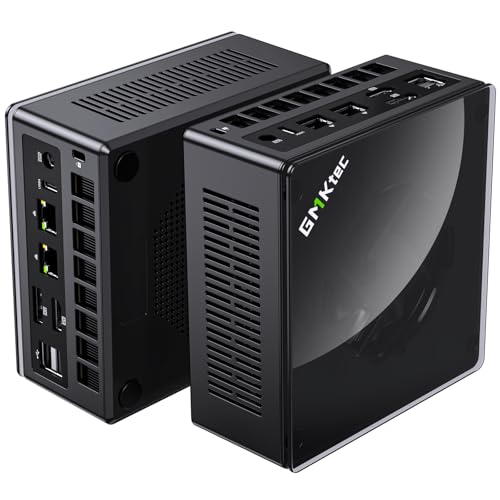
- Best overall barebone: GMKtec NucBox K8 Plus Barebone, Ryzen 7 8845HS (No RAM/SSD/OS) — Check on Amazon
- Minisforum UM890 Pro Barebone, Ryzen 9 8945HS — Check on Amazon
- Minisforum UM880 Plus Barebone, Ryzen 7 8845HS — Check on Amazon
- Minisforum UM870 Slim Barebone, Ryzen 7 8745H — Check on Amazon
- Minisforum UM790 Pro Barebones, Ryzen 9 7940HS — Check on Amazon
See 1 more Amazon option
- Minisforum MS-A1 Barebone, AM5 Socket (No CPU/RAM/SSD/OS) — Check on Amazon
Read the full guide ↓
Disclosure: As an Amazon Associate, reviewstook.com earns from qualifying purchases. Links to Amazon on this page are affiliate links; they cost you nothing extra. Listing details such as price and availability change often, so check the current Amazon listing before you buy.
A barebones mini PC under $700 is the strangest bargain in small computers right now, and this guide will not pretend otherwise. Every kit below arrives as a case, a motherboard and a soldered Ryzen processor with Radeon 780M graphics — and nothing else. No RAM, no SSD, no operating system. Check price on Amazon for each kit before you judge it. But a barebone is not a computer until you feed it memory, storage and an OS, and in the current parts market — where DDR5 memory can be a substantial expense on its own — the distance between the kit price and a finished, gaming machine is the whole story of this category. Read any barebones listing that hides that distance with suspicion.
Here is the honest frame. If you already own DDR5 SO-DIMMs and an NVMe drive — pulled from a dead laptop, a previous mini PC, a parts drawer — a $700 ceiling buys you the strongest integrated-graphics platform AMD has ever put in a small box: eight Zen 4 cores and the Radeon 780M, an iGPU that genuinely plays modern games at 1080p on medium settings and esports titles far faster. Several kits here add an OCuLink port, which is a direct PCIe link to an external desktop graphics card — the only real upgrade path past integrated graphics that exists in this form factor. If you own nothing, the same kits still make sense, but the finished machine will usually cost considerably more once parts are added, and in at least one documented case the maker’s own complete version costs less than the barebone plus new parts. We will show that comparison openly, kit by kit, because it is the only honest way to write this guide.
What $700 does not buy, in barebone form or any other: discrete graphics. Every pick below renders games on the same Radeon 780M, so this is a 1080p tier — medium settings in demanding titles, high frame rates in lighter ones, 1440p only with upscaling or in older games. The differences that matter are everything around that chip: which kits carry OCuLink for an eGPU later, how many SSD slots and LAN ports you get, how the box is cooled, and how volatile each listing’s price has been. Below are the quick picks, detailed reviews of all six kits, a comparison table, a full accounting of what finishing a barebone actually costs, the mistakes that waste money in this category, and the questions buyers ask before they commit.
In this guide
Quick Picks
Short on time, or comparing several options at once? Each row below names a buyer type and the kit that suits it, with a link to the listing.
| Buyer type | Pick | Why it stands out | Link |
|---|---|---|---|
| Best overall | GMKtec NucBox K8 Plus Barebone | 8845HS, native OCuLink port, dual 2.5G LAN and dual USB4 | Check on Amazon |
| Best build quality and cooling | Minisforum UM890 Pro Barebone | Fastest chip here (8945HS), dual LAN, quad display outputs | Check on Amazon |
| Best value 8845HS kit | Minisforum UM880 Plus Barebone | Same 780M platform at a budget-tier kit price — check price on Amazon, OCuLink via adapter board | Check on Amazon |
| Cheapest route to a 780M | Minisforum UM870 Slim Barebone | 8745H kit at a budget-tier price — check price on Amazon, slim case, no frills to pay for | Check on Amazon |
| Best for parts you already own | Minisforum UM790 Pro Barebones | 7940HS with dual M.2 slots and four display outputs | Check on Amazon |
| Best for true DIY builders | Minisforum MS-A1 Barebone | Socketed AM5 platform, four M.2 slots — you choose the CPU | Check on Amazon |
How These Picks Were Chosen
The budget was applied to the kit, because that is what the search promises — but never to the kit alone. Every product below is a real Amazon listing for a barebone (or, in the MS-A1’s case, a barebone platform) that fits this guide’s under-$700 kit framing, and for each one the review states what finishing it involves: the RAM configuration the 780M needs to perform, an SSD, and an operating system. Prices change often, so check price on Amazon for the current listing before you buy. Anything that turned out to be a complete PC wearing a barebones keyword, or a kit built around last-generation Vega or 680M graphics, was excluded.
We did not use these kits ourselves. We read the maker listings, specification pages and long-running price tracking for each ASIN, and compared processors, memory and storage expansion, display outputs, networking and cooling design. Three filters did most of the work. The first is the graphics filter: at this budget the Radeon 780M is the floor, because it is the integrated GPU that makes 1080p gaming a real claim rather than a hope — all six picks clear it, five with the chip soldered in, one by letting you socket the desktop 8700G that carries it. The second is the memory filter: the 780M borrows its bandwidth from system RAM, so a kit only earns its place if it takes two DDR5 SO-DIMM sticks for dual-channel memory — a single-stick build quietly strangles the graphics, and every pick here has two slots. The third is the honesty filter: each kit had to survive the total-cost test in its own review — kit plus parts, compared against the complete version of the same machine where one exists.
One structural note before the reviews. Five of these kits arrive with the processor already soldered down; you are choosing RAM and storage, nothing more. The sixth, the Minisforum MS-A1, is a different species: an empty AM5 socket, so the CPU is also your purchase and your choice. That freedom is genuinely valuable and genuinely expensive, and its review treats it as such rather than pretending a low-cost shell is a finished computer.
The 6 Best Barebones Mini PCs Under $700
GMKtec NucBox K8 Plus Barebone (Ryzen 7 8845HS, No RAM/SSD/OS)
Who it suits: Buyers who want the most complete barebone platform under $700 — and especially anyone who can see an external GPU in their future, because this is the kit that plans for it properly.
The K8 Plus is what happens when a maker designs a mini PC around expansion instead of apologizing for it. The processor is AMD’s Ryzen 7 8845HS: eight Zen 4 cores and sixteen threads boosting to 5.1GHz, with Radeon 780M graphics — twelve RDNA 3 compute units that are the strongest integrated graphics in this guide’s class — and a 16 TOPS AI engine. Around that chip, the barebone gives you two DDR5 SO-DIMM slots, two M.2 2280 PCIe 4.0 slots, and a port layout nothing else here matches in one box: a native OCuLink port carrying a PCIe 4.0 x4 link (roughly 64Gbps, double a USB4 connection), two USB4 ports, HDMI 2.1 and DisplayPort outputs for up to four screens, and two 2.5-gigabit Ethernet ports on Intel controllers. The OCuLink port is the headline. It is a wired PCIe connection to an external graphics dock, and it turns this kit’s one hard limit — integrated graphics — into a postponement rather than a verdict: play on the 780M now, bolt on a desktop card later, and the same small box becomes a genuinely fast gaming machine. GMKtec is explicit that OCuLink is not hot-pluggable on this machine, so the dock connects while the power is off; treat that as a habit, not a flaw.
The total-cost paragraph, as promised. Check price on Amazon for this barebone — the kit alone sits comfortably in this guide’s under-$700 framing. Finishing it means two DDR5-5600 SO-DIMMs (buy them as a matched pair; the 780M’s performance lives and dies on dual-channel bandwidth), an NVMe SSD for one of the two slots, and an operating system the listing does not include. A 32GB kit and a 1TB drive add a substantial further cost, which can put a finished K8 Plus in the same territory as GMKtec’s own complete 32GB/1TB version of this machine. So the barebone’s case is specific, and it is a good one: you own suitable RAM and storage already, you want more than 32GB or a faster drive than the factory fits, or you specifically want the machine built your way. If none of those is true, check price on Amazon for the complete version before you order this one.
- Native OCuLink port — a real PCIe x4 path to a desktop GPU, not a USB workaround.
- Dual 2.5G LAN, dual USB4 and four display outputs: the best-connected kit here.
- Two M.2 slots and two SO-DIMM slots, with firmware power modes that let you trade noise for speed.
Honest limitation: The barebone only saves money against the complete K8 Plus if your parts are already paid for or unusually cheap; at today’s RAM prices the factory build is often the rational buy.
Choose it if you want the strongest all-round barebone and a credible eGPU future. Skip it if you are buying every part new and the complete version is on sale — do that arithmetic first.

Minisforum UM890 Pro Barebone (Ryzen 9 8945HS, No RAM/SSD/OS)
Who it suits: Buyers who want the premium build — the fastest processor in this guide, the best networking, and cooling designed for sustained loads — and who are furnishing it with parts they already own or have budgeted honestly.
The UM890 Pro is Minisforum’s flagship of the previous mini PC generation, and the barebone version strips it to the parts you cannot buy separately: the case, the cold-plate cooling system, and a Ryzen 9 8945HS — eight Zen 4 cores boosting to 5.2GHz, a small step above the 8845HS in the K8 Plus and UM880 Plus, with the same Radeon 780M graphics. The platform around it is the most workstation-leaning here: two 2.5-gigabit LAN ports, two USB4 ports, HDMI and DisplayPort outputs for four displays, four USB 3.2 ports, and an OCuLink port for an external GPU or fast PCIe storage. Memory goes in two DDR5 SO-DIMM slots (up to 96GB), and storage in M.2 PCIe 4.0 slots. Minisforum built its reputation in this segment on exactly this recipe — metal, cooling headroom, ports — and the UM890 Pro is the fullest expression of it among these six kits.
The price story needs care, because it cuts both ways. Check price on Amazon for this premium-tier barebone — it sits in this guide’s under-$700 framing, well below what the complete UM890 Pro with 32GB/1TB typically commands after the memory shortage lifted complete-box pricing. That gap is the barebone’s argument: the chip, board and case did not get more expensive; the RAM and SSD inside the complete box did. A buyer holding a 32GB DDR5 kit and a 1TB drive from another machine converts this shell into a flagship mini PC for the cost of the shell alone. A buyer purchasing those parts new hands most of the saving back — the finished total can approach the complete machine’s price while adding an OS license on top. Neither fact cancels the other; which buyer you are decides the recommendation.
- Ryzen 9 8945HS — the fastest CPU in this guide, with the same 780M graphics as the 8845HS kits.
- Dual 2.5G LAN, dual USB4, OCuLink and four display outputs.
- Minisforum’s flagship cooling and case design, built for sustained rather than bursty loads.
Honest limitation: It is the most expensive kit here, and its premium over the UM880 Plus buys build and connectivity, not gaming frame rates — the graphics are identical.
Choose it if you want the best-built 780M platform and will use the dual LAN, OCuLink or cooling headroom. Skip it if gaming is the whole job — the cheaper 8845HS kits render the same frames.
Minisforum UM880 Plus Barebone (Ryzen 7 8845HS, No RAM/SSD/OS)
Who it suits: Parts-drawer builders who want the modern 8845HS platform at the lowest kit price — and anyone willing to read one paragraph of arithmetic before buying, because this is the kit that paragraph was invented for.
On hardware, the UM880 Plus is easy to recommend. The Ryzen 7 8845HS brings the same eight Zen 4 cores, 5.1GHz boost and Radeon 780M graphics as the K8 Plus, in Minisforum’s compact metal case, with two DDR5 SO-DIMM slots (up to 96GB), M.2 PCIe 4.0 storage, HDMI, DisplayPort and USB4 outputs, a 2.5-gigabit LAN port and Wi-Fi 6E. It also offers OCuLink for an external GPU — with one design caveat the listing ecosystem is open about: on this model the OCuLink connection is provided through an adapter board rather than a native front-panel port like the K8 Plus’s, so enabling it is a small internal project and can trade against internal expansion. Plan for that before you buy a dock. Check price on Amazon for this barebone: it is a budget-tier way into a full 8845HS platform, and among the lowest-cost modern kits in this guide.
Now the comparison, because this exact machine illustrates the category’s central trap. When this barebone is priced against its own complete version on Amazon, adding a new 32GB DDR5 kit and a 1TB NVMe drive can bring the finished build to more than the complete UM880 Plus with the same memory and storage — building it yourself with new parts can cost more. That is not an argument against this kit; it is an argument for knowing which of two buyers you are. With parts already owned, this budget-tier 8845HS platform is the best value in this guide. With parts bought new during a memory shortage, the factory’s bulk-bought RAM can beat retail RAM, and the complete box can win. Both statements are in this review because both are true, and any guide that prints only the first one is selling you something.
- Full 8845HS / 780M platform at the lowest kit price among the modern Minisforum models.
- Two SO-DIMM slots to 96GB, USB4, 2.5G LAN and Wi-Fi 6E.
- OCuLink available via adapter board for a future eGPU.
Honest limitation: Documented pattern where the complete version can undercut the finished barebone build when parts are bought new — the kit’s value depends entirely on parts you already have.
Choose it if your DDR5 and SSD are already paid for. Skip it if they are not, and the complete UM880 Plus is the better-value option when you check its price on Amazon.

Minisforum UM870 Slim Barebone (Ryzen 7 8745H, No RAM/SSD/OS)
Who it suits: Buyers who want the cheapest credible route onto the Radeon 780M platform — a slim, quiet desk box for 1080p gaming and everyday work — and who do not need an eGPU port or a second LAN jack.
The UM870 Slim’s processor looks like a compromise and mostly is not. The Ryzen 7 8745H keeps the parts that matter for this guide — eight Zen 4 cores and sixteen threads boosting to 4.9GHz, and the full Radeon 780M graphics — and drops the parts that do not: principally the AI engine, which games do not use. In exchange, this is the least expensive kit in the guide from a major maker — check price on Amazon; it sits at the budget end of this tier. The slim case carries HDMI 2.1, DisplayPort and USB4 outputs, a single 2.5-gigabit LAN port, four USB ports, Wi-Fi 6E and Bluetooth 5.3, plus an auto-power-on feature that suits a box tucked behind a monitor or running as a small home server between gaming sessions. Memory and storage follow the house pattern: DDR5 SO-DIMMs you supply, an M.2 2280 PCIe 4.0 SSD you supply, and no operating system.
What you give up against the kits above it should be stated plainly, because it is the entire reason the price is lower. There is no OCuLink port: the 780M is this machine’s graphics ceiling for life, with USB4 docks as the only — slower, pricier — external GPU route. There is one LAN port, not two. And the slim case has less cooling and expansion headroom than the UM890 Pro’s flagship design. None of that matters to a buyer whose plan is a 32GB dual-channel kit, a 1TB drive and years of 1080p gaming at a desk. All of it matters to a buyer sketching a homelab or an eGPU build. As with every kit here, finish the total before you order: the complete UM870 Slim configurations exist on the same marketplace, and on a good day for them — or a bad day for retail DDR5 — they can close much of this barebone’s price advantage.
- Full Radeon 780M graphics at the lowest kit price from a major brand.
- Slim case with HDMI 2.1, DisplayPort and USB4 outputs, Wi-Fi 6E.
- Auto power on — handy for VESA-mounted and light server duty.
Honest limitation: No OCuLink and a single LAN port: the graphics you start with are the graphics you keep, and the 8745H drops the AI engine some buyers may want for local AI work.
Choose it if the plan is integrated graphics, a small footprint and the lowest entry price. Skip it if an eGPU or dual-LAN networking is anywhere in your future.

Minisforum UM790 Pro Barebones (Ryzen 9 7940HS, No RAM/SSD/OS)
Who it suits: Owners of DDR5 and NVMe parts who want a proven flagship platform at a discount — and who are patient enough to buy it at the right point in its price cycle, because this listing’s cycle is the wildest in the guide.
The UM790 Pro was the machine that started the 780M era: the first mini PC built on AMD’s Ryzen 7040 series, with a Ryzen 9 7940HS — eight Zen 4 cores boosting to 5.2GHz — and Radeon 780M graphics running at up to 2.8GHz, the highest iGPU clock in this guide. The platform is still thoroughly modern: two DDR5-5600 SO-DIMM slots up to 64GB, two M.2 2280 PCIe 4.0 slots with RAID support, two HDMI 2.1 ports and two USB4 ports for four displays, Wi-Fi 6E, Bluetooth 5.3 and a 2.5-gigabit LAN port, in a slim aluminum case with a VESA mount in the box. As a barebone it asks only for the two things it has always asked for: your memory and your storage, matched DDR5-5600 sticks strongly preferred, because the 780M’s 2.8GHz of graphics still feeds on system bandwidth like every other pick here.
The reason this kit is fifth rather than first is its volatile pricing. Check price on Amazon before you judge it: this is a two-year-old flagship whose listing price wanders a lot with stock levels, and the difference between buying it well and buying it badly can be substantial for the identical box. So the rule for this pick is stricter than for any other: when it is priced at the budget end of its range, it is a bargain flagship for a parts owner; when it drifts toward the premium end, the newer UM880 Plus and UM890 Pro barebones — with OCuLink, which this model lacks — are better purchases at similar money. Check price on Amazon against those two listings before you commit, and let the comparison, not the Ryzen 9 badge, decide.
- 780M at its highest clock (2.8GHz) with a 5.2GHz-boosting 7940HS.
- Dual M.2 slots with RAID, dual HDMI plus dual USB4 — four displays.
- Proven, well-documented platform with a deep owner community.
Honest limitation: No OCuLink, and the listing’s price is the most volatile here — check price on Amazon before buying, because timing is part of the product.
Choose it if you catch it at a favourable price and your parts are ready. Skip it if its price on Amazon has drifted toward the premium end — the newer kits give you more for that money.

Minisforum MS-A1 Barebone (AM5 Socket, No CPU/RAM/SSD/OS)
Who it suits: True DIY builders — the ones who hear “it doesn’t include the processor” as an invitation. Everyone else should read this review as a warning label, which is how it is written.
Every other kit in this guide is a computer missing its memory. The MS-A1 is a platform missing nearly everything: an AM5 motherboard in a mini workstation case, with a socket that accepts desktop Ryzen processors, four M.2 NVMe slots (storage capacity no other pick approaches), two DDR5 SO-DIMM slots for up to 96GB, dual 2.5-gigabit LAN, Wi-Fi 6E, and HDMI, DisplayPort and USB-C display outputs. Check price on Amazon for the barebone: it has the lowest headline price here — and the least meaningful, because nothing about a finished MS-A1 costs only the shell price. To make it a gaming machine you add a CPU, and the right one is AMD’s Ryzen 7 8700G: a desktop APU whose Radeon 780M matches the graphics in every other pick, in a socket that lets you replace it later — the only CPU upgrade path in this guide, and the platform’s entire reason to exist. Add dual-channel DDR5, an SSD and an OS, on top of a chassis that caps processor power around 100W, and the honest total for a new-parts 8700G build lands well above this guide’s ceiling at current parts prices.
So why is it here? Because for the right owner the arithmetic inverts. A builder with an AM5 processor on the shelf, or DDR5 left from a desktop upgrade, or plans that genuinely use four SSD slots and a swappable CPU — a homelab that games, a workstation that shrinks — gets a platform nothing else in this guide can imitate, at a shell price lower than every soldered kit. The MS-A1 is also the only pick whose ceiling is not fixed: today’s 8700G build can become tomorrow’s faster socketed build without replacing the box. That is a real and rare thing. It is simply not a budget thing, and the review’s job is to make sure nobody buys a low-cost shell expecting a low-cost finished computer, or even one within this guide’s budget, unless the expensive parts are already in the house.
- Socketed AM5 CPU — the only replaceable-processor platform here.
- Four M.2 NVMe slots and dual 2.5G LAN: storage and networking beyond any rival.
- The lowest kit price in the guide, for builders whose parts are already owned.
Honest limitation: It includes no CPU at all. A finished 780M build with new parts realistically exceeds $700 — often by a lot — so as a pure budget gaming buy it fails its own test.
Choose it if you own AM5 parts or want a CPU-swappable platform for years. Skip it if you are starting from zero — every soldered kit above finishes cheaper.

Comparison Table
| Product | Processor / Graphics | Best use | Link |
|---|---|---|---|
| GMKtec NucBox K8 Plus Barebone | Ryzen 7 8845HS / Radeon 780M, OCuLink | Best all-round kit and the eGPU upgrade path | Check on Amazon |
| Minisforum UM890 Pro Barebone | Ryzen 9 8945HS / Radeon 780M, OCuLink | Premium build, dual LAN, sustained loads | Check on Amazon |
| Minisforum UM880 Plus Barebone | Ryzen 7 8845HS / Radeon 780M, OCuLink via adapter | Lowest-cost modern kit for parts owners | Check on Amazon |
| Minisforum UM870 Slim Barebone | Ryzen 7 8745H / Radeon 780M, no OCuLink | Cheapest slim 780M box, integrated graphics for life | Check on Amazon |
| Minisforum UM790 Pro Barebones | Ryzen 9 7940HS / Radeon 780M at 2.8GHz | Discount flagship when its price dips | Check on Amazon |
| Minisforum MS-A1 Barebone | AM5 socket, no CPU included / 4× M.2 | CPU-swappable DIY platform for parts owners | Check on Amazon |
How to Choose a Barebones Mini PC Under $700
- Do the finished-build sum first, in writing. Kit + a matched dual-channel DDR5 kit + an NVMe SSD + an operating system. Compare that total against the complete version of the same machine on the same day. Whichever is cheaper for the parts you actually want is the right buy — the barebone badge itself earns nothing.
- Count your parts drawer honestly. A barebone is a bargain exactly when its missing pieces are already paid for. DDR5 SO-DIMMs from a retired laptop and a spare NVMe drive turn a budget- to mid-range-tier kit into a complete flagship platform; needing to buy both at retail reverses the conclusion.
- Buy memory in matched pairs, always. The Radeon 780M has no memory of its own — it borrows bandwidth from your RAM. Two sticks in dual channel is the difference between the 780M’s real performance and a hobbled version of it. A single 32GB stick is a worse gaming purchase than two 16GB sticks at the same total.
- Decide about OCuLink now, not later. It cannot be added to a kit that lacks it (the UM880 Plus’s adapter board is a factory design, not an accessory for other models). If a desktop GPU dock is even a maybe, choose between the K8 Plus’s native port, the UM890 Pro, or the UM880 Plus’s adapter route — and remember OCuLink docks and cards are a substantial extra budget of their own.
- Match the kit to the second job. These boxes rarely only game. Dual 2.5G LAN (K8 Plus, UM890 Pro, MS-A1) suits homelab and NAS duty; four M.2 slots (MS-A1) suit storage builds; the UM870 Slim’s auto power-on suits an always-on box behind a TV. The gaming silicon is nearly identical across the guide, so the second job should break ties.
- Check which SSD slots and speeds you are really getting. Two M.2 slots let you separate OS and game library or add storage later without cloning; a single slot means the drive you buy today is the machine’s storage until you replace it. PCIe 4.0 x4 is the standard across these kits.
- Treat the OS as a line item, because it is one. No kit here includes Windows. Linux is free and excellent for Steam-based gaming; a Windows license bought at retail is not free, and “no OS” in a listing title means exactly that. Buyers moving a license from a retired machine should confirm its transfer terms.
- Watch the listing, not the badge. Ryzen 9 on the UM790 Pro and UM890 Pro buys a few hundred megahertz over the Ryzen 7 kits, not a different graphics tier — all five soldered picks render on the same 780M. Pay for ports, cooling and price timing before you pay for the badge.
- Check the live price before you buy. Barebone listings swing hard with stock, and the UM790 Pro is the clearest example. If a kit is priced well above where it usually sits, waiting, or choosing a rival kit that is favourably priced today, is a legitimate strategy rather than indecision.
The Real Total: What Finishing a Barebone Actually Costs
Every barebones guide owes its readers one clear worked example, so here is this category’s, in principle. Take the Minisforum UM880 Plus barebone and add a new 32GB DDR5 kit and a 1TB NVMe drive — the configuration the complete version ships with — and the finished build can end up costing more than the complete UM880 Plus with the same chip, memory and storage. The do-it-yourself route can cost more, and memory is where much of the money goes: not into the mini PC, but into the memory market around it. That is why this guide refuses to call any kit in it a cheap finished gaming PC. It is a platform, and the platform is excellent — the sentence just has a second half.
The same math, run for the buyer this category actually serves, comes out the other way. If the 32GB kit and the SSD are already yours, the UM880 Plus build costs only the kit itself for hardware that complete-box buyers pay a premium to get in the current market; the K8 Plus and UM890 Pro tell the same story at their respective tiers. No complete mini PC in this budget range touches that value, because no complete mini PC in this range currently ships this processor class with this memory — the memory is precisely what the market has made expensive, and the barebone buyer who already owns it skips the toll entirely. That is the whole economics of this keyword in one paragraph: barebones do not make computers cheaper; they let you refuse to buy the parts that got expensive, twice.
Two practical consequences follow. First, the smaller your parts drawer, the more the complete versions deserve your attention — the UM870 Slim’s complete configurations and the K8 Plus’s complete listing have both spent long stretches at prices a new-parts build cannot beat. Second, if you are buying parts anyway, buy them as a system: a matched 32GB dual-channel DDR5-5600 kit and a 1TB PCIe 4.0 drive are the reference build for every kit in this guide, and pricing that pair, on the day you order, tells you more about whether to go barebone than any review — including this one — can.
Common Buying Mistakes
- Reading the kit price as the computer price. The most expensive mistake in this category, and the reason this guide repeats the finished-build sum in nearly every review.
- Buying one RAM stick to “upgrade later.” On an integrated-graphics machine, single-channel memory is not a temporary compromise — it is a slower GPU for as long as it lasts.
- Assuming OCuLink can be added later to any kit. It cannot. The UM870 Slim and UM790 Pro will never have it; the UM880 Plus’s adapter is part of that model’s design.
- Paying the Ryzen 9 premium for gaming. The 8945HS and 7940HS render on the same Radeon 780M as the 8845HS kits; the frame-rate difference is small, the price difference is not.
- Forgetting the operating system until the box is on the desk. “No OS” means sourcing Windows or Linux yourself, license and installation time included.
- Buying the MS-A1 as a cheap gaming PC. It is a cheap platform. The CPU that makes it a gaming PC is a separate, substantial purchase.
- Ordering a kit at its price peak because the headline said “under $700.” Several of these listings swing widely; a week of patience, or the rival kit favourably priced today, is worth real money.
- Skipping the complete-version comparison. In a memory shortage, factories sometimes sell RAM cheaper inside a finished box than shops sell it in a blister pack. Check both listings every time.
Final Recommendation
- Most buyers with parts on hand: GMKtec NucBox K8 Plus Barebone.
- Best build and networking: Minisforum UM890 Pro Barebone.
- Lowest-cost modern platform: Minisforum UM880 Plus Barebone.
- Cheapest slim 780M box: Minisforum UM870 Slim Barebone.
- Discount flagship, bought when its price dips: Minisforum UM790 Pro Barebones.
- CPU-swappable DIY platform: Minisforum MS-A1 Barebone.
Our top two are the K8 Plus, for the native OCuLink port and dual LAN that give a barebone a future beyond its integrated graphics, and the UM880 Plus, for putting the same 8845HS platform at a budget-tier kit price in the guide. Between them they cover the two honest reasons to buy a barebone at this budget: building toward an eGPU, and refusing to re-buy expensive memory you already own. If your desk plan is integrated graphics in the smallest case for the least money, the UM870 Slim is the quiet achiever; if you want the flagship shell and cooling, the UM890 Pro earns its premium in build rather than frames; the UM790 Pro is the connoisseur’s pick at a favourable price only; and the MS-A1 is the platform for builders whose projects outgrow soldered chips. Whichever way you lean, run the finished-build sum against the complete versions before ordering, look at the tighter-budget options in Best Barebones Mini PC Under $500 if your parts drawer is full, and step up to Best Barebones Mini PC Under $800 if it is not — at today’s parts prices, that tier’s kits plus parts is where many from-scratch builds honestly land.
Frequently Asked Questions
What exactly is missing from a barebones mini PC?
RAM, storage and an operating system — and on the Minisforum MS-A1, the processor as well. A barebone is a case, motherboard, power supply and (usually) a soldered CPU with its cooling, sold empty so you can install your own memory and SSD. It will not boot until all three missing pieces are in place, which is why every review in this guide considers the finished machine, not just the kit.
Is a barebone cheaper than buying the same mini PC complete?
Only if you already own the parts. Pricing comparisons have shown a UM880 Plus barebone plus a new 32GB DDR5 kit and 1TB SSD can total more than the complete version with the same specification — check price on Amazon for both before you decide. With the RAM and SSD already on your shelf, the same build costs only the kit itself and nothing else comes close. The answer is entirely about what is in your parts drawer.
Can a Radeon 780M barebone actually play games?
Yes — at 1080p. The 780M is the strongest integrated graphics of its generation: esports and lighter titles run at high frame rates, and demanding modern games are playable at medium settings, helped by FSR upscaling. It is not a 1440p-native or ray-tracing solution, and no kit in this guide changes that; the ones with OCuLink change it later, by letting you attach a desktop graphics card in an external dock.
How much RAM should I install, and does the configuration matter?
It matters more on these machines than on almost any other kind of PC, because the integrated GPU shares the memory. Install two matched DDR5-5600 SO-DIMMs — 32GB as a pair of 16GB sticks is the reference build — so the memory runs dual-channel at full bandwidth. A single stick, or a mismatched pair, measurably slows the graphics you bought the machine for.
What is OCuLink, and which of these kits have it?
OCuLink is a cabled PCIe connection — on these machines a PCIe 4.0 x4 link of roughly 64Gbps — that connects an external GPU dock with far less performance loss than USB4. Among these picks, the GMKtec K8 Plus and Minisforum UM890 Pro carry it as a port, the UM880 Plus provides it through an internal adapter board, and the UM870 Slim and UM790 Pro do not offer it at all. It is not hot-pluggable: connect docks with the power off.
Do I need to buy Windows for a barebone?
You need an operating system; which one is your choice. No kit here includes Windows. Linux is free and runs Steam and most of a gaming library well through Proton, and it is the zero-cost way to finish a build. If you want Windows, budget for a license or confirm that one you own can transfer — and note that one pleasant exception exists in owner reports for some brands’ store-bought units, but the Amazon barebone listings in this guide promise no OS, so plan on that basis.
Why does the MS-A1 cost less than the other kits if it needs the most parts?
Because it includes the least: no processor at all. Its shell price — check price on Amazon — buys an AM5 socket, four SSD slots and a workstation case — a platform, not a nearly-finished PC. Paired with a Ryzen 7 8700G it matches the other picks’ graphics and adds a replaceable CPU, but with all parts bought new, the finished build is the most expensive route in this guide. Its value is for builders who already own AM5-era parts.
- Best Barebones Mini PC Under $500
- Best Barebones Mini PC Under $800
- Best Barebones Mini PC For 1440p Gaming Under $700
- Best Barebones Mini PC For Beginners Under $700
- Best Barebones Mini PC For Small Spaces Under $700
- Best Barebones Mini PC For Streaming Under $700
- Best Mini PC Under $700
- Best Mini Gaming PC Under $700


