Where to buy
Check the latest price, availability and delivery on Amazon. Orders are placed on Amazon. We may earn a commission from qualifying purchases.
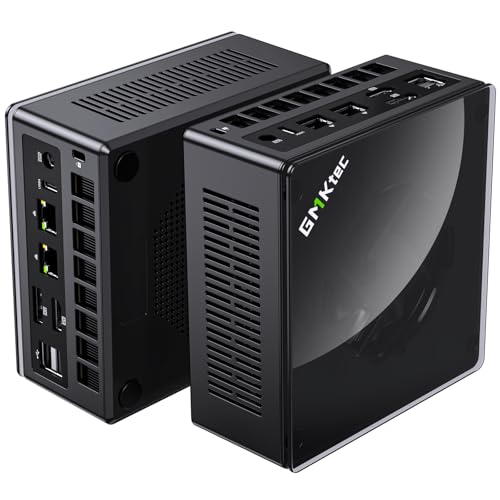
- Best overall barebone: GMKtec NucBox K8 Plus Barebone, Ryzen 7 8845HS (No RAM/SSD/OS) — Check on Amazon
- Minisforum UM890 Pro Barebone, Ryzen 9 8945HS — Check on Amazon
- Minisforum UM880 Plus Barebone, Ryzen 7 8845HS — Check on Amazon
- Minisforum UM870 Slim Barebone, Ryzen 7 8745H — Check on Amazon
- Minisforum UM790 Pro Barebones, Ryzen 9 7940HS — Check on Amazon
See 1 more Amazon option
- Minisforum MS-A1 Barebone, AM5 Socket (No CPU/RAM/SSD/OS) — Check on Amazon
Read the full guide ↓
Disclosure: As an Amazon Associate, reviewstook.com earns from qualifying purchases. Links to Amazon on this page are affiliate links; they cost you nothing extra. Listing details such as price and availability change often, so check the current Amazon listing before you buy.
Nobody searches for a barebones mini PC because they have too much desk. The category exists for people whose workspace is a shallow shelf, a kitchen counter corner, the back of a monitor, a dorm desk that also holds textbooks — and every kit in this guide starts from the same small footprint class; there is no tower hiding in this list. So this guide does not grade these machines on whether they are small. It grades them on what still takes up room after the box itself: the power brick that has to live somewhere, the cables that have to fall somewhere, the external GPU dock that turns one small box into two bigger ones, the heat a sealed cabinet traps, and the mounting options that decide whether the machine sits on your desk at all — or disappears behind your screen.
Two honest warnings before the picks. First: a barebone is not a finished computer. Each kit below is a case, a motherboard and (in five of six cases) a soldered Ryzen processor with Radeon 780M graphics — no RAM, no SSD, no operating system. Check price on Amazon for each kit before you plan, because finishing any of them costs more than the kit alone, and at current memory prices — even a single 16GB DDR5 laptop stick is a significant purchase — a from-scratch build can cost more than the same machine bought complete. Every review makes that cost clear, as our base guide to Best Barebones Mini PC Under $700 does, because a cheap box needing expensive parts saves neither money nor space. Second: this guide claims no measurements it cannot back. Only one pick documents a mounting bracket in the box; the rest are graded by size class, port layout and cooling design, and the checklist further down turns the live listing into your tape measure.
What does not change from the base version is the silicon. Every pick renders games on the Radeon 780M — five with it soldered beside a Zen 4 processor, one by letting you socket the desktop chip that carries it — which makes this a 1080p tier: medium settings in demanding games, fast frame rates in lighter ones, 1440p only through upscaling or in older titles. The differences that matter here are spatial and structural: which kits can mount out of sight, which put their important ports where your cables actually are, which run cool enough for a shelf, and which hide a second box in their future. Quick picks first, then full reviews, a comparison table, a measure-before-you-buy routine, the real cost of finishing a barebone, the mistakes that waste money and room, and the questions small-space buyers ask most.
In this guide
Quick Picks
Short on time, or comparing several options at once? Each row below names a buyer type and the kit that suits it, with a link to the listing.
| Buyer type | Pick | Why it stands out | Link |
|---|---|---|---|
| Best overall | GMKtec NucBox K8 Plus Barebone | Native front-panel OCuLink, dual 2.5G LAN and dual USB4 in one compact box | Check on Amazon |
| Best build quality and cooling | Minisforum UM890 Pro Barebone | Fastest chip here (8945HS), cold-plate cooling for enclosed, sustained duty | Check on Amazon |
| Best value 8845HS kit | Minisforum UM880 Plus Barebone | Same 780M platform in a lower-priced kit, OCuLink via adapter board | Check on Amazon |
| Best for the tightest desk | Minisforum UM870 Slim Barebone | Slim case, auto power-on for behind-monitor duty, 780M in a budget-tier kit | Check on Amazon |
| Best for mounting out of sight | Minisforum UM790 Pro Barebones | The only pick with a VESA mount documented in the box | Check on Amazon |
| Best for true DIY builders | Minisforum MS-A1 Barebone | Socketed AM5 platform, four internal M.2 slots — storage without external drives | Check on Amazon |
How These Picks Were Chosen
The starting list is identical to our base guide’s: every product below is a genuine Amazon barebone listing that fits this guide’s Under $700 scope — check price on Amazon — and every review states the finished-build cost — kit plus the dual-channel DDR5 the Radeon 780M needs, an NVMe SSD and an operating system — next to the kit price. Listings that turned out to be complete PCs wearing a barebones keyword were excluded, as were kits built around older Vega or 680M graphics at 780M money. Because prices change often, the reviews point to the live listing instead of a number that will go stale.
On top of that shared foundation, this variant applied a spatial filter. It eliminated nothing — at this size class, nothing is big — but it changed the grading. Each kit was assessed on what decides whether a small PC works in a small space. Mounting: does the box document a way to leave the desk surface entirely? Port geography: are the connections you touch daily — above all an OCuLink port, if one exists — on a face you can reach once the machine is tucked away? Thermal manners: is the cooling designed for sustained loads in still air, or does the slim case trade headroom for thinness? Expansion honesty: does the kit’s future involve a second box on the same desk? And the invisible footprint: every machine here runs from an external power adapter, a separate object needing a home and a cable run, which no listing headline counts.
A word on evidence, because small-space guides are where invented numbers breed. We did not use these kits ourselves, and the research behind the base guide — maker listings and specification pages for each ASIN — documents chassis dimensions, weights and noise figures for none of them. So this guide claims none. One pick, the UM790 Pro, documents a VESA mount in the box, stated for that pick alone; for the other five, mounting support is a live-listing confirmation, and the how-to-choose section shows you how. Placement is graded by class and design instead: slim case versus flagship case, cold-plate cooling versus a thinner thermal envelope, ports as documented. Less tidy than a table of made-up centimetres — and considerably more useful.
The 6 Best Barebones Mini PCs for Small Spaces Under $700
GMKtec NucBox K8 Plus Barebone (Ryzen 7 8845HS, No RAM/SSD/OS)
Who it suits: Small-desk buyers who want the most complete barebone platform under $700 without giving up a future graphics upgrade — and who understand that the upgrade, when it comes, is a second box that needs its own space plan.
Start with the port that decides this kit’s spatial story. The K8 Plus carries a native OCuLink port — a wired PCIe 4.0 x4 connection running at roughly 64Gbps — on its front panel, where you can reach it after the machine is pushed to the back of a shelf. That placement sounds like a detail until you picture the alternative: a dock cable that only connects from behind a machine wedged against a wall. Through that port, this compact box can drive a desktop graphics card in an external dock, converting its one hard limit — integrated graphics — into a postponement. GMKtec is explicit that OCuLink is not hot-pluggable here, so docks connect with the power off; on a small desk that is arguably a virtue, since the dock can live powered down until game night. Around the Ryzen 7 8845HS — eight Zen 4 cores boosting to 5.1GHz, Radeon 780M graphics, a 16 TOPS AI engine — the kit packs two DDR5 SO-DIMM slots, two M.2 2280 PCIe 4.0 slots, two USB4 ports, HDMI 2.1 and DisplayPort outputs for up to four displays, and dual 2.5-gigabit Ethernet on Intel controllers. It matters spatially: dual LAN and four display outputs mean one small box can be desk PC, home server and media hub at once, instead of three boxes competing for the same shelf.
The completion cost, stated as openly as in the base guide. Check price on Amazon for the kit itself — it sits within this guide’s budget scope, but the kit alone is not the finished machine. Finishing it takes a matched pair of DDR5-5600 SO-DIMMs — dual channel is the difference between the 780M’s real performance and a strangled version of it — plus an NVMe drive and an operating system the listing does not include. At current parts prices those additions add significantly, landing a finished K8 Plus near GMKtec’s own complete 32GB/1TB version — compare the two live listings the same day before deciding. The barebone earns its money in specific situations: your RAM and SSD are already paid for, you want a configuration the factory does not sell, or you are deliberately building toward the dock. And plan the dock’s space honestly — an external GPU enclosure is a second, larger object with its own power supply and cable, and on a genuinely small desk it can end up bigger than the PC it upgrades. The firmware power modes, which trade fan noise for speed, are the other placement-relevant feature: in a quiet bedroom corner, the lower-power modes are how this box behaves itself at close range.
- Native OCuLink on the front panel — reachable after the machine is tucked away, unlike rear-only designs.
- Dual 2.5G LAN, dual USB4 and four display outputs let one small box replace several.
- Two M.2 slots keep storage internal — no external drive taking desk space.
- Firmware power modes let you trade speed for quiet in noise-sensitive rooms.
Honest limitation: Its best trick — the eGPU dock — is a second box with its own footprint and power supply, and the barebone only beats the complete version’s price when your parts are already owned or unusually cheap.
Choose it if you want one compact, well-connected box now and a credible graphics upgrade later, with room planned for the dock. Skip it if every part must be bought new and the complete version is on sale — or if your space cannot ever host the dock its future depends on.

Minisforum UM890 Pro Barebone (Ryzen 9 8945HS, No RAM/SSD/OS)
Who it suits: Buyers placing a machine somewhere it will work hard in still air — a shelf, a media cabinet with the door open, a workstation corner — who want flagship cooling and connectivity, and whose parts are already owned or honestly budgeted.
In a small space, heat is a placement constraint before it is a performance one, and the UM890 Pro is the pick engineered for exactly that problem. Minisforum’s cold-plate cooling was designed for sustained rather than bursty loads — what a box in an enclosed-ish spot actually faces: long sessions in air that does not circulate the way an open desk’s does. The processor is the fastest in this guide, a Ryzen 9 8945HS with eight Zen 4 cores boosting to 5.2GHz and the same Radeon 780M graphics as the 8845HS kits. The platform leans workstation: dual 2.5-gigabit LAN, dual USB4, HDMI and DisplayPort outputs for four displays, four USB 3.2 ports, and an OCuLink port for an external GPU or fast PCIe storage. Memory is two DDR5 SO-DIMM slots up to 96GB, storage is M.2 PCIe 4.0 — everything internal, nothing dangling off the back in a USB enclosure. If your small space doubles as a home lab, this kit consolidates the most roles into one footprint: gaming PC, server and desk machine in a single metal case.
The price story cuts both ways, as the base guide documents. Check price on Amazon for the barebone, and compare it the same day with the complete UM890 Pro’s 32GB/1TB listing, which the memory shortage has pushed into a much higher tier. That gap is the argument: the case, board and chip did not get more expensive; the RAM and SSD inside the finished box did. A buyer holding a 32GB DDR5 kit and a 1TB drive converts this shell into a flagship for the price of the shell alone; a buyer purchasing those parts new hands most of the saving back, plus an OS licence. Placement homework is simpler than for most picks — no mounting bracket is documented for this model, so treat it as a sits-on-a-surface machine and confirm any mount on the live listing before planning a behind-monitor build — but give its cooling the clearance the checklist describes, because sustained-load cooling only works if the exhaust air has somewhere to go.
- Cold-plate cooling built for sustained loads — the safest pick for shelf and cabinet-adjacent placement.
- Ryzen 9 8945HS: the fastest CPU in this guide, with the same 780M graphics as the 8845HS kits.
- Dual 2.5G LAN, dual USB4, OCuLink and four display outputs consolidate several machines into one footprint.
- All storage internal across its M.2 slots — no external boxes or dangling enclosures.
Honest limitation: It is the most expensive kit here, its premium buys build and connectivity rather than frame rates, and no in-box mount is documented — it lives on a surface, so that surface needs to exist.
Choose it if your spot runs warm, your workloads run long, and the dual LAN or OCuLink will genuinely be used. Skip it if gaming is the whole job and the box will sit in open air — the cheaper 8845HS kits render the same frames.
Minisforum UM880 Plus Barebone (Ryzen 7 8845HS, No RAM/SSD/OS)
Who it suits: Parts-drawer builders who want the modern 8845HS platform at the lowest kit price — and who are comfortable opening the case once, because on this model one headline feature lives inside it.
The UM880 Plus puts the same silicon as the K8 Plus — Ryzen 7 8845HS, eight Zen 4 cores to 5.1GHz, Radeon 780M graphics — into Minisforum’s compact metal case, with two DDR5 SO-DIMM slots up to 96GB, M.2 PCIe 4.0 storage, HDMI, DisplayPort and USB4 outputs, a 2.5-gigabit LAN port and Wi-Fi 6E. It is, on paper, the value route into this platform: check price on Amazon — it is positioned as a lower-priced 8845HS barebone, in the same budget tier as its closest rivals. The spatial caveat is the OCuLink arrangement. Where the K8 Plus offers a native front-panel port, the UM880 Plus provides OCuLink through an internal adapter board — enabling it is a small project with the case open, and it can trade against internal expansion. For a small-space build that matters twice over. First, the decision happens at build time, on a workbench, not after the machine is wedged into its spot; pulling a tucked-away PC back out to open it is exactly the friction this form factor exists to eliminate. Second, if the adapter costs you internal expansion, storage growth may move outside the box later — and an external drive is desk space spent. The UM880 Plus rewards buyers who spec it completely, once, before it goes into its home.
Then the completion cost, because this machine is the category’s most instructive example. Cost a fresh 32GB DDR5 kit and a 1TB NVMe drive on top of the barebone, and compare it with Minisforum’s complete UM880 Plus with identical memory and storage — check price on Amazon for both the same day. At current memory prices, an all-new self-build can come out behind the complete version. Treat that as a fact about the memory market, not a verdict on the kit. Parts already on your shelf flip it completely: the platform is yours for the kit price alone, and no complete box in this tier matches it. Parts bought new mid-shortage flip it back, because the factory buys RAM by the pallet and you buy it by the stick. This guide prints both directions; one that printed only the first would be selling you something.
- The complete 8845HS / 780M platform, at the lowest kit price of any current Minisforum model here.
- Compact metal case with two SO-DIMM slots to 96GB, USB4, 2.5G LAN and Wi-Fi 6E.
- An OCuLink route to a future eGPU, provided by the internal adapter board.
Honest limitation: The OCuLink route is an internal adapter that can trade against expansion, so the build wants finishing in one session — and the case where the complete version can undercut the finished build with new parts applies in full.
Choose it if your DDR5 and SSD are already paid for and you will configure it once, completely, before placing it. Skip it if they are not, whenever the complete UM880 Plus is priced competitively — check price on Amazon for both.

Minisforum UM870 Slim Barebone (Ryzen 7 8745H, No RAM/SSD/OS)
Who it suits: Buyers whose space problem is real and specific — a shallow desk, a narrow shelf, a monitor that needs a PC living behind it — and who want the cheapest credible route onto the Radeon 780M platform without paying for ports they will never use.
The UM870 Slim is the pick whose name is its argument. Its case is the slim design in Minisforum’s range, and its feature list reads like it was written for tucked-away duty: HDMI 2.1, DisplayPort and USB4 outputs, a single 2.5-gigabit LAN port, four USB ports, Wi-Fi 6E and Bluetooth 5.3 — and an auto-power-on feature that suits a machine wedged somewhere its power button is awkward to reach, waking with the outlet or the schedule instead of your fingertip. That last feature is worth more in a small space than any benchmark in this guide. The processor keeps what matters: the Ryzen 7 8745H holds eight Zen 4 cores boosting to 4.9GHz and the full Radeon 780M, dropping mainly the AI engine games do not use. It is a budget-tier kit from a major maker — check price on Amazon — and the finish is the standard one: your DDR5 SO-DIMMs, your M.2 2280 PCIe 4.0 SSD, your operating system.
What the slim case gives up should be stated as plainly as the base guide states it. There is no OCuLink port, so the 780M is this machine’s graphics ceiling for life; the only external GPU route is a USB4 dock, slower and pricier than OCuLink — and still a second box on the small desk you bought this machine to protect. There is one LAN port, not two. And a thinner case has less cooling and expansion headroom than the UM890 Pro’s flagship design, which is why the placement guidance below steers this kit toward open-backed spots rather than sealed cabinets. One documentation note: no mounting bracket is documented in this kit’s box — for a behind-screen build, confirm the mount situation on the live listing before ordering. For the buyer whose plan is 32GB in dual channel, a 1TB drive and years of 1080p gaming from a box that asks almost nothing of the room, none of the compromises bite.
- Slim case and the lowest kit price from a major brand — the least demanding guest on a tight desk.
- Auto power-on: built for machines that live where the power button is hard to reach.
- Full Radeon 780M graphics with HDMI 2.1, DisplayPort and USB4 outputs, Wi-Fi 6E.
Honest limitation: No OCuLink and a single LAN port — the graphics you start with are the graphics you keep — and the slim case has the least cooling headroom here, so it wants open air around it.
Choose it if the plan is integrated graphics in the slimmest case for the least money. Skip it if an eGPU dock or dual-LAN networking is anywhere in your future, or if its only available spot is a sealed cabinet.

Minisforum UM790 Pro Barebones (Ryzen 9 7940HS, No RAM/SSD/OS)
Who it suits: Buyers whose endgame is a desk with no computer visible on it at all — and who are patient enough to buy this listing at the right point in its price cycle, because its cycle is the wildest in the guide.
Every small-space guide needs one pick that can genuinely leave the desk, and this is it: the UM790 Pro is the only kit among the six whose research documents a VESA mount included in the box. Bolted behind a compatible monitor, its desk footprint is not small — it is zero, and its cables drop straight down behind the screen with the monitor’s own. The platform wearing that bracket started the 780M era: a Ryzen 9 7940HS with eight Zen 4 cores boosting to 5.2GHz and Radeon 780M graphics at up to 2.8GHz, the highest iGPU clock in this guide. Around it: two DDR5-5600 SO-DIMM slots up to 64GB, two M.2 2280 PCIe 4.0 slots with RAID support, two HDMI 2.1 ports and two USB4 ports driving four displays, Wi-Fi 6E, Bluetooth 5.3 and a 2.5-gigabit LAN port, in a slim aluminium case. Two cautions belong to the mounting plan. A PC behind a monitor lives in the monitor’s warm exhaust shadow, so the checklist’s ventilation step matters more here than for any other pick. And a mounted machine is one you do not want to open often — fit the matched DDR5-5600 pair and the storage you actually need at build time, because a second opening means unmounting.
The reason this kit is fifth rather than first is its pricing, which is the most volatile in this guide. Check price on Amazon: when its live price is favourable, it is excellent value for a flagship platform with the bracket in the box; when it climbs, that value disappears. Its price swings noticeably with stock and timing, so the rule here is stricter than for any other pick: at a favourable live price, it is a bargain for a parts owner who wants the disappearing build; at a high live price, the newer UM880 Plus and UM890 Pro barebones — both with OCuLink, which this model lacks — are better purchases in a similar tier. Compare the live price against those two listings before committing, and let the comparison, not the Ryzen 9 badge, decide.
- VESA mount documented in the box — the only pick that can take its footprint to zero behind a monitor.
- The 7940HS boosts to 5.2GHz and runs its 780M at 2.8GHz — the fastest iGPU clock in this guide.
- Dual M.2 slots with RAID, dual HDMI plus dual USB4 — four displays from a hidden box.
Honest limitation: No OCuLink, and the listing’s price is the most volatile here — its live price can sit far above its best levels, so timing is part of the product; a mounted build also wants its full spec fitted once, up front.
Choose it if you catch it at a favourable live price, your parts are ready, and the behind-monitor build is the plan. Skip it if the live price has wandered upward; in that tier the newer kits offer more.

Minisforum MS-A1 Barebone (AM5 Socket, No CPU/RAM/SSD/OS)
Who it suits: True DIY builders with a storage problem as much as a space problem — the ones who want four SSDs inside one box instead of a row of external drives — and who hear “it doesn’t include the processor” as an invitation. Everyone else should take this review as the warning it is intended to be.
The MS-A1’s spatial argument is consolidation. It is an AM5 motherboard in a mini workstation case: a socket for desktop Ryzen processors, two DDR5 SO-DIMM slots for up to 96GB, dual 2.5-gigabit LAN, Wi-Fi 6E, HDMI, DisplayPort and USB-C display outputs — and four M.2 NVMe slots, storage capacity no other pick approaches. On a small desk that slot count is a floor-plan feature: game library, media archive and work drive all live inside the one box, where a lesser machine would push two of them into USB enclosures that each need a home, a cable and a power feed. It is a budget-tier shell — check price on Amazon — with the lowest headline price here, and the least meaningful, because a finished MS-A1 costs far more. Making it a gaming machine means adding a CPU, and the right one is AMD’s Ryzen 7 8700G, the desktop APU whose Radeon 780M matches every other pick’s graphics and whose socket lets you replace it later — the only CPU upgrade path in this guide, inside a chassis that caps processor power around 100W. Add dual-channel DDR5, an SSD and an OS, and a new-parts 8700G build lands well above this guide’s budget scope at current parts prices. This guide claims no finished-build total beyond that — check price on Amazon for the shell and price the parts the same day; an invented total would not be documentation.
So why is a workstation platform in a small-spaces gaming guide? Because for the right owner the arithmetic inverts. A builder with an AM5 processor on the shelf, DDR5 left from a desktop upgrade, or a homelab that games gets a platform nothing else here can imitate — swappable CPU, four internal drives, dual LAN — at a shell price lower than every soldered kit, in a case that replaces a small rack’s worth of separate boxes. It is also the only pick whose ceiling is not fixed: today’s 8700G build can become tomorrow’s faster socketed build without replacing the machine. That is a real and rare thing. It is simply not a budget thing: nobody should buy a budget-tier shell expecting a finished computer for the shell’s price, or one within this guide’s budget, unless the expensive parts are already in the house.
- Four M.2 NVMe slots: the storage-consolidation pick — libraries live inside, not in external enclosures.
- A socketed AM5 processor — the one CPU in this guide you can pull and replace.
- Dual 2.5G LAN and the lowest kit price in the guide, for builders whose parts are already owned.
Honest limitation: It includes no CPU at all. A finished 780M build with new parts realistically exceeds this guide’s budget — often by a lot — so as a pure budget gaming buy it fails its own test, whatever it saves in shelf clutter.
Choose it if you own AM5 parts, need the internal storage, or want a CPU-swappable platform for years. Skip it if you are starting from an empty parts drawer — every soldered kit above will finish for less.

Comparison Table
| Product | Processor / Graphics | Best use | Link |
|---|---|---|---|
| GMKtec NucBox K8 Plus Barebone | Ryzen 7 8845HS / Radeon 780M, native OCuLink | Best all-round kit; reachable front OCuLink for a future dock | Check on Amazon |
| Minisforum UM890 Pro Barebone | Ryzen 9 8945HS / Radeon 780M, OCuLink | Sustained cooling for shelves and warm corners, dual LAN | Check on Amazon |
| Minisforum UM880 Plus Barebone | Ryzen 7 8845HS / Radeon 780M, OCuLink via adapter | Lowest-cost modern kit for parts owners, built once and placed | Check on Amazon |
| Minisforum UM870 Slim Barebone | Ryzen 7 8745H / Radeon 780M, no OCuLink | Slimmest case, auto power-on, integrated graphics for life | Check on Amazon |
| Minisforum UM790 Pro Barebones | Ryzen 9 7940HS / Radeon 780M at 2.8GHz | VESA mount in the box — zero desk footprint when its live price is favourable | Check on Amazon |
| Minisforum MS-A1 Barebone | AM5 socket, no CPU included / 4× M.2 | Four internal drives and a swappable CPU for parts owners | Check on Amazon |
How to Choose a Barebones Mini PC for a Small Space
- Measure before you buy — in this order. (1) Shelf or desk depth: measure the surface the machine will live on, front edge to wall, and keep the number in front of you while you shop. (2) Ventilation clearance: decide where the exhaust air goes — an open-backed shelf, a gap behind the monitor, never a sealed cabinet — and treat that airflow path as part of the footprint. (3) Brick placement: every kit here runs from an external power adapter; decide where it sits and how its cable reaches the machine before the box arrives. (4) Cable drop: trace where display, Ethernet and USB cables will fall — down behind the desk is free space, across the desk is not. (5) Then order, using the live listing’s product-information block as the final check on dimensions and box contents, because that listing — not any guide, including this one — is the dimension source you can hold the seller to.
- Decide whether the machine leaves the desk. Of these six kits, only the UM790 Pro documents a VESA mount in the box. If a behind-monitor build is the plan, that pick is the documented route; for any other kit, confirm mount support on the live listing first, and never build the plan around a render in a product photo.
- Do the finished-build sum first, in writing. Kit plus a matched dual-channel DDR5 kit, an NVMe SSD and an operating system, compared against the complete version of the same machine on the same day. A barebone is a bargain exactly when its missing pieces are already paid for; buying both memory and storage at current retail usually reverses the conclusion, and no amount of desk saved changes that arithmetic.
- Buy memory in matched pairs, always. Integrated graphics hold no memory of their own — the 780M drinks from the same pool the system uses — so a matched pair running in dual channel is worth more than a small clock-speed difference between chips. One 32GB stick will game worse than two 16GB sticks at the same total capacity, and on a machine you plan to mount or wedge away, it also guarantees a second case-opening you will regret scheduling.
- Price the second box before you promise yourself the first. OCuLink cannot be added to a kit that lacks it — the UM880 Plus’s adapter board is part of that model’s design, not an accessory — and where it exists, the dock it invites is a separate, sizeable object with its own power supply. If your space can never host that dock, the honest choice is a kit whose integrated graphics you can live with permanently — the UM870 Slim charges less for exactly that deal.
- Match cooling to the spot, not the spec sheet. Sustained-load cooling (the UM890 Pro’s cold-plate design) earns its premium in shelves and warm corners; slim cases (the UM870 Slim) ask for open air in exchange for thinness; firmware power modes (the K8 Plus) trade speed for quiet at close range. The same kit can be right on an open desk and wrong in a cabinet.
- Keep storage inside the box. Every external drive is a home, a cable and a power feed you have to find. Two M.2 slots let you grow without enclosures; the MS-A1’s four are the extreme version of the same idea. Count slots before gigabytes.
- Budget the operating system like a component. Nothing in this guide ships with Windows installed. Linux costs nothing and handles a Steam library well through Proton; a retail Windows licence costs real money, and the words “no OS” in a title are a promise, not a suggestion. Anyone hoping to carry a licence over from a retired machine should check its transfer terms before counting on it.
- Check the live price, not a remembered one. These listings move with stock levels, sometimes violently, and the UM790 Pro is the clearest example — its live price can sit far above its favourable levels. When a kit’s live price is uncomfortably high, patience — or switching to a rival kit favourably priced today — is a legitimate buying strategy, not dithering.
The Space You Cannot See on the Spec Sheet
A mini PC’s listing photograph shows one object: a small, tidy box floating against a white background with a single cable drawn in for scale. The machine you actually install is a small system of objects, and in a small space the difference between the photograph and the system is the whole purchase. The first hidden object is the power adapter. Kits of this class run from external bricks, and a brick needs a home — on the floor where feet and vacuum cleaners find it, on the desk where it eats the space the mini PC just saved you, or on a shelf where its cable length suddenly matters. No headline dimension includes it, which is why the checklist above makes you place it before you order. The second hidden object is the cable set: display, Ethernet, USB for the peripherals you already own. Cables that drop straight down behind a desk cost nothing; cables that cross the working surface cost exactly the room you were protecting, and port geography — which face of the box a connector sits on — decides which kind you get. It is why this guide makes a point of the K8 Plus’s front-panel OCuLink, and why the other kits’ listing photographs of their front and rear panels are worth two minutes before checkout.
The third hidden object is the future one. Three of these kits can grow a desktop graphics card in an external dock, and a dock is not an accessory in spatial terms — it is a second enclosure, typically larger than the mini PC itself, with its own power supply and a cable that wants a straight, short run to the machine. Decide whether that second box has a home before paying a premium for the port that invites it; buyers who know it never will are overpaying for OCuLink on any kit, and the UM870 Slim exists precisely for them. The fourth hidden cost is a behaviour: heat. A small PC in a small, still space recycles its own exhaust, and a machine that throttles in August was not too slow — it was too enclosed. Leave the exhaust a path, keep intakes off soft furnishings, and prefer the sustained-cooling designs when the spot cannot change. None of these costs appear in a comparison table. All of them appear in your room.
The Real Total: What Finishing a Barebone Actually Costs
One worked example, because this category runs on completion costs. Take the Minisforum UM880 Plus barebone, price the parts that turn it into the machine Minisforum sells complete — a fresh 32GB DDR5 kit and a 1TB NVMe drive — and compare it with the factory’s identically specified finished version: check price on Amazon for both the same day. At current memory prices an all-new self-build can cost more than buying it complete, and the reason sits in one component: a lone 16GB DDR5 SO-DIMM is now a significant purchase. The money is not in the mini PC. It is in the memory market the mini PC swims in. That is why no kit here gets called a finished gaming PC at its kit price — it is a platform, an excellent one, and the sentence has a second half.
For the buyer this category actually serves, the same sum inverts. Own the 32GB kit and the SSD already, and the UM880 Plus is finished for its kit price alone — check price on Amazon — for hardware complete-box buyers pay a premium-tier price for. The K8 Plus and the UM890 Pro repeat the pattern. What a barebone really sells is not a cheaper computer; it is permission not to re-buy the components that got expensive. Two practical consequences follow. The emptier your parts drawer, the harder you should look at the complete versions — the K8 Plus’s finished listing and the UM870 Slim’s complete configurations have both spent long stretches priced beyond a new-parts build’s reach. And if parts must be bought regardless, price them as one basket on order day: a matched 32GB dual-channel DDR5-5600 kit plus a 1TB PCIe 4.0 drive is the reference completion for every kit here, and that pair’s price tells you more about the barebone decision than any review can.
Common Buying Mistakes
- Reading the kit price as the computer price. It is the costliest error in this category, which is why the finished-build sum appears in nearly every review above.
- Measuring the box and forgetting the system. The adapter, the cable runs and the possible future dock are all part of the footprint; a machine that fits its shelf but strands its brick on your keyboard tray has saved nothing.
- Sealing a mini PC in a closed cabinet. Small boxes in still, recycled air throttle and cook; if the spot has a door, the door stays open under load or the machine lives somewhere else.
- Assuming every mini PC here can VESA-mount. Only the UM790 Pro documents a bracket in the box in this research. For the rest, mount support is a live-listing question, not a product-photo assumption.
- Buying one RAM stick to “upgrade later.” On an integrated-graphics machine, single-channel memory is a slower GPU for as long as it lasts — and on a mounted build, “later” means unmounting the machine to open it.
- Paying the OCuLink premium with no room for the dock. A port whose second box can never fit your desk is not an upgrade path; it is a donation.
- Buying the MS-A1 as a cheap gaming PC. It is a cheap platform; the processor that turns it into a gaming PC is a separate purchase with a serious price of its own.
- Ordering a kit at a pricing peak because the headline said “under $700.” Live prices move well above their best levels; patience, or a rival favourably priced today — check price on Amazon — is worth money.
- Leaving the operating system out of the plan until the box is on the desk. No kit includes one, so the licence — or a Linux install — and the setup time belong in the budget from the start.
Final Recommendation
- Most buyers with parts on hand: GMKtec NucBox K8 Plus Barebone.
- Warm spots and long loads: Minisforum UM890 Pro Barebone.
- Lowest-cost modern platform: Minisforum UM880 Plus Barebone.
- Tightest desks: Minisforum UM870 Slim Barebone.
- The disappearing build, bought at a favourable price: Minisforum UM790 Pro Barebones.
- Storage consolidation and a swappable CPU: Minisforum MS-A1 Barebone.
Our top two are the K8 Plus — the best-connected compact kit here, its OCuLink port on the front panel where a tucked-away machine can still use it — and the UM880 Plus, which puts the same 8845HS platform at the guide’s lowest kit price for buyers whose parts are already paid for. If the plan is a computer that vanishes, the UM790 Pro is the only pick with a documented bracket in the box; if the spot runs warm and the loads run long, the UM890 Pro’s cooling is the premium that matters; the UM870 Slim is the honest minimum — slim, cheap, finished growing the day you build it; and the MS-A1 serves builders whose storage and projects outgrow soldered chips. If a finished machine would honestly serve you better, the complete machines in Best Mini PC Under $700 and the gaming-first boxes in Best Mini Gaming PC Under $700 skip the parts hunt, and the room-first versions of those searches live at Best Mini PC For Small Spaces Under $700 and Best Mini Gaming PC For Small Spaces Under $700. Whatever you choose, run the finished-build sum, walk the measure routine, and check the live price before ordering.
Frequently Asked Questions
What exactly is missing from a barebones mini PC?
Three things as standard: memory, storage and an operating system. The MS-A1 in this guide omits a fourth — the processor itself. What you are buying is the enclosure, the board, the power supply and, on the other five kits, a soldered CPU with its cooler fitted. Nothing boots until your RAM, SSD and OS are installed, which is why the reviews above stress every kit’s finished-machine cost — check price on Amazon.
Can I mount one of these behind my monitor?
One pick documents the hardware for it: the Minisforum UM790 Pro includes a VESA mount in the box, per the research behind this guide, so a behind-monitor build with a compatible screen is its documented route. For the other five kits, mounting support is not documented in that research — check the live listing’s box contents and specification table before planning a mounted build, and treat anything not stated there as not included.
Is a barebone cheaper than buying the same mini PC complete?
It hinges on your shelf, not on the kit. Price a UM880 Plus barebone plus memory and storage, and compare it with Minisforum’s finished version — check price on Amazon for both the same day. With all-new parts, the complete version can work out cheaper. Already own the RAM and SSD, though, and the comparison collapses in the barebone’s favour: the build costs the kit price alone. Parts drawer first, verdict second.
Where does the power brick go, and does it matter?
More than the box size does. These kits run from external power adapters that no listing photograph dimensions for you, so plan the adapter’s home — floor, desk or shelf — and its cable run as part of the installation, using the live listing’s contents list to confirm what ships. A brick stranded on the working surface hands back the space the mini PC saved.
Can a Radeon 780M barebone actually play games?
At 1080p, genuinely yes. This is the fastest integrated graphics AMD has shipped in this class: lighter and esports titles run quickly, heavier modern releases stay playable at medium settings, and FSR upscaling stretches both. Native 1440p and ray tracing are beyond it, and no kit here alters that verdict — the OCuLink models merely postpone it, by accepting a desktop card in an external dock later, assuming your room has planned somewhere for that dock to live.
How much RAM should I install, and does the configuration matter?
Configuration matters unusually here, because the graphics borrow from the same memory the system runs on. The reference fit is two matched DDR5-5600 SO-DIMMs totalling 32GB — a pair of 16GB sticks — running dual-channel at full bandwidth. A lone stick or a mismatched pair measurably dulls the GPU you paid for, and in a mounted build it also schedules a second strip-down you could have avoided.
What is OCuLink, and which of these kits have it?
Think of it as an external PCIe slot on a cable: in these machines a PCIe 4.0 x4 link of roughly 64Gbps, feeding a desktop graphics card in a dock with far less loss than a USB4 connection manages. The K8 Plus builds it in as a native front-panel port; the UM890 Pro includes it as a port; the UM880 Plus reaches it through an internal adapter board; the UM870 Slim and UM790 Pro leave it out entirely. One handling rule applies everywhere: the connection is not hot-pluggable, so docks are attached with the machine powered down.
Why does the MS-A1 cost less than the other kits if it needs the most parts?
Because its budget-tier positioning reflects how little is in the box — no processor at all. The shell price — check price on Amazon — covers an empty AM5 socket, four SSD slots and a workstation enclosure: a platform awaiting a build, not a nearly-finished PC. Drop in a Ryzen 7 8700G and it matches the other picks’ graphics while adding a replaceable CPU, yet with every part bought new it becomes the most expensive finished machine in this guide. Its buyers are the ones holding AM5-era parts already — and the ones who would rather keep four drives inside a single box than scatter them across a small desk in enclosures.
- Best Barebones Mini PC Under $700
- Best Barebones Mini PC Under $500
- Best Barebones Mini PC Under $800
- Best Barebones Mini PC For Beginners Under $700
- Best Barebones Mini PC For Streaming Under $700
- Best Barebones Mini PC For 1440p Gaming Under $700
- Best Mini PC Under $700
- Best Mini Gaming PC Under $700


