Where to buy
Check the latest price, availability and delivery on Amazon. Orders are placed on Amazon. We may earn a commission from qualifying purchases. One warning before the list: the kit price buys an empty kit — case, board and processor, with no RAM, no SSD and no operating system — so the streaming machine you actually switch on costs more than the kit alone. Each review covers the finished build.
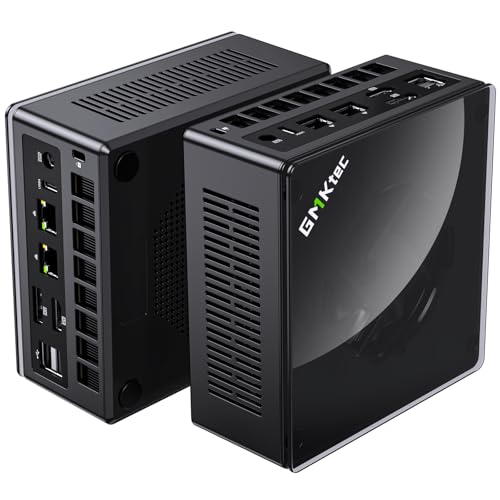
- Best overall streaming barebone: GMKtec NucBox K8 Plus Barebone, Ryzen 7 8845HS (No RAM/SSD/OS) — Check on Amazon
- Minisforum UM890 Pro Barebone, Ryzen 9 8945HS — Check on Amazon
- Minisforum UM880 Plus Barebone, Ryzen 7 8845HS — Check on Amazon
- Minisforum UM870 Slim Barebone, Ryzen 7 8745H — Check on Amazon
- Minisforum UM790 Pro Barebones, Ryzen 9 7940HS — Check on Amazon
See 1 more Amazon option
- Minisforum MS-A1 Barebone, AM5 Socket (No CPU/RAM/SSD/OS) — Check on Amazon
Read the full guide ↓
Disclosure: As an Amazon Associate, reviewstook.com earns from qualifying purchases. Links to Amazon on this page are affiliate links; they cost you nothing extra. Listing details such as price and availability change often, so check the current Amazon listing before you buy.
Streaming is the workload that exposes a barebones mini PC twice. The first exposure is the one this whole category carries: the sticker price is not a computer. Every kit below is sold on Amazon as an empty kit, and every one of them arrives with empty memory slots, an empty drive bay and no operating system. The second exposure is specific to streamers. A finished PC is still not a streaming PC. Between the machine and your first broadcast sit a microphone, light, cables and — if a console is involved — a capture card, none of which is inside any price in this guide. Both gaps are covered openly below, because a streaming guide that hides either one is setting you up to discover it live, on air, in front of people.
Here is what the $700 ceiling genuinely buys a streamer, and it is better than you might expect. All six kits are built on AMD’s Radeon 780M platform — eight Zen 4 cores and the strongest integrated graphics ever fitted to a mini PC — which matters for streaming in a way it does not for ordinary gaming: the 780M’s media engine is a modern hardware encoder with AV1 support, so the machine can compress your broadcast on a dedicated block of silicon instead of stealing processor cores from the game. The realistic workflow at this tier is honest and specific: talk and desktop streams, console play fed through a capture card, and light games played on the machine itself, sent out at 720p60 or 1080p30 into Twitch’s roughly 6,000 kbps ceiling. Demanding modern games played and streamed from the same integrated graphics are beyond it. What separates the six kits is everything around that shared silicon: cooling that stays quiet next to a microphone, network ports that keep the upload wired, drive slots for your recordings, and one upgrade path — an external GPU dock — that can lift the whole setup later.
In this guide
Quick Picks
In a hurry? Each row names a streaming situation and the kit that fits it. Every pick is the empty kit; parts and streaming gear are covered in the reviews and the kit section.
| Streaming situation | Pick | Why it stands out | Link |
|---|---|---|---|
| Best overall for streaming | GMKtec NucBox K8 Plus Barebone | Native OCuLink for a future GPU dock, dual 2.5G LAN, adjustable power modes for mic-side noise | Check on Amazon |
| Best for long sessions | Minisforum UM890 Pro Barebone | Flagship cooling built for sustained loads, fastest CPU here, dual LAN and OCuLink | Check on Amazon |
| Best value streamer build | Minisforum UM880 Plus Barebone | The same 780M encoder platform at a value-tier kit price — check price on Amazon, OCuLink via adapter board | Check on Amazon |
| Cheapest quiet desk streamer | Minisforum UM870 Slim Barebone | Slim 8745H kit at a budget-tier kit price — check price on Amazon, auto power-on, no ports you are not using | Check on Amazon |
| Best when its live price fits | Minisforum UM790 Pro Barebones | 780M at its highest clock, dual drive slots for recordings — check price on Amazon | Check on Amazon |
| Best for builders who will grow it | Minisforum MS-A1 Barebone | Socketed AM5 platform with four SSD slots — the encoder arrives with the CPU you choose | Check on Amazon |
How These Picks Were Chosen
The budget was applied to the kit, because that is what the search promises — but never to the kit alone. Every product below is a genuine barebone listing that fits this guide’s under-$700 budget framing on Amazon and for each one the review explains what finishing it involves: the dual-channel memory configuration the graphics need, an SSD, and an operating system. A kit had to offer a modern hardware encoder, at least one wired gigabit-class Ethernet port — every pick here has 2.5-gigabit networking — and enough cooling design to run a game and an encoder together for hours rather than minutes.
We did not use these kits ourselves. We read the maker listings, specification pages and long-running price tracking behind each ASIN, and compared processors, encoders, memory and storage expansion, networking and cooling. Three facts shaped the shortlist. First, the graphics floor: the Radeon 780M is the integrated GPU that makes playing and streaming from one small box a real plan, and all six picks reach it — five with the chip soldered in, one by letting you socket the desktop processor that carries it. Second, the memory rule: the 780M borrows its bandwidth from system RAM, and a stream adds OBS compositing and a browser to the same pool, so every pick takes two DDR5 sticks for dual-channel memory — a single-stick build starves the game and the broadcast simultaneously. Third, the honesty rule: each kit had to survive its own total-cost comparison, kit plus parts against the complete version of the same machine where one exists, with the result covered in its review rather than buried.
The Encoder Is the Streaming Spec
Every streaming guide should start here, because the encoder — the piece of hardware that compresses your picture into the stream — decides more about your broadcast than the processor badge does. There are three hardware encoder families in modern PCs. NVIDIA’s NVENC, inside GeForce cards, is the benchmark: sharp at low bitrates and the reason most dedicated streaming PCs carry a discrete GPU. Intel’s Quick Sync, inside Intel integrated graphics, is an excellent second. AMD’s VCN, inside Radeon graphics, is the third — historically a step softer than NVENC at the roughly 6,000 kbps Twitch allows, a gap viewers can see in fast motion.
Now the fact that shapes this entire guide: there is no NVENC and no Quick Sync anywhere in it, because there is no NVIDIA or Intel silicon in any of these six kits. Every pick encodes through the VCN media engine built into the Radeon 780M. That engine belongs to AMD’s RDNA 3 generation, and the generation matters: RDNA 3’s VCN added AV1 encoding, which the previous RDNA 2 generation cannot do at all. AV1 is the codec YouTube’s live platform increasingly prefers and the best choice for local recordings — so on Twitch, today, you will be sending H.264 from VCN at Twitch bitrates, graded honestly as good rather than best-in-class. What saves the arrangement is that VCN is a dedicated block: encoding runs on its own silicon, not on the processor cores or the graphics shaders, so a game and a broadcast can share one small machine without the encoder eating the game’s frame rate the way software encoding does.
The fallback deserves one warning so you never rely on it. OBS can encode in software (x264) on the processor, and eight Zen 4 cores can just about carry a talk or desktop stream that way — but those same cores are also running your game, your browser and your alerts, and software encoding is the first thing to collapse when a scene gets busy. On every pick in this guide, the hardware VCN encoder is the correct default and x264 is an emergency setting, not a plan. Set OBS to the AMD hardware encoder, use constant bitrate (CBR) at or below about 6,000 kbps for Twitch with a two-second keyframe interval, and the encoder block will do quietly and indefinitely what the processor would do loudly and briefly.
The 6 Best Barebones Mini PCs for Streaming Under $700
GMKtec NucBox K8 Plus Barebone (Ryzen 7 8845HS, No RAM/SSD/OS)
Who it suits: Streamers who want the most complete streaming platform under $700 — and especially anyone who suspects a discrete GPU is in their future, because this kit is the one that plans for it honestly.
Start with the streaming hardware. The Ryzen 7 8845HS pairs eight Zen 4 cores with the Radeon 780M, whose RDNA 3 VCN encoder handles your broadcast — H.264 for Twitch today, AV1 available for YouTube live and local recordings — while the graphics render the game and the cores run everything else. Around that chip, GMKtec fits the port layout a streamer would spec from scratch: two 2.5-gigabit Ethernet ports on Intel controllers, so the upload stays wired with the rest of your network on the other port; two USB4 ports; HDMI 2.1 and DisplayPort outputs for up to four screens, because a second monitor for chat and OBS is not a luxury in this hobby; and two M.2 slots, so recordings live on their own drive instead of fighting the game library for space. Memory is two DDR5 SO-DIMM slots, and for streaming they are not decoration: fit a matched pair, because the graphics, the encoder and OBS all drink from the same memory pool.
The headline feature, though, is the native OCuLink port — a wired PCIe 4.0 x4 connection, roughly 64Gbps, to an external graphics dock. For a streamer it is an escape hatch: the day integrated graphics stop being enough, a desktop card in a dock brings discrete-GPU rendering and, with the right card, a stronger hardware encoder than VCN, without replacing the machine. GMKtec states plainly that OCuLink is not hot-pluggable here, so docks connect with the power off — a habit, not a flaw.
The money, stated as plainly as this guide promises. Check price on Amazon for the barebone kit itself. Finishing it — a matched 32GB DDR5 pair, a 1TB NVMe drive, an operating system the listing does not include — adds a significant parts bill at current parts prices, bringing the finished machine into the same territory as GMKtec’s own complete 32GB/1TB version of this model. So the barebone’s case is specific: your parts are already owned, you want a bigger or faster configuration than the factory fits, or the OCuLink plan is the point. If none of those holds, check price on Amazon for the complete version first and compare.
- RDNA 3 VCN hardware encoder with AV1 — Twitch-ready H.264 today, YouTube-friendly AV1 in reserve.
- Native OCuLink port: the only real path in this guide to a desktop GPU and a stronger encoder later.
- Dual 2.5G wired Ethernet, dual USB4, four display outputs and two SSD slots.
- Firmware power modes let you tune fan noise down for microphone distance.
Honest limitation: VCN’s H.264 at Twitch bitrates is visibly softer than a discrete NVIDIA card’s NVENC in fast motion, and the barebone only beats the complete K8 Plus on price when your memory and storage are already paid for.
Choose it if you want the strongest all-round streaming barebone with an upgrade path. Skip it if you are buying every part new — check price on Amazon for the complete version and run that comparison first.

Minisforum UM890 Pro Barebone (Ryzen 9 8945HS, No RAM/SSD/OS)
Who it suits: Streamers who run long sessions and heavy scenes — the VTuber with a tracking stack, the talk-show host with four browser sources — and who want cooling and processor headroom that never becomes the story mid-broadcast.
Streaming is a sustained load, and sustained load is what this flagship barebone was built for. The Ryzen 9 8945HS is the fastest processor in this guide — eight Zen 4 cores boosting to 5.2GHz — carrying the same Radeon 780M and the same RDNA 3 VCN encoder as the 8845HS kits: H.264 for Twitch, AV1 available, the encoding done on its dedicated block while the cores absorb OBS, chat, alerts, a browser and whatever else a modern stream stacks up. Where the UM890 Pro pulls ahead is everything that keeps that load boring for hours: Minisforum’s cold-plate cooling design, built for continuous rather than bursty work — also a microphone feature, since a fan that never has to surge is a fan your viewers never hear. The connectivity matches the ambition: two 2.5-gigabit LAN ports, two USB4 ports, HDMI and DisplayPort outputs for four displays, four USB 3.2 ports for cameras, interfaces and control decks, and an OCuLink port for the same external-GPU escape hatch the K8 Plus offers.
Memory and storage follow the flagship pattern: two DDR5 SO-DIMM slots up to 96GB — fit a matched 32GB pair at minimum, because a streaming stack grows into memory — and M.2 PCIe 4.0 storage, with room to keep recordings apart from the operating system and games.
The price story cuts both ways, and this guide prints both edges. Check price on Amazon for the barebone — it sits in the premium tier of this guide, comfortably under $700 as a kit — and compare it with the complete UM890 Pro, whose 32GB/1TB listing sits in a notably higher tier after the memory shortage lifted complete-box pricing. That gap is the argument: the case, board and chip did not get more expensive; the RAM and SSD inside the complete box did. A streamer holding a DDR5 kit and a drive from another machine turns this shell into a flagship streaming PC for the price of the shell. A streamer buying those parts new at current prices hands most of the saving back and adds an OS license on top.
- Fastest CPU here (8945HS) with the same RDNA 3 VCN encoder — headroom for heavy OBS scenes.
- Flagship cooling designed for sustained loads: steadier, quieter running beside a microphone.
- Two 2.5G LAN ports, two USB4 ports, an OCuLink port and outputs for four displays.
Honest limitation: It is the most expensive kit in this guide, and the premium buys build, cooling and connectivity — the encoder and graphics are identical to the cheaper 8845HS kits, so stream quality per se does not improve.
Choose it if your streams are long, your scenes are heavy and you will use the ports and cooling. Skip it if your broadcast is a game and a facecam — the cheaper kits encode the same picture.
Minisforum UM880 Plus Barebone (Ryzen 7 8845HS, No RAM/SSD/OS)
Who it suits: Parts-drawer streamers who want the full modern platform — encoder, cores, connectivity — at the lowest kit price here, and who are willing to read one paragraph of arithmetic before ordering, because this kit produced the most instructive number in the category.
For streaming purposes the UM880 Plus is the K8 Plus’s equal where it counts. The Ryzen 7 8845HS brings the same eight Zen 4 cores and the same Radeon 780M, which means the same RDNA 3 VCN encoder: your Twitch broadcast leaves through the hardware block in H.264, AV1 is available for YouTube and for high-quality local recordings, and the processor is left to run the game, OBS and the browser stack. Around the chip: two DDR5 SO-DIMM slots up to 96GB, M.2 PCIe 4.0 storage, HDMI, DisplayPort and USB4 outputs for a multi-monitor streaming desk, a 2.5-gigabit LAN port for the wired upload this guide insists on, and Wi-Fi 6E for everything that is not the stream. It also offers OCuLink for an external GPU — with one design caveat stated openly: on this model the connection comes through an internal adapter board rather than a native front-panel port, so enabling it is a small project and can trade against internal expansion.
Now the arithmetic. Check price on Amazon for this barebone — it is a value-tier route to a full 8845HS platform. But when a market survey priced this exact machine against its own complete version on Amazon, adding a new 32GB DDR5 kit and a 1TB NVMe drive brought the finished build to a total above the complete UM880 Plus with the same memory and storage. Building it yourself with all-new parts cost more in that comparison. None of that argues against the kit. With parts already owned, the kit price alone buys a streaming platform complete-box buyers are paying far more for. With parts bought new mid-shortage, the factory’s bulk-bought RAM beats your retail RAM. Both sentences are true; the one that describes your parts drawer is the recommendation.
- Full 8845HS / 780M platform — the same VCN encoder as the flagship kits — at the lowest modern kit price.
- Two SO-DIMM slots to 96GB, USB4, 2.5G wired LAN and Wi-Fi 6E.
- OCuLink available via adapter board for a future GPU dock.
Honest limitation: The documented case where the complete version undercuts the finished barebone with new parts — and the adapter-board OCuLink is a project, not a port, which can cost you internal expansion.
Choose it if your DDR5 and SSD are already paid for and you want maximum platform value — check price on Amazon. Skip it if they are not, and the complete UM880 Plus is anywhere near its usual complete-box pricing.

Minisforum UM870 Slim Barebone (Ryzen 7 8745H, No RAM/SSD/OS)
Who it suits: Streamers whose broadcast is a tidy desk, a light game or a console feed, and a quiet room — the cheapest credible way onto this encoder platform, in the slimmest box here.
The UM870 Slim’s processor looks like a compromise and, for streaming, mostly is not. The Ryzen 7 8745H keeps the parts a broadcast uses — eight Zen 4 cores boosting to 4.9GHz and the full Radeon 780M with its RDNA 3 VCN encoder, H.264 and AV1 alike — and drops the AI engine, which no streaming software touches. In exchange this is a budget-tier kit in the guide from a major maker — check price on Amazon. The slim case carries HDMI 2.1, DisplayPort and USB4 outputs, a single 2.5-gigabit LAN port — wired, as the upload rule requires — four USB ports, Wi-Fi 6E and Bluetooth 5.3. One quietly useful streaming feature is auto power-on: a box mounted behind a monitor or across the room can return from a power cut or a scheduled restart without you crawling behind the desk mid-session.
The simultaneous-load story is the honest middle of this guide. Game, OBS compositing, VCN encoding, chat browser and alerts all fit on this platform at the workflow this tier promises — talk, desktop, console capture, light games at 720p60 or 1080p30 output — provided the memory is a matched dual-channel pair, because the encoder, the graphics and the applications share one pool and a single stick taxes all three at once. What you give up against the kits above is stated plainly: there is no OCuLink, so the 780M is this machine’s graphics and encoder ceiling for life, with slower USB4 docks the only external-GPU route; there is one LAN port, not two; and the slim case has less cooling headroom than the flagship designs, so very long, hot sessions are the UM890 Pro’s argument, not this one’s.
- Full Radeon 780M and its VCN encoder at the lowest kit price from a major brand.
- Slim case with HDMI 2.1, DisplayPort and USB4 outputs, wired 2.5G LAN, Wi-Fi 6E.
- Auto power-on — genuinely handy for a mounted or always-on streaming box.
Honest limitation: No OCuLink and a single LAN port: the encoder and graphics you start with are the ones you keep, and the slim case is not the pick for marathon sessions in a warm room.
Choose it if the plan is a small, quiet, integrated-graphics streaming desk at the lowest entry price. Skip it if a GPU dock, dual networking or very long sessions are anywhere in your future.

Minisforum UM790 Pro Barebones (Ryzen 9 7940HS, No RAM/SSD/OS)
Who it suits: Streamers who record everything — the VOD archivists and clip editors — and who are patient enough to buy this listing at the right point in its price cycle, because its cycle is the wildest in the guide.
The UM790 Pro started the 780M era, and its streaming credentials begin with a clock speed: its Radeon 780M runs at up to 2.8GHz, the highest graphics clock in this guide, driven by a Ryzen 9 7940HS with eight Zen 4 cores boosting to 5.2GHz. The encoder is the same RDNA 3 VCN found across this guide — H.264 out to Twitch, AV1 available for YouTube and recordings — so the broadcast picture is the platform’s picture; what the higher graphics clock buys is a little more headroom in the game being encoded, not a different stream. Two M.2 2280 PCIe 4.0 slots with RAID support mean the reference streaming layout — operating system and games on one drive, local recordings on the other — fits without adapters or external boxes, and recording at high bitrate alongside the broadcast, which is how you get editable VODs and clean clips, consumes roughly 20GB an hour at archive quality. Add two HDMI 2.1 ports and two USB4 ports for four displays, Wi-Fi 6E, Bluetooth 5.3, a 2.5-gigabit LAN port and a VESA mount in the box, and this is a complete little broadcast desk in a slim aluminum case.
The reason it sits fifth is its pricing behaviour. Check price on Amazon carefully for this listing, because its pricing is notably volatile. The difference between buying it well and buying it badly is significant for the identical box, so the rule here is stricter than for any other pick: when its live price sits at the lower end of its range, it is a bargain flagship for a parts owner who records; when its live price drifts higher, the UM880 Plus and UM890 Pro barebones — which add the OCuLink this model lacks — are better purchases at similar money.
- 780M at its highest clock (2.8GHz) — the most in-game headroom behind the shared encoder.
- Dual M.2 slots with RAID: the natural home for the record-to-a-second-drive layout.
- Dual HDMI plus dual USB4, four displays, VESA mount included.
Honest limitation: No OCuLink, so no encoder upgrade path — and the listing’s price is the most volatile here. Timing is part of the product — check price on Amazon.
Choose it if its live price fits your build budget, your parts are ready and you record everything. Skip it if the live price has drifted higher — the newer kits give you more, including the dock port, for that money.

Minisforum MS-A1 Barebone (AM5 Socket, No CPU/RAM/SSD/OS)
Who it suits: Builder-streamers — the ones who hear “it doesn’t include the processor” as an invitation, and who want a streaming box that can become a small server, a storage machine or a faster PC without being replaced. Everyone else should treat this review as the warning label it is written to be.
The other five kits are computers that happen to be missing their memory. The MS-A1 is a platform missing nearly everything: an AM5 motherboard in a mini workstation case, with an empty processor socket, four M.2 NVMe slots — recording and archive capacity no other pick approaches — two DDR5 SO-DIMM slots for up to 96GB, dual 2.5-gigabit LAN, Wi-Fi 6E, and HDMI, DisplayPort and USB-C display outputs. For a streamer, the socket changes the first question: the encoder is not in the box, it is in the CPU you choose. Fit AMD’s Ryzen 7 8700G — the desktop APU the listing itself names, and the right choice for this guide — and you get the same Radeon 780M and the same RDNA 3 VCN encoder as every other pick, in the only package here whose processor can be replaced later. That replaceability is the platform’s entire reason to exist, and for a streamer whose needs grow it is a genuine, rare thing.
The price honesty has to be blunt. Check price on Amazon for the barebone listing — it is a budget-tier shell headline in this guide — and the least meaningful, because nothing about a finished MS-A1 costs only the shell price. The chassis caps processor power around 100W, and between the CPU, a matched dual-channel DDR5 pair, an SSD and an operating system, the honest total for a new-parts 8700G streaming build lands well above this guide’s $700 ceiling at current prices; no finished total is claimed for it beyond that direction. So why is it here? Because for the right owner the arithmetic inverts: a builder with an AM5 processor on the shelf, or DDR5 left from a desktop upgrade, gets a platform nothing else in this guide can imitate, at a shell price lower than every soldered kit. It is simply not a budget route, and nobody should buy a low-priced shell expecting a low-priced streaming PC, or even one within the $700 framing, unless the expensive parts are already in the house.
- Socketed AM5 CPU — the only replaceable-processor platform here, so the encoder can grow up later.
- Four M.2 NVMe slots and dual 2.5G LAN: recording archives and networking beyond any rival.
- The cheapest shell in this guide — priced for builders whose parts are already on the shelf.
Honest limitation: It includes no CPU at all — the encoder literally is not in the box — and a finished 780M build with new parts realistically exceeds $700, often by a lot. As a pure budget streaming buy it fails its own test.
Choose it if you own AM5-era parts or want a CPU-swappable platform for years. Skip it if you are starting from zero — every soldered kit above finishes cheaper and streams the same picture today.

Comparison Table
| Product | Processor / Graphics | Encoder | Best streaming use | Link |
|---|---|---|---|---|
| GMKtec NucBox K8 Plus Barebone | Ryzen 7 8845HS / Radeon 780M, native OCuLink | AMD VCN (RDNA 3), H.264 + AV1 | Best all-round streamer with a GPU-dock future | Check on Amazon |
| Minisforum UM890 Pro Barebone | Ryzen 9 8945HS / Radeon 780M, OCuLink | AMD VCN (RDNA 3), H.264 + AV1 | Long sessions, heavy scenes, flagship cooling | Check on Amazon |
| Minisforum UM880 Plus Barebone | Ryzen 7 8845HS / Radeon 780M, OCuLink via adapter | AMD VCN (RDNA 3), H.264 + AV1 | Lowest-cost modern kit for parts owners | Check on Amazon |
| Minisforum UM870 Slim Barebone | Ryzen 7 8745H / Radeon 780M, no OCuLink | AMD VCN (RDNA 3), H.264 + AV1 | Cheapest slim streaming desk, integrated for life | Check on Amazon |
| Minisforum UM790 Pro Barebones | Ryzen 9 7940HS / Radeon 780M at 2.8GHz | AMD VCN (RDNA 3), H.264 + AV1 | Recording-first streamer, when its live price fits | Check on Amazon |
| Minisforum MS-A1 Barebone | AM5 socket, no CPU included / 4× M.2 | Arrives with your CPU — VCN (RDNA 3) with an 8700G | CPU-swappable DIY platform for parts owners | Check on Amazon |
How to Choose a Barebones Mini PC for Streaming Under $700
- Do the finished-build sum first, in writing. Kit + a matched dual-channel DDR5 kit + an NVMe SSD + an operating system — then add the streaming kit from the section after next. Compare the total against the complete version of the same machine, streaming gear included on both sides. The barebone badge itself earns nothing; the arithmetic decides.
- Accept the encoder you are buying. Every kit here encodes through AMD’s VCN. It is a real hardware encoder with AV1 support, and it is a step softer than NVIDIA’s NVENC at Twitch bitrates. If your channel’s whole identity is fast-motion gameplay at 6,000 kbps, no kit here is your final machine — the ones with OCuLink are your bridge to it.
- Buy memory in a matched pair, always. The 780M has no memory of its own, and streaming adds OBS compositing and a browser to the same pool the game renders from. Two sticks in dual channel — 32GB as a pair of 16GB sticks is the reference streaming build — is the difference between the platform’s real performance and a hobbled version of it. A single stick starves the game and the broadcast at the same time.
- Wire the upload. Every pick here has at least one 2.5-gigabit Ethernet port; use it for the stream, every stream, no exceptions. Wi-Fi is for everything else in the room. Dropped frames from a wireless upload are the most common and most preventable failure in small-streamer setups.
- Decide about OCuLink now, not later. It cannot be added to a kit that lacks it — the UM880 Plus’s adapter board is part of that model’s design, not an accessory. If a desktop GPU dock is even a maybe, the shortlist is the K8 Plus’s native port, the UM890 Pro, or the UM880 Plus’s adapter route. The UM870 Slim and UM790 Pro will stream on integrated graphics for life, which is fine if that is the plan.
- Give recordings their own drive. If you record locally while broadcasting — and you should, for VODs and clips — a second M.2 slot (K8 Plus, UM790 Pro, MS-A1 above all) keeps a ~20GB-an-hour recording habit from filling the drive your games live on.
- Match the kit to the second job. These boxes rarely only stream. Dual 2.5G LAN (K8 Plus, UM890 Pro, MS-A1) suits a box that also routes or serves; the UM870 Slim’s auto power-on suits an always-on capture station; flagship cooling (UM890 Pro) suits marathon sessions in warm rooms. The encoder is identical across the guide, so the second job should break ties.
- Check the live price, not a remembered one. Barebone listings swing hard with stock — the UM790 Pro is the clearest example. If a kit’s live price on Amazon is far above what you expected, waiting, or choosing the rival kit whose live price fits today, is strategy rather than indecision.
Set Up OBS Once, Correctly
Every pick in this guide runs the same streaming stack, so the setup is written once, here, the way it should be done on day one. In OBS, set the output encoder to the AMD hardware encoder (it appears as the AMD HW H.264 option) — never x264 software encoding, which spends the processor cores your game and scene stack need. Use rate control CBR, a bitrate at or below roughly 6,000 kbps for Twitch, and a keyframe interval of two seconds; those three settings are the platform’s contract, and they are the same on a budget-tier kit as on a flagship. For YouTube, the same machines can push higher bitrates and offer AV1, which is where these encoders quietly shine — but set the profile per platform rather than assuming one configuration travels.
Choose your output resolution for the content, not the ego: 720p60 for fast-moving games, where frame rate and bitrate-per-pixel matter more than raw pixels at Twitch’s ceiling; 1080p30 for talk, desktop and slow content, where the picture is mostly still and sharpness wins. Then learn the three counters in OBS’s Stats window before you need them, because each names a different failure with a different fix. Rendering lag means the graphics are overloaded and OBS cannot composite your scene in time — lower the game’s settings or the canvas, and check that a single-stick memory build is not the real cause. Encoding lag means the encoder block is saturated — drop the output resolution or frame rate a step rather than touching bitrate first. Dropped frames are the network, almost never the machine — get on the wired port, then lower bitrate if your upload genuinely cannot hold it. Read the counter, apply its fix, and do not change three settings at once.
Two habits finish the setup. Record locally at a higher bitrate than you broadcast whenever the content matters — the broadcast is compressed to Twitch’s ceiling, the recording is your editable master, and at archive quality it will eat roughly 20GB an hour, which is why the dual-drive kits above earn their keep. And test the whole chain — game, scene switches, alerts, hard motion — in a private or unlisted stream before the first public one. Every failure in the paragraph above is free in rehearsal and expensive live.
What $700 Does Not Include
Two bills arrive after the kit, and this guide covers both rather than letting either ambush you. The first is the completion bill, covered in the next section: memory, storage and an operating system, without which the kit does not boot. The second is the streaming kit itself — the gear that turns a finished PC into a broadcast — and it is never inside any pick’s price, here or anywhere else. Budget it in this order, because the order is the priority:
- A microphone, first. Viewers forgive a soft picture years before they forgive bad audio. A decent USB microphone, or a budget XLR mic with an interface if you will grow into it, is the single highest-value purchase in streaming.
- Lighting. One soft light aimed at your face does more for a cheap camera than a better camera does in the dark. Buy the light before you upgrade anything with a lens.
- A webcam, if you need one. No mini PC in this guide has a camera, so a facecam means a USB webcam — or a phone you already own doing the job. Cost it only if your format uses one; plenty of successful formats never show a face.
- A capture card, for console streaming only. If the games live on a console, the card is how they reach OBS, and it is mandatory. If you play on the PC itself, this line is zero — do not let a bundle talk you into one.
- The unglamorous lines: an Ethernet cable long enough to reach the router, a second monitor for chat and OBS if you do not own one, and a USB hub if your camera, interface, deck and dongles outnumber the ports. Small money, all of it, and all of it cheaper bought calmly than mid-crisis.
Altogether, a realistic streaming-kit allowance on top of the finished PC varies depending on whether a console and a facecam are in your format — kept out of every pick’s price on purpose, so the totals you compare are the totals you will actually spend.
The Real Total: What Finishing the Build Actually Costs
Every barebones guide owes its readers one worked example, so here is this category’s, drawn from a market survey that priced Amazon mini PC listings directly. Fitted with a new 32GB DDR5 kit and a 1TB NVMe drive — the same specification the complete version ships with — the Minisforum UM880 Plus build came to a total above the complete UM880 Plus — same chip, same memory, same storage. The do-it-yourself route cost more in that comparison, and the same survey pointed to retail memory pricing as the reason, which tells you where the money went: not into the mini PC, but into the memory market around it. That is why this guide refuses to call any kit in it a kit-price streaming PC — the sentence has a second half, and a streaming kit after that.
Run the same math for the buyer this category actually serves and it inverts. If the 32GB kit and the SSD are already yours, the UM880 Plus streaming build costs only the kit price all-in for hardware complete-box buyers are paying a premium tier for; the K8 Plus and UM890 Pro tell the same story. No complete mini PC under $700 touches that value, because the memory is precisely what the market has made expensive, and the barebone buyer who already owns it skips the toll entirely.
Two consequences follow for streamers specifically. First, the smaller your parts drawer, the more the complete versions deserve your attention — and the more a purpose-built option from our Best Streaming PC Under $700 guide belongs in the comparison. Second, if you are buying parts anyway, buy them as a system: a matched 32GB dual-channel DDR5-5600 kit and a 1TB PCIe 4.0 drive are the reference build for every kit in this guide, and pricing that pair on the day you order tells you more about whether to go barebone than any review can.
Common Buying Mistakes
- Reading the kit price as the streaming-PC price. The finished machine costs the kit plus memory, storage and an OS — and the broadcast costs a microphone, light and possibly a capture card on top of that. Three prices, one budget.
- Setting OBS to software (x264) encoding because a forum said it looks better. On an integrated-graphics machine it spends the cores your game needs and collapses in busy scenes. The hardware VCN encoder is the correct default on every pick here.
- Buying one RAM stick to “upgrade later.” Single-channel memory starves the graphics, the encoder’s shared buffers and OBS simultaneously — on a streaming build it is not a temporary compromise, it is a slower everything.
- Streaming over Wi-Fi because the box is small and the router is far. Dropped frames are the tax. Every pick here has a wired 2.5G port; run the cable.
- Believing OCuLink can be retrofitted later. It cannot — the UM870 Slim and UM790 Pro will never gain it, and the UM880 Plus’s adapter board belongs to that model alone.
- Buying a capture card for PC gaming, or skipping it for console gaming. The card exists to bring an external source into OBS. Know which side of that line your format sits on before spending either way.
- Paying the Ryzen 9 premium for stream quality. The 8945HS and 7940HS encode through the same VCN as the 8845HS kits; you are buying cores, cooling and ports, not a sharper broadcast.
- Ordering the UM790 Pro at a high live price because the headline said “under $700.” Its live pricing varies widely. Patience, or the rival kit whose live price fits today, is the smarter move.
Final Recommendation
- Most streamers with parts on hand: GMKtec NucBox K8 Plus Barebone.
- Long sessions and heavy scenes: Minisforum UM890 Pro Barebone.
- Lowest-cost modern platform: Minisforum UM880 Plus Barebone.
- Cheapest slim streaming desk: Minisforum UM870 Slim Barebone.
- Recording-first, when its live price fits: Minisforum UM790 Pro Barebones.
- CPU-swappable DIY platform: Minisforum MS-A1 Barebone.
Our top two are the K8 Plus, for the native OCuLink port and dual wired LAN that give a streaming barebone a future beyond its integrated encoder, and the UM880 Plus, for putting the same 8845HS platform at the lowest kit price in the guide. Between them they cover the two honest reasons to build a streaming barebone at this budget: growing toward a discrete GPU, and refusing to re-buy expensive memory you already own. If your desk plan is a small, quiet box streaming light content on integrated graphics, the UM870 Slim is the quiet achiever; if your sessions are marathons, the UM890 Pro earns its premium in cooling rather than frames; the UM790 Pro is the archivist’s pick when its live price is favourable only; and the MS-A1 is the platform for builders whose projects outgrow soldered chips. Readers starting from zero parts should also weigh a complete machine from Best Mini PC For Streaming Under $700 — and whatever you choose, run the finished-build sum, add the streaming kit honestly, and check the live price before you order.
Frequently Asked Questions
Can an integrated-graphics barebone really run a stream?
Yes — at this tier’s honest workflow. The Radeon 780M’s hardware encoder compresses the broadcast on its own silicon while the graphics render light games and the cores run OBS, chat and alerts. Talk and desktop streams, console play through a capture card, and lighter games played on the machine are all comfortable at 720p60 or 1080p30 output. Demanding modern games played and streamed from the same integrated graphics are the limit — that workload wants a discrete GPU, which in this guide means an OCuLink dock later.
Is AMD’s VCN encoder good enough, or do I need NVENC?
Good enough for the overwhelming majority of streams, with one honest caveat. VCN on these RDNA 3 chips handles H.264 for Twitch and adds AV1, which the previous AMD generation could not encode at all — genuinely useful for YouTube live and local recordings. At Twitch’s roughly 6,000 kbps ceiling, NVENC from a discrete NVIDIA card is visibly sharper in fast motion. If your content is talk, desktop, console capture or slower games, you will likely never see the difference; if it is high-motion competitive play, the K8 Plus or UM890 Pro plus a future GPU dock is the bridge.
What exactly is missing from a barebones mini PC?
RAM, storage and an operating system — and on the Minisforum MS-A1, the processor as well, which means the encoder arrives with the CPU you choose. A barebone is a case, motherboard, power supply and (usually) a soldered CPU with its cooling, sold empty so you install your own memory and SSD. It will not boot until the missing pieces are in place, which is why every review in this guide covers the finished machine, not just the kit.
How much RAM does a streaming build need, and does the configuration matter?
It matters more here than on almost any other kind of PC, because the game, the encoder’s buffers, OBS and your browser all share one pool. Install two matched DDR5-5600 SO-DIMMs — 32GB as a pair of 16GB sticks is the reference build — so memory runs dual-channel at full bandwidth. A single stick measurably slows the graphics and risks exactly the rendering-lag counter you will meet in OBS’s Stats window.
Should I record while I stream?
If the content matters, yes. The broadcast leaves at Twitch’s bitrate ceiling; a local recording at higher quality is your editable master for VODs, clips and uploads elsewhere. Budget the storage honestly — roughly 20GB an hour at archive quality — which is why the dual-drive kits in this guide (K8 Plus, UM790 Pro, and the four-slot MS-A1) suit archivists, and set OBS to record to the second drive where one exists.
Do I need a capture card with one of these kits?
Only if the gameplay comes from outside the PC. Console streaming needs a capture card to bring the console’s picture into OBS — budget for a capture card separately, outside every price in this guide; it is a mid-range accessory purchase, so check the live price at the retailer before you buy. If you play on the mini PC itself, you need no card at all; the encoder is already in the machine.
Is a barebone cheaper than buying the same mini PC complete?
Only if you already own the parts. A pricing survey found a UM880 Plus barebone finished with a new 32GB DDR5 kit and 1TB SSD cost more in total than the complete version in the same specification. With the RAM and SSD already on your shelf, the same streaming build costs the kit price only and nothing in the complete market comes close. Which means the answer lives in your parts drawer.
What is OCuLink, and which of these kits have it?
OCuLink is a cabled PCIe connection — on these machines a PCIe 4.0 x4 link of roughly 64Gbps — that connects an external GPU dock with far less performance loss than USB4. For a streamer it is the upgrade path to discrete graphics and a stronger encoder. Among these picks, the K8 Plus and UM890 Pro carry it as a port, the UM880 Plus provides it through an internal adapter board, and the UM870 Slim and UM790 Pro do not offer it at all. There is no hot-plugging: docks connect while the machine is off.
- Best Barebones Mini PC Under $700
- Best Barebones Mini PC Under $500
- Best Barebones Mini PC Under $800
- Best Barebones Mini PC For Streaming Under $500
- Best Barebones Mini PC For Streaming Under $800
- Best Barebones Mini PC For 1440p Gaming Under $700
- Best Barebones Mini PC For Beginners Under $700
- Best Barebones Mini PC For Small Spaces Under $700
- Best Mini PC Under $700
- Best Mini Gaming PC Under $700


