Where to buy
Check the latest price, availability and delivery on Amazon. Orders are placed on Amazon. We may earn a commission from qualifying purchases. Every machine below is a barebones kit: the price buys the case, board, processor and cooler only — no RAM, no SSD and no operating system — so budget for those parts before comparing any price here with a complete streaming PC.
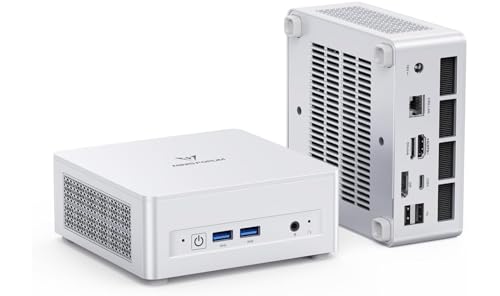
- Best overall barebones for streaming: MINISFORUM UM880 Plus Barebone, Ryzen 7 8845HS, No RAM / SSD / OS — Check on Amazon
- GMKtec NucBox K8 Plus, Ryzen 7 8845HS, Without RAM / SSD / OS — Check on Amazon
- MINISFORUM UM870 Slim Barebone, Ryzen 7 8745H, Without RAM / SSD / OS — Check on Amazon
- MINISFORUM UM790 Pro Barebones Version, Ryzen 9 7940HS, Without RAM and SSD — Check on Amazon
- MINISFORUM UM773 Lite Barebones, Ryzen 7 7735HS, No RAM No SSD — Check on Amazon
- ASUS NUC 14 Pro+ Barebone Kit, Intel Core Ultra 5 125H — Check on Amazon
Read the full guide ↓
Disclosure: As an Amazon Associate, reviewstook.com earns from qualifying purchases. Links to Amazon on this page are affiliate links; they cost you nothing extra. Listing details such as price and availability change often, so check the current Amazon listing before you buy.
A streaming PC built on a barebones mini PC starts with two honest sentences. The first: a barebones price is not a computer price. Every box below arrives with a processor, a board, a case and a cooler — and no RAM, no SSD and no operating system. It will not boot, let alone broadcast, until you add memory, storage and an OS yourself, and the true cost of the finished machine is the box plus those parts. The second: a finished PC is still not a streaming setup. A microphone, some light and — for console streaming — a capture card sit on top of the computer budget, and no pick in this guide includes any of them. Both costs are itemised in the open below, because a guide that hides either number sets you up to run out of money mid-build.
What a barebone genuinely offers a streamer is control over the two specs streaming punishes hardest: memory configuration and storage. A stream is never one workload — it is a game, OBS, a browser full of chat and dashboards, and a local recording, all running at once on the same memory pool. Complete mini PCs are frequently sold with a single memory stick or a small drive, and both choices hurt a streamer more than a gamer. A barebone lets you fit a matched pair of SO-DIMMs for full dual-channel bandwidth and a drive sized for hours of recordings from day one. That is the real reason to build this way. It is not, right now, a way to save money: memory prices have surged, and completing a barebone with a new DDR5 kit and a new drive can cost more than buying the complete version of the same machine outright. If your parts shelf is empty, check the complete machines’ prices on Amazon too. If your shelf holds DDR5 SO-DIMMs and an NVMe drive, a barebone is the cheapest route to a properly specified streaming PC that exists.
The streaming angle also reorders what matters. The first question is the encoder — the fixed-function block that turns your gameplay into the video your audience watches, without stealing frames from the game itself. Four of the six picks carry AMD’s Radeon 780M, whose RDNA 3 media engine can encode AV1 as well as H.264; one carries the previous generation’s 680M, whose encoder cannot do AV1 at all; and one is an Intel machine whose Quick Sync encoder is, for the H.264 video Twitch actually carries today, arguably the best block in this guide. The realistic workflow all six are graded against: talk and desktop shows, console games fed through a capture card, and light games played on the machine itself — broadcast at 720p60 or 1080p30, at Twitch’s practical ceiling of around 6,000 kbps. Nobody in this guide is streaming a modern AAA game at 1080p60 from the same integrated GPU that renders it.
In this guide
Quick Picks
Short on time? Each row names a streamer type and the kit that suits it. Remember that every price is the empty box — RAM, SSD and OS are extra on all six, and the streaming kit is extra on top of that.
| Streamer type | Pick | Why it stands out | Link |
|---|---|---|---|
| Best overall barebones for streaming | MINISFORUM UM880 Plus Barebone, Ryzen 7 8845HS | 780M with AV1-capable encoder, dual M.2 for recordings, OCuLink escape hatch — check price on Amazon | Check on Amazon |
| Best for expansion and networking | GMKtec NucBox K8 Plus, Ryzen 7 8845HS (No RAM / SSD / OS) | Dual 2.5G LAN for a dedicated streaming network, dual USB4, OCuLink — check price on Amazon | Check on Amazon |
| Best value streaming barebone | MINISFORUM UM870 Slim Barebone, Ryzen 7 8745H | The most affordable route to the 780M’s encoder in this guide — check price on Amazon | Check on Amazon |
| Best CPU headroom | MINISFORUM UM790 Pro Barebones, Ryzen 9 7940HS | Flagship 5.2GHz chip for the game-plus-OBS stack, listed by marketplace sellers — check price on Amazon | Check on Amazon |
| Best budget talk/desktop streamer | MINISFORUM UM773 Lite Barebones, Ryzen 7 7735HS | Budget-tier 680M platform — capable encoder for talk and capture-card work, no AV1 | Check on Amazon |
| Best encoder quality and warranty | ASUS NUC 14 Pro+ Barebone Kit, Core Ultra 5 125H | Quick Sync encoding, three-year warranty, Thunderbolt 4 — a conditional pick: buy only when its price dips into this guide’s budget | Check on Amazon |
How These Picks Were Chosen
The first filter was the definition itself. A machine belongs here only if its Amazon listing is a genuine barebones configuration — no RAM, no SSD, no OS — sold as its own listing or a clearly labelled barebone variant. That filter removes most famous mini PC names: Beelink’s listings, for example, are complete configurations with no clean Amazon barebone listing to link.
The second filter was the platform a streamer actually needs. Every pick takes socketed DDR5 SO-DIMM memory in two slots — because a streaming stack of game plus OBS plus browser is exactly the workload that starves on a single stick, and dual-channel memory is also what feeds the integrated graphics — and at least one M.2 2280 NVMe slot, with a second slot counting as a real advantage for anyone recording locally. Machines with soldered memory were excluded even when their processors were newer: a streamer cannot fix a bad memory configuration on a soldered board, and fixing it is half the point of building barebones.
The third filter was the encoder, graded strictly from the silicon each listing documents. No pick here has a discrete GPU, so there is no NVENC anywhere in this guide — that absence is stated plainly rather than papered over. What the picks do have: AMD’s VCN media engine in two generations (the 780M’s RDNA 3 version encodes AV1; the 680M’s RDNA 2 version does not, and is graded as an H.264/HEVC encoder only) and Intel Quick Sync in the ASUS kit.
The fourth filter was price honesty. Each machine fits this guide’s under-$500 budget frame — and where a machine only touches the budget when its price dips, like the ASUS kit, the review frames it as a conditional buy and repeats the condition wherever the pick is recommended. Prices move constantly and are never standing prices, so check the live price on Amazon before you order. Finally, we did not use these machines ourselves; we read the maker listings, specification pages, manuals and independent reviews, and where a listing’s copy is vague, the review says what to verify on the live listing.
The Encoder Is the Streaming Spec
Every streaming guide for discrete-GPU PCs starts with NVENC. This one cannot, and that fact shapes everything below: there is no NVIDIA hardware in this guide, so there is no NVENC. What integrated graphics offer instead are two encoder families, and they are not equal.
AMD VCN, RDNA 3 generation (Radeon 780M — picks 1 to 4). The media engine inside the 780M encodes H.264 and HEVC and adds AV1 encode — the only AV1 encoders in this guide. For Twitch today that AV1 block is mostly unused, because Twitch’s standard ingest is H.264 at up to roughly 6,000 kbps; it earns its keep on YouTube, which accepts AV1 and higher bitrates, and in local recordings, where AV1 keeps file sizes down at a given quality. Graded honestly on the Twitch job, AMD’s encoder produces a visibly softer picture than NVIDIA’s NVENC at the same bitrate — fast motion smears sooner — but at 720p60 or 1080p30 it is entirely watchable, and it costs the game almost nothing because the encode happens on a fixed-function block, not on the graphics cores rendering your game.
AMD VCN, RDNA 2 generation (Radeon 680M — pick 5). The previous generation’s encoder handles H.264 and HEVC and stops there: it has no AV1 encode, and no driver update will add one. For a Twitch talk or capture-card stream that barely matters; for YouTube-first or recording-heavy workflows it is a real ceiling, and one of the two reasons the UM773 Lite is graded as a talk/desktop pick rather than an all-round streamer.
Intel Quick Sync (Core Ultra 5 125H — pick 6). Intel’s hardware encoder has the longest pedigree here and, for H.264 at Twitch bitrates, produces the cleanest picture of any encoder in this guide — the block streamers reached for before NVENC matured. The honest trade is the other half of the chip: the Arc graphics render games a clear tier below the Radeon 780M, so the ASUS is at its best when something else renders the picture — a console through a capture card, a desktop show, a light game — and Quick Sync’s only job is the encode.
One rule covers all six picks: never encode on the CPU. Software x264 encoding on these mobile chips competes directly with your game and OBS for the same cores, and it is what the OBS “encoding overloaded” warning is made of. Every pick here has a hardware encoder; use it. The second rule is about the platform, not the hardware: Twitch’s practical ceiling is around 6,000 kbps with constant bitrate and a two-second keyframe interval, and no encoder changes what the platform accepts.
The Completion Maths: Box, Parts, Then the Kit
A streaming barebone has three layers of cost, and this section prices each one so the reviews can compare like with like. Layer one is the box. Layer two is completion: RAM, an SSD and an operating system. Layer three is the streaming kit. Only layer one is in the listing price.
Completion is the expensive layer in 2026. All six picks use DDR5 SO-DIMM memory, and DDR5 prices have surged since late 2025, so completing a barebone with new memory and storage can push the finished total past the cost of the complete version of the same machine. The reviews below therefore describe completion using a consistent basket — 32GB as two matched 16GB SO-DIMMs plus a 1TB PCIe 4.0 NVMe drive — and ask you to price that basket live on Amazon wherever the comparison matters. For a streamer, 32GB is not a luxury specification: it is the size that lets a game, OBS, a browser and a recording share one pool without swapping, and the pair matters as much as the capacity, because a single stick halves the bandwidth the integrated graphics render and composite with. Parts pulled from a shelf or a dead laptop cost nothing, and for buyers who own them the maths inverts completely. An operating system is the quiet third line: none of these boxes includes Windows, so budget a license you supply, or run Linux free — OBS Studio is first-class on Linux and every processor here is well supported.
The kit is the layer buyers forget. A microphone, lighting, a webcam if your format needs one, and a capture card only if a console is part of the show — the size of that layer depends on what you already own, and it is itemised in the kit section below. It is never inside any pick’s price, and it is kept out of the completion comparison so the six machines stay comparable — but it belongs in your total before you decide the budget works.
The 6 Best Barebones Mini PCs for Streaming Under $500
MINISFORUM UM880 Plus Barebone, Ryzen 7 8845HS (No RAM / SSD / OS)
Who it suits: Streamers with DDR5 SO-DIMMs and an NVMe drive already on the shelf who want the strongest all-round streaming platform here — the best integrated graphics, an AV1-capable encoder, two drive slots for recordings, and an eGPU port as the long-term escape hatch.
Check the live price on Amazon before anything else — the listing to buy is titled “Barebone Version Without RAM / SSD / OS,” and it means exactly that. Inside is a Ryzen 7 8845HS: eight Zen 4 cores and the Radeon 780M, twelve RDNA 3 graphics cores with the generation’s VCN encoder built in. For streaming, that encoder is the headline: it handles the Twitch-standard H.264 job on a fixed-function block while the graphics cores render your game, and its AV1 encode gives YouTube streams and local recordings a modern codec the previous generation lacks. The simultaneous-load story is the best in this guide — eight full cores for the game-plus-OBS-plus-browser stack, two DDR5 SO-DIMM slots to 96GB, and two M.2 2280 PCIe 4.0 slots, so the boot drive and a recordings drive never fight over one slot. Add USB4, HDMI and DisplayPort outputs, 2.5G Ethernet, Wi-Fi 6E, and an OCuLink port — the connector that lets a desktop GPU dock take over later, the one upgrade that turns this class of machine into a full streaming rig.
The completion cost, stated plainly: add a 32GB DDR5 kit and a 1TB NVMe drive at current parts prices and the finished total can exceed the complete UM880 Plus with the same memory and storage installed — check both prices on Amazon before you commit. Buying every part new, the complete machine may well be the better purchase; this review is honest about that. The barebone wins when the parts are already yours, when you want 64GB or a 4TB recordings drive that complete ranges do not sell, or when you are staging the build across paydays. The external 120W power brick is the one physical annoyance: there is a brick to hide behind the desk.
- Radeon 780M with RDNA 3 encoder: H.264 for Twitch today, AV1 encode for YouTube and recordings.
- Two DDR5 SO-DIMM slots (to 96GB) and two M.2 slots — the simultaneous-load and recording headroom a streamer needs.
- OCuLink plus USB4: two eGPU paths for the day integrated graphics stop being enough.
Honest limitation: At current parts prices, completing it with new RAM and SSD can cost more than the complete version of the same machine — this pick makes financial sense with parts you already own or a configuration the complete range does not sell.
Choose it if your parts are on the shelf, or you want the strongest encoder-plus-graphics combination here with an OCuLink future. Skip it if every part would be bought new at retail — the complete UM880 Plus is the better purchase then.

GMKtec NucBox K8 Plus, Ryzen 7 8845HS (Without RAM / SSD / OS)
Who it suits: Streamers who also run a home network — or simply want the most connectivity in the class — with dual 2.5G Ethernet, dual USB4 and a front OCuLink port, and who are comfortable buying from a value brand.
The K8 Plus matches the UM880 Plus chip for chip: the same Ryzen 7 8845HS, the same Radeon 780M with the same RDNA 3 encoder, the same two DDR5-5600 SO-DIMM slots to 96GB and the same pair of M.2 2280 PCIe 4.0 slots. Its streaming case is built around the ports. Two 2.5-gigabit Ethernet ports let you put the stream on its own wired path — genuinely useful for anyone whose streams have ever died to a family member’s cloud backup — and the front-panel OCuLink port, dual USB4, HDMI 2.1 and DisplayPort 2.1 cover capture devices, extra displays for chat and dashboards, and the future eGPU. Check the barebone listing, titled “Without RAM / SSD / OS,” for its live price on Amazon; completed with the standard parts basket it becomes a substantially more expensive finished machine — and on this listing, timing matters, because its price swings enough that catching it on a dip is part of the deal.
Two brand-level caveats belong in a streaming review specifically. The warranty is one year, where the ASUS kit below offers three — worth weighing for a machine that will run hot for hours nightly. And reviewers consistently note the fans become audible in Performance power mode: for a streamer, fan noise is not a comfort spec, it is an audio spec, because a microphone hears it. Run the K8 Plus in its balanced mode — the sensible setting anyway — and it is a civilised desk machine; the removable top panel also makes RAM and SSD swaps genuinely easy.
- Dual 2.5G Ethernet: a dedicated wired path for the stream, separate from household traffic.
- Same 780M encoder as the top pick, with front OCuLink and dual USB4 for capture and displays.
- The top panel lifts off: no pick here makes RAM and SSD swaps simpler.
Honest limitation: A one-year warranty and fans that turn audible in Performance mode — a real consideration with a live microphone nearby — from a brand with thinner support than the big names, on a listing whose price swings hard.
Choose it if dual LAN, dual USB4 or the front OCuLink solves a problem the UM880 Plus does not. Skip it if one Ethernet port is enough — the same silicon is available in the pick above.

MINISFORUM UM870 Slim Barebone, Ryzen 7 8745H (Without RAM / SSD / OS)
Who it suits: Value hunters who want the 780M’s encoder and graphics for the lowest box price in this guide, and who will never dock an external GPU.
The UM870 Slim is the most affordable route to a 780M barebone on Amazon right now — check its live price there; its pricing has historically been the tightest and most stable of any pick here. The processor is the Ryzen 7 8745H: the same eight-core Zen 4 design with the same Radeon 780M — and therefore the same RDNA 3 encoder with AV1 — as the 8845HS machines, clocked a touch lower at 4.9GHz boost and without the Ryzen AI NPU, which no streaming workload here uses. For the simultaneous-load test, nothing is given up: two DDR5 SO-DIMM slots (each rated to 48GB, 96GB total) and, per MINISFORUM’s own store specification, two M.2 2280 PCIe 4.0 slots, plus HDMI 2.1, DisplayPort and USB4 outputs, 2.5G Ethernet and Wi-Fi 6E. Completed with the standard parts basket it becomes a considerably pricier finished machine; with salvaged parts, the box itself is the only cost.
What you give up against the UM880 Plus is the OCuLink port: there is no dedicated eGPU connector, so the 780M is both the beginning and the end of this machine’s graphics story, with slower USB4 docks as the only fallback. For the majority of streamers — whose next upgrade is a better microphone, not a graphics dock — that is the right trade for a lower box price. One verification note, stated the way we would want it stated to us: MINISFORUM sells this model through several near-identical Amazon listings whose copy varies on whether it describes one SSD slot or two. The maker’s own store page specifies dual M.2 slots, but confirm the slot count on the live listing before ordering if a second, dedicated recordings drive is part of your plan.
- The budget-tier route to the 780M platform — encoder included.
- Same Zen 4 eight-core / 780M / AV1-encode combination as the pricier picks; the missing NPU is irrelevant to streaming.
- Stable pricing by mini PC standards, and auto power-on for scheduled, server-style use.
Honest limitation: No OCuLink port, so there is no clean eGPU upgrade path — when the 780M stops being enough for your games, the upgrade is a different machine.
Choose it if you want the strongest streaming platform here as cheaply as possible and will never dock an external GPU. Skip it if a graphics dock is in your plans — that future belongs to the UM880 Plus or the K8 Plus.

MINISFORUM UM790 Pro Barebones Version, Ryzen 9 7940HS (Without RAM and SSD)
Who it suits: Streamers who want the fastest CPU in this guide for the game-plus-OBS stack, and who are comfortable buying through a marketplace seller listing rather than a factory storefront.
The UM790 Pro defined this class: a Ryzen 9 7940HS with eight Zen 4 cores boosting to 5.2GHz — the highest clocks here — the same Radeon 780M graphics and RDNA 3 encoder as the 8845HS machines, two DDR5 SO-DIMM slots, two M.2 PCIe 4.0 slots, and a port selection built for a streaming desk: two HDMI ports and two USB4 ports for up to four displays, so game, chat, dashboard and a preview monitor each get a screen, plus 2.5G Ethernet and Wi-Fi 6E. For simultaneous load, the extra clock headroom is the argument — when a game spikes while OBS composites scenes and the browser animates alerts, the fastest CPU here has the most room to absorb it. Check its barebones listing price on Amazon; completed with the standard parts basket it lands at a mid-pack finished total — the strongest CPU in the guide.
The caveats are about the listing, not the machine, and they are why this pick sits fourth rather than first. Its attractive pricing comes through third-party marketplace sellers: the same listing’s price history swings widely, which makes a keen price something to catch, not something to expect, and the seller behind it will vary. The model is also the oldest design in this guide’s top half, so its cooling and board design sit a step behind the UM870 and UM880 machines, and stock of the barebones version comes and goes. Verify the seller, verify the listing still says “Barebones Version Without RAM and SSD,” and check the live price against the UM870 Slim before committing — if it has drifted well above the Slim, this machine’s argument evaporates and the newer Slim’s begins.
- Ryzen 9 7940HS — the fastest CPU here, with the same 780M graphics and AV1-capable encoder as the 8845HS picks.
- Dual USB4 and dual HDMI: the best four-display support for a chat-and-dashboard desk.
- Marketplace pricing can put flagship silicon at a mid-range barebone price — when the marketplace cooperates.
Honest limitation: The attractive price comes from third-party marketplace sellers on a listing whose price swings widely — availability and seller quality vary, and the design is a generation older than the UM870/UM880 machines.
Choose it if the live listing is priced keenly from a seller you are comfortable with, and CPU clocks matter to your stack. Skip it if the price has drifted up — at that point the UM870 Slim is the same encoder and graphics for less risk.

MINISFORUM UM773 Lite Barebones, Ryzen 7 7735HS (No RAM No SSD)
Who it suits: Budget streamers whose show is talk, desktop or a console through a capture card — formats where the encoder does the work and the graphics mostly idle — completing the machine as cheaply as possible.
The UM773 Lite is this guide’s floor: a previous-generation barebone at the budget end of the range — check its live price on Amazon — and the most affordable box here by a clear margin. Under the lid sits a Ryzen 7 7735HS — eight Zen 3+ cores boosting to 4.75GHz, with Radeon 680M graphics. For streaming, grade the two halves separately. The encoder is the older RDNA 2-generation VCN: H.264 and HEVC, entirely serviceable for a Twitch talk or capture-card stream at 6,000 kbps — and no AV1 encode, which closes the YouTube-AV1 and lean-recording routes the 780M picks offer. The graphics are a real tier down, which matters only if the machine also renders the game: for console capture, desktop shows and light indie titles it is enough; for playing and streaming a demanding game on the same box, it is the weakest pick here. The barebones essentials are done right — two DDR5 SO-DIMM slots on a DDR5-4800 platform (cheaper kits are correct here; DDR5-5600 kits simply run at the lower speed), an M.2 SSD slot, two HDMI outputs, a USB4 port and 2.5G Ethernet.
The completion maths is where this pick earns its place: content with 16GB of DDR5-4800 and a 512GB drive, it is the one machine here that can be finished cheaply without salvaged parts — though “cheaply” in the current memory market is relative, and you should still check the parts’ prices before ordering rather than after. Note the single M.2 slot against a streamer’s habits: local recordings at high quality consume roughly 20GB an hour, so size the one drive for the machine’s whole life or plan to replace it wholesale. Two honest warnings: this is an older, third-party-sold listing with finite stock that tends not to return at the same price once sold through; and if your spare parts are DDR4, even this budget pick cannot use them — DDR4 and DDR5 SO-DIMMs are keyed differently, and your platform would be an older DDR4 kit instead.
- The lowest box price in this guide — the budget-tier entry point.
- H.264 encoder entirely adequate for talk, desktop and console-capture streaming at Twitch bitrates.
- DDR5-4800 platform: the correct memory is the cheaper memory, and 16GB is a sensible start.
Honest limitation: No AV1 encode, graphics a clear tier below the 780M picks, a single M.2 slot for recordings, and an ageing third-party listing with finite stock.
Choose it if your show is talk, desktop or console capture and the finished total matters most. Skip it if you play and stream games on the same machine, or want AV1 — the UM870 Slim costs a little more and is a generation ahead.

ASUS NUC 14 Pro+ Barebone Kit, Intel Core Ultra 5 125H
Who it suits: Streamers who value encoder quality and long-term support over gaming graphics — console-capture and desktop-show streamers especially — and anyone for whom the machine must simply work for years under a real warranty.
The ASUS NUC line continues Intel’s NUC programme under ASUS manufacture, and the 14 Pro+ kit is a different kind of barebone: an anodised aluminium 5×4-inch chassis with toolless access, built around the Intel Core Ultra 5 125H — fourteen cores, Intel Arc integrated graphics and an NPU — with two DDR5-5600 SO-DIMM slots, an M.2 2280 slot plus a smaller M.2 2242 slot, dual Thunderbolt 4, Wi-Fi 6E, and a three-year warranty no other pick here matches. Its streaming argument is the encoder: Quick Sync, Intel’s hardware encoder inside the Arc graphics, produces the cleanest H.264 picture at Twitch’s roughly 6,000 kbps of any encoder in this guide — for a console fed through a capture card, or a talk and desktop show, this kit’s output can look better than the AMD picks’ at the same bitrate. ASUS specifies no memory, no storage and no OS at shipment, so the completion maths applies in full, and completed with the standard DDR5 basket this is the most expensive finished machine here in estimate terms.
Its place here comes with a condition, and the condition is the price tag. This kit usually sits comfortably over this guide’s budget, but its price does dip into range from time to time. Catch it on one of those dips and it is a defensible premium pick; at its usual premium pricing it does not belong in an under-$500 guide — check the live price on Amazon before treating it as a candidate. The second condition is the workload split: the Arc graphics trail the Radeon 780M clearly for games, and there is no OCuLink port, so the eGPU path runs through slower Thunderbolt docks. Grade it as what it is — the best encoder and warranty here, attached to the weakest gaming graphics in the guide — and it is the right pick for streamers whose games arrive through a capture card.
- Quick Sync encoding: the cleanest H.264 picture at Twitch bitrates of any pick here.
- A three-year warranty behind an ASUS support network — two to three times the cover of any other pick.
- Toolless aluminium chassis and dual Thunderbolt 4 for capture devices and docks.
Honest limitation: Usually priced over this guide’s budget — only its periodic dips into range belong here — and its integrated graphics trail the Radeon 780M for gaming, with no OCuLink for a fast eGPU path.
Choose it if it is on sale at or under $500, your games come through a capture card, and warranty outranks gaming. Skip it if it is at its usual premium price, or you play and stream on the same box — every AMD pick above is faster for that job.

Comparison Table
| Product | Processor / Graphics | Encoder | You add | Best streaming use | Link |
|---|---|---|---|---|---|
| MINISFORUM UM880 Plus Barebone | Ryzen 7 8845HS / Radeon 780M | AMD VCN (RDNA 3): H.264, HEVC, AV1 encode | DDR5 SO-DIMM ×2, M.2 SSD ×2 slots, OS | Play-and-stream on one box, with OCuLink for later | Check on Amazon |
| GMKtec NucBox K8 Plus (No RAM / SSD / OS) | Ryzen 7 8845HS / Radeon 780M | AMD VCN (RDNA 3): H.264, HEVC, AV1 encode | DDR5-5600 SO-DIMM ×2, M.2 SSD ×2 slots, OS | Dual-LAN streaming desk, homelab crossover | Check on Amazon |
| MINISFORUM UM870 Slim Barebone | Ryzen 7 8745H / Radeon 780M | AMD VCN (RDNA 3): H.264, HEVC, AV1 encode | DDR5 SO-DIMM ×2, M.2 SSD, OS | The full streaming platform at the lowest box price | Check on Amazon |
| MINISFORUM UM790 Pro Barebones | Ryzen 9 7940HS / Radeon 780M | AMD VCN (RDNA 3): H.264, HEVC, AV1 encode | DDR5 SO-DIMM ×2, M.2 SSD ×2 slots, OS | Fastest CPU for the stack, four-display desk | Check on Amazon |
| MINISFORUM UM773 Lite Barebones | Ryzen 7 7735HS / Radeon 680M | AMD VCN (RDNA 2): H.264, HEVC — no AV1 | DDR5-4800 SO-DIMM ×2, M.2 SSD, OS | Talk, desktop and console-capture on a budget | Check on Amazon |
| ASUS NUC 14 Pro+ Barebone Kit | Core Ultra 5 125H / Intel Arc | Intel Quick Sync: cleanest H.264 here | DDR5-5600 SO-DIMM ×2, M.2 2280 + 2242, OS | Capture-card streaming, warranty and support | Check on Amazon |
How to Choose a Barebones Mini PC for Streaming Under $500
- Decide what renders the picture before anything else. If the machine itself renders the game, graphics come first and the encoder second — that points to the four 780M picks. If a console renders and the PC only encodes, the encoder comes first — that is the ASUS kit’s whole argument, and the UM773 Lite’s budget version of it.
- Start with your parts shelf, not the listings. DDR5 SO-DIMMs and an M.2 2280 drive already owned make any pick here a bargain. An empty shelf means you must price the complete versions of these same machines before the barebones — in the current memory market the complete machine frequently wins.
- Always run the full total in writing. Box + RAM pair + SSD + OS + the streaming kit, compared against a complete PC plus the same kit. A barebone that looks affordable as a box can end up costing more once completed than the complete version of the same machine — that is the cautionary tale, not the exception, while DDR5 prices stay high.
- Buy memory as a matched pair, sized for the stack. 32GB as two 16GB SO-DIMMs is the right default: dual channel feeds the integrated graphics, and the capacity lets game, OBS, browser and recording share one pool. A single stick halves graphics bandwidth and is the most common self-inflicted wound in this category.
- Match the encoder to your platform. Twitch today is H.264 at roughly 6,000 kbps, and every pick here can do that job on hardware. AV1 encode — only the 780M picks have it — matters for YouTube streaming and efficient local recordings. Do not buy the 680M pick if YouTube is your main platform.
- Count SSD slots against your recording habit. High-quality local recordings consume roughly 20GB an hour. Two M.2 slots (UM880 Plus, K8 Plus, UM790 Pro, UM870 Slim) let a recordings drive be added later; one slot (UM773 Lite) means the first drive is a lifetime decision.
- Be honest about whether an eGPU dock is genuinely in your future plans. It is the one upgrade that transforms these machines for gaming. If it is, the choice narrows to the UM880 Plus and K8 Plus and their OCuLink ports. If it is not, do not pay for the port — the UM870 Slim exists precisely for you.
- Check the listing title character by character. Complete and barebone versions of the UM880 Plus, K8 Plus and UM870 Slim are separate Amazon listings with near-identical names. “Without RAM / SSD / OS” and “Barebones Version” confirm you are on the listing this guide means — and if you wanted the complete machine, they are your warning to click away.
- Plan the wired connection now. Every pick here has 2.5G Ethernet, and a stream should run on a cable, full stop. If the desk is far from the router, budget the cable run as part of the build, not as an afterthought on your first live night.
Set Up OBS Once, Correctly
The hardware choices above buy you headroom; these settings are how you keep it. They are the same on all six picks, because the encoder discipline matters more than the badge on the box.
- Encoder: hardware, always. In OBS, choose the AMD hardware encoder on the Ryzen picks and Quick Sync on the ASUS kit — never x264 software encoding on these mobile CPUs. Set the hardware encoder for both the stream and, if you record simultaneously, the recording; the fixed-function block exists so the game never feels the broadcast.
- Rate control: CBR, two-second keyframes. Twitch’s standard ingest expects constant bitrate with a keyframe interval of two seconds. Set roughly 6,000 kbps for 1080p30 or a busy 720p60 scene; drop to 4,500–5,000 kbps for 720p60 if your upload is shared — a stable lower bitrate always beats an unstable higher one.
- Match the output to the hardware’s honest ceiling. On the 780M picks playing and streaming the same game, output 720p60 for fast titles or 1080p30 for slow ones. On the 680M and ASUS picks, let the console or the desktop be the picture and keep output at 1080p30 or 720p60. Rendering internally at a lower resolution and letting OBS scale is a legitimate route to a steadier stream.
- Read the three counters in OBS Stats, and fix the right one. Frames missed due to rendering lag means the graphics are saturated compositing scenes — lower the game’s settings or the output resolution, or cap the game’s frame rate. Skipped frames due to encoding lag means the encoder is overloaded — confirm you are on the hardware encoder, and step the output down a tier. Dropped frames are the network, never the PC — an upload problem or an ingest server to change. Each counter has a different fix, and treating a network problem as a settings problem wastes a whole evening.
- Wire it. Stream on Ethernet, not Wi-Fi, even though every pick here has Wi-Fi 6E. A single interference spike reads to your audience as a broken stream, and no encoder setting compensates for it.
What $500 Does Not Include: The Streaming Kit
None of the prices in this guide — box, completion basket or finished total — contains a single piece of streaming gear. Budget this layer separately, in this order, because the order is the priority order.
- A microphone, first. A USB dynamic microphone is the highest-value purchase in streaming: it rejects room noise, forgives a bad room, and improves every stream more than any encoder setting. Everything else on this list is optional by comparison.
- Lighting. One soft light aimed at your face does more for a face camera than a camera upgrade does. Buy the light before the webcam.
- A webcam, if your format needs one. Talk and reaction formats need a face camera; pure gameplay and capture-card formats may not. None of these mini PCs includes one.
- A capture card, console streamers only. If a console renders your games, this is the bridge into OBS. If everything is played on the PC itself, skip it entirely.
- The small stuff. An Ethernet cable long enough to reach, a USB stick for the OS installer, and a screwdriver if you do not own one.
All-in, a realistic kit layer is a modest extra for a gameplay-only setup that needs just a microphone, and a noticeably larger one for a face-cam console setup with a capture card. Put that layer next to the completion maths before you decide the budget works.
Common Buying Mistakes
- Reading the barebone price as the streaming PC’s price. The box is roughly a third to a half of a finished build at current parts prices; the rest is RAM, SSD and OS — and the microphone is still to come.
- Encoding on the CPU. x264 software encoding on a mobile chip competes with your game for the same cores. Every pick here has a hardware encoder; the setting is one dropdown in OBS.
- Installing a single memory stick and judging the machine by the result. Single-channel memory halves the bandwidth the integrated graphics render and composite with — the stream stutters and the barebone gets the blame.
- Buying the 680M pick for a YouTube-first channel. Its encoder has no AV1. The 780M picks are the AV1 route in this guide, and the price gap is small.
- Clicking the wrong listing. Barebone and complete versions of these models circulate under near-identical titles; a price that looks like a miracle is usually the empty version of the machine.
- Sizing the only SSD for the install, not the archive. Recordings at high quality consume roughly 20GB an hour; a one-slot machine with a small drive fills up mid-season.
- Paying the ASUS kit’s standing price inside a $500 plan. At its usual premium pricing you have bought a good kit at a price this budget cannot defend; only a dip into this guide’s budget range makes it fit.
- Chasing 1080p60 because the platform allows it. On integrated graphics playing and streaming at once, 720p60 or 1080p30 done steadily looks better than 1080p60 with rendering lag — and the OBS Stats counters will tell you which you are actually delivering.
Final Recommendation
- Most streaming builders (parts already owned): MINISFORUM UM880 Plus Barebone.
- Cheapest finished 780M streaming build: MINISFORUM UM870 Slim Barebone.
- Dual-LAN streaming desk and homelab: GMKtec NucBox K8 Plus.
- Top processor, when the marketplace price cooperates: MINISFORUM UM790 Pro Barebones.
- Talk and capture-card shows on the tightest total: MINISFORUM UM773 Lite Barebones.
- Encoder quality and warranty, on sale only: ASUS NUC 14 Pro+ Barebone Kit.
Our top two are the UM880 Plus, for builders whose parts shelf makes its box a finished streaming PC with the strongest graphics-plus-encoder combination here and an OCuLink port in reserve, and the UM870 Slim, which delivers the same Radeon 780M and the same AV1-capable encoder at the lowest box price here. Start either build by reading the completion maths against live parts prices — and if those prices make the complete version cheaper, buy the complete version with our blessing; Best Streaming PC Under $500 and Best Mini Gaming PC Under $500 cover the ready-made routes. First-time builders should read Best Barebones Mini PC For Beginners Under $500 alongside this guide, and anyone whose stream is also a small-desk problem should compare Best Barebones Mini PC For Small Spaces Under $500.
Frequently Asked Questions
Can a barebones mini PC really run a stream?
Yes — for the workflows integrated graphics can honestly sustain: talk and desktop shows, console games through a capture card, and light games played on the machine itself, broadcast at 720p60 or 1080p30. The hardware encoder in every pick handles the broadcast without stealing the game’s frames. What these machines cannot do is render a demanding modern game and stream it at 1080p60 from the same integrated GPU — that job needs a discrete graphics card, which is why two picks carry an OCuLink port for an external GPU dock later.
What exactly is missing from a barebones mini PC?
RAM, storage and the operating system. Inside the box you get the processor, the motherboard, the case, the cooling and a power supply or external brick, with a wireless card fitted on most models here. You add DDR5 SO-DIMM memory as a matched pair, an M.2 NVMe SSD and an OS — Windows via a license you supply, or Linux free, which runs OBS Studio well on every processor in this guide.
Which encoder should I use in OBS?
The hardware one, always: the AMD encoder on the four 780M picks and the UM773 Lite, and Quick Sync on the ASUS kit. Never x264 software encoding on these chips. Set CBR with a two-second keyframe interval at roughly 6,000 kbps for Twitch, and step the output resolution down before touching anything else if the OBS Stats counters show rendering or encoding lag.
Does AV1 encoding matter for streaming?
It depends on the platform. Twitch’s standard ingest is H.264, so for a Twitch stream today AV1 changes nothing — every pick here can do the Twitch job. YouTube accepts AV1 and rewards it, and AV1 keeps local recordings smaller at the same quality. Only the four Radeon 780M picks encode AV1; the 680M pick’s encoder cannot.
How much RAM does a streaming build need?
32GB as a matched pair of 16GB SO-DIMMs is the right default: the game, OBS, a browser and a recording share one pool, and dual channel is what the integrated graphics need for full bandwidth. 16GB as a pair of 8GB sticks is the acceptable minimum for talk and capture-card formats. A single stick of any size is a false economy here.
Is a barebone cheaper than a complete streaming PC?
Only when the parts are already yours, or when the configuration you need is one complete machines simply do not offer. With every part bought new at current prices, completing a barebone such as the UM880 Plus can cost more than the complete version with identical 32GB and 1TB specification. Run the maths with live prices for your configuration, and add the streaming kit to both sides of the comparison.
Do I need a capture card?
Only if something outside the PC renders your picture — a console, a camera, or a second computer. For games played on the streaming PC itself, a capture card does nothing. Console streamers should budget for one, on top of the PC and the rest of the kit.
- Best Barebones Mini PC Under $400
- Best Barebones Mini PC Under $700
- Best Barebones Mini PC For Beginners Under $500
- Best Barebones Mini PC For Small Spaces Under $500
- Best Barebones Mini PC For Streaming Under $400
- Best Barebones Mini PC For Streaming Under $700
- Best Barebones Mini PC For 1440p Gaming Under $500
- Best Streaming PC Under $500
- Best Mini PC Under $500
- Best Mini Gaming PC Under $500
- Best Compact Gaming PC Under $500
- Best Budget Gaming PC Under $500


