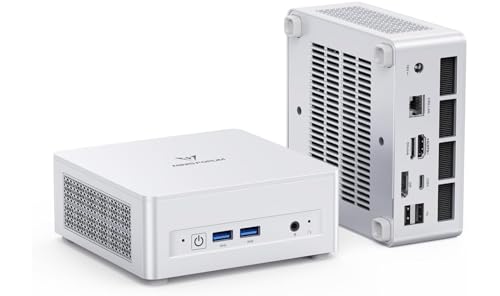
Where to buy
Check the latest price, availability and delivery on Amazon. Orders are placed on Amazon. We may earn a commission from qualifying purchases. Remember that every machine below is sold as a barebones kit — the case, board, processor and cooler, with empty memory slots, an empty drive bay and no operating system — so the finished computer always costs more than the sticker.
- Best overall barebones for a small space: MINISFORUM UM880 Plus Barebone, Ryzen 7 8845HS, No RAM / SSD / OS — Check on Amazon
- GMKtec NucBox K8 Plus, Ryzen 7 8845HS, Without RAM / SSD / OS — Check on Amazon
- MINISFORUM UM870 Slim Barebone, Ryzen 7 8745H, Without RAM / SSD / OS — Check on Amazon
- MINISFORUM UM790 Pro Barebones Version, Ryzen 9 7940HS, Without RAM and SSD — Check on Amazon
- MINISFORUM UM773 Lite Barebones, Ryzen 7 7735HS, No RAM No SSD — Check on Amazon
- ASUS NUC 14 Pro+ Barebone Kit, Intel Core Ultra 5 125H — Check on Amazon
Read the full guide ↓
Disclosure: As an Amazon Associate, reviewstook.com earns from qualifying purchases. Links to Amazon on this page are affiliate links; they cost you nothing extra. Listing details such as price and availability change often, so check the current Amazon listing before you buy.
Nobody shops for a mini PC by accident. If “small spaces” is in the title of the guide you are reading, your desk, shelf, dorm room or media cabinet has already ruled out a tower — and on that first question, all six machines below give the same answer. A barebones mini PC trades the tower for a palm-class box, and the kits here differ by centimetres rather than categories, so this guide refuses to rank boxes by size. It grades what genuinely decides whether a small computer lives well in a small room: where the power brick sleeps, which face the ports sit on and therefore which way the cables fall, how much air the vents need, how much noise the fans make in a room that may also be your bedroom, and — the quiet one — which of these “small” machines plans to grow a second, larger box later, in the shape of an external GPU dock.
Two honesty rules govern everything that follows. The first is the category definition. Barebones means the box turns up empty where it counts: no RAM, no SSD, no operating system. The listing price buys the case, board, processor, cooler and power supply — a starting point, not a computer — so every pick below is graded on its finished cost, never its sticker. The second rule covers the space claims themselves. Mini PC listings play fast and loose with physical details, and the research behind this guide documents very few hard dimensions — so where a figure is not documented, this guide prints none. Placement is graded on what is genuinely known: chassis class, documented port layouts, and confirmed chassis details such as a toolless shell or a removable lid. When an exact footprint decides your order, the five-step routine in the How to Choose section makes the live listing’s own product-information block your measuring source — the number you can hold the seller to.
Why grade space this carefully for machines that are all small? Because small rooms punish the accessories, not the computer. What may not fit is the brick that needs a home, the cables that leave the wrong face and arc across the surface you were trying to clear, the intake vent pressed flat against a cabinet wall, the fan that is unremarkable in an office and intolerable two metres from a pillow, and the eGPU dock that shows up a year later with a power supply of its own and doubles the installation.
The Space You Cannot See on the Spec Sheet
The brick. Most machines of this class draw power from an external brick rather than an internal supply — the UM880 Plus below ships with an external 120W brick, the single physical annoyance of an otherwise tidy installation. A brick is small, but it is never nothing: it wants a surface, a cable run to the wall, and enough air not to stew in a cable basket. Give it an address in advance — floor tray, monitor shelf, ventilated cable box — and where a listing does not state its power arrangement, treat that as a question for the live page, not a surprise for delivery day.
The second box. Two picks below carry an OCuLink port, the connector that hooks a desktop graphics card into an external dock. As an upgrade path, it is superb. As a space claim, it deserves an asterisk the size of the dock itself: an eGPU enclosure is a second computer-sized object, with its own supply and its own cable, and a setup containing one is no longer tiny — it is a small tower in two pieces. If the footprint is the whole point, buy the integrated graphics you truly need and hold OCuLink as insurance; if the dock is definitely coming, measure for both boxes today.
Cable direction. Ports are placement. A machine that keeps its display and network sockets on the rear face drops every cable straight down behind the desk. A machine with a connector on the front that you use often — the K8 Plus below puts its OCuLink socket on the front panel — invites a cable to live across the front of your setup. Neither layout is wrong; on a shallow desk, though, the gap between cables falling behind the machine and cables looping around it is the gap between a clear surface and a cluttered one.
Air and noise. A tiny enclosure cools itself with tiny fans, and tiny fans work audibly harder than large ones. One pick below is documented to turn audible in its high-power mode; read that as a room question — in a studio flat, the desk stands in the bedroom. Small machines also get pushed into small holes — a media cabinet, a bookshelf cubby, the slot behind a monitor — and each of those starves the intakes. The rule is unglamorous and absolute: no hand’s width of clearance around the vents, no installation — whatever the dimensions claim.
In this guide
Quick Picks
Short on time? Each row names a buyer type and the kit that suits it. Every listing here is the empty box — RAM, SSD and OS are extra on all six; check price on Amazon — and the placement notes are the reason each machine earned its row.
| Buyer type | Pick | Why it stands out | Link |
|---|---|---|---|
| Best overall barebones for a small space | MINISFORUM UM880 Plus Barebone, Ryzen 7 8845HS | 780M graphics, dual M.2 slots, OCuLink held in reserve — check price on Amazon | Check on Amazon |
| Best for ports and networking in one box | GMKtec NucBox K8 Plus, Ryzen 7 8845HS (No RAM / SSD / OS) | Dual 2.5G LAN, dual USB4, front OCuLink, easy-open top panel | Check on Amazon |
| Best value 780M barebone | MINISFORUM UM870 Slim Barebone, Ryzen 7 8745H | The Slim chassis class with 780M graphics — check price on Amazon | Check on Amazon |
| Best CPU headroom | MINISFORUM UM790 Pro Barebones, Ryzen 9 7940HS | Flagship 5.2GHz chip, dual HDMI and dual USB4, offered through marketplace sellers — check price on Amazon | Check on Amazon |
| Best budget previous-generation pick | MINISFORUM UM773 Lite Barebones, Ryzen 7 7735HS | Radeon 680M platform at the entry end of this guide — the most affordable way in; check price on Amazon | Check on Amazon |
| Best warranty and business support | ASUS NUC 14 Pro+ Barebone Kit, Core Ultra 5 125H | Documented 5×4-inch aluminium chassis, three-year warranty — buy only at its low | Check on Amazon |
How These Picks Were Chosen
The first filter was definitional, and it cut most of the famous names in mini PCs. To belong here, a machine’s Amazon listing had to be a genuine barebones configuration — memory, storage and OS all absent — whether as a standalone listing or a clearly labelled barebone variant. Beelink’s SER8 shows why: an excellent machine whose Amazon listings are complete configurations, with no clean barebone listing to link, so it is absent. Where a model sells both ways, as several GMKtec and MINISFORUM machines do, we linked the barebone listing under its own ASIN, because the two versions sit on different listings at different prices, and mixing them up is how buyers end up staring at an empty box they did not expect.
The platform filter came next. Every pick accepts socketed DDR5 SO-DIMM memory across two slots, serviceable with a screwdriver, plus at least one M.2 2280 NVMe slot. Soldered-LPDDR5 machines failed this test even when their processors were newer, because a barebone whose priciest component is fixed at the factory is not meaningfully a barebone at all. That single decision explains the guide’s shape: Ryzen 7000/8000 machines throughout, rather than the newer Ryzen AI boxes whose memory is soldered.
Fit with this guide’s budget was the third filter. Each pick belongs in an under-$500 guide — and where a machine reaches the budget only at the low end of its range, the ASUS NUC at the foot of this guide being the case in point, the review says so plainly and treats it as a conditional buy. This market moves violently, and listing prices swing hard over time, so check the current price on Amazon on any listing before ordering.
The fourth filter belongs to this variant: placement evidence. The small-spaces grading rests only on what the underlying research documents — the ASUS kit’s 5×4-inch chassis class, the UM880 Plus’s external 120W brick, the K8 Plus’s front-panel OCuLink and removable top, and each machine’s documented port layout. For any pick where the research records no dimension, weight, mounting pattern or noise figure, this guide claims none and grades by class and layout instead. A final note on method: we did not use these machines ourselves; the guide is built from maker listings, specification pages, manuals and independent reviews, and where a listing’s own copy stays vague about exactly which slots are fitted, the review marks what is confirmed and what to check on the live page.
The Completion Maths: What a Barebones PC Really Costs
Each review below weighs the finished cost, and this section shows the reasoning so you can redo it against live prices — check price on Amazon for the box and the parts alike. Completing a barebone takes four things the box leaves out: memory, a drive, an operating system, and roughly twenty minutes with a screwdriver. Only the screwdriver is free — and for a small-space budget the arithmetic matters twice, because money spent finishing the machine is money not spent on the desk setup.
Memory is the expensive problem of 2026. All six picks run on DDR5 SO-DIMM laptop memory, and DDR5 prices have climbed steeply since late 2025 — memory alone can dominate a finished build’s cost. Pair two 16GB sticks — the 32GB dual-channel setup these graphics chips need to perform properly — add a 1TB NVMe drive, and a barebone completed from new parts can end up costing more than the complete version of the same machine carrying identical memory and storage. Nobody is obliged to complete a machine at that level: one 16GB stick beside a 512GB drive is the sensible floor, and parts already sitting in a drawer cost nothing. Even so, any completion built from new retail DDR5 in this market starts from a painful baseline. For comparability, the reviews use one consistent basket — 32GB (2×16GB) of DDR5 plus a 1TB PCIe 4.0 NVMe drive, checked at current prices — described in qualitative terms wherever it appears.
DDR4 owners get a direct answer. Earlier barebone platforms — Intel’s NUC 13 Pro kits, Ryzen 5000 mini PCs — take DDR4 SO-DIMMs, which cost far less than DDR5 and already sit in many dead laptops. Those sticks fit nothing in this guide: the two generations are keyed differently and refuse each other in both directions, which routes DDR4 owners toward previous-generation kits instead. The UM773 Lite keeps a foot in that world — a DDR5 machine, but a previous-generation one positioned at the budget end of this guide.
The operating system is the quiet third line item. Windows is included with none of these machines. The choices are a retail licence bought separately, an eligible licence transferred within Microsoft’s terms, or Linux — free, and excellent on every processor here; for a home server, emulation box or Steam library machine, Linux can be the plan rather than the compromise. What you cannot do is expect the box to arrive with Windows waiting: it will wake to a BIOS screen and wait for you. Cost the OS before setting a barebone against a complete machine, because complete machines fold the licence into what you pay for them.
The 6 Best Barebones Mini PCs for Small Spaces Under $500
MINISFORUM UM880 Plus Barebone, Ryzen 7 8845HS (No RAM / SSD / OS)
Who it suits: Small-desk buyers who already hold DDR5 SO-DIMMs and an NVMe drive, and who want the fullest modern platform in the guide — the strongest integrated graphics here, two of every slot that matters, and an eGPU port kept in reserve rather than in use.
As furniture, the UM880 Plus asks for almost nothing: one palm-class box on the desk and a single cable run to the wall. Inside sits a Ryzen 7 8845HS — eight Zen 4 cores and sixteen threads boosting to 5.1GHz — paired with the Radeon 780M, twelve RDNA 3 graphics cores that still set the integrated-gaming benchmark once dual-channel memory feeds them. The surrounding platform is the most complete here: two DDR5 SO-DIMM slots rated to 96GB, two M.2 2280 PCIe 4.0 drive slots, USB4, HDMI and DisplayPort outputs, 2.5G Ethernet and Wi-Fi 6E. The listing to buy is titled “Barebone Version Without RAM / SSD / OS” — check the current price on Amazon — and the title means precisely what it says.
Its space grading carries one debit and one credit. The debit is documented and specific: power comes from an external 120W brick, and that brick needs hiding behind the desk, as it does for most machines of this class. Give it a planned home — a floor tray, the back of a monitor shelf — rather than the strip of desk the mini PC just freed. The credit is the OCuLink port, graded in both directions: today it consumes no space whatsoever and stands as the fastest route to a desktop graphics card later; the day it is used, though, the dock it feeds becomes a second box with a power supply of its own, and the one-box setup ends.
Completed from new parts, the documented build — this box plus a 32GB DDR5 kit and a 1TB NVMe drive — ends up costing more in total than the complete UM880 Plus with the same memory and storage installed. Buying every part new therefore points at the complete machine. The barebone wins when the parts are already yours: the finished computer then costs the box alone — check price on Amazon — while staying highly expandable. It also wins for the configuration the complete range simply does not sell — 64GB or 96GB of memory, or a 4TB drive — where picking your own parts is the entire purpose.
- Radeon 780M graphics — the strongest integrated GPU here, properly fed by dual-channel DDR5.
- Two SO-DIMM slots (to 96GB) and two M.2 PCIe 4.0 slots: nothing soldered, nothing sealed away.
- OCuLink alongside USB4 — two distinct eGPU routes for the day integrated graphics fall short.
Honest limitation: Completed with new RAM and an SSD bought at current retail prices, it can cost more than the complete version of the same machine — in cost terms, this pick belongs to buyers who already own the parts or need a configuration the complete range omits.
Choose it if your parts shelf is stocked, or you want 64GB+ of memory inside one small box with an eGPU port in reserve. Skip it if memory and storage would be bought new at retail — take the complete UM880 Plus instead.

GMKtec NucBox K8 Plus, Ryzen 7 8845HS (Without RAM / SSD / OS)
Who it suits: Tinkerers and homelab buyers in tight quarters who prize ports and networking above all — dual 2.5G Ethernet, dual USB4, OCuLink — and accept a value brand’s thinner support as the price of connectivity no rival here matches.
Chip for chip, the K8 Plus mirrors the UM880 Plus: the same Ryzen 7 8845HS, the same Radeon 780M, the same pair of DDR5-5600 SO-DIMM slots good for 96GB, the same twin M.2 2280 PCIe 4.0 slots. Where it pulls ahead is connection, and the port layout writes its small-space story. The OCuLink socket sits on the front panel, ready for an external GPU; around the back wait two USB4 ports, HDMI 2.1 and DisplayPort 2.1 driving up to four displays, and two 2.5-gigabit Ethernet ports. Read that as furniture: cables you connect once fall behind the machine, while the connector meant for occasional docking faces forward, where a dock cable will cross the desk on the days it is used. The removable top panel is the other placement virtue, since memory and drive swaps stay easy — upgrading in place beats excavating a buried machine. The barebone listing, titled “Without RAM / SSD / OS” and meaning it, is on Amazon — check the current price on Amazon before judging it, because its pricing moves around a great deal.
Completion follows the shape of the pick above: the standard basket of 32GB DDR5 and a 1TB NVMe drive puts the finished K8 Plus well above the cost of the box alone, while complete configurations have appeared across a wild range as memory costs moved — with this listing, timing is a feature, so check price on Amazon on the day you buy. Two room-level caveats close the review. Reviewers consistently report the fans turning audible in Performance mode for modest gains, so in a one-room home the balanced mode is the civilised setting. And cover runs to one year, where the ASUS kit closing this guide offers three.
- Dual 2.5G Ethernet with dual USB4 — connectivity no other pick here equals, for gaming or homelab duty.
- Front-panel OCuLink for a later GPU dock, while display and network cables stay at the rear.
- A top panel that lifts off — the simplest memory and drive access in the guide.
Honest limitation: One year of warranty and fans that speak up in Performance mode, from a brand whose support runs thinner than the big names — plus a listing price that swings hard over time.
Choose it if dual LAN, dual USB4 or the front OCuLink socket answers a problem the UM880 Plus leaves open. Skip it if a single Ethernet port suffices — the pick above gives you the identical chip in a simpler package.

MINISFORUM UM870 Slim Barebone, Ryzen 7 8745H (Without RAM / SSD / OS)
Who it suits: Value hunters whose space is tight enough for the slimmer chassis class to matter, who want Radeon 780M graphics on a current platform at the value end of this guide — and who have no intention of ever docking an external GPU.
The UM870 Slim is the value route to a 780M barebone on Amazon, positioned toward the lower end of this guide — check the current price on Amazon. Its name makes its space claim, too: this is the Slim variant of MINISFORUM’s current platform, built for buyers who want the smaller box on the desk. This guide prints no dimensions for it, because the research behind it documents none; if the exact footprint decides your purchase, measure from the live listing’s product-information block, using the routine in the How to Choose section. The processor is the Ryzen 7 8745H — the same eight-core Zen 4 design and the same 780M graphics as the 8845HS above, clocked a shade lower at 4.9GHz boost and lacking the Ryzen AI NPU, a difference that touches a short list of AI-accelerated Windows features and practically nobody’s game library. Around it: two DDR5 SO-DIMM slots (48GB apiece, 96GB in total), two M.2 2280 PCIe 4.0 slots per MINISFORUM’s own store specification, HDMI 2.1, DisplayPort and USB4 outputs rated for 8K@60Hz on a single display, 2.5G Ethernet, Wi-Fi 6E, and auto power-on — a minor feature home-server buyers value out of proportion, because a hidden machine can wake itself after an outage.
The sacrifice against the UM880 Plus is the OCuLink port: with no dedicated eGPU connector, the 780M is the graphics ceiling, and USB4 docks remain as the slower, pricier fallback. In pure space terms the trade looks better than it sounds — the dock was never going to be small — and for the great majority of buyers, who never purchase an eGPU dock at all, the Slim also tends to work out as the most affordable finished build among the 780M machines once the standard basket is added, while salvaged parts turn it into a finished computer with flagship integrated graphics for the cost of the box alone. One verification note: MINISFORUM sells this model through several near-identical Amazon listings whose copy disagrees about whether one SSD slot or two is fitted. The maker’s store page specifies dual M.2 slots, but if a second drive figures in your plan, confirm the count on the live listing before ordering.
- Positioned at the lower end of this guide for a 780M barebone — check price on Amazon.
- The Slim chassis class of the current platform — the smaller-box route among the 780M picks.
- Positioned consistently at the value end of this market, plus auto power-on for hidden or server-style installs.
Honest limitation: No OCuLink port means no clean eGPU path — the 780M opens and closes this machine’s graphics story.
Choose it if you want the 780M platform as cheaply and compactly as it comes, with no external GPU in your future. Skip it if an eGPU dock features in your plans — that is the UM880 Plus or the K8 Plus.

MINISFORUM UM790 Pro Barebones Version, Ryzen 9 7940HS (Without RAM and SSD)
Who it suits: Buyers running a multi-screen desk inside a small room — this is the four-display pick — who want the fastest CPU in the guide and are comfortable buying through a marketplace seller rather than a factory storefront.
The UM790 Pro defined this class when it launched: a Ryzen 9 7940HS whose eight Zen 4 cores boost to 5.2GHz, the highest clocks here, alongside the same Radeon 780M graphics as the 8845HS machines, two DDR5 SO-DIMM slots, two M.2 PCIe 4.0 slots, and a port selection organised around screens — two HDMI sockets and two USB4 ports, feeding four displays — plus 2.5G Ethernet, Wi-Fi 6E and Bluetooth 5.3. Four displays driven by one palm-class box is how a cramped desk acquires a big workstation’s screen area with no tower underneath; it is also four display cables converging on the back of a tiny machine, joined by power and network. On a shallow desk that bundle becomes the installation, so route it once — downward, with slack for the machine to slide out when upgrades call — or it will migrate across the workspace for good. The barebones listing, sold without RAM and SSD, is on Amazon — check the current price on Amazon — and with the standard basket its finished cost sits mid-pack in this guide: the strongest CPU here.
The caveats concern the listing rather than the machine, and they explain its fourth-place ranking. Its most attractive listings are third-party marketplace offers, not Amazon or factory-store ones: its pricing history varies widely, which makes a low listing an offer to catch instead of one to expect, with the seller behind it varying. The design is also the oldest in the guide’s top half, so its cooling and board design trail the UM870 and UM880 machines, and barebone stock drifts in and out. All of it demands care — vet the seller, confirm the listing still reads “Barebones Version Without RAM and SSD,” and weigh the live price against the UM870 Slim before committing, because if this listing has climbed toward the top of the budget the argument flips and the newer Slim’s begins.
- Ryzen 9 7940HS — the quickest processor in this guide, with 780M graphics to match the 8845HS picks.
- Dual HDMI with dual USB4: the strongest four-display support here, big-desk screens from a small box.
- Flagship silicon positioned in the middle of this guide’s range, whenever the marketplace cooperates — check price on Amazon.
Honest limitation: The attractive listings are marketplace offers on a machine whose pricing varies widely, so availability and seller quality fluctuate — and the design predates the UM870 and UM880 machines by a generation.
Choose it if you find the live listing comfortably inside this guide’s budget from a seller you trust, and CPU clocks or four displays drive your decision. Skip it if the live price has wandered toward the top of the budget — the UM870 Slim then offers the same graphics with less risk attached.

MINISFORUM UM773 Lite Barebones, Ryzen 7 7735HS (No RAM No SSD)
Who it suits: Budget builders in small spaces finishing a machine as cheaply as possible — a media corner, a dorm desk, a spare-room PC — particularly anyone whose parts basket is one modest DDR5 kit and a small SSD, gaming happily at the level the previous generation handles.
Every guide needs a floor, and here it is: a previous-generation barebone positioned at the bottom of this guide — the most affordable box here by a clear margin; check price on Amazon. The platform is the Ryzen 7 7735HS: eight Zen 3+ cores reaching 4.75GHz and Radeon 680M graphics. The 680M steps down genuinely from the 780M, with fewer graphics cores on an older architecture — roughly the gap between playing a demanding game at 1080p low with upscaling and not quite managing it — yet it remains a thoroughly capable integrated GPU: esports titles, indie games, older AAA releases and emulation all run well, and for desktop, media and home-server work the 7735HS gives little away to the Zen 4 chips. Its placement profile is the simplest in the guide: two HDMI outputs and a USB4 port cover a TV corner or a single-screen desk without a cable farm, while the barebones essentials stay intact — two DDR5 SO-DIMM slots (a DDR5-4800 platform, so the cheaper kits are the correct ones and DDR5-5600 kits simply run at the lower speed), a single M.2 SSD slot, and 2.5G Ethernet.
Completion is where the pick earns its place. A platform content with 16GB of DDR5-4800 and a 512GB drive is the one machine here that can be finished cheaply without salvaged parts being a fantasy — though “cheaply” is relative in the current memory market, and the parts basket deserves checking at live prices before the box is ordered, not after. It is also the natural home for a lone 16GB stick picked up when memory is favourably priced, the second slot waiting. Two warnings close it out. The listing is older and third-party-sold: stock is finite, the design dates from 2023, and when listings like this sell through they rarely return. And spare DDR4 fits even this budget pick nowhere; its platform is an older DDR4 kit such as the Intel NUC 13 Pro family.
- The most affordable barebone here — positioned at the entry end of this guide; check price on Amazon.
- Radeon 680M still covers esports, older AAA and emulation comfortably at 1080p.
- A simple two-HDMI placement profile — an easy fit for a TV corner or a single-screen desk.
Honest limitation: Previous-generation silicon with graphics a clear tier under the 780M picks, a single M.2 slot, and an ageing third-party listing whose stock will not last forever.
Choose it if the finished total outranks the graphics tier and your completion parts stay modest. Skip it if the 780M is what you came for — the UM870 Slim stands a generation ahead.

ASUS NUC 14 Pro+ Barebone Kit, Intel Core Ultra 5 125H
Who it suits: Buyers who want a barebone backed by a global brand’s warranty and support network — a machine for a relative’s small flat, a classroom, an office nook — and who have no need of AMD’s graphics.
The ASUS NUC line carries Intel’s NUC programme forward under ASUS manufacture, and the 14 Pro+ kit is a different species from the five gaming-leaning machines above it. Its space credentials are the best documented in this guide: an anodised aluminium chassis in the 5×4-inch class — the classic NUC footprint, a box that rests in a hand — opened without tools, and built around the Intel Core Ultra 5 125H, with fourteen cores, Intel Arc integrated graphics and an NPU for AI-accelerated tasks. Toolless access is a real small-space virtue: a machine that opens bare-handed can be upgraded on a crowded desk with no screwdriver hunt, and a non-technical owner can be talked through servicing it over the phone. The supporting cast runs to two DDR5-5600 SO-DIMM slots, an M.2 2280 slot beside a smaller M.2 2242 slot, dual Thunderbolt 4, Wi-Fi 6E, and a three-year warranty no other pick here matches. ASUS ships it honestly bare: no memory, no storage, no OS.
Its place in this guide is conditional, and the condition is price. The Amazon listing usually sits comfortably beyond this guide’s budget — check the current price on Amazon — yet at the low end of its range it can land inside it. Caught at that low during a sale, it becomes a defensible premium pick; bought at its usual above-budget level, it belongs to a different guide, and we would direct you to the UM880 Plus instead. Graphics form the second condition: the 125H’s Arc integrated graphics handle desktop work, media and light gaming capably, but they do not equal the Radeon 780M for games, and with no OCuLink port the eGPU route runs through Thunderbolt — slower, and carrying the same second-box space cost through a larger, pricier dock. Completed on the standard DDR5 basket, it is also the dearest finished machine here. What the premium purchases is the warranty, the chassis and the support network — worth a real premium to the buyers this kit targets, and very little to the buyers the other five picks target.
- A three-year warranty with ASUS support — double or triple the cover of every other pick.
- A documented 5×4-inch-class aluminium chassis with toolless access — upgrades with no toolkit.
- The Core Ultra 5 125H adds an NPU and strong single-core pace for office and creative work.
Honest limitation: It usually sits beyond this guide’s budget — only the low end of its range earns its place here — and its integrated graphics trail the Radeon 780M for gaming.
Choose it if a sale brings it within this guide’s under-$500 budget and warranty and support outrank gaming in your priorities. Skip it if it sits at its usual above-budget level, or games are the point — every AMD pick above it plays faster.

Comparison Table
| Product | Processor / Graphics | Space story | Best use | Link |
|---|---|---|---|---|
| MINISFORUM UM880 Plus Barebone | Ryzen 7 8845HS / Radeon 780M | One box plus an external 120W brick to hide; an OCuLink dock is a future second box | The complete modern platform, with OCuLink for later | Check on Amazon |
| GMKtec NucBox K8 Plus (No RAM / SSD / OS) | Ryzen 7 8845HS / Radeon 780M | Front OCuLink, rear display and network cables; the lid lifts for in-place upgrades | Dual LAN, dual USB4, homelab and gaming in one box | Check on Amazon |
| MINISFORUM UM870 Slim Barebone | Ryzen 7 8745H / Radeon 780M | The Slim chassis class; no eGPU port, so the single box stays the whole setup | 780M graphics at the value end of the guide | Check on Amazon |
| MINISFORUM UM790 Pro Barebones | Ryzen 9 7940HS / Radeon 780M | A four-display cable bundle from one small box — route it once, downward | Fastest CPU here, four-display port selection | Check on Amazon |
| MINISFORUM UM773 Lite Barebones | Ryzen 7 7735HS / Radeon 680M | The simplest placement: two HDMI and USB4, one M.2 slot, no dock ambitions | Cheapest finished build in the guide | Check on Amazon |
| ASUS NUC 14 Pro+ Barebone Kit | Core Ultra 5 125H / Intel Arc | Documented 5×4-inch-class aluminium chassis, opened without tools | Warranty, support and business deployment | Check on Amazon |
How to Choose a Barebones Mini PC for a Small Space
Run this five-step routine before ordering anything. It takes ten minutes, a tape measure and the live listing of the machine you are considering — and it exists because “will it fit?” deserves a measurement, not a vibe.
- Step 1 — Measure the spot itself. Note the usable depth and width of the exact place: shelf, cubby, desk corner, TV stand. Every pick here is a palm-class box, so the machine will fit; the measurement decides what remains around it for air and cables.
- Step 2 — Reserve the breathing room. From that spot, subtract a hand’s width of clearance around the sides and top where the vents live. Small enclosures shed heat through small fans, and a box sealed into a closed cabinet or wedged between books will throttle, grow loud, or both.
- Step 3 — Give the brick an address. Most machines of this class run from an external brick; the UM880 Plus’s unit is a documented 120W. Decide where yours will live — floor tray, ventilated cable box, behind the monitor — and confirm the power arrangement on the live listing before ordering. A planned brick disappears; an unplanned one owns the desk.
- Step 4 — Walk the cable drop. Using the pick’s documented port layout, trace every cable before it exists. Displays and network should leave the rear face and fall straight down; anything front-facing that sees daily use — the K8 Plus’s OCuLink socket, a permanent USB device — will cross the front of the setup. Count the bundle honestly, remembering that a four-display machine like the UM790 Pro brings four display cables to one small box, and leave slack so the machine can slide out for its memory and drive fitting without unplugging the world.
- Step 5 — Only then order, parts included. A barebone arrives unusable, so its memory pair, its SSD and its OS plan should arrive with it or already be on your shelf. Inventory that shelf first: DDR5 SO-DIMMs and an M.2 2280 NVMe drive turn any pick here into a bargain, while DDR4 sticks and 2.5-inch SATA drives fit none of them. An empty shelf changes the maths — price the completion at live rates and set it against the complete version of the same machine, because in the present memory market the finished machine frequently wins.
Three shorter rules ride with the routine. Memory goes in pairs: integrated graphics draw on system memory, and one stick halves the bandwidth the Radeon 780M and 680M rely on, so two matched SO-DIMMs in dual channel count as the specification rather than an upgrade. Decide the eGPU question in space terms: a dock is a second box with its own supply — if it is genuinely coming, measure for it now and pick the UM880 Plus or the K8 Plus; if not, the UM870 Slim’s missing port costs nothing. Treat warranty as a line item: one year from the value brands, three from ASUS — a modest spec on your own desk, possibly the deciding one for a machine bound for a relative or an office.
When a Barebone Is the Wrong Kind of Small
A barebone is the right small computer for three buyers: the one who already owns DDR5 SO-DIMMs and an NVMe drive, the one harvesting those parts from a dead laptop or an older mini PC, and the one chasing a configuration no complete machine sells — 64GB of memory, a 4TB drive — while accepting the premium. Everyone else is usually better served by a finished machine, which in a small space holds a specific virtue: it arrives complete, OS licensed, warranty covering the whole box — one purchase to measure, place and plug in. If that is your situation, see Best Mini PC Under $500 and, for gaming-first small desks, Best Mini Gaming PC Under $500. Rooms that can stretch to a compact tower should also see Best Compact Gaming PC Under $500 and Best Small Form Factor Gaming PC Under $500, where the trade runs the other way. The barebone’s honest counter-offer is control: your memory kit, your drive, your upgrade path, inside the smallest box that can hold them.
Common Buying Mistakes
- Measuring the box and forgetting the installation around it — the brick, the cable bundle and the ventilation clearance form the real footprint.
- Sealing a mini PC inside a closed cabinet or a snug cubby, where starved vents make it throttle and turn loud in precisely the room least able to tolerate noise.
- Counting an OCuLink dock as “still a small PC,” when the dock is a second box with its own power supply and the setup’s footprint doubles on arrival.
- Mistaking the barebone sticker for the computer’s price, when memory, storage and an operating system still have to be added on top before it can run at all.
- Ordering DDR4 for a DDR5 platform, or the reverse — the SO-DIMM generations are keyed apart physically and will neither fit nor function.
- Fitting one memory stick in an integrated-graphics machine, then judging the graphics on the outcome; single-channel memory can strip the Radeon 780M of much of its frame rate.
- Expecting Windows to be included because a processor sounds “Windows-ready” — barebone means no OS, and a listing’s “Without RAM / SSD / OS” is a complete sentence rather than marketing texture.
- Landing on the wrong listing, since complete and barebone versions of the UM880 Plus, K8 Plus and UM870 Slim circulate as separate listings with near-identical names and photographs — a miraculous price usually marks the empty one.
- Paying the ASUS kit’s usual above-budget price inside an under-$500 guide, when it is a fine kit in the wrong budget and only the low end of its range is the version that belongs here.
- Discarding the M.2 screw, any mounting hardware from the box, or the packaging itself — the screw is tiny, specific and supplied exactly once, and the rest is your return ticket if a part refuses to train.
Final Recommendation
- Most small-space barebones buyers (parts already owned): MINISFORUM UM880 Plus Barebone.
- Cheapest finished 780M build, one box only: MINISFORUM UM870 Slim Barebone.
- Homelab, dual LAN, maximum ports: GMKtec NucBox K8 Plus.
- Four displays from one small box: MINISFORUM UM790 Pro Barebones.
- Tightest total budget: MINISFORUM UM773 Lite Barebones.
- Warranty and business support, on sale only: ASUS NUC 14 Pro+ Barebone Kit.
Our top two are the UM880 Plus — for buyers whose parts shelf turns its box into a finished, flagship-integrated-graphics computer with an eGPU port held in reserve — and the UM870 Slim, which delivers the same Radeon 780M in the slimmer chassis class and never tempts anyone with a second box. Begin either build by setting the completion maths against live parts prices — check price on Amazon — and if the complete version comes out cheaper, buy it with our blessing; Best Mini PC Under $500 and Best Mini Gaming PC Under $500 cover those machines. First-time builders should also read Best Barebones Mini PC For Beginners Under $500, anyone streaming from a small room Best Barebones Mini PC For Streaming Under $500, and anyone stretching the box budget toward a stronger platform should compare Best Barebones Mini PC Under $700 before ordering. Whichever route you take: measure the spot, plan the brick, walk the cables — then check the live price and order.
Frequently Asked Questions
What exactly is missing from a barebones mini PC?
Memory, storage and the operating system. The box holds the processor, motherboard, case, cooling and power supply or brick, with a wireless card fitted on most models here. Add DDR5 SO-DIMM memory, an M.2 NVMe SSD and an OS — Windows under a licence you supply, or Linux free — and the machine stands complete. Keyboard, mouse and display are assumed, as with any desktop.
How much space does a barebones mini PC actually take up?
The box itself is palm-class — the ASUS kit in this guide is documented in the 5×4-inch chassis class — but the honest footprint is the whole installation: the box, its power brick, its cable bundle and a hand’s width of air around its vents. This guide deliberately prints no dimension the underlying research fails to document; for a specific pick’s exact footprint, measure from the live listing’s product-information block, following the routine in the How to Choose section.
Can I mount one of these behind a monitor or on a wall?
The research behind this guide documents no mounting support for any pick, so treat it as unconfirmed rather than included. Before planning a behind-the-monitor installation, check the live listing for a stated VESA bracket or mounting kit; if the listing stays silent, assume the machine lives on a surface. Never plan a hidden installation around a mount you have not seen in writing — and wherever it ends up, keep the ventilation rule: hidden is fine, sealed is not.
Is a barebones mini PC actually cheaper than a complete one?
Only when the parts are already yours, or the configuration you need is one complete machines do not sell. Assembled entirely from new parts, this guide’s documented example — the UM880 Plus barebone — ended up costing more completed than the complete version carrying the same 32GB and 1TB, because current DDR5 pricing drives the result. Run the sums at live prices for your own configuration — check price on Amazon for the box, the memory and the drive — before assuming the barebone saves anything.
Can I use the DDR4 RAM from my old laptop?
In nothing in this guide. All six picks are DDR5 platforms, and the two SO-DIMM generations are keyed differently at the physical level — the stick will not even seat. DDR4 spares point toward previous-generation barebone kits built for DDR4-3200, the Intel NUC 13 Pro family among them.
Can these barebones mini PCs actually play games?
They can, at the level integrated graphics permit. The Radeon 780M machines (UM880 Plus, K8 Plus, UM870 Slim, UM790 Pro) run esports titles at high frame rates and older AAA games at 1080p under sensible settings; the 680M UM773 Lite steps down from there and leans harder on upscaling. None replaces a discrete graphics card for current AAA games at high settings, which is what makes the OCuLink port on the top two picks matter — subject to the space caveat this guide keeps repeating, that the dock it enables is a second box.
How hard is it to complete a barebones mini PC?
It is the gentlest build in computing. Open the case — the ASUS kit needs no tools, the K8 Plus lifts a panel — click two SO-DIMMs into their slots, seat the M.2 SSD beneath its single screw, close up, and install an OS from a USB stick prepared in advance. Twenty minutes is typical, most of it the OS install. The one real skill is a single BIOS check confirming the machine sees all the memory and the drive you fitted — and for a small space, in-place upgradeability is the point: the machine never has to leave its spot to grow.
- Best Barebones Mini PC Under $400
- Best Barebones Mini PC Under $700
- Best Barebones Mini PC For Beginners Under $500
- Best Barebones Mini PC For Streaming Under $500
- Best Barebones Mini PC For 1440p Gaming Under $500
- Best Barebones Mini PC For Small Spaces Under $400
- Best Barebones Mini PC For Small Spaces Under $700
- Best Mini PC Under $500
- Best Mini Gaming PC Under $500
- Best Compact Gaming PC Under $500


