Where to buy
Check the latest price, availability and delivery on Amazon. Orders are placed on Amazon. We may earn a commission from qualifying purchases. Every product below is a barebones kit: the price covers the case, board, processor and cooler only — no RAM, no SSD and no operating system unless a review says otherwise — so work out what the missing parts cost before comparing any figure here with a complete mini PC.
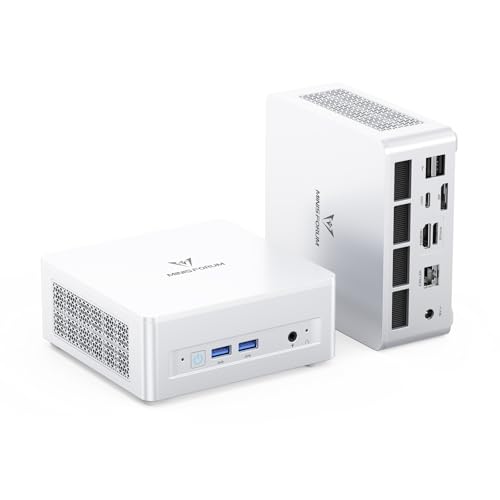
- Best overall barebones kit: MINISFORUM UM880 Plus Barebone, Ryzen 7 8845HS, Radeon 780M — Check on Amazon
- MINISFORUM UM870 Slim Barebone, Ryzen 7 8745H, Radeon 780M — Check on Amazon
- GMKtec NucBox K8 Plus, Ryzen 7 8845HS (Without RAM / SSD / OS) — Check on Amazon
- ASUS NUC 14 Essential Barebone Kit, Intel N150 — Check on Amazon
- ASUS NUC 14 Essential Barebone Kit, Intel Core 3 N355 — Check on Amazon
See 1 more Amazon option
- Intel NUC 11 NUC11PAHi5 Barebone, Core i5-1135G7, 0GB RAM / 0GB SSD — Check on Amazon
Read the full guide ↓
Disclosure: As an Amazon Associate, reviewstook.com earns from qualifying purchases. Links to Amazon on this page are affiliate links; they cost you nothing extra. Listing details such as price and availability change often, so check the current Amazon listing before you buy.
Start with the fact the listings print smallest: under $400 in this category buys an empty box with a processor soldered inside — not a computer that works. The memory slots stand empty, the drive bay stands empty, and no operating system greets you at first power-on. Until you fit RAM, an SSD and an OS yourself, the machine cannot boot, install or play a thing. That is not a defect to forgive; it is the definition of the product. Barebones kits exist for the buyer who already has DDR5 SO-DIMMs and a spare NVMe drive in a drawer, or who trusts their own parts choices more than a factory’s. If neither describes you, a complete mini PC is very likely the smarter purchase.
Now the space question, since it is why this variant exists. Every machine below is small — smallness is the entry ticket to the category, not a distinguishing feature — so the chassis alone is not what this page grades. What actually differs is the life around the box: which kit can bolt behind a monitor and leave the desk bare, where the power brick lives, how many cables spill off the desk’s rear, whether the thing can breathe in its planned nook, and whether its upgrade path smuggles in a second box later. One kit below documents a 0.56-litre chassis and a VESA mount in the box. For the rest, our research records no dimensions at all, so they are graded by class and documented port sets — never by invented millimetres, because a fabricated measurement is worse than none.
The money deserves the same bluntness: memory and storage bought new can easily outweigh the saving a barebone appears to offer, and a kit finished with new parts can end up costing more than the identical machine sold ready-built — check price on Amazon for both versions before assuming either route is cheaper. Read plainly: a barebone saves money in exactly one circumstance, when the parts are already yours. This guide is written for that reader, weighs the cost to finish beside every pick in qualitative terms, and then grades the six survivors on how gracefully they occupy a small room.
What the ceiling genuinely buys that reader is remarkable silicon. The leading three kits carry AMD’s Ryzen 7 8845HS or 8745H — eight Zen 4 cores with Radeon 780M graphics, the strongest integrated GPU in any mini PC — and with two DDR5 sticks running dual channel they handle esports and older AAA games at 1080p on low-to-medium settings. The ASUS pair trade that graphics muscle for the guide’s only documented disappearing act. The final pick is a legacy Intel NUC carrying its warning on the outside: a sound DDR4 platform that usually sits over this budget entirely, defensible only when its price dips — check the current price on Amazon before considering it.
In this guide
Quick Picks
Short on time? Each row pairs a space situation with the kit that fits it. Every pick is the empty kit — check price on Amazon for each one, and remember that finishing costs live in the reviews.
| Space situation | Pick | Why it stands out | Link |
|---|---|---|---|
| Best overall barebones kit | MINISFORUM UM880 Plus Barebone, Ryzen 7 8845HS | Strongest iGPU class, two DDR5 slots, two M.2 slots, USB4 and OCuLink | Check on Amazon |
| Slimmest 780M box | MINISFORUM UM870 Slim Barebone, Ryzen 7 8745H | The range’s slim-class chassis around the same Radeon 780M graphics, for less money | Check on Amazon |
| Most cables, most displays | GMKtec NucBox K8 Plus, Ryzen 7 8845HS | Dual 2.5G LAN, two USB4 ports and a maker-claimed four-display output — at the budget’s very top | Check on Amazon |
| Must vanish behind a monitor | ASUS NUC 14 Essential Barebone Kit, Intel N150 | Documented 0.56L chassis, VESA mount included, positioned at the lower end of this budget — check price on Amazon | Check on Amazon |
| Same vanishing act, more cores | ASUS NUC 14 Essential Barebone Kit, Intel Core 3 N355 | Eight cores inside the identical 0.56L VESA-mountable chassis | Check on Amazon |
| Best legacy DDR4 wildcard | Intel NUC 11 NUC11PAHi5 Barebone, Core i5-1135G7 | Thunderbolt 3, four displays and cheap DDR4 parts — only on a price dip | Check on Amazon |
How These Picks Were Chosen
Filter one was the definition of the product itself. To qualify, a kit had to ship as a true barebone: case, board, processor and cooling, with empty memory slots, an empty drive bay and no operating system installed. Finished mini PCs that Amazon’s search surfaces under barebones keywords were rejected at any price, and so were listings that wear the label while arriving with memory fitted. If a listing’s own title or spec table does not declare the slots empty, it never made the list.
Filter two was memory, and it eliminated more famous names than anything else. A barebone’s whole value proposition is the parts you choose yourself, so preference went to kits with two socketed SO-DIMM slots: two slots permit dual-channel memory, and since an integrated GPU like the Radeon 780M owns no memory of its own, dual channel is roughly the gap between a gaming chip and a slideshow. Machines with soldered memory cannot be barebones in any honest sense and were excluded outright; single-slot kits appear only where the surrounding package earns the place, with the single-channel ceiling printed in the review rather than footnoted. Storage got the same treatment — at least one full-size M.2 2280 NVMe slot, a second slot or 2.5-inch bay scoring as a genuine plus.
Filter three was the cost to finish, judged qualitatively instead of by a single day’s figures. Memory and an NVMe drive bought new add a substantial amount on top of any kit here, and DDR5 in particular can change the value calculation entirely, so check the current price on Amazon for the kit, the memory and the drive on ordering day and compare the completed total with the same machine sold finished. Where a kit needs DDR4 memory, as the legacy Intel machine does, the same check applies — compare the parts you would need with what you already own rather than assuming the older standard settles the question.
Filter four belongs to this variant: space, graded strictly on documented evidence. Across six kits, the underlying research documents precisely one chassis volume — the ASUS pair’s 0.56 litres — and one in-box mounting solution, their VESA bracket. No dimensions, weights, VESA patterns or noise ratings are documented for the other four kits, so this page claims none for them; they are graded by class (slim-class chassis, standard mini-PC box) and by documented facts such as port sets and display counts. When an exact measurement will decide your purchase, the live listing’s product-information block is the authority. Prices, finally, vary between listings — the same kit can be offered differently under a near-identical listing from the same brand — so check the current price on Amazon and the variant selector before ordering.
What Actually Occupies Your Space
Six placement questions decide whether a small PC still feels small once installed; none appears in a headline specification, so this variant grades them explicitly.
Chassis class. The honest differences here are modest. The ASUS kits occupy the documented extreme at 0.56 litres — the smallest class in the guide. The UM870 Slim is designed and sold as the slim member of its family. The remaining three are standard mini-PC boxes: small enough for any desk, record-breakers none of them.
Mounting is the real space feature. A computer screwed behind a monitor takes up no desk whatsoever, and only the two ASUS kits document that option — their VESA mount ships in the box. No mount is documented for the other four kits, so plan on them standing on a desk or shelf unless the live listing for the exact ASIN says more. A bracket you supply can hide any of them, but furniture you buy is not a feature we can credit to a kit.
The power brick needs an address. Each kit here runs from an external adapter — a second physical object with its own bulk, warmth and cable. It wants ventilation, not a drawer or a sealed cable box shared with other bricks, and its lead length fixes how far the PC may sit from the wall socket. In a small setup it is frequently the harder placement problem.
Cables and ports. A mini PC’s desk footprint is tiny; its cable footprint is not. Power, one display lead per screen, Ethernet if you wire it, and whatever permanently occupies the USB ports all leave the back or sides, each needing slack and a route downward. Which sockets face front and which face back is not documented in our research, so study the listing photographs before committing to a tight alcove — a box flush against a shelf back can render its rear ports unreachable.
Airflow is a placement rule, not a specification. Small enclosures shed heat through small vents, and every kit here needs intake and exhaust left clear: no sealed cabinets, nothing stacked on top, and clearance at the vented sides — a hand’s width makes a workable minimum, more is better. Bolting a PC behind a monitor trades desk space for a warmer neighbourhood — it lives in the panel’s exhaust zone — which suits the light-duty ASUS kits and deserves a second thought before a hard-working 780M box goes in the same spot. A kit that throttles inside a cupboard is not a small PC — it is a slow one.
The second-box problem. The usual way a tidy setup stops being tidy is a later addition. The UM880 Plus’s OCuLink port is a real upgrade path, and an external GPU dock is a desktop-sized second enclosure with its own power supply and cable, needing a home of its own. The UM870 Slim and K8 Plus reach external graphics through USB4 docks, with the identical physical consequence. External drives, hubs and monitor-arm hardware all count as well. None of this argues against buying the capability — it argues for counting tomorrow’s boxes before declaring today’s space problem solved.
The 6 Best Barebones Mini PCs for Small Spaces Under $400
MINISFORUM UM880 Plus Barebone — Ryzen 7 8845HS, Radeon 780M
Who it suits: The parts-drawer owner whose small room still has to do heavy work — two DDR5 SO-DIMMs and an NVMe drive already in hand, the class’s strongest integrated graphics wanted today, an external-GPU option kept open, and a shelf or clear desk run where a standard box can stand and breathe.
The silicon is a Ryzen 7 8845HS: eight Zen 4 cores, sixteen threads, boost to 5.1GHz, and Radeon 780M graphics from twelve RDNA 3 compute units — still the yardstick for mini-PC iGPUs. Around it sits the most expandable enclosure here. Memory is two socketed DDR5 SO-DIMM slots rated to 96GB: a matched pair gives the 780M the dual-channel bandwidth it depends on, while a lone stick halves your graphics performance. Storage is two M.2 2280 PCIe 4.0 slots, so boot drive and games drive both live inside the case — no enclosure colonising the desk. Ports run to HDMI, DisplayPort and USB4 video outputs, a 2.5G Ethernet port, and OCuLink for an external graphics dock.
No dimensions and no mounting option are documented for this kit in our research, so expect it to stand on desk or shelf with vents unobstructed, and pull the exact footprint from the live listing before measuring your spot. Its space virtues are internal — two drive bays keep storage growth inside the chassis, and the full port set means no USB hub moves in alongside. Its liability is the future: the OCuLink dock it invites is a second, desktop-scale box with its own power brick, so one-box tidiness expires the day you take that upgrade.
The finishing cost, stated plainly: check price on Amazon for this barebone, then price a matching DDR5 kit and an NVMe drive bought new and compare the completed total with the identical UM880 Plus sold ready-built. With new parts, the barebone route is often the expensive way to own this computer; with parts already in hand it becomes an accessible doorway into the best iGPU platform in the class. No operating system either way — budget for a retail Windows license, or install Linux and add nothing.
- Radeon 780M graphics on an 8845HS — the strongest integrated pairing in this guide.
- Two socketed DDR5 slots (to 96GB) plus two M.2 2280 PCIe 4.0 bays — growth stays inside the box.
- OCuLink alongside USB4 — a genuine eGPU path today, a second box on the desk tomorrow.
Honest limitation: Finished with new parts, this build can land above the same machine bought complete — the kit only pays when its memory and storage are already yours. And with no mount documented, it earns its place through tidiness rather than by vanishing.
Choose it if DDR5 SO-DIMMs and an NVMe drive are already in your drawer, you want maximum iGPU performance, and a vented shelf or clear desk run is available. Skip it if memory and storage would be bought new — price the finished UM880 Plus first — or if the machine must mount out of sight; that job belongs to the ASUS kits below.

MINISFORUM UM870 Slim Barebone — Ryzen 7 8745H, Radeon 780M
Who it suits: The same parts-drawer buyer as the UM880 Plus, in a tighter spot and without the eGPU ambition — content for the second M.2 slot, not a graphics dock, to be the expansion story.
Its processor is the Ryzen 7 8745H: the same eight Zen 4 cores and sixteen threads, boosting to 4.9GHz, driving the same Radeon 780M graphics as the flagship above. The differences live in the surroundings. Memory remains the correct arrangement — two socketed DDR5 SO-DIMM slots, so dual channel is on the table and the 780M can breathe — and storage is M.2 2280 PCIe 4.0, with the listing describing a further PCIe 4.0 slot for expansion. Video leaves through HDMI, DisplayPort and USB4; networking is a single 2.5G Ethernet port; dual-band Wi-Fi is built in. It is the same gaming heart in a tidier body with a shorter port list — and in a small room the shorter list counts, because built-in wireless makes the Ethernet drop optional.
The Slim name denotes a class, not a measurement: no dimensions and no VESA option are documented for this kit in our research. Grade it as the slimmest of the 780M boxes by design, verify the figures on the live listing, and plan a desk or shelf placement with vents breathing. What the profile costs is the OCuLink port; external graphics run through USB4 docks instead.
Positioning is the argument: check the current price on Amazon — this kit is habitually positioned a little below the UM880 Plus for identical graphics silicon. Finishing follows the family pattern: memory and a drive bought new add a substantial amount before any operating system, so compare the completed machine with a ready-built version live before judging the value. The Slim is a bargain precisely when its memory and drive are already owned. A variant warning, because it bites: this model also sells on Amazon as finished machines, so confirm the page you order from declares “barebone” and “without RAM/SSD/OS” in its title, as the linked listing does.
- The flagship’s Radeon 780M graphics in the family’s slim-class box, for less money.
- Two socketed DDR5 slots — dual channel available, memory fully replaceable.
- USB4, HDMI and DisplayPort outputs, 2.5G Ethernet and built-in Wi-Fi — wiring can stay minimal.
Honest limitation: No OCuLink port, so any external-GPU future runs through a USB4 dock and pays its bandwidth penalty — and the completion warning applies undiluted: when DDR5 memory and storage are bought new, a ready-built UM870 Slim is often the cheaper finished machine.
Choose it if the parts are already yours, your spot favours the slimmer profile, and you would rather not pay for ports you will never use. Skip it if an eGPU dock is a firm plan — that is the UM880 Plus above — or if memory would be bought new.

GMKtec NucBox K8 Plus — Ryzen 7 8845HS (Without RAM / SSD / OS)
Who it suits: The network-minded builder in a small room — home-lab and multi-monitor people — who wants 8845HS power with dual Ethernet and dual USB4, owns a vented shelf that can take a standard box, and can live with buying at this budget’s very ceiling.
The K8 Plus pairs the same Ryzen 7 8845HS and Radeon 780M as the UM880 Plus, then differentiates on the connection panel: two 2.5G Ethernet ports — a mini PC moonlighting as router, firewall or dual-network server is a genuine use case at this spec — two USB4 ports, HDMI 2.1 and DisplayPort, and a maker claim of up to four 4K displays. Memory is dual socketed DDR5 SO-DIMM in the same up-to-96GB class as its rivals, and storage is M.2 NVMe: the standard, correct layout. As a bare specification it is arguably the most complete box in the guide.
Its space story is a trade rather than a triumph. The chassis is unremarkable — no dimensions, no mount documented, so it stands on desk or shelf like the other standard boxes — but its connections are anything but. Two Ethernet leads, as many as four display cables on the maker’s claim, USB4 peripherals: of these six kits, this is the one most likely to turn a small desk into a cable waterfall, and the one that most rewards a planned cable route, a monitor arm, or a shelf with a drop behind it. Count the cables before counting the ports as a blessing.
The difficulty is where this kit sits in the budget. Check the current price on Amazon — the empty box alone can swallow the whole budget for this guide, and it often sits above this guide’s ceiling, only visiting it on dips. Finishing then adds memory and a drive bought new on top, before an operating system. The K8 Plus earns its place on its unmatched port layout — as a sale-watch pick, not a buy-any-day one. Set an alert, verify the listing still reads “Without RAM/SSD/OS” (the identical model sells finished as well), and only strike when the live price falls within this budget.
- Twin 2.5G Ethernet — the sole kit here able to anchor a home lab or software router.
- Two USB4 ports with HDMI 2.1 and DisplayPort; the maker claims up to four displays.
- The same 8845HS / 780M heart and dual-socket DDR5 layout as the top pick.
Honest limitation: The empty box alone can consume the entire budget for this guide, and it often sits above the ceiling — a dip-only purchase, so check the current price on Amazon before committing — and its lavish port panel hands a small desk the heaviest cable load in this guide.
Choose it if dual networking or several displays are your real requirement, DDR5 and an NVMe drive are already owned, and your space offers a shelf plus a cable route that can absorb it. Skip it if a single Ethernet port suffices — both MINISFORUM kits deliver identical graphics for less, with far fewer cables to hide.

ASUS NUC 14 Essential Barebone Kit — Intel N150
Who it suits: The buyer whose space problem admits no compromise — a monitor able to host a PC behind it, a kitchen counter, a media nook, a desk that must stay visibly empty — and who prizes a brand name and warranty structure over graphics, with this kit’s ceiling understood before money moves.
ASUS inherited Intel’s NUC line, and the NUC 14 Essential is its entry kit: a 0.56-litre chassis wrapped around the Intel N150, a four-core, four-thread chip built for desktops and documents rather than games. It is the one kit in this guide whose space claims are fully documented — the 0.56L volume is published, and a VESA mount is included in the box, letting the finished machine bolt behind a monitor and surrender no desk surface at all. The supporting kit is properly finished for the class: triple display support, a 2.5G Ethernet port, Wi-Fi 6E and Bluetooth 5.3. The barebone terms are exactly right — no RAM, no SSD, no OS — and its positioning is the friendliest on this page: check price on Amazon — it sits at the lower end of this budget.
Mounted, its space costs are the gentlest here as well: a short cable set — power, a single display lead, Ethernet only if you prefer it to the built-in Wi-Fi — the adapter tucked behind or beneath the desk, and the lightest workload in the guide generating the heat. No noise figure is documented for it, so none is claimed. It still needs air — behind a monitor is a warm neighbourhood, so keep the vents unobstructed and do not pin it flat against a wall.
Then the two structural problems, stated without varnish. First, memory: this board carries a single DDR5-4800 SO-DIMM slot, capped at 16GB, running single channel permanently. No second slot exists to grow into, and dual channel can never be had, which fixes memory capacity and integrated-graphics bandwidth for the machine’s life. Office work, browsing, 4K playback and light server duty tolerate that ceiling comfortably; gaming is why the kit sits fourth in a gaming-category guide. Second, the finishing cost — the starkest in the guide. The one DDR5 stick this kit requires, bought new, can rival the kit itself in cost, and an NVMe drive still has to be added on top, so a completed build can end up well above a finished N150 mini PC with the same memory and storage already fitted — check the current price on Amazon for the kit, the stick and the drive, and compare all three with a finished equivalent before buying. Own a DDR5 SO-DIMM and a small NVMe drive and this is a brand-name bargain at the lower end of the budget; own neither, and the finished boxes are not slightly cheaper — they are substantially cheaper once completed.
- Positioned at the lower end of this budget among the respectable kits here — check price on Amazon.
- Documented 0.56L chassis with a VESA mount in the box — the only pick that can truly leave the desk.
- 2.5G LAN, Wi-Fi 6E and triple displays keep the mounted setup’s cable count tiny.
Honest limitation: A single memory slot, 16GB ceiling, single channel for life — and, bought new, the one stick it requires can rival the kit itself in cost. This is a light-duty machine for office, media and server work, not a gaming PC.
Choose it if a spare DDR5 SO-DIMM and NVMe drive are already in hand and you want a branded box that disappears behind a screen. Skip it if gaming is the purpose, or the memory would be bought new — a finished N150 machine performs the same job for far less completed money once parts are counted.

ASUS NUC 14 Essential Barebone Kit — Intel Core 3 N355
Who it suits: The same disappear-it buyer as the N150 kit, carrying a busier workload — dozens of browser tabs, several office applications, a livelier home server — who wants extra cores inside the identical tiny chassis and accepts the shared memory ceiling with open eyes.
The step-up logic is simple because the chassis, the terms and the caveats all carry over unchanged: the same documented 0.56-litre enclosure, the same VESA mount in the box, the same triple-display support, 2.5G Ethernet and Wi-Fi 6E, and the same barebone deal — no RAM, no SSD, no operating system. Everything the N150 review says about mounting, cables and vent clearance holds here. The change is the processor: the Core 3 N355 doubles the count to eight cores and eight threads, a difference you genuinely feel in desktop responsiveness, browser-heavy work and small-server duty next to the four-core N150. Check the current price on Amazon — it is positioned noticeably above its sibling in this budget, reflecting the extra cores.
What refuses to change is the part that matters most: the memory design is a carbon copy — one DDR5-4800 SO-DIMM slot, 16GB maximum, single channel. Extra cores unlock neither dual channel nor a higher ceiling, and they do not convert this into a gaming kit. Its finishing maths is therefore the N150’s maths with a higher starting point: the same memory and drive, bought new, lift the completed total well above what finished equivalents typically command — check price on Amazon for the kit and the parts and compare before buying. The choice between the ASUS pair reduces to one question — are eight cores worth the step up for your workload? For a pure media box, no; for a working desktop or a server juggling several services, yes.
- Eight cores inside the identical documented 0.56L, VESA-mountable chassis as the N150 kit.
- The same tidy connectivity: 2.5G LAN, Wi-Fi 6E, triple display support.
- Watch for a dip — check the current price on Amazon, and on a dip the core upgrade can cost very little extra over its sibling.
Honest limitation: The single-slot, 16GB, single-channel memory ceiling survives untouched, so the cheaper kit’s gaming and memory limits apply in full — you are purchasing cores, not headroom. It also sits close in positioning to the Radeon 780M kits — check price on Amazon — far stronger all-round machines that simply cannot hide as well.
Choose it if your workload is CPU multitasking, the machine must mount out of sight, and the DDR5 stick and drive are already owned. Skip it if the real contest is this versus a 780M barebone at similar money and the desk can accept a standing box — for anything graphical, the AMD kits play in a different league.
Intel NUC 11 NUC11PAHi5 Barebone — Core i5-1135G7, 0GB / 0GB
Who it suits: Patient bargain-hunters with DDR4 in the drawer — buyers who specifically want the classic Intel NUC platform, Thunderbolt and a four-display desk in a compact classic chassis, and who will wait for this kit’s price to fall into the budget rather than pay its usual asking figure.
Some context, because this pick demands it: a legacy kit from the Intel era of the NUC line, built on the Core i5-1135G7 — four cores, eight threads, up to 4.20GHz, with Iris Xe integrated graphics. The platform’s attractions are genuine. Memory is two socketed DDR4 SO-DIMM slots, good for up to 64GB — DDR4’s status as the older, cheaper standard is precisely the point for a parts-drawer build — storage pairs an M.2 NVMe slot with a 2.5-inch SATA bay, and the port list runs to Thunderbolt 3, Wi-Fi 6 and support for four 4K displays. That 2.5-inch bay earns a space commendation of its own: a spare laptop drive can live inside the machine instead of inside a USB enclosure on the desk, the tidiest storage expansion in this guide. Completed, a NUC 11 remains a pleasant desk machine for office work, media and light creative tasks, its graphics a generation behind the 780M kits yet clearly above the N150/N355 boxes for older, lighter games. On mounting, discipline applies: our research documents neither a chassis volume nor an in-box mount for this kit, so grade it as a standard small box that stands on the desk unless the live listing for this exact ASIN tells you more.
The warning label, printed as large as this guide insists on: this kit normally sits above this guide’s budget. Check the current price on Amazon before anything else — it usually sits well above the under-$400 ceiling, with DDR4 memory and storage still to add on top. It sits in this guide for one reason only — it does, occasionally, dip, as old stock clears and third-party sellers compete, and a NUC11PAHi5 that falls within this budget is a legitimate buy for the DDR4-owning builder. Above this budget inside an under-$400 guide it is not a pick; it is a nostalgia purchase. Verify the exact variant — this ASIN is the true 0GB/0GB barebone, while the same model name sells pre-fitted as well — verify the seller, and hold your price line.
- Two socketed DDR4 SO-DIMM slots to 64GB — the cheapest memory standard to complete with.
- M.2 NVMe plus a 2.5-inch SATA bay — spare drives live inside the case, not on the desk.
- Thunderbolt 3 and Wi-Fi 6 alongside support for four 4K displays, from Intel’s proven NUC platform.
Honest limitation: It usually overshoots this guide’s budget by a wide margin — check the current price on Amazon — making it a dip-only, alert-setting purchase. The platform is also a generation old: no USB4, DDR4 in place of DDR5, and Iris Xe graphics trailing the Radeon 780M kits by a wide margin.
Choose it if you catch it within this budget while owning DDR4 SO-DIMMs and a spare drive — check the current price on Amazon first. Skip it if the live price sits above this budget — at that point the UM870 Slim and UM880 Plus are newer, faster and actually within budget.

Comparison Table
| Product | Processor / Graphics | Memory it takes | Space profile | Link |
|---|---|---|---|---|
| MINISFORUM UM880 Plus Barebone | Ryzen 7 8845HS / Radeon 780M | 2× DDR5 SO-DIMM, socketed, up to 96GB | Standard mini-PC box; no mount documented — desk or shelf, vents clear | Check on Amazon |
| MINISFORUM UM870 Slim Barebone | Ryzen 7 8745H / Radeon 780M | 2× DDR5 SO-DIMM, socketed | Slim-class chassis; no mount documented — the tidiest standing 780M box | Check on Amazon |
| GMKtec NucBox K8 Plus | Ryzen 7 8845HS / Radeon 780M | 2× DDR5 SO-DIMM, socketed, up to 96GB class | Standard box; heaviest cable load here — dual LAN, dual USB4, up to four displays | Check on Amazon |
| ASUS NUC 14 Essential (N150) | Intel N150 / Intel UHD | 1× DDR5-4800 SO-DIMM, max 16GB, single channel | Documented 0.56L; VESA mount in the box — can leave the desk entirely | Check on Amazon |
| ASUS NUC 14 Essential (Core 3 N355) | Intel Core 3 N355 / Intel UHD | 1× DDR5-4800 SO-DIMM, max 16GB, single channel | Documented 0.56L; VESA mount in the box — same vanishing act, more cores | Check on Amazon |
| Intel NUC 11 NUC11PAHi5 Barebone | Core i5-1135G7 / Iris Xe | 2× DDR4 SO-DIMM, socketed, up to 64GB | Standard small box; 2.5-inch bay keeps spare drives inside the case | Check on Amazon |
How to Choose a Barebones Mini PC for a Small Space
Work through these steps in order. Measuring comes before shopping, because in a small room the wrong order is how a supposedly tiny PC ends up exiled to the floor.
- Step 1 — Measure the spot, not the product. Note the shelf depth, desk run, or alcove’s width, depth and height. Then open the live listing of the kit you are considering and take its dimensions from the product-information block — for four of these six kits that listing is the only dimension source we can stand behind, and for the ASUS pair the documented figure is a 0.56-litre chassis. If the numbers fail to fit with room to spare, the kit does not fit, whatever its name implies.
- Step 2 — Reserve ventilation clearance. From the spot you measured, subtract breathing room: clearance at the vented sides and above the top panel, and no sealed doors. A hand’s width works as the minimum. If the spot is a closed cabinet or a backed media-unit cubby, plan to leave the door open in use, pick a light-duty ASUS kit, or pick a different spot — a throttled gaming kit serves nobody.
- Step 3 — Give the power brick an address. Every kit here runs from an external adapter. Decide where yours will live — floor tray, shelf behind, under-desk mount — somewhere ventilated, clear of soft furnishings, and within reach of both wall socket and PC. A plan in which the brick has no home is not yet a plan.
- Step 4 — Walk the cable drop. List every cable the finished setup needs: power, one display lead per screen, Ethernet if you are wiring it (the ASUS kits and the UM870 Slim carry built-in Wi-Fi, so the network cable is genuinely optional), keyboard and mouse (wireless deletes two runs), and any permanent USB devices. Check the listing photographs for which ports face front and back — placement is undocumented in our research — and confirm a box pushed home can still reach its own sockets. Only then order.
- Begin with your parts drawer, not the listings. A barebone discounts only parts you already own. Take stock of what you hold — DDR5 or DDR4 SO-DIMMs, an M.2 2280 drive, a 2.5-inch SATA drive — and let the stock choose the kit: DDR5 toward the AMD kits or ASUS boxes, DDR4 toward the NUC 11, an empty drawer honestly toward a complete mini PC instead.
- Run the completion sum before anything else. Kit price plus memory, SSD and operating system, priced today, set against the same machine sold finished. Memory and an NVMe drive bought new can add enough to flip the value of every kit here, so check the current price on Amazon for each part on ordering day. When the completed barebone out-costs the finished machine, the barebone needs a non-price justification: your parts, your chosen drive, your exact memory kit.
- Two memory slots, or it is not a gaming kit. Integrated graphics feed from system memory, and a matched pair across two SO-DIMM slots in dual channel can be worth more gaming performance than an entire processor tier. Each 780M kit here offers two slots; each ASUS kit offers one, which is why they are labelled office and media picks throughout.
- Confirm the variant on the page before paying. Every model here also sells finished on sibling listings — sometimes on the same page, a click away. The title or style selector must read barebone / no RAM / no SSD / no OS. When a price looks implausibly good for the finished machine, you are almost certainly looking at the barebone.
- Handle above-ceiling kits as watches, not purchases. Two picks in this guide — the K8 Plus, and the NUC 11 nearly always — live above this budget and merely visit it. Set a price alert, hold your line, and let the dip arrive on its own schedule.
The Completion Worksheet: What Each Kit Really Costs
The kit price is a starting point, not a finished cost, so here is the entire guide on one page in qualitative terms. For every kit, check price on Amazon, then add memory, storage and an operating system in your own comparison: a retail Windows license in your planning, or nothing for Linux.
- UM880 Plus: positioned in the upper part of this budget — check price on Amazon; completed with new parts it can exceed the same machine bought finished, so it is compelling mainly when those parts are already owned.
- UM870 Slim: positioned a little below the UM880 Plus — check price on Amazon; the same completion burden applies, softened only when memory and a drive are already in hand.
- K8 Plus: at the very top of this budget on dips and often above it — check the current price on Amazon; completed with new parts it has the poorest ratio in the guide.
- NUC 14 Essential N150: positioned at the lower end of this budget — check price on Amazon; yet its completion gap against a finished equivalent is the widest here when its stick and drive are bought new.
- NUC 14 Essential N355: positioned above the N150 and closer to the 780M kits — check price on Amazon; the same single-slot completion burden applies, with the extra cost buying cores only.
- NUC 11: usually well above this budget, with DDR4 memory and storage still to add — check the current price on Amazon; caught on a dip within this budget with DDR4 already owned, it can become the most affordable finished route in the guide.
The pattern underneath: memory bought new can outrun the saving on a finished computer, because finished machines are priced on parts contracts signed earlier. Barebones are thus a real hedge for the parts-rich and a real trap for the parts-poor — and in a small space the trap has a second door, since money misspent on the wrong kit tends to be spent again on the docks, hubs and enclosures that make it fit.
Common Buying Mistakes
- Measuring the computer and forgetting the brick, the cables and the clearance. The installed arrangement is always larger than the chassis — measure the whole of it.
- Sealing a mini PC inside a closed cabinet or cubby. Small fans and small vents cannot push heat through a shut door; expect throttling, noise and a shortened life.
- Assuming every mini PC can VESA-mount. Only the ASUS kits document a mount in the box in this guide; for the rest, verify on the live listing or plan on a desk or shelf.
- Counting an eGPU dock as “still a small PC.” The UM880 Plus’s OCuLink path is excellent — and the dock is a second desktop box with its own power supply. Budget its space when you budget its price.
- Calling a barebone cheaper than a complete mini PC by comparing sticker to sticker. The comparison exists only after RAM, SSD and OS join the bill — and once parts bought new are counted it usually reverses.
- Fitting a single memory stick in a two-slot iGPU machine and wondering why games crawl. The Radeon 780M and Iris Xe both drink from system memory; single channel starves them.
- Mixing memory generations. DDR4 SO-DIMMs physically do not fit DDR5 slots: the NUC 11 wants DDR4, everything else here wants DDR5. One hasty wrong order costs a return cycle.
- Paying full everyday money for the K8 Plus or NUC 11 inside an under-$400 plan. Both are dip purchases that usually sit above the ceiling; patience is the discount.
Final Recommendation
- Most parts-drawer builders: MINISFORUM UM880 Plus Barebone.
- 780M value in the slimmer box: MINISFORUM UM870 Slim Barebone.
- Dual networking / four displays: GMKtec NucBox K8 Plus — on a dip only.
- Must disappear behind a monitor: ASUS NUC 14 Essential, Intel N150.
- Same hiding place, busier workload: ASUS NUC 14 Essential, Intel Core 3 N355.
- DDR4 owners, patient hunters: Intel NUC 11 NUC11PAHi5 Barebone — within this budget only.
Our top two are the MINISFORUM pair, and the choice between them is a ports-and-profile question: the UM880 Plus when OCuLink matters to your future, the UM870 Slim when it does not and you would rather hold the slimmer box and the difference in cash. Each delivers the same Radeon 780M heart, each accepts two socketed DDR5 sticks, and each is an honest bargain exactly when its memory and storage already sit in your drawer. If your space cannot accept a standing box at all, pass both by and go directly to the ASUS kits — the only picks here that bolt behind a monitor. Readers who would rather skip building entirely should see Best Mini PC Under $400 and Best Mini Gaming PC Under $400 for finished machines in the same footprints, while the base guide at Best Barebones Mini PC Under $400 grades these same kits on performance alone. Whatever you settle on, write the completion sum down, run the measuring steps above, confirm the variant declares the slots empty, and check the live price before ordering.
Frequently Asked Questions
Can I mount one of these behind my monitor?
Only the two ASUS NUC 14 Essential kits document the option: a VESA mount is included in their box and their 0.56-litre chassis is built for precisely that trick. No mount is documented for the other four kits in our research, so treat them as desk or shelf machines unless the live listing for the exact ASIN confirms a bracket. If you do mount one, keep its vents clear of the monitor’s back panel and confirm the power and display cables can still reach — a mounted PC you cannot plug in is wall art.
Can a mini PC live inside a closed TV cabinet or desk cubby?
It can — and it will run hotter, louder and slower for the privilege. Every kit here cools through small vents that need moving air. A light-duty ASUS kit driving a television is the most forgiving candidate; a Radeon 780M kit gaming in a sealed box will throttle. If the cabinet is non-negotiable, leave its door open while the machine works, or find the machine a different home.
Where does the power brick go?
Somewhere ventilated, off carpet and soft furnishings, and never sealed inside a cable box alongside other adapters. The brick forms part of the machine’s footprint: its cable length sets how far the PC may sit from the wall, and its warmth deserves the same respect as the computer’s. Under-desk trays and the floor behind a media unit are the usual answers — decide before the kit arrives.
Does an external GPU dock defeat the point of a small PC?
Physically, yes — and this guide says so instead of burying it. The UM880 Plus’s OCuLink port, and the USB4 ports on the UM870 Slim and K8 Plus, can drive a desktop graphics card in a dock, but the dock is a second, roughly desktop-sized box with its own power supply. It is a fine upgrade for a shelf with room to spare; it is not a small-space feature. If the dock would have nowhere to live, buy the kit for its integrated graphics and judge it on those alone.
What exactly does a barebones mini PC include?
The case, the motherboard, the processor — soldered to the board in every kit here — the cooling system, the power adapter and the ports. RAM, storage and an operating system are excluded unless the listing explicitly states otherwise. Treat any listing that fails to declare the slots empty as a finished machine until its specification table proves the contrary.
Which kit should a first-time builder in a small space choose?
If the machine must vanish, the ASUS NUC 14 Essential N150: two parts to fit, a mount in the box, and the gentlest heat and cable load here — bought knowingly as a light-duty machine, its single-slot ceiling accepted in advance. If you own DDR5 parts and have a vented shelf, the UM870 Slim: the strongest graphics in a slim box once it boots. If you own nothing at all, the honest first machine in this category is usually a complete mini PC.
- Best Barebones Mini PC Under $400
- Best Barebones Mini PC Under $500
- Best Barebones Mini PC Under $700
- Best Barebones Mini PC For Beginners Under $400
- Best Barebones Mini PC For Streaming Under $400
- Best Barebones Mini PC For 1440p Gaming Under $400
- Best Mini PC Under $400
- Best Mini Gaming PC Under $400
- Best Compact Gaming PC Under $400


