Where to buy
Check the latest price, availability and delivery on Amazon. Orders are placed on Amazon. We may earn a commission from qualifying purchases.
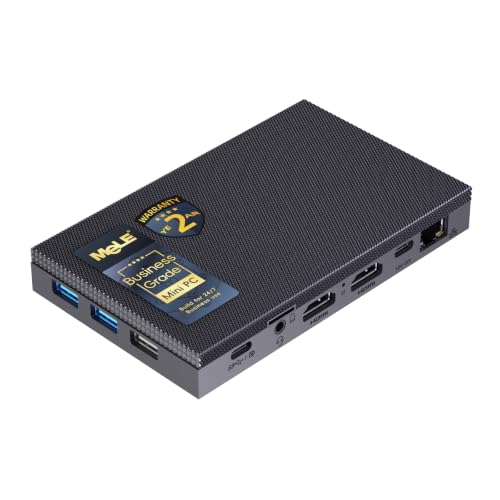
- Best overall fanless mini PC for a 1440p screen: MeLE Quieter4C Fanless Mini PC, Intel N100, 8GB RAM, 128GB, Windows 11 Pro — Check on Amazon
- MINIX NEO Z300-0dB Fanless Mini PC, Intel Core i3-N300, 16GB RAM, 512GB SSD — Check on Amazon
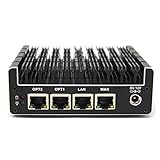
- HUNSN RJ42 Micro Firewall Appliance, Intel N150, 4x 2.5GbE LAN — Check on Amazon
- ZOTAC ZBOX CI337 Nano Fanless Barebone Mini PC, Intel N100, No RAM/Storage/OS — Check on Amazon
See 2 more Amazon options
- KINGDEL NC3000 Fanless Industrial Mini PC, Core i7 8th Gen, 32GB RAM, 1TB SSD — Check on Amazon
- Protectli Vault FW4C, 4-Port Firewall Mini PC, Intel J3710, 4x 2.5GbE — Check on Amazon
Read the full guide ↓
Disclosure: As an Amazon Associate, reviewstook.com earns from qualifying purchases. Links to Amazon on this page are affiliate links; they cost you nothing extra. Listing details such as price and availability change often, so check the current Amazon listing before you buy.
Two different jobs hide inside the phrase “1440p gaming,” and a fanless mini PC can only do one of them. The first job is displaying 1440p: lighting up every pixel of a 2560×1440 monitor with a sharp desktop, crisp text and full-fidelity video. Every machine in this guide with a display output does that easily, because showing a desktop at 1440p is light work that integrated graphics have handled for years. The second job is rendering 1440p: calculating a modern game’s world at that resolution, sixty times a second, inside the game engine. No fanless mini PC at any price does that. The chips that can be cooled without a fan — Intel’s N100, N150, i3-N300 and their low-wattage relatives — carry integrated graphics built for displays and video, not for pushing modern games at two-and-a-half megapixels per frame. Any guide that blurs those two jobs together is selling you the first while implying the second.
So this guide grades the honest version of the search. Each pick is judged on how well it supports the route that actually works: render games at 1080p or 720p, where these chips genuinely live, and let a 1440p monitor display the result; lean on render scaling inside the game rather than pretending the panel’s resolution is the render resolution; and enjoy the things a 1440p screen truly improves on a silent machine — a roomier, sharper desktop, video shown at its full quality, emulation upscaled to a big panel, and cloud gaming services that render the game on a server and stream it back for the local chip to decode. Graded that way, the picks separate cleanly: by the display outputs their makers document, by how much integrated-graphics headroom sits behind them, and by how their passive cooling behaves over a long session, because gaming loads are sustained loads and a sealed case answers sustained loads by slowing down.
The budget needs the same honesty. There is no premium tier of fanless computing waiting at $2,500: the verified fanless machines in this guide all sit well below that figure, at the lower end of the wider mini PC market. The verified ceiling of the whole category sits well below this budget, so most of a $2,500 budget stays unspent no matter which pick you choose — that is not a gap in the market, it is what passive cooling costs, and the money is better kept or spent on the 1440p monitor itself than handed to a listing that dressed a low-power chip in a four-figure price tag. If native 1440p rendering is the real goal, the honest destination is a fanned machine — start with Best Mini Gaming PC Under $2500 — and if silent streaming and media duty matter more than rendering, Best Fanless Mini PC For Streaming Under $2500 covers that angle.
In this guide
Quick Picks
Short on time, or comparing several options at once? Each row below names a buyer type and the product that suits it, with a link to the listing.
| Buyer type | Pick | Why it stands out | Link |
|---|---|---|---|
| Best overall for a 1440p screen | MeLE Quieter4C (N100, 8GB/128GB) | Triple 4K-class outputs drive a 1440p desktop with room to spare; the reference silent machine | Check on Amazon |
| Strongest fanless graphics | MINIX NEO Z300-0dB (i3-N300, 16GB/512GB) | The most integrated-graphics headroom in a verified fanless desktop, with dual 4K/60 HDMI | Check on Amazon |
| Best display-output set | HUNSN RJ42 (N150, 4x 2.5GbE) | Dual HDMI 2.1, DisplayPort and USB-C display output — the most modern screen connections here | Check on Amazon |
| Best kit for a 1440p desk | ZOTAC ZBOX CI337 Nano (N100 barebone) | Triple display output from a brand-name fanless kit you finish with your own memory and SSD | Check on Amazon |
| 1440p desktop for legacy setups | KINGDEL NC3000 (i7 8th Gen, 32GB/1TB) | An HDMI output rated for 4K-class displays, plus VGA and serial ports for older gear | Check on Amazon |
| The silent router behind the stream | Protectli Vault FW4C (J3710, 4x 2.5GbE) | Not a display machine at all — the supported, silent firewall that carries cloud-gaming traffic | Check on Amazon |
How These Picks Were Chosen
Two verifications ran before any ranking happened. The first was the fanless test this series applies everywhere: a machine only qualifies if the manufacturer’s own specification page, manual or an independent review confirms there is no fan inside — a passive heatsink and a finned chassis doing the cooling. Listing adjectives were never accepted as evidence, because “silent” is the most abused word in this category; machines that merely run a small fan slowly were excluded no matter how capable they are. The second verification was the display audit. For a 1440p guide, what matters is what each maker actually documents about screen connections — the HDMI, DisplayPort and USB-C outputs and the display classes they are rated for — so every output claim in the reviews below traces to the base research behind this series rather than to a marketplace bullet point. Where a base document records no display output for a pick, this guide says so and grades the pick on what it is, instead of borrowing a port from a sibling model.
The ranking itself follows the angle. Picks are graded first on the display job — can the machine light a 1440p monitor at its native resolution for desktop and video, and how much output flexibility surrounds that — then on the render job graded honestly: integrated-graphics class, the memory fitted beside it, and sustained behavior, because a passively cooled chip does not hold its headline turbo clock through a long gaming session. Independent measurement of the best-known pick here found sustained clocks around a third of rated turbo at factory power limits; that is physics, not a defect, but it means the render budget shrinks the longer a session runs, and the reviews grade with that in mind. For pricing, check the current price on Amazon for each listing, because listing prices change often. Two picks are configurable platforms rather than single fixed machines (the ZOTAC kit ships with no memory, storage or operating system; the Protectli and KINGDEL listings exist in several configurations), and each review states exactly what the linked configuration includes and what it leaves for you to add.
One boundary deserves stating before the reviews: nothing in this guide credits these Intel chips with technologies they do not have. There is no DLSS on Intel integrated graphics, and this guide claims no internal-resolution figures for any upscaling brand on this hardware. The practical tool on every pick is render scaling — setting the game’s internal render resolution below the panel’s 1440p and letting the display show the scaled result — and the reviews talk about it in those plain terms.
1440p, Split in Two: Rendering Is Not Displaying
The distinction that organizes this whole guide is worth one section of its own, because every disappointment in this category comes from confusing its two halves. Displaying 1440p means the monitor receives a 2560×1440 signal. Desktop compositing, text, photos and video playback at that resolution are light, fixed-function work: the display engine and the video decode hardware in these Intel chips were built for exactly that, at 1440p and well beyond it. When a listing says a fanless box “supports 4K,” this is the job it is describing, and it is telling the truth. Rendering 1440p means the graphics hardware computes a game’s scene — geometry, lighting, shading — at 2560×1440 for every frame. That is the most expensive work a consumer chip does, it scales brutally with pixel count, and it is precisely the work these low-wattage integrated graphics are not built for. A modern game rendered natively at 1440p is beyond every pick in this guide; most are beyond them rendered natively at 1080p, which is why the honest playbook below starts lower.
The playbook has three honest routes, and the reviews grade each pick against all three. Route one: render low, display high. Set the game to render at 1080p for lighter titles or 720p for heavier ones, use the game’s own render-scale setting where it offers one, and let the 1440p panel display the result. The image is softer than native 1440p rendering — no scaling recovers detail that was never computed — but it is genuinely playable territory for indie games, older titles and esports at modest settings. Route two: emulation and older games. Retro emulation is this hardware’s home turf; reviewers of the strongest pick here ran PS2-era emulation smoothly, and older PC titles at reduced settings sit comfortably in the same class. Upscaled to a 1440p screen, those games look sharp in a way their original hardware never managed. Route three: let a server render. Cloud gaming services compute the game remotely and stream video back; the local machine only decodes that video, which is fixed-function work these chips excel at. On a wired connection, a cloud game displayed on a 1440p monitor is the one way a fanless box shows you something that genuinely looks like high-resolution modern gaming — because, in the only sense that matters visually, it is.
Monitor pairing follows from the split. A 1440p monitor is a good purchase for these machines: every display pick below drives one at native resolution, the desktop gains real workspace and visibly sharper text, and streamed or stored video shows at full fidelity. What the monitor cannot do is raise the render ceiling by a single pixel — pairing the weakest pick here with an expensive high-refresh 1440p panel buys refresh headroom the chip can only use on the desktop, never in a game. Buy the panel for the desktop, the video and the cloud streams; set the games to the resolution the silicon can actually render; and the combination is honest, silent and genuinely pleasant.
The 6 Best Fanless Mini PCs for a 1440p Screen Under $2,500
MeLE Quieter4C Fanless Mini PC (Intel N100, 8GB RAM, 128GB)
Who it suits: Anyone whose 1440p plan is a sharp, silent desktop first and light gaming second — the reference fanless machine, with the output set to run a 1440p monitor and still have screens left over.
Start with the display job, because it is this machine’s clearest strength. The Quieter4C’s documented output set — two HDMI 2.0 ports plus a full-function USB-C port carrying DisplayPort — drives three 4K-class displays at once, so a single 1440p monitor is well inside its comfort zone, with ports spare for a second screen or a TV. The desktop at 1440p is exactly the workload this design was built around: an Intel N100 (four cores, up to 3.4 GHz, a chip in the 6-watt class) sealed in a slim 5.2 × 3.2 × 0.7 inch fanless chassis, powered over USB-C, with a VESA mount in the box so the whole machine can live on the back of the very monitor it drives. For the render job, grade it as the category’s honest baseline: indie games, older titles and esports at modest settings rendered at 1080p or below and scaled to the panel, emulation, and cloud gaming decoded locally. The configuration linked here is the Business-Grade build with 8GB of RAM, 128GB of storage and Windows 11 Pro; the line also sells 16GB builds (with soldered LPDDR5 memory on the N100 versions, so that memory is fitted for life) and storage up to 512GB combining eMMC with an M.2 SSD in the machine’s upgrade slot, plus a microSD slot. Check price on Amazon for the current listing, including the higher configurations in the line, which sit above this base build in the range.
The limitation that matters most for this angle is sustained behavior. Independent stress testing at factory power limits measured average clocks around 1.2 GHz over a long run — roughly a third of the chip’s rated turbo — with the case top reaching around 64°C at the surface. Desktop work never notices, because it is bursty; a long gaming session does, because rendering is a sustained load and the render budget quietly shrinks as the case warms. The practical translation: set the render resolution for the session you will actually have in twenty minutes, not the burst you get in the first two — 720p rendering for longer sessions in heavier titles is the honest setting, with 1080p reserved for lighter games. The linked configuration’s 8GB of RAM and 128GB of storage are the line’s floor, and its networking is gigabit Ethernet and Wi-Fi 5, a step behind the newer rivals below.
- Triple 4K-class display output (2x HDMI 2.0 plus USB-C with DisplayPort) — a 1440p desktop with ports to spare.
- Verified fanless by design, USB-C powered, VESA mount in the box: it can live behind the monitor it drives.
- M.2 slot and microSD give the base configuration’s storage a growth path.
- The most thoroughly reviewed machine in its class — its sustained behavior is measured, not guessed.
Honest limitation: Sustained clocks fall to roughly a third of rated turbo under long loads, so long gaming sessions render at the conservative end of its range; the linked 8GB/128GB configuration is the line’s minimum, and networking is gigabit/Wi-Fi 5 rather than 2.5GbE/Wi-Fi 6.
Choose it if the 1440p monitor is mainly for a silent, sharp desktop and media, with light gaming rendered at 1080p or below. Skip it if your sessions are long and rendering-heavy — passive cooling taxes exactly that workload — or if you need 2.5GbE networking.

MINIX NEO Z300-0dB Fanless Mini PC (Intel Core i3-N300, 16GB RAM, 512GB SSD)
Who it suits: Buyers who want the most rendering headroom a verified fanless desktop offers — the strongest integrated graphics in this guide — behind a 1440p screen, for emulation and light gaming at the top of the category’s range.
If the Quieter4C is the baseline, the Z300-0dB is the ceiling of what fanless rendering looks like. Its Intel Core i3-N300 pairs eight efficiency cores (up to 3.8 GHz, a 7-watt-class chip) with the strongest integrated graphics in this set: independent reviewers measured a larger gain in graphics benchmarks over the N100 generation than the roughly 23% multi-core improvement they found on the CPU side, and in practice that headroom is what separates “esports at modest settings” from “esports at slightly less modest settings.” Reviewers ran PS2-era emulation smoothly on this machine, which marks the realistic top of its gaming range. The display job is handled by dual HDMI 2.0 outputs rated at 4K/60 — a 1440p panel runs at its native resolution with a second screen beside it — and the rest of the specification is the most complete here: 16GB of DDR4 in a single SO-DIMM slot (upgradeable to 32GB), a 512GB PCIe NVMe SSD, Windows 11 Pro, a 2.5GbE Ethernet port, Wi-Fi 6 with external antennas, and a VESA mount in the box, all inside a finned aluminum chassis measuring 4.84 × 4.72 × 1.81 inches. The “0dB” in the name is a literal claim, confirmed by the maker’s own copy and by reviewers: the metal chassis is the heatsink, and there is no fan anywhere in the machine. Check the current price on Amazon — it sits near the top of the verified fanless desktop range, and still sits well below this guide’s budget.
The physics bill arrives as heat. Stress testing has measured the CPU at 98°C under sustained load, and owners describe the outside of the chassis reaching roughly 160°F through long CPU-intensive stretches — warm enough that MINIX’s own listing copy cautions that the top cover heats up and belongs out of children’s reach. For this angle the consequence is specific: the strongest fanless renderer is still a passive machine, so a long session settles to what the fins can shed, and the sensible render settings are the ones chosen for the settled machine, not the cold one. Expansion is one slot deep — a single M.2 slot and a single memory channel — and the USB-C port is data-only, offering neither power delivery nor display output, so the two HDMI ports carry the whole display plan.
- Eight-core i3-N300 with the strongest integrated graphics in a verified fanless desktop.
- Dual HDMI 2.0 at 4K/60: a 1440p monitor at native resolution, plus a second screen.
- 16GB socketed RAM (to 32GB) and 512GB NVMe fitted, Windows 11 Pro included.
- 2.5GbE and Wi-Fi 6 with external antennas — the modern network set for cloud gaming.
Honest limitation: The case runs hot enough under sustained load to carry a keep-away-from-children warning from its own maker; single-channel memory, one storage slot, and a data-only USB-C port.
Choose it if you want the fanless machine that renders the most — emulation and light titles at the top of the class — behind your 1440p screen. Skip it if modern gaming matters at all: its graphics are the best here and still integrated, several classes below any discrete GPU.

HUNSN RJ42 Micro Firewall Appliance (Intel N150, 8GB RAM, 128GB SSD, 4x 2.5GbE)
Who it suits: Buyers who want the most modern display connections in this guide wrapped around a silent box that can also run the network — and who are comfortable vetting a white-box listing themselves.
On paper, the RJ42’s output list is the best here: dual HDMI 2.1, DisplayPort and USB-C with display support, a generation of connector newer than the HDMI 2.0 sets above. A 1440p desktop is trivially within that — and the machine behind the outputs is a current one: an Intel N150 (four cores, up to 3.6 GHz) in a fanless aluminum chassis whose manufacturer’s manual specifies silent 0.00 dB operation, with 8GB of DDR5 in a single SO-DIMM slot, a 128GB SSD, and storage headroom no other pick matches (two M.2 2280 NVMe slots plus a 2.5-inch SATA position alongside the fitted drive). Rendering grades like the N150 class it belongs to: light titles and emulation rendered at 1080p or below, cloud gaming decoded locally. The four 2.5GbE ports sit on Intel I226-V controllers — the NIC generation the pfSense and OPNsense communities specifically look for — which gives this pick its second honest role in a 1440p setup: the silent, wired, always-on network box that keeps a cloud-gaming stream fed. HUNSN sells the RJ42 in barebone and multiple fitted configurations under closely related listings; the one linked here is the N150 build with 8GB and 128GB documented by MiniPCReviewer’s spec-checked survey of the category — check price on Amazon for the configuration you are actually buying on the live listing.
The trade against the supported brands is support, and it is not subtle. Support means a translated manual and a storefront inbox; there is no US support line to call, and no money-back promise standing behind the hardware beyond Amazon’s own returns window. The manual also records that this chassis exists in N100 and i3-N305 variants, and that it carries mounting holes for an optional 80mm fan you will never need to fit — fitting one would end the fanless premise the purchase is based on. The defense is verification: confirm the NICs are Intel I226-V, confirm the chip is the N150, and buy through Amazon’s returns rather than a storefront you cannot find twice.
- Dual HDMI 2.1, DisplayPort and USB-C display output — the most modern screen connections in the guide.
- Intel N150 and DDR5, a full generation newer than the supported-brand firewall rival.
- Four Intel I226-V 2.5GbE ports: the silent wired foundation for cloud gaming.
- Two M.2 NVMe slots plus a 2.5-inch bay — firewall today, small host tomorrow.
Honest limitation: White-box support reality — a manual, a storefront inbox and Amazon returns stand in for a vendor; listings and configurations churn, so verify chip and NICs on the live listing and check the current price on Amazon.
Choose it if you are fluent enough to self-support and want the newest outputs and network hardware in this guide. Skip it if the setup is maintained for other people and needs a vendor behind it — that is the Protectli’s entire reason to exist.

ZOTAC ZBOX CI337 Nano Fanless Barebone (Intel N100, No RAM/Storage/OS)
Who it suits: Builders who want a brand-name fanless machine with triple display output for a 1440p desk — and who are happy to choose their own memory, storage and operating system to finish it.
ZOTAC’s C-series is the longest-running fanless line in consumer mini PCs, and the CI337 Nano is its current N100 generation: a passively cooled barebone — ZOTAC’s own description is “a robust passive cooled design with no moving components” — in a nano chassis with a VESA mount, so it can hang behind the 1440p monitor it serves. The display job is a genuine strength: two HDMI 2.0 ports, DisplayPort 1.4 and DisplayPort over USB-C give triple display output, matching the finished MeLE’s party trick. What arrives in the box is the computer minus its variable parts — one DDR5-4800 SO-DIMM slot (up to 16GB; ZOTAC’s specification says DDR5, whatever a stray retailer answer claims), one M.2 2242 slot (PCIe 3.0 x1 or SATA) and a 2.5-inch SATA bay, all empty, and no operating system. That emptiness is also the render-job opportunity: the buyer speccing the machine for a 1440p desk fits the full 16GB of memory from day one rather than accepting a finished box’s floor configuration. Check the current price on Amazon for the barebone — as a kit with no memory, storage or operating system fitted, it is the entry-level route into this guide. Completing it means adding the memory module, a drive and an OS, and the finished machine’s total depends on the parts you choose and on choosing Linux or adding a Windows license, so check prices for those parts as well before comparing it with finished machines.
The compromises are structural. Its M.2 slot accepts only 2242-length drives and connects them over a single PCIe 3.0 lane, which is narrow and slow by current standards; most builds will lean on the 2.5-inch SATA bay for bulk storage, and neither path is a fast one. Memory is capped for good at 16GB, in one slot and one channel. And a kit makes compatibility your homework: picking the correct SO-DIMM, matching drive lengths, installing an OS — none of it difficult, all of it on you. Rendering grades exactly like the finished N100 machines: the same chip, the same 1080p-and-below playbook, the same sustained-load physics.
- A fanless kit from an established brand — ZOTAC’s C-series passive design comes with documentation and a support trail.
- Triple display output and a VESA mount, same as the finished machines.
- An entry-level way into this guide — check the current price on Amazon for the kit.
- You choose the RAM, storage and OS — including a full 16GB from day one, or free Linux builds.
Honest limitation: The box arrives empty, so memory, storage and an operating system are separate purchases and separate work; the M.2 slot takes only short 2242 drives on a slow PCIe 3.0 x1 lane, and memory tops out at 16GB in a single slot and a single channel.
Choose it if you enjoy the build and want brand-name fanless hardware behind a 1440p screen in kit form. Skip it if you want to plug in and work today — every finished pick in this guide arrives ready.

KINGDEL NC3000 Fanless Industrial Mini PC (Core i7 8th Gen, 32GB RAM, 1TB SSD)
Who it suits: Buyers whose silent 1440p desktop also has to talk to the physical world — serial-controlled equipment, older displays, kiosks, point-of-sale and shop-floor hardware — and who need memory and storage headroom the N-series boxes do not offer.
The NC3000 is the industrial branch of fanless computing, where passive cooling is solved with mass: a full metal case with the surface area to shed a 15-watt-class processor’s heat without a fan. The linked configuration is built around an 8th-generation Core i7 — the i7-8565U, with four cores and a turbo ceiling of 4.6 GHz — fitted with 32GB of DDR4 memory and a 1TB NVMe SSD, the most memory and storage any machine in this guide carries. For the display job, its listing rates the HDMI output for 4K-class displays (4096×2304), so a 1440p desktop is comfortably driven, and a VGA port stands beside it for the older screens this machine’s world is full of. Two RS232 serial COM ports, four USB 3.0 ports, Wi-Fi and Bluetooth complete a port selection that exists for control rooms and installations where the connected equipment predates USB-C by decades. Check the current price on Amazon for the linked configuration on the live listing. This industrial machine sits at the upper end of the verified fanless range on Amazon, and it still sits well below this guide’s budget.
For the render job, this is the weakest graphics in the guide wearing the proudest badge. The i7-8565U is a 2018 platform; its UHD Graphics 620 is older than the N100’s integrated graphics in respects that matter for media, the base research notes there is no modern Quick Sync advantage to lean on, and under sustained load a passively cooled U-series chip settles well below its turbo headline — the same physics as every pick here, applied to a bigger number. A 1440p desktop: yes, all day. Rendering at 1080p: only the lightest end of the playbook, with 720p the safer session setting. KINGDEL’s wider catalog also teaches a listing-literacy lesson this guide wants on the record: the brand sells many near-identical fanless boxes, and at least one newer listing states that the exact 12th-generation i7 variant is “shipped randomly” from a list of four chips. That listing is excluded from this guide — a CPU lottery is not a specification. The NC3000 linked here states its processor openly, and that plainness is exactly why it earns this guide’s recommendation among KINGDEL’s boxes.
- The linked configuration’s 32GB of memory and 1TB NVMe drive are the most fitted capacity in this guide.
- HDMI rated for 4K-class displays drives a 1440p desktop; VGA covers the legacy screen beside it.
- Dual RS232 serial ports: connects to industrial and legacy gear without adapters.
- The listing names its processor outright (i7-8565U) — not true of every sibling in the brand’s catalog.
Honest limitation: A 2018 platform with the oldest integrated graphics in this guide; passive cooling caps sustained performance well below the turbo headline. Check the current price on Amazon on the live listing, and read the brand’s wider catalog carefully.
Choose it if serial ports, VGA or a metal industrial build are requirements, and the 1440p screen is a desktop rather than a render target. Skip it if gaming rendering is the priority — the MINIX does that job with newer silicon.

Protectli Vault FW4C (Intel J3710, 4x 2.5GbE Firewall Mini PC)
Who it suits: Home-lab and small-office buyers whose 1440p gaming arrives over the network — cloud gaming services and streamed desktops — and who want the silent box carrying that traffic to come from a vendor that answers support tickets.
Grade this pick honestly and its score splits in two. As a display machine, it scores nothing: the base research behind this guide documents no display outputs for the FW4C, because it is not built to drive a monitor — it is a firewall appliance, and this guide will not borrow a port from a sibling model to pretend otherwise. Its place in a 1440p setup is upstream of the screen. Protectli’s Vault line exists to run open-source firewall software (pfSense, OPNsense, OpenWrt, Untangle) on silent, finned-aluminum hardware with no moving parts: an Intel J3710 quad-core processor, four Intel 2.5GbE ports labeled WAN, LAN, OPT1 and OPT2 on the chassis, a hardware serial console port, AES-NI encryption support, and the option of coreboot open firmware instead of a conventional BIOS. For a household whose high-resolution gaming is rendered on a cloud server and streamed back, the quality of that always-on, silent, wired network foundation is a real part of the experience — jitter and drops are network events before they are graphics events. The Amazon listing linked here is the 4GB DDR3 RAM / 32GB SSD configuration; the same chassis sells in higher configurations (8GB/120GB listings exist), and the platform’s documented ceiling is 8GB of DDR3L and an mSATA drive. What the premium buys is everything around the hardware: US-based support, a 30-day money-back guarantee, and published knowledge-base documentation down to BIOS settings. Check the current price on Amazon, and compare it with buying direct from Protectli if that matters to you.
The silicon’s age is the honest limitation, stated in network terms: the J3710 is a 2016-era low-power chip that routes a gigabit WAN and runs standard firewall rules silently and indefinitely — which is the job — but multi-gigabit VPN throughput and heavy intrusion-prevention workloads are beyond its comfortable reach, and even sympathetic reviewers steer power users toward newer N-series appliances or the HUNSN above. It also ships without an operating system by design; installing the firewall software is part of the purchase. Buy it as infrastructure and it is the most defensible pick in this guide; buy it as a gaming PC and no review can help it.
- Four Intel 2.5GbE ports, labeled WAN, LAN, OPT1 and OPT2 on the case, plus a hardware serial console port.
- AES-NI encryption support and the option of coreboot open firmware — the boxes firewall enthusiasts ask about, both ticked.
- US-based support, 30-day money-back guarantee, deep published documentation.
- A finned aluminum chassis with no moving parts, built for the kind of 24/7 service measured in years.
Honest limitation: It is not a display or gaming machine at all — no documented display outputs in the base research — and the J3710 is a 2016 chip with a low ceiling for VPN and inspection workloads.
Choose it if your 1440p gaming streams in from the cloud and the network carrying it deserves a supported, silent foundation. Skip it if you need a machine to plug a monitor into — every other pick in this guide is that machine.
Comparison Table
| Product | Display outputs (as documented) | Best use with a 1440p screen | Link |
|---|---|---|---|
| MeLE Quieter4C (N100) | 2x HDMI 2.0 + USB-C (DisplayPort), triple 4K-class | The reference silent 1440p desktop, mountable behind the panel | Check on Amazon |
| MINIX NEO Z300-0dB (i3-N300) | 2x HDMI 2.0 at 4K/60 | Most render headroom here: emulation and light gaming | Check on Amazon |
| HUNSN RJ42 (N150) | 2x HDMI 2.1 + DisplayPort + USB-C display | Newest outputs, plus the wired network for cloud gaming | Check on Amazon |
| ZOTAC ZBOX CI337 Nano (N100) | 2x HDMI 2.0 + DisplayPort 1.4 + DP over USB-C | Triple-display fanless kit you spec yourself | Check on Amazon |
| KINGDEL NC3000 (i7 8th Gen) | HDMI (4K-class) + VGA | 1440p desktop for legacy and industrial setups | Check on Amazon |
| Protectli Vault FW4C (J3710) | None documented — a network appliance | The silent, supported router behind cloud gaming | Check on Amazon |
How to Choose a Fanless Mini PC for a 1440p Screen
- Decide which 1440p job you are actually buying for. Displaying 1440p — desktop, text, video — is easy for every display pick here. Rendering 1440p in a modern game is impossible for all of them. Buyers who name their job first are happy with these machines; buyers who let a listing blur the two jobs are the returns queue.
- Set the render resolution before you set the budget. The working playbook is 1080p rendering for lighter titles, 720p for heavier ones and longer sessions, with the game’s render-scale setting doing the work and the 1440p panel displaying the result. If that playbook sounds like a compromise you cannot accept, the correct move is a different category of machine, not a more expensive fanless one — see Best Mini PC Under $2500 for where the fanned options start.
- Buy the monitor for the desktop, not for the render. A 1440p panel earns its money in workspace, text sharpness and video fidelity on these machines. Its refresh-rate ceiling, though, is desktop headroom only: no pick here renders games fast enough to feed a high-refresh 1440p panel in play. Spend on panel quality before panel speed.
- Count documented outputs, not headline resolutions. “Supports 4K” describes the display engine, not a gaming promise. What matters is the physical set — dual HDMI 2.0 on the MINIX, HDMI 2.1 and DisplayPort on the HUNSN, triple outputs on the MeLE and the ZOTAC — and whether it matches your screens, including a second monitor or a TV.
- Judge sustained performance, not turbo clocks. Gaming loads are sustained loads, and a sealed case answers them by settling — measured at roughly a third of rated turbo on the best-known pick here. Choose render settings for the machine as it runs twenty minutes in, and place it in open air: a fanless case is its own heatsink, and a sealed cabinet starves it.
- Treat cloud gaming as the high-resolution route. If modern games at 1440p-looking quality are the goal, a cloud service renders them and these chips decode the stream — the one route where the panel’s resolution is honestly fed. It rewards a wired connection, which is why the 2.5GbE picks (MINIX, HUNSN, Protectli) grade better in a streaming household than their graphics suggest.
- Check what the box does not include. The ZOTAC kit needs memory, storage and an OS before it computes anything; the firewall picks ship without an operating system by design. Total the finished machine before comparing it with finished machines like the MeLE and MINIX.
- Keep the change. Every pick in this guide sits well below the $2,500 budget. If a share of the $2,500 wants spending, the monitor itself, real storage, or a second identical unit as a cold spare for an always-on role are the honest destinations — readers building a small-space setup around the panel should also see Best Mini PC For Small Spaces Under $2500. The rest is worth more unspent than converted into markup.
Common Buying Mistakes
- Reading “supports 4K” as “plays games at 4K.” Display support and rendering power are different specifications; the first is documented on every box here, the second is modest on all of them.
- Setting games to the panel’s native 1440p because the monitor can show it. The panel displays whatever it is sent; send it a rendered 1080p or 720p image, scaled, and it will look fine. Send it native 1440p rendering from integrated graphics and it will look like a slideshow.
- Assuming a bigger budget buys a faster silent machine. The verified ceiling of this category sits well below this guide’s budget; money above it purchases support, ports, rugged construction or pure markup — a faster class of fanless silicon is not on the menu at any price.
- Buying a high-refresh 1440p monitor for fanless gaming. The refresh headroom is usable on the desktop only; in games, these chips are the bottleneck at any refresh rate.
- Judging by turbo clocks. What a sealed case can hold through a long load is a fraction of the boost figure on the box; plan around the sustained machine, not the sprinting one.
- Sealing the radiator in a cabinet. A fanless PC in a closed media cabinet will throttle or cook; open air is a system requirement, not a suggestion — and long gaming sessions are exactly the loads that punish bad placement.
- Buying a firewall appliance as a desktop (or the reverse). Four LAN ports do not make a desktop better, and a desktop’s single Ethernet port does not make a router; one pick in this guide documents no display outputs at all, because displaying is not its job.
- Trusting a configuration you did not read. Listings in this category stack several configurations under a single page, and one prominent industrial listing openly ships whichever of four CPUs comes to hand. Check the exact build — chip, memory, storage — in the cart, then check it again when the box arrives.
Final Recommendation
- Most buyers pairing a fanless box with a 1440p screen: MeLE Quieter4C.
- The most rendering a fanless desktop can do: MINIX NEO Z300-0dB.
- Newest display outputs and network hardware: HUNSN RJ42.
- Builders on a floor budget: ZOTAC ZBOX CI337 Nano barebone.
- Serial ports and industrial builds with a 1440p desktop: KINGDEL NC3000.
- Cloud gaming on a supported, silent network: Protectli Vault FW4C.
Our top two are the MeLE Quieter4C, the proven reference for a silent, sharp 1440p desktop — check price on Amazon — and the MINIX NEO Z300-0dB, which adds the strongest integrated graphics in the class, 16GB of memory and dual 4K/60 outputs — check the current price on Amazon. Between them they cover the honest version of this search: a silent machine that makes a 1440p monitor look its best at everything except the one job no fanless box can do. Buyers working to the category’s natural budgets will find the same machines competing at Best Fanless Mini PC For 1440p Gaming Under $1500 and Best Fanless Mini PC For 1440p Gaming Under $800, and the broader fanless picture at Best Fanless Mini PC Under $2500 and Best Fanless Mini PC Under $1500. First-time buyers of silent PCs may want Best Fanless Mini PC For Beginners Under $2500, and those fitting the machine around the screen should see Best Fanless Mini PC For Small Spaces Under $2500. Verify the fanless claim, verify the configuration, set the render resolution honestly — and keep the change.
Frequently Asked Questions
Can a fanless mini PC actually game at 1440p?
It can display games on a 1440p monitor, and it can play them — but it renders them at 1080p or 720p and scales the image to the panel. Native 1440p rendering of modern games is beyond every verified fanless machine, because the low-wattage chips that can be cooled passively carry integrated graphics built for displays and video. The playable territory is indie games, older titles, esports at modest settings and emulation — plus cloud gaming, where a server does the rendering and the fanless box decodes the stream.
Is a 1440p monitor wasted on a fanless mini PC?
No — it is arguably the best monitor pairing for one, provided you buy it for the right jobs. Every display pick in this guide drives 1440p at native resolution for the desktop, where the extra workspace and sharper text are real, and video plays back at full fidelity. What the monitor cannot do is raise the render ceiling: in games, the panel shows a scaled 1080p or 720p image. A high-refresh 1440p panel is the one specification to skip — its headroom is usable on the desktop only.
Why is there no fanless mini PC anywhere near $2,500?
Because the processor is capped by what passive cooling can shed, and processors under that cap are inexpensive parts. A sealed fanless case can shed the heat of a 6–15 watt chip; the chips that fit that envelope cost little, and the machines built on them sit well below this guide’s budget. In our research, anything wearing a “fanless” label at much higher asking prices on Amazon US turned out to be one of three things: a fanned machine with hopeful copy, an industrial quote, or a low-power box carrying a markup.
Which pick renders games best?
The MINIX NEO Z300-0dB. Its i3-N300 carries the strongest integrated graphics in this guide — reviewers measured its graphics improvement over the N100 generation as larger than its CPU improvement — and reviewers ran PS2-era emulation smoothly on it. Best here is a relative term: it widens the light-gaming playbook, it does not change its class, and under sustained load its passive case still settles well below its burst speeds.
Does render scaling look bad on a 1440p screen?
It looks softer than native rendering — scaling cannot invent detail that was never computed — but at typical desk distances, a 1080p render scaled to a 1440p panel is a perfectly presentable image, and a 720p render of a lighter or older game holds up better than the numbers suggest, especially in emulation where the source material was never high-resolution to begin with. The honest comparison is not scaled-versus-native; it is scaled-versus-unplayable.
Fanless desktop, firewall appliance or industrial box — which do I need?
Match the box to the job. A fanless desktop (MeLE, MINIX, or the ZOTAC kit you finish yourself) is a silent general-purpose computer that drives your screen. A firewall appliance (Protectli, HUNSN) is a network device with multiple Ethernet ports that ships without an OS for you to install pfSense, OPNsense or similar — its role in a 1440p setup is carrying streamed and cloud traffic, not driving the monitor. An industrial box (KINGDEL) trades modern silicon for serial ports, legacy video and metal construction. The processors are close cousins across all three; the ports, and the jobs they serve, are not.


