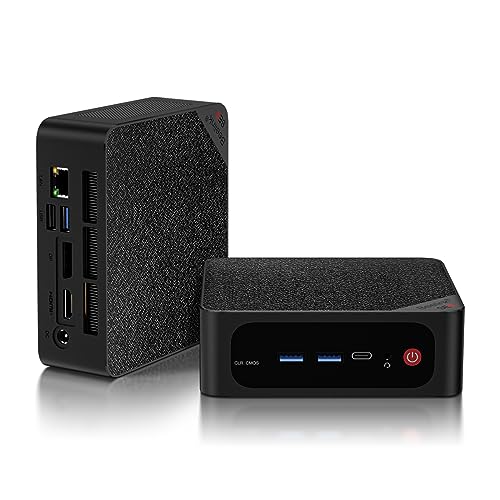
Where to buy
Check the latest price, availability and delivery on Amazon. Orders are placed on Amazon. We may earn a commission from qualifying purchases.
- Best overall for a first home office PC: Beelink SER5 MAX, Ryzen 7 5800H, 32GB RAM, 1TB SSD — Check on Amazon
- GMKtec NucBox K6, Ryzen 7 7840HS, 32GB DDR5, 1TB SSD — Check on Amazon
- MINIX NEO Z300-0dB Fanless Mini PC, Intel i3-N300, 16GB RAM, 512GB SSD — Check on Amazon
- HP EliteDesk 800 G5 Mini, Core i5-9500T, 16GB RAM, 256GB SSD (Renewed) — Check on Amazon
See 2 more Amazon options
- MeLE Quieter 4C Fanless Mini PC, Intel N150, 8GB RAM, 256GB SSD — Check on Amazon
- Beelink EQ14 Mini PC, Intel N150, 16GB RAM, 500GB SSD — Check on Amazon
Read the full guide ↓
Disclosure: As an Amazon Associate, reviewstook.com earns from qualifying purchases. Links to Amazon on this page are affiliate links; they cost you nothing extra. Listing details such as price and availability change often, so check the current Amazon listing before you buy.
If this is your first time buying a desktop computer — or your first in a decade — the honest starting point is that $500 is a genuinely workable budget for a home office, provided you spend it on the right two or three things. A home office PC does not need the parts that make gaming computers expensive. It needs enough memory that your browser, chat apps and documents can all stay open at once, a storage drive big enough that you stop thinking about it, and the right holes in the back to plug in the monitors you actually own. Every machine in this guide is a mini PC: a complete, ready-to-run computer in a box small enough to sit behind a monitor, with Windows already installed. None of them needs building, and none of them is a kit of parts.
Three honest warnings belong up front, because they shape every recommendation below. First, prices in this corner of Amazon move a lot: memory and storage costs climbed sharply through late 2026, so check the live price on Amazon before you buy rather than assuming any figure is fixed. Second, one of the six picks is a renewed business desktop: a retired company machine offered as a budget-tier option. It is the best value in the guide and it comes with homework, which the review spells out. Third, two picks only belong here when they are discounted, and the guide says so every time they are mentioned, not just once. Start with the glossary if the jargon is new, the setup walkthrough once your machine arrives, and the Beelink SER5 MAX if you simply want the safest first purchase.
In this guide
Quick Picks
Short on time, or comparing several options at once? Each row below names a home-office type and the machine that suits it, with a link to the listing.
| Buyer type | Pick | Why it stands out | Link |
|---|---|---|---|
| Best overall for a first home office PC | Beelink SER5 MAX, Ryzen 7 5800H, 32GB/1TB | 32GB of memory that can grow, three monitor outputs, a terabyte of storage | Check on Amazon |
| Best performance | GMKtec NucBox K6, Ryzen 7 7840HS, 32GB/1TB | The fastest chip and graphics here, DDR5 memory — only when discounted | Check on Amazon |
| Best silent for calls | MINIX NEO Z300-0dB, Intel i3-N300, 16GB/512GB | No fan at all, so nothing whirs behind your voice on a call | Check on Amazon |
| Best renewed value | HP EliteDesk 800 G5 Mini, i5-9500T, 16GB/256GB (Renewed) | A six-core business desktop in the budget tier, with three DisplayPort outputs | Check on Amazon |
| Best fanless on a budget | MeLE Quieter 4C, Intel N150, 8GB/256GB | Silent, Windows 11 Pro, two HDMI outputs — best bought on a price dip | Check on Amazon |
| Best low-cost new PC | Beelink EQ14, Intel N150, 16GB/500GB | A new, warrantied budget-tier machine for documents, email and browsing | Check on Amazon |
How These Picks Were Chosen
The first rule was beginner-proofing: every pick is a complete computer that works out of the box — memory, storage and Windows already fitted. There are no barebones kits in this guide (a barebones is a shell you must finish with your own parts before it can do anything), because a first PC should not begin with a screwdriver and a parts list. Where a machine’s price drifts around the $500 line, check the live price on Amazon before you buy; two of the six are sale-dependent in exactly that way.
We did not use these machines ourselves. We read the maker listings and specification pages, and compared the things office work actually loads. Memory came first — how much is fitted, and whether it can ever grow — because a browser with forty tabs is the real workload of home working. Monitor support was counted from physical ports, not marketing lines: a machine earns a “three monitors” claim only when it has three independent video outputs. We also checked the Windows edition (Pro versus Home matters to some employers), how each machine is cooled (a fan you can hear on a call is a specification too), and, for the one renewed pick, whether its processor is on Microsoft’s supported list for Windows 11 and what warranty actually stands behind it. Soldered memory — memory permanently attached to the board — was treated as a final ceiling and flagged wherever it appears.
Words Worth Knowing Before You Buy
Thirteen terms explain nearly everything on a mini PC listing. Plain versions:
- Mini PC. A complete desktop computer shrunk into a small box. It is not a laptop: the screen, keyboard and mouse are separate purchases, and the box itself simply sits on or behind your desk.
- Processor (CPU) and cores. The chip that does the thinking. Cores are parallel workers: more cores means more jobs handled at once. Office work is mostly light jobs in bursts, so even the modest chips here feel quick at documents and browsing.
- RAM (memory). The machine’s short-term workspace, where open apps and browser tabs live. Too little RAM is the number one cause of an office PC feeling slow. Sixteen gigabytes (16GB) is the sensible floor; 32GB ends the subject for years.
- Slotted versus soldered memory. Slotted RAM sits in sockets and can be swapped for more later. Soldered RAM is attached permanently — the amount fitted is the amount the machine will have forever. Of these six picks, only the MeLE Quieter 4C has soldered memory. (One warning: a different build sold under the same SER5 MAX name as our top pick also uses soldered memory — the review explains how to make sure you get the slotted one.)
- SSD (storage). The drive where Windows, your apps and your files live, measured in gigabytes (GB) or terabytes (TB — roughly 1,000GB). Bigger matters once photo libraries and years of documents pile up; 500GB is comfortable, 256GB needs tidiness.
- Integrated graphics. The picture-making circuitry built into the processor, instead of a separate graphics card. All six picks work this way, which is why none of them is a gaming machine — integrated graphics handle screens, video calls and light, casual games, and that is their honest limit.
- Renewed. A used business machine that has been tested, cleaned and resold with a program guarantee instead of a maker’s full warranty. One pick here — the HP EliteDesk — is renewed; the other five are new.
- Barebones. A part-finished computer sold without some or all of its memory, storage and Windows. None of the six picks is a barebones — all six work the day they arrive.
- Windows 11 Pro versus Home. Two editions of the same system. Pro adds business features — drive-encryption management, joining a company domain, hosting Remote Desktop connections. Five of these picks include Pro; the Beelink EQ14 ships with Home, which suits independent workers and mismatches some employers’ rules.
- Video outputs (HDMI, DisplayPort, USB-C). The sockets your monitors plug into. Each independent output can run one screen, so a three-monitor desk needs three outputs. Some USB-C ports also carry video; some are data-only, which is why this guide counts outputs from port lists.
- Fanless. No fan inside: the metal case itself sheds the heat. Fanless machines are silent and have no fan to wear out, but under a long, heavy load they slow themselves down to stay cool. Two picks here — the MINIX and the MeLE — are fanless.
- VESA mount. A standard bracket pattern that lets a small PC screw onto the back of a monitor, hiding it completely. The SER5 MAX and the MeLE include mounting in the box.
- Refresh rate (Hz). How many times per second a screen redraws. These machines output 4K pictures at 60Hz, the standard for office monitors — smooth for documents, calls and video. The setup walkthrough below shows you how to make sure Windows is actually using your screen’s full setting.
The 6 Best Home Office PCs Under $500 for Beginners
Beelink SER5 MAX — Ryzen 7 5800H, 32GB RAM, 1TB SSD
Who it suits: The first-time buyer who multitasks without thinking about it — dozens of browser tabs, chat apps, a spreadsheet, two or three monitors — and wants one purchase to settle the question for years.
This is the guide’s recommendation for most beginners because it removes the two decisions that age a PC. The first is memory: 32GB is fitted, in two slots, and it can grow to 64GB later, so the forty-tab habit never becomes a problem you have to solve. The second is storage: a 1TB drive is fitted, it can be swapped for up to 2TB, and there is an empty 2.5-inch bay inside for a second drive — years of documents and photos have somewhere to go. The Ryzen 7 5800H processor has eight cores, far more than office work asks of it, and the port list is the verified kind: one HDMI, one DisplayPort and a USB-C port that carries video run up to three 4K screens at 60Hz between them. Windows 11 Pro is pre-installed, Wi-Fi 6 and Bluetooth 5.2 are built in, and the included VESA mount lets the box vanish behind a monitor. On price, check price on Amazon before you buy — this is a mid-range pick for what is fitted, and its value is strongest when it is discounted.
The limitations are about age and noise rather than capability. The processor is a 2021-era design: plenty fast for office work, but newer chips at this money are more power-efficient, and its integrated graphics are for desktop work and light, casual gaming only. Two fans cool it at a 54-watt setting, and reviewers have heard them under sustained heavy load — normal office work will not provoke that, but a silent-room worker should know. Reviewers also noted the fitted drive is a QLC type, which can slow down while copying very large files in one go; documents will never notice. One checkout warning matters: Beelink also sells a 24GB/500GB build under this same SER5 MAX name, on a different chip, with soldered memory that can never grow. The listing linked here is the 5800H model with slotted DDR4 memory — check the processor and memory type on the page before you pay.
- 32GB of RAM in two slots, with headroom to reach 64GB later.
- HDMI, DisplayPort and USB-C video — three screens without a hub.
- A 1TB SSD already fitted, plus an empty bay for a second drive.
Honest limitation: The chip dates from 2021 and its fans are audible when it works hard for a long stretch; a soldered-memory build shares its name, so double-check what is in the basket before paying.
Choose it if your days are many tabs across two or three screens and you want capacity that will not need revisiting. Skip it if a silent room matters most, or you would rather have the newest chip generation — the K6 below is quicker, and the fanless picks make no noise at all.

GMKtec NucBox K6 — Ryzen 7 7840HS, 32GB DDR5 RAM, 1TB SSD
Who it suits: The beginner whose “office work” quietly includes heavy jobs — very large spreadsheets, photo editing, data tools, light video work — and who is patient enough to buy on a sale day.
On specification alone this is the strongest machine in the guide, and it is not close. The Ryzen 7 7840HS is a newer eight-core processor with Radeon 780M integrated graphics — the most capable graphics here, with genuinely useful light gaming and creative work in reserve. It comes with 32GB of faster DDR5 memory in two slots (expandable to 64GB) and a 1TB SSD, with a second empty slot for another drive. Three 4K monitors run from HDMI, DisplayPort and a USB4 port; there are two fast 2.5GbE Ethernet sockets, Wi-Fi 6E, and Windows 11 Pro. In plain terms, this is the machine that does not pause when a huge workbook recalculates or a big export runs.
The catch is the price, and it is the whole review in one line: when it is discounted, this is the best home office PC under $500; at its everyday premium-tier price, it does not belong in this guide at all. That discounted positioning has recurred in Amazon promotions covered by the tech press. So the buying rule is simply to check price on Amazon, wait for a discount, or buy the SER5 MAX above today. Two further notes. The fans are audible under load and there is no fan-profile setting to soften them — GMKtec provides Quiet (45W) and Performance (65W) power modes, and office work belongs in Quiet. And one verified buyer reported a fitted drive showing prior usage hours in its health data, so check your own drive’s health readout in the first week, while returning it would still be easy — the walkthrough below shows where.
- The quickest processor and the strongest integrated graphics in this guide.
- USB4 among its three 4K outputs, and two 2.5GbE Ethernet sockets.
- Fast DDR5 memory, and a spare drive slot beside the fitted 1TB SSD.
Honest limitation: On an ordinary day it costs more than this guide’s budget — it earns its place only when it is discounted — and its fans make themselves heard under load.
Choose it if your work is genuinely heavy and your buying day can wait for the dip. Skip it if you must order today regardless of price, or your workload is documents and browsing, where this power would sit idle.

MINIX NEO Z300-0dB — Intel i3-N300, 16GB RAM, 512GB SSD, Fanless
Who it suits: Anyone whose workday is spent on calls — managers, teachers, support and sales staff — in a quiet room, where a fan spinning up behind their voice is a genuine problem.
The “0dB” in the name is the product: there is no fan. The all-metal case is the heatsink, so there is no fan noise on a call, no fan to wear out, and no dust being pulled through the machine over years of desk life. Around that silence sits a sensible office build. The Intel Core i3-N300 has eight efficiency cores — modest on paper, genuinely sufficient for documents, browsing, email and video calls — with 16GB of memory in a slot that can grow to 32GB, and a 512GB drive in a slot that accepts drives up to 4TB. Windows 11 Pro is installed. Two HDMI ports plus a USB-C port carrying video and power make three monitors possible, and there is a fast 2.5GbE Ethernet port, Wi-Fi 6 and Bluetooth 5.2. Check price on Amazon before you buy — it sits at the premium end of this budget tier, and what the money buys is the silence and the metal build, not raw speed.
The honest limitation is physics. A fanless case has nowhere extra to put heat, so under a long, heavy load the processor protects itself by slowing down — independent testing of this model measured it at 98°C under a sustained full load. Office work is bursty rather than sustained, so it rarely lives in that regime; but if your work includes long video renders, big data jobs or running AI tools locally, choose one of the fanned machines instead. The second limitation is simpler: at this price the processor is the weakest of the three full-price new picks, so the purchase only makes sense if quiet really is your priority.
- No fan anywhere in the design — silence on calls, and nothing to wear out.
- Slotted memory that can reach 32GB; a drive bay that accepts up to 4TB.
- Dual HDMI plus USB-C video for three screens, and Windows 11 Pro.
Honest limitation: The processor is the modest part, and a case with no fan slows the chip down during long, heavy jobs — built for quiet offices, not workstation work.
Choose it if your working day is back-to-back calls in a quiet room and quiet outranks speed. Skip it if your work holds the processor at full stretch for minutes on end — renders, exports, compiles.

HP EliteDesk 800 G5 Mini — Core i5-9500T, 16GB RAM, 256GB SSD (Renewed)
Who it suits: The value-first beginner — a second desk, a family office, a side business — who would rather choose a budget-tier computer and keep more of the budget for the monitor, chair and webcam.
This is the renewed route at its most persuasive, and beginners should understand what they are looking at: the EliteDesk is a small business desktop built for company fleets, retired, tested and resold through the Amazon Renewed program. The configuration linked here has a six-core Core i5-9500T processor, 16GB of memory and a 256GB SSD with Windows 11 Pro. The port list is the business-machine advantage in miniature: six USB-A ports, a USB-C port, and three DisplayPort outputs, so a three-monitor desk needs no hub. As a renewed budget-tier machine, it offers six cores and 16GB of memory at a value level the new market cannot match — check price on Amazon before you buy. The processor is 9th-generation, which matters: it sits on Microsoft’s supported list for Windows 11, so this machine runs a fully supported system. Amazon’s Renewed program backs the purchase with its guarantee — a minimum 90-day warranty is the program’s standard — which is a floor, not a manufacturer’s multi-year cover.
The caveats are real, and they are the review. A renewed unit is an individual, not a product: reviewers of this model family note that the internal configuration varies between units — the Wi-Fi arrangement and the form of the third display output differ — and the listing’s own details are not perfectly consistent, with the title saying Windows 11 Pro while a features block mentions Windows 10 Professional. Two habits turn this pick from a gamble into a routine purchase. First, treat the first evening as an inspection: confirm the memory, storage, Wi-Fi and ports match the listing, and run a full workday inside the return window. Second, reinstall Windows from Microsoft’s own installation media before trusting it with work accounts — at least one review outlet reported malware detections on a pre-installed image for this model family, and a clean install takes about an hour and removes the question entirely. Judged on lifespan, this is a 2019 platform bought as a three-to-four-year answer, and the 256GB drive is the size you will feel first. With those rules attached, it is excellent value; bought expecting a decade, the disappointment is scheduled.
- A six-core business processor and 16GB of RAM in the budget tier.
- Six USB-A ports and three DisplayPorts — multi-monitor desks need no hub here.
- A processor on Microsoft’s Windows 11 supported list, with the Renewed program’s guarantee behind the sale.
Honest limitation: Each renewed unit is its own specimen — parts vary, cover comes from the Renewed program rather than HP, and a 256GB drive in a 2019 design sets the machine’s horizon.
Choose it if price leads your decision and you are willing to run the first-evening inspection. Skip it if this machine must serve as your only computer for many years, or a maker’s warranty is non-negotiable — pick a new machine from this guide.

MeLE Quieter 4C — Intel N150, 8GB RAM, 256GB SSD, Fanless
Who it suits: The quiet-desk beginner with a lighter load — documents, email, web apps, calls — who wants silence and Windows 11 Pro without spending to the top of the budget.
The Quieter 4C is built on the same idea as the MINIX above — no fan, a passively cooled case, nothing to hear on a call — at a lower price and a smaller scale. The Intel N150 is a four-core efficiency processor that handles the document-and-browser working day without drama. The machine carries Windows 11 Pro, two HDMI outputs at 4K, a USB-C port with power delivery, Wi-Fi 6, a gigabit Ethernet port, and a VESA mount for fitting behind a monitor. Check price on Amazon before you buy — this is the guide’s clearest buy-on-a-dip recommendation. When it is discounted into its lower, budget-friendly range it is a tidy silent office box; at the top of its range, the MINIX above — with double the memory in a slot that can grow — is the better spend.
The limitation is the memory, and it is structural: 8GB is soldered to the board and can never be increased. For a handful of tabs, a document or two and a call, 8GB is workable today. For the forty-tab habit this guide keeps mentioning, 8GB is the ceiling that decides the machine’s retirement date, because memory pressure — not processor speed — is what makes an aging office PC feel old. The 256GB drive asks for the same discipline. Matched to the workload it genuinely fits and bought when discounted, it is a pleasant desk companion; bought as a five-year main machine for heavy multitasking, the soldered memory is what will retire it.
- Silent by design, with Windows 11 Pro and two 4K HDMI outputs.
- Small, light on power, and VESA-ready for behind-monitor fitting.
- Best value when discounted; much less tempting at full price.
Honest limitation: 8GB of memory is soldered and final, and the drive is 256GB — a machine fitted to a light workload, with no growth path.
Choose it if your day is documents, email and calls, and quiet matters more than spare capacity. Skip it if you multitask hard or expect a machine to last many years — the SER5 MAX, with 32GB in slots, is the safer long-term buy.

Beelink EQ14 — Intel N150, 16GB RAM, 500GB SSD
Who it suits: The straightforward first office — documents, email, browsing, video calls, a second monitor — that wants a new machine with a maker’s warranty and most of the budget left over.
Not every home office needs 32GB and eight cores, and the EQ14 is the proof, positioned accordingly as a budget-tier option. Its Intel N150 runs four efficiency cores up to 3.6GHz, with 16GB of memory and a 500GB drive — a specification shared by many near-identical listings. Check price on Amazon before you buy. What the money buys is completeness and calm: two HDMI outputs at 4K/60 for the classic two-monitor desk, two fast 2.5GbE Ethernet ports (more networking than most offices can use), Wi-Fi 6, and a second drive slot for more storage later — with a new machine’s warranty behind all of it. For the workload most home offices actually have, it simply does the job and leaves a real share of the budget for the monitor and keyboard.
The boundaries deserve the same clarity. Four efficiency cores are four: the EQ14 is responsive at documents, browsing and ordinary multitasking, and it is the wrong machine for heavy spreadsheets, big photo libraries or anything that keeps a processor busy for minutes. Its 16GB of memory lives in a single slot and 16GB is the platform’s maximum, so the fitted amount is also the final amount. And the listing’s title specifies Windows 11 Home — fine for most home workers, but Home lacks Pro’s drive-encryption management, company-domain joining and Remote Desktop hosting, so anyone whose employer requires those should choose a Pro machine above. Availability has wobbled on this listing before — it vanished for part of autumn 2026 before coming back — so if it is out of stock when you shop, the MeLE above is the closest stand-in, and Best Mini PC Under $500 covers the wider field.
- New and warrantied, in the budget tier — most of the budget survives.
- 16GB of RAM and a 500GB drive fitted; two HDMI outputs and two fast Ethernet ports.
- Storage can grow through the second drive slot, even though memory cannot.
Honest limitation: Four efficiency cores, a memory ceiling fixed at the fitted 16GB, and Windows 11 Home instead of Pro — sized for ordinary office work and no more.
Choose it if your workload is the everyday mix of documents, email, browsing and calls, and a new machine’s warranty matters to you. Skip it if your work is heavy, your employer insists on Windows Pro features, or you keep a computer for six years.

Comparison Table
| Product | Type | Best use | Link |
|---|---|---|---|
| Beelink SER5 MAX, 5800H, 32GB/1TB | New mini PC | Heavy multitasking across three monitors | Check on Amazon |
| GMKtec NucBox K6, 7840HS, 32GB/1TB | New mini PC | Heaviest workloads — when discounted | Check on Amazon |
| MINIX NEO Z300-0dB, N300, 16GB/512GB | New fanless mini PC | Silent running for call-heavy days | Check on Amazon |
| HP EliteDesk 800 G5 Mini, i5-9500T (Renewed) | Renewed business desktop | Maximum value per dollar, three DisplayPorts | Check on Amazon |
| MeLE Quieter 4C, N150, 8GB/256GB | New fanless mini PC | Silent light-duty desk, bought on a dip | Check on Amazon |
| Beelink EQ14, N150, 16GB/500GB | New mini PC | Ordinary office work, new with warranty | Check on Amazon |
Your First Evening: Setup, Step by Step
None of these machines needs building — setup is plugging in, switching on, and doing the steps below in order. Allow about an hour, most of it waiting for updates.
- Place the box where air can reach it. On the desk, under it, or — for the SER5 MAX and the MeLE, which include the bracket — screwed to the back of a monitor with the VESA mount. Every machine here sheds heat through its case, and the two fanless picks depend on it entirely: their case is their heatsink. Never seal any of them inside a closed cabinet or drawer, and leave a hand’s width of open air around the vents.
- Plug the monitor into any video output on the box. Beginners often worry about the classic trap — plugging the screen into the wrong socket and silently bypassing a graphics card. That trap does not exist here: none of these six machines has a separate graphics card, so every HDMI, DisplayPort and video-carrying USB-C socket on the box is driven by the processor’s integrated graphics and is the right socket. For two or three monitors, use a separate output for each screen, matching the port counts in the reviews above.
- Connect the power supply that came in the box, then keyboard and mouse. If your desk has a wired internet socket or your router is within cable reach, plug in an Ethernet cable now — the first round of updates is large, and a wire is faster and more reliable than Wi-Fi for it. Wi-Fi is fine afterwards.
- Switch on and follow the Windows setup. Pick your region and keyboard, connect to your network, and sign in. EliteDesk buyers: do the clean reinstall from Microsoft’s own installation media at this point, before signing into work accounts — the renewed review above explains why, and it is the one step in this list that is not optional for that pick.
- Run Windows Update, then run it again. Settings → Windows Update → Check for updates. Install everything, restart when asked, and repeat until it reports you are up to date — the first pass almost always reveals a second. This is also where the graphics and network drivers for these machines arrive; there is nothing separate to hunt down.
- Set your screen to its real resolution and refresh rate. Settings → System → Display: choose the monitor’s native resolution (3840 × 2160 for a 4K screen), then open Advanced display and confirm the refresh rate is set to the panel’s full 60Hz rather than a lower default. If text looks tiny at 4K, raise the Scale setting rather than lowering the resolution — the picture stays sharp and the words get bigger.
- Verify you received the configuration you paid for. Settings → System → About shows the processor and installed memory; File Explorer shows the drive size. SER5 MAX buyers: confirm the processor reads Ryzen 7 5800H and the memory is DDR4 — not the same-name soldered variant. K6 buyers: open the drive’s health readout (search “storage” settings or the maker’s utility) and glance at its power-on hours, given the one buyer report in the review. EliteDesk buyers: confirm memory, storage, Wi-Fi and the Windows edition against the listing, since renewed units vary. EQ14 buyers: confirm the Windows edition matches the listing title (Home).
- Install your work tools — and, if you like, a game store. Browser, office suite, chat and call apps first. A game store such as Steam is a two-minute install, with honest expectations set by the reviews: the K6’s graphics are genuinely capable at lighter titles, the SER5 MAX handles older and casual games at modest settings, and the Intel-based picks are limited to very light or older games. These are office machines that can play a little.
What Else You Will Spend
A mini PC is a box, not a workstation — the $500 in this guide buys the computer only. Budget the desk around it, in this order. First, a monitor: it is the thing you look at all day, it outlives several computers, and it is where leftover money does the most good. The renewed EliteDesk and the EQ14, both budget-tier picks, are popular partly because they leave real room for exactly that. Next, a keyboard and mouse you actually like typing on, and a webcam if your calls need one and your monitor does not include one — a renewed business desktop includes none of these, which is the honest other half of its price.
Two catches are best understood as machine-plus-fix purchases, priced as the machine plus the remedy rather than hidden inside the machine’s price. The EliteDesk’s 256GB drive is the size you will feel first: treat the pick as the machine plus a larger drive later, when it fills, rather than a reason to reject it today. And the K6’s rule is a timing fix, not a parts fix: the machine only fits this budget when it is discounted, so the “fix” is patience — or choosing the SER5 MAX instead. No peripheral prices are quoted here, deliberately: they vary too much to state responsibly, and none is needed to judge the six computers.
Upgrades in Plain Terms
One promise first, because listing pages blur it: none of these six machines can take a graphics card — there is no slot for one, and no pick here documents a named power supply and standard case of the kind a card swap requires. Anyone whose plans include serious gaming later should not buy any of them expecting to add one. What can grow is memory and storage, and only where the base designs allow it:
- SER5 MAX: the most growable pick — memory from 32GB to 64GB, the main drive swappable to 2TB, and an empty 2.5-inch bay for a second drive.
- NucBox K6: memory to 64GB, plus a second empty drive slot waiting beside the fitted 1TB.
- MINIX Z300-0dB: memory from 16GB to 32GB, and a drive slot that accepts up to 4TB.
- EQ14: storage only — a second drive slot. Its 16GB of memory is the platform’s maximum, so what is fitted is final.
- EliteDesk (Renewed): a business machine built from standard parts, but renewed units vary — treat any upgrade as something to confirm on your own unit, not a promise.
- MeLE Quieter 4C: nothing to promise. Its 8GB of memory is soldered, and no growth path is documented — buy it for the workload it fits today.
How to Choose a Home Office PC Under $500
- Start with memory — it decides how the machine feels day to day. What slows an office PC is rarely the processor; it is the browser, the chat apps and the office suite all asking for RAM at once. A fitted 32GB settles the question for years, 16GB is a sensible minimum, and 8GB only suits a light, unchanging workload. Whatever the size, soldered memory is a full stop: it can never be increased.
- Count sockets before you count screens. Every monitor needs its own independent video output — HDMI, DisplayPort, or a USB-C port that carries video. Check the listing’s port list rather than its headline (all six picks here were verified that way), and remember that a USB-C port without video is only a data port.
- Buy for the shape of your workload. Bursty work — documents, browsing, calls — flatters almost every machine in this guide. Sustained work — big recalculations, exports, long renders — holds a processor at full stretch for minutes, and that is where the fanned AMD picks earn their money and a fanless box quietly slows down.
- Settle the Windows edition question early. Pro brings managed drive encryption, company-domain joining and Remote Desktop hosting, and some employers require one of those three. Five picks here include Pro; the EQ14’s Home edition is no drawback for independent workers and a real one for managed staff.
- Budget for the desk, not just the box. The monitor, keyboard, mouse and webcam are separate purchases, and a modest computer behind a good screen beats a flagship box behind a tired one — one honest reason the EliteDesk and the EQ14 leave money over.
- In this market, fitted capacity is insurance. Memory and drive prices sit at record levels, so a machine arriving with 32GB and 1TB already inside is partly shielded from the surge; a bargain box plus an upgrade list priced today can end up costing more than the complete machine did.
- If calls fill your day, treat noise as a specification. Fanless machines are silent by construction. Among the fanned picks, the two performance machines here are both documented as audible under load — a footnote in a busy household, a deal-breaker in a quiet room.
- Inspect in week one, while returns are painless. Confirm the memory, storage and ports match the listing, and glance at the drive’s health figures — ten minutes of checking that cannot be done later.
Common Buying Mistakes
- Buying renewed without checking the processor’s generation. Listings happily sell 6th- and 7th-generation machines with Windows 11 installed, but Microsoft’s supported list effectively begins at 8th-generation Intel Core; older chips run an unsupported setup with no guaranteed updates. The EliteDesk’s 9th-generation chip is a deliberate choice.
- Believing the headline monitor count. “Supports three displays” can quietly depend on a hub you do not own. The port list is the truth — count the physical video outputs, as this guide did for every pick.
- Ordering on the wrong day. These listings swing noticeably between promotions, so checking the live price and a little patience pay: the K6 is either a discounted bargain or over budget, and the MeLE is fairly priced when discounted and poor value at full price.
- Reading soldered memory as a starting amount. Soldered means final. If there is any chance your workload grows, a slotted machine is the safer buy at the same price, even where its headline numbers look smaller.
- Signing a renewed machine into work accounts as it arrives. Reinstall Windows from Microsoft’s own media first. The hour it takes removes an entire category of doubt about what the previous image contained.
- Blowing the whole budget on the computer itself. The screen and keyboard are what you look at and touch all day; leave money for them.
- Trusting a model name to mean one machine. The SER5 MAX badge covers a soldered-memory build as well as the slotted model recommended here. Check the processor and memory type on the listing every time, at checkout.
- Asking a fanless box to do sustained work. Passive cooling buys silence and pays for it in speed during long renders, exports and compiles. Match the cooling to the work.
Final Recommendation
- The default first buy: Beelink SER5 MAX.
- Heavy work, if you catch the sale: GMKtec NucBox K6.
- Days spent on calls in a quiet room: MINIX NEO Z300-0dB.
- The strongest value per dollar: HP EliteDesk 800 G5 Mini (Renewed).
- Silence on a light workload: MeLE Quieter 4C.
- Everyday work, new with a maker’s warranty: Beelink EQ14.
If two picks deserve a beginner’s shortlist, they are the Beelink SER5 MAX and the GMKtec NucBox K6. The Beelink is the finished article today — memory, storage and monitor outputs all fitted, with room to grow — while the GMKtec is the stronger machine on the day it is discounted. Pick between them by calendar: order now, or wait for the dip. Where the binding constraint is money, the renewed EliteDesk’s arithmetic is hard to argue with, provided its inspection homework gets done; where the constraint is noise, the MINIX is the machine nobody on your calls will ever hear. Smaller budgets are covered in Best Home Office PC For Beginners Under $400, a longer runway in Best Home Office PC For Beginners Under $700, and small rooms in Best Home Office PC For Small Spaces Under $500. Check the ports, check price on Amazon, confirm the configuration before you pay — and the machine will look after the work.
Frequently Asked Questions
I have never set up a desktop before. How hard is it?
About an hour, and none of it is technical. These machines arrive complete: you plug in the monitor, the power supply, a keyboard and mouse, switch on, and follow the on-screen Windows setup. The walkthrough above covers the whole first evening in order, including the two steps beginners most often miss — running Windows Update until it stops finding updates, and setting the screen to its real resolution and refresh rate.
How much RAM does a home office PC actually need?
Sixteen gigabytes is the working floor for a modern office load — browser, office suite, chat and calls — and 32GB is the amount that stops memory from being a topic for years, which is why both full-price performance picks here ship with it. Eight gigabytes, as in the MeLE, suits a light and stable workload only. The more important question is whether the memory can grow: slotted memory can be upgraded later; soldered memory is the machine’s permanent ceiling.
Can these machines run two or three monitors?
Yes — port lists were a selection filter for this guide. The three-display machines are the SER5 MAX, the K6 and the MINIX, each combining HDMI, DisplayPort and USB-C video in some order, plus the EliteDesk with its three DisplayPorts. The MeLE and the EQ14 are two-display machines over dual HDMI. Because same-name variants occasionally rearrange ports, confirm the exact outputs on the listing before you order.
Is a renewed business desktop a safe buy for a first PC?
Yes, provided you treat it as a checklist rather than a leap of faith. Stay inside the Amazon Renewed program so its guarantee covers the purchase, insist on a processor from Microsoft’s Windows 11 supported list (8th-generation Intel Core or later), check the delivered unit against the listing during the first week, and reinstall Windows from Microsoft’s media before any work account touches it. Do those four things and a machine of the EliteDesk’s class is a sensible three-to-four-year office computer; skip them and the low price is doing all the work.
Do I need Windows 11 Pro for working from home?
Only if something requires it: an employer’s device policy, company-domain joining, managed drive encryption, or hosting Remote Desktop connections. For independent workers and most home users, Home gives up nothing they would actually use. Pro is included on five of these six picks regardless; the EQ14’s Home edition is one of the ways it reaches its price, so check your employer’s rules before choosing it.
Will a fanless mini PC overheat doing office work?
Not at office work. Documents, browsing and calls arrive in bursts, and a passive case sheds its heat in the gaps between them. The exception is sustained load: put the MINIX in this guide under a continuous full load and testing measured 98°C, the point where the chip throttles itself to cope. Long renders and exports belong on a fanned machine — and no pick here should ever be sealed inside a closed cabinet.
Can a home office PC under $500 handle any gaming?
Light and casual gaming only, and unevenly. The K6’s Radeon 780M is the one genuinely capable graphics setup here, happy at 1080p in lighter titles; the SER5 MAX manages older and casual games at modest settings. The Intel-based picks, renewed included, are limited to very light or older games — and no pick here can ever be upgraded with a graphics card. These are office machines that can play a little; readers whose office machine must double properly for play should read Best Compact Gaming PC Under $500 before assuming an office pick moonlights well.
Why does this guide tell me to check the live price?
Because the listings themselves behave that way. Mini PC prices climbed steeply through late 2026 as memory and storage costs rose, and several listings here swing noticeably between promotions. So each pick is positioned qualitatively by tier — the K6 on sale, the MeLE on a dip, the EliteDesk as a budget-tier renewed option — and the live listing has the final word at checkout. Check price on Amazon before you buy.
- Best Home Office PC Under $400
- Best Home Office PC Under $700
- Best Home Office PC For Beginners Under $400
- Best Home Office PC For Beginners Under $700
- Best Home Office PC For Small Spaces Under $500
- Best Home Office PC For Streaming Under $500
- Best Mini PC Under $500
- Best Fanless Mini PC Under $500
- Best Mini PC For Small Spaces Under $500
- Best Compact Gaming PC Under $500
- Best Workstation PC Under $500
- Best Mini Gaming PC Under $500


