Where to buy
Check the latest price, availability and delivery on Amazon. Orders are placed on Amazon. We may earn a commission from qualifying purchases.
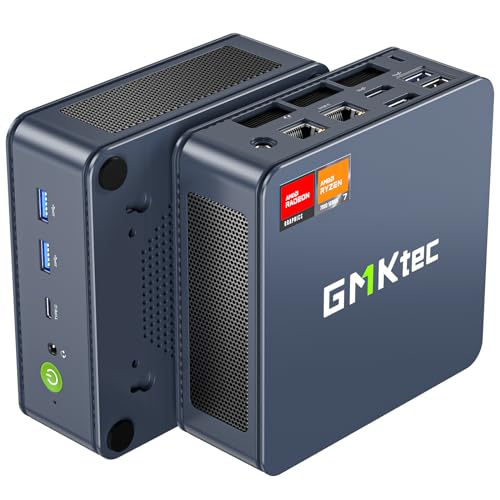
- Best for streaming overall: GMKtec NucBox K6, Ryzen 7 7840HS, 32GB DDR5, 1TB SSD — Check on Amazon
- Beelink SER5 MAX, Ryzen 7 5800H, 32GB RAM, 1TB SSD — Check on Amazon
- MINIX NEO Z300-0dB Fanless Mini PC, Intel i3-N300, 16GB RAM, 512GB SSD — Check on Amazon
- Beelink EQ14 Mini PC, Intel N150, 16GB RAM, 500GB SSD — Check on Amazon
See 2 more Amazon options
- MeLE Quieter 4C Fanless Mini PC, Intel N150, 8GB RAM, 256GB SSD — Check on Amazon
- HP EliteDesk 800 G5 Mini, Core i5-9500T, 16GB RAM, 256GB SSD (Renewed) — Check on Amazon
Read the full guide ↓
Disclosure: As an Amazon Associate, reviewstook.com earns from qualifying purchases. Links to Amazon on this page are affiliate links; they cost you nothing extra. Listing details such as price and availability change often, so check the current Amazon listing before you buy.
Start with what streaming actually asks of a computer, because at under $500 the answer decides everything else. A stream is a live encode: your machine takes whatever is on screen, compresses it into a video feed and pushes it out continuously for hours. Twitch’s standard working point is around 6,000 kbps with constant bitrate (CBR) encoding, which is a demanding, unforgiving load at 1080p60. YouTube is more generous — it accepts higher bitrates, carries 1440p streams, and accepts AV1, the newer codec that holds picture quality together at lower bitrates; Twitch’s own AV1 path runs through its Enhanced Broadcasting program rather than the standard ingest. Streaming in 4K is limited by the platforms, not by anything you can buy in this budget tier, so no pick below is graded on it. The work is done by a dedicated encoder block inside the graphics hardware, and which block a machine carries matters more than its headline processor speed. That is the lens this whole guide uses.
Now the honesty this budget requires. These are home office mini PCs, not gaming rigs, and none of them is a one-box game-streaming machine in the way a desktop with a modern graphics card is. What they genuinely do well is the other half of streaming, which is most of it: talk and just-chatting streams built around a camera, desktop and tutorial streams that share a screen and a voice, podcast-style shows, and — with a capture card — console streams where the console renders the game and the PC only has to encode and broadcast it. Several also make excellent dedicated stream boxes in a two-PC setup, encoding a feed captured from a separate gaming machine. One-machine streams of games played on the PC itself are realistic only for the lightest titles, and only on the strongest pick here; the reviews say exactly where that line falls for each machine. If your plan is streaming modern games from the same box that plays them, this is the wrong shelf — Best Streaming PC Under $500 is the guide written for that job.
Graded as encoders and broadcast desks, the six machines separate cleanly. One carries the only AV1 encoder in the set — the office guide’s performance pick — but its place in this budget tier depends on the current listing, so check price on Amazon before counting it in. One is a 32GB multitasker whose eight real cores give it the best software-encoding fallback here. Two are fanless, which for a streamer is an audio feature, not a comfort one: a microphone cannot hear a fan that does not exist. And one is a renewed business desktop whose encoder is the oldest in the set and which sits in the budget tier, so that, cleaned and checked properly, it still earns a place as a dedicated broadcast box. Check price on Amazon for the current listing on every pick — the live listing is always the final word.
In this guide
Quick Picks
Short on time, or comparing several options at once? Each row below names a streaming job and the machine that suits it, with a link to the listing.
| Streaming job | Pick | Why it stands out | Link |
|---|---|---|---|
| Best for streaming overall | GMKtec NucBox K6, Ryzen 7 7840HS, 32GB/1TB | The only AV1 encoder in this guide, the strongest chip, dual 2.5GbE — check price on Amazon | Check on Amazon |
| Best multitasking stream desk | Beelink SER5 MAX, Ryzen 7 5800H, 32GB/1TB | 32GB for OBS, chat and browser at once; eight cores as a real software-encode fallback | Check on Amazon |
| Best silent stream room | MINIX NEO Z300-0dB, Intel i3-N300, 16GB/512GB | Truly fanless, so the microphone hears your voice and nothing else | Check on Amazon |
| Best low-cost stream box | Beelink EQ14, Intel N150, 16GB/500GB | Quick Sync encoding and dual 2.5GbE in a new, warrantied budget-tier machine | Check on Amazon |
| Best silent on a budget | MeLE Quieter 4C, Intel N150, 8GB/256GB | Fanless and Windows 11 Pro in a lower tier — with a hard memory ceiling | Check on Amazon |
| Cheapest broadcast box | HP EliteDesk 800 G5 Mini, i5-9500T, 16GB/256GB (Renewed) | A budget-tier renewed option; the oldest encoder here, bought with inspection rules attached | Check on Amazon |
How These Picks Were Chosen
The budget was applied the same way as in the office guide this one is built on: every pick is a complete, ready-to-run Amazon listing — no barebones kits that still need memory, storage and an operating system before they can open OBS. Where a machine’s current listing moves around this budget tier, the review flags it and asks you to check price on Amazon before deciding. That caution is flagged wherever the pick appears, not just once.
On top of that sat a streaming filter with four parts. The first is the encoder itself: which compression block the documented silicon carries, which codecs it can encode — not merely decode — and how it behaves at Twitch’s roughly 6,000 kbps working point. The second part is simultaneous load. A streaming desk never runs one program: OBS composites the picture while a browser holds chat and alerts, a voice app runs, and recordings write to disk. Memory capacity and real core count were graded against that combined load, which is why 32GB machines rise here and why a soldered 8GB ceiling is treated as a streaming limitation, not a footnote. The third part is the network: a stream is only as stable as its uplink, so documented Ethernet ports were weighed heavily and the wired-connection rule in the OBS section applies to every pick. The fourth part is the room itself — fan noise is an audio specification for anyone with a microphone, and the two fanless picks were graded as recording equipment, not just computers.
We did not use these machines ourselves. We worked from the maker listings and specification pages assembled in the base research, and from the encoder capabilities of the documented processors and graphics.
The Encoder Map: What Each Chip Can Actually Send
Everything in the detailed reviews follows from this section, so it is worth reading before the picks. An encoder is a fixed-function block: it either supports a codec or it does not, and no driver update changes that. Three encoder families appear in this guide, and one famous name is entirely absent — there is no NVIDIA graphics in any of these six machines, so there is no NVENC anywhere in this guide.
The only AV1 encoder here belongs to the GMKtec NucBox K6. Its Radeon 780M graphics use AMD’s current VCN encoder generation, which encodes AV1 as well as H.264 and HEVC. That makes the K6 the only pick that can send an AV1 stream to YouTube today, and the strongest H.264 sender in the set for Twitch. AV1 encode exists only on current-generation silicon of this kind; no setting or update adds it to the other five picks.
The Beelink SER5 MAX encodes with an older AMD VCN block. The Ryzen 7 5800H’s integrated Vega graphics encode H.264 and HEVC, and that is the full list — no AV1 encode. AMD’s VCN output in H.264 has historically been softer than the best competing encoders at Twitch’s bitrate, so fast-moving content asks more of this pick than of the K6; for talk, desktop and console-capture work it is entirely serviceable. What the SER5 MAX adds is behind the encoder: eight full cores make software x264 encoding at a fast preset a genuine fallback for talk and desktop content, which none of the small Intel picks can claim.
The three Intel picks encode with Quick Sync — of two different ages. The MINIX’s Core i3-N300 and the two N150 machines (the MeLE and the Beelink EQ14) carry the newer Quick Sync generation: clean H.264 and HEVC encoding that is well matched to talk and desktop streams, plus AV1 decoding, which helps when the machine plays back AV1 video. Decoding is not encoding. None of these chips can encode AV1, and any listing or review that suggests otherwise is confusing the two directions. The renewed HP EliteDesk’s UHD Graphics 630 carries the oldest Quick Sync in this guide — H.264 and HEVC encoding of an earlier generation, with no AV1 support in either direction. It still encodes a watchable 1080p talk or desktop stream; it is simply the weakest sender here, and its six real processor cores are its compensation, giving it the same x264 fallback as the SER5 MAX for talk content.
The 6 Best Home Office PCs for Streaming Under $500
GMKtec NucBox K6 — Ryzen 7 7840HS, 32GB DDR5 RAM, 1TB SSD
Who it suits: The streamer who wants the strongest broadcast desk this budget can hold — AV1 for YouTube, headroom for a busy OBS scene collection, and the only pick here that can also play the lighter games it streams.
On encoder merit alone this machine stands apart from the other five. The Ryzen 7 7840HS pairs eight current-generation cores with Radeon 780M integrated graphics, and the 780M’s VCN encoder is the only one in this guide that encodes AV1 alongside H.264 and HEVC. In practice that means two different streams from one box: an AV1 feed to YouTube, where the codec’s efficiency buys a visibly cleaner picture, and an H.264 feed to Twitch at the standard bitrate with the best hardware encoder AMD offers. Thirty-two gigabytes of DDR5 memory sit in two SO-DIMM slots and can grow to 64GB, so OBS, a browser full of chat and dashboard tabs, a voice app and a recording all run without the machine rationing memory. The 1TB PCIe 4.0 SSD has a second M.2 slot beside it for a dedicated recording drive later. Networking is the best in the guide — two 2.5GbE Ethernet ports and Wi-Fi 6E — and three 4K displays can run from HDMI, DisplayPort and USB4 — enough for a main, chat and preview screen. Windows 11 Pro is pre-installed.
The condition attached to all of this is fit for this budget, and it is not a minor one. Check price on Amazon before choosing it: if the current listing sits above this budget tier, it does not belong in this guide for your purchase, and the SER5 MAX below is the buy. When the current listing does fit this tier, this is the strongest streaming desk in the guide. Two working notes complete the picture. The fans are audible under load and the BIOS offers no fan-profile control; GMKtec’s Quiet (45W) and Performance (65W) power modes are the lever you get, and a microphone in the room argues for Quiet mode and distance from the mic. And one verified buyer reported a fitted SSD showing prior usage hours in its SMART data, so check the drive’s health readout in the first week, while returns are easy.
- The only AV1 encoder in this guide, plus the strongest H.264 encoding — YouTube and Twitch both covered properly.
- 32GB of slotted DDR5 and two SSD slots: simultaneous-load headroom that can grow.
- Dual 2.5GbE Ethernet and three 4K display outputs — a stream desk’s port list.
Honest limitation: Check price on Amazon to confirm the current listing fits this budget before choosing it; if it sits above this tier, look to the SER5 MAX instead. Its fans are also audible under load with no BIOS fan control.
Choose it if you stream to YouTube, want AV1, or run a busy multi-scene setup — and the current listing fits this budget. Skip it if the current listing sits outside this budget tier, or your stream is a quiet-room talk show where fan noise near the microphone is the first problem — the fanless picks below solve that one better.

Beelink SER5 MAX — Ryzen 7 5800H, 32GB RAM, 1TB SSD
Who it suits: The multitasking streamer — busy scenes, browser sources, chat, alerts, a recording running underneath — who streams talk, desktop or console-capture content to Twitch and wants one purchase to end the subject for years.
Streaming desks fail on memory before they fail on anything else, and this is the pick built against that failure. The Ryzen 7 5800H brings eight cores and sixteen threads; the configuration linked here fits 32GB of DDR4 in two SO-DIMM slots, expandable to 64GB, and a 1TB NVMe SSD with a 2.5-inch SATA bay inside for a second drive — the natural home for stream recordings. The encoder is the integrated Vega graphics’ VCN block: H.264 and HEVC, no AV1, and graded honestly as softer than the K6’s current-generation encoder at Twitch’s bitrate on fast-moving pictures. For the workflows this machine is actually for — a camera-led talk stream, a shared desktop, a console fed through a capture card — the picture is calmer and the encoder is adequate, and behind it sits the set’s best safety net: eight real cores make x264 software encoding at a fast preset a workable fallback for talk and desktop content. Three 4K displays run from HDMI 2.0, DisplayPort 1.4 and USB-C video; Windows 11 Pro is installed; Wi-Fi 6 is built in, though the wired rule in the OBS section applies — this machine’s Ethernet port is the one to use. Check price on Amazon for the current listing for what is fitted.
The 5800H is a 2021-era chip — more than quick enough for this work, but its graphics are for desktop and light casual play, so one-machine game streaming beyond the lightest titles is not on its menu. Cooling is a dual-fan design at a 54-watt chip setting, and reviewers have flagged fan noise under sustained heavy load; ordinary streaming loads are lighter, but keep the box away from the microphone. The fitted NVMe drive is a QLC design, which can slow during very large sustained writes — a reason to record to the second-drive bay as the setup matures. One variant warning matters at checkout: Beelink also sells a 24GB/500GB build under the same SER5 MAX name on a different chip with soldered memory. The listing linked here is the 5800H model with slotted DDR4 — confirm the configuration on the page matches before you pay, because the soldered variant would gut this pick’s whole argument.
- 32GB of slotted memory and a terabyte fitted, with a bay for a dedicated recording drive.
- Eight real cores: the strongest simultaneous-load headroom and a genuine x264 fallback.
- Three independent 4K display outputs for a proper stream-desk layout.
Honest limitation: No AV1 encoding and a previous-generation VCN encoder that runs soft on fast-moving content at Twitch bitrates; a same-name soldered-memory variant exists — check the configuration at checkout.
Choose it if your stream is talk, desktop or console capture with a busy browser and scene load, and you value headroom over codec bragging rights. Skip it if AV1 to YouTube is the point of the purchase — that is the K6 — or if the room is silent and the microphone is close, where the fanless picks win.

MINIX NEO Z300-0dB — Intel i3-N300, 16GB RAM, 512GB SSD, Fanless
Who it suits: The talk streamer in a quiet room — podcasts, interview shows, teaching streams, call-style broadcasts — where the microphone is close, the room is untreated, and fan noise is not a nuisance but a defect in the product being made.
For a streamer, silence is an audio feature, and this is the machine built around it. The NEO Z300-0dB has no fan at all: the all-metal chassis is the heatsink, so there is nothing to whir into a quiet passage and nothing to gate or filter out of the recording later. The encoder is Intel Quick Sync from the Core i3-N300 — eight efficiency cores behind it — and it encodes H.264 and HEVC cleanly at the bitrates talk and desktop streams use. Be precise about the boundary this guide keeps drawing: this Quick Sync generation decodes AV1 for playback but does not encode it — a YouTube stream from this box goes out in the established codecs, and looks fine, but it is not an AV1 stream. The supporting specification is a considered one: 16GB of DDR4 in a slot that upgrades to 32GB, a 512GB PCIe SSD in an M.2 slot that accepts drives up to 4TB — the obvious recording-drive upgrade — Windows 11 Pro, two HDMI ports at 4K/60 plus a USB-C port carrying video and power delivery for up to three displays, a 2.5GbE Ethernet port for the wired rule, and Wi-Fi 6. Check price on Amazon for the current listing; it sits at the premium end of this budget tier, and what that positioning buys is the silence and the build quality, not raw speed.
The honest limitation is the physics every fanless machine answers to. Sustained heavy load has nowhere to put its heat: independent testing of this model measured the processor at 98°C under a sustained full load, at which point the chip manages itself by slowing down. Talk and desktop streaming are bursty loads that sit well inside what a passive case can shed, and a camera-led show will not trouble it. A marathon session that pins the processor for hours — long renders, or a one-machine game stream beyond the lightest title — does not belong on this box. The second limitation is simpler: this is the most modest processor among the new picks, so the purchase only makes sense where quiet truly is the priority.
- Genuinely fanless — the microphone hears the voice in the room and nothing else.
- Quick Sync H.264/HEVC encoding well matched to talk and desktop streams.
- Memory slotted to 32GB and an SSD slot that takes up to 4TB for recordings; 2.5GbE wired networking.
Honest limitation: No AV1 encoding, a modest processor, and passive cooling that throttles under sustained full load — a quiet-room broadcast machine, not a workstation.
Choose it if your stream is your voice, your room is quiet, and fan noise in the recording is the flaw you are paying to remove. Skip it if you want AV1, plan heavy multitasking scenes, or expect long sustained loads — the K6 and SER5 MAX are built for that side of the trade.

Beelink EQ14 — Intel N150, 16GB RAM, 500GB SSD
Who it suits: The streamer who wants a dedicated broadcast box at the lowest sensible price — a second machine that encodes a console feed or a captured gaming PC, or a simple one-box talk and desktop stream — new, with a maker’s warranty.
The EQ14’s streaming case rests on the same Quick Sync generation as the MINIX above. The Intel N150’s encoder handles H.264 and HEVC with the calm competence that suits camera, desktop and capture-card work, and — the boundary again, stated plainly — it decodes AV1 without encoding it. Around that encoder sits a specification fitted to the second-machine job: 16GB of DDR4 and a 500GB SSD, two M.2 2280 slots so a dedicated recording drive can be added later, dual HDMI at 4K/60 for a broadcast screen and a chat screen, and two 2.5GbE Ethernet ports — exactly what the wired rule wants. It is a new, warrantied machine positioned in the budget tier of this guide, well suited to a dedicated stream-box role alongside the microphone and capture card that matter more.
Four efficiency cores are four: this box encodes a feed and does almost nothing else at the same time, so a one-machine setup with a heavy browser, multiple animated sources and a game running locally is beyond it — its home is the talk stream, the desktop stream, or the encode-only seat in a two-machine arrangement. The 16GB of memory lives in a single slot and 16GB is the platform’s maximum, so the fitted amount is also the final amount — a fair trade for an encode box, stated so it is made knowingly. The listing’s title specifies Windows 11 Home — irrelevant to streaming itself, since OBS and every platform tool run identically on Home, but Home lacks Pro’s BitLocker management, domain joining and Remote Desktop hosting, so anyone whose employer requires those should look at the Pro machines in this guide. Stock on this listing has been interrupted before, disappearing for a stretch of autumn 2026 before returning; if it is unavailable when you shop, the MeLE below is the nearest equivalent, and Best Mini PC Under $500 tracks the wider field.
- Quick Sync H.264/HEVC encoding and dual 2.5GbE in a new, budget-tier machine.
- A second M.2 slot gives recordings their own drive later.
- A compact new machine with maker warranty cover for the dedicated stream-box role.
Honest limitation: Four efficiency cores and a hard 16GB memory ceiling on Windows 11 Home — an encode box and a light stream desk, not a multitasking workstation.
Choose it if you need a dedicated stream box, a console-capture station, or a simple talk-stream desk in the budget tier for a new machine. Skip it if the same machine must also play the games being streamed, or your employer requires Windows Pro features.

MeLE Quieter 4C — Intel N150, 8GB RAM, 256GB SSD, Fanless
Who it suits: The quiet-desk streamer with a simple show — one camera, one screen share, a handful of scenes — who wants fanless silence and Windows 11 Pro without spending to the top of the budget.
The Quieter 4C makes the same promise as the MINIX — no fan, a passively cooled chassis, nothing for the microphone to hear — in a lower tier and at a smaller scale. Its N150 carries the same Quick Sync generation as the EQ14: H.264 and HEVC encoding suited to talk and desktop work, AV1 decoding for playback, and no AV1 encoding. The machine adds Windows 11 Pro, dual HDMI outputs at 4K, a USB-C port with power delivery, gigabit Ethernet for the wired rule, Wi-Fi 6 and a VESA mount for behind-monitor fitting — a tidy, silent broadcast seat. Check price on Amazon for the current listing before deciding. As a budget-tier silent stream box it is a pleasant option; if its current listing approaches the MINIX above in tier, the MINIX — with double the memory in an upgradeable slot — is the better choice, and this guide says so in both reviews rather than pretending the overlap away.
The limitation is memory, and for streaming it bites earlier than it does in office work. Eight gigabytes of LPDDR5 are soldered to the board and can never be increased. A streaming desk runs OBS, a browser holding chat and alerts, and a voice app all at once, on top of the operating system — a combined load that makes 8GB the ceiling that decides how simple the show must stay. Keep the scene collection lean, keep browser tabs few, and this machine runs a calm talk stream in complete silence; let the setup grow the way setups do, and memory pressure — not the encoder, not the processor — is what ends its service. The 256GB of storage asks for the same discipline with recordings: treat this pick as the machine plus a plan for where recordings live.
- Fanless and silent, with Windows 11 Pro and dual 4K HDMI outputs.
- The same Quick Sync encoding as the EQ14, in a VESA-mountable silent chassis.
- Check price on Amazon, and compare its current tier with the MINIX above before choosing.
Honest limitation: 8GB of memory is soldered and final, and the SSD is 256GB — a simple show’s machine, with no growth path as the setup expands.
Choose it if your stream is a camera, a screen and a calm scene list, and silence matters more than headroom. Skip it if your OBS setup is busy or growing — the MINIX’s slotted 16GB, or the SER5 MAX’s 32GB, is the grown-up answer.

HP EliteDesk 800 G5 Mini — Core i5-9500T, 16GB RAM, 256GB SSD (Renewed)
Who it suits: The value-first streamer building a dedicated broadcast seat — a second desk, a console-capture station, a spare-room studio — who would rather choose a budget-tier renewed encode box and prioritise the microphone, lighting and capture card in the kit.
What the EliteDesk brings is a six-core Core i5-9500T, 16GB of DDR4 memory and business-desktop connectivity — six USB-A ports, a USB-C port and three DisplayPort outputs, so the broadcast monitor, chat monitor and a third screen need no hub. Its encoder is the oldest in this guide: the UHD Graphics 630’s Quick Sync is an earlier generation, H.264 and HEVC only, with no AV1 support in either direction. Graded as a sender it is the weakest here — and still entirely capable of a clean 1080p talk, desktop or console-capture stream, which is the work it would be bought for. Its compensation is the same as the SER5 MAX’s: six real cores make x264 software encoding at a fast preset a legitimate alternative for talk content, an option the little N150 and N300 boxes do not honestly have. Check price on Amazon for the current listing — as a budget-tier renewed option, it occupies a tier no new machine in this guide matches.
The caveats are the renewed ones, and for a machine that will hold streaming-account credentials they carry extra weight. A renewed unit is an individual, not a product: reviewers of this model family note that the internal configuration varies between units — the Wi-Fi arrangement among them — and the listing’s own details are not perfectly consistent, with the title saying Windows 11 Pro while a features block mentions Windows 10 Professional. First, reinstall Windows from Microsoft’s own media before the machine touches a streaming account — at least one review outlet reported malware detections on a pre-installed image for this model family, and a clean install costs an hour and removes the question entirely. Second, treat the first evening as an inspection: confirm the memory, storage and network arrangement match the listing — if the unit’s networking turns out to ride on a USB adaptor, plan the wired connection before the first broadcast, not during it — and run a full rehearsal stream inside the return window. Amazon’s Renewed program backs the purchase with its guarantee (a minimum 90-day warranty is the program’s standard), which is the floor of the deal, not a manufacturer’s multi-year cover. The platform is a 2019 design on Microsoft’s Windows 11 supported list: a supported present, no next-Windows runway to count on, and a 256GB SSD that recordings will fill first — treat it as the machine plus a storage plan. Bought as a three-to-four-year budget-tier broadcast box, it is excellent value; bought expecting a decade, the disappointment is scheduled.
- Six-core business processor and 16GB of memory in a budget-tier renewed machine.
- Three DisplayPort outputs and six USB-A ports — a multi-screen broadcast desk with no hub.
- Six real cores give it a genuine x264 fallback for talk content.
Honest limitation: The oldest encoder in this guide, in a renewed individual whose configuration varies by unit — the clean reinstall and first-week inspection are conditions of the recommendation, not optional extras.
Choose it if the budget matters more than the warranty and you will do the setup work properly. Skip it if this will be your only machine for many years, or you want a manufacturer’s warranty behind the box your accounts live on — buy new from this guide instead.

Comparison Table
| Product | Encoder | Best streaming use | Link |
|---|---|---|---|
| GMKtec NucBox K6, 7840HS, 32GB/1TB | AMD VCN — AV1, H.264, HEVC | AV1 to YouTube, busy setups — check price on Amazon | Check on Amazon |
| Beelink SER5 MAX, 5800H, 32GB/1TB | AMD VCN — H.264, HEVC | Multitasking talk/desktop/console-capture desk | Check on Amazon |
| MINIX NEO Z300-0dB, N300, 16GB/512GB | Intel Quick Sync — H.264, HEVC | Silent talk and podcast streams | Check on Amazon |
| Beelink EQ14, N150, 16GB/500GB | Intel Quick Sync — H.264, HEVC | Dedicated stream box, console capture | Check on Amazon |
| MeLE Quieter 4C, N150, 8GB/256GB | Intel Quick Sync — H.264, HEVC | Simple silent streams in a lower tier | Check on Amazon |
| HP EliteDesk 800 G5 Mini, i5-9500T (Renewed) | Intel Quick Sync (older gen) — H.264, HEVC | Cheapest dedicated broadcast box | Check on Amazon |
Setting Up OBS on These Machines
The encoder map becomes practical here; the same setup discipline applies to every pick, and it is worth an evening before the first public broadcast. In OBS, choose the hardware encoder that matches your machine — AMD’s VCN encoder on the K6 and SER5 MAX, Intel Quick Sync on the MINIX, EQ14, MeLE and EliteDesk — rather than the software x264 default. The exceptions are narrow and named: on the SER5 MAX and the EliteDesk, x264 at a fast preset is a legitimate choice for talk and desktop content, because their real cores can carry it; on the N150 and N300 machines, leave x264 alone except as an emergency fallback, because the same cores are also running everything else. For Twitch, set constant bitrate at or below roughly 6,000 kbps with a two-second keyframe interval; for YouTube you can raise the bitrate, and on the K6 you can select AV1. Record locally at a higher quality setting than the stream where the encoder allows it, and write recordings to the second drive or larger SSD wherever a pick offers one.
When a stream stutters, OBS’s statistics separate the failure into three counters, and each has its own fix — guessing wastes more evenings than any of them. Rendering lag means the graphics side could not composite your scene in time: too many browser sources, animated overlays and high-resolution canvases are the usual cause, so simplify the scene, cap the canvas at 1080p, and close what the show does not use — this is the counter the 8GB MeLE will meet first. Encoding lag means the encoder itself is overloaded: stay on the hardware encoder, avoid stacking a high-quality local recording on the same block at maximum settings, and step the preset toward speed rather than quality. Network lag — dropped frames in the network column — is not the computer’s fault at all: it is the connection, and its fix is below.
The network rule has no exceptions in this guide: stream over wired Ethernet, not Wi-Fi, on every pick that offers a port — and five of these six document one, from the K6’s dual 2.5GbE down to the MeLE’s gigabit port. Wi-Fi 6 is fine for everything else a home office does; a live uplink competing with every other device in the house is how a clean encode becomes a dropped-frame counter. On the renewed EliteDesk, confirm the unit’s actual network arrangement during the first-week inspection and arrange the wired run before the first broadcast. Finally, rehearse: run a private or unlisted stream at full show load — camera, scenes, alerts, recording — for a full hour inside the machine’s return window, while sending the box back is still free.
What Else the Stream Needs: Costing the Kit
The computer is the middle of a streaming budget, not the whole of it, and the honest order of spending puts the accessories that change what viewers hear and see ahead of any faster box. No prices are given in this section, deliberately: these are categories to plan for from live listings on the day, and none of them belongs inside any pick’s listing above.
Microphone first. Viewers forgive a soft picture and abandon a bad-sounding stream, so the first kit money goes to the voice: a proper USB or XLR microphone, positioned close, ahead of every other upgrade. This is also where the fanless picks quietly help — a silent room needs less microphone technique and less noise cleanup than a fanned one. Lighting second. A modest, deliberate light on the face improves a camera picture more than a camera upgrade does. Webcam third. Only after light does the camera itself become the limit; many streamers find a well-lit ordinary webcam outperforms an expensive one in a dark room. Capture card last, and only for its one job. A capture card is console equipment — or the bridge in a two-PC setup — and it does nothing at all for a stream whose content is already on the PC. Buy it when a console joins the show, not before. Taken as a whole, the sensible shape at this tier is a mid-tier computer plus this kit in this order, rather than the top-tier box in the guide and a laptop microphone.
How to Choose a Home Office PC for Streaming Under $500
- Grade the encoder before anything else. It decides which codecs you can send and how clean the picture is at Twitch’s bitrate. In this guide the order is: the K6’s current-generation VCN with AV1, then the newer Quick Sync machines and the SER5 MAX’s older VCN for H.264 work, then the EliteDesk’s older-generation Quick Sync.
- Decide whether AV1 is a requirement or a wish. If you stream to YouTube and AV1 matters, exactly one pick here does it. If you stream to Twitch, every pick sends H.264 and the decision moves to memory, silence and price.
- Count the whole simultaneous load, not the stream alone. OBS plus chat browser plus voice app plus recording is the real workload. 32GB ends the subject, 16GB is the working floor, and soldered 8GB fits only a deliberately simple show.
- Treat silence as an audio specification. If the microphone sits in the same room — it usually does — a fanless pick removes a noise source no software gate fully fixes. If the box can live in another room or far from the mic, fanned picks stop being a compromise.
- Plan the recording drive. Streams recorded at stream quality fill small SSDs quietly and completely. Prefer a pick with a second slot or bay, or plan for a storage addition from the start.
- Wire the uplink. Plan the Ethernet cable run as part of the setup — the OBS section above explains why Wi-Fi is not a streaming connection.
- Plan the whole desk, not the box. Microphone, lighting, webcam and possibly a capture card are separate purchases, in that order. The EQ14 and EliteDesk are budget-tier options — a legitimate reason to choose them when the kit matters as much as the box.
- Check the current price on Amazon for every pick. Confirm the K6’s current listing fits this budget before choosing it, and compare the MeLE’s current listing with the MINIX tier before deciding between them.
Common Buying Mistakes
- Assuming an Intel mini PC encodes AV1 because its listing mentions AV1. The N150 and N300 chips in this guide decode AV1 for playback; encoding is a different block, and they do not have it. Only the K6 encodes AV1 here.
- Buying the K6 without checking its current price and calling it an under-$500 purchase. If the current listing sits above this budget tier, the SER5 MAX is the buy instead.
- Streaming over Wi-Fi because the specification sheet boasts about it. The wireless generation is not the point — contention and interference are. If the machine has an Ethernet port, the stream goes through it.
- Signing a renewed machine into streaming accounts on its pre-installed Windows. Reinstall from Microsoft’s media first; on the EliteDesk this is a condition of the recommendation, not a suggestion.
- Letting the show outgrow soldered memory. OBS setups accrete scenes, browser sources and plugins. On the MeLE’s fixed 8GB the accretion has a hard stop, and it arrives as rendering lag mid-stream.
- Assuming a same-name variant is the same machine. The SER5 MAX name also covers a soldered-memory build that would gut the pick’s argument. Confirm the processor and memory type on the listing at checkout, every time.
- Recording everything to a small system drive. A 256GB SSD holding the operating system, OBS and an archive of broadcasts fills faster than new streamers expect — give recordings their own drive or a deliberate deletion habit.
- Expecting one-machine game streaming from an office mini PC. Only the K6, and the SER5 MAX for the lightest titles, play and stream from the same box with any honesty. For everything else, the console-plus-capture-card route is the design, not a workaround — and readers set on game streaming from one machine should start with Best Home Office PC For Streaming Under $700 and the dedicated streaming guides.
Final Recommendation
- Best streaming desk overall: GMKtec NucBox K6 — check price on Amazon to confirm it fits this budget.
- Busiest multitasking setup: Beelink SER5 MAX.
- Quiet-room talk and podcast streams: MINIX NEO Z300-0dB.
- Dedicated stream box on a budget: Beelink EQ14.
- Simple, silent, light-duty: MeLE Quieter 4C.
- Cheapest broadcast seat: HP EliteDesk 800 G5 Mini (Renewed) — with the inspection rules.
Our top two for streaming at this budget are the GMKtec NucBox K6, the only machine here that encodes AV1 and the strongest encoder and multitasker in the guide — provided you check price on Amazon and confirm the current listing fits this budget — and the Beelink SER5 MAX, whose 32GB of slotted memory, terabyte of storage and eight real cores make it the most forgiving desk for a busy show — check price on Amazon for its current listing. Between them they cover the two shapes this search usually takes: the best codec story on the right day, or the most headroom every day. If the room is the constraint, the fanless MINIX is the machine your microphone will thank you for; if the budget tier is the priority, the EQ14 new or the renewed EliteDesk — cleaned, checked and wired — keep the focus where it improves the stream most, in the kit. Buyers weighing the smaller end should also see Best Home Office PC For Streaming Under $400, anyone whose office machine is also the gaming machine should read Best Mini Gaming PC Under $500 before assuming an office pick moonlights well, and workers whose streams are really workstation loads should see Best Workstation PC Under $500. Check the encoder, wire the uplink, rehearse for an hour inside the return window, and the stream will take care of itself.
Frequently Asked Questions
Can a home office PC under $500 really run a stream?
Yes — for the workflows most home streamers actually run. Talk and just-chatting shows, desktop and tutorial streams, podcast-style broadcasts and console streams fed through a capture card all sit comfortably on the encoders in this guide. What these machines are not is one-box game streamers for modern titles; that job wants a discrete graphics card, and only the K6 — and the SER5 MAX for the lightest games — should be asked to play and broadcast from the same box.
Which of these PCs can stream in AV1?
Only the GMKtec NucBox K6. Its Radeon 780M graphics carry AMD’s current VCN encoder, which encodes AV1 for YouTube. The Intel picks decode AV1 for playback but cannot encode it, and the SER5 MAX’s older VCN block encodes H.264 and HEVC only. No setting or update changes any of this — the encoder is fixed hardware.
Why is there no NVENC in this guide?
Because none of the six machines contains an NVIDIA graphics processor — they run AMD or Intel integrated graphics, so their encoders are AMD VCN and Intel Quick Sync respectively. NVENC is a strong encoder family, but it lives on a different shelf of computers; readers set on it should look at the dedicated streaming PC guides, starting with Best Streaming PC Under $500.
Twitch or YouTube — does the platform change the pick?
It changes the codec, which can change the pick. Twitch’s standard path is H.264 at around 6,000 kbps, which every pick here sends — the K6 and SER5 MAX with the most headroom. YouTube accepts higher bitrates and AV1, which only the K6 can supply. A Twitch talk streamer can choose freely on silence, memory and current tier; a YouTube streamer who wants AV1 has one option in this guide.
Will the fanless machines overheat on a long stream?
A talk or desktop stream is a bursty load that a passive case sheds comfortably. The exception is sustained full load: independent testing measured the MINIX’s processor at 98°C under a continuous maximum load, where the chip slows itself to cope. Keep the show to camera, screen and scenes and they run cool and silent for hours; add rendering or demanding games and they will throttle.
Is the renewed EliteDesk safe to sign into streaming accounts?
After one specific step, yes. Reinstall Windows from Microsoft’s own media before the machine touches any account — review outlets reported malware detections on a pre-installed image for this model family, and the clean install removes the question entirely. Then verify the configuration matches the listing, arrange the wired network connection, and run a full rehearsal stream inside the Amazon Renewed return window. Follow that sequence and it is a sound broadcast box; skip the reinstall and you are relying on luck.
Do I need Windows 11 Pro for streaming?
No. OBS, capture software and the platform tools run identically on Home, and the EQ14 streams perfectly well on it. Pro matters only where an employer’s policy requires it — BitLocker management, domain joining, Remote Desktop hosting. Five of the six picks include Pro anyway; check your employer’s requirements before choosing the EQ14.
Why does this guide insist on wired Ethernet when these machines have Wi-Fi 6?
Because a stream is a continuous uplink, and dropped frames come from contention and interference, not from insufficient wireless speed on paper. A cable removes the variable entirely, and the OBS network counter cannot tell the difference between a cheap computer and a busy wireless network — but your viewers can. Wire the box; use the Wi-Fi for everything else.
- Best Home Office PC For Streaming Under $400
- Best Home Office PC For Streaming Under $700
- Best Streaming PC Under $500
- Best Home Office PC Under $400
- Best Home Office PC Under $700
- Best Home Office PC For Beginners Under $500
- Best Home Office PC For Small Spaces Under $500
- Best Mini PC Under $500
- Best Fanless Mini PC Under $500
- Best Mini Gaming PC Under $500


