Where to buy
Check the latest price, availability and delivery on Amazon. Orders are placed on Amazon. We may earn a commission from qualifying purchases.
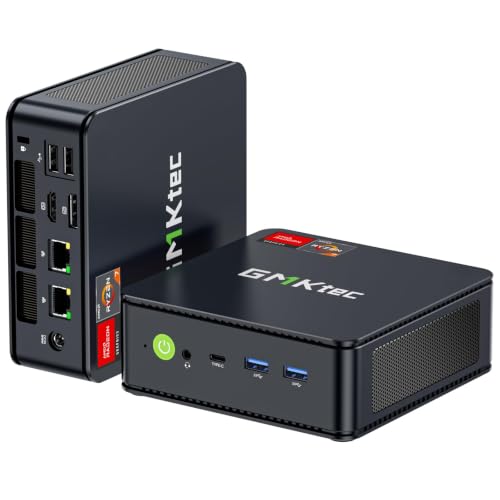
- Best overall streaming desk: GMKtec M5 Plus Mini PC, Ryzen 7 5825U, 32GB RAM, 1TB SSD — Check on Amazon
- Beelink SER5 MAX Mini PC, Ryzen 7 5800H, 16GB RAM, 500GB SSD — Check on Amazon
- Dell OptiPlex 7060 SFF Desktop, Core i5-8500, 16GB RAM, 512GB SSD (Renewed) — Check on Amazon
- BOSGAME P4 Mini PC, Ryzen 7 5700U, 32GB RAM, 1TB SSD — Check on Amazon
- KAMRUI E3B Mini PC, Ryzen 5 7430U, 32GB RAM, 512GB SSD — Check on Amazon
See 1 more Amazon option
- MeLE Quieter4C Fanless Mini PC, Intel N150, 8GB RAM, 256GB SSD — Check on Amazon
Read the full guide ↓
Disclosure: As an Amazon Associate, reviewstook.com earns from qualifying purchases. Links to Amazon on this page are affiliate links; they cost you nothing extra. Listing details such as price and availability change often, so check the current Amazon listing before you buy.
Start with the sentence most guides at this price skip: there is no discrete graphics card in any machine below, which means there is no NVENC encoder in this guide, and no machine here can encode AV1. If your plan is to play a demanding PC game on the same box that broadcasts it, a $400 home office PC is not that machine, and no wording on a listing changes that. What these six machines genuinely are is streaming boxes for the other three honest workflows: talk and desktop content — podcasts, video essays, teaching, screen-share and just-chatting streams; console streaming, where a capture card feeds the picture in and the PC only has to encode it; and media or transcode duty around a stream. For those jobs the encoder question becomes narrower and more interesting, because every pick here carries a hardware H.264 encoder of some kind — AMD’s VCN block inside the Ryzen chips’ Vega graphics, or Intel’s Quick Sync inside the two Intel machines — and they are not equal.
The workflow they are graded against is the real one. Twitch’s standard ceiling for most broadcasters is around 6,000 kbps with constant bitrate (CBR) encoding, which is why encoder quality at exactly that bitrate matters more than any specification on the box: a softer encoder turns fine detail — grass, rain, confetti, a busy spreadsheet shared at small sizes — into mush at 6,000 kbps, and a better one stays legible. YouTube is the more generous platform: it accepts higher bitrates, takes 1440p uploads as streams, and supports AV1 live ingest, none of which these machines can fully exploit, because their encoders top out at H.264 and HEVC. Twitch’s AV1 path runs through its Enhanced Broadcasting programme rather than general availability. And 4K streaming remains limited by the platforms themselves, not by anything you can buy at this price — so the honest target for every pick below is a clean 1080p60 H.264 stream, or a cleaner 720p60 one where the encoder is weak, produced without dropped frames and without the machine audibly complaining into your microphone.
That grading changes the order you might expect from the office version of this guide. Memory still matters — OBS, a browser full of dashboards and chat, a call client and the game or console feed all live in RAM at once — but the encoder moves to the front of the queue, and simultaneous load sits right behind it: on the Ryzen picks, the same chip renders the picture and encodes it, on shared memory bandwidth and a shared thermal budget. The renewed Dell, an office afterthought in most rankings, turns out to hold this set’s best H.264 encoder. The fanless MeLE, the weakest computer here by almost every measure, contributes the one thing no fan can: a silent room. Below are the quick picks, an encoder map for the whole set, detailed reviews of all six machines, an OBS setup section written for hardware of exactly this class, the mistakes that waste money, and the questions new streamers ask most.
In this guide
Quick Picks
Short on time, or comparing several options at once? Each row below names a streaming job and the machine that suits it, with a link to the listing.
| Streaming job | Pick | Why it stands out | Link |
|---|---|---|---|
| Best overall streaming desk | GMKtec M5 Plus, Ryzen 7 5825U, 32GB, 1TB | 32GB of dual-channel RAM for OBS plus dashboards, dual 2.5GbE wired networking, three screens for the stream desk | Check on Amazon |
| Best one-box light game streaming | Beelink SER5 MAX, Ryzen 7 5800H, 16GB, 500GB | The strongest processor here, run at 54W — the most headroom when one chip must render and encode at once | Check on Amazon |
| Best encoder quality per dollar | Dell OptiPlex 7060 SFF, Core i5-8500, 16GB, 512GB (Renewed) | Intel Quick Sync is the cleanest H.264 encoder in this set — a console-capture or talk box; check price on Amazon | Check on Amazon |
| Best for recording-heavy channels | BOSGAME P4, Ryzen 7 5700U, 32GB, 1TB | 1TB fitted for local recordings and dual 2.5GbE networking | Check on Amazon |
| Best budget 32GB stream box | KAMRUI E3B, Ryzen 5 7430U, 32GB, 512GB | 32GB of RAM in a budget-tier package — check price on Amazon — with a fan you must plan your microphone around | Check on Amazon |
| Best silent stream room | MeLE Quieter4C, Intel N150, 8GB, 256GB | Fanless — no fan noise exists to reach your microphone; a talk or console-capture encode box | Check on Amazon |
How These Picks Were Chosen
The budget was applied as a ceiling, not a target: every machine below is a real Amazon listing in this budget tier in the United States, and prices in this category move weekly with coupons, so check the live price on Amazon before you order. The renewed Dell fluctuates with refurbisher stock and availability. The set is the verified $400 home office set; what this guide changes is the grading, not the hardware.
The first grading axis is the encoder, and it is derived only from the silicon the base listings document — no encoder is claimed for any chip that does not carry one, and no capability is upgraded in the telling. Four picks run Ryzen processors with Vega integrated graphics (the 5825U, 5800H, 5700U and 7430U), and Vega’s video block encodes H.264 and HEVC: serviceable, and visibly softer than a modern NVENC block at Twitch’s bitrate, with no AV1 encode — AV1 encoding on the AMD side arrived with a later graphics generation that none of these chips has. The Dell’s Core i5-8500 carries Intel Quick Sync in its UHD Graphics 630, a mature H.264 encoder that is this set’s quality benchmark at 6,000 kbps. The MeLE’s N150 carries a newer Quick Sync generation that decodes AV1 for playback but does not encode it. Stated once, plainly: AV1 encode appears nowhere in this guide, because the hardware for it appears nowhere in this guide.
The second axis is simultaneous load. A streaming PC never does one thing: it composites scenes in OBS, holds a browser of dashboards and chat, runs a call or a game, records locally, and encodes — concurrently, for hours. On the Ryzen machines the render and the encode share one chip, so memory bandwidth and thermal headroom become streaming specifications: dual-channel RAM feeds both the graphics and the encoder, and the Beelink’s 54W power setting buys sustained room the 15W-class chips do not have. The third axis is the unglamorous infrastructure of a reliable stream: wired Ethernet ports (two of the picks carry dual 2.5GbE), enough display outputs to run a proper stream desk — game or console picture on one screen, OBS on a second, chat and dashboards on a third — storage that survives a recording habit, and a noise profile your microphone can live with. Every pick drives at least two displays from its own ports; most drive three.
We did not use these machines ourselves. We read the maker listings and specification pages, the encoder capabilities of the documented processors, and the platform specifications behind the renewed pick, and we scored what streaming actually loads. Where a listing’s details matter to the verdict — the KAMRUI’s 16GB sibling sold under a separate listing, the Dell’s third video port being a factory option, the BOSGAME family’s near-identical variant titles — the review says so rather than repeating the headline.
The Encoder Map: What Each Chip in This Set Can Actually Send
Because the encoder decides the picture your viewers get, here is the whole set’s map in one place before the reviews. The four Ryzen picks encode through AMD’s VCN block in their Vega graphics: H.264 for Twitch, HEVC available for recordings and for platforms that accept it, and no AV1 in either direction of the claim — not hidden, not coming in a driver update. Treat any listing copy that implies otherwise as marketing. Within that shared encoder, the picks differ around it: the Beelink’s 54W 5800H has the most processor left over for OBS compositing while the encoder works; the 32GB machines give the integrated graphics and the stream’s supporting software the most memory bandwidth to share.
The two Intel picks encode through Quick Sync. The Dell’s UHD Graphics 630 version is the older of the two and still the set’s H.264 quality leader at Twitch bitrates — Quick Sync’s reputation among streamers was earned in exactly this generation — but it is attached to integrated graphics that render almost nothing, so the Dell encodes other machines’ pictures (a console through a capture card) or a desktop, never a demanding game of its own. The MeLE’s N150 Quick Sync is newer, adds AV1 decoding for playback and media duties, and encodes H.264 and HEVC — but it sits beside four efficiency cores and 8GB of soldered memory, so its honest jobs are talk, desktop and console-capture encoding at 1080p60 or below. The software fallback, x264 encoding on the processor, is an emergency tool only in this set: the eight-core Ryzen picks can hold a light desktop scene on it, the N150 cannot be asked to, and on any pick it spends the same cores the rest of the stream needs.
The 6 Best Home Office PCs for Streaming Under $400
GMKtec M5 Plus Mini PC — Ryzen 7 5825U, 32GB RAM, 1TB SSD
Who it suits: The talk-and-desktop streamer — podcast, video essay, teaching, just-chatting — who runs a full stream desk of OBS, dashboards, chat and a call client, and wants the machine to stop being a variable.
Streaming on integrated graphics is a memory-bandwidth exercise before it is anything else, and the M5 Plus is the best-equipped machine here for it. Its 32GB of DDR4 sits in two slots in dual channel, which matters twice over: the Ryzen 7 5825U’s Vega graphics borrow system memory for rendering, and OBS, a browser holding the streaming dashboard, chat and alerts, and a call client all compete for what is left. With 32GB, nothing swaps to disk mid-stream, and swapping is the silent cause of the stutters viewers describe as “the stream felt off.” The encoder is Vega’s VCN block — H.264 and HEVC, no AV1 — and graded honestly it is a mid-pack Twitch encoder: at 6,000 kbps it holds faces, slides and desktop detail well, and softens in fast, fine-textured game footage, which is why this pick is graded as a talk-and-desktop machine first. Where it separates itself is the desk around the encoder: triple 4K output over HDMI, DisplayPort and USB-C runs a proper three-screen stream desk with no dock; dual 2.5GbE Ethernet ports give the wired connection this guide insists on, with a port to spare for a home server or a second machine; and the 1TB SSD absorbs a local-recording habit that fills smaller drives in a month. Windows 11 Pro’s Remote Desktop hosting even lets you reach the stream box from another room.
Check price on Amazon for the current listing: prices in this category move often with coupons and promotions, so check the live price before you order, as with most picks here. The limitations are the class limitations. The 5825U is a laptop processor, and its VCN encoder sets the picture ceiling: a viewer comparing your game footage against an NVENC stream will see the difference in motion-heavy scenes, and no setting removes it. GMKtec is a value brand whose support runs through the seller rather than a domestic service network. And like every actively cooled pick here it has a small fan — quiet under streaming loads, which are mostly encoder and compositor work rather than full processor load, but present in a silent room. As the complete stream desk — memory, screens, wired networking, storage — it is the set’s most finished package.
- 32GB of dual-channel RAM and 1TB of storage — the memory headroom a stream desk of OBS plus dashboards actually consumes.
- Dual 2.5GbE LAN and triple 4K output (HDMI, DisplayPort, USB-C): wired streaming and a three-screen desk, no dock.
- Vega VCN hardware H.264 encoding, with memory expandable to 64GB and a second SSD slot for growth.
Honest limitation: The Vega encoder is visibly softer than NVENC at Twitch bitrates in fast game footage, and there is no AV1 encode — this is a talk-and-desktop pick first, a light-games pick second.
Choose it if your content is talk, desktop or console-fed and you want the fullest stream-desk specification under $400. Skip it if your channel is demanding PC games played on the same box — that job needs a discrete GPU this budget does not contain.

Beelink SER5 MAX Mini PC — Ryzen 7 5800H, 16GB RAM, 500GB SSD
Who it suits: The streamer whose show includes light games played on the same machine — older titles, indie and esports at modest settings — and who needs one chip to render and encode without falling over.
Simultaneous load is where most integrated-graphics streaming dies, and the SER5 MAX is built to survive more of it than anything else here. Its Ryzen 7 5800H is the strongest processor in the guide, and Beelink runs it at a 54W power setting rather than the throttled 15W of a thin laptop, so the thermal and power budget that the game render, the VCN encoder, OBS compositing and the supporting browser all draw from is roughly triple the usual mini PC allowance. The encoder itself is the same Vega VCN block as the GMKtec’s — H.264 and HEVC, no AV1, the same softness at 6,000 kbps in fast footage — so the Beelink does not win on picture quality per frame; it wins on how much else can happen while those frames are encoded without the frame pacing falling apart. Display output is triple over HDMI, DisplayPort and USB-C, Wi-Fi 6 and Bluetooth 5.2 are fitted, Windows 11 Pro is installed, and the box measures roughly 5 by 4.4 by 1.65 inches, small enough to mount behind a monitor. Check price on Amazon for the current listing and availability.
The catch is memory, and for streaming it is a real one: 16GB is the tightest allocation among the serious picks here, and a game, OBS and a dashboard browser together will lean on it. The honest framing is machine plus fix — the memory is socketed and upgrades to 64GB, the SSD to 2TB, so the fix is a standard laptop-memory purchase later rather than a replacement machine — but it is a purchase the GMKtec above does not ask for, and it is never counted inside this pick’s price. Storage as shipped is the same story in miniature: 500GB is fine for streamed content, tight for a local-recording habit. Buy it as the one-box light-gaming streamer with a documented growth path, knowing which half of the specification you are deferring.
- Ryzen 7 5800H at a 54W setting — the most simultaneous-load headroom in this guide, sustained like a desktop.
- Three displays driven over HDMI, DisplayPort and USB-C from a chassis roughly five inches square.
- RAM and SSD both upgradeable (to 64GB and 2TB), so the streaming spec can grow with the channel.
Honest limitation: It ships with 16GB of RAM and 500GB of storage — a game plus OBS plus dashboards will lean on both, and the memory fix is a later purchase, not included in the price.
Choose it if your stream includes light games rendered on the same box and you value sustained processor headroom. Skip it if you want 32GB fitted from the factory — the GMKtec and KAMRUI already include it.

Dell OptiPlex 7060 SFF Desktop — Core i5-8500, 16GB RAM, 512GB SSD (Renewed)
Who it suits: The console streamer or talk broadcaster who wants the cleanest H.264 picture this budget produces, and is comfortable buying renewed to get a business desktop as the encode box.
This is the guide’s renewed pick, scored on renewed rules, and it holds a card none of the new machines can match: Intel Quick Sync. The Core i5-8500’s UHD Graphics 630 carries Quick Sync Video, and at Twitch’s 6,000 kbps its H.264 output is the quality benchmark in this set — the encoder the Vega machines are compared against and found softer. Around it sit six real desktop cores for OBS compositing, alerts and the dashboard browser, 16GB of DDR4, a 512GB SSD and Windows 11 Pro, with a keyboard and mouse included in the box per the listing. The platform is a standard business desktop: the cover comes off without tools, memory and storage are ordinary parts, and Dell’s documentation and spares are everywhere. Two longevity points matter for a machine you will run for hours daily: the i5-8500 sits on Microsoft’s supported-processor list for Windows 11, so the operating system is legitimate and updates normally, unlike the 6th- and 7th-generation renewed stock sold with Windows 11 installed off-list; and the two standard DisplayPort outputs are guaranteed, while the platform’s third video port was a factory option that varies by unit — check the rear panel of the exact machine on the live listing if a third screen matters.
The grading must be equally plain about the job it cannot do. The UHD 630 renders almost nothing: the Dell encodes pictures produced elsewhere — a console through a capture card, a desktop, a camera scene — and it is not a game-streaming machine for games played on itself beyond the lightest casual titles. No discrete graphics card is part of this pick as documented, and none is promised. Check price on Amazon before you order: as a renewed listing, its pricing follows refurbisher stock and availability. The protection is Amazon Renewed’s 90-day guarantee rather than a manufacturer’s year. Bought as an encode box — the role where its one special component is the whole product — it is the sharpest streaming value in this guide.
- Intel Quick Sync H.264 — the cleanest Twitch-bitrate encoder in this set, in a budget-tier renewed machine; check price on Amazon.
- Six desktop cores for OBS and stream software, with tool-less access and standard, replaceable parts.
- Its i5-8500 sits on Microsoft’s Windows 11 supported-processor list, so the operating system carries no off-list compromise.
Honest limitation: Renewed means a 90-day Amazon Renewed guarantee instead of a manufacturer’s year, on a 2018 platform whose integrated graphics render almost nothing — it encodes other machines’ pictures, it does not game.
Choose it if your picture comes from a console or a desktop scene and you want the best encoder quality per dollar. Skip it if you need a full manufacturer warranty, or any real game rendering from the same box.
BOSGAME P4 Mini PC — Ryzen 7 5700U, 32GB RAM, 1TB SSD
Who it suits: The recording-heavy creator — stream-and-upload channels, video podcasts, anyone who keeps a local archive of every broadcast — whose office PC also does household file duty.
The P4’s streaming case is built from the two specifications recordings consume: space and memory. It matches the GMKtec’s 32GB of RAM and 1TB SSD, and local OBS recordings are the workload that turns storage from a specification into a schedule — a 1TB drive holds a season of broadcasts where a 256GB or 500GB drive starts forcing deletions mid-season. Its Ryzen 7 5700U encodes through the same Vega VCN block as the other Ryzen picks: H.264 and HEVC, no AV1, the same Twitch-bitrate softness in fast game footage, entirely adequate for the talk, desktop and console-fed content this set is for. Around that sit triple 4K output over HDMI, DisplayPort and USB-C for the stream desk, Wi-Fi 6E and Bluetooth 5.2, and dual 2.5GbE Ethernet — the wired connection a stream should run on, plus a second fast port that suits the machine’s other life hosting shared files, backups or a media library for the house. Windows 11 Pro is installed, and its Remote Desktop hosting pairs naturally with that server role. Check price on Amazon for the current listing.
None of the cautions that follow is about the concept; all of them are about the listing. This product family has also been sold in a 5825U variant under near-identical titles, so confirm the live listing’s configuration line — processor, 32GB, 1TB — before ordering, and check the machine’s system information on arrival while the return window is open. BOSGAME is a value brand with support through the seller, and the 5700U is a step behind the 5825U and the 5800H in sustained work, which is why this pick sits fourth despite matching the leader’s memory and storage: for pure streaming the GMKtec’s processor and finish are ahead, and the P4’s case rests on the recording archive and the second network port. Buy it for that combination and it earns its place.
- 32GB of RAM and 1TB of storage — the recording archive is fitted from the factory, not scheduled as an upgrade.
- Dual 2.5GbE LAN alongside Wi-Fi 6E: wired streaming plus a home file and media server in one box.
- Triple 4K output and Windows 11 Pro cover the desk side completely.
Honest limitation: The listing family includes a near-identically named variant with a different processor — verify the exact configuration on the live listing and again on delivery.
Choose it if you record everything locally and your stream PC doubles as the home’s file hub. Skip it if you would rather not verify configurations at all — the GMKtec asks less checking of its buyer.

KAMRUI E3B Mini PC — Ryzen 5 7430U, 32GB RAM, 512GB SSD
Who it suits: The value-first streamer — a second-room setup, a small channel equipping on a firm budget — who has read the memory argument and wants 32GB for the least money.
The E3B’s proposition survives the change of angle intact: the RAM headroom of the top pick at a budget-tier price point; check price on Amazon. Its Ryzen 5 7430U is a six-core, twelve-thread chip, and around it sit 32GB of dual-channel DDR4 — two 16GB sticks, expandable to 64GB — which feeds the same streaming arithmetic as the leader’s: the Vega 7 graphics borrow system memory, OBS and the dashboard browser live in the rest, and nothing swaps mid-stream. The encoder is the family’s Vega VCN block with two honest qualifications: the Vega 7 configuration has fewer graphics cores than the Vega 8 machines above, so its own game rendering is the weakest of the Ryzen picks and its honest content is talk, desktop, console-fed and the lightest games; and the encoder’s Twitch-bitrate softness is the family trait, not a defect of this box. Three displays are supported, and the claim is verified from the maker’s own specification table on the listing rather than from the headline: HDMI 2.0, DisplayPort 1.4 and USB-C, each at 4K and 60Hz — enough for the three-screen stream desk. Wi-Fi 6, Bluetooth 5.2 and gigabit Ethernet cover networking — note the step down: this is the one serious pick with gigabit rather than 2.5GbE wired networking, which costs a stream nothing today and a home-server side-job some speed. Windows 11 Pro is installed, a VESA mount and HDMI cable are in the box, and there are two M.2 slots, the second SATA-only, so a storage upgrade should be planned as a SATA drive or a main-drive replacement. A 16GB version exists under a separate listing, so confirm the cart says 32GB.
The streaming-specific caution is acoustic. The E3B is actively cooled, and reviewers have noted the fan becomes audible under sustained heavy load; streaming loads are lighter than the benchmarks that provoke it, but a streamer whose microphone sits near the desk should plan placement — behind the monitor on its VESA plate, not beside the mic — and a noise gate in OBS, rather than discovering the fan on a recording. The 7430U’s name also sounds newer than the chip is: a refreshed Zen 3 part, a close relative of the 5800U generation, which for this workload is no disqualification. Support runs through the seller, as with the other value brands here.
- 32GB of dual-channel DDR4 — a budget-tier route to a memory-comfortable stream desk; check price on Amazon.
- Three 4K outputs (HDMI 2.0, DisplayPort 1.4, USB-C); the VESA mount and an HDMI cable are included in the box.
- A second M.2 slot and memory headroom to 64GB make the upgrade path real.
Honest limitation: The fan is audible under sustained heavy load — plan microphone placement and a noise gate — and wired networking is gigabit where the picks above carry 2.5GbE.
Choose it if you want 32GB and three displays for the least money and can place the box away from the microphone. Skip it if your recording space is very quiet and the mic is close — the fanless MeLE below exists for exactly that room.
MeLE Quieter4C Fanless Mini PC — Intel N150, 8GB RAM, 256GB SSD
Who it suits: The voice-first streamer — podcasting, teaching, commentary, ASMR-adjacent and call-style content — recording in a room where the computer itself must make no sound whatsoever.
Every other pick in this guide asks you to manage its noise; the Quieter4C deletes the category. There is no fan anywhere in the design, so there is no fan noise to reach a microphone, no bearing to wear, and nothing moving to fail — and for talk content, where the product is a voice in a quiet room, that silence is a genuine streaming feature rather than a comfort. The chassis is a slab roughly 5.2 by 3.2 by 0.7 inches; bolted to the included VESA hardware, it disappears behind a monitor entirely. Its Intel N150 encodes through Quick Sync: H.264 and HEVC for the stream and recordings, with AV1 decoding for playback duties — and the boundary must be stated exactly, because listing copy blurs it: this chip does not encode AV1, and neither does anything else in this guide. The port selection is better than the size suggests — two HDMI 2.0 outputs plus USB-C display output drive three 4K screens, with gigabit Ethernet for the wired rule, Wi-Fi 6, Bluetooth 5.2, Windows 11 Pro and an NVMe SSD. For its honest workloads — a talk scene, a desktop, a console feed arriving through a capture card — 1080p60 H.264 through Quick Sync is a comfortable assignment. Check price on Amazon for the current listing.
The limitations are structural and must be bought with open eyes. The 8GB of memory is soldered and is the ceiling for the life of the machine: OBS, one browser of dashboards and a call client fit; OBS plus a game plus dashboards do not, and no upgrade exists. The N150’s four efficiency cores are the set’s thinnest simultaneous-load budget, so this pick is a dedicated encode box — talk, desktop, console-capture — and not a one-box game streamer in any configuration. Storage is 256GB, the tightest here, so a recording habit needs an external or network destination from the start. This pick is a specialist bought for one property. If your microphone can hear your current PC, it solves the problem completely, and nothing else in the guide can say that.
- Truly fanless: zero moving parts and zero fan noise in the recording room — silence as a streaming feature.
- Quick Sync H.264/HEVC encoding and triple 4K output from two HDMI ports and USB-C, in a slab that hides behind a monitor.
- Windows 11 Pro is installed, and storage is a proper NVMe SSD rather than eMMC.
Honest limitation: 8GB of soldered memory is a permanent ceiling and the N150 is an efficiency chip — a dedicated talk or console-capture encode box, never a one-box game streamer.
Choose it if silence is your first requirement and your content is voice, desktop or console-fed. Skip it if anything you stream is rendered on the same machine — start with the Beelink instead.

Comparison Table
| Product | Encoder | Memory & storage | Best streaming use | Link |
|---|---|---|---|---|
| GMKtec M5 Plus, Ryzen 7 5825U | AMD VCN H.264/HEVC — no AV1 | 32GB (to 64GB), 1TB NVMe, 2 slots | The complete talk-and-desktop stream desk | Check on Amazon |
| Beelink SER5 MAX, Ryzen 7 5800H | AMD VCN H.264/HEVC — no AV1 | 16GB (to 64GB), 500GB (to 2TB) | Light games rendered and encoded on one box | Check on Amazon |
| Dell OptiPlex 7060 SFF (Renewed), i5-8500 | Intel Quick Sync H.264/HEVC — no AV1 | 16GB, 512GB, desktop parts | Console-capture or talk encode box; cleanest H.264 here | Check on Amazon |
| BOSGAME P4, Ryzen 7 5700U | AMD VCN H.264/HEVC — no AV1 | 32GB, 1TB | Recording-heavy channels and stream archives | Check on Amazon |
| KAMRUI E3B, Ryzen 5 7430U | AMD VCN H.264/HEVC — no AV1 | 32GB (to 64GB), 512GB, 2 slots | 32GB stream desk on the tightest budget | Check on Amazon |
| MeLE Quieter4C, Intel N150 | Intel Quick Sync H.264/HEVC — no AV1 encode | 8GB soldered, 256GB NVMe | Silent talk or console-capture encode box | Check on Amazon |
Setting Up OBS on a Machine of This Class
Hardware of this class streams well when OBS is configured for it and badly when it is left on defaults written for gaming PCs. Encoder choice comes first, per pick: on the four Ryzen machines, select the AMD hardware H.264 encoder in OBS rather than x264 — the VCN block exists precisely so the processor does not have to do this work — and on the Dell and the MeLE, select Quick Sync H.264 for the same reason. Rate control is constant bitrate (CBR) at or below 6,000 kbps for Twitch, with a keyframe interval of two seconds, which is the combination the platform’s ingest expects; YouTube accepts the same settings comfortably and will take a higher bitrate if your upload allows it, which is the one place these encoders’ headroom can be spent. Output resolution deserves honesty per encoder: the Quick Sync Dell and any Ryzen pick carrying a talk or desktop scene hold 1080p60 cleanly, while fast game footage on a Vega encoder usually looks better sent as 720p60 or 900p at the same 6,000 kbps — fewer pixels, each encoded properly, beats more pixels encoded into mush. Record locally with the same hardware encoder, and point the recording path at the big drive if your pick has one.
When a stream stutters, OBS’s own statistics separate the three causes, and each has a different fix. Rendering lag means the scene itself is too heavy for the graphics — too many browser sources, an oversized canvas, a game uncapped and eating the whole chip; the fixes are to simplify the scene, run the canvas at the output resolution rather than above it, and cap any game running on the same box so the compositor keeps its share. Encoding lag means the encoder is being asked for more than it has — the fixes are to step the output down a resolution tier, keep the hardware encoder selected rather than x264, and close whatever else is decoding video in the background. Dropped frames are the network, and the fix is not a setting: run a wired Ethernet connection from the PC to the router for every stream, on every pick in this guide, whatever its Wi-Fi generation — a stream is a sustained upload, and sustained uploads are where wireless goes to fail. All six picks carry a physical Ethernet port; two carry dual 2.5GbE. Finally, rehearse: run a full-load test stream — private or unlisted where the platform allows — for a full hour inside the machine’s return window, with your real scene, your real game or console, and your real recording running. An hour of clean statistics is the only proof any of this works, and it costs nothing but time you were going to spend setting up anyway.
The Rest of the Kit, in the Order to Buy It
The PC is the encoder, not the channel. The remaining kit matters in a specific order, and none of it belongs inside any pick’s price above — cost it separately, after the machine, and buy it in this sequence. First, the microphone: for talk content the audio is the product, and a decent USB microphone placed close to your mouth improves a stream more than any other single purchase; it is also the purchase that interacts with your PC choice, because a sensitive microphone in a quiet room is exactly what the fanless pick and the placement advice in this guide are for. Second, lighting: one light in front of you, raised and slightly to the side, does more for a camera picture than a camera upgrade does, and it costs the encoder nothing. Third, the webcam, only if your format uses a facecam — a camera scene is one more source for OBS to composite, so on the tighter picks keep its resolution at what you actually display it at rather than full frame. Fourth and last, a capture card, and only for console streaming: it is the required input for the Dell’s and the MeLE’s console-box roles and for any pick encoding a console’s picture, and it is entirely unnecessary for content the PC itself produces, where OBS captures the screen in software. Buy in that order and each purchase makes the next one easier to judge.
How to Choose a Streaming PC Under $400
- Name the workflow before the machine. Talk and desktop content, console-fed streaming, and games rendered on the same box are three different jobs. This set covers the first two completely and the third only at its lightest; a channel built on demanding PC games needs a discrete GPU and a different budget, honestly stated.
- Grade the encoder, not the processor name. At Twitch’s roughly 6,000 kbps, encoder generation decides picture quality. Here that means Quick Sync for the cleanest H.264, Vega VCN for a serviceable one — and no AV1 encode anywhere, whatever the listing implies.
- Buy memory for the whole desk, not the game. OBS, dashboards, chat, a call client and the content itself share RAM. 32GB is the comfortable stream desk; 16GB works with discipline or a documented upgrade path; 8GB is a dedicated encode box’s allocation, not a one-box streamer’s.
- Count screens for the stream desk. Content on one display, OBS on a second, chat and dashboards on a third is the working layout. Every pick here drives at least two displays from its own ports and most drive three — verify USB-C carries video only where the maker says so, as it does on these listings.
- Wire the stream. A physical Ethernet port is a streaming specification, not a legacy extra. Every pick has one; the dual 2.5GbE picks add a server or second-machine port. Never grade a stream PC on its Wi-Fi.
- Size storage to your recording habit. Streaming alone needs little; recording every broadcast locally consumes drives on a schedule. 1TB is the archive size, 500GB the managed size, 256GB a stream-only or record-elsewhere size.
- Place the noise before you buy the silence. Actively cooled mini PCs are quiet under streaming loads and audible under sustained heavy ones. Microphone distance and placement solve most of it; a genuinely silent room is the fanless pick’s reason to exist.
- Buy on the dip. Prices in this category cycle weekly with coupons and Prime promotions. The renewed pick’s price follows refurbisher stock instead. Check the live price on Amazon, and the exact configuration, before you order.
Common Buying Mistakes
- Expecting NVENC or AV1 from a machine with no NVIDIA card and no AV1-capable silicon. Listings at this tier borrow streaming vocabulary freely; the encoder map in this guide is the whole truth for this set — hardware H.264, no AV1 encode, anywhere.
- Streaming over Wi-Fi because the spec sheet boasts a fast wireless generation. Wireless generation is a peak-speed claim; a stream is a sustained upload. Every pick here has an Ethernet port — use it.
- Leaving OBS on x264 software encoding. On integrated-graphics machines the hardware encoder is the design; x264 spends the same cores the game, the scene and the browser need, and the N150 cannot carry it at all beyond the lightest scenes.
- Sending 1080p from a weak encoder because the number sounds better. At a fixed 6,000 kbps, a clean 720p60 or 900p stream reads sharper than a smeared 1080p one in fast footage. Resolution is a budget you spend bitrate on.
- Counting a mini PC’s headline price as the whole streaming cost. Microphone, light and — for console streaming only — a capture card are separate purchases, deliberately kept out of every pick’s price in this guide.
- Ignoring configuration variants on mini PC listings. The KAMRUI’s 32GB configuration is the pick; a 16GB version exists under a separate listing. The BOSGAME family sells a different processor under a near-identical title. The configuration in the cart is the product — verify it before and after delivery.
- Treating a renewed listing’s configuration as guaranteed. Refurbishers fit options — including the Dell’s third video port — unevenly. Read the configuration line on the live listing, then inspect the delivered machine itself while the return window is still open.
- Skipping the rehearsal. An hour-long full-load test stream inside the return window is the only verification that encoder, scene, network and thermals work together. Discovering a dropped-frame problem in front of an audience is the expensive way to learn it.
Final Recommendation
- Most streamers at this budget: GMKtec M5 Plus — 32GB, dual 2.5GbE and three 4K outputs make the complete talk-and-desktop stream desk.
- Light games on the same box: Beelink SER5 MAX — the 54W 5800H carries the render and the encode together, with a documented memory upgrade as the planned fix.
- Console or talk, cleanest picture: Dell OptiPlex 7060 (Renewed) — Quick Sync is the best H.264 encoder here, in a budget-tier renewed machine; check price on Amazon.
- Recording-heavy channels: BOSGAME P4 — 1TB fitted for the archive, dual 2.5GbE for the desk and the house.
- Tightest budgets: KAMRUI E3B — 32GB in a budget-tier package, with the fan planned around the microphone; check price on Amazon.
- Silent rooms: MeLE Quieter4C — fanless, for voice-first content and console-capture duty inside its 8GB ceiling.
Our top two for streaming at this budget are the GMKtec M5 Plus, for the talk-and-desktop streamer who wants the whole desk settled in one purchase, and the Beelink SER5 MAX, for the streamer whose show includes light games from the same box and who accepts the memory upgrade as a scheduled fix. The Dell is the connoisseur’s pick — the best encoder, the least rendering — and the MeLE is the specialist’s: silence, bought with a permanent memory ceiling. Streamers whose ambitions outgrow integrated graphics should step up with Best Home Office PC For Streaming Under $500 or look at the dedicated machines in Best Streaming PC Under $400, and first-time buyers setting up a desk from nothing should also see Best Home Office PC For Beginners Under $400. Name your workflow, wire the connection, rehearse for an hour before anyone is watching — and check the live price and configuration before you order.
Frequently Asked Questions
Can a home office PC under $400 really stream?
Yes — the workflows it genuinely covers. Talk, desktop, teaching and podcast content streams comfortably from every pick here; console streaming works through a capture card, where the PC only encodes; light games at modest settings stream from the stronger Ryzen picks. What it cannot do is play a demanding PC game and broadcast it from the same box — that requires a discrete graphics card, and no machine in this guide has one.
Why is there no AV1 encoding anywhere in this guide?
Because the hardware for it is not in any of these machines. AV1 encoding arrived on the NVIDIA side with the RTX 40 series, on the AMD side with a graphics generation newer than the Vega integrated graphics in these Ryzen chips, and on the Intel side with Arc-class graphics. The MeLE’s N150 decodes AV1 for playback, which listing copy sometimes blurs into an encoding claim — it is not one. If AV1 streaming is a requirement, the budget has to change, not the wording.
Which encoder is better here, AMD VCN or Intel Quick Sync?
At Twitch’s bitrate, Quick Sync — the Dell’s version is this set’s H.264 quality benchmark. The Ryzen picks’ Vega VCN is serviceable and entirely adequate for talk, desktop and console-fed content, and visibly softer in fast, detailed game footage. The practical consequence is resolution discipline: VCN picks often look better sending 720p60 or 900p at 6,000 kbps than forcing 1080p.
Is 16GB of RAM enough to stream?
For a disciplined setup, yes: OBS, one dashboard browser and a light game or a console feed fit, and the Beelink’s memory is upgradeable to 64GB when the channel grows. 32GB is the comfortable answer for a full stream desk — several dashboards, chat tools, a call client and recordings at once — which is why three picks ship with it. The fanless pick’s 8GB suits a dedicated encode box running OBS and little else.
Do I need a capture card?
Only for console streaming. If the picture is produced on the same PC — desktop content, talk scenes, PC games — OBS captures it in software and a capture card adds nothing. If a console produces the picture, a capture card is the required input, and it is costed as separate kit in this guide, never inside a pick’s price.
Is a renewed desktop a safe streaming machine?
It is a calculated one. You get the set’s best encoder, business-grade hardware and standard replaceable parts in a budget-tier renewed machine — check price on Amazon — in exchange for Amazon Renewed’s 90-day guarantee instead of a manufacturer’s year. Buy a platform on Microsoft’s Windows 11 supported list — 8th-generation Intel or newer, as here — run the hour-long rehearsal on arrival while returns are easy, and the calculation is sound.


