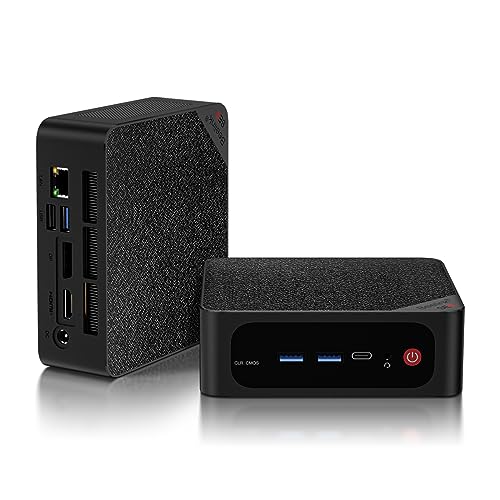
Where to buy
Check the latest price, availability and delivery on Amazon. Orders are placed on Amazon. We may earn a commission from qualifying purchases.
- Best overall workstation under $500: Beelink SER5 MAX, Ryzen 7 5800H, 32GB RAM, 1TB NVMe — Check on Amazon
- GMKtec NucBox K6, Ryzen 7 7840HS, 32GB DDR5, 1TB PCIe 4.0 SSD — Check on Amazon
- GMKtec M5 Plus, Ryzen 7 5825U, 32GB RAM, 1TB NVMe, Dual 2.5GbE — Check on Amazon
- BOSGAME P4, Ryzen 7 5700U, 32GB RAM, 1TB SSD, Triple 4K — Check on Amazon
See 2 more Amazon options
- KAMRUI E3B, Ryzen 5 7430U, 32GB RAM, 512GB SSD — Check on Amazon
- HP EliteDesk 800 G5 Mini, Core i5-9500T, 16GB RAM, 256GB NVMe (Renewed) — Check on Amazon
Read the full guide ↓
Disclosure: As an Amazon Associate, reviewstook.com earns from qualifying purchases. Links to Amazon on this page are affiliate links; they cost you nothing extra. Listing details such as price and availability change often, so check the current Amazon listing before you buy.
Five hundred dollars is not workstation money in the traditional sense, and this guide will not pretend otherwise. A true workstation — the kind with an ISV-certified professional GPU, ECC memory and a vendor who guarantees your CAD or simulation software will run correctly — starts at several times this budget. Nothing below has a certified graphics driver, none of it is sold with error-correcting memory, and if your employer or your client contract requires certified hardware, stop here and spend real workstation money. What $500 does buy, bought carefully, is prosumer horsepower that does genuine work: eight-core processors, 32GB of memory fitted at the factory, fast NVMe storage and three-monitor outputs, in boxes small enough to mount behind a display. For compiling code, running virtual machines, wrestling large spreadsheets and datasets, editing 1080p video or 4K footage through proxies, and handling 2D CAD with light 3D, that specification is not a compromise — it is the job done.
The single most important number in this guide is 32. Gigabytes of RAM, that is. Sixteen gigabytes is the specification of an office PC; it is what a browser, a chat client and a spreadsheet share before the real work starts. Thirty-two is where a machine becomes a workstation in practice: a virtual machine gets its own 8GB and the host keeps breathing, a compile job can use every core without swapping, a video timeline holds its cache, and a dataset stops paging to disk. Five of the six machines below ship with 32GB fitted, and the sixth — a renewed business mini — takes cheap socketed DDR4 to get there. In late 2026 that factory-fitted memory matters more than it used to: memory and SSD prices surged through the year, so memory already inside the box is worth more than the same capacity bought later. Check the current price on Amazon for each pick before you buy, because listing prices in this market change often.
Below are the quick picks, detailed reviews of all six machines, a comparison table, a buying checklist built around expandability and display outputs, an honest map of which workloads fit this tier and which do not, the mistakes that waste money here, and the questions workstation buyers ask most.
In this guide
Quick Picks
Short on time, or comparing several options at once? Each row below names a type of work and the machine that suits it, with a link to the listing.
| Buyer type | Pick | Why it stands out | Link |
|---|---|---|---|
| Best overall workstation | Beelink SER5 MAX, Ryzen 7 5800H, 32GB/1TB | Eight cores, socketed memory to 64GB, a spare drive bay and three 4K outputs | Check on Amazon |
| Best performance | GMKtec NucBox K6, Ryzen 7 7840HS, 32GB DDR5/1TB | The fastest chip and graphics in this guide, when its sale price appears | Check on Amazon |
| Best value and expandability | GMKtec M5 Plus, Ryzen 7 5825U, 32GB/1TB | 32GB and 1TB with dual 2.5GbE for server duties — check price on Amazon | Check on Amazon |
| Best storage per dollar | BOSGAME P4, Ryzen 7 5700U, 32GB/1TB | A full terabyte and 32GB at the lower end of this tier — check price on Amazon | Check on Amazon |
| Best budget 32GB machine | KAMRUI E3B, Ryzen 5 7430U, 32GB/512GB | Socketed 32GB and two drive slots at the lower end of this tier — check price on Amazon | Check on Amazon |
| Best renewed business mini | HP EliteDesk 800 G5 Mini, i5-9500T, 16GB/256GB (Renewed) | Corporate serviceability and three DisplayPorts, at the lowest end of this tier — check price on Amazon | Check on Amazon |
How These Picks Were Chosen
The budget was applied as a ceiling for a working machine, not a starter kit: every product below is a real Amazon listing positioned at or regularly within $500 in the United States, complete with Windows installed — check the current price on Amazon before you buy, because listing prices change often. One pick, the GMKtec NucBox K6, only qualifies when it is on sale within this budget; it often sits above this budget and the guide says so wherever it appears. Anything that reached $500 only by shipping with 8GB of memory, a spinning hard drive, or a processor generation too old to run Windows 11 on Microsoft’s supported list was excluded, however impressive the rest of the specification looked.
We did not use these machines ourselves. We read the maker listings, specification pages and model databases, and compared the things that decide workstation work: core and thread counts, whether the memory is socketed or soldered and how far it expands, how many displays the physical ports can drive at once, what storage is fitted and what can be added, and whether the networking suits a machine that may double as a small server. We favored listings that publish their numbers in full. Where a specification matters and a listing does not establish it — the memory construction of one pick below is undocumented in the sources we verified — the review leaves it unclaimed rather than guessing, and tells you how to check before the return window closes.
Three workstation filters sat on top of all of that. The first is the memory filter: 32GB fitted, or a documented socketed path to it, because memory is the resource real workloads exhaust first. The second is the expansion filter: a second drive slot, a spare bay or a memory ceiling of 64GB, because a workstation is bought for the work you will be doing in two years, not only today’s. The third is the display filter: three independent monitor outputs, verified from the physical port set, because multi-monitor work is where these small machines most often disappoint — a port that mirrors is not a second desktop. Machines that failed any filter needed an exceptional reason to stay, and the one 16GB pick below is here precisely because its sockets make the upgrade a ten-minute job with inexpensive DDR4.
The 6 Best Workstation PCs Under $500
Beelink SER5 MAX, Ryzen 7 5800H, 32GB RAM, 1TB NVMe
Who it suits: Developers, analysts and power users who want one machine that does a bit of everything — compiles, a VM or two, three monitors — with room to grow into 64GB later.
This is the most complete workstation in the guide, and its specification reads like a checklist of this tier’s filters. The Ryzen 7 5800H is an eight-core, sixteen-thread processor, the memory is 32GB of DDR4 in two SO-DIMM slots expandable to 64GB, and storage is a 1TB NVMe drive that can be swapped to 2TB, with a 2.5-inch SATA bay inside for a second drive — bulk storage for datasets, media or backups without touching the fast disk. Three displays run at 4K at 60Hz through HDMI 2.0, DisplayPort 1.4 and USB-C video, Windows 11 Pro is pre-installed, and Wi-Fi 6, Bluetooth 5.2, gigabit Ethernet and an included VESA mount round out a machine that can disappear behind a monitor and simply work. For code compilation it uses all sixteen threads; for virtual machines, 32GB lets you hand a guest 12GB and keep a responsive host; for a photo or 1080p video workflow, the terabyte of NVMe is the difference between keeping projects local and living on external drives.
Two honest notes belong in this review. The fitted SSD in documented units is a Crucial P3 Plus, a QLC drive: fast in bursts, but QLC slows noticeably on very long sustained writes, so anyone routinely copying hundred-gigabyte datasets will feel it where a TLC drive would not. And Beelink runs this chip at a 54W setting with dual fans, which reviewers have flagged as audible under sustained load — fine in an office, worth knowing for a quiet studio. Positioned in the middle to upper part of this tier depending on configuration, it is remarkable value for 32GB and a terabyte — check the current price on Amazon. One warning that matters: Beelink also sells a different machine under the same SER5 MAX name built on a Ryzen 7 6800U with soldered memory. The listing linked here is the 5800H/DDR4 configuration — confirm the processor and the DDR4 slots on the listing before you order, because the name alone does not guarantee them.
- Eight cores and sixteen threads with socketed memory expandable to 64GB.
- 1TB NVMe plus an internal 2.5-inch bay — fast storage and bulk storage in one box.
- Three independent 4K at 60Hz outputs and Windows 11 Pro pre-installed.
Honest limitation: The fitted QLC SSD slows on very long writes, the fans are audible under sustained load, and a same-name soldered variant exists — verify the 5800H configuration at checkout.
Choose it if you want the balanced workstation: cores, memory, storage and displays with no single weakness. Skip it if your work is GPU-heavy rendering or you need a certified professional graphics driver — nothing at this price has one.

GMKtec NucBox K6, Ryzen 7 7840HS, 32GB DDR5, 1TB PCIe 4.0 SSD
Who it suits: Buyers whose work leans on the processor and integrated graphics together — heavier compiles, light video editing, data work — and who can wait for a sale.
The K6 is the performance ceiling of this guide. Its Ryzen 7 7840HS is a generation newer than the other AMD chips here, with eight cores and sixteen threads, and its Radeon 780M integrated graphics are the strongest in this roundup by a clear margin — the component that makes 1080p timeline editing comfortable and 4K proxy workflows practical on a machine with no discrete card. The specification around it is properly workstation-grade for the price: 32GB of DDR5-5600 in two SO-DIMM slots expandable to 64GB, a 1TB PCIe 4.0 SSD with a second M.2 2280 slot for expansion, triple 4K output through HDMI 2.0, DisplayPort 1.4 and USB4, dual 2.5-gigabit Ethernet, Wi-Fi 6E and Windows 11 Pro. The dual fast LAN ports deserve emphasis for workstation buyers: this is the machine in the guide best suited to doubling as a home-lab node, a small file server or a virtualization host once its desktop years are done, and the USB4 port is the one future-proof connector none of its rivals here match.
The catch is the price, and the guide will not hide it. The K6 often sits above this budget. It earns its place because it recurs on sale within this budget: when the 32GB/1TB configuration is on sale within the tier, it is the best workstation under $500, full stop — check price on Amazon before you buy. When it is not on sale, it belongs to a higher tier and should be bought as one, or not at all. Two smaller notes: reviewers have flagged fan noise under load with no BIOS fan-profile control to tame it, and the maker offers Quiet 45W and Performance 65W power modes — the quiet mode is the sensible default for office work. One verified buyer reported a fitted SSD showing prior power-on hours in its SMART data; treat that as a first-week check on any mini PC in this guide — open the drive health tool when the machine arrives, while returns are painless.
- Newest processor here and the strongest integrated graphics — the light-editing pick.
- DDR5 memory to 64GB, PCIe 4.0 storage plus a second M.2 slot, USB4.
- Dual 2.5GbE LAN makes it the best future home-lab or server machine in the guide.
Honest limitation: It only fits this budget when it is on sale; outside a sale it belongs to a higher tier, and its fan is audible under load with no BIOS profile to soften it.
Choose it if your work mixes CPU and graphics — editing, compiling, data — and you can buy on the sale cycle. Skip it if you need the machine this week at whatever price it is sitting at, or a silent desk matters more than speed.

GMKtec M5 Plus, Ryzen 7 5825U, 32GB RAM, 1TB NVMe, Dual 2.5GbE
Who it suits: Budget-serious builders of home workstations — virtual machines, containers, big spreadsheets, a machine that becomes a server later — who value capacity and expandability over raw speed.
The M5 Plus is the value argument of this guide made physical. Positioned at the lower end of this tier, it fits the two specifications that cost the most to add later: 32GB of DDR4 in two slots, expandable to 64GB, and a 1TB M.2 NVMe drive in a dual-slot layout rated to 4TB total. The Ryzen 7 5825U is an eight-core, sixteen-thread chip — a generation behind the SER5 MAX’s processor in graphics, with Vega-generation integrated graphics that are a clear class below the 680M and 780M machines here, but for CPU-bound work — compiling, running two or three virtual machines, crunching a spreadsheet that makes lesser machines beachball — core count and memory are what you feel, and this box has both. Dual 2.5-gigabit Ethernet, triple 4K display output over DisplayPort, HDMI and USB-C, Wi-Fi 6E and Windows 11 Pro complete a specification that reads like it belongs to a higher tier.
Frame the purchase correctly and it is the smartest money in the guide. What you give up against the SER5 MAX at the top is graphics generation and a measure of single-core pace; what you keep is the entire workstation skeleton — cores, memory ceiling, storage ceiling, networking — while positioned lower in this tier. That makes it the natural virtualization and home-lab pick: 32GB today runs a firewall VM, a Linux development VM and the host without strain, 64GB tomorrow extends its life, and the dual fast LAN ports are exactly what a small server wants. It is also the honest second-career machine: when a faster desktop eventually replaces it, this becomes the always-on box without buying anything else. The graphics caveat is real, though — anyone whose daily work is video timelines or 3D viewports should take the K6 or the SER5 MAX instead, because no memory upgrade fixes an older integrated GPU.
- 32GB socketed to 64GB and 1TB in dual M.2 slots — the expandability pick.
- Dual 2.5GbE and triple 4K output — check price on Amazon.
- Eight cores for compiles, VMs and data work — strong value for the specification in this tier.
Honest limitation: Its Vega-generation integrated graphics are the weakest of the AMD picks here — fine for displays and light work, the wrong choice for editing or 3D.
Choose it if your workload is CPU, memory and storage — development, virtualization, analysis — and the budget is firm. Skip it if graphics do daily work for you, or you want the newest platform rather than the most capacity.

BOSGAME P4, Ryzen 7 5700U, 32GB RAM, 1TB SSD, Triple 4K
Who it suits: Buyers who need the terabyte and the 32GB above all — media libraries, project archives, document-heavy work — at the lowest documented price for that combination.
The P4’s proposition is simple: a Ryzen 7 5700U with eight cores and sixteen threads, 32GB of memory and a full 1TB SSD, positioned at the lower end of this tier. Nothing else in this guide pairs that much fitted memory with that much fitted storage at this position in the tier — check price on Amazon. For workstation purposes the shape is right: the terabyte holds project files, a photo library and a couple of virtual machine images without the external-drive shuffle; the eight cores handle compiles and batch exports; and the port set is a work set — triple 4K at 60Hz displays across HDMI, DisplayPort and USB-C, dual 2.5-gigabit Ethernet, Wi-Fi 6E and Windows 11 Pro. As a desk machine for a writer-analyst, a bookkeeper with heavy files, a developer on a strict budget or a student whose coursework is datasets and documents, it covers the workstation bases while leaving room in the budget for the monitors.
The reservations are about the unknown rather than the known. BOSGAME is a smaller brand than Beelink or GMKtec, and its documentation and long-term support depth are thinner — the intangible you trade for the price. More specifically, the sources we verified for this listing do not establish whether its memory is socketed or soldered, and this guide will not guess: if expandability to 64GB is part of your plan, check the listing’s specification table and the machine itself in the first week, and treat the answer as a condition of keeping it. The listing family has also been sold in 5700U and 5825U variants under near-identical titles; the configuration tied to this listing is the 5700U with 32GB and 1TB, so confirm exactly that in the cart. None of this disqualifies the machine — it defines the homework. At this position in the tier, the homework is worth doing.
- 32GB and 1TB together at the lower end of this tier — storage value champion — check price on Amazon.
- Eight cores, triple 4K output and dual 2.5GbE — a complete work port set.
- Windows 11 Pro included in a tier where rivals often ship 16GB machines.
Honest limitation: Smaller-brand support depth, and its memory construction is not documented in the sources we verified — confirm socketed or soldered before relying on an upgrade path.
Choose it if fitted capacity per dollar is the priority and you are comfortable verifying the details on arrival. Skip it if a guaranteed 64GB upgrade path or a big-brand support channel is part of the requirement.

KAMRUI E3B, Ryzen 5 7430U, 32GB RAM, 512GB SSD
Who it suits: Buyers who want the 32GB workstation specification at the lowest new-machine price — students, junior developers, home analysts — and can live with half a terabyte.
The E3B makes one trade and makes it openly: half the storage of the machines above, in exchange for a position at the lowest end of this tier among the new 32GB machines in this guide — check price on Amazon. What is not traded away is the structure. The 32GB is two 16GB sticks in dual channel, socketed, with a documented ceiling of 64GB; storage lives in two M.2 2280 slots — one NVMe, one SATA-only — so a second drive is a real upgrade path rather than a wish; and the Ryzen 5 7430U is a six-core, twelve-thread Zen 3 processor, two cores down on the picks above but entirely adequate for development work, office-plus workloads, data analysis and light editing. Outputs are a proper triple-display set — HDMI 2.0, DisplayPort 1.4 and USB-C, each 4K at 60Hz — Windows 11 Pro is confirmed in the listing’s own product information, and a VESA plate is in the box.
Judge it as the entry point to the tier rather than a rival to its top. Six cores compile more slowly than eight; 512GB fills faster than a terabyte when virtual machines and media accumulate, and the second slot being SATA-only means the expansion drive will be slower than the primary. Reviewers have also noted the fan becomes audible under sustained heavy load — the common tax of small, inexpensive cooling. But the E3B’s skeleton is the workstation skeleton: socketed memory with headroom, a spare drive slot, three real monitor outputs and a supported operating system. For a first workstation, a coursework machine, or a second desk where the heavy rendering happens elsewhere, it delivers the specification that matters while leaving room in the budget for a good monitor — which, at this budget, is often the smarter allocation.
- Socketed 32GB with a 64GB ceiling at the lower end of this tier — check price on Amazon.
- Two M.2 slots and a triple 4K output set — real expansion, real displays.
- Windows 11 Pro confirmed in the listing’s product information.
Honest limitation: Six cores rather than eight, 512GB of storage, and a second drive slot that is SATA-only; the fan is audible under sustained load.
Choose it if the budget is hard and the 32GB specification is the point. Skip it if you know your storage passes a terabyte in year one — the BOSGAME above is the same money shape with the space fitted.
HP EliteDesk 800 G5 Mini, Core i5-9500T, 16GB RAM, 256GB NVMe (Renewed)
Who it suits: Practical buyers furnishing a working desk cheaply — and anyone who values corporate serviceability, spare parts and three DisplayPorts over newness.
The renewed route is the oldest trick in the workstation book: buy the machine a business paid full price for, after the business is done with it. This EliteDesk 800 G5 Mini was exactly the kind of fleet desktop companies deployed by the thousand, and its virtues are fleet virtues. The Core i5-9500T is a six-core processor that sits on Microsoft’s Windows 11 supported list — the line that separates a renewed bargain from a renewed dead end. The 16GB of DDR4 is socketed, so the 32GB this guide treats as standard is an inexpensive upgrade rather than a new machine. There are six USB-A ports and a USB-C, and the display set is three DisplayPort outputs — two 1.2 and one 1.4 — which is the most business-like monitor arrangement in this guide. Its position at the lowest end of this tier makes the case: this plus a memory stick is a 32GB three-monitor workstation for a modest outlay — check the current price on Amazon.
Renewed buying has rules, and this pick carries all of them. The internal configuration varies between units from refurbishers — analyses of this model note some units arriving with the advertised Wi-Fi missing or provided by a USB adaptor, and this listing’s own material is inconsistent about its Windows edition, title saying Windows 11 Pro where a features block says Windows 10 Professional. Review outlets have also reported malware detections on pre-installed images for this model family, so the professional routine applies: whatever arrives, wipe it and install Windows cleanly from Microsoft’s own media before any real work touches it. Amazon Renewed’s program floor is a 90-day guarantee, not HP’s warranty — price that difference honestly against the new machines above. Bought with those eyes open, it is the budget pick with the longest service tail: fleet machines have manuals, parts and documentation that no-name minis never will.
- Six-core CPU on the Windows 11 supported list, with socketed DDR4 for a cheap 32GB upgrade.
- Three DisplayPort outputs and a full business port set.
- Its position at the lowest end of the tier makes it the cheapest route into this guide — check price on Amazon.
Honest limitation: It ships with 16GB and 256GB, renewed units vary in configuration, cover is the Renewed program’s 90-day floor rather than a manufacturer warranty, and a clean Windows reinstall is part of the purchase.
Choose it if value and serviceability lead and you are comfortable with the renewed routine. Skip it if you want a warranty with a manufacturer’s name on it, or 32GB fitted on day one without opening the case.

Comparison Table
| Product | Processor | Memory | Storage | Best use | Link |
|---|---|---|---|---|---|
| Beelink SER5 MAX (5800H) | Ryzen 7 5800H, 8 cores | 32GB DDR4, socketed to 64GB | 1TB NVMe + 2.5-inch bay | The balanced all-round workstation | Check on Amazon |
| GMKtec NucBox K6 | Ryzen 7 7840HS, 8 cores | 32GB DDR5, socketed to 64GB | 1TB PCIe 4.0 + second M.2 | Heaviest CPU and graphics work, on sale | Check on Amazon |
| GMKtec M5 Plus | Ryzen 7 5825U, 8 cores | 32GB DDR4, socketed to 64GB | 1TB NVMe, dual slot | VMs, home lab and value | Check on Amazon |
| BOSGAME P4 | Ryzen 7 5700U, 8 cores | 32GB, construction unverified | 1TB SSD | Most fitted capacity per dollar | Check on Amazon |
| KAMRUI E3B | Ryzen 5 7430U, 6 cores | 32GB DDR4, socketed to 64GB | 512GB + second M.2 (SATA) | Cheapest new 32GB machine | Check on Amazon |
| HP EliteDesk 800 G5 Mini (Renewed) | Core i5-9500T, 6 cores | 16GB DDR4, socketed | 256GB NVMe | Renewed value and serviceability | Check on Amazon |
How to Choose a Workstation PC Under $500
- Start with the workload, not the processor. Compiles, VMs and data work eat cores and memory; video timelines eat graphics and storage speed; CAD eats single-core pace and, in professional packages, certified drivers this tier does not have. Name your heaviest weekly task and buy for it.
- Treat 32GB as the floor, and check how it is fitted. Two socketed sticks with a 64GB ceiling is a workstation; 16GB soldered is a ceiling you will meet. In the late-2026 memory market, factory-fitted capacity is worth more than it used to be — retail memory modules have become expensive, so an empty slot is not the bargain it once was.
- Count threads for parallel work. Eight cores and sixteen threads is the sweet spot here for virtualization, containers and build jobs. Six cores is a fair budget trade; four is an office PC wearing a workstation’s clothes.
- Verify displays from the port list, not the headline. Three independent outputs means three physical video connections — HDMI, DisplayPort, USB-C with video — each driving its own desktop at 4K at 60Hz on the picks above. A single port with a splitter mirrors; it does not extend.
- Plan storage in two tiers. Fast NVMe for the system, projects and VM images; a second slot or a 2.5-inch bay for bulk and backups. A single small drive is the first wall a workstation hits, usually in month three.
- Look at the network if the machine has a second career. Dual 2.5-gigabit Ethernet turns a retired desktop into a credible home server or lab node. Single gigabit is fine for a pure desk machine; know which you are buying.
- Check the current price and watch the sale cycle. Several machines here move widely within and beyond this tier. The K6 is a bargain when it is on sale within this budget and a different guide’s machine when it is not — the same box. Check price on Amazon and decide your walk-away point before you shop.
- For renewed, check the CPU against Microsoft’s Windows 11 list. Intel’s 8th generation and AMD’s Zen+ generation are roughly the floor. Listings cheerfully ship Windows 11 on unsupported processors; the OS installs and the support does not follow.
- Budget the desk, not just the box. These are minis: monitor, keyboard and mouse are separate purchases, and a workstation’s second and third monitors are where the productivity actually lives. A cheaper pick plus a good display beats a dearer pick on a bad one.
- Do the first-week checks. Confirm the configuration matches the listing, read the SSD’s health data, verify every port with your actual monitors, and — on a renewed machine — reinstall Windows from Microsoft media. All of it is free inside the return window and expensive outside it.
What $500 of Workstation Actually Runs
Honesty about fit matters more in this category than in any other, because the word workstation promises professional buyers professional behavior. Here is the map, workload by workload, for the machines in this guide. Software development fits fully: compiling, testing, containers and two or three virtual machines are exactly what eight cores and 32GB do well, and developers are this tier’s happiest buyers. Data work fits: large spreadsheets, local databases and analysis notebooks run comfortably, with memory — not the processor — as the resource to watch. Video editing fits with one condition: 1080p timelines are comfortable on all six machines, and 4K work is practical through proxy or optimized media, especially on the K6’s stronger graphics; native 4K timelines with heavy effects are beyond integrated graphics at any patience level. Photography fits: large raw libraries and batch exports are CPU-and-storage work, and both are present here. CAD fits at the 2D and light-3D level — drawings, small assemblies, hobbyist and student modeling — with the standing caveat that professional CAD packages certify specific professional GPUs, and an integrated Radeon is not one; if a client or employer requires certified drivers, this entire tier is the wrong purchase.
What does not fit deserves the same clarity. GPU rendering — the render engines that produce final 3D frames — wants a discrete CUDA-class card with its own large memory, and no upgrade path inside these minis provides one. Large CAD assemblies and simulation work run into the same wall from the other side: memory bandwidth and certified graphics, not core count. Professional color work needs a calibrated, high-bit-depth display pipeline that starts with the monitor budget, not this one. Local AI workloads beyond experimentation want GPU memory these machines do not have. And nothing here carries ECC memory, so workloads where silent data corruption is a contractual or safety issue belong on true workstation hardware. None of this diminishes the tier: it defines it. Prosumer horsepower, honestly bounded, is what $500 buys — and for the workloads in the first paragraph, it is genuinely enough.
Socketed or Soldered: The Memory Question
If one specification decides how long these machines stay useful, it is how the memory is attached. Socketed SO-DIMM memory — fitted in slots, replaceable with a screwdriver — means the 32GB machine you buy today becomes a 64GB machine the year a project demands it, at the price of two sticks. Soldered memory is what the machine ships with, forever: faster and more power-efficient in some designs, but a hard ceiling wearing a specification’s clothes. Five of the six picks here are socketed designs with a documented 64GB ceiling or an upgrade path; the renewed EliteDesk takes standard DDR4, the cheapest memory upgrade in computing. The one pick whose construction our verified sources do not establish — the BOSGAME P4 — is flagged in its review for exactly that reason, and the check takes two minutes on the listing and two more in a system-information tool when the box arrives.
The late-2026 market has sharpened this question rather than softening it. Memory prices surged through the year, to the point where capacity that was once routine in this tier has become harder to find, and retail DDR5 modules have become expensive enough to make an empty slot an expensive promise. The practical conclusions follow. Fitted capacity beats promised capacity: 32GB in the box today is worth more than a slot and a plan. Socketed still beats soldered for a workstation, because the upgrade that does happen will happen at whatever the market then charges, and having the choice is the value. And when you compare two machines that are close in price, choose the one whose ceiling you can raise. Workstations are bought for the work of the next three years; memory construction is where that future is decided.
Common Buying Mistakes
- Buying 16GB because the processor looked faster. For workstation workloads, memory exhausts first; a slower chip with 32GB outworks a faster chip swapping to disk.
- Assuming a professional GPU or ECC memory exists at this price. It does not — no ISV-certified graphics, no error-correcting memory. If the work requires either, the budget, not the guide, has to change.
- Counting mirrored outputs as monitors. One port and a splitter gives you the same desktop twice. Count physical video connections before you count screens.
- Paying the K6’s non-sale price and calling it a $500 workstation. Outside a sale it is a fine higher-tier machine; the guide’s claim rests on it recurring on sale within this budget — check the current price on Amazon.
- Confusing the two SER5 MAX machines. Beelink sells a soldered-memory 6800U build under the same name as the socketed 5800H pick — check the processor and memory type on the listing, not the badge.
- Buying renewed stock on an unsupported processor. Sixth and seventh generation Intel machines ship with Windows 11 installed and no place on Microsoft’s supported list; the 8th-generation floor exists for a reason.
- Skipping the clean reinstall on a renewed machine. Refurbisher images vary and have drawn malware reports on this model family; thirty minutes with Microsoft’s own installation media is part of the price.
- Filling the only drive in month one. Projects, VM images and media grow toward whatever space exists; a second slot or bay is not a luxury specification.
- Judging by gaming benchmarks. These are integrated graphics chosen for timelines and viewports, not frame rates; a machine can top a gaming chart and be the wrong workstation, and vice versa.
- Ignoring the desk around the box. No pick here includes a monitor, keyboard or mouse — the workstation budget that forgets them is not finished.
Final Recommendation
- Most workstation buyers: Beelink SER5 MAX (Ryzen 7 5800H, 32GB/1TB).
- Heaviest CPU and graphics work: GMKtec NucBox K6 — at its sale price.
- Virtual machines, home lab, strict budgets: GMKtec M5 Plus.
- Maximum fitted storage per dollar: BOSGAME P4.
- Lowest price for the 32GB specification: KAMRUI E3B.
- Renewed value and serviceability: HP EliteDesk 800 G5 Mini (Renewed).
Our top two for workstation buyers at this budget are the Beelink SER5 MAX in its 5800H configuration, for the most complete balance of cores, socketed memory, storage and displays, and the GMKtec NucBox K6, for buyers whose work touches graphics and who can time the purchase to its sale. Between them they cover the two shapes this search usually takes: the all-round machine that does everything competently today, and the faster machine that rewards patience. If the budget is the binding constraint, the M5 Plus and the E3B deliver the same 32GB skeleton at the lower end of this tier, and the renewed EliteDesk remains the connoisseur’s route — fleet hardware, three DisplayPorts and a memory upgrade away from the full specification. Buyers who mainly need an office machine rather than a workstation should also see Best Home Office PC Under $500, those furnishing a smaller desk can start with Best Workstation PC For Small Spaces Under $500, and first-time buyers have a gentler on-ramp in Best Workstation PC For Beginners Under $500. Check the configuration on the listing, check the drive health in the first week, and check the live price before you order — at $500, that homework is the whole difference between a workstation and a regret.
Frequently Asked Questions
Is a $500 PC really a workstation?
It is a workstation in capability, not in certification. These machines have the cores, memory and storage to do development, data, editing and light CAD work all day, but none carries an ISV-certified professional GPU or ECC memory, and none comes with a vendor’s guarantee that a specific professional package is supported. If your work is your own, that trade is usually right. If a client or employer specifies certified hardware, it is not a trade you are allowed to make.
Why does this guide insist on 32GB of RAM?
Because it is the resource real work runs out of first. A browser, an office suite and a chat client can hold 10GB before you open anything serious; add a virtual machine, a compile or a large dataset and 16GB is swapping to disk while the processor waits. Thirty-two gigabytes is where a machine stops rationing, and five of the six picks here fit it at the factory — the sixth takes an inexpensive socketed upgrade to get there.
Can these machines run three monitors?
Yes — every pick was required to. Each has three physical video outputs (combinations of HDMI, DisplayPort and USB-C video) documented from its port set, and the AMD machines are documented for three 4K displays at 60Hz. The renewed EliteDesk uses three DisplayPort outputs instead. What none of them does is drive three monitors from one port without additional hardware; splitters mirror rather than extend.
Which pick is best for video editing?
The GMKtec NucBox K6, when its sale price is live: its Radeon 780M is the strongest integrated graphics here, which is what timeline smoothness and effects previews draw on, and its PCIe 4.0 storage keeps media responsive. Work at 1080p directly and at 4K through proxies. If the K6 is sitting at its average price, the SER5 MAX is the sensible editing buy under $500 — with the note that its QLC SSD slows on very long media copies.
Is the renewed HP a safe buy?
It is a managed risk, and the guide prices it as one. The processor is on Microsoft’s Windows 11 supported list, the hardware is fleet-grade with documentation and parts behind it, and Amazon Renewed’s program floor is a 90-day guarantee rather than a manufacturer warranty. The routine that makes it safe is in the review: verify the configuration on arrival, expect variation between units, and reinstall Windows cleanly from Microsoft media before real work — refurbisher images for this model family have drawn malware reports.
What should I step up to if $500 is not enough?
More of the same, one tier up: the machines in Best Workstation PC Under $700 and Best Workstation PC Under $800 add newer platforms and stronger graphics, and Best Workstation PC Under $1200 is where discrete graphics start to enter the conversation. The honest exception is certified professional work — for that, the step is not a bigger mini but a true workstation line, at a true workstation price. Buyers at the other end of the budget can also see Best Workstation PC Under $400.
Can one of these replace my streaming or gaming PC?
Partly, and the guides are separated for a reason. Integrated graphics here will play lighter and older games respectably, and the K6’s 780M is the strongest of them, but none of these is a gaming machine first. If streaming is the actual job, Best Workstation PC For Streaming Under $500 approaches this budget from that direction, and the general small-PC view is in Best Mini PC Under $500.


