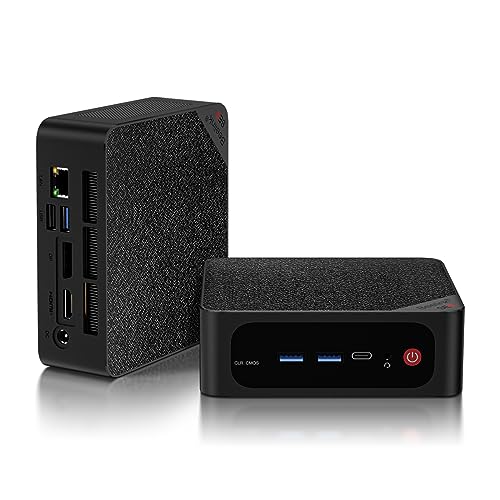
Where to buy
Check the latest price, availability and delivery on Amazon. Orders are placed on Amazon. We may earn a commission from qualifying purchases.
- Best small-space all-rounder: Beelink SER5 MAX, Ryzen 7 5800H, 32GB RAM, 1TB SSD — Check on Amazon
- MeLE Quieter 4C Fanless Mini PC, Intel N150, 8GB RAM, 256GB SSD — Check on Amazon
- MINIX NEO Z300-0dB Fanless Mini PC, Intel i3-N300, 16GB RAM, 512GB SSD — Check on Amazon
- Beelink EQ14 Mini PC, Intel N150, 16GB RAM, 500GB SSD — Check on Amazon
See 2 more Amazon options
- GMKtec NucBox K6, Ryzen 7 7840HS, 32GB DDR5, 1TB SSD — Check on Amazon
- HP EliteDesk 800 G5 Mini, Core i5-9500T, 16GB RAM, 256GB SSD (Renewed) — Check on Amazon
Read the full guide ↓
Disclosure: As an Amazon Associate, reviewstook.com earns from qualifying purchases. Links to Amazon on this page are affiliate links; they cost you nothing extra. Listing details such as price and availability change often, so check the current Amazon listing before you buy.
Small rooms rewrite the rules for buying a home office PC. When the office is a studio corner, a spare-bedroom shelf or the far end of a living-room desk, a computer is not simply purchased — it is fitted, into whatever space the rest of life has left over. All six machines shortlisted here are mini PCs, so the question is never whether the box is enormous; none of them is. The real differences are about installation. Can the machine bolt behind a monitor and surrender its footprint entirely? Does its case double as its cooler, demanding open air on every side? How many cables will spill from it across the desk? And where, exactly, is the power brick supposed to live? Those are the questions this guide grades, next to the familiar ones about memory, storage and screens, because in tight quarters the winning computer is usually the one that stops being visible.
Two ground rules run through everything that follows. The first is measurement honesty: the research behind these six picks documents mounting hardware for just two of them and records no case dimensions for any, so this guide grades installation by form-factor class and box contents, and points you to the live listing for any figure it cannot stand behind. The second is price honesty. Late 2026 pushed memory and SSD costs sharply upward, so prices for this class of machine move often — check the current price on Amazon for every pick before you buy. Capacity fitted at the factory carries extra weight in a market like this, and so does thinking about the installation before the parcel arrives. The short version: take the Beelink SER5 MAX for the strongest machine that can disappear behind a screen, or the MeLE Quieter 4C when the desk is tiny and the workload is gentle. The long version — quick picks, a five-step measure-before-you-buy checklist, six full reviews, a comparison table, the mistakes that waste money and space in equal measure, and answers to the questions small-room workers ask — starts below.
In this guide
Quick Picks
Short on time, or comparing several options at once? Each row below names a small-space situation and the machine that suits it, with a link to the listing.
| Small-space situation | Pick | Why it stands out | Link |
|---|---|---|---|
| Zero desk footprint, full power | Beelink SER5 MAX, Ryzen 7 5800H, 32GB/1TB | Mount included in the box, 32GB of RAM, three 4K outputs | Check on Amazon |
| Tiniest desk, silent running | MeLE Quieter 4C, Intel N150, 8GB/256GB | Fanless and mountable, Windows 11 Pro — check price on Amazon | Check on Amazon |
| Quiet corner, call-heavy days | MINIX NEO Z300-0dB, Intel i3-N300, 16GB/512GB | No fan whatsoever; the metal shell sheds the heat | Check on Amazon |
| Ordinary work, smallest spend | Beelink EQ14, Intel N150, 16GB/500GB | New and warrantied, positioned at the lower end of the budget — check price on Amazon | Check on Amazon |
| Heavy work in a small room | GMKtec NucBox K6, Ryzen 7 7840HS, 32GB/1TB | The quickest APU in the guide — check the current price on Amazon to confirm it fits the budget | Check on Amazon |
| Most computer per dollar | HP EliteDesk 800 G5 Mini, i5-9500T, 16GB/256GB (Renewed) | Six cores, three DisplayPorts, positioned as the value pick — check price on Amazon | Check on Amazon |
How These Picks Were Chosen
The starting point matches our main under-$500 home office guide: a pick only counts if the listing is a finished computer, ready to work out of the box — never a barebones shell still waiting for memory, storage and an operating system. When a model’s price drifts across the $500 line, check the current price on Amazon — it only earns its place here when the live listing fits the under-$500 budget. Two picks sit near that line in precisely that way, and the condition is repeated wherever they are recommended. Layered over that foundation sits the filter this particular search demands: installation.
That filter works through five questions. Mounting comes first: a machine is only credited with a behind-the-monitor installation when a mount is documented in the box or on the listing — a claim two picks here can make and four cannot, and for those four the gap is stated plainly instead of papered over. Form-factor class follows: although every pick is a mini PC, they are different species of object — two are sealed passive boxes, one is a business mini desktop that carries the biggest footprint in the guide, and the rest are ordinary desk minis — and each review grades the class its pick actually belongs to. The brick’s address is third: this class of machine runs from an external adapter, and the adapter and its lead need a deliberate home, so installation grading includes it; no wattage is quoted, because the underlying research records none. Cable drop is counted from each pick’s documented ports — the display leads, network lead and USB lines that will hang from box to desk. Heat and air closes the filter: passive cases radiate through their own skin and need room around them, fanned minis need unblocked vents, and not one pick in this guide, of either kind, may be shut inside a closed cabinet. That refusal is made once here and enforced in every review.
Nothing in this guide comes from hands-on testing by us. The evidence is maker listings and specification pages, weighed against what office work genuinely stresses: how much memory is fitted and whether more can be added, how many displays the sockets can truly drive, how large the SSD is, which Windows edition arrives installed, and how the machine gets rid of its heat — a fan audible over a video call being, in effect, a specification. A “three monitors” credit is only given where three independent video outputs exist among the ports, such as HDMI, DisplayPort and a video-carrying USB-C. Memory that is soldered down is treated as a hard ceiling: where RAM can never grow, the review spells out the consequence for year three. The renewed machine had an extra condition filter to pass — business-class hardware, a processor on Microsoft’s Windows 11 supported list, and sale through the Amazon Renewed program under its guarantee.
Measure Before You Buy: The Five-Step Check
Small-space purchases tend to go wrong in the same sequence: the machine gets chosen, the parcel arrives, and only then does somebody find that the shelf lacks depth, the cabinet door fouls the cables, or the brick has no home. Run these five steps, in this order, before ordering and nearly every version of that story disappears.
- Measure the spot. Pick the machine’s future home first — monitor back, desktop, shelf, under-shelf — and tape-measure it, depth included. Then compare the live listing’s stated dimensions with your numbers. This guide prints no case dimensions of its own, deliberately, because the research behind the picks documents none; the listing is the sole trustworthy source, and two minutes with it beats a returns label.
- Check the ventilation clearance. Wherever the spot is, air must move through it. A fanless case is a heatsink and needs open air against its surfaces — not bedding, paperwork or a door. A fanned mini needs its intake and exhaust unobstructed, with roughly a hand’s breadth behind it. If the sole candidate spot is a closed cabinet, halt the process here: no pick in this guide may live in one, and the remedy is a new spot, not a new shortlist.
- Give the power brick an address. Each machine here is fed by an external adapter. Settle its home in advance — behind the monitor, in an under-desk tray, on the floor by the wall socket — and make sure that home is both reachable and ventilated; a brick smothered under cushions is a small warm error. When the brick’s only conceivable home is the closed cabinet ruled out in step two, redesign the installation rather than leaving a door cracked open.
- Trace the cable drop. Inventory the connections: a display lead per screen, the power lead, a network cable if you wire in (worth doing wherever the room permits), and any USB devices that live on the desk full-time. Walk each one mentally from the pick’s documented ports to its destination, checking that runs are short, slack and clear of knees, chair castors and feet. A monitor-mounted machine sends everything straight down the desk’s back edge — the neatest drop available — which is exactly why the two documented mounts in this guide carry weight.
- Then order. Spot measured, air assured, brick housed, cables traced: now pick the machine whose installation fits, and check the current price on Amazon before you order — the K6 only when its live listing fits the budget, the MeLE when its current price makes sense for a light-duty box, the renewed HP with a first-evening inspection already planned. In a small-space purchase, ordering is the final step, never the opening one.
The 6 Best Home Office PCs for Small Spaces Under $500
Beelink SER5 MAX — Ryzen 7 5800H, 32GB RAM, 1TB SSD
Who it suits: The small-room worker carrying a full-sized workload — forty tabs, chat clients, an ambitious spreadsheet, two or three screens — who would like the computer to occupy no desk whatsoever.
Top billing goes to the machine that pairs the guide’s strongest specification with its neatest exit from the desk. The mount is a documented fact rather than a hope: a VESA bracket ships in the box, letting the SER5 MAX bolt onto the rear of a VESA-ready monitor and reduce its footprint to nothing — no shelf, no desk corner, just a power lead and display cables falling down the back of the desk with the monitor’s own wiring. Should your screen offer no free VESA holes, the machine reverts gracefully to an ordinary desk-or-shelf mini of the conventional class. What the mount carries is the complete package: an eight-core, sixteen-thread Ryzen 7 5800H; 32GB of DDR4 in a pair of SO-DIMM slots that accept up to 64GB; and a 1TB NVMe SSD backed by an empty 2.5-inch SATA bay, making this the most expandable new pick in the guide. The display story is verified at the sockets: HDMI 2.0, DisplayPort 1.4 and a video-carrying USB-C together drive as many as three 4K panels at 60Hz, so a three-screen setup drops three display leads plus power and — ideally — one Ethernet cable into the gigabit port, with Wi-Fi 6 and Bluetooth 5.2 covering the rest. Windows 11 Pro arrives installed. For pricing, check the current price on Amazon — it sits toward the upper part of this budget for the hardware fitted, so confirm the live listing before you buy.
Its installation caveats concern air and noise. Cooling is a dual-fan arrangement running the chip at a 54-watt setting, and reviewers noted audible fan behaviour under sustained heavy load; routine office work stays well clear of that, yet a monitor-mounted unit still wants daylight between its vents and both panel and wall — clearance, not a sealed sandwich — and hiding it inside a closed cabinet is refused outright, since airless and hidden amount to the same mistake. The brick takes its usual address behind the desk or in a tray. Two more honest entries: the supplied NVMe drive is a QLC design, prone to slowing during very long sustained writes — an archive copy will notice, document work never will — and the body is plastic rather than metal. Finally, one checkout warning with real consequences: Beelink sells a second build under this identical SER5 MAX name, built on a different chip with 24GB of soldered memory and 500GB of storage. The listing linked here is the 5800H version with slotted DDR4; verify the configuration on the page before paying, because the soldered twin overturns both the machine’s future and this verdict.
- Mount included in the box — the sole full-power pick able to claim zero desk space.
- Slotted memory reaching 64GB, plus a spare 2.5-inch bay for a second drive.
- Three separate 4K display outputs across HDMI, DisplayPort and USB-C video.
Honest limitation: A 2021-vintage processor in a plastic shell, fans that reviewers could hear when the machine is pushed hard, and a soldered-memory namesake lurking in the same listing family — confirm the configuration at checkout.
Choose it if your monitor accepts a VESA bracket and your workload is genuine: the guide’s power pick and its cleanest installation arrive in the same box. Skip it if quiet outranks everything for you, or the room offers neither a mount nor an open shelf — the passive picks below make fewer demands.

MeLE Quieter 4C — Intel N150, 8GB RAM, 256GB SSD, Fanless
Who it suits: The truly cramped desk — a bedroom corner, a studio shelf, a monitor arm above a kitchen table — in the hands of someone whose day is documents, mail, web apps and calls.
Where the Beelink vanishes, the Quieter 4C starts out small. It is a compact passive mini PC with no fan to hear on a call, and its documented VESA mount means it, too, can quit the desk surface altogether and ride on the back of a screen. Its cable drop is the slimmest in this guide: power, a display lead or two from the dual HDMI outputs (each good for 4K), and a network cable only if you want one — Wi-Fi 6 is built in, alongside Bluetooth 5.2, a gigabit Ethernet port and a USB-C socket with power delivery. Windows 11 Pro is installed, no small thing at this size and price. On price, check the current price on Amazon before you judge it. Positioned well within this budget, it is a neat silent office box; positioned near the top of the budget, the MINIX further down — carrying twice the memory, in a slot — is where the money belongs.
Placement law for this machine is the fanless rule undiluted: the case is the cooling system. Heat leaves through its own surfaces, so those surfaces need open air — monitor back, open shelf, bare desk — and the machine must never be shut in a cabinet, slipped into a drawer or used as a coaster for paperwork in the name of tidiness. Out of sight is acceptable; out of air is not. Its brick wants a ventilated address of its own, as always. The computing ceiling is structural, and it decides the buyer: 8GB of LPDDR5 is soldered to the board permanently. A modest tab count, a document and a call run happily inside that today; the forty-tab habit will hit the ceiling, and memory pressure — rather than processor pace — is what dates an office PC, so the solder sets this machine’s retirement date in a way its chip never will. The 256GB of storage demands matching restraint. Purchase it for the workload it truthfully fits, at a current price that makes sense for a light-duty machine, and it is a delightful small-room companion; purchase it as a five-year multitasking mainstay and the memory is the reason it gets replaced.
- Silent by construction and documented as VESA-mountable — the lightest total footprint here.
- Windows 11 Pro with twin 4K HDMI outputs and USB-C power delivery.
- Best judged against the other light-duty picks — check the current price on Amazon.
Honest limitation: Memory is fixed at 8GB for life and storage is 256GB — a light-duty machine with no upgrade path at all.
Choose it if space is genuinely scarce, the workload is gentle, and silence matters more than headroom. Skip it if you multitask heavily or keep computers for many years — the SER5 MAX offers slotted 32GB and mounts every bit as neatly.

MINIX NEO Z300-0dB — Intel i3-N300, 16GB RAM, 512GB SSD, Fanless
Who it suits: People who spend the working day talking — managers, teachers, support and sales staff — in a small, quiet room where a fan spinning up behind their voice is a genuine professional liability.
The name’s “0dB” is the entire proposition. No fan exists in this machine: the all-metal body doubles as the heatsink, so calls carry no fan noise, no fan bearing will ever wear out, and no dust gets drawn through the case over years of desk duty. Its installation grading is deliberately unglamorous: the research behind this pick documents no bundled mount, so a behind-monitor plan should not be built on this review’s authority — consult the live listing if mounting is non-negotiable, and otherwise allot the machine an open stretch of desk or shelf where its metal skin can breathe from every side. Around that silence sits a thoughtfully chosen office specification. The Intel Core i3-N300 brings eight efficiency cores — unremarkable on paper, amply sufficient for documents, browsing, mail and video calls — backed by 16GB of DDR4 in a slot that accepts 32GB, and a 512GB PCIe SSD in an M.2 slot rated for drives up to 4TB. Windows 11 Pro is installed. The port audit supports three displays: two HDMI sockets at 4K/60 plus a USB-C carrying both video and power delivery, with 2.5GbE Ethernet, Wi-Fi 6 and Bluetooth 5.2 alongside. A three-screen corner desk therefore drops three display leads, power and a network cable — a fuller bundle than the MeLE’s, and one worth tracing through step four of the checklist before you order. Check the current price on Amazon: it is positioned at the ceiling of this budget, buying silence and build quality rather than speed.
Passive design carries a physics clause, and it is this pick’s honest limitation: heat from a sustained load has nowhere to go. Independent testing recorded this processor at 98°C under a continuous full load — the chip throttling itself to cope. Office work arrives in bursts and never inhabits that regime, but anyone rendering video, compiling for long stretches or running local AI models should take a fanned pick from this guide instead. Placement follows from the same fact: a case that warms under load belongs in open air, never sealed in a cabinet and never with its surfaces blanketed. The plainer limitation is value: among the guide’s three new full-price machines, this processor is the weakest, so the purchase only adds up when quiet truly is the headline requirement.
- Completely fanless — nothing audible on calls, no fan to fail, no dust ingested.
- Slotted memory (up to 32GB) and an SSD bay accepting drives up to 4TB.
- Dual HDMI plus USB-C video covers three displays; Windows 11 Pro installed.
Honest limitation: A modest processor whose passive cooling throttles under sustained load — and with no mount documented, open desk or shelf space is part of the deal.
Choose it if your days are calls in a quiet room and an open shelf or desk patch is available. Skip it if your only spot is enclosed, or your work holds a processor flat-out for minutes at a time — pick a fanned machine.

Beelink EQ14 — Intel N150, 16GB RAM, 500GB SSD
Who it suits: The uncomplicated home office — documents, mail, browsing, video calls, a second screen — occupying a corner with room for one small box and nothing beyond it.
Thirty-two gigabytes and eight cores are not every office’s requirement, and the EQ14 is the priced-accordingly evidence. Its installation is the straightforward sort: a conventional desk mini that parks beside or beneath a monitor, connects through a documented port list and asks nothing exotic of the room. No mount appears in the research behind this pick, so assume desk or shelf duty and verify any mounting option on the live listing rather than presuming one exists. The Intel N150 contributes four efficiency cores running up to 3.6GHz, with 16GB of DDR4 and a 500GB SSD — a specification that sits at the lower end of this budget across near-identical listings. Check the current price on Amazon before you buy. The money purchases completeness and calm: twin HDMI outputs at 4K/60 for the standard two-screen desk — a drop of two display leads, power, and a network cable if you use either of its two 2.5GbE ports, with Wi-Fi 6 and Bluetooth 5.2 built in — plus a second M.2 slot awaiting another drive, all under a new machine’s warranty. Being a fanned mini, it wants the standard vent clearance, and the closed-cabinet refusal applies here as everywhere in this guide; in ordinary office service it remains unobtrusive in a small room. For the workload described, it simply does the job while leaving more of the budget for the monitor arm and the decent keyboard — items that, in a tight space, may upgrade the desk more than a faster computer would.
Its boundaries merit equal plainness. Four efficiency cores are four: responsive for documents, browsing and everyday multitasking, wrong for heavy spreadsheets, large photo libraries, virtual machines or any task that occupies a processor for minutes. Memory occupies a single slot, and 16GB is the platform’s ceiling, so the fitted figure is also the final one. The listing’s title, meanwhile, specifies Windows 11 Home — perfectly adequate for most home workers, but Home omits Pro’s BitLocker management, domain joining and Remote Desktop hosting, so employer requirements on any of those three point you to the Pro machines above. Availability has form, too: this listing vanished for a stretch of autumn 2026 before returning to stock, so if it is gone when you shop, the MeLE above is the closest stand-in, and Best Mini PC Under $500 surveys the broader field.
- A new machine under warranty, positioned at the lower end of the budget — check price on Amazon, and much of the budget survives for the desk.
- 16GB and 500GB fitted, twin 4K HDMI outputs and dual 2.5GbE networking.
- A spare M.2 slot lets storage grow even though memory cannot.
Honest limitation: Four efficiency cores under a fixed 16GB ceiling, running Windows 11 Home instead of Pro — tailored to ordinary office work and nothing past it.
Choose it if your workload is documents, mail, browsing and calls, a clear patch of desk or shelf exists, and a maker’s warranty matters to you. Skip it if your work is heavy, your employer mandates Windows Pro features, or clearing the desk entirely requires a documented mount.

GMKtec NucBox K6 — Ryzen 7 7840HS, 32GB DDR5 RAM, 1TB SSD
Who it suits: The small-room home worker whose “office work” smuggles in heavy lifting — giant spreadsheets, data tools, photo editing, light video, virtual machines — and who can check the current price and wait until it fits the budget.
On performance this pick stands apart, and not by a little. Its Ryzen 7 7840HS is a modern eight-core chip whose Radeon 780M integrated graphics are the strongest in this guide by a wide margin, teamed with 32GB of DDR5-5600 in two SO-DIMM slots (64GB maximum) and a 1TB PCIe 4.0 SSD, a second M.2 slot standing empty for later. The socket list reads like a home-office wish list: HDMI 2.0, DisplayPort 1.4 and a video-carrying USB4 between them drive three 4K displays, joined by dual 2.5GbE Ethernet, Wi-Fi 6E and pre-installed Windows 11 Pro. Installation-wise it is a conventional desk-or-shelf mini — the research behind this pick documents no mount, so a behind-monitor plan needs verifying on the live listing — and its cable drop is the guide’s fullest: as many as three display leads, power, and one or two network cables for those twin Ethernet ports. Translated into office terms, the specification buys headroom: no hesitation when the workbook recalculates, the export runs or the call shares a heavy deck, with the 780M additionally holding genuinely useful light gaming and GPU-accelerated creative work in reserve.
The catch lives in the price. This listing often sits above this guide’s budget, and it only belongs here when its current listing fits — check the current price on Amazon before anything else. The rule is therefore the review in one sentence: when the live price fits the under-$500 budget, this is the finest home office PC in the guide on performance; when it does not, it falls outside the budget entirely, and the SER5 MAX above becomes the purchase. Small rooms sharpen its other caveats. The fans make themselves heard under load and the BIOS provides no fan-profile control; GMKtec’s answer is a pair of power modes — Quiet at 45W, Performance at 65W — and shared or quiet rooms should run office work in Quiet. A hard-working fanned machine also needs its vents open to the room, never a shut cabinet. Lastly, one verified buyer found a fitted SSD reporting prior usage hours in its SMART data, so whichever mini PC you choose, read the drive’s health figures during the first week, while returning it is painless.
- The guide’s fastest processor and graphics, with DDR5 memory fitted.
- Three 4K outputs including USB4, plus two 2.5GbE network ports.
- Two SSD slots and memory headroom to 64GB — years of growing room.
Honest limitation: Its price often breaks the $500 budget; membership of this guide rests entirely on the current listing fitting that budget — check price on Amazon — and the fans are audible when it works hard.
Choose it if the workload is heavy, you can wait until its current price fits the budget, and your small room offers an open, airy desk or shelf spot. Skip it if its current listing sits over budget, or your work is documents and browsing — you would be funding headroom you never use.

HP EliteDesk 800 G5 Mini — Core i5-9500T, 16GB RAM, 256GB SSD (Renewed)
Who it suits: The value-led home worker — second desk, family office, side business in a spare corner — happier spending less on the computer and reserving more of the budget for the monitor, chair and webcam.
Here is the renewed route making its best case, in the guide’s largest installation — “largest” being strictly relative, since the EliteDesk remains a business mini desktop rather than anything approaching a tower. No mount is documented for it, so do not count on it vanishing behind a screen without checking the live listing; allot it an honest patch of desk or shelf, house its brick, and drop its cables down the rear edge. The linked configuration pairs a six-core Core i5-9500T with 16GB of DDR4 and a 256GB NVMe SSD under Windows 11 Pro. Its socket list is the corporate-desktop advantage in miniature — six USB-A ports, one USB-C, and three DisplayPort outputs, enough for a three-screen desk with no hub and no apology — though three displays plus power plus peripherals also adds up to the busiest cable drop in this guide, which is where step four of the checklist pays for itself. Check the current price on Amazon: positioned well below the top of this budget for six cores and 16GB, it is the value arithmetic that justifies the renewed route’s caveats. Those caveats follow immediately. A renewed unit is an individual specimen, not a product run: reviewers of this model family report the internal layout varying from unit to unit — Wi-Fi arrangements differ, as does the form of the third display output — and the listing contradicts itself in places, its title claiming Windows 11 Pro while a features block mentions Windows 10 Professional. Cover comes from Amazon’s Renewed program and its guarantee, with a 90-day warranty as the program’s standard floor — a floor, note, not a manufacturer’s multi-year promise.
Two habits convert this pick from merely cheap to genuinely safe. Habit one: make the first evening an inspection — confirm memory, storage, Wi-Fi and ports against the listing, then run a complete workday inside the return window. Habit two: reinstall Windows from Microsoft’s own media before any work account touches it, because at least one review outlet found malware detections on a pre-installed image for this model family; an hour’s clean install deletes that entire category of doubt. On longevity the platform is a 2019 design whose processor sits on Microsoft’s Windows 11 supported list — a supported present, then, but no next-Windows runway to bank on, and the 256GB SSD is the constraint you will meet first. Frame it as a lower-cost three-to-four-year answer and the value is outstanding; expect a decade from it and the disappointment is already scheduled.
- Six business-class cores and 16GB of memory, positioned as the value pick in this budget — check price on Amazon.
- Three DisplayPort outputs and six USB-A sockets — a hub-free multi-screen desk.
- Windows 11 Pro on a supported chip, under the Amazon Renewed guarantee.
Honest limitation: A renewed individual rather than a new product: specification drifts between units, cover is the Renewed program’s instead of HP’s, and the 256GB drive plus 2019 platform cap the machine’s lifespan.
Choose it if price outranks warranty, the desk or shelf patch it needs exists, and the first-evening checks sound like a fair trade. Skip it if this will be your only machine for many years, or a manufacturer’s warranty has to stand behind it — buy new from this guide instead.

Comparison Table
| Product | Installation class | Best use | Link |
|---|---|---|---|
| Beelink SER5 MAX, 5800H, 32GB/1TB | Mount included; desk mini otherwise | Serious multitasking on three screens, zero footprint | Check on Amazon |
| MeLE Quieter 4C, N150, 8GB/256GB | Fanless; mount documented | Silent light duty in the tightest quarters | Check on Amazon |
| MINIX NEO Z300-0dB, N300, 16GB/512GB | Fanless; open desk or shelf (no mount documented) | Quiet running for call-heavy schedules | Check on Amazon |
| Beelink EQ14, N150, 16GB/500GB | Desk mini (no mount documented) | Everyday office work, new with warranty | Check on Amazon |
| GMKtec NucBox K6, 7840HS, 32GB/1TB | Desk mini (no mount documented) | The heaviest workloads — when the current price fits the budget | Check on Amazon |
| HP EliteDesk 800 G5 Mini, i5-9500T (Renewed) | Business mini desktop — the largest here | Top value per dollar, three DisplayPorts | Check on Amazon |
How to Choose a Home Office PC for a Small Space
- Let the room rank the shortlist. Measure before anything else (checklist, step one) and allow the answer to lead: a VESA-ready monitor promotes the two documented mounts; an open shelf welcomes all six; a closed cabinet welcomes none, and no specification can argue it out of that.
- Treat a documented mount as a headline feature. Just two picks document theirs — a bracket in the SER5 MAX’s box, a VESA fitting on the MeLE. The remaining four may or may not mount; the research behind this guide does not say, so confirm on the live listing before designing an installation around the assumption.
- Put memory ahead of processor speed. Office sluggishness is rarely the chip’s fault; it is the browser, chat clients and office suite fighting over RAM. A fitted 32GB closes the topic, 16GB is the sane floor, and 8GB suits only a genuinely gentle workload — with soldered memory at any size acting as a permanent ceiling rather than a starting point.
- Count outputs, then count the cables they imply. Two or three screens require that many independent outputs among HDMI, DisplayPort and video-carrying USB-C — and every output is also a lead dropping to the desk. Audit the listing’s sockets, then plan the drop before parcels arrive.
- Match the cooling to the room’s life. Passive picks are silent by construction yet radiate through their cases, so they need open air most urgently of all. Fanned picks vary, and both performance machines here are documented as audible under load — a footnote in a busy household, a deal-breaker in a room that doubles as a bedroom.
- Settle the Windows edition question early. Pro contributes BitLocker management, domain joining and Remote Desktop hosting, and some employers insist on one of the three. Five picks here ship Pro; the EQ14’s Home edition serves independent workers well and managed ones badly.
- Budget the desk, not just the box. A mini PC is no laptop: screen, keyboard, mouse and webcam are separate line items, each competing for the same scarce surface. The renewed EliteDesk and the EQ14, both positioned at the lower end of the budget, release real money — and keep the desk clearer — for precisely those items.
- Spend ten minutes on week-one verification. New or renewed alike, confirm the delivered memory, storage and ports match the listing and glance at the SSD’s health readout while returns are still painless. It is the one inspection that cannot be rescheduled.
Renewed Business Desktop or New Mini PC?
At this budget every buyer meets the same fork, and the guide deliberately stocks both branches. Down the renewed branch sits the EliteDesk and its Dell OptiPlex and Lenovo ThinkCentre cousins: fleet-built machines with standard parts, sockets in business quantities and genuine multi-core processors, at a value position the new market cannot touch — six cores and 16GB, with the current price to check on Amazon. The surrender is time and cover: the platform is years old on arrival day, protection is the Renewed program’s guarantee rather than a maker’s multi-year pledge, and each unit is a specimen to be verified rather than a product to be assumed. Space-wise it also asks the most of any pick here, though “most” still means a mini desktop, not a tower.
Down the new branch, the terms invert. More money per core buys a current platform, a maker’s warranty, contemporary ports and wireless, and efficiency quiet enough to forget. Its hazards are of a different species: mini PC brands revise quickly, fitted components vary between production runs, and in the present memory market the current listing deserves a check on Amazon before it deserves payment. Neither branch is clever in the abstract. Renewed is a lower-cost three-to-four-year answer; new is a higher-cost, longer-runway answer within the same budget — both rational, provided you do not pay new-machine money for renewed cover or renewed money while expecting new-machine years. The listings, read carefully, disclose which bargain is actually on the table. If the smaller end of the market tempts you, Best Home Office PC For Small Spaces Under $400 covers it; if a longer runway justifies spending up, see Best Home Office PC Under $700.
Common Buying Mistakes
- Shutting a fanless PC inside a cabinet to make the room prettier. Passive cooling carries a physics bill: the case is the heatsink, and sealed away it throttles. Behind a monitor is concealment enough; concealment without air is a slow machine bought at full price.
- Ordering ahead of measuring. Two minutes comparing the listing’s dimensions with your shelf or desk patch settles the fit question, and this guide quotes no dimensions of its own on purpose — the research behind these picks documents none, so any guide volunteering one for these machines is inventing it.
- Presuming a mount because a product photograph shows one. Documented mounting exists for exactly two picks here — the bracket in the SER5 MAX’s box and the MeLE’s VESA fitting. Everything else needs verifying on the live listing before anything gets drilled.
- Forgetting the brick entirely. Each machine runs from an external adapter that requires a ventilated home. A flawless layout with no provision for the brick ends with it on the floor in the footwell, where cables go to be kicked loose.
- Paying a volatile listing’s peak. Several picks swing noticeably between promotions; patience and checking the current price on Amazon are worth real money at this level — the K6 only belongs in this budget when its live listing fits it, and the timing decides which.
- Reading soldered 8GB as a starting configuration. Soldered is forever. When a workload might grow, a slotted machine at the same price is the safer buy even if its remaining numbers look humbler.
- Signing work accounts into a renewed machine’s pre-installed Windows on day one. Reinstall from Microsoft’s media first: an hour of setup that retires a whole category of doubt.
- Buying renewed hardware whose processor predates Windows 11 support. Listings happily sell 6th- and 7th-generation machines with Windows 11 aboard, yet Microsoft’s supported list effectively begins at 8th-generation Intel Core — such machines run unsupported, with no update guarantee. The EliteDesk here is 9th-generation precisely to avoid that trap.
- Pouring the whole $500 into the box and nothing into the desk. In a small room the monitor arm, keyboard and chair are not garnish on the purchase; they are most of what you will experience. A lower-cost computer on a well-arranged desk outperforms a top-of-budget computer in a cable tangle.
Final Recommendation
- Most small-space workers: Beelink SER5 MAX — mounted, it leaves the desk exactly as it found it.
- Tightest space, lightest work: MeLE Quieter 4C — check the current price on Amazon first.
- Call-heavy days in a quiet room: MINIX NEO Z300-0dB, on an open shelf.
- Ordinary office work, new with warranty: Beelink EQ14.
- Heavy workloads, when the current price fits the budget: GMKtec NucBox K6.
- Most computer per dollar: HP EliteDesk 800 G5 Mini (Renewed), inspection rules attached.
Our top two for a small home office at this money are the Beelink SER5 MAX — 32GB of memory, a terabyte of storage, three displays and a documented mount that lifts the whole machine off the desk, an absence of drama in every department — and the MeLE Quieter 4C, the smaller and quieter answer to a lighter workload and the guide’s other documented mount. Between them they cover this search’s two usual shapes: hide the powerful machine, or choose the machine that was never big. Where call silence rules and an open shelf exists, the MINIX is the box your callers never hear; where the desk budget is the binding constraint, the renewed EliteDesk posts the strongest arithmetic here, provided its first-evening checks are planned rather than skipped. First-time buyers should also read Best Home Office PC For Beginners Under $500; anyone whose office machine doubles as a broadcast desk should see Best Home Office PC For Streaming Under $500; and those weighing the wider mini PC field for tight quarters should start with Best Mini PC For Small Spaces Under $500. Measure the spot, confirm the air, house the brick, trace the cables — then order.
Frequently Asked Questions
Can I put one of these PCs inside a closed cabinet or TV unit?
No — the refusal covers all six picks, passive and fanned alike. A fanless case is a heatsink that needs open air against its surfaces; a fanned machine needs unblocked vents. Shut either kind away and it slows itself down to survive. When the cabinet is the only candidate spot, the honest options are a monitor mount, an open shelf or a rethought room layout — not a different machine, since everything at this size obeys the same physics.
Which of these can actually mount behind a monitor?
Two, on documented evidence: the Beelink SER5 MAX, with a VESA bracket in the box, and the MeLE Quieter 4C, documented as VESA-mountable. For the other four, the research behind this guide records no mount — which is not proof none exists, so read the live listing’s box contents before planning around one, and confirm your monitor has spare VESA holes with an accessible back.
How much desk space do these machines really take?
This guide declines to print case dimensions, deliberately: the research behind the picks documents none, and a figure borrowed from a different model or a sibling listing is how shelves end up not fitting. What can be stated honestly is class — the two mountable picks can occupy no desk surface at all; the passive and conventional minis are single small boxes that sit beside or beneath a screen; and the renewed EliteDesk is the largest here while remaining a mini desktop. Measure your spot, then take the exact numbers from the live listing — that is what step one of the checklist is for.
Where does the power brick go?
Somewhere ventilated that you select on purpose: behind the monitor, in an under-desk cable tray, or on the floor by the wall socket. It should not vanish under soft furnishings or into a sealed cabinet alongside the machine. Count the brick’s space as part of the installation — in a small room, the brick rather than the PC often dictates what can go where.
Can these machines run two or three monitors?
Yes — port lists were part of the selection. The SER5 MAX, K6 and MINIX each drive three displays across HDMI, DisplayPort and USB-C video outputs; the EliteDesk provides three DisplayPort outputs; the MeLE and EQ14 run two displays over twin HDMI. Remember that in a small space every display is also a cable: three screens make a wonderful desk and, once power is counted, a four-cable drop — trace it before ordering.
Is a renewed business desktop a safe buy for work?
It is a managed risk carrying a strong price. Buy through the Amazon Renewed program so its guarantee backs the unit, pick a processor on Microsoft’s Windows 11 supported list (8th-generation Intel Core or newer), verify the delivered configuration against the listing during the first week, and reinstall Windows from Microsoft’s own media before signing into work accounts. Observed, those rules make a renewed EliteDesk-class machine a sound three-to-four-year office computer; ignored, they leave you relying on luck.
Will a fanless mini PC overheat doing office work?
Everyday office work will not trouble one: documents, browsing and calls arrive in bursts, giving a passive case time to shed heat between peaks — as long as the case sits in open air. Sustained loads are the exception: testing of the MINIX here recorded 98°C under a continuous full load, the chip throttling to cope. Long renders, exports or local AI work call for a fanned pick instead, given the same open air.
Why does this guide tell me to check the price on Amazon?
Because the listings behave that way. Mini PC prices moved through late 2026 as memory and SSD costs climbed, and several of these models swing noticeably between promotions. This guide therefore gives no fixed product prices: check the current price on Amazon for each pick, apply the budget rule that follows — the K6 only when its live listing fits the under-$500 budget, the MeLE judged as a light-duty box, the EliteDesk judged as the value pick — and let the live listing have the final word at checkout.
- Best Home Office PC Under $500
- Best Home Office PC Under $400
- Best Home Office PC Under $700
- Best Home Office PC For Beginners Under $500
- Best Home Office PC For Streaming Under $500
- Best Mini PC Under $500
- Best Fanless Mini PC Under $500
- Best Mini PC For Small Spaces Under $500
- Best Compact Gaming PC Under $500
- Best Workstation PC Under $500


