Where to buy
Check the latest price, availability and delivery on Amazon. Orders are placed on Amazon. We may earn a commission from qualifying purchases.
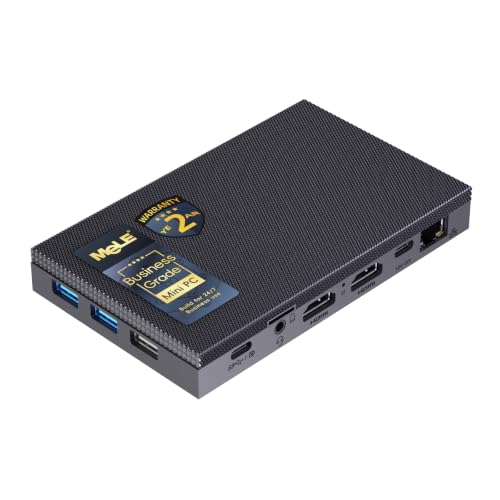
- Best overall fanless streaming PC: MeLE Quieter4C Fanless Mini PC, Intel N100, 8GB RAM, 128GB Storage, Windows 11 Pro — Check on Amazon
- MeLE Quieter4C Fanless Mini PC, Intel N150, 16GB RAM, 512GB SSD, Windows 11 Pro — Check on Amazon
- Protectli Vault Pro VP2430, Intel N150, 4-Port 2.5GbE Firewall Mini PC — Check on Amazon
- Protectli Vault Pro VP2420, Intel Celeron J6412, 8GB RAM, 120GB SSD, 4-Port 2.5GbE — Check on Amazon
- CWWK Fanless Firewall Mini PC, Intel N100, 8GB DDR5, 128GB NVMe, 4-Port 2.5GbE — Check on Amazon
See 1 more Amazon option
- Protectli Vault Pro VP4630, Intel Core i3, 8GB RAM, 120GB SSD, 6-Port 2.5GbE — Check on Amazon
Read the full guide ↓
Disclosure: As an Amazon Associate, reviewstook.com earns from qualifying purchases. Links to Amazon on this page are affiliate links; they cost you nothing extra. Listing details such as price and availability change often, so check the current Amazon listing before you buy.
Before a single pick, the workflow has to be defined, because “streaming” on a fanless mini PC means something narrower — and in one specific way better — than it does on a gaming tower. Every machine in this guide renders its picture with Intel integrated graphics and encodes with Intel Quick Sync, the fixed-function video block built into the chip. There is no discrete graphics card here, no NVENC, no AV1 encoding at any price in this set, and no fan: the processor’s heat soaks into a finned aluminium case and radiates away in silence. So the honest menu is this. These boxes are excellent silent stream stations for talk, desktop and just-chatting broadcasts. They are excellent encode boxes for a console, taking a capture card’s feed and doing the broadcasting work while the console does the playing — in total silence. And they are excellent media and transcode servers. What they are not is one-box game streamers: a machine that has to render a modern game and broadcast it at the same time needs graphics hardware none of these possess, and the lightest self-rendered game streams top out around 720p on the simplest titles. That line is drawn by the silicon, not by the budget — because even the most expensive verified fanless configurations sit well below this guide’s budget ceiling, and most of that budget cannot be spent on silence at all.
Here is why that trade can still be the right one. Encoding is the one streaming workload that low-power silicon does genuinely well, because Quick Sync is dedicated hardware: the encode does not compete with the processor cores, so a 6-watt chip can push a clean Twitch broadcast — plan on the platform’s standard of roughly 6,000 kbps constant bitrate with a two-second keyframe interval — while its cores handle OBS, a browser full of chat and dashboards, and the game feed arriving from somewhere else. The constraints that actually bind are elsewhere: shared memory, because the integrated graphics borrow system RAM; storage, because local recordings eat space and some of these machines write to slow eMMC; and heat, because a three-hour stream is a sustained load, and sustained loads are exactly where a fanless case settles to its cruising speed. This guide grades all six verified picks on precisely those terms — encoder first, simultaneous load second, recording storage third — and keeps the overspending warning in view throughout.
In this guide
Quick Picks
Short on time, or comparing several options at once? Each row below names a streaming job and the product that suits it, with a link to the listing.
| Streaming job | Pick | Why it stands out | Link |
|---|---|---|---|
| Best overall silent stream station | MeLE Quieter4C, Intel N100, 8GB/128GB | Quick Sync encoding, triple 4K outputs for scenes and monitors, zero fan noise near a microphone | Check on Amazon |
| Best finished streaming desktop | MeLE Quieter4C, Intel N150, 16GB/512GB | Double the memory for OBS plus browser plus chat, real SSD storage for recordings | Check on Amazon |
| Best dedicated encode and network box | Protectli Vault Pro VP2430, Intel N150 | Four 2.5GbE ports, Quick Sync transcoding, built to run a stream infrastructure job 24/7 | Check on Amazon |
| Best for reusing DDR4 parts | Protectli Vault Pro VP2420, Celeron J6412, 8GB/120GB | Socketed DDR4 and Quick Sync in the cheapest supported silent appliance | Check on Amazon |
| Best white-label value | CWWK Fanless Firewall Mini PC, Intel N100, 8GB/128GB | The same N100 Quick Sync platform and four fast ports without the brand premium | Check on Amazon |
| The category ceiling | Protectli Vault Pro VP4630, Intel Core i3, 8GB/120GB | Six 2.5GbE ports — where mainstream fanless money runs out | Check on Amazon |
How These Picks Were Chosen
The first filter was the same one this category always demands: proof of silence. Marketplace listings use “fanless” loosely, so a pick counted only if the manufacturer itself — in its specifications, product pages or manuals — describes the machine as fanless or passively cooled, or a reputable independent review confirms no fan exists in the design. Anything sold as merely “quiet” or “silent mode” was treated as a fanned PC and excluded, which removed most of the famous mini PC names: the popular boxes from Beelink, GMKtec, Minisforum, ACEMAGIC and KAMRUI all cool themselves with fans. A fan beside a microphone is a noise floor you can never fully process away, and a fan in an always-on media box is a dust path and a wear item; a genuinely fanless machine has neither problem, forever.
The second filter was the encoder, because for this angle the encoder is the product. Every pick below carries Intel integrated graphics with Quick Sync, the fixed-function hardware encoder in these chips, and the grading starts from what that block can and cannot do. It encodes H.264 — the format Twitch broadcasting is built on — and HEVC, at quality that holds up well at streaming bitrates, without consuming the processor cores. What it does not do, on any chip in this set, is encode AV1: the N100, N150 and Celeron J6412 generations predate AV1 encoding in Intel’s integrated media engine, and no listing wording changes that. If a seller’s page implies AV1 streaming from one of these machines, it is describing decode support or simply wrong. There is also no DLSS, no NVENC and no discrete encoder anywhere in this guide, because there is no discrete GPU; any streaming setup that needs those belongs to a fanned machine.
The third filter was verifiability. Each pick is a real Amazon listing tied to a specific product code confirmed through the listing itself, manufacturer documentation keyed to that code, or established tracking records for that exact listing — never guessed and never borrowed from a sibling model. Where a listing is sold mainly by third parties or a model name covers several configurations, the review flags it and tells you what to check. Check the live Amazon listing for the current price before you buy. Finally, the budget was applied as information rather than as a target: this guide lists the verified fanless machines worth recommending for streaming-adjacent work and refuses to pad the difference with fanned gaming PCs wearing quieter descriptions.
The Encoder Story: What Quick Sync Does and Does Not Do
One section of ground truth before the reviews, because every streaming claim in this guide descends from it. A live broadcast is two workloads wearing one coat. Rendering produces the picture — the game, the desktop, the webcam scene composited in OBS. Encoding compresses that picture into the stream your viewers receive. On these fanless machines the render side is weak and shared, and the encode side is a small fixed-function block called Quick Sync — and the whole art of streaming on this hardware is keeping the first job tiny so the second can shine.
Quick Sync’s virtues are real. Because it is fixed-function silicon, encoding a 1080p H.264 stream at Twitch’s working bitrate costs very little processor power, leaving the four modest cores free for OBS itself and the browser windows carrying chat and alerts. Its H.264 quality at roughly 6,000 kbps constant bitrate is entirely respectable for talk, desktop, camera and console-fed content, and it encodes HEVC as well for local recording and media-server duties. Its limits are equally definite. There is no AV1 encode on any pick here, so platforms and workflows built around AV1 broadcasting are closed to this set; the encoder shares the chip’s small power and thermal budget with everything else; and no encoder, however good, can rescue a picture the render side cannot produce — Quick Sync will faithfully broadcast a slideshow if the integrated graphics are asked to render a modern game at high settings.
That is the frame for every grade below. Picks are ranked by how honestly their whole system — encoder, memory, storage, ports, thermals — supports the three streaming jobs this hardware can actually do: the silent talk and desktop station, the console’s encode partner, and the always-on media and transcode box. Readers whose ambition is a single machine that plays and broadcasts modern games should stop here and take the budget to a fanned streaming PC instead — Best Streaming PC Under $3000 is the same money spent with a fan allowed. Readers whose stream is their voice, their screen, their console or their library will find that the silent version of that setup costs far less than the headline budget and makes no noise at all.
The 6 Best Fanless Mini PCs for Streaming Under $3,000
MeLE Quieter4C Fanless Mini PC — Intel N100, 8GB RAM, 128GB Storage
Who it suits: Streamers whose broadcast is themselves — talk, podcast-style, desktop and just-chatting formats — plus anyone who wants a silent encode box beside a console, in a room where a fan would be audible on the recording.
Start with why this little slab leads a streaming guide despite having the least memory in it. The N100’s Quick Sync block encodes the broadcast in fixed-function hardware, so the stream itself barely touches the four processor cores; what the cores do is run OBS, composite a webcam scene, and carry the browser load of chat, alerts and dashboards. For a talk or desktop stream, that division of labour is comfortably within this machine’s means, and it happens in literal silence — there is no fan to bleed into a condenser microphone, no noise gate fighting a whir. The supporting hardware is unusually well aimed at a stream desk: two HDMI ports and a full-function USB-C output drive up to three 4K displays, so streaming, chat and confidence monitors all hang off one pocket-sized box, and the USB-C port can also power the PC. Windows 11 Pro is preinstalled. Check price on Amazon for the Quieter4C — it is the most affordable complete answer to “silent stream station” that this category offers.
The simultaneous-load grading is where the honesty lives, because 8GB of memory is this pick’s ceiling and it is soldered there permanently. That memory is shared: the integrated graphics borrow from the same pool OBS, Windows and a hungry browser are drinking from, so the working set has to be run lean — one browser window for chat, modest scene complexity, no game rendering beyond the lightest titles at 720p. Storage grades harder still. The 128GB base drive is eMMC, which is both small and slow to write; a single evening of high-bitrate local recording alongside the stream can crowd it, and eMMC write speeds are the wrong tool for big capture files. The designed fix is in the box: an M.2 2280 slot accepts a real NVMe or SATA SSD, and a microSD slot takes overflow. Treat the machine’s honest price as the machine plus that drive if you record locally, exactly as its own design intends. Finally, heat: independent review measurements of this machine at factory power limits found sustained stress settling around 1,200 MHz on average with the case top in the mid-60s Celsius after twenty minutes. A talk stream will never push it that hard — encoding is the cheap part — but it is the measured proof of why rendering a demanding game on this box while streaming is not a plan. The encoder will do its job all night. The renderer is the one on a thermal budget.
- Quick Sync hardware encoding that leaves the modest CPU free for OBS, chat and browser duties.
- Completely silent — no fan noise floor under a microphone, ever.
- Triple 4K display outputs and USB-C power input make a genuinely tidy one-box stream desk.
- M.2 2280 and microSD slots provide the recording-storage escape hatch the base model needs.
Honest limitation: 8GB of soldered memory shared with the graphics, and 128GB of eMMC storage, cap the simultaneous load hard — this is a lean talk/desktop station or a console’s encode partner, not a one-box game streamer, and local recording wants the SSD upgrade from day one.
Choose it if your stream is talk, desktop or console-fed, your room is quiet enough that a fan would be heard, and you will run a tidy software load. Skip it if you record hours of high-bitrate footage locally without adding a drive, or you intend to render the games you broadcast on the same machine — the next pick eases the first problem, and nothing fanless solves the second.

MeLE Quieter4C Fanless Mini PC — Intel N150, 16GB RAM, 512GB SSD
Who it suits: Streamers who liked the first pick’s silence but not its ceilings — more memory for a busier OBS scene collection and browser load, and real SSD storage for recordings, in the same fanless case.
The encoder story is a sibling of the first pick’s, not a sequel. The N150 is a refresh of the N100 with a slightly higher boost clock, up to 3.6 GHz, and independent coverage puts it roughly ten to twenty percent ahead — the Quick Sync block does the same H.264 and HEVC work to the same standard, with no AV1 encode, and the streaming ceiling is unchanged. What this configuration actually buys is room around the encoder. Sixteen gigabytes of memory means OBS, a browser running chat and dashboards, a music app and a recording buffer coexist without the machine swapping itself into a stutter mid-broadcast; the 512GB SSD means local recordings land on storage large enough, and fast enough, to ignore. The triple-display output, USB-C power input and Windows 11 Pro installation carry over from the N100 model. For a talk or desktop streamer who records everything, this is the configuration that never asks to be thought about again. Check price on Amazon for the current listing.
Two honest notes keep the grade clean. First, none of the extra money buys streaming capability: the broadcast this machine produces is the same 6,000 kbps H.264 stream its cheaper sibling produces, because the encoder is the same class of fixed-function block. You are paying for headroom and storage — dropped frames from an overloaded system are a memory-and-load problem far more often than an encoder problem — but a buyer expecting a visibly better stream for the extra money will not see one. Second, the memory is soldered in every Quieter4C, so the 16GB you buy is the 16GB the machine dies with; that is acceptable precisely because 16GB is the right size for this job. And the category landmark belongs here too: MeLE’s business-grade configuration of this same case, with 32GB and a 1TB drive, sits at the premium end of the category — the highest verified fanless configuration we could find, and still well below this guide’s budget ceiling.
- 16GB of memory gives OBS, browser, chat and recording real simultaneous headroom.
- A proper 512GB SSD makes local recording a non-issue instead of a storage management chore.
- Same silence, same triple-display desk, same USB-C power convenience as the N100 model.
Honest limitation: The encoder and the stream it produces are the same as the N100 model’s — the premium buys memory and storage headroom, not broadcast quality — and the soldered memory makes the configuration final.
Choose it if you record locally, run a busy scene collection, and want the finished silent station in one purchase. Skip it if your stream is a lean talk setup — the N100 model plus a large SSD reaches the same broadcast for less.

Protectli Vault Pro VP2430 — Intel N150, 4-Port 2.5GbE Firewall Mini PC
Who it suits: Streamers and home-lab builders who want a dedicated, always-on box for the infrastructure side of streaming — a silent transcode server, a network-segmented stream setup, or an encode appliance that runs for years without being thought about.
Read this pick as infrastructure rather than as a desk PC, and it becomes the most professional streaming-adjacent purchase in the guide. The N150 inside carries the same Quick Sync hardware encoder as the MeLE pair, which makes the VP2430 a genuinely capable transcode engine: pointed at a media library, it converts video in fixed-function hardware, and the same block will encode a capture-fed broadcast without troubling the cores. What surrounds the encoder is the point. Four Intel 2.5-gigabit Ethernet ports let one silent box run a segmented network — stream traffic on its own path, consoles and capture sources isolated, a NAS full of recordings a fast hop away — multi-gigabyte recording files move at 2.5-gigabit speed. Protectli builds only fanless appliances: the finned case contains absolutely no fans, the maker supports open-source coreboot firmware, a VESA mount kit and console cable come in the box, and US-based support stands behind hardware that is documented like infrastructure. Check price on Amazon — pricing climbs as memory and storage are configured in — and the configuration question is this pick’s main caveat, because the lower Amazon configurations are barebone in effect: the DDR5 memory slot and M.2 NVMe slot are yours to fill, the 32GB of onboard eMMC is a boot device for a lightweight system rather than recording storage, and it ships without a preinstalled desktop OS because its buyers install their own. The VP2430 graded as a streaming appliance is therefore a build, not an unboxing — cost it as the unit plus the memory and SSD your workload needs, exactly as you would a server.
Fitted with sensible memory, this is the pick that shrugs at the background jobs: transcoding for the household, syncing recordings to a NAS, hosting the stream’s supporting services, all in silence, all on a wired network it can shape itself. The newest VP2430e variant drops the onboard eMMC, so check which revision a listing describes before ordering. What it will not do is be a streamer's desk machine out of the box — no Windows waiting for OBS, display outputs intended for setup and console work — and buyers who want the broadcast itself to originate here should plan the build deliberately.
- Quick Sync transcoding and encoding in a box designed for 24/7 silent duty.
- Four Intel 2.5GbE ports — segmented stream networks and fast recording transfers to a NAS.
- Coreboot firmware support, documented hardware and a maker that sells nothing else.
Honest limitation: It arrives as an appliance project, not a stream station: lower configurations need your own memory and SSD, there is no preinstalled desktop OS, and the onboard eMMC is a boot device, not recording storage.
Choose it if your streaming life needs an always-on transcode and network box, or you are building a dedicated silent encode appliance and enjoy speccing it. Skip it if you want to unbox a Windows machine and install OBS tonight — that is the MeLE pair above.

Protectli Vault Pro VP2420 — Intel Celeron J6412, 8GB RAM, 120GB SSD
Who it suits: The parts-bin streamer: someone with DDR4 memory already on the shelf who wants a supported silent appliance for media serving and stream infrastructure at the lowest Protectli rung.
The VP2420 is the previous generation of the pick above, and its streaming case rests on the same foundation — an Intel chip with Quick Sync hardware encoding, in this case the Celeron J6412, four cores up to 2.6 GHz, behind four 2.5-gigabit Ethernet ports on Intel I225-V controllers, with AES-NI acceleration and coreboot support in Protectli’s fanless extruded-aluminium case. As a media and transcode box it does the quiet jobs properly: serving a library, transcoding in fixed-function hardware, sitting in a wiring closet for years with no fan to fail. The configuration documented here carries 8GB of DDR4 memory and a 120GB SSD, and the platform’s socketed DDR4 is its signature virtue — the memory slot takes the SO-DIMMs upgraders already own, and the platform supports up to 32GB, so a parts drawer can turn this into a roomier machine than its sticker suggests. Check price on Amazon for the current third-party listing.
The compromises are a generation deep and should be weighed in streaming terms. The J6412 is measurably slower core for core than the N150 in the VP2430, and its Quick Sync block is the older generation — entirely adequate for H.264 transcoding and encode duties at streaming bitrates, but with less headroom when transcodes queue up. The storage slot is M.2 SATA rather than NVMe, so recordings and library files move at SATA speed; the fitted 120GB SSD is a system drive, not a recording archive, so network storage is part of the honest setup. Protectli has also been succeeding this model — an eMMC-free variant and the newer VP2430 mark where the line is going — so you are buying the mature, deeply documented end of a product family rather than its future.
- Socketed DDR4 memory — the silent appliance that can grow on RAM you already own.
- Quick Sync transcoding with four Intel 2.5GbE ports for media and stream infrastructure.
- Protectli’s fanless construction, coreboot support and long deployment history.
Honest limitation: An older, slower chip and encoder generation than the VP2430, SATA-only storage, a small fitted SSD that is not a recording archive, and third-party Amazon availability that comes and goes.
Choose it if the configured price undercuts the VP2430 or your DDR4 parts make it the cheapest route to a supported silent transcode box. Skip it if prices are close — the newer VP2430 is the better buy at parity, with NVMe storage and the faster platform.

CWWK Fanless Firewall Mini PC — Intel N100, 8GB DDR5, 128GB NVMe
Who it suits: Experienced home-lab streamers who know exactly what a four-port N100 appliance does in a media and streaming stack, and would rather spend the brand premium elsewhere.
CWWK manufactures a large share of the white-label fanless appliances sold on Amazon — the same hardware surfaces under several storefront brands — and this listing is the formula undiluted: an Intel N100 with its Quick Sync encoder, 8GB of DDR5 memory, a 128GB NVMe SSD, four 2.5-gigabit Ethernet ports on Intel i226-V controllers, AES-NI support, and a finned aluminium case whose own listing data describes the cooling as passive, with no fan. In streaming terms it matches the branded appliances block for block: the same fixed-function transcoding for a media library, the same wired ports for a segmented network and fast movement of recording files. Check price on Amazon — it sits in the middle of this guide’s range on value. For a buyer fluent in the software side, the hardware-per-dollar argument is complete and honest.
The discount is paid in everything wrapped around the hardware, and for streaming infrastructure that wrapper matters at the worst moments. There is no US support organization behind the listing; firmware and BIOS updates are community archaeology; and white-label listings are known for quiet configuration drift, so the unit that arrives deserves a bench session verifying the network controllers, memory and SSD against the listing before it goes into service. None of this is concealed — it is simply the trade the price represents, and the home-lab community buys these boxes in volume. We would not hand it to a first-time builder as the box their household’s streaming depends on; as a second appliance in experienced hands, it is the value pick of this section.
- The same N100 Quick Sync platform as the branded appliances, with DDR5 and NVMe at a white-label price.
- Four 2.5GbE ports on Intel i226-V controllers — the NICs media and firewall builds prefer.
- Genuinely passive cooling, confirmed in the listing’s own specification data.
Honest limitation: Support, documentation and firmware maintenance are community-grade, and the exact configuration under a white-label listing can drift — verify what arrives before it becomes infrastructure.
Choose it if you run your own stack confidently and value hardware-per-dollar over the support wrapper. Skip it if this box will be the single point of failure for a stream or a household that cannot troubleshoot it at midnight.

Protectli Vault Pro VP4630 — Intel Core i3, 8GB RAM, 120GB SSD, 6-Port 2.5GbE
Who it suits: Builders whose stream and media infrastructure has genuinely outgrown four network ports — and anyone who wants to see, concretely, where the top of the mainstream fanless market sits relative to this guide’s budget.
End with the ceiling made physical. The VP4630 is Protectli’s six-port Vault Pro: an Intel Core i3 — the listing does not name the exact SKU, and neither do we — six 2.5-gigabit Ethernet ports, 8GB of DDR4 memory and a 120GB SSD in the configuration tracked on Amazon, with AES-NI and the line’s fanless aluminium construction. For streaming infrastructure, six ports is a real capability: broadcast, console-and-capture, media and management segments, all physically separate, all silent. The i3’s Quick Sync block handles the transcoding and encode duties of this guide with the most headroom of any pick here, and its cores are a genuine step above the N-series and Celeron chips for the virtualization hosts these appliances often run. Check price on Amazon for the current listing. The verdict stands regardless: the flagship of the mainstream fanless market, mid-configured, sits well below the budget in this guide’s title.
And its ceiling is the category’s ceiling. The i3 is a low-power mobile processor chosen because a finned case can shed its heat; nothing about this machine — no memory tier, no storage option, no support contract — turns it into a game-streaming PC, because the constraint was never the parts list. It is the fixed amount of heat a passive case can radiate. Buy the VP4630 if six ports, Protectli’s documentation and the strongest encoder headroom in this set are worth the premium to your setup. Just buy it knowing you have reached the top of the fanless ladder with much of the original budget unspent — not because you settled, but because above this rung there is, verifiably, nothing.
- Six 2.5GbE ports — physical network segments for stream, media and management traffic.
- The most Quick Sync and CPU headroom in this guide for transcoding and hosted services.
- Protectli’s fanless construction, firmware support and documentation at the top of its range.
Honest limitation: The step up from the VP2430 buys ports and headroom, not a faster class of streaming — the broadcast it encodes is the same H.264 stream, and no configuration makes it a game-rendering machine.
Choose it if your network design truly needs six ports and the box will anchor a serious home media and stream infrastructure. Skip it if four ports suffice — they usually do — and let the VP2430 do the same work for less.

Comparison Table
| Product | Processor | Best streaming use | Link |
|---|---|---|---|
| MeLE Quieter4C, 8GB/128GB | Intel N100 | Lean silent talk/desktop station; console encode partner | See review above |
| MeLE Quieter4C, 16GB/512GB | Intel N150 | The finished streaming desktop with recording headroom | Check on Amazon |
| Protectli Vault Pro VP2430 | Intel N150 | Dedicated transcode and segmented-network appliance | See review above |
| Protectli Vault Pro VP2420 | Intel Celeron J6412 | Supported media box that reuses DDR4 parts | Check on Amazon |
| CWWK Fanless Firewall Mini PC | Intel N100 | White-label transcode and network value | Check on Amazon |
| Protectli Vault Pro VP4630 | Intel Core i3 | Six-port stream and media infrastructure ceiling | Check on Amazon |
Setting Up OBS on a Fanless Stream Station
The settings below apply to the two MeLE desktops as broadcast stations, and to any of the appliances a builder deliberately turns into an encode box. They are deliberately conservative: on hardware with a thermal budget, a stream that never drops beats a sharper one that does.
- Pick the Quick Sync encoder, always. In OBS, choose the QuickSync H.264 encoder rather than the software x264 option. Software encoding spends the processor cores — the scarcest resource in these machines — while Quick Sync spends a fixed-function block that is otherwise idle. On the VP2420’s older J6412 the choice matters even more, because its cores have the least to spare.
- Run Twitch numbers: CBR at about 6,000 kbps, keyframe interval 2 seconds. Constant bitrate is what the platform expects, the two-second keyframe is its standard requirement, and 6,000 kbps is the practical ceiling for non-partnered broadcasts. Set the encoder to a balanced or quality-leaning preset; the slowest presets buy invisible quality with very visible load and heat.
- Keep the canvas honest. A plain 1080p canvas is cheap; one full of animated overlays, browser sources and a rendered game is not. Talk and desktop streamers can run 1080p comfortably. If the same box is rendering a light game, drop the game to 720p and let the encoder work at the resolution the renderer can actually sustain.
- Learn the three lag counters, because each has a different fix. OBS reports three distinct failures and streamers constantly treat them as one. Dropped frames are network: the connection could not carry the bitrate — the fix is a wired connection, a lower bitrate, or a better ingest server, never a settings preset. Skipped frames due to rendering lag mean the graphics side could not composite the scene in time: simplify scenes, cap browser sources, reduce the canvas. Skipped frames due to encoding lag mean the encoder was overcommitted: confirm Quick Sync is selected rather than software encoding, and ease the preset.
- Wire the Ethernet. No exceptions. Every pick in this guide has a proper wired Ethernet port — use it for the broadcast, every time. Wi-Fi in a stream room full of wireless peripherals is a dropped-frame generator, and the entire point of these machines' port layouts is that the cable exists. The multi-port appliances can go further and give streaming traffic its own physical path, but even the single-port MeLE boxes should be streaming down a wire.
- Give the case air for the whole session. A stream is a sustained load measured in hours, and a fanless case is a heatsink that needs open air around its fins for every one of them. The stream-room instinct to tuck the silent box into a closed media cabinet is exactly wrong — silence tempts the one placement this hardware cannot survive.
- Record smart. If you record while streaming, record to the fastest storage the machine has — the SSD in the N150 MeLE, an added NVMe in the others — and on the eMMC-based N100 model, treat local recording as the job of the M.2 drive you added, or offload to a NAS over the wired connection the same night.
Costing the Rest of the Kit
A stream station is not a stream setup, and the remaining money in this keyword's budget is better spent here than on any fanless upgrade — but note that none of the following belongs inside a pick's price, and this guide quotes no prices for any of it, because none were verified. Cost your own from current listings, in this order. Microphone first. On a silent PC the microphone becomes the loudest decision in the chain: the fanless machine removes the noise floor, so the mic and its placement — close to your mouth, on an arm, with the gain set low — define the audio your viewers judge you by. Lighting second. A single soft light facing you does more for a webcam picture than any camera upgrade, because small sensors are starved for light long before they are starved for resolution. Webcam third, once it is lit — most streamers discover their existing camera was fine all along. A capture card only if you stream a console. It is the bridge that lets a fanless box encode a PlayStation or Xbox feed, and it is a pointless purchase for talk, desktop or PC-native streaming. What you do not need: a second PC, an outboard encoder, or acoustic treatment bought to fight fan noise that a fanless machine never made. The silence was the acoustic treatment.
How to Choose a Fanless PC for Streaming
- Name your stream before you name your machine. Talk and desktop broadcasting, console-with-capture, and media transcoding are three different jobs wearing one keyword. The first wants a Windows desktop (the MeLE pair), the second wants an encoder and a wired port (either MeLE, or a built appliance), the third wants ports and uptime (the Protectli and CWWK pattern). Buying across the patterns is this category's most common disappointment.
- Grade the encoder you are actually getting. In this set that means Intel Quick Sync: excellent fixed-function H.264 and HEVC, no AV1 encode on any pick, no NVENC, no DLSS. If your streaming plan depends on AV1 broadcasting or on rendering modern games in the same box, the plan needs a fanned machine.
- Count memory like a streamer, not a shopper. OBS, a browser with chat and dashboards, and the operating system share the same pool the integrated graphics borrow from. Eight gigabytes runs a lean talk setup; sixteen is the comfortable size for a busy scene collection and local recording. On soldered machines the listing number is forever — decide accordingly.
- Plan recording storage before the first stream. Local recordings at broadcast bitrates accumulate fast, and eMMC is the wrong medium for them: small, and slow to write. Either buy the pick whose SSD is already real, or budget the M.2 drive the design expects, or offload nightly to network storage over the wired ports.
- Verify the silence from the manufacturer. “Fanless” should come from the maker's own specification or an independent teardown, not from a marketplace adjective. Every pick here passed that test; hold anything else you consider to the same one.
- Price configurations, not stickers. Appliance prices climb as memory and storage are configured in, and barebone-style listings start bare. The Protectli pair in particular must be compared at the configuration you will actually run — RAM, SSD and operating system included — against the complete desktops.
- Spend the leftover where viewers can perceive it. Microphone, light, then camera, then the monitor the station drives. Most of this keyword's budget cannot buy a better fanless encoder; it can buy a dramatically better-sounding and better-looking broadcast around the same one.
Common Buying Mistakes
- Expecting one fanless box to render and broadcast modern games. The integrated graphics and shared thermal budget cannot do it at any configuration; these machines stream talk, desktops, consoles via capture, and light titles at modest settings.
- Believing a listing that implies AV1 streaming from an N100, N150 or Celeron. Those generations of Intel integrated graphics have no AV1 encoder; the claim is decode support or an error, and platforms built on AV1 broadcasting are closed to this hardware.
- Choosing software x264 encoding in OBS “for quality”. On four low-power cores it spends the scarcest resource in the machine and invites encoding lag; Quick Sync exists precisely so the cores do not have to.
- Streaming over Wi-Fi because the desk looks tidier. Dropped frames are a network failure, and every pick here ships a wired port for a reason.
- Recording hours of footage to a 128GB eMMC drive. Add the SSD the slot is there for, or offload to the network nightly.
- Hiding the silent PC in a closed cabinet. A fanless case radiates heat from its fins; suffocated placement causes the throttling and dropped frames that get blamed on the processor.
- Buying an appliance as a ready-made stream station. The Protectli and CWWK boxes ship without a desktop streaming setup — no preinstalled consumer OS on the Vaults — and are infrastructure you build on, not an unboxing.
- Comparing a barebone-style listing price against complete desktops. Memory and storage can add substantially to the real cost of the cheapest appliance configuration in this guide.
- Paying a steep “premium fanless” markup for streaming performance. Even an exotic memory-heavy configuration at the category's ceiling sits well below this guide's budget, and mainstream machines sit lower still; pricing far above that tier is markup, not encoder.
Final Recommendation
- Most streamers: MeLE Quieter4C, Intel N100, 8GB/128GB — plus an M.2 SSD if you record.
- The finished streaming desktop: MeLE Quieter4C, Intel N150, 16GB/512GB.
- Dedicated transcode and network appliance: Protectli Vault Pro VP2430.
- DDR4 parts on the shelf: Protectli Vault Pro VP2420.
- Experienced and value-first: CWWK Fanless Firewall Mini PC.
- Six ports, top of the range: Protectli Vault Pro VP4630.
Our top two are the MeLE Quieter4C in its N100 form — the silent station a talk or desktop streamer can set up tonight, at the affordable end of this guide's range — and the Protectli VP2430, the appliance-grade answer for the transcoding and network side of a serious streaming setup. Between them they cover what fanless streaming honestly is: a silent box encoding in fixed-function hardware, wired into a network, in a room where the loudest thing is the streamer. The N150 Quieter4C is the upgrade for buyers who record everything and run busy scenes; the VP2420 tilts on a parts drawer; the CWWK rewards fluent builders; the VP4630 anchors infrastructures that have outgrown four ports. Readers starting smaller lose nothing at Best Fanless Mini PC For Streaming Under $400 or Best Fanless Mini PC For Streaming Under $1200 — the encoder story is the same at every rung, because the chips are the same. And readers who arrived hoping the headline budget would buy a silent machine that plays and broadcasts modern games should hear the guide's central fact as good news: the silence costs far less than that budget, the microphone and light deserve the next slice, and a genuinely capable fanned streaming PC — start with Best Streaming PC Under $3000 — can have the rest.
Frequently Asked Questions
Can a fanless mini PC really run a live stream?
Yes — the right kind. Talk, podcast, desktop and just-chatting streams are comfortably within these machines, because Intel Quick Sync encodes the broadcast in fixed-function hardware while the cores run OBS and the browser. Console streaming works the same way with a capture card feeding the picture in. What they cannot do is render a modern game and broadcast it from the same box; that workload needs a discrete GPU, and no fanless mini PC has one.
What bitrate and settings should I use on one of these?
The Twitch working standard: the QuickSync H.264 encoder in OBS, constant bitrate around 6,000 kbps, and a two-second keyframe interval. Talk and desktop content looks clean at those numbers, the encoder block handles them without troubling the processor, and the wired Ethernet port every pick provides carries them reliably.
Can these PCs stream in AV1?
No. None of the chips in this guide — N100, N150, Celeron J6412 or the VP4630's low-power i3 class — includes an AV1 encoder in its integrated media engine, and no configuration or listing upgrade adds one. AV1 broadcasting requires newer discrete or integrated graphics in a fanned machine. What these boxes do encode, H.264 and HEVC via Quick Sync, covers Twitch's standard workflow and local recording completely.
Is 8GB of memory enough for streaming?
For a lean talk or desktop setup, yes — OBS, one browser carrying chat, and the encoder's fixed-function offload fit, which is exactly the first pick's design point. For busy scene collections, several dashboards, simultaneous recording and editing, 16GB is the comfortable size — and on the soldered-memory desktops that choice is permanent.
Why is there no fanless streaming PC anywhere near $3,000?
Because the budget cannot change the physics. Fanless cooling caps a processor at roughly 6 to 15 watts, and the chips in that class are inexpensive. Even a memory-loaded business configuration at the premium end of the category sits well below this guide’s ceiling, and mainstream machines sit lower still. The remaining budget buys ports, memory, storage and support — and, outside the PC, the microphone and lighting your viewers will actually notice.
Do fanless PCs overheat during long streams?
They run warm by design — the case is the heatsink, and the best-documented pick here measured case temperatures in the mid-60s Celsius under a sustained stress load. A stream is mostly encoder work, which is light; the practical rule is placement. Open air around the fins, never a sealed cabinet, and a fanless station will broadcast for years with no maintenance at all.
Fanless desktop or fanless appliance — which does a streamer need?
Look at where the broadcast originates. If the PC itself runs OBS and your scenes, you want the desktop pattern — the MeLE models, with Windows installed and displays for your monitors. If the box is infrastructure — transcoding a media library, segmenting the network your stream travels on, hosting services — you want the appliance pattern, and you will install and configure its software yourself. Many settled setups end up with one of each, and even that pair sits well below this guide's budget.
- Best Fanless Mini PC For Streaming Under $400
- Best Fanless Mini PC For Streaming Under $1500
- Best Fanless Mini PC For Streaming Under $2500
- Best Fanless Mini PC Under $400
- Best Fanless Mini PC For Beginners Under $3000
- Best Fanless Mini PC For Small Spaces Under $3000
- Best Streaming PC Under $3000
- Best Mini PC Under $3000


