Where to buy
Check the latest price, availability and delivery on Amazon. Orders are placed on Amazon. We may earn a commission from qualifying purchases.
- Best overall fanless mini PC for a small space: MeLE Quieter4C Fanless Mini PC, Intel N100, 8GB RAM, 128GB Storage, Windows 11 Pro — Check on Amazon
- MeLE Quieter4C Fanless Mini PC, Intel N150, 16GB RAM, 512GB SSD, Windows 11 Pro — Check on Amazon
- Protectli Vault Pro VP2430, Intel N150, 4-Port 2.5GbE Firewall Mini PC — Check on Amazon
- CWWK Fanless Firewall Mini PC, Intel N100, 8GB DDR5, 128GB NVMe, 4-Port 2.5GbE — Check on Amazon
- Protectli Vault Pro VP2420, Intel Celeron J6412, 8GB RAM, 120GB SSD, 4-Port 2.5GbE — Check on Amazon
See 1 more Amazon option
- Protectli Vault Pro VP4630, Intel Core i3, 8GB RAM, 120GB SSD, 6-Port 2.5GbE — Check on Amazon
Read the full guide ↓
Disclosure: As an Amazon Associate, reviewstook.com earns from qualifying purchases. Links to Amazon on this page are affiliate links; they cost you nothing extra. Listing details such as price and availability change often, so check the current Amazon listing before you buy.
A fanless mini PC looks like the easiest small-space purchase in computing: a slab the size of a paperback, no fan, no noise, tuck it anywhere. Two of those three impressions survive contact with a real room. The slab is genuinely tiny, and the silence is real. But “tuck it anywhere” is where fanless machines punish careless buyers, because a fanless case is not a box that happens to get warm — the case is the heatsink, and a heatsink has placement rules that a fanned PC does not. It needs open air on every finned side. It cannot be sealed in a media cabinet, buried under a stack of books, or sandwiched between a warm receiver and a shelf. The footprint you are actually buying is the case plus the air around it, plus an external power brick that needs an address of its own, plus every cable that leaves the back. This guide grades all six verified fanless mini PCs below as installations — what they occupy once they are cabled, powered and breathing — rather than as spec sheets.
Then there is the budget in the title, and it deserves the same plain treatment. There is no fanless mini PC anywhere near $3,000, and the verified top of this category is not close: the most expensive genuinely fanless configuration we could verify on Amazon, a business-grade MeLE Quieter4C loaded with 32GB of memory and a 1TB drive, sits at the very top of the category, and a heavily configured white-label firewall sits near that same ceiling. The six picks in this guide all sit well below the headline budget — check price on Amazon for each pick’s current position in the band. That is not a gap in the market. A fanless case sheds heat by radiation and natural convection from its fins, which caps the processor at roughly 6 to 15 watts of sustained power no matter what you offer to pay — Intel’s N100, N150 and low-power Celeron class. Money past the ceiling buys ports, memory, storage and support, never a faster class of silence. So the honest shape of a $3,000 fanless budget is a machine from the lower-to-middle part of this category, an installation done properly, and most of the money still in your pocket. If gaming brought you to this keyword, be clear about the trade before you buy: these are silent machines for desks, media corners, firewalls and home labs, and their gaming life is streaming, emulation and light titles — there is no discrete graphics card in anything below, at any price.
In this guide
Quick Picks
Short on time, or comparing several options at once? Each row below names a buyer type and the product that suits it, with a link to the listing.
| Buyer type | Pick | Why it stands out | Link |
|---|---|---|---|
| Best overall for a small space | MeLE Quieter4C, Intel N100, 8GB/128GB | The only pick with documented dimensions — a 5.16 × 3.19 × 0.72 in slab that can draw power over the same USB-C cable that feeds its display | Check on Amazon |
| Best finished silent desktop | MeLE Quieter4C, Intel N150, 16GB/512GB | The same documented slab with the specification filled in — nothing to open, add or upgrade on day one | Check on Amazon |
| Best mounted install | Protectli Vault Pro VP2430, Intel N150 | The only pick with a documented mount — a VESA kit in the box takes the case off the desk entirely; four 2.5GbE ports for firewall duty | Check on Amazon |
| Best white-label value appliance | CWWK Fanless Firewall Mini PC, Intel N100, 8GB/128GB | Four 2.5GbE ports and DDR5 without the brand premium — graded by class, since its base research documents no dimensions | Check on Amazon |
| Best for reusing DDR4 parts | Protectli Vault Pro VP2420, Celeron J6412, 8GB/120GB | Socketed DDR4 and four 2.5GbE ports at the lowest Protectli rung — a network-corner install, not a desk piece | Check on Amazon |
| The category ceiling | Protectli Vault Pro VP4630, Intel Core i3, 8GB/120GB | Six 2.5GbE ports — and six cables to route, which is its real footprint; about as much as mainstream fanless money can buy | Check on Amazon |
How These Picks Were Chosen
The six machines are the verified set from our base fanless research, reused exactly — same Amazon listings, nothing added and nothing swapped for this angle. Every pick passed a strict fanless test: the manufacturer itself, in its own specifications, product pages or manuals, describes the machine as fanless or passively cooled, or a reputable independent review confirms there is no fan in the design. Listings that merely say “quiet”, “silent mode” or “low noise” failed that test, because those words almost always describe a small fan running slowly. That filter is why the famous mini PC names are absent: the popular N100 and Ryzen boxes from Beelink, GMKtec, Minisforum, ACEMAGIC and KAMRUI cool themselves with fans, and a fan you cannot hear today still pulls dust through the case for as long as it spins. Each pick is also tied to a specific Amazon listing confirmed through the listing itself, manufacturer documentation keyed to that product code, or established records for that exact listing — never guessed, never borrowed from a sibling model. Check the current price on Amazon for each pick, because fanless hardware sells in small batches and listings change between restocks.
What this variant changes is the grading. A small-spaces guide that ranked these machines by processor speed would be answering a question nobody with a tiny desk is asking. So each pick is graded as an installation: its form-factor class, the air it needs, the brick it brings, and the cables it trails. Dimension discipline is strict. The base research documents exact dimensions for exactly one chassis in this set — the MeLE Quieter4C at 5.16 × 3.19 × 0.72 inches — and a documented mounting option for exactly one pick, the VP2430’s included VESA kit. Those are the only measurements and the only mount claimed anywhere in this guide. Everything else is graded by class — finned desktop slab, finned network appliance — with the live listing’s specification table named as the place to confirm a measurement before you commit a shelf to it. No weights and no noise figures are printed for any pick, because the base research documents none; silence is graded qualitatively, which for genuinely fanless machines is simple: there is no fan, so there is no fan noise, and that is the whole of the claim.
The Space a Fanless PC Really Occupies
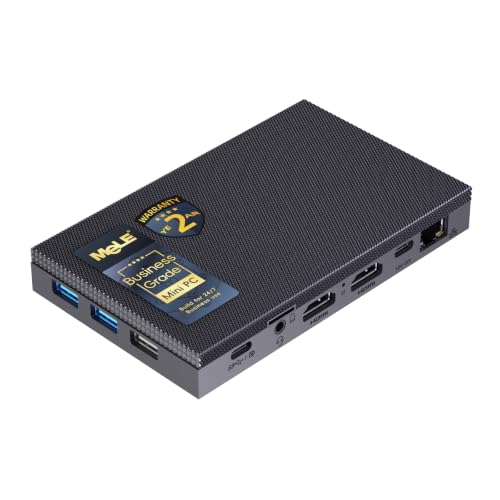
The product photo shows a slab. The installed reality is four things, and a small room feels all of them.
The air is part of the footprint. A fanned PC moves its heat out with air it pulls through itself; a fanless PC conducts its heat into its case and waits for the room to take it away. That only works while room air can reach the fins. The best-documented machine in this guide, the MeLE Quieter4C, was measured by independent reviewers settling at roughly 1,200 MHz average clock under a sustained stress load — about a third of its headline boost — with the case top reaching the mid-60s Celsius after twenty minutes. Read that as a placement specification: the top of the case is a working radiator, and anything resting on it — a book, a router, a games controller — is a blanket. Every pick in this guide needs open air above and around its finned surfaces, and the rule is stricter than for a fanned machine precisely because there is no fan to compensate when you get it wrong. A fanned PC in a tight spot gets louder; a fanless PC in a tight spot gets slower and hotter. Sealed cabinets, closed media units and stacked equipment are refused outright for all six picks — not discouraged, refused. If the only home you have for a computer is inside a closed cabinet, this category is not for you, and no amount of the $3,000 budget changes that.
The brick needs an address. Machines this small run from external power adapters, and the adapter is a second object that lives somewhere — on the desk, on the floor, behind the cabinet — with its own cable run to the wall. In a small space the brick is often the harder placement problem: the slab hides beautifully and the brick sits in the middle of the floor. Plan its home before the machine arrives, somewhere it can sit in open air rather than under a rug or behind insulation. One pick family offers the only genuine escape from the brick problem documented in this set: the MeLE Quieter4C can draw power over its full-function USB-C port, so a single cable from a compatible monitor can carry both picture and power. That is a documented capability of the listing, and in a one-screen small room it deletes the brick and one whole cable run at a stroke.
The cable drop sets the real depth. A case that is three inches deep does not occupy three inches. Cables leave the back with a bend radius, and the installed depth is the case plus the gentlest curve its stiffest cable will accept. The desktop picks trail a modest bundle — display, power, perhaps Ethernet and a peripheral or two. The appliance picks are a different order of clutter: four Ethernet ports means four network cables arriving from wherever your router, switch and wall jacks live, and the six-port VP4630 means six. For those machines the honest footprint is not the finned box; it is the box plus a cable bundle that needs a planned route, slack for the bend, and a destination. Measure the drop — from the back of the case to wherever the cables land — before you decide the box is small.
Heat leaves the case and enters the room. Six to fifteen watts is not much, but in a small, closed room an always-on fanless appliance is a small always-on heater that never cycles off. That is an argument for placing these machines where air already moves — an open shelf, the back of a desk, a hallway network corner — rather than inside the one enclosed nook that made them look attractive in the first place. Given moving air, a fanless PC is the lowest-maintenance computer you can own: no fan to fail, no filter to clog, nothing to service. The entire installation bargain is that you trade placement freedom for that reliability, and in a small space the trade is worth making deliberately rather than discovering it in the first heatwave.
The 6 Best Fanless Mini PCs for Small Spaces Under $3,000
MeLE Quieter4C Fanless Mini PC — Intel N100, 8GB RAM, 128GB Storage
Who it suits: Anyone whose small space is a desk, a shelf or the back of a television, and who wants the one fanless machine in this guide whose size is a documented fact rather than an estimate.
Start with the measurement, because it is the only one in this guide: the Quieter4C’s case is documented at 5.16 by 3.19 by 0.72 inches — a flat slab thinner than most paperbacks are thick. Inside it, an Intel N100 (four cores, up to 3.4 GHz, a 6-watt-class chip) conducts its heat into the aluminium shell, which radiates it away with no fan and no moving parts. MeLE fits 8GB of LPDDR5 memory and 128GB of eMMC storage, then adds the two things that make a slab this size practical: an M.2 2280 slot inside for a real NVMe or SATA SSD, and a microSD slot for cheap bulk storage. Two HDMI ports plus a full-function USB-C port drive up to three 4K displays, and Windows 11 Pro is preinstalled. As an installation, its virtues compound. The slab lies flat on a shelf or under a monitor stand without blocking a drawer or a doorway of cables, and the USB-C port is also a power input: pair it with a compatible monitor and one cable carries picture and power, which deletes the external brick and its cable run from your small room entirely — the only documented route in this set to a one-cable install.
The placement rules are the fanless rules, and this machine’s own review measurements state them numerically. Under a sustained load the processor settled at roughly a third of its boost clock with the case top in the mid-60s Celsius — the lid is a radiator, so nothing goes on top of it, ever, and the slab wants open air above it rather than a shelf stacked tight against the one above. The 8GB of memory is soldered and final, and the 128GB of eMMC is the specification’s weak point: the M.2 slot is the designed-in fix, and the honest way to plan this pick is machine plus the SSD you will almost certainly add. A single gigabit Ethernet port rules it out as a serious router. Check price on Amazon for the current listing — it sits toward the lower end of this set, and it is also the standing rebuke to this guide’s title: the best-documented small-space fanless desktop in the category sits well below the headline budget.
- The only documented dimensions in the set — a 5.16 × 3.19 × 0.72 in slab you can measure a shelf against before ordering.
- USB-C power input: one cable from a compatible monitor carries picture and power, deleting the brick.
- Triple 4K display output and an M.2 slot, in a case with zero moving parts and nothing to clog with dust.
Honest limitation: The case top is a working radiator that reaches the mid-60s Celsius under sustained load — it needs open air and an empty top surface, and the soldered 8GB of memory plus 128GB of eMMC are fixed starting points, not a finished specification.
Choose it if your space is measured in shelf inches and you want the size in writing before you buy. Skip it if the only available spot is enclosed, or you need multi-gigabit networking — the appliances below cover the second, and nothing fanless covers the first.

MeLE Quieter4C Fanless Mini PC — Intel N150, 16GB RAM, 512GB SSD
Who it suits: Buyers who want the same documented slab with the specification finished — more memory, real SSD storage, and nothing to open, add or plan around after the install.
This is the same fanless case and the same installation with the spec sheet filled in. The processor steps up to Intel’s N150, a refresh of the N100 boosting to 3.6 GHz; memory doubles to 16GB; and storage becomes a proper 512GB SSD instead of eMMC. The triple 4K output, the USB-C power input and Windows 11 Pro all carry over, so every placement virtue of the pick above applies unchanged: the same documented 5.16 by 3.19 by 0.72 inch footprint, the same option of a single-cable monitor-powered install, the same flat profile that disappears onto a shelf or under a stand. What the extra money removes is the project. There is no SSD to shop for, no slot to open, no second parcel arriving after the first — the machine goes into its measured spot once and stays there, which in a small space is worth more than it sounds: the best installation is the one you never have to pull out and redo.
Two honest notes. The N150 is a refresh, not a leap — independent coverage puts it roughly ten to twenty percent ahead of the N100, so what your money buys is the memory and storage, not a faster class of computer; if the base model’s capacity suits you, it is the same silence and the same footprint for less. And the memory is still soldered, as it is across the Quieter4C line, so the 16GB in this configuration is the machine’s lifetime allocation. MeLE also sells a business-grade configuration of this chassis with 32GB and a 1TB drive — the top-end configuration of this chassis on Amazon and the landmark that marks where this category ends: even the most loaded version of this little slab leaves most of a $3,000 budget unspent. For the configuration reviewed here, check the current price on Amazon.
- Same documented slab as the N100 model — the footprint is known before it arrives, and nothing needs adding to it.
- 16GB of memory and a 512GB SSD: the finished fanless desktop, installed once and left alone.
- USB-C power input keeps the one-cable, brick-free monitor install available.
Honest limitation: The processor step over the N100 model is small, the memory is soldered shut, and you are paying finished-desktop money for a 6-watt-class chip — the premium is specification and silence, not speed.
Choose it if you want the category’s best small-space desktop with zero follow-up work. Skip it if the N100 model plus your own SSD reaches the same desk for less — for many small rooms, it does.

Protectli Vault Pro VP2430 — Intel N150, 4-Port 2.5GbE Firewall Mini PC
Who it suits: Home-lab and network buyers whose small space has a network corner — and who want the one pick in this guide that can leave the desk surface entirely.
Protectli builds nothing but fanless network appliances, and the VP2430 is its current four-port design: an Intel N150 in a finned aluminium case — Protectli states plainly that its Vaults contain absolutely no fans — with a DDR5 memory slot, an M.2 NVMe storage slot and 32GB of onboard eMMC, fronted by four Intel 2.5-gigabit Ethernet ports. The installation fact that earns it this ranking is in the box: a VESA mount kit and a serial console cable are included, the only documented mounting hardware in this set. Mounted behind a monitor or on the underside of a shelf, the case occupies no desk and no shelf surface at all — the zero-footprint install. The mount does not repeal the heat rule, though. Behind a monitor is still an installation, not a hiding place: the fins need air, a warm display’s back panel is not a heatsink’s friend, and a mounted fanless case inside a closed cabinet is still a sealed fanless case, which this guide refuses for every pick. Leave a gap, let the air move, and the mount is the best small-space trick in the category.
Grade the rest of the install honestly. Four Ethernet ports means four cables arriving from your router, switch and wall runs, plus the power adapter’s own lead — the cable drop, not the finned box, is this machine’s real spatial claim, and it rewards a planned route along a wall or behind the desk rather than a bundle dropped down the back. It is an appliance, not a desktop: it ships without a consumer operating system because its buyers install OPNsense, pfSense, OpenWrt or a Proxmox host themselves, and its display outputs exist for setup and console work. Protectli supports open-source coreboot firmware and backs the unit with US-based support. Check price on Amazon for the current listing, and read every appliance listing in this guide that way, as a starting configuration rather than a finished one — configured units with more memory and storage sit higher in the band.
- VESA mount kit in the box — the only documented mount in the set, and the route to a genuinely zero-footprint install.
- Four Intel 2.5GbE ports, a DDR5 slot and an NVMe slot in a completely fanless chassis.
- Coreboot firmware support from a maker that sells nothing else and supports what it sells.
Honest limitation: The mount removes the box, not the cables — four Ethernet runs and a power lead still need a route and an address, and a configuration with generous memory and storage sits well above the entry configuration in the band.
Choose it if the fanless PC you need is a firewall or lab host and you can give its fins moving air wherever it mounts. Skip it if you want a Windows desktop — the MeLE pair above is that machine, in a similar part of the band.

CWWK Fanless Firewall Mini PC — Intel N100, 8GB DDR5, 128GB NVMe
Who it suits: Experienced home-lab buyers who know what a four-port N100 appliance is for, and who would rather keep the brand premium than pay it.
CWWK is the name behind a large share of the white-label fanless appliances sold on Amazon — the same hardware often appears under several storefront brands — and this listing is the formula undiluted: an Intel N100, 8GB of DDR5 memory, a 128GB NVMe SSD, four 2.5-gigabit Ethernet ports on Intel i226-V controllers, AES-NI support, and a finned aluminium case whose own listing data describes the cooling honestly as passive, with no fan. For firewall duty it matches the branded appliances port for port and chip for chip, and check price on Amazon for its current listing. The base research documents no dimensions for this listing, so this guide claims none: it is graded by class, as a finned network appliance that belongs in a network corner — beside the router, on a hallway shelf, in the cupboard-under-the-stairs run where the cables already live. Its footprint story is the appliance story at full strength: the box is the small part, and the four-cable drop plus the power adapter is the installation.
What its position as the value option in this set gives up is everything surrounding the hardware itself. There is no US support organization behind the listing; firmware and BIOS updates are a community-archaeology exercise rather than a vendor download page; and white-label listings are notorious for quiet configuration drift, so the unit that arrives deserves a bench session — network controllers, memory and SSD checked against the listing — before it goes into service and before its cables are dressed into their final route. None of that is hidden, and the home-lab community buys these boxes in volume with its eyes open. What we would not do is recommend it as a first appliance to a buyer who needs a support desk when the routing stops at 11 p.m. That buyer is who the Protectli premium exists for, and in a category where the entire spread between the value and branded rungs is modest, the premium is smaller than it looks.
- Four 2.5GbE ports on Intel i226-V controllers — the current-generation network chips firewall builds prefer.
- DDR5 memory and NVMe storage at the white-label end of the band, in a genuinely passive finned case.
- The identical N100 platform the branded appliances use, minus the markup the badge adds.
Honest limitation: Support, documentation and firmware maintenance are community-grade, the exact configuration under a white-label listing can drift, and with no documented dimensions the install has to be planned by class and confirmed against the live listing.
Choose it if you are fluent in firewall software and your network corner has room planned for the cable bundle. Skip it if this is your first appliance, or other people depend on the network it will run.

Protectli Vault Pro VP2420 — Intel Celeron J6412, 8GB RAM, 120GB SSD
Who it suits: The parts-bin buyer: someone with DDR4 memory already on the shelf who wants a supported, silent four-port appliance at the lowest Protectli rung.
The VP2420 is the previous rung of Protectli’s ladder, and as an installation it is the same proposition as its successor — a finned, completely fanless aluminium appliance graded by class, since the base research documents no dimensions for it — with a different parts arithmetic. Its Celeron J6412 (four cores, up to 2.6 GHz) sits behind four 2.5-gigabit Ethernet ports on Intel I225-V controllers, with AES-NI acceleration for VPN and firewall work and coreboot firmware support. The configuration documented here carries 8GB of DDR4 memory in a socket — the platform supports up to 32GB — and a 120GB SSD. That socket is the pick’s spatial virtue as much as its financial one: the upgrade path is a memory stick you may already own, swapped in during the same bench session that installs the box, rather than a second machine or a return. Check the current price on Amazon for this exact listing — Protectli’s Amazon presence is largely third-party and stock rotates, so availability and configuration vary.
The compromises are documented and plainly stated. The J6412 is a generation behind the VP2430’s N150 and measurably slower core for core; the storage slot is M.2 SATA rather than NVMe, so the fast SSD in your parts bin runs at SATA speed here; and Protectli itself has been succeeding this model with an eMMC-free variant and the newer VP2430, so you are buying the mature end of a product line. For the job these boxes do — routing and firewalling a home or small-office network at 2.5-gigabit port speeds — the hardware is sufficient, and years of deployment history sit behind it. Place it like every appliance in this guide: fins in open air, four cables routed deliberately, brick given a home that is not under a rug. Buy it when its position in the band and the parts drawer agree with each other. Speed is not its argument, and in this part of the band it does not need to be.
- DDR4 in a real socket — feed it the memory stick your last upgrade left behind.
- Four Intel 2.5GbE ports and AES-NI encryption acceleration, in the same fanless aluminium Vault case.
- A long deployment record, with the community documentation that years in the field accumulate.
Honest limitation: An older, slower processor than the VP2430, a storage slot limited to SATA, and a model its own maker is succeeding — plus Amazon availability that comes and goes with third-party stock.
Choose it if its configured position in the band sits below the VP2430 or your DDR4 parts make it the cheapest route to a supported silent firewall. Skip it if the two sit close together in the band — the newer VP2430, with its included mount, is the better small-space buy at parity.

Protectli Vault Pro VP4630 — Intel Core i3, 8GB RAM, 120GB SSD, 6-Port 2.5GbE
Who it suits: Buyers who genuinely need more network ports than the four-port boxes offer — and who want to see, concretely, where the mainstream fanless market ends.
The picks end with the ceiling made physical. Protectli’s six-port flagship pairs an Intel Core i3 processor with six 2.5-gigabit Ethernet ports, 8GB of DDR4 memory and a 120GB SSD in the configuration Amazon tracking records, wrapped in the line’s usual fanless aluminium with AES-NI on board. Six ports is a real capability — one silent appliance can serve a firewall with several physically separate networks, a lab with isolated segments, or a small office with room to grow — and the i3 is a genuine step above the Celeron and N-series chips elsewhere in this guide. As an installation, though, grade it by its cables: six Ethernet runs plus power is the largest cable drop in this set, a bundle that needs a planned route, slack for its bends, and a destination shelf or network corner with air moving through it. The base research documents no dimensions for this listing, so none are claimed; by class it is a finned appliance, and its real estate is measured in cable management as much as in inches. Check the current price on Amazon — this is the top of the mainstream fanless category in a mid-range configuration, still well below this guide’s headline budget.
What no configuration of this machine delivers is the thing the $3,000 headline keeps hinting at. Its i3 is a low-power mobile part, selected because a finned case can shed its heat — quicker than an N100 the way a bicycle outruns a pedestrian, not the way a motorcycle does. No memory ceiling you can pay to raise, no storage tier, no support contract turns it into a high-performance computer, because the constraint was never the parts list. It is the constraint every pick in this guide shares: a fanless case radiates a small, fixed amount of heat, and every manufacturer in the category designs to that number. Buy the VP4630 if six ports and Protectli’s support are worth its place at the top of the mainstream band to you and your network corner can absorb the cabling. Just buy it knowing you have reached the top of the fanless ladder, with most of the original budget still unspent and nothing above you left to climb to.
- Six 2.5GbE ports — the count that segmented networks and busy labs genuinely exhaust.
- An Intel Core i3, one rung clear of the N-series and Celeron silicon elsewhere in this guide.
- The range-topper still gets Protectli’s fanless build, maintained firmware and US support desk.
Honest limitation: Its position well above the VP2430 in the band buys ports and support, not a faster class of computing — and its six-cable drop is the heaviest installation in this guide, which is the opposite of what most small spaces are short of.
Choose it if you need six ports and have a network corner planned to receive them. Skip it if four ports suffice — they usually do — and let the VP2430 and a switch do the same job with two fewer cables to route.

Comparison Table
| Product | Processor | Best use | Link |
|---|---|---|---|
| MeLE Quieter4C, 8GB/128GB | Intel N100 | Documented 5.16 × 3.19 × 0.72 in slab — the measured shelf or under-stand install | Check on Amazon |
| MeLE Quieter4C, 16GB/512GB | Intel N150 | The same documented footprint, finished — install once, never reopen | Check on Amazon |
| Protectli Vault Pro VP2430 | Intel N150 | Included VESA kit — the mounted, zero-desk-footprint firewall | Check on Amazon |
| CWWK Fanless Firewall Mini PC | Intel N100 | White-label four-port value for a planned network corner | Check on Amazon |
| Protectli Vault Pro VP2420 | Intel Celeron J6412 | Supported appliance that reuses DDR4 parts | Check on Amazon |
| Protectli Vault Pro VP4630 | Intel Core i3 | Six ports and six cables — the mainstream ceiling | Check on Amazon |
How to Choose: Measure Before You Buy
Small-space buying fails in a predictable order: the machine is chosen first and the room is consulted afterwards. Run these five steps in this order instead, and the fanless PC you order will fit the life you actually have.
- Measure the spot. Take the length, width and height of the exact shelf, desk corner or network nook, and write the numbers down. Then compare them against documented figures only. In this set, exactly one chassis carries published dimensions in our research — the MeLE Quieter4C at 5.16 × 3.19 × 0.72 inches — and one pick, the VP2430, documents a mounting kit. For every other pick, open the live Amazon listing’s specification table and take the measurement from there; if a listing will not state its size, treat that as information and plan by class with margin to spare.
- Reserve ventilation clearance. Whatever spot you measured, now shrink it in your head: the fins need open air above and around them, and nothing may rest on the case. A fanless case is its heatsink, so clearance is not a courtesy, it is the cooling system. If the honest version of your spot is “inside a closed cabinet” or “under a stack of other warm equipment”, stop here — that placement is refused for every pick in this guide, and the right purchase is a fanned machine placed somewhere else, or a different spot.
- Give the brick an address. Every machine here runs from an external power adapter, and the adapter needs a home with air around it — not under a rug, not behind insulation, not dangling by its cable. Decide where it sits and how its lead reaches the wall. One documented exception: the MeLE picks can draw power over USB-C from a compatible monitor, which deletes the brick entirely. If that is your plan, confirm the monitor’s power delivery against the live listing before you rely on it.
- Walk the cable drop. Stand at the spot and trace every cable to its destination: display and power for a desktop pick; for an appliance, one Ethernet run per port you will actually use, from the box to the router, switch or wall jack. Add the bend at the back of the case to the depth you measured in step one — installed depth is case plus cable curve, never case alone. If the drop crosses a walkway or a doorway of drawers, reroute it on paper now, not with the machine in your hand.
- Then order — and verify on arrival. Only now does the budget get spent, and the last step protects it. When the box arrives, check the delivered configuration against the model number and the listing: memory, storage and network controllers, and on the white-label CWWK a full bench check before deployment. Confirm the physical fit in the measured spot with the cables attached, not just the case alone, and run the machine under load in its real home while the return window is open — a fanless install that throttles on day one is a placement problem you can still fix, or a purchase you can still return.
Common Buying Mistakes
- Sealing the case in a cabinet. The case is the cooling system; starve its fins of air and you have unplugged the fan it never had. Suffocated placement causes the throttling and heat complaints that fill negative reviews, and no pick in this guide is exempt.
- Stacking things on top of it. The lid is the heatsink’s largest surface. A book, a router or a controller resting on it is a blanket over the cooling system.
- Measuring the case and forgetting the cables. Installed depth is the chassis plus the bend of the stiffest cable leaving its back. Appliances multiply the error by every Ethernet port in use.
- Leaving the power brick unplanned. The adapter is a second object with its own cable run. In a small room it is routinely the piece that ends up in the middle of the floor.
- Assuming a bigger budget buys fanless performance. It buys ports, memory, storage and support. The performance ceiling is thermal, identical from the entry rung to the category’s top — most of a $3,000 budget should stay unspent.
- Buying a fanless box for modern native gaming. The integrated graphics and shared thermal budget are not built for it; these machines stream games, emulate classics and play light titles. A fanned mini PC is the correct tool for the rest.
- Buying across the category’s split. A desktop’s single Ethernet port cannot route a segmented network, and an appliance’s bank of ports makes a bleak desk computer. Match the pattern to the job before you match it to the shelf.
- Ignoring soldered memory. On the fanless desktops here, the RAM in the listing is permanent. Size the purchase for the machine’s whole working life, not its first year.
- Skipping the arrival check on white-label listings. Verify the network controllers, memory and storage in the unit that arrives against the listing, during the return window — before the cables are dressed and the box is deployed.
Final Recommendation
- Most small spaces: MeLE Quieter4C, Intel N100, 8GB/128GB — the only pick whose size is documented to the tenth of an inch.
- The finished install: MeLE Quieter4C, Intel N150, 16GB/512GB — same footprint, nothing left to add.
- Zero desk footprint: Protectli Vault Pro VP2430 — the included VESA kit takes it off every surface.
- Parts-bin DDR4 build: Protectli Vault Pro VP2420.
- Experienced and value-first: CWWK Fanless Firewall Mini PC.
- The six-port ceiling: Protectli Vault Pro VP4630.
Our top two are the MeLE Quieter4C in its N100 form — the silent desktop whose dimensions you can verify against your shelf before spending anything, well below this guide’s headline budget — and the Protectli VP2430, the one pick that can leave the desk entirely on its included mount. Between them they cover the two honest ways a fanless PC earns its place in a small room: measured and flat, or mounted and gone. Readers whose rooms are smaller still lose nothing by starting with Best Fanless Mini PC For Small Spaces Under $400 or Best Fanless Mini PC For Small Spaces Under $1500 — the machines at those budgets are largely the same machines, because in this category the tiers are separated by configurations, not by classes of computer. And readers who arrived hoping $3,000 would buy silent gaming performance should take the guide’s central fact as good news: the silence sits in the lower part of this category, the installation costs an afternoon of measuring, and the gaming PC can have the rest — start with Best Mini Gaming PC Under $3000 and spend the difference where heat is allowed.
Frequently Asked Questions
Can I put a fanless mini PC inside a TV cabinet?
Not inside a closed one — this is the single placement this guide refuses for every pick. A fanless case cools itself by radiating heat from its fins into the room air; seal it in a cabinet and it recirculates its own heat until it throttles. An open-backed media unit with genuine airflow is a different matter, and a mount or shelf in moving air is better still. If the cabinet door has to close, buy a fanned machine instead.
Is there really no fanless mini PC near $3,000?
Really. The highest verified Amazon configuration for a genuinely fanless mini PC is a maxed-out business configuration at the very top of the category, and the mainstream category tops out well below this budget. Fanless cooling caps processors at roughly 6 to 15 watts, and chips in that class sit at the accessible end of the market; there is no expensive fanless machine to sell you. Listings implying otherwise are large-memory configurations, reseller markups, or machines with fans described loosely.
How much room does a fanless mini PC actually need?
More than its product photo suggests. The case itself is small — the one documented chassis here measures 5.16 by 3.19 by 0.72 inches — but the installed footprint adds open air around the fins, the external power adapter and its cable, and the bend of every cable leaving the back. Measure the spot, reserve the clearance, give the brick an address and walk the cable drop before ordering; the five-step routine above is the whole method.
Which of these can be mounted out of sight?
Only one pick documents it: the Protectli VP2430 includes a VESA mount kit in the box. For the other five, the base research documents no mounting hardware or pattern, so this guide claims none — check the live listing if a mount matters to you. And remember that mounted is not the same as hidden: a fanless case behind a monitor still needs air moving around its fins.
Can a fanless mini PC play games?
Some kinds, honestly stated. Retro emulation, indie and older titles, and light esports settings are within reach of the N100 and N150 models; cloud gaming and streaming from another PC work excellently because the decoding is hardware-accelerated. Modern AAA games at native settings are not playable on any fanless mini PC at any price — that requires a fanned machine with a discrete graphics card, and no upgrade path inside this category changes it.
Do fanless mini PCs overheat in small rooms?
They run warm by design — the case is the heatsink, and measured case temperatures in the 60s Celsius under sustained load are normal for the best-documented model here. Give the fins moving air and they are content. In a small room, an always-on unit is also a small always-on heat source, which is one more reason to place it where air already moves rather than in the one enclosed nook available.
What should I do with the rest of a $3,000 budget?
Spend it where it changes something: the monitor the silent PC will drive, storage for the media or lab it will run, a second fanless unit for the other end of the house, or a separate fanned PC for gaming and heavy work while the fanless box handles the silent jobs. The only spend with nothing to show for it is a premium-priced “high-end fanless” listing — the engineering in this category tops out well below this budget, and the ceiling is described above.


