Where to buy
Check the latest price, availability and delivery on Amazon. Orders are placed on Amazon. We may earn a commission from qualifying purchases.
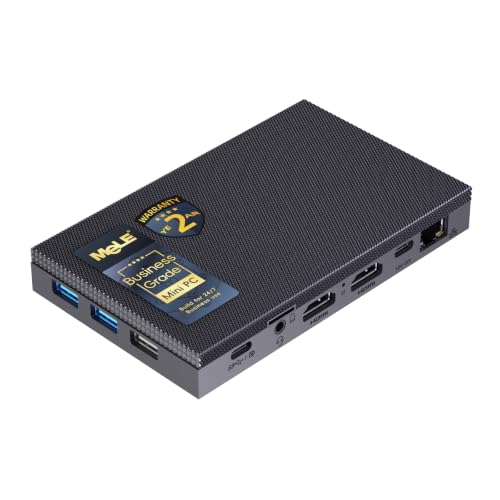
- Best first fanless mini PC: MeLE Quieter4C Fanless Mini PC, Intel N100, 8GB RAM, 128GB Storage, Windows 11 Pro — Check on Amazon
- MeLE Quieter4C Fanless Mini PC, Intel N150, 16GB RAM, 512GB SSD, Windows 11 Pro — Check on Amazon
- Protectli Vault Pro VP2430, Intel N150, 4-Port 2.5GbE Firewall Mini PC — Check on Amazon
- Protectli Vault Pro VP2420, Intel Celeron J6412, 8GB RAM, 120GB SSD, 4-Port 2.5GbE — Check on Amazon
- CWWK Fanless Firewall Mini PC, Intel N100, 8GB DDR5, 128GB NVMe, 4-Port 2.5GbE — Check on Amazon
See 1 more Amazon option
- Protectli Vault Pro VP4630, Intel Core i3, 8GB RAM, 120GB SSD, 6-Port 2.5GbE — Check on Amazon
Read the full guide ↓
Disclosure: As an Amazon Associate, reviewstook.com earns from qualifying purchases. Links to Amazon on this page are affiliate links; they cost you nothing extra. Listing details such as price and availability change often, so check the current Amazon listing before you buy.
If this is your first mini PC, here is the single most useful thing anyone can tell you before you spend anything: a fanless mini PC is a small, silent computer built around a low-power processor, and “fanless” describes how it cools itself, not how fast it is. There is no fan inside. The metal case is the cooling system — the processor presses its heat into a finned aluminium shell, and the shell quietly radiates that heat into the room. That one design decision explains everything else in this guide: why these machines make literally no noise, why they sip electricity, why they are wonderful as desk PCs, media boxes and always-on home servers — and why none of them, at any price, is a gaming PC in the way a tower with a graphics card is a gaming PC.
Now the part that will save you real money. Your search says “under $3,000”, and the honest headline of this guide is that you cannot spend $3,000 on a fanless mini PC, because no such machine exists. The most expensive genuinely fanless configuration we could verify on Amazon — a business-grade MeLE Quieter4C loaded with 32GB of memory and a 1TB drive — sits at the very top of the category, well below this guide’s budget ceiling; check price on Amazon to see where it sits today. A heavily configured white-label fanless firewall sits in the upper part of the category as well. The six verified picks below sit in the lower to upper part of the category, well below the budget ceiling — check the current price on Amazon for each pick. Silence does not scale with price: doubling your budget does not buy a faster silent computer, it buys more network ports, more memory, more storage, or a bigger markup. So this beginner’s guide does three things. It explains the vocabulary in plain English, so listing pages stop being intimidating. It walks you through your first evening with the machine, step by step. And it tells you, pick by pick, exactly what each machine can and cannot do — including the gaming truth, stated early so nobody buys the wrong thing: these PCs play retro games, indie titles, older games and light esports settings, and they stream games beautifully from elsewhere. Modern big-budget games at native settings are beyond every fanless mini PC ever made, and no amount of the $3,000 changes that.
One more beginner warning, because it catches more people than any other: four of the six picks below are network appliances — little firewall and router computers with four or six Ethernet ports. They are excellent machines, but they are not first desktop computers, and one of them does not even come with a desktop operating system installed. If you want a quiet PC for a desk, start with the first two picks; if you want a silent box to run your home network, start with the Protectli picks.
In this guide
Quick Picks
Short on time, or comparing several options at once? Each row below names a buyer type and the product that suits it, with a link to the listing.
| Buyer type | Pick | Why it stands out | Link |
|---|---|---|---|
| Best first fanless mini PC | MeLE Quieter4C, Intel N100, 8GB/128GB | The beginner’s silent desktop: Windows ready out of the box, three 4K displays, zero noise | Check on Amazon |
| Best finished silent desktop | MeLE Quieter4C, Intel N150, 16GB/512GB | Double the memory and real SSD storage — the version you never have to open | Check on Amazon |
| Best first firewall appliance | Protectli Vault Pro VP2430, Intel N150 | Four 2.5GbE ports, upgradable memory and storage, a maker that supports its hardware | Check on Amazon |
| Best if you own DDR4 parts | Protectli Vault Pro VP2420, Celeron J6412, 8GB/120GB | Socketed DDR4 memory and four fast network ports on the older, cheaper platform | Check on Amazon |
| Best value for experienced hands | CWWK Fanless Firewall Mini PC, Intel N100, 8GB/128GB | The same four-port formula as the branded boxes, without the brand premium | Check on Amazon |
| The top of the category | Protectli Vault Pro VP4630, Intel Core i3, 8GB/120GB | Six network ports — roughly where mainstream fanless pricing ends | Check on Amazon |
How These Picks Were Chosen
The first test was the word “fanless” itself, checked against the manufacturer rather than the marketplace headline. A machine only counts here if its maker describes it as fanless or passively cooled in official specifications, product pages or manuals — or an independent review has opened it up and confirmed there is no fan. Sellers use “silent” and “quiet” to describe ordinary mini PCs whose small fans spin slowly, and that wording excluded most of the famous names in this category: the popular boxes from Beelink, GMKtec, Minisforum, ACEMAGIC and KAMRUI are good computers, but every one of them cools itself with a fan, so none appears below. A fan you cannot hear today still gathers dust and still wears out; a fanless case has no moving parts at all.
The second test was identity. Every pick is tied to one specific Amazon listing whose product code we confirmed through the listing itself or manufacturer documentation keyed to that code. These machines sell in small batches and listings change often, so check the current price on Amazon for each pick before you buy. Where a model name covers several configurations, or a listing is sold mainly by third-party sellers whose stock rotates, the review says so and tells you what to verify when your box arrives.
The third test was honesty about the budget. Rather than pad the list toward $3,000 with fanned gaming PCs wearing quiet marketing, this guide takes the complete set of verified fanless machines worth recommending and shows you the verified machines that mark the category’s real ceiling. For a beginner, that framing is the most valuable thing here: in this corner of computing, the expensive mistake is overspending, not underspending.
The Words, in Plain English
Mini PC listings are written in shorthand. Here are the terms used in this guide, translated once, so every review below reads easily.
- Fanless / passive cooling. The computer has no fan. Its processor is bonded to a finned metal case that works like a radiator, soaking up heat and releasing it into the air. Two consequences follow: the machine is completely silent, and the case is supposed to feel warm in use — warm is the cooling working, not failing.
- CPU (the processor). The chip that does the general thinking. Listings advertise its boost clock — the top speed it can touch for a few seconds. A fanless case can only sustain a fraction of that speed under a long load, because the heat has nowhere else to go. Judge these machines by chip class, not by the biggest gigahertz number on the box.
- Integrated graphics. The picture-making circuitry built into the processor, instead of living on a separate card. It borrows part of the machine’s ordinary memory (RAM) to use as graphics memory — this is called shared memory, and it is why the RAM figure matters even for games. Integrated graphics handle desktops, video, retro games and light titles well; they are not built for modern big-budget games.
- Graphics card (discrete GPU). A separate, powerful card whose whole job is 3D graphics. No fanless mini PC has one, and none can be added later: a gaming card makes more heat in a minute than a passive case can shed in an hour. If a listing for a “fanless” machine implies serious graphics power, it is not a fanless machine.
- RAM (memory), soldered vs socketed. RAM is the machine’s short-term working space; more of it means more things open at once without slowing down. Soldered RAM is melted onto the board at the factory and can never be changed — the number in the listing is the number forever. Socketed RAM (often called a SO-DIMM) sits in a slot and can be swapped or enlarged later. In this guide, both MeLE desktops have soldered memory, while the Protectli appliances use slots.
- Storage: SSD, NVMe, SATA and eMMC. Where your files live permanently. An SSD is the fast modern kind. NVMe and SATA are two connection styles for SSDs — NVMe is the faster one, and a slot that only accepts SATA will not run an NVMe drive at full speed, or at all. eMMC is slower, simpler built-in storage, fine for light duties. The MeLE N100 pick mixes the two ideas: modest eMMC built in, plus an empty slot for a real SSD.
- Barebones vs complete. A barebones machine arrives without some combination of memory, storage and operating system — you supply and fit the missing pieces. A complete machine works out of the box. Barebones prices look wonderfully low until the missing parts are added, so this guide always says which kind each pick is: the two MeLE desktops and the CWWK arrive complete as listed, while the VP2430’s cheaper configurations leave memory and storage to you.
- New vs renewed. New means factory-sealed with the maker’s full warranty. Renewed (or refurbished) means a previously owned machine that has been checked and resold, usually cheaper, usually with a shorter warranty. Every pick in this guide is sold new; if a listing variant you find is renewed, that is a different offer and should be priced as one.
- Power brick. The external adapter that turns wall power into the low-voltage power these little machines drink. Every mini PC has one, and it needs the same courtesy as the PC itself: open air, not buried under papers or sealed in a drawer. One neat exception below: the MeLE desktops can also be powered through their USB-C port, which can mean one cable carrying both picture and power from a compatible monitor.
- Resolution. How many dots make the picture. 1080p (1920 × 1080) is the standard; 4K (3840 × 2160) is four times as many dots and needs four times the graphics work in games. These machines display a 4K desktop and 4K video happily — playing a video is easy work — but gaming at 4K is a different and much heavier job, and it is not what fanless hardware is for.
- Refresh rate. How many times per second the screen redraws, measured in hertz (Hz). A 60Hz screen redraws 60 times a second; gaming screens go to 144Hz and beyond. Your monitor may support more than Windows uses by default, which is why the setup walkthrough below includes setting the real refresh rate by hand — it is the most common “my new screen looks ordinary” fix there is.
- Upscaling. A trick where the game draws a smaller picture and software stretches it to fill the screen, trading a little sharpness for a lot of speed. Famous brand-name versions need specific graphics hardware that none of these machines have. On fanless hardware, the practical beginner version is simpler: lower the game’s resolution setting, or use its built-in resolution-scale slider, and let the screen stretch the result. It works, it is free, and it is how light machines play above their weight.
- Platform. The generation of parts a machine is built from, and therefore what it can grow into. The N150 is a small step newer than the N100; the VP2420’s older platform accepts the DDR4 memory many people already own, while the VP2430’s takes newer DDR5.
The 6 Best Fanless Mini PCs Under $3,000, Explained for Beginners
MeLE Quieter4C Fanless Mini PC — Intel N100, 8GB RAM, 128GB Storage
Who it suits: A first-time buyer who wants a silent Windows PC for a desk, a bedroom or behind a TV — and wants it to simply work on the first evening.
Start with the shape of the thing: a flat aluminium slab roughly 5.2 by 3.2 by 0.7 inches, whose top surface is a field of cooling fins. Inside, an Intel N100 processor — four cores, advertised at up to 3.4 GHz, from the roughly 6-watt class of chips these machines are built around — passes its heat straight into that shell. There is nothing to spin, nothing to clog, and nothing to hear. MeLE fits 8GB of memory and 128GB of built-in storage, preinstalls Windows 11 Pro, and adds the two touches that turn a curiosity into a computer: an empty M.2 slot inside that accepts a proper SSD when you outgrow the built-in storage, and a microSD slot for cheap extra room. Two HDMI ports and a full-function USB-C port can run three 4K displays at once, and that USB-C port can also power the machine, so the right monitor can feed it picture and electricity down one cable. Check price on Amazon for this benchmark silent desktop — it sits in the lower part of the category, well below the budget in your search, which is the first lesson of this category.
Its limits are the category’s limits, and one measurement makes them concrete. Independent reviewers who stress-tested this exact model at its factory settings watched the processor settle to roughly a third of its headline boost speed — around 1,200 MHz on average — under a long, heavy load, with the top of the case reaching the mid-60s Celsius after twenty minutes. Everyday work never feels that: opening documents, browsing, email, video calls and media playback all live in the short bursts where the chip runs at full speed. Long marathons — encoding a big video, compiling a large program — run at the case’s cruising pace instead. Treat the warm case as a thermometer, not a fault.
- Genuinely fanless: a passively cooled aluminium case with zero moving parts and nothing to dust out.
- Windows 11 Pro preinstalled and ready on the first evening — the beginner-friendly way to buy.
- Three 4K display outputs and USB-C power input from a box smaller than a paperback.
- An empty M.2 SSD slot and a microSD slot, so the small built-in storage is a starting point, not a life sentence.
Honest limitation: The 8GB of memory is soldered and can never be increased, long heavy loads run well below the headline clock speed, and its single network port rules it out as a home firewall.
Choose it if silence at a desk or beside a TV is the point and your computing is everyday computing. Skip it if you already know you need more than 8GB of memory — buy its bigger sibling below instead — or if the machine’s real job is routing a network.

MeLE Quieter4C Fanless Mini PC — Intel N150, 16GB RAM, 512GB SSD
Who it suits: Beginners who like the silent-desktop idea but want the finished version — more memory, proper storage, nothing to upgrade or open, ever.
Everything the first pick teaches applies here, with the specification sheet filled in. The processor steps up to Intel’s N150, a refresh of the N100 that boosts a little higher, to 3.6 GHz. Memory doubles to 16GB, and the storage is a real 512GB SSD instead of the base model’s modest built-in eMMC. The triple 4K display support, USB-C power input and Windows 11 Pro installation all carry over. For the jobs these desktops actually do all day — office work in a room that must stay quiet, a studio PC that must not be heard by a microphone, a media PC behind a television, a little always-on box for photos, signage or a telescope rig — this is the configuration that never asks you to think about hardware again. Check the current price on Amazon for it — it sits toward the top of fanless desktop pricing, and that is, honestly, about where fanless desktop pricing ends.
Two clarifications keep the recommendation straight. First, the N150 is a refresh, not a leap: independent coverage puts it roughly ten to twenty percent ahead of the N100, so most of your extra money buys the memory and storage, not a faster class of computer. If 8GB and a slot for your own SSD suit you, the first pick is the same silence for noticeably less. Second, this is the top of MeLE’s ladder, not the top of the world: a business-grade configuration of this same case with 32GB of memory and a 1TB drive sits at the top of the category — the highest tier we could find for any genuinely fanless mini PC; check price on Amazon. Even that sits well below a $3,000 budget, with headroom to spare.
- 16GB of memory and a 512GB SSD: the finished fanless desktop, no upgrades pending.
- Same silent finned case, triple 4K output and USB-C power as the benchmark model.
- Windows 11 Pro preinstalled; built for business and always-on duties.
Honest limitation: The memory is soldered shut here too — 16GB is generous today and final forever — and you are paying complete-desktop money for a low-power chip, because what you are buying is silence and specification, not speed.
Choose it if you want the best fanless desktop MeLE makes and no intention of ever opening it. Skip it if the N100 model plus a future SSD covers your desk for less — for many beginners, it genuinely does.

Protectli Vault Pro VP2430 — Intel N150, 4-Port 2.5GbE Firewall Mini PC
Who it suits: A beginner whose project is the home network itself — a first serious firewall, router or small home-lab box — rather than a desktop.
Protectli makes only fanless network appliances, and the VP2430 is its current four-port design. The finned aluminium case holds an Intel N150 processor, a slot for DDR5 memory, a slot for an M.2 NVMe SSD and 32GB of small built-in eMMC storage, fronted by four Intel 2.5-gigabit Ethernet ports. Those ports are the product: they let one silent box replace a consumer router, divide a home network into safer segments, and run firewall software such as OPNsense or pfSense, or a small virtual-machine host. Protectli supports open-source coreboot firmware, includes a VESA mount kit and a serial console cable in the box, and backs the hardware with a US-based support organisation. Check price on Amazon — the total varies as memory and storage are configured in, so check the current price on Amazon for the exact configuration you are considering.
Now the beginner-specific warning, plainly: this is an appliance, not a desktop. It ships without a consumer operating system because its buyers install their own, and the cheaper Amazon configurations leave the memory and SSD for you to supply — read the exact configuration on the listing, because the headline price may describe a box you still have to complete. Its screen outputs exist for setup, not for a three-monitor desk. Judged as the always-on heart of a home network — silent, cool, sipping power, supported like infrastructure — it is the most professional fanless purchase in this guide, and the friendliest possible first appliance precisely because a real support desk stands behind it.
- Four Intel 2.5-gigabit network ports — the layout home firewalls and segmented networks actually need.
- Memory and storage slots (DDR5 and NVMe) plus built-in eMMC, so the box can grow with the project.
- Open-source coreboot firmware support, VESA mount kit included, from a maker that sells nothing else.
Honest limitation: No desktop operating system is preinstalled, the lower-priced configurations are effectively barebones, and as a desk PC it is deliberately spartan — beginners wanting Windows should buy a MeLE above.
Choose it if the fanless PC you actually need is a firewall, router or quiet home-lab host that will run untouched for years. Skip it if you want a ready-to-use Windows desktop — that is what the first two picks are for, at similar money.

Protectli Vault Pro VP2420 — Intel Celeron J6412, 8GB RAM, 120GB SSD
Who it suits: The beginner with a parts drawer — DDR4 memory or a spare drive already on the shelf — who wants a supported silent appliance without paying for the newest platform.
The VP2420 is the previous rung of Protectli’s ladder, and its charm is compatibility. A Celeron J6412 processor (four cores, up to 2.6 GHz) sits behind the same four 2.5-gigabit Ethernet ports on Intel I225-V controllers, with AES-NI encryption acceleration, coreboot support, and the same fanless extruded-aluminium case as every Vault. The configuration listed on Amazon carries 8GB of DDR4 memory in a slot — the platform accepts up to 32GB — and a 120GB SSD. Check price on Amazon, since Protectli’s Amazon stock is largely third-party and rotates, so check the current price on Amazon before you buy.
The compromises are documented and worth a beginner’s attention. The J6412 is a generation behind the VP2430’s N150 and slower core for core. Its storage slot accepts M.2 SATA drives only, so a fast NVMe SSD from your parts bin will not run at its full speed here. And Protectli has been succeeding this model — an eMMC-free variant and the newer VP2430 are its future — so you would be buying the mature end of a product line. For routing and firewalling a home or small-office network at 2.5-gigabit port speeds, none of that is disqualifying; the model’s long sales history means community knowledge about it runs deep. Buy it when the value or your parts drawer makes the choice obvious.
- Socketed DDR4 memory — the rare fanless appliance that can reuse RAM you already own.
- Four 2.5-gigabit Intel ports with AES-NI, in Protectli’s fanless aluminium case.
- A long sales history means deep community documentation and deployment experience stand behind the model.
Honest limitation: An older, slower processor than the VP2430, a storage slot limited to SATA speeds, and a model its own maker is succeeding — with Amazon availability that comes and goes with third-party stock.
Choose it if its configured price clearly undercuts the VP2430 or your DDR4 parts make it the cheapest route to a supported silent firewall. Skip it if the two prices are close — at parity, the newer VP2430 is simply the better buy.

CWWK Fanless Firewall Mini PC — Intel N100, 8GB DDR5, 128GB NVMe
Who it suits: A confident beginner — comfortable following community guides and checking their own hardware — who would rather spend the brand premium on something else.
CWWK is the manufacturer behind a large share of the white-label fanless appliances on Amazon, and this listing is that formula undiluted: an Intel N100, 8GB of DDR5 memory, a 128GB NVMe SSD, four 2.5-gigabit Ethernet ports on Intel i226-V controllers, AES-NI support, and a finned aluminium case whose own listing data describes the cooling as passive, with no fan. For firewall duty it matches the branded appliances port for port and chip for chip, — check price on Amazon; it sits squarely in the middle of this guide’s tier, offering the same network throughput as the Protectli pair for less.
The discount is paid in everything surrounding the hardware, and a beginner should hear this clearly. There is no US support organisation behind the listing, and firmware updates are a community-archaeology exercise rather than a tidy vendor download page. White-label listings are also known for quiet configuration drift, so the unit that arrives deserves one careful evening: confirm the network controllers, memory and SSD match the listing, inside the return window. None of this is hidden — the home-lab community buys these boxes in volume with its eyes open — but we would not hand it to a first-time buyer as their very first appliance if a support desk matters to them; that buyer is exactly who Protectli’s modest premium exists for.
- Four 2.5-gigabit ports on current-generation Intel i226-V controllers — the NICs firewall builds prefer.
- DDR5 memory and an NVMe SSD at a white-label price, inside a genuinely passive case.
- The identical N100 platform the branded appliances use, minus the brand markup.
Honest limitation: Support, documentation and firmware upkeep are community-grade, and the exact configuration under a white-label listing can drift — verify what arrives before you deploy it.
Choose it if you are comfortable verifying hardware yourself and value hardware over a support wrapper. Skip it if this is your first appliance, or if other people will depend on the network it runs.

Protectli Vault Pro VP4630 — Intel Core i3, 8GB RAM, 120GB SSD, 6-Port 2.5GbE
Who it suits: Beginners who already know their project needs more than four network ports — and anyone curious what the top of the mainstream fanless market actually looks like.
The picks end at the category’s ceiling, made physical. The VP4630 is Protectli’s six-port Vault Pro: an Intel Core i3 processor (the listing does not name the exact chip, and neither do we), six 2.5-gigabit Ethernet ports, 8GB of DDR4 memory and a 120GB SSD in the configuration listed on Amazon, with AES-NI and the same fanless aluminium construction as the rest of the line. Six ports is a real capability — one silent appliance can serve a firewall with several physically separate networks, a lab with isolated corners, or a small office with room to grow — and the i3 is a genuine step above the Celeron and N-series chips elsewhere in this guide. Check the current price on Amazon for this exact listing — stock is largely third-party. This sits at the top of the mainstream fanless market, in a mid-range configuration, well below the budget in this guide’s title.
For all that, the VP4630 still cannot do the thing the $3,000 figure keeps implying. Its processor is a low-power mobile chip chosen because a finned case can shed its heat; it is quicker than an N100 the way a bicycle is quicker than walking, not the way a motorcycle is. No configuration of this machine — no memory tier, no storage upgrade, no support contract — turns it into a high-performance computer, because the limit was never the parts list: a fanless case radiates a small, fixed amount of heat, and every manufacturer designs to that number. Buy it if six ports and Protectli’s support are worth it to you — they may well be — knowing you have reached the top of the fanless ladder well below the original budget, because there is nothing above it to climb to.
- Six 2.5-gigabit ports — the port count genuinely segmented networks and labs run out of.
- An Intel Core i3 that sits a genuine step above this guide’s N-series and Celeron chips.
- Protectli’s fanless construction and US support desk, with maintained firmware, at the top of its range.
Honest limitation: A step up from the VP2430 buys ports and support, not a faster class of computing — and even this ceiling machine demonstrates that the category simply ends here.
Choose it if six ports are a real requirement and you want them from the maker that supports them best. Skip it if four ports suffice — they usually do — and let the VP2430 plus an ordinary network switch do the same job for less.

Comparison Table
| Product | Processor | Best use | Link |
|---|---|---|---|
| MeLE Quieter4C, 8GB/128GB | Intel N100 | The beginner’s silent desktop, ready out of the box | Check on Amazon |
| MeLE Quieter4C, 16GB/512GB | Intel N150 | The finished fanless desktop, nothing to upgrade | Check on Amazon |
| Protectli Vault Pro VP2430 | Intel N150 | Modern firewall, router and home-lab host | Check on Amazon |
| Protectli Vault Pro VP2420 | Intel Celeron J6412 | Supported appliance that reuses DDR4 parts | Check on Amazon |
| CWWK Fanless Firewall Mini PC | Intel N100 | White-label four-port value for confident hands | Check on Amazon |
| Protectli Vault Pro VP4630 | Intel Core i3 | Six-port networks — the mainstream ceiling | Check on Amazon |
Your First Evening: Setup, Step by Step
This walkthrough assumes a desktop pick (either MeLE) unless a step says otherwise; appliance buyers follow the same physical steps, then install their own system software where the walkthrough mentions Windows.
- Choose the spot first — and respect the fins. A fanless case is not a box that contains a heatsink; the case is the heatsink. Put the machine where air can move around its finned surfaces: on a desk, on an open shelf, or mounted behind a monitor where a mount is included. Never bury it in a drawer, seal it in a cabinet, stack warm equipment on top of it, or wrap it in a cable nest. This single rule decides whether a fanless PC runs happily for years or throttles and complains — it matters more than any setting in this list.
- Give the power brick an address. Plug the adapter into a reachable outlet and let the brick sit in open air too — it warms up in use and dislikes being buried under papers. If you bought a MeLE and your monitor supports USB-C power delivery, you may be able to run the PC from the monitor’s USB-C port instead; either way, decide where the power lives before the cables multiply.
- Connect the screen to the machine’s own outputs. On the MeLE desktops, use one of the HDMI ports or the USB-C display output. On the Protectli and CWWK appliances, the display output is for setup and console work — connect a screen for installation, and do not judge the machine by desktop standards afterwards.
- Add keyboard, mouse and wired internet. Plug in a keyboard and mouse, and for this first evening use a network cable rather than Wi-Fi even if the machine has wireless: the big first update downloads faster and fails less on a wire.
- First boot, then updates before anything fun. On the MeLE desktops, let Windows finish setting itself up, then run Windows Update until it stops offering updates, and check the maker’s support page for driver or firmware updates. On an appliance pick there is no desktop waiting for you — this is the step where you install your chosen system (OPNsense, pfSense, a Linux distribution, a hypervisor) from a USB stick, following the guide for that exact model. Budget the evening accordingly.
- Set the monitor’s real refresh rate. Windows often defaults to 60Hz even on faster screens. Open Settings, go to Display, then Advanced display, and select the highest refresh rate your monitor offers. It takes twenty seconds and it is the difference between a screen that feels ordinary and one that feels like the upgrade you paid for.
- Verify what actually arrived. Open Settings (or Task Manager’s Performance tab) and compare the processor, memory and storage against the listing and the model number on the box. This is cheap insurance on any mini PC, and it is essential on the white-label CWWK, whose listings are known to drift: check the network controllers, memory size and SSD while the return window is wide open. A mismatch found now costs nothing to fix; found later, it costs plenty.
- Install a game store — with the right expectations. Install Steam (and any other store you use), sign in, and start with the library these machines genuinely enjoy: retro collections, indie games, older titles, and lighter settings on esports games. If you own a gaming PC elsewhere in the house, set up in-home streaming as well — a fanless box beside the TV, receiving a stream, is one of the best silent gaming setups there is.
How to Choose a Fanless Mini PC
- Verify the silence, not the adjective. “Fanless” should come from the manufacturer’s own specifications or manual, or from a reviewer who opened the case. “Quiet” and “silent mode” on a listing usually describe a fan at low speed. Every pick here passed the manufacturer-or-review test; hold anything else to the same standard.
- Decide which species you need. Fanless desktops (the MeLE pattern: one network port, several screen outputs, Windows installed) and fanless appliances (the Protectli and CWWK pattern: four to six network ports, no desktop system, screens for setup only) share a cooling method and nothing else. Buying across that line is the category’s most common beginner disappointment.
- Plan around the sustained speed, not the boost speed. The gigahertz figure on the box is a burst lasting seconds. Under a long load, a fanless case sustains a fraction of it — measured at roughly a third on the best-documented machine here. For everyday bursty work that trade is invisible; for long renders and encodes it is the whole story, and it does not improve at any price in this category.
- Settle the memory question before you order. On the fanless desktops, memory is soldered: the capacity in the listing is the capacity for life. On the appliances, memory sits in a slot you can change. If your workload might grow, that difference outweighs any processor step in this guide.
- Count ports before processors. In appliance-land the binding constraint is almost always network ports and controller quality, not CPU speed. Four 2.5-gigabit ports on Intel controllers cover nearly every home firewall design; six ports serve genuinely segmented networks. A faster chip behind too few ports is money in the wrong place.
- Value the support wrapper like a feature. The gap between a white-label appliance and a Protectli buys maintained firmware, real documentation and a support desk that knows the hardware. For a box that will route a household’s traffic for years, that is often the best-value line in the whole purchase — and the category still sits well below the $3,000 budget in this guide.
What Else You Will Spend
No pick in this guide includes a monitor, a keyboard or a mouse, so the honest first addition is the screen: buy the monitor first, because it outlives the PC and every pick here can drive a good one. Beyond that, the extra spending is small and specific. If you choose the N100 MeLE, treat a proper SSD for its empty M.2 slot as a planned second purchase rather than a surprise — think of the pick as a machine plus that one fix, and it is still the most affordable route to the finished article. If you choose a lower-priced VP2430 configuration, the memory stick and SSD it leaves out are part of the purchase, not accessories. And if you choose any appliance, remember it arrives without a desktop operating system: the firewall systems its buyers use are free, but the evening spent installing one is a cost too. Notice what is not on this list: cables you do not need, docks, or a “premium” anything. The leftover from a $3,000 budget is better spent on the monitor, a larger SSD or a second fanless unit — or kept. Keeping it is a legitimate outcome; silence is one of computing’s few bargains.
Upgrades, in Plain Terms
Here is every upgrade this guide can honestly promise, and the one it never will. On the N100 MeLE, you can add an SSD in its documented internal M.2 slot and cheap bulk storage on a microSD card; its memory is soldered and final. On the N150 MeLE, the machine is sold finished — memory soldered, storage fitted — and that is precisely its appeal. On the VP2430, both the DDR5 memory and the NVMe storage sit in slots you can change, which is why appliance buyers love the pattern. On the VP2420, the DDR4 memory is socketed and the platform accepts up to 32GB, while its storage slot speaks SATA only. On the CWWK, the documented offer is the configuration as listed; verify it on arrival rather than planning around undocumented slots. And on graphics, the rule has no exceptions: no fanless mini PC can be given a graphics card, ever — there is no slot, no power and no cooling for one. If your gaming ambitions grow past light titles, the upgrade is a second, fanned machine beside the silent one, not a part you add to it.
Common Buying Mistakes
- Reading “silent” or “quiet” on a listing as “fanless”. Most describe a small fan running slowly. Verify with the manufacturer’s own specifications, or expect a faint whir and a dust path.
- Expecting a bigger budget to buy fanless performance. It buys ports, memory, storage and support. The performance ceiling is thermal, and it is the same at the entry of the category and at its top.
- Buying a fanless box for modern native gaming. The integrated graphics and shared heat budget are not built for it; these machines emulate, play light titles and stream.
- Buying across the desktop/appliance line. One network port cannot route a segmented network, and a port-rich appliance makes a spartan desk PC — one of them does not even include a desktop operating system.
- Forgetting that soldered memory is forever. On the fanless desktops, the RAM in the listing is the RAM for the machine’s whole life. Buy the capacity for the job’s future, not its first month.
- Sealing the case away. A fanless PC is a radiator and needs open air around its fins; suffocated placement causes exactly the throttling and heat complaints that fill negative reviews.
- Skipping the arrival check on a white-label listing. Verify the network controllers, memory and storage in the unit that arrives, during the return window — not after it is deployed.
- Paying a premium for a “high-end fanless” label. The category’s real ceiling sits at the top tier for an exotic configuration, with mainstream machines below that — check price on Amazon; beyond that you are paying markup, not engineering.
Final Recommendation
- Most beginners: MeLE Quieter4C, Intel N100, 8GB/128GB.
- The finished silent desktop: MeLE Quieter4C, Intel N150, 16GB/512GB.
- First firewall or home lab: Protectli Vault Pro VP2430.
- DDR4 parts on the shelf: Protectli Vault Pro VP2420.
- Confident and value-first: CWWK Fanless Firewall Mini PC.
- Six ports, top of the range: Protectli Vault Pro VP4630.
Our top two are the MeLE Quieter4C in its N100 form — the silent desktop the category is judged by, well below this guide’s headline budget — and the Protectli VP2430, the modern fanless appliance for the network jobs these machines do best. Together they cover the category’s two honest halves. The refinements: the N150 Quieter4C if you want the desktop finished rather than expandable, the VP2420 if your parts drawer tilts the choice, the CWWK if you are confident and value-led, and the VP4630 if six ports are a genuine requirement. Beginners working with less money lose nothing by starting at Best Fanless Mini PC For Beginners Under $400 or Best Fanless Mini PC Under $400 — the machines there are the same machines, because in this category the tiers are separated by configurations, not by classes of computer. And if you arrived hoping $3,000 would buy silent gaming performance, take the central fact as good news: the silence sits well below the budget, and the gaming PC can have the rest — see Best Mini Gaming PC Under $3000 and Best Mini PC Under $3000.
Frequently Asked Questions
Is there really no fanless mini PC near $3,000?
Really. The highest verified tier for a genuinely fanless mini PC is a maxed-out business configuration at the top of the category, and the mainstream category sits below that — check price on Amazon. Fanless cooling caps processors at roughly 6 to 15 watts, and chips in that class are inexpensive — there is no expensive fanless machine to sell you. Listings implying otherwise are large-memory configurations, reseller markups, or machines with fans described loosely.
I am a complete beginner. Which pick should I actually buy?
If you want a computer for a desk, buy the first pick — the MeLE Quieter4C N100 — or its N150 sibling if you want more memory and storage from day one. Both arrive with Windows installed and work on the first evening. Buy a Protectli or the CWWK only if your project is the home network itself, and understand that those are appliances: the VP2430 does not even include a desktop operating system.
Can a fanless mini PC play games?
Some kinds, honestly stated. Retro emulation, indie and older titles, and light esports settings are within reach of the N100 and N150 models; cloud gaming and streaming from another PC work excellently because the decoding is handled by dedicated hardware in the chip. Modern big-budget games at native settings are not playable on any fanless mini PC at any price — that takes a fanned machine with a graphics card, and no upgrade can add one to these boxes later.
Why does the case get warm? Is that a fault?
No — it is the cooling system working. The processor’s heat is conducted into the finned case and radiated away, so a warm case means heat is leaving. The best-documented machine here measured case temperatures in the 60s Celsius under sustained load, which its maker considers normal. What a fanless PC needs is open air around the fins; sealed in a cabinet, any of them will slow down to protect itself.
Why can’t a fanless PC just use a faster processor?
Because the heat has nowhere to go. A finned case sheds a small, fixed amount of heat by radiation and natural air movement. Under load, a fast desktop processor makes ten to fifty times as much heat; sealed inside a fanless case it would slow to a fraction of its speed within minutes — in sustained work, slower than the low-power chips these machines use by design.
What does “soldered memory” mean for me in practice?
It means the memory figure in the listing is permanent. On both MeLE desktops the RAM is fixed to the board at the factory, so choose the capacity for the machine’s whole life: 8GB is fine for everyday single-purpose use, 16GB is the comfortable long-term choice. The Protectli appliances use slotted memory instead, which is why they can grow.
What should I do with the rest of a $3,000 budget?
Spend it where it changes something: the monitor the silent PC will drive (no pick includes one), a larger SSD, a second fanless unit, or a separate fanned PC for gaming and heavy work while the fanless box handles the silent jobs — Best Home Office PC Under $3000 covers the desk side of that split. The one option with no return at all is paying a premium for a “high-end fanless” machine; the category’s engineering tops out well below this budget, and this guide has shown you its actual ceiling.
- Best Fanless Mini PC Under $1500
- Best Fanless Mini PC Under $2500
- Best Fanless Mini PC For Beginners Under $1500
- Best Fanless Mini PC For 1440p Gaming Under $3000
- Best Fanless Mini PC For Small Spaces Under $3000
- Best Fanless Mini PC For Streaming Under $3000
- Best Mini PC Under $3000
- Best Home Office PC Under $3000


