Disclosure: As an Amazon Associate, reviewstook.com earns from qualifying purchases. Links to Amazon on this page are affiliate links; they cost you nothing extra.
If you print a few pages a month, the cheapest printer to own is not always the cheapest to run. Ink can dry out when a printer sits idle, so the right type depends on how often you really print.
This guide covers five printers for occasional use. It is built from published specifications and listings, not our own testing, so confirm details on each product page.
New to printers? Start with our guide to the best printers for home use and how we pick printers.
By the Reviewstook Editorial Team. Last updated: October 31, 2026.

In this guide
Quick Picks
| Printer | Type | Best for |
|---|---|---|
| Brother HL-L2460DW | Compact monochrome laser | Text-only printing with two-sided output |
| Canon PIXMA TR4720 | Color inkjet all-in-one | Light, occasional printing in a small space |
| HP DeskJet 4155e | Color inkjet all-in-one | Small-space everyday printing |
| HP DeskJet 2827e | Color inkjet all-in-one | The lowest entry price for printing, copying and scanning |
| Brother Work Smart 1360 | Color inkjet all-in-one | Compact everyday color printing |
5 Best Printers for Low-Volume Printing

Top pickBest for students, teachers and home workers who print text
1. Brother HL-L2460DW
A wireless compact monochrome laser with duplex printing.
Good for: Students, teachers and home workers who print text. Strengths: Toner keeps between uses, and duplex saves paper. Weaknesses: No color, and no scanner. Skip it if you need color or a scanner.


Best for a dorm, spare room or apartment
2. Canon PIXMA TR4720
A small 4-in-1 color inkjet that prints, copies, scans and faxes, with an auto document feeder, per the listing.
Good for: A dorm, spare room or apartment. Strengths: Compact body, a document feeder and a simple feature set. Weaknesses: Small cartridges mean it is not meant for heavy use. Skip it if you print daily.

Best for apartments and shared rooms
3. HP DeskJet 4155e
A compact color inkjet all-in-one with a feature set above the entry tier.
Good for: Apartments and shared rooms. Strengths: Compact body and basic automation. Weaknesses: Cartridge costs can climb with volume. Skip it if you need heavy-duty output.
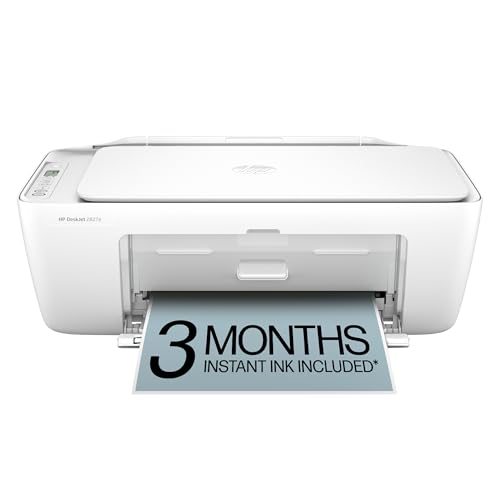
Best for someone who prints a few pages a month
4. HP DeskJet 2827e
A low-cost wireless color inkjet all-in-one.
Good for: Someone who prints a few pages a month. Strengths: Low purchase price and small footprint. Weaknesses: Starter ink is limited and running cost is high for frequent use. Skip it if you print regularly.


5. Brother Work Smart 1360
A compact color inkjet all-in-one that prints, scans and copies, from Brother’s Work Smart line.
Good for: Households that want occasional color without a bulky machine. Strengths: Small size and a basic, easy feature set. Weaknesses: Cartridge refills add up if volume grows. Skip it if you need a document feeder; check the product page.

Printing Rarely: Notes
Laser for rare use
Toner does not dry out, so a laser copes with long gaps.
Inkjet care
If you pick an inkjet, print a test page every few weeks. See how to stop ink drying out.
Consider printing elsewhere
If you print a handful of pages a year, a library or print shop may cost less.
Best Picks by Category
These labels summarize the picks by category and are not hands-on test results.
- Top rated: Canon PIXMA TR4720 — a mid-range pick; check price on Amazon.
- Most reviewed: HP DeskJet 4155e — a premium pick; check price on Amazon.
- Best value: Canon PIXMA TR4720 — a mid-range pick; check price on Amazon.
- Lowest price: Brother Work Smart 1360 — a budget pick; check price on Amazon.
- Premium option: HP DeskJet 4155e — a premium pick; check price on Amazon.
Price, Rating and Review Comparison
The table lists the picks by price tier. Check price on Amazon before you buy.
| Product | Price | Rating | Ratings | Price tier |
|---|---|---|---|---|
| Brother Work Smart 1360 | Check price on Amazon | — | — | Budget |
| HP DeskJet 2827e | Check price on Amazon | — | — | Mid-range |
| Brother HL-L2460DW | Check price on Amazon | — | — | Mid-range |
| Canon PIXMA TR4720 | Check price on Amazon | — | — | Mid-range |
| HP DeskJet 4155e | Check price on Amazon | — | — | Premium |
How Much Feedback Backs Each Rating
Feedback volume varies by pick, so check the listing on Amazon for current details.
- Brother HL-L2460DW: check the listing on Amazon for current feedback.
- Canon PIXMA TR4720: check the listing on Amazon for current feedback.
- HP DeskJet 4155e: check the listing on Amazon for current feedback.
- HP DeskJet 2827e: check the listing on Amazon for current feedback.
- Brother Work Smart 1360: check the listing on Amazon for current feedback.
How to Choose
Consider a laser for rare use
Toner does not dry out, so a laser copes well with long gaps.
If you choose an inkjet, print a test page
Print something every few weeks to keep the nozzles clear.
Skip the ink tank
Tank printers pay back only with regular printing.
How We Chose These Products
We start from products sold on Amazon with a full product name and clear specifications, and we skip results that show only a brand name or a vague title. We then read the listing and any manufacturer information for each one and note the features that matter for printers: print technology, running costs, connectivity and size. We do not run our own lab tests, and this guide contains no hands-on measurements. Use it to build a shortlist, then check current prices, dimensions and return terms on the Amazon page before you buy.
Buying Guide: What to Check Before You Choose
Ink tank versus cartridge
Ink tank printers use refillable tanks and usually have a lower cost per page, with a higher purchase price. Cartridge printers are cheaper up front but ink can cost more over time. Check the page yield and the cost of refills.
Laser printers
Laser printers print text quickly and sharply and do not clog like inkjets. Color lasers cost more. Check the toner cost and the print speed.
Photo printing
Photo printers focus on color accuracy and paper handling. Check the number of inks, the paper sizes and the cost per print.
Quick Reference: Which Pick Suits Whom
- Brother HL-L2460DW: suits students, teachers and home workers who print text
- Canon PIXMA TR4720: suits A dorm, spare room or apartment
- HP DeskJet 4155e: suits apartments and shared rooms
- HP DeskJet 2827e: suits someone who prints a few pages a month
- Brother Work Smart 1360: suits households that want occasional color without a bulky machine
Common Mistakes to Avoid
- Judging a printer by its price without considering ink cost.
- Ignoring the starter cartridge size.
- Forgetting the paper types needed.
- Assuming all-in-ones are always better.
- Skipping the return window.
Setup and Care
- Install the maker’s app or driver.
- Connect to Wi-Fi.
- Run an alignment and nozzle check.
- Print regularly to avoid clogs.
Why Light Printing Needs Different Math
Most printer advice assumes that you print a lot. It talks about cost per page, page yield and duty cycle, which are useful numbers when a cartridge is emptied every few months. If you print a dozen pages a month, those numbers lose some of their meaning, and a different set of costs takes over.
For a light user, three things dominate. The first is the purchase price, because there are too few pages to spread it over. The second is waste, meaning ink that dries out, cartridges that expire before they are used, and maintenance cycles that spend ink without producing a page. The third is hassle, such as a printer that refuses to connect after sitting idle for a month, or one that demands an update the moment you need a boarding pass.
Running cost still matters if you print more than you expect, which is common. A person who buys a printer for tax forms often finds that school projects, shipping labels and recipes soon add pages. A sensible choice for light use should be cheap to keep if your volume doubles, and not wildly expensive to buy if it never does.
| Cost driver | Compact laser | Cartridge inkjet | Ink tank |
|---|---|---|---|
| Purchase price | Moderate | Lowest | Highest |
| Risk when idle | Low | Higher, ink can dry | Higher, ink can dry |
| Color pages | Not on mono models | Yes | Yes |
| Refill cost at low volume | Rarely needed | Often the biggest expense | Rarely needed, but bottles are an upfront outlay |
The table shows tendencies, not guarantees for a given model. Use it to decide which type deserves a closer look, and then read the exact page for the product you are considering.
How You Print Decides the Right Machine
The five printers in this guide serve different light-use habits. Here are some common ones and what each one tends to need.
Text only, once in a while
If your pages are letters, forms, boarding passes and statements, a monochrome laser is the low-maintenance answer. The Brother HL-L2460DW in this guide is a compact mono laser with duplex printing. Dry toner waits patiently through long gaps, so you can leave it for two months and print immediately. The compromise is no color and, on this model, no scanner.
A little of everything in a small space
Renters, students and people in small apartments often want printing, copying and scanning in a box that fits on a shelf. An all-in-one inkjet like the Canon PIXMA TR4720 or the HP DeskJet models in this guide answers that need at a low price. They suit short, infrequent jobs best. Scan a document, print a form, and leave the machine alone otherwise.
Color for school and crafts
Children’s projects, certificates and flyers need color, and an inkjet is the realistic route at this price. Print in draft mode where you can, use the regular quality only for pages that matter and keep spare cartridges only if you use them within their shelf life.
Home sellers and shipping labels
Selling a few items online calls for neat labels more than color. A mono laser prints sharp barcodes and does not smear if a package gets damp, which is a quiet advantage. Check that the labels you buy are made for the printer type you own.
Retirees and caregivers
Medical forms, insurance paperwork and recipes are mostly text, and simplicity matters. Choose a printer with clear controls, a straightforward setup and few accounts or apps to manage. A printer that works over USB with a single computer can be easier than a wireless one for a person who does not want to troubleshoot a network.
Features That Matter More When You Print Rarely
Some specs that get headlines are irrelevant to a light user, and some small details matter a great deal.
- Wake-up and first-page time: A printer that has been asleep should print without a long delay. This matters more than a rated speed in pages per minute for jobs of one or two pages.
- Standby behavior: A printer that goes into deep sleep uses little power. Avoid leaving inkjets powered on needlessly if the maker advises shutting them down with the power button, since a proper shutdown caps the print head.
- Wireless reliability: Frequent dropouts are a common complaint for idle printers. Look for dual-band Wi-Fi or a USB fallback, and learn how to reconnect the printer before you need it urgently.
- Account and firmware rules: Some budget inkjets require an online account, a subscription program or original supplies to function. Read the setup requirements on the maker’s page, because a printer you must register is a different proposition from one that just prints.
- Starter supplies: The cartridges or toner in the box are often partial. For a light user, that is fine if you do not need a spare soon, but check the price of replacements so you can plan.
- Size and noise: A shelf-friendly body and a quiet motor are real advantages in shared living spaces.
- Document feeder: A feeder is helpful only if you copy or scan multi-page documents. For a single page now and then, the glass is enough.
Where the Money Goes at the Low End
Entry-level printers are inexpensive for a reason, and it helps to know what you give up as the price falls. The lowest-priced inkjets save money on the body and recover it through supplies. The cartridges are small, the starter ink is limited and the cost of a replacement set can approach the price of the printer itself. That is acceptable if you print very little, and a poor bargain if your pages creep up.
Moving up a step typically adds a sturdier build, a document feeder, a screen on the unit, faster wireless and automatic two-sided printing. For a light user, only some of these are worth paying for. A duplex feature saves paper but not much money at low volume. A feeder is useful if you copy contracts or multi-page forms. A small display makes setup easier for a person who is not comfortable with apps.
A compact laser costs more at the till but tends to cost less to own for a text-only user, since toner lasts and does not spoil. If you can live without color and a scanner, the extra purchase price is a fair trade for fewer headaches. If you need color, treat the inkjet as a consumable appliance and plan to replace it every few years instead of paying for features you will not use.
Keeping a Seldom-Used Printer Ready
Printers are machines, and machines left alone can stop working. A few habits make a seldom-used printer behave when you finally need it.
For inkjets
Print a color test page every couple of weeks, even if you have nothing to print. This pushes fresh ink through the nozzles and prevents blockages. If you see gaps, run one cleaning cycle and check the result before you repeat it, as each cycle uses ink. Turn the printer off with its own button so the print head returns to its capped position. Keep it away from sunlight and heat sources, and avoid dry rooms with heavy air flow.
For lasers
Dry toner is forgiving, but humidity affects paper. Store paper in its wrapper and keep it flat. If the printer has sat for months, run a test page to check that the fuser warms and the pages come out clean.
For both
Save the model number, the Wi-Fi password and the support page address in a note. Keep the printer’s default settings simple, and remember to turn off automatic updates if a surprise update has caused trouble before. Keep a spare sheet or two of paper loaded so a last-minute print is not delayed.
When Not Owning a Printer Makes Sense
The cheapest printer is the one you do not buy. Libraries, copy shops and office stores print single pages for a small fee, and many offer email or online upload. If you need only a handful of pages a year, the total cost of a machine, ink and replacement supplies can exceed what you would pay at a shop.
Many forms can also be signed and sent digitally, and boarding passes and tickets often work on a phone. Even so, owning a basic printer is convenient when you need something right away, or when a school or agency insists on paper. Decide based on how often you are caught needing a page, and whether that stress is worth the shelf space.
The Low-Volume Paradox: Printing Rarely Is Hard on Printers
It sounds backwards, but printing very little is one of the hardest lives a printer can live — at least for inkjets. Ink dries. Nozzles that sit unused for weeks can clog, and the cleaning cycles that clear them consume the ink you were trying to save. This is the central fact of low-volume printing, and it shapes every recommendation in this guide: the less you print, the more the type of printer matters, and the less the cost per page should drive your decision.
Laser printers escape the paradox entirely. Toner is a dry powder that can sit in a cartridge for a very long time without changing, and a laser that prints nothing for two months will usually produce a perfect first page when finally asked. That indifference to idle time is why the Brother HL-L2460DW leads this list: for the household that prints a boarding pass in March and a form in June, reliability after silence is worth more than any colour feature.
If You Choose an Inkjet Anyway: Keeping It Alive
Colour is the honest reason to choose an inkjet at low volume — the occasional photograph, school project or birthday card that a monochrome laser simply cannot do. The Canon PIXMA TR4720 and the HP DeskJet models in this guide serve exactly that need at modest prices. The price of admission is a small discipline: print something in colour every week or two, even a tiny test image, so ink keeps moving through every nozzle. A calendar reminder turns this from a chore you forget into a habit that costs one sheet a fortnight.
Where the printer lives matters too. Ink tolerates a cool, stable room better than a hot one, and a printer baked by a sunny window or a radiator will dry out faster between uses. Keep cartridges installed even when they run low — an inkjet left with no cartridge installed invites air into places ink should be. And when a low-volume inkjet does clog, run one cleaning cycle and then print a test page; repeating cleanings back to back mostly converts your ink supply into waste.
What Low-Volume Buyers Should Actually Compare
Ignore cost-per-page tables; at your volume they are nearly irrelevant. A household printing twenty pages a month will take years to spend the price difference between printers on ink. Compare instead the things you will actually feel: how quickly the printer wakes and prints its first page after weeks idle, how simple the Wi-Fi setup is, how much desk it occupies, and how painful its software is on the rare occasions you meet it.
Starter supplies deserve a glance. Some inexpensive printers ship with low-capacity starter cartridges, which is acceptable at low volume but worth knowing before you compare prices. The Brother Work Smart 1360 and the DeskJet models here are all sold for light use, so judge them as appliances: the winner is the one that asks least of you between its rare outings. Also consider size honestly — a compact printer that fits the shelf you actually have beats a better printer that lives in a cupboard you must empty to use it, because a printer that is hard to reach is a printer that gets replaced by a trip to the library.
The Occasional Jobs Low-Volume Printers Still Face
Rare printing is rarely trivial printing. It is the visa form that must be right, the concert tickets, the shipping label for a return with a deadline, the homework discovered at bedtime. These jobs share two traits: they are urgent, and they are often in colour or on special paper. A low-volume printer therefore needs to be ready in the full sense — connected, stocked with paper, and with enough ink that tonight’s emergency is not the night it runs dry.
That readiness argues for keeping one spare supply on hand even at low volume, and for printing a test page whenever you pass the printer with a spare minute. It also argues for keeping the printer connected to your network permanently rather than unplugging it between uses: a connected printer receives its updates, stays findable from phones, and does not need a setup ritual before every job. The standby power involved is small; the readiness it buys is the entire point of owning a printer at this volume.
Comparing the Picks for Occasional Use
The Brother HL-L2460DW is the set-and-forget answer for text-only households: fast, duplex, and immune to drying out. Choose it if your rare printing is forms, letters, tickets and documents. The Canon PIXMA TR4720 adds colour, scanning and a feeder at a gentle price, and suits households whose occasional jobs include school and family colour work, provided someone keeps the fortnightly test-page habit.
The HP DeskJet 4155e and DeskJet 2827e are the compact, inexpensive all-in-ones for the lightest users of all — a few pages a month, a scan now and then, minimal space and budget committed. The Brother Work Smart 1360 sits in the same light-use territory with Brother’s straightforward manners. Between the three, desk space, current availability of their cartridges in your local shops, and your preference for each maker’s app are more decisive than any specification. At this end of the market, the best printer is the one your household finds least annoying on its rare appearances.
When Not Owning a Printer Is the Right Answer
Honesty requires one more option: for some households, the best low-volume printer is someone else’s. If your true volume is a handful of pages a year, library printing, a workplace printer used with permission, or a print shop covers it without a machine gathering dust at home. The break-even is not only money — it is the space, the supplies expiring, and the maintenance habits this guide describes.
Most readers, though, are here because the urgent, awkward jobs keep arriving: the form needed tonight, the label needed before the courier comes. For them, a modest printer chosen for idle reliability — a small laser if colour is optional, a cared-for inkjet if it is not — pays for itself in avoided emergencies. Judge your own last year of printing honestly, and the right choice from this list usually names itself.
Where Low-Volume Printers Live: Space, Storage and Access
A printer used twice a month still occupies its space every day, so placement is a genuine buying criterion at low volume. The compact models in this guide — the DeskJet 2827e and DeskJet 4155e in particular — fit shelves, side tables and the top of a filing cabinet, which is where occasional printers belong. Measure the space with the scanner lid open and paper loaded, not just the closed footprint; a printer that cannot open where it lives will be carried to the floor for every scan, and quietly resented.
Storage of supplies follows the same logic. At low volume you need little: paper, one spare ink or toner, and nothing else. Resist bulk-buying supplies for a printer you barely use — cartridges bought in a multipack can outlast the printer itself, and a bargain that expires in a drawer is not a bargain. Buy small, buy when the spare is opened, and let the shops hold the inventory.
Access matters in shared homes. A printer in a study that is locked or occupied during the evening may as well be in another building when homework strikes. The household printer, however humble, belongs where the household can reach it — one more reason the small footprint of these picks is a practical feature and not a compromise.
Seasonal Printing: The Low-Volume Calendar
Low volume does not mean evenly spread volume. Most occasional printers live a seasonal life: a burst at the start of the school year, holiday cards and photos in December, tax documents in spring, travel documents in summer. Each burst arrives after weeks of idleness, which is precisely the pattern that punishes inkjets and flatters lasers. If your calendar looks like this, let it vote: the Brother HL-L2460DW will greet every season identically, while an inkjet asks for its fortnightly test page through the quiet months to be ready for the busy ones.
Seasonal bursts also reward a pre-season ritual. Before the known busy period, print a test page, check supplies, and load fresh paper. Five minutes in a calm week prevents the December discovery that the colour cartridge dried out in October — the single most common low-volume printing story there is.
Holiday photographs deserve one specific note: if December is the one time you print photos in quantity, a budget inkjet plus fresh cartridges bought for the season produces results that make families happy, and the rest of the year’s discipline is the fortnightly colour page. Owners who know their calendar can choose with confidence rather than guilt.
Handing a Printer Down, Selling It On, or Recycling It
Low-volume printers often change hands — upgraded, inherited, passed to a student leaving home. A printer being handed on deserves a small courtesy: a test page proving it works, the spare supplies included, and a note of which cartridges it takes. That note saves the new owner the most confusing part of printer ownership, and costs the giver two minutes.
Before any printer leaves your home, clear its memory. Models with storage or saved scans can hold copies of documents, and a factory reset from the settings menu wipes them. Wi-Fi details should be reset too, so the machine does not arrive at its new home still trying to join your network.
When a printer truly dies, recycle it through a retailer or council scheme rather than landfill, and remove cartridges for their separate recycling stream. At low volume the environmental story of printing is mostly the machine itself, so keeping one modest printer alive for many years — as the picks here are chosen to do — beats cycling through replacements.
Choosing Between the Picks: A Decision in Three Questions
Low-volume buyers can decide with three questions. First: will you ever need colour? If the honest answer is no — your printing is forms, tickets, letters and labels — the Brother HL-L2460DW ends the search, because its toner will wait patiently through every gap in your printing life. If colour appears even a few times a year for photographs, school work or cards, you are choosing among the inkjets, and the remaining questions decide which.
Second: do you scan? A household that scans signed forms, children’s drawings or documents for email needs an all-in-one, which all the inkjet picks here are, and should glance at whether a feeder matters — at low volume it usually does not, and the flatbed on the Canon PIXMA TR4720 or the DeskJets handles occasional pages perfectly well. Third: how much space and money do you want to commit? The DeskJet 2827e is the smallest commitment that still covers print, scan and copy; the DeskJet 4155e adds a little size and convenience; the Brother Work Smart 1360 offers Brother’s alternative take on the same light-duty brief.
Notice what the three questions never mention: speed, cost per page, and maximum paper sizes. At low volume those specifications are decoration. The printers in this guide are separated by patience, colour and footprint — by how they behave in the fifty weeks a year you are not printing — and choosing on that basis is why some occasional printers are loved for a decade and others are replaced in frustration within two years.
The First Month With an Occasional Printer
Set the printer up completely in its first week, while the manuals and cables are still to hand: connect every phone and laptop in the house, print one real job from each, and run the alignment or calibration the maker recommends. A printer that was only ever half set up is the one that fails the bedtime homework emergency, because the missing step always turns out to be the one tonight’s job needs.
Put the recurring habit in place immediately — the fortnightly colour test page for inkjet owners — as a calendar event with the printer’s name in it. Habits installed in week one survive; habits intended for later rarely happen. Note the cartridge or toner type somewhere durable, such as a photo of the label saved with your household documents, so that a future supply run is a purchase rather than a research project.
Then print the jobs you bought it for and judge it honestly while returning it is still possible. At low volume the trial is not about speed; it is about whether the machine wakes, connects and prints without a negotiation. The picks in this guide were chosen because they pass that test quietly — and a quiet pass in month one is the best predictor of a printer you will still be content with in year five.
Ink Subscriptions and Low Volume: Read the Small Print
Ink subscription plans are marketed heavily to exactly the buyers in this guide, and they deserve a clear-eyed look rather than either enthusiasm or dismissal. The model is simple: you pay for a number of pages per month, and cartridges arrive when the printer reports it is running low. For a household that prints a steady, predictable trickle — homework every week, a few forms, the occasional photograph — a small plan can be convenient and fairly priced, and it removes the risk of the empty-cartridge emergency entirely.
The catch lives in the pattern of low-volume life, which is not a steady trickle but bursts separated by silence. Pages you do not use may roll over only within limits, so silent months can mean paying for printing you never did, while a burst month can push you into a higher tier or extra charges. Read the rollover and overage terms against your own calendar — the seasonal pattern described earlier in this guide — rather than against an average month that does not exist. For genuinely bursty printers, owning cartridges outright, bought when the spare is opened, is usually the calmer arrangement.
Laser owners sidestep the question, since toner subscriptions are less central to that market and a single cartridge lasts a low-volume household so long that the errand barely exists. That, in miniature, is the recurring theme of this entire guide: at low volume, the best technology is the one that asks the least of you, and every feature, plan and specification should be taxed with the same question — what will this demand from me in the months when I am not thinking about printing at all?
A Word About Photographs at Low Volume
The occasional photograph is the job that keeps many low-volume households in the inkjet camp, so it deserves honest treatment. Modern budget inkjets, including the DeskJet and PIXMA picks here, produce perfectly cheerful photographs on proper photo paper — family-album quality that satisfies almost everyone. They are not fine-art machines, and they do not pretend to be; the photograph you frame for a decade might still deserve a lab print or a dedicated photo printer, while the forty prints for the family album are exactly what these machines are for.
Print photographs in batches when you do print them. A session that uses the printer steadily for an hour is kinder to it than the same prints scattered across a month, and it concentrates the paper-loading, setting-checking part of the job into one sitting. Use the session to print the test page that keeps the nozzles honest, and your photograph habit and your maintenance habit become the same habit — the neatest trick in low-volume ownership.
And keep perspective on cost. At low volume, the difference between printing a photograph at home and ordering it is small in money and large in immediacy: the print in a card tonight, the picture on the fridge before the grandparents leave. That immediacy is a legitimate reason to own the printer, and the picks in this guide deliver it without demanding a hobbyist’s dedication in return.
Simple Security for a Printer You Rarely Think About
A printer that sits quietly for months still sits on your home network the whole time, and it deserves the same basic hygiene as any other connected device. Change its admin password from the factory default if it has one, let it install firmware updates when it offers them, and keep it on your main network rather than an unsecured one. These are five-minute jobs done once, ideally during that first setup week, and they close the small but real risks that come with any always-connected appliance.
When the printer eventually leaves your home — sold, donated or recycled — run its factory reset first. Models that store scanned documents or network credentials carry a little of your household with them, and the reset menu exists precisely to wipe that clean. It is the same courtesy as signing out of a phone before passing it on, and at low volume it is easy to forget simply because the printer has been so forgettable in daily life. Add it to the hand-over note habit described earlier and the machine leaves as cleanly as it served.
Frequently Asked Questions
What is the best printer for occasional use?
A compact monochrome laser for text. A basic inkjet if you need color.
Do inkjets dry out?
Yes, if left unused for weeks. Print a test page now and then.
Is it worth buying a printer for a few pages a month?
If you print only a few, a print shop may cost less.
Which is cheaper to run, inkjet or laser?
Laser is usually cheaper per page for text, and ink tank printers are cheaper for color and photos.
How do I connect my printer to Wi-Fi?
Use the printer’s setup menu or the maker’s app. See our Wi-Fi guide.
Do I need genuine ink?
Not always, but some printers restrict third-party ink. Check the terms.
How often should I print to keep an inkjet from clogging?
Printing a color test page every one to two weeks is a common habit that keeps the nozzles moving. If you leave the printer idle for months, expect to run a cleaning cycle or two. Always power it off with its own button so the print head caps properly.
Is a laser printer cheaper than an inkjet for occasional use?
Often it is cheaper over time, because toner does not dry out and you replace it rarely. The purchase price is usually higher than a basic inkjet, and affordable lasers are mostly monochrome. If you need color, an inkjet may still be the more practical choice.
What happens if I do not use my printer for months?
An inkjet may clog or need several cleaning cycles, which use ink. A laser usually prints normally after a long gap, though paper stored in damp conditions can curl. Run a test page when you bring a stored printer back into use.
Are starter cartridges worth worrying about?
Starter cartridges in the box are often partly filled, so they run out sooner than full-size ones. For a light user this may not matter for months, but check the price of replacements before you buy so there are no surprises when the first one runs out.
Can I print from my phone without Wi-Fi setup trouble?
Most current printers support phone printing through the maker’s app, a built-in system feature or a wireless direct connection. Setup is usually simplest on the same Wi-Fi network. A printer with USB as a fallback gives you another way to print if wireless fails.
Bottom Line
For text, the Brother HL-L2460DW is the low-upkeep pick. For occasional color, a basic inkjet such as the Canon PIXMA TR4720 or HP DeskJet 4155e is enough.
Related Reading
- Types of Printers Explained: Inkjet, Laser, Ink Tank and More
- 7 Best Wireless Printers for Home Use
- 6 Best Printers for High-Volume Printing at Home or Office
- 6 Best Printers With Automatic Duplex (Double-Sided) Printing
- 5 Best 11×17 Tabloid Printers for Home and Office
More Printer Guides
- Best Printers for Home Use
- Best Printers for Mac and MacBook Users
- Best Printers for Real Estate Agents and Notaries
- Best Printers for Small Business Use
- Best Printers for Students and Dorm Rooms
- Best Printers for Teachers

