Disclosure: As an Amazon Associate, reviewstook.com earns from qualifying purchases. Links to Amazon on this page are affiliate links; they cost you nothing extra.
Printing hundreds of pages a month needs a printer built for low cost per page, not a cheap cartridge model. Ink tank printers and lasers are the two types that usually fit.
This guide covers six printers for steady, high-volume use. It is built from published specifications and listings, not our own testing, so confirm duty cycle and yields on each product page.
New to printers? Start with our guide to the best printers for home use and how we pick printers.
By the Reviewstook Editorial Team. Last updated: October 31, 2026.

In this guide
Quick Picks
| Printer | Type | Best for |
|---|---|---|
| Epson EcoTank ET-2850 | Ink tank all-in-one | High-volume home printing at low running cost |
| Epson EcoTank ET-2900 | Ink tank all-in-one | A big ink supply included in the box |
| Canon MegaTank G3290 | MegaTank all-in-one | Everyday printing with refillable tanks |
| Epson EcoTank ET-4800 | Ink tank all-in-one with fax | Home offices that want tanks plus office features |
| Brother MFC-L2820DW | Monochrome laser all-in-one | Black-and-white offices that also scan and fax |
| Canon imageCLASS MF465dw II | Monochrome laser all-in-one | Office-grade black-and-white multifunction |
6 Best Printers for High-Volume Printing at Home or Office
Top pickBest for families and students who print every week
1. Epson EcoTank ET-2850
A refillable ink tank all-in-one that prints, scans and copies over wireless.
Good for: Families and students who print every week. Strengths: Ink tanks usually bring a lower cost per page than cartridges. Weaknesses: Higher up-front price than a basic cartridge model, and inkjet nozzles can clog if left idle. Skip it if you print only a few pages a month.

Best for households that print regularly and want to buy ink rarely
2. Epson EcoTank ET-2900
A wireless ink tank all-in-one that the listing says comes with up to three years of ink.
Good for: Households that print regularly and want to buy ink rarely. Strengths: Refillable tanks and a large included ink supply. Weaknesses: Higher entry price than a cartridge printer, and the ink claim depends on how much you print. Skip it if you print rarely.


Best for families and students who print a lot
3. Canon MegaTank G3290
A wireless MegaTank all-in-one from Canon, a newer model in the line that includes the G3270.
Good for: Families and students who print a lot. Strengths: Refillable tanks tend to lower the cost per page. Weaknesses: Bigger than a cartridge printer; check the feeder and duplex support on the product page. Skip it if you print very little.


Best for home offices that scan and send documents
4. Epson EcoTank ET-4800
A wireless ink tank all-in-one that prints, copies, scans and faxes, per the listing.
Good for: Home offices that scan and send documents. Strengths: Tank economy with more office features than entry models. Weaknesses: Larger than entry tank models; confirm duplex and feeder details on the product page. Skip it if you do not need fax or office features.


Best for freelancers and small sellers who live on paperwork
5. Brother MFC-L2820DW
A compact monochrome laser all-in-one that prints, copies, scans and faxes, with two-sided printing.
Good for: Freelancers and small sellers who live on paperwork. Strengths: Laser text quality with copy, scan, fax and duplex in one body. Weaknesses: No color, and larger than a compact inkjet. Skip it if color matters or desk space is tight.

Best for small offices with steady document volume
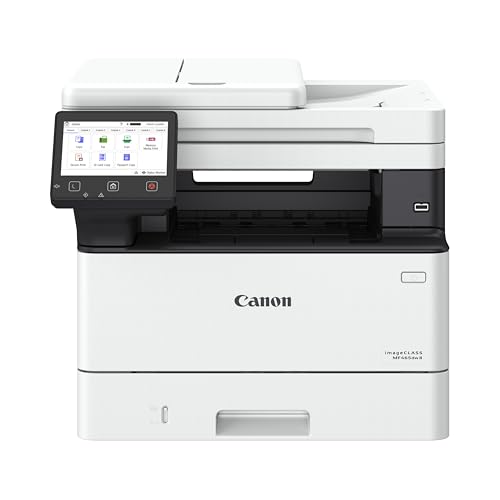
6. Canon imageCLASS MF465dw II
A monochrome laser all-in-one from Canon’s office line that prints, copies, scans and faxes, with wireless and duplex.
Good for: Small offices with steady document volume. Strengths: Built for heavier workloads than home models. Weaknesses: Larger and pricier than home printers. Skip it if you have light needs and little space.
Heavy Printing: Notes
Duty cycle
Pick a printer rated well above your monthly volume.
High-yield supplies
High-yield cartridges, bottles and toner reduce refills and cost per page.
Maintenance
Keep paper paths clean and use paper suited to the printer.
Best Picks by Category
These labels summarize what each pick is best suited for. They are not hands-on test results.
- Large included ink supply: Epson EcoTank ET-2900 — a mid-range ink tank pick for households that print regularly; check price on Amazon.
- Office features with tanks: Epson EcoTank ET-4800 — a mid-range ink tank pick for home offices that want tanks plus office features; check price on Amazon.
- Best value: Brother MFC-L2820DW — a mid-range monochrome laser pick for black-and-white paperwork; check price on Amazon.
- Budget option: Canon imageCLASS MF465dw II — a budget-tier monochrome laser pick for steady document volume; check price on Amazon.
- Premium option: Epson EcoTank ET-4800 — a premium-tier ink tank option for home offices; check price on Amazon.
Price, Rating and Review Comparison
The table lists the picks with their price tier. Check price on Amazon for the current price.
| Product | Price | Rating | Ratings | Price tier |
|---|---|---|---|---|
| Canon imageCLASS MF465dw II | Check price on Amazon | — | — | Budget |
| Epson EcoTank ET-2850 | Check price on Amazon | — | — | Mid-range |
| Epson EcoTank ET-2900 | Check price on Amazon | — | — | Mid-range |
| Canon MegaTank G3290 | Check price on Amazon | — | — | Mid-range |
| Brother MFC-L2820DW | Check price on Amazon | — | — | Mid-range |
| Epson EcoTank ET-4800 | Check price on Amazon | — | — | Mid-range |
How Much Feedback Backs Each Rating
Feedback based on a small sample is weaker evidence than feedback based on a large sample. Here is how the sample size looks for each pick.
- Epson EcoTank ET-2850: a large sample of feedback backs this pick.
- Epson EcoTank ET-2900: only a small sample of feedback backs this pick, so treat feedback cautiously.
- Canon MegaTank G3290: a moderate sample of feedback backs this pick.
- Epson EcoTank ET-4800: a large sample of feedback backs this pick.
- Brother MFC-L2820DW: a large sample of feedback backs this pick.
- Canon imageCLASS MF465dw II: a moderate sample of feedback backs this pick.
How to Choose
Check the monthly duty cycle
Manufacturers list a recommended monthly volume. Pick a printer rated above what you print.
Compare cost per page
Ink tank and laser models usually cost far less per page than small cartridge inkjets.
Plan for supplies
High-yield cartridges, ink bottles and toner reduce the number of refills.
How We Chose These Products
We start from products sold on Amazon with a full product name and clear specifications, and we skip results that show only a brand name or a vague title. We then read the listing and any manufacturer information for each one and note the features that matter for printers: print technology, running costs, connectivity and size. We do not run our own lab tests, and this guide contains no hands-on measurements. Use it to build a shortlist, then check current prices, dimensions and return terms on the Amazon page before you buy.
Buying Guide: What to Check Before You Choose
Ink tank versus cartridge
Ink tank printers use refillable tanks and usually have a lower cost per page, with a higher purchase price. Cartridge printers are cheaper up front but ink can cost more over time. Check the page yield and the cost of refills.
Laser printers
Laser printers print text quickly and sharply and do not clog like inkjets. Color lasers cost more. Check the toner cost and the print speed.
Photo printing
Photo printers focus on color accuracy and paper handling. Check the number of inks, the paper sizes and the cost per print.
Quick Reference: Which Pick Suits Whom
- Epson EcoTank ET-2850: suits families and students who print every week
- Epson EcoTank ET-2900: suits households that print regularly and want to buy ink rarely
- Canon MegaTank G3290: suits families and students who print a lot
- Epson EcoTank ET-4800: suits home offices that scan and send documents
- Brother MFC-L2820DW: suits freelancers and small sellers who live on paperwork
- Canon imageCLASS MF465dw II: suits small offices with steady document volume
Common Mistakes to Avoid
- Judging a printer by its price without considering ink cost.
- Ignoring the starter cartridge size.
- Forgetting the paper types needed.
- Assuming all-in-ones are always better.
- Skipping the return window.
Setup and Care
- Install the maker’s app or driver.
- Connect to Wi-Fi.
- Run an alignment and nozzle check.
- Print regularly to avoid clogs.
What counts as high-volume printing?
High-volume printing means printing often enough that supplies, paper handling and reliability matter more than the sticker price of the printer. There is no single official line, so judge it by how many pages you print and how steadily.
A student who prints a few assignments a week, a home office that sends invoices and shipping labels every day, and a small team that runs reports all behave differently, even if their monthly totals look alike. Steady daily printing is easier on a machine than occasional huge bursts, and bursts are where small printers struggle with heat, jams and empty cartridges.
To place yourself, answer three questions:
- How many pages do you print in a typical month? Count a busy month, not an average one.
- Is it mostly text, or color and graphics? This points you toward laser or ink tank.
- Do you print single sheets, or long documents and double-sided copies? This affects whether you need duplex printing and a document feeder.
If your answers point to hundreds of pages a month or more, a printer built for volume is a sensible purchase. If you print only occasionally, the guide’s own advice applies: a high-volume machine will cost more up front than you need, and ink tanks in particular prefer regular use. Be honest about the number, because it decides everything else in this guide.
Ink tank or laser: which is cheaper for heavy use?
For black-and-white documents, a laser printer such as the Brother MFC-L2820DW or Canon imageCLASS MF465dw II is usually the better fit, while ink tank printers such as the Epson EcoTank and Canon MegaTank models suit color and mixed printing at a low running cost.
Both technologies aim to cut the cost of each page compared with small cartridge inkjets, but they get there differently.
- Ink tank printers use large refillable reservoirs filled from bottles. They handle color well, so they suit homework, school projects, forms with color headers and the occasional photo.
- Monochrome laser printers use toner and fuse it to the page with heat. Text comes out sharp and fast, and toner does not dry out the way liquid ink can.
Choose by content. If nearly everything you print is black text, a laser avoids the clogging risk that comes with inkjets left idle. If you need color at least some of the time, an ink tank model covers both without the cost of a color laser.
Check the page yield for the supplies on each product page, since claimed yields depend on the type of pages printed. Compare the cost of replacement bottles or toner, not just the printer price.
One more factor is warm-up and speed. Lasers are generally quick on text, while ink tank models are more varied, so look at the printing speed listed for your chosen model.
How do you keep a high-volume printer reliable?
You keep a high-volume printer reliable by feeding it suitable paper, keeping it clean and printing on a regular basis. Most breakdowns in busy printers trace back to paper trouble, dust or neglected supplies.
Paper matters more than people expect. Damp, curled or wrong-weight paper causes jams and misfeeds. Store paper flat in a dry place, fan the stack before loading it, and check the printer’s manual for the supported weights and sizes.
- For ink tank models: print something every week or so, run the maker’s nozzle check when output looks faint, and refill tanks with the matching ink. Do not let a tank run completely dry.
- For laser models: keep the vents clear, replace toner when the printer warns you, and follow the maker’s guidance on cleaning paper dust from the feed path.
- For both: keep the firmware and driver updated, and place the printer on a stable surface with space around it for airflow.
Duplex printing and document feeders put more wear on the paper path, so use them with clean, flat paper. A feeder is a convenience for scanning or copying multi-page documents, but staples and torn pages cause jams, so remove them first.
If you see repeated jams, streaks or noise, check the manual’s troubleshooting section before replacing parts. A simple cleaning often resolves it.
Which high-volume printer should you buy?
Pick by what you print: an Epson EcoTank or Canon MegaTank for color and mixed work, and a Brother or Canon laser for black-and-white documents. The notes below map common needs to the printers in this guide.
- If you print every week at home and want a lower running cost, go for the Epson EcoTank ET-2850.
- If you want to buy ink rarely, choose the Epson EcoTank ET-2900, whose listing mentions a large included ink supply. Check how that claim applies to your printing.
- If you want an everyday refillable-tank printer from Canon, look at the Canon MegaTank G3290. Check the feeder and duplex details on the page.
- If you run a home office that scans, copies and faxes, pick the Epson EcoTank ET-4800.
- If you live on black-and-white paperwork and need duplex, scan and fax, choose the Brother MFC-L2820DW.
- If you want an office-grade monochrome multifunction for steady document volume, consider the Canon imageCLASS MF465dw II.
When two printers seem close, decide in this order: color or not, features you truly use, then size. Features you will never use only add bulk.
What to check before you buy a high-volume printer
Before you buy, confirm that the listing’s supplies, features and size match your real workload. Use this checklist on the product page.
- Monthly volume rating: make sure the recommended monthly volume sits comfortably above what you print.
- Supply type and cost: note whether it uses bottles, cartridges or toner, and look up the replacement cost and yield.
- What is in the box: check whether starter ink or toner is included and how much it covers.
- Duplex and feeder: confirm automatic two-sided printing and whether the document feeder suits your scanning needs.
- Connectivity: check Wi-Fi, USB or Ethernet to match your setup and devices.
- Size and weight: measure your desk or shelf, and leave room to open covers and trays.
- Paper handling: check tray capacity, paper sizes and supported media.
- Third-party supplies: read the terms, since some printers restrict non-original ink or toner.
- Warranty and returns: read both on the listing before you order.
Also look at how many people have rated each printer and read recent written feedback for patterns like setup trouble or recurring jams. Small numbers of ratings are weaker evidence.
If the listing is vague, the manufacturer’s specification sheet is the best place to confirm details.
Finally, think about where supplies will be bought. Make sure replacement ink bottles or toner for your chosen model are easy to find, and keep a spare on hand if you print on a deadline. Running out mid-job is the most common frustration with busy printers, and it is easy to avoid with a little planning and a note of the supply model number.
Is a high-volume printer worth it, and who should skip it?
A high-volume printer is worth it when you print often enough that lower supply costs and fewer refills offset the higher purchase price. If you print rarely, a simpler printer is the more sensible buy.
The honest trade-offs:
- Higher up-front cost: ink tank and office laser models usually cost more than basic cartridge printers.
- Size: they are bulkier and need more desk space.
- Idle risk for inkjets: ink tank printers can clog if left unused for long periods.
- No color on mono lasers: the Brother and Canon laser picks print black and white only.
- Claims depend on use: yields and ink supply claims vary with the pages you print.
Who should skip it:
- People who print a few pages a month and may leave the printer idle for weeks.
- Anyone with very limited desk space.
- Buyers who need frequent color photo prints, who may want a dedicated photo printer instead.
Is it worth paying more for the office-style laser? If your work is steady black-and-white documents and you want scan and fax in one body, yes. If you also need color, an ink tank model is the better match.
Compare the picks above, check the current listing for supplies and what is included, then choose the one that fits how much and what you print.
Duty Cycle, Recommended Volume and What the Numbers Mean
High-volume printing is where specification sheets start using two numbers that are easy to confuse. The maximum monthly duty cycle is a stress rating — the most the machine can survive in an exceptional month — while the recommended monthly volume is the range the printer is designed to live in, month after month, without accelerated wear. Buying by the maximum number is the classic high-volume mistake: a printer run at its maximum every month is a printer being worn out on schedule.
A better rule is to estimate your real monthly pages honestly — count a busy month, not a quiet one — and choose a printer whose recommended range comfortably contains it. Every pick in this guide was selected with that headroom in mind. The tank models from Epson and Canon suit sustained colour volume at home and in small offices; the Brother MFC-L2820DW and Canon imageCLASS MF465dw II bring laser durability to heavy monochrome work, where their recommended volumes and robust paper paths earn their place.
The Real Cost of Printing Thousands of Pages
At high volume, running cost stops being a footnote and becomes the budget. The difference between a cartridge printer and a tank printer, trivial at fifty pages a month, becomes decisive at a thousand: ink bought in bottles costs a fraction per page of ink bought in small cartridges, and the refills interrupt you rarely instead of weekly. This is the entire economic logic of the EcoTank ET-2850, ET-2900 and ET-4800 and the Canon MegaTank G3290 in this list — a higher purchase price exchanged for years of inexpensive pages.
Laser economics work differently. Toner cartridges for machines like the MFC-L2820DW and MF465dw II come in high-yield versions whose cost per page is genuinely low, and the cartridges themselves last long enough that replacing them is a monthly event rather than a weekly one. Paper becomes a major line item at this volume too: buy it by the box, store it dry and flat, and treat duplex as the default so each box lasts twice as long. At high volume, the cheapest page is the one you never print — draft modes for internal documents and duplex for everything else are policies, not preferences.
Speed, Warm-Up and the Shape of a Busy Print Day
Headline print speed is measured on simple text pages after the first page emerges, which is why two other numbers matter as much in real offices: time to first page, and how the printer behaves across a long mixed run. A laser that wakes and prints in seconds suits a day of many small jobs; a printer with a long warm-up taxes every one of them. Tank inkjets print their first page more slowly but settle into long colour runs without complaint, which suits batch work — the evening spent producing a course pack, a set of listings, or a month’s invoices.
Paper capacity shapes the day as much as speed. A tray that empties mid-run stops the job and waits for a human, so high-volume buyers should match tray capacity to their typical run length and consider models that accept an optional second tray. The picks here span home and small-office capacities; if your runs routinely exceed the standard tray, that fact alone should steer you toward the office-grade end of the list, where larger trays and sturdier feeders are standard.
Comparing the High-Volume Picks by Workload
The Epson EcoTank ET-2850 and ET-2900 are close relatives aimed at heavy home and small-office colour work — reports with graphics, teaching materials, marketing pieces — where bottled ink keeps the per-page cost low enough to print freely. The ET-4800 adds a document feeder, which matters when the same workload includes scanning stacks of paperwork; high-volume households often discover their scanning volume grows alongside their printing. The Canon MegaTank G3290 answers the same brief from Canon’s side, with duplex printing as a standard strength for long two-sided runs.
The Brother MFC-L2820DW is the monochrome laser all-in-one for text-heavy volume: invoices, contracts, shipping documents and reports where colour adds nothing. The Canon imageCLASS MF465dw II is the heavier-duty laser option for offices whose monthly counts push past what home machines are recommended for. Choosing between the tank and laser camps is really choosing what your pages look like — colour-rich and varied, or text-dense and relentless — and high-volume buyers who do both often end up, sensibly, with one of each.
Maintenance That Keeps a Busy Printer Young
Volume wears printers in predictable places: pickup rollers glaze and begin to slip, paper dust accumulates in the path, and inkjet heads need their occasional cleaning. A monthly five-minute routine — wipe accessible rollers as the manual directs, clear dust, run a nozzle check on inkjets — prevents most of the jams and quality fade that people blame on age. Keep a log if the printer is shared; a note of when toner or ink was changed and when odd noises began turns troubleshooting from archaeology into reading.
Supplies strategy matters at volume. Keep one full spare set in reserve — bottles or a toner cartridge — and reorder when the spare is opened, not when the printer stops. Running a high-volume printer dry mid-run costs more in delay than any saving from just-in-time ordering. Finally, respect the printer’s environment: busy machines generate heat and paper dust, so give them ventilation, keep them out of damp corners, and their mechanical life will match the duty ratings that made you choose them.
Scaling Up: When One Printer Stops Being Enough
There is a volume at which the correct upgrade is a second printer rather than a bigger first one. Two mid-range machines divide the work by type — colour tank for graphics, laser for text — provide backup when one is down or mid-maintenance, and let two people print simultaneously without a queue. Small offices often discover this after one breakdown too many during their busiest week.
The signal to scale is not a single huge month but a pattern: queues forming daily, trays refilled more than once a day, supplies ordered constantly, staff scheduling their printing around each other. When those become normal, cost the second printer against the hours being lost. The arithmetic usually favours the machine — and the picks in this guide, chosen for headroom, become the natural first half of a pair rather than a purchase you regret.
Paper Handling at Volume: Trays, Stock and Jams
Ask a busy office what actually stops printing, and the answer is rarely the print engine — it is paper. Trays run empty mid-run, a damp ream feeds two sheets as one, a wrong-weight stock jams in the same place every time. High-volume reliability is mostly paper logistics: enough capacity that refills are scheduled rather than desperate, paper stored flat and dry so it feeds as single sheets, and one paper type per tray so nobody’s labels become somebody else’s jam.
Jam prevention at volume is a discipline, not a talent. Fan each ream before loading, never top up a tray with a different stock mid-run, and keep the paper path’s accessible areas free of the dust that high throughput generates. When a jam does occur, remove the sheet whole and check for torn corners left behind; the fragment you miss today is the recurring jam you curse next week. The office-grade picks here, the Brother MFC-L2820DW and Canon imageCLASS MF465dw II, are built with service access in mind, which is part of what their extra cost buys.
Special stocks — letterheads, labels, envelopes, card — should have a designated route, usually the manual or multipurpose slot, and a note by the machine saying so. At volume, most “printer problems” reported by staff are actually stock problems, and a one-line note prevents more of them than any upgrade.
Networking a Busy Printer So Everyone Can Use It
A high-volume printer is usually a shared printer, and sharing multiplies everything: queues, conflicts, and the cost of downtime. Connect it by Ethernet if the location allows — a wired connection removes Wi-Fi from the list of suspects forever — and give it a fixed address so every computer’s saved entry stays correct. Name it clearly, by room or role, so nobody sends the payroll run to the machine down the corridor.
Queue management becomes a social skill at volume. Agree that very long runs go at quiet times, that the person who loads special stock removes it afterwards, and that a jam is reported rather than abandoned for the next user to discover. Printers with a display that shows whose job is running make these courtesies easy; a shared supplies shelf with a visible spare toner or ink set makes them sustainable.
Security scales with sharing too. Busy office printers hold other people’s documents in their trays and sometimes in their memory, so collect confidential pages promptly, use any PIN-printing feature the model offers for sensitive jobs, and reset the machine before it is sold or recycled. None of this is burdensome, and all of it is easier to establish on day one than to retrofit after an incident.
Planning Replacement Cycles for Hard-Working Machines
High-volume printers are consumable capital: they wear, predictably, roughly in line with the pages they produce. Offices that track page counts can forecast replacement instead of being ambushed by it — a machine approaching the end of its recommended life can be retired to lighter duties and replaced during a quiet period, rather than dying during the busiest week of the year, which is when printers traditionally choose to die.
Keep the old machine’s role in mind when choosing its successor from a list like this one. If volumes grew, step up a class; if the work changed from colour to text, a laser may now be the honest choice. The worst replacement is the identical panic purchase made while the queue backs up behind a dead printer. A page-count habit and a calm review of guides like this one, once a year, turn printer replacement from an emergency into an errand.
Colour at Volume: Managing Inkjet Workloads Honestly
High-volume colour is the tank printers’ home ground, but it rewards a little management. Long colour runs lay down a great deal of ink, and paper choice begins to matter: very cheap paper can cockle under heavy coverage and slow the run with misfeeds, while a decent everyday stock keeps a long job moving. For documents heavy with charts and photographs, printing a sample page and letting it dry flat before committing the full run is a professional habit that costs one sheet and occasionally saves a hundred.
Colour volume also changes how you should think about the printer’s own maintenance. Heads that print daily rarely clog; it is the busy printer left idle for a holiday fortnight that returns to streaks. A nozzle check on the first morning back, before the urgent run, belongs in the same routine as checking supplies. The Epson and Canon tank models here are built for this rhythm — heavy use, brief rests, minimal fuss — and their owners’ main discipline is simply keeping bottles in reserve so a long run never pauses for a delivery.
When Volume Is Really a Workflow Problem
Sometimes an office that believes it needs a faster printer actually needs a better workflow. Printing everything that arrives, in full, single-sided, at full quality, manufactures volume that no machine should have to carry. Reading on screen what can be read on screen, printing two pages to a sheet for internal drafts, and distributing documents digitally by default can cut a print load by a third without anyone feeling deprived — savings that dwarf the difference between any two printers in this guide.
The audit is simple: for one week, note what gets printed and what happens to it. Pages binned unread, drafts printed at presentation quality, and twenty copies where five were used will identify themselves. Fix those, then size your printer to the volume that remains. High-volume buying done in that order — workflow first, machine second — is how small organisations end up with a printer like the ones recommended here instead of an industrial machine idling beside a recycling bin full of its own output.
Print Management for Teams: Defaults That Do the Managing
In a shared office, the cheapest print manager is a well-set default. Configure the shared machine — or each computer’s driver — to duplex, to a sensible quality for everyday documents, and to monochrome where colour adds nothing, and most waste disappears without a single policy document. People print carelessly only when the machine lets carelessness be the path of least resistance; make the economical choice the automatic one and the team’s habits follow quietly.
The Canon imageCLASS MF465dw II and Brother MFC-L2820DW in this guide support the administrator side of this life — settings that can be standardised across users — while the tank models suit teams small enough to manage by agreement. Either way, review the defaults twice a year: a setting chosen when the team was three people may be wrong for the team of nine it has become, and print volume problems are often just defaults that nobody revisited.
Buying for the Next Three Years, Not the Next Three Months
High-volume printers are bought rarely and used relentlessly, so the purchase should be sized to where the workload is heading. A growing practice, class or business that buys exactly for today’s volume will be shopping again within two years, having worn a home machine at office pace. The headroom principle from earlier in this guide applies with money attached: choose the machine whose recommended range contains next year’s honest estimate, not this year’s hopeful one.
Total cost over that horizon is the fair comparison — machine, three years of ink or toner at your volume, paper, and one allowance for the maintenance items volume consumes. Run that arithmetic and the tank printers’ higher shelf price routinely dissolves into the lowest three-year cost for colour work, while the lasers justify themselves for text with the same maths. The picks in this guide were chosen to win that three-year comparison in their respective camps, which is the only comparison a high-volume buyer should trust.
Finally, buy from a channel with painless returns and set the machine up the week it arrives, under load, with a real run. A high-volume printer’s character — its pace, its paper manners, its noise in your space — reveals itself in the first big job, and that is the moment to discover a mismatch, while the discovery is still free.
Environmental Sense at High Volume
Volume printing has a footprint, and the honest way to shrink it is the order this guide has followed throughout: print less of what does not need printing, duplex what remains, use draft settings for internal work, and keep the machine maintained so it lives out its full design life instead of being replaced early. Paper recycling in a busy office should be effortless — a bin beside the printer, not across the room — because convenience decides whether good intentions survive a busy afternoon.
Supplies deserve the same practicality. Bottled ink and high-yield toner cartridges generate far less packaging waste per page than small standard cartridges, which is a further, quieter argument for the tank and high-yield choices recommended here. Spent cartridges should go back through the makers’ recycling schemes where they exist. None of this requires sacrifice; it is simply the same efficiency thinking that makes high-volume printing affordable, extended one step further to the waste stream the office produces.
Frequently Asked Questions
Is laser or ink tank better for volume?
Laser for black-and-white text. Ink tank for color and mixed work.
What is a duty cycle?
The maximum pages a printer is designed to print per month.
Are high-volume printers expensive?
The printer can cost more, but cost per page is lower.
Which is cheaper to run, inkjet or laser?
Laser is usually cheaper per page for text, and ink tank printers are cheaper for color and photos.
How do I connect my printer to Wi-Fi?
Use the printer’s setup menu or the maker’s app. See our Wi-Fi guide.
Do I need genuine ink?
Not always, but some printers restrict third-party ink. Check the terms.
How many pages a month is considered high volume?
There is no official cutoff, but printing hundreds of pages a month or more usually calls for a volume-oriented printer. Check the recommended monthly volume on the product page and choose a model rated above what you print.
Are ink tank printers good for heavy printing?
Yes, they are designed for a lower cost per page than small cartridge printers. They work best when used regularly, because ink can dry in the nozzles if the printer sits idle.
Is a laser printer better than an inkjet for lots of documents?
For black-and-white text, a laser is usually the better fit because it prints sharply and toner does not dry out. For color, an ink tank printer is the more practical choice.
Can a home printer handle high-volume printing?
Some can, especially ink tank and compact laser models, but check the duty rating. Pushing a light-duty printer well beyond its rating can lead to jams and a shorter life.
How do I lower my printing cost per page?
Choose a printer with refillable tanks or high-yield toner, and compare supply costs before you buy. Printing double-sided and using draft mode for internal documents also cuts usage.
Do I need duplex printing for high-volume use?
It is very useful because it halves paper use for long documents. Confirm on the listing that the model prints automatically on both sides.
Should I use third-party ink or toner in a busy printer?
It can lower costs, but some printers restrict non-original supplies. Read the terms on the listing and the manual before you decide.
How often should I replace a high-volume printer?
Replace it when repairs, jams or supply problems start costing more time and money than a new unit. Check your maker's guidance for the expected lifespan and warranty terms.
Bottom Line
For color and mixed printing, the Epson EcoTank ET-2850 or ET-2900 and Canon MegaTank G3290 are the ink tank choices. For black-and-white, the Brother MFC-L2820DW or Canon imageCLASS MF465dw II fit better.
Related Reading
- Types of Printers Explained: Inkjet, Laser, Ink Tank and More
- 7 Best Wireless Printers for Home Use
- 6 Best Printers With Automatic Duplex (Double-Sided) Printing
- 5 Best 11×17 Tabloid Printers for Home and Office
- 6 Best AirPrint Printers for iPhone, iPad and Mac
More Printer Guides
- Best Printers for Home Use
- Best Printers for Low-Volume Printing
- Best Printers for Mac and MacBook Users
- Best Printers for Real Estate Agents and Notaries
- Best Printers for Small Business Use
- Best Printers for Students and Dorm Rooms

