Where to buy
Check the latest price, availability and delivery on Amazon. Orders are placed on Amazon. We may earn a commission from qualifying purchases.
- Best overall fanless mini PC: MeLE Quieter4C Fanless Mini PC, Intel N100, Windows 11 Pro — Check on Amazon
- Protectli Vault Pro VP2430, Intel N150, 4x 2.5GbE, Coreboot-Ready Barebone — Check on Amazon
- MINIX NEO Z300-0dB Fanless Mini PC, Intel Core i3-N300, 16GB RAM, 512GB SSD — Check on Amazon
- KINGDEL NC3000 Fanless Industrial Mini PC, Core i7-8565U, 16GB RAM, 512GB NVMe — Check on Amazon
- ZOTAC ZBOX CI337 Nano Fanless Mini PC, Intel N100, Barebone — Check on Amazon
See 1 more Amazon option
- Protectli Vault Pro VP4630, Intel Core i3, 6-Port Firewall Appliance — Check on Amazon
Read the full guide ↓
Disclosure: As an Amazon Associate, reviewstook.com earns from qualifying purchases. Links to Amazon on this page are affiliate links; they cost you nothing extra. Listing details such as price and availability change often, so check the current Amazon listing before you buy.
Here is the truth this entire guide is built on, stated before any product names: spending $800 on a fanless mini PC does not buy you a faster computer than spending far less. It cannot. A fanless PC has no fan, so every watt of heat its processor makes has to leave through the metal of the case, and that physics caps the silicon at the same low-power chips — Intel’s N100, N150 and i3-N300, or older 15-watt U-series parts — no matter how large the budget gets. There is no passively cooled mini PC on Amazon with a gaming-class processor, and there is no fanless path to real 1440p gaming at any price in this category. If that is what you came here hoping $800 would unlock, it is better to learn it in the second paragraph than at the returns desk.
So what does the money buy? Ports, support and staying power. At the top of the fanless market you stop paying for bare circuit boards and start paying for things that matter over a five-year service life: four or six Intel 2.5GbE network ports instead of one, a vendor with US-based support, a published datasheet and a real warranty instead of an anonymous storefront, open-source coreboot firmware instead of an opaque BIOS, finned aluminum cases machined to work as heatsinks, serial ports for industrial gear, and configurations with the RAM and storage already fitted. Most of the six picks below cost far less than $800 — the honest framing for this budget is “the best fanless mini PCs money can buy under $800,” and for most readers the right move is to buy one of the cheaper ones and keep the change. Below are the quick picks, detailed reviews of all six, a comparison table, a plain explanation of the thermal ceiling, what the step up in price genuinely buys, the mistakes that waste money in this category, and the questions silent-PC buyers ask most.
In this guide
Quick Picks
Short on time, or comparing several options at once? Each row below names a buyer type and the product that suits it, with a link to the listing.
| Buyer type | Pick | Why it stands out | Link |
|---|---|---|---|
| Best overall | MeLE Quieter4C (Intel N100) | The silent desktop most people should buy — complete, triple 4K, well under budget — check price on Amazon | Check on Amazon |
| Best for firewall and homelab | Protectli Vault Pro VP2430 (Intel N150) | Four Intel 2.5GbE ports, coreboot option, US support and a published datasheet | Check on Amazon |
| Best silent desktop performance | MINIX NEO Z300-0dB (Intel Core i3-N300) | Eight cores — the most CPU a verified fanless desktop offers here — with 16GB/512GB fitted | Check on Amazon |
| Best for industrial and legacy gear | KINGDEL NC3000 (Core i7-8565U) | Fanless all-metal case with dual RS232 serial, VGA and a 15W Core i7 | Check on Amazon |
| Best barebone value | ZOTAC ZBOX CI337 Nano (Intel N100) | A name-brand fanless kit at the lowest entry point in this guide — check price on Amazon, and bring your own RAM, SSD and OS | Check on Amazon |
| Best for multi-port networking with support | Protectli Vault Pro VP4630 (Intel Core i3) | Six 2.5GbE ports and Protectli’s support behind an i3-class chip | Check on Amazon |
How These Picks Were Chosen
The first filter was the word “fanless” itself, applied strictly. A pick only qualifies if the manufacturer states passive cooling in its own specifications or datasheet, or a reviewer teardown confirms there is no fan inside. That sounds obvious, but this category is full of traps: finned aluminum boxes that look passively cooled yet hide a small internal fan over the memory and storage, “quiet” mini PCs whose listings never claim fanless at all, and low-power chips that ship in actively cooled cases. Several well-known models failed this filter and were excluded — they are named in our research notes, and the how-to-choose section below explains how to spot them yourself. If we could not verify the absence of a fan from the maker’s own documentation, the model did not get in on a guess.
The budget was applied as a ceiling, not a target. Every product below is a real Amazon listing that sells at or below $800 in the United States in at least one sensible configuration, and because these listings move constantly, check price on Amazon for the current figure rather than relying on any older number. Two of the six are barebones that need RAM and storage added before they are computers at all; where that is the case, the review says so in its first lines and counts the parts bill as part of the product’s real price.
We did not use these products ourselves. We read the manufacturer listings, datasheets and specification pages, and independent coverage that documents prices and configurations, and we favored products whose makers publish their numbers in full — port controllers, memory ceilings, thermal design — over listings that hide behind adjectives. In a category where the entire value proposition is a negative (no fan, no noise, no moving part to fail), documentation is the product. A fanless box from a maker who will not publish a datasheet is a promise you cannot check, and it was weighted accordingly.
The 6 Best Fanless Mini PCs Under $800
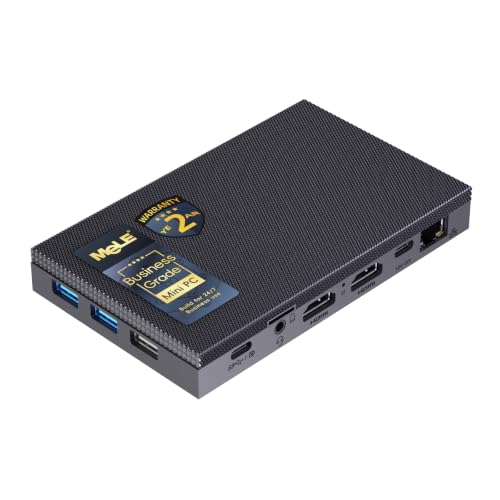
MeLE Quieter4C Fanless Mini PC (Intel N100)
Who it suits: Anyone who wants a genuinely silent everyday desktop — bedroom PC, studio machine, media box, signage player — that arrives complete and ready to run, with no parts to buy and no assembly to plan.
The Quieter4C is the pick that makes the rest of this guide’s argument for it: it is the fanless desktop most people should buy, and it sits well under this budget — check price on Amazon. MeLE builds the whole top of the slim case as the heatsink for an Intel N100 — four cores, up to 3.4GHz — and the result is a machine with no fan, no vents to clog and nothing to wear out, thin enough to VESA-mount behind a monitor and forget. It drives three 4K displays at 60Hz across two HDMI ports and a full-function USB-C, and that USB-C also accepts USB PD power, so the box can run from a suitable power bank or PD supply in mobile and off-grid setups — a trick almost nothing else in this guide can do. Windows 11 Pro is preinstalled, auto power-on and Wake on LAN are supported, and MeLE rates the design for 24/7 commercial duty, which is why these turn up in astrophotography rigs and digital signage as often as on desks.
Configurations matter, so read the listing’s options carefully. The 8GB/128GB build — check price on Amazon — uses eMMC storage, serviceable, but the empty M.2 slot beside it is where an NVMe drive belongs if you keep the machine for years. The 16GB/512GB build — also check price on Amazon — is the one to buy if the budget stretches: proper NVMe storage and enough memory for a decade of browser tabs. Both builds run memory in a single channel, which is normal for the N100 and caps graphics performance — this is a machine for office work, media, light photo jobs and retro or cloud gaming, and it is honest about that everywhere except the category label that filed it under gaming PCs.
- Truly fanless by design — MeLE’s Quieter line is passively cooled, with the case top as the heatsink.
- Triple 4K@60Hz output and USB-C PD power input, in a case under an inch thick.
- Complete with Windows 11 Pro in both the 16GB/512GB and 8GB/128GB builds — check price on Amazon for either configuration.
Honest limitation: A single Gigabit Ethernet port and Wi-Fi 5 date the networking, and the N100’s single-channel memory means integrated graphics stay in the light-duty class no matter which configuration you choose.
Choose it if you want silence for ordinary computing and would rather spend the leftover budget on a monitor or a bigger SSD later. Skip it if you need multiple fast network ports — that is the Protectli and dual-LAN territory below — or any real gaming headroom.

Protectli Vault Pro VP2430 (Intel N150, 4x 2.5GbE)
Who it suits: Firewall, router and homelab builders who want the box at the center of their network to come from a vendor that answers support tickets, publishes datasheets and will still exist at the next firmware update.
Protectli is what the top of this budget actually buys. The VP2430 is a fanless, all-aluminum appliance — the chassis is the heatsink, per Protectli’s own datasheet — built around an Intel N150 and four Intel I226-V 2.5GbE ports, the network controller that pfSense and OPNsense handle without driver drama. It supports both AMI and open-source coreboot firmware, with the Vault Pro line adding security features such as TPM support and measured boot, and it is assembled in the USA, Canada or Germany with US-based support behind it. There are three M.2 slots inside — NVMe storage, plus E-key and B-key slots for Wi-Fi or a 4G/5G modem — and 32GB of onboard eMMC that can boot a lightweight OS before you add anything. This is infrastructure, sold the way infrastructure should be: with a hardware overview, a knowledge base and a 30-day money-back guarantee.
Now the barebone honesty: the Amazon listing is a barebone unit. You add a DDR5 SO-DIMM (Protectli qualifies modules well beyond Intel’s official 16GB figure, up to 64GB) and an M.2 SSD yourself, and the parts bill is part of this product’s price — budget for it before comparing against complete machines. Check price on Amazon for the barebone, and configured coreboot builds (sold as the VP2430e, the same hardware without eMMC) sit in a higher tier — check the live listing for their current price. Even fully built, it lands far under this guide’s ceiling — the premium over a white-box import buys the support, the firmware maintenance and the warranty, not a faster chip, because the N150 inside is the same class of silicon as in boxes costing half as much.
- Four Intel I226-V 2.5GbE ports — the firewall-friendly controller, four times over.
- Coreboot or AMI firmware, a published datasheet, and US-based support with a real knowledge base.
- Fanless all-aluminum chassis rated by design for 24/7 appliance duty; room for NVMe, Wi-Fi and a cellular modem.
Honest limitation: It is a barebone — RAM and SSD are extra — and the N150 is a four-core efficiency chip: superb for routing, VPN and light virtualization, unremarkable as a desktop, and not a gaming processor by any stretch.
Choose it if this box will run your network or homelab and you value firmware, documentation and support over raw price. Skip it if you want a complete Windows desktop out of the box — the MeLE and MINIX picks are built for you.

MINIX NEO Z300-0dB Fanless Mini PC (Intel Core i3-N300)
Who it suits: Buyers who want the strongest CPU that exists in a verified fanless desktop — eight cores for multitasking, office loads and media duty — in a complete machine with nothing to assemble.
The “0dB” in the name is a specification, and MINIX’s own manual backs it: the cooling system is listed as “Fanless (0dB),” with the aluminum and steel chassis doing all the thermal work. Inside is the Intel Core i3-N300 — eight cores up to 3.8GHz, double the core count of the N100 and N150 boxes that fill this category — paired with 16GB of DDR4 in a real SO-DIMM slot (upgradeable to 32GB, which almost no fanless desktop allows) and a 512GB PCIe NVMe SSD. Dual HDMI 2.0 outputs drive two 4K displays at 60Hz, there is a 2.5G Ethernet port, and Windows 11 Pro is preinstalled. Check price on Amazon — it is the complete-machine ceiling of this guide: the most desktop you can buy without a fan, at a position in the range that proves the guide’s thesis — the extra money over the Quieter4C bought cores and build, not a new performance class.
The thermal fine print deserves its own paragraph, because it is the fanless bargain in miniature. In independent testing the N300’s CPU temperature was measured at 98°C under sustained load. That is within the chip’s design envelope and the machine keeps working, but it tells you exactly how a fanless box survives heavy work: it runs hot and manages clocks to what the case can shed. Bursty desktop work — documents, tabs, calls, media — never gets there. Sustained all-core loads, long exports and software compiles live there permanently, and a fanned mini PC will finish those jobs faster for less money. Buy the Z300 for silence during ordinary work, not for silent speed under marathon loads.
- Eight-core i3-N300 — the most CPU cores in any verified fanless pick in this guide.
- 16GB of RAM in an upgradeable slot and a 512GB NVMe SSD, fitted and ready, with Windows 11 Pro.
- Dual 4K@60Hz HDMI and 2.5G Ethernet in a solid all-metal case — check price on Amazon.
Honest limitation: Sustained-load temperatures measured at 98°C mean throttling physics apply to long heavy jobs; the USB-C port is data-only, and memory runs single-channel.
Choose it if you want a silent desktop with real multitasking headroom and zero setup. Skip it if your workload is sustained rendering, compiling or gaming — a fan you can barely hear will serve you better than silence that slows down.

KINGDEL NC3000 Fanless Industrial Mini PC (Core i7-8565U)
Who it suits: Buyers connecting a silent PC to the physical world — serial-controlled instruments, CNC and lab gear, point-of-sale hardware, older VGA displays — who need industrial ports that consumer mini PCs deleted years ago.
The NC3000 is the rugged end of this budget. KINGDEL builds it as a fanless, all-metal industrial computer around a Core i7-8565U — a 15-watt, four-core/eight-thread chip turboing to 4.6GHz — and fits the ports industry still runs on: two RS232 COM serial ports, HDMI and VGA for dual displays (the VGA output is 4K-capable per the listing), four USB 3.0 ports, and Wi-Fi with Bluetooth. The configuration most often listed on Amazon pairs 16GB of DDR4 with a 512GB NVMe SSD — check price on Amazon — and the same listing family offers a 32GB/1TB build for buyers who want the storage headroom. At 9.2 by 5.9 by 2 inches and about three pounds of metal, it is the largest and heaviest machine in this guide — that mass is the heatsink, and it is why a 15W chip can live in this box without a fan.
Judge it as what it is. The platform is from 2018: UHD Graphics 620 handles displays and video playback, not games; DDR4 and a single storage generation date the internals; and KINGDEL is a small industrial brand whose support is a storefront, not a knowledge base. None of that matters if your problem is a serial device and a quiet room. Everything about this machine — the metal, the ports, the conservative chip — is aimed at being installed, connected to equipment, and ignored for years, in rooms where a fan would be one more thing to hear and one more thing to fail. Bought for that job, it is fairly priced. Bought as a fast modern desktop, it will disappoint you at any price.
- Fanless all-metal industrial build with two RS232 serial ports and VGA — ports nothing else in this guide offers.
- Core i7-8565U with 16GB RAM and 512GB NVMe — check price on Amazon; a 32GB/1TB configuration exists in the same listing family.
- A heavy finned case that gives a 15W processor genuine passive thermal headroom, 24/7-style.
Honest limitation: A 2018 platform with UHD 620 graphics: fine for control, office and media work, irrelevant for gaming, and the brand’s support is thin compared with Protectli or MeLE.
Choose it if serial ports, VGA or an industrial install are the actual requirement. Skip it if you just want a quiet home desktop — the Quieter4C and Z300-0dB are newer, cheaper and better supported for that job.

ZOTAC ZBOX CI337 Nano Fanless Mini PC (Intel N100, Barebone)
Who it suits: Tinkerers and second-PC builders who already own — or enjoy choosing — RAM, storage and an operating system, and want a fanless kit from an established brand at the lowest entry price in this guide.
ZOTAC’s C-series is one of the longest-running fanless lines in the business, and the CI337 Nano is its current N100 model: a passively cooled barebone, stated as fanless in ZOTAC’s own listing copy, that arrives with no memory, no storage and no OS. What the kit does include is unusually complete for an entry-level kit — check price on Amazon. There is a DDR5 SO-DIMM slot (up to 16GB), an M.2 NVMe slot plus a 2.5-inch drive bay, dual Gigabit LAN, Wi-Fi 6, and triple-display output across two HDMI 2.0 ports, DisplayPort 1.4 and DisplayPort over USB-C. For a home-theater PC, a light Linux server, a signage player or a quiet second desktop, you add one memory stick and one SSD and you are done — and because you chose the parts, you know exactly what is inside, which is more than most prebuilt buyers can say.
The barebone arithmetic is the whole review, so do it before ordering: the kit plus a 16GB DDR5 stick and a 512GB NVMe drive can land near the price of a complete N100 machine, and on days when DDR5 prices spike it can land above it. The kit wins when you have parts on the shelf, when you want a specific drive, or when you run Linux and refuse to pay for a Windows license you will delete. One technical footnote: the M.2 slot runs at PCIe 3.0 x1, so NVMe speeds are capped well below what the drive itself can do — irrelevant for this machine’s jobs, but do not buy a flagship SSD for it. And like every N100 here, the ceiling is the ceiling: office, media, network and retro-gaming duty, delivered in silence.
- A genuinely fanless barebone from an established brand at the lowest entry price in this guide — check price on Amazon.
- Dual Gigabit LAN, Wi-Fi 6 and triple-display output, with both M.2 and 2.5-inch storage options.
- You choose the RAM, SSD and OS — ideal for Linux installs and parts you already own.
Honest limitation: Barebone means the sticker is not the price — parts and an OS are on you — and the x1-lane M.2 slot caps SSD speed; the N100 itself is the same light-duty chip as in the complete machines.
Choose it if you have parts, prefer Linux, or enjoy the build. Skip it if you want to unbox a working computer — the Quieter4C is the same silicon, complete, for not much more on most days.

Protectli Vault Pro VP4630 (Intel Core i3, 6-Port)
Who it suits: Network builders who want the most ports and the most support this budget can buy in one fanless box — a six-port firewall or virtualization host from the vendor with the best documentation in the category.
The VP4630 is the step up inside Protectli’s own line: six 2.5GbE ports instead of four, an Intel Core i3 (Tiger Lake class) instead of an N-series chip, DDR4 memory and your choice of M.2 NVMe or SATA storage, all in the same fanless aluminum Vault chassis with coreboot available and Protectli’s US support behind it. For a segmented home or small-office network — WAN, LAN, IoT, guest, DMZ, lab — six physical ports end the VLAN gymnastics, and the i3’s AES-NI acceleration keeps encrypted VPN traffic moving at rates the N-series boxes cannot match. This is the pick that most literally embodies the guide’s thesis: nothing about it is fast in the gaming sense, and everything about it — ports, firmware, vendor — is what the upper end of a fanless budget is actually for.
Two cautions, both about buying rather than hardware. First, configuration: the listed Amazon configuration pairs 8GB of RAM with a 120GB SATA SSD, which is a firewall’s spec, not a desktop’s — if you want a virtualization host, confirm the configuration on the listing or order the parts to grow it. Second, price discipline: this listing is largely third-party-sold and its price swings widely. At the low end of its range it is a fair price for six ports and this vendor. Near the top of it, walk away — the VP2430 above covers most of the same ground for less, and no fanless box in this guide justifies paying a scarcity premium. Check the live price, and let it decide between this pick and its smaller sibling.
- Six 2.5GbE ports and a Core i3 with AES-NI — the most network this budget buys without a fan.
- Protectli’s coreboot option, documentation and US-based support, in the fanless aluminum Vault chassis.
- DDR4 and NVMe-or-SATA flexibility for firewall or light virtualization duty.
Honest limitation: The commonly listed configuration is a lean 8GB/120GB, the platform is DDR4-era, and third-party pricing swings widely — this pick is only a buy near the low end of its price range.
Choose it if you need six physical ports and vendor support, and the live price sits near the low end of its range — check price on Amazon. Skip it if the listing is priced toward the top of its range — at that point the VP2430 plus a managed switch is the smarter network.

Comparison Table
| Product | Processor | Best use | Link |
|---|---|---|---|
| MeLE Quieter4C | Intel N100 (4-core) | Silent everyday desktop and media PC, complete | Check on Amazon |
| Protectli Vault Pro VP2430 | Intel N150 (4-core) | Firewall, router and homelab with vendor support | Check on Amazon |
| MINIX NEO Z300-0dB | Intel Core i3-N300 (8-core) | Silent desktop with the most CPU headroom | Check on Amazon |
| KINGDEL NC3000 | Core i7-8565U (4-core, 15W) | Industrial control, serial devices, legacy displays | Check on Amazon |
| ZOTAC ZBOX CI337 Nano | Intel N100 (4-core) | Barebone kit for builders and Linux installs | Check on Amazon |
| Protectli Vault Pro VP4630 | Intel Core i3 (6-port) | Segmented networks and VPN-heavy firewalls | Check on Amazon |
How to Choose a Fanless Mini PC Under $800
- Start with the workload, not the budget. Fanless PCs do four jobs well — silent desktop, media playback, network appliance, always-on light server — and one job badly: gaming beyond retro, emulation and cloud streaming. If your workload is on the good list, this category is a delight. If it is not, no price in this guide fixes it.
- Verify “fanless” like a skeptic. Check the manufacturer’s own spec sheet or datasheet for the words fanless or passive cooling. Finned cases can hide fans — some multi-port boxes that look passive carry a small internal fan over the RAM and SSD — and “quiet” in a listing title is not a claim of fanless at all. If the maker will not say it in the specifications, assume there is a fan.
- Understand the thermal ceiling before you spend. A passive case sheds a fixed amount of heat. Chips in this category are rated around 6 to 15 watts for a reason, and under sustained all-core load they slow down or run near their temperature limits — that is physics, not a defect. Match the machine to bursty, everyday loads and it will feel quick for years; match it to marathon loads and it will feel expensive.
- Spend the step-up on ports, support and warranty — knowingly. Between the budget end of this market and the $800 ceiling the silicon barely changes. What changes is network ports (one Gigabit port becomes four or six 2.5GbE ports), firmware (coreboot options), documentation, warranty handling and who answers when something breaks. Those are real things. Just buy them on purpose, not under the illusion that they are performance.
- Count the whole price of a barebone. A barebone kit plus memory, an SSD and possibly a Windows license adds up to a considerably more expensive computer. Barebones win when you own parts or run Linux; complete machines win when you do not. Do the full sum for every candidate before comparing stickers.
- Check the network controller, not just the port count. For firewall builds, Intel I226-V controllers are the safe choice for pfSense and OPNsense; some fanless boxes use Realtek controllers whose drivers have caused real install trouble in those systems. The listing or datasheet names the controller — read it.
- Mind the storage you are actually getting. eMMC is the budget tell: slower and less durable than NVMe. At this budget, prefer a fitted NVMe SSD or an empty M.2 slot you can fill, and treat “512GB” claims as incomplete until you know which kind of storage it is.
- Plan placement like it matters — it does. A fanless case is a heatsink, and heatsinks need air. Leave space around the fins, keep the box out of sealed cabinets and direct sun, and never stack gear on top of it. The same machine runs cool on an open shelf and throttles inside a closed TV cabinet.
- Use the leftover budget. Most readers of this guide should spend well under the $800 ceiling, not the full amount. The remainder buys the things that actually change daily life with a silent PC: a better monitor, a larger SSD, a managed switch for the network builds, or a UPS for the always-on ones.
The Physics: Why $800 Cannot Buy a Faster Fanless PC
Every gaming PC you have ever seen is a negotiation between heat and noise, and fans are how the negotiation is won: move more air, shed more heat, run a faster chip. A fanless PC declines the negotiation. Its case — a few pounds of finned aluminum at most — can shed a small, fixed amount of heat into a room, and the processor must live inside that allowance forever. That is why the entire fanless market, from the budget end to this guide’s $800 ceiling, is built from the same shelf of chips: Intel’s 6-watt N-series, the 7-to-15-watt i3-N300, and conservatively cooled 15-watt U-series parts. A 65-watt desktop chip in a passive mini PC case would hit its temperature limit in minutes and throttle to a fraction of its speed — you would have paid for performance the laws of thermodynamics will not let you keep.
This is also why the honest version of this guide spends so much time on things that are not processors. Once the silicon is capped, differentiation moves to everything around it: how many network ports the board carries and which controllers drive them, whether the firmware is open and maintained, whether the maker publishes a datasheet and honors a warranty from your own country, whether the case is a machined heatsink or a plastic shell with delusions, and whether the configuration includes storage you would actually keep. The premium fanless machines in this guide are not pretending to be fast. They are built to be installed and forgotten — in a wiring closet, behind a monitor, beside a telescope, on a factory wall — and to still be running, silently, when a fanned box at the same desk has eaten its third fan. That is a legitimate thing to spend $800 on. It is just not gaming performance, and any guide that lets you believe otherwise at this budget is selling you the one thing this category cannot ship.
Common Buying Mistakes
- Expecting the budget to buy gaming performance. There is no fanless gaming tier: integrated graphics on 6–15W chips handle retro, indie, esports-at-low-settings and cloud gaming, and that is the whole list — at $800 exactly as at any lower budget.
- Trusting a finned case as proof of fanless design. Some lookalike boxes hide an internal fan over the memory and storage. Verify passive cooling in the manufacturer’s specifications, or do not believe it.
- Comparing a barebone’s sticker against complete machines. The kit that looks cheaper needs RAM, storage and maybe an OS license before it computes anything.
- Paying the scarcity premium on third-party listings. Fanless models drift in and out of stock and third-party prices swing widely; a pick that is a buy near the low end of its range is a mistake near the top, and waiting is a strategy.
- Buying eMMC storage at NVMe prices. At the top of this budget, check what the storage actually is — and prefer a fitted NVMe drive or an open M.2 slot.
- Ignoring the network controller on firewall builds. Realtek-based boxes have caused documented pfSense and OPNsense driver pain; Intel I226-V is the boring, correct answer.
- Sealing a heatsink in a cabinet. A fanless PC in a closed entertainment center is an oven with a computer in it; throttling and shortened life follow.
- Spending all $800 because the budget says so. The best outcome in this category is usually a mid-range machine well under the ceiling and money left over — the ceiling is permission, not instructions.
Final Recommendation
- Most buyers: MeLE Quieter4C, in the 16GB/512GB configuration.
- Firewall and homelab builders: Protectli Vault Pro VP2430.
- Silent desktop with the most headroom: MINIX NEO Z300-0dB.
- Industrial and legacy connections: KINGDEL NC3000.
- Builders with parts on hand: ZOTAC ZBOX CI337 Nano.
- Six ports and maximum support: Protectli Vault Pro VP4630, only near the low end of its price range.
Our top two for this budget are the MeLE Quieter4C — the complete, silent desktop that makes the category’s case at half the ceiling — and the Protectli Vault Pro VP2430, for everyone whose fanless PC is really network infrastructure and who wants a vendor standing behind it. Between them they cover the two honest shapes of this search: a computer you will never hear, and an appliance you will never think about. If your silent desktop needs more multitasking muscle, the MINIX Z300-0dB is the step up; if your world runs on serial cables, the KINGDEL is the only pick speaking your language; and if you would rather assemble the thing yourself, the ZOTAC kit is the cheapest honest way in. Readers who suspect they are over-shopping should also see Best Fanless Mini PC Under $500 and Best Fanless Mini PC Under $400 — the same silence lives there for less — and anyone whose real goal is a silent machine for the TV stand should read Best Fanless Mini PC For Streaming Under $800. Decide what the box is for, verify the fanless claim in the maker’s own specs, count the full cost if it is a barebone, and check the live price before you order.
Frequently Asked Questions
Can a fanless mini PC play games?
Light ones, honestly framed. The integrated graphics in these 6–15W chips handle retro games, emulation, indie titles and esports games at low settings, and they are excellent for cloud gaming and streaming a real gaming PC from another room. Modern AAA games at native resolution are beyond every pick in this guide, and 1440p gaming in particular is not something a fanless mini PC does at any price — if gaming is the priority, a fanned mini PC or a small desktop at this same budget is dramatically faster, and our Best Fanless Mini PC For 1440p Gaming Under $800 guide explains the reality of that search in full.
Why do fanless mini PCs cost so much for such modest processors?
Because the price was never for the processor. It pays for the machined aluminum case that replaces the fan, for low-volume industrial design, for multi-port network boards, and — at the top of the range — for firmware maintenance, documentation, warranty and support organizations. A premium fanless box and a cheaper fanned box with the same chip are different products: one is a computer, the other is an appliance built to be forgotten.
Will a fanless PC overheat or slow down?
It will manage its heat by design, which under sustained all-core load means running hot and trimming clock speeds — one pick in this guide was measured at 98°C at the CPU under sustained load. For bursty everyday work you will never notice. For long renders, compiles or transcodes, a fanned machine is simply the right tool, and no placement trick changes that; placement only decides whether the fanless box reaches its (modest) potential or falls short of it.
Is a barebone fanless PC a good deal?
It is a good deal in exactly two situations: you already own suitable RAM and storage, or you run Linux and will not pay for a bundled Windows license. Otherwise, add the parts at current prices before comparing — DDR5 in particular swings enough that a kit can go from bargain to bad idea between shopping seasons. The ZOTAC CI337 in this guide is the honest version of the format: a name-brand kit at a price that leaves genuine room for parts.
Fanless mini PC or a quiet fanned one — which should I buy?
Buy fanless when silence is absolute (bedroom, studio, recording space), when the box runs 24/7 in dusty or unattended places, or when it is network infrastructure you intend to forget for five years. Buy a quiet fanned mini PC when you want the most performance per dollar and a faint fan under load is acceptable — it will be faster, cheaper, or both. Shoppers still deciding can compare the wider field in Best Mini PC Under $800, and those set on silence in tight quarters should see Best Fanless Mini PC For Small Spaces Under $800.
How long will a fanless mini PC last?
The design removes the most common mechanical failure — there is no fan to wear out, clog or start rattling — and the industrial and appliance picks here are built for continuous duty. The realistic limits are elsewhere: eMMC storage wears faster than NVMe, capacitors and power bricks age like any electronics, and an N-series chip will feel slow for desktop work long before it stops working. Buy NVMe storage and a vendor with a warranty, and the machine’s useful life is set by your patience, not its parts.


