Where to buy
Check the latest price, availability and delivery on Amazon. Orders are placed on Amazon. We may earn a commission from qualifying purchases.
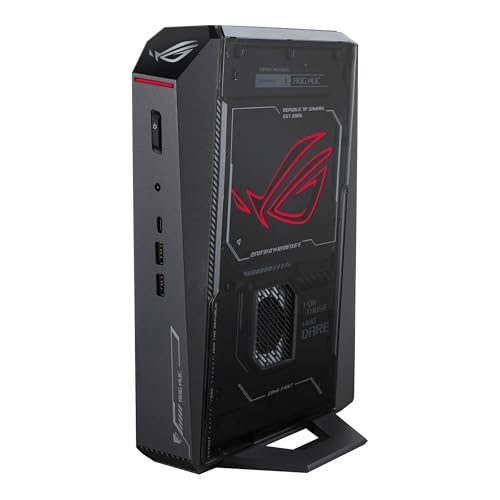
- Best overall: ASUS ROG NUC (2025), Core Ultra 9 275HX, RTX 5070 Ti Mobile, 16GB, 1TB — Check on Amazon
- GMKtec EVO-X2, Ryzen AI Max+ 395, Radeon 8060S, 64GB unified memory, 1TB — Check on Amazon
- Minisforum AtomMan G7 Pro, Core i9-14900HX, RTX 5070 Laptop GPU, 32GB, 1TB — Check on Amazon
See 3 more Amazon options
- ASUS ROG G22CH DB779, Core i7-13700KF, desktop RTX 4070, 32GB, 1TB — Check on Amazon
- ASUS ROG NUC 970, Core Ultra 9 185H, RTX 4070 Laptop GPU, 32GB, 1TB — Check on Amazon
- Minisforum AtomMan G1 Pro, Ryzen 9 8945HX, desktop RTX 5060, 32GB, 1TB — Check on Amazon
Read the full guide ↓
Disclosure: As an Amazon Associate, reviewstook.com earns from qualifying purchases. Links to Amazon on this page are affiliate links; they cost you nothing extra. Listing details such as price and availability change often, so check the current Amazon listing before you buy.
Buying your first gaming PC is confusing in any size. Buying your first mini gaming PC at $2,500 adds a second trap: the smaller the box, the more the listing wants you to believe the graphics inside it match the ones in a big tower. Mostly, they do not. Five of the six machines here run laptop graphics chips — good ones, honestly labelled in these reviews, but laptop parts sharing a name with stronger desktop cards while carrying less memory and less power. One machine has no separate graphics card at all; one is a small tower in disguise. None of that makes them bad buys. It means a beginner needs the vocabulary before the verdicts, so this guide front-loads plain-English explanations, prices the size premium openly, and ends with a first-evening walkthrough — including which hole the monitor cable goes into, the most common first-night mistake in this category.
Three honest facts before the picks. First: $2,500 in a tower buys a desktop RTX 5070 Ti with 16GB of graphics memory and 32GB of system memory — while $2,500 in a mini buys laptop-class graphics a step below. The difference is the price of the small box itself; this guide calls it the size premium and states it per pick. Second: there is no genuine RTX 5080 mini under $2,500. The one real sub-4-litre 5080 machine, the top version of ASUS’s ROG NUC (2025), sits firmly in a premium tier well above this budget — so if a listing inside this budget waves a 5080 at you, close the tab. Third: two picks are deal-dependent, and each review says so plainly. If your room can fit a tower after all, our Best Gaming PC Under $2500 guide covers the bigger boxes. If the box genuinely has to be small — a dorm desk, a TV stand, a carry-on — these are the six minis a first-time buyer can choose between without needing a translator.
In this guide
Quick Picks
Short on time, or comparing several options at once? Each row below names a buyer type and the product that suits it, with a link to the listing.
| Buyer type | Pick | Why it stands out | Link |
|---|---|---|---|
| Best overall | ASUS ROG NUC (2025), RTX 5070 Ti Mobile | The strongest graphics that fit this budget in a true mini — a 12GB mobile 5070 Ti in about 3 litres — check price on Amazon | Check on Amazon |
| Best for local AI plus gaming | GMKtec EVO-X2, 64GB | One chip does everything, backed by 64GB of memory the games and AI models share, in about 2.8 litres — check price on Amazon | Check on Amazon |
| Best value with a separate graphics chip | Minisforum AtomMan G7 Pro | RTX 5070 Laptop GPU and a full 32GB of memory — a value-focused way in here; check price on Amazon | Check on Amazon |
| Best real desktop graphics card | ASUS ROG G22CH DB779 | An actual desktop RTX 4070 with 12GB in a 10.7-litre small tower — keyboard and mouse in the box, the smallest size premium here | Check on Amazon |
| Best tiny footprint | ASUS ROG NUC 970 | Last year’s flagship — the smallest box in the guide at 2.5 litres; check price on Amazon | Check on Amazon |
| Best upgrade path | Minisforum AtomMan G1 Pro | The only pick whose graphics card sits in a real slot and can be swapped later, in 3.8 litres | Check on Amazon |
How These Picks Were Chosen
Every product below is a real Amazon listing positioned at or under the $2,500 budget ceiling in the United States — check price on Amazon for the current figure, as pricing moves often and no number printed here could stay current. Two picks are deal-dependent and say so: the ROG NUC (2025) belongs here only when its live price sits within budget, not at its usual premium shelf positioning; and the AtomMan G7 Pro’s Amazon pricing tends to run above the maker’s own channel, so check the live listing carefully. If a machine only makes sense on deal, that condition is stated openly, not buried.
Size was judged from published dimensions, never from the word “mini” in a title. Each pick’s volume is computed from the maker’s stated measurements, and anything over about 11 litres was excluded — which is why the familiar RTX 5070 Ti tower prebuilts are absent despite fitting the budget. The one deliberate exception explains itself: the ROG G22CH at 10.7 litres is a compact tower rather than a true mini, included because it shows a beginner what graphics honesty buys when the size demand relaxes a little. We did not use these products ourselves. We read maker listings, specification pages and independent reviews, and compared graphics chips by cores, memory and power limits rather than by name, because in this category the name is the least trustworthy line on the page. Anything we could not verify from a real listing was excluded rather than guessed in — that rule removed the 128GB memory-heavy machines (over budget in every configuration) and a pricier 64GB rival. Readers working with half this budget will find the same families ranked in our Best Mini Gaming PC Under $1500 guide.
Words Worth Knowing Before You Spend
Thirteen terms explain almost every confusing line in a mini PC listing. Each one is used in the reviews below, so this is the cheapest ten minutes of the whole purchase.
- Graphics card (GPU): the part that draws your games. Everything else feeds it, and performance talk is almost always about this.
- Laptop GPU vs desktop GPU: NVIDIA sells two different chips under near-identical names: the desktop RTX 4070 has 5,888 cores and 12GB of memory; the RTX 4070 Laptop GPU has 4,608 cores and 8GB. Five of the six picks here use laptop GPUs, and each review says so.
- VRAM (video memory): the graphics chip’s own memory. The one listing figure that cannot be spun: an “RTX 5070” showing 8GB is the laptop part, whatever the headline says.
- Integrated graphics: graphics built into the main processor rather than on a separate card. Usually the weak option — with one famous exception here, whose integrated graphics share a huge pool of fast memory.
- RAM (system memory): the PC’s working space for Windows, games and apps, separate from VRAM. Expect 32GB fitted at this budget; one pick ships 16GB and its review treats that as homework.
- SO-DIMM: the small, laptop-size memory sticks mini PCs use. Two SO-DIMM slots means memory can be added with a screwdriver in ten minutes.
- Soldered: attached permanently at the factory; soldered memory can never be upgraded. Exactly one pick here has it, flagged in its review’s first paragraph.
- Barebone: a PC sold without some or all of its memory, storage and Windows licence — a kit for people who own parts, not a finished computer. None of the six picks here is a barebone — but one pick’s page also sells a barebone version of itself, and its review flags the trap.
- Renewed: a used machine checked, cleaned and resold with a programme guarantee rather than a factory warranty. None of the six picks here is renewed — the word appears only so you can recognise it elsewhere.
- SSD (storage): where Windows, games and files live. All six picks carry 1TB, which fills faster than beginners expect.
- Refresh rate (Hz): how many times per second your monitor redraws. A 144Hz monitor left at its out-of-box 60Hz setting shows half the smoothness you paid for; the walkthrough includes the one-minute fix.
- Driver: software that lets Windows talk to the graphics chip. An old driver leaves performance on the table, so updating it is a first-evening job.
- Power supply and watts: the part that feeds everything, in watts. It matters twice: the supply’s rating limits any future graphics card, and the chip’s own watt limit (a laptop GPU can be set from half power to its full 140W) decides how fast it runs.
In short: none of the six is renewed or sold as a barebone (the G7 Pro’s page offers a barebone version to avoid), the EVO-X2’s memory is soldered forever while the other five use openable SO-DIMM slots, and only the G1 Pro’s graphics can ever be swapped.
The 6 Best Mini Gaming PCs Under $2,500, Explained for First-Time Buyers
ASUS ROG NUC (2025) — Core Ultra 9 275HX, RTX 5070 Ti Mobile, 16GB, 1TB
Who it suits: The beginner who wants the strongest graphics this budget can squeeze into a genuinely small box, and can wait for a deal.
Start with the name, because this pick is where the naming lesson pays off. The graphics chip is the RTX 5070 Ti Mobile — the laptop version — with 12GB of its own memory; the desktop card of the same name carries 16GB. So the honest sentence is: the most powerful graphics chip in this guide, and still a laptop part. Around it ASUS builds a box of 282.4 × 187.7 × 56.5 mm, about 3.0 litres — mountable behind a monitor — with serious cooling (three fans, two vapour chambers), a Core Ultra 9 275HX processor, and Thunderbolt 4, the fast all-purpose port that carries a monitor signal, data and power down one cable. Check price on Amazon for it — it belongs in this guide only on deal, when the live price sits within budget. At the family’s usual premium shelf positioning, this stops being an under-$2,500 machine.
The beginner homework is printed on the specification sheet: 16GB of system memory — the amount a machine a full tier cheaper would ship with, where 32GB is the happier amount. The saving grace is that the memory sits in two SO-DIMM slots, so the fix is a single extra stick: a ten-minute job with one screwdriver, and the walkthrough explains how you will know. Count it honestly, though: a single 16GB DDR5 SO-DIMM is an extra purchase on top of the machine, so factor that stick into the total, done properly, before you compare. What no stick can fix is the graphics chip, soldered to the board permanently: the 5070 Ti Mobile you buy is the one the machine retires with. Buy it knowing that, at the deal price, and it is the strongest honest answer in this guide.
- The strongest graphics here: RTX 5070 Ti Mobile with 12GB — a tier above every other pick, named as a laptop part because it is one.
- About 3.0 litres by the maker’s dimensions, with cooling well beyond the minimum.
- Two memory slots, so the thin 16GB it ships with can be corrected — unlike the soldered pick below.
Honest limitation: It fits this budget only when discounted into it; at the family’s usual premium shelf pricing it is a different, worse-value purchase, and 16GB is thin at this price even before the fix.
Choose it if you want the most graphics power a true mini can hold and your buying day can flex to meet a deal. Skip it if you must buy this week at shelf price, or opening a brand-new PC to add memory puts you off.

GMKtec EVO-X2 (64GB) — Ryzen AI Max+ 395, Radeon 8060S, 64GB Unified Memory, 1TB
Who it suits: The beginner who wants one small box that games well and runs local AI programs — and is comfortable deciding their memory amount once, forever, on day one.
This is the pick with no graphics card, and it breaks the rule beginners are usually taught. Its processor, AMD’s Ryzen AI Max+ 395, carries its graphics inside the main chip — the Radeon 8060S — fed from the same 64GB of fast memory the processor uses. Integrated graphics is normally the budget option; here, independent assessment from Notebookcheck places this chip roughly level with the RTX 4070 Laptop GPU for gaming, making it a genuine gaming machine with no card at all. The 64GB is the real headline: no graphics card in this guide offers more than 12GB of video memory, while this machine can hand its graphics a far larger slice of its 64GB — exactly what local AI models need to load whole. The box measures 193 × 185.8 × 77 mm (about 2.8 litres), runs Windows 11 Pro, and you can check price on Amazon for the 64GB/1TB configuration — a competitively priced way into this chip family. It runs from an external 230W laptop-style brick, which is why the walkthrough’s placement step gives the brick its own open spot.
Now the part that cannot be softened. That 64GB is soldered. It will never be 128GB; versions with more memory exist in a premium tier, outside this budget entirely. For some beginners that permanence is a feature — nothing to upgrade, nothing to open, nothing to get wrong — and for anyone whose ambitions may grow, it is the whole decision. GMKtec is smaller than ASUS; support and software polish are the known trade for getting new technology first and cheapest. Buy it as the memory machine that also games, in the configuration you will still want in three years, and nothing else here does its job.
- 64GB of shared memory the graphics can draw on — what makes it the local-AI pick as well as a gaming pick.
- Graphics placed by Notebookcheck around RTX 4070 Laptop class — with no separate card to name, there is no naming trick to fall for.
- About 2.8 litres — a competitively priced way into this chip family; check price on Amazon.
Honest limitation: The memory is soldered and final; outgrow 64GB and the upgrade is a second, premium-tier machine. The maker’s support operation is smaller than the big brands’.
Choose it if local AI interests you alongside games, or you want the most memory per litre in the category. Skip it if gaming is the entire job — the G7 Pro below delivers separate-card gaming at a lower tier.

Minisforum AtomMan G7 Pro — Core i9-14900HX, RTX 5070 Laptop GPU, 32GB, 1TB
Who it suits: The beginner who wants a current-generation separate graphics chip and a full helping of memory at a value-focused entry point here — and will do two short checks, one before paying, one when the box arrives.
The G7 Pro takes laptop parts and dresses them as a slim upright desktop. The graphics are the RTX 5070 Laptop GPU — a laptop part, 8GB of memory, a power limit around 115W — and independent review coverage consistently places this class of chip around the desktop RTX 4060 Ti’s level: honest, playable company. What surrounds it is the most generous specification here: 32GB of memory across two slots (growable to 96GB), a 1TB SSD plus a second storage slot accepting the fastest current drives, Wi-Fi 7, USB4 and Windows 11 Pro on the configured version. The configured 32GB/1TB machine is sold through the maker’s own channel as well as Amazon, and Amazon pricing for this brand tends to run above the maker’s direct prices — so check price on Amazon and compare channels before you buy.
The two checks, plainly. First, the cart check: this listing is a family page selling both the finished machine and a barebone version — no memory, no storage, no Windows. The barebone’s lower price is not a discount; it is a different, unfinished product, and ordering it by accident is this category’s most expensive beginner mistake. Confirm the configured 32GB/1TB version is selected before you pay. Second, the arrival check: some review units arrived with all 32GB on a single memory stick. Memory works best in matched pairs — one stick runs in single-channel mode and leaves performance behind — so check on your first evening how it arrived (the walkthrough shows where) and raise it with the seller while returns are easy. Both checks are the difference between the machine in this review and a lesser one wearing its name.
- Value entry point here: the configured 32GB/1TB version sits in a lower tier than the ASUS picks — check price on Amazon.
- 32GB fitted from the start, with slots to 96GB — no day-one memory homework, unlike the flagship above.
- A second, fastest-class storage slot, Wi-Fi 7 and USB4: the most current set of connections here.
Honest limitation: Its Amazon price moves rather than staying stable, and the shared listing page plus documented single-stick arrivals make the two checks part of the purchase, not optional extras.
Choose it if you want separate-card gaming in a mini without the ASUS premium, and two five-minute checks do not scare you. Skip it if you need pricing that never moves — this listing’s configured price moves, and its page takes a careful read.

ASUS ROG G22CH DB779 — Core i7-13700KF, Desktop RTX 4070, 32GB, 1TB
Who it suits: The beginner who wants the real desktop graphics card and a keyboard and mouse in the box — and whose space can stretch to a small tower instead of a true mini.
Every other separate graphics chip in this guide is a laptop part. This one is the genuine desktop RTX 4070: 5,888 cores and 12GB of memory, per NVIDIA’s own published figures, at full desktop power. Behind it sit a Core i7-13700KF processor, 32GB of memory, a 1TB SSD and a 600W Gold-rated power supply — a proper supply with headroom, not a laptop brick. The honesty runs the other way on size: the case measures 11.50 × 32.30 × 28.69 cm, about 10.7 litres, roughly four times the NUC machines’ volume. It will not mount behind a monitor or hide in a TV stand; it sits under a desk like the small tower it is, and in exchange charges the smallest size premium here — positioned in the mid-range of this guide — check price on Amazon for the current figure.
Two beginner-specific notes, both important. First, the model number. DB779 is the exact configuration documented here — 13700KF processor, 32GB of memory — and reseller listings for a weaker lookalike (a 13700F with 16GB) have been seen asking more for less machine. The walkthrough’s verification step exists largely because of this pick, so read the model number off the delivered box before you fall in love. Second, this pick’s one real quirk: the processor’s name ends in KF, and the F means it has no integrated graphics at all — so the motherboard’s monitor sockets are dead sockets, and the cable must go into the graphics card’s sockets, full stop. Plug into the wrong row and you get a black screen; the walkthrough flags it again where it matters. Finally, the ceiling: ASUS rates this chassis for 32GB of memory maximum, so the generous amount it ships with is all it will ever hold.
- A real desktop RTX 4070 with 12GB — the only full-power desktop card in a pick under 11 litres here.
- 600W Gold power supply and 32GB fitted, with keyboard and mouse included: the most complete box in the guide.
- Often discounted in deal coverage — its size premium is the smallest in the guide by far.
Honest limitation: At 10.7 litres it is a compact tower, not a mini; its memory is capped at the 32GB it ships with, and lookalike variants make the DB779 model check non-negotiable.
Choose it if your space fits a small tower and you want desktop parts with no laptop compromises. Skip it if the entire point is a machine that vanishes — the two NUCs are a quarter of its size.

ASUS ROG NUC 970 — Core Ultra 9 185H, RTX 4070 Laptop GPU, 32GB, 1TB
Who it suits: The beginner with the smallest desk, who wants a big-brand machine — last year’s flagship, bought the patient way.
The NUC 970 was this line’s flagship a generation ago, and its successor’s arrival discounted it. The box is 270 × 180 × 50 mm — 2.5 litres, the smallest in this guide — and inside it the RTX 4070 Laptop GPU runs at its full 140W power limit. That wattage matters: many slim machines run this chip at half power and quietly deliver far less. The rest needs no homework: a Core Ultra 9 185H processor, 32GB fitted with slots accepting up to 64GB, a 1TB SSD, Thunderbolt 4, an SD card reader genuinely useful for photos and video, and the vertical stand included. Check price on Amazon for the current figure on the actual listing.
Keep the one ageing fact in view. The graphics memory is 8GB, and of everything in this machine that figure will feel old first as games grow. No upgrade changes it — the chip is soldered — so this pick is a deliberate trade: the smallest footprint in the guide, against a graphics memory ceiling the flagship above exceeds by half. The size premium over cheaper routes to similar speed is substantial. In a studio flat, a dorm or a living-room setup, 2.5 litres is frequently the difference between a gaming PC existing in the space and not existing at all — and a machine that exists beats a faster one never bought.
- Smallest pick here at 2.5 litres, its laptop GPU run at the full 140W rather than a quiet half-power setting.
- Now in a lower tier than its original flagship positioning — check price on Amazon.
- 32GB fitted and slotted to 64GB, Thunderbolt 4, an SD reader and the stand in the box: nothing to add on day one.
Honest limitation: The 8GB of graphics memory is the machine’s ageing point and cannot be upgraded, and a large share of what you pay is for the 2.5-litre size itself.
Choose it if footprint comes first and you want ASUS behind the warranty with pricing you can verify today on Amazon. Skip it if you can stretch to the 2025 NUC on deal — its 12GB of graphics memory is the longer-lived specification.

Minisforum AtomMan G1 Pro — Ryzen 9 8945HX, Desktop RTX 5060, 32GB, 1TB
Who it suits: The beginner happy to tinker a little — this is the one mini here that rewards it, with the only graphics card that can be replaced later.
The G1 Pro’s party trick is mechanical. Its graphics card is a desktop RTX 5060 — a low-profile card, the short height made for slim cases, running at 145W — seated in a genuine PCIe x16 slot inside a 3.8-litre chassis, fed by an internal 350W power supply rather than a laptop brick. Around it: a sixteen-core Ryzen 9 8945HX, 32GB in slots accepting 96GB, a 1TB SSD plus a second slot, 5GbE networking, Wi-Fi 7, Windows 11 Pro. Check price on Amazon for the current US pricing. The slot is both the story and the fine print: it accepts low-profile cards, which today means the RTX 5060 class and below — a narrow path by tower standards, a unique one by mini standards. When a stronger low-profile card exists one day, this is the only machine here that can take it; every other pick’s graphics are a sealed, lifetime answer.
Three documented quirks need a beginner’s honesty rather than an enthusiast’s shrug. First and most important: the G1 Pro ships in an 80W power-saving mode withholding roughly a fifth of its performance behind a switch in Minisforum’s own software. Find that switch on your first evening — the walkthrough gives it its own step — or you will own a slower machine than you paid for and never know why. Second, reviewers found it loud under heavy load; small boxes move air with small, fast fans, and this one makes itself heard. Third, the maker’s utility software has been documented shipping a component Windows Defender flags — alarming the first time it pops up. None of this disqualifies the pick; it asks something of its owner, and the right first-time buyer reads that list and thinks “fine” rather than “what?”
- The only true graphics slot in the guide: a desktop RTX 5060 that can later be swapped for a future low-profile card.
- An internal 350W power supply — no laptop brick — in a 3.8-litre box — check price on Amazon.
- A sixteen-core processor and memory slots to 96GB: the most growing room on the processor side here.
Honest limitation: It ships in a power-saving mode hiding about a fifth of its speed until you find the software switch; reviewers found it loud under load, and its maker’s utility carries the Defender flag described above.
Choose it if the future card swap is worth a premium and three documented setup notes sound like a fair trade. Skip it if you want a sealed, quiet appliance that asks nothing of you — that is the NUC 970’s job.
Comparison Table
| Product | Graphics (honest label) | Size | Best use | Link |
|---|---|---|---|---|
| ASUS ROG NUC (2025) | RTX 5070 Ti Mobile, 12GB | ~3.0L | Most graphics power in a true mini — at the deal price only | Check on Amazon |
| GMKtec EVO-X2 (64GB) | Radeon 8060S integrated, 64GB shared | ~2.8L | Local AI plus gaming, with nothing to upgrade ever | Check on Amazon |
| Minisforum AtomMan G7 Pro | RTX 5070 Laptop GPU, 8GB | Slim upright | Value entry point with a separate graphics chip | Check on Amazon |
| ASUS ROG G22CH DB779 | Desktop RTX 4070, 12GB | ~10.7L | Real desktop parts and the smallest size premium | Check on Amazon |
| ASUS ROG NUC 970 | RTX 4070 Laptop GPU, 8GB, 140W | 2.5L | Tiniest footprint — check price on Amazon | Check on Amazon |
| Minisforum AtomMan G1 Pro | Desktop RTX 5060 low-profile, 8GB | 3.8L | The only graphics card here that can be swapped later | Check on Amazon |
Your First Evening: Setup, Step by Step
Every pick here arrives as a finished computer with Windows installed (provided you ordered the configured G7 Pro — see its review). Nothing below needs tools. Allow about an hour, most of it waiting for updates.
- Check the box against the order before plugging anything in. Match the carton model number to what you paid for: RNUC15JNK9X369AU for the ROG NUC (2025); the 64GB/1TB configuration for the EVO-X2 (its family also sells 64GB/2TB and 128GB versions at higher prices — the wrong one is a returns conversation, not a bargain); the configured 32GB/1TB version for the G7 Pro; and DB779 — exactly DB779 — for the G22CH. Two minutes here is the cheapest insurance in the purchase.
- Place it where air can move. Flat surface, vents unobstructed, out in the open — never sealed in a closed cabinet or drawer, because a mini sheds all its heat through those vents. If your pick has an external power brick (the EVO-X2’s 230W adapter is the clear example), give the brick its own open spot; bricks run warm and need air too.
- Connect power, and do not panic at a quiet box. One cable, then the power button. Small PCs are quiet at idle; a dark, silent box with a power light is working, not dead. If nothing lights up, check the power supply’s own switch where fitted, then the wall socket, before concluding anything is broken.
- Plug the monitor into the graphics card’s sockets — not the motherboard’s. A PC with a separate card has two clusters of monitor sockets at the back; the card’s are the ones that carry your games. One hard warning belongs to a single pick: the G22CH’s processor (the 13700KF — the F is the tell) has no integrated graphics whatsoever, so its motherboard sockets are completely dead. Plug into them and you will stare at a black screen on a healthy machine. On the EVO-X2 there is no separate card, so every socket is the right socket. If the picture looks wrong or games feel slow on night one, this cable is the first thing to check.
- Add keyboard, mouse and a wired internet connection. The G22CH includes keyboard and mouse; for the others, use what you have. Then plug in an Ethernet cable if one can reach, even if you plan to live on Wi-Fi afterwards — the first night’s downloads are the biggest the machine will ever do, and a cable makes them fast and unbreakable.
- Let Windows finish setting itself up. Region, account, privacy choices — no wrong answers that cannot be changed later. Decline bundled trial software as it appears; installing things deliberately afterwards is the correct order.
- Run Windows Update, then update the graphics driver. Settings, Windows Update, check, install, restart, repeat until nothing is left. Then the driver: NVIDIA’s app for the GeForce machines, AMD’s software for the EVO-X2, or the maker’s support page for your exact model. The driver Windows installs itself is only a starting point, and games notice the difference.
- Set your monitor’s real refresh rate. Monitors commonly arrive set to 60Hz whatever the box promises: Settings, System, Display, Advanced display, then choose the highest rate listed. If 60 is the highest offered and your monitor advertises more, the cable is usually the culprit — use the cable that came with the monitor, in the graphics card’s socket.
- Verify what actually arrived. In Settings, System, About and Task Manager’s Performance tab, confirm the machine matches the order: the ROG NUC (2025) should show 16GB (your planned second stick still to come); the G7 Pro should show 32GB — and check whether it arrived as one stick or two, because review units were documented arriving single-stick and that is a seller conversation for this week, not next year. Confirm ~1TB of storage and the graphics entry naming your chip, laptop label and all.
- G1 Pro owners only: switch off the shipping mode. Your machine left the factory in an 80W power-saving mode holding back roughly a fifth of its speed. Open Minisforum’s utility, find the performance mode setting, switch to full power before judging anything — before step 11, not after a disappointing first game. (If Windows Defender flags a component of that utility, see the review: documented behaviour for this maker’s software, not an infection.)
- Install one game store and one game. Steam is the usual first stop; the Epic Games Store and the Xbox app are the other common ones, all free to install. Sign in, download a single game you know well, and play it for twenty minutes. You now own a working gaming PC, and every later experiment starts from a machine known to be healthy.
What Else You Will Spend
The box is not the whole purchase, and a beginner’s budget deserves the full list up front. Where a pick has a catch, it is described here as the machine plus the fix, so you can compare honestly.
- A monitor comes first. None of these machines includes a screen (the G22CH’s keyboard and mouse are the only bundled peripherals documented here). If you do not already own a monitor, it outranks every other accessory, and a 1440p panel is the natural partner for this class of graphics. No monitor prices are quoted — they move too much to print responsibly — so treat the monitor as a separate, deliberate purchase rather than an afterthought at the till.
- The flagship’s memory fix. Consider the ROG NUC (2025) as the machine plus one more stick: it ships with 16GB, its second slot is empty, and a single 16GB DDR5 SO-DIMM is an extra purchase. Factor that in before comparing it with the 32GB machines.
- The G7 Pro’s possible second stick. If yours arrives with its 32GB on one stick — the documented review-unit pattern your first-evening check looks for — the fix is a matched second stick, considered as machine plus stick. Raise it with the seller first; a performance model should arrive configured as one.
- Storage headroom, eventually. Every pick ships with 1TB, and large games are large. The slotted picks accept a second drive or a bigger one later, so this is a someday cost, not a day-one one — the EVO-X2 included, where only the memory decision was forever.
- The basics, if you do not own them. A keyboard, a mouse and something to listen with. No prices are quoted for these — they vary too widely, and most households already own a workable set. Spend on the monitor first and upgrade the feel of the desk later.
Upgrades in Plain Terms
Beginners are often sold a mini on a promise about “upgrading later,” so here is exactly what that means for each pick — no more, no less.
Changing the graphics card later: one pick, full stop. The AtomMan G1 Pro’s desktop RTX 5060 sits in a real slot and can be swapped for a future low-profile card — that class of card, within what its internal 350W power supply can feed. That is the entire list. The G22CH carries a real desktop card and a named 600W Gold supply, but its case and board are ASUS’s own compact design rather than a standard tower layout, so no swap is promised for it either — treat its RTX 4070 as its lifetime card. In the other four picks the graphics are soldered or built into the processor, with no upgrade at any price.
Adding memory and storage: possible on five picks, impossible on one. The ROG NUC (2025) takes a second memory stick (that is its day-one fix). The G7 Pro and G1 Pro accept up to 96GB of memory and carry second storage slots. The NUC 970’s slots accept up to 64GB. The G22CH is already at its 32GB ceiling — nothing to add because nothing more fits. And the EVO-X2’s 64GB is soldered: generous, and absolutely final. Remember the pattern: in a mini, memory and storage are the flexible parts and graphics almost never are — buy graphics for year three, and let the flexible parts be flexible.
How to Choose a Mini Gaming PC Under $2,500
- Measure the space before you shop the specs. Decide where the machine must live — behind a monitor, in a media unit, under a desk — and let that set your size ceiling. Under about 3 litres points at the NUCs and the EVO-X2; a small tower’s worth of room reopens the G22CH and halves the size premium.
- Read the graphics memory before the graphics name. 8GB in a listing means a laptop part, whatever the headline claims. 12GB at this budget means either the current mobile flagship or a genuine desktop card. The memory line is the one part of a mini listing that cannot be spun — the beginner’s best friend.
- Ask what the wattage is, not just what the chip is. The same laptop graphics chip runs from half power to its full 140W depending on the box. Makers who publish the number — ASUS on the NUC 970, Minisforum on the G1 Pro’s card — are the ones whose claims you can trust.
- Count memory twice: fitted, then possible. Demand 32GB fitted at this price, or a printed plan to get there (the flagship’s second slot). Then the ceiling: two picks grow to 96GB, one stops at 64GB, one is already at its 32GB maximum, one is soldered at a generous 64GB forever.
- Treat a deal-dependent pick as two different products. The ROG NUC (2025) is a strong buy on deal and poor value at full shelf positioning — two different purchases. Decide which one you are buying, set a price alert for a deal, and never let a crossed-out list price decide for you.
- Interrogate any listing that sells versions of itself. Two picks here share their Amazon page with other configurations — one with a barebone, one with different memory amounts. The version in the cart is the product; everything else on the page is advertising.
- Decide how you feel about homework. The NUC 970 asks nothing. The G7 Pro asks for two checks. The G1 Pro asks for a software switch, some noise tolerance and one calm moment with an antivirus warning. All are fair trades — but different ones, and the right pick is the one whose homework you will actually do.
- Budget the desk, not just the box. A mini near the top of this budget leaves little room, and the monitor that makes it a setup lives outside the sticker. If the total setup is the real limit, a cheaper tier plus a good screen is often the smarter spend — readers at that crossroads should compare our Best Compact Gaming PC Under $2500 guide, where the size line is drawn looser and the premium shrinks.
Common Buying Mistakes
- Believing the graphics name. A mini “RTX 4070” is the 8GB laptop part until the memory line proves otherwise — check gigabytes and watts, not adjectives.
- Paying shelf price for a deal-dependent pick. The ROG NUC (2025) at full shelf price is not the top pick having a bad day; it is a different purchase from the same machine on deal — tower money for laptop graphics.
- Ordering the barebone version by accident on a shared listing page, then discovering memory, storage and Windows were never in the box.
- Assuming the memory in the box matches the headline — 16GB in the flagship, and single-stick 32GB documented on G7 Pro review units. Check on the first evening, while returns are easy.
- Plugging the monitor into the motherboard. On the G22CH those sockets are dead by design and the screen stays black; on every card machine, the card’s sockets are where the games live.
- Leaving the G1 Pro in its shipping mode. It leaves the factory holding back about a fifth of its speed behind a software switch; owners who never find it own a slower PC than they paid for.
- Assuming the EVO-X2 can grow. Its 64GB is soldered; the only upgrade path is a different, premium-tier machine. Buy the configuration you will still want in three years.
- Chasing an RTX 5080 mini at this budget. The genuine article sits in a much higher tier; a listing suggesting otherwise is selling a name, not the card.
- Never pricing the tower version. Run the comparison even if a tower is impossible: the gap is what your room costs — and occasionally the room turns out to be negotiable.
Final Recommendation
- Most buyers who can wait for a deal: ASUS ROG NUC (2025) — on deal only, second memory stick budgeted.
- Local AI plus gaming in one sealed box: GMKtec EVO-X2 (64GB).
- Separate-card gaming for the least money: Minisforum AtomMan G7 Pro.
- Desktop parts without the laptop compromise: ASUS ROG G22CH DB779.
- The smallest footprint: ASUS ROG NUC 970.
- A graphics card you can change later: Minisforum AtomMan G1 Pro.
Our top two for a first-time buyer are the ASUS ROG NUC (2025) and the GMKtec EVO-X2 — the choice is really about what you want to never think about again. Choose the NUC (2025) on deal and never at shelf price, for the strongest graphics chip here, accepting one homework item: the second memory stick its 16GB needs. Choose the EVO-X2 to think about nothing at all — no card, no memory to add, 64GB fitted for good — accepting that its specification is final on arrival. The G7 Pro suits buyers who will do its two checks gladly; the G22CH is the standing reminder that relaxing the size demand is the cheapest performance upgrade in this guide; the G1 Pro is for the beginner who already likes taking things apart. If your space is tighter than your budget, start with Best Mini Gaming PC For Small Spaces Under $2500; if the budget can breathe, the cheaper tiers in Best Mini Gaming PC For Beginners Under $1500 teach the same lessons for less; and if next year’s budget is the plan, Best Mini Gaming PC Under $3000 is where the RTX 5080 machines actually live. Whichever pick you land on, run the walkthrough on night one and verify the delivered configuration against the model number: at this budget, twenty minutes of homework is the difference between paying a size premium you chose and one you never saw.
Frequently Asked Questions
Is a mini with an “RTX 4070” the same as a desktop RTX 4070?
No — the single most valuable fact in this guide. NVIDIA’s own figures give the desktop RTX 4070 5,888 cores and 12GB of memory against the Laptop GPU’s 4,608 cores and 8GB: roughly a tier apart, with independent reviewers placing the full-power laptop part around the desktop RTX 4060 Ti class. One pick here, the G22CH, carries the genuine desktop card; every laptop part in the reviews is named as one.
Can I buy an RTX 5080 mini PC for under $2,500?
Not a genuine one. The only true sub-4-litre RTX 5080 machine — the ROG NUC (2025)’s top configuration — sits in a premium tier well above this budget. At this budget the strongest verified mini graphics are the RTX 5070 Ti Mobile on deal. A listing offering a 5080 mini inside $2,500 is mislabelled, misconfigured, or not the machine its headline describes.
My new PC shows a black screen. What did I do wrong?
Almost certainly the monitor cable. On the G22CH, the processor has no integrated graphics at all, so the motherboard’s sockets are dead — move the cable to the graphics card’s sockets and the picture appears. On any other card machine, the same move is the first fix to try. It is the most common first-evening problem in this category precisely because the wrong sockets look identical to the right ones.
Can I upgrade any of these later?
Graphics: one pick only. The G1 Pro’s desktop RTX 5060 sits in a real slot and can be swapped for a future low-profile card within its 350W supply’s limits; every other pick’s graphics are fixed for life. Memory and storage are the flexible parts — the G7 Pro and G1 Pro grow to 96GB, the NUC 970 to 64GB, the flagship takes its second stick — while the G22CH is already at its 32GB ceiling and the EVO-X2’s soldered 64GB cannot change.
Are any of these machines renewed or barebone?
No. All six picks are new, finished computers with Windows installed. “Barebone” appears in this guide for one reason: the G7 Pro’s Amazon page also sells a barebone version of the same machine — no memory, no storage, no Windows — and ordering it by accident is the mistake its review and the walkthrough guard against. Confirm the configured version is the one in your cart.
- Best Mini Gaming PC Under $2500
- Best Mini Gaming PC Under $1500
- Best Mini Gaming PC Under $3000
- Best Mini Gaming PC For 1440p Gaming Under $2500
- Best Mini Gaming PC For Streaming Under $2500
- Best Mini Gaming PC For Small Spaces Under $2500
- Best Small Form Factor Gaming PC Under $2500
- Best Mini PC Under $2500
- Best Barebones Mini PC Under $2500


