Where to buy
Check the latest price, availability and delivery on Amazon. Orders are placed on Amazon. We may earn a commission from qualifying purchases.
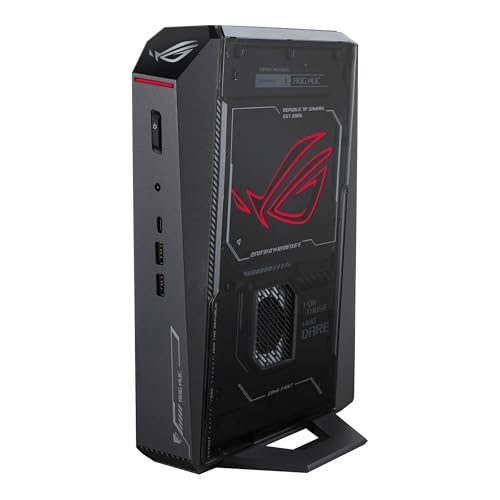
- Best overall for streaming: ASUS ROG NUC (2025), Core Ultra 9 275HX, RTX 5070 Ti Mobile, 16GB, 1TB — Check on Amazon
- ASUS ROG G22CH DB779, Core i7-13700KF, desktop RTX 4070, 32GB, 1TB — Check on Amazon
- GMKtec EVO-X2, Ryzen AI Max+ 395, Radeon 8060S, 64GB unified memory, 1TB — Check on Amazon
See 3 more Amazon options
- ASUS ROG NUC 970, Core Ultra 9 185H, RTX 4070 Laptop GPU, 32GB, 1TB — Check on Amazon
- Minisforum AtomMan G7 Pro, Core i9-14900HX, RTX 5070 Laptop GPU, 32GB, 1TB — Check on Amazon
- Minisforum AtomMan G1 Pro, Ryzen 9 8945HX, desktop RTX 5060, 32GB, 1TB — Check on Amazon
Read the full guide ↓
Disclosure: As an Amazon Associate, reviewstook.com earns from qualifying purchases. Links to Amazon on this page are affiliate links; they cost you nothing extra. Listing details such as price and availability change often, so check the current Amazon listing before you buy.
A streaming PC does two jobs at once, and a mini PC feels that double workload sooner than a tower does. The game renders on the graphics chip while a hardware encoder turns those frames into the feed your viewers watch, the CPU keeps the game logic, OBS, chat, alerts and a browser source moving, and the drive absorbs a local recording if you keep one. In a 3-litre box there is no spare thermal room and no spare slot, so the questions that decide this guide are not the usual mini-PC questions. They are: which encoder does the silicon actually carry, how much memory is left after the game takes its share, how loud is the cooler going to be three feet from your microphone, and does the price you are looking at belong to the configuration in the headline? Every pick below is graded on those streaming questions first and on raw gaming power second.
The workflow this guide grades against is the one most readers will actually run. On Twitch, the standard arrangement is a 1080p60 feed at roughly 6,000 kbps with constant bitrate and a two-second keyframe interval. YouTube allows considerably higher bitrates, accepts 1440p streams, and takes AV1 live ingest, which rewards encoders that can produce it. Twitch’s AV1 support exists through its Enhanced Broadcasting programme rather than as a general switch every channel can flip, so for most Twitch streamers the H.264 picture still decides what viewers see — and H.264 is exactly where the encoder brands differ most. Streaming in 4K is limited by the platforms, not by anything in this guide: no pick here is held back by its encoder on that front, because the services themselves are the ceiling. If your channel lives on YouTube and AV1, the ranking below still holds, but the AMD pick climbs — its one structural weakness matters less there, for reasons the encoder section explains.
One honesty note before the picks, carried over from the base guide because streamers deserve it in writing: at $2,500 a mini still does not match a tower’s graphics class. The money buys laptop GPUs in five of these six machines, and every mobile chip is named as mobile in its review. There is no RTX 5080 mini under $2,500 — the one genuine sub-4-litre RTX 5080 machine sits in a premium tier well past this budget. What $2,500 in mini form does buy, and what a tower cannot give you, is a stream station that sits on or under a desk, sips wall space in a small room, and still carries a current-generation hardware encoder. If the tower’s size is genuinely no obstacle, our Best Gaming PC Under $2500 guide covers the full-size machines; if the stream has to come from a small box, these six are the ones whose encoders, memory and cooling survive a three-hour session. The same six machines, graded on gaming alone, are ranked in our Best Mini Gaming PC Under $2500 guide.
In this guide
Quick Picks
Short on time, or comparing several options at once? Each row below names a streaming buyer type and the product that suits it, with a link to the listing.
| Buyer type | Pick | Why it stands out for streaming | Link |
|---|---|---|---|
| Best overall for streaming | ASUS ROG NUC (2025), RTX 5070 Ti Mobile | Dual NVENC blocks with AV1 encode on the strongest GPU here — one block streams, one records — in about 3 litres — check price on Amazon; budget a memory upgrade on top | Check on Amazon |
| Best for long sessions and stream-plus-record | ASUS ROG G22CH DB779 | A desktop RTX 4070 with dual Ada NVENC and AV1, 32GB of RAM and the most cooling headroom in the guide — in a 10.7-litre compact tower, not a true mini | Check on Amazon |
| Best simultaneous-load headroom | GMKtec EVO-X2, 64GB | 64GB of unified memory the game, OBS and everything else share without fighting, plus an AV1-capable AMD encoder — check price on Amazon; its H.264 is the softest here at Twitch bitrates | Check on Amazon |
| Best value with a dual encoder | ASUS ROG NUC 970 | Two Ada NVENC blocks and AV1 from a full-power 140W RTX 4070 Laptop GPU in 2.5 litres — check price on Amazon | Check on Amazon |
| Best entry tier, current-generation encoder | Minisforum AtomMan G7 Pro | Single NVENC with AV1 plus a Quick Sync reserve from its HX processor — check price on Amazon for the configured style, with style-selector and memory checks you must do on arrival | Check on Amazon |
| Best upgrade path | Minisforum AtomMan G1 Pro | The only pick whose encoder lives on a real desktop card in a swappable PCIe slot — check price on Amazon — and the loudest pick here under load | Check on Amazon |
How These Picks Were Chosen
The six machines are the six verified picks of the base mini gaming guide at this budget — same listings, same configurations, same verification rules — re-graded for streaming. Nothing was added and nothing was swapped out; what changed is the order and the questions. A pick that wins on frames alone can lose here, because streaming adds a second tenant to every component: the encoder shares the graphics chip with the game, OBS and the browser share the CPU and memory with the game, and the microphone shares the room with the cooler. Where the base guide weighed the size premium against towers, this guide weighs the streaming compromises: encoder generation, encoder count, memory left over after the game loads, recording space, and noise at streaming distance.
The encoder map below is derived only from the silicon each base listing documents — no encoder is credited to a chip that does not carry one, and two traps are called out in plain terms. First, AV1 encoding exists only on current-generation silicon: NVIDIA’s RTX 40-series and 50-series encoders and AMD’s RDNA 3-class media engines produce it, while older NVIDIA generations — the RTX 30-series included — encode H.264 and HEVC only, no matter what a listing’s headline implies. Second, Intel’s Quick Sync is credited only where the documented processor actually has integrated graphics: three of the Intel machines here carry non-F processors whose model names include it, and one — the G22CH, built on an F-suffix 13700KF — has no integrated graphics at all, so no Quick Sync is claimed for it anywhere in this guide.
The encoder map, pick by pick. The ROG NUC (2025) pairs its RTX 5070 Ti Mobile with two ninth-generation NVENC blocks and AV1 encode — the strongest streaming silicon in the guide, able to run a stream and a separate local recording on separate encoder blocks. The ROG G22CH’s desktop RTX 4070 carries two eighth-generation Ada NVENC blocks with AV1 encode, and nothing else: its F-suffix processor contributes no second encoder. The ROG NUC 970’s RTX 4070 Laptop GPU, run at a full 140W, carries the same dual Ada NVENC arrangement with AV1, and its Core Ultra 9 185H adds a Quick Sync reserve encoder for H.264 and HEVC utility work. The AtomMan G7 Pro’s RTX 5070 Laptop GPU carries a single ninth-generation NVENC block with AV1 encode, backed by a Quick Sync reserve from its Core i9-14900HX. The AtomMan G1 Pro’s desktop RTX 5060 carries a single ninth-generation NVENC block with AV1 encode. The EVO-X2 is the AMD entry: its Radeon 8060S media engine, an RDNA 3.5 design, encodes AV1 as well as H.264 and HEVC — but AMD’s H.264 encoding is visibly softer than NVENC’s at Twitch’s roughly 6,000 kbps, which is why the EVO-X2’s ranking leans on YouTube’s AV1 and high-bitrate ingest, where that weakness stops mattering. No encoder claim is made for the G1 Pro’s small integrated Radeon graphics; its streaming runs on the desktop card, as it should.
Simultaneous load is the second grading axis. A streamed game at 1080p or 1440p, OBS with several scenes, a chat window, alerts, a browser and a local recording will together press on memory in a way a bare game never does. That is why the EVO-X2’s 64GB of unified memory grades so highly despite its encoder’s H.264 softness, why the ROG NUC (2025)’s 16GB is treated as a defect to be fixed rather than a footnote, and why the G7 Pro’s documented single-stick review configuration matters: a lone 32GB stick runs in single-channel mode, narrowing the memory path the whole double workload shares, and the fix — a matched second stick — should be planned for separately, on top of the machine itself. Storage is graded the same way: every pick ships with 1TB, and a local recording habit eats that faster than game installs do, so the reviews note which machines document a second drive slot and which leave the question open.
Price discipline in this guide is simple: no static prices are printed, because listing prices move constantly. Check the live price on Amazon for every pick before you decide, and treat the $2,500 line as the budget frame for the guide rather than a promise about any single listing. The ROG NUC (2025) sits at the premium end of this set, so confirm its live listing still fits the budget when you shop. For the G7 Pro, check the configured style’s live price on Amazon and compare it with the maker’s own store before you buy. For the G22CH, the model number — DB779 — is the thing to verify, because a lesser 13700F/16GB variant also circulates under similar listings. Readers whose streaming budget is smaller will find the same encoder-first method applied in our Best Mini Gaming PC For Streaming Under $1500 guide, and the tower-class alternative ranked in our Best Streaming PC Under $2500 guide.
The 6 Best Mini Gaming PCs for Streaming Under $2,500
ASUS ROG NUC (2025) — Core Ultra 9 275HX, RTX 5070 Ti Mobile, 16GB, 1TB
Who it suits: The streamer who wants the strongest encoder and GPU pairing that fits this budget in a true mini, streams and records at the same time, and is willing to check price on Amazon and budget one upgrade.
Start with the encoder, because here it is the headline: the RTX 5070 Ti Mobile — a laptop GPU, named as one — carries two ninth-generation NVENC blocks with AV1 encode. In practice that means the arrangement streamers usually need a second PC for: one encoder block produces the live feed while the second writes a clean local recording at different settings, and neither steals work from the other. On Twitch the H.264 output is current-generation NVENC quality at the standard roughly 6,000 kbps; on YouTube the same silicon can send AV1 at the higher bitrates the platform accepts, including 1440p feeds. The Core Ultra 9 275HX behind it has core count to spare for the game, OBS and the browser stack running alongside, and its integrated graphics add a Quick Sync reserve for utility encodes. The chassis is 282.4 × 187.7 × 56.5 mm, about 3.0 litres, cooled by a triple-fan, dual-vapour-chamber system — the kind of sustained-load cooling a three-hour stream actually tests, as opposed to a three-minute benchmark.
Pros: Dual NVENC with AV1 — the only current-generation dual-encoder pairing in the guide; the strongest graphics chip here for the game side of the workload; serious cooling for sustained sessions; Thunderbolt 4 for docks and capture hardware; two SO-DIMM slots, so the memory fix is a stick, not a new machine.
Honest limitation: It ships with 16GB of memory, and 16GB is the tightest simultaneous-load figure in this guide. A modern game, OBS, chat and a browser will fit, but they will fit the way luggage fits a small car — arranged, not comfortable — and the fix is not free: you will need to buy a single 16GB DDR5 SO-DIMM separately, so plan for that extra purchase alongside the machine. The pick also sits at the premium end of this budget, so confirm the live Amazon listing still fits under $2,500 when you shop, and do not let a listing talk you into the RTX 5080 configuration of the same machine at this budget — that configuration belongs to a higher tier.
Choose it if you stream and record simultaneously, or you want the mini that needs the fewest streaming compromises. Skip it if the live price on Amazon has moved past this budget when you shop — the value argument weakens quickly at the premium end — or if you will never add the memory stick, in which case the EVO-X2 below is the more honest buy.

ASUS ROG G22CH DB779 — Core i7-13700KF, Desktop RTX 4070, 32GB, 1TB
Who it suits: The streamer whose sessions run long, who records everything, and who cares more about sustained encoder behaviour than about winning a smallest-box contest.
The G22CH is the control group of this guide: at 11.50 × 32.30 × 28.69 cm it computes to about 10.7 litres, which makes it a compact tower rather than a true mini — and that honesty is kept in its ranking, not hidden. What the extra litres buy a streamer is specific. The graphics card is a genuine desktop RTX 4070 — 5,888 CUDA cores and 12GB of GDDR6X per NVIDIA’s published specifications, not the laptop part with the same name — and its encoder section is the desktop arrangement: two eighth-generation Ada NVENC blocks with AV1 encode. One block streams, the other records, exactly as on the pick above. The bigger case gives those blocks the steadiest thermal environment in the guide, and a desktop that can sit on the floor or under the desk keeps fan noise physically farther from the microphone than any 3-litre box on the desktop can. It arrives with 32GB of memory fitted — the simultaneous-load figure the top pick makes you buy separately — plus a 600W 80+ Gold power supply, Wi-Fi 6E, and a keyboard and mouse in the box.
Pros: Dual Ada NVENC with AV1 on a desktop card; 32GB fitted from day one; the most cooling headroom and the easiest noise management in the guide; a published 600W Gold power supply rather than a mystery unit.
Honest limitation: Two, and both are stated plainly. First, the size: if your room genuinely cannot take a 10.7-litre box, this pick fails its only test no matter how good the encoder is. Second, the processor is an F-suffix 13700KF, which means no integrated graphics and therefore no Quick Sync reserve encoder — the NVENC blocks are the whole encoder story, with no Intel fallback for utility encodes. Neither is a deal-breaker for most streamers, but both belong in the decision. Pricing needs care as well: check the live price on Amazon before you decide — and a lesser variant with a 13700F and 16GB also circulates under similar listings, so the DB779 model number is the specification to verify before paying.
Choose it if your streams run three hours or more and you record locally as a matter of routine. Skip it if the 10.7 litres do not fit your space — that is the entire premise of the other five picks — or if a live price check shows the lesser variant wearing this pick’s price.

GMKtec EVO-X2 (64GB) — Ryzen AI Max+ 395, Radeon 8060S, 64GB Unified Memory, 1TB
Who it suits: The streamer whose setup is heavy around the game — multiple browser sources, chat, alerts, a recording, maybe local AI tools — and whose channel leans toward YouTube, where this machine’s encoder profile plays to its strengths.
There is no discrete graphics card in this box. The Ryzen AI Max+ 395 — AMD’s Strix Halo — puts a 16-core CPU and the Radeon 8060S, with 40 RDNA 3.5 compute units, on one chip, fed by 64GB of LPDDR5X-8000 memory on a 256 GB/s unified bus. Independent reviewers place the 8060S roughly on par with an RTX 4070 Laptop GPU for gaming, and for streaming the arrangement has one overwhelming virtue: the memory pool is shared and enormous. The game, OBS, the browser stack and the recording all draw from the same 64GB, and none of them ever has to evict another. It is the only pick in this guide where simultaneous load simply stops being a planning problem. The encoder is AMD’s RDNA 3.5 media engine, and it does encode AV1 — which is why the YouTube path matters so much here. Send YouTube an AV1 feed at a generous bitrate and this machine’s stream looks the way its hardware deserves. The chassis computes to about 2.8 litres from its 193 × 185.8 × 77 mm dimensions, runs from an external 230W adapter, and ships with Windows 11 Pro. Check price on Amazon for this 64GB/1TB configuration before you buy.
Pros: 64GB of unified memory — simultaneous-load headroom nothing else here approaches; AV1 encode for YouTube’s live ingest; no discrete card means one less heat source fighting the CPU under combined load; a genuine 64GB configuration in the premium tier of this guide — check price on Amazon.
Honest limitation: The encoder’s H.264 output is visibly softer than NVENC’s at Twitch’s roughly 6,000 kbps — fast motion in a busy game is where viewers will see it. That is a silicon fact about AMD’s H.264 encoding at low bitrates, not a settings problem you can tune away, and it is the reason this pick ranks third despite its memory advantage: a Twitch-first streamer gets a better-looking feed from either pick above. The second limitation is permanence: the 64GB is soldered and can never grow, and the family’s answer to “more” is a 128GB configuration in a higher premium tier — over budget and excluded. Buy the 64GB knowing it is the final specification.
Choose it if your stream is YouTube-first, or your around-the-game workload is heavy enough that memory pressure is your current bottleneck. Skip it if Twitch is your main platform and picture softness at 6,000 kbps would bother you every single stream — it will not improve with settings.

ASUS ROG NUC 970 — Core Ultra 9 185H, RTX 4070 Laptop GPU, 32GB, 1TB
Who it suits: The streamer who wants the dual-encoder arrangement — stream on one block, record on the other — in the smallest box in this guide — check price on Amazon.
The NUC 970 is last generation’s flagship mini, and streaming is where that stops mattering much, because encoders age more slowly than game rendering does. Its RTX 4070 Laptop GPU — a laptop part, named as one — runs at a full 140W in this chassis rather than the cut-down power limits smaller laptops impose, and its encoder section is the dual arrangement: two Ada NVENC blocks with AV1 encode, the same streaming toolkit as the desktop card in the G22CH above. Behind it, the Core Ultra 9 185H contributes a Quick Sync reserve encoder for H.264 and HEVC utility work — a genuinely useful third option for quick clips and transcodes that neither the F-suffix G22CH nor the AMD pick can offer. The memory figure is the grown-up one: 32GB fitted, in slots rated to 64GB, so the simultaneous-load conversation is settled at purchase rather than deferred. All of it sits in a 2.5-litre chassis, 270 × 180 × 50 mm, with Thunderbolt 4, an SD card reader — handy for camera media — and the vertical stand included. Check price on Amazon for the current listing before you buy.
Pros: Dual NVENC with AV1 in a compact value-tier package — check price on Amazon; 32GB fitted and upgradeable; a Quick Sync reserve as a third encoder; the smallest footprint here, which also makes it the easiest pick to place away from the microphone.
Honest limitation: The GPU is a generation old, and on the game side of the workload that shows: the RTX 4070 Laptop GPU carries 4,608 CUDA cores and 8GB of memory against the desktop 4070’s 5,888 cores and 12GB, per NVIDIA’s published specifications. For the stream itself the encoder is current enough; for the game feeding it, you will choose settings one notch more carefully than the NUC (2025) owner does. The 8GB of graphics memory is also the tightest texture budget among the NVIDIA picks, which matters for the newest games at 1440p. Neither point touches its streaming grade — both belong in a gaming-first decision.
Choose it if you want stream-plus-record from a box that disappears on the desk, without paying the current-generation premium. Skip it if your games are new, heavy and run at 1440p — the top pick’s stronger GPU earns its premium on exactly that workload.

Minisforum AtomMan G7 Pro — Core i9-14900HX, RTX 5070 Laptop GPU, 32GB, 1TB
Who it suits: The streamer who wants a current-generation encoder in the entry tier of this guide, and who is willing to do two verification jobs on delivery day in exchange.
The G7 Pro’s streaming kit is genuinely modern: its RTX 5070 Laptop GPU — a laptop part, named as one, with 8GB of GDDR7 run at around 115W — carries a single ninth-generation NVENC block with AV1 encode, and the Core i9-14900HX behind it adds a Quick Sync reserve encoder, since that processor’s model name carries integrated graphics. A single NVENC block still streams and records, but it does both jobs on one block: feed it a stream and a high-quality local recording at once and the two share one encoder’s capacity, where the dual-block picks above divide the work. For a straightforward one-feed setup — Twitch at roughly 6,000 kbps, or a YouTube AV1 feed — the single block is not a compromise at all, and the HX processor’s core count handles the surrounding workload comfortably. The chassis brings dual M.2 slots, one of them PCIe 5.0, Wi-Fi 7, USB4 and HDMI 2.1, with memory slots rated to 96GB.
Pros: Current-generation NVENC with AV1 plus a Quick Sync reserve — two encoder families in one small box; an entry-tier configured option — check price on Amazon; strong HX processor headroom for the simultaneous workload; two drive slots for the recording archive.
Honest limitation: The homework is real, and it is the reason for fifth place rather than a higher one. First, price: check the live price on Amazon for the configured style before you buy, and compare it with the maker’s own store, since the two channels do not always match and availability shifts between them. Second, the listing is a style family: barebone and configured machines sell under this one listing, so the configured 32GB/1TB style is the one to select, deliberately. Third, review units shipped with a single 32GB stick — single-channel memory feeding a double workload — so open the memory panel on arrival and, if yours matches, plan for a matched second stick as a separate purchase.
Choose it if the live configured price on Amazon still looks like entry-tier value when you shop and you will do the two checks. Skip it if the listing’s configured style is priced near the dual-encoder picks when you shop — at that point the shared single encoder is harder to justify.

Minisforum AtomMan G1 Pro — Ryzen 9 8945HX, Desktop RTX 5060, 32GB, 1TB
Who it suits: The streamer who thinks in upgrade cycles: the only pick here whose encoder can be replaced, because the only pick whose graphics card sits in a real slot.
The G1 Pro’s distinction is structural. Inside its 3.8-litre chassis, a desktop low-profile RTX 5060 — a Gigabyte OC Low Profile card at 145W — sits in a genuine PCIe x16 slot, powered by an internal 350W supply. When a future encoder generation tempts you, this is the one machine in the guide where the answer is a card swap rather than a new computer. Today’s card carries a single ninth-generation NVENC block with AV1 encode — the same encoder count as the G7 Pro, with the same one-block stream-and-record sharing — and the Ryzen 9 8945HX, a 16-core processor running to 5.4GHz, has ample headroom for the game and everything around it. Memory is 32GB of DDR5-5200 in slots rated to 96GB, storage is 1TB with a second M.2 slot for the recording archive, and the networking is the best documented here: 5GbE wired Ethernet alongside Wi-Fi 7, which makes the wired rule in the OBS section below effortless to obey. Check price on Amazon before you buy, and compare it with the maker’s US store, since the two channels do not always match.
Pros: A swappable desktop card — the only future encoder upgrade path in the guide; single NVENC with AV1 today; 5GbE wired networking; 32GB fitted and a second drive slot; internal power supply, so no brick joins the desk clutter near your audio gear.
Honest limitation: Two documented behaviours cost it the last-place streaming rank despite the structural advantage. First, noise: independent review found it loud under heavy load, and a mini lives within microphone range — fan noise is not an abstract spec for a streamer, it is a sound your audience hears or your gate has to fight for three hours. Second, homework: the machine ships in an 80W “Gaming Mode” that hides roughly a fifth of its performance behind a software toggle, so switching it on day one is part of the purchase, and the maker’s utility software ships a driver that Windows Defender flags — a documented wrinkle to handle deliberately, not discover mid-setup. Neither flaw touches the encoder; both touch the stream.
Choose it if you keep machines for years and want the card — encoder included — to be replaceable when the next generation lands. Skip it if your microphone sits close and your room is quiet: the NUC 970 does the same streaming job in near-silence — check price on Amazon for both before you decide.
Comparison Table
| Pick | Encoder (from documented silicon) | AV1 encode | Memory / storage | Price | Link |
|---|---|---|---|---|---|
| ASUS ROG NUC (2025) | 2× 9th-gen NVENC + Quick Sync reserve | Yes | 16GB (slots to grow) / 1TB | Check price on Amazon | Check on Amazon |
| ASUS ROG G22CH DB779 | 2× Ada NVENC (desktop card); no Quick Sync — F-suffix CPU | Yes | 32GB / 1TB | Check price on Amazon | Check on Amazon |
| GMKtec EVO-X2 (64GB) | AMD RDNA 3.5 media engine; H.264 softer than NVENC at Twitch bitrates | Yes | 64GB unified, soldered / 1TB | Check price on Amazon | Check on Amazon |
| ASUS ROG NUC 970 | 2× Ada NVENC + Quick Sync reserve | Yes | 32GB (slots to 64GB) / 1TB | Check price on Amazon | Check on Amazon |
| Minisforum AtomMan G7 Pro | 1× 9th-gen NVENC + Quick Sync reserve | Yes | 32GB (check for single stick) / 1TB, second M.2 slot | Check price on Amazon (configured style) | Check on Amazon |
| Minisforum AtomMan G1 Pro | 1× 9th-gen NVENC (desktop card, swappable) | Yes | 32GB / 1TB, second M.2 slot | Check price on Amazon | Check on Amazon |
Setting Up OBS on a Mini Stream Station
Pick the encoder your silicon actually has. In OBS, the output settings offer every encoder your drivers expose, and the right choice differs by pick. On the four NVIDIA machines, select the NVENC encoder — on the two dual-block picks (ROG NUC 2025, G22CH, and the NUC 970 with its dual Ada blocks) a simultaneous local recording can run on the second block at its own quality settings; on the single-block picks (G7 Pro, G1 Pro) the stream and the recording share one block, so set the recording to a sensible quality rather than the maximum and let the live feed keep priority. On the EVO-X2, select the AMD hardware encoder; on the NUC 970 and G7 Pro, the Quick Sync reserve is the sensible choice for quick utility encodes and clips, leaving NVENC to the main feed. What none of these machines should do is encode the main feed in software x264 while a game runs: the hardware blocks exist precisely so the CPU does not have to, and on a mini’s shared thermal budget the software path is the first thing to fall behind.
Bitrate and keyframes. For Twitch, set constant bitrate at roughly 6,000 kbps and a keyframe interval of two seconds — that pairing is the platform’s standard expectation, and drifting from it costs you either picture quality or compatibility. For YouTube, use the higher bitrates the platform accepts and, on any pick here, you can send AV1: every encoder in this guide produces it, which is one quiet advantage of buying current silicon in mini form. If you stream a 1440p feed to YouTube, remember the game still has to render those frames — the encoder is rarely the limit; the laptop-class GPUs in most of these boxes are.
The three lag counters, and what each one is telling you. OBS reports three separate failure counters, and each points at a different component. Rendering lag means the graphics chip was too busy drawing the game to compose the OBS scene on time — the fix is to cap the game’s frame rate, lower its settings a notch, or reduce the OBS canvas load; the encoder is innocent. Encoding lag means the encoder itself fell behind — on these machines that almost always means the feed was accidentally set to a software encoder, or a single-block pick was asked for a maximum-quality recording on top of the stream; the fix is the hardware encoder, and on single-block picks, a saner recording preset. Network lag — dropped frames — is neither the game nor the encoder: it is the connection, and on a mini PC streamed over Wi-Fi it is the most common of the three. The fix is a cable.
The wired rule, without exceptions. Stream on wired Ethernet, always. Every machine in this guide is a desk machine that never moves during a session, so there is no convenience argument for Wi-Fi, and a wireless link’s retransmissions land exactly where a live feed can least afford them. The G1 Pro’s documented 5GbE port makes it the best-networked pick here, but plain gigabit wired beats any wireless link for this job. Run the cable before your first stream, not after your first dropped-frames report. Finish the setup with a one-hour full-load rehearsal inside the return window — game, stream, recording, chat, everything — watching the three counters and listening to the machine from your microphone’s position. A mini that is quiet in a five-minute test can be a different animal in hour two, and the rehearsal is when you find out which one you bought.
What the Rest of the Stream Station Costs
The PC is the largest purchase in a stream station, not the only one, and this section deliberately names no prices: accessory pricing moves constantly, and none of it belongs inside a pick’s price above. Budget for the kit in this order, because the order follows what your audience actually notices. Microphone first. Viewers forgive a soft picture far sooner than harsh audio; a decent USB microphone on an arm that brings it close to your mouth, run at low gain, does more for a stream than any encoder setting in this guide — and on the louder picks here it is also your defence, since a close microphone at low gain hears less of the room, fans included. Lighting second. One key light aimed at your face makes an ordinary webcam look deliberate; without it, the best camera in the world produces a grey cave. Webcam third. Once light exists, a mid-range camera is enough for the corner-of-screen job it actually does. Capture card last — and only for console. A capture card exists to bring an external source — a console, a second PC, a camera — into OBS. For streaming games played on the same PC, it does nothing at all: the machine captures its own frames internally, and no pick in this guide needs one. Buy it when a console joins the setup, not before.
How to Choose a Mini Gaming PC for Streaming
Start with your platform, because it reorders the encoder question. Twitch-first streamers are graded on H.264 at roughly 6,000 kbps, and that is NVENC’s home ground — the four NVIDIA picks all produce a cleaner Twitch picture than the AMD machine, and the EVO-X2’s third place already reflects that. YouTube-first streamers can send AV1 at generous bitrates, which erases the AMD encoder’s one weakness and lets its 64GB of memory argue louder. Decide the platform before the machine.
Decide whether you record while you stream. If a local recording at separate quality settings is part of your workflow — for edits, highlights or archives — the dual-NVENC picks (ROG NUC 2025, G22CH, NUC 970) run it on a second encoder block, and the single-block picks (G7 Pro, G1 Pro) share one block between the two jobs. Sharing works; it is simply a real constraint to buy with open eyes.
Count the whole simultaneous workload, not the game alone. Add the browser sources, chat, alerts and recording to the game’s appetite and compare against the memory fitted — not the memory the platform allows. The EVO-X2’s 64GB is the stress-free answer; 32GB fitted is the comfortable standard; the ROG NUC (2025)’s 16GB is a planned upgrade, to be budgeted for separately alongside the machine. And where a listing’s configuration is a family rather than a fixed build — the G7 Pro above all — verify the style, the stick count and the model number on arrival, inside the return window. Readers squeezing the same questions into a smaller room should also see our Best Mini Gaming PC For Small Spaces Under $2500 guide, and anyone whose stream doubles as their first PC should read the Best Mini Gaming PC For Beginners Under $2500 walkthrough before setting up.
Place the box for the microphone, not for the photograph. A mini on the desk sits inside the microphone’s world. The NUC 970’s 2.5 litres can tuck behind a monitor; the G22CH’s size lets it live on the floor; the G1 Pro’s documented loudness under load is the one placement problem no position fully solves. Run the hour-long rehearsal from the OBS section before the return window closes — noise, heat and counters together are the real review of a stream station.
Common Buying Mistakes
- Crediting an encoder the silicon does not have. AV1 encode exists only on current-generation encoders — RTX 40/50-series NVENC and RDNA 3-class AMD media engines. Older NVIDIA generations encode H.264 and HEVC only. Read the chip, not the headline.
- Assuming Quick Sync comes free with every Intel badge. It lives in the integrated graphics, and F-suffix processors — the G22CH’s 13700KF here — have none. This guide claims no Quick Sync for that pick, and neither should your expectations.
- Streaming over Wi-Fi because the desk looks cleaner. Dropped frames are a network diagnosis, not an encoder one, and the cable is the entire fix. Every pick here is a fixed desk machine; wire it.
- Buying a capture card for same-PC streaming. It captures external sources only. For games played on the streaming PC itself it contributes nothing, at any price.
- Trusting the style selector. The G7 Pro’s listing sells barebone and configured machines under one page. Selecting the wrong style buys you a kit, not a stream station — and the single-stick memory configuration documented on review units is the second check on the same delivery.
- Treating 16GB as a streaming specification. On the ROG NUC (2025) it is the entry configuration of a machine designed to grow. Budget the second stick with the machine, or choose a pick that arrives with 32GB fitted.
- Judging noise from a five-minute test. Sustained combined load — game plus encode plus record — is the condition a stream actually runs. Rehearse for an hour, from the microphone’s seat, inside the return window.
Final Recommendation
For most streamers buying a mini at this budget, the answer is the ASUS ROG NUC (2025): the strongest graphics chip in the guide paired with dual current-generation NVENC blocks, so the stream and the recording stop competing, in a 3-litre box with cooling built for sustained work. Check price on Amazon before you buy, and budget the memory stick alongside it — with 32GB fitted it is the complete stream station this category currently offers. If your sessions are long and your desk can take the litres, the ASUS ROG G22CH DB779 is the steadier workhorse: the same dual-encoder arrangement on a desktop card, 32GB already fitted, and the easiest noise story here, provided the DB779 model number is what actually arrives. The EVO-X2 is the right answer for YouTube-first streamers and heavy multitaskers, the NUC 970 is the value route to a dual encoder, the G7 Pro is the entry-tier option with homework attached, and the G1 Pro is the long-term owner’s pick — the only one whose encoder can be swapped when the next generation arrives. Readers stepping up from here should see where the same money goes in our Best Mini Gaming PC For Streaming Under $3000 guide, and readers who would rather skip the mini premium entirely will find the full-size equivalents in our Best Compact Gaming PC Under $2500 roundup.
Frequently Asked Questions
Can these mini PCs stream and record at the same time?
Yes — the difference is how the work is divided. The ROG NUC (2025), ROG G22CH and ROG NUC 970 carry two NVENC blocks each, so the live feed and the local recording run on separate encoder hardware. The G7 Pro and G1 Pro carry a single NVENC block and share it between the two jobs, which works with sensible recording settings. The EVO-X2’s AMD encoder likewise handles both, with its 64GB of memory removing the other bottleneck.
Is AV1 worth choosing a PC over?
On YouTube, increasingly yes: the platform accepts AV1 live ingest at high bitrates, and every pick in this guide can produce it. On Twitch, AV1 runs through the Enhanced Broadcasting programme rather than a general setting, so most Twitch streamers are still graded on H.264 — where NVENC holds its documented edge over AMD’s encoder at roughly 6,000 kbps. Choose by platform, not by codec fashion.
Do I need a capture card with any of these?
Only if a console, a second PC or a camera joins the setup. For games played on the streaming PC itself, OBS captures the frames internally and a capture card adds nothing. It is the most commonly wasted purchase in a first stream station.
Is 16GB of memory enough to stream?
It is enough to start and tight enough to plan around. A modern game plus OBS, chat and a browser will run in 16GB, but the ROG NUC (2025)’s own design assumes growth — it has two SO-DIMM slots for exactly that reason. Budget for the second stick alongside the machine, or pick one of the 32GB-fitted options.
Can I stream over Wi-Fi to keep the desk tidy?
You can, and the dropped-frames counter will eventually explain why you should not. A live feed wants a constant connection, wireless links retransmit, and every pick in this guide is a fixed machine with a wired port. Run the cable once and remove an entire category of stream problems.
Should I encode with the CPU (x264) instead for better quality?
Not on these machines while gaming. The hardware encoders in every pick exist to take that job off the CPU and the shared thermal budget; software encoding a live feed alongside a game is the classic route to encoding lag on a mini. Reserve the CPU for the game and the scene, and let NVENC, the AMD media engine or Quick Sync do the job they were built for.
Related guides: Best Mini Gaming PC Under $2500 · Best Mini Gaming PC For Streaming Under $1500 · Best Mini Gaming PC For Streaming Under $3000 · Best Mini Gaming PC For 1440p Gaming Under $2500 · Best Streaming PC Under $2500 · Best Mini PC Under $2500 · Best Small Form Factor Gaming PC Under $2500 · Best Mini Gaming PC Under $1500


