Where to buy
Check the latest price, availability and delivery on Amazon. Orders are placed on Amazon. We may earn a commission from qualifying purchases.
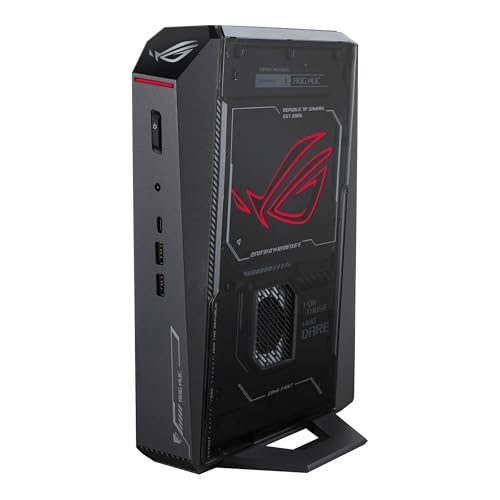
- Best overall: ASUS ROG NUC (2025), Core Ultra 9 275HX, RTX 5070 Ti Mobile, 16GB, 1TB — Check on Amazon
- GMKtec EVO-X2, Ryzen AI Max+ 395, Radeon 8060S, 64GB unified memory, 1TB — Check on Amazon
- Minisforum AtomMan G7 Pro, Core i9-14900HX, RTX 5070 Laptop GPU, 32GB, 1TB — Check on Amazon
See 3 more Amazon options
- ASUS ROG G22CH DB779, Core i7-13700KF, desktop RTX 4070, 32GB, 1TB — Check on Amazon
- ASUS ROG NUC 970, Core Ultra 9 185H, RTX 4070 Laptop GPU, 32GB, 1TB — Check on Amazon
- Minisforum AtomMan G1 Pro, Ryzen 9 8945HX, desktop RTX 5060, 32GB, 1TB — Check on Amazon
Read the full guide ↓
Disclosure: As an Amazon Associate, reviewstook.com earns from qualifying purchases. Links to Amazon on this page are affiliate links; they cost you nothing extra. Listing details such as price and availability change often, so check the current Amazon listing before you buy.
A small-space PC purchase fails in a way a normal PC purchase never does: the machine arrives, it is fast, it is exactly what the listing promised — and it does not fit the shelf, the cubby, the gap behind the monitor or the desk corner the room allows. Everything in this guide is therefore graded installation-first. Every pick below is a genuine gaming machine, but the order of questions is reversed: where does it physically live, where does its power brick live, where do its cables fall, where does its heat go — and only then, how fast is it?
Start with the honest shape of this budget. Under $2,500, the word “mini” covers machines from 2.5 litres to 10.7 litres, and those are not variations on one product — they are different furniture decisions. The 2.5-litre ASUS ROG NUC 970 can hang behind a monitor and vanish. The 10.7-litre ASUS ROG G22CH is a compact tower that sits under a desk and makes no apology for it. Both are legitimate answers, but to different rooms, and each review below grades its pick on the room it actually fits. One refusal applies to all six, without exception: none of these machines belongs inside a sealed cabinet, a closed TV-stand cubby or any box with a door and no airflow. Every pick here pulls cool air in and pushes hot air out, and a sealed space turns that exhaust into its own intake within minutes. If your only spot is enclosed, it needs a door left open, a back panel removed, or a different spot.
Two more facts before the picks, because small-space shoppers get misled by both. First, there is no RTX 5080 mini under $2,500: the one genuine sub-4-litre RTX 5080 machine, the top configuration of ASUS’s ROG NUC (2025), sits firmly in a premium tier well above this budget, so any listing implying one inside this budget deserves a slow, suspicious read. Second, almost every graphics chip below is a laptop part wearing a desktop name, and each review names its chip’s class plainly, every time. If your room can take a 40-litre tower, our Best Gaming PC Under $2500 guide covers machines that give you more graphics for the same money.
In this guide
Quick Picks
Short on time, or comparing several options at once? Each row below names a buyer type and the product that suits it, with a link to the listing.
| Buyer type | Pick | Why it stands out | Link |
|---|---|---|---|
| Best overall | ASUS ROG NUC (2025), RTX 5070 Ti Mobile | The strongest GPU in the guide in a flat ~3-litre slab that mounts behind a monitor — check price on Amazon, as it only fits this budget on deal | Check on Amazon |
| Best for local AI plus gaming | GMKtec EVO-X2, 64GB | Strix Halo with 64GB of unified memory in ~2.8 litres — check price on Amazon, and plan a home for its external power adapter | Check on Amazon |
| Best value with a discrete GPU | Minisforum AtomMan G7 Pro | RTX 5070 Laptop GPU and 32GB of RAM in a slim upright, console-style chassis — check price on Amazon | Check on Amazon |
| Best desktop-class GPU | ASUS ROG G22CH DB779 | A real desktop RTX 4070 in a ~10.7-litre compact tower — an under-desk installation, not a hideaway mini | Check on Amazon |
| Best tiny footprint | ASUS ROG NUC 970 | The smallest pick at 2.5 litres, vertical stand in the box — check price on Amazon | Check on Amazon |
| Best upgrade path | Minisforum AtomMan G1 Pro | A desktop graphics card in a real PCIe slot inside 3.8 litres, with an internal power supply — no brick to place | Check on Amazon |
How These Picks Were Chosen
The budget was applied as a ceiling on real, verifiable listings: every product below is a real Amazon listing that can fit this budget in the United States, and because pricing drifts you should check price on Amazon rather than hold any guide to a hard number. Two picks are deal-dependent in ways their reviews state plainly: the ROG NUC (2025) qualifies only when it is on deal and not at its regular premium pricing, and the AtomMan G7 Pro’s configured version is positioned through the maker’s own channel, with Amazon pricing that tends to run higher. Where a pick only makes sense on deal, the review says so plainly.
Installation grading follows a strict evidence rule. Where a maker publishes dimensions, the review prints them and computes the volume from them — that is how the figures 2.5, 2.8, 3.0, 3.8 and 10.7 litres below were arrived at, and they are the only measurements in this guide. Where a maker does not publish dimensions, no number is invented and none is borrowed from a different machine: the pick is graded by its form-factor class instead, and you are directed to the live listing’s specification table before ordering. That rule bites hardest on the AtomMan G7 Pro, whose slim upright shape is well documented but whose exact measurements are not published in our sources. The same discipline applies to noise: no decibel figure is printed for any pick, because none is documented for these six — cooling is graded on documented design (fan counts, vapor chambers, power limits) and on reviewer findings stated as findings, not numbers.
Power supplies are graded as furniture, because in a small room they are. A machine with an internal supply needs one mains cable and nothing else; a machine with an external adapter needs a second object housed and ventilated — and that object’s home is part of the installation whether the listing mentions it or not. The EVO-X2’s external 230W adapter is documented and graded as such below; the G1 Pro’s internal 350W supply and the G22CH’s internal 600W supply are documented too, and both picks earn installation credit for it. Where a pick’s supply arrangement is not documented, the review says so and sends you to the listing — assume an external adapter exists until the listing proves otherwise, and measure for it.
We did not use these products ourselves. Our method was to read maker listings, specification pages and independent reviews, and to compare GPU silicon directly — core counts, memory capacity, power limits — instead of GPU names, which are the least reliable words in any mini listing. Mobile GPUs are labelled mobile throughout. Anything that could not be verified from a real listing was left out rather than guessed at. That rule removed the 128GB Strix Halo machines (over budget in every configuration), the 64GB form of the Minisforum MS-S1 MAX (also over this budget), and several announced small-form-factor machines whose US Amazon listings could not be pinned to one configuration. Readers whose space is larger than their budget should start from our Best Mini Gaming PC Under $1500 guide, where the same silicon families appear at half the spend.
Measure Before You Buy: The Five Steps
Every return in this category begins with a tape measure that stayed in the drawer. Work through these five steps, in order, before any listing below gets your money.
Step 1 — Measure the spot. Not the desk: the spot. Width, depth and height of the exact shelf, cubby, monitor-back or floor corner the machine will occupy, written down. Then compare against the pick’s documented dimensions in its review — and where dimensions are not documented, this step ends at the live listing’s specification table, not at a guess.
Step 2 — Ventilation clearance. Add breathing room to the measurement: open air on the sides that intake and a clear path behind or above the side that exhausts. A pick that fits a cubby with a centimetre to spare on every side does not fit that cubby in any sense that matters, because its fans will drink their own exhaust. If the spot cannot give the machine open air on at least its intake and exhaust faces, the spot fails — and a sealed cabinet fails for all six picks, full stop.
Step 3 — The brick address. Decide where the power adapter lives before the machine arrives. For the EVO-X2, whose external 230W adapter is documented, that means a ventilated shelf spot or a space on the desk — not a cable box with the lid on, and not buried behind the sofa where its heat has nowhere to go. For the G1 Pro and G22CH, whose supplies are internal and documented, this step is mercifully short: no brick exists. For the remaining picks, check the listing and assume a brick until proven otherwise.
Step 4 — Cable drop. Trace the runs on paper: power from the wall to the brick or the machine, display cable from the machine to the monitor, network cable if you wire it. Measure the drop from the spot to the monitor’s ports — behind-monitor and under-desk placements fail here more often than on size, because a cable that reaches only at full stretch pulls on both ports forever. If the run needs a longer display cable, that is a planned purchase made now, not a surprise on installation day.
Step 5 — Then order. Only now — spot measured, clearance confirmed, brick housed, cables traced — does the listing get opened. Confirm the exact style and configuration in the cart (two picks below sell barebone and configured versions on one page), check price on Amazon, and order. Twenty minutes of steps beats a two-week size return.
The 6 Best Mini Gaming PCs for Small Spaces Under $2,500
ASUS ROG NUC (2025) — Core Ultra 9 275HX, RTX 5070 Ti Mobile, 16GB, 1TB
Who it suits: The buyer whose spot is the back of a monitor or a shallow shelf, and who wants the strongest graphics chip this budget reaches in a mini — bought on a deal, not on a schedule.
Installation grade: This is a flat slab, and its documented dimensions tell the placement story precisely: 282.4 × 187.7 × 56.5 mm, which computes to about 3.0 litres. A slab under 6 cm thick is the easiest shape in this guide to house — it slides onto a shallow shelf, stands in a monitor’s shadow, or mounts behind a display, which is the placement this chassis family is built around. What it demands in return is respect for its faces: the cooling is a triple-fan system with dual vapor chambers, and a slab cannot have its broad sides smothered by books, a flush wall, or a cubby with no side clearance. Give it open air on its faces and the installation is the cleanest here; wedge it tight and you have built it a small oven. Its power-supply arrangement is not documented in the sources this guide rests on, so apply Step 3 honestly: check the live listing, and plan a ventilated home for an external adapter unless the listing shows otherwise. Cable drop is short in the natural placements — behind a monitor, the display run is measured in centimetres, and the power run is the one to trace.
The machine inside the slab is the category flagship. The graphics chip is the RTX 5070 Ti Mobile — a laptop GPU, named as one — with 12GB of GDDR7 memory, a tier above every other pick here. Around it sit a Core Ultra 9 275HX, Thunderbolt 4, and two SO-DIMM slots. The documented configuration carries 16GB of DDR5 and a 1TB SSD, and that memory figure is the pick’s honest weakness: 16GB is a tier-down specification on a premium machine. The second slot makes the fix one stick away, but the stick is not cheap in the current market, so budget for 32GB from day one and treat the total cost as the real cost.
The price needs the same plain treatment. This pick is in the guide only as a deal-dependent pick; at its regular premium pricing it is not an under-$2,500 machine at all — check price on Amazon before you commit. The deal is the product: set an alert and hold the line. For context, verified tower prebuilts with a desktop RTX 5070 Ti, 16GB of video memory and 32GB of system RAM sit in a similar premium tier — you are paying tower money for a mobile GPU with 4GB less memory and half the system RAM, and what you receive for it is 3.0 litres that disappear behind a monitor. In a room where the tower physically cannot go, that trade is the entire point of this guide.
- Documented 282.4 × 187.7 × 56.5 mm slab (~3.0L): the easiest shape here to mount or shelve.
- The strongest GPU in the guide: RTX 5070 Ti Mobile with 12GB GDDR7.
- Two SO-DIMM slots — the thin 16GB as-shipped configuration can be fixed, unlike soldered rivals.
Honest limitation: It fits this budget only on deal, and 16GB of RAM is thin at this tier even before the cost of the second stick.
Choose it if your spot is a monitor back or shallow shelf and you can wait for the deal. Skip it if you must buy today at shelf price, or your spot cannot give its broad faces open air.

GMKtec EVO-X2 (64GB) — Ryzen AI Max+ 395, Radeon 8060S, 64GB Unified Memory, 1TB
Who it suits: The buyer with a small desk and a second hobby — local AI — who wants one compact box that games credibly and holds large models whole.
Installation grade: The chassis measures 193 × 185.8 × 77 mm — about 2.8 litres — which makes it a deep book rather than a slab: taller than the NUCs, with a footprint closer to a hardback standing on a shelf. That shape sits happily on a desk corner or a bookshelf with its front to the room. The installation fact that defines this pick, though, is documented and non-negotiable: it runs from an external 230W power adapter. The brick is a second object with its own footprint and its own heat, and Step 3 of the checklist exists largely because of machines like this. House it on an open shelf or the desk surface where air reaches it; do not seal it in a cable-management box or drop it behind furniture to cook quietly for years. Cable drop runs wall → brick → machine, so the socket’s position relative to the shelf decides the layout — trace it before ordering, per Step 4.
Inside, this is the strangest and most interesting machine in the guide. It is built around AMD’s Ryzen AI Max+ 395, codenamed Strix Halo: sixteen Zen 5 cores and a Radeon 8060S integrated GPU with 40 RDNA 3.5 compute units, fed by 64GB of LPDDR5X-8000 memory that CPU and GPU share at 256 GB/s. Integrated graphics is normally where a gaming guide lowers its voice; here it is the headline. Notebookcheck’s independent assessment puts the 8060S roughly level with the RTX 4070 Laptop GPU for gaming, and reviewers have framed the machine as a genuine 1440p gaming box with no dedicated card at all. But the 64GB is the real product: no graphics card in this guide offers more than 12GB of video memory, while the EVO-X2 can hand its GPU a slice of memory large enough to hold 32B-class local AI models entire. It runs Windows 11 Pro — check price on Amazon for the 64GB/1TB configuration, which is positioned as a more accessible Strix Halo option in this tier.
Two cautions are structural, and both are placement-independent. Because the memory is soldered, 64GB is a lifetime decision — buyers who outgrow it are exactly why 128GB configurations exist, and those sit in a premium tier well beyond this budget. And GMKtec is a smaller maker than ASUS, so support, firmware polish and warranty handling are the known trade for being first and cheapest with new silicon. Buy it as what it is — the memory pick that also games — and give its brick a proper home, and it has no rival here.
- Documented 193 × 185.8 × 77 mm chassis (~2.8L) in a bookshelf-friendly upright shape.
- 64GB of unified memory the GPU can draw on by the tens of gigabytes — local AI headroom no 12GB card in this guide can approach.
- Notebookcheck places the Radeon 8060S integrated GPU roughly in RTX 4070 Laptop territory for gaming.
Honest limitation: The documented external 230W adapter is a second object to house and ventilate, and the soldered memory can never grow past 64GB.
Choose it if local AI matters alongside gaming and your shelf has room for machine plus brick. Skip it if gaming is the only job on the desk — the G7 Pro further down does discrete-GPU gaming at a lower tier.

Minisforum AtomMan G7 Pro — Core i9-14900HX, RTX 5070 Laptop GPU, 32GB, 1TB
Who it suits: The value hunter: the buyer who wants a current-generation discrete GPU and a full 32GB of RAM in a slim mini, at the lowest entry price in this guide.
Installation grade: This pick is graded by form-factor class, and the reason is stated plainly: its maker documents a slim upright chassis that stands on the desk like a games console, but the sources this guide rests on do not publish its exact dimensions, and this guide does not invent measurements. So the honest grade is this — a slim vertical slab in the console class, designed to stand beside a monitor rather than hide behind one, asking for a desk footprint roughly the size of its base plus open air around its vents. Before ordering, complete Step 1 at the live listing: read the specification table, write the real numbers down, and measure your spot against them. Ports on a standing slab route cables downward and behind, so the drop to monitor and wall wants a clear channel behind the desk edge. Its power-supply arrangement is likewise not documented in the sources — check the listing and apply Step 3’s default assumption of an external adapter needing an address.
The specification inside the slab is the most complete in this guide at its price. A Core i9-14900HX drives an RTX 5070 Laptop GPU — a mobile part, named as one, with 8GB of GDDR7 and a power limit around 115W. Around them: 32GB of DDR5 across two SO-DIMM slots, upgradable to 96GB; a 1TB SSD with a second M.2 slot that accepts PCIe 5.0 drives; Wi-Fi 7, USB4 and HDMI 2.1; and Windows 11 Pro on configured units. The configured 32GB/1TB version is positioned through the maker’s channel as the value option in this guide, with a barebone version — no RAM, no SSD, no operating system — offered below it. Minisforum’s own store positions the configured unit higher, and Amazon pricing for this brand tends to run higher still, so check price on Amazon: the live listing is the number that counts.
Two checks on arrival day belong in any honest account of this machine, and they are in this one. Some review units arrived with their 32GB on a single stick — single-channel memory in a machine marketed on performance — so check the memory page in the BIOS or a system tool on the first day, and take it up with the seller if yours matches. And the Amazon listing is a style family: barebone and configured versions share one page, so confirm the configured 32GB/1TB style is the one in your cart before paying, because the barebone’s lower price is not a deal — it is a different, emptier product that will not boot your games until you have bought the parts it lacks.
- Slim upright console-class chassis: stands beside a monitor instead of hiding behind one.
- A value route into this guide: the configured 32GB/1TB version is positioned in a mid-range tier — check price on Amazon.
- 32GB of RAM fitted and two SO-DIMM slots to 96GB — no day-one upgrade tax, unlike the ROG NUC (2025).
Honest limitation: Its exact dimensions are not published in this guide’s sources, so the fit check must be finished at the live listing; and its clearest positioning is through the maker’s channel, with Amazon tending to charge more.
Choose it if you want discrete-GPU gaming in a mini without the ASUS premium and your spot suits a standing slab. Skip it if you need verified dimensions and stable Amazon pricing before you commit — its listing is a style family with a barebone in it, and the configured pricing moves.

ASUS ROG G22CH DB779 — Core i7-13700KF, Desktop RTX 4070, 32GB, 1TB
Who it suits: The skeptic: the buyer who wants a real desktop graphics card and standard desktop thinking, and whose “small space” is a floor corner or the space under a desk rather than a shelf.
Installation grade: Honesty first: at a documented 11.50 × 32.30 × 28.69 cm — about 10.7 litres — this is a compact tower, not a true mini, roughly four times the volume of the NUCs it sits between in this guide. It will not mount behind a monitor, it will not ride a bookshelf, and any placement plan that begins with hiding it is the wrong plan. Its installation is the tower installation, shrunk: a floor or under-desk position with open air at its intake and exhaust faces, a cable drop that runs down from the desk rather than across it, and room to open the case later, because a standard tower is the one pick here you can easily service yourself. Two documented facts work in its favour. Its 600W 80+ Gold power supply is internal — there is no brick, so Step 3 of the checklist simply does not exist for this pick — and a keyboard and mouse are included in the box. The sealed-cabinet refusal applies to it exactly as to the minis: under a desk in open air is a placement; inside a closed desk cupboard is a slow bake.
What the volume buys is the thing the true minis cannot offer. The graphics card is a desktop RTX 4070 — the full card, 5,888 CUDA cores and 12GB of GDDR6X memory per NVIDIA’s specifications — behind a Core i7-13700KF, with 32GB of DDR5, a 1TB PCIe 4.0 SSD and that 600W Gold supply. No laptop silicon, no power-limit asterisks, and cooling with the physical room to work quietly rather than shout. Check price on Amazon — when it is on deal, the premium over faster-card towers (such as RTX 4070 SUPER machines in a lower tier) shrinks considerably, making its size premium among the most modest in this guide.
Two cautions. Check the model number before anything else: DB779 denotes the 13700KF/32GB configuration this review covers, while reseller listings for a weaker 13700F/16GB variant have been spotted asking a higher price for a worse machine — so confirm DB779 on the live listing before any money moves. ASUS also caps this chassis at 32GB of memory across its two SO-DIMM slots, so the healthy RAM figure in the box is the most it will ever hold. As the control group of this guide, it makes the trade legible: if 10.7 litres fits your space, the size premium nearly vanishes.
- Documented 11.50 × 32.30 × 28.69 cm case (~10.7L): a compact tower — plan an under-desk or floor installation.
- A real desktop RTX 4070 with 12GB — no other sub-11-litre pick here carries a full-power desktop card.
- Internal 600W Gold power supply (no brick to house) and keyboard/mouse included.
Honest limitation: It cannot disappear the way the NUCs do, and variant drift means the DB779 model number must be checked on the listing before paying.
Choose it if your space fits a small tower in open air and you want desktop silicon without laptop compromises. Skip it if the whole point is a machine that hides — the NUC 970 below is a quarter of its size.

ASUS ROG NUC 970 — Core Ultra 9 185H, RTX 4070 Laptop GPU, 32GB, 1TB
Who it suits: The smallest-desk buyer who wants a name-brand machine — the previous flagship, bought the smart way; check price on Amazon.
Installation grade: The documented dimensions are 270 × 180 × 50 mm — 2.5 litres, the smallest pick in this guide — and the box includes a vertical stand, which gives this machine two distinct installations. Standing, it occupies a sliver of desk edge; laid into a media setup or hung behind a monitor, it disappears entirely, which is the placement this chassis was designed for. Either way, the thermal rule is the strictest of the small picks, because ASUS runs this chip at full power (below) inside 2.5 litres: the breathing faces need open air, a behind-monitor mount must leave the gap to the panel unstuffed, and the sealed-cabinet refusal is not a formality here — a 140W GPU in a closed cubby will throttle itself into a worse machine than the one you paid for. Its power-supply arrangement is not documented in this guide’s sources, so the checklist’s default applies: confirm it on the live listing and give any external adapter a ventilated address.
The machine itself is the 2024 flagship of this line, and a year of successors has made it the value route into the same chassis idea. Its RTX 4070 Laptop GPU — 4,608 cores, 8GB of GDDR6, per NVIDIA’s published specifications — runs at its full 140W power limit here, the specification that separates it from the many thin minis that strangle the same chip at half power. Around it: a Core Ultra 9 185H, 32GB of DDR5 with slots to 64GB, a 1TB SSD, Thunderbolt 4, and an SD card reader creators genuinely use. Check price on Amazon — its positioning below its original list tier is the whole argument for the machine. The 2025 model at the top of this guide is faster, but on deal it sits in a higher tier and ships with half the memory.
The honest debit is memory of the other kind: 8GB of video memory is the specification that will age first in this machine, and no upgrade fixes it. Set against the tower anchors used throughout this guide — complete desktop RTX 4060 Ti towers in a much lower tier, the class the full-power 4070 Laptop performs around — a substantial part of what you pay is the 2.5-litre form itself. In a studio apartment, a dorm or a living-room media setup, that is not a luxury tax; it is the difference between a gaming PC existing in the space and not existing.
- Smallest pick in the guide: documented 270 × 180 × 50 mm (2.5L), with the vertical stand included in the box.
- The 4070 Laptop GPU runs at its full 140W rather than a strangled limit — with the open-air placement that demands.
- Positioned below its original list tier on Amazon — check price on Amazon.
Honest limitation: The 8GB of video memory is the aging point of the whole machine, and its full-power chip in 2.5 litres makes ventilation discipline non-negotiable.
Choose it if the smallest possible footprint tops your list and a name-brand warranty matters to you. Skip it if your only spot is enclosed, or you can stretch to the 2025 NUC on deal — its 12GB mobile 5070 Ti is the longer-lived GPU.

Minisforum AtomMan G1 Pro — Ryzen 9 8945HX, Desktop RTX 5060, 32GB, 1TB
Who it suits: The tinkerer: the buyer who refuses to accept that a mini’s GPU is forever, and wants a real graphics slot in a small box that installs like an appliance.
Installation grade: The chassis is documented at 3.8 litres, and an independent review measured the physical box at 12.4 × 8.5 × 2.25 inches — a low, wide slab that sits on a desk shelf or a media console like a piece of AV equipment rather than a PC. Its defining installation virtue is documented and rare in this category: the 350W power supply is internal. There is no brick. One mains cable goes into the back of the machine, and Step 3 of the checklist — the step that complicates the EVO-X2’s installation and shadows the picks whose supplies are undocumented — simply does not arise. The counterweight is documented too: reviewers found it loud under heavy load, which in a small room is an installation fact, not a footnote — a loud 3.8 litres beside you is a different purchase from the same machine across the room, so place it with your ears in mind and keep its vents in open air. The sealed-cabinet refusal applies with the usual force.
The engineering inside is the outlier of the guide. The graphics card is a desktop RTX 5060 — a low-profile card running at 145W — seated in a genuine PCIe x16 slot, so when a future low-profile card arrives, this is the only machine here that can take it; the rest are sealed answers. Around it: a sixteen-core Ryzen 9 8945HX, 32GB of DDR5-5200 across slots that accept up to 96GB, a 1TB PCIe 4.0 SSD with a second M.2 slot, 5GbE networking, Wi-Fi 7 and Windows 11 Pro. Check price on Amazon for current US pricing. Complete desktop RTX 5060 towers sit in a much lower tier, so a substantial part of what you pay here is the 3.8 litres and the slot — the size premium, stated in the open as it is for every pick here.
Two documented gotchas must be handled on day one, and both change the machine you receive. It ships in an 80W gaming mode that holds back roughly a fifth of its performance behind a software toggle — so find the performance mode in Minisforum’s utility and switch it before you benchmark anything, or the machine will seem slower than the one you paid for. And the maker’s utility software has been documented shipping a driver component that Windows Defender flags — know that before the first antivirus warning surprises you. Neither disqualifies the pick; both belong in the review.
- Documented 3.8L slab (independently measured at 12.4 × 8.5 × 2.25 in) that installs like AV equipment.
- Internal 350W power supply — no brick to house, ventilate or lose behind furniture.
- A genuine PCIe graphics slot — unique in this guide — holding a desktop RTX 5060 that a future low-profile card can replace.
Honest limitation: Reviewers found it loud under load — a real constraint in a small room — and it ships in a power-saving mode that hides about a fifth of its performance until you find the toggle.
Choose it if the upgrade path is worth a premium and your spot has open air and a little distance from your ears. Skip it if you want a sealed, quiet appliance for a desk you sit at all day — that is the NUC 970’s job, in a similar tier.
Comparison Table
| Product | Graphics (honest label) | Documented size | Power supply | Best installation | Link |
|---|---|---|---|---|---|
| ASUS ROG NUC (2025) | RTX 5070 Ti Mobile, 12GB | 282.4 × 187.7 × 56.5 mm (~3.0L) | Not documented — check listing | Behind a monitor or on a shallow shelf, faces in open air | Check on Amazon |
| GMKtec EVO-X2 (64GB) | Radeon 8060S integrated, 64GB unified | 193 × 185.8 × 77 mm (~2.8L) | External 230W adapter (documented) | Desk corner or bookshelf, with a ventilated home for the brick | Check on Amazon |
| Minisforum AtomMan G7 Pro | RTX 5070 Laptop GPU, 8GB | Slim upright — dimensions not published in our sources; verify on the listing | Not documented — check listing | Standing beside a monitor, console-style | Check on Amazon |
| ASUS ROG G22CH DB779 | Desktop RTX 4070, 12GB | 11.50 × 32.30 × 28.69 cm (~10.7L) | Internal 600W Gold (documented) | Under a desk or on the floor, in open air | Check on Amazon |
| ASUS ROG NUC 970 | RTX 4070 Laptop GPU, 8GB, 140W | 270 × 180 × 50 mm (2.5L) | Not documented — check listing | Behind a monitor or standing on its included stand | Check on Amazon |
| Minisforum AtomMan G1 Pro | Desktop RTX 5060 low-profile, 8GB | 3.8L (measured 12.4 × 8.5 × 2.25 in) | Internal 350W (documented) | Media console or desk shelf, with distance from the listener | Check on Amazon |
How to Choose a Mini Gaming PC for a Small Space
- Let the spot set the litre ceiling first. Run the five steps before you fall for a specification. A 2.5-litre answer and a 10.7-litre answer are both in this guide because different rooms demand them — but each is wrong in the other’s room.
- Trust dimensions, not the word “mini”. Five of these six picks have documented measurements you can hold against your shelf. The sixth, the G7 Pro, does not publish them in our sources — not a disqualification, but its fit check finishes at the live listing, not in this guide.
- Count the objects, not just the machine. An external adapter is a second installation with its own footprint and heat. The EVO-X2’s 230W brick is documented and manageable; the G1 Pro and G22CH have internal supplies and skip the problem; the rest require a listing check.
- Grade the placement by the cooling, not the brochure. The NUC 970 runs its GPU at a full 140W in 2.5 litres and the G1 Pro was found loud under load — both facts decide where the machine can live as surely as its dimensions do.
- Refuse the sealed cabinet. For all six. A closed cubby, a lidded cable box, a TV stand with the door shut — each converts exhaust into intake. If the only spot is enclosed, change the spot or change the plan.
- Read the GPU’s memory before its name. 8GB in a listing means a laptop part whatever the headline claims; 12GB at this budget means the current mobile flagship or a desktop card. The memory line is the one part of a mini listing that cannot be spun.
- Check the RAM twice: fitted and possible. At $2,500, 32GB fitted is the standard to demand — the flagship NUC (2025) ships 16GB and charges you a stick to fix it, while the EVO-X2’s soldered 64GB is generous and final in equal measure, and the G22CH’s fitted 32GB is also its ceiling.
- Interrogate style-family listings. On two of these picks, barebone and configured versions share a single Amazon page. Confirm the exact style, memory and storage in the cart — a barebone delivered to a small room means a second round of boxes and parts the room did not budget for either.
Common Buying Mistakes
- Measuring the machine and forgetting the brick. The EVO-X2’s adapter needs its own ventilated home; an installation planned around the chassis alone fails on delivery day.
- Closing the cabinet door. Every pick in this guide breathes; a sealed cubby turns any of them into a slower, louder, shorter-lived machine.
- Trusting the word “mini” in a title. It covers 2.5 litres and 10.7 litres in this guide alone. Measure the spot, then read documented dimensions — in that order.
- Assuming a fit you have not verified. The G7 Pro’s exact dimensions are not published in our sources; ordering it against an unmeasured guess is how size returns happen.
- Paying shelf price for a deal-dependent pick. At regular pricing the ROG NUC (2025) is simply not the under-$2,500 machine a deal makes it — it is a different purchase wearing the same name.
- Ordering a barebone style by accident from a shared listing page, then opening a box with no RAM, no SSD and no Windows licence inside.
- Never checking what memory actually shipped: the flagship NUC (2025) arrives with 16GB, and some G7 Pro review units arrived with a single 32GB stick. Look on day one, while returns are still painless.
- Leaving the G1 Pro in its shipping performance mode: the 80W setting holds back roughly a fifth of its speed, and an owner who never finds the toggle has paid for a slower machine than the one they expected.
- Hunting for an RTX 5080 mini inside this budget. The real machine sits well above this budget, and listings that suggest otherwise are selling a name rather than a card.
Final Recommendation
- Smallest serious installation: ASUS ROG NUC 970 — 2.5 litres, stand included — check price on Amazon.
- Most GPU behind a monitor: ASUS ROG NUC (2025) — on deal only; check price on Amazon.
- Local AI plus gaming in one box: GMKtec EVO-X2 (64GB) — with a planned home for its brick.
- Discrete GPU for the least money: Minisforum AtomMan G7 Pro — after verifying its dimensions on the listing.
- Desktop silicon, no brick: ASUS ROG G22CH DB779 — if the room takes a compact tower.
- An upgrade path in a mini: Minisforum AtomMan G1 Pro — internal supply, real slot, place it away from your ears.
Our top two for a small room are the ROG NUC 970, because 2.5 documented litres with a stand in the box is the easiest installation in this guide to get right, and the ROG NUC (2025), for buyers whose spot can take its slightly larger slab and whose patience can catch its deal — the strongest mobile GPU this budget reaches, in a shape built to disappear behind a display. The EVO-X2 is the pick when memory is the point, provided the brick gets its address; the G1 Pro is the pick when the second year matters, provided the room gives it air and a little distance. If your space is tighter than any of these, start with Best Mini Gaming PC Under $2500 and work down the sizes; if the budget is next year’s question, see Best Mini Gaming PC Under $3000 for where the RTX 5080 machines actually live. Whichever pick you land on: run the five steps, verify the exact style and configuration on the live listing, check the memory it ships with on the day it arrives, and check price on Amazon before you order.
Frequently Asked Questions
Can I put one of these mini PCs inside a closed TV stand or cabinet?
No — not any of the six, and this is the one rule in the guide with no exceptions. Every pick here pulls in cool air and exhausts hot air; in a sealed space the exhaust becomes the intake, temperatures climb, fans run harder and the machine throttles itself slower than what you paid for. If the stand is the only spot, run it with the door open or the back panel removed so air can actually move. An open shelf, a monitor back and the floor beside a desk are all better installations than a closed box of exactly the right size.
Which of these can actually mount behind a monitor?
The two ASUS NUCs: the ROG NUC 970 at a documented 270 × 180 × 50 mm (2.5 litres), and the ROG NUC (2025) as a 56.5 mm-thick slab of about 3.0 litres. Both were designed for that placement — but leave the gap between machine and panel open, because a stuffed gap starves the cooling. The G1 Pro’s low slab suits a media console better, the EVO-X2 stands like a book, the G7 Pro stands like a console, and the G22CH at 10.7 litres does not mount anywhere — it is an under-desk machine.
How much room do I need to leave around a mini PC for cooling?
The machine’s documented dimensions are its body, not its installation: the faces that intake need open air in front of them, and the exhaust needs a path that does not lead straight back into the intake. A pick that slides into a cubby with a centimetre to spare on every side has not been installed, it has been stored. If a spot cannot give a pick open air on at least its intake and exhaust faces, it fails Step 2 of the checklist — choose a different spot or a smaller machine from our Best Mini Gaming PC Under $1500 guide.
Does the power brick really matter for a small space?
Yes, because it is a second object with a footprint and heat of its own, and listings rarely photograph it next to the machine. The EVO-X2’s external 230W adapter is documented here and needs a ventilated shelf or desk spot — not a lidded cable box. The G1 Pro and G22CH avoid the issue with documented internal supplies. For the remaining picks the arrangement is not documented in our sources, so assume a brick exists, confirm it on the live listing, and give it an address before the machine arrives.
Is a mini gaming PC at $2,500 worse than a tower at the same price?
For gaming performance, yes — that is the size premium this guide prices in the open. The same money buys a desktop RTX 5070 Ti tower with 16GB of video memory and 32GB of RAM, while the minis here run laptop GPUs a tier below their names or, in the G22CH’s case, a previous-generation desktop card in a quarter of the space. The mini wins on the only thing this guide is about: it fits the room. Buy the mini when the room demands it, not when the frames do — shoppers with a looser size line should weigh the machines in our Best Compact Gaming PC Under $2500 guide, where the premium shrinks accordingly.
Can I buy an RTX 5080 mini PC for under $2,500?
Not a genuine one. The one genuine sub-4-litre RTX 5080 machine — the ROG NUC (2025) in its top configuration — sits in a premium tier well above this budget, even on deal. Within $2,500, the strongest verified mini GPU is the RTX 5070 Ti Mobile from the same chassis family, available on deal — check price on Amazon. Treat any listing that offers a 5080 mini inside this budget as mislabelled or misconfigured until its specification table proves otherwise.
Can any of these minis be upgraded later?
Only one, in any meaningful sense: the AtomMan G1 Pro, whose desktop RTX 5060 occupies a genuine PCIe slot and can be exchanged for a future low-profile card. The other five machines keep their graphics silicon for life — it is soldered, and that is final. Memory and storage are where flexibility survives: the G7 Pro and G1 Pro can grow to 96GB of RAM, the NUCs accept second sticks and bigger drives, and the EVO-X2’s 64GB — soldered at purchase — is generous on day one and fixed forever. In a small room, upgradability has a second meaning too: the G22CH is the one pick you can open and service on a desk without specialist patience.
- Best Mini Gaming PC Under $2500
- Best Mini Gaming PC Under $1500
- Best Mini Gaming PC Under $3000
- Best Mini Gaming PC For 1440p Gaming Under $2500
- Best Mini Gaming PC For Beginners Under $2500
- Best Mini Gaming PC For Streaming Under $2500
- Best Small Form Factor Gaming PC Under $2500
- Best Mini PC Under $2500
- Best Barebones Mini PC Under $2500


