Where to buy
Check the latest price, availability and delivery on Amazon. Orders are placed on Amazon. We may earn a commission from qualifying purchases.
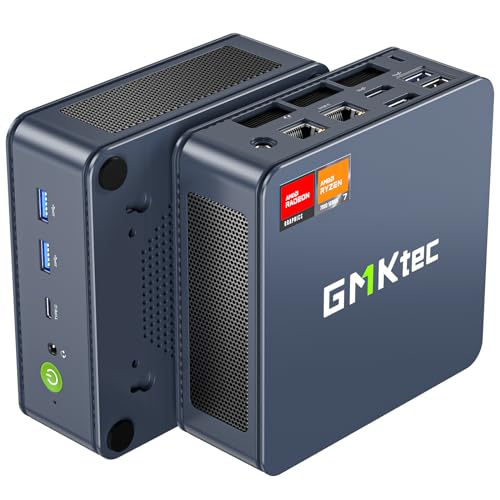
- Best 1440p attempt in this guide: GMKtec NucBox K6, Ryzen 7 7840HS, Radeon 780M, 32GB DDR5, 1TB SSD — Check on Amazon
- Beelink SER5 MAX, Ryzen 7 5800H, 32GB RAM, 1TB SSD — Check on Amazon
- MINIX NEO Z300-0dB Fanless Mini PC, Intel i3-N300, 16GB RAM, 512GB SSD — Check on Amazon
- HP EliteDesk 800 G5 Mini, Core i5-9500T, 16GB RAM, 256GB SSD (Renewed) — Check on Amazon
See 2 more Amazon options
- Beelink EQ14 Mini PC, Intel N150, 16GB RAM, 500GB SSD — Check on Amazon
- MeLE Quieter 4C Fanless Mini PC, Intel N150, 8GB RAM, 256GB SSD — Check on Amazon
Read the full guide ↓
Disclosure: As an Amazon Associate, reviewstook.com earns from qualifying purchases. Links to Amazon on this page are affiliate links; they cost you nothing extra. Listing details such as price and availability change often, so check the current Amazon listing before you buy.
This keyword hides two different purchases inside one phrase, and separating them is the whole job of this guide. The first purchase is a 1440p display: a sharp 2560×1440 monitor on the desk for documents, spreadsheets and calls. Every machine below drives that panel easily — most of them can output 4K — so if your working day is the point and gaming is an evening extra, all six picks pass. The second purchase is 1440p rendering: the graphics hardware actually drawing a game at 2560×1440, pixel by pixel, in real time. That is a far heavier workload, and at under $500 in a home office mini PC it is mostly not on sale. Only one pick in this guide, the GMKtec NucBox K6, can honestly attempt native 1440p rendering, and only in lighter, older or esports-style titles at reduced settings. Everything else here renders games at 1080p or below and lets the monitor upscale the picture to fill the panel — a perfectly enjoyable arrangement, as long as nobody sells it to you as native 1440p.
Two honesty rules follow from that, and they run through every review below. First, there is no NVIDIA RTX hardware anywhere in this set, which means there is no DLSS anywhere in this set — DLSS needs RTX Tensor cores, and integrated Vega, Radeon 780M and Intel UHD graphics do not have them. Any listing or review that implies otherwise for machines like these is wrong. Second, where a game is rendered below 1440p and upscaled, this guide says what the render resolution actually is. AMD’s FSR upscaling is available on the two Radeon picks and is credited generically for them; it improves the upscaled picture, but it does not turn a 1080p render into a 1440p render, and this guide never blurs that line. If your priority is genuine 1440p gaming first and office work second, the honest reads are Best 1440p Gaming PC Under $500 and the step up to Best Home Office PC For 1440p Gaming Under $700. If your priority is a 1440p desk that also plays games in the evening, read on — that is exactly the machine this guide is buying.
In this guide
Quick Picks
Short on time, or comparing several options at once? Each row below names a buyer type and the machine that suits it, with a link to the listing.
| Buyer type | Pick | Why it stands out | Link |
|---|---|---|---|
| Closest to real 1440p gaming | GMKtec NucBox K6, Ryzen 7 7840HS, 32GB/1TB | Radeon 780M graphics — native 1440p in lighter titles; check price on Amazon, as it fits this budget on sale | Check on Amazon |
| Best 1440p desk, games upscaled | Beelink SER5 MAX, Ryzen 7 5800H, 32GB/1TB | 32GB of memory and three 4K outputs; games render at 1080p and upscale | Check on Amazon |
| Silent 1440p desk | MINIX NEO Z300-0dB, Intel i3-N300, 16GB/512GB | Fanless, so the 1440p office is silent; gaming is light-duty only | Check on Amazon |
| Cheapest route to a 1440p desk | HP EliteDesk 800 G5 Mini, i5-9500T, 16GB/256GB (Renewed) | Budget-tier renewed pick with three DisplayPort outputs, leaving more of the budget for the panel — check price on Amazon | Check on Amazon |
| New, warrantied, light gaming | Beelink EQ14, Intel N150, 16GB/500GB | 16GB of memory for the shared-graphics pool in the budget tier — check price on Amazon | Check on Amazon |
| Fanless on a budget | MeLE Quieter 4C, Intel N150, 8GB/256GB | Silent and VESA-mounted behind the panel — check price on Amazon | Check on Amazon |
How These Picks Were Chosen
The starting point is the verified set from our office guide to this budget, Best Home Office PC Under $500: six complete, ready-to-run machines, no barebones kits, with every specification carried over unchanged. This guide re-grades that same set through one lens — what each machine can honestly do with a 1440p monitor — and re-ranks it where the lens changes the order. Nothing new was added and no specification was imported from anywhere else; where the office guide recorded a deal rule, a variant warning or a renewed-condition caveat, it is carried here at full size.
The grading itself has three parts. The first is the graphics hardware, because it decides the render resolution: the K6’s Radeon 780M is a modern integrated GPU strong enough for native 1440p in lighter titles at reduced settings and comfortable 1080p rendering elsewhere; the SER5 MAX’s older Vega-class graphics are a 1080p-and-below renderer; and the Intel UHD graphics in the remaining four picks are desktop-class accelerators that draw a beautiful 1440p office and render games at 720p-to-1080p in light titles only. The second part is memory, because integrated graphics have no memory of their own — they borrow from system RAM, so the pool the game and the graphics share matters twice over. That is why the two 32GB machines grade at the top, why 16GB is the comfortable floor, and why the one soldered 8GB machine grades last for this angle even though it is a fine quiet office box. The third part is the documented display outputs, because a 1440p panel is only as good as the port feeding it: every pick here was checked for outputs that carry 1440p properly, and the monitor section below works only from the port lists recorded for these machines.
Three techniques get named in this guide, so here is what each can and cannot do, stated once and applied consistently. Upscaling renders the game below the panel’s resolution and reconstructs a 1440p-sized image from it; AMD’s FSR does this on the Radeon picks and is the honest way most of these machines will fill a 1440p screen. DLSS is NVIDIA’s equivalent and is simply absent here — no pick has RTX hardware, so no pick offers it, and no internal-resolution figures for it apply to this set. Frame generation, where a game offers it, interpolates extra frames on the display side to smooth motion; it changes how fluid a picture feels, never the resolution it was rendered at, and it is not a reason to call any machine in this guide a native-1440p machine. Finally, the one route that presents a genuinely 1440p-rendered game on any of these boxes is cloud gaming, where a remote server does the rendering and streams the picture down — genuinely 1440p on the panel, at the price of a subscription, a strong connection and some input lag. It is mentioned where it is the honest answer, not used as a trick to make weak hardware sound strong.
The 6 Best Home Office PCs for 1440p Gaming Under $500
GMKtec NucBox K6 — Ryzen 7 7840HS, Radeon 780M, 32GB DDR5 RAM, 1TB SSD
Who it suits: The home worker who games most evenings and wants the one machine in this guide that can render at least some games at the panel’s own resolution — and who is willing to buy on a sale day to get it.
The K6 leads this guide for one reason: its Radeon 780M integrated graphics are in a different class from everything else here. Built into the eight-core Ryzen 7 7840HS and fed by 32GB of DDR5-5600 memory in two SO-DIMM slots, the 780M is strong enough to render lighter, older and esports-style games natively at 1440p with settings turned down, and to render demanding titles at 1080p and upscale them to the panel with FSR doing the reconstruction. That two-mode honesty is the correct way to think about the machine: native 1440p is real but conditional, and the condition is the game’s weight. The memory matters beyond capacity — integrated graphics borrow bandwidth as well as space from system RAM, and a 32GB DDR5 pool in two slots is the best feeding arrangement in this guide. Storage is a 1TB PCIe 4.0 SSD with a second M.2 slot empty for later, memory expands to 64GB, and the outputs are the right ones for a 1440p desk: HDMI 2.0, DisplayPort 1.4 and a USB4 port carrying video drive three 4K displays between them, so the gaming panel gets a proper high-refresh connection with ports to spare. Dual 2.5GbE networking, Wi-Fi 6E and Windows 11 Pro complete a specification that reads like it wandered in from a higher price tier.
Price is the condition on the whole pick. This listing often sits above this guide’s budget at its everyday price and only fits the budget when it is on sale, so check price on Amazon before you buy. The rule is the same one our office guide printed, unchanged: on a sale day when it does fit the budget, this is the best home office PC for 1440p gaming in this guide; at its everyday price above the budget, the SER5 MAX below is the buy. Two working caveats travel with it. Fan behaviour is the first: the fans make themselves heard under load, the BIOS gives you no fan curve to tame them with, and GMKtec’s Quiet (45W) and Performance (65W) power modes are the only lever — gaming wants the higher one. The second is a single verified buyer’s report of a fitted SSD whose SMART data showed prior usage hours, so read the drive’s health figures in the first week while returns are easy; that advice applies to every mini PC in this guide.
- The strongest integrated graphics in this guide — native 1440p in lighter titles, FSR upscaling for the rest.
- 32GB of DDR5 memory in two slots feeding the shared graphics pool, expandable to 64GB.
- HDMI 2.0, DisplayPort 1.4 and USB4 video outputs — a proper high-refresh feed for a 1440p panel.
Honest limitation: Its everyday price often sits above this guide’s budget; it belongs in this guide only when it is on sale within the budget — check price on Amazon — and even then native 1440p means lighter titles at reduced settings, not demanding games at high settings.
Choose it if gaming matters most in this guide and you can wait for the sale. Skip it if you need to order today at the everyday price, or your games are the newest demanding releases — those want a discrete graphics card, and Best Mini Gaming PC Under $500 is the more honest starting point.

Beelink SER5 MAX — Ryzen 7 5800H, 32GB RAM, 1TB SSD
Who it suits: The worker whose desk is the point — two or three sharp monitors, a heavy browser habit, long days — and whose gaming is older, casual or indie titles played at sensible settings in the evening.
Judged as a 1440p desk, this is the most complete machine in the guide. One HDMI 2.0 port, one DisplayPort 1.4 and a USB-C port carrying video drive up to three 4K displays at 60Hz between them, so a 1440p main panel flanked by a second screen is a cabling exercise, not an upgrade. The eight-core Ryzen 7 5800H is paired with 32GB of DDR4 memory in two SO-DIMM slots (expandable to 64GB) and a 1TB NVMe SSD, with a 2.5-inch SATA bay inside for a second drive — the roomiest fitted specification here, and the reason the machine shrugs off the forty-tab working day. Judged as a 1440p gaming machine, the honest grade is one step down: its Vega-class integrated graphics render games at 1080p and below, so on a 1440p panel the picture is an upscaled one — FSR where the game offers it, the monitor’s or driver’s scaling where it does not. Older and lighter games look perfectly respectable that way, and the 32GB pool means the graphics never have to fight the browser for memory. What this machine will not do is render a modern game natively at 1440p, and no setting changes that. Pricing for this fitted specification varies between listings and over time, so check price on Amazon for the current listing before you buy. Windows 11 Pro is pre-installed, Wi-Fi 6 and Bluetooth 5.2 are built in, and a VESA mount in the box lets the machine disappear behind the panel it feeds.
The limitations are about age, acoustics and one checkout trap. The 5800H is a 2021-era chip: quick enough for office work and light gaming, but its graphics belong to an older generation and there is no DLSS to lean on — Vega graphics predate that feature set entirely. The cooling is a dual-fan design running the chip at a 54-watt setting, and reviewers could hear those fans under sustained heavy load. Ordinary office work never provokes them; a gaming session is exactly the sustained load that does. Reviewers also noted the fitted NVMe drive is a QLC design, a type that can slow during very large sustained writes. And the variant warning matters at checkout: Beelink also sells a 24GB/500GB build under the same SER5 MAX name, on a different chip whose memory is soldered. The link here points at the 5800H model with slotted DDR4 — check the page’s configuration against that before paying, because the soldered namesake is a materially worse machine for this guide’s purposes.
- 32GB of slotted memory and a 1TB SSD — the shared-graphics pool never starves.
- Three independent 4K outputs: the best multi-monitor 1440p desk in this guide.
- Games render at 1080p and upscale cleanly; older and lighter titles are its home ground.
Honest limitation: No native 1440p rendering in modern games and no DLSS — its graphics are an older integrated generation, and fans are audible under the sustained load gaming creates.
Choose it if the working desk comes first and evening gaming is older, casual or indie. Skip it if native 1440p in current games is the goal — that is the K6’s trick, and only just.

MINIX NEO Z300-0dB — Intel i3-N300, 16GB RAM, 512GB SSD, Fanless
Who it suits: The call-heavy worker in a quiet room who wants a sharp 1440p office in complete silence, and whose gaming is the lightest kind — classics, indies, and browser-era titles.
The name is the specification. There is no fan anywhere in this machine — the all-metal chassis is the heatsink — so a 1440p monitor, a document and a video call happen in a room with no computer noise in it at all. As a display engine for office work it is fully equipped: two HDMI ports at 4K/60 plus a USB-C port carrying video and power delivery make three displays possible, so a 1440p main panel with a side screen is well within its brief. The Intel Core i3-N300 is an eight-core efficiency processor — modest on paper, genuinely sufficient for documents, browsing, email and calls — with 16GB of DDR4 memory in a slot that upgrades to 32GB, and a 512GB PCIe SSD in a slot that accepts drives up to 4TB. Windows 11 Pro is installed, and there is a 2.5GbE Ethernet port, Wi-Fi 6 and Bluetooth 5.2. It sits at the premium end of this budget tier on Amazon — check price on Amazon — and what the money buys is the silence and the build.
For gaming, grade it plainly. The N300’s Intel UHD graphics are a desktop accelerator, not a gaming GPU: they will draw the 1440p desktop all day, and they will render genuinely light games — older classics, simple indies, 2D titles — typically at 720p or modest 1080p settings, upscaled to the panel. There is no DLSS (no RTX hardware) and no meaningful FSR story on Intel graphics of this class in the sources behind this guide, so nothing here is credited. The second limitation is thermal and it is the physics of fanless design: testers who held this model at full load for a sustained stretch recorded the processor at 98°C, the point where the chip protects itself by slowing down. Office work is bursty and never lives in that regime, but gaming is a sustained load — a long session asks the one kind of work this cooling design is worst at, and throttling is the predictable result. Buy it for the silent 1440p office and treat any gaming as a bonus at the lightest settings; buy it for gaming and every other pick in this guide serves you better.
- Genuinely fanless — a silent 1440p desk, and nothing whirs behind your voice on a call.
- Two HDMI ports plus USB-C video for up to three displays; memory slotted to 32GB.
- SSD slot accepts drives up to 4TB, so storage can grow even though the role is light-duty.
Honest limitation: Desktop-class graphics that render only the lightest games at reduced resolution, in a fanless chassis that throttles under the sustained load gaming creates.
Choose it if silence is the first specification and gaming is an occasional, lightweight extra. Skip it if gaming sessions are long or the titles are modern — the fanned AMD picks above are the honest route.

HP EliteDesk 800 G5 Mini — Core i5-9500T, 16GB RAM, 256GB SSD (Renewed)
Who it suits: The value-first worker who would rather keep the computer in the budget tier and put the serious money into the 1440p monitor itself — accepting renewed-machine rules in exchange for that saving.
For this particular keyword, the renewed route has a specific logic: the panel is the expensive half of a 1440p desk, and this machine is how you afford a good one. The EliteDesk 800 G5 Mini is a one-litre business desktop built for corporate fleets, and the configuration linked here carries a six-core Core i5-9500T, 16GB of DDR4 memory and a 256GB NVMe SSD. Its port list is the business-desktop advantage in miniature: six USB-A ports, a USB-C port, and three DisplayPort outputs — two DisplayPort 1.2 and one DisplayPort 1.4 — so a 1440p panel connects over DisplayPort exactly as it should, with outputs to spare for a second screen. As a renewed, budget-tier machine with a six-core processor and 16GB of memory, it leaves much more of the overall budget for the monitor itself — check price on Amazon for the current listing — which is precisely where a 1440p budget does the most good.
The gaming grade is the modest part. The i5-9500T’s Intel UHD Graphics 630 are a 2019 desktop accelerator: they drive a 1440p office desktop without complaint and render only very light or older games, at 720p-class settings upscaled to the panel. There is no DLSS and no upscaling feature worth the name on this silicon; what you see is an honestly small render, honestly displayed. The renewed caveats are the rest of the review, and they are unchanged from our office guide. Remember what a renewed unit is: an individual machine, not a sealed product. Reviewers of this model family found the innards vary from unit to unit — how Wi-Fi is provided, and what form the third display output takes — and the listing itself disagrees with itself, the title claiming Windows 11 Pro while a features block says Windows 10 Professional. The Renewed program’s guarantee stands behind the purchase — a 90-day warranty is that program’s standard minimum — and that guarantee is the floor of the deal, not a substitute for a manufacturer’s multi-year cover. Two habits are what make the pick safe rather than merely cheap. Spend the first evening inspecting it — memory, storage, Wi-Fi and ports all checked against the listing while the return window is wide open — and, before any work account touches it, wipe the drive and install Windows fresh from Microsoft’s own media, because review outlets have reported malware detections on a pre-installed image from this model family. On longevity, be clear-eyed: this is a 2019 platform whose processor sits on Microsoft’s Windows 11 supported list, so it has a supported present and no promised future beyond it. As a three-to-four-year answer at a budget-tier renewed price the deal is a good one; expect a decade and you have misread it.
- Six-core business processor and 16GB of memory in a budget-tier renewed pick — check price on Amazon, and the panel budget survives.
- Three DisplayPort outputs, so the 1440p monitor gets a proper DisplayPort feed.
- A supported Windows 11 processor with Pro installed, and the Renewed program’s guarantee behind the unit.
Honest limitation: 2019 integrated graphics render only very light games at reduced resolution, and a renewed unit is an individual — configuration varies, the warranty is the Renewed program’s rather than HP’s, and the 256GB SSD caps its lifespan.
Choose it if the monitor matters more than the machine and you will do the first-evening checks and the clean reinstall. Skip it if gaming is more than an occasional light extra, or you need a manufacturer’s warranty — buy new from this guide instead.

Beelink EQ14 — Intel N150, 16GB RAM, 500GB SSD
Who it suits: The straightforward home office — documents, email, browsing, calls, a sharp second monitor — that wants a new machine with a maker’s warranty, a 1440p panel on the desk, and most of the budget left over.
The EQ14’s case for this guide is completeness in the budget tier. Inside is Intel’s N150 — four efficiency cores peaking at 3.6GHz — alongside 16GB of DDR4 memory and a 500GB SSD: a specification shared across several near-identical listings in this tier, so check price on Amazon for the current listing before you buy. Two HDMI outputs at 4K/60 feed the classic two-monitor desk, so a 1440p main panel is an ordinary connection here, and there are two 2.5GbE Ethernet ports, Wi-Fi 6, and a second M.2 slot for another drive later. The 16GB of memory is why it grades above the MeLE below for this angle specifically: integrated graphics borrow from system memory, and 16GB leaves the game and the graphics a workable pool where 8GB does not.
The gaming grade itself is light-duty, stated plainly. The N150’s Intel UHD graphics render the lightest games — older titles, simple indies, 2D games — at reduced resolutions upscaled to the panel, and that is the ceiling; there is no DLSS on Intel silicon and no native 1440p rendering of anything modern. The boundaries around the office role deserve the same clarity. Four efficiency cores are four: the EQ14 is responsive at documents and browsing and the wrong machine for heavy spreadsheets or anything that pins a processor for minutes. The 16GB lives in a single slot and 16GB is the platform’s maximum, so the fitted amount is also the final amount. And the listing’s title specifies Windows 11 Home — fine for most home workers, but Home lacks Pro’s BitLocker drive-encryption controls, domain joining and Remote Desktop hosting, so anyone whose employer requires those should look at the Pro machines above. This listing has also vanished for a stretch before — it was out of stock through part of autumn 2026 — so if it is unavailable when you shop, the MeLE below is the nearest equivalent, and Best Mini PC Under $500 tracks the wider field.
- A new, warrantied machine in the budget tier — check price on Amazon, and the budget keeps room for the panel.
- 16GB of memory fitted: a workable shared pool for the integrated graphics.
- Dual 4K HDMI outputs, dual 2.5GbE, and a second M.2 slot for storage growth.
Honest limitation: Light-duty graphics that upscale reduced-resolution renders, four efficiency cores, a hard 16GB memory ceiling, and Windows 11 Home rather than Pro.
Choose it if the workload is documents, email, browsing and calls with light gaming on the side. Skip it if gaming is a real priority — the K6 at its sale price is the same budget spent the other way.

MeLE Quieter 4C — Intel N150, 8GB RAM, 256GB SSD, Fanless
Who it suits: The quiet-desk worker with a light load — documents, email, web apps, calls — who wants silence, Windows 11 Pro, and a machine that can hide behind the 1440p panel itself.
The Quieter 4C takes the MINIX’s founding idea — no fan anywhere, a chassis that sheds heat passively, nothing audible — and builds it smaller and cheaper. For a small 1440p desk it has one installation trick the others mostly lack: a VESA mount, so the whole computer bolts to the back of the monitor and the desk holds nothing but the panel, the keyboard and the mouse. Dual HDMI outputs at 4K, a USB-C port with power delivery, Wi-Fi 6 and Windows 11 Pro round out a tidy silent office box. Pricing for this model varies, so check price on Amazon and consider waiting for a dip if the current listing sits at the top of its range. When it is priced in the mid-range of this budget tier it is a pleasant silent machine; at the top of its range the MINIX above, with double the memory in an upgradeable slot, is the better spend.
For this angle the memory is the limitation, and it cannot be fixed. The N150’s graphics are desktop-class to begin with — light games at reduced resolutions, upscaled — and they borrow their memory from a pool of just 8GB of LPDDR5 that is soldered to the board and can never be increased. The operating system, the browser and the game all draw from the same 8GB the graphics are borrowing from, which is why this pick grades last for 1440p gaming despite being a perfectly good quiet office machine: it is the one specification in the guide that cannot grow and cannot be worked around. The 256GB SSD asks for the same discipline. Buy it for the silent desk it honestly fits — check price on Amazon first — and treat gaming as an occasional light extra; buy it as a gaming machine of any ambition and the solder will be the reason it disappoints.
- No fan and no noise, Windows 11 Pro installed, and two HDMI outputs at 4K.
- VESA-mountable — the computer disappears behind the 1440p panel it feeds.
- A mid-range pick in this budget tier when priced on a dip — check price on Amazon before you buy.
Honest limitation: 8GB of memory is soldered and final, and that shared pool is shared with the graphics too — the tightest gaming ceiling in this guide, with no growth path.
Choose it if the working day is documents, email and calls and a silent room outranks spare capacity. Skip it if gaming matters at all beyond the lightest titles — the EQ14’s 16GB or the SER5 MAX’s 32GB are the grown-up answers.

Comparison Table
| Product | Graphics | What 1440p honestly means on it | Link |
|---|---|---|---|
| GMKtec NucBox K6, 7840HS, 32GB/1TB | Radeon 780M integrated | Native 1440p in lighter titles at reduced settings; 1080p + FSR upscale for heavier games | Check on Amazon |
| Beelink SER5 MAX, 5800H, 32GB/1TB | Vega-class integrated | Superb 1440p desktop across three displays; games render at 1080p or below and upscale | Check on Amazon |
| MINIX NEO Z300-0dB, N300, 16GB/512GB | Intel UHD integrated | Silent 1440p office; only the lightest games, at reduced resolution | Check on Amazon |
| HP EliteDesk 800 G5 Mini, i5-9500T (Renewed) | Intel UHD 630 integrated | 1440p desktop over DisplayPort; very light or older games at 720p-class renders | Check on Amazon |
| Beelink EQ14, N150, 16GB/500GB | Intel UHD integrated | 1440p desktop over dual HDMI; lightest games at reduced resolution, upscaled | Check on Amazon |
| MeLE Quieter 4C, N150, 8GB/256GB | Intel UHD integrated | 1440p desktop from behind the panel; gaming limited by the soldered 8GB shared pool | Check on Amazon |
Pairing a 1440p Monitor With These Machines
The monitor is the half of this purchase you will look at for a decade, so pair it deliberately. Everything below works only from the outputs documented for these six machines — no port has been invented for the occasion.
- Connect over DisplayPort or HDMI 2.0. The K6 offers HDMI 2.0, DisplayPort 1.4 and USB4 video; the SER5 MAX offers HDMI 2.0, DisplayPort 1.4 and USB-C video; the EliteDesk offers DisplayPort 1.2 and 1.4; the MINIX, EQ14 and MeLE offer HDMI at 4K/60 and, on the MINIX, USB-C video. Any of those connections carries a 1440p picture properly. For a high-refresh 1440p gaming panel, prefer DisplayPort where the machine offers it — it is the connection gaming monitors are built around — and use the cable that ships with the monitor.
- Set the refresh rate yourself. Windows frequently connects a new high-refresh panel at 60Hz and leaves it there. Whatever panel you buy, open the display settings after setup and set its actual refresh rate; a 144Hz monitor running at 60Hz is the most common way this entire purchase quietly underdelivers.
- Match the panel to the rendering, not the dream. A 1440p 60Hz office panel is the right partner for five of these six machines: razor-sharp text all day, and an upscaled game picture in the evening. A high-refresh 1440p gaming panel only earns its premium behind the K6, the one pick whose rendering can feed it — and even there, in lighter titles. Behind an N150 or UHD 630 machine, a fast panel is money spent on headroom the graphics cannot use.
- Do not buy a 4K panel expecting 4K gaming. Every pick here can display 4K for office work, and none of them can render games at 4K. A 4K monitor also makes upscaled 1080p renders work harder across more pixels. For this budget and this hardware, 1440p is the sweet spot precisely because the display is sharp and the render targets stay honest.
- Remember the render setting inside the game. On a 1440p panel, the five non-K6 picks should be run at a 1080p or lower render resolution with upscaling where offered; rendering at 720p upscaled to 1440p is an exact doubling per axis, which is why it often looks cleaner than a non-integer step. Setting a game to the panel’s native 1440p on integrated graphics and wondering why it crawls is the standard first-evening mistake — the checklist in the next section exists to prevent it.
How to Choose a Home Office PC for 1440p Gaming Under $500
- Decide which 1440p you are buying. If it is a sharp working display, every pick here qualifies and the choice turns on memory, silence and price. If it is native 1440p game rendering, only the K6 qualifies, only in lighter titles, and only at its sale price. Most buyers honestly want the first with a side of the second — buy accordingly.
- Grade the graphics before the processor. For this keyword the GPU class is the specification: Radeon 780M, then Vega-class integrated, then Intel UHD. An eight-core CPU behind UHD graphics will lose every gaming comparison to a stronger GPU behind a modest CPU, because the render is the bottleneck, not the cores.
- Count memory as graphics memory. Integrated GPUs borrow system RAM, so 32GB is a gaming specification here, not just an office one. Treat 16GB as the floor and soldered 8GB as a ceiling that no later upgrade can lift — soldered memory is final, at any size.
- Set the render resolution per game, on purpose. On the five non-K6 picks, run games at 1080p or below and let FSR or the display upscale; on the K6, try native 1440p in lighter titles and drop to an upscaled render when a game is heavier than the silicon. The panel stays at 1440p either way — only the render moves.
- Price the whole desk, panel included. None of these boxes is a laptop — the monitor, keyboard, mouse and webcam are all separate line items. The renewed EliteDesk and the EQ14, both budget-tier picks, leave real money for a good 1440p monitor — a legitimate reason to choose them over a premium-tier machine in this guide feeding a tired panel.
- Put noise on the checklist if you take calls or play late. Fanless picks are silent by construction. The two performance machines here are both documented as audible under sustained load — and gaming is sustained load — so a quiet room argues for the fanless picks or for headphones, honestly weighed.
- Check the configuration and the drive in week one. Whether the box is new or renewed, spend ten minutes in the first week confirming the fitted memory, storage and ports are what the listing promised, and read the SSD’s health figures while a return is still painless. Same-name variants — the SER5 MAX has a soldered namesake — make this a buying step, not a paranoia.
Common Buying Mistakes
- Believing a mini PC listing that implies DLSS on integrated graphics. DLSS requires NVIDIA RTX hardware with Tensor cores. No machine in this guide has any, so no machine in this guide offers DLSS — whatever a marketplace bullet suggests.
- Confusing a 4K or 1440p output specification with gaming at that resolution. “Supports 4K displays” describes the desktop signal. Rendering a game at that resolution is a different and much heavier claim, and at this budget it is mostly not true.
- Setting games to the panel’s native 1440p on Intel UHD graphics and concluding the machine is broken. It is doing exactly what its silicon can do. Drop the render resolution and upscale — that is the designed operating mode for five of these six picks.
- Paying the K6’s everyday price without checking. At its everyday price it can sit above this guide’s budget, and it only belongs in this guide when it is on sale within the budget. Checking the price on Amazon and a little patience are the difference between the best pick in this guide and an over-budget one.
- Buying a high-refresh gaming monitor for a machine that cannot feed it. Behind an N150 or UHD 630, a 165Hz panel displays a slow render very smoothly. Spend the monitor money on panel quality at 60Hz unless the K6 is the machine.
- Reading 8GB of soldered memory as a starting point you can build on. Soldered is final, and on an integrated-graphics machine the game shares that same small pool. If your workload or your gaming might grow, a slotted machine is the safer purchase at the same price.
- Signing work accounts into a renewed machine’s pre-installed Windows on the first evening. Wipe it and install fresh from Microsoft’s own media instead — about an hour’s work that retires a whole category of risk, on a model family where pre-installed images have drawn warnings.
- Assuming a same-name variant is the same machine. One name, two different computers: a soldered-memory SER5 MAX build exists alongside the slotted model recommended here, so check the chip and the memory type on the listing page before paying.
Final Recommendation
- Closest to real 1440p gaming: GMKtec NucBox K6 — at its sale price.
- Best 1440p desk overall: Beelink SER5 MAX.
- Silent 1440p office: MINIX NEO Z300-0dB.
- Cheapest route to the panel: HP EliteDesk 800 G5 Mini (Renewed).
- New, warrantied, light-duty: Beelink EQ14.
- Silent and hidden behind the monitor: MeLE Quieter 4C.
Our top two for this keyword are the GMKtec NucBox K6 and the Beelink SER5 MAX, and they answer the keyword’s two meanings in order. The K6 is the only machine here that renders any games at the panel’s native 1440p, and when it is on sale within this budget — check price on Amazon — it is the strongest answer in this guide for a worker who games most evenings — bought on the right day, never at its everyday price above the budget. The SER5 MAX is the better desk: 32GB of memory, a terabyte of storage, three displays, everything fitted and expandable, with evening gaming rendered at 1080p and upscaled without apology. If the budget is the real constraint, the renewed EliteDesk’s arithmetic — a budget-tier six-core machine, leaving more of the money for the monitor itself — is the strongest in the guide, bought with its inspection rules attached; if silence is the constraint, the MINIX is the machine your callers will never hear. Buyers in a small room should also see Best Home Office PC For Small Spaces Under $500, first-time buyers Best Home Office PC For Beginners Under $500, and anyone whose office machine doubles as a streaming station should read Best Home Office PC For Streaming Under $500 before assuming an office pick moonlights well. Decide which 1440p you are buying, check price on Amazon, confirm the configuration at checkout, and the machine will take care of the work.
Frequently Asked Questions
Can any home office PC under $500 really game at 1440p?
One of them, conditionally. The GMKtec NucBox K6’s Radeon 780M graphics can render lighter, older and esports-style games natively at 1440p with settings reduced, and it upscales heavier games from a 1080p render. The other five picks in this guide display a 1440p picture — the desktop is genuinely 1440p — but render games below that resolution and upscale. Demanding modern games at native 1440p need a discrete graphics card, which this budget and this form factor do not contain; Best Gaming PC For 1440p Gaming Under $500 covers machines built around that job.
Why is there no DLSS in this guide?
Because there is no NVIDIA RTX hardware in this guide. DLSS runs on RTX Tensor cores, and every pick here uses integrated graphics — AMD Vega, AMD Radeon 780M or Intel UHD — none of which has them. The upscaling these machines can use is AMD’s FSR on the two Radeon picks, credited in this guide without invented figures, plus ordinary display scaling elsewhere. A listing that suggests DLSS for a machine like these is describing hardware it does not have.
Why does a 1080p game look softer on my 1440p monitor than on a 1080p one?
Because 1440p is not a whole-number multiple of 1080p: each axis scales by one and a third, so pixels land between pixels and the picture softens. Upscaling features like FSR exist to manage exactly this. It is also why a 720p render can look surprisingly clean on a 1440p panel — 720p doubles exactly per axis. Either way, the softness is the scaling, not a fault in the monitor or the machine.
Which monitor should I pair with these PCs?
For five of the six picks, a good 1440p 60Hz office panel: sharp text, honest upscaled gaming, no money wasted on refresh the graphics cannot feed. Reserve a high-refresh 1440p gaming monitor for the K6, connect it over DisplayPort where the machine offers it, and whichever panel you buy, set its real refresh rate in Windows display settings after setup — new panels commonly default to 60Hz. The monitor section above works through the pairings port by port.
Is a renewed business desktop a safe buy for a 1440p desk?
It is a risk you manage in exchange for a price the new market cannot match. Buy through the Amazon Renewed program so its guarantee stands behind the unit, choose a processor on Microsoft’s Windows 11 supported list (the EliteDesk’s 9th-generation chip qualifies), verify the configuration matches the listing in the first week, and reinstall Windows from Microsoft’s own media before signing into work accounts. Follow those rules and it is a sound three-to-four-year route to a 1440p desk at a budget-tier renewed machine price; skip them and you are relying on luck.
Can cloud gaming give me real 1440p on these machines?
Yes — it is the one route where the picture on the panel is genuinely rendered at 1440p on any pick here, because a remote server does the rendering and streams the result down. The costs are a subscription, a fast and stable connection, and some input lag between your hands and the screen, which matters more in fast games than in slow ones. It is a legitimate way to game at 1440p on a light machine; it is not a property of the machine itself, and this guide does not count it as one.
- Best Home Office PC Under $400
- Best Home Office PC Under $700
- Best Home Office PC For 1440p Gaming Under $400
- Best Home Office PC For 1440p Gaming Under $700
- Best Home Office PC For Beginners Under $500
- Best Home Office PC For Small Spaces Under $500
- Best Home Office PC For Streaming Under $500
- Best Mini PC Under $500
- Best Fanless Mini PC Under $500
- Best Compact Gaming PC Under $500


