Where to buy
Check the latest price, availability and delivery on Amazon. Orders are placed on Amazon. We may earn a commission from qualifying purchases.
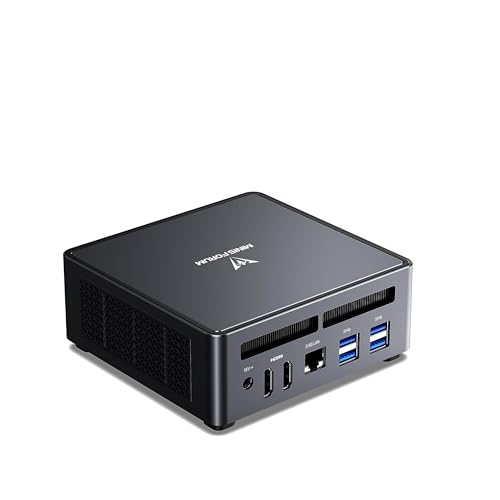
- Best overall for 1440p upscaling: MINISFORUM UM790 Pro Barebone (Ryzen 9 7940HS, no RAM/SSD) — Check on Amazon
- ASRock DeskMini X600 (USB4) AM5 Barebone Kit — Check on Amazon
- AOOSTAR GEM12+ PRO Barebone (Ryzen 7 PRO 8845HS, OCuLink) — Check on Amazon
- MINISFORUM MS-01 Barebone (Core i5-12600H, dual 10GbE, PCIe slot) — Check on Amazon
See 2 more Amazon options
- ASRock DeskSlim X600 AM5 Barebone (PCIe 5.0 x16 slot for a low-profile GPU) — Check on Amazon
- MINISFORUM MS-A1 Barebone with Ryzen 9 9950X (no RAM/SSD) — Check on Amazon
Read the full guide ↓
Disclosure: As an Amazon Associate, reviewstook.com earns from qualifying purchases. Links to Amazon on this page are affiliate links; they cost you nothing extra. Listing details such as price and availability change often, so check the current Amazon listing before you buy.
This keyword makes two promises at once, and both need examining before any money moves. The first is “barebones”: an incomplete computer by design — no memory, no storage, usually no operating system, and in two cases here no CPU either — so what you pay for the barebone alone is never the cost of a working PC. This guide holds every pick to one rule: the $1,200 budget is the cost of the finished machine, parts included, and every pick below is chosen so the finished machine can be completed within it. The second promise, “1440p gaming”, needs the same treatment: not one of these six machines renders demanding modern games natively at 2560×1440 on integrated graphics. What this budget honestly buys is a PC that drives a 1440p monitor while rendering at 1080p or below and upscaling to fill the panel — FSR and RSR on the AMD machines, XeSS on the Intel one — with native 1440p reserved for lighter, older and esports titles. So each pick is graded on its 1440p path: how strong a picture its upscaling can produce, and whether it owns a door — a PCIe slot or an OCuLink port — to a discrete GPU and native 1440p later.
The DLSS point belongs here too, stated plainly: there is no NVIDIA graphics chip in any of these six picks, so there is no DLSS on day one, whatever a game menu or a listing headline implies. DLSS only enters this guide through the upgrade doors — fit an NVIDIA card into the DeskSlim’s or MS-01’s slot, or dock one over OCuLink on the GEM12+ PRO or MS-A1, and DLSS becomes available, rendering at roughly 1707×960 internally in its Quality mode for a 1440p output, or roughly 1280×720 in Performance mode. Until then, FSR is the upscaler that does the work here. We also hunted for a discrete-GPU barebone verifiable on Amazon US that completes under $1,200, and could not pin one down; the reasoning is in the discrete-GPU section below. Finally, the spending order matters: completion parts eat the budget first; any GPU or dock is a second purchase on top of a finished PC. A barebone plus an eGPU dock and no RAM is not a 1440p gaming rig; it is a paperweight with a promising port.
In this guide
Quick Picks
Short on time, or comparing several options at once? Each row names a buyer type and the barebone that suits it, with a link to the listing. Check price on Amazon for each barebone and for the parts needed to finish it — each review explains what is still needed, and the comparison table’s “1440p path” column is the one this keyword lives or dies by.
| Buyer type | Pick | Why it stands out | Link |
|---|---|---|---|
| Best overall for 1440p upscaling | MINISFORUM UM790 Pro Barebone | Radeon 780M renders at 1080p and upscales to 1440p; just add RAM and SSD | Check on Amazon |
| Cheapest finished 1440p build | ASRock DeskMini X600 (USB4) | Socketed AM5 kit at the lower end of the range — check price on Amazon; your APU sets the graphics | Check on Amazon |
| Best two-stage 1440p plan | AOOSTAR GEM12+ PRO Barebone | 780M upscaling today, an OCuLink port for a native-1440p dock later | Check on Amazon |
| Best expansion and networking | MINISFORUM MS-01 Barebone (i5-12600H) | A real PCIe slot for a low-profile card; Iris Xe alone is not a 1440p GPU | Check on Amazon |
| Best internal route to native 1440p | ASRock DeskSlim X600 | PCIe 5.0 x16 slot takes a low-profile desktop GPU inside the box | Check on Amazon |
| Most CPU, with an eGPU door | MINISFORUM MS-A1 (Ryzen 9 9950X) | 16 desktop cores; its iGPU is display-grade, so 1440p gaming means OCuLink | Check on Amazon |
How These Picks Were Chosen
Every pick is a real Amazon US listing whose ASIN we verified during research, sold as a barebone — no RAM, no SSD, no OS — or, for the two ASRock kits, as a platform with no CPU either. Complete systems wearing barebone-sized prices were excluded however good they might be, because they do not answer the search you actually made. Check price on Amazon for the current figure on every listing, because barebone pricing moves with memory-market promotions and marketplace sellers.
The completion maths uses one standard basket so the six picks compare fairly: a 32GB DDR5 memory kit and a 1TB NVMe SSD. Check the current price on Amazon for the basket parts as well as for the barebone itself, and judge each pick by the cost of the finished machine rather than by the barebone alone — less still if you already own suitable parts. No operating system is part of completing any pick here, and — this matters for the 1440p angle — no graphics card, eGPU dock or other upgrade is included either. Where a pick’s 1440p future depends on one, it is named as an extra purchase in its review, never treated as part of the cost of completing the machine. Where a kit also needs a CPU or a cooler, that is named separately as another part to budget for and to check price on Amazon for.
We did not use these machines ourselves. We compared what maker listings, specification pages and independent reviews actually publish: CPU and graphics silicon, memory type and ceiling, storage slots, expansion ports, network hardware and chassis volume. The grading lens here is each pick’s 1440p path, which sorts the six into three honest groups. The Radeon 780M machines upscale from the strongest integrated render available, so their upscaled 1440p is genuinely good. The MS-01’s Iris Xe supports XeSS upscaling but renders weakly underneath it, so its real path runs through its PCIe slot. And the MS-A1’s built-in graphics are a display adapter that no upscaler can rescue, so its path is its OCuLink port or nothing. Upscaling technologies are described as documented features of the silicon — FSR and RSR on AMD, XeSS on Intel, DLSS on NVIDIA only — not as tested claims, and no FPS figures are quoted anywhere because we ran no benchmarks. The discrete-GPU question was treated as a verification problem: a dGPU barebone only earns a pick slot if its Amazon listing and a route to completing it within the budget can both be pinned down. None passed that test; the working is shown below.
The 6 Best Barebones Mini PCs for 1440p Gaming Under $1,200
MINISFORUM UM790 Pro Barebone — The Upscaling Pick
Who it suits: The 1440p buyer who accepts the upscaling bargain and wants the best version of it: the strongest integrated graphics AMD makes, rendering at 1080p and upscaling to a 1440p panel, with only memory and storage left to choose.
Everything about this pick’s 1440p story starts with the Radeon 780M — the one integrated GPU that needs no apology in a gaming guide: a genuine 1080p gaming chip for modern titles at sensible settings, and a high-frame-rate one for esports. That strength is what upscaling feeds on: FSR reconstructs a 1440p picture from the 780M’s solid 1080p render, RSR does the same at driver level for games with no FSR built in, and lighter or older games can run at native 1440p outright. Beside it sits a Ryzen 9 7940HS (eight Zen 4 cores, sixteen threads, to 5.2GHz) with the full modern checklist around it: two DDR5 SO-DIMM slots to 64GB, two M.2 2280 PCIe 4.0 slots, Wi-Fi 6E and Bluetooth 5.3, 2.5-gigabit Ethernet, two USB4 ports and dual HDMI 2.1 outputs. Check price on Amazon — this barebone sits in the middle of this guide’s pricing.
The completion maths is the simplest in this guide: add the standard basket and the finished machine stays comfortably within the budget, at lower cost than buying the complete 32GB/1TB version — check price on Amazon for both. Two disciplines decide whether the upscaled picture matches the promise. Memory first: the 780M shares system RAM, so fit two matched SO-DIMMs dual-channel — a single stick halves the bandwidth both the render and the upscale draw from, and no game setting gives it back. Air second: owners and reviewers report sustained-load temperatures in the high 80s Celsius, so it wants open space, not a sealed cabinet — and when you open it, open slowly, because the bottom plate is attached to the motherboard by short, thin wires. The flip side of its simplicity: no PCIe slot and no OCuLink port means its 1440p ceiling is fixed on day one. Upscaling is not its first stage — it is the whole story, permanently. If that story is enough, nothing here does it better.
- Radeon 780M: the strongest upscaling source in this guide, already installed beside a 7940HS.
- FSR in games that support it, RSR at driver level for the ones that do not.
- Mid-range barebone — check price on Amazon, and compare the complete version too.
Honest limitation: No slot and no OCuLink means no route to native-1440p discrete graphics later; it also runs hot under sustained load (high 80s °C reported), and the wired-on bottom plate makes the parts install a careful job.
Choose it if upscaled 1440p from a strong 1080p render is the picture you want, with the least building possible. Skip it if native 1440p is a firm requirement — that needs a door this box does not have.

ASRock DeskMini X600 (USB4) — You Choose the Graphics
Who it suits: Builders who want to choose everything — CPU included — and understand that on this kit, the processor decision is the 1440p decision.
The DeskMini is a different species of barebone: not a finished computer missing its memory, but a platform — a 1.92-litre case, an ASRock Mini-STX motherboard, a 120W adapter and a basic CPU cooler — waiting for a socketed AMD AM5 processor of your choosing. The socket accepts Ryzen 7000, 8000 and 9000 chips up to 65W, and because AMD’s desktop APUs carry their graphics on the same die, the chip you drop in sets the machine’s entire 1440p path. Choose the Ryzen 7 8700G and its Radeon 780M matches the best integrated graphics in this guide — 1080p rendering, FSR upscaling to your panel, native 1440p in lighter titles. Choose a cheaper APU and you have downgraded the upscaler’s source material by exactly the step down you took: the one false economy this kit invites. The kit itself sits at the lower end of this guide’s pricing — check price on Amazon. The board is current-generation: two DDR5 SO-DIMM slots rated to 6400MHz and beyond (OC), up to 96GB — fast memory matters, because the iGPU drinks from it — one PCIe Gen5 and one Gen4 M.2 slot, room for two 2.5-inch SATA drives, 2.5-gigabit Ethernet, and a 40Gbps USB4 port, with ASRock’s own caveat: USB4 works when an 8000G-series APU is fitted, because the port runs through the processor.
Costing a DeskMini build honestly means costing the CPU as well: the natural partner is the Ryzen 7 8700G — check price on Amazon for the kit, the APU and the standard basket parts. Together they make a finished 780M machine among the lowest-cost completed routes to this guide’s best upscaled 1440p. The graphics doors, though, are narrow: no PCIe slot means no internal card ever, and the only external route is a USB4 dock — workable, but a cabled USB4 connection gives up more performance than the OCuLink docks below, so this guide grades the DeskMini as an upscaling machine first and a dock host a distant second. The remaining compromises are structural: the 65W ceiling rules out hotter desktop chips, cooler space is 47mm tall (plan on the included cooler or a low-profile replacement), and this non-W version leaves Wi-Fi to an M.2 Key-E card you supply — the X600W variant bundles a Wi-Fi kit if that matters more.
- Socketed AM5: the only pick at the lower end of this guide’s pricing whose CPU — and therefore graphics — you choose, and can replace later.
- With an 8700G, the same 780M upscaling story as the UM790 Pro, completed at the lower end of this guide’s completed builds.
- Gen5 M.2, DDR5 to 96GB and USB4 (with an 8000G APU) inside 1.92 litres.
Honest limitation: No PCIe slot caps internal graphics at integrated level forever, the USB4 dock route is the weakest door in this guide, and Wi-Fi is a bring-your-own card on this version.
Choose it if you like building and want the cheapest finished 780M upscaling machine, with a socket for later. Skip it if you want the CPU pre-installed, or a discrete card inside the case one day — that is the DeskSlim below.

AOOSTAR GEM12+ PRO Barebone — Upscale Today, Dock Tomorrow
Who it suits: The planner with a two-stage 1440p plan: strong upscaled 1440p now, and an OCuLink door to native 1440p with a desktop card when the budget recovers.
AOOSTAR is the smallest brand in this guide and this is its flagship trick: a barebone built around the Ryzen 7 PRO 8845HS — eight Zen 4 cores boosting to 5.1GHz, Radeon 780M graphics, the same pairing as the UM790 Pro above — in an aluminium shell with a 2.68-inch status screen showing temperatures and load, and a fingerprint reader for Windows Hello. Its stage-one 1440p story is therefore identical to the UM790 Pro’s: render at 1080p, let FSR or RSR carry the picture to your 1440p panel, native 1440p in lighter titles. Under the shell sit two DDR5-5600 SO-DIMM slots rated up to 128GB, dual M.2 slots, dual 2.5-gigabit Ethernet, USB4 and Wi-Fi — and the port that defines the machine, OCuLink. Check the current price on Amazon before you buy — checking the live price matters more than usual here.
OCuLink is why this pick exists, and for a 1440p buyer it is the most valuable port in this guide: a cabled PCIe connection that docks a full desktop graphics card externally with far less performance loss than a USB4 or Thunderbolt dock. It converts stage two from a hope into a plan — the day a desktop GPU and a dock fit your budget, the GEM12+ PRO renders natively at 1440p, and if the card is an NVIDIA one, that is also the day DLSS arrives, with its roughly 1707×960 internal render in Quality mode at a 1440p output. Dock and card are extra purchases, deliberately kept separate from the cost of completing the machine: completed on integrated graphics with the standard basket, the machine sits at the lower end of this guide’s completed builds, among the lowest-cost finished 780M PCs here — check price on Amazon, and compare the configured version (24GB/1TB) too. The honest debits: OCuLink does not hot-plug, so the eGPU ritual is power down, connect, power up; storage tops out at PCIe 4.0 speeds; and AOOSTAR’s support network is a minnow next to Minisforum’s or ASRock’s. None of that changes the offer’s shape — the only pick near the top of the upscaling class today that is also one cable away from native 1440p tomorrow.
- Ryzen 7 PRO 8845HS and 780M graphics: the same upscaling strength as the UM790 Pro.
- OCuLink port: the lowest-loss eGPU route here, and the door to native 1440p — and DLSS, with an NVIDIA card — later.
- Among the lowest-cost routes to a finished 780M machine; status screen and fingerprint reader included.
Honest limitation: Its price needs a live check on Amazon before you order, the eGPU stage costs extra on top of completing the machine, and the brand’s support bench is thinner than the bigger names.
Choose it if your 1440p plan has two stages and you want the second one to be a cable, not a new PC. Skip it if a GPU dock will never happen — the UM790 Pro above is the same graphics with a longer track record.

MINISFORUM MS-01 Barebone — The Slot Is the 1440p Plan
Who it suits: The homelab and networking crowd whose mini PC is really a small server — and whose route to 1440p gaming runs through the low-profile PCIe slot, not the integrated graphics.
Nothing else here is built like the MS-01. Minisforum fitted a 1.78-litre workstation chassis with a Core i5-12600H (twelve cores, sixteen threads, up to 4.5GHz), two 10-gigabit SFP+ ports on an Intel X710 controller, two more 2.5-gigabit Ethernet ports, three M.2 storage slots including U.2 support, two USB4 ports and Intel vPro remote management — and a low-profile PCIe 4.0 x16 slot, the feature that changes what a mini PC can become, since the listing itself cites support for compact desktop graphics cards of the RTX 3050 class. Check price on Amazon — homelab guides have recommended this exact configuration all through 2026, because nothing else puts dual 10GbE in a box this small at this end of the market. With the standard basket added, the finished machine stays comfortably within the budget, at lower cost than the complete 32GB/1TB version — check the current price on Amazon for both.
The 1440p grading, though, has to be blunt. Out of the box, the graphics are Intel Iris Xe, the weakest gaming GPU in this line-up. XeSS upscaling does exist on this silicon, and it can lift a render to a 1440p output — but an upscaler can only reconstruct what the render underneath gives it, and an Iris Xe render at settings a 1440p player would accept is a thin foundation. Treat the integrated graphics as a desktop and light-gaming solution that drives every monitor you own beautifully, 1440p included, and treat the slot as the gaming plan: a low-profile card is an extra purchase on top of completing the machine, and once fitted it renders at 1440p in a way no integrated upscaler can match, with DLSS in play if the card is NVIDIA. Buy the MS-01 if your real workload is the homelab — virtual machines, containers, a firewall, a NAS brain — with 1440p gaming arriving via the slot, or if the slot itself is the point and the card is already budgeted. As a pure integrated-graphics games machine, the two 780M picks above are better value.
- Dual 10GbE SFP+ plus dual 2.5GbE — networking nothing else here approaches.
- A real PCIe slot and three M.2 slots in 1.78 litres: server hardware that hides behind a monitor.
- Mid-range barebone — check price on Amazon, and compare the complete 32GB/1TB version too.
Honest limitation: Iris Xe is the weakest gaming graphics in this guide and XeSS cannot rescue it for 1440p play — real 1440p requires the PCIe slot and a card you buy separately.
Choose it if networking, storage or a homelab is the real job, with a low-profile GPU planned for the slot. Skip it if you want to game at 1440p on integrated graphics from day one.
ASRock DeskSlim X600 — A Real GPU, Inside the Box
Who it suits: The builder who refuses to accept upscaling as the end of the story: the one kit here whose PCIe x16 slot grows a genuine internal discrete GPU — the straightest road to native 1440p in this guide.
The DeskSlim exists to answer the DeskMini’s one structural compromise. The box grows to 5 litres — still small enough to disappear behind a monitor or into a TV stand — and in exchange you get a PCIe 5.0 x16 slot that accepts a low-profile, dual-slot graphics card up to 200mm long, inside the case, powered by the included 240W adapter. A 330W option exists; confirm which adapter a given bundle ships and what card it supports before ordering, because in a 5-litre chassis the power budget is the real GPU compatibility list. Until that card arrives, the build starts where the DeskMini does: a socketed AM5 board taking Ryzen 7000, 8000 and 9000 processors up to 120W — double the DeskMini’s ceiling — and with a Ryzen 7 8700G fitted, the same Radeon 780M renders at 1080p and upscales to 1440p as well as anything here. The platform around it is the most desktop-like here: four full-size DDR5 DIMM slots good for up to 256GB at 7200MHz and beyond with overclocking — bandwidth headroom an iGPU always appreciates — one Gen5 and one Gen4 M.2 slot, two SATA ports, 2.5-gigabit Ethernet and USB4. Check price on Amazon for the kit — for a case, board and power supply with a Gen5 slot, it is the value pick of the ASRock range.
The build maths: the kit, the same Ryzen 7 8700G to start on integrated graphics, and the basket on top — plus a CPU cooler, which this kit does not include; budget for a low-profile cooler up to 71mm tall as a fourth line item, and check price on Amazon for each part. The graphics card, when it comes, is a fifth — deliberately separate from the cost of completing the machine, because the card is your choice, not a completion cost. The step up from the DeskMini buys one thing: a future with no second box on the desk. A low-profile NVIDIA card in the slot brings native 1440p rendering and DLSS; a low-profile AMD card brings native 1440p and FSR — and either way the card lives inside the case, which no dock here can say. The costs are the 5-litre footprint, the low-profile-only envelope (full-height cards will never fit, whatever their price) and the most involved build in this guide. If none of that deters you, this is the connoisseur’s pick — a barebone that behaves like a real desktop.
- PCIe 5.0 x16 slot for a low-profile desktop GPU inside the case — the only internal route to native 1440p here.
- Starts on the same 8700G/780M upscaling as the DeskMini, so 1440p is playable from day one.
- Socketed AM5 up to 120W and four desktop DIMM slots: the most desktop-like platform here — check price on Amazon for the kit.
Honest limitation: At 5 litres it is the biggest box here, the GPU must be low-profile and is an extra purchase beyond completing the machine, and no CPU cooler is included — it is a fourth part to buy and fit.
Choose it if native 1440p from an internal card is the plan, now or later, and you enjoy a proper build. Skip it if the smallest possible box, or the fewest possible parts, is the goal.

MINISFORUM MS-A1 Barebone with Ryzen 9 9950X — CPU First, 1440p by Cable
Who it suits: CPU-first buyers — compiling, rendering, virtual machines, heavy multitasking — who want the most processor that can still be completed under $1,200, and who understand its 1440p gaming story begins and ends with its OCuLink port.
One pick defines this guide’s ceiling, and this is it. The MS-A1 listing here is the version with AMD’s Ryzen 9 9950X already fitted: sixteen Zen 5 cores and thirty-two threads boosting to 5.7GHz — a flagship desktop processor, the kind that anchors high-end workstations — in Minisforum’s socketed AM5 mini workstation, sold barebone with no RAM and no SSD. Check price on Amazon. Add the basket and the finished machine is the priciest completion in this guide, at the top end of the budget — the proof of the budget’s honesty, because it still fits. Around the chip, the platform is a storage and connectivity specialist: the CPU sits in a real AM5 socket, replaceable rather than landfill-bound; four M.2 PCIe 4.0 slots with RAID support; two DDR5 SO-DIMM slots to 96GB; dual 2.5-gigabit Ethernet, triple display outputs, an OCuLink port, and a dual-fan, quad-heatpipe cooler the maker rates as low as 37dB.
Now the limitation that decides this pick, stated without softening: the 9950X’s built-in Radeon graphics are a display adapter, not a gaming GPU. They will light up a 1440p monitor, play video and run a desktop all day — and sit far behind the 780M machines for games at any resolution. Upscaling is not a loophole: FSR reconstructs a picture from the render beneath it, and this render is too weak to reconstruct from. Nobody should buy this configuration expecting to game on its integrated graphics, at 1440p or anywhere else. Buy it because the CPU is the workload, and because the OCuLink port leaves the same door open as the GEM12+ PRO’s: dock a desktop card later — an extra purchase on top of completing the machine — and the machine renders natively at 1440p with sixteen cores feeding it. Two further honest notes: a 16-core desktop chip in a mini chassis will not hold tower-class boost clocks through an all-day render, however good the cooling; and a lower-cost door into this platform exists — the MS-A1 also launched as a CPU-less barebone through Minisforum’s own store, positioned well below the CPU-included version in the range, which we could not pin to a verified Amazon listing, so it is not the pick here, but if you already own an AM5 processor it is the version to hunt for.
- Ryzen 9 9950X in the box: 16 Zen 5 cores — nearly more CPU than every other pick combined.
- Socketed AM5, four M.2 slots, OCuLink and dual 2.5GbE — a genuine mini workstation.
- Completed at the top end of the budget: the verified ceiling of this category under $1,200.
Honest limitation: Its integrated graphics are for displays, not games, and no upscaler changes that — as a 1440p gaming machine it only makes sense with an OCuLink eGPU budget on top.
Choose it if CPU work is the point and 1440p gaming will be funded through the OCuLink port. Skip it if gaming is the point — the UM790 Pro delivers the graphics for a much lower completed cost.

Comparison Table
Check price on Amazon for every kit and part. Completing a machine means adding the standard basket used throughout this guide (32GB DDR5 plus 1TB NVMe), plus a CPU where needed, and judging the pick by where the finished machine sits within the budget. No operating system, graphics card or eGPU dock is part of completing any machine here — the “1440p path” column shows what each machine does today and what extra purchase, if any, native 1440p requires.
| Product | Graphics | 1440p path | Kit pricing | Completed position | Link |
|---|---|---|---|---|---|
| MINISFORUM UM790 Pro Barebone | Radeon 780M (integrated) | FSR/RSR upscale from 1080p; no GPU door | Mid-range — check price on Amazon | Comfortably within budget | Check on Amazon |
| ASRock DeskMini X600 (USB4) | You choose the APU (780M with an 8700G) | FSR/RSR upscale; USB4 dock is the only, weakest door | Lower end, plus APU — check price on Amazon | Among the lowest-cost builds | Check on Amazon |
| AOOSTAR GEM12+ PRO Barebone | Radeon 780M (integrated), OCuLink for eGPU | FSR/RSR upscale now; native 1440p via OCuLink dock later | Lower end — check price on Amazon | Among the lowest-cost builds | Check on Amazon |
| MINISFORUM MS-01 Barebone (i5-12600H) | Intel Iris Xe; PCIe slot for a low-profile card | XeSS on weak silicon; real path is the slot card | Mid-range — check price on Amazon | Comfortably within budget | Check on Amazon |
| ASRock DeskSlim X600 | PCIe 5.0 x16 slot for a low-profile desktop GPU | 780M upscale with an 8700G; native 1440p from the internal card | Lower end, plus APU and cooler — check price on Amazon | Within budget, before cooler | Check on Amazon |
| MINISFORUM MS-A1 (Ryzen 9 9950X) | Basic Radeon iGPU; OCuLink for eGPU | No iGPU gaming path; native 1440p only via OCuLink dock | Top end — check price on Amazon | Top end of the budget | Check on Amazon |
How to Choose a Barebones Mini PC for 1440p Gaming Under $1,200
- Separate the two resolutions in every claim you read. Output resolution is what your monitor shows; render resolution is what the GPU actually draws. Every pick here outputs 1440p without breaking a sweat. The buying question is only ever the second number — and any listing that blurs the two is selling you the first while implying the second.
- Know your upscaler inventory before you buy. AMD graphics run FSR in supported games and RSR at driver level for the rest. Intel graphics run XeSS. DLSS runs on NVIDIA graphics only, and no pick here has any — it arrives only with a card fitted later via a slot or dock, rendering around 1707×960 internally in Quality mode at 1440p output. Match the upscaler to the silicon, not to the game you hope to play.
- Judge the upscaler by the render beneath it. Upscaling reconstructs; it does not create. A 780M’s strong 1080p render upscales into a convincing 1440p picture; a weak integrated GPU’s render upscales into a larger weak picture. That single fact ranks this guide: 780M first, Iris Xe second, the MS-A1’s display graphics out of the running.
- Buy memory in pairs, and buy it first. Integrated graphics share system memory, so a single stick halves the bandwidth your GPU is starving for — and at 1440p output the upscaler draws on the same pool, so fit a matched pair: on a 780M machine the second stick is the difference between the GPU you paid for and half of it.
- Pick your door to native 1440p now, and spend in the right order. The door is one of four: a PCIe slot inside (DeskSlim, MS-01), an OCuLink port for an external dock (GEM12+ PRO, MS-A1), a USB4 dock as the weaker third option (DeskMini), or no door at all (UM790 Pro). It cannot be retrofitted. And whichever you pick, completion parts come first — the card or dock is a second budget, spent after the machine runs.
- On the socketed kits, the CPU choice is the graphics choice. The DeskMini and DeskSlim carry their graphics on the APU die: an 8700G makes them 780M machines, a cheaper APU makes them weaker upscalers by exactly the step down taken. The socket’s consolation: the chip, and the graphics, can be replaced later without replacing the PC.
- Check the memory type before anything else. All six picks use DDR5, but SO-DIMM (laptop-style) and full-size DIMM are not interchangeable — the DeskSlim takes desktop DIMMs, everything else takes SO-DIMMs. A drawer kit only saves money if it physically fits.
- Respect the power and size ceilings. The DeskMini’s 65W CPU cap and 47mm cooler space, the DeskSlim’s adapter wattage and low-profile card envelope, the MS-01’s low-profile slot — hard physical limits printed in the specs. No discount makes an out-of-envelope part fit.
- Check the complete version’s price before ordering. Makers discount complete systems aggressively in sales — check the current price on Amazon for both routes. When a promotion puts the finished version close to the cost of completing the barebone yourself, the complete box — warranty on the whole machine, Windows included — is often the smarter buy. The barebone wins when the gap is wide, or when your parts drawer is stocked.
Barebones vs Complete Systems at $1,200
Judge this whole guide by what the same money buys finished. The complete UM790 Pro (32GB/1TB) and the complete MS-01 (32GB/1TB) both cost more than completing their own barebone versions — check the current price on Amazon for both routes before you decide. Complete systems from other makers press in too: a GMKtec K8 Plus from the same 8845HS family is a complete 16GB/1TB alternative — check its current price where it is listed. The pattern is consistent: the barebone route is the lower-cost route when you buy memory at calm prices or already own parts, and that advantage shrinks — occasionally disappearing — when DDR5 is spiking and the complete system is on promotion. For a 1440p buyer, one extra point matters: complete versions carry the same integrated graphics, so completing a barebone buys the same upscaled picture for less money, not a better one. If a finished machine is simply the right answer, Best Mini Gaming PC For 1440p Gaming Under $1200 covers complete mini PCs aimed at this resolution, and Best Mini Gaming PC Under $1200 covers the wider field at this budget.
The Discrete-GPU Question, Answered Honestly
Because the search that brought you here often means “a tiny PC with a real graphics card that renders closer to native 1440p”, here is exactly what verification found. Minisforum’s HX99G — Ryzen 9 6900HX with a discrete Radeon RX 6600M — was offered as a barebone through the maker’s own store, in the upper part of this budget’s range, with some store listings whose configuration could not be confirmed as the barebone. Its successor, the HX100G (Ryzen 7 7840HS, RX 6650M), was likewise offered as a barebone through Minisforum’s store, lower in this budget’s range. The AtomMan G7 Pt (Ryzen 9 7945HX, RX 7600M XT) was offered as a barebone at pre-sale near the top of this budget — at which point memory and storage on top push the finished machine to the budget’s edge or past it — and the newer AtomMan G7 Pro with an RTX 5070 sits above this entire budget as a barebone, before a single part is added. In every case, the barebone version could not be pinned to a verified Amazon US listing that could be completed within the budget — and this guide does not publish picks it cannot pin. So the verified Amazon ceiling of this category today is the MS-A1 above: enormous CPU, modest graphics. Inside this guide, the routes to discrete graphics are the two internal low-profile slots and the two OCuLink docks, all as extra purchases after completion. If a discrete GPU inside the box from day one is non-negotiable, the honest alternatives are the makers’ own stores for the HX machines, with your eyes open about warranty and returns; stepping up to Best Barebones Mini PC Under $1500, where several discrete-GPU barebones genuinely complete; or a complete machine from Best 1440p Gaming PC Under $1200.
Common Buying Mistakes
- Reading “1440p gaming” on a listing as native 1440p rendering. On integrated graphics at this budget it means a 1440p output upscaled from a lower render — good, but a different thing.
- Assuming DLSS is available because your game supports it. DLSS needs an NVIDIA GPU; there is none in this guide until you fit a card through a slot or a dock.
- Fitting a single memory stick to save money, then wondering why performance is nowhere near reviews of the same chip. Dual-channel is the GPU’s fuel line — and the upscaler drinks from the same tank.
- Buying the MS-A1 or the MS-01 for their integrated graphics. One is a display adapter with a flagship CPU attached; the other is a networking workstation whose gaming plan is a slot. Both are excellent at their real jobs.
- Counting a graphics card or an eGPU dock inside the $1,200 as if the kit arrived complete. Parts first — a dock beside a RAM-less barebone upgrades nothing.
- Buying DDR4 — or desktop DIMMs for a SO-DIMM machine — because the listing title said “DDR5 kit” in large friendly letters. Check the form factor twice.
- Assuming a Windows licence is included. Barebones ship without an operating system; if you do not own a licence or plan to run Linux or SteamOS, that cost is yours.
- Ordering a CPU above the kit’s wattage ceiling — a 65W-capped DeskMini does not care that the 105W chip was on sale — or a cooler a millimetre too tall for the case.
- Expecting OCuLink to hot-plug like USB. It does not; the ritual is power down, connect, boot. Buying a dock before confirming your chosen mini actually has the port is the companion mistake.
- Paying over the odds because a listing looked scarce. Check the current price on Amazon before you order; barebone pricing rewards a week of patience like nothing else in PC hardware.
Final Recommendation
- Most 1440p buyers: MINISFORUM UM790 Pro Barebone — the best upscaled 1440p in the guide, from the strongest integrated render here.
- Builders on a budget: ASRock DeskMini X600 with an 8700G — the cheapest finished 780M upscaling machine, with a socket for later.
- Native 1440p in stage two: AOOSTAR GEM12+ PRO — upscaling today, one OCuLink cable to a desktop GPU tomorrow.
- Homelab first, gaming by slot: MINISFORUM MS-01 — dual 10GbE, and a low-profile card turns it into a real 1440p machine.
- A real GPU inside, eventually: ASRock DeskSlim X600 — the only internal-slot route to native 1440p in a small box.
- CPU above all: MINISFORUM MS-A1 with Ryzen 9 9950X — the ceiling of the budget, spent on cores; 1440p gaming only via its OCuLink port.
Our top two are the UM790 Pro, because its 780M produces the most convincing upscaled 1440p here and it behaves like a product rather than a project — the right CPU and graphics already fitted, completed for less than its own complete version — and the GEM12+ PRO, because it matches that upscaling strength today while holding the guide’s best door open: an OCuLink port that turns native 1440p into a later purchase instead of a different computer. Between them they cover the two honest shapes of this search: upscale well and stop there, or upscale well and keep a road open. If your budget is tighter, the same families continue in Best Barebones Mini PC For 1440p Gaming Under $800; if it stretches, Best Barebones Mini PC For 1440p Gaming Under $1500 is where discrete-GPU barebones enter the picture; first-time builders should read Best Barebones Mini PC For Beginners Under $1200 before ordering parts; and the base guide, Best Barebones Mini PC Under $1200, covers these same six machines without the resolution lens. Whatever you choose: judge the cost of the finished PC, buy memory in pairs, pick your graphics door before you order — and check the live listing, because at $1,200 that homework is the difference between a bargain and a box of almost-PC.
Frequently Asked Questions
Can a barebones mini PC under $1,200 really game at 1440p?
Yes — with the mechanism named honestly. On the Radeon 780M picks (UM790 Pro, GEM12+ PRO, and an 8700G-built DeskMini or DeskSlim), games render at 1080p or below and FSR or RSR upscales the picture to your 1440p monitor, which looks convincing because the underlying render is strong; lighter, older and esports titles can run at native 1440p. The MS-01’s Iris Xe and the MS-A1’s display graphics cannot — those two reach real 1440p only via a fitted or docked GPU.
What is the difference between rendering at 1440p and upscaling to it?
Rendering at 1440p means the GPU draws all 2560×1440 pixels of every frame. Upscaling means the GPU draws fewer pixels — a 1080p render is about 56% of them — and software reconstructs the full-size picture, using motion and history from previous frames to fill the gaps. The concrete numbers most often published are DLSS’s: at a 1440p output, its Quality mode renders at roughly 1707×960 internally and its Performance mode at roughly 1280×720. DLSS itself needs an NVIDIA GPU, which none of these six has until a card is fitted via a slot or dock — but FSR on the AMD picks works on the same principle, trading a little fine detail for a large saving in GPU work, and on a strong render the trade is a good one.
Is there a barebone with a discrete GPU that completes under $1,200?
Not one that we could verify on Amazon US. The discrete-GPU barebones — Minisforum’s HX99G and HX100G, AtomMan’s G7 Pt and G7 Pro — sell mainly through the makers’ stores, positioned across the upper part of this budget’s range, and the RTX 5070 model starts above this entire budget. The discrete-GPU section above has the full reasoning. Inside this guide, the routes to discrete graphics are the two internal low-profile slots and the two OCuLink ports.
Why does memory matter so much for upscaled 1440p?
Because an integrated GPU has no memory of its own. The 780M renders from system RAM and hands frames to the upscaler from the same pool, so bandwidth feeds both halves of the 1440p trick at once. A single stick runs that pool in single-channel mode and can halve the bandwidth — which is why every build here assumes a matched pair, and why “the same chip” in a dual-channel review can look like a different GPU next to a single-stick build.
Which pick should I choose if I will never add a graphics card?
The UM790 Pro if you want the least building, or the GEM12+ PRO if its screen, fingerprint reader and dual 2.5GbE appeal — both live on their 780M upscaling permanently, and both do it as well as integrated graphics can. The DeskMini with an 8700G joins them if you enjoy the build. Cross the MS-01 and MS-A1 off entirely: without a card, their gaming graphics are the weakest here.
Which pick gives me real, native 1440p later — and what will it cost?
Four picks have a door. The DeskSlim takes a low-profile desktop card inside its case (confirm the shipped adapter’s wattage first); the MS-01 takes a low-profile card in its PCIe slot; the GEM12+ PRO and MS-A1 take a full desktop card in an OCuLink dock — the lowest-loss external route, and the only one that keeps the big card outside the small box. The card — plus, for the OCuLink pair, the dock — is always an extra purchase on top of completing the machine, by design; check the current price on Amazon for the card and dock you choose.
Barebone or complete — which is the better buy for a 1440p setup?
For the picture itself, it makes no difference: the complete versions carry the same integrated graphics, so the upscaled 1440p is the same. The barebone wins on money and choice — when you own any of the parts, when memory prices are calm, or when you want a configuration (64GB, a second SSD, a socketed CPU) that complete systems do not offer. The complete system wins when a promotion narrows the gap until the two routes are close, because it adds a Windows licence and a single whole-machine warranty.
Do I need to be an experienced builder to finish a barebone?
No. On the CPU-included picks the job is two SO-DIMM sticks, an M.2 screw or two and an OS install — twenty careful minutes, with the UM790 Pro’s wired bottom plate the only fiddly moment here. The ASRock kits add fitting a CPU and cooler, which is standard desktop building: an hour and a screwdriver. True beginners may still prefer starting with Best Mini Gaming PC For Beginners Under $1200 and graduating to a kit for the second machine.
What about streaming or a living-room setup with these machines?
The 780M picks play and stream from the same box comfortably, and the MS-01’s networking makes it the pick if the mini PC doubles as your home server. For those angles on the same budget, Best Barebones Mini PC For Streaming Under $1200 takes this budget from the broadcaster’s side, and Best Barebones Mini PC For Small Spaces Under $1200 covers shrinking the same platforms into a TV stand or a shelf.


