Where to buy
Check the latest price, availability and delivery on Amazon. Orders are placed on Amazon. We may earn a commission from qualifying purchases.
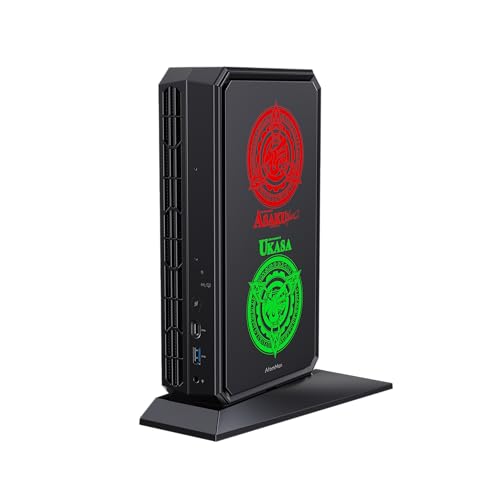
- Best overall mini gaming PC: Minisforum AtomMan G7 Pt, Ryzen 9 7945HX, Radeon RX 7600M XT, 32GB, 1TB — Check on Amazon
- Beelink SER9 Pro, Ryzen AI 9 HX 370, Radeon 890M, 32GB, 1TB — Check on Amazon
- Minisforum UM890 Pro, Ryzen 9 8945HS, Radeon 780M, 32GB, 1TB, OCuLink — Check on Amazon
- GMKtec NucBox K8 Plus, Ryzen 7 8845HS, Radeon 780M, 32GB, 1TB, OCuLink — Check on Amazon
See 2 more Amazon options
- Minisforum UM880 Plus Barebone, Ryzen 7 8845HS, no RAM/SSD/OS — Check on Amazon
- The tower benchmark (not a mini PC): CyberPowerPC Gamer Xtreme VR, i7-13700F, RTX 4060 Ti 16GB — Check on Amazon
Read the full guide ↓
Disclosure: As an Amazon Associate, reviewstook.com earns from qualifying purchases. Links to Amazon on this page are affiliate links; they cost you nothing extra. Listing details such as price and availability change often, so check the current Amazon listing before you buy.
If this is your first gaming PC, welcome — and take a breath, because this corner of the market is where the confusing names live. A “mini gaming PC” is a real computer shrunk into a box that can sit behind a monitor or on a shelf, and at $1,200 the six machines below split into three kinds a beginner must tell apart before spending anything. Four are complete mini PCs that arrive ready to plug in and play. One — the Minisforum UM880 Plus — is a barebone kit, which means the box arrives without the memory, storage and Windows that make it a computer; it is a starting point for people who already own those parts, not a bargain for people who do not. And one is not a mini PC at all: a full-size CyberPowerPC tower, included on purpose as a measuring stick, so you can see what the small boxes ask you to give up and what they give you back.
Here is the most important fact in this guide: only one of the minis — the AtomMan G7 Pt — has a separate graphics chip of its own, and even that chip is a laptop-class part, not the desktop card its name sounds like. The other minis draw their game graphics with hardware built into the main processor — honestly good at the standard 1080p screen resolution in the best cases here. But no listing shorthand should talk you into believing a built-in solution is a gaming graphics card, and by the end of this page you will know how to spot the difference yourself. Everything is explained in plain English as it comes up, starting with a glossary right after the quick picks.
In this guide
Quick Picks
Short on time, or comparing several options at once? Each row below names a buyer type and the product that suits it, with a link to the listing. Volumes are computed from the makers’ published dimensions, not from marketing names.
| Buyer type | Pick | Why it stands out | Link |
|---|---|---|---|
| Best overall | Minisforum AtomMan G7 Pt | The only mini here with its own graphics chip — a laptop-class RX 7600M XT in a ~2.7L box | Check on Amazon |
| Best pure mini | Beelink SER9 Pro | The strongest built-in graphics in the guide, in the smallest box here, ~0.82L | Check on Amazon |
| Best upgrade path | Minisforum UM890 Pro | An OCuLink port lets it borrow a full desktop graphics card later; quiet, ~1.1L | Check on Amazon |
| Best value complete mini | GMKtec NucBox K8 Plus (32GB/1TB) | Same graphics class as the UM890 Pro with the same upgrade port, positioned as a mid-range value pick — check price on Amazon | Check on Amazon |
| Best for builders | Minisforum UM880 Plus Barebone | A barebone kit that only saves money if the parts it lacks are already on your shelf | Check on Amazon |
| The benchmark (not a mini) | CyberPowerPC Gamer Xtreme VR | A desktop RTX 4060 Ti 16GB in a mid-tower — the strongest gaming hardware here | Check on Amazon |
How These Picks Were Chosen
Because this version of the guide is written for first-time buyers, the selection rules were applied the way a careful friend would apply them for you. First, the $1,200 budget was charged against the machine as you would actually switch it on. A complete PC had to fit within the budget in the United States; where pricing wanders — and mini PC pricing is wandering a lot during the current memory shortage — the reviews tell you to check price on Amazon instead of pretending any single number is permanent. The one kit in the guide is charged honestly: its review adds the parts it leaves out and explains the finished cost before admiring the headline. The one tower is called a tower every time it appears, so nobody buys it by mistake.
Second, graphics honesty decided the order. A separate graphics chip beats built-in graphics; the strongest built-in graphics beats weaker built-in graphics; and a laptop-class chip is labelled a laptop-class chip every time, with its power figure stated, because a name shared between a laptop part and a desktop card is the oldest trick in this market. Third, we asked what happens in two years. Machines whose memory sits in sockets can grow; machines with an OCuLink port can borrow a desktop graphics card through a dock; one excellent machine below has its memory permanently attached and no such port, which means the graphics you buy are the graphics you keep. We did not use these products ourselves; we read the maker listings, specification pages and independent reviews.
Two absences deserve a sentence each. Minisforum’s AtomMan G7 Ti, with an RTX 4070 Laptop GPU, is the mini many readers picture when they search this keyword — and it is not here, because the research behind this guide found it over this budget in both its barebone and complete forms; it is covered in Best Mini Gaming PC Under $1500 instead. If your real priority is the smallest possible footprint rather than gaming first, the companion guide is Best Mini Gaming PC For Small Spaces Under $1200.
The Words in the Listings, in Plain English
Every term below appears in the listings for these six machines. Learn these thirteen and you can read any mini PC listing on the internet without being steered.
- Mini PC. A complete desktop computer built into a very small case — here, between roughly 0.8 and 2.7 litres. Everything a normal PC has is inside: processor, memory, storage, ports. What it usually lacks is room for a full-size graphics card, which is why the next two terms matter.
- Integrated graphics (iGPU). Game graphics drawn by a small graphics unit built into the main processor, sharing the computer’s ordinary memory. It costs nothing extra and sips power, and the best examples — AMD’s Radeon 890M and 780M here — play games well at 1080p. It is still the junior partner: a separate chip is stronger.
- Discrete GPU. A separate graphics processor with its own dedicated memory, doing nothing but graphics. It is what makes a machine a “gaming PC” without qualifications. Only one mini in this guide has one — and see the next term before celebrating.
- Mobile GPU. A discrete GPU built for laptops, running on far less power than the desktop card its name resembles. The G7 Pt’s Radeon RX 7600M XT is a mobile chip: the M is the giveaway. It is genuinely strong, and genuinely not the desktop RX 7600 XT. Judge it against other laptop chips and against integrated graphics, where it wins clearly.
- VRAM (graphics memory). The memory a graphics chip uses to hold the world it is drawing. More VRAM means headroom for prettier settings and newer games. The tower’s desktop card carries 16GB; the G7 Pt’s mobile chip carries 8GB; integrated graphics borrows from system memory instead.
- Upscaling. A trick where the game renders at a lower resolution and clever software stretches the picture to fill your screen. It is how integrated graphics stays playable in modern games: the machine is really drawing a smaller picture and presenting it well. Honest, useful — and not the same as rendering the full resolution.
- Barebone. A kit that is not yet a computer. A barebone mini arrives without memory, without storage and usually without Windows; you supply all three. One pick in this guide is a barebone, and its low price is real only if the missing parts are already in your house.
- Soldered vs socketed memory. Socketed memory sits in slots and can be upgraded years later. Soldered memory is attached permanently at the factory — what you buy is what you keep, forever. In this guide, the Beelink SER9 Pro’s memory is soldered; the Minisforum and GMKtec complete machines use sockets.
- OCuLink. A special port that lets a mini PC connect to a full desktop graphics card sitting in an external dock. It is the escape hatch that lets some minis borrow tower-class graphics later. The dock is a separate purchase containing no power supply, and the card is a third purchase — the reviews count all three purchases.
- F-suffix processor. An Intel processor whose name ends in F — like the tower’s Core i7-13700F — has no built-in graphics at all. On such a machine the screen must be plugged into the graphics card, because the motherboard’s own display sockets are dead. It is the one setup trap in this guide, and the walkthrough flags exactly where it applies.
- Refresh rate (Hz). How many times per second your monitor redraws the picture. Ordinary office screens run at 60Hz; gaming screens run faster. Windows often leaves a fast monitor set to 60Hz until you change it yourself, so the walkthrough includes that step.
- Power supply (PSU) and wattage. The component that feeds electricity to everything else, rated in watts. A graphics card can only be swapped into a machine whose power supply can feed the replacement — which is why this guide talks about card swaps only where the case is standard and the supply can be checked.
Three plain statements to carry into the reviews. None of the six picks is renewed or refurbished — every machine here is sold new. Exactly one pick is a barebone: the Minisforum UM880 Plus, which arrives with no memory, no storage and no Windows. Exactly one pick has soldered memory: the Beelink SER9 Pro, whose 32GB is fixed for life.
The 6 Best Mini Gaming PCs Under $1,200, Explained for First-Time Buyers
Minisforum AtomMan G7 Pt — Ryzen 9 7945HX, Radeon RX 7600M XT, 32GB, 1TB
Who it suits: The beginner who wants the fewest asterisks: a small box that plays games the way the adverts promise, once you learn the one naming trick in its review.
The trick is in the graphics name, and learning it here will protect you in every listing you read afterwards. This machine’s graphics chip is a Radeon RX 7600M XT. The M stands for mobile: a laptop-class chip with 8GB of its own memory, running at 120 watts in this machine. Compared honestly — against laptop chips and against the built-in graphics in the rest of this guide — it is the strongest graphics here by a wide margin, and reviewers who measured this machine place it at strong 1080p gaming with selective 1440p in lighter titles. Around the chip sits a desktop-class 16-core Ryzen 9 7945HX, 32GB of memory in upgradeable sockets (up to 96GB), a 1TB drive with two storage slots inside, and selectable 65W and 85W processor modes. Check price on Amazon for this configuration, as pricing moves often.
Now picture it on your desk, because beginners picture minis as invisible and this one is not. The body measures 269 × 155 × 64 mm without its stand — roughly 2.7 litres, console-sized rather than palm-sized, though still smaller in every dimension than a PS5 Slim. It is powered by a separate 300W brick weighing 874 grams that lives on the floor or behind the desk, and under hard gaming it is the most audible machine in this guide. None of that is a flaw; it is the physical price of the only real graphics chip in a mini here.
- The only mini in this guide with its own graphics chip — a proper step up from built-in graphics.
- A 16-core desktop-class processor, memory you can upgrade to 96GB, and two storage slots.
- A complete machine — check price on Amazon — and remember to leave budget room for the monitor it does not include.
Honest limitation: The graphics chip is a laptop part with 8GB of memory — do not expect desktop-card performance, and make room for the big power brick.
Choose it if playing games well is the point and the box merely needs to be small. Skip it if you want the tiniest or quietest machine here, or if a tower fits your room — the last pick in this guide is faster for similar money.

Beelink SER9 Pro — Ryzen AI 9 HX 370, Radeon 890M, 32GB, 1TB
Who it suits: The beginner who wants the smallest, simplest answer — a tiny sealed box that mounts out of sight, plays a modern library at 1080p, and asks nothing of you ever.
This is the best version of built-in graphics. The Radeon 890M inside the SER9 Pro is the strongest integrated graphics in this guide, a clear step above the 780M machines below, fed by 32GB of very fast memory and a Ryzen AI 9 HX 370 processor. Reviewers who tested it agree on the shape of the truth: comfortable at 1080p in esports and older big-budget games, playable in modern ones at low-to-medium settings with upscaling helping. The case measures 135.5 × 135.5 × 44.7 mm — about 0.82 litres, the smallest in this guide — it is relatively quiet under load, and it arrives with Windows 11 Pro installed. Check price on Amazon for this configuration before you buy; pricing moves with the current memory shortage, so the rule is simple: buy only when it is priced at or under this guide’s budget, and treat anything above the budget as a reason to wait.
One structural fact matters more than everything above. This machine’s graphics ceiling is fixed on the day you buy it. Its memory is soldered — permanently attached, never upgradeable — and it has no OCuLink port, so the borrow-a-desktop-card escape route the next two picks offer does not exist. When the 890M eventually stops being enough for the games you want, the upgrade is a whole new computer. There is also a paperwork wrinkle: Beelink’s listing copy has claimed two storage slots while at least one detailed review found a single slot, so if adding a second drive later is part of your plan, confirm the slot count on the live listing before ordering.
- The strongest built-in graphics in the guide, in the smallest case here — about 0.82 litres.
- 32GB of fast memory and a 1TB drive fitted as standard, Windows 11 Pro included.
- Relatively quiet, and sized for behind-monitor mounting so the desk stays empty.
Honest limitation: Soldered memory and no OCuLink port mean the performance you buy is the performance you keep, for the life of the machine.
Choose it if you want maximum mini and your games fit built-in graphics. Skip it if you plan to chase the newest big games for years, or you want any graphics upgrade path at all.
Minisforum UM890 Pro — Ryzen 9 8945HS, Radeon 780M, 32GB, 1TB
Who it suits: The patient beginner. Happy with good built-in graphics today, and the only buyer here who can borrow a full desktop graphics card tomorrow without replacing the computer.
Start with the honest downgrade: this machine’s built-in graphics, the Radeon 780M, sit a step below the SER9 Pro’s 890M, and this guide will not blur that. At 1080p with sensible settings and upscaling, the 780M is a proven, capable gaming chip. Around it, Minisforum builds the most expandable small machine in this guide: a Ryzen 9 8945HS processor, 32GB of memory in two sockets (upgradeable to 96GB), two storage slots, two fast USB4 ports, dual high-speed network ports — and a built-in OCuLink port, the feature this whole review hangs on. The case measures 130 × 127 × 66.6 mm, about 1.1 litres; reviewers measured the bare unit at 709 grams and praised its whisper-quiet cooling. Its price has swung with the memory market, so check price on Amazon for this configuration and compare it against this guide’s budget before you buy.
The OCuLink port deserves its invoice in full, because sellers present it as a feature and beginners hear it as a free upgrade. The port is only a socket. Using it means buying an OCuLink dock — Minisforum’s DEG1 is available on Amazon; check price on Amazon — then a power supply, because the dock pointedly does not include one, then the desktop graphics card itself, such as a new RTX 4060. Dock, supply and card add a substantial second purchase on top of the machine, enough that a docked setup costs more than the tower at the end of this guide costs outright. What that money buys is the arrangement, not a bargain: the little box stays on the desk, quiet, for everyday use and lighter games, and the dock comes out for the demanding titles. If that two-mode desk is not specifically what you want, the maths says buy the tower.
- A built-in OCuLink port — the cleanest future graphics path in this guide — plus memory sockets to 96GB and two storage slots.
- Whisper-quiet cooling in reviewer testing, in a ~1.1L case that mounts behind a monitor.
- The best-connected pick here, with dual high-speed networking and two USB4 ports.
Honest limitation: Its own graphics trail the SER9 Pro’s, and the OCuLink upgrade costs tower money once the dock, power supply and card are counted.
Choose it if you want a quiet mini now with a genuine graphics future. Skip it if you will never buy the dock — the SER9 Pro is the better sealed machine — or if you want maximum frames today.

GMKtec NucBox K8 Plus — Ryzen 7 8845HS, Radeon 780M, 32GB, 1TB
Who it suits: The value-hunting beginner who can wait for the right price. Same graphics class and same upgrade port as the UM890 Pro, historically positioned below it as a value pick — if you buy it the way this review tells you to.
The formula will look familiar, because it is the UM890 Pro’s formula at a GMKtec price: a Ryzen 7 8845HS processor with Radeon 780M graphics, 32GB of memory across two sockets (upgradeable to 96GB), two storage slots, two USB4 ports, dual high-speed networking, and a built-in OCuLink port. One detail differs and matters on setup night: this OCuLink port is not hot-pluggable, meaning the dock must be connected before you switch the machine on, not plugged in mid-session. The case is about 132 × 127 × 58 mm by the maker’s stated dimensions, roughly 1.0 litre. The gaming story is the honest 780M one: strong at 1080p with upscaling, a step behind the SER9 Pro’s 890M, and in a different league from the G7 Pt’s separate chip. The hardware is not what makes this pick interesting; its value positioning is.
That value positioning is the whole review. The complete 32GB/1TB version is a mid-range, budget-tier value pick, though shortage pricing inflated by the same memory shortage pushing on every machine here can push it well above its usual tier. When it is priced in its usual value tier it is the best-value complete mini in this guide by a wide margin, matching the UM890 Pro’s graphics and upgrade path for far less. When shortage pricing pushes it toward the premium tier the gap narrows until the Minisforum’s quieter cooling and finish earn their premium. So check price on Amazon, treat its usual mid-range value positioning as the guide to whether it is a good buy, and treat a shortage spike as a shortage effect, not a fact about the product. Two checks before ordering: GMKtec sells this same machine as a barebone kit under a near-identical listing family, so confirm the page you are on says the complete 32GB/1TB configuration; and if you dock later, the OCuLink invoice from the UM890 Pro review applies unchanged.
- 780M graphics, a built-in OCuLink port and socketed memory to 96GB — the full expansion formula.
- Dual high-speed networking and dual USB4 in a roughly 1.0-litre case.
- Positioned in a mid-range value tier — the value pick of this guide whenever it is priced there; check price on Amazon.
Honest limitation: Shortage pricing can erase its value argument, and its OCuLink port must be connected before boot, not during a session.
Choose it if you can catch it at a value price — check price on Amazon, as nothing else in this guide competes when it sits in its value tier. Skip it if the live price sits at the top of its range and you need a machine this week.

Minisforum UM880 Plus Barebone — Ryzen 7 8845HS, No RAM, No SSD, No OS
Who it suits: Exactly one beginner-shaped buyer: the one with a drawer of spare parts. If you recently upgraded a laptop and kept its memory and drive, read on. Everyone else, read the warning first.
The warning, in the listing’s own spirit: check price on Amazon for this kit — and that money buys a Ryzen 7 8845HS motherboard with Radeon 780M graphics in a case of about 130 × 127 × 50 to 55 mm (published dimensions differ slightly by source; roughly 0.85 litres), with two memory sockets, two storage slots, and OCuLink provided through an adapter board rather than a built-in port. It does not buy a computer: no memory to run anything, no drive to store anything, no Windows to boot into. The documented comparison for this exact model is the cautionary tale of the whole barebone category: completing the kit with a brand-new 32GB memory kit and a 1TB drive cost more in total than buying the complete version of the same machine. Building it from new parts can cost more than buying it finished — especially in a market where memory pricing is elevated.
So the honest use case is narrow and genuinely good. You already own compatible DDR5 memory from a laptop upgrade, a spare NVMe drive from a retired machine, and ideally a Windows licence you can transfer. With those on the shelf, this kit becomes a 780M gaming mini for the kit price alone — at a lower total cost than any complete machine in this guide — with an OCuLink path, via the adapter board, for later. Without them, the same order is the most expensive route to a 780M mini here wearing the cheapest headline. If you would be pricing the parts new, stop here, add them honestly, and compare the total against the K8 Plus and SER9 Pro above — then buy the finished machine that wins.
- The cheapest route to a 780M mini in this guide — if the memory and drive are already on your shelf.
- Two memory sockets and two storage slots: you choose the capacities, not a configurator.
- OCuLink available via an adapter board, for a later graphics dock.
Honest limitation: Completed with new parts it has been documented to cost more than the same machine sold complete — the kit price is not a computer price, and its OCuLink is an adapter arrangement, not a built-in port.
Choose it if you own compatible memory and storage already, or you specifically want to spec the machine yourself. Skip it if you are buying every part new — the complete machines above finish cheaper, and this guide has shown its working.

The Benchmark: CyberPowerPC Gamer Xtreme VR — i7-13700F, RTX 4060 Ti 16GB (Not a Mini PC)
Who it suits: The beginner with a normal desk and no space problem, who wants the strongest gaming machine this budget buys and does not mind that it is big.
Everything the minis compromise on, this tower does not. Its RTX 4060 Ti is a desktop graphics card with 16GB of graphics memory — double the G7 Pt’s laptop chip — and it is a genuine 1440p card, where the best mini in this guide manages that resolution only selectively and the rest are 1080p machines. Its Core i7-13700F sits in a standard tower case with standard parts and room to grow. The price sharpens the point: check price on Amazon for this configuration, and the rule is strict — buy it only when it is priced at or under this guide’s budget, on a deal. When it is priced within budget it competes directly with every complete mini here while out-performing all of them.
Two beginner-specific notes belong to this pick alone. First, the processor’s name ends in F, and as the glossary explained, that means it has no built-in graphics whatsoever. The practical consequence arrives on setup night: the display cable must go into the graphics card’s sockets, low on the back of the tower, and never into the motherboard’s sockets higher up, because those are dead on this machine — plug into the wrong set and you will stare at a black screen from a perfectly healthy computer. Second, upgrades: the graphics card in a standard tower unbolts and a standard replacement bolts in, which no mini here can offer. The one homework item is the power supply — the listing does not publish its wattage, so before choosing any future card, open the case and read the label on the supply itself, and pick a card that label can feed.
- A desktop RTX 4060 Ti with 16GB of graphics memory — the strongest gaming hardware in this guide.
- Standard, replaceable parts: memory, storage and the graphics card itself all upgrade on your schedule.
- Only inside this budget when on deal — check price on Amazon — without the mini compromises.
Honest limitation: It is a full mid-tower. It will not hide behind a monitor or travel in a backpack, it only fits this budget when on deal rather than at its usual pricing, and its F-suffix processor makes the display-cable step unforgiving.
Choose it if performance per dollar matters most and the space exists. Skip it if the space genuinely does not — that is what the five minis above are for, and you now know exactly what each one costs you.

Comparison Table
| Product | Graphics | Volume | Best use | Link |
|---|---|---|---|---|
| Minisforum AtomMan G7 Pt | RX 7600M XT (mobile, 8GB, 120W) | ~2.7L body | Real discrete-GPU gaming, small footprint | Check on Amazon |
| Beelink SER9 Pro | Radeon 890M (integrated) | ~0.82L | Smallest serious 1080p mini, sealed and quiet | Check on Amazon |
| Minisforum UM890 Pro | Radeon 780M (integrated) + OCuLink | ~1.1L | Quiet mini now, desktop GPU later | Check on Amazon |
| GMKtec NucBox K8 Plus | Radeon 780M (integrated) + OCuLink | ~1.0L | 780M value in a mid-range tier — check price on Amazon | Check on Amazon |
| Minisforum UM880 Plus Barebone | Radeon 780M (integrated) + OCuLink via adapter | ~0.85L | Builders with DDR5 and an SSD already owned | Check on Amazon |
| CyberPowerPC Gamer Xtreme VR | RTX 4060 Ti (desktop, 16GB) | Full mid-tower | The benchmark: maximum frames per dollar | Check on Amazon |
Your First Evening: Setup, Step by Step
Every complete machine in this guide arrives with Windows installed and needs the same first evening. Allow about an hour, most of it waiting for downloads. If you bought the UM880 Plus barebone kit, your evening starts earlier: fit your memory and drive first, then install Windows from a USB installer prepared on another computer — and only then join the steps below at step 1.
- Placement. Put the machine where air can reach it. The minis want open air around their vents — on the desk, on a shelf, or mounted behind the monitor where a mount is provided — never sealed inside a closed cabinet, because a small case has no spare room for heat. The G7 Pt’s power brick goes on the floor or behind the desk, also with air around it. The tower goes under or beside the desk with its rear fans unobstructed.
- Power. Connect the power cable or brick, then the wall socket, then press the power button once. On tower PCs there is also a small rocker switch on the power supply at the back of the case: if a brand-new tower appears completely dead, that switch is off — the classic first-night panic, and not a fault. Minis have no such switch.
- The monitor cable — the one step that can go wrong. On the five minis, this is simple: the box has one set of display sockets, and they are the right ones. On the CyberPowerPC tower, it is the most important step of the evening. That machine’s processor is an i7-13700F, and the F means it has no built-in graphics at all — so the display sockets on the motherboard, high on the back panel, are dead. Plug the monitor cable into the graphics card’s sockets instead: the separate row lower down, on the card itself. Plug into the motherboard and a perfectly healthy computer will show you a black screen.
- Peripherals and internet. Connect keyboard and mouse. Then, for this first evening, connect the internet with a cable if one can reach: a wired connection makes the large updates in the next step faster and far less likely to stall. Wi-Fi can take over tomorrow.
- First boot and Windows setup. Follow the on-screen steps: region, keyboard, Microsoft account, and the privacy toggles. Decline the optional extras offered along the way; nothing offered during setup is required to play games. When the desktop appears, give the machine a few minutes — first boots finish background tasks before the PC feels like itself.
- Windows Update, then the graphics driver. Open Settings, run Windows Update, and keep running it — restarting when asked — until it reports you are up to date. Then update the graphics driver from the maker’s own software: AMD’s driver tool on the five minis, NVIDIA’s on the tower.
- Set your monitor’s real refresh rate. Windows frequently leaves a fast monitor running at 60Hz, its slowest polite setting. Open Settings, then System, Display, Advanced display, and choose the highest refresh rate your monitor offers. Until you do this, a gaming monitor is an office monitor.
- Verify what actually arrived. Before the return window becomes a memory, confirm the delivered machine matches the order: the model name on the box and in Windows Settings, 32GB of memory and a 1TB drive on the complete minis, the complete — not barebone — version of the K8 Plus, and the RTX 4060 Ti 16GB configuration on the tower. On the SER9 Pro, also confirm the storage-slot count against the live listing if a second drive is in your plans, since its documentation disagrees with itself.
- Install a game store. Download Steam — or the store your games live on — sign in, and install one game you already own before buying anything new. Play it for twenty minutes. That single test confirms the machine, the monitor setting and the driver all at once.
What Else You Will Spend
Buying the computer does not buy the rest of the desk — and a beginners’ guide should say what the rest is. No peripheral prices are quoted here, because the research behind this guide verified none; check price on Amazon or at your chosen retailer before you buy, rather than treating any figure elsewhere as a promise. A basic keyboard and mouse belong on the same shopping list if you do not already own a set — any ordinary set serves.
- A monitor, first. No pick in this guide includes a screen. Match it to the machine: the integrated-graphics minis are 1080p gaming machines, so a good 1080p monitor serves them honestly; the G7 Pt can feed a 1440p screen in lighter titles; only the tower earns a high-refresh 1440p panel outright.
- The barebone’s missing parts, if you chose the kit. Priced as machine plus fix, never folded into the kit’s price: memory, a drive, and Windows. The documented completion of this exact kit with new parts cost more in total than the finished machine — the comparison is in its review.
- The OCuLink dock path, if you chose a dockable mini. Also machine plus fix: a dock, a power supply the dock does not include, and the desktop card itself, such as a new RTX 4060 — a planned second purchase on a premium scale, not an accessory. Check price on Amazon for each part.
- A second drive, eventually. Modern games are large, and a 1TB drive fills faster than new owners expect. The socketed minis and the tower all have room to add storage later; the SER9 Pro’s slot count is the one to confirm on its live listing first.
Upgrades, in Plain Terms
Here is what “upgradeable” honestly means for each kind of machine in this guide. The socketed complete minis — the G7 Pt, UM890 Pro, K8 Plus and the completed UM880 Plus — let you add memory (up to 96GB) and storage as your library grows. The UM890 Pro and K8 Plus add the OCuLink dock route to desktop graphics, described in full above — a genuine path, bought as three separate purchases. The SER9 Pro offers none of this for graphics: its memory is soldered and it has no OCuLink port, so its graphics are the graphics you keep — buy it as a finished machine and it will never disappoint you on this point.
A graphics-card swap — unbolting the card you have and bolting in a faster one — is promised for exactly one pick: the CyberPowerPC tower, whose standard case and standard card make the physical swap straightforward. It is promised with one condition, because it is the difference between an upgrade and a paperweight: the listing does not publish the power supply’s wattage, so read the label on the supply inside the case before choosing the new card, and buy a card that label can feed. No such promise is made for any mini, because no mini here has a swappable internal card: the G7 Pt’s mobile chip is part of its board, and the integrated machines have no card at all.
How to Choose Among These Six
- Start with your screen, not the listings. A 1080p monitor makes the integrated minis legitimate gaming PCs, while a 1440p high-refresh monitor makes only the G7 Pt (selectively) and the tower honest answers.
- Read the graphics name to the very end. An M, or the word Laptop, changes the product. The G7 Pt’s mobile chip is strong and worth its price — as a mobile chip.
- Decide whether you are a finisher or a grower. Finishers should buy the SER9 Pro or G7 Pt and never think about internals again. Growers should buy socketed memory and, for graphics, an OCuLink port — counted in full before admiring it.
- Never price a barebone as a computer. Add memory, storage and Windows at current prices, then compare.
- Check the live price, not a remembered number. Pricing for picks like the K8 Plus and the SER9 Pro swings sharply during the memory shortage. A pick priced above this guide’s budget is a pick to wait on. The same discipline applies to the set’s rules: buy the tower and the SER9 Pro only when they are priced within this budget, and treat the K8 Plus as a value pick only when its live price keeps it in its mid-range value tier — check price on Amazon. At other prices, other picks win.
- Be honest about the room. If a tower fits your life, the benchmark is simply the better gaming PC for this money. Mini earns its premium in small flats, shared rooms, TV stands and desks that double as dining tables.
Common Buying Mistakes
- Reading a mobile GPU’s name as a desktop card’s promise — the most expensive misunderstanding in this category.
- Buying the barebone kit as if it were a computer, then paying shortage prices for the parts that complete it.
- Plugging the tower’s monitor into the motherboard’s sockets and diagnosing a dead PC — on an F-suffix processor those sockets are dead by design.
- Leaving a gaming monitor at 60Hz in Windows settings and concluding the new PC feels no faster.
- Budgeting OCuLink as a dock price and forgetting the excluded power supply and the desktop card itself.
- Paying a memory-shortage spike price instead of waiting for pricing to settle back toward its usual range.
- Assuming a sealed mini’s graphics can be upgraded later: with soldered memory and no OCuLink, the ceiling was fixed at checkout.
- Skipping the delivered-configuration check and discovering the wrong memory size after the return window closes.
Final Recommendation
- Most first-time buyers: Minisforum AtomMan G7 Pt — the only mini here whose graphics need no explanation.
- Smallest and simplest: Beelink SER9 Pro — buy it as a finished machine.
- Buy now, grow later: Minisforum UM890 Pro.
- Best value, bought at the right price: GMKtec NucBox K8 Plus complete.
- Builders with parts on the shelf: Minisforum UM880 Plus Barebone.
- Performance first, space available: CyberPowerPC Gamer Xtreme VR — the benchmark tower.
If you only remember two names, remember the AtomMan G7 Pt — the one machine here that answers “gaming PC” without an asterisk — and the Beelink SER9 Pro, the purest expression of what a mini PC is for: 0.82 litres, quiet, and genuinely capable at 1080p. The UM890 Pro is the thinking buyer’s middle path, the K8 Plus the price-watcher’s, and the UM880 Plus barebone the builder’s Readers speccing a machine purely for a small room should also see Best Mini Gaming PC For Small Spaces Under $1200; anyone planning to broadcast their play will find the encoder-first treatment in Best Mini Gaming PC For Streaming Under $1200; and anyone whose real target is a smaller desk footprint without the gaming-first brief can compare Best Compact Gaming PC Under $1200.
Frequently Asked Questions
Can a mini PC under $1,200 really play modern games?
Yes — with expectations set by the graphics hardware rather than the marketing. The G7 Pt’s discrete mobile chip plays modern titles strongly at 1080p and selectively at 1440p. The 890M and 780M integrated machines play esports and older titles well at 1080p and modern titles at reduced settings with upscaling. No mini at this price matches a desktop graphics card — the tower benchmark exists to show that gap honestly.
Is the RX 7600M XT the same as a desktop RX 7600 XT?
No. The M marks a mobile chip — in the G7 Pt it runs at 120W with 8GB of memory, squarely in the laptop performance class. It is the strongest graphics in this guide and a genuine step above integrated graphics — but judge it against laptop chips, not the desktop cards its name resembles.
My screen is black after plugging everything in. What did I do wrong?
If you bought the tower, almost certainly the monitor cable: its i7-13700F has no built-in graphics, so the motherboard’s display sockets are dead and the cable must go into the graphics card’s sockets, lower on the back panel. On the minis, check the cable is fully seated and the monitor is set to the input you used. A black screen on setup night is usually a cable in the wrong socket, not a broken computer.
What is OCuLink, and is it worth it?
OCuLink is a port that connects a mini PC to a full desktop graphics card housed in an external dock. It works, and on the UM890 Pro and K8 Plus it is a real upgrade path — but not a cheap one: a dock, a power supply the dock does not include, and the card itself, such as a desktop RTX 4060, put the all-in total in tower territory. Check price on Amazon for each part. It earns its cost when that two-mode setup — a small, silent mini for daily use, docked power for big titles — is exactly the desk you want.
Can I upgrade these machines later?
Partly — and the answer differs for every pick, which is why each review names its ceiling. The socketed minis take memory to 96GB and have two storage slots; the UM890 Pro and K8 Plus add OCuLink for graphics. The SER9 Pro’s memory is soldered and it has no OCuLink, so its graphics are fixed for life. The tower’s graphics card itself can be swapped for a standard replacement — after reading the power supply’s label inside the case, since the listing does not publish its wattage.
- Best Mini Gaming PC Under $1200
- Best Mini Gaming PC Under $800
- Best Mini Gaming PC Under $700
- Best Mini Gaming PC For 1440p Gaming Under $1200
- Best Mini Gaming PC For Streaming Under $1200
- Best Barebones Mini PC Under $1200
- Best Mini PC Under $1200
- Best Small Form Factor Gaming PC Under $1200
- Best Prebuilt Gaming PC Under $1200
- Best Gaming PC Under $1200


