Where to buy
Check the latest price and availability on Amazon. We may earn a commission from qualifying purchases.
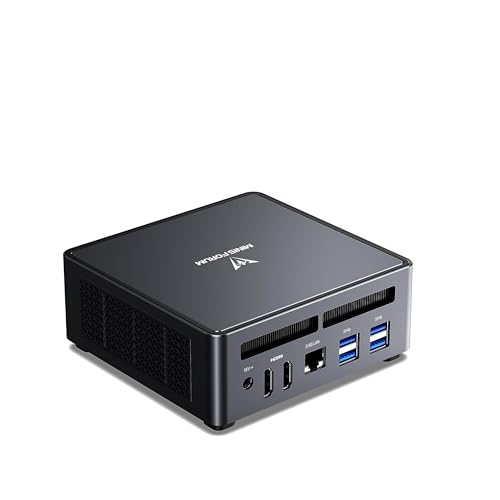
- Best overall for a first build: MINISFORUM UM790 Pro Barebone (Ryzen 9 7940HS, no RAM/SSD) — Check on Amazon
- ASRock DeskMini X600 (USB4) AM5 Barebone Kit — Check on Amazon
- AOOSTAR GEM12+ PRO Barebone (Ryzen 7 PRO 8845HS, OCuLink) — Check on Amazon
- MINISFORUM MS-01 Barebone (Core i5-12600H, dual 10GbE, PCIe slot) — Check on Amazon
See 2 more Amazon options
- ASRock DeskSlim X600 AM5 Barebone (PCIe 5.0 x16 slot for a low-profile GPU) — Check on Amazon
- MINISFORUM MS-A1 Barebone with Ryzen 9 9950X (no RAM/SSD) — Check on Amazon
Read the guide ↓
Disclosure: As an Amazon Associate, reviewstook.com earns from qualifying purchases. Links to Amazon on this page are affiliate links; they cost you nothing extra. Listing details such as price and availability change often, so check the current Amazon listing before you buy.
Never built a PC before? This is the friendliest corner of PC building to start in — and the one with the easiest trap to fall into. A barebones mini PC arrives deliberately unfinished. The maker has built the case, the main circuit board (the motherboard), the power supply and, on most models, the processor. What they have left out — on purpose — is the memory, the storage and the operating system. You buy those parts yourself, slot them in with a screwdriver, and end up with a complete PC — usually for less than the finished version.
Here is the trap, stated before anything else: the price on the listing is not the price of a working computer. A barebone still needs memory and storage before it will switch on properly — check price on Amazon for the kit, then add what those parts currently cost — and two of the six kits below also need you to buy and fit the processor yourself. So this guide judges every pick the only fair way: by the cost of the finished PC. Every pick in this guide — kit plus everything it still needs — can be finished inside the $1,200 budget, and most sit comfortably inside it.
One more honest note. If you came here hoping for a tiny PC with a separate, powerful graphics card inside — the kind gaming laptops and big desktops use — we looked hard for one that could be verified on Amazon and finished under $1,200, and there isn’t one this month; the numbers are in their own section below. What $1,200 genuinely buys is superb integrated graphics (explained in the glossary next — it is simpler than it sounds), plus two kits with an honest route to a real graphics card later. If you already own spare parts, a barebone is the best-value way in; if you own nothing, this guide will say plainly when ready-made is smarter.
Words on the Listing, Translated
Barebones listings are written for people who already build PCs. Here is every term used here, in plain English.
- Barebones / barebone. A partly built computer. Case, motherboard and power supply are included; memory, storage and the operating system are not. On two kits here the processor is missing too — each review says so plainly, because it changes what your first build involves.
- CPU / processor. The computer’s brain — the chip that does the general thinking. Names like “Ryzen 9 7940HS” or “Core i5-12600H” are just model numbers; the reviews below translate what each one is actually good at.
- RAM / memory. The computer’s short-term workspace, where programs sit while they run, measured in gigabytes (GB). 16GB is a sensible minimum today; 32GB is the comfortable choice this guide costs for.
- SO-DIMM vs DIMM. The same memory in two physical sizes. SO-DIMM is the short, laptop-sized stick; DIMM is the long, desktop-sized one. They are not interchangeable. Five of the six picks here take SO-DIMMs; one (the DeskSlim) takes full-size DIMMs. Buying the wrong size is the most common beginner mistake in this whole category.
- SSD / storage. Where your files and games live permanently. Two shapes matter here. An M.2 drive is a slim stick held down by one tiny screw — this is what every pick in this guide uses. A 2.5-inch drive is a small flat box; two kits here have room for both. 1TB (one terabyte, roughly 1,000GB) is the size this guide costs for.
- Integrated graphics. A graphics processor built into the same chip as the CPU, sharing the computer’s memory. “Integrated” used to mean “hopeless for games”. The best modern example — AMD’s Radeon 780M, in three picks below — genuinely plays modern games at 1080p (the resolution of a standard HD screen). Weaker integrated graphics, like Intel’s Iris Xe, are fine for screens and video but not for serious gaming.
- Discrete graphics / GPU. A separate, dedicated graphics chip — much more powerful, much more expensive. Almost no mini PC in this budget has one inside; two picks below give you a way to add one later.
- Operating system (OS) and licence. The software the computer runs — Windows, or a free alternative such as Linux or SteamOS. Barebones ship with none. If you want Windows and don’t already own a licence you can reuse, that is an extra cost this guide never hides in its totals.
- Dual-channel memory. Fitting memory as a matched pair instead of one stick. On integrated-graphics machines this matters enormously, because the graphics borrow the memory’s speed. One stick can mean half the gaming performance. Always buy pairs.
- PCIe slot. A long slot on the motherboard that accepts add-in cards — including, in two picks below, a small desktop graphics card.
- OCuLink. A special cable port that lets you connect a full desktop graphics card in an external dock. A genuine upgrade path, with one quirk: you must switch the PC off to connect or disconnect it.
- Ports: USB4 and Ethernet. USB4 is the fastest current USB connection — one cable for data, display and charging. Ethernet is the wired internet port; 2.5GbE and 10GbE are its speed grades. Most homes will never notice anything above 2.5GbE — the 10GbE hardware in one pick is for home servers.
In this guide
Quick Picks
In a hurry? Find your row. For every pick, check price on Amazon for the barebone alone — the finished-PC picture, once the parts it still needs are added, is in each review and the comparison table further down.
| Buyer type | Pick | Why it stands out | Link |
|---|---|---|---|
| Best first build overall | MINISFORUM UM790 Pro Barebone | Processor and strong gaming graphics already fitted — you only add memory and storage | Check on Amazon |
| Cheapest finished PC | ASRock DeskMini X600 (USB4) | The lowest-priced kit in this guide and you choose the processor — check price on Amazon — but you fit that processor yourself | Check on Amazon |
| Best if a graphics card comes later | AOOSTAR GEM12+ PRO Barebone | OCuLink port for an external graphics card, plus a status screen and fingerprint reader | Check on Amazon |
| Best for a home server sideline | MINISFORUM MS-01 Barebone (i5-12600H) | Very fast networking, three storage slots and a slot for a small graphics card | Check on Amazon |
| Best long-term upgrade path | ASRock DeskSlim X600 | A real slot inside for a desktop graphics card — the most building work of the six | Check on Amazon |
| Most processing power | MINISFORUM MS-A1 (Ryzen 9 9950X) | A flagship 16-core desktop processor included — but its graphics are for screens, not games | Check on Amazon |
How These Picks Were Chosen
Every pick is a real Amazon US listing, checked during research, that is genuinely sold as a barebone — no memory, no storage, no operating system. Ready-made PCs wearing a barebones-style price were left out, because they don’t answer the question you actually searched for. Prices here move around a lot, so no static price is printed for any pick: check the current price on Amazon before you compare.
To compare the six fairly, every finished build uses the same shopping basket: a 32GB DDR5 memory kit (two sticks) and a 1TB M.2 SSD. That basket is not priced here, because its cost moves a lot — DDR5 prices have spiked at times — so check the current price on Amazon for both parts before you add up a build. No operating system is included in any finished build: all six run Linux or SteamOS free, and Windows buyers should add a licence they don’t already own. Where a kit also needs a processor or a cooler, that is covered in its review.
We didn’t use these machines ourselves. We compared what manufacturers, listings and reviewers publish: processor and graphics chips, memory type and maximum, storage slots, ports, networking and size. Two judgement calls are worth stating. First, gaming ability is decided by the graphics, not by how fast the processor sounds — four picks game on integrated graphics, and the reviews say plainly what each can and cannot do. Second, a pick with a discrete GPU only makes this list if its Amazon listing and finished position can both be pinned down. None could, this month.
The 6 Best Barebones Mini PCs for Beginners Under $1,200
MINISFORUM UM790 Pro Barebone — Ryzen 9 7940HS, Radeon 780M
Who it suits: The first-time builder who wants the shortest possible job and a proper gaming PC at the end of it: the processor and graphics are already fitted, so your entire build is two memory sticks and one storage stick.
Start here if building appeals but the fear of it doesn’t. Inside this metal box Minisforum fits a Ryzen 9 7940HS processor — eight cores, boosting to 5.2GHz — and the Radeon 780M, the strongest integrated graphics AMD makes. That pairing tops this list: the 780M plays modern games at 1080p with sensible settings and runs esports titles at high frame rates, with no graphics card to buy or fit. Your shopping list is exactly two items: a pair of DDR5 SO-DIMM memory sticks (the board takes up to 64GB) and an M.2 SSD (two slots, so a second drive can join later). Everything else is already handled: Wi-Fi 6E, Bluetooth, a 2.5-gigabit wired port, two USB4 ports and two HDMI outputs.
The money: check price on Amazon for the barebone, and check the current price on Amazon again before you order, because this listing has moved below its list position and lower still in deal coverage. Add the standard basket and the finished PC lands well inside the budget all-in, in the lower-to-middle part of this guide’s range. The complete, ready-built version with 32GB and 1TB sits notably higher — check its current price on Amazon alongside. That gap is the barebones idea in one product. Two warnings, both from owners. The machine runs warm when worked hard — temperatures in the high 80s Celsius have been reported — so give it open air, not a closed cabinet. And open it slowly: the bottom cover is connected by short, thin wires, and several owners have learned that the abrupt way. Neither is a reason to walk away; both make this a calm twenty minutes with a screwdriver, not a rushed five.
- The easiest build in this guide: memory and storage only, everything else fitted.
- Radeon 780M graphics — genuine 1080p gaming with no graphics card involved.
- Check price on Amazon — the barebone route sits well below the finished version of the same machine.
Honest limitation: It runs hot under sustained load (high 80s °C reported), and the wired-on bottom cover makes fitting your parts a careful job rather than a quick one.
Choose it if you want a gaming PC the same evening your parts arrive. Skip it if you know you want a separate graphics card soon — this box has no way to add one inside, ever.

ASRock DeskMini X600 (USB4) — The Kit Where You Choose the Processor
Who it suits: Beginners who like the idea of building properly — choosing and fitting the processor themselves — and want the cheapest genuinely modern finished PC in this guide.
The DeskMini is a step deeper into building. What arrives is a platform: a 1.92-litre case, an ASRock motherboard, a 120W power adapter and a basic processor cooler. What does not arrive is the processor itself. The board has a socket — a fitted cradle, called AM5 — that accepts AMD Ryzen 7000, 8000 and 9000 series processors up to a 65-watt power limit. The kit itself sits at the low end of this guide’s range — check price on Amazon — below where it launched. Choose the Ryzen 7 8700G and you have a gaming PC, because that chip carries the same Radeon 780M graphics as the pick above. Around the socket, the board is thoroughly current: two DDR5 SO-DIMM slots (rated to 6400MHz and beyond, up to 96GB), one very fast PCIe Gen5 M.2 slot and one Gen4 slot, room for two older-style 2.5-inch drives as well, 2.5-gigabit wired networking, and — on this USB4 version — a 40Gbps USB4 port. One quirk: that USB4 port only works when an 8000G-series processor is fitted, because the port runs through the processor.
The natural partner is the Ryzen 7 8700G, a mid-tier processor choice for this socket — check its current pricing wherever you buy it, as it is a costing input here rather than a linked pick. So the realistic finished build is the kit, plus the processor, plus the basket: a complete 780M gaming PC that lands at the lowest finished cost in this guide, well inside the budget all-in — and one whose processor you can replace years from now. Reviewers who lived with this platform built exactly this combination. The compromises are the price of the socket: no graphics-card slot, so graphics means integrated or an external dock, forever; the 65-watt ceiling rules out hotter desktop chips; cooler space is only 47mm tall, so use the included or a low-profile cooler; and this non-W version leaves Wi-Fi to an add-in card you supply (a sibling, the X600W, bundles one). Fitting a processor is one more step than the pick above — the walkthrough covers it.
- The lowest-priced pick here where you choose the processor — and can replace it later.
- Very fast Gen5 storage slot and up to 96GB of memory in a roughly two-litre box.
- Finished with an 8700G, it is the cheapest complete build here.
Honest limitation: No graphics-card slot and a 65-watt processor ceiling cap it at integrated graphics for good, and Wi-Fi is a bring-your-own card on this version.
Choose it if building is part of the fun and the budget is the priority. Skip it if you want the processor already installed, or a graphics card inside the case one day — that’s the DeskSlim, further down.

AOOSTAR GEM12+ PRO Barebone — Ryzen 7 PRO 8845HS, OCuLink
Who it suits: The beginner with a plan: strong gaming graphics today, and a genuine door left open to a full desktop graphics card later — plus a couple of extras no rival here offers.
AOOSTAR is the smallest brand in this guide, and this is its flagship idea. Like the UM790 Pro, the processor is already fitted: a Ryzen 7 PRO 8845HS, eight cores boosting to 5.1GHz, with the same Radeon 780M graphics — so the build is the same memory-and-storage job. The aluminium shell carries a small 2.68-inch status screen on top showing temperatures and load, and a fingerprint reader so you can sign into Windows with a touch. Underneath: two DDR5-5600 SO-DIMM slots rated up to 128GB of memory, two M.2 storage slots, two 2.5-gigabit wired ports, USB4 — and the port that defines this machine, OCuLink. Check the current price on Amazon for the barebone, and check it with extra care on this one: this listing’s price wanders, and it has at times sat above the model’s own list position.
OCuLink is a cable that carries the same signal a graphics-card slot carries. It lets you connect a full-size desktop graphics card in a powered dock, with much less speed lost than Thunderbolt docks. That changes the long-term story from “integrated graphics forever” to “integrated graphics until you fancy a graphics card”. Finished on integrated graphics with the standard basket, this machine lands well inside the budget all-in — the cheapest finished Radeon 780M PC in this guide. The ready-built version of the same machine (24GB/1TB) sits higher in the band, which makes the barebones maths easy to defend — but only while the barebone itself stays in its usual position rather than drifting above its own list price again, so check price on Amazon before you commit. The honest debits: OCuLink does not unplug live, so the dock routine is switch off, connect, switch on; storage tops out at PCIe 4.0 rather than Gen5; and AOOSTAR’s support network is a minnow next to Minisforum’s or ASRock’s, which matters if something fails in year two.
- Same gaming graphics as the top pick, finished for less money — the cheapest finished 780M build here.
- OCuLink port — the cleanest route here to a desktop graphics card later.
- Status screen and fingerprint reader: small joys nothing else in this guide has.
Honest limitation: Its listing price has at times sat above its own list price, and the brand’s support bench is thinner than the bigger names here.
Choose it if an external graphics card is somewhere in your future and you like the extras. Skip it if you will never dock a graphics card — the UM790 Pro offers the same graphics with a longer track record.

MINISFORUM MS-01 Barebone — Core i5-12600H, Dual 10GbE, PCIe Slot
Who it suits: The beginner whose curiosity runs toward home servers and networking — or who suspects their “mini PC” will end up doing far more than gaming.
Nothing else here is built like the MS-01. In a 1.78-litre workstation case, Minisforum fitted a Core i5-12600H processor (twelve cores, up to 4.5GHz), two 10-gigabit SFP+ network ports, two more 2.5-gigabit ports, three M.2 storage slots, two USB4 ports, remote-management hardware — and a low-profile PCIe slot, the feature that changes what a mini PC can become, since the listing names compact desktop graphics cards of the RTX 3050 class as supported. Check price on Amazon for the barebone: it sits in the middle of this guide’s range, around its list position, and homelab writers have recommended this exact configuration in that position through 2026. Add the standard basket and the finished machine lands well inside the budget all-in; the ready-built 32GB/1TB version sits far higher — check its current price on Amazon alongside — so the barebone route saves real money even when memory prices are spiked.
Now the honesty this pick demands: as it arrives, its graphics are Intel Iris Xe — the weakest gaming graphics here. It runs esports and older games at modest settings, but it is not a chip for modern big-budget games, and no amount of fast networking changes that. So the MS-01 earns its place on two conditions, and you should only buy it if one of them is genuinely yours: either your real interest is the home-lab side — running virtual machines, a media server, a network firewall — with gaming as a side dish, or you intend to use that PCIe slot later, fitting a low-profile graphics card and turning it into the one machine here with a desktop GPU inside and serious networking. That card is an extra purchase on top of the totals above. As a pure games machine, the two 780M picks above are better value.
- Networking in another league: two 10-gigabit ports plus two 2.5-gigabit ports.
- A real slot for a small graphics card, and three storage slots, in 1.78 litres.
- Check price on Amazon — the barebone sits far below the ready-built version of the same machine.
Honest limitation: Its built-in Iris Xe graphics are the weakest for gaming in this guide — serious gaming needs the slot filled, with a card you buy separately.
Choose it if networking, storage or a home server is the real job, or you plan to slot in a small graphics card. Skip it if you want to play modern games on integrated graphics from day one.
ASRock DeskSlim X600 — The Kit With a Real Graphics-Card Slot
Who it suits: The beginner who refuses to accept “integrated graphics forever” and is happy doing the most building of anyone in this guide to get a real slot inside the box.
The DeskSlim exists because the DeskMini has one structural compromise. The box grows to 5 litres — still small enough to disappear behind a monitor — and in exchange you get a PCIe 5.0 x16 slot: a full-size slot that accepts a low-profile, dual-slot desktop graphics card up to 200mm long, inside the case. (Low-profile means half-height; full-height gaming cards will never fit.) The platform around the slot is the most desktop-like here: a socketed AM5 board taking Ryzen 7000, 8000 and 9000 processors up to 120 watts — double the DeskMini’s ceiling — four full-size DDR5 DIMM slots (note: desktop memory, not SO-DIMMs) good for up to 256GB, one Gen5 and one Gen4 M.2 slot, two SATA ports for older-style drives, 2.5-gigabit networking and USB4. Power comes from an included 240W adapter, and a 330W option exists — confirm which adapter a given bundle ships with, and what card it supports, before ordering, because in a small case the power budget is the graphics-card compatibility list. Check price on Amazon for the kit — it sits at the low end of this guide’s range, remarkable value for a case, board and power supply.
The build maths: the kit, the same Ryzen 7 8700G if you start on integrated graphics, and the memory-and-storage basket on top — a finished build that sits comfortably inside the budget before a processor cooler, which this kit does not include; budget for a low-profile cooler up to 71mm tall as a fourth item on the list. Check price on Amazon for the kit and check current pricing for the processor and parts before you add it up. That is more money and more building than the DeskMini — the difference buys one thing: a future. Start on the 8700G’s 780M graphics, and when a low-profile card fits your budget, the DeskSlim becomes the only machine here that grows a genuine internal graphics card — no dock, no cable, no second box. The costs are the 5-litre footprint, the low-profile-only envelope, and the most involved first build here: processor, cooler, memory, storage. None of it is hard — but if “most involved” just made you tired, the UM790 Pro exists for you.
- A genuine slot for a desktop graphics card inside the case — unique in this guide.
- Socketed processor up to 120W and four desktop memory slots: the most desktop-like platform here.
- Check price on Amazon — a low-end kit price for this tier, including the power adapter.
Honest limitation: At 5 litres it is the biggest box here, the graphics card must be low-profile, and no cooler is included — it is a fourth part to buy and fit.
Choose it if a graphics card inside the case is the plan, now or later, and building is part of the fun. Skip it if you want the tiniest box or the shortest parts list.

MINISFORUM MS-A1 Barebone with Ryzen 9 9950X — The Ceiling of the Budget
Who it suits: Beginners whose real interest is processing power — learning to code, video editing, running many programs at once — and who understand that gaming is not this machine’s party trick.
The MS-A1 listing here is the version with AMD’s Ryzen 9 9950X processor already fitted: sixteen cores boosting to 5.7GHz — a flagship desktop chip — in Minisforum’s socketed mini workstation, sold with no memory and no storage. Check price on Amazon: this is the highest-priced pick in this guide, sitting near the top of the band. Add the standard basket and the finished machine lands at the top end of this guide’s range all-in: the most expensive completion here, and still inside the budget. Around the chip: the processor sits in a real AM5 socket; four M.2 slots take a great deal of fast storage; two DDR5 SO-DIMM slots go to 96GB; there are two 2.5-gigabit network ports, outputs for three screens, an OCuLink port for an external graphics card, and a twin-fan cooler the maker rates as low as 37dB.
And now the limitation that decides whether this pick is genius or nonsense for you: its built-in graphics are a display adapter, not a gaming GPU — fine for screens, video and desktop work, far behind the 780M machines for games. Nobody should buy this to game on integrated graphics. Buy it because the processor is the workload — compiling code, encoding video, virtual machines, a render queue — and because OCuLink leaves the external-graphics door open. Two further honest notes. A 16-core desktop chip in a mini case will not hold its top speeds through an all-day render; the cooling is good, but physics is physics. And a cheaper door into this same platform exists: the MS-A1 launched as a barebone with no processor at all, at a much lower entry position through Minisforum’s own store — we couldn’t pin that no-processor version to a verified Amazon listing, so it isn’t the pick here, but if you already own a suitable AM5 processor, it is the version to hunt for.
- Ryzen 9 9950X included: sixteen cores — more processing power than the rest of this guide combined, nearly.
- Socketed processor, four storage slots, OCuLink and twin fast network ports.
- Finishes at the top end of this guide’s range — the ceiling of what the $1,200 budget buys here.
Honest limitation: Its integrated graphics are for displays, not games — as a gaming machine it only makes sense with an external graphics dock budgeted on top.
Choose it if processor-heavy work is the point and gaming is secondary. Skip it if gaming is the point — the UM790 Pro gives you the graphics for a finished cost that sits far lower in the budget.

Comparison Table
For every pick, check price on Amazon — no static kit price is printed here. “Finished position” reflects the standard basket used throughout this guide (32GB DDR5 kit plus 1TB M.2 SSD, whose cost varies with the memory market), plus a processor where the kit needs one. No operating system is included in any finished build.
| Product | Graphics | Kit price | Finished position | Link |
|---|---|---|---|---|
| MINISFORUM UM790 Pro Barebone | Radeon 780M (integrated) | Check price on Amazon | Well inside budget | Check on Amazon |
| ASRock DeskMini X600 (USB4) | You choose the processor (780M with an 8700G) | Check price on Amazon (plus a processor you choose) | Lowest finished cost in this guide | Check on Amazon |
| AOOSTAR GEM12+ PRO Barebone | Radeon 780M (integrated), OCuLink for an external card | Check price on Amazon | Cheapest finished 780M build, well inside budget | Check on Amazon |
| MINISFORUM MS-01 Barebone (i5-12600H) | Intel Iris Xe; slot for a low-profile card | Check price on Amazon | Well inside budget | Check on Amazon |
| ASRock DeskSlim X600 | Slot for a low-profile desktop graphics card | Check price on Amazon (plus a processor you choose, plus cooler) | Comfortably inside budget before cooler | Check on Amazon |
| MINISFORUM MS-A1 (Ryzen 9 9950X) | Basic integrated graphics; OCuLink for an external card | Check price on Amazon | Top end of this guide’s range, still inside budget | Check on Amazon |
Your First Build, Step by Step
Here is the whole job, in order. On the processor-fitted picks (UM790 Pro, GEM12+ PRO, MS-01, MS-A1) you skip step 2 and will be done in about twenty careful minutes; on the ASRock kits you do all of it, in about an hour. Nothing here needs strength or talent — it needs slowness.
Before anything arrives — the shopping list. Alongside the kit, order: (1) a memory kit of two matched sticks, in the right physical size for your pick — SO-DIMM for everything except the DeskSlim, which takes full-size DIMMs — and DDR5 in all six cases; (2) an M.2 2280 SSD, 1TB; (3) on the ASRock kits, your processor — the Ryzen 7 8700G is the one referenced throughout this guide — and on the DeskSlim only, a low-profile cooler up to 71mm tall (the DeskMini includes a basic cooler; the DeskSlim does not); (4) a small Phillips screwdriver — the one tool every build here needs; (5) your operating system plan: a USB stick of at least 8GB for the installer, and either a Windows licence or a free download of Linux or SteamOS.
Step 1 — Set up like you mean it. Clear a table, work on a hard surface rather than carpet, and touch something metal first to discharge static. Keep the tiny screws in a saucer — they roll.
Step 2 — Fit the processor (ASRock kits only). Lift the socket’s retaining arm, look for the small triangle printed on one corner of the processor and the matching triangle on the socket, and lower the chip in flat — it fits one way only and needs no force at all. If it doesn’t sit flat, lift it out and check the triangles; never press. Lower the arm to lock it. Then the cooler: a pea-sized dot of the thermal paste supplied with it, sit the cooler squarely on top, and tighten its screws a little at a time in a cross pattern, like wheel nuts. Plug the cooler’s small fan cable into the board header labelled CPU_FAN — forgetting this is the most common first-build error.
Step 3 — Fit the memory. Open the clips at each end of a slot, line the stick’s notch up with the slot’s key (it only fits one way round), and push down evenly with both thumbs until both clips snap shut. A firm click is correct; a stick sitting at an angle is not. Use the pair of slots the manual names.
Step 4 — Fit the storage. Slide the M.2 stick into its slot at a shallow angle, press the far end down flat, and secure it with the single small screw provided. Finger-tight plus a gentle nudge: these screws strip easily.
Step 5 — Close up and connect. Replace the cover (slowly, on the UM790 Pro — remember its short wires), then connect only the essentials for the first switch-on: power, one screen, a keyboard. Fewer cables means fewer suspects if something’s wrong.
Step 6 — First switch-on checks. Press power and watch. You should see the maker’s logo and a message that no boot device or operating system was found — on a barebone, that message is success: processor, memory and storage are all alive and the machine is asking for an operating system. If the screen stays black, switch off, reseat the memory (nine times out of ten, a stick isn’t fully clicked), and try again. Then plug in your installer USB, restart, and follow the operating system’s setup.
What Else You Will Spend: The Honest Total
The finished totals cover the computer itself. Also expect some of the following — none of it folded into a pick’s price here:
- A Windows licence, if you want Windows and don’t already own a reusable one. Every pick runs Linux or SteamOS free; but if Windows is the plan, price the licence as its own line item.
- A screwdriver. One small Phillips driver is the whole toolkit for every build in this guide. If you own one already, this line costs nothing.
- A USB stick (8GB or larger) to carry the operating-system installer, unless you already have one spare.
- The desk around the PC: a screen, keyboard and mouse, if you don’t already own them — check before the kit arrives, not after.
- Optional extras people actually buy: a second M.2 drive later (several picks have spare slots waiting), a Wi-Fi add-in card for the DeskMini, and — much later, and only on the picks that support them — an external graphics dock or a low-profile card.
How to Choose, in Beginner Terms
- Decide by the finished price, never the kit price. A low-priced kit and a high-end barebone can both be the right buy. The finished builds are the only honest comparison — check price on Amazon for the kit and check current pricing for the parts it still needs.
- Choose the graphics first, because on most minis they can never change. Radeon 780M is the integrated graphics to want for gaming. Iris Xe and basic integrated graphics are screen drivers with gaming as a hobby.
- Pick your graphics-card escape route now. There are three doors in this class: a slot inside the box (DeskSlim, MS-01), an OCuLink port for an external dock (GEM12+ PRO, MS-A1), or no door at all (UM790 Pro, DeskMini). Just know which one you’re buying.
- Socketed or soldered is the big fork. The ASRock kits and the MS-A1 let you replace the processor one day; the others are smaller and simpler but age as a single unit. If you keep computers for five or six years, the socket is worth a great deal over time.
- Memory: two sticks, right size, bought first. Integrated graphics share the computer’s memory, so a single stick halves the speed your graphics are fed with. Two matched sticks aren’t an upgrade — on a 780M machine they’re the difference between the graphics you paid for and half of them.
- Respect the printed ceilings. The DeskMini’s 65-watt processor cap and 47mm cooler space, the DeskSlim’s adapter wattage and low-profile card envelope — these are hard physical limits.
- Price the ready-made version before you order. Makers discount finished systems hard in sales. If the complete version of the same machine is close to your finished barebone cost during a promotion — check the current price on Amazon for both — the ready-made box — one warranty over the whole machine, Windows included — is often the smarter first buy.
Barebones or Ready-Made? The Beginner’s Version
The fairest test of everything above is what the same money buys finished. The ready-built UM790 Pro with 32GB and 1TB sits notably higher than finishing its own barebone version — check the current price on Amazon for both before you judge the gap. The ready-built MS-01 with 32GB and 1TB likewise sits far above its finished barebone build. Finished systems from other makers press in too: a GMKtec K8 Plus, built around the same processor family as the GEM12+ PRO, is sold on Amazon in a 16GB/1TB configuration in the middle of this band. Read honestly, the pattern is consistent: the barebone route saves a meaningful amount when you buy memory at sensible prices, and the saving shrinks toward nothing — occasionally below it — when memory is spiking and the finished system is on promotion. That isn’t a flaw in the idea; it is the idea. A barebone is a small bet that you can source two standard parts better than the maker’s bundle. If you already own a DDR5 memory kit or an M.2 drive, the bet is rigged in your favour. If you own nothing, price both columns before committing — and if ready-made wins for you, our guide to Best Mini Gaming PC Under $1200 covers the finished machines.
The Separate Graphics Card Question, Answered Honestly
Because the search that brought you here often secretly means “a tiny PC with a real graphics card”, here is exactly what checking found, in band terms. Minisforum’s HX99G — a processor paired with a discrete Radeon RX 6600M graphics chip — launched as a barebone in the upper part of this budget through the maker’s own store, and Minisforum’s store has shown it lower in a listing whose configuration couldn’t be confirmed as the barebone. Its successor, the HX100G, launched as a barebone in the upper-middle part of this band, again through Minisforum’s store. The AtomMan G7 Pt, with a stronger discrete chip, was reported near the top of this budget for the barebone before launch — a position at which memory and storage at spike prices push the finished machine to the budget’s edge or past it — and the newer AtomMan G7 Pro with laptop RTX 5070 graphics starts above this entire budget as a barebone, before a single part is added. In every case, what we couldn’t do is pin the barebone version to a verified Amazon US listing at a finishing position inside this budget — and this guide doesn’t publish picks it can’t pin down. If a discrete graphics chip inside the box is non-negotiable, the honest routes are the DeskSlim’s low-profile slot, an OCuLink dock on the GEM12+ PRO or MS-A1, or shopping the makers’ own stores for the HX machines with your eyes open about warranty and returns. Our Best Barebones Mini PC Under $1500 guide is where the discrete-graphics barebones get their full hearing, because at that budget several of them genuinely finish.
What You Can Upgrade Later — in Plain Terms
- Storage: yes, easily, almost everywhere. Every pick has a second M.2 slot or more, so when your game library outgrows 1TB you add a drive rather than replacing one.
- Memory: yes, by replacement. You can’t add sticks beyond the slots provided — two in most picks, four in the DeskSlim — but you can swap a 32GB pair for a 64GB pair later.
- The processor: only where there’s a socket. The DeskMini, DeskSlim and MS-A1 hold their processor in a socket you can open — a faster chip years from now is a real option. On the UM790 Pro, GEM12+ PRO and MS-01 the processor is soldered down and is the machine’s for life.
- Graphics: only through the door you bought. A slot (DeskSlim, MS-01) takes a low-profile card inside. An OCuLink port (GEM12+ PRO, MS-A1) takes a desktop card in an external dock — remember, switched off to connect. No door (UM790 Pro, DeskMini) means the integrated graphics are the graphics, permanently. The DeskMini’s USB4 port can drive certain external docks too, but only with an 8000G-series processor fitted, and with more speed lost than OCuLink.
Common Beginner Mistakes
- Comparing kit prices with ready-made PC prices and concluding the barebone is “half price”. It is half a PC. The finished total is the price.
- Fitting a single memory stick to save money, then wondering why games run far worse than reviews of the same chip suggest.
- Buying the wrong memory shape — desktop DIMMs for a SO-DIMM machine, or the other way round — because the listing title shouted “DDR5 kit” in large friendly letters. Check the shape twice.
- Assuming Windows is included. Barebones ship with no operating system. If you don’t own a licence or plan to run Linux or SteamOS, that cost is real.
- Ordering a processor above the kit’s wattage ceiling — a 65-watt-capped DeskMini doesn’t care that the hotter chip was on sale — or a cooler a millimetre too tall for the case.
- Forgetting the cooler’s fan cable, finishing the build, and meeting a black screen or an instant shutdown. Plug it into CPU_FAN.
- Expecting OCuLink to unplug like USB. It doesn’t; the dock routine is switch off, connect, switch on. Buying a dock before checking your chosen mini actually has the port is the companion error.
- Paying above list price for a barebone because the listing looked scarce. One pick in this guide has sat over its own list price at times; barebone prices reward a week of patience.
- Skipping the ready-made version’s price check. During a promotion, the finished machine with a whole-machine warranty can undercut your parts bill.
Final Recommendation
- Most beginners: MINISFORUM UM790 Pro Barebone — the gaming graphics are in the box; you only add parts.
- Builders on a budget: ASRock DeskMini X600 — the cheapest modern PC you can finish here, socket included for later.
- A graphics card in the future: AOOSTAR GEM12+ PRO — OCuLink today, desktop graphics when you’re ready.
- Home server and networking: MINISFORUM MS-01 — fast networking and a card slot change what a mini PC is.
- A real graphics card inside, eventually: ASRock DeskSlim X600 — the only internal-slot path in a small box.
- Processing power above all: MINISFORUM MS-A1 with Ryzen 9 9950X — the ceiling of the budget, spent on cores.
Our top two for a first build are the UM790 Pro, because it behaves like a product rather than a project — the right processor and the right graphics already fitted, finished for notably less than its own ready-made version — and the DeskMini X600, because as a low-priced socketed platform — check price on Amazon — it is the best raw material in mini PCs today; the finished 8700G build it enables embarrasses pricier ready-made systems. If your budget is tighter, the same families continue in Best Barebones Mini PC Under $800; if the machine has to vanish into a living-room setup, see Best Barebones Mini PC For Small Spaces Under $1200. Whatever you choose: price the finished PC, buy memory in pairs, and check the live listing before you order — at $1,200, that little bit of homework is the whole difference between a bargain and a box of almost-PC.
Frequently Asked Questions
What does “barebones” actually leave out?
At minimum: memory, storage and the operating system. The Minisforum and AOOSTAR picks here include their processor; the two ASRock kits also leave the processor — and on the DeskSlim, the cooler — to you. Everything else — case, motherboard, power supply or adapter, networking — arrives in the box.
I’ve never built anything. Can I actually do this?
Yes — this is the shallow end of PC building. On the processor-fitted picks, the whole job is two memory sticks, one storage stick and an operating-system install: about twenty careful minutes. The ASRock kits add fitting a processor and cooler — an hour, a screwdriver, and the step-by-step section above. If you’d rather not build at all, start with Best Mini Gaming PC For Beginners Under $1200 and graduate to a kit for your second machine.
Can one of these really play games?
Yes — on the Radeon 780M picks. The UM790 Pro, the GEM12+ PRO and an 8700G-built DeskMini or DeskSlim carry the strongest integrated graphics AMD sells, which is a genuine 1080p gaming GPU for modern titles at sensible settings and a high-frame-rate one for esports. The MS-01 (Iris Xe) and MS-A1 (basic integrated graphics) are not gaming machines as they arrive; they game via a slot-in card or an OCuLink dock respectively.
Is there a barebone with a separate graphics card that finishes under $1,200?
None that we could verify on Amazon US during this research. The discrete-graphics barebones — Minisforum’s HX99G and HX100G, AtomMan’s G7 Pt and G7 Pro — are sold mainly through the makers’ own stores, positioned from the upper part of this band to above this entire budget, and the RTX 5070 model starts above this budget on its own. The full picture is in the graphics-card section above. Inside this guide, the routes to discrete graphics are the DeskSlim’s internal low-profile slot and OCuLink external docks.
How much will the parts to finish one actually cost me?
Our standard basket — a 32GB DDR5 memory kit and a 1TB M.2 SSD — varies widely with the memory market: at friendlier times it sits at the lower end, and when DDR5 prices spike, a kit such as a Crucial 32GB DDR5-5600 set can push it toward the upper end, so check the current price on Amazon for both parts before you budget. One compatible part already owned can take a meaningful chunk off the total.
What about streaming, or a living-room setup?
The 780M picks stream and play from the same box comfortably, and the MS-01’s networking makes it the pick if the mini PC doubles as your home server. For a machine that lives by the TV, our Best Barebones Mini PC For Streaming Under $1200 guide takes the same budget from the couch’s point of view, and Best Barebones Mini PC For 1440p Gaming Under $1200 covers pushing these same platforms to a higher-resolution display.


