Where to buy
Check the latest price, availability and delivery on Amazon. Orders are placed on Amazon. We may earn a commission from qualifying purchases.
- Best overall for 4K under $1,500: MSI Codex Z2 Gaming Desktop, Ryzen 7 8700F, RTX 5070, 32GB DDR5, 2TB SSD — Check on Amazon
- Skytech Omega Gaming PC, Ryzen 7 7800X3D, RTX 4070 Super, 32GB DDR5, 1TB NVMe — Check on Amazon
- iBUYPOWER Slate 8 MESH Gaming PC, Intel Core i7-14700F, RTX 4070 Super, 2TB NVMe — Check on Amazon
- Thermaltake LCGS View i4770 Gaming Desktop, Intel Core i7-14700KF, RTX 4070, 32GB DDR5 — Check on Amazon
See 2 more Amazon options
- Skytech Omega Gaming PC, Ryzen 7 7700X, RTX 4070 Super, 32GB DDR5, White — Check on Amazon
- ASUS ROG Strix G15DS Gaming Desktop, Ryzen 7 7700X, RTX 4070 Dual, 1TB PCIe SSD — Check on Amazon
Read the full guide ↓
Disclosure: As an Amazon Associate, reviewstook.com earns from qualifying purchases. Links to Amazon on this page are affiliate links; they cost you nothing extra. Listing details such as price and availability change often, so check the current Amazon listing before you buy.
Start with the sentence this keyword does not want to hear: there is no small 4K gaming PC under $1,500 in this guide, because at this budget there effectively is no small 4K gaming PC anywhere. Every one of the six systems below is a full tower. The graphics cards that make 4K gaming real at $1,500 — the RTX 5070 and RTX 4070 class — ship in tower cases with tower cooling, tower power supplies and tower footprints, and no manufacturer has put this GPU class into a genuinely compact box at this price. So “small spaces” at $1,500 is not a product category you can buy your way into. It is a placement problem you solve: choosing the tower whose shape and airflow fit the corner you actually have, measuring that space before the box arrives, and refusing the placements — sealed cabinets, carpet, flush against a wall — that quietly cook a $1,500 machine. That is what this guide grades. If your room genuinely cannot take any tower at all, skip to the section near the end that routes you to the mini and small-form-factor guides, because those are different machines for a different room, and pretending otherwise would waste your money.
What this guide will not do is invent measurements. The research behind these picks documents no case dimensions, volumes, weights or noise figures for any of the six, so none are printed here — a footprint copied from a render or a roundup would be a guess wearing a lab coat. Instead, each system is graded on what is actually documented: its form-factor class, its cooling architecture, the character of its case front (mesh that must breathe, or glass that must be protected), the one machine designed to be picked up and moved, and the colour of the case that will show every speck of dust in a room where the PC is always in view. Where an exact number matters, take it from the live listing’s specification block — the How to Choose section gives you a measuring routine to use it with. Less convenient than a printed table of dimensions, and more honest.
The 4K part of the promise needs the same honesty, briefly. At $1,500, 4K gaming means native 4K in lighter titles and DLSS-upscaled 4K — rendered internally around 1440p in Quality mode — in demanding ones, on cards that all share a 12GB video memory ceiling. It does not mean native 4K ultra with full ray tracing; that machine costs considerably more. And prices need this tier’s standing warning: several of these systems sit above this budget for much of the year and only drop into it during sales, so check the price on Amazon before you commit — a pick is only a $1,500 pick while its live listing says so. Towers only, measurements from the live listing, live prices on Amazon — here is how the six machines differ for a small room.
In this guide
Quick Picks
Short on time, or comparing several options at once? Each row below names a buyer type and the product that suits it, with a link to the listing.
| Buyer type | Pick | Why it stands out | Link |
|---|---|---|---|
| Best overall for 4K | MSI Codex Z2, Ryzen 7 8700F, RTX 5070 | Newest GPU generation and the fullest spec — a standard tower you place once and leave | Check on Amazon |
| Best CPU for gaming | Skytech Omega, Ryzen 7 7800X3D, RTX 4070 Super | Flagship gaming chip, liquid cooling and a published 750W Gold PSU | Check on Amazon |
| Fewest extra boxes | iBUYPOWER Slate 8 MESH, i7-14700F, RTX 4070 Super | Mesh-front tower with keyboard and mouse in the box — but only 16GB of RAM | Check on Amazon |
| Best for a protected corner | Thermaltake LCGS View i4770, i7-14700KF, RTX 4070 | Panoramic glass case and liquid cooling — a display piece that needs a safe spot | Check on Amazon |
| Best verified value | Skytech Omega, Ryzen 7 7700X, RTX 4070 Super, White | Standout value when its live price dips — and a white case that shows dust | Check on Amazon |
| Best if the PC has to move | ASUS ROG Strix G15DS, Ryzen 7 7700X, RTX 4070 | The compact tower of the set, with a carry handle — 16GB RAM, marketplace seller | Check on Amazon |
How These Picks Were Chosen
The performance sort is the one this budget always demands, and it is unchanged by the room the PC will sit in: every product below is a real Amazon listing built around an RTX 5070, RTX 4070 Super or RTX 4070, selected to fit this guide’s $1,500 budget — check the price on Amazon before you buy. Systems that did not fit the budget were excluded, and so was anything below the 4070 class, because at 4K those cards run out of raster power and memory headroom too quickly to recommend honestly. Where a system spends most of the year above budget, its review says so plainly. Prices move constantly at this tier, so let the live listing have the last word.
On top of that sort sits the placement grading, under a strict sourcing rule: only documented facts are graded. We did not use these PCs ourselves, and the listings, specification pages and price-tracker records behind this guide publish no case dimensions, volumes, weights or acoustic figures for these six systems — so this guide prints none, and the comparison table’s placement column is built from class and cooling design instead of numbers. What is documented, and graded, is the shape of each machine’s life in a small room: a front panel of mesh that needs open air or glass that needs protection; cooling by liquid radiator that must exhaust somewhere or by air drawn through the case; a handle fitted because the machine is meant to be carried; a white finish that, where the PC is never out of sight, is a cleaning commitment as much as a colour. Where a figure would genuinely decide your purchase, the How to Choose section turns the live listing into the measuring instrument.
Two completeness filters apply unchanged. At $1,500 a buyer should not have to open the case on day one, so 32GB of memory and at least 1TB of storage were treated as the tier standard, and the two 16GB systems carry that shortfall as a named limitation. Listings that publish their power supply were favoured: the two Skytech systems state a 750W Gold unit, while the MSI, iBUYPOWER, Thermaltake and ASUS listings publish no wattage in the sources checked — a gap flagged in each review, never filled with a guess, and worth confirming live before you order, because an unknown PSU is also an unknown upgrade ceiling.
What “Small” Can Honestly Mean at This Budget
It helps to name the classes before the reviews, because the differences that matter in a small room are architectural, not numerical. Five of these six machines are conventional gaming towers: a vertical case, intake at the front, exhaust at the rear and top, designed to stand on a floor or a wide desk and to be left there. Within that class, the front panel is the placement decision. A mesh front — the iBUYPOWER’s defining feature — breathes through its face, which makes it the tower most punished by being shoved flush into an alcove: block the mesh and you have blocked the machine. A glass-fronted panoramic case like the Thermaltake’s is the opposite bargain: it asks for a protected, out-of-traffic position where the panel will not be kicked or leaned against. The liquid-cooled systems — both Skytech Omegas and the Thermaltake — move their heat to a radiator, which concentrates the exhaust: whatever sits above or behind it lives in the hottest stream of air in the room.
The sixth machine is the exception that proves the rule. The ASUS ROG Strix G15DS is documented as a compact mid-tower with a multi-zone airflow design and a carry handle — the only pick designed around being moved, which in a small space is a real feature: a PC carried to the TV for a couch session and back to the desk afterwards solves the two-rooms-one-PC problem small homes actually have. Compact is a class, not a measurement, and this guide will not convert it into litres it cannot source; but it is the only class here that starts from your constraint rather than asking your room to accommodate it. Everything else in the set asks for a permanent, ventilated home.
Heat and noise deserve one paragraph of plain physics, kept qualitative because no acoustic figures are documented for any pick. A gaming tower under load turns most of the electricity it draws into heat, and in a small room that heat has nowhere to go: the room becomes the reservoir, and a long session warms it in a way the same PC in a large room never would. GPU class is the ordering that matters — the 5070 and 4070 Super systems work hardest and dump the most heat, the plain 4070 systems a step less. Noise follows distance more than hardware: the cheapest noise reduction in PC gaming is the metre or two between case and ears, which is why floor placement beats a case at head height on the desk — and why a machine exiled to a sealed cabinet to hide its noise is being suffocated, not silenced.
The 6 Best 4K Gaming PCs for Small Spaces Under $1,500
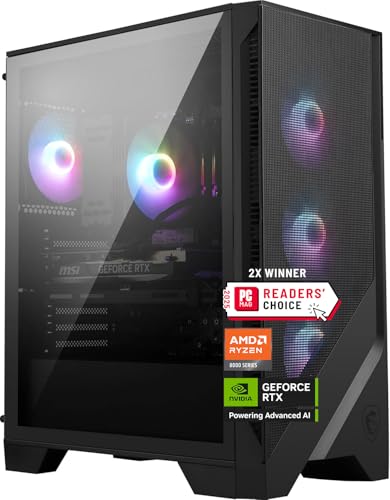
MSI Codex Z2 Gaming Desktop, Ryzen 7 8700F, RTX 5070, 32GB DDR5, 2TB SSD
Who it suits: The buyer with one good tower-sized spot — beside a desk, at the end of a TV stand — who wants the newest GPU generation and the fullest specification, placed once and left alone.
The placement story is the simplest in the guide: this is a standard tower doing a standard tower’s job, and its virtue for a small room is that it asks for nothing exotic. There is no panoramic glass to protect, no handle inviting you to move it, no accessory trail — the box arrives, it stands in its spot, and the specification means it should not need opening for years. That completeness is the real small-space feature. Memory is 32GB of DDR5 and storage is a 2TB NVMe SSD, one of only two picks here to pair the full memory allowance with the larger drive, and every upgrade you do not have to perform is a side panel that never comes off in a room with no workbench and no spare surface to lay parts on. The graphics card is the headline for the room as much as for the games: the RTX 5070, NVIDIA’s current-generation part with 12GB of GDDR7, brings DLSS 4 multi frame generation — up to three generated frames per rendered one — which is how a $1,500 PC drives a 4K high-refresh panel in supported titles. It also sits at the top of this guide’s heat order, so its spot needs honest ventilation: open air at the front, room to exhaust at the rear, nothing heat-sensitive stacked above it.
The system around the card suits that set-and-forget life. The Ryzen 7 8700F is an 8-core, 16-thread processor boosting to 5.0 GHz — a step below the 7800X3D in cache-sensitive games, but never the bottleneck for a 12GB card at 4K. The listing notes USB Type-C and Windows 11 Home, and MSI backs it with a one-year warranty. Then there is the price, which is this pick’s one real catch: this listing spends long stretches priced above this budget and only drops into it during sales. Check the price on Amazon before you buy — while it sits within budget it is the best pick in this guide; well above it, it is not a $1,500 PC at all, whatever the headline says.
- The only RTX 5070 in the guide — its DLSS 4 multi frame generation is the smoothest route here to a high-refresh 4K panel.
- Complete configuration: 32GB DDR5 and a 2TB SSD — nothing to upgrade, nothing to open.
- Conventional tower placement: no glass to protect, no special handling, one permanent spot.
Honest limitation: The price is the most volatile in this guide, the 12GB VRAM ceiling still applies, the listing does not publish its power supply wattage in the sources we checked — verify it on the live page — and as the hardest-working GPU here it produces the most heat of the six, so its corner must breathe.
Choose it if the live price is at or under $1,500 and you have one well-ventilated tower spot to give it permanently. Skip it if the listing is sitting at its usual higher price, or your only available spot is enclosed — no specification is good enough to survive a sealed cabinet.

Skytech Omega Gaming PC, Ryzen 7 7800X3D, RTX 4070 Super, 32GB DDR5, 1TB NVMe
Who it suits: The player of CPU-demanding games — simulation, strategy, big multiplayer titles — whose small room still has a floor corner with open air above it for a liquid-cooled tower.
The processor is the reason this machine exists, and it comes first even in a placement guide. The Ryzen 7 7800X3D, with its stacked 3D V-Cache, has been the benchmark gaming CPU of its generation, and its advantage lives where a high-refresh 4K player feels it: minimum frame rates and frame-time consistency. At native 4K the GPU limits most titles and the edge narrows, but DLSS lowers the internal render resolution most of the time — this budget’s whole premise — and then the CPU’s workload rises and the X3D earns its place. Paired with it is the RTX 4070 Super, 12GB of GDDR6X, roughly fifteen percent stronger than the plain 4070, with DLSS 3 upscaling and frame generation. The placement consequence is cooling: documented configurations of this model run a 360mm liquid cooler, moving the processor’s heat to a radiator that must exhaust freely — do not cap this tower with a shelf or a desk pressed close above it, and give the exhaust side a clear run of open room air.
The supporting specification is complete and, unusually, published: 32GB of DDR5, a 1TB Gen4 NVMe drive, and a stated 750W Gold power supply — transparency that should be standard and is not. Pricing follows the tier’s usual story: this system sits above the budget for long periods and drops to the ceiling during sales — check the price on Amazon before you buy. It qualifies right at the ceiling, so the advice mirrors the MSI’s: when its live price is within budget it is a superb buy for its processor alone; well above it, the same money should shop a tier up.
- The 7800X3D’s stacked 3D V-Cache delivers the steadiest minimum frame rates of any pick here.
- Liquid cooling keeps a hard-working system composed — provided the radiator can exhaust.
- A stated 750W Gold power supply alongside the full 32GB memory allowance — nothing hidden, nothing missing.
Honest limitation: Storage is 1TB in a tier where games are enormous, it only just fits the $1,500 budget when it is on sale, the radiator’s exhaust makes this the wrong tower to tuck under a low shelf, and the 7800X3D’s gaming brilliance does not extend to heavy multi-threaded work, where the Intel picks below are faster.
Choose it if you play CPU-heavy titles and your spot offers open air above and behind the case. Skip it if your only placement is low and enclosed, or your library is purely GPU-bound AAA games and the white Omega below is at a better live price — the X3D premium buys little there.

iBUYPOWER Slate 8 MESH Gaming PC, Intel Core i7-14700F, RTX 4070 Super, 2TB NVMe
Who it suits: The small-room buyer who wants the fewest possible boxes and cables in the room — one tower, peripherals included — and whose library is big enough to need the 2TB drive.
Two features lead this review, and both are about the room as much as the machine. The first is in the name: the Slate 8 MESH is an airflow-first case with a mesh front and RGB fans, cooled by a tower air cooler. Mesh is the honest small-space bargain and demand in one part — it lets the machine breathe at lower fan effort than a sealed glass box, and in exchange it insists on breathing room. Of the six picks, this is the one most punished by the classic small-room placement: slid into an alcove with its face a hand’s breadth from the wall. Give the mesh open air and the design pays you back; starve it and no specification inside compensates. The second feature is the bundle: a keyboard and mouse are included, which sounds minor until you count what a small room accumulates — one delivery, one tower, no second parcel of peripherals. Check the price on Amazon for the current offer and stock.
The hardware inside earns its place independently. The processor is Intel’s Core i7-14700F, a 20-core, 28-thread hybrid chip (8 performance cores plus 12 efficiency cores) boosting to 5.4 GHz — the most versatile CPU here for anyone who edits video, streams or runs heavy background work next to their games. The graphics card is the RTX 4070 Super with 12GB and DLSS 3 frame generation, the joint-strongest raster GPU in the guide. Storage is the 2TB NVMe drive, double three of its rivals, and at 4K file sizes that is the difference between a library and a rotation. Then the compromise, unsoftened: memory is 16GB of DDR5-5200 in a 2 × 8GB layout, below this tier’s 32GB standard. For pure gaming today it runs everything — system RAM is not the 4K bottleneck — but it leaves less headroom for a game plus chat plus a browser plus capture software, and upgrading later means replacing both sticks rather than adding a pair. iBUYPOWER spent the money on the drive and the processor instead; for the library-first buyer that trade may be exactly right, made with open eyes.
- A 2TB NVMe drive — roughly twice the installed library of the 1TB picks before the deleting starts.
- Mesh front breathes easily in open air — the placement this case rewards is an honest one.
- Keyboard and mouse included: one box, one tower, the fewest extras in the room.
Honest limitation: Only 16GB of RAM (2 × 8GB DDR5-5200) in a 32GB tier — the clearest spec compromise in this guide — no published PSU figure in the offer data we reviewed, and the mesh front makes it the pick most harmed by a flush or alcove placement.
Choose it if your spot gives the front of the case open air and you value storage and a complete out-of-box setup. Skip it if the tower must live nose-against a wall or inside a nook — take a less placement-sensitive pick — or if you stream and multitask heavily enough that 16GB will pinch from the first week.

Thermaltake LCGS View i4770 Gaming Desktop, Intel Core i7-14700KF, RTX 4070, 32GB DDR5
Who it suits: The gamer-creator whose small room has one protected, out-of-traffic corner where a glass display case can live safely — and who has the patience to catch this machine on a deep sale day.
Placement first, because this is the one pick where placement is a risk decision. The LCGS View is Thermaltake’s panoramic case line: a glass showcase built to be looked at, housing closed-loop liquid cooling. In a large room that is a style choice; in a small room it is a commitment. The corner it wants is the one nobody walks through, bumps with a chair or leans a vacuum against — because the panel that makes it beautiful is the panel that makes it fragile. If your room has that protected corner, the reward is real: this is the only pick that earns its floor space twice, once as a computer and once as the room’s display piece. If it does not, be honest now rather than after the first knock — the other five picks forgive accidents this one will not.
The processor is the system’s second reason to exist. The Core i7-14700KF is the unlocked sibling of the chip above: the same 20-core, 28-thread hybrid layout, overclocking headroom, and the strongest multi-threaded performance in this guide. For gaming alone at 4K it is more CPU than the RTX 4070 can use; for gaming plus rendering, compiling or serious streaming, it is the pick that will not be the bottleneck in four years. Around it sit 32GB of DDR5 at a published 5600MT/s, a 1TB NVMe drive, WiFi and Windows 11. The graphics card is the plain RTX 4070, 12GB — a step below the Supers and the 5070, which at 4K means leaning on DLSS Quality in the heaviest titles and accepting high rather than ultra textures sooner, with DLSS 3 frame generation keeping the lived experience smooth. Pricing is the most instructive in the guide: this is a premium-tier machine — sold and shipped by Amazon — that occasionally drops into this budget during deep sales. It rents a room at this budget rather than living here, and the entire recommendation is conditional on catching one of those occasions — check the price on Amazon before you commit.
- An unlocked, liquid-cooled i7-14700KF — more multi-threaded muscle than any other pick in the guide.
- The panoramic case earns its space as a display piece, in the right corner.
- Only worth it at a deep sale price on Amazon — the discount is the recommendation.
Honest limitation: The plain RTX 4070 is the weakest GPU among the top picks, its usual price sits far over budget, so this is strictly a wait-for-the-sale pick, the KF chip has no integrated graphics as a troubleshooting fallback, and the glass case is the most placement-fragile object in this guide.
Choose it if you catch it on a deep sale and your room offers a protected, out-of-traffic spot where glass can live. Skip it if you are buying today at full price, or your only corner is a walkway — a 4070 Super system at budget, in a case that forgives a knock, beats a beautiful machine in harm’s way.

Skytech Omega Gaming PC, Ryzen 7 7700X, RTX 4070 Super, 32GB DDR5, White
Who it suits: The value hunter building a light-themed setup in a room where the PC is always on display — and who is willing to dust it like they mean it.
The colour is where this review has to start, because in a small space a white case is not a finish, it is a maintenance schedule. In a large room a tower can disappear into a shadowed corner; in a small room the PC is furniture, permanently in view, and white shows every film of dust and grey fingerprint that black hides for a year. Buyers split honestly: some want the bright build enough to wipe it down — for them this is the best-looking machine in the guide at its best price — and others will watch it slowly grey and resent it. Know which one you are before the price seduces you, because the price is genuinely seductive. Under the finish sits the same Omega formula as the 7800X3D system with one change: a Ryzen 7 7700X, an 8-core chip boosting to 5.4 GHz. In GPU-bound 4K gaming — most of play on these machines, with DLSS set sensibly — the practical gap to the X3D is small, because the RTX 4070 Super does the deciding; the X3D pulls ahead only in minimum frame rates in CPU-sensitive games.
Everything else matches the flagship Omega: the same RTX 4070 Super 12GB with DLSS 3 frame generation, 32GB of DDR5 RGB memory, a 1TB Gen4 NVMe drive, the published 750W Gold power supply, Wi-Fi and Windows 11 Home, with the 360mm liquid cooling configuration documented for this model line — so the same placement rule applies: the radiator needs a clear exhaust path, with open air above and behind rather than a low shelf capping the case. The 7700X is a hot-running chip that justifies its liquid cooler rather than making it a luxury, which in a small room means its heat arrives in your living space efficiently and in full; place it where the room can absorb that. On price, this is one of the strongest value picks in the guide when it is on sale: its sale pricing lands comfortably under budget rather than balanced on its edge — though its usual price sits far above its sale price, so this too is a price you catch rather than assume — check the price on Amazon before you buy. Any saving against the budget is best spent on a second NVMe drive, the one upgrade its 1TB specification invites.
- Among the deepest sale discounts of the six — check the price on Amazon.
- Full specification with no cuts: 4070 Super, 32GB DDR5, published 750W Gold PSU.
- The bright build a light-themed small room actually wants — if you will keep it bright.
Honest limitation: The white case shows dust and scuffs that a small room gives you no way to ignore, storage is 1TB like its sibling, the CPU runs hot and needs its cooler and exhaust path kept healthy, and the value exists only at sale pricing — its usual price is far above its sale price.
Choose it if the live price is near its best sale level and a white build is a feature you will maintain, not a chore you will resent. Skip it if CPU-sensitive simulation or strategy games dominate your library — that is the one case where the 7800X3D Omega’s premium is money well spent — or if you know the dusting will not happen.
ASUS ROG Strix G15DS Gaming Desktop, Ryzen 7 7700X, RTX 4070 Dual, 1TB PCIe SSD
Who it suits: The buyer whose PC cannot have a single permanent home — desk by day, TV by night — and who wants the one machine in this guide designed to be picked up and carried between them.
ASUS builds this one differently, and for a small space the differences are the whole argument. The ROG Strix G15DS is documented as a compact mid-tower — the only pick whose class starts from the constraint — with a multi-zone airflow design separating chambers for the hot components, and the practical touches this line is known for: a carry handle rated to 20 kg and a headphone hook, both straight from the maker’s listing. The handle is not a gimmick in a small home; it is the difference between a PC that lives where it was first unpacked and one that follows the evening — carried to the TV for a couch session, carried back to the desk for work, without the two-handed shuffle that makes moving a tower a reason not to bother. The headphone hook sounds trivial until you count the surfaces in a small room. Compact remains a class, not a measurement — the live listing’s specification block is where you confirm the exact fit — but this is the only pick designed around your constraint.
The hardware is honest mid-guide fare. The processor is the Ryzen 7 7700X, the same strong 8-core chip as the white Omega, and the graphics card is an ASUS Dual-fan RTX 4070 with 12GB of GDDR6X and three DisplayPort outputs plus HDMI — the full multi-display connectivity a desk-plus-TV life actually uses, so the carry-and-play routine does not mean re-plumbing cables at both ends. It carries a 1TB PCIe SSD and runs Windows 11 Home. The compromises are two, and both are named. Memory is 16GB at DDR5-4800, the slowest published memory speed in the guide and below the tier’s 32GB standard: fine for gaming today, since the GPU’s 12GB is the binding constraint at 4K, but the specification of a cheaper tier, and heavy multitaskers will feel it first. And the in-budget offers for this model have come via a marketplace seller rather than Amazon itself, so check who is selling and shipping the unit on the live listing and confirm the warranty path before you buy; the same model through Amazon or an authorised seller at a similar price is the cleaner purchase — check the price on Amazon either way.
- The compact tower of the set, with a carry handle — built for rooms where the PC moves.
- Multi-zone airflow and full 3× DisplayPort connectivity for a desk-plus-TV setup.
- ROG build quality and a big-name warranty path behind the box.
Honest limitation: 16GB of DDR5-4800 is below the tier’s 32GB standard and the slowest memory here, the in-budget offers have come via a marketplace seller — verify the seller and warranty on the live listing — and no PSU wattage is published in the sources checked.
Choose it if the PC has to move between desk and TV, or your spot is tight enough that the compact class is the deciding factor. Skip it if you want 32GB in the box or Amazon itself as the seller — the Omegas cover both, and they do not need carrying.

Comparison Table
| Product | GPU | CPU | RAM / Storage | Placement character | Link |
|---|---|---|---|---|---|
| MSI Codex Z2 | RTX 5070 12GB | Ryzen 7 8700F | 32GB / 2TB | Standard tower — place once, ventilate well, leave alone | Check on Amazon |
| Skytech Omega (7800X3D) | RTX 4070 Super 12GB | Ryzen 7 7800X3D | 32GB / 1TB | Liquid-cooled tower — needs a clear exhaust path above and behind | Check on Amazon |
| iBUYPOWER Slate 8 MESH | RTX 4070 Super 12GB | Intel i7-14700F | 16GB / 2TB | Mesh front — breathes in open air, suffers flush in an alcove | Check on Amazon |
| Thermaltake LCGS View i4770 | RTX 4070 12GB | Intel i7-14700KF | 32GB / 1TB | Panoramic glass — a display piece for a protected corner | Check on Amazon |
| Skytech Omega (7700X, White) | RTX 4070 Super 12GB | Ryzen 7 7700X | 32GB / 1TB | Liquid-cooled tower in white — shows every speck of dust | Check on Amazon |
| ASUS ROG Strix G15DS | RTX 4070 12GB | Ryzen 7 7700X | 16GB / 1TB | Compact tower with carry handle — the one built to move | Check on Amazon |
How to Choose a 4K Gaming PC for a Small Space Under $1,500
- Measure before you buy — in this order. (1) Measure the spot: width, depth and height of the exact place the tower will live. (2) Add clearance: open air at the front for intake, behind for exhaust and cables, above for any liquid-cooled pick — a tower that exactly fills its hole overheats in it. (3) Tape the footprint: mark the case’s outline on the floor with painter’s tape, using the dimensions from the live listing’s specification block, and live with the tape for a day — walk past it, sit where you will sit. (4) Walk the cable run: trace the power lead, display cable and any Ethernet from the taped outline to their sockets, and check they reach without crossing a walkway at ankle height. (5) Then order. Ten minutes, and the difference between a PC that fits your room and a PC your room has to survive.
- Take the dimensions from the live listing, not from a guide. This guide prints no case measurements because its sources document none: listings publish case dimensions in their specification blocks, and that figure — for the exact model and revision being sold — is the only one worth taping to your floor. A listing that publishes no dimensions is itself information.
- Match the case front to the spot. Mesh fronts (the iBUYPOWER) need open air in front of them and are the wrong choice for a flush alcove. Glass fronts (the Thermaltake) need protection from traffic. Sealed, quiet-looking fronts need the most rear clearance of all. The front panel is a placement requirement disguised as a design choice — read it as one.
- Decide whether the PC moves or stays. If it stays, any tower here works and the choice returns to GPU, price and specification. If it moves — desk to TV, room to room — the ASUS is the only pick designed for it, handle and all, and that design intent outweighs a specification gap you can fix later with a memory kit.
- Put distance between the case and your ears. No acoustic figures are published for these systems, and none are needed to apply the rule: floor placement beside the desk is quieter at your chair than the same case on the desk at head height, and a door or a bookcase between you and the tower beats any fan curve. Solve noise with geography before you solve it with hardware.
- Never solve noise or clutter with a closed cabinet. A tower in a sealed TV cabinet or wardrobe is a tower in an oven of its own exhaust. If the PC must live inside furniture, the furniture needs an open back and open air paths — or the PC needs to be a different, smaller machine entirely (see the next section).
- Keep towers off carpet where you can. Many towers draw air or mount their power supply at the bottom; on deep carpet the intake chokes on pile and dust. A hard board, a low stand or a hard floor spot is a five-minute fix that the machine will thank you for every day it runs.
- Buy the graphics card class first, as always. Placement decides which of these six fits your room; it does not change what they are. The order stands — RTX 5070 ≈ RTX 4070 Super, then RTX 4070 — and a weaker card in a cleverer case is still a weaker card at 4K.
- Check the live price, not the headline. Each of the six fits this guide’s $1,500 budget when it is on sale, and each normally sells above it. Check the price on Amazon for every pick before you buy, and decline to pay over-budget money for a recommendation written for this tier — patience, at this tier, is worth money.
- Accept the 12GB VRAM ceiling knowingly. All six cards carry 12GB: enough for 4K with DLSS and sensible texture settings today, and the first thing that will age. If ultra textures in every release for five years is the plan, no $1,500 PC is your machine — and no placement trick changes that.
When a Tower Is the Wrong Answer
Everything above assumes your room can take a tower with ventilation around it. Some rooms cannot: the studio with one wall of furniture, the shared house where the TV stand is already full. If the measuring routine ends with tape on the floor and nowhere honest to put it, the correct purchase is not the least-bad tower — it is a different class of machine, and this site’s other guides cover them. Start with Best Mini Gaming PC Under $1500 for the smallest machines that still game properly, and Best Small Form Factor Gaming PC Under $1500 for the console-sized cases built around exactly your constraint. Buyers who want a desktop footprint with a gentler shape should see Best Compact Gaming PC Under $1500, and anyone whose gaming is light enough that integrated graphics will do — older titles, esports, cloud gaming — can drop the tower entirely with Best Mini PC Under $1500.
Make the trade with open eyes, in both directions. The small machines give up this GPU class, this cooling headroom and this upgrade path — a compact 4070-class system costs more than this budget or does not exist, which is why this guide is towers all the way down. The towers give up a footprint a shelf can hold. Neither direction is a compromise to be embarrassed about; the only bad outcome is buying the tower for a room that needed the mini, or the mini for games that needed the tower. Measure first, then choose the class, then the machine.
Common Buying Mistakes
- Ordering the tower first and measuring when it arrives. In a small room the measurement is the purchase decision; the tape routine in How to Choose prevents the most expensive mistake in this guide.
- Hiding the PC in a closed cabinet to solve noise or clutter. The cabinet fills with the machine’s own exhaust, fans run harder and components age faster. Open-backed furniture or a different machine class — never a sealed box.
- Placing a tower directly on deep carpet. Bottom intakes and power supplies choke on pile and dust. A board or a low stand is the cheapest performance upgrade in this entire guide.
- Shoving a mesh-front case flush into an alcove. The mesh is the intake; block it and the machine breathes its own exhaust. The iBUYPOWER in this guide is the pick most harmed by the most common small-room placement.
- Capping a liquid-cooled tower with a low shelf. The radiator exhausts upward or rearward; give it a clear run of room air, or the cooling you paid for becomes a heater aimed at the underside of your furniture.
- Putting the glass showcase in the walkway. The Thermaltake’s panoramic panel and a small room’s traffic are natural enemies. If every corner is a thoroughfare, choose a case that forgives a knock.
- Buying the white build and never dusting it. A white case in a small, always-visible spot is a cleaning commitment; the grey film arrives on schedule whether you budgeted for it or not.
- Trusting dimensions from a render, a roundup or a different revision. Models drift; the live listing’s specification block for the exact unit being sold is the only measurement worth taping to your floor.
- Paying the usual price for a sale-priced recommendation. Several picks here normally sell above this budget. The sale price is the deal; the usual price is not.
- Assuming “compact” on a listing means small enough. It is a class word, not a measurement — the ASUS here earns it honestly, but the tape routine still decides whether it fits your shelf.
Final Recommendation
- Most small-room 4K buyers: MSI Codex Z2, RTX 5070 — one permanent, ventilated spot, at its sale price.
- CPU-heavy and simulation gamers: Skytech Omega, Ryzen 7 7800X3D — with open air above for its radiator.
- Fewest boxes in the room: iBUYPOWER Slate 8 MESH — peripherals included, mesh given room to breathe.
- A protected corner and a sale day: Thermaltake LCGS View i4770 — only at a deep sale price.
- Best value, light-themed room: Skytech Omega, Ryzen 7 7700X, White — strong sale value, dusting included.
- The PC that has to move: ASUS ROG Strix G15DS — the compact tower with the handle.
Our top two for a small room at this budget are the MSI Codex Z2 — newest GPU generation, DLSS 4 multi frame generation and the only complete 32GB-plus-2TB specification here, the tower you place once and never think about again — and the ASUS ROG Strix G15DS, the one machine designed around the reality of small homes, whose compact class and carry handle solve the desk-to-TV problem no specification sheet can. Between them they cover the two shapes this search takes: a room with one good permanent spot, or a home where the PC has to earn two. The white Skytech Omega joins them whenever its live price drops to its best sale level and its buyer accepts the dusting. Buyers one tier down should also see Best 4K Gaming PC For Small Spaces Under $1200, those with more budget Best 4K Gaming PC For Small Spaces Under $2500, and anyone still settling the room question should start from Best 4K Gaming PC Under $1500. Measure the spot, tape the footprint, walk the cable run — then check the live price, and order.
Frequently Asked Questions
Is there a genuinely small 4K gaming PC under $1,500?
Not in this guide, and effectively not at this budget: the RTX 5070 and 4070 class that makes 4K gaming real ships in tower cases at this price. All six picks here are towers — five conventional, one compact mid-tower. If a tower genuinely cannot fit, the honest route is a mini or small-form-factor machine from the guides linked in this article, accepting the GPU-class trade that comes with the size.
How much clearance does a gaming tower actually need?
Enough that its intake draws room air and its exhaust leaves freely: open air in front, space behind for exhaust and cable bends, room above for liquid-cooled systems whose radiators exhaust upward. The figure that matters is your spot’s, not a universal one — measure, add clearance on every breathing side, tape the footprint from the live listing’s dimensions, and only then order.
Can I put one of these PCs inside a TV cabinet?
Not inside a closed one. A sealed cabinet fills with the tower’s own exhaust until the machine is breathing heated air, at which point fans get louder and components run hotter — the opposite of what the cabinet was for. Open-backed furniture with genuine air paths can work for lighter use; for sustained 4K gaming sessions, open placement or a smaller class of machine is the honest answer.
Which of these six is actually the smallest?
The ASUS ROG Strix G15DS is the only pick documented as a compact mid-tower, and it is the only one designed to be moved, with a carry handle. This guide prints no dimensions because its sources document none for any pick — the live listing’s specification block carries the exact figures, and the measuring routine in How to Choose is how to use them before the box is on your doorstep.
Will a tower heat up a small room?
Yes, over a long session — every watt a gaming PC draws becomes heat in the room, and a small room is a small reservoir. The 5070 and 4070 Super systems warm it most; the plain 4070 systems a step less. Room ventilation matters as much as case ventilation: a door ajar does more for a small gaming room than any fan configuration inside the PC.
Is the floor or the desk better for the tower?
The floor, in almost every small room: it puts distance between the case and your ears — the cheapest noise reduction there is — frees the desk entirely, and keeps the machine’s weight off furniture. The exceptions are deep carpet, which chokes bottom intakes (use a board or low stand), and a floor spot in a walkway, where a tower becomes an obstacle with a power cable.
Why doesn’t this guide print one firm price per PC?
Because at this tier the same system can sit within this budget in a sale week and well above it the next, and any printed figure goes stale quickly. Check the price on Amazon on every pick; until you are looking at the live listing, no other number is the price — and the moment that listing climbs above $1,500, the pick stops being a $1,500 pick.


