Where to buy
Check the latest price, availability and delivery on Amazon. Orders are placed on Amazon. We may earn a commission from qualifying purchases.
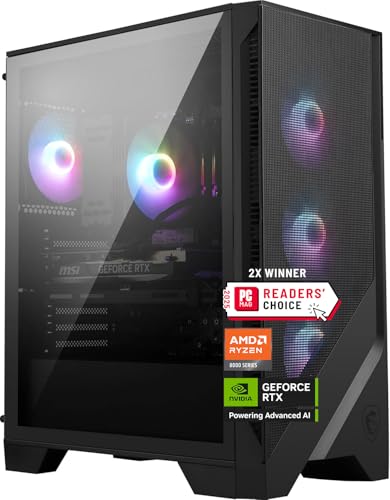
- Best overall for a first 4K PC: MSI Codex Z2 Gaming Desktop, Ryzen 7 8700F, RTX 5070, 32GB DDR5, 2TB SSD — Check on Amazon
- Skytech Omega Gaming PC, Ryzen 7 7800X3D, RTX 4070 Super, 32GB DDR5, 1TB NVMe — Check on Amazon
- iBUYPOWER Slate 8 MESH Gaming PC, Intel Core i7-14700F, RTX 4070 Super, 2TB NVMe — Check on Amazon
- Thermaltake LCGS View i4770 Gaming Desktop, Intel Core i7-14700KF, RTX 4070, 32GB DDR5 — Check on Amazon
See 2 more Amazon options
- Skytech Omega Gaming PC, Ryzen 7 7700X, RTX 4070 Super, 32GB DDR5, White — Check on Amazon
- ASUS ROG Strix G15DS Gaming Desktop, Ryzen 7 7700X, RTX 4070 Dual, 1TB PCIe SSD — Check on Amazon
Read the full guide ↓
Disclosure: As an Amazon Associate, reviewstook.com earns from qualifying purchases. Links to Amazon on this page are affiliate links; they cost you nothing extra. Listing details such as price and availability change often, so check the current Amazon listing before you buy.
If this is your first gaming PC, welcome — and before anything else, here is the single most important sentence in this guide, because almost every beginner misunderstanding about “4K gaming PCs” starts here: a PC under $1,500 does not play most modern games by drawing every pixel of a 4K picture itself. What it does — and this is genuinely impressive, not a trick — is draw the game at a lower internal resolution, roughly the size of a 1440p picture, then use smart software called DLSS to rebuild a sharp 4K picture from it, sixty or more times a second. Lighter and older games, meanwhile, really do run at full native 4K on the machines below. So the honest description of what $1,500 buys is: real 4K for easy games, expertly upscaled 4K for demanding ones, and high settings rather than the very top “ultra” settings in the heaviest new releases. Anyone promising more than that at this price is describing a machine that does not exist.
Because this guide is written for first-time buyers, it explains every technical term in plain English the first time it appears, walks you through your first evening with the machine step by step, and separates the cost of the PC itself from the cost of everything around it — the 4K screen, the keyboard, the extras. One warning belongs up front, because it applies to every pick below: prices on prebuilt PCs at this level swing a lot. Each system here belongs in this budget tier when it is on sale, but several spend much of the year positioned well above it. A pick in this guide counts as a pick for this budget only on a day when its live listing fits that budget — check price on Amazon before you buy. If the live price sits well above the tier when you look, wait for it to fall again rather than paying it.
Short version of the recommendations: most beginners should start with the MSI Codex Z2, the only machine here with the newest-generation graphics card, a full 32GB of memory and a roomy 2TB drive.
New to This? The Jargon, in Plain English
Gaming PC listings are written in shorthand. Here are the dozen terms that actually decide what you are buying, translated.
- Resolution is how many dots (pixels) make up the picture. More pixels means a sharper picture and much more work for the PC. 1080p is 1920 × 1080, about 2.1 million pixels. 1440p is 2560 × 1440, about 3.7 million. 4K (also called 2160p or UHD) is 3840 × 2160, about 8.3 million pixels — roughly four times 1080p and about two and a quarter times 1440p. Every extra pixel has to be calculated and coloured by the graphics card for every frame, which is why 4K is so demanding.
- Display resolution vs render resolution is the distinction this whole guide rests on. Your screen always displays 4K if it is a 4K screen. But the game can be rendered — actually drawn by the graphics card — at a smaller size and then stretched up intelligently. When a game “runs at 4K” on the PCs below, it usually means: displayed at 4K, rendered at around 1440p, rebuilt by software. That is not cheating; it is how almost all affordable 4K gaming works, consoles included.
- GPU (graphics card) is the part that draws the game — the single most important component in a gaming PC, and at 4K the one doing most of the work. The cards in this guide (RTX 5070, RTX 4070 Super, RTX 4070) are the engine room of each machine.
- CPU (processor) runs the game’s logic: the world, the physics, the other characters. At 4K the graphics card is usually the busy one, so the CPU matters less than beginners expect.
- VRAM (video memory) is the graphics card’s own private memory, where the game’s textures — the detailed surfaces on walls, armour, landscapes — are stored while you play. Every card in this guide has 12GB of it. At 4K, textures are big, and 12GB is enough for high texture settings in most games today, but not unlimited: the very top “ultra” texture settings in a few recent games want more.
- RAM (system memory) is the PC’s general workspace, separate from VRAM. 16GB is workable; 32GB is comfortable, especially if you keep a browser, chat apps and recording software open while you play. Four of the six PCs below have 32GB; two have 16GB, and those reviews say so plainly.
- SSD (storage) is where games live when you are not playing them. Modern games are huge — 80 to 150GB each is normal. All six PCs here use fast NVMe SSDs, so loading times are quick on all of them.
- Upscaling (DLSS) is NVIDIA’s software for the render/display trick above. The card renders the game smaller, then uses artificial intelligence trained on high-resolution imagery to reconstruct a convincing 4K frame. In its Quality mode at 4K output, the game is rendered internally at about 2560 × 1440 (1440p) and rebuilt to 3840 × 2160; the Performance mode renders at about 1920 × 1080 (1080p) for a bigger speed boost with a softer picture. DLSS is the reason this price tier can call itself “4K” with a straight face.
- Frame generation is a separate trick: the card invents extra in-between frames and slots them between the real ones, so motion looks smoother. The RTX 4070 cards (DLSS 3) can insert one invented frame per real frame; the RTX 5070 (DLSS 4) can insert up to three. Important beginner point: frame generation is interpolation, not rendering power. It makes a game that is already running decently feel smoother; it cannot rescue a game running badly, and it adds a tiny delay to your controls, which is why competitive players usually switch it off.
- Frame rate (fps) is how many pictures per second the PC produces: 30fps is playable but sluggish, 60fps is the smooth standard most people aim for, and 100fps and above feels smoother still on a screen that can show it.
- Refresh rate (Hz) is how many times per second your screen can update: a 60Hz screen can show at most 60fps, however fast the PC is. These PCs deserve a 4K screen with 120Hz or more; on a basic 60Hz office monitor, much of what you paid for never reaches your eyes.
In this guide
Quick Picks
Short on time, or comparing several options at once? Each row below names a buyer type and the product that suits it, with a link to the listing.
| Buyer type | Pick | Why it stands out | Link |
|---|---|---|---|
| Best first 4K PC overall | MSI Codex Z2, Ryzen 7 8700F, RTX 5070 | Newest graphics card, full 32GB memory and 2TB storage — nothing to add on day one | Check on Amazon |
| Best for strategy & simulation games | Skytech Omega, Ryzen 7 7800X3D, RTX 4070 Super | The best gaming processor in this guide, with a published 750W Gold power supply | Check on Amazon |
| Best for a big game library | iBUYPOWER Slate 8 MESH, i7-14700F, RTX 4070 Super | 2TB of storage and a strong 20-core processor — but only 16GB of memory | Check on Amazon |
| Best if the PC also does work | Thermaltake LCGS View i4770, i7-14700KF, RTX 4070 | Powerful unlocked processor and liquid cooling — a bargain only on its sale days | Check on Amazon |
| Best value when on sale | Skytech Omega, Ryzen 7 7700X, RTX 4070 Super, White | Value-focused positioning in this tier, with no cut corners in the specification | Check on Amazon |
| Best-known brand, compact case | ASUS ROG Strix G15DS, Ryzen 7 7700X, RTX 4070 | Trusted brand and a smaller tower — with a 16GB memory compromise and a seller note | Check on Amazon |
How These Picks Were Chosen
Three rules shaped the list. First, the capability rule: nothing built around a graphics card weaker than the RTX 4070 was included, because below that line a “4K” label stops meaning anything honest. Second, the price rule: every pick is a system that fits this budget tier when it is on sale, and where a machine spends most of the year above budget, its review says so plainly, so you know whether you are looking at an everyday listing or a sale you need to catch — check price on Amazon to see where it sits today. Third, the completeness rule: at $1,500 a first-time buyer should not have to open the case in week one, so 32GB of memory and at least 1TB of storage were treated as the standard. Two systems below fall short on memory; both are included for genuine strengths, and both carry the shortfall as a clearly labelled limitation rather than a footnote.
The 6 Best 4K Gaming PCs Under $1,500 for Beginners
MSI Codex Z2 Gaming Desktop, Ryzen 7 8700F, RTX 5070, 32GB DDR5, 2TB SSD
Who it suits: The first-time buyer who wants the newest technology and the most complete box — the PC you set up once and do not think about upgrading for years — and who can act quickly when the price drops.
Start with the graphics card, because on a gaming PC it matters most. This one is the RTX 5070, the newest card in this guide, from NVIDIA’s current Blackwell generation. Its raw drawing speed is about level with the RTX 4070 Super cards below, but it owns one feature none of them can match: DLSS 4 with multi frame generation, which can insert up to three software-created frames between each pair of real ones. Remember the glossary’s warning — those invented frames are interpolation, not rendering power — but at 4K, where real frame rates are lowest, they are exactly what makes a demanding game feel fluid on a fast screen. In lighter games this card also renders true native 4K outright. It carries 12GB of video memory, the same ceiling as every card here, so the “high textures, not always ultra” advice applies to it too.
Everything around the card is finished, which is what a beginner is really paying for. The processor is AMD’s Ryzen 7 8700F, an 8-core chip that boosts to 5.0 GHz — comfortably strong for gaming, where the graphics card does the heavy lifting at 4K. Memory is the full 32GB, and storage is a 2TB drive, double most of this guide: at 80–150GB per modern game, that is the difference between installing a dozen games and constantly deleting them. The listing also includes USB Type-C, Windows 11 Home, and a one-year MSI warranty. The catch is price behaviour. This listing moves between sale pricing that fits this budget and stretches positioned well above it. When it fits the budget, it is the best overall first 4K PC here. When it sits high, it is simply not a PC for this tier, and you should wait rather than pay it — check price on Amazon before deciding.
- Newest-generation RTX 5070 with DLSS 4 multi frame generation — the strongest 4K-smoothing technology in this guide.
- Nothing to add on day one: 32GB of memory and a 2TB drive in the box.
- A published model number and a one-year warranty from a major brand.
Honest limitation: The price swings more than any other pick here — the listing spends long stretches well over budget — the 12GB video-memory ceiling still applies, and the listing does not publish its power supply wattage in the sources we checked, so confirm it on the live page before ordering.
Choose it if you check price on Amazon and it fits this budget, and you want the newest graphics card with the fullest specification. Skip it if the listing is sitting high — either wait for the next dip or choose a 4070 Super system that is genuinely at budget today.

Skytech Omega Gaming PC, Ryzen 7 7800X3D, RTX 4070 Super, 32GB DDR5, 1TB NVMe
Who it suits: Beginners whose favourite games are strategy, simulation, city-builders, flight sims or big multiplayer titles — the kinds of games that lean on the processor — and who want the smoothest, steadiest frame delivery in this guide.
Most reviews in this guide lead with the graphics card; this one leads with the processor, because the Ryzen 7 7800X3D is a genuine exception. It uses a design called 3D V-Cache — extra memory stacked directly on the chip — which makes it exceptionally good at feeding a game world to the graphics card without hiccups. In everyday language: average frame rates look similar to the other PCs here, but the worst moments — the dips and stutters that make a game feel rough — are where this chip pulls ahead, and smoothness you can feel beats a headline number you cannot. The graphics card paired with it is the RTX 4070 Super, about fifteen percent faster than the plain RTX 4070 in the two reviews below, with DLSS upscaling and DLSS 3 frame generation (one inserted frame at a time). In GPU-bound games it renders at around 1440p internally and upscales to your 4K screen, exactly as the glossary describes; in lighter titles it can render native 4K.
The rest of the specification is complete and, helpfully for a beginner, fully published. Memory is 32GB, storage is a 1TB NVMe drive, cooling is a 360mm liquid cooler in documented configurations of this model line, and the power supply is a stated 750W Gold unit — a detail several rivals leave unstated, and one that matters later if you upgrade the graphics card. On price, be clear-eyed: this machine is positioned at the premium end of the tier and qualifies for the guide right at the ceiling, on its sale days — check price on Amazon. When it fits the budget, the processor alone justifies it. When it sits at its usual premium positioning, you are shopping in the wrong guide.
- Ryzen 7 7800X3D — the best gaming processor in this guide, strongest where stutter is born.
- RTX 4070 Super with DLSS upscaling and frame generation for smooth upscaled 4K.
- Published 750W Gold power supply and the full 32GB of memory — no mysteries in the spec sheet.
Honest limitation: Storage is 1TB in a guide where games are enormous, it tends to sit at the top end of this budget tier rather than comfortably under it, and this processor’s gaming brilliance does not make it the fastest at heavy work tasks like video rendering, where the Intel systems below finish sooner.
Choose it if your library leans on strategy, simulation or multiplayer games and you value steadiness over spectacle. Skip it if you mostly play big single-player adventures and the white Omega below is cheaper on the day — in those games its processor advantage mostly goes unused.

iBUYPOWER Slate 8 MESH Gaming PC, Intel Core i7-14700F, RTX 4070 Super, 2TB NVMe
Who it suits: The beginner who installs everything and deletes nothing — a big rotating library of large games — and who might also edit video, stream, or keep a crowd of apps open alongside play.
Two parts of this machine lead its class. The storage is a 2TB NVMe drive, double the three 1TB systems here, and for a 4K library that is a daily quality-of-life feature, not a luxury: the delete-download-delete shuffle is the most annoying chore in modern gaming, and this PC halves it. The processor is Intel’s Core i7-14700F, a 20-core chip (8 fast performance cores plus 12 efficiency cores, boosting to 5.4 GHz) — more all-round muscle than any AMD chip in this guide for work that spreads across cores, like video editing or streaming while you play. The graphics card is the RTX 4070 Super, joint-strongest raster performer here alongside the other Super systems, with DLSS upscaling and frame generation; expect the same honest 4K recipe — native in lighter games, rendered around 1440p and upscaled in demanding ones.
Now the compromise, stated without softening: the memory is 16GB, configured as two 8GB sticks of DDR5-5200. Every other full-price rival here ships 32GB, so this is below the standard for the tier. For gaming alone it is fine today — the real 4K limit is the graphics card’s 12GB of video memory, not system memory — but 16GB leaves less room for a game plus voice chat plus a browser plus recording software, and because both slots are filled with small sticks, upgrading later means replacing the pair rather than adding to it. If your habits are “one game, full screen, nothing else,” that trade may suit you perfectly; if you multitask, plan for a 32GB memory kit from the start.
- 2TB of storage — the big-library pick, half the deleting of the 1TB systems.
- 20-core i7-14700F: the most versatile processor here for gaming plus creative work.
- RTX 4070 Super graphics, airflow mesh case, and a keyboard and mouse in the box.
Honest limitation: Only 16GB of memory in a 2 × 8GB layout in a tier where 32GB is the standard — the clearest compromise in this guide — and no power supply figure was published in the offer data we reviewed.
Choose it if storage space and an all-round processor top your list and you play with few background apps. Skip it if you stream, record and multitask while gaming — take a 32GB pick instead; adding a drive later is easier than replacing memory.

Thermaltake LCGS View i4770 Gaming Desktop, Intel Core i7-14700KF, RTX 4070, 32GB DDR5
Who it suits: The patient beginner. Someone whose PC will work as hard as it plays — editing, rendering, school or office workloads alongside games — and who is willing to wait for one of this machine’s deep sale days rather than buying on a deadline.
The headline here is the processor. The Core i7-14700KF is the unlocked version of the chip in the iBUYPOWER above: the same 20 cores, with overclocking headroom for later and the strongest all-round computing performance in this guide. For gaming at 4K it is more processor than the graphics card can use, but for everything else a PC does, it is the pick least likely to feel slow in four years. Around it, Thermaltake builds a polished system: closed-loop liquid cooling, 32GB of memory at a published 5600 speed, a 1TB NVMe drive, WiFi and Windows 11, in the glass-fronted View case. The graphics card is the plain RTX 4070 — a step below the Supers and the 5070 — which at 4K means relying on DLSS Quality upscaling in demanding games and choosing high texture settings sooner. With DLSS 3 frame generation on board, games still feel properly smooth; it is the ceiling that sits lower, not the everyday experience.
Pricing decides whether this review is a recommendation or a warning. This is a premium-tier machine that occasionally visits this budget on sale days, and the entire recommendation depends on catching one of those visits — check price on Amazon. When it drops into this tier it is a genuine bargain: the guide’s best processor platform and its neatest cooling in a system positioned well above this budget the rest of the year. At its everyday premium positioning, a 4070 Super system that actually fits the budget is the better gaming purchase.
- i7-14700KF, unlocked and liquid-cooled — the strongest all-round processor platform here.
- Full 32GB of memory at a published speed, from a respected case-and-cooling brand.
- A genuine sale-day find when its live price drops into this budget — check price on Amazon.
Honest limitation: The plain RTX 4070 is the weakest graphics card among the top picks, its typical positioning is far over budget, so this is strictly a wait-for-the-sale pick, and the KF processor has no built-in graphics, which removes a handy fallback if you ever need to troubleshoot a display problem.
Choose it if you catch it on a sale day when it fits this budget and your PC earns its keep in work as well as play. Skip it if you are buying today, at full price, mainly for games — a 4070 Super system that is actually at budget beats it every time.

Skytech Omega Gaming PC, Ryzen 7 7700X, RTX 4070 Super, 32GB DDR5, White
Who it suits: The value-conscious beginner who wants the full specification — strong graphics card, full memory, published power supply — at the lowest verified price in this guide, and who likes the clean look of a white build.
This machine is the sibling of the 7800X3D Omega above with one change, and understanding that change is the whole review. The processor is the Ryzen 7 7700X, a strong 8-core chip boosting to 5.4 GHz, instead of the 3D V-Cache flagship. In the big single-player games most beginners play at 4K, the graphics card decides performance, and here that card is the same RTX 4070 Super — so in practice this system plays those games about as well as its pricier sibling. Where the flagship chip earns its premium is steadier minimum frame rates in processor-heavy strategy and simulation titles.
And value is the headline: this system is positioned as the best-value pick in the guide for this tier — check price on Amazon to see where it sits today. Everything else matches the flagship Omega — the same 4070 Super with DLSS upscaling and frame generation, the full 32GB of memory, a 1TB Gen4 NVMe drive, the published 750W Gold power supply, WiFi, Windows 11 Home, and the 360mm liquid-cooling configuration documented for this model line. That value positioning leaves room in a wider setup budget for a second storage drive later — the one upgrade its 1TB specification eventually invites. Two honest cautions: its typical positioning is well above its sale-day level, so this value exists on sale days, not every day; and the 7700X runs hot by design, which is why the liquid cooler is fitted — keep its fans and vents clear of dust and it will look after itself.
- Best-value positioning in this tier for a full, no-compromise specification.
- No cut corners: 4070 Super graphics, 32GB of memory, published 750W Gold power supply.
- In graphics-led 4K games, effectively the flagship Omega’s experience for less.
Honest limitation: 1TB of storage like its sibling, a hot-running processor that depends on its cooler, and a typical positioning far above its sale-day level — the value is real only at sale pricing.
Choose it if you check price on Amazon and it fits this budget comfortably — it is the value pick of this guide. Skip it if processor-heavy simulation and strategy games dominate your library; that is the one case where paying for the 7800X3D version makes sense.
ASUS ROG Strix G15DS Gaming Desktop, Ryzen 7 7700X, RTX 4070 Dual, 1TB PCIe SSD
Who it suits: The beginner who trusts a famous brand, wants a compact tower that sits comfortably beside a TV, and accepts a memory compromise and a careful seller check to get them.
ASUS approaches this tier differently from the boutique builders above, and for a first-time buyer the differences are reassuring. The ROG Strix G15DS is a compact mid-tower with a multi-zone airflow design that keeps hot components in separate chambers, plus two small features that matter in real rooms: a carry handle rated to 20kg, so moving the PC between desk and TV is a one-hand job, and a headphone hook on the case. The processor is the same Ryzen 7 7700X as the white Omega, and the graphics card is ASUS’s own Dual-fan RTX 4070 with 12GB of video memory, three DisplayPort sockets and HDMI — the full set of connections for a desk monitor plus a TV. Expect the standard honest 4K recipe from that card: native 4K in lighter games, DLSS-upscaled 4K in demanding ones. Storage is a 1TB SSD. In our research this system was positioned in the premium part of this tier — a machine that lives near this budget and dips into it on sale days, so check price on Amazon before you buy.
Two cautions, both carried at full size because they affect a real purchase. The first is memory: 16GB, at DDR5-4800, the slowest published memory speed in this guide. For gaming alone it is enough today — the graphics card’s 12GB is the true 4K limit — but it is a cheaper-tier specification in this tier, and heavy multitaskers will feel it before pure gamers do. The second is about who sells it: the sighting documented in our research came through a marketplace seller (Jztech LLC) rather than Amazon itself. Marketplace sellers are a normal part of Amazon, but on a purchase this size, open the live listing, check who is selling and who is shipping, and confirm how the warranty works before you pay. The same model sold by Amazon or an authorised seller at a similar price is the cleaner buy. Neither caution erases the build quality on offer — but at this budget, who stands behind the box is part of the specification.
- ROG build quality in a compact tower: multi-zone airflow, carry handle, headphone hook.
- 7700X processor and a full set of display connections for monitor-plus-TV setups.
- Lives near this budget tier, dipping into it on sale days rather than rare deep discounts.
Honest limitation: 16GB of DDR5-4800 memory is below this tier’s 32GB standard and the slowest here, and the best sighting was via a marketplace seller — verify the seller, shipper and warranty on the live listing before buying.
Choose it if brand support, compact size and living-room manners matter most and your use is gaming-first. Skip it if you want 32GB in the box, or Amazon itself as the seller in this tier — the two Skytech Omegas cover both wishes.

Comparison Table
| Product | Graphics card | Processor | Memory / Storage | Best use | Link |
|---|---|---|---|---|---|
| MSI Codex Z2 | RTX 5070 12GB | Ryzen 7 8700F | 32GB / 2TB | Newest technology, most complete box | Check on Amazon |
| Skytech Omega (7800X3D) | RTX 4070 Super 12GB | Ryzen 7 7800X3D | 32GB / 1TB | Strategy, simulation, steadiest frame delivery | Check on Amazon |
| iBUYPOWER Slate 8 MESH | RTX 4070 Super 12GB | Intel i7-14700F | 16GB / 2TB | Big libraries, gaming plus creative work | Check on Amazon |
| Thermaltake LCGS View i4770 | RTX 4070 12GB | Intel i7-14700KF | 32GB / 1TB | Workstation-grade processor — a sale-day pick | Check on Amazon |
| Skytech Omega (7700X, White) | RTX 4070 Super 12GB | Ryzen 7 7700X | 32GB / 1TB | Best verified value under budget | Check on Amazon |
| ASUS ROG Strix G15DS | RTX 4070 12GB | Ryzen 7 7700X | 16GB / 1TB | Compact big-brand build for TV setups | Check on Amazon |
How to Choose Your First 4K Gaming PC Under $1,500
- Judge the PC by what it renders, not by the badge. Every machine here displays a 4K picture; the demanding games are drawn at around 1440p inside and upscaled. That is the correct, honest way to buy at this budget — just make sure any guide or listing you read admits it, the way this one does.
- Graphics card first, always. The order in this budget is RTX 5070 and RTX 4070 Super at the top, RTX 4070 a step below. A stronger processor behind a weaker card gives you weaker gaming; the Thermaltake is the one deliberate exception, and only at its sale price.
- Treat the live price as part of the specification. Each pick fits this budget on its sale days and sits above it the rest of the time. Check price on Amazon for today’s listing, and refuse to pay well over budget for a recommendation made for this tier. At this level, patience is worth real money.
- Know the 12GB ceiling before you buy. All six cards carry 12GB of video memory — enough for high texture settings at 4K in most games, the first limit you will meet in the heaviest ones. If you dream of ultra textures in every new release for five years, save for a more expensive tier instead of expecting this one to be something it is not.
- Take 32GB of memory if you can. Four of the six picks include it. The two 16GB systems earn their place for other reasons, with the shortfall labelled — if you stream, record, mod heavily or keep many apps open while playing, make 32GB non-negotiable.
- Size storage honestly. At 80–150GB per game, 1TB means roughly six to eight big titles installed; 2TB doubles your breathing room.
- Match the processor to your games. Strategy, simulation and MMO players feel the 7800X3D’s steadiness. Adventure and shooter players at 4K mostly will not. Creators benefit from the 20-core Intel chips. There is no single “best CPU” — there is a best CPU for your library.
- Check what the listing does not say. A published power supply wattage (750W Gold on both Skytech Omegas) is a good sign. Where a listing stays silent — as several here do — that is not proof of a problem, but in this tier you are entitled to check the live page before ordering.
- Confirm the seller and the warranty. Sale prices sometimes come via marketplace sellers rather than Amazon or the brand. On a purchase this size, who sells it, who ships it and who honours the warranty are part of what you are buying.
Your First Evening: Setting Up, Step by Step
Every PC in this guide arrives with Windows 11 installed, so your first evening is about connections and settings, not assembly. Work through this list in order and you will avoid the three mistakes almost every first-time owner makes.
1. Unbox and check the machine over. Before plugging anything in, look through the case’s glass panel: nothing should be loose, rattling or visibly disconnected after shipping. Check the box for the power cable and any included accessories (the iBUYPOWER also includes a keyboard and mouse).
2. Plug the screen into the graphics card — not the motherboard. This is the classic beginner error, and it matters enormously. The back of the PC has two clusters of sockets: a vertical group on the motherboard (near the USB ports) and a horizontal group lower down, on the graphics card itself. Your monitor or TV cable — HDMI or DisplayPort — must go into the graphics card’s sockets. Plug into the motherboard instead and the PC will either show nothing or run on a weak built-in graphics chip, and your expensive card will sit idle while games crawl. If a game ever runs absurdly slowly on a new PC, check this cable first.
3. Tell the screen to run at full speed. Windows often starts a fast screen at a safe 60Hz. Right-click the desktop, open Display settings, then Advanced display, and choose the highest refresh rate listed — 120Hz, 144Hz or whatever your 4K screen supports. Until you do this, a 120Hz screen behaves like a 60Hz one and half the smoothness you paid for is invisible.
4. Let Windows update, then update the graphics driver. Run Windows Update until it stops finding things, restarting when asked. Then install NVIDIA’s app (it comes preinstalled on many of these systems, or downloads free from NVIDIA) and let it fetch the latest graphics driver.
5. Set your games up the 4K way. In your first demanding game, use these settings as the starting point: resolution 3840 × 2160, DLSS set to Quality, texture quality High, and frame generation On for single-player games. That combination is the recipe this entire guide is built around. If a game still feels sluggish, lower DLSS to Balanced before you lower anything else — it costs the least picture quality per frame gained.
6. Install your game stores and claim your space. Steam, the Epic Games Store and the Xbox app cover most libraries.
What It Really Costs: The PC Is Not the Whole Purchase
The reviews above cover the PC alone, and deliberately so — inflating a pick’s value by quietly assuming you already own everything else is how budgets get wrecked. Here is the rest of a first 4K setup, considered separately and honestly. None of it is inside any pick’s budget.
- A 4K screen is the big one. These PCs are built for a 4K display with a refresh rate of 120Hz or higher and an HDMI 2.1 or DisplayPort connection. A good 4K 144Hz gaming monitor typically costs a few hundred dollars; a 4K 120Hz TV costs more but doubles as your living-room screen. Buying the PC first and using an old 1080p or 60Hz 4K screen for a while is a perfectly sensible order of operations — just know the PC will look ordinary until the screen catches up.
- Keyboard and mouse. The iBUYPOWER includes a basic set in the box; the other five assume you own or buy your own.
- Sound. A headset is the usual first choice — it gives you game audio and a microphone for multiplayer in one purchase. Desk speakers are the alternative if the PC lives in its own room.
- The small stuff. A surge protector for a machine in this tier is cheap insurance. Possibly a desk or stand that lets the case breathe — never seal a gaming PC inside a closed cabinet; it needs to exhale.
Add it up realistically and a complete first 4K setup — PC, screen, peripherals — lands meaningfully above the PC’s own budget, which is exactly why the PC itself should be bought only when its live price genuinely fits this tier. The staged approach works well: PC now on a sale day, screen next, luxuries last. Our broader roundup at Best Gaming PC Under $1500 covers the tier generally, and Best Prebuilt Gaming PC Under $1500 compares the prebuilt field if you want a second opinion on the category.
Later, When You Are Ready: The Upgrade Path in Plain Terms
A prebuilt PC is not a sealed console.
- More storage (easiest, cheapest). Most of these towers have a spare M.2 slot: you slot in a second SSD, Windows sees a new drive, done. This is the upgrade the 1TB picks will want first, and it needs no other changes.
- More memory (easy). On the 32GB machines, you are already set. On the two 16GB picks, the upgrade means replacing the pair of 8GB sticks with a 32GB kit — a five-minute job with the power off, and the single most worthwhile spend for multitaskers.
- A stronger graphics card (the big one, years away). This is the upgrade that eventually moves you toward true native 4K. It is also the one that cares about your power supply: a published 750W Gold unit, like the Skytech Omegas’, leaves comfortable headroom, while an unpublished wattage is something to verify before the day comes. When you shop for it, the target is a card with more than 12GB of video memory — that ceiling, not raw speed, is what this tier will outgrow first.
- The screen (any time). If you started on an older display, a 4K 120Hz-plus monitor or TV unlocks performance your PC has had all along.
- What not to bother with. Replacing the processor on these platforms is poor value for gaming at 4K — the graphics card is the limit — and the processors here are strong enough to outlast one graphics-card upgrade comfortably. Spend on the card, the drive and the screen, in that order.
Common Buying Mistakes
- Believing “4K gaming PC” means native 4K in every game. At $1,500 it means native 4K in lighter games and beautifully upscaled 4K in demanding ones. Bought under its real name, that is a great product; bought under the fantasy name, it is a disappointment waiting to happen.
- Paying the everyday price for a sale-price recommendation. Several picks here are positioned well above this budget for much of the year. The sale-day positioning is the deal; the everyday positioning is not. Check price on Amazon before you buy, every time.
- Plugging the monitor into the motherboard. The most common first-evening error in PC gaming — your games run on the weak built-in graphics while the real card idles. The cable belongs in the graphics card’s sockets, lower on the back panel.
- Leaving the screen at 60Hz. Windows plays safe by default. Set the refresh rate in Display settings or your 120Hz screen shows you 60Hz and a chunk of your money buys nothing visible.
- Choosing the processor over the graphics card for 4K. At this resolution the card decides your experience. A flagship CPU behind a mid-range card produces mid-range gaming; the one workstation-shaped exception in this guide only makes sense at its sale price.
- Treating frame-generated frame rates as real ones. A display counter showing 110fps built on a 40fps base feels like neither number.
- Not noticing a 16GB memory specification in this tier. It is the most common quiet compromise at this tier. Two picks here carry it, labelled in their reviews — fine as a conscious trade, annoying as a surprise.
- Skipping the seller and warranty check on a marketplace deal. On a purchase this size, who sells, ships and stands behind the box is part of what you are buying.
Final Recommendation
- Most beginners: MSI Codex Z2, RTX 5070 — the newest card and the most complete box, at its sale price.
- Strategy, simulation and multiplayer players: Skytech Omega, Ryzen 7 7800X3D, RTX 4070 Super.
- Big libraries and creator-gamers: iBUYPOWER Slate 8 MESH — 2TB and 20 cores, 16GB noted.
- Patient gamer-creators: Thermaltake LCGS View i4770 — only when its live price drops into this budget; check price on Amazon.
- Best value: Skytech Omega, Ryzen 7 7700X, White — the best-value positioning of the six in this tier.
- Compact, big-brand build: ASUS ROG Strix G15DS — with the seller check done first.
If you read nothing else, read this: for a first 4K PC under $1,500, buy the MSI Codex Z2 when you check price on Amazon and it fits this budget, or the white Skytech Omega when its live price fits this tier comfortably — the first gives you the newest graphics technology and nothing to upgrade, the second the strongest hardware for this tier in the guide. If your games are the processor-hungry kind, the 7800X3D Omega becomes the first recommendation instead. Buyers whose library is lighter than this tier should look at Best 4K Gaming PC Under $1200 and put the savings toward the screen; buyers planning to stream should see Best 4K Gaming PC For Streaming Under $1500; and anyone short on room should check Best 4K Gaming PC For Small Spaces Under $1500 before falling for a full-size tower. The full, non-beginner version of this comparison — same six machines, more depth — is at Best 4K Gaming PC Under $1500. Whichever you choose: check price on Amazon, plug the screen into the graphics card, set the refresh rate, choose DLSS Quality, and your first evening of 4K gaming will go the way it is supposed to.
Frequently Asked Questions
I am a beginner. Can a $1,500 PC really play games at 4K?
Yes, with the honest definition this guide uses throughout. Lighter and older games run at true native 4K on these graphics cards. Demanding modern games are drawn at around 1440p inside the card and upscaled to a 4K picture by DLSS, which at a normal viewing distance looks very close to native. What no $1,500 PC does is native 4K at the top “ultra” settings with full ray tracing in the heaviest new releases
What is the difference between render resolution and display resolution?
Your 4K screen always displays 3840 × 2160 — that is the display resolution, and it never changes. The render resolution is the size at which the graphics card actually draws the game before the picture is scaled up to fill the screen. DLSS Quality at 4K output renders at about 2560 × 1440 and reconstructs the rest; DLSS Performance renders at about 1920 × 1080 for more speed and a softer image. Rendering fewer pixels is where the performance comes from; the reconstruction is why it still looks sharp.
Is frame generation the same as real performance?
No, and this is the most useful thing a beginner can learn from this guide. Frame generation invents extra frames between the real ones the card renders — interpolation, not rendering power. It makes motion look smoother when the real frame rate is already reasonable (roughly 50–70fps), but it adds a small delay to your controls and cannot fix a game that is genuinely struggling. Enjoy it in single-player adventures; leave it off in competitive shooters.
Is 12GB of video memory (VRAM) enough?
For this tier, yes — it is what every card here has, and it handles high texture settings at 4K in most current games. A few recent releases want more at their very top texture settings, and over a four-to-five-year ownership you will meet that limit more often. It is a known, acceptable ceiling at this price, not a defect — and it is the main reason the eventual graphics-card upgrade, years from now, should target a card with more VRAM.
Is 16GB of RAM a problem on the iBUYPOWER and ASUS?
Not for gaming alone — system memory is not the 4K bottleneck; the graphics card’s VRAM is. It becomes a limitation when you game with streaming, recording, heavy mods or many apps open at once, and both machines use two 8GB sticks, so upgrading means replacing the pair with a 32GB kit.
Why doesn’t this guide list one firm price for each PC?
Because prebuilt prices at this level move constantly. The live listing is the only price that counts — check price on Amazon, and treat a pick as a pick for this budget only while its live listing fits that budget.
What screen should I buy to go with one of these PCs?
A 4K monitor or TV with a refresh rate of 120Hz or higher and an HDMI 2.1 or DisplayPort input, so the smoothness these PCs produce can actually reach your eyes. On an older 60Hz 4K screen the PCs still work well, but you will not see their high-refresh advantage until you upgrade the display.
Should I buy this tier, or save money with a cheaper PC?
Buy this tier if you play current big releases and want them to look their best at 4K for several years: you get a stronger graphics card class, 32GB of memory in most picks, and better processors than the tier below. Save the money if your library is mostly lighter, older or competitive titles — they run beautifully at 4K on cheaper machines too, and the sensible comparison is Best 1440p Gaming PC Under $1500 if you play at a desk. And if your ambitions outgrow this tier entirely, Best 4K Gaming PC Under $2500 is where native 4K starts becoming the default rather than the exception.


