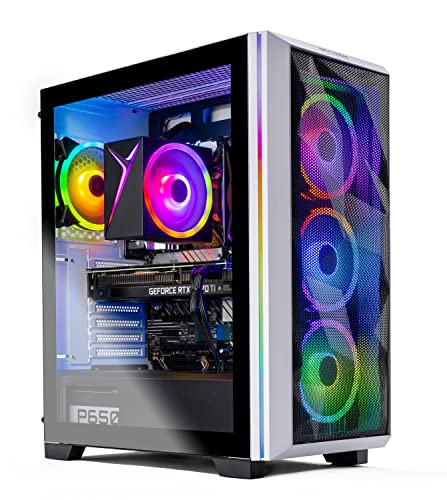
Where to buy
Check the latest price, availability and delivery on Amazon. Orders are placed on Amazon. We may earn a commission from qualifying purchases.
- Best overall for entry 4K: Skytech Chronos Gaming PC, Ryzen 7 5700X, RTX 4070 Ti 12GB — Check on Amazon
- HOENGAGER Gaming PC, Intel Core i7-12700F, RTX 4070 12GB, 32GB DDR4 — Check on Amazon
- CYBERPOWERPC Gamer Xtreme VR, Intel Core i7-13700F, RTX 4060 Ti 16GB — Check on Amazon
- Thermaltake LCGS Quartz i1460, Intel Core i5-14400F, RTX 5060 — Check on Amazon
See 2 more Amazon options
- CYBERPOWERPC Gamer Master, AMD Ryzen 7 8700F, RTX 4060 Ti 8GB — Check on Amazon
- iBUYPOWER Scale, AMD Ryzen 5 7600, RTX 4060 Ti 8GB — Check on Amazon
Read the full guide ↓
Disclosure: As an Amazon Associate, reviewstook.com earns from qualifying purchases. Links to Amazon on this page are affiliate links; they cost you nothing extra. Listing details such as price and availability change often, so check the current Amazon listing before you buy.
A far higher budget used to be the honest answer to “what does a 4K gaming PC cost?” — and the honest answer at $1,200 is more interesting than a simple no. You cannot buy native 4K ultra at this budget. No machine in this guide renders every modern game at 3840×2160, maximum settings, high frame rates, and any listing or headline that promises you that for $1,200 is selling you a resolution number rather than a gaming experience. What $1,200 genuinely buys in 2026 is the entry edge of 4K: graphics cards in the RTX 4060 Ti, RTX 4070 and — on a deal day — RTX 4070 Ti class, paired with modern upscaling. DLSS rendering a game internally at a lower resolution and reconstructing a convincing 4K image is not a trick or a cheat at this tier; it is the entire mechanism that makes the tier exist. Set DLSS to Quality or Balanced, hold settings at medium-high rather than ultra, accept that 8GB of VRAM will force texture compromises in the heaviest titles, and a $1,200 PC on a 4K TV is a genuinely enjoyable way to play — sharper than any 1080p machine, at console-beating settings, with a full Windows PC underneath it.
The discipline of this guide is knowing where that bargain ends. Native 4K ultra with ray tracing belongs to graphics cards costing close to this entire budget on their own. The three 8GB cards below are upscaling machines, not native 4K machines, and their reviews say so. The 12GB cards are the sweet spot: VRAM for high textures, power enough that DLSS Quality looks close to native. And the single 16GB card earns its place for texture headroom while rendering slower than the 12GB cards — a trade this guide explains rather than hides. One warning runs through everything: prices at this tier swing violently, so check price on Amazon for every pick and confirm it still fits this budget before you buy.
In this guide
Quick Picks
Short on time, or comparing several options at once? Each row below names a buyer type and the machine that suits it, with a link to the listing.
| Buyer type | Pick | Why it stands out | Link |
|---|---|---|---|
| Best overall for entry 4K | Skytech Chronos, Ryzen 7 5700X, RTX 4070 Ti 12GB | The strongest GPU in this guide — the closest thing to native 4K here; check price on Amazon | Check on Amazon |
| Best balanced 4K build | HOENGAGER, Intel Core i7-12700F, RTX 4070 12GB, 32GB DDR4 | RTX 4070-class power with double the RAM of most rivals — check price on Amazon | Check on Amazon |
| Best for texture headroom | CYBERPOWERPC Gamer Xtreme VR, i7-13700F, RTX 4060 Ti 16GB | 16GB of VRAM — the most in this guide — for high textures at 4K output | Check on Amazon |
| Best new-generation features | Thermaltake LCGS Quartz i1460, i5-14400F, RTX 5060 | Current-generation GPU with the newest DLSS and frame generation; check price on Amazon | Check on Amazon |
| Best AM5 value | CYBERPOWERPC Gamer Master, Ryzen 7 8700F, RTX 4060 Ti 8GB | Modern AM5 platform and DDR5 in a value-tier package; check price on Amazon | Check on Amazon |
| Best everyday price | iBUYPOWER Scale, Ryzen 5 7600, RTX 4060 Ti 8GB | A straightforward pick in this budget tier — with one RAM caveat to fix | Check on Amazon |
How These Picks Were Chosen
The budget was applied as a ceiling, and at this tier that needed a precise definition, because prebuilt pricing is a moving target. A machine qualifies for this guide if it belongs in this budget tier on Amazon — check price on Amazon for the current number, because listings move often and can shift between deal events. Where a machine is positioned above this tier, the review says so in plain language. Nothing was included on the strength of a hoped-for discount, and the reviews direct you to the live listing for the price that matters.
The performance filter was built for 4K specifically, and it is stricter than the filter for a 1440p guide. First, the GPU had to support modern upscaling: every card here is an NVIDIA RTX part with DLSS, because at $1,200, upscaling is not a bonus feature — it is the load-bearing wall of the whole 4K proposition. Second, VRAM was weighed as a first-class specification rather than a footnote. At 4K output resolutions, texture data is the first thing that runs out: 8GB cards must turn textures down in the heaviest current titles, 12GB is the comfortable working minimum for high textures, and 16GB buys headroom that shows up as stability rather than speed. Third, the rest of the machine had to be a real PC rather than a GPU in a compromised box: a modern multi-core CPU, an NVMe SSD of at least 1TB in every pick, and at least 16GB of system RAM. Where a listing cuts a corner we could verify — one pick below ships its 16GB as a single memory stick — the review names it and factors the fix into its advice.
We did not use these machines ourselves. We read the maker listings and specification pages and compared GPU model and VRAM, CPU, memory capacity and configuration, storage, power supply and platform. Performance is therefore described by tier and settings class rather than by invented frame-rate numbers — no FPS figure appears in this guide, because none was measured. What can be stated with confidence is the structure of the category: an RTX 4070 Ti out-renders an RTX 4070, which out-renders an RTX 4060 Ti; DLSS Quality at 4K output renders internally around 1440p-class workloads; and frame generation adds displayed smoothness on top of a base frame rate it cannot rescue if that base is too low.
The 6 Best 4K Gaming PCs Under $1,200
Skytech Chronos Gaming PC — Ryzen 7 5700X, RTX 4070 Ti 12GB
Who it suits: The buyer who wants the most genuine 4K this budget can produce — and who is willing to wait for the right moment to get it.
Start with the graphics card, because at 4K it is most of the machine. The RTX 4070 Ti is a full class above everything else in this guide: substantially more rendering power than the RTX 4070, and roughly a tier and a half above the 4060 Ti cards, with 12GB of GDDR6X memory behind it. In practical 4K terms that gap changes the conversation. Where the 4060 Ti machines below are planning around DLSS Balanced and medium-high settings, the Chronos can hold DLSS Quality in demanding titles, keep textures high on its 12GB, and in lighter or older games render at or near native 4K — the only pick here for which “native” is a word that belongs in the review at all. On a 4K TV at 60Hz, which is how most entry-4K gaming actually happens, this is the machine that fills the panel most convincingly.
The supporting cast is a generation older. The Ryzen 7 5700X is an eight-core AM4 processor with 16GB of DDR4 3200, a 1TB NVMe SSD and a 750W Gold power supply. At 4K, where the graphics card does the overwhelming share of the work, that CPU is not the bottleneck; the honest cost of AM4 is the upgrade path, not today’s performance — there is no future CPU generation for this socket, so buy the Chronos for what it is on delivery day. Skytech’s listing notes the graphics card brand may vary: the GPU model and 12GB are the specification, the board partner is not.
Then there is the price, which is the whole catch, and this guide will not soften it. This listing is usually positioned in a premium tier well above this guide’s ceiling, and it only belongs here when its live price on Amazon fits this budget. Read that correctly: the Chronos is not an everyday pick in this tier. It is a premium-class gaming PC that occasionally fits this budget, and it is the best pick in this guide only when it does. Check price on Amazon, set a price alert if you use one, and if the live listing sits well above this budget, walk past it to the machines below without a second thought — in a higher tier the comparison set changes completely, and so does the right answer.
- RTX 4070 Ti 12GB — the strongest GPU in this guide, a full class above the rest.
- 12GB of VRAM holds high textures at 4K output where 8GB cards must compromise.
- 750W Gold power supply — proper headroom for the card, not a bare-minimum unit.
Honest limitation: It only belongs in this guide when its live price fits this budget; it is usually positioned well above this tier, and the AM4/DDR4 platform is a dead end for future CPU upgrades.
Choose it if you check price on Amazon, it fits this budget, and you want the most real 4K this tier can buy. Skip it if the live price sits well above this budget — at that tier, this is the wrong guide.

HOENGAGER Gaming PC — Intel Core i7-12700F, RTX 4070 12GB, 32GB DDR4
Who it suits: Buyers who want the balanced version of entry 4K — a 12GB card, a twelve-core CPU and double the usual RAM — from a listing they are prepared to price-check carefully.
The RTX 4070 is where honest 4K begins for most players. With 12GB of GDDR6X and rendering power a clear step above the 4060 Ti class, it runs the entry-4K formula in its most comfortable form: DLSS Quality as the default rather than the stretch, high textures that its VRAM can actually hold, medium-high to high settings in current titles, and native or near-native rendering in the enormous back catalogue of games that predate the current hardware-hungry generation. If the Chronos above is the deal-hunter’s version of this tier, the HOENGAGER is the same idea in a more conventionally priced class of machine — an RTX 4070 build is the specification most $1,200 4K guides would lead with if prices simply behaved.
What distinguishes this build is everything around the card. The Core i7-12700F is a twelve-core processor (eight performance plus four efficiency cores), the memory is 32GB of DDR4 3200 — double what most machines here carry, and a real benefit for the player who keeps a browser, chat and recording software alive beside the game — and storage is a 1TB M.2 PCIe SSD. The listing specifies a 240mm AIO liquid cooler, a tempered-glass RGB case, Wi-Fi with Bluetooth, and Windows 11 Pro. None of that renders a game faster at 4K, where the GPU rules; all of it makes a better daily computer, and a 12GB card with 32GB of system memory is a genuinely uncommon combination at this budget.
The caveat is verification discipline, and it is stated plainly so you can apply it: check price on Amazon for this listing before you buy. The machine is included on specification, as the balanced RTX 4070 build this category needs, with a condition attached: buy it only when the live listing fits this budget. RTX 4070 prebuilts have historically sold both sides of that line. If it fits the ceiling, it is arguably the most sensible purchase in this guide. If it sits above the ceiling, the Chronos when it fits this budget and the 16GB CyberPowerPC below are the picks to act on instead.
- RTX 4070 12GB — the comfortable entry-4K card: DLSS Quality, high textures, no drama.
- 32GB of DDR4 — double the RAM of most rivals here, ideal for game-plus-everything-else use.
- Twelve-core i7-12700F, 240mm AIO cooling and Windows 11 Pro round out a grown-up specification.
Honest limitation: It is a pick with a condition: check price on Amazon — when it fits this budget it is excellent; above the ceiling, it is out of this guide’s scope.
Choose it if you check price on Amazon, it fits this budget, and you value the balanced, 32GB specification. Skip it if the listing is priced above the ceiling on the day you shop — do not stretch for it.

CYBERPOWERPC Gamer Xtreme VR (GXiVR8040A14) — Intel Core i7-13700F, RTX 4060 Ti 16GB
Who it suits: The texture-first 4K player — someone whose games are the big open-world and cinematic titles where VRAM, not raw speed, is what runs out first.
This is the most interesting specification in the guide, because it trades the usual way. The RTX 4060 Ti comes in two versions with the same name and rendering speed, differing only in memory: 8GB, and the 16GB fitted here. At 1080p the extra memory is mostly decoration; at 4K output it is functional. High-resolution texture packs and the heaviest open-world games can push past 8GB even when the GPU renders internally at an upscaled resolution, and when VRAM runs out the symptom is not a graceful slowdown — it is stutter, texture pop-in and settings that quietly downgrade themselves. The 16GB card does not have that failure mode at this tier. Paired with DLSS, it lets you spend your settings budget on the textures a 4K screen shows off best, accepting medium-high on the effects sliders.
Be equally clear about what the 16GB does not do: it does not make the 4060 Ti faster. Frame-for-frame in raw rendering, this machine sits with the other 4060 Ti picks below and behind the two 12GB cards above, and its 4K method is DLSS Balanced or Quality with settings discipline, exactly like theirs. What you are buying is smoothness and texture fidelity within that method. The rest of the build supports it well: a sixteen-core Core i7-13700F that will not hold the card back in any resolution, 16GB of DDR5 on a B760 platform, a 1TB PCIe Gen4 NVMe SSD, and the listing’s one HDMI and two DisplayPort outputs, which matters for the monitor-plus-TV setups 4K players often run. One detail could not be confirmed from the listing material — whether the 16GB of system RAM is one stick or two — so check the live listing’s memory configuration before ordering, because dual-channel matters and a second stick is the cheapest upgrade in PC gaming if it comes as one.
On price, this machine straddles the line and the review will treat it the way the Chronos was treated. Check price on Amazon before you buy. When it fits this budget, it is a strong, distinctive buy — the texture-headroom pick in this tier. When it sits above this guide’s ceiling, it is competing with machines a class up. The rule is identical to the top pick’s: the recommendation is attached to it fitting this budget, not to the listing in the abstract.
- 16GB of VRAM — the most in this guide; high textures at 4K without the 8GB stutter-and-pop-in failure mode.
- Sixteen-core i7-13700F and DDR5 platform — nothing else in the box limits the card.
- 1TB PCIe Gen4 SSD and three display outputs suit a monitor-plus-4K-TV desk.
Honest limitation: The 16GB buys headroom, not speed — raw rendering is 4060 Ti class, so 4K still means DLSS and medium-high settings; and it only belongs here when you check price on Amazon and it fits this budget.
Choose it if your games are texture-heavy and it fits this budget when you check price on Amazon. Skip it if you want maximum frame rates above texture fidelity — the 12GB cards render faster — or if its live price sits above this budget.

Thermaltake LCGS Quartz i1460 — Intel Core i5-14400F, RTX 5060 8GB
Who it suits: The features-first buyer — someone who wants the current generation’s upscaling and frame generation, in a clean white build, in a value-to-mid-range tier for this category; check price on Amazon.
Every other card in this guide is from the RTX 40 series. The Quartz carries an RTX 5060, the current generation’s entry card, and its 4K argument is made of features rather than muscle — on raw rendering it belongs to the 4060-class conversation, not secretly above the 4060 Ti picks. What the newer generation adds is the most advanced version of the technology this tier depends on: the latest DLSS upscaling and multi frame generation, which inserts generated frames between rendered ones. Used on top of a healthy base frame rate, in supported titles, that is a real 4K tool, because 4K is where rendered frames are most expensive. Used as a substitute for a base rate that is not there, it produces smoothness that feels wrong — hence the instruction that applies to every 8GB card here: settings first, upscaling second, frame generation last.
The rest of the specification is tidy and slightly old-fashioned in one deliberate place. The Core i5-14400F is a ten-core processor that will not limit this card at 4K; storage is a 1TB NVMe M.2 SSD; and the memory is 16GB of Thermaltake’s ToughRam DDR4 at 3600MHz — DDR4 on a B760 platform, where the CyberPowerPC machines below offer DDR5. At 4K, with the graphics card carrying the load, that difference is small in games today; it matters more as a statement about the platform’s future, since DDR4 memory and this socket are the end of their lines. The white Quartz case is the aesthetic pick of the guide, if the machine will live visibly beside a TV. Pricing is this pick’s friendliest trait: it is positioned in the more accessible part of this tier — check price on Amazon — making it one of the machines here that most readily fits this budget.
And its VRAM is the ceiling on its ambition: 8GB of GDDR7. The memory is fast, the capacity is the constraint — at 4K output, the heaviest current titles will ask for texture reductions on this card just as they do on the 8GB 4060 Ti machines, and no generation badge changes that arithmetic. Buy the Quartz for its features, its price and its looks, with your settings expectations set to the 8GB class it belongs to.
- Current-generation RTX 5060 — the newest DLSS and multi frame generation in this guide.
- Positioned in the accessible part of this tier — check price on Amazon, no deal-hunting heroics required.
- Clean white build with RGB DDR4 — the pick that looks right beside a 4K TV.
Honest limitation: 8GB of VRAM caps it at the upscaling class — DLSS plus medium-high settings and texture discipline at 4K, with frame generation as a top-up, never a foundation; DDR4 platform has no upgrade future.
Choose it if you want the newest features in an accessible tier; check price on Amazon. Skip it if texture-heavy 4K gaming is your main use — the 16GB CyberPowerPC above exists for you.

CYBERPOWERPC Gamer Master (GMA2900A) — AMD Ryzen 7 8700F, RTX 4060 Ti 8GB
Who it suits: The value-and-future buyer — a value-tier pick in this guide, on the platform with the longest life ahead of it.
The Gamer Master’s 4K story is the standard 8GB 4060 Ti story, told as a value-tier option and on the best platform. The RTX 4060 Ti 8GB renders in the same class as the iBUYPOWER below: at 4K output its method is DLSS Quality or Balanced, medium-high settings, textures managed rather than maxed in the titles that punish 8GB. That is a workable, enjoyable way to play on a 4K TV — provided you buy it knowing that is the deal, which is why this guide keeps repeating it. What the CyberPowerPC adds around that card is the Ryzen 7 8700F, an eight-core processor on AMD’s AM5 socket with a B650 chipset and 16GB of DDR5, plus a 1TB PCIe Gen4 NVMe SSD. AM5 is the platform AMD is still building on: years from now, when a future GPU upgrade turns this into a genuinely stronger 4K machine, the CPU socket, memory type and board will still accept modern parts in a way the AM4 Chronos and the DDR4 machines cannot match.
Value positioning is the other half of its case. Check price on Amazon for this listing; it is positioned as a value-tier option in this guide. The warning that travels with it: marketplace sellers also list this model in a higher tier — so the seller and the live price are part of the purchase. Bought from Amazon when it fits this budget, it can leave room in a wider setup budget for upgrades such as a 32GB DDR5 kit, or the larger SSD a 4K library eventually demands.
Its honest weaknesses are the shared ones of its class, plus the discipline its pricing requires. The 8GB VRAM ceiling is real and permanent for this card. The 8700F, for all its eight cores, is not a faster gaming CPU than the i7s above it; its virtue is the socket it sits in. And a machine whose price is set by deal events is a machine you buy on the category’s schedule, not your own. If you can accept those three things, this is the most future-proof value in the guide.
- Value-tier positioning in this guide — check price on Amazon.
- AM5 platform with DDR5 and a B650 board — the longest upgrade runway in this guide.
- Eight-core Ryzen 7 8700F and a Gen4 SSD — nothing in the box embarrasses the card.
Honest limitation: The 8GB of VRAM defines its 4K life permanently — DLSS and texture discipline, forever; and marketplace sellers list it in a higher tier than Amazon, so the seller matters.
Choose it if you want entry 4K now with a real upgrade path later, as a value-tier pick; check price on Amazon. Skip it if you will never upgrade and simply want the best 4K on day one — that is the 12GB cards’ job.

iBUYPOWER Scale (SCA5N46T01) — AMD Ryzen 5 7600, RTX 4060 Ti 8GB
Who it suits: The buyer who wants the simplest transaction in the guide — an AM5 machine positioned as an everyday pick in this budget tier — and who will spend ten minutes and a little money fixing its one flaw.
The Scale’s distinction is its everyday positioning in this tier. Check price on Amazon for this listing — it is presented as a straightforward pick in this budget, without needing to chase a special deal moment. No alerts, no deal archaeology, no seller roulette: it is an everyday option in this tier. For this budget the specification is properly modern: a six-core Ryzen 5 7600 on the AM5 platform, an RTX 4060 Ti 8GB, a 1TB NVMe SSD, Wi-Fi, Windows 11 Home, and a keyboard and mouse in the box, backed by a one-year manufacturer warranty. Its 4K performance is the familiar 8GB method — DLSS doing the heavy lifting, medium-high settings, textures set with the VRAM limit in mind — and on a 4K TV that is a satisfying experience for the money, particularly across the vast library of games from the last decade that this class of card handles at 4K with ease.
Now the flaw, which the listing itself states: the 16GB of DDR5-5200 arrives as a single stick — 16×1, in the listing’s own title. Single-channel memory costs real performance in CPU-sensitive moments and minimum frame rates. The fix is the cheapest in this guide: add a second matching 16GB stick, restoring dual-channel and taking the machine to 32GB. Budget for it in from the start — check the price of a matching stick on Amazon — and the Scale remains the value pick it claims to be. Its six cores are the fewest here: sufficient for 4K gaming, where the GPU leads, but the least headroom for heavy streaming on the side. Bought with the stick, this is the recommendation for the buyer asking the simplest question: what do I buy today, at a normal price, to play on my 4K TV?
- Everyday positioning in this budget tier — check price on Amazon.
- AM5 and DDR5 platform with a six-core Ryzen 5 7600 — modern where it counts for the future.
- Keyboard, mouse and a one-year warranty in the box.
Honest limitation: The 16GB ships as a single stick (16×1) — single-channel memory until you add the second stick, which you should budget for on day one; and 8GB of VRAM sets the same 4K settings ceiling as the other 4060 Ti picks.
Choose it if you want entry 4K as an everyday pick in this budget tier and will add the second RAM stick; check price on Amazon. Skip it if you refuse to open the case for any reason — buy the 32GB HOENGAGER at the ceiling instead, if its price cooperates.

Comparison Table
| Product | GPU / VRAM | CPU / RAM / Storage | Best use | Link |
|---|---|---|---|---|
| Skytech Chronos | RTX 4070 Ti / 12GB | Ryzen 7 5700X / 16GB DDR4 / 1TB | Most genuine 4K here — check price on Amazon, fits this budget only | Check on Amazon |
| HOENGAGER Gaming PC | RTX 4070 / 12GB | i7-12700F / 32GB DDR4 / 1TB | Balanced 4K with double RAM — check price on Amazon | Check on Amazon |
| CYBERPOWERPC Gamer Xtreme VR 16GB | RTX 4060 Ti / 16GB | i7-13700F / 16GB DDR5 / 1TB Gen4 | Texture headroom at 4K output | Check on Amazon |
| Thermaltake LCGS Quartz i1460 | RTX 5060 / 8GB | i5-14400F / 16GB DDR4 / 1TB | Newest DLSS / frame generation; check price on Amazon | Check on Amazon |
| CYBERPOWERPC Gamer Master | RTX 4060 Ti / 8GB | Ryzen 7 8700F / 16GB DDR5 / 1TB Gen4 | Value tier, AM5 future | Check on Amazon |
| iBUYPOWER Scale | RTX 4060 Ti / 8GB | Ryzen 5 7600 / 16GB DDR5 (1 stick) / 1TB | Everyday pick in this tier, add a RAM stick | Check on Amazon |
How to Choose a 4K Gaming PC Under $1,200
- Define 4K honestly before you shop. At this budget, 4K means 4K output resolution with upscaled rendering and medium-high settings. If your requirement is native 4K ultra, the correct action is to raise the budget or lower the resolution target — a 1440p machine at this price will look better than a 4K machine failing at native.
- Rank VRAM alongside the GPU name. The ladder that matters here: 16GB for texture headroom, 12GB as the comfortable 4K working minimum, 8GB as the upscaling-only class. A slower card with more VRAM and a faster card with less are genuinely different machines at 4K, as the 16GB CyberPowerPC and the 4070 Ti in this guide demonstrate from opposite directions.
- Treat DLSS as a specification, not a slogan. Every pick here supports it, and the generation matters: the RTX 5060’s newest DLSS and multi frame generation versus the 40-series’ DLSS 3 frame generation. Then remember the rule — frame generation multiplies a base frame rate; it cannot create one. Settings and upscaling first.
- Apply deal-price discipline ruthlessly. Some picks in this guide only belong here when their live price fits this budget. Check price on Amazon, and if the live price sits above this tier, wait or buy a different pick. Overpaying for a machine positioned in a higher tier is one of the most expensive mistakes in this category.
- Check the RAM configuration, not just the capacity. 16GB as one stick runs single-channel and costs smoothness. The iBUYPOWER’s listing states 16×1 openly; for any machine, confirm 2×8 or plan the second stick — it is the cheapest performance upgrade that exists.
- Match the machine to your screen. A 4K TV at 60Hz is the natural partner for this tier — every pick can feed it well with upscaling. A 4K high-refresh monitor is a much harder target that this budget serves only in lighter games; if that is your screen, weight the 12GB cards heavily or reconsider the tier.
- Think in total library size. Every pick carries 1TB. At 4K, texture-rich games are the largest games; a second SSD or a 32GB RAM kit is where the money saved on a value pick is best spent, in that order.
- Weigh the platform’s future at the price you actually pay. AM5/DDR5 machines (both CyberPowerPC and iBUYPOWER picks) accept tomorrow’s CPUs and GPUs gracefully. AM4 and DDR4 machines (Chronos, HOENGAGER, Thermaltake) are finished platforms — fair trades when the GPU or the price compensates, as each of those reviews explains.
- Verify the seller on marketplace listings. The same model can appear from Amazon and from third-party sellers at very different prices. Check price on Amazon and check who is selling; a markup from an unfamiliar seller is not the machine getting better.
- Keep the packaging through the first weeks. Run your heaviest game at your real settings, watch for the VRAM symptoms — stutter and texture pop-in on 8GB cards — and confirm the machine behaves as its tier promises while returns are still simple.
What 4K Actually Demands — and What Upscaling Changes
A 4K frame contains roughly four times the pixels of a 1080p frame and about 2.25 times those of a 1440p frame, and the texture data grows with it. That arithmetic is why cards that cruise at 1440p become conditional at 4K, and why VRAM — a secondary concern at lower resolutions — is a headline specification here. Upscaling separates the resolution you render from the resolution you display: DLSS Quality at 4K output renders internally at roughly 1440p-class resolution and reconstructs the rest, and on a TV at viewing distance, in motion, that trade is heavily in the player’s favour. Frame generation then inserts synthesized frames between rendered ones — rewarding a healthy base rate and punishing a poor one. Every machine in this guide is, in the end, a machine for running that pipeline well.
Common Buying Mistakes
- Believing a headline that promises native 4K ultra at $1,200. It does not exist at this price; what exists is excellent upscaled 4K, which this guide recommends on its real merits.
- Buying a machine that only fits this budget on a deal at a higher-tier price. The Chronos and the 16GB CyberPowerPC are different — worse — purchases when their live prices sit well above this budget than when you check price on Amazon and they fit this tier.
- Shopping by GPU name alone and ignoring VRAM. An 8GB card and a 16GB card with the same name are different 4K machines; at this resolution, capacity is a performance feature.
- Turning textures to ultra on an 8GB card and blaming the PC for stutter. That stutter is VRAM exhaustion, it is predictable, and the fix is a settings slider, not a return label.
- Expecting frame generation to rescue a low base frame rate. Generated frames multiply what exists; below a healthy base, they add artefacts and latency instead of smoothness.
- Leaving a single-stick RAM configuration unfixed. The iBUYPOWER’s 16×1 is stated in its own listing; the second stick is cheap, and single-channel memory quietly taxes every game.
- Pairing this tier with a 4K high-refresh monitor and expecting it to be filled. These are 4K60-class machines with upscaling; high-refresh 4K is a higher budget’s promise.
- Ignoring storage until the library arrives. 1TB is four to eight modern AAA games at 4K texture sizes; plan the second drive before the first “storage full” message plans it for you.
- Paying a third-party seller’s markup for a model Amazon itself deals regularly. Check who is selling, not just what is being sold.
Final Recommendation
- Most genuine 4K, if the deal appears: Skytech Chronos, RTX 4070 Ti — only when it fits this budget; check price on Amazon.
- Balanced buyers: HOENGAGER, RTX 4070 with 32GB — only when it fits this budget on the live listing; check price on Amazon.
- Texture-heavy libraries: CYBERPOWERPC Gamer Xtreme VR 16GB — when it fits this budget; check price on Amazon.
- Newest features, accessible tier: Thermaltake LCGS Quartz i1460, RTX 5060.
- Value tier with a future: CYBERPOWERPC Gamer Master on AM5.
- Simplest everyday purchase: iBUYPOWER Scale — plus one matching RAM stick.
Our top two for most buyers are the HOENGAGER, when its live price sits at or under the ceiling — the balanced RTX 4070 and 32GB specification is what entry 4K looks like when it is done sensibly — and the iBUYPOWER Scale with its second RAM stick added, the honest everyday route onto a 4K TV in this budget tier. Deal hunters should hold out for the Chronos when it fits this budget, which is a class above everything here, and texture-first players for the 16GB CyberPowerPC when it fits this budget. If your ambitions are really native rather than upscaled, the honest signposts are Best 4K Gaming PC Under $1500 and stepping down a resolution to Best 1440p Gaming PC Under $1200, which at this money is a superb experience with no asterisks. Set your DLSS mode before your settings, your textures before your effects, check price on Amazon for the live price, and a $1,200 PC will show you a 4K picture that would have seemed impossible at the price not long ago.
Frequently Asked Questions
Can a $1,200 PC really game at 4K?
Yes — with the definition this guide repeats on purpose. It games at 4K output resolution using DLSS upscaling, at medium-high settings, at TV-friendly frame rates. It does not game at native 4K ultra; no $1,200 machine does. Judged on what it actually delivers — a sharp 4K picture, settings above console equivalents, a full PC underneath — the tier is real and worth buying into.
How much VRAM do I need for 4K gaming?
Treat 12GB as the comfortable working minimum for high textures at 4K output, 16GB as headroom that buys stability in the heaviest titles, and 8GB as workable only with texture discipline in those titles. VRAM is the specification buyers under-weight most at this resolution, which is why a 16GB version of a mid-range card earns a place in this guide beside faster 12GB cards.
Is DLSS cheating, or does upscaled 4K look worse?
It looks different, in specific places: fine detail in motion and thin geometry are where reconstruction shows its seams, and Balanced mode shows more than Quality. At TV viewing distances, in motion, most players rate DLSS Quality at 4K as visually close to native while running far faster — that trade is the entire reason this budget tier exists. It is a rendering technique, not a trick, and every card in this guide supports it.
Does frame generation make an 8GB card a native 4K card?
No. Frame generation — including the RTX 5060’s multi frame generation in the Thermaltake — inserts generated frames between rendered ones to raise displayed smoothness. It needs a healthy rendered base rate to work from, it adds some latency, and it does nothing for VRAM capacity. Use it as the last step of a settings setup, never as the foundation of one.
Should I buy the Chronos at its normal price instead of waiting?
No — when its live price sits well above this budget it leaves this guide’s category entirely, and in a higher tier the correct comparison set includes stronger, newer machines. The Chronos recommendation is attached to it fitting this budget; check price on Amazon. Set an alert if you use one, and in the meantime the HOENGAGER at the ceiling or the Scale as an everyday pick will put you on a 4K TV now.
Is 16GB of system RAM enough, and does the single-stick thing matter?
16GB is enough capacity for gaming at this tier, but configuration matters: a single 16GB stick runs single-channel and costs performance in exactly the minimum-frame-rate moments you feel. The iBUYPOWER Scale ships that way and says so in its listing; adding a matching stick fixes the channel issue and upgrades you to 32GB in one step, which is why its review treats the stick as part of the purchase.
Would I be happier with a 1440p PC at this price?
Possibly — and it is the most sensible alternative in this guide. At $1,200, a 1440p machine runs higher settings at higher frame rates with no upscaling compromises, as Best 1440p Gaming PC Under $1200 shows. Choose 4K if your screen is a 4K TV and viewing distance is kind; choose 1440p if you sit close to a monitor and value frame rate and settings over pixel count. Both are defensible; pretending the 4K machine does both is not.


