Where to buy
Check the latest price, availability and delivery on Amazon. Orders are placed on Amazon. We may earn a commission from qualifying purchases.
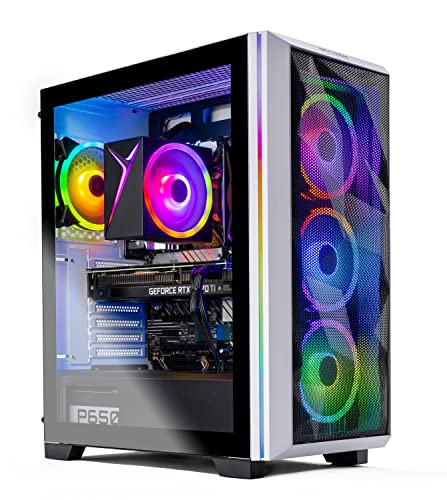
- Best overall for streaming: Skytech Chronos Gaming PC, Ryzen 7 5700X, RTX 4070 Ti 12GB — Check on Amazon
- HOENGAGER Gaming PC, Intel Core i7-12700F, RTX 4070 12GB, 32GB DDR4 — Check on Amazon
- CYBERPOWERPC Gamer Xtreme VR, Intel Core i7-13700F, RTX 4060 Ti 16GB — Check on Amazon
- Thermaltake LCGS Quartz i1460, Intel Core i5-14400F, RTX 5060 — Check on Amazon
See 2 more Amazon options
- CYBERPOWERPC Gamer Master, AMD Ryzen 7 8700F, RTX 4060 Ti 8GB — Check on Amazon
- iBUYPOWER Scale, AMD Ryzen 5 7600, RTX 4060 Ti 8GB — Check on Amazon
Read the full guide ↓
Disclosure: As an Amazon Associate, reviewstook.com earns from qualifying purchases. Links to Amazon on this page are affiliate links; they cost you nothing extra. Listing details such as price and availability change often, so check the current Amazon listing before you buy.
A streaming PC does two jobs at once, and only one of them is playing the game. While the graphics card renders your session, a separate block of silicon — the hardware encoder — compresses every frame into the stream your audience watches, and your CPU, memory and storage carry OBS, your browser, chat and alerts. That is why this guide grades these six machines encoder-first. The headline split is simple to state and decisive in practice: the two 12GB cards at the top of this guide, the RTX 4070 Ti and the RTX 4070, carry two NVENC encoder units each, so the broadcast encode and a simultaneous high-quality local recording run on separate hardware and never fight. The four machines below them carry one encoder each — an RTX 4060 Ti or an RTX 5060 — so streaming and recording share a single unit, and the rest of each machine is graded on how gracefully it handles that sharing.
Before the picks, the workflow this guide is built around, stated precisely. You play locally at 1440p — the resolution these machines genuinely render well, and the reason a 4K panel still makes sense here. OBS captures that game, scales the output canvas to 1080p, and broadcasts at 1080p60. On Twitch, the standard working setup is roughly 6,000 kbps with constant bitrate (CBR); YouTube is more generous, allowing higher bitrates, 1440p streams and AV1 live ingest. Which brings up the honest core of this entire keyword: you cannot stream in 4K in any way your viewers will benefit from, and no PC at any price fixes that — the limit is the platforms, not the hardware. Twitch’s standard broadcast is a 1080p60 affair, and even on YouTube a 4K live stream is a specialist workflow with marginal viewer benefit. The “4K” in this guide’s title is your monitor or TV — the screen you play on — not the resolution of your broadcast. What $1,200 honestly buys a streamer is a machine that renders a sharp 1440p game locally, encodes a clean 1080p60 stream without touching the game’s frame budget, and — on the two dual-encoder picks — records a high-quality local copy for edits and uploads at the same time. That is a genuinely complete streaming setup, and it is what the six reviews below are graded on.
One warning travels with the territory: prices at this tier swing hard, and two of these six machines only belong here when their live price sits under the ceiling, so check price on Amazon for every pick before you buy. Streaming gear also costs money beyond the PC — the final sections cover it separately, because none of it is included with any pick here.
In this guide
Quick Picks
Short on time, or comparing several options at once? Each row below names a streamer type and the machine that suits it, with a link to the listing.
| Streamer type | Pick | Why it stands out | Link |
|---|---|---|---|
| Best overall for streaming | Skytech Chronos, Ryzen 7 5700X, RTX 4070 Ti 12GB | Dual NVENC plus the strongest renderer here — broadcast and record on separate encoders, when the live price sits under the ceiling | Check on Amazon |
| Best for a heavy app stack | HOENGAGER, Intel Core i7-12700F, RTX 4070 12GB, 32GB DDR4 | Dual NVENC, twelve cores and double the RAM of most rivals — buy only at or under the ceiling | Check on Amazon |
| Best VRAM headroom for busy scenes | CYBERPOWERPC Gamer Xtreme VR, i7-13700F, RTX 4060 Ti 16GB | 16GB of VRAM shared between game, overlays and browser sources, no 8GB squeeze | Check on Amazon |
| Best new-generation encoder | Thermaltake LCGS Quartz i1460, i5-14400F, RTX 5060 | Newest-generation NVENC and AV1 in a white on-camera build, well under the ceiling | Check on Amazon |
| Best AM5 value for streamers | CYBERPOWERPC Gamer Master, Ryzen 7 8700F, RTX 4060 Ti 8GB | Modern AM5 platform and DDR5 at strong value in this guide — check the seller | Check on Amazon |
| Best everyday starter price | iBUYPOWER Scale, Ryzen 5 7600, RTX 4060 Ti 8GB | Everyday pricing sits under $1,200 — check price on Amazon, with one RAM caveat to fix on day one | Check on Amazon |
How These Picks Were Chosen
The budget was applied as a ceiling: a machine qualifies when its live Amazon listing sits at or under $1,200, and where a machine often sells well above the ceiling, the review says so and frames the pick as buy-only-under-the-ceiling or do not buy. Exactly two of the six work that way. Listings move between deal events, so check price on Amazon for the number that matters before you buy.
The performance filter, though, was rebuilt for streaming rather than copied from a gaming guide. First and most important, the encoder. Every card here is an NVIDIA RTX part with NVENC hardware encoding and AV1 encode support, because software (CPU) encoding at this budget steals cores from the game and the app stack, while NVENC produces the broadcast on dedicated silicon at a quality CPU encoding cannot match here. Within that filter, encoder count was graded as a first-class specification: two NVENC units (RTX 4070 Ti, RTX 4070) let a streamer broadcast and record locally at high quality simultaneously, each on its own hardware; one unit (RTX 4060 Ti, RTX 5060) means those two jobs share, which is workable but shapes how you set OBS up. Second, the simultaneous load was weighed end to end: VRAM is a single pool the game, OBS’s compositing and every browser source draw from, so the 8GB / 12GB / 16GB ladder matters here even more than for pure gaming; CPU cores carry the app stack while the encoder works; system RAM holds it all; and storage absorbs local recordings that, at a typical 40–50 Mbps setting, consume roughly 20GB per hour. Third, the basics still had to be right: a modern multi-core CPU, at least 16GB of system RAM, and a 1TB NVMe SSD in every pick. Where a listing cuts a verifiable corner — one pick below ships its 16GB as a single memory stick — the review names it, and for streaming that corner matters more than usual.
We did not use these machines ourselves. We read the maker listings and specification pages and compared GPU and encoder hardware, VRAM, CPU, memory capacity and configuration, storage and platform. Performance is therefore described by tier and workload rather than by invented frame-rate numbers — no per-game FPS figure appears in this guide, because none was measured. What can be stated with confidence is the category’s structure: an RTX 4070 Ti out-renders an RTX 4070, which out-renders an RTX 4060 Ti, and a second encoder unit is a physical fact of the two larger cards, not a marketing line.
The Encoder Is the Streaming Spec
Most PC buying guides treat the encoder as a footnote. For a streamer it is the specification, so it gets its own section. NVENC is NVIDIA’s dedicated encoding hardware: it turns rendered frames into the H.264 (or AV1) video your platform receives, without consuming the GPU’s rendering capacity or the CPU’s cores. Every card here has it, and every card here also encodes AV1 — the newer codec YouTube accepts for live ingest, delivering a cleaner picture at the same bitrate. Twitch’s standard broadcast remains H.264 at around 6,000 kbps for 1080p60, so AV1 is today mostly a YouTube and recording advantage — but a real one, at no cost on any pick here.
The count is where this guide’s six machines divide. The RTX 4070 Ti and RTX 4070 each carry two NVENC units: OBS can run your broadcast encode on one while a second, independent encode writes a high-bitrate local recording — the file you will cut into videos and clips — without either job degrading the other. The RTX 4060 Ti cards and the RTX 5060 carry one NVENC unit each. OBS can still stream and record simultaneously on a single encoder, and for many streamers that is enough; but the two jobs share one piece of hardware, so the common practice is to record at broadcast quality, moderate the record bitrate, or clip from the VOD instead. Neither arrangement is a defect — it is a workflow fact, and each review grades its pick on the workflow it actually supports.
Two platform truths complete the picture. First, bitrate ceilings belong to the platforms: pushing past Twitch’s standard ~6,000 kbps does not buy your viewers a better picture, and no OBS setting turns a 1080p60 platform into a 4K one. Second, upload bandwidth is yours to provide: wired Ethernet is a rule in this guide, not a suggestion, because Wi-Fi variance drops more frames than any encoder setting can save. With the encoder understood, the reviews can be read the way they were written — encoder first, then the load around it, then the game.
The 6 Best 4K Gaming PCs for Streaming Under $1,200
Skytech Chronos Gaming PC — Ryzen 7 5700X, RTX 4070 Ti 12GB
Who it suits: The streamer who wants the complete workflow — broadcast and high-quality local record at the same time, on the strongest renderer here — and who will wait for a deal price to get it.
The RTX 4070 Ti is the only card here that makes both halves of a streaming PC effortless. On the render side it is a full class above everything else in this guide, which matters to a streamer in a specific way: your audience watches a 1080p60 downscale of your local game, and a game rendered cleanly at 1440p with settings headroom downscales into a visibly cleaner broadcast than one already struggling at its render resolution. On the encode side, its two NVENC units are the headline. Set OBS to broadcast on one encoder and record locally at 40–50 Mbps on the other, and the two jobs never meet — no shared-encoder compromise, no choosing between a good stream and a good recording. Its 12GB of VRAM is the comfortable pool for the combined load, too: game textures, OBS compositing and browser sources all draw from the same memory, and 12GB holds that stack at 1440p without the texture rationing the 8GB picks below must practise.
Around the card, the machine is a generation older, and for streaming that cuts both ways. The eight-core Ryzen 7 5700X has ample cores for OBS’s supporting work, chat and browser duties, and the 750W Gold power supply is proper headroom. The honest costs are two. System memory is 16GB of DDR4 — workable for game-plus-stream, but the tightest part of this specification once a browser, a chat client and recording software join the game; streamers will feel it before gamers do. And the AM4 platform is finished: no future CPU generation exists for this socket, so the Chronos is bought for exactly what it is on delivery day. Skytech’s listing also notes the graphics card brand may vary — the GPU model and its 12GB are the specification; the board partner is not.
The price is the catch, and this guide will not soften it. The Chronos usually sells well above this guide’s ceiling and only occasionally drops under it. Read that correctly: it is a higher-tier machine that sometimes visits this budget, and it is the best pick in this guide only during the visit. Check price on Amazon, buy only when the live listing sits at or under the ceiling, and if the live price is well above it, walk past it.
- Two NVENC encoders — broadcast and high-quality local recording run simultaneously on separate hardware.
- RTX 4070 Ti 12GB — the strongest renderer here; a clean 1440p local game downscales into the cleanest broadcast.
- 750W Gold PSU — sized with headroom to spare, not trimmed to the minimum.
Honest limitation: It only belongs in this guide when its live price sits under the ceiling; 16GB of system RAM is the streaming stack’s tightest resource, and the AM4/DDR4 platform has no CPU upgrade future.
Choose it if you find it at or under the ceiling and you stream and record at the same time. Skip it if the live price is well above the ceiling — at that money you are shopping in the wrong guide.

HOENGAGER Gaming PC — Intel Core i7-12700F, RTX 4070 12GB, 32GB DDR4
Who it suits: The streamer whose PC carries the whole production — game, OBS, browser sources, chat, alerts, recording — and who wants the dual-encoder workflow with the deepest supporting cast in this guide, from a listing they are prepared to price-check carefully.
The RTX 4070 brings the same dual-NVENC arrangement as the Chronos to a more conventionally priced class of machine: two encoder units, so the broadcast encode and a simultaneous high-bitrate local record proceed independently, plus AV1 encode for YouTube ingest and recordings. Its rendering is a clear step above the 4060 Ti class — DLSS Quality at 1440p local play as the comfortable default — and its 12GB of VRAM holds the combined pool of game textures, OBS compositing and browser sources without rationing. If the Chronos is the deal-hunter’s route to this workflow, the HOENGAGER is the same workflow in the specification most streamers would design for themselves.
What distinguishes this build is everything around the card, and for streaming the supporting cast is not decoration. The Core i7-12700F is a twelve-core processor (eight performance plus four efficiency cores) — the efficiency cores are genuinely useful here, absorbing the browser, chat clients and background apps while the performance cores and GPU carry the game. Memory is 32GB of DDR4 3200, double what most machines here carry, and that is the figure a working streamer feels daily: OBS scenes stacked with browser sources, a browser that never gets closed, recording software, a game — 32GB is the capacity at which the stack stops asking you to manage it. Storage is a 1TB M.2 PCIe SSD, cooling a 240mm AIO, the case tempered glass with RGB fans, and it ships with Windows 11 Pro. One specification could not be confirmed from the listing material: the power supply wattage is unpublished, so check the live listing if that figure matters to you.
The caveat is verification discipline, stated plainly: check price on Amazon carefully for this listing before you buy. It is included on specification — the balanced dual-encoder build this category needs — with a condition attached: buy it only when the live listing shows it at or under $1,200. RTX 4070 prebuilts have historically sold on both sides of that line. At or under the ceiling, it is arguably the most sensible purchase in this guide for a working streamer; above it, act on the Chronos when it drops under the ceiling or the 16GB CyberPowerPC below.
- Two NVENC encoders with AV1 — broadcast and local record on separate hardware, like the top pick.
- 32GB of DDR4 — double the RAM of most rivals; the app stack stops needing management.
- Twelve-core i7-12700F, 240mm AIO cooling and Windows 11 Pro round out a grown-up streaming specification.
Honest limitation: Its PSU wattage is unpublished, so check the live listing — it is a pick with a condition: at or under $1,200 it is excellent; above the ceiling, it is out of this guide’s scope.
Choose it if the live price is at or under $1,200 and your stream runs a heavy stack of apps and sources. Skip it if the live price has climbed over $1,200 when you shop — never stretch to reach it.

CYBERPOWERPC Gamer Xtreme VR (GXiVR8040A14) — Intel Core i7-13700F, RTX 4060 Ti 16GB
Who it suits: The streamer whose scenes are heavy — layered overlays, browser sources, animated alerts, a texture-rich game underneath — and who needs VRAM headroom more than rendering speed.
This is the most interesting specification in the guide for a streamer, because it trades the usual way. NVIDIA sells the RTX 4060 Ti in two memory configurations under one name — 8GB, and the 16GB fitted here — with identical rendering speed. For pure gaming at 1080p the extra memory is mostly decoration. For streaming it is functional, because VRAM is a shared pool: the game’s textures, OBS’s scene compositing and every browser source in your layout all draw from the same memory at once. On an 8GB card, a texture-heavy game plus a busy scene is exactly the combination that pushes the pool over — and the symptom is not a graceful slowdown but stutter in the game and dropped rendering in OBS together. That failure mode simply does not exist on the 16GB card at this tier. Its single NVENC encoder carries AV1 as well as H.264, so YouTube ingest and recordings get the efficient codec; the honest trade is that a simultaneous local record shares that one encoder with the broadcast — record at broadcast quality, or moderate the bitrate, rather than expecting two independent jobs.
The rest of the build is the strongest supporting cast of the single-encoder picks. The sixteen-core Core i7-13700F is the most CPU in this guide — more cores than the app stack, the game and OBS’s supporting work can realistically ask for — on a B760 platform with 16GB of DDR5 and a 1TB PCIe Gen4 NVMe SSD that absorbs those roughly-20GB-per-hour recordings as fast as you make them. The listing’s one HDMI and two DisplayPort outputs suit monitor-plus-TV setups. One detail could not be confirmed — whether the 16GB of system RAM is one stick or two — so check the live listing before ordering, because dual-channel matters and a second stick is the cheapest fix in PC building if it arrives as one.
On price, this machine straddles the line and is treated the way the Chronos was treated. Its live price straddles the ceiling. When it sits under the ceiling it is a strong, distinctive buy — the headroom pick at a fair price. When it sits above the ceiling it has left this guide’s budget behind and is competing a class up. What is recommended is the pick under the ceiling, not the listing in the abstract.
- 16GB of VRAM — the most in this guide; the shared game-plus-scene pool never hits the 8GB wall.
- Sixteen-core i7-13700F and DDR5 platform — the deepest app-stack headroom of the single-encoder picks.
- 1TB PCIe Gen4 SSD and three display outputs suit a monitor-plus-4K-TV streaming desk.
Honest limitation: A single NVENC encoder means broadcast and local record share one unit; the 16GB buys headroom, not rendering speed — and it only fits this guide under the ceiling — check price on Amazon.
Choose it if your scenes and games are memory-hungry and you catch it under the ceiling. Skip it if you need the dual-encoder workflow — that is the two 12GB cards’ job — or if it is sitting above the ceiling.

Thermaltake LCGS Quartz i1460 — Intel Core i5-14400F, RTX 5060 8GB
Who it suits: The streamer who wants the newest encoder generation and a case that looks the part on camera, at a price well under the ceiling — and who streams games that leave an 8GB card room to breathe.
The other five cards here are all RTX 40-series parts. The Quartz carries an RTX 5060, the current generation’s entry card, and its streaming argument is its encoder: the newest-generation NVENC, a single unit like the 4060 Ti picks but of the latest design, with AV1 encode for YouTube and recordings, alongside the generation’s DLSS upscaling and multi frame generation for the local game. Be precise about the division of labour, because this card invites confusion: frame generation raises the smoothness of the game you see; the encoder is what your audience sees, and the two are separate systems. The encoder here is genuinely current-generation; the rendering belongs to the 4060-class conversation — plan on DLSS at 1440p local play and settings discipline in heavy titles, exactly as with the 4060 Ti machines.
The constraint is the shared pool: 8GB of GDDR7. The memory is fast; the capacity is the limit, and for streaming it arrives sooner than for gaming alone, because OBS’s compositing and your browser sources draw from the same 8GB as the game. Stream lighter or older titles, keep textures a notch down, cap the in-game frame rate so the GPU keeps headroom for compositing, and the Quartz streams beautifully. Point it at the heaviest current releases with a busy scene and it asks for compromises the 16GB CyberPowerPC above never has to make. The rest of the specification is tidy: a ten-core Core i5-14400F with cores to spare for the app stack, a 1TB NVMe M.2 SSD, 16GB of Thermaltake’s ToughRam DDR4 at 3600MHz — DDR4 on a B760 platform, the end of its line, which matters for upgrade future rather than today’s performance — and the white Quartz case, a real consideration for a streamer whose PC sits in the camera frame.
Pricing is this pick’s friendliest trait: it is one of only two machines here whose ordinary life is lived entirely under the ceiling — check price on Amazon. Buy it for the encoder generation, the value and the looks, with settings expectations set to the 8GB class it belongs to.
- Current-generation NVENC with AV1 — the newest encoder hardware in this guide.
- Live pricing keeps landing well under the ceiling — check price on Amazon, no heroic deal-hunting needed.
- Clean white build — the pick that looks right in a streamer’s camera frame or beside a 4K TV.
Honest limitation: A single encoder and 8GB of VRAM cap its streaming life — busy scenes plus texture-heavy games will force texture and settings compromises; the DDR4 platform has no upgrade future.
Choose it if you want the newest encoder at a price well under the ceiling for lighter titles. Skip it if your main games are the heaviest current releases — the 16GB CyberPowerPC above exists for you.

CYBERPOWERPC Gamer Master (GMA2900A) — AMD Ryzen 7 8700F, RTX 4060 Ti 8GB
Who it suits: The streamer buying for the long run — strong value in this guide, on the platform with the longest life ahead of it, with a single-encoder workflow they are happy to work within.
The Gamer Master’s streaming story is the standard single-encoder 4060 Ti story, told at the best price and on the best platform. Its one NVENC unit encodes the broadcast with AV1 available for YouTube and recordings; a simultaneous local record shares that unit, so the workflow here is record-at-broadcast-quality or lean on the VOD for clips — a workable arrangement thousands of channels run on. The render side is the familiar 8GB method: DLSS Quality or Balanced at 1440p local play, medium-high settings, textures managed rather than maxed, and a VRAM pool shared with OBS’s compositing that rewards the same discipline — cap the frame rate, keep the scene sensible, and the stream stays clean. Around the card sits the Ryzen 7 8700F, an eight-core processor with cores enough for the app stack, on AMD’s AM5 socket with a B650 chipset, 16GB of DDR5 and a 1TB PCIe Gen4 NVMe SSD. AM5 is the platform AMD is still building on: when a future GPU — a dual-encoder card among them — turns this into a stronger streaming machine, the socket and board will still accept modern parts in a way the AM4 Chronos and the DDR4 machines cannot match.
Price is the other half of its case: check price on Amazon, because marketplace sellers also list this model far higher, so the seller matters as much as the listing. Bought from Amazon under the ceiling, it can leave headroom in the budget — money for a 32GB DDR5 kit, a larger SSD, or much of the broadcast kit covered later in this guide.
Its weaknesses are its class’s weaknesses, with one addition: its pricing demands patience. The 8GB VRAM ceiling is permanent for this card, and the single encoder defines its record workflow for as long as the card stays. A machine priced by deal events gets bought on the category’s timetable, not yours. Accept those three things and this is the most future-proof dollar in the guide.
- Strong value in this guide — check price on Amazon and buy from Amazon itself, not a markup seller.
- AM5 platform with DDR5 and a B650 board — the longest upgrade runway in this guide, dual-encoder GPUs included.
- Eight-core Ryzen 7 8700F and a Gen4 SSD — nothing in the box embarrasses the encoder or the card.
Honest limitation: One encoder and 8GB of VRAM define its streaming life — shared record workflow and texture discipline, permanently; and marketplace sellers list it far above the ceiling, so the seller matters.
Choose it if you want to start streaming now with a real upgrade path later, at strong everyday value — check price on Amazon. Skip it if you will never upgrade and need the dual-encoder workflow on day one — that is the 12GB cards’ job.

iBUYPOWER Scale (SCA5N46T01) — AMD Ryzen 5 7600, RTX 4060 Ti 8GB
Who it suits: The new streamer who wants the simplest transaction in the guide — an AM5 machine whose everyday pricing has never needed a deal event to fit the budget — and who will spend a little of the headroom fixing its one flaw before the first stream.
The Scale’s distinction is pricing behaviour: it is the only listing here that consistently fits under the ceiling as an everyday buy. No alerts, no deal hunting, no seller roulette. For the money the streaming specification is properly modern: a six-core Ryzen 5 7600 on AM5, an RTX 4060 Ti 8GB with its single NVENC encoder and AV1 support, a 1TB NVMe SSD, Wi-Fi, Windows 11 Home, and a keyboard and mouse in the box, backed by a one-year warranty. The workflow is the honest single-encoder one — broadcast on NVENC, record at broadcast quality or moderate bitrate on the same unit, clip from the VOD — and its six cores are the fewest here: sufficient for the game and a sensible app stack, the least headroom for a sprawling one.
Now the flaw, which the listing itself states, and which streaming makes more important than gaming does: the 16GB of DDR5-5200 arrives as a single stick — 16×1, in the listing’s own title. Single-channel memory halves the bandwidth between CPU and RAM, and a streaming PC pulls on that bandwidth from three directions at once — the game, OBS and its browser sources, and the background stack — in exactly the moments a live audience notices. The fix is the cheapest in this guide and, for a streamer, not optional: add a second matching 16GB stick, restoring dual-channel and taking the machine to 32GB in one step. Budget it in from the start — the finished machine still fits inside the headroom its everyday pricing leaves under the ceiling — and the Scale becomes the value pick it claims to be. Its 8GB VRAM pool sets the same settings ceiling as the other 4060 Ti picks: textures managed, frame rate capped, scene kept sensible.
Bought with the stick, this is the recommendation for the buyer asking the simplest question: what do I buy today, at a normal price, to start streaming from my 4K TV setup?
- Everyday pricing that never leaves the budget — check price on Amazon.
- AM5 socket and DDR5 memory behind a six-core Ryzen 5 7600 — the platform stays current for years.
- Keyboard, mouse and a one-year warranty in the box — the starter kit starts here.
Honest limitation: The 16GB ships as a single stick (16×1) — single-channel bandwidth that a streaming stack feels from three directions at once, until you add the second stick; and a single encoder plus 8GB of VRAM set the same workflow ceiling as the other 4060 Ti picks.
Choose it if you want to start streaming at a normal, everyday sub-$1,200 price and will add the second RAM stick on day one. Skip it if opening the case is out of the question — take the 32GB HOENGAGER at the ceiling instead, provided its live price cooperates.

Comparison Table
| Product | GPU / VRAM / Encoder | CPU / RAM / Storage | Best streaming use | Link |
|---|---|---|---|---|
| Skytech Chronos | RTX 4070 Ti / 12GB / 2× NVENC + AV1 | Ryzen 7 5700X / 16GB DDR4 / 1TB | Broadcast + high-quality local record at once — under the ceiling only | Check on Amazon |
| HOENGAGER Gaming PC | RTX 4070 / 12GB / 2× NVENC + AV1 | i7-12700F / 32GB DDR4 / 1TB | Dual-encoder workflow, heaviest app stack — at/under $1,200 only | Check on Amazon |
| CYBERPOWERPC Gamer Xtreme VR 16GB | RTX 4060 Ti / 16GB / 1× NVENC + AV1 | i7-13700F / 16GB DDR5 / 1TB Gen4 | Busy scenes and texture-heavy games, no VRAM squeeze | Check on Amazon |
| Thermaltake LCGS Quartz i1460 | RTX 5060 / 8GB / 1× NVENC (newest gen) + AV1 | i5-14400F / 16GB DDR4 / 1TB | Newest encoder, on-camera looks, well under the ceiling | Check on Amazon |
| CYBERPOWERPC Gamer Master | RTX 4060 Ti / 8GB / 1× NVENC + AV1 | Ryzen 7 8700F / 16GB DDR5 / 1TB Gen4 | Strong value, AM5 future — check the seller | Check on Amazon |
| iBUYPOWER Scale | RTX 4060 Ti / 8GB / 1× NVENC + AV1 | Ryzen 5 7600 / 16GB DDR5 (1 stick) / 1TB | Everyday sub-$1,200 starter price, add a RAM stick | Check on Amazon |
Set Up OBS Once, Correctly
Every machine here can produce a clean stream with the same core settings; the differences are in what you ask the encoder to do on top. Work through this list once, in order, and most streaming problems never happen.
- Wire the PC to the router. Ethernet, not Wi-Fi. Upload stability, not raw speed, is what a broadcast consumes, and a cable is the cheapest picture-quality upgrade in this guide.
- Set the encoder to NVENC. In OBS, choose the NVIDIA NVENC H.264 encoder for a Twitch broadcast — never x264 on these CPUs while a game is running. For YouTube, you may choose AV1 (NVENC AV1) where the ingest accepts it, for a cleaner picture at the same bitrate.
- Set rate control to CBR and the keyframe interval to 2 seconds. Constant bitrate at roughly 6,000 kbps is the Twitch standard; platforms expect the 2-second keyframe, and variable bitrate buys nothing live. On YouTube, higher bitrates — and a 1440p output canvas — are legitimate upgrades if your upload sustains them.
- Play at 1440p, output at 1080p. Set the base canvas to your local 1440p game and the output canvas to 1920×1080 with a quality downscale filter. The downscale is why the broadcast looks sharp: a supersampled picture, not a native 1080p render.
- Decide the recording workflow by encoder count. On the two dual-NVENC picks, add a recording at 40–50 Mbps on the second encoder — roughly 20GB of storage per hour, so archive or delete on a schedule. On the single-encoder picks, record at broadcast quality or moderate the bitrate, or cut clips from the VOD.
- Cap the in-game frame rate. An uncapped game consumes the whole GPU and starves OBS’s scene compositing, which shares the card. A sensible cap leaves the compositor its headroom and is the most effective stability setting on the 8GB picks.
- Read the three lag counters before you change anything. OBS’s stats window separates your problems for you. Rendering lag means the GPU is overloaded — cap the frame rate, lower settings, simplify the scene. Encoding lag means the encoder is overloaded — drop the preset a step. Dropped frames are the network — lower the bitrate, check the cable and the upload, never the graphics settings. Fixing the counter that is actually counting is the whole skill.
What $1,200 Does Not Include
Every pick in this guide is the PC and nothing else — with one partial exception noted below — and a streaming setup has a second bill gaming guides routinely hide. Budget for it separately, in this order, because the order is the priority:
- A microphone comes first. Viewers forgive a soft picture for an evening; they leave bad audio in a minute. A decent USB microphone is the highest-value purchase in streaming, ahead of any camera.
- A webcam. A 1080p face camera is the standard expectation for a growing channel; lighting you already own improves it more than a pricier sensor.
- A second monitor — whatever a basic panel costs you. Chat, OBS and alerts need a home that is not your game screen. It can be the cheapest display in the house; it cannot stay optional for long.
- A capture card — console streamers only. If you play on PC, you do not need one at all. It exists solely to bring a console’s picture into OBS; for a PC-only setup it is money spent on a box that does nothing.
All in, a realistic broadcast kit adds a meaningful extra cost on top of the PC, depending on what you already own. None of it is included with any pick. The one partial exception: the iBUYPOWER Scale includes a keyboard and mouse in the box — a starter convenience, not broadcast gear. Note the honest corollary: the value picks that leave headroom unspent against the ceiling are, in effect, part-funding this list.
How to Choose a 4K Gaming PC for Streaming Under $1,200
- Count encoders before you count cores. If you stream and record simultaneously — the content workflow — the two dual-NVENC picks (Chronos, HOENGAGER) are the guide’s centre. If you stream only, or record at broadcast quality, every pick here works and the choice moves to the factors below.
- Weigh VRAM as a shared pool, not a game spec. Game textures plus OBS compositing plus browser sources draw from one pool: 16GB never thinks about it, 12GB is comfortable, 8GB works with texture discipline and a capped frame rate. Streamers hit this wall sooner than gamers do.
- Count the whole stack’s RAM and cores. Game + OBS + browser + chat is a four-app workload. 32GB (HOENGAGER) is the no-management option; 16GB works everywhere here provided it is dual-channel — check configurations, and treat the Scale’s second stick as part of its purchase.
- Apply deal-price discipline ruthlessly. Two picks here qualify only when they drop under the ceiling. Check price on Amazon; if the live price is above the ceiling, wait or buy a different pick. Overpaying for a machine that only makes sense under the ceiling is this category’s most expensive mistake.
- Keep the 4K in its place. Your panel can be 4K — these machines drive a 4K TV beautifully as a display and render the local game at 1440p. Your broadcast is 1080p60. A listing that blurs that distinction is selling you a number, and Best 4K Gaming PC Under $1500 is the honest next step up if the local render is what you want to raise.
Common Buying Mistakes
- Believing any headline that promises a 4K stream. The platforms cap the broadcast — Twitch’s standard is 1080p60 — and no PC purchase changes that. You are buying a 1440p local render and a 1080p60 broadcast; buy the machine that does those best.
- Shopping by GPU name and ignoring the encoder count. A 4070 and a 4060 Ti differ for a streamer in a way no gaming chart shows: two encoder units versus one decides whether broadcast and record run together or share.
- Encoding on the CPU (x264) with NVENC sitting idle. Software encoding steals cores from the game and the app stack to produce a worse result than the dedicated hardware gives free.
- Leaving the game uncapped and blaming OBS for rendering lag. The compositor shares your GPU; an uncapped game starves it. Cap the frame rate and the “OBS problem” disappears.
- Buying a machine above the ceiling it was recommended at. Paying well above the ceiling for the Chronos, or for the 16GB CyberPowerPC, turns two good buys into two bad ones — the listing did not change, only the price did.
- Leaving a single-stick RAM configuration unfixed. The iBUYPOWER’s 16×1 is stated in its own listing; a streaming stack pulls bandwidth from three directions at once, and the second stick is this guide’s cheapest fix.
- Buying the capture card first. For PC gaming it does nothing at all — it is a console accessory. The microphone is the first purchase; the kit list above is ordered for a reason.
- Recording everything at maximum bitrate forever. At roughly 20GB an hour, an unmanaged archive fills 1TB within weeks. Set the path, set a retention habit, delete ruthlessly.
Final Recommendation
- Stream and record at once, if the deal appears: Skytech Chronos, RTX 4070 Ti — only at or under the ceiling.
- The heavy-stack streamer: HOENGAGER, RTX 4070 with 32GB — only at or under $1,200 on the live listing.
- Busy scenes, texture-heavy games: CYBERPOWERPC Gamer Xtreme VR 16GB — under the ceiling.
- Newest encoder, well under the ceiling: Thermaltake LCGS Quartz i1460, RTX 5060.
- Lowest price with a future: CYBERPOWERPC Gamer Master on AM5 — from Amazon, not a markup.
- Simplest everyday start: iBUYPOWER Scale — plus one matching RAM stick.
Our top two for most streamers are the HOENGAGER, when its live price sits at or under the ceiling — dual encoders, twelve cores and 32GB is the complete workflow in one box — and the iBUYPOWER Scale with its second RAM stick added, the honest everyday route to a first channel at a price that stays under $1,200. Deal hunters should hold out for the Chronos under the ceiling, and scene-heavy streamers for the 16GB CyberPowerPC under the ceiling. If your ambitions are really about raising the local render rather than the broadcast — which the platforms cap — the honest signposts are Best 4K Gaming PC Under $1500 for the next tier and Best 1440p Gaming PC For Streaming Under $1200 for this budget spent purely on the streaming render. Wire the Ethernet, set NVENC and CBR before anything else, check price on Amazon, and a $1,200 PC will run a channel that looks a full tier above its budget.
Frequently Asked Questions
Can I stream in 4K with a $1,200 PC?
No — and not with a far more expensive PC either, in any way that helps your viewers. Streaming platforms set the ceiling: Twitch’s standard broadcast is 1080p60 at around 6,000 kbps, and YouTube’s more generous ingest still makes 4K live a specialist workflow with marginal benefit. What this budget buys is the right split — a 1440p local game on your 4K screen, downscaled into a clean 1080p60 broadcast. Judge every pick here on that split; it is the one your audience experiences.
Why does the encoder count matter so much?
Because streaming and recording are two separate encodes. A card with two NVENC units — the RTX 4070 Ti and RTX 4070 picks — runs the broadcast on one and a high-bitrate local recording on the other, simultaneously and independently. A single-encoder card (the 4060 Ti and 5060 picks) shares one unit between the jobs, which is workable — record at broadcast quality, moderate the bitrate, or clip from the VOD — but it is a workflow decision to make before you buy, not discover after.
Is AV1 worth caring about for streaming?
Yes, in specific places. Every card here encodes AV1. YouTube accepts AV1 for live ingest, where it delivers a cleaner picture at a given bitrate than H.264, and AV1 is equally valuable for local recordings you later upload. Twitch’s standard broadcast remains H.264, so for a Twitch-only streamer AV1 is a recording and future-proofing feature rather than a broadcast one — real, but correctly weighted.
How much storage does streaming actually eat?
More than new streamers expect. A local recording at a typical 40–50 Mbps consumes roughly 20GB per hour, so a five-stream week can pass 100GB of archive. Every pick here carries a 1TB SSD — fine as a working drive, finite as an archive: set the recording path deliberately and delete on a schedule.
Is the Chronos worth its everyday price, or should I wait for the deal?
No. Well above the ceiling the Chronos belongs to a different category altogether, where stronger and newer machines are the right comparison. The recommendation lives and dies with its live price sitting under the ceiling. Check price on Amazon and set an alert; in the meantime, the HOENGAGER at the ceiling or the Scale at its everyday price puts your channel live now.
Is 16GB of RAM enough for streaming, and does the single-stick thing matter?
16GB is workable capacity for game-plus-stream, but configuration matters more here than in pure gaming: a single 16GB stick runs single-channel, and a streaming stack — game, OBS and its browser sources, background apps — pulls on memory bandwidth from three directions at once. The iBUYPOWER Scale ships that way and says so in its listing; adding a matching stick fixes the channel issue and upgrades you to 32GB in one step, which is why its review treats the stick as part of the purchase.
Would a dedicated streaming PC at this price be better?
For almost everyone starting out, no — a second PC adds a capture card, audio routing and a second machine’s cost to solve a problem these single PCs do not have, because NVENC encoding barely touches the game’s resources. Dual-PC setups earn their complexity at professional scale; at $1,200, one machine from this guide plus the broadcast kit is the correct allocation — also the premise of Best Streaming PC Under $1200, if you want the category without the 4K framing.


