Where to buy
Check the latest price, availability and delivery on Amazon. Orders are placed on Amazon. We may earn a commission from qualifying purchases.
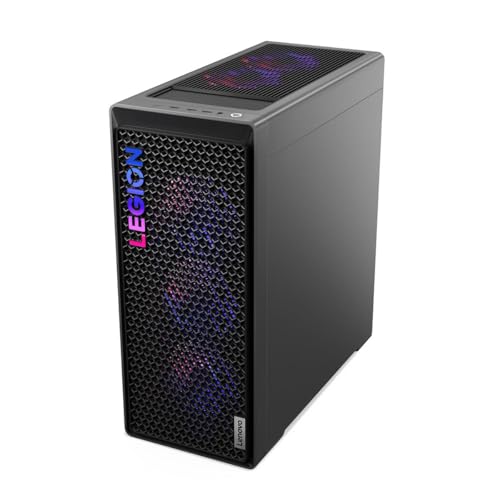
- Best overall when the deal is live — and the only pick with published dimensions: Lenovo Legion T7 34IAS10, Core Ultra 7 265KF, RTX 5080 — Check on Amazon
- Skytech King 95, Ryzen 7 9800X3D, RTX 5070 Ti — Check on Amazon
- CyberPowerPC Gamer Supreme, Ryzen 7 9800X3D, RTX 5070 Ti (SLC8480A9) — Check on Amazon
- iBUYPOWER Y40 PRO, Ryzen 9 7900X, RTX 5070 Ti — Check on Amazon
See 2 more Amazon options
- ZOTAC MEK Hero A7748S, Ryzen 7 7700X, RTX 4080 Super — Check on Amazon
- CyberPowerPC Gamer Supreme Liquid Cool, Ryzen 7 7800X3D, RTX 4070 Ti Super (SLC8480A3) — Check on Amazon
Read the full guide ↓
Disclosure: As an Amazon Associate, reviewstook.com earns from qualifying purchases. Links to Amazon on this page are affiliate links; they cost you nothing extra. Listing details such as price and availability change often, so check the current Amazon listing before you buy.
Begin with the sentence this guide owes you: there is no small 4K gaming PC in it. All six machines below are flagship full towers — the largest class of gaming desktop there is — built around 16GB graphics cards, liquid coolers and 800W-class power supplies. “Small spaces” at $2,500 is not a product category you can buy your way into; it is a placement problem you solve with a tape measure, honest clearance and the right spot in the room. This guide says so up front, then does the useful work instead: grading each tower on its cooling architecture, its documented facts, and where its heat goes.
Why does the small version not exist at this price? Because the hardware that makes $2,500 the first no-compromise 4K tier — RTX 5080, 5070 Ti, 4080 Super and 4070 Ti Super cards with 16GB of VRAM — is physically large and electrically hungry, and the cases that cool it properly are large to match; compact systems built around this class of card exist, but verified compact 5080-class machines cost more than this entire budget. The same physics sets the guide’s other hard boundary, worth printing plainly: there is no RTX 5090 system near $3,000 in any form factor — not in a tower, and certainly not in a small one. If your room is genuinely too small for a full tower, the honest exits — spend more for compact flagship hardware, or step down a tier — are signposted in their own section below. What you cannot do is keep the $2,500, keep the 16GB card, and lose the tower. Something in that triangle always gives.
What this guide can promise is precision about the one thing it can verify. Exactly one pick below — the Lenovo Legion T7 — has dimensions and weight published in its Amazon listing, so it alone is graded against real numbers: 17.8 × 8.3 × 18.8 inches, 39.7 pounds, a footprint of roughly 148 square inches. For the other five, the verified material documents form-factor class and cooling hardware but not dimensions, and this guide refuses to invent the missing figures — a made-up litre count in a small-spaces guide is worse than none, because you would plan a room around it. Each review grades what is documented, and the checklist below turns the live listing’s own specification block into your measuring instrument. Measure first, order second: at this size and weight, that order of operations is the entire discipline.
In this guide
Quick Picks
Short on time? Each row below names a room situation and the machine that suits it, with a link to the listing.
| Your situation | Pick | Why it stands out | Link |
|---|---|---|---|
| You can measure before you buy — deal-dependent | Lenovo Legion T7 34IAS10, RTX 5080 | The only pick with published dimensions (17.8 × 8.3 × 18.8 in) — and the only 5080 under the ceiling, while its deal runs | Check on Amazon |
| One tower, bought once, on open floor | Skytech King 95, 9800X3D, RTX 5070 Ti | Fastest gaming CPU here, published 850W Gold PSU, 360mm AIO that needs exhaust room | Check on Amazon |
| Big library, no room for a drive-juggling habit | CyberPowerPC Gamer Supreme SLC8480A9, RTX 5070 Ti | 9800X3D with a 2TB SSD where rivals ship 1TB — confirm its unpublished PSU first | Check on Amazon |
| The PC will be seen as much as used | iBUYPOWER Y40 PRO, Ryzen 9 7900X, RTX 5070 Ti | Panoramic-glass showcase case and a 12-core creator CPU — designed to be looked at, placed accordingly | Check on Amazon |
| You have a work surface and like a project | ZOTAC MEK Hero A7748S, RTX 4080 Super | 4080 Super positioned as a value option in this tier — check price on Amazon — but only 16GB of system RAM, so plan the upgrade and the space for it | Check on Amazon |
| Least money, coolest-running card class here | CyberPowerPC Gamer Supreme SLC8480A3, RTX 4070 Ti Super | Previous-gen 16GB card and X3D CPU, positioned at the value end of this tier — check price on Amazon, and let what it leaves in the budget fund the room | Check on Amazon |
How These Picks Were Chosen
The performance filter is inherited from this site’s base guide to 4K PCs under $2,500, and it is a single line drawn at the graphics card: 16GB of VRAM, no exceptions. At 4K, high-resolution textures, ray-tracing structures and frame generation all draw from the same memory pool, and 12GB cards that look adequate at 1440p begin swapping and quietly dropping texture quality at 3,840 × 2,160. That filter admits exactly four GPU families — RTX 5080, RTX 5070 Ti, RTX 4080 Super and RTX 4070 Ti Super — and it is why every machine here is a tower: those cards, their coolers and their power supplies do not currently come in a small box at this price. The six picks, their ASINs and specifications are the base guide’s verified set, reused unchanged. What is new here is the grading: every machine re-examined purely as an object that has to fit into, breathe in and be lived with inside a small room.
That re-grading follows a strict sourcing rule, because a small-spaces guide lives or dies on its numbers. Dimensions, weights and volumes are used only where the verified sources publish them. One pick — the Legion T7 — has them, and it is graded against them in full. The other five are graded on what is documented: form-factor class (all full towers), cooling architecture where the sources state it (a named 360mm or 240mm liquid cooler, a glass showcase case), and published supporting facts such as power-supply wattage. Where a figure is not documented — the SLC8480A9’s PSU wattage and radiator, for instance — the review says so rather than filling the gap with a plausible number. No decibel figure appears anywhere in this guide, because none was verified for any pick; noise is handled by distance and placement, in the sections below.
The budget discipline is the base guide’s, kept intact. The ceiling is $2,500 on US Amazon. Prices change often, so this guide prints no fixed product prices: for every pick, check price on Amazon and judge the machine against the ceiling at the moment you buy. A machine whose regular positioning sits above the ceiling qualifies only when the current price on Amazon brings it inside the budget, labelled deal-dependent wherever it appears — the Legion T7’s situation, which its review will not let you forget. The King 95’s regular positioning also sits above the ceiling, so it belongs here only when you check the current price on Amazon and find it inside the budget. For the SLC8480A9, the live listing decides in the same way. Two picks are previous-generation machines framed throughout as clearance-context purchases, where live stock matters as much as the current price. In every case, the live listing — not a figure printed here — is the authority.
What We Know About Size — and What We Refuse to Guess
One pick in this guide can be measured on paper. Lenovo’s Amazon listing for the Legion T7 publishes dimensions of 17.8 × 8.3 × 18.8 inches and a weight of 39.7 pounds. The footprint — the rectangle it actually takes from your floor or desk — is 17.8 by 8.3 inches, roughly 148 square inches: a little over one square foot. The height, 18.8 inches, decides whether it slides under a desk’s modesty panel or into a shelving unit, and it will not fit most of either. The weight, just under 40 pounds before the shipping box, is the dimension your staircase cares about. One caution about litre figures: multiplying the three published dimensions gives a bounding box of roughly 45 litres, noticeably more than the “34-litre” class in the Legion’s branding. Neither number is a lie — makers quote nominal or internal volume, while bounding-box arithmetic counts feet, protrusions and the outermost millimetre in every direction — but for placement, only the three dimensions and the footprint are real. Plan with those.
For the other five machines, the honest statement is that their listings, as verified for this guide, do not publish dimensions — and this guide will not estimate them. “Full tower” still tells you the class truthfully: a case in the Legion’s general size family, tall enough for a full-length flagship card and a liquid-cooling radiator, heavy enough to be a two-handed carry. Within that class there is real variation — a few inches is exactly the difference between fitting under a desk and not fitting — which is why the checklist below makes the live listing’s specification block the source of the final numbers for five of the six picks. If a seller will not state a machine’s dimensions, ask before ordering.
The 6 Best 4K Gaming PCs Under $2,500, Graded for Small Rooms
Lenovo Legion T7 34IAS10, Core Ultra 7 265KF, RTX 5080 (Model 90Y6003KUS) — Deal-Dependent
Who it suits: The small-room buyer who wants the strongest 4K machine here and is willing to do the one thing this guide keeps asking for — measure a real, published footprint before ordering.
This is the only review in the guide that can begin with the tape measure. The Legion T7’s listing publishes 17.8 × 8.3 × 18.8 inches and 39.7 pounds, which converts placement from guesswork into arithmetic: a footprint of roughly 148 square inches, a height that rules out most under-desk cubbies and TV-unit shelves, and a weight that makes the delivery route — doorways, stairs, the turn at the top of them — a genuine part of the purchase. It is also the hottest pick here: the RTX 5080 tops this guide’s heat ordering, pouring more warm air into a small room than anything else on this page. Place it on open floor with free exhaust room behind and above, not in a corner pocket between furniture. The rest of the machine is the base guide’s flagship: a 20-core Core Ultra 7 265KF boosting to 5.5GHz, 32GB of DDR5-5600, a 1TB SSD, Windows 11 Pro, and a model’s published specification that includes an 850W power supply.
Then the condition, stated as plainly here as everywhere this pick appears. This machine’s regular positioning sits above this budget, and it belongs in an under-$2,500 guide only when a live deal brings it inside the ceiling — check price on Amazon before anything else in this review matters. When the current price on Amazon fits the budget, it is the strongest 4K PC here by a clear margin — native-resolution high settings in most games, ray tracing as a setting you leave on, DLSS 4 Multi Frame Generation on top. When the listing sits above the ceiling, it has left the budget and belongs to a higher tier. The 1TB SSD is the other honest mark against it: small for a flagship, in a machine you will not enjoy opening in a cramped room, so treat a second drive as a planned purchase rather than a surprise.
- The only pick with published dimensions — 17.8 × 8.3 × 18.8 in, 39.7 lb — so its footprint can be taped out exactly before you order.
- RTX 5080 16GB GDDR7: the strongest 4K GPU here, and the hottest-running card class in the guide — budget its heat, not just its space.
- Core Ultra 7 265KF, 32GB DDR5-5600, Windows 11 Pro, and a published-specification 850W PSU from a global OEM.
Honest limitation: The deal is the product: at its regular positioning above this budget, this machine belongs to a different guide — check price on Amazon — and its 1TB SSD is the least storage a flagship should ship with.
Choose it if you check price on Amazon and find it inside this budget, and your taped-out footprint, with clearance, fits the published dimensions. Skip it if the listing sits above the ceiling, or your only available spot is enclosed — the hottest card in the guide is the worst one to suffocate.

Skytech King 95, Ryzen 7 9800X3D, RTX 5070 Ti (Model ST-KING95-1671-W-AM)
Who it suits: The buyer with one honest patch of open floor who wants the strongest standing — not deal-dependent — 4K machine in the guide, bought once and placed once.
The King 95’s dimensions are not published in the verified material, so this review grades the architecture instead — and the architecture is unusually well documented. Skytech publishes a 360mm ARGB liquid cooler, the largest radiator named in this guide, and a radiator that size dictates the placement physics: it mounts at the top or front of the case and moves the 5070 Ti’s and 9800X3D’s heat out on a broad, slow-moving cushion of air — provided the exhaust has somewhere to go. A 360mm radiator pushed against a wall or under a shelf lip recirculates its own weather; give it open air above and behind and it is the calmest-running configuration here. The white showcase case cuts both ways in a small room: it is built to be seen, so it will claim visible floor rather than hiding in a corner, and white panels show dust in a way black ones forgive. The specification behind the glass is the guide’s most complete: the Ryzen 7 9800X3D, the fastest gaming CPU here, an RTX 5070 Ti 16GB, 32GB of DDR5-5600, a 1TB Gen4 SSD, Wi-Fi, Windows 11 — and a published 850W Gold ATX 3.0 power supply, stated in the listing, sized for a 300W-class card.
The price discipline is milder than the Legion’s but real. The King 95’s regular positioning sits above the ceiling, so its place in this guide depends on the live listing: check price on Amazon and hold it to this budget. Other configurations under the King 95 name — including a 2TB, DDR5-6000 variant — sit higher in the tier still, so hold the listing to the model number ST-KING95-1671-W-AM and to a current price at or under $2,500. Skytech also notes the graphics card brand may vary, so the exact cooler design on the card is a lottery even when the model number is right. Measure this one from the live listing before ordering: in a small room, the model-number check and the tape measure are the same errand.
- Documented 360mm AIO — the largest radiator named here — which rewards open exhaust room.
- Ryzen 7 9800X3D behind an RTX 5070 Ti 16GB, with a published 850W Gold ATX 3.0 PSU: nothing in the spec left to guess.
- White showcase case: designed to be visible, so place it as furniture, and expect it to show dust.
Honest limitation: Its regular positioning sits above the budget — its place rests on checking the current price on Amazon and finding it inside the ceiling — the GPU brand may vary, and its dimensions must be taken from the live listing.
Choose it if you have open floor with free air above and behind, and you check price on Amazon and find the live listing matching the model number at or under $2,500. Skip it if your only spot is a tight alcove — a 360mm radiator needs to exhale — or the current price sits past the ceiling.

CyberPowerPC Gamer Supreme, Ryzen 7 9800X3D, RTX 5070 Ti (Model SLC8480A9)
Who it suits: The buyer whose game library is already large and whose room has no spare surface for a second-drive project — provided they do one verification errand first.
The silicon is the guide’s reference pairing bought a different way: the same Ryzen 7 9800X3D and RTX 5070 Ti 16GB as the King 95, the same 32GB of DDR5 — and then a 2TB PCIe 4.0 SSD where both machines above ship 1TB. In a small room, storage is a spatial feature, not just a specification. A 1TB flagship fills after six or seven large installs, and the fix — opening the case, fitting a second NVMe drive — needs a cleared table, elbow room and an afternoon; the SLC8480A9 removes that appointment from your life. Independent spec tables for the model list a B850 chipset, and CyberPowerPC ships it Wi-Fi ready with Windows 11 Home in its long-running Gamer Supreme line.
The trade is disclosure, and in a placement guide the gaps matter twice. The verified material for this model does not publish the power-supply wattage or the RAM speed — nor the cooling arrangement or dimensions — so this is the one pick whose placement behaviour cannot be graded beyond its full-tower class until you interrogate the live listing yourself. That does not make it a bad machine; the core silicon is identical to the pick above it. It makes the pre-purchase checklist non-optional: confirm the PSU wattage (treat anything under 750W Gold as a reason to choose the King 95), the memory speed, and the case dimensions before ordering, because a machine you cannot measure is a machine you cannot place. For price, check the current price on Amazon and judge it live against a simple rule: positioned at a similar level in this tier to the King 95, the double-size SSD wins; positioned clearly higher in the tier, it does not.
- 9800X3D + RTX 5070 Ti 16GB with a 2TB PCIe 4.0 SSD — the storage project the other flagships schedule for you never happens.
- 32GB DDR5 and Windows 11 Home, Wi-Fi ready, from an established assembler.
- The reference pairing, bought for library size instead of spec-sheet completeness.
Honest limitation: PSU wattage, RAM speed, cooling details and dimensions are not published in the verified material — all must be confirmed on the live listing before you can responsibly place it — and its fit for this budget must be confirmed the same way: check price on Amazon.
Choose it if storage is your deciding factor, you check price on Amazon and find it positioned in this tier at a similar level to the King 95, and the seller confirms an adequate PSU and the case dimensions. Skip it if those confirmations stay vague — an unmeasurable tower is the wrong gamble for a small room.

iBUYPOWER Y40 PRO, Ryzen 9 7900X, RTX 5070 Ti (Model Y40BA9N57T01)
Who it suits: The buyer whose PC will sit in the room’s sightline — a studio or shared space where the machine is furniture — and whose workload mixes creating with playing.
The Y40 PRO is built in HYTE’s Y40 case, whose panoramic glass exists for one purpose: to display the build. A black tower can go on the floor in a corner and be forgotten; a glass showcase is a lit object in the room, and it should be placed like one — visible, level, with the glass given the clearance it needs, because glass panels and tight alcoves are enemies. The base guide’s honest note about this case carries a placement consequence too: the Y40 prioritises the view over raw intake airflow, so it is the pick most punished by flush placement — give its intake side open room rather than a wall to breathe against. Inside the glass: a Ryzen 9 7900X, twelve cores that trail the X3D chips in pure gaming but earn their keep the moment rendering, compiling or streaming joins the session, an RTX 5070 Ti 16GB, 32GB of DDR5-5200, a 2TB NVMe SSD, Windows 11 Home, and a keyboard and mouse in the box.
Its positioning in this tier is among the friendliest in the guide. Check price on Amazon: it often sits toward the value end of the 5070 Ti machines, below the X3D pair’s level in the tier, while giving up little at 4K, where the graphics card leads. The honest notes: the 5200MHz memory is a step slower than the King 95’s kit, and iBUYPOWER does not headline the PSU in the verified material, so apply the same live-listing confirmation as with the SLC8480A9 — wattage and dimensions before money moves. Measure it as furniture, confirm it as hardware, and it is the pick that makes a small room look intentional rather than crowded.
- Panoramic-glass HYTE Y40 case — the one pick designed to be looked at; place it as a display object, with clearance for its glass and intakes.
- Ryzen 9 7900X 12-core — the best multitasking and creation CPU here — with an RTX 5070 Ti 16GB and a 2TB SSD.
- Positioned toward the value end of the 5070 Ti tier — check price on Amazon; keyboard and mouse included.
Honest limitation: The glass-first case is the pick most punished by wall-flush placement, the RAM is 5200MHz rather than 5600, and the PSU is not headlined in verified material — confirm it, and the dimensions, before ordering.
Choose it if the PC will be on show anyway and your machine creates as well as plays. Skip it if your only spot is a narrow gap between furniture — this case needs an audience and an air supply, in that order.

ZOTAC MEK Hero A7748S, Ryzen 7 7700X, RTX 4080 Super
Who it suits: The hands-on buyer with a work surface — someone who values the 4080 Super’s raw rendering muscle and is willing to perform one easy upgrade in exchange for the guide’s strongest raster value.
ZOTAC sells the previous generation’s flagship formula, built around its own Trinity Black Edition RTX 4080 Super: 16GB of GDDR6X that trades blows with the 5070 Ti in traditional rendering, in a machine whose documented supporting cast is admirably complete — a 240mm AIO liquid cooler, a published 800W 80+ Gold power supply, Wi-Fi 6E, Bluetooth 5.2, 2.5-gigabit Ethernet, hand-assembly in the United States and a 3-year warranty on the graphics card itself. The 240mm radiator is the placement-relevant detail: a step down in size from the King 95’s 360mm unit, in a full tower of the same class, moving the heat of a card that sits between the 5070 Ti and the 4070-class machines in this guide’s heat ordering. It still needs exhaust room; every liquid cooler in this guide does. What the MEK Hero asks of your room, uniquely here, is not floor space but work space. Its documented shortcoming is system memory: 16GB of DDR5-4800, half this tier’s standard and slow with it. For gaming alone it is workable; behind a stream, a recording and a creator’s desktop, it is the ceiling you will feel first.
The saving grace is that RAM is the easiest upgrade in any desktop — a standard DDR5 kit, a side panel, ten minutes on a kitchen table — and its positioning in this tier makes the trade kind. It is a previous-generation model, so its current price and remaining stock are questions to settle live, not standing facts: check price on Amazon before planning around it. Buy it as a GPU-and-chassis purchase positioned at the value end of this tier, with a memory upgrade planned and a surface to perform it on, and it is the strongest raster value in the guide. Buy it expecting the finished article, in a room with nowhere to open it, and the one flaw will find you. Note also what the generation costs: the 7700X is a fine gaming CPU the X3D chips outclass, and the 4080 Super’s frame generation is DLSS 3’s single generated frame — Multi Frame Generation is a 50-series feature it lacks.
- RTX 4080 Super 16GB GDDR6X — flagship-class raster power, positioned as a value option in this tier — check price on Amazon.
- Published 800W 80+ Gold PSU and a documented 240mm AIO, Wi-Fi 6E and 2.5GbE, US hand-assembly, 3-year GPU warranty.
- The guide’s most fixable flaw: its 16GB of RAM is a one-kit upgrade, if your room has a surface to do it on.
Honest limitation: Only 16GB of DDR5-4800 system RAM — half this tier’s standard, and slow — so budget the upgrade and the workspace into the real purchase; it is a previous-generation model, so check the current price on Amazon and confirm live stock before relying on it.
Choose it if you check price on Amazon and find it positioned at the value end of this tier, and you are comfortable adding a 32GB memory kit. Skip it if opening a case is not your idea of a first evening, or your desk runs a stream and a recording from the day it arrives.

CyberPowerPC Gamer Supreme Liquid Cool, Ryzen 7 7800X3D, RTX 4070 Ti Super (Model SLC8480A3)
Who it suits: The value hunter whose small room would rather spend what it leaves in the budget on itself — the pick that buys genuine 4K hardware and leaves more of the budget behind for the desk, the chair or the monitor.
Every tier has a pick that exists because a generation turned over, and this is the $2,500 guide’s. The SLC8480A3 pairs the Ryzen 7 7800X3D — the X3D chip that defined gaming CPUs before the 9800X3D succeeded it, and still within a few percent of it in most titles — with the RTX 4070 Ti Super, a 16GB GDDR6X card whose design brief was precisely 4K: the move from 12GB to 16GB and the wider memory bus that 4K textures demand. Around them sit 32GB of DDR5, a 2TB PCIe Gen4 SSD, liquid cooling as the model name states, Wi-Fi and Windows 11 Home. For a small-spaces guide, its most interesting specification is thermal: the 4070 Ti Super sits at the cool end of this guide’s heat ordering, a full class below the 5080 and a step below the 5070 Ti machines, so of the six towers here it asks the least of a small room’s air. It is still a full tower — the class does not shrink because the card runs cooler — and its dimensions must come from the live listing. But heat is the tax a small room pays hourly, and this pick pays the least of it.
Its positioning is the value story of the guide: a previous-generation configuration in clearance, sitting at the value end of this tier — check price on Amazon, because remaining stock is finite, availability will end rather than refresh, and the current price must be confirmed live rather than assumed. Read that value positioning spatially and it is the best in the guide: what it leaves in the budget can fund the 4K monitor this machine deserves, or the desk that gives any of these towers a proper home. The honest costs are generational — no DLSS Multi Frame Generation — and procedural: the listing’s supporting details deserve the same PSU-confirmation step as its CyberPowerPC sibling before ordering. Buy it as last generation’s proper 4K machine positioned as this generation’s value option, in the coolest-running card class here, and it is the easiest recommendation in the guide to defend.
- 7800X3D + RTX 4070 Ti Super 16GB — a genuine 4K pairing in the coolest-running GPU class in this guide.
- 32GB DDR5 and a 2TB Gen4 SSD, liquid cooled — no storage project, no memory ceiling.
- Positioned at the value end of this tier — check price on Amazon — so what it leaves in the budget can furnish the room around it.
Honest limitation: Previous-generation hardware in clearance: finite remaining stock, no Multi Frame Generation, and the same unpublished-PSU confirmation step as its sibling — check the current price on Amazon and confirm availability live.
Choose it if value and a cooler room matter more than the newest feature set. Skip it if the newest frame-generation titles are your priority, or you buy expecting the current platform’s full five-year runway.

Comparison Table
| Product | GPU / VRAM | CPU | RAM / Storage | Placement notes | Link |
|---|---|---|---|---|---|
| Lenovo Legion T7 34IAS10 | RTX 5080 / 16GB GDDR7 | Core Ultra 7 265KF | 32GB DDR5 / 1TB | Only published dimensions: 17.8 × 8.3 × 18.8 in, 39.7 lb; hottest class — deal-dependent | Check on Amazon |
| Skytech King 95 | RTX 5070 Ti / 16GB GDDR7 | Ryzen 7 9800X3D | 32GB DDR5 / 1TB | Documented 360mm AIO, white showcase case; measure from the live listing | Check on Amazon |
| CyberPowerPC Gamer Supreme SLC8480A9 | RTX 5070 Ti / 16GB GDDR7 | Ryzen 7 9800X3D | 32GB DDR5 / 2TB | Dimensions and PSU unpublished — confirm both first | Check on Amazon |
| iBUYPOWER Y40 PRO | RTX 5070 Ti / 16GB GDDR7 | Ryzen 9 7900X | 32GB DDR5 / 2TB | Panoramic-glass showcase case; most punished by flush placement | Check on Amazon |
| ZOTAC MEK Hero A7748S | RTX 4080 Super / 16GB GDDR6X | Ryzen 7 7700X | 16GB DDR5 / 1TB | Documented 240mm AIO, 800W Gold PSU; plan workspace for its RAM upgrade | Check on Amazon |
| CyberPowerPC Gamer Supreme SLC8480A3 | RTX 4070 Ti Super / 16GB GDDR6X | Ryzen 7 7800X3D | 32GB DDR5 / 2TB | Coolest-running card class here; clearance stock — verify live | Check on Amazon |
How to Choose: Measure Before You Buy
Every pick above is a full tower, so choosing between them is only half the task; the other half is proving your room can take the one you chose. Work through this checklist in order.
- Step 1 — Measure the spot, from the listing’s own numbers. Take the case width, depth and height from the live listing’s specification block (for the Legion T7, they are published: 17.8 × 8.3 × 18.8 in). If a listing does not publish dimensions, ask the seller before ordering. Every later step uses those three numbers.
- Step 2 — Add clearance before you judge the fit. A tower that exactly fills a space is a tower that cannot breathe. Allow open room behind for exhaust and cable bends, above for a top-mounted radiator, and on the intake side — double that discipline for the Y40 PRO, whose glass case already trades intake for view. If the spot only works with zero clearance, it does not work.
- Step 3 — Tape the footprint. Mark the case’s rectangle on the floor or desk with painter’s tape, at full size, and live with it for a day. Walk past it, sit in the chair, open the door. A footprint that annoys you in tape will not improve once the tower is inside it.
- Step 4 — Measure the delivery route. The Legion’s published weight is 39.7 lb before its shipping box; the class is comparable. Check the route the box must travel: doorway widths, stair turns, the lift if there is one. A machine you cannot get into the room is not a small-spaces solution.
- Step 5 — Budget the heat by GPU class. These machines return most of their electrical draw to the room as warm air, and the ordering is by card class: the RTX 5080 pours out the most, the 5070 Ti and 4080 Super sit a class below it, and the 4070 Ti Super the least of the six. In a small, closed room, that ordering is a comfort specification. If the room already runs warm, weight the cooler classes — or accept that summer sessions come with an open door.
- Step 6 — Use distance as your noise control. No decibel figure is published for any pick here, so noise is managed by placement. A tower on the floor, a few feet from your chair, is a quieter machine than the same tower on the desk beside your monitor — distance is the cheapest noise reduction there is, and it is free. Desk placement is for the showcase pick, chosen knowingly.
- Then check the hardware paperwork. Exact model number, character for character (ST-KING95-1671-W-AM, SLC8480A9, Y40BA9N57T01, SLC8480A3, 90Y6003KUS); a published or seller-confirmed power supply (the King 95’s 850W Gold ATX 3.0 and the ZOTAC’s 800W Gold are the standard to hold the others to); and the current price — check price on Amazon against this guide’s rules: the Legion only when its current price fits the budget, the King 95 only at or under $2,500, and the previous-generation picks only after a fresh check of price and stock.
Heat and Noise: The Two Small-Room Taxes
Floor space is the tax you pay once. Heat is the tax you pay every hour you play: a flagship gaming PC under load converts most of its power draw into warm air, and a small room with the door closed has very little air to absorb it. The six picks divide by graphics-card class: the Legion’s RTX 5080 is the largest heat source here; the three 5070 Ti machines and the 4080 Super form the middle class; and the SLC8480A3’s 4070 Ti Super is the gentlest — still a serious heater, but the pick a small, warm room will forgive first. Cooling architecture decides how gracefully that heat leaves the case, not whether it leaves: the King 95’s documented 360mm radiator spreads its exhaust over the largest area, the ZOTAC’s 240mm unit over a smaller one, and glass-fronted cases like the Y40’s lean harder on their side and rear paths. What no architecture can do is delete the heat from the room — ventilation is part of a small-space setup at this tier, and it is budgeted here like one.
No verified decibel figure exists for any of these six machines, and this guide prints none. What can be said is structural: liquid-cooled machines move heat on large, slow fans rather than small, fast ones; a radiator starved of exhaust room works its fans harder and louder; and a tower inside furniture is a tower whose fans will tell you about it. The controls you actually own are placement and clearance — floor over desk for distance, open air over enclosure for fan effort. Buyers for whom noise is the binding constraint are usually buyers for a different form factor entirely — the subject of the next section.
The Honest Alternative: When the Tower Is the Wrong Answer
Some rooms lose the argument, and this guide would rather hand you the exits than win the sale. If your taped footprint fails, if the only available spot is enclosed, or if the heat ordering above ends the discussion, then a full tower at $2,500 is the wrong purchase — and the alternatives divide into two honest directions. The first is smaller hardware at this money: the small form factor, mini gaming, compact and mini PC guides at this budget — start with Best Small Form Factor Gaming PC Under $2500, Best Mini Gaming PC Under $2500, Best Compact Gaming PC Under $2500 and Best Mini PC Under $2500 — genuinely shrink the box, and the trade must be named in both directions. What you gain is a machine that fits the room: shelf-sized, cooler and quieter by class. What you give up is this tier’s defining hardware: at $2,500 the compact world does not sell you a 16GB flagship card with this cooling headroom, so the 4K experience steps down a class with the case size. The second direction keeps the performance and changes the budget: verified compact systems built around 5080-class cards exist, but they cost more than $2,500 — compact flagship hardware is a premium product — and no RTX 5090 system exists near $3,000 in any form factor, so chasing the halo card does not shrink the box either. The only failure on this page is a 40-pound tower in a room that told you, in tape, that it did not fit.
Common Buying Mistakes
- Putting a flagship tower in a closed cabinet. A TV unit or cupboard with the door shut is an oven with a power supply in it: intake and exhaust recirculate the same warming air, fans climb and clocks fall. If the cabinet is the only spot, the cabinet is the answer — choose a smaller form factor, not a hotter tenant.
- Standing the tower on carpet. Many towers draw intake air through the bottom. On deep carpet the case sinks, the intake chokes on pile, and dust ingestion doubles. A hard board or a low stand turns a suffocating placement into a sound one for very little cost.
- Buying the dimensions you hoped for. Five of these six listings do not publish dimensions in the verified material. Ordering on a guess — “about the size of my old PC” — is how a 40-pound return begins. The listing’s specification block, or the seller’s answer, comes before the order.
- Skipping the tape test because the numbers “look fine.” A footprint on paper is abstract; the same rectangle in tape, in the actual room, is information. Buyers who tape first almost never return towers. Buyers who skip it write the reviews that begin “bigger than expected.”
- Paying over-budget positioning for a deal-dependent pick. The Legion T7 sitting above this budget is not this guide’s recommendation at a worse position in the tier — it is a different guide’s machine: check price on Amazon and buy it only when the current price fits the ceiling. The same discipline applies to the King 95 above $2,500 and to the previous-generation ZOTAC and SLC8480A3, whose current price and stock must be checked live on Amazon.
- Shopping by family name. King 95 and Gamer Supreme are families, not machines; configurations under one name vary in GPU, storage and memory. Match the model number in this guide character for character.
- Forgetting the route while measuring the destination. The spot fits, the tape test passes — and the boxed tower cannot make the turn at the top of the stairs. At this weight, the journey is part of the fit.
- Treating heat as a winter problem. A 5080-class tower in a small room is a space heater that also plays games. If the room is already the warmest in the home, the GPU-class heat ordering in this guide is a buying specification, not a footnote.
Final Recommendation
- Deal live, footprint taped: the flagship: Lenovo Legion T7, RTX 5080 — the only pick you can measure exactly before it ships.
- Best standing buy on open floor: Skytech King 95, 9800X3D, RTX 5070 Ti.
- Big library, no workshop space: CyberPowerPC Gamer Supreme SLC8480A9 — after the PSU and dimensions are confirmed.
- The room’s centrepiece: iBUYPOWER Y40 PRO, Ryzen 9 7900X.
- Raster value with a work surface: ZOTAC MEK Hero A7748S, RTX 4080 Super, plus its planned RAM upgrade.
- Least money, least heat: CyberPowerPC Gamer Supreme SLC8480A3, RTX 4070 Ti Super.
Our top two mirror the base guide’s, re-ranked by the room. The Legion T7, when its deal is live, is the strongest 4K machine here and — uniquely — the only one whose fit you can prove in advance, from published dimensions, before a 40-pound box enters your home; in a small space that documentation is worth almost as much as the 5080 inside it. The standing recommendation is the King 95: the fastest gaming CPU, the tier’s reference card, a published power supply, and a documented 360mm cooler whose one demand is open exhaust room. Below them, choose by constraint: the SLC8480A9 if your library forbids a storage project and its unknowns check out, the Y40 PRO if the machine will be seen and your work goes beyond games, the MEK Hero if you have a table and ten minutes for its memory, and the SLC8480A3 if you would rather keep more of the budget for the room itself. Readers with a smaller budget for the same problem should compare Best 4K Gaming PC For Small Spaces Under $1500, those with more headroom Best 4K Gaming PC For Small Spaces Under $3000, and anyone still deciding whether the tower earns its floor should start from the unangled guide, Best 4K Gaming PC Under $2500. Measure the spot, tape the footprint, walk the route, check the model number and check price on Amazon — at $2,500, in a small room, the tape measure is a buying specification.
Frequently Asked Questions
Is there a genuinely small 4K gaming PC under $2,500?
Not with this tier’s hardware in it. Every verified machine at this budget built around a 16GB flagship-class card — the filter that makes $2,500 the first no-compromise 4K tier — is a full tower. Compact systems exist at lower performance classes for this money, and at this class for more money; small, flagship and $2,500 together is the combination the market does not sell.
How much clearance does a tower like this actually need?
Enough that its fans are never breathing their own exhaust: open room behind the case for hot air to leave and cables to bend, open room above if the radiator exhausts through the top, and an intake side that faces the room rather than a wall. The exact inches matter less than the principle — a tower that exactly fills its space has no clearance at all, and a closed cabinet has negative clearance.
Can I put one of these in a TV unit or entertainment centre?
Not with the door closed, and not in a typical TV-unit bay at all: the one pick with published dimensions stands 18.8 inches tall, taller than most entertainment-centre shelves, and every pick here exhausts flagship-class heat that an enclosed bay traps against the machine. An open-backed, open-front stand with generous air around the case is a different matter — but that is open floor placement wearing furniture’s clothes.
Desk or floor — which is better in a small room?
Floor, for most buyers. Distance from your ears is the cheapest noise reduction available, and the floor keeps a 40-pound machine off furniture that may not welcome it. The exceptions are real: deep carpet chokes bottom intakes (use a board or stand), and the Y40 PRO’s glass case is built to be seen. Choose desk placement as a decision, not a default.
The Legion is called a 34-litre tower, but its dimensions multiply to about 45 litres. Which is right?
Both, measuring different things. The published dimensions — 17.8 × 8.3 × 18.8 inches — multiply out to a bounding box of roughly 45 litres, because that arithmetic counts the outermost point in every direction, feet and protrusions included. Maker litre figures are nominal class numbers, usually based on internal or rounded volume. For placement, neither litre figure is the useful one: use the three dimensions, the roughly 148-square-inch footprint, and the 39.7 lb weight, and let litres be marketing.
Why does this guide give dimensions for only one machine?
Because only one machine’s verified sources publish them. The other five listings document their components and cooling but not their case dimensions, and a small-spaces guide that estimated the missing numbers would be sending you to plan a room around a guess. The checklist above makes the live listing’s specification block the final source — and if a seller cannot tell you how big a $2,500 tower is, that silence is itself buying information.
Which of the six is easiest to live with in a small, warm room?
The SLC8480A3, on the documented evidence: its 4070 Ti Super sits in the coolest GPU class in this guide, it is liquid cooled, and its clearance pricing leaves budget for the room around it. The honest asterisk is that its dimensions are unpublished, so its fit must be confirmed from the live listing — easiest to live with once it arrives is not the same as easiest to measure before it does. That title belongs to the Legion alone.
- Best 4K Gaming PC Under $2500
- Best 4K Gaming PC For Small Spaces Under $1500
- Best 4K Gaming PC For Small Spaces Under $3000
- Best Small Form Factor Gaming PC Under $2500
- Best Mini Gaming PC Under $2500
- Best Compact Gaming PC Under $2500
- Best 4K Gaming PC For Streaming Under $2500
- Best 4K Gaming PC For Beginners Under $2500


