Where to buy
Check the latest price, availability and delivery on Amazon. Orders are placed on Amazon. We may earn a commission from qualifying purchases.
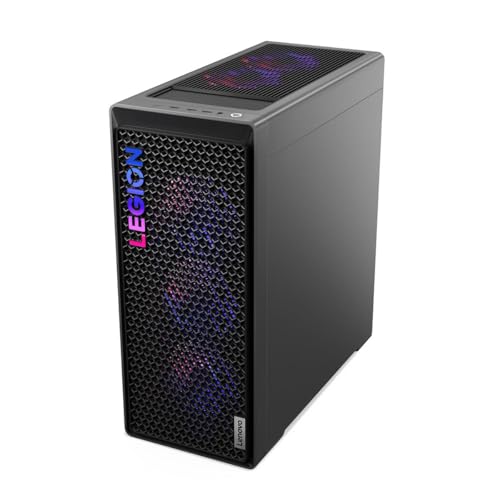
- Best overall: Lenovo Legion T7 34IAS10, Core Ultra 7 265KF, RTX 5080 — Check on Amazon
- Skytech King 95, Ryzen 7 9800X3D, RTX 5070 Ti — Check on Amazon
- CyberPowerPC Gamer Supreme, Ryzen 7 9800X3D, RTX 5070 Ti (SLC8480A9) — Check on Amazon
- iBUYPOWER Y40 PRO, Ryzen 9 7900X, RTX 5070 Ti — Check on Amazon
See 2 more Amazon options
- ZOTAC MEK Hero A7748S, Ryzen 7 7700X, RTX 4080 Super — Check on Amazon
- CyberPowerPC Gamer Supreme Liquid Cool, Ryzen 7 7800X3D, RTX 4070 Ti Super (SLC8480A3) — Check on Amazon
Read the full guide ↓
Disclosure: As an Amazon Associate, reviewstook.com earns from qualifying purchases. Links to Amazon on this page are affiliate links; they cost you nothing extra. Listing details such as price and availability change often, so check the current Amazon listing before you buy.
If this is your first gaming PC, $2,500 is a serious amount to spend on something you may not fully understand yet — and Amazon’s product titles are written to sell, not to help. So this guide starts with the honest version of what you are buying, in plain English, before it asks you to look at a single machine.
Here is that honest version. At $2,500, a “4K gaming PC” does not usually draw every game at full 4K resolution, pixel for pixel, at the highest settings. What it does — and this is genuinely excellent — is render most games at a 1440p-class resolution and upscale them to fill your 4K screen so cleverly that the result looks close to native 4K. In lighter games — esports titles, older games, indie games — these machines do render true native 4K, easily. In the heaviest new releases, they lean on that upscaling, plus a feature called frame generation, to stay smooth. Machines that render native 4K at ultra settings in everything, with no help at all, live a tier above this one — see Best 4K Gaming PC Under $3000 — and even there, the most extreme effects ask for assistance. Anyone who tells you a $2,500 PC plays “everything at native 4K ultra” is selling you something.
Why is this still the right tier for a beginner with a real budget? Because $2,500 is the first budget where you stop managing compromises. Every cheaper tier forces a trade: give up texture quality, give up ray tracing (the realistic lighting modern games are built around), give up smooth frame rates at high resolution. The six machines below are all built around graphics cards with 16GB of video memory — the amount that lets a card hold 4K textures, ray tracing and frame generation at once without choking — and that single fact separates this guide from everything cheaper. Your job as a first-time buyer is not to become an engineer: learn ten terms, follow one first-evening checklist, and check three things on the listing before you pay. This guide walks you through all of it.
In this guide
Quick Picks
Short on time? Each row names a buyer type and the machine that suits it. If a term is new to you, the plain-English glossary right after the table explains every one.
| Buyer type | Pick | Why it stands out | Link |
|---|---|---|---|
| Best overall | Lenovo Legion T7 34IAS10, RTX 5080 | The strongest graphics card here — check price on Amazon to confirm it fits this budget | Check on Amazon |
| Best everyday buy | Skytech King 95, 9800X3D, RTX 5070 Ti | Fastest gaming processor here, and every important spec is published | Check on Amazon |
| Best if your game library is huge | CyberPowerPC Gamer Supreme SLC8480A9, RTX 5070 Ti | Same top pairing as the King 95, with double the storage | Check on Amazon |
| Best if the PC also does work | iBUYPOWER Y40 PRO, Ryzen 9 7900X, RTX 5070 Ti | 12-core processor for editing and streaming on the same 16GB card | Check on Amazon |
| Previous-generation flagship power | ZOTAC MEK Hero A7748S, RTX 4080 Super | A flagship-class card from the last generation — but half the usual memory | Check on Amazon |
| True 4K as the value pick | CyberPowerPC Gamer Supreme SLC8480A3, RTX 4070 Ti Super | Last generation’s proper 4K machine — check the current price on Amazon | Check on Amazon |
Start Here: The Words on the Box, in Plain English
Every confusing term in PC gaming reduces to a handful of ideas. Learn these and the rest of this guide — and every Amazon listing — becomes readable.
- Resolution is how many dots (pixels) make up the picture. 4K means 3,840 pixels wide by 2,160 tall — about 8.3 million pixels in every frame. That is roughly four times the pixels of 1080p (1,920 × 1,080) and about 2.25 times the pixels of 1440p (2,560 × 1,440). More pixels means a sharper picture — and much more work, because the PC calculates every one dozens of times per second.
- Display resolution vs render resolution is the most important distinction in this guide. Your screen always displays 4K if it is a 4K screen. But the PC can render (draw) the game at a lower resolution and stretch it up to fill the screen. Rendering fewer pixels is far easier, so games stay smooth; clever software makes the result look nearly as sharp. When this guide says a machine “renders at 1440p-class and upscales to 4K,” that is what it means — and it is how almost all 4K gaming works, at every price.
- GPU (graphics card) is the part that renders the game. It is the most important component in a gaming PC, and where most of your $2,500 goes. Names to know here: NVIDIA’s RTX 5080, RTX 5070 Ti, RTX 4080 Super and RTX 4070 Ti Super. Bigger number, newer generation, more power — roughly in that order.
- VRAM (video memory) is the GPU’s own private memory, measured in gigabytes (GB). It holds the game’s textures — the surface detail on every wall and face. 4K textures are big, and when VRAM runs out, games stutter or quietly blur their own textures. All six cards in this guide carry 16GB of VRAM, and that is deliberate: 16GB is the amount that lets a card live at 4K instead of visiting it.
- CPU (processor) is the machine’s general brain — it runs the game’s logic, Windows, your browser, everything that is not drawing the picture. At 4K the GPU does most of the work, so the CPU matters less than beginners fear — but a good one keeps frame rates steady and handles everything else you do.
- RAM (system memory) is the PC’s shared short-term memory — different from VRAM. 32GB is this tier’s standard. One machine below ships with 16GB, and its review flags that clearly, because it is the one spec here you may want to upgrade.
- SSD (storage) is where games live permanently. Modern games are enormous — 100GB or more is normal — so a 1TB drive fills faster than new owners expect. Three picks below carry 2TB and save you that headache.
- Upscaling (DLSS and FSR) is the stretching trick described above, done by smart software: NVIDIA’s is DLSS, AMD’s is FSR, and DLSS has quality settings. At a 4K output, DLSS Quality renders at roughly 2,560 × 1,440 internally — a little under half the pixels — and rebuilds a 4K image from them. DLSS Performance renders at roughly 1,920 × 1,080 — about a quarter of the pixels — and is the mode for the most demanding games or the highest frame rates. Quality is the everyday setting — not a compromise, but how these cards are designed to be used.
- Frame generation is a separate trick: the GPU invents extra frames in between the ones it really renders, interpolating motion the way a TV smooths a film. It makes movement look smoother and pushes the frame-rate counter higher, but it is not rendering power — the invented frames add a little input delay, and the underlying rendered rate still decides how responsive the game feels. The RTX 50-series can insert up to three generated frames per real one (“Multi Frame Generation”); 40-series cards insert one. Treat it as a bonus on a healthy real frame rate, never a substitute.
- Frame rate (fps) is how many frames the PC finishes each second; 60fps is the traditional “smooth” target, and higher is smoother still. Which brings us to refresh rate (Hz): how many times your monitor can redraw per second. A 60Hz screen can never show more than 60fps, no matter how powerful the PC — a fact that matters when you choose a monitor below.
- Ray tracing is realistic lighting — reflections, shadows and glow calculated the way light actually behaves. It is beautiful and expensive; every card here can do it at 4K with upscaling’s help, and cheaper cards mostly cannot.
How These Picks Were Chosen
The budget was a hard ceiling of $2,500 on Amazon in the United States. Every pick below was selected for this tier on its hardware — graphics card, video memory, processor, memory, storage and, where published, power supply. Because pricing in this category moves often, no pick’s place here rests on a fixed price: check price on Amazon for each exact model, and confirm the live listing fits the $2,500 budget before you buy.
The performance rule was one line: 16GB of VRAM, no exceptions. At 4K, textures, ray-tracing data and frame generation all drink from the same memory pool. A 12GB card can post fine-looking numbers in older games, then stutter or quietly downgrade its textures in the newest ones. That rule admits four graphics-card families (RTX 5080, RTX 5070 Ti, RTX 4080 Super, RTX 4070 Ti Super) and excludes a long list of newer-sounding 12GB machines. If a listing at this price is built around a 12GB GPU, it is a 1440p machine wearing 4K clothing, whatever its title says. Readers curious about that resolution will find honest machines in Best 1440p Gaming PC Under $2500.
We did not use these machines ourselves. We read the manufacturer listings and specification pages and compared the parts that decide ownership: graphics card and VRAM, processor, memory amount and speed, storage size, power supply wattage where published, and cooling. Two industry habits shaped the rankings. First, a published power supply is worth money: the King 95 states an 850W Gold-rated supply in its listing, while some rivals never say — and behind a graphics card that can draw 300 watts or more, the power supply is not a detail. Where a wattage is unpublished, the review says so and gives you the question to ask. Second, model families are not machines: names like King 95 and Gamer Supreme cover several configurations, so every review gives you the exact model number to match, character for character, on the live listing. Check the current price on Amazon on the live listing before you buy — this category’s pricing moves weekly.
The 6 Best 4K Gaming PCs for Beginners Under $2,500
Lenovo Legion T7 34IAS10, Core Ultra 7 265KF, RTX 5080 (Model 90Y6003KUS) — Best Overall
Who it suits: A beginner who wants the strongest machine in this guide and is ready to check the current price on Amazon to confirm the exact model fits this budget before buying.
Start with what makes this machine stand out. Check price on Amazon for this exact model before you buy, and confirm the live listing fits the $2,500 budget. When it does, it is simply the best machine here: its RTX 5080 is the most powerful graphics card in the guide, a current-generation card with 16GB of the fastest video memory (GDDR7), the newest upscaling (DLSS 4) and Multi Frame Generation, which can insert up to three generated frames between real ones. In plain terms: this is the one pick that renders native 4K at high settings in most games, takes ray tracing in its stride, and still has power left over. Behind the card sits Intel’s Core Ultra 7 265KF, a 20-core processor boosting to 5.5GHz, with 32GB of DDR5 memory, a 1TB SSD, Windows 11 Pro, Wi-Fi and Bluetooth, in a large grey tower weighing just under 40 pounds; an 850W power supply appears in the model’s published specification. Lenovo’s global warranty organisation is also the gentlest support landing here if something goes wrong.
The weaknesses are two, both manageable. The 1TB SSD is small for a flagship — a handful of modern games will fill it, and the upgrade section explains the easy fix. And its fit for this guide depends on the live listing: if you check price on Amazon and the listing sits above this guide’s budget, buy the King 95 next instead, which is the standing everyday recommendation in this tier.
- RTX 5080 with 16GB of VRAM — the only card here that makes native 4K its default rather than its party trick.
- 20-core Intel processor and 32GB of memory: games plus streaming, editing or work, all at once.
- Big-brand build and support; published specification includes an 850W power supply.
Honest limitation: Its fit for this budget depends on the live listing — check the current price on Amazon before buying — and the 1TB SSD is tight for a machine at this level.
Choose it if you want the most 4K performance this budget can buy and the live listing fits the budget when you check price on Amazon. Skip it if the live listing sits above this tier when you check; at that level it belongs to the under-$3,000 tier, not this one.

Skytech King 95, Ryzen 7 9800X3D, RTX 5070 Ti (Model ST-KING95-1671-W-AM) — Best Everyday Buy
Who it suits: The beginner who wants the safe, complete answer — the strongest complete machine in this tier, with nothing important left unspecified.
If the Legion does not fit your budget when you check, this is the recommendation, and it is an easy one to explain. The King 95 pairs the RTX 5070 Ti — 16GB of video memory, current generation, with DLSS 4 and Multi Frame Generation — with the Ryzen 7 9800X3D, widely regarded as the fastest gaming processor you can buy. Its secret is extra memory built into the chip itself (AMD calls it 3D V-Cache), which keeps frame rates high and, just as importantly for how a game feels, keeps the dips shallow in busy scenes. Around that pairing, Skytech publishes the specification sheet every maker should copy: 32GB of DDR5-5600 memory, a 1TB fast SSD, a 360mm liquid cooler, and an 850W Gold-rated ATX 3.0 power supply, stated in the listing and correctly sized for the card. Wi-Fi is built in, Windows 11 is installed, and the white showcase case lets you see it all working. For a first-time owner, that completeness matters: no follow-up question needs answering before this machine makes sense.
One honest note on checking this pick. Other machines are sold under the King 95 name (including a version with a bigger SSD and faster memory), so hold the listing to the model number ST-KING95-1671-W-AM and check the current price on Amazon to confirm it fits the $2,500 budget; if both check out, you are buying the best-balanced everyday machine here. Two smaller notes: the graphics card brand may vary (normal for assembled PCs, but the exact cooler design is a small lottery), and the 1TB SSD is as tight as the Legion’s. It renders native 1440p-class at high settings in everything, upscaled to your 4K screen — the honest $2,500 experience, without conditions.
- The fastest gaming processor available, paired with a current-generation 16GB card.
- Every key spec published, including the 850W Gold power supply and 360mm liquid cooler.
- 32GB of memory and a fast SSD in a showcase case, ready out of the box.
Honest limitation: Pricing for this model family can move — check price on Amazon and confirm the exact model fits this budget before buying — the card brand may vary, and 1TB fills quickly.
Choose it if you want the default buy: strongest all-round specification, with no timing condition to watch for. Skip it if the live price has climbed past the $2,500 budget when you check — the CyberPowerPC below offers the same core pairing with twice the storage.

CyberPowerPC Gamer Supreme, Ryzen 7 9800X3D, RTX 5070 Ti (Model SLC8480A9) — Best for Big Libraries
Who it suits: The beginner who already owns a shelf of games — or plans to — and does not want storage maths to be part of the hobby.
On paper this is the King 95 bought differently. Same fastest-in-class processor, the Ryzen 7 9800X3D. Same RTX 5070 Ti graphics card with 16GB of video memory. Same 32GB of system memory. Then one change that sounds boring and turns out to be the one you feel every week: a 2TB SSD instead of 1TB. Modern flagship games commonly install at 100–150GB each. On a 1TB drive, Windows and applications leave room for perhaps six of them, and “which game do I delete?” becomes a recurring chore. This machine removes that chore for years. It arrives Wi-Fi ready with Windows 11 Home, and renders exactly what the King 95 renders.
The trade for that storage is paperwork: where Skytech publishes its power supply and cooler, this model’s verified material states neither the wattage nor the memory speed. That does not make it a bad machine — the core parts are identical to the pick above — but it adds one step: before ordering, confirm the power supply wattage (you want a quality unit of roughly 750W or more) and the memory speed on the live listing or by asking the seller. If the answer is vague, buy the King 95 instead. Check price on Amazon for this model and compare the live listing directly with the King 95 as you shop: the case for this machine is the double storage on the same core pairing, so let the confirmed power supply and memory details, and how the two live listings compare, decide between them.
- The guide’s reference pairing — 9800X3D plus RTX 5070 Ti — with a 2TB SSD.
- 32GB of memory, Windows 11 Home, Wi-Fi ready.
- No deleting games to make room for new ones, for a long time.
Honest limitation: The power supply wattage and memory speed are not published in the verified material — confirm both before buying — and check the current price on Amazon, so the live listing decides its fit for this budget.
Choose it if room for games is your deciding factor and the live listing fits this budget when you check price on Amazon. Skip it if you cannot get a clear answer on the power supply, or the live listing does not compare well with the Skytech for the same core parts.

iBUYPOWER Y40 PRO, Ryzen 9 7900X, RTX 5070 Ti (Model Y40BA9N57T01) — Best If the PC Also Does Work
Who it suits: The beginner whose PC will earn its desk space twice — gaming in the evening, video editing, streaming, study or work the rest of the time.
This machine makes a different bet on the processor, and for many first-time owners it is the smarter one. Its Ryzen 9 7900X has 12 cores — think of cores as workers. In games alone it trails the 9800X3D slightly, because that chip’s special cache is purpose-built for play. But the moment your PC does two things at once — streaming while you play, exporting video, running a crowd of applications — extra workers win, and at 4K the graphics card is the bottleneck anyway, so the gaming gap shrinks to very little. The rest of the build matches the tier properly: the same RTX 5070 Ti 16GB card, 32GB of memory, a 2TB SSD that removes the storage chore, Windows 11 Home, a keyboard and mouse in the box (a small thing that saves a beginner a second order), all in a panoramic glass case that is the best-looking in this guide.
Check price on Amazon for this pick as you shop. Compared with the two machines above, it gives up almost nothing at 4K while gaining cores everywhere else. The honest notes: its memory runs at 5200MHz, a step slower than the King 95’s 5600 kit (a difference you would struggle to feel), the glass case favours looks over maximum airflow, and iBUYPOWER does not headline the power supply in the material we verified — so apply the same confirm-before-you-buy step as with the CyberPowerPC.
- 12-core processor — the best multitasking and creating chip in this guide — behind the same 16GB card.
- 2TB SSD, 32GB of memory, keyboard and mouse included, in a panoramic glass case.
- Same RTX 5070 Ti 16GB card as the picks above — check the current price on Amazon.
Honest limitation: Trails the X3D chips slightly in pure gaming, its memory is a step slower, and the power supply is not headlined in verified material — confirm it before ordering.
Choose it if your machine creates as well as plays. Skip it if the PC will only ever game and every last frame matters — the two X3D machines exist for you.

ZOTAC MEK Hero A7748S, Ryzen 7 7700X, RTX 4080 Super — Flagship-Class Power, With One Homework Task
Who it suits: The beginner who likes a bargain and does not mind one small, well-explained upgrade to complete the machine.
The MEK Hero is last generation’s flagship formula, sold by the company that made its graphics card. ZOTAC’s RTX 4080 Super carries 16GB of video memory and remains a superb 4K GPU: in traditional rendering it trades blows with the newer 5070 Ti, its ray tracing is a generation behind but entirely serious, and its frame generation (DLSS 3, one generated frame) covers the demanding titles. In beginner terms, it renders the same honest picture as the 5070 Ti machines, with muscle to spare. Around it, ZOTAC builds a tidy machine: an eight-core Ryzen 7 7700X under a 240mm liquid cooler, an 800W Gold-rated power supply published in the launch specification, Wi-Fi 6E and 2.5-gigabit wired networking, a 1TB SSD, Windows 11 Home without bloatware, assembly and testing in the United States, and a 3-year warranty on the graphics card itself. This is a previous-generation flagship formula positioned as a value option in this tier — check the current price on Amazon on the live listing before you buy.
Now the homework, stated plainly: this machine ships with 16GB of system memory, at the slow 4800 speed — half the amount, at a slower speed, than every other pick in this guide. For gaming alone today that is workable; games themselves rarely use more. But stream, record, or leave a creator’s desktop open behind your game and you will feel the ceiling, and the slow speed leaves a little processor performance unclaimed in the meantime. The reason this pick survives its flaw is that memory is the cheapest, easiest upgrade in any desktop PC — and a buyer who treats this as a great card and chassis in this tier, plus one memory kit, still comes out ahead. Buy it with that plan made, not as a surprise. Also know: the 7700X is a good gaming processor the X3D chips outclass, and this card has no Multi Frame Generation.
- RTX 4080 Super with 16GB of video memory — flagship-class rendering; check price on Amazon.
- Published 800W Gold power supply, liquid cooling, fast networking, US assembly.
- 3-year warranty on the ZOTAC graphics card itself.
Honest limitation: Only 16GB of slow DDR5-4800 system memory — half this tier’s standard — so plan a memory upgrade as part of the real cost of ownership; and no Multi Frame Generation on the previous-generation card.
Choose it if you are comfortable adding a memory kit (it is genuinely beginner-doable — see the upgrade section) — check price on Amazon before buying. Skip it if you want a machine that needs nothing added out of the box, or your evenings mix streaming and creating with gaming from the start.

CyberPowerPC Gamer Supreme Liquid Cool, Ryzen 7 7800X3D, RTX 4070 Ti Super (Model SLC8480A3) — True 4K as the Value Pick
Who it suits: The beginner who wants the real thing — a proper 16GB 4K machine — and would rather spend the savings on the monitor, which (as the total-cost section explains) you also need to buy.
Every generation of hardware has a moment like this: the new models arrive, and the previous ones — barely slower, missing one or two new features — become the smart value buy on the page. This machine is that moment. It pairs the Ryzen 7 7800X3D, the processor that defined gaming CPUs before its successor above appeared and remains within a few percent of it in most games, with the RTX 4070 Ti Super: a 16GB card whose entire design brief was 4K, with the memory size and bandwidth 4K textures demand. Around them sit 32GB of memory, a 2TB SSD, liquid cooling, Wi-Fi and Windows 11 Home. Nothing in that list is a compromise. It renders the same honest 4K picture as the 5070 Ti machines — 1440p-class native with DLSS Quality upscaling, native 4K in lighter games — using the previous generation’s feature set to do it.
As this tier’s previous-generation value pick, it can leave more room in your overall desk budget for the monitor, which (as the total-cost section explains) you also need to buy — check the current price on Amazon and weigh the live listing against the rest of your setup costs. You still own a true 4K PC with the right processor class and video memory. The honest costs are generational. There is no Multi Frame Generation, so in the small set of titles where the newest cards pull away using it, this one cannot follow. And the configuration dates from the previous cycle, which means remaining stock is clearance stock: availability will end rather than refresh, and the listing’s details deserve the same power-supply confirmation step as its CyberPowerPC sibling above. Buy it as what it is — last generation’s proper 4K machine, positioned as this generation’s value pick in this tier.
- 7800X3D processor plus a 16GB card designed for 4K — a genuine pairing, not a cut-down one.
- 32GB of memory and a 2TB SSD, liquid cooled.
- Positioned as the value pick in this tier — check price on Amazon.
Honest limitation: Previous-generation hardware in clearance: no Multi Frame Generation, stock that will not be replenished, and the same unpublished-power-supply confirmation step as its sibling.
Choose it if value matters more than the newest feature and the monitor still needs funding. Skip it if you keep a PC for many years and want the current generation’s full feature runway, or Multi Frame Generation titles top your list.

Comparison Table
| Product | GPU / VRAM | CPU | RAM / Storage | Best use | Link |
|---|---|---|---|---|---|
| Lenovo Legion T7 34IAS10 | RTX 5080 / 16GB GDDR7 | Core Ultra 7 265KF | 32GB DDR5 / 1TB | Maximum 4K power in this tier | Check on Amazon |
| Skytech King 95 | RTX 5070 Ti / 16GB GDDR7 | Ryzen 7 9800X3D | 32GB DDR5 / 1TB | Best everyday 4K buy | Check on Amazon |
| CyberPowerPC Gamer Supreme SLC8480A9 | RTX 5070 Ti / 16GB GDDR7 | Ryzen 7 9800X3D | 32GB DDR5 / 2TB | Big libraries, no storage juggling | Check on Amazon |
| iBUYPOWER Y40 PRO | RTX 5070 Ti / 16GB GDDR7 | Ryzen 9 7900X | 32GB DDR5 / 2TB | Playing and creating on one machine | Check on Amazon |
| ZOTAC MEK Hero A7748S | RTX 4080 Super / 16GB GDDR6X | Ryzen 7 7700X | 16GB DDR5 / 1TB | Flagship-class power, plus a memory upgrade | Check on Amazon |
| CyberPowerPC Gamer Supreme SLC8480A3 | RTX 4070 Ti Super / 16GB GDDR6X | Ryzen 7 7800X3D | 32GB DDR5 / 2TB | True 4K as the value pick | Check on Amazon |
Your First Evening: A Setup Walkthrough
Every machine here arrives with Windows installed. Your first evening is about four things: checking the machine survived shipping, plugging things into the right holes, changing two settings most new owners never find, and letting it update itself. Budget an unhurried hour or two, mostly waiting on downloads.
- Step 1 — Inspect before you power on. Photograph the box if it is damaged. Several makers ship foam packing inside the case to protect the graphics card in transit — remove all of it. Check the card sits straight in its slot and no cables have shaken loose; a surprising share of “dead on arrival” PCs are one unseated cable.
- Step 2 — Plug the monitor into the graphics card, not the motherboard. This is the most common beginner mistake in PC gaming. The back of the PC has two sets of video sockets: one on the motherboard, near the USB ports, and one lower down, on the graphics card itself, usually horizontal. Plug your monitor cable (HDMI or DisplayPort) into the graphics card’s sockets. Use the motherboard’s instead and the PC falls back to weak built-in graphics — $2,500 of performance you never see. DisplayPort is preferred for high-refresh 4K monitors.
- Step 3 — Power, network, peripherals. Power cable into the tower and a surge protector, and flip the small switch on the back of the power supply to on — another classic first-night trap. Use a wired Ethernet cable if one is in reach; it is faster and steadier than Wi-Fi for game downloads. Keyboard and mouse into any USB ports.
- Step 4 — First boot and Windows setup. Follow the on-screen steps: region, Microsoft account, privacy choices (set them as you like; none affect gaming). Decline optional trial-software offers you do not recognise.
- Step 5 — Set your screen’s refresh rate. Windows often defaults a fast monitor to 60Hz. Go to Settings → System → Display → Advanced display and set the refresh rate to the highest your monitor offers. Until you do, a fast screen runs slow. While there, confirm the resolution reads 3,840 × 2,160.
- Step 6 — Install the graphics driver. The driver is the software that lets games talk to the graphics card properly, and the shipped one is already out of date. Download NVIDIA’s app from NVIDIA’s website, let it detect your card, and install the current “Game Ready” driver; afterwards it stays current with a click.
- Step 7 — Let Windows update, then restart. Settings → Windows Update → Check for updates. A new machine can have a queue of them; let them all finish before installing games, not after.
- Step 8 — Install a game launcher and one game. Steam is the standard starting point. Install one game you know well, set its display options to your screen’s resolution, and turn on DLSS (Quality) if offered. That is the honest 4K recipe from the introduction, working in your home.
- Step 9 — The arrival checks. Within the first days, confirm you received the machine you ordered: open Task Manager → Performance and check the graphics card name, memory amount and storage size against the listing. This is where the model-number discipline pays off — if anything does not match, you are inside the return window and a photo of that screen is your evidence. Then run one demanding game for twenty minutes: fans spinning up under load and settling afterwards is health, not a fault.
The Real Total Cost: What $2,500 Does Not Include
Every price in this guide is the price of the tower alone. That is the industry convention, and for a first-time buyer it is a trap, because a tower by itself displays nothing. Here is the rest of the desk, costed separately and honestly. None of these figures are inside any pick’s price above.
- A 4K monitor — the big one. A 27–32 inch 4K monitor with a refresh rate of 120Hz or higher and variable refresh (which syncs the screen to the PC) is the correct partner for these machines, and it costs hundreds of dollars, not tens. Do not pair a $2,500 PC with a cheap 60Hz office panel: the PC will render frames the screen cannot show. If the monitor money does not exist yet, that is a genuine argument for the SLC8480A3 pick above — as this tier’s value pick, it can help leave room in the overall desk budget for the monitor.
- Keyboard and mouse. Only the Y40 PRO includes them. A good set is a modest purchase; premium mechanical keyboards are a hobby of their own. Start modest.
- Sound. A headset is the standard answer and covers voice chat; desk speakers are the alternative. Neither is in the box.
- A place to put it. These are large towers — the Legion weighs just under 40 pounds and stands roughly 19 inches tall. Measure your space, leave room around the vents, and keep it off thick carpet — a small stand underneath is a cheap kindness to its cooling.
- Surge protection. A basic surge protector is inexpensive insurance for a $2,500 machine. Plug the PC and monitor into it, not straight into the wall.
- Games. The machine arrives with none. A subscription library service is the cheapest way to have fifty games in the first month; buying two or three titles you know you want is the alternative. Either way, budget something — the tower is the cinema, not the film.
Add it up before you order, not after: for most first-time buyers the honest total lands several hundred dollars above the tower’s price. Readers planning the whole desk from scratch may also find Best Gaming PC Under $2500 and Best Prebuilt Gaming PC Under $2500 useful.
How to Choose Among the Six
- Match the processor to your second job. Gaming only? The X3D chips (9800X3D, 7800X3D) keep frame rates steadiest. Gaming plus streaming, editing or heavy multitasking? The 12-core 7900X or the 20-core Intel earn their keep. At 4K there is no wrong processor in this guide — only different second jobs.
- Treat 1TB as a planned purchase. Three picks ship 1TB. Either choose a 2TB pick, or add the cost of a second SSD to the 1TB machines from the start. The upgrade section shows how easy that addition is.
- Ask the power-supply question where it is unanswered. King 95 (850W Gold) and MEK Hero (800W Gold) publish theirs. For the CyberPowerPC models and the Y40 PRO, confirm wattage and rating before paying — and walk away from vague answers.
- Match the model number, character for character. King 95, Gamer Supreme and Y40 are family names covering multiple configurations. The numbers in this guide — 90Y6003KUS, ST-KING95-1671-W-AM, SLC8480A9, Y40BA9N57T01, SLC8480A3 — are the products reviewed. A listing that differs is a different computer.
Common Beginner Mistakes
- Plugging the monitor into the motherboard. Mistake number one, covered in the walkthrough: card sockets, low on the back panel, every time.
- Never changing the refresh rate. Windows defaults many fast monitors to 60Hz; two minutes in Settings fixes it.
- Expecting native 4K ultra in everything. That machine does not exist at this price — and barely exists at any price. The recipe that looks superb and runs smoothly is DLSS Quality upscaling; treat anyone promising more as a salesperson.
- Paying $2,500 for a 12GB card because the title said “4K”. Check the VRAM line before the headline. Sixteen gigabytes is this tier’s entry ticket.
- Buying the Legion without checking its fit for this budget. Check the current price on Amazon for the exact model before you buy. If the live listing sits above this tier, buy the King 95 instead.
- Shopping by family name. A “King 95” can be several different computers. Model number first, enthusiasm second.
- Spending everything on the tower. No monitor budget, a 60Hz panel, and a juddering picture blamed on the PC. The display is half the experience; fund it, even if it means the value pick.
- Ignoring the one flagged spec. The MEK Hero’s 16GB of slow memory is the standing lesson: similar cards do not make similar machines if one carries half the memory. Read for the caveat, not just the headline parts.
- Filling a 1TB SSD and leaving it full. A drive run permanently near capacity slows down and blocks updates. Buy 2TB, or add the second drive while the first still has room.
- Skipping the arrival checks. Five minutes in Task Manager confirms you received the card, memory and storage you paid for — while returning is still easy. Do it in week one, not month three.
Upgrades, in Plain Terms
A desktop PC lets you fix its weaknesses one part at a time. Here is the honest order for these six machines, in the language of what each upgrade actually does.
- More storage (easiest, most likely). If you chose a 1TB pick, this is your first upgrade, and barely an upgrade at all: a second SSD clicks into a spare motherboard slot, Windows sees a new drive, and your library moves in. No reinstalling. Do it when the first drive passes three-quarters full, not after.
- More system memory (the MEK Hero’s homework). The ZOTAC ships with 16GB of slow memory; replacing it with a 32GB kit of faster DDR5 is the single planned upgrade in this guide. Memory sticks unclip and clip in by hand — it is the upgrade beginners have done first for thirty years. Buy a matched pair, and the machine’s one flagged weakness stops existing.
- The graphics card (years away, by design). Eventually a new GPU generation will tempt you. The published power supplies (850W, 800W) and full-size cases were chosen with that day in mind — a card swap is a normal mid-life refresh, not a new computer. Confirm wattage first where it is unpublished.
- What you do not need to upgrade: the processors. Every CPU here has years of headroom at 4K, where the graphics card does the work. Anyone urging a beginner to swap a processor in year one is selling, not advising.
None of this is maintenance you owe the machine: all six picks are complete as they arrive, and upgrades are options, not homework — with the single exception of the MEK Hero’s memory, planned into its purchase from the start.
Final Recommendation
- Strongest flagship in this tier: Lenovo Legion T7, RTX 5080.
- Best everyday buy: Skytech King 95, 9800X3D, RTX 5070 Ti.
- Big library, same core parts: CyberPowerPC Gamer Supreme SLC8480A9.
- If you also create or stream: iBUYPOWER Y40 PRO, Ryzen 9 7900X.
- Raw value, one small upgrade planned: ZOTAC MEK Hero A7748S, RTX 4080 Super.
- The value route to genuine 4K: CyberPowerPC Gamer Supreme SLC8480A3, RTX 4070 Ti Super.
For a first-time buyer, the shortlist is genuinely short. If the Legion T7’s live listing fits this budget when you check price on Amazon, take it: an RTX 5080 in this tier is the strongest option here, and Lenovo’s support is the gentlest landing for a beginner. If it is not, the Skytech King 95 is the standing recommendation — fastest gaming processor, the tier’s reference card, every important specification published, nothing to verify by phone. If your library is large, take the same core pairing with 2TB in the SLC8480A9; if the PC also earns its keep, the Y40 PRO’s twelve cores make it the smart creator pick; if the monitor still needs funding, the SLC8480A3 buys true 4K and leaves the money where it is needed; and the MEK Hero rewards the beginner willing to do one clip-in memory upgrade with flagship-class rendering as this tier’s previous-generation value option. Readers whose ambitions outgrow this tier should see Best 4K Gaming PC Under $3000, where native 4K ultra stops being an aspiration; those who would rather keep the change should compare Best 4K Gaming PC Under $1500 first. Check the model number, check the power supply, check the live price — and plug the monitor into the graphics card.
Frequently Asked Questions
I am a beginner. Is $2,500 too much to spend on a first gaming PC?
It is a lot, and it is also the tier where the money is easiest to justify: the first budget where you stop paying for compromises, in a machine that stays current for years. The case for spending less is real, though — if you are unsure gaming will hold your interest, or your monitor is 1440p or 1080p, a cheaper tier serves you honestly. Spend $2,500 when you know you will use it, and pair it with a 4K high-refresh monitor.
So do these PCs actually play games at 4K or not?
Yes — with one honest refinement. Your screen will show a 4K picture, and in lighter games the PC renders every pixel natively. In the heaviest modern games it renders at a lower internal resolution — DLSS Quality at 4K output works from roughly 2,560 × 1,440 — and reconstructs the 4K image so well that most viewers cannot tell it apart from native, while running far more smoothly. That is not a trick played on beginners; it is how 4K gaming is done at every price, including on machines costing twice this. Unassisted native-4K ultra in everything is a tier above — and even there it has limits.
What is the difference between VRAM and RAM? Both are “memory,” right?
They are two separate pools doing two separate jobs. VRAM (16GB in every graphics card here) belongs to the graphics card and holds the game’s visual detail — textures, lighting data, generated frames. RAM (32GB in five of the six machines) belongs to the whole system and holds everything in progress: the game, Windows, your browser, your stream. Running short on VRAM blurs textures and stutters the picture; running short on RAM slows the whole machine when you multitask. The ZOTAC is the standing example: a full 16GB of VRAM, but only 16GB of RAM — hence its flagged memory homework.
The Legion T7 listing sits above this budget when I look. Did I miss something?
No — you have caught a moment when its live price does not fit this guide, which this guide warns about in the buy box, the quick picks, the review and the mistakes section. The Legion belongs here only when its live listing fits the $2,500 budget — check the current price on Amazon for the exact model; when it does not fit, it is an under-$3,000 machine. Your moves: buy the King 95 instead (the standing recommendation exists for exactly this situation), or set a price alert and wait.
Do I need a special monitor, or will my TV work?
Your TV will work — any 4K TV with an HDMI socket will display these PCs, and for relaxed sofa gaming it is a fine start. Two caveats: most TVs refresh at 60Hz, capping frame rates at 60 per second, and TVs add a little input delay (use “game mode” if it has one). A 4K monitor at 120Hz or above lets you see everything you paid for, which is why the total-cost section treats it as part of the real budget. Small-room readers should also glance at Best 4K Gaming PC For Small Spaces Under $2500 — these towers are large.
I want to stream or record my games too. Does that change the pick?
It changes the emphasis, not the tier. Streaming adds a second job while the machine games, which favours the extra cores of the Y40 PRO (12 cores) or the Legion (20 cores) — and it makes the ZOTAC’s 16GB of memory a real constraint, so plan its upgrade immediately or choose elsewhere. For machines chosen for broadcasting first, see Best 4K Gaming PC For Streaming Under $2500.


