Where to buy
Check the latest price, availability and delivery on Amazon. Orders are placed on Amazon. We may earn a commission from qualifying purchases.
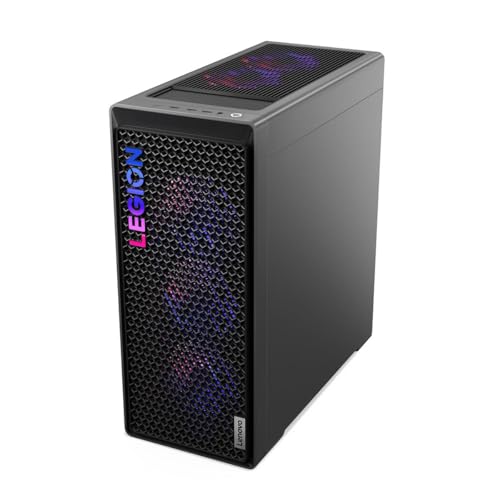
- The 1440p powerhouse that also does real 4K — deal shoppers only: Lenovo Legion T7 34IAS10, Core Ultra 7 265KF, RTX 5080 — Check on Amazon
- Skytech King 95, Ryzen 7 9800X3D, RTX 5070 Ti — Check on Amazon
- CyberPowerPC Gamer Supreme, Ryzen 7 9800X3D, RTX 5070 Ti (SLC8480A9) — Check on Amazon
- iBUYPOWER Y40 PRO, Ryzen 9 7900X, RTX 5070 Ti — Check on Amazon
See 2 more Amazon options
- ZOTAC MEK Hero A7748S, Ryzen 7 7700X, RTX 4080 Super — Check on Amazon
- CyberPowerPC Gamer Supreme Liquid Cool, Ryzen 7 7800X3D, RTX 4070 Ti Super (SLC8480A3) — Check on Amazon
Read the full guide ↓
Disclosure: As an Amazon Associate, reviewstook.com earns from qualifying purchases. Links to Amazon on this page are affiliate links; they cost you nothing extra. Listing details such as price and availability change often, so check the current Amazon listing before you buy.
Read the title of this guide twice and it stops sounding like a mistake. Plenty of gamers deliberately shop for 4K-class hardware to feed a 1440p screen: the monitor on the desk is 2560 × 1440, probably running at 165Hz or faster, and the plan is to render every game natively at that resolution with the settings cranked and the frame rate high — this year, next year, and the year after. A $2,500 budget buys exactly that kind of insurance, and the six machines gathered here all deliver it. So the honest headline, before a single product is named: native 1440p is not a challenge for anything in this guide. Each pick pairs a 16GB graphics card (RTX 5080, RTX 5070 Ti, RTX 4080 Super or RTX 4070 Ti Super) with a serious processor, and each one renders 1440p at high settings and high refresh without asking upscaling for help. Where they genuinely differ is in how much lies beyond 1440p. One of them — the RTX 5080 machine — is a native 4K PC in its own right. The other five are 1440p endgame machines whose 4K mode is an upscaling arrangement: excellent on a big television, but built on a render that sits right around the resolution this keyword names.
That distinction runs on arithmetic worth learning once. Upscaling tools like DLSS separate the resolution a game renders at from the resolution the screen shows. Feed DLSS Quality a 1440p output and it renders internally at roughly 1707 × 960 before reconstructing the 2560 × 1440 image. Feed it a 4K output and Quality mode renders at roughly 2560 × 1440 — in other words, when a 5070 Ti machine advertises 4K gaming, the frame it actually draws is very often a 1440p frame, polished and enlarged. Performance mode at 4K drops the internal render to roughly 1920 × 1080. None of this is trickery; the results look superb. It simply means a 1440p buyer should rank these PCs by their native rendering and their processors, and count 4K output as a bonus. Processors matter more at this resolution than at 4K, too: with fewer pixels per frame, the graphics card finishes sooner and waits on the CPU, so chip choice and 1% lows shape how smooth a high-refresh panel actually feels. And the 16GB of VRAM on every card here, a survival requirement at 4K, becomes something better at 1440p — headroom that keeps texture-heavy future releases from ever becoming a settings negotiation.
Two fences around the tier before the picks. Above it: no RTX 5090 system comes anywhere near this money — verified complete 5090 machines sit well above this budget tier — so treat any listing hinting at that class of performance for $2,500 as mislabelled. Within it: the strongest machine in the guide, Lenovo’s Legion T7, sits above this ceiling in its standard positioning and earns its place only when a limited-time Amazon promotion brings it within this budget — check the current price on Amazon before counting on it. Every appearance below flags it as deal-dependent. Should that deal be gone when you shop, the standing recommendation takes over: the Skytech King 95, which is positioned within this tier as the default buy — check price on Amazon to confirm its current positioning. Nothing else here leans on a promotion to justify itself. What follows is the quick-pick table scored for 1440p first, six full reviews grading each machine on both resolutions, a comparison table, a checklist written for high-refresh buyers, the spending mistakes this budget invites, and the questions readers send us.
In this guide
Quick Picks
Short on time, or comparing several options at once? Each row below names a buyer type and the machine that suits it, with a link to the listing.
| Buyer type | Pick | Why it stands out | Link |
|---|---|---|---|
| 1440p today, native 4K tomorrow — deal-dependent | Lenovo Legion T7 34IAS10, RTX 5080 | The sole native-4K card in the line-up, discounted under the ceiling only while its deal lasts | Check on Amazon |
| The standing 1440p recommendation | Skytech King 95, 9800X3D, RTX 5070 Ti | Gaming’s fastest CPU, a power supply the listing actually specifies, effortless native 1440p | Check on Amazon |
| Storage for a serious library | CyberPowerPC Gamer Supreme SLC8480A9, RTX 5070 Ti | The same X3D-and-5070 Ti core as the King 95, with 2TB instead of 1TB | Check on Amazon |
| Best value among the 5070 Ti machines | iBUYPOWER Y40 PRO, Ryzen 9 7900X, RTX 5070 Ti | Twelve cores for work that isn’t gaming, 2TB of storage, frequent deep discounts | Check on Amazon |
| Rendering muscle per dollar | ZOTAC MEK Hero A7748S, RTX 4080 Super | A flagship card from the last generation — held back by 16GB of system memory | Check on Amazon |
| Endgame 1440p for the least money | CyberPowerPC Gamer Supreme SLC8480A3, RTX 4070 Ti Super | Last generation’s 16GB card and an X3D chip, at the lowest entry point in this tier — check price on Amazon | Check on Amazon |
How These Picks Were Chosen
We treated $2,500 as a hard ceiling for this tier, then made exactly one exception and put it in lights: a PC positioned above the ceiling can appear here only if a current promotion brings it within this budget, and the copy then calls it deal-dependent at every mention. The Legion T7 is that exception — you will not be allowed to miss the condition. Everything else qualified on its ordinary positioning within this tier. Two picks can sit above the ceiling in their standard positioning and rely on recurring promotions to bring them within it; their reviews flag that condition and tell you to check the current price on Amazon before the machine deserves your money.
The entry ticket was the graphics card, and for a 1440p shopper that choice needs defending, because mid-range cards can drive 1440p right now. What $2,500 should purchase is 1440p with no expiry date attached: native rendering, high settings, ray tracing switched on, refresh rates that use a fast panel, and a memory pool deep enough that future texture packs never force a compromise. That translates to 16GB of VRAM without exception — the reservoir that textures, ray-tracing data and frame generation all drink from, and the same reservoir that lets every machine here moonlight as an upscaled-4K box. Four GPU families pass: RTX 5080, RTX 5070 Ti, RTX 4080 Super, RTX 4070 Ti Super. The many $2,500 listings wrapped around 12GB cards fail, because at this money a 12GB card is neither a 1440p endgame nor a credible 4K machine; it disappoints both halves of the keyword simultaneously.
Nobody on this team has benched these PCs on a test rig. The rankings rest on maker listings and specification pages, weighed on the components that decide what ownership feels like: the GPU and its memory, processor class, RAM capacity and speed, SSD size, cooling, and power supply wattage and rating wherever the maker publishes them. Two habits of the industry influenced the order. A stated PSU earns trust and rank — one pick below prints an 850W Gold ATX 3.0 unit in its listing while rivals stay silent, and silence behind a 300W-class card is a question a buyer should not have to ask. And names drift: assemblers sell families, not single configurations, and one listing here openly warns that the graphics card brand may vary, so each review pins the exact model number to verify on the live page before ordering. For every pick, check the current price on Amazon before you buy, because positioning in this tier moves with promotions and configuration changes. Finally, the grading itself follows this guide’s angle: each machine is scored first on the native 1440p rendering you are buying it for, and second on how honestly its 4K claim survives scrutiny.
The 6 Best 4K Gaming PCs for 1440p Gaming Under $2,500
Lenovo Legion T7 34IAS10, Core Ultra 7 265KF, RTX 5080 (Model 90Y6003KUS) — Deal-Dependent
Who it suits: A 1440p gamer who can act the week a deal appears, and who would rather overbuy the graphics card once than replace a PC early.
Everything about this recommendation hangs on its current positioning, so that comes first. The T7 sits above this budget in its standard positioning and belongs here only while a limited-time promotion brings it within this tier — check the current price on Amazon before treating it as an option in this guide. When that promotion is live, no contest in this guide is close. The RTX 5080 — 16GB of GDDR7 on Blackwell silicon, with DLSS 4 and Multi Frame Generation — stands a clear class above every other card assembled here, in ray tracing most of all. For a 1440p display that surplus turns into longevity: native rendering at high settings is undemanding work for this GPU, ray tracing stays enabled, and a 240Hz panel finally gets fed at the rate it was built for. Intel’s Core Ultra 7 265KF supplies the frames — twenty Arrow Lake cores topping out at 5.5GHz — alongside 32GB of DDR5-5600 memory, a 1TB SSD, Windows 11 Pro, Wi-Fi 6 and Bluetooth, inside a 34-litre Storm Gray tower weighing a shade under 40 pounds. Lenovo’s published specification for the model includes an 850W power supply, and the ownership experience is the most appliance-like in the guide: conventional layout, an international OEM’s warranty operation behind the box, none of the variance that boutique assembly can bring.
Score it on this guide’s two axes and it tops both. At 1440p it is deliberate overkill, the card most likely in this line-up to still be rendering natively at high refresh several GPU generations from now. At 4K it is the only pick whose claim needs no footnote about upscaling. The criticisms are real, though. The 265KF, strong as it is, is not the finest pure gaming processor in this guide — AMD’s X3D chips below wear that crown, and at 1440p, where the CPU shoulders more of each frame than it does at 4K, a CPU-bound title can let the cheaper King 95 pull level or ahead. The 1TB SSD is also small by flagship standards in an era of 150GB installs. And the deal governs everything: if the listing sits above this budget, the T7 has exited this tier entirely, at which point the King 95 is the buy, or the Lenovo follows you into under-$3,000 comparisons with its higher positioning honestly attached.
- An RTX 5080 with 16GB of GDDR7 — a class clear of the field at both resolutions, Multi Frame Generation included.
- Twenty-core Core Ultra 7 265KF at up to 5.5GHz, 32GB of DDR5-5600, and Windows 11 Pro.
- Lenovo’s OEM support network, plus an 850W supply in the model’s published specification.
Honest limitation: Its place within this budget exists only while the limited-time deal does — in its standard positioning it sits above this tier, so check price on Amazon first — its Intel chip hands the pure-gaming title to the X3D machines below, and 1TB of storage runs tight in a flagship.
Choose it if the current price on Amazon sits within this budget and you want the resolution question settled for the life of the machine. Skip it if the listing sits above this budget, where it belongs to a different tier, or if squeezing the last frame from CPU-bound games at 1440p outranks future 4K headroom for you.

Skytech King 95, Ryzen 7 9800X3D, RTX 5070 Ti (Model ST-KING95-1671-W-AM)
Who it suits: A committed high-refresh 1440p player — especially a fan of simulation, strategy, MMO or esports titles — who wants the strongest machine that doesn’t depend on catching a deal.
With the Legion’s promotion out of the picture, this becomes the guide’s default answer, and a buyer who never intends to leave 1440p can reasonably prefer it even when the deal is live. Skytech bolts the RTX 5070 Ti — 16GB of GDDR7, Blackwell generation, DLSS 4 — to the Ryzen 7 9800X3D, eight Zen 5 cores reaching 5.2GHz with the 3D V-Cache that has made it the fastest gaming processor AMD sells. At 4K that cache is garnish. At 1440p it approaches the main course: frames leave the GPU sooner, so the processor’s speed at preparing the next one sets the ceiling in exactly the genres named above, and the 1% lows — the metric that separates a fast game from a smooth one — benefit everywhere else. Skytech then publishes the supporting cast in full, which almost nobody at this tier bothers to do: 32GB of DDR5-5600 RGB memory, a 1TB Gen4 NVMe drive, a 360mm ARGB liquid cooler, and an 850W Gold ATX 3.0 power supply named outright and correctly sized for a 300W-class card’s transients. Wi-Fi is on board, Windows 11 comes installed, and the white King 95 chassis is built to be looked at.
Its 4K grade deserves plain words. The 5070 Ti reaches a 4K screen by rendering near 1440p internally under DLSS Quality and upscaling the result — the very arrangement this keyword describes, and a good-looking one on a television. Demanding games at native 4K are beyond it, and this guide won’t dress that up. Its positioning asks for the same candour in smaller measure. This recommendation stands on the King 95 being positioned within this tier — check the current price on Amazon to confirm that before you buy — and the King 95 badge also covers pricier siblings, among them a 2TB configuration with DDR5-6000 memory that belongs to a higher tier. So verify two things on the live page: the model string ST-KING95-1671-W-AM, and that the current price on Amazon sits within this budget. Both in order, you own the most balanced standing machine in the guide. The listing itself contributes two warnings: Skytech says the graphics card brand may vary — ordinary assembler practice that turns the exact cooler design into a small lottery — and that 1TB SSD matches the Legion’s flagship tightness.
- The fastest gaming CPU in the guide, the 9800X3D, feeding an RTX 5070 Ti with 16GB of memory.
- An 850W Gold ATX 3.0 power supply and 360mm liquid cooler, both stated in the listing.
- DDR5-5600 memory at 32GB, a Gen4 NVMe SSD, and a white showcase chassis.
Honest limitation: Its footing in this tier depends on its current positioning on Amazon — check price on Amazon, since its standard positioning can sit above the ceiling — the GPU brand is a lottery, the 1TB drive fills quickly, and 4K output arrives upscaled rather than native.
Choose it if 1440p at high refresh is your destination and you want the default purchase: the best gaming processor, an endgame card, and a specification with no blanks. Skip it if the current price on Amazon has drifted beyond this budget with no promotion running — the CyberPowerPC that follows matches its silicon and doubles its storage.

CyberPowerPC Gamer Supreme, Ryzen 7 9800X3D, RTX 5070 Ti (Model SLC8480A9)
Who it suits: A 1440p gamer with a big, growing library who keeps bumping into the storage ceiling of every 1TB machine on this page.
Think of this as the King 95’s recipe purchased from a different kitchen. The headline ingredients match — Ryzen 7 9800X3D, RTX 5070 Ti with 16GB of GDDR7, 32GB of DDR5 — and then CyberPowerPC changes the one line that matters most to a library keeper: storage doubles to a 2TB PCIe 4.0 SSD. Resolution does nothing to shrink modern games; flagship installs occupy 100–150GB apiece, texture packs pile on top, and a 1TB drive beside Windows holds perhaps six or seven of them before the uninstall shuffle begins. This machine postpones that shuffle for years while keeping the fastest gaming processor in the guide — the component that, by the 1440p logic running through these reviews, counts for most once the graphics card is this capable. It arrives Wi-Fi ready with Windows 11 Home, from the Gamer Supreme range that has anchored CyberPowerPC’s top shelf for years.
What it surrenders is paperwork. Skytech prints an 850W Gold supply and a 360mm cooler; the verified material for the SLC8480A9 states neither its power supply wattage nor its memory speed. Third-party spec tables assign the model a B850 chipset, yet the PSU — the supporting part that matters most behind a 300W-class GPU — goes unpublished in everything we could confirm. That is a buying step, not a disqualification: the core silicon equals the pick ranked above it, so the remedy is simply to confirm wattage and RAM speed on the live listing or with the seller before paying, and to pivot to the King 95 if the answer comes back under 750W Gold. Its 4K behaviour mirrors the Skytech’s precisely — identical card, identical DLSS Quality arrangement, identical honest ceiling. Check the current price on Amazon for this one in particular: its case rests on how it is positioned against the King 95. Positioned at or below the King 95 within this tier, the doubled SSD carries the day; positioned above it, the argument collapses.
- The guide’s reference 1440p pairing — 9800X3D and RTX 5070 Ti 16GB — with storage doubled to 2TB PCIe 4.0.
- 32GB of DDR5, Windows 11 Home, and Wi-Fi readiness out of the box.
- No storage upgrade needs budgeting from day one.
Honest limitation: Neither PSU wattage nor RAM speed appears in the verified listing material, so both need confirming before purchase, and you will need to check the current price on Amazon to settle whether it earns its place within this budget.
Choose it if storage decides your purchase and its current positioning on Amazon lands at or under the King 95’s within this tier. Skip it if the seller cannot confirm a power supply up to the job, or it is positioned above the Skytech for the same silicon.

iBUYPOWER Y40 PRO, Ryzen 9 7900X, RTX 5070 Ti (Model Y40BA9N57T01)
Who it suits: A gamer whose PC moonlights — editing, rendering, compiling, streaming — and who has the patience to buy inside this model’s frequent discount windows.
iBUYPOWER bets differently on the processor, and at 1440p the bet deserves a hearing rather than a dismissal. The Ryzen 9 7900X brings twelve cores and twenty-four threads. Against the 9800X3D it loses the gaming duel — cache wins games, and at 1440p the deficit shows up most plainly in CPU-bound titles, because the processor carries a larger share of the frame at this resolution. Widen the workload, though, and the ledger flips: timeline exports, shader builds, a live stream encoded beside the game, a desktop buried under browser tabs — the spare cores collect their pay in all of it, while in the GPU-bound majority of games the RTX 5070 Ti alongside it sets the pace regardless. The surrounding build matches the tier’s standard: 16GB of video memory on that 5070 Ti, 32GB of DDR5 RGB running at 5200MHz, a 2TB NVMe SSD equalling the CyberPowerPC’s storage edge, Windows 11 Home, a keyboard and mouse in the carton, and HYTE’s panoramic-glass Y40 case, the handsomest enclosure in this guide.
Promotional positioning is this model’s second specification. It is frequently promoted on Amazon — check the current price on Amazon when you shop. Caught in the lower part of this tier during one of those windows, it becomes the finest value here that doesn’t hinge on one flagship promotion breaking your way — positioned below the X3D pair, surrendering a little at 1440p in the most processor-sensitive games, gaining twelve-core muscle everywhere else. Its 4K grading copies the other 5070 Ti machines: DLSS Quality upscaling to the big screen, native 1440p at home. Three honest debits close the file. Memory runs at 5200MHz where the King 95 manages 5600. The Y40’s glass favours the view over intake airflow. And iBUYPOWER doesn’t headline a power supply in the material we verified, so borrow the CyberPowerPC’s homework and confirm the wattage before ordering. Weighed together, for a machine that earns as well as plays, this remains the shrewdest standing spend in the guide.
- A twelve-core Ryzen 9 7900X — the strongest creation and multitasking chip here — beside an RTX 5070 Ti 16GB.
- 2TB of NVMe storage and 32GB of DDR5 inside the glass-walled HYTE Y40.
- A documented habit of promotional positioning in the lower part of this tier — check price on Amazon.
Honest limitation: Pure gaming belongs to the X3D chips, most visibly in CPU-bound games at 1440p; memory runs a step slower at 5200MHz; and the power supply goes unheadlined in verified material, so confirm it first.
Choose it if the machine will create alongside playing, or a promotional window puts it in the lower part of this tier while you’re shopping. Skip it if gaming frames are the only currency you count — two X3D machines above exist precisely for you.

ZOTAC MEK Hero A7748S, Ryzen 7 7700X, RTX 4080 Super
Who it suits: A deal-hunting raster traditionalist who trusts the last generation’s flagship card and doesn’t mind correcting one obvious factory shortcut with their own hands.
Unusually, the company selling this PC also manufactured its graphics card. ZOTAC’s Trinity Black Edition RTX 4080 Super — 16GB of GDDR6X, 10,240 CUDA cores, a 2,610MHz boost clock by ZOTAC’s launch figures — was the previous generation’s flagship formula, and time has not demoted it: in conventional raster rendering it exchanges blows with the 5070 Ti, which at 1440p translates to native high settings at high refresh across practically the whole catalogue, while its ray tracing, a generation adrift of Blackwell, stays thoroughly respectable with DLSS 3 frame generation for the heavy titles. The supporting build reads like a maker showing off its homework: a Ryzen 7 7700X, eight cores peaking at 5.4GHz beneath a 240mm AIO liquid cooler; an 800W 80+ Gold power supply published in the launch specification; Wi-Fi 6E, Bluetooth 5.2 and 2.5-gigabit Ethernet; a 1TB NVMe SSD; a bloatware-free Windows 11 Home; assembly and testing by hand in the United States; and three years of warranty on the graphics card. As a previous-generation model it is often positioned in the lower part of this tier — check the current price on Amazon — which is where flagship rendering meets strong value for this budget.
Then the flaw, which is neither small nor hidden: system memory stops at 16GB of DDR5-4800. Every rival in this guide ships 32GB, so the MEK Hero carries half the expected capacity at a speed current standards call slow. Gaming alone, today, mostly forgives it — few titles demand more. Streaming, recording, or a creator’s desktop idling behind the game will find the ceiling quickly, and the leisurely memory speed leaves a slice of CPU performance uncollected, a slice a 1440p player can genuinely feel since the processor matters at this resolution. The redemption is practical: memory is the cheapest and simplest upgrade in any desktop, the AM5 platform accepts standard DDR5, and a buyer who treats this machine as a graphics-and-chassis purchase with a memory kit added on top still lands ahead of most of the tier. Purchase it with the upgrade already planned, never as an unwelcome discovery. Its 4K grading follows the 5070 Ti pattern — upscaled output, native 1440p at home — with one generational footnote: 40-series silicon tops out at DLSS 3’s single generated frame, Multi Frame Generation being a 50-series privilege.
- An RTX 4080 Super with 16GB of GDDR6X — flagship-grade raster power; check price on Amazon.
- A published 800W 80+ Gold supply, 240mm liquid cooling, Wi-Fi 6E and 2.5GbE, assembled in the USA.
- Three years of warranty covering the ZOTAC-made graphics card.
Honest limitation: System memory is the guide’s outlier — 16GB of DDR5-4800 where 32GB is the tier’s norm — so the honest total cost of ownership includes a memory upgrade, and the 40-series card has no Multi Frame Generation.
Choose it if its current positioning on Amazon sits in the lower part of this tier and fitting a 32GB kit holds no fear for you. Skip it if you expect the finished article straight from the carton, or heavy streaming and creation start on day one.

CyberPowerPC Gamer Supreme Liquid Cool, Ryzen 7 7800X3D, RTX 4070 Ti Super (Model SLC8480A3)
Who it suits: A value-first buyer determined to own endgame 1440p hardware — 16GB card, X3D processor — and content to let last generation’s badge pay for it.
Each guide in this series keeps one pick that exists because a product generation rolled over, and the SLC8480A3 fills that slot at this tier. Its processor, the Ryzen 7 7800X3D, defined gaming CPUs until its own successor arrived and still runs within a few percent of the 9800X3D in most games. Its graphics card, the RTX 4070 Ti Super, carries 16GB of GDDR6X — the memory upgrade that separated the Ti Super from the plain Ti was engineered for 4K textures, and dropped into 1440p duty the card simply outmuscles the resolution: native high settings, ray tracing with DLSS 3 frame generation, high refresh sustained without strain. The rest of the configuration refuses to cut corners: 32GB of DDR5 memory, a 2TB PCIe Gen4 SSD, liquid cooling as the model’s name advertises, Wi-Fi, and Windows 11 Home. Graded for 4K, it tells the same truthful story as the other non-5080 picks — output upscaled from a render in this keyword’s own territory.
Its positioning is what earns it this slot: as previous-generation stock in clearance, it sits at the lowest entry point in this guide — check the current price on Amazon to confirm that still holds when you shop. That lower positioning leaves meaningful headroom in this budget for the high-refresh 1440p monitor such a machine deserves, or toward a 4K panel, while you still own a PC with the right processor class and the right memory count. The costs are generational rather than functional. Multi Frame Generation is absent, so in the narrow set of titles where 50-series cards sprint ahead on generated frames, this one cannot chase. Clearance stock behaves like clearance stock: supply ends instead of refreshing, a given unit’s shelf time is unknowable, and its listing merits the same power-supply confirmation step as the CyberPowerPC above it. Judge it as last generation’s endgame machine wearing this generation’s value price, and the recommendation defends itself.
- A 7800X3D beside an RTX 4070 Ti Super 16GB — a pairing built for endgame play, not a trimmed substitute.
- 32GB of DDR5, a 2TB Gen4 SSD, and liquid cooling as standard.
- Positioned at the lowest entry point in this guide — the most accessible route into this tier; check price on Amazon.
Honest limitation: Previous-generation hardware on clearance terms: no Multi Frame Generation, a finite and ageing stock pool, value positioning that depends on clearance stock lasting, and the family habit of an unpublished power supply to confirm.
Choose it if value outranks the newest feature list and the monitor still needs its share of the budget. Skip it if Multi Frame Generation titles headline your library, or you keep machines five years and want the current platform’s full runway.

Comparison Table
| Product | GPU / VRAM | CPU | RAM / Storage | 1440p verdict | Link |
|---|---|---|---|---|---|
| Lenovo Legion T7 34IAS10 | RTX 5080 / 16GB GDDR7 | Core Ultra 7 265KF | 32GB DDR5 / 1TB | Surplus power at 1440p; the line-up’s only native-4K card (deal-dependent) | Check on Amazon |
| Skytech King 95 | RTX 5070 Ti / 16GB GDDR7 | Ryzen 7 9800X3D | 32GB DDR5 / 1TB | The standing endgame: quickest gaming CPU, native high refresh | Check on Amazon |
| CyberPowerPC Gamer Supreme SLC8480A9 | RTX 5070 Ti / 16GB GDDR7 | Ryzen 7 9800X3D | 32GB DDR5 / 2TB | Identical endgame core, twice the room for games | Check on Amazon |
| iBUYPOWER Y40 PRO | RTX 5070 Ti / 16GB GDDR7 | Ryzen 9 7900X | 32GB DDR5 / 2TB | Endgame play with twelve cores left over for work | Check on Amazon |
| ZOTAC MEK Hero A7748S | RTX 4080 Super / 16GB GDDR6X | Ryzen 7 7700X | 16GB DDR5 / 1TB | Flagship-grade rendering — once the memory is upgraded | Check on Amazon |
| CyberPowerPC Gamer Supreme SLC8480A3 | RTX 4070 Ti Super / 16GB GDDR6X | Ryzen 7 7800X3D | 32GB DDR5 / 2TB | Endgame 1440p at the guide’s lowest entry point | Check on Amazon |
How to Choose a 4K-Class PC for 1440p Gaming Under $2,500
- Settle which screen is the destination. A 1440p high-refresh panel on your desk for the next three years makes all six picks endgame, and the decision narrows to processor, storage and price. A 4K monitor already on the shopping list changes the answer: only the Legion T7 renders that resolution natively, while the rest upscale — handsomely, but upscaling all the same. Shop for the destination, not the detour.
- Give the processor more weight than a 4K buyer would. Fewer pixels per frame means the GPU clocks out earlier and the CPU’s frame preparation caps the result in processor-bound genres, while governing the 1% lows everywhere. That logic puts two 9800X3Ds and a 7800X3D in this guide, and it is why the 7900X and Ultra 7 machines argue their case through second jobs — creation, streaming, compiling — instead of gaming rank.
- Hold the 16GB VRAM line even though 1440p doesn’t yet enforce it. Twelve gigabytes survives 1440p today; $2,500 is not a today-sized purchase. Sixteen gigabytes is texture headroom for years of releases, the pool frame generation and ray tracing draw from, and the whole difference between driving a 4K screen credibly and failing to. A 12GB listing at this price should end the conversation.
- Marry the monitor to the machine. Hardware like this earns its keep on a 1440p panel running 165Hz–240Hz with variable refresh; bolt it to a 60Hz office display and most of the purchase goes unseen. If no monitor budget exists yet, the SLC8480A3’s lower positioning in this tier is the honest funding route — an endgame PC behind a good panel beats a flagship behind a poor one.
- Pick a deal posture and stick to it. The tier’s best machine is deal-dependent and its runner-up straddles the ceiling, so decide in advance: waiters should watch for the Legion T7 to come within this budget and for the Y40 PRO to drop into the lower part of this tier — check the current price on Amazon for both — while buyers shopping today should take the King 95 or the SLC8480A9 at their current positioning and stop relitigating the choice.
- Budget 1TB machines their second drive now. Three picks ship a single terabyte, and installs of 100–150GB consume it in a season. Either start with a 2TB pick — SLC8480A9, Y40 PRO or SLC8480A3 — or fold a second NVMe drive into the Legion, King 95 or MEK Hero’s true cost from the outset.
- Insist on knowing the power supply. Cards of this class, drawing around 300W, deserve a quality 750–850W unit with modern connectors. The King 95 (850W Gold ATX 3.0) and MEK Hero (800W Gold) print theirs; where a listing stays quiet, get wattage and rating confirmed by the seller before money moves, and treat evasive answers as a verdict.
- Verify the model number character by character. King 95, Gamer Supreme and Y40 are families wearing one name over several different computers, with GPUs, storage and memory swapped between them. The reviewed products are ST-KING95-1671-W-AM, SLC8480A9, Y40BA9N57T01, SLC8480A3 and 90Y6003KUS — match the string on the live listing exactly.
Render Resolution vs Display Resolution: The Two Numbers Behind This Keyword
Confusion about this keyword evaporates once two numbers stop being conflated: the resolution the game renders at, and the resolution the display shows. They were identical for decades. Upscaling split them, and product titles have exploited the split ever since. On the hardware in this guide the maths is concrete. Point a game at a 1440p monitor and play natively, and the card draws 2560 × 1440 — about 3.7 million pixels per frame. Engage DLSS Quality at that same output and the internal render falls to roughly 1707 × 960, around 1.6 million pixels, before reconstruction rebuilds the 1440p image; with cards this strong you will reach for that trade mainly in path-traced showcases. Now point the same machine at a 4K display. DLSS Quality renders internally at roughly 2560 × 1440 — the 1440p render once more, enlarged to 3840 × 2160 — and DLSS Performance at 4K renders near 1920 × 1080. Lined up side by side, those figures sort the entire tier: on the 5070 Ti, 4080 Super and 4070 Ti Super machines, “4K gaming” and “1440p gaming” are very often the same rendered frame wearing two different outputs, which is precisely why this odd keyword describes something real. Only the RTX 5080 alters the render itself at 4K, sustaining native or near-native pixel counts that the others manage only in lighter games.
Frame generation deserves its place in this section because it is the second number modern games advertise. It renders no additional scene detail; it interpolates extra frames between the rendered ones — a single generated frame per rendered frame under DLSS 3 on the 40-series picks, up to three under DLSS 4’s Multi Frame Generation on the 50-series machines. The displayed rate climbs while the rendered rate stands still, and input responsiveness follows the rendered rate. On hardware this powerful at 1440p the distinction shrinks — rendered rates already run high — but it remains the truthful way to read a specification sheet, and it is why this guide grades rendering first and generation features second. Calibrate expectations to “native 1440p at high settings and high refresh as the everyday floor, upscaling and generation held in reserve for the heaviest titles, plus a credible upscaled 4K for the television,” and all six machines clear the bar. Demand native 4K across the board instead, and exactly one machine — and only while its promotion holds — is even part of that discussion.
Common Buying Mistakes
- Handing $2,500 to a 12GB graphics card because the title says “4K ready.” Sixteen gigabytes is the admission price for both halves of this keyword; a 4070 Super or plain 5070 at this money is a pricing failure wearing an endgame costume.
- Ordering the Legion T7 while it sits above this budget, out of an under-$2,500 guide, because nobody mentioned the deal had lapsed. The recommendation is the deal — check the current price on Amazon before anything else.
- Believing a “4K PC” badge means a 4K render. Five of these six machines produce 4K output from a render near 1440p. Splendid for a television; a pointless premium if your monitor is 1440p. Grade the render, never the output label.
- Buying the family name instead of the machine. One badge — King 95, Gamer Supreme — covers several different computers, and skipping the model number can land you a different GPU, half the storage, or slower memory than the review described.
- Skipping the power supply question because the GPU impressed you. Unpublished wattage at this level is homework to finish before purchase, not a discovery to make during the first summer heatwave gaming session.
- Pairing the tower with a 1440p 60Hz panel lacking variable refresh, then blaming the PC for the judder. The display carries half the high-refresh experience — fund it properly, even when that means choosing the value pick.
- Comparing graphics cards and never glancing at system memory. The MEK Hero’s 16GB stands as the permanent warning: similar GPUs do not make similar machines when one carries half the other’s RAM.
- Letting a 1TB drive fill in month one and running it near 95% forever, throttling the drive and stalling updates. Start with 2TB, or fit the second drive while the first still breathes.
Final Recommendation
- Deal showing? Take the flagship: Lenovo Legion T7, RTX 5080 — native 4K held in reserve, 1440p overwhelmed.
- The standing 1440p purchase: Skytech King 95, 9800X3D, RTX 5070 Ti.
- Same silicon, roomier library: CyberPowerPC Gamer Supreme SLC8480A9.
- For players who also produce: iBUYPOWER Y40 PRO, Ryzen 9 7900X.
- Raster value for the hands-on: ZOTAC MEK Hero A7748S, RTX 4080 Super.
- Endgame 1440p at the lowest entry: CyberPowerPC Gamer Supreme SLC8480A3, RTX 4070 Ti Super.
Two machines share the honours at this budget. The Legion T7, while its deal runs, offers an RTX 5080 beneath $2,500 — the tier’s outstanding value event, and the only pick whose 4K is rendered rather than reconstructed. The Skytech King 95 is the standing recommendation: the fastest gaming processor available, a power supply the listing bothers to specify, and the tier’s reference graphics card. For the reader this keyword genuinely describes, the King 95 may be the truer champion of the two — facing a 1440p panel, its X3D processor buys frames in CPU-bound games that the Legion’s stronger card cannot always spend. A large library points to the same pairing with 2TB in the SLC8480A9; a PC that must also earn its keep points to the Y40 PRO’s twelve cores and discount cycle; a monitor still waiting for funding points to the SLC8480A3’s clearance positioning. Readers whose destination is honestly a 4K screen should set this set against Best 4K Gaming PC Under $2500 and, if the budget can stretch, Best 4K Gaming PC Under $3000; readers settled at this resolution can cross-check the same money spent the opposite way in Best 1440p Gaming PC Under $2500. Verify the model number, verify the power supply, and check the current price on Amazon — at $2,500 that homework is the entire distance between an endgame machine and a costly lesson.
Frequently Asked Questions
Why buy 4K-class hardware for a 1440p monitor at all?
Because at this budget the two labels describe one set of hardware purchased for two different virtues. A 16GB, high-end graphics card is exactly what turns 1440p into an endgame resolution: native rendering, high settings, ray tracing enabled, fast panels fed properly, and texture headroom measured in years. You are not paying for pixels the monitor cannot display; you are paying so the pixels it can display never become the bottleneck. The same machines then serve a 4K television credibly through upscaling, should one join the room.
Which of these PCs genuinely renders native 4K?
Dependably, one: the Legion T7’s RTX 5080, present here only while a promotion brings it within this budget — check the current price on Amazon. The 5070 Ti, 4080 Super and 4070 Ti Super machines render native 1440p and build their 4K output chiefly through DLSS Quality — an internal render near 2560 × 1440 upscaled to 3840 × 2160. On a 4K screen the result looks excellent, but if native 4K rendering is a hard requirement, the answer is the 5080 or a larger budget; no RTX 5090 system exists anywhere near $2,500, with verified systems sitting well above this tier.
Is DLSS Quality at 1440p a downgrade from native rendering?
It draws fewer pixels — roughly 1707 × 960 internally, reconstructed to 2560 × 1440 — and in most titles the rebuilt image sits close enough to native that the performance trade pays in demanding, ray-traced games. The practical point for this guide is how rarely you will need it: every card here treats native 1440p at high settings as its default state. Regard DLSS at this resolution as a reserve for the heaviest showcases, not an operating mode.
Does the processor really matter more at 1440p than at 4K?
It does, and it is the chief reason this guide’s order differs from a pure 4K guide’s. At 3840 × 2160 the graphics card dictates pace in nearly every title. At 2560 × 1440 the card completes frames sooner, rates climb, and the processor’s frame preparation becomes the ceiling across simulation, strategy, MMO and esports genres — hence the 9800X3D machines leading the standing picks, and the 7900X and Ultra 7 265KF justifying themselves through multitasking and creation instead of gaming rank.
The Legion T7 sits above this budget. What is it doing in an under-$2,500 guide?
A limited-time Amazon promotion on this precise model can bring it within this budget, and when it does, it outclasses everything else here — check the current price on Amazon to see whether that is the case when you shop. The guide marks it deal-dependent in the buy box, the quick picks, its review and this section alike, and states openly that its standard positioning belongs to the under-$3,000 tier. If the deal isn’t showing when you check, shop as though the pick didn’t exist — the King 95 carries the standing recommendation.
Wait for an RTX 5080 deal, or buy a 5070 Ti machine today?
Your deadline and your monitor decide. A 1440p player can stop waiting with a clear conscience: the 5070 Ti systems, the X3D-backed ones especially, are already endgame at this resolution, and patience purchases headroom that may never be spent. The 5080 deal justifies itself only when a 4K screen is genuinely in the plan. Need the machine now and a 5070 Ti system within this budget is a complete PC with nothing to apologise for; have a working machine and a 4K panel on the way, and watching for the Legion to come within this budget is the most valuable waiting game in this guide.


