Where to buy
Check the latest price, availability and delivery on Amazon. Orders are placed on Amazon. We may earn a commission from qualifying purchases.
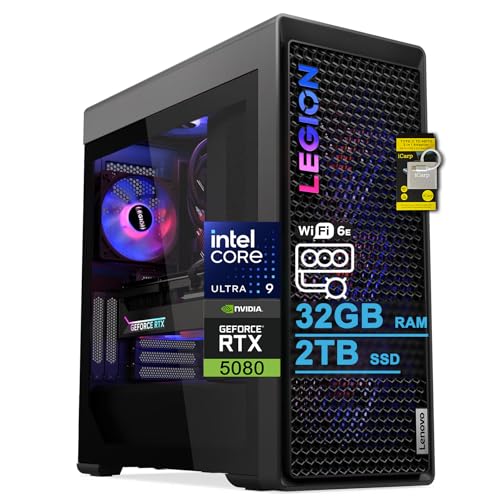
- Best overall for a small room under $3,000: Lenovo Legion Tower 7i Gen 10, Core Ultra 9 285K, RTX 5080 — Check on Amazon
- CLX Set Gaming PC, Ryzen 7 9800X3D, RTX 5080 — Check on Amazon
- Skytech King 95, Ryzen 7 9800X3D, RTX 5070 Ti — Check on Amazon
- Acer Nitro 60 N60-181-UR26, Ryzen 9 7900, RTX 5070 Ti — Check on Amazon
See 2 more Amazon options
- iBUYPOWER Y40 PRO, Ryzen 9 7900X, RTX 5070 Ti — Check on Amazon
- ZOTAC MEK Gaming PC, Ryzen 7 9700X, RTX 5070 Ti — Check on Amazon
Read the full guide ↓
Disclosure: As an Amazon Associate, reviewstook.com earns from qualifying purchases. Links to Amazon on this page are affiliate links; they cost you nothing extra. Listing details such as price and availability change often, so check the current Amazon listing before you buy.
Start with the fact this keyword tries to hide: at a $3,000 budget, there is no small gaming PC with flagship graphics. All six systems verified for this guide are full-size towers — the kind of machine that occupies a floor bay beside a desk or a serious slice of the desk itself. The genuinely compact RTX 5080 systems that exist on the market cost more than this entire budget, and there is no RTX 5090 system anywhere near $3,000 at any size. So “small spaces” at this price does not mean a small computer. It means a big computer placed well: footprint measured before it arrives, clearance left for the air it breathes, and a clear-eyed account of the two things a flagship tower does to a small room — it heats it, and it makes noise in it. If your space limit is a hard physical one — a shelf, a TV stand, a desk too small for a tower at all — the honest destination is a different class of machine, and this guide links the small-form-factor and mini PC guides where those live: below this size class, you step down in graphics tier, because compact 5080 hardware starts above $3,000. If instead your room is small but has a floor corner or an under-desk bay, read on. A tower placed correctly disappears into a small room surprisingly well, and the six systems below are the verified ceiling of what $3,000 buys — graded here on how each one behaves in the space it will actually occupy.
That grading changes the usual questions. Raw performance still matters — every pick pairs a 16GB flagship-class graphics card with 32GB of memory — but for a small room the deciding specs are physical. How much floor or desk does the case claim? Does the maker even publish its dimensions? How much heat will the graphics tier pour into a closed bedroom across a three-hour session? How close will the fans sit to your ears? Two of the six are RTX 5080 systems that reach this budget only when discounted — check price on Amazon to see if a deal is live; the other four are RTX 5070 Ti machines, which are not just cheaper — for a small room they are also the cooler-running class, and that counts here as a feature. Below are the quick picks organized by living situation rather than raw speed, full reviews that treat each tower as a piece of furniture as well as a computer, a comparison table with the space column performance guides leave out, a measuring checklist, and the placement mistakes that make small rooms miserable.
In this guide
Quick Picks
Short on time, or comparing several options at once? Each row below names a living situation and the system that suits it, with a link to the listing.
| Living situation | Pick | Why it stands out in a small room | Link |
|---|---|---|---|
| Best overall for a small room | Lenovo Legion Tower 7i Gen 10, Ultra 9 285K, RTX 5080 | The only pick whose maker publishes full dimensions and weight, so you can measure your space against real numbers before it arrives | Check on Amazon |
| Best for esports, with floor space beside the desk | CLX Set, Ryzen 7 9800X3D, RTX 5080 | The strongest gaming CPU in the guide inside a panoramic showcase tower — a floor-standing statement piece; check price on Amazon, as its place here depends on a deal | Check on Amazon |
| Best for a small bedroom | Skytech King 95, Ryzen 7 9800X3D, RTX 5070 Ti | The 5070 Ti class pours less heat into a closed room than the 5080 pair, and the X3D chip keeps competitive frame rates at the top of the class | Check on Amazon |
| Best for a shared room or studio | Acer Nitro 60 N60-181-UR26, Ryzen 9 7900, RTX 5070 Ti | A mainstream case with the least visual presence in the guide, 12 cores for work — check price on Amazon | Check on Amazon |
| Best for a streaming corner | iBUYPOWER Y40 PRO, Ryzen 9 7900X, RTX 5070 Ti | A panoramic showcase case built to be looked at, on a standard ATX layout that upgrades in place — if you have the desk width to display it | Check on Amazon |
| Best for spending less | ZOTAC MEK, Ryzen 7 9700X, RTX 5070 Ti | The same 16GB GPU class for less — check price on Amazon — leaving budget for the monitor arm, desk and chair the room actually needs | Check on Amazon |
How These Picks Were Chosen
The budget was applied as a hard ceiling: every system below is a real Amazon listing that has been offered at or under the $3,000 ceiling in the United States, and where a price is deal-dependent the review says so plainly. Two picks — the RTX 5080 pair — are in this guide only on deal pricing; check price on Amazon, and if either has drifted back above the ceiling when you check, the walk-away rules in their reviews apply.
On top of that performance filter sat a placement filter with three rules. The first rule is that we only grade size from evidence. Of the six makers, only Lenovo publishes complete dimensions and a weight in the listing material we verified — about 17.6 × 8.3 × 19.3 inches and just under 40 pounds — so the Lenovo is graded against real numbers. For the other five, no dimensions were documented in the verified sources, and this guide invents none: they are graded by documented form-factor class (panoramic showcase tower, standard ATX tower, mainstream mid-tower), and their reviews tell you to take the measurements from the live listing before ordering. That is less convenient than a table of invented numbers, and it is the honest way to do it. The second rule is that heat is a placement spec. A graphics card turns almost all of its power into heat that ends up in your room, so the graphics tier is the room-heating tier: the two RTX 5080 systems are the warmest class in this guide, and the four RTX 5070 Ti systems run a class cooler. No wattage beyond the published power-supply figures is claimed for any pick, and where a listing does not publish its PSU at all — the Acer and the iBUYPOWER, in the material verified — the review says so rather than guessing, because an unpublished supply also means its efficiency, and therefore its waste heat at the wall, cannot be checked from the listing. The third rule concerns noise, and it is a rule of restraint: no maker of these six systems publishes a noise rating in the verified material, so this guide prints no decibel figures for any of them. What can be said honestly is structural — three of the six use 360mm liquid coolers, and distance is the one silencer that always works — and the reviews stick to that.
One more filter deserves stating, because it is the one this keyword most needs: the exit filter. A buyer whose space genuinely cannot take a tower should not be sold one with better marketing. Where a pick makes no sense for a truly tight space, its review says so and points to the classes that do fit. The six towers below are for small rooms. They are not for small shelves, and pretending otherwise would waste the money this guide exists to save.
The 6 Best Gaming PCs Under $3,000, Graded for Small Spaces
Lenovo Legion Tower 7i Gen 10 — Core Ultra 9 285K, RTX 5080, 32GB DDR5, 2TB SSD
Who it suits: The small-room buyer who wants flagship performance and the ability to measure the machine against their floor plan before it ships — plus a big brand’s service network behind a purchase this size.
This is the only system in the guide whose placement can be planned on paper. Lenovo’s listing publishes the tower at about 17.6 inches deep, 8.3 inches wide and 19.3 inches tall — roughly 46 liters of case by its own published dimensions — and just under 40 pounds on the scale. Those numbers tell a precise story against a small room. The footprint is a strip of floor about the size of a sheet of legal paper, which fits the gap beside most desks; the height is the dimension to check, because 19.3 inches plus the clearance its cooling needs above and behind will not fit every under-desk bay, and at nearly 40 pounds this is a machine you position once, deliberately. Inside that case sits the strongest all-round specification verified under the ceiling: an RTX 5080 with 16GB of GDDR7, Intel’s 24-core Core Ultra 9 285K, 32GB of DDR5 memory, a 2TB SSD, a 360mm liquid cooler and an 850W power supply — check price on Amazon, because this class of machine usually sits in a higher tier and its place here is deal-dependent, so verify the live price at checkout.
The placement costs are the flagship costs. An RTX 5080 and a 24-core processor under sustained load make this the warmest-running class of system in the guide, and in a small closed room that heat has nowhere to go but into the air you sit in — a genuine comfort factor across a long summer session. The 360mm liquid cooler moves the heat out of the case efficiently; placement near a door gap or a room’s natural airflow path helps more than any setting. On noise, Lenovo publishes no rating in the verified material and neither do we: expect a large liquid-cooled tower’s character — unobtrusive in ordinary play, audible when the full system works hard — and treat under-desk placement, which adds both distance and a desk’s worth of baffling, as the default in a small room. The 285K is a superb all-rounder for mixed gaming and creation, while the X3D systems below are the esports frame-time specialists. And note the listing’s stated 32GB memory maximum: the fitted memory is the configuration you are buying, not a waypoint to 64GB.
- Published dimensions and weight — about 17.6 × 8.3 × 19.3 in, ~40 lb — the only pick you can measure your room against in advance.
- RTX 5080 16GB GDDR7 with a 360mm liquid cooler and a named 850W PSU — check price on Amazon, as its place here is deal-dependent.
- Wi-Fi 6E, 2.5Gb Ethernet and Thunderbolt 4: the fullest connectivity in this guide, with keyboard and mouse included.
Honest limitation: It is a full-size, near-40-pound tower that reaches this budget on deal pricing, it belongs to the warmest-running graphics class here, and its stated 32GB memory ceiling closes one upgrade path.
Choose it if your under-desk bay or floor corner measures out — check the 19.3-inch height plus clearance — and you want the strongest all-round machine with big-brand support. Skip it if your space is a shelf or a cabinet (no tower in this guide belongs in either), or the listing has drifted well above $3,000 when you check.

CLX Set Gaming PC — Ryzen 7 9800X3D, RTX 5080, 32GB DDR5, 2TB NVMe SSD
Who it suits: Competitive players on 240 Hz and 360 Hz monitors whose small room still has a floor-standing spot for a showcase tower — and who can catch the deal price.
The CLX Set pairs the strongest gaming processor in this guide, AMD’s Ryzen 7 9800X3D with its frame-smoothing 3D V-Cache, with an RTX 5080 16GB, 32GB of DDR5 RGB memory, a 2TB NVMe SSD and a 360mm all-in-one liquid cooler, in a panoramic-style showcase case. Its place in this guide depends on a deal price on Amazon — check the live price — rather than its higher regular pricing, and that dependence is the whole placement story as well as the whole price story. As furniture, a panoramic showcase case is a commitment: it is a full-size tower whose glass exists to be looked at, which means it wants floor space beside the desk or a generous run of desk top, in line of sight. CLX does not publish the case dimensions in the listing material we verified, so the discipline is non-negotiable: take the width, depth and height from the live listing and measure your spot — including the clearance behind it — before you order, because “full-size panoramic tower” is a class, not a measurement.
Performance placement is simpler. At 1080p this pairing is the purest high-refresh machine here: the GPU is never the bottleneck, the X3D chip produces the high, even frame rates a fast monitor exists to show, and the 360mm cooler gives thermal headroom for long sessions. The room-heat note from the Lenovo applies with equal force — this is the same RTX 5080 class, and a small room will feel a long session — while the noise picture is again unpublished by the maker and unprinted here; distance does the work. The ownership trade is the boutique one: standard desktop parts any local shop can service, in exchange for support from a smaller company than a global brand’s network. And the deal warning bears repeating as a rule: at its regular list price this machine is simply not in this guide’s budget. If the deal price is live on Amazon, it is arguably the strongest competitive buy here; if it is not, walk away and take the King 95 below.
- Ryzen 7 9800X3D plus RTX 5080: the frame-consistency pairing competitive players ask for by name.
- 360mm AIO, 32GB DDR5 and 2TB NVMe — no weak line on the spec sheet.
- Standard-parts boutique build — check price on Amazon; in budget only at its deal price, not its list price.
Honest limitation: Its under-$3,000 status is entirely deal-dependent, its showcase case claims display space a small desk may not have, and its dimensions are not published in the verified material — measure from the live listing.
Choose it if competitive frame rates are the whole point, you have a floor spot worthy of a showcase case, and the deal price is live. Skip it if the listing is back at list price, or your only space is on a small desk — a panoramic tower will own it.

Skytech King 95 — Ryzen 7 9800X3D, RTX 5070 Ti, 32GB DDR5, 1TB Gen4 SSD
Who it suits: Esports-first buyers in small bedrooms — the room where tower heat matters most — who want the X3D processor and a 16GB flagship-class card without deal-hunting.
The King 95 is the pick this angle of the guide was made for. Its specification mirrors the CLX’s philosophy — the same Ryzen 7 9800X3D (4.7 GHz base, 5.2 GHz boost), 32GB of DDR5-5600 RGB memory, a 360mm ARGB liquid cooler and a named 850W Gold ATX 3.0 power supply — but the graphics card steps down one tier to an RTX 5070 Ti 16GB, and it sits in a lower tier than the deal-priced 5080 systems, at ordinary pricing rather than a fleeting deal — check price on Amazon. At 1080p the 5070 Ti is already far more card than competitive titles can stress, so the frame rates that matter are effectively unchanged — while the 5070 Ti class converts meaningfully less power into room heat than the 5080 pair across a long evening session, in the room where you also sleep. The King 95 case is a full-size panoramic design in white, which cuts both ways in a small room: it is a handsome object that brightens a corner rather than looming in it, and it is still a big tower that wants a floor bay or a wide desk, with dimensions you must take from the live listing (Skytech does not publish them in the material we verified).
The limitations are printed in its own spec sheet. Storage is 1TB, half the 2TB of the systems above it here; a modern library fills that with a handful of large installs, and while a second NVMe drive is a cheap, easy addition in a standard case, price it in from day one. Skytech also notes that the graphics card brand may vary — the GPU model is guaranteed, the specific partner card is not. On noise the maker publishes no rating in the verified material; the practical lever is the same as everywhere in this guide: floor placement beside or under the desk, with clearance, rather than a desktop perch beside your monitor. Judged as furniture and as a computer together, this is the configuration a builder with a small bedroom would spec with their own money, and it leaves room in the budget for the fast monitor that makes it meaningful.
- 9800X3D plus RTX 5070 Ti: the CPU-first split 1080p rewards, in the cooler-running graphics class.
- 850W Gold ATX 3.0 PSU and 360mm AIO named in the listing, not left to chance.
- Lower-tier positioning for this class — check price on Amazon; no deal required, and the widest margin under the ceiling of any X3D system here.
Honest limitation: 1TB of storage is the joint-smallest drive in this guide, the exact graphics card brand varies by build, and the case dimensions must be taken from the live listing.
Choose it if the tower will live in a small bedroom and you want X3D consistency without watching for a deal. Skip it if you want 2TB fitted from the factory, or the RTX 5080’s extra longevity — and can catch the CLX at its deal price.

Acer Nitro 60 N60-181-UR26 — Ryzen 9 7900, RTX 5070 Ti, 32GB DDR5, 2TB SSD
Who it suits: Buyers in shared rooms and studios who want the machine to disappear — a mainstream case with no light show — while splitting desk time between games and creation work.
Every other tower in this guide is, to some degree, a display object. The Nitro 60 is the exception, and in a small shared space that is a genuine virtue: Acer’s Nitro line wears a mainstream mid-tower case with sober presentation, the kind of box that reads as “computer” rather than “installation” and can sit in a living room without arguing with the furniture. The specification inside is a pragmatist’s flagship — a 12-core Ryzen 9 7900, an RTX 5070 Ti (listed at 1,406 AI TOPS, with the DLSS 4 feature set), 32GB of DDR5 and a 2TB PCIe 4.0 SSD, with Wi-Fi 6 and gigabit Ethernet — and its pricing is the most variable in the guide: it lives under the ceiling, but sometimes only just, so check price on Amazon before you commit. Acer does not publish the case dimensions in the listing material we verified; it is a mainstream mid-tower class machine, smaller in presence than the panoramic showcases but not a small PC, and the same rule applies — measure the live listing’s figures against your space before ordering.
Two expectations should be set before it arrives. The listing is thinner on power-supply detail than the boutique systems here, and the PSU wattage is simply not published in the sources verified — which matters a little more in a small room than elsewhere, because an unpublished supply means its efficiency, and so the waste heat it adds at the wall, cannot be checked in advance; confirm it on the live listing, and certainly before planning a future graphics upgrade. Second, the 12-core processor will not match an X3D chip for esports minimum frame rates, but it chews through exports, compiles and multitasking that an 8-core gaming chip handles more slowly, and at 1080p the 5070 Ti keeps games firmly in high-refresh territory regardless. As with every pick, no noise rating is published. Buy it for balance and invisibility, when the live price is favorable.
- 12-core Ryzen 9 7900 — the multitasking and creation muscle of the mid-guide picks.
- 2TB PCIe 4.0 SSD and 32GB DDR5 fitted as standard, in the guide’s least showy case.
- Pricing varies widely for this pick — check price on Amazon, because timing pays.
Honest limitation: It can sit close to the $3,000 ceiling, its listing leaves the PSU unpublished, its dimensions must come from the live listing, and its CPU favors productivity over esports frame-time consistency.
Choose it if your PC works as well as plays, shares a room with the rest of your life, and you can buy when the live price sits low in its range. Skip it if pure competitive frame rates are the goal, or the live price is at the top of its range — the Y40 PRO below covers similar ground.

iBUYPOWER Y40 PRO — Ryzen 9 7900X, RTX 5070 Ti, 32GB DDR5, 2TB NVMe SSD
Who it suits: Streamers setting up a corner of a small room as a studio — buyers who want the tower visible on camera, on a standard platform that can grow with them.
The Y40 PRO (model Y40BA9N57T01) is built around HYTE’s Y40 panoramic case, and its placement logic is the mirror image of the Acer’s: this tower is meant to be seen. If your small room doubles as a streaming backdrop, that is a rational use of space — the PC becomes part of the set rather than an obstacle beside it — but it must be said plainly that a panoramic showcase case claims premium desk width or a dedicated stand. iBUYPOWER does not publish the case dimensions in the listing material we verified, so check the live listing’s figures against your desk before ordering. Inside, a 12-core Ryzen 9 7900X pairs with an RTX 5070 Ti 16GB, 32GB of DDR5 RGB memory at 5200 MHz and a 2TB NVMe SSD, with Windows 11 Home, a keyboard and mouse in the box and a one-year manufacturer warranty stated on the listing. Check price on Amazon — its pricing has often sat comfortably under the ceiling. For streaming, the twelve cores absorb the game, the encoder, the browser and the chat at once, and 2TB holds the library and the recordings folder together.
The ownership case is the other reason to give this tower your scarce space: a standard ATX layout on AMD’s AM5 platform means the eventual upgrades — a newer X3D processor or a bigger graphics card — are drop-in jobs rather than a new machine competing for the same corner. The finer print: the DDR5-5200 kit is the slowest memory here and the first thing a performance-minded owner might swap; the listing does not headline its power supply, so confirm the wattage on the live page before counting on a flagship GPU upgrade (an unpublished PSU also cannot be efficiency-checked from the listing, which matters when every watt becomes room heat); and the 7900X trails the X3D pair at the single job of feeding a 360 Hz monitor. No noise rating is published for it either. Buy it if the corner it occupies will earn its keep on camera and over years of upgrades.
- Standard ATX, AM5 platform — the clearest upgrade path in this guide, so the space it takes is taken once.
- 12 cores for streaming and multitasking, 2TB storage, keyboard and mouse included.
- Check price on Amazon — pricing has often sat well under the ceiling.
Honest limitation: A panoramic showcase case is a deliberate claim on scarce desk space, its dimensions and PSU wattage are not published in the verified material, and DDR5-5200 is the slowest memory kit here.
Choose it if your small room is also your studio and you plan to upgrade in place over several years. Skip it if desk space is your scarcest resource — that is the Acer above, or a genuinely small machine from the guides linked below.

ZOTAC MEK Gaming PC — Ryzen 7 9700X, RTX 5070 Ti, 32GB DDR5, 1TB NVMe SSD
Who it suits: Buyers who want this tier’s graphics class and a clean, professional specification — and would rather spend the savings on the room itself: the monitor arm, the desk, the chair.
In a small-space guide, the cheapest pick earns its place in a specific way: the money it does not spend on the tower is money available for the furniture and ergonomics that make a small room work. The MEK sits at the most accessible tier in this guide — check price on Amazon — as its lowest entry point by a wide margin, and the specification is notably tidy: an RTX 5070 Ti 16GB GDDR7 built by ZOTAC itself (the GPU is a named ZOTAC GAMING model, not a brand-may-vary lottery), a Ryzen 7 9700X boosting to 5.5 GHz, 32GB of DDR5-6000 — the joint-fastest memory here — a 1TB NVMe SSD, a named 750W 80+ Gold power supply, Wi-Fi 6E, Bluetooth 5.3, quad-display outputs and Windows 11 Pro. It also sits in the cooler-running 5070 Ti class — the class a closed bedroom tolerates best. ZOTAC does not publish the case dimensions in the material we verified, so take its measurements from the live listing and check them against your bay before ordering, as with the other unpublished cases here.
What the lower price gives up is storage and cache. The 1TB drive matches the King 95 as the joint-smallest here — budget for a second NVMe drive as the library grows — and the 9700X, an excellent conventional processor, lacks the X3D cache that makes its Skytech and CLX rivals esports specialists; the gap shows in the minimum frame rates of CPU-heavy games, not in whether games run beautifully. One documentation note: secondary details in ZOTAC’s own materials have been inconsistent in places (the Windows edition and output descriptions), so verify the configuration on the Amazon listing itself at checkout. No noise figure is published for the MEK either; it belongs on the floor beside or under the desk with clearance, not sealed into furniture. Judged as a room decision, this is the pick for the buyer who decided to buy most of the headroom and keep the change for the room.
- Lowest entry point in the guide — check price on Amazon.
- DDR5-6000, a named 750W 80+ Gold PSU, Wi-Fi 6E and Windows 11 Pro — a tidy spec sheet.
- The GPU is a named ZOTAC GAMING model — no brand-may-vary uncertainty about the card.
Honest limitation: 1TB of storage, no X3D cache for CPU-limited esports titles, unpublished case dimensions, and some inconsistency in the maker’s secondary documentation — trust the Amazon listing.
Choose it if the room needs the savings as much as the PC needs the specification — this is the tier’s graphics class with the furniture budget left intact. Skip it if esports minimum frame rates are the priority and the full budget is genuinely there to spend: that money buys an X3D chip in the systems above.

Comparison Table
| Product | CPU | GPU | Memory / Storage | Price | Space notes | Link |
|---|---|---|---|---|---|---|
| Lenovo Legion Tower 7i Gen 10 | Core Ultra 9 285K, 24-core | RTX 5080 16GB | 32GB DDR5 / 2TB SSD | Check price on Amazon | Dimensions published: ~17.6 × 8.3 × 19.3 in, ~40 lb; warmest class | Check on Amazon |
| CLX Set | Ryzen 7 9800X3D | RTX 5080 16GB | 32GB DDR5 / 2TB NVMe | Check price on Amazon (deal-dependent) | Panoramic showcase tower; measure from live listing; warmest class | Check on Amazon |
| Skytech King 95 | Ryzen 7 9800X3D | RTX 5070 Ti 16GB | 32GB DDR5-5600 / 1TB Gen4 | Check price on Amazon | Full-size panoramic case, white; measure from live listing; cooler class | Check on Amazon |
| Acer Nitro 60 N60-181-UR26 | Ryzen 9 7900, 12-core | RTX 5070 Ti 16GB | 32GB DDR5 / 2TB PCIe 4.0 | Check price on Amazon | Mainstream mid-tower, least visual presence; measure from live listing | Check on Amazon |
| iBUYPOWER Y40 PRO | Ryzen 9 7900X, 12-core | RTX 5070 Ti 16GB | 32GB DDR5-5200 / 2TB NVMe | Check price on Amazon | Panoramic showcase case, standard ATX; measure from live listing | Check on Amazon |
| ZOTAC MEK | Ryzen 7 9700X | RTX 5070 Ti 16GB | 32GB DDR5-6000 / 1TB NVMe | Check price on Amazon | Conventional tower class; measure from live listing; cooler class | Check on Amazon |
How to Choose a Gaming PC Under $3,000 for a Small Space
- Measure the space before you measure the specs. Write down the width, depth and height of the exact spot — floor bay, under-desk space, desk run — plus the clearance you can leave behind and above it for exhaust air. A tower that fits with no air around it does not fit.
- Use published dimensions where they exist, and the live listing where they don’t. Only the Lenovo in this guide publishes full dimensions and weight in the material we verified (about 17.6 × 8.3 × 19.3 in, ~40 lb). For the other five, the case dimensions on the live Amazon listing are part of the purchase decision; read them before checkout.
- Treat the graphics tier as your room’s heating setting. Nearly all the power a GPU draws becomes heat in the room. The RTX 5080 pair are the warmest class here; the four RTX 5070 Ti systems run a class cooler and lose almost nothing at 1080p. In a small bedroom, that difference is felt every session.
- Plan noise with distance, not decibels. None of these makers publishes a noise rating in the verified material, so any specific decibel claim about them would be invented. What works: floor placement beside or under the desk instead of a desktop perch, and a few feet of distance between the case and your chair.
- Decide whether the tower is furniture or appliance. Panoramic showcase cases (CLX, King 95, Y40 PRO) are built to be looked at and claim display space accordingly. If the room needs the PC to disappear, the Acer’s mainstream case — or a genuinely small machine — is the honest answer.
- Never seal a tower into furniture. A closed cabinet, a closet or a tight TV stand starves any of these systems of air. If the only available space is enclosed, stop shopping for towers and start with Best Small Form Factor Gaming PC For Small Spaces Under $3000.
- Know when to leave this guide. If your measured space cannot take a full-size tower at all, the right move is down in size class, not down in this list: Best Small Form Factor Gaming PC Under $3000 and Best Mini Gaming PC Under $3000 cover machines that are honestly small, and Best Compact Gaming PC Under $3000 covers the middle ground. The trade at this budget is graphics tier — compact RTX 5080 systems cost more than $3,000.
- Keep the deal discipline. The two RTX 5080 systems belong here only at deal prices, against higher list prices. If the live price has climbed back over the ceiling, the 5070 Ti systems are not a downgrade you will feel at 1080p — and in a small room they are the cooler purchase anyway.
- Check the under-desk height twice. Flagship towers in this class stand around 19 inches tall before clearance. A bay that fits the case but not the case plus its exhaust room will run hot and loud.
- Budget the room, not just the tower. A $3,000 PC on a wobbling desk in a hot room is a misallocation. The ZOTAC and King 95 sit in this guide partly so the total — tower, fast monitor, workable desk and chair — lands inside a sane figure. Readers whose needs are honestly smaller should start from Best 1080p Gaming PC For Small Spaces Under $1500 or Best 1080p Gaming PC For Small Spaces Under $2500 and put the difference into the space itself.
The Honest Part: “Small Spaces” at $3,000 Means Placement, Not Size
It is worth one plain paragraph, because the keyword will not say it: nothing in this guide is a small computer, and at the time of writing nothing with this performance is. The verified market under $3,000 offers flagship graphics exclusively in full-size towers. The compact RTX 5080 systems that do exist — built around laptop-class graphics or ultra-compact custom cases — are priced above this entire budget, and the RTX 5090 does not appear in any verified system near $3,000 in any form factor. So the small-spaces buyer at this budget faces a real fork, and both branches are respectable. Take a tower from this guide and place it well: floor bay measured, clearance kept, heat class chosen with the room in mind. Or take the size constraint as the hard requirement it is, step into the small-form-factor and mini PC guides, and accept the graphics tier those machines honestly offer at this money — not this tier. What does not exist is the third option the keyword implies: flagship performance, tiny box, this price. Any listing that seems to offer all three is selling a different configuration in the dropdown, and the ASIN-level checks in this guide exist precisely to catch that.
There is a compensating truth on the tower side of the fork. A full-size case is not wasted space: it is cooling headroom, standard parts, room for a second drive and a future graphics card, and a machine that can be serviced on the same floor spot for years instead of replaced. In a small room, longevity is a space feature. Buy the placement once, correctly, and the size stops being the story.
Common Buying Mistakes
- Assuming a “1080p” keyword means small, cheap machines. At $3,000 it means flagship towers; the resolution describes your monitor, not the box.
- Ordering before measuring. Five of these six makers do not publish case dimensions in the material we verified — the live listing’s measurements are the buyer’s job, and a tape measure is cheaper than a return.
- Pushing the tower flush against a wall or into a closed cabinet. Exhaust air needs somewhere to go; a sealed tower in a small room runs hot, loud and short-lived.
- Buying a panoramic showcase case for a desk with no width to spare, then living with it as an obstacle. Glass is a space claim — make it deliberately or not at all.
- Ignoring room heat until the first long session. A flagship tower in a small closed bedroom is a space heater with a game attached; the 5070 Ti class exists in this guide partly as the cooler answer.
- Paying list price for a deal-dependent machine. The 5080 systems here belong in this guide only at a deal price; at list price they are out of budget and out of this guide.
- Chasing an RTX 5090 at this budget. No verified system with one exists near $3,000, at any size; listings implying otherwise are selling a different configuration in the dropdown.
- Trusting a near-identical listing title. Builders sell the same case with different processors, drive sizes and memory speeds; the ASIN and the spec lines are the machine.
Final Recommendation
- Most small-room buyers at this budget: Lenovo Legion Tower 7i Gen 10 — the one you can measure before it arrives.
- Competitive players with a floor spot, when the deal is live: CLX Set, Ryzen 7 9800X3D, RTX 5080.
- Small bedrooms, without deal-hunting: Skytech King 95 — X3D consistency in the cooler-running class.
- Shared rooms and studios: Acer Nitro 60 N60-181-UR26 — flagship parts, appliance manners.
- Streaming corners and long-term upgrading: iBUYPOWER Y40 PRO.
- The full tier for less: ZOTAC MEK — and spend the difference on the room.
Our top two split the small-room brief the same way they split the performance one. The Lenovo Legion Tower 7i is the best all-round machine and the only pick whose size is a published fact: an RTX 5080 — check price on Amazon, as its place here is deal-dependent — a 24-core processor, the guide’s best connectivity and a big brand behind it, in a tower of known dimensions that a measured floor bay will hold. The CLX Set is the best pure gaming machine, spending the same deal money on the 9800X3D pairing competitive play rewards most, in a showcase case that asks for a deliberate place in the room. If neither is sitting under $3,000 when you shop, the Skytech King 95 is the standing recommendation: X3D consistency, a 16GB card, the cooler graphics class for a bedroom, in a lower tier with no deal required — check price on Amazon. Buyers whose space constraint turns out to be a hard one should not force any of these into it — Best Small Form Factor Gaming PC Under $3000 and Best Mini Gaming PC Under $3000 are the honest guides for that room, and buyers whose needs are simply smaller will find the same placement-first treatment at Best 1080p Gaming PC Under $2500. Whichever you choose, measure the space first, then verify the live price, the exact configuration and the case dimensions on the listing.
Frequently Asked Questions
Is there a truly small gaming PC with an RTX 5080 for under $3,000?
Not that we could verify. Every RTX 5080 system we verified under the ceiling — the Lenovo and CLX here, both deal-dependent picks — is a full-size tower, and the genuinely compact 5080 systems on the market are priced above this budget. If small is the hard requirement, the small-form-factor and mini PC guides linked in this article cover the machines that fit, with the graphics trade stated openly.
How much room do these towers actually need?
Only the Lenovo publishes its dimensions in the material we verified: about 17.6 × 8.3 × 19.3 inches and just under 40 pounds — a floor strip roughly the size of a sheet of legal paper, plus clearance above and behind for exhaust. For the other five, the case dimensions were not documented in our verified sources, so take them from the live Amazon listing and measure your space against those figures before ordering. Do not rely on the case name or product photos for size.
Will one of these PCs heat up a small room?
Yes — plan for it rather than discovering it. Almost all the power a graphics card draws ends up as heat in the room, so the graphics tier is the heating tier: the two RTX 5080 systems are the warmest class in this guide, and the four RTX 5070 Ti systems run a class cooler while giving up very little at 1080p. Placement near the room’s natural airflow, and a door left ajar during long sessions, do more than any setting.
Which of these is the quietest?
No maker of these six systems publishes a noise rating in the material we verified, so this guide prints no decibel figures — any specific number would be invented. What can be said is structural: three picks use 360mm liquid coolers, larger cases give cooling more room to work, and distance is the most reliable silencer — a tower on the floor beside or under your desk will always be less present than the same tower on the desk beside your monitor.
Desk or floor for a tower in a small room?
Floor, in almost every small-room case: it returns your desk surface to the monitor and keyboard, adds distance between the fans and your ears, and suits the weight of machines in this class — the one published figure here is just under 40 pounds. Reserve desk placement for the showcase cases, and keep any tower out of closed cabinets and off deep carpet that can smother a bottom intake; check the case’s intake layout in the listing photos.
Can I put one of these in a TV stand or media cabinet?
No — not closed, and not safely. Flagship towers exhaust a great deal of heat, and an enclosed cabinet traps it around the machine. If a media-console placement is the requirement, that is a genuinely small machine’s job: start with the compact and small-form-factor guides linked above, and expect a lower graphics tier at this budget.
The CLX is back at its list price. Is it still worth it?
Not for this guide’s buyer. Its place here rests entirely on its deal pricing; at list price it is a machine competing in a different guide. At that point the King 95 delivers the same 9800X3D philosophy with a 5070 Ti in a lower tier — check price on Amazon — and in a small room, its cooler-running graphics class is an argument in its favor.
Will these PCs work if I get a bigger monitor later?
Easily — nothing here is a 1080p-only machine. Every system in this guide is a strong 1440p high-refresh PC, and the 5080 pair are credible entry-4K systems with upscaling; readers planning that move directly will also want Best 1080p Gaming PC For 1440p Gaming Under $3000. Streamers comparing dedicated broadcast setups should see Best 1080p Gaming PC For Streaming Under $3000 as well.


