Where to buy
Check the latest price, availability and delivery on Amazon. Orders are placed on Amazon. We may earn a commission from qualifying purchases.
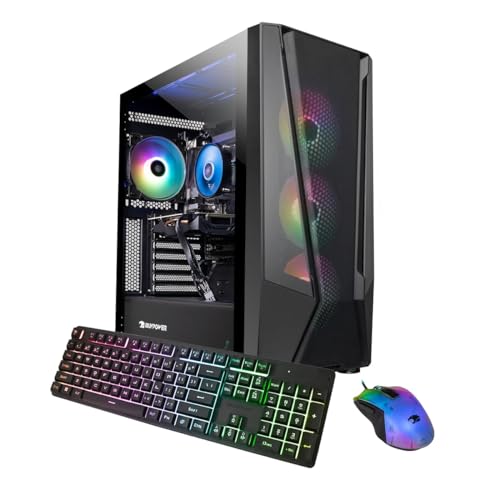
- Best overall under $1,500: iBUYPOWER TraceMesh Gaming PC, Intel Core i7-14700F, RTX 4060 Ti — Check on Amazon
- Acer Nitro 70 N70-130-UR13, AMD Ryzen 9 7900, RTX 4070 — Check on Amazon
- CyberPowerPC Gamer Xtreme VR GXiVR8040A14, Intel Core i7-13700F, RTX 4060 Ti 16GB — Check on Amazon
- MSI Codex R2 A14NUD5-213US, Intel Core i5-14400F, RTX 4060 Ti — Check on Amazon
See 2 more Amazon options
- iBUYPOWER Slate Mesh SMA7N46T01, AMD Ryzen 7 5700, RTX 4060 Ti — Check on Amazon
- CyberPowerPC Gamer Xtreme VR GXiVR8060A24, Intel Core i5-13400F, RTX 4060 — Check on Amazon
Read the full guide ↓
Disclosure: As an Amazon Associate, reviewstook.com earns from qualifying purchases. Links to Amazon on this page are affiliate links; they cost you nothing extra. Listing details such as price and availability change often, so check the current Amazon listing before you buy.
Start with the sentence most guides to this keyword would rather bury: at $1,500, there is no genuinely small 1080p gaming PC to recommend, because the money buys tower-class hardware. Every machine in this guide is a full-size gaming tower — the kind that lives on a desk or on the floor beside one — and not one of them is a mini PC or a small-form-factor build. If your space problem is absolute — a desk with no floor beside it, a shelf that must hold the whole setup, a room where a tower simply has nowhere to stand — stop here and go where the honest answers live: Best Small Form Factor Gaming PC Under $1500 and Best Mini Gaming PC Under $1500 cover machines built small on purpose, at this same budget.
This guide is for the more common version of the problem. You have room for exactly one tower — in a bedroom, a studio apartment, a dorm room, a box room turned office — and you want the most 1080p performance that one placement can hold, without the machine dominating the room it sits in. So alongside the usual questions (graphics card, processor, memory, price), each review below grades the placement itself: what kind of case the machine wears and how it breathes, whether it belongs on the desk or on the floor, how much heat and fan noise it pushes into a small room under load, and how long it can serve before you need space for a second box. One sourcing rule applies throughout: the research behind this guide documented no manufacturer dimensions for these six listings, so no measurements are printed here — the tape-measure step in How to Choose, using the dimensions on the live listing against the space you actually have, is part of the buying process, not an optional extra.
The performance context matters too, because it decides how much tower your room has to tolerate. $1,500 is a premium budget for 1080p: the machines below are built around the RTX 4060 Ti and RTX 4070, hold very high refresh rates at 1920×1080, and most of them step up to 1440p the day a bigger monitor fits your desk. If your screen is a 60Hz panel and your room is small, you are solving the wrong problem with a big box — a cheaper, cooler-running machine plus a better monitor is the smarter use of both money and space, and Best 1080p Gaming PC For Small Spaces Under $1200 argues that tier. But if a high-refresh monitor is already on the desk and the tower has one good spot to occupy, the six machines below are the strongest ways to fill it.
In this guide
Quick Picks
Short on time, or comparing several options at once? Each row names a space situation and the machine that suits it, with a link to the listing.
| Your space situation | Pick | Why it stands out | Link |
|---|---|---|---|
| Best overall for a one-tower room | iBUYPOWER TraceMesh TMI7N46T01 | i7-14700F, RTX 4060 Ti and 32GB DDR5 — the complete spec, so nothing needs upgrading soon | Check on Amazon |
| Most graphics power, on deal days | Acer Nitro 70 N70-130-UR13 | The only RTX 4070 here — worth its footprint at its deal price only | Check on Amazon |
| Best for modded, texture-heavy games | CyberPowerPC Gamer Xtreme VR GXiVR8040A14 | RTX 4060 Ti with 16GB of VRAM in a tempered-glass case — place it where the glass is safe | Check on Amazon |
| Best for one tower that lasts for years | MSI Codex R2 A14NUD5-213US | A mid-tower of standard parts you upgrade in place instead of replacing | Check on Amazon |
| Best breathing case for a tight corner | iBUYPOWER Slate Mesh SMA7N46T01 | Mesh-fronted, airflow-first case and a stable in-budget price | Check on Amazon |
| Best value — budget left for the room | CyberPowerPC Gamer Xtreme VR GXiVR8060A24 | RTX 4060 and DDR5 for less, leaving money for the monitor and the setup | Check on Amazon |
How These Picks Were Chosen
The budget was applied as a ceiling, not a target. Every machine below is a real Amazon listing that can fit at or under the $1,500 budget in the United States — check price on Amazon for each pick, because prebuilt prices swing hard and only the live listing counts. Two of the six, the iBUYPOWER TraceMesh and the Acer Nitro 70, regularly drift above the cap between promotions; both are included only with an explicit condition, printed in their reviews: buy at or under $1,500 and walk away when the listing says otherwise.
We did not use these machines ourselves. We read the manufacturer listings and specification pages and cross-checked configurations against independent price trackers and deal coverage. On performance, the filters are the ones that decide 1080p at this level: the graphics card and its VRAM, the processor’s speed for high-refresh play, DDR5 on a current platform versus DDR4 on a retiring one, storage, and power supply quality. On placement — the reason this variant of the guide exists — the grading uses only what the research actually documented: each machine’s form-factor class (full tower or mid-tower), its case construction where the listing states it (a mesh front, a tempered-glass chassis), and whether its parts are standard enough to upgrade in place. No dimensions, volumes, mounting options or noise figures are claimed for any pick, because none were documented; where a number would decide your purchase, the review says so and sends you to the live listing with a tape measure in hand.
One exclusion shows the price discipline at work: a popular RTX 4070 Skytech configuration was left out because it does not fit this guide’s under-$1,500 budget — it is not an under-$1,500 pick no matter how often round-ups list it as one. The same discipline applies to space claims in reverse: a tower does not become a small-space PC because a keyword needs one. What follows is the best six full-size machines for a room that can hold exactly one of them, graded honestly on that basis.
The 6 Best 1080p Gaming PCs Under $1,500 for Small Spaces
iBUYPOWER TraceMesh Gaming PC (TMI7N46T01) — Intel Core i7-14700F, RTX 4060 Ti, 32GB DDR5
Who it suits: The small-room buyer who wants to solve the PC question once — one tower, placed once, with no specification weak enough to force an upgrade, a second box or a replacement for years.
In a small room, the most underrated specification is completeness, and completeness is this machine’s argument. Its Intel Core i7-14700F is a 20-core processor — eight performance cores, twelve efficiency cores — and at 1080p, where fast games lean on the processor to feed a high-refresh monitor, that performance-core speed is the ceiling on your frame rates. The rest of the specification refuses to be the weak line: a GeForce RTX 4060 Ti with 8GB of graphics memory, 32GB of DDR5 5600 RGB memory — double what most prebuilts at this price ship — a 1TB NVMe SSD, Wi-Fi ready and Windows 11 Home. The 32GB matters beyond multitasking: it is the specification that keeps this tower closed. Every upgrade you never have to make is a side panel that never comes off in a room with no workbench, and a parts box that never needs storing.
As a placement, treat it as what it is: a full-size gaming tower that will occupy a desk corner or a floor spot and should be given the better of the two — floor placement beside the desk keeps its fan noise below ear level and its exhaust out of your immediate breathing zone, while desk placement is the choice if the floor spot is a walkway. The listing research documented no case dimensions for this machine, so measure the live listing’s figures against your spot before ordering; a tower that arrives a centimetre too deep for the gap beside a desk is a small-room problem of the purest kind. On price, this listing lives on a promotion cycle — check price on Amazon and buy it only when the live price sits within this guide’s budget, and it is the most complete single-tower answer here.
- The strongest all-round specification here: 20-core i7-14700F, 32GB DDR5 and a 4060 Ti.
- 32GB of memory as standard — headroom for game, stream and browser, and no early upgrade to house.
- Frequently promoted well under the cap — check price on Amazon before you buy.
Honest limitation: It is a full-size tower with a full-size footprint — nothing about it is small — and its 4060 Ti carries 8GB of VRAM, the tightest graphics specification in an otherwise generous machine; its price also swings between promotions, so check price on Amazon.
Choose it if you have one good tower spot and want the most complete machine to put in it, bought on promotion. Skip it if the listing is over budget on the day you buy, or if your space cannot take a tower at all — that reader belongs in the small-form-factor guides linked above.

Acer Nitro 70 (N70-130-UR13) — AMD Ryzen 9 7900, RTX 4070, 32GB DDR5
Who it suits: The graphics-first buyer in a small room who has exactly one tower spot and wants it to hold the strongest graphics card this budget can reach — and who is disciplined enough to buy only when this machine’s deal price appears.
The Nitro 70 is the most powerful machine in this guide, and the gap is not subtle. Its GeForce RTX 4070 carries 12GB of GDDR6X memory — a full tier above the 4060 Ti machines around it, and a card designed for 1440p in the first place. At 1080p it turns ray tracing from a negotiation into a setting you simply enable, and DLSS frame generation turns demanding games into high-refresh ones. Behind the card sits a 12-core AMD Ryzen 9 7900 boosting to 5.4GHz, 32GB of DDR5 4800MHz memory, a 1TB PCIe Gen 4 SSD and Wi-Fi 6E. That last specification is quietly a placement feature: in a small room where the router lives somewhere else, strong Wi-Fi frees the tower from the one wall with the Ethernet socket — though a wired connection remains the better choice for competitive play if a cable run is possible.
Power has a physical price in a small room, and this machine pays the most of it: the strongest graphics card here is also the one that turns the most electricity into heat under load, and a long session in a closed bedroom will notice it. Give this tower the best-ventilated spot you have — open air on at least the front and rear, never a closed cabinet — and it earns its footprint. Then the condition, stated as plainly as the specification: the Nitro 70 belongs in a $1,500 guide only on its deal days, when it fits within the budget — check price on Amazon. Its headline price sits above the cap much of the time and only periodically drops into budget. Set your ceiling at $1,500, verify the exact configuration at checkout — the Nitro name covers several generations — and if the live price is over budget, close the tab and buy the TraceMesh instead.
- The only RTX 4070 in this guide — 12GB of GDDR6X and a genuine tier above the rest.
- 12-core Ryzen 9 7900 and 32GB of DDR5: processor and memory to match the card.
- Wi-Fi 6E loosens the tower’s tether to the router’s wall — useful in small, rented rooms.
Honest limitation: Its price and its appetite. It fits the budget only periodically while its headline price is often over budget, and as the most powerful machine here it also dumps the most heat into a small room under sustained load.
Choose it if you can wait for the deal price and graphics power justifies the tower’s footprint and warmth. Skip it if you need to buy this week at whatever the listing says, or your room already runs hot — at its headline price it fails this guide’s brief outright.

CyberPowerPC Gamer Xtreme VR (GXiVR8040A14) — Intel Core i7-13700F, RTX 4060 Ti 16GB
Who it suits: Players of texture-heavy, heavily modded or open-world games, in a room with one safe, out-of-the-way spot for a glass-sided tower — somewhere it can be seen but not kicked, knocked or used as a shelf.
There are two versions of the GeForce RTX 4060 Ti, and almost every prebuilt in this price range ships the 8GB one. This CyberPowerPC ships the other: the 16GB variant, doubling the graphics memory on the same core. At 1080p that shows up not in raw frame rates but in specific relief — maximum texture settings in the newest releases, modded games whose texture packs were never sized for 8GB, titles that stutter or quietly downgrade textures when VRAM runs short. What 16GB buys is trajectory: texture budgets grow in one direction only, and where the 8GB machines will meet that growth in settings menus, this one meets it by continuing to work. It pairs the card with the still-strong Intel Core i7-13700F, 16GB of DDR5 memory and a 1TB PCIe Gen 4 NVMe SSD — the system memory is the deliberate trade, adequate for gaming, with the money visibly spent on the graphics card’s memory instead.
The placement grading turns on the case: this machine wears CyberPowerPC’s tempered-glass Gamer Xtreme VR chassis, and glass changes how a tower should be sited in a small room. A glass side panel is the part of the PC most vulnerable to the accidents small rooms specialize in — the chair leg, the vacuum cleaner, the foot in the dark — so this tower belongs in the protected spot: beside the desk rather than in the walkway past it, with its glass side visible but out of traffic. Glass also asks for clearance rather than providing airflow, so keep the panel side off the wall. On price, check price on Amazon — when it sits within budget it is arguably the long-ownership value pick of the guide, and it is the only route here to 16GB of VRAM inside the budget.
- RTX 4060 Ti with 16GB of VRAM — double every other 4060 Ti in this guide.
- i7-13700F is a strong, proven gaming processor with cores to spare for background tasks.
- A 16GB VRAM option inside the budget — check price on Amazon before you buy.
Honest limitation: In games that never press past 8GB, the 16GB card performs essentially like the 8GB one — you are paying for headroom, not frame rates today — and its glass chassis is the most fragile placement in this guide, demanding the protected spot a small room may not have.
Choose it if you play modded or texture-heavy games, plan to keep the machine for years, and have a safe corner for a glass tower. Skip it if the only available spot is a high-traffic floor — a mesh or plain-sided tower forgives the knocks this one won’t.

MSI Codex R2 (A14NUD5-213US) — Intel Core i5-14400F, RTX 4060 Ti, DIY-Friendly
Who it suits: The small-space buyer playing the long game — someone whose room can hold one mid-tower indefinitely, and who would rather upgrade that tower in place over the years than find room for its replacement.
MSI builds components for a living, and the Codex R2 is what happens when a component company assembles the prebuilt: a mid-tower built from standard, replaceable parts, sold explicitly as DIY-friendly. In space terms, that construction is the feature. A proprietary mini or an oddly shaped tower that outgrows its graphics card becomes a whole second machine to house; the Codex instead accepts new memory, storage and eventually a bigger graphics card inside the same footprint it already occupies. The configuration pairs an Intel Core i5-14400F with a GeForce RTX 4060 Ti, 16GB of DDR5 memory and a 1TB M.2 NVMe SSD, powered by an 80 Plus Gold power supply, with Wi-Fi, a bundled keyboard and mouse, and Windows 11 Home. The i5 deserves its defense: at 1080p it feeds the 4060 Ti as well as the i7s in the overwhelming majority of games — what you give up is throughput in heavily multithreaded work, not frame rates — and the Gold-rated PSU is exactly the component that decides whether a future GPU upgrade is a ten-minute job or a second purchase.
Independent review coverage of the Codex R2 14 line, tested with this same processor and graphics pairing, praised the sensible assembly and the room to work inside the case — and working room is a small-space virtue, because the upgrade you can do on the desk you have is the upgrade that actually happens. Two cautions belong here. First, Amazon’s own metadata for this listing is inconsistent, naming the graphics coprocessor as an RTX 4060 in one field while the title and card description say RTX 4060 Ti; verify the configuration on the page, and again on the delivered box, inside the return window. Second, 16GB of memory and 1TB of storage are this guide’s floor — in this chassis, fortunately, both are the easiest upgrades in computing. Check price on Amazon — it also tends to leave headroom under the cap compared with the other 4060 Ti machines here.
- Standard, DIY-friendly parts from a component manufacturer — upgrades happen inside the footprint you already have.
- 80 Plus Gold power supply: headroom for a future graphics card, not just today’s.
- The i5-14400F gives up nothing meaningful in games to the i7 machines above it.
Honest limitation: Amazon’s listing data contradicts itself on the graphics card in one field, so the delivered configuration must be verified; and a mid-tower is smaller than a full tower, not small — it still needs a real desk corner or floor spot.
Choose it if your space is fixed for years and you want the tower in it to evolve rather than be replaced. Skip it if you never open a PC case — the TraceMesh gives you more of everything on day one, for similar money on promotion.

iBUYPOWER Slate Mesh (SMA7N46T01) — AMD Ryzen 7 5700, RTX 4060 Ti, 16GB DDR4
Who it suits: The buyer whose tower spot is a tight corner, a desk end or the gap beside a bookcase — anywhere airflow is scarce — and who wants RTX 4060 Ti performance at a clear, stable price today.
The Slate Mesh earns its place in a small-spaces guide on one documented construction detail: its case is mesh-fronted, favouring airflow over the sealed glass fronts that make some prebuilts run hot and loud. In a big room that is a preference; in a small one it is close to a requirement. A tower tucked into a corner or against a wall lives on whatever air its front panel can pull, and a mesh front pulls it without asking the fans to work as hard — which also means less fan noise pushed into a room where the desk is never far from the bed. The specification behind the mesh is straightforward and strong at 1080p: an eight-core, sixteen-thread AMD Ryzen 7 5700, an RTX 4060 Ti 8GB, 16GB of DDR4 3200MHz memory and a 1TB NVMe SSD, with Windows 11 Home and the keyboard and mouse in the box. Its pricing is the calmest here — check price on Amazon; it has a tendency to simply sit within budget rather than visiting it only on promotion.
The limitation is structural, and it is why this machine is fifth rather than first: the platform underneath it is finished. DDR4 memory and AMD’s AM4 socket are at the end of their road, so there is no path to a current-generation processor without replacing motherboard and memory together — in effect, rebuilding the PC. The Ryzen 7 5700 is also a different, slightly lesser chip than the 5700X its name invites comparison with. In a small room, though, that dead end has an honest shape: if your pattern is to buy a PC, use it fully for four or five years and replace it whole, the platform’s end will never inconvenience you — and a finished appliance asks nothing of your space in the meantime: no upgrade parts stored, no second build sprawled across the only desk.
- Mesh-fronted, airflow-first case — the best breather here for a corner or wall-side spot.
- RTX 4060 Ti performance with pricing that tends to stay within budget — check price on Amazon.
- Keyboard and mouse included — a complete purchase with no extra boxes to house.
Honest limitation: The AM4/DDR4 platform is at the end of its upgrade road, and the Ryzen 7 5700 is a step below the 5700X. You are buying a finished machine, not a foundation — and it is still a full-size tower that needs a real spot.
Choose it if your tower spot has poor airflow and you replace your PCs whole rather than upgrading them. Skip it if a future CPU upgrade matters to you — every DDR5 machine above it keeps that option alive for similar money.

CyberPowerPC Gamer Xtreme VR (GXiVR8060A24) — Intel Core i5-13400F, RTX 4060
Who it suits: The honest small-room buyer — the competitive player whose games are Valorant, Counter-Strike 2, Rocket League, Fortnite and Apex, and whose $1,500 has to furnish the whole setup: tower, monitor, and a desk arrangement that fits the room.
Every guide in this series needs the machine that questions the budget, and here it also questions the footprint-first logic: this CyberPowerPC is built a full tier sensibly lower — an Intel Core i5-13400F, a GeForce RTX 4060 with 8GB, 16GB of DDR5 memory and a 1TB PCIe Gen 4 SSD — check price on Amazon — yet it occupies the same tempered-glass Gamer Xtreme VR chassis as its pricier sibling above. That is the honest trade to understand: stepping down a tier does not shrink the tower, but it shrinks everything else the budget must carry. At a 1080p monitor, in the games most 1080p players actually play, the performance gap shrinks remarkably too: the RTX 4060 drives esports titles into the several-hundred-frame range where 240Hz monitors live, runs modern single-player games at high settings with DLSS, and its ten-core processor handles a stream or recording session without complaint. The difference against the 4060 Ti picks is real — roughly a class of settings in the heaviest games — measured in the most demanding hour of your gaming week, not the typical one.
The space argument is about allocation. Choosing this lower-tier tower — check price on Amazon — leaves more of the $1,500 budget for a good 1080p 240Hz monitor — and in a small room, the monitor is the component you look at and live with every day, while the tower sits under the desk. The lesser card also runs the coolest of the graphics options here, which in a small, closed room across a long evening is a comfort difference you can feel. The glass chassis carries the same placement rules as its sibling: a protected spot, clearance on the panel side, no walkway duty. And because the platform is current DDR5, memory, storage and eventually the graphics card can all move up inside the same box. It is the pick that respects the budget, the room, and the truth about the resolution.
- RTX 4060 and a 10-core i5 on a current DDR5 platform — real high-refresh 1080p for less.
- A value-tier pick below the top models — check price on Amazon — freeing budget for the monitor and the desk setup.
- The coolest-running graphics option here — the kindest to a small room’s temperature over a long session.
Honest limitation: It is a tier down in the heaviest games, with the 8GB VRAM ceiling its siblings share — and stepping down buys budget relief, not floor space: the tower itself is the same size as the pricier CyberPowerPC above.
Choose it if the budget must also buy the screen, or your room runs warm and your games are competitive. Skip it if a high-refresh monitor is already on your desk and single-player eye candy is the point — that buyer is who the top of this guide is for.
Comparison Table
| Product | CPU / GPU | RAM / Storage | Placement verdict | Link |
|---|---|---|---|---|
| iBUYPOWER TraceMesh TMI7N46T01 | i7-14700F / RTX 4060 Ti 8GB | 32GB DDR5 / 1TB NVMe | Full tower; the complete spec that needs no early opening | Check on Amazon |
| Acer Nitro 70 N70-130-UR13 | Ryzen 9 7900 / RTX 4070 12GB | 32GB DDR5 / 1TB Gen 4 | Full tower; most heat under load — give it the best-ventilated spot, deal price only | Check on Amazon |
| CyberPowerPC GXiVR8040A14 | i7-13700F / RTX 4060 Ti 16GB | 16GB DDR5 / 1TB Gen 4 | Tempered-glass tower; needs the protected, out-of-traffic spot | Check on Amazon |
| MSI Codex R2 A14NUD5-213US | i5-14400F / RTX 4060 Ti 8GB | 16GB DDR5 / 1TB NVMe | Mid-tower of standard parts; upgrades in place for years | Check on Amazon |
| iBUYPOWER Slate Mesh SMA7N46T01 | Ryzen 7 5700 / RTX 4060 Ti 8GB | 16GB DDR4 / 1TB NVMe | Mesh-front tower; breathes best in a corner or wall-side spot | Check on Amazon |
| CyberPowerPC GXiVR8060A24 | i5-13400F / RTX 4060 8GB | 16GB DDR5 / 1TB Gen 4 | Tempered-glass tower; same footprint, coolest-running card | Check on Amazon |
How to Choose a 1080p Gaming PC Under $1,500 for a Small Space
- Measure the spot before you measure the specs. The research behind this guide documented no dimensions for these listings, so the live listing’s measurements are the only ones that count. Tape out the width, depth and height of your intended spot, compare them at checkout, and remember the tower also needs its cables and its air.
- Decide desk or floor first. On the desk, a tower is at ear level and eats monitor room, but stays cleaner and safer from kicks. On the floor, it is quieter to live with and out of sight, but collects dust faster and needs a spot out of the walkway. In most small rooms, floor-beside-desk wins.
- Leave breathing room on every open side. A gaming tower pulls air in and pushes heat out continuously under load. Butted flat against a wall, a bookcase or a curtain, it recycles its own exhaust, runs hotter and gets louder doing it. If the spot has no air around it, it is not a spot.
- Never seal a tower in a closed cabinet. The media-unit cupboard is the classic small-space temptation and the classic suffocation mistake: an enclosed box with a gaming PC inside becomes an oven within the hour. Open-backed furniture with genuine through-airflow is the minimum; open air is better.
- Match the case to the corner. Mesh fronts breathe where air is scarce and are the forgiving choice for corners and wall-side spots. Tempered glass looks better and shrugs off dust visibility, but it needs clearance, a protected position, and it is the panel a chair leg will find if one is findable.
- Count heat as a space cost. Under load, a gaming tower turns most of the electricity it draws into warm air in your room, and the stronger the graphics card, the more of it there is. In a small closed room, the RTX 4070 pick is a commitment to ventilation; the RTX 4060 pick is the kindest to the thermostat.
- Think in years per footprint. A standard-parts tower you can upgrade in place (the MSI here) holds one spot for two hardware generations. A finished-platform tower (the Slate Mesh) asks nothing until the day it is replaced whole. Both are legitimate small-space strategies; the bad strategy is the proprietary box that forces a second machine alongside it.
- Start with the monitor, not the tower. Your display decides how much PC you can use: a 1080p 60Hz screen wastes everything in this guide, a 240Hz screen is what the top picks are for. If the budget covers both, split it — the value CyberPowerPC’s level of tower, then the screen.
- Shop the price cycle, not the list price. Two picks here are only picks at their deal prices, and prebuilt prices move around promotions. A price tracker and a week of patience are worth more at $1,500 than any single specification upgrade.
- Verify the exact configuration at checkout — and on delivery. Prebuilt listings aggregate variants, and at least one listing here contradicts itself in its own metadata. Screenshot what you paid for; check the delivered machine against it inside the return window.
Desk, Floor or Shelf: Placing a Tower in a Small Room
There are three places a tower can live, and in a small room each one spends a different currency. The desk spends surface: a tower beside the monitor shortens the desk for everything else, puts fan noise at ear level, and puts the machine’s exhaust in your immediate air — but it also keeps the PC cleanest, safest from floor-level accidents, and easiest to plug things into. The floor spends safety: under or beside the desk the tower is out of the way and measurably easier to live with acoustically, but it breathes the dustiest air in the room, sits where feet, chair castors and vacuum cleaners travel, and — for the glass-sided picks here — presents its most fragile panel to exactly those hazards. A small plinth or even a board under a floor tower is cheap insurance: it lifts the intakes out of the carpet pile and the worst of the dust.
The shelf, mostly, spends money on regret. Gaming towers are heavy, deep and hot; a shelf that fits one is usually a shelf that fits nothing else, at a height that makes every cable run longer and every upgrade a lift. Unless the shelf is genuinely furniture-grade, ventilated and within easy reach, treat it as a last resort. And whatever surface you choose, run the cables with the same discipline as the placement: a power strip within reach, the display cable in the graphics card rather than the motherboard, and enough slack that the tower can be pulled forward for cleaning without unplugging the room. In a small space, the setup you can maintain is the setup that lasts — dust you cannot reach becomes heat you cannot avoid.
Heat and Noise: The Invisible Footprint
A tower occupies space twice: once with its case, and once with what it does to the room’s air. Under a gaming load, the machines in this guide convert most of their power draw into heat exhausted into your space, and in a small room with the door closed, an evening of that is a temperature you can feel. The ordering follows the graphics tiers: the RTX 4070 Acer warms a room most, the 4060 Ti machines sit in the middle, and the RTX 4060 CyberPowerPC is the gentlest — one more reason the value pick suits small, warm rooms and competitive players whose sessions run long. None of this is a reason to avoid a tower; it is a reason to place it where its exhaust goes somewhere — toward the room, not into a corner pocket of trapped air — and to crack a door or window on marathon nights.
Noise follows heat, because fans are how the heat leaves. A tower working harder spins faster, and in a small room there is no far side of the room for the sound to go to: the desk is near the bed, the bed is near the door. Two placement levers genuinely help. The first is distance and obstruction — floor placement under a desk puts the desk itself between the fans and your ears. The second is breathing room: a mesh-fronted machine in open air moves its air at lower fan speeds than a glass-fronted one recycling warmth in a tight slot, which is the practical content of the Slate Mesh’s airflow-first design. No noise figures are printed in this guide because none were documented for these listings; judge by placement and case type, and treat any listing that promises silence from a tower-class gaming PC as marketing, not measurement.
Common Buying Mistakes
- Ordering the tower before measuring the spot. Listings aggregate variants and sizes; the machine that arrives is the size it is, and a small room has no spare corner for the wrong one.
- Trusting a product name instead of the dimensions. Names promise many things — compactness included — that spec sheets do not. Measure the listing’s figures against your tape, not its title against your hopes.
- Shutting the tower inside a TV unit or cupboard. Enclosed furniture plus a gaming load equals an oven; if the furniture has no open back and real airflow, the PC does not go in it.
- Siting a glass-sided tower in the walkway. In a small room the floor spot beside the desk is also the route to the door; tempered glass and passing feet are a matter of time.
- Paying a deal-cycle machine’s headline price. Two picks here swing widely between promotions — buying the Acer over budget because a guide listed it under $1,500 is the costliest mistake this page can cause, so check price on Amazon.
- Spending the full $1,500 on the tower and crowding out the monitor. A high-refresh screen is half the experience and most of what you look at; the frames a 60Hz panel cannot show are not a feature.
- Blocking the front intake with books, a wall or a curtain. The fastest way to make a well-chosen tower loud and hot is to starve the one panel it breathes through.
- Plugging the monitor into the motherboard instead of the graphics card, then concluding the expensive PC is slow — and forgetting to set the panel’s refresh rate in Windows, the most common own-goal in high-refresh gaming.
- Assuming 16GB of RAM and a 1TB SSD are generous in 2026. They are this tier’s floor: adequate, upgradeable, and the first things heavy users will replace — plan the upgrade path when you plan the placement.
- Skipping the configuration check on delivery. Variants share listings; the machine in the box is the only specification that counts, and the return window is the time to confirm it.
Final Recommendation
- Most buyers with one tower spot: iBUYPOWER TraceMesh TMI7N46T01 — on promotion.
- Graphics-first, patient buyers: Acer Nitro 70 N70-130-UR13 — at $1,500 or less, only, in the best-ventilated spot you have.
- Modded and texture-heavy games: CyberPowerPC Gamer Xtreme VR GXiVR8040A14 — in the protected corner.
- One tower for years of upgrades: MSI Codex R2 A14NUD5-213US.
- A tight corner with poor airflow: iBUYPOWER Slate Mesh SMA7N46T01.
- The whole setup on one budget: CyberPowerPC Gamer Xtreme VR GXiVR8060A24.
Our top two at this budget are the TraceMesh — the complete, balanced machine, bought when its live price fits the budget (check price on Amazon), and the one that asks the least of its room once placed — and the Acer Nitro 70, for the buyer whose priority is graphics, whose patience can catch the only RTX 4070 here within budget, and whose spot can give it air. Between them they mark the tier’s two philosophies: balance, or the best card the money can reach on its best day. If your space is tighter than any tower, say so honestly and step sideways to Best Compact Gaming PC Under $1500 or down in budget to Best 1080p Gaming PC For Small Spaces Under $1200, where the machines shrink with the money; if your room can hold the tower but your needs are simpler, the unangled ranking in Best 1080p Gaming PC Under $1500 makes the same case without the placement grading. Measure the spot, check the live price, verify the configuration, set the refresh rate — and the one tower your room can hold will be the right one.
Frequently Asked Questions
Is any PC in this guide actually small?
No — and the guide says so rather than dressing a tower up as something it is not. All six picks are full-size or mid-size gaming towers; the research documented no dimensions for them, and none is a mini PC or small-form-factor build. If your space rules out a tower entirely, the honest guides are the small-form-factor and mini gaming PC guides at this budget, linked from the introduction.
How much room does a gaming tower need around it?
Enough that air can enter the front and leave the back and top without immediately re-entering: open air on the intake and exhaust sides, no wall, bookcase or curtain pressed against the panels, and never an enclosed cabinet. If you cannot leave breathing room on the open sides of the case, the spot will make any tower in this guide run hotter and louder than it should.
Is the desk or the floor better in a small room?
For most small rooms, the floor beside or under the desk: the desk itself muffles fan noise, the exhaust stays below and behind you, and the desk surface stays free for the monitor. The desk wins when the floor spot is a walkway, when the tower has a glass side panel exposed to feet and chair castors, or when dust and pets make floor-level air a problem.
Will a gaming PC heat up a small bedroom?
Yes, measurably over a long session — a tower under load turns most of its power draw into warm air, and a small closed room holds onto it. The effect scales with the graphics card: the RTX 4070 pick warms a room most, the RTX 4060 value pick least. Ventilation — an open door, a window, exhaust directed into the room rather than a corner — manages it; a closed cabinet makes it dramatically worse.
Are mesh or glass cases better for tight spaces?
They solve different problems. A mesh front breathes freely where air is scarce, so it suits corners and wall-side spots and tends to keep fan speeds — and therefore noise — down. Tempered glass looks cleaner and hides dust, but it needs clearance rather than providing airflow, and it is fragile in exactly the high-traffic floor spots small rooms force on you. Pick by the spot, not the photograph.
Can I put one of these PCs inside a TV stand or media unit?
Only if the unit is open-backed with genuine through-airflow and the tower still has breathing room on its open sides — which most media furniture does not provide. A closed or mostly closed cabinet will overheat any machine in this guide. Measure the furniture, then be honest about the air; if there is no airflow path, the answer is no.
Which pick should I choose if my space is the tightest but I still want a tower?
The MSI Codex R2: it is the mid-tower here rather than a full tower, its standard parts let it grow in place instead of being replaced, and it tends to leave headroom under the cap — check price on Amazon. But if measuring your spot against the live listings says even a mid-tower does not fit, believe the tape — that is the moment to switch to the mini and small-form-factor guides rather than force a tower into a space that will suffocate it.
Why is the Acer Nitro 70 only recommended at $1,500 or less?
Because that is the deal its inclusion rests on. The Nitro 70 is the strongest machine here, but its headline Amazon price is often over budget; it periodically falls to $1,500 and below — check price on Amazon — and only in that window does it belong in an under-$1,500 guide. At its headline price it is a fine PC in the wrong guide, and the TraceMesh is the better buy that week.
- Best 1080p Gaming PC Under $1500
- Best 1080p Gaming PC For Small Spaces Under $1200
- Best 1080p Gaming PC For Small Spaces Under $2500
- Best Small Form Factor Gaming PC Under $1500
- Best Mini Gaming PC Under $1500
- Best Compact Gaming PC Under $1500
- Best Mini PC Under $1500
- Best 1080p Gaming PC For Beginners Under $1500
- Best 1080p Gaming PC For Streaming Under $1500


