Where to buy
Check the latest price, availability and delivery on Amazon. Orders are placed on Amazon. We may earn a commission from qualifying purchases.
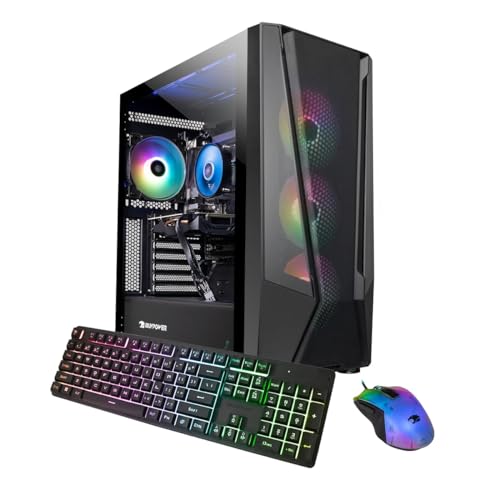
- Best overall under $1,500: iBUYPOWER TraceMesh Gaming PC, Intel Core i7-14700F, RTX 4060 Ti — Check on Amazon
- Acer Nitro 70 N70-130-UR13, AMD Ryzen 9 7900, RTX 4070 — Check on Amazon
- CyberPowerPC Gamer Xtreme VR GXiVR8040A14, Intel Core i7-13700F, RTX 4060 Ti 16GB — Check on Amazon
- MSI Codex R2 A14NUD5-213US, Intel Core i5-14400F, RTX 4060 Ti — Check on Amazon
See 2 more Amazon options
- iBUYPOWER Slate Mesh SMA7N46T01, AMD Ryzen 7 5700, RTX 4060 Ti — Check on Amazon
- CyberPowerPC Gamer Xtreme VR GXiVR8060A24, Intel Core i5-13400F, RTX 4060 — Check on Amazon
Read the full guide ↓
Disclosure: As an Amazon Associate, reviewstook.com earns from qualifying purchases. Links to Amazon on this page are affiliate links; they cost you nothing extra. Listing details such as price and availability change often, so check the current Amazon listing before you buy.
Fifteen hundred dollars is a strange budget for a 1080p gaming PC, and this guide will not pretend otherwise. A competent 1080p machine — the kind that runs competitive shooters at high frame rates and modern single-player games at high settings — can be bought for much less. What $1,500 actually buys, in late 2026, is a class of prebuilt that has outgrown the resolution in its name: desktops built around the GeForce RTX 4060 Ti and RTX 4070, with 16GB to 32GB of DDR5 memory, fast 1TB NVMe storage and strong modern processors. Machines like that do not merely play at 1080p; they hold very high refresh rates at 1080p — 165Hz, 240Hz and beyond in esports titles — and they step up to 1440p the day you replace the monitor. So read this guide for what it really is: a ranking of the best high-refresh 1080p machines under $1,500, most of which are quietly 1440p computers wearing a 1080p label.
That honesty cuts the other way too. If your monitor is a 1080p 60Hz or 75Hz panel, if you play mostly older or lightweight games, or if this is a first PC for a younger player, you should not spend $1,500 on the tower. The frame rates these machines produce would be thrown away by a slow display, and the sensible move is a cheaper PC plus a better monitor — one pick below deliberately leaves part of the budget unspent for exactly that reason, and Best 1080p Gaming PC Under $1200 covers the tier where pure 1080p value lives. Spend the full $1,500 when you own, or are about to buy, a high-refresh monitor; when you stream or record while you play; when you want ray-traced games to look their best at 1080p today and a 1440p upgrade to need nothing but a screen tomorrow. For those buyers, the six machines below are the ones worth the money — five built around the RTX 4060 Ti or RTX 4070, and one honest RTX 4060 value pick that banks the difference.
In this guide
Quick Picks
Short on time, or comparing several options at once? Each row below names a buyer type and the machine that suits it, with a link to the listing.
| Buyer type | Pick | Why it stands out | Link |
|---|---|---|---|
| Best overall under $1,500 | iBUYPOWER TraceMesh TMI7N46T01 | i7-14700F, RTX 4060 Ti and 32GB DDR5 in one balanced tower | Check on Amazon |
| Best graphics card, on deal days | Acer Nitro 70 N70-130-UR13 | The only RTX 4070 here, with a 12-core Ryzen 9 — at its deal price only | Check on Amazon |
| Best for VRAM-heavy games and mods | CyberPowerPC Gamer Xtreme VR GXiVR8040A14 | RTX 4060 Ti with 16GB of VRAM, double the usual at this price | Check on Amazon |
| Best for upgraders and tinkerers | MSI Codex R2 A14NUD5-213US | DIY-friendly standard parts, Gold PSU, keyboard and mouse included | Check on Amazon |
| Best straightforward AMD option | iBUYPOWER Slate Mesh SMA7N46T01 | Ryzen 7 5700 and RTX 4060 Ti at a stable, predictable price | Check on Amazon |
| Best value — bank the difference | CyberPowerPC Gamer Xtreme VR GXiVR8060A24 | RTX 4060 and DDR5 for less, leaving budget for a 240Hz monitor | Check on Amazon |
How These Picks Were Chosen
The budget was applied as a ceiling, not a target. Every machine below is a real Amazon listing that belongs in this budget class in the United States — and because prebuilt prices swing harder than almost any other category on Amazon, this guide prints no fixed prices: check the price on Amazon for each pick before you buy. Two of the six, the Acer Nitro 70 and the iBUYPOWER TraceMesh, regularly drift above the cap between promotions; both are included only with an explicit condition — buy them only when the live price sits within this guide’s budget, and walk away when the listing says otherwise — printed in the reviews themselves, not buried here.
We did not use these machines ourselves. We read the manufacturer listings and specification pages, cross-checked configurations against independent price trackers and deal coverage, and compared what decides 1080p performance at this level: the graphics card and its VRAM, the processor’s single-core speed for high-refresh play, whether the memory is DDR5 on a current platform or DDR4 on a retiring one, storage, power supply quality, and how standard the parts are when upgrade day comes. At $1,500 those filters bite hard: a machine pairing its card with 8GB of system RAM, a spinning hard drive or a no-name power supply does not belong here however bright its lighting is. We also excluded machines whose lowest recorded price never reaches this budget — a popular RTX 4070 Skytech configuration has never been tracked within this budget, so it is not a pick here no matter how often it appears in round-ups of this tier.
One structural note: five of the six picks carry either the RTX 4060 Ti — in both its 8GB and 16GB forms — or the RTX 4070. That is what the $1,500 prebuilt market honestly contains, and the differences that matter live around the card: the processor paired with it, the memory platform underneath it, the power supply behind it and the price cycle in front of it. The reviews therefore judge each machine as a system — at 1080p, where the processor sets the ceiling in fast games, that difference is frequently the whole story.
The 6 Best 1080p Gaming PCs Under $1,500
iBUYPOWER TraceMesh Gaming PC (TMI7N46T01) — Intel Core i7-14700F, RTX 4060 Ti, 32GB DDR5
Who it suits: The buyer who wants the whole $1,500 brief answered in one tower — high-refresh 1080p now, credible 1440p later, streaming and everyday work handled by the same machine — without a single weak line in the specification.
Start with the processor, because at 1080p it is the specification that separates this machine from most of its price class. The Intel Core i7-14700F is a 20-core chip — eight performance cores and twelve efficiency cores — and in the fast, lightly threaded games that define high-refresh 1080p, that performance-core speed is what keeps frame rates fed to a 240Hz monitor. Around it, iBUYPOWER has specified the rest of the system the way this budget deserves: an NVIDIA GeForce RTX 4060 Ti with 8GB of graphics memory, 32GB of DDR5 5600 RGB memory, and a 1TB NVMe solid-state drive, with Wi-Fi ready and Windows 11 Home installed. The 32GB of memory deserves emphasis. Most prebuilts at this price still ship 16GB, which is adequate for a game alone and increasingly tight for a game plus a stream, a browser full of tabs and a voice client; 32GB removes that ceiling for the life of the machine.
The RTX 4060 Ti itself is the natural center of a $1,500 1080p build: at 1920×1080 it runs modern single-player games at high settings with DLSS doing useful work, and in competitive titles it produces frame rates well past what a 165Hz monitor can show. Its 8GB of VRAM is the specification to go in clear-eyed about — workable at 1080p today, but texture-heavy games at maximum settings already press against it, and the 16GB CyberPowerPC below exists for buyers who would rather pay for headroom. The TraceMesh’s answer is balance: the strongest processor in this guide’s 4060 Ti group, double the usual memory, and a DDR5 platform that still accepts faster processors later. On price, this listing lives on a promotion cycle: check the price on Amazon, and when a promotion brings it comfortably within this guide’s budget, it is the best-balanced machine here.
- The strongest all-round specification here: 20-core i7-14700F, 32GB DDR5 and a 4060 Ti.
- 32GB of memory as standard — the streaming and multitasking headroom rivals charge extra for.
- Frequently promoted well under the cap — check the price on Amazon before you buy.
Honest limitation: The 4060 Ti’s 8GB of VRAM is the tightest specification in an otherwise generous machine, and the listing’s price swings widely — when it drifts above this guide’s budget it should be left for a sale.
Choose it if you want one balanced tower for high-refresh 1080p, streaming and work, and you can time the purchase to a promotion. Skip it if the listing is sitting at full price on the day you buy, or maximum textures in the newest games matter more to you than processor power — the 16GB CyberPowerPC below is your pick.

Acer Nitro 70 (N70-130-UR13) — AMD Ryzen 9 7900, RTX 4070, 32GB DDR5
Who it suits: The graphics-first buyer — the player whose 1080p means ray-traced single-player games at their best-looking, who suspects a 1440p monitor is in their future, and who is disciplined enough to buy only when this machine’s deal price appears.
This is the most powerful gaming PC in the guide, and it is not close. The graphics card is the GeForce RTX 4070 with 12GB of GDDR6X memory — a full tier above the 4060 Ti machines around it, and a card designed for 1440p in the first place. At 1080p it is, frankly, more than the resolution asks for: ray tracing that makes the 4060 Ti negotiate becomes a setting you simply turn on, and DLSS frame generation turns demanding games into high-refresh ones. Behind it sits an AMD Ryzen 9 7900, a 12-core processor boosting to 5.4GHz, with 32GB of DDR5 4800MHz memory, a 1TB PCIe Gen 4 SSD and Wi-Fi 6E — a specification with no apology in it. If a 1440p monitor joins the desk within this machine’s life, this is the pick that needs nothing else changed.
Now the condition, stated as plainly as the specification: this machine only belongs in a $1,500 guide on its deal days. Its headline Amazon price sits well above this guide’s budget, and that is where it sits much of the time. But on deal days it periodically falls into this budget and then climbs back out of it. The buying skill with the Nitro 70 is therefore patience: check the price on Amazon, verify the exact configuration at checkout — the Nitro name covers several generations and the newer Nitro 70 line is a different, more expensive machine — and if the live price sits above this guide’s ceiling, close the tab and wait, or buy the TraceMesh above. Bought within budget, nothing else here touches it. Bought at its headline price, it is a fine PC in the wrong guide.
- The only RTX 4070 in this guide — 12GB of GDDR6X and a genuine tier above the rest.
- 12-core Ryzen 9 7900 and 32GB of DDR5: processor and memory to match the card.
- Wi-Fi 6E and a 1TB Gen 4 SSD, from a major manufacturer’s support network.
Honest limitation: Its price. Its in-budget appearances are real but periodic, the headline price sits well over budget, and the DDR5 is a comparatively modest 4800MHz. This is a deal-watch purchase, not a buy-it-today one.
Choose it if you can wait for the price to fall into budget and graphics power is your priority. Skip it if you need to buy this week at whatever the listing says — at its headline price it fails this guide’s brief outright.

CyberPowerPC Gamer Xtreme VR (GXiVR8040A14) — Intel Core i7-13700F, RTX 4060 Ti 16GB
Who it suits: Players of texture-heavy, heavily modded or open-world games — the buyer who has read the 8GB VRAM debate, decided which side they are on, and wants the question settled for the life of the machine.
There are two versions of the GeForce RTX 4060 Ti, and almost every prebuilt in this price range ships the 8GB one. This CyberPowerPC ships the other: the 16GB variant, with double the graphics memory on the same core. At 1080p today, that difference shows up in specific places rather than in raw frame rates — maximum texture settings in the newest releases, modded games whose texture packs were never sized for 8GB, and the titles that already stutter or quietly downgrade textures when VRAM runs out. What 16GB really buys is trajectory: games’ texture budgets grow in one direction only, and the 8GB machines here will meet that growth with settings menus, while this one meets it by continuing to work. For a buyer planning to keep a PC for four or five years, that is a rational place to spend, which is why this machine pairs the card with the still-strong Intel Core i7-13700F rather than the newer i7 in the TraceMesh.
The rest of the specification is competent and conventional: 16GB of DDR5 memory, a 1TB PCIe Gen 4 NVMe SSD, Wi-Fi ready and Windows 11 Home, in CyberPowerPC’s tempered-glass Gamer Xtreme VR case. The 16GB of system memory is the specification to note against the TraceMesh’s 32GB — for gaming alone it is enough, and the money has visibly gone into the graphics card’s memory instead, a trade this guide would make the same way for a pure games machine. On price, check the price on Amazon: when a promotion brings it toward the lower end of this tier, it is arguably the value pick of the entire guide for a long-ownership buyer, and at any point within this guide’s budget it remains the only route to 16GB of VRAM here.
- RTX 4060 Ti with 16GB of VRAM — double every other 4060 Ti in this guide.
- i7-13700F is a strong, proven gaming processor with cores to spare for background tasks.
- Regularly promoted within this tier — check the price on Amazon.
Honest limitation: In games that never press past 8GB, the 16GB card performs essentially like the 8GB one — you are paying for headroom and longevity, not for frame rates today — and the 16GB of system RAM is merely adequate next to 32GB rivals.
Choose it if you play modded or texture-heavy games, hate touching settings menus, and plan to keep the machine for years. Skip it if your gaming is competitive and frame-rate-led — there, the cheaper picks below play the same games at the same refresh rates for less.

MSI Codex R2 (A14NUD5-213US) — Intel Core i5-14400F, RTX 4060 Ti, DIY-Friendly
Who it suits: The buyer who treats a prebuilt as a starting point — someone who wants to game immediately, then add storage, memory or a bigger graphics card over the years without fighting proprietary parts.
MSI builds components for a living, and the Codex R2 is what happens when a component company assembles the prebuilt: a mid-tower built from standard, replaceable parts, sold explicitly as DIY-friendly. The configuration pairs an Intel Core i5-14400F with a GeForce RTX 4060 Ti, 16GB of DDR5 memory and a 1TB M.2 NVMe SSD, powered by an 80 Plus Gold power supply, with Wi-Fi, a bundled keyboard and mouse, and Windows 11 Home. The i5-14400F deserves a defense, because on a spec sheet it looks like the junior processor here. For gaming it is nothing of the sort: at 1080p in the overwhelming majority of games it will feed the 4060 Ti exactly as well as the i7s do. What you give up is throughput in heavily multithreaded work — long video renders, big compiles — not frame rates. In exchange, the Codex’s money lands on build quality and that Gold-rated power supply, the unglamorous component that decides whether a future graphics card upgrade is a ten-minute job or a full rebuild.
Independent review coverage of the Codex R2 14 line — tested with this same i5-14400F and RTX 4060 Ti pairing — praised exactly the things a spec sheet cannot show: sensible assembly, room to work inside the case, and value. Two cautions belong in this review. First, Amazon’s own metadata for this listing is inconsistent, naming the graphics coprocessor as an RTX 4060 in one field while the title and card description say RTX 4060 Ti; verify the configuration on the page, and again on the box, before the return window closes. Second, 16GB of memory and 1TB of storage are this guide’s floor — the good news being that in this chassis, both are the easiest upgrades in computing. Bought with those checks in mind, the Codex R2 is the pick for the owner who expects their PC to evolve rather than be replaced.
- Standard, DIY-friendly parts from a component manufacturer — the easiest machine here to upgrade.
- 80 Plus Gold power supply: headroom for a future graphics card, not just today’s.
- The i5-14400F gives up nothing meaningful in games to the i7 machines above it.
Honest limitation: Amazon’s listing data contradicts itself on the graphics card in one field, so the delivered configuration must be verified; and the 16GB/1TB memory and storage pairing is the minimum this budget should accept.
Choose it if you plan to upgrade over time and value standard parts, a proper PSU and a maker’s warranty. Skip it if you never open a PC case — the TraceMesh gives you more of everything on day one for similar money on promotion.

iBUYPOWER Slate Mesh (SMA7N46T01) — AMD Ryzen 7 5700, RTX 4060 Ti, 16GB DDR4
Who it suits: The buyer who wants RTX 4060 Ti performance at a clear, stable price today — and who is honest with themselves that they buy a PC to use for its life, not to upgrade its platform halfway through.
The Slate Mesh is the straightforward machine in this guide. Unlike the two deal-cycle picks above, it tends to simply sit within budget rather than visiting it — check the price on Amazon to confirm it on the day you buy. The specification pairs an AMD Ryzen 7 5700 — an eight-core, sixteen-thread Zen 3 processor — with an RTX 4060 Ti 8GB, 16GB of DDR4 3200MHz memory and a 1TB NVMe SSD, with Windows 11 Home and the keyboard and mouse in the box. In games, that is a genuinely strong combination at 1080p, and its mesh-fronted case favors airflow over the sealed glass fronts that make some prebuilts run hot and loud. For the player coming from a console or an aging laptop, this machine will feel like a revelation.
The limitation is structural, and it is the reason this machine is fifth rather than first: the platform underneath it is finished. DDR4 memory and AMD’s AM4 socket are at the end of their road — there is no path from here to a current-generation processor without replacing the motherboard and memory together, which is to say, without rebuilding the PC. The Ryzen 7 5700 also carries a naming subtlety: it is a different, slightly lesser chip than the 5700X in other machines, with lower clocks — a reminder to read prebuilt spec sheets letter by letter. None of this makes the Slate Mesh a bad purchase; it makes it a purchase with a known shape. If your pattern is to buy a PC, use it fully for four or five years and replace it whole, the platform’s dead end will never once inconvenience you.
- RTX 4060 Ti performance at a stable, predictable price within budget.
- Eight-core Ryzen 7 and a mesh, airflow-first case.
- Keyboard and mouse included — a complete, no-extras-needed purchase.
Honest limitation: The AM4/DDR4 platform is at the end of its upgrade road, and the Ryzen 7 5700 is a step below the 5700X its name invites comparison with. You are buying a finished machine, not a foundation.
Choose it if you want 4060 Ti gaming at a predictable price and replace your PCs whole rather than upgrading them. Skip it if a future CPU upgrade matters to you — every DDR5 machine above it keeps that option alive for similar money.

CyberPowerPC Gamer Xtreme VR (GXiVR8060A24) — Intel Core i5-13400F, RTX 4060
Who it suits: The honest 1080p buyer — the competitive player whose games are Valorant, Counter-Strike 2, Rocket League, Fortnite and Apex, and who would rather own a fast PC and a great monitor than a great PC feeding a mediocre screen.
Every guide in this series needs the machine that questions the budget, and in this one it is a CyberPowerPC built a full tier sensibly lower: an Intel Core i5-13400F, a GeForce RTX 4060 with 8GB, 16GB of DDR5 memory and a 1TB PCIe Gen 4 SSD. On paper it is outclassed by everything above it. At a 1080p monitor, in the games most 1080p players actually play, the gap shrinks remarkably: the RTX 4060 drives esports titles into the several-hundred-frame range where 240Hz monitors live, runs modern single-player games at high settings with DLSS, and does it on a current DDR5 platform whose ten-core processor handles a stream or a recording session without complaint. The difference against the 4060 Ti picks is real — roughly a class of settings in the heaviest games — but it is measured in the most demanding hour of your gaming week, not the typical one.
The argument for this pick is arithmetic. This guide’s budget spent on a mid-range tower of this class, with the remainder going to a good 1080p 240Hz monitor, produces a visibly better experience than the whole budget spent on a tower behind a 60Hz or 144Hz screen. Frame rates you cannot see are not a feature. Equally, if the high-refresh monitor is already on your desk, this pick’s logic inverts: buy the 4060 Ti machines above. The Gamer Xtreme VR line is a known quantity — tempered glass, bundled peripherals, Windows 11 Home, Wi-Fi ready — and the DDR5 platform means memory, storage and eventually the graphics card can all move up without a rebuild. It is the pick that respects both the budget and the truth about the resolution.
- RTX 4060 and a 10-core i5 on a current DDR5 platform — real high-refresh 1080p for less.
- Sits a tier below the rest of the guide and regularly promotes lower, freeing budget for a 240Hz monitor — check the price on Amazon.
- The same upgradeable Gamer Xtreme VR chassis and bundle as its pricier siblings.
Honest limitation: It is a tier down in the heaviest games: maximum settings with ray tracing in the newest releases will mean DLSS compromises the 4060 Ti and 4070 picks do not have to make, and its 8GB of VRAM shares their ceiling.
Choose it if your monitor is 1080p, your games are competitive, or the budget must also buy the screen. Skip it if a high-refresh monitor is already on your desk and single-player eye candy is the point — that buyer is who the top of this guide is for.
Comparison Table
| Product | CPU / GPU | RAM / Storage | Best use | Link |
|---|---|---|---|---|
| iBUYPOWER TraceMesh TMI7N46T01 | i7-14700F / RTX 4060 Ti 8GB | 32GB DDR5 / 1TB NVMe | Best balance of CPU, memory and graphics | Check on Amazon |
| Acer Nitro 70 N70-130-UR13 | Ryzen 9 7900 / RTX 4070 12GB | 32GB DDR5 / 1TB Gen 4 | Strongest graphics; buy only at its deal price | Check on Amazon |
| CyberPowerPC GXiVR8040A14 | i7-13700F / RTX 4060 Ti 16GB | 16GB DDR5 / 1TB Gen 4 | VRAM headroom for textures and mods | Check on Amazon |
| MSI Codex R2 A14NUD5-213US | i5-14400F / RTX 4060 Ti 8GB | 16GB DDR5 / 1TB NVMe | Standard parts and future upgrades | Check on Amazon |
| iBUYPOWER Slate Mesh SMA7N46T01 | Ryzen 7 5700 / RTX 4060 Ti 8GB | 16GB DDR4 / 1TB NVMe | Stable price on a finished platform | Check on Amazon |
| CyberPowerPC GXiVR8060A24 | i5-13400F / RTX 4060 8GB | 16GB DDR5 / 1TB Gen 4 | Value pick that funds a better monitor | Check on Amazon |
How to Choose a 1080p Gaming PC Under $1,500
- Start with the monitor, not the tower. Your display decides how much PC you can actually use. A 1080p 60Hz screen wastes everything in this guide; a 144Hz screen justifies the middle of it; a 240Hz screen is what the top picks are for. If the budget has to cover both, split it — tower first at the CyberPowerPC value pick’s level, monitor second.
- Decide whether you are really a 1080p buyer. At $1,500, most of these machines are 1440p-capable. If a bigger, sharper monitor is even a maybe within two years, weight the RTX 4070 and 16GB VRAM picks heavily; if 1080p is your settled home, the cheaper machines lose almost nothing.
- At 1080p, respect the processor. Lower resolutions push the bottleneck toward the CPU, especially in esports titles chasing 240+ frames. Strong single-core performance is worth more at 1080p than at 4K — it is why the i7-14700F TraceMesh leads this guide despite sharing its graphics card with cheaper machines.
- Settle your VRAM position before you shop. 8GB works at 1080p today with occasional texture compromises in the newest games; 12GB and 16GB remove the question for years. Neither answer is wrong, but buying 8GB while expecting maximum textures in 2029 is.
- Insist on DDR5 at this price — or know why you didn’t. Current platforms keep CPU upgrades open and cost little more. The one DDR4 machine here earns its place on price and simplicity, bought knowingly, as a finished appliance.
- Treat 32GB of RAM as this tier’s quiet luxury. 16GB remains the gaming minimum and is fine for a pure games box. If you stream, record, mod, or keep a browser’s worth of life open beside the game, 32GB is the specification you will feel daily.
- Read the power supply line. A named wattage with an 80 Plus Gold rating, as in the MSI and several others here, is information; a silent spec sheet is also information. The PSU decides your upgrade ceiling and, in a bad unit, your stability.
- Shop the price cycle, not the list price. Prebuilt prices on Amazon move by hundreds of dollars around promotions. Two picks in this guide are only picks at their deal prices. A price tracker and a week of patience are worth more at $1,500 than any single specification upgrade.
- Verify the exact configuration at checkout — and on delivery. Prebuilt listings aggregate variants, and at least one listing here contradicts itself in its own metadata. Screenshot the configuration you paid for; check the delivered machine against it inside the return window.
- Budget the whole desk. The monitor comes out of the same money. An expensive tower under a bargain-basement screen is a worse experience than the reverse, every single evening.
What $1,500 Actually Buys at 1080p: Headroom, Not Necessity
It is worth pausing on the strangest fact in this guide: not one of these six machines is necessary to play games beautifully at 1920×1080. That job is done, well, at a much lower budget. What the step up to $1,500 buys is headroom in four specific currencies, and knowing which currency you value is the whole decision. The first is refresh rate: on a 240Hz monitor, frame rates stop being a bragging number and become the experience itself — motion clarity in a flick shot, input that feels wired to your hand. The second is settings: ray tracing at 1080p, once a slideshow, is genuinely playable on an RTX 4070 and respectable with DLSS on a 4060 Ti. The third is time: a $1,500 machine bought well — DDR5 platform, adequate VRAM, a power supply with room — absorbs the next several years with settings adjustments instead of a replacement fund, and accepts a new graphics card mid-life as a planned event rather than a rescue. The fourth is simultaneity: the game, the stream, the recording, the voice chat and the browser, all at once, on the 20-core and 32GB configurations.
What $1,500 does not buy is equally worth naming. It does not buy 4K, whatever the listings imply. It does not buy immunity from badly optimized releases. And it does not buy a better experience than a cheaper PC for the player on a 60Hz monitor playing decade-old games — for that player the extra money is not headroom, it is simply spent.
High-Refresh 1080p: Why the CPU Stops Being a Supporting Actor
Guides to 1440p and 4K machines can talk about the graphics card for pages, because at those resolutions the GPU is nearly always the limit. At 1080p the physics invert. Each frame is smaller, the graphics card finishes it sooner, and the question becomes whether the processor can prepare the next one in time — the hundred small jobs that scale with frame rate rather than resolution. That is why two machines with the same RTX 4060 Ti can feel different on a 240Hz monitor, and why this guide ranks a 20-core i7-14700F configuration first among them: in Counter-Strike, Valorant and their peers, processor speed is the ceiling, and the ceiling is the product.
Three practical consequences follow. First, single-core performance matters more at this tier than core counts beyond eight — though the hybrid Intel chips here get both, using their performance cores for the game and their efficiency cores for the stream and the operating system. Second, memory speed is not a footnote at high refresh: DDR5 holds a small but real edge in the minimum frame rates that decide whether 240Hz feels smooth or merely fast on average. Third, the monitor’s setup deserves the same care as the parts list — the display cable belongs in the graphics card, not the motherboard, and the panel’s refresh rate must actually be set in Windows, a step a surprising number of expensive setups have never taken. Buy the CPU seriously at 1080p; it is the resolution where it finally gets top billing.
Common Buying Mistakes
- Spending the full $1,500 on a tower for a 1080p 60Hz monitor. The frames you paid for will never be displayed; upgrade the screen or downgrade the tower.
- Paying a deal-cycle machine’s headline price. Two picks here swing widely between promotions — buying the Acer at its headline price because a guide listed it in this budget tier is the costliest mistake this page can cause, so check the live price on Amazon.
- Assuming every RTX 4060 Ti is the same. The 8GB and 16GB versions share a name and little else in longevity; know which one is in the box.
- Chasing core counts for pure gaming while ignoring the platform — then discovering the DDR4 machine cannot accept a modern CPU without a rebuild.
- Treating 16GB of RAM and a 1TB SSD as generous in 2026. They are this tier’s floor: adequate, upgradeable, and the first things heavy users will replace.
- Believing “4K ready” marketing on a $1,500 prebuilt. These are 1080p high-refresh and 1440p machines, whatever the listing implies.
- Plugging the monitor into the motherboard instead of the graphics card, then concluding the expensive PC is slow.
- Forgetting to set the monitor’s refresh rate in Windows — the 240Hz panel running at 60Hz is the most common own-goal in high-refresh gaming.
- Ignoring the power supply until upgrade day, when an unnamed, undersized unit turns a simple GPU swap into a second purchase.
- Skipping the configuration check on delivery. Variants share listings; the machine in the box is the only specification that counts, and the return window is the time to confirm it.
Final Recommendation
- Most buyers spending the full budget: iBUYPOWER TraceMesh TMI7N46T01 — on promotion.
- Graphics-first, patient buyers: Acer Nitro 70 N70-130-UR13 — within this guide’s budget, only.
- Modded and texture-heavy games: CyberPowerPC Gamer Xtreme VR GXiVR8040A14.
- Upgraders and tinkerers: MSI Codex R2 A14NUD5-213US.
- A stable price on a finished platform: iBUYPOWER Slate Mesh SMA7N46T01.
- Pure 1080p value, monitor included: CyberPowerPC Gamer Xtreme VR GXiVR8060A24.
Our top two at this budget are the TraceMesh — the complete, balanced machine, bought on promotion — and the Acer Nitro 70, for the buyer whose priority is graphics and whose patience can catch the only RTX 4070 here at the price this guide promises. Between them they mark the tier’s two philosophies: balance, or the best card the money can reach on its best day. If neither timing works, the 16GB CyberPowerPC is the long-ownership play and the MSI is the tinker’s; if your heart is honestly in competitive 1080p, the cheaper CyberPowerPC plus a 240Hz monitor will make you happier than any of them. Buyers whose real budget is lower should step down to Best 1080p Gaming PC Under $1200 without regret, and those eyeing a sharper screen will find this same money argued from the other side in Best 1440p Gaming PC Under $1500. Check the live price, verify the configuration, set the refresh rate — and then enjoy the luxury of a 1080p machine that is never the bottleneck.
Frequently Asked Questions
Is $1,500 too much to spend on a 1080p gaming PC?
For basic 1080p gaming, yes — that job is done well for much less. $1,500 is justified when it buys something specific: 240Hz competitive play, ray-traced games at their best, streaming while you play, or a machine that steps up to 1440p with only a monitor change. If none of those describes you, spend less on the tower and put the difference into the screen.
Which is the best 1080p gaming PC under $1,500 overall?
The iBUYPOWER TraceMesh, bought on promotion: its i7-14700F is the strongest gaming processor among the 4060 Ti machines, its 32GB of DDR5 is double the usual memory, and promotions regularly bring it comfortably within this budget. The Acer Nitro 70 is more powerful still — the only RTX 4070 here — but only qualifies when its deal price appears.
Is 8GB of VRAM enough at 1080p in 2026?
Mostly, with an asterisk. Competitive and older games will never trouble it, and DLSS keeps modern titles comfortable. The newest texture-heavy releases at maximum settings already press against 8GB — which is why this guide includes a 16GB 4060 Ti and a 12GB RTX 4070 for buyers who set textures to ultra and leave them there.
Can these PCs actually play at 1440p?
Yes — that is the open secret of this tier. The RTX 4070 Acer was effectively built for 1440p, the 4060 Ti machines handle it well with DLSS, and even the RTX 4060 value pick manages it in lighter titles. Buying from this guide and upgrading the monitor later is a legitimate, even savvy, plan.
DDR4 or DDR5 — does it matter at this price?
For today’s frame rates, barely; for the machine’s future, decisively. DDR5 platforms accept current and coming processors; DDR4 platforms are complete, with no CPU upgrade path short of a rebuild. At $1,500 we recommend DDR5 unless, like the Slate Mesh buyer, you knowingly prefer a lower price on a finished machine you will replace whole.
Should I buy a prebuilt at this price or build my own?
Building your own can still edge a prebuilt on parts choice, and this guide’s MSI pick exists for people who think that way. But at $1,500 the prebuilt premium has narrowed to where the single warranty, the assembled and tested machine, and promotion pricing make the prebuilt the rational default for most buyers. Build if you enjoy building; that enjoyment is the real saving.
What else do I need to budget for besides the tower?
A monitor worthy of the machine — 1080p 165Hz at minimum, 240Hz if competitive play is the point. Several picks bundle a keyboard and mouse good enough to start with. If the $1,500 must cover the screen too, buy the value CyberPowerPC in this guide and a 240Hz panel, and you will have the better setup for it.


